kubectl + curlコマンドの文字列結合をやめてBuilderパターンで安全に組み立てる

はじめに
自動化システムからKubernetesのPod内でcurlを実行する場面は多いと思います。典型的には kubectl exec <pod> -- curl ... のようなコマンドを組み立てますが、テンプレートリテラルで直接結合すると、JSONペイロードのエスケープ漏れやスペース抜けなどのバグが生まれがちです。
本記事では、Fluent Builderパターンを使ってシェルコマンドを安全に組み立てる方法を紹介します。
問題: テンプレートリテラルの落とし穴
まず、よくある書き方の問題点を見てみましょう。
// こういうコードを書いていませんか?
const cmd = `kubectl exec ${podName} -- curl -Lgskv -X PATCH -H "Authorization: Bearer ${token}" -H "Content-Type: application/json" -d '${JSON.stringify(payload)}' "${apiUrl}"`;

await execRemote(cmd);
この書き方には以下の問題があります。
1. JSONペイロードにシングルクォートが含まれると壊れる
const payload = { name: "O'Brien" };
// → -d '{"name":"O'Brien"}'
// シェルがシングルクォートを閉じてしまう
2. 変数が空文字列だとコマンドが壊れる
const token = ""; // 何らかの理由で空
// → -H "Authorization: Bearer "
// 無効な認証ヘッダーが送られる
3. 長くなると可読性が壊滅する
コマンドが1行で200文字超えると、レビューで何がどの引数か判別できません。
解決: Fluent Builderパターン
配列にコマンドのパーツを蓄積し、最後に join(" ") で結合するBuilderクラスを作ります。
class CommandBuilder {
  private commandParts: string[] = [];

  public reset(): CommandBuilder {
    this.commandParts = [];
    return this;
  }

  public pod(podName: string): CommandBuilder {
    this.reset();
    this.commandParts.push(
      "kubectl",
      "exec",
      podName,
      "--",       // kubectl と Pod 内コマンドの区切り
      "curl",
      "-Lgskv"   // 標準的な curl フラグ
    );
    return this;
  }

  public patch(): CommandBuilder {
    this.commandParts.push("-X PATCH");
    return this;
  }

  public token(token: string): CommandBuilder {
    this.commandParts.push(`-H "Authorization: Bearer ${token}"`);
    return this;
  }

  public header(header: string): CommandBuilder {
    this.commandParts.push(`-H "${header}"`);
    return this;
  }

  public content(
    type: "json" | "form" | "patch" = "json"
  ): CommandBuilder {
    const contentTypes = {
      json: "application/json",
      form: "multipart/form-data",
      patch: "application/json-patch+json",
    };
    this.commandParts.push(
      `-H "Content-Type: ${contentTypes[type]}"`
    );
    return this;
  }

  public payload(payload: object): CommandBuilder {
    const jsonString = JSON.stringify(payload);
    // シングルクォート内のシングルクォートをエスケープ
    const escapedPayload = jsonString.replace(/'/g, "'\\''");
    this.commandParts.push(`-d '${escapedPayload}'`);
    return this;
  }

  public api(url: string): CommandBuilder {
    this.commandParts.push(`"${url}"`);
    return this;
  }

  public create(): string {
    return this.commandParts.join(" ");
  }
}

export default new CommandBuilder();
使い方
import cmd from "./command-builder";

const command = cmd
  .pod("api-server-pod-abc123")
  .patch()
  .token(authToken)
  .content("json")
  .payload({ name: "O'Brien", status: "active" })
  .api("http://internal-api:8080/api/v1/users/42")
  .create();

await execRemote(command);
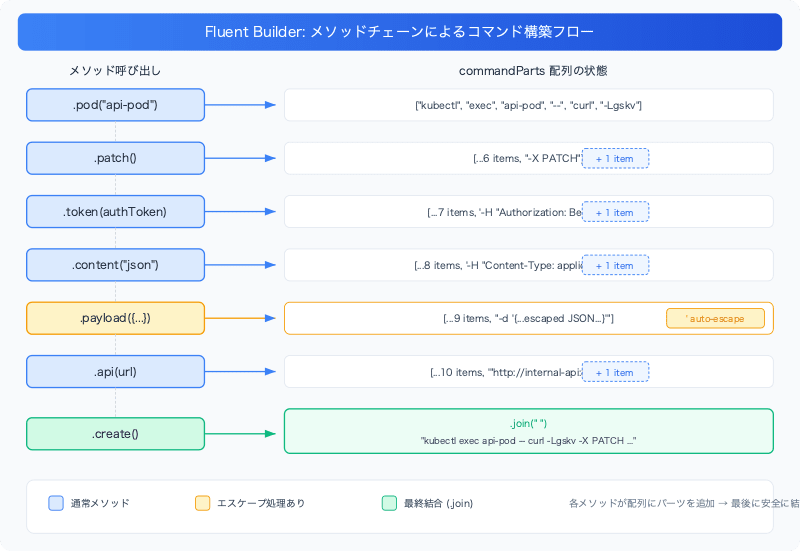
以下の図は、各メソッドが commandParts 配列にパーツを追加し、最後に create() で結合する流れを示しています。
生成されるコマンド:
kubectl exec api-server-pod-abc123 -- curl -Lgskv -X PATCH -H "Authorization: Bearer xxx" -H "Content-Type: application/json" -d '{"name":"O'\''Brien","status":"active"}' "http://internal-api:8080/api/v1/users/42"
設計のポイント
シングルクォートのエスケープ
payload() メソッドが最も重要な部分です。
public payload(payload: object): CommandBuilder {
  const jsonString = JSON.stringify(payload);
  const escapedPayload = jsonString.replace(/'/g, "'\\''");
  this.commandParts.push(`-d '${escapedPayload}'`);
  return this;
}
'\\'' は一見不思議ですが、シェルでは以下のように解釈されます。
'          → 現在のシングルクォート文字列を閉じる
\\         → バックスラッシュでエスケープされた
'          → リテラルのシングルクォート文字
'          → 新しいシングルクォート文字列を開始
つまり O'Brien は 'O'\''Brien' となり、シェルが正しく O'Brien と解釈します。
pod() が reset() を呼ぶ理由
public pod(podName: string): CommandBuilder {
  this.reset();  // ← ここ
  this.commandParts.push("kubectl", "exec", podName, ...);
  return this;
}
Builderをシングルトンとしてエクスポートしているため、前回のコマンドのパーツが残っている可能性があります。pod() が新しいコマンド構築の起点となるため、ここで必ずリセットします。
Content-Typeの型安全性
public content(
  type: "json" | "form" | "patch" = "json"
): CommandBuilder
TypeScriptのユニオン型で有効な Content-Type のみを受け付けます。"applcation/json" のようなtypoはコンパイル時にエラーになります。
テンプレートリテラル版との比較
// Before: テンプレートリテラル
const cmd = `kubectl exec ${pod} -- curl -Lgskv -X PATCH -H "Authorization: Bearer ${token}" -H "Content-Type: application/json" -d '${JSON.stringify(payload)}' "${api}"`;

// After: Builder
const cmd = builder
  .pod(pod)
  .patch()
  .token(token)
  .content("json")
  .payload(payload)
  .api(api)
  .create();
Builderの利点:
| 観点 | テンプレートリテラル | Builder |
|---|---|---|
| シングルクォートのエスケープ | 手動(忘れがち) | 自動 |
| 可読性 | 1行で200文字超 | メソッドチェーンで構造化 |
| 再利用性 | コピペ | メソッド呼び出し |
| Content-Type のtypo | 実行時エラー | コンパイル時エラー |
まとめ
- シェルコマンドをテンプレートリテラルで組み立てると、エスケープ漏れやスペース抜けが起きやすい
- Fluent Builderパターンで配列にパーツを蓄積し、
join(" ")で結合する方式が安全 - JSONペイロードのシングルクォートは
'\\''パターンでエスケープする - TypeScriptの型システムを活用して、不正な引数をコンパイル時に検出する