HCP Terraform/Terraform Enterpriseのプライベートレジストリがモノレポをサポートしました

アップデート概要
HCP Terraform・Terraform Enterpriseには、プライベートレジストリという機能があります。
この機能は組織内にモジュールやプロバイダーを共有するための機能です。
従来は、このレジストリに登録するにはモジュール個別にリポジトリを作成する必要がありました。
例えば、以下のようなモジュールを公開する場合、それぞれ別のリポジトリを作成してレジストリに登録する必要がありました。
- モジュール
- vpc
- ec2
- rds
- リポジトリ
- terraform-aws-vpc
- terraform-aws-ec2
- terraform-aws-rds
今回のアップデートで1つのリポジトリに複数のモジュールを配置している構成でも、レジストリに登録できるようになりました。
やってみた
検証用にサンプルリポジトリを作りました。
このリポジトリには、VPCモジュールとEC2モジュールが入っています。
.
├── vpc/
│   ├── main.tf
│   ├── variables.tf
│   └── outputs.tf
└── ec2/
    ├── main.tf
    ├── variables.tf
    └── outputs.tf
このリポジトリ内のモジュールをプライベートレジストリに登録してみます。
プライベートレジストリにモジュールを登録
HCP Terraformのコンソールにログインして、Registry -> Publish -> Moduleの順に選択します。
任意のVPC接続方法を選択します。
モジュールリポジトリとディレクトリを選択します。
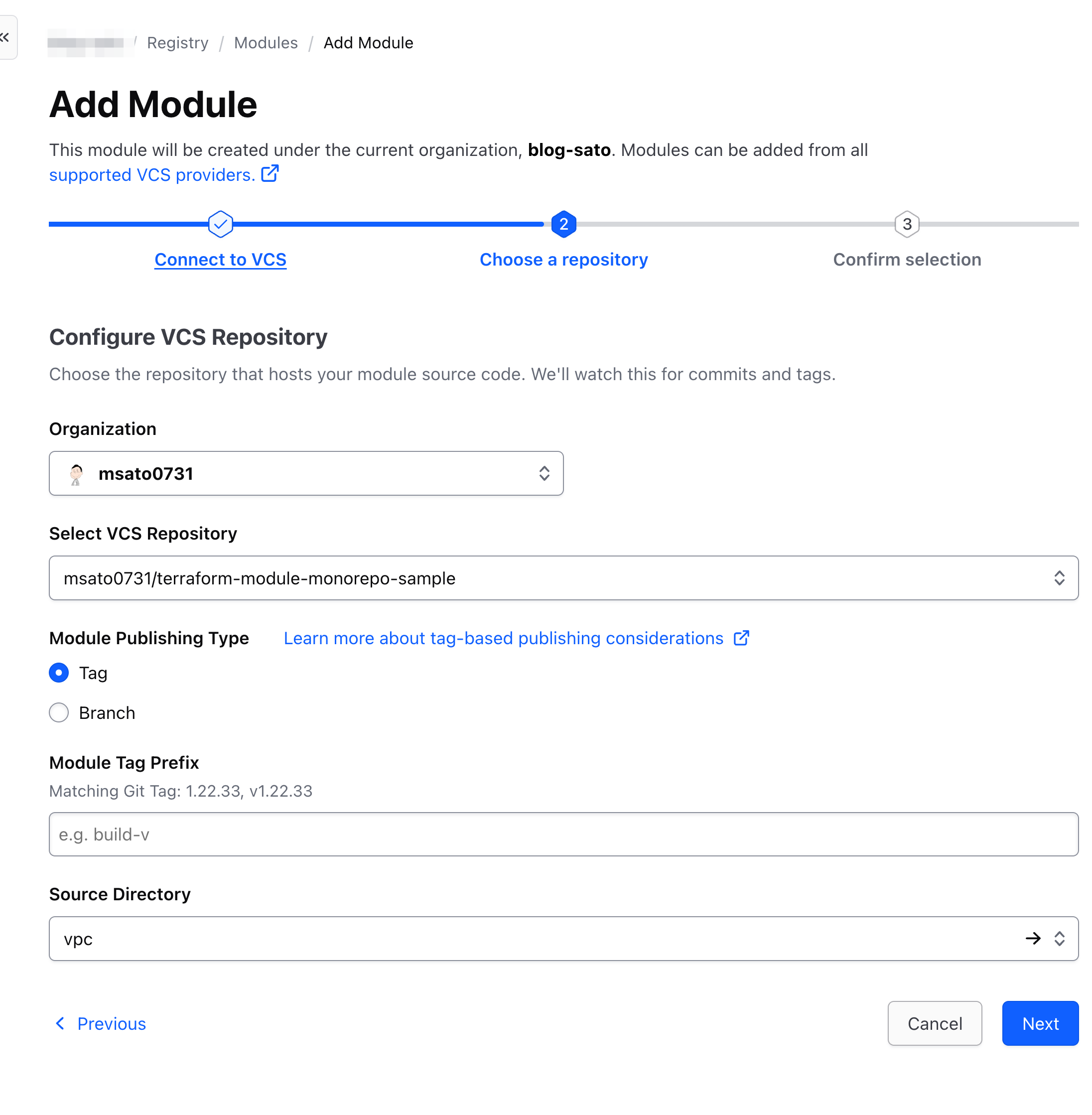
以前と比べて、ディレクトリの選択部分が追加されていました。
また、以前はリポジトリ選択では、Terraform Moduleの命名規則に沿っていないリポジトリは選択できませんでした。
命名規則に沿っていないリポジトリも選択可能になっていました。
最後にモジュール名とプロバイダー名を設定し、Publish moduleを選択します。
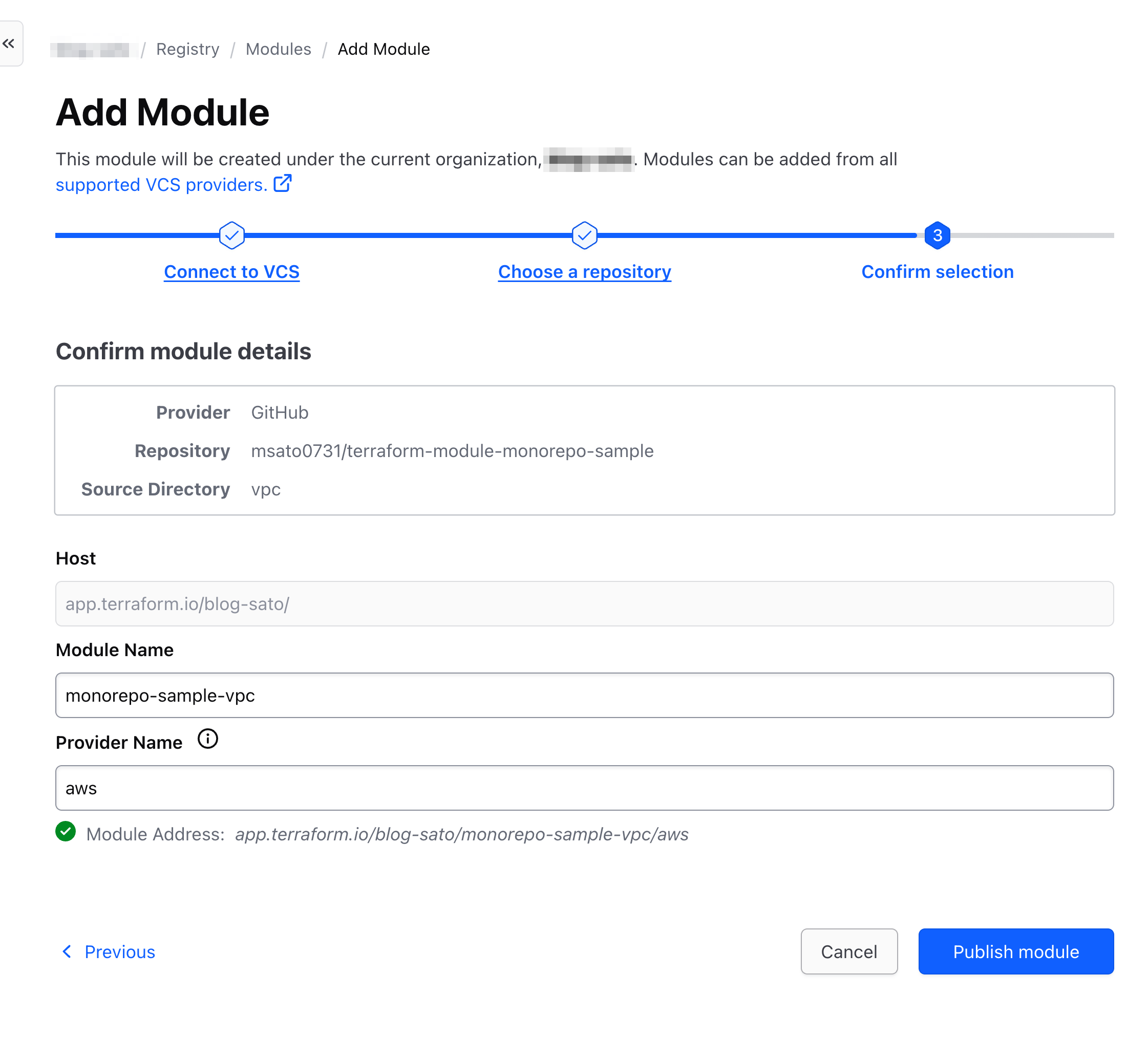
プライベートレジストリにモジュールを登録できました。
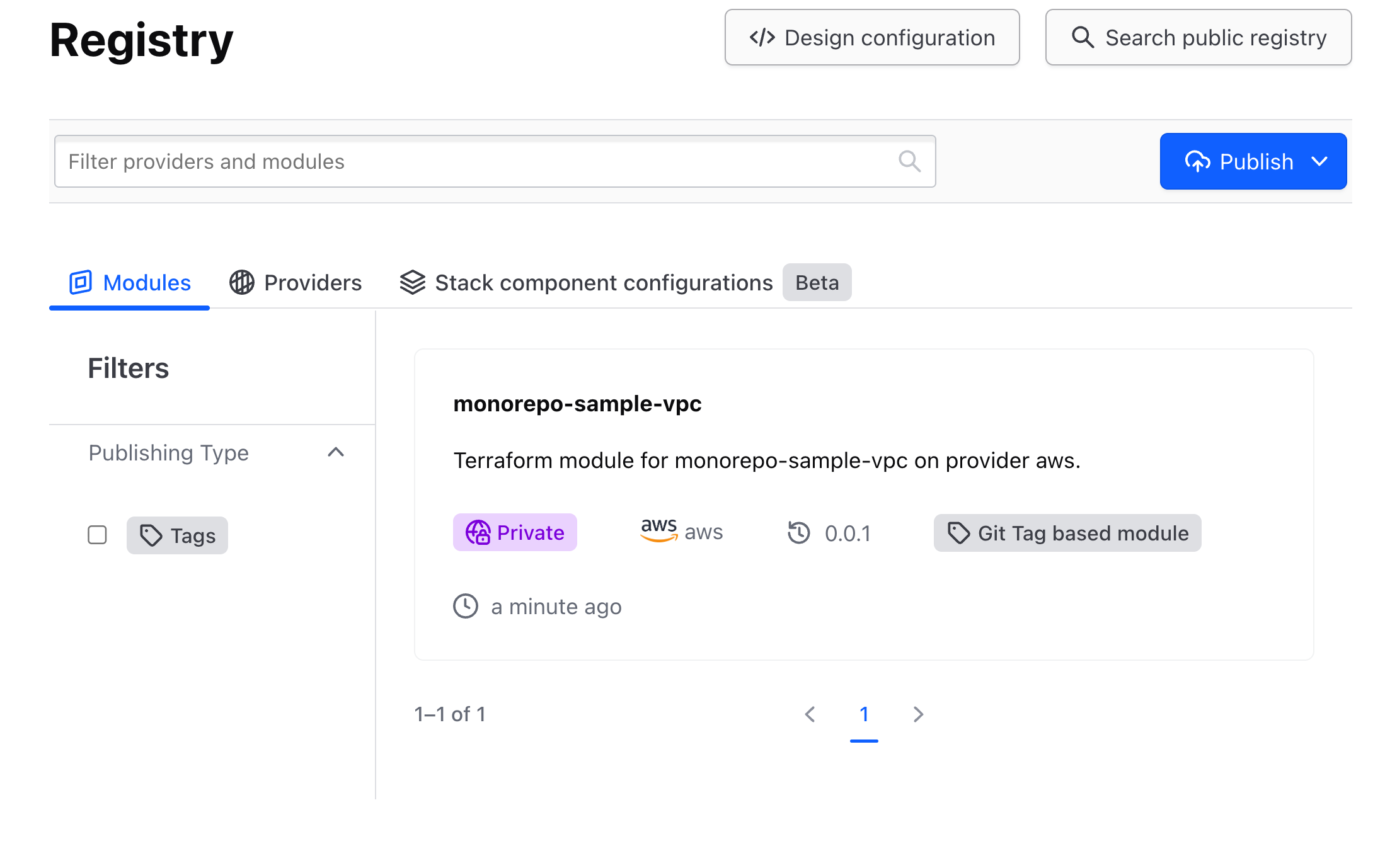
ディレクトリ選択部分を変えて同様の手順を繰り返すことで、EC2モジュールも登録できます。
気になる方は試してみて下さい。
動作確認
実際に登録したモジュールを呼び出してみます。
作業には、プライベートレジストリにアクセスできる権限が付与されたHCP Terraformトークンが必要です。
HCP Terraformトークンを発行していない場合は、terraform loginコマンド等を実行してトークンを発行してください。
以下のファイルを用意します。
module "monorepo-sample-vpc" {
  source  = "app.terraform.io/<org名>/monorepo-sample-vpc/aws"
  version = "0.0.1"
}
terraform init
モジュールがダウンロードできていることを確認できました。
$ ls .terraform/modules

```bash
modules.json            monorepo-sample-vpc
PlanやApplyも正常に動作しました。
terraform plan
terraform apply
module.monorepo-sample-vpc.data.aws_availability_zones.available: Reading...
module.monorepo-sample-vpc.data.aws_availability_zones.available: Read complete after 0s [id=ap-northeast-1]

Terraform used the selected providers to generate the following execution plan. Resource actions are indicated with the following symbols:
  + create

Terraform will perform the following actions:

  # module.monorepo-sample-vpc.aws_internet_gateway.main will be created
  + resource "aws_internet_gateway" "main" {
      + arn      = (known after apply)
      + id       = (known after apply)
      + owner_id = (known after apply)
      + region   = "ap-northeast-1"
      + tags     = {
          + "Name" = "main-igw"
        }
      + tags_all = {
          + "Name" = "main-igw"
        }
      + vpc_id   = (known after apply)
    }

  # module.monorepo-sample-vpc.aws_route_table.public will be created
  + resource "aws_route_table" "public" {
      + arn              = (known after apply)
      + id               = (known after apply)
      + owner_id         = (known after apply)
      + propagating_vgws = (known after apply)
      + region           = "ap-northeast-1"
      + route            = [
          + {
              + cidr_block                 = "0.0.0.0/0"
              + gateway_id                 = (known after apply)
                # (11 unchanged attributes hidden)
            },
        ]
      + tags             = {
          + "Name" = "main-public-rt"
        }
      + tags_all         = {
          + "Name" = "main-public-rt"
        }
      + vpc_id           = (known after apply)
    }

  # module.monorepo-sample-vpc.aws_route_table_association.public[0] will be created
  + resource "aws_route_table_association" "public" {
      + id             = (known after apply)
      + region         = "ap-northeast-1"
      + route_table_id = (known after apply)
      + subnet_id      = (known after apply)
    }

  # module.monorepo-sample-vpc.aws_route_table_association.public[1] will be created
  + resource "aws_route_table_association" "public" {
      + id             = (known after apply)
      + region         = "ap-northeast-1"
      + route_table_id = (known after apply)
      + subnet_id      = (known after apply)
    }

  # module.monorepo-sample-vpc.aws_subnet.public[0] will be created
  + resource "aws_subnet" "public" {
      + arn                                            = (known after apply)
      + assign_ipv6_address_on_creation                = false
      + availability_zone                              = "ap-northeast-1a"
      + availability_zone_id                           = (known after apply)
      + cidr_block                                     = "10.0.1.0/24"
      + enable_dns64                                   = false
      + enable_resource_name_dns_a_record_on_launch    = false
      + enable_resource_name_dns_aaaa_record_on_launch = false
      + id                                             = (known after apply)
      + ipv6_cidr_block_association_id                 = (known after apply)
      + ipv6_native                                    = false
      + map_public_ip_on_launch                        = true
      + owner_id                                       = (known after apply)
      + private_dns_hostname_type_on_launch            = (known after apply)
      + region                                         = "ap-northeast-1"
      + tags                                           = {
          + "Name" = "main-public-1"
        }
      + tags_all                                       = {
          + "Name" = "main-public-1"
        }
      + vpc_id                                         = (known after apply)
    }

  # module.monorepo-sample-vpc.aws_subnet.public[1] will be created
  + resource "aws_subnet" "public" {
      + arn                                            = (known after apply)
      + assign_ipv6_address_on_creation                = false
      + availability_zone                              = "ap-northeast-1c"
      + availability_zone_id                           = (known after apply)
      + cidr_block                                     = "10.0.2.0/24"
      + enable_dns64                                   = false
      + enable_resource_name_dns_a_record_on_launch    = false
      + enable_resource_name_dns_aaaa_record_on_launch = false
      + id                                             = (known after apply)
      + ipv6_cidr_block_association_id                 = (known after apply)
      + ipv6_native                                    = false
      + map_public_ip_on_launch                        = true
      + owner_id                                       = (known after apply)
      + private_dns_hostname_type_on_launch            = (known after apply)
      + region                                         = "ap-northeast-1"
      + tags                                           = {
          + "Name" = "main-public-2"
        }
      + tags_all                                       = {
          + "Name" = "main-public-2"
        }
      + vpc_id                                         = (known after apply)
    }

  # module.monorepo-sample-vpc.aws_vpc.main will be created
  + resource "aws_vpc" "main" {
      + arn                                  = (known after apply)
      + cidr_block                           = "10.0.0.0/16"
      + default_network_acl_id               = (known after apply)
      + default_route_table_id               = (known after apply)
      + default_security_group_id            = (known after apply)
      + dhcp_options_id                      = (known after apply)
      + enable_dns_hostnames                 = true
      + enable_dns_support                   = true
      + enable_network_address_usage_metrics = false
      + id                                   = (known after apply)
      + instance_tenancy                     = "default"
      + ipv6_association_id                  = (known after apply)
      + ipv6_cidr_block                      = (known after apply)
      + ipv6_cidr_block_network_border_group = (known after apply)
      + main_route_table_id                  = (known after apply)
      + owner_id                             = (known after apply)
      + region                               = "ap-northeast-1"
      + tags                                 = {
          + "Name" = "main"
        }
      + tags_all                             = {
          + "Name" = "main"
        }
    }

Plan: 7 to add, 0 to change, 0 to destroy.

─────────────────────────────────────────────────────────────────────────────────────────────────────────────────────────────────────────────────────────────────────

Note: You didn't use the -out option to save this plan, so Terraform can't guarantee to take exactly these actions if you run "terraform apply" now.
おわりに
プライベートレジストリにモジュールを登録する際は、「1リポジトリ = 1モジュールにする」「命名規則に沿ったリポジトリ名にする」等 制約がありました。
制約が緩和されて柔軟な構成で利用が可能になりました。
HCP Terraform・Terraform Enterpriseのプライベートレジストリへの移行ハードルが下がった点が嬉しいですね。