![[Kitesurf] I let Claude drive Cloudflare's new Kitesurf browser: lighter browser, slower agent~](https://devio2024-media.developers.io/image/upload/f_auto,q_auto,w_3840/f_auto,q_auto/v1792768486/eyecatch/efuqkxlgomda8ovzezbd.png)
[Kitesurf] I let Claude drive Cloudflare's new Kitesurf browser: lighter browser, slower agent~

Could someone sponsor me Chocolate Flavor Pocky ?(ゝ∀・)
Ciallo~(∠ ω< )⌒ ★ this is AnonymousPenguin~
Cloudflare made a new web browser just for AI agents. It's called Kitesurf, it runs on Cloudflare's servers, and it's free while it's in beta.
Cloudflare says it uses much less computer power than Chrome. But does it help the AI agent perform better?
So I gave the same jobs to an AI agent on four different browsers and compared the results~
Result first
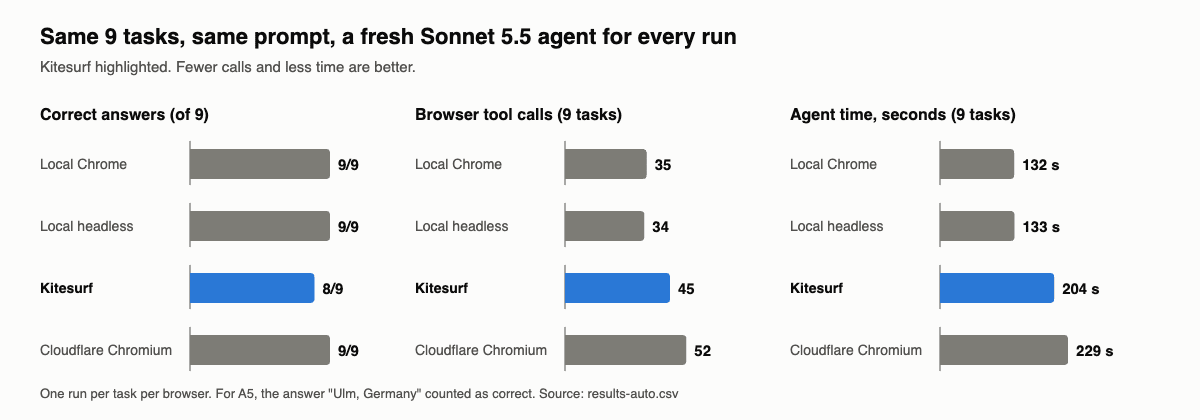
No, Kitesurf didn't make my AI agent better. On simple pages it did just as well as Chrome. On harder pages, the agent needed more steps and more time, and it got one task wrong that every other browser got right.
| Local Chrome | Local headless | Kitesurf | Cloudflare Chromium | |
|---|---|---|---|---|
| Correct answers (of 9) | 9 | 9 | 8 | 9 |
| Browser actions | 35 | 34 | 45 | 52 |
| Time (seconds) | 132 | 133 | 204 | 229 |
Should you use it?
- ✅ Reading simple public pages: fine, same as Chrome.
- ⚠️ Lots of clicking through pages: works, but slower.
- ❌ Frames, big JavaScript sites, logins: avoid for now.
About this test:
- The agent: Claude Code with Claude Sonnet 5.5 (
claude-sonnet-5-5). - Each task was run once per browser.
- Kitesurf is a beta (version
0.0.1), so things may change.
What is Kitesurf?
Kitesurf is a browser Cloudflare built for AI agents.
- It's built from scratch, with no Chrome inside.
- It runs on Cloudflare's servers (Cloudflare Workers).
- Cloudflare says it uses 3–7 times less CPU and memory than Chrome, but is about 1.7 times slower. I didn't test this.
- It's free while in beta.
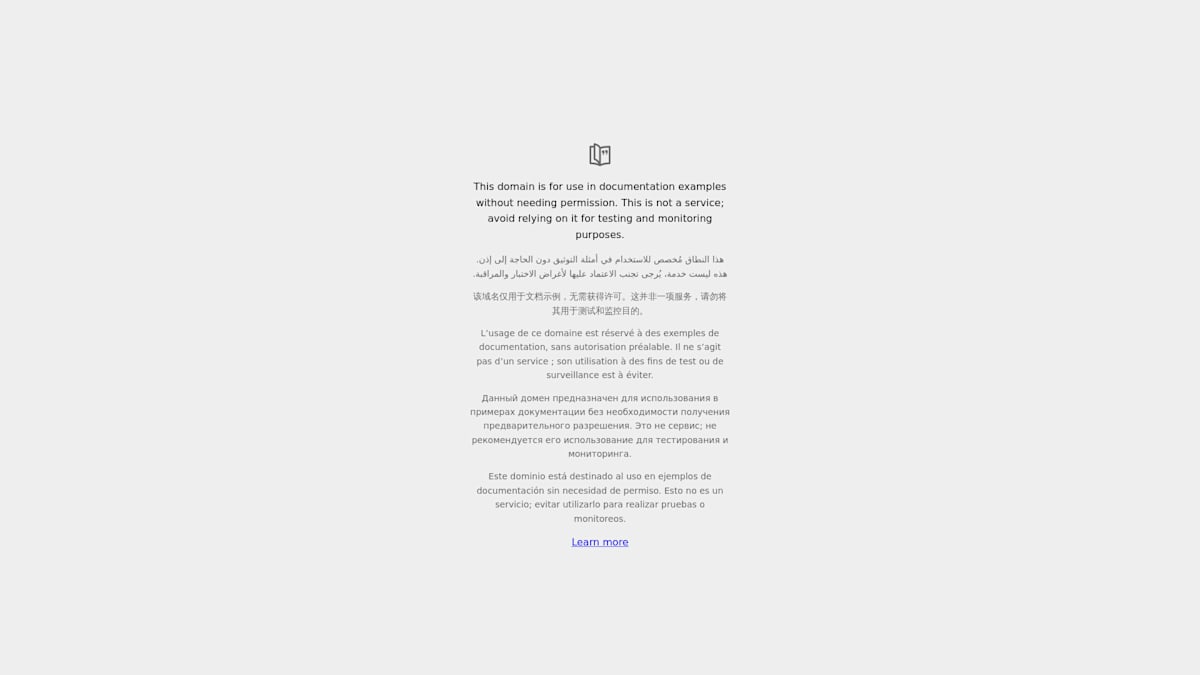
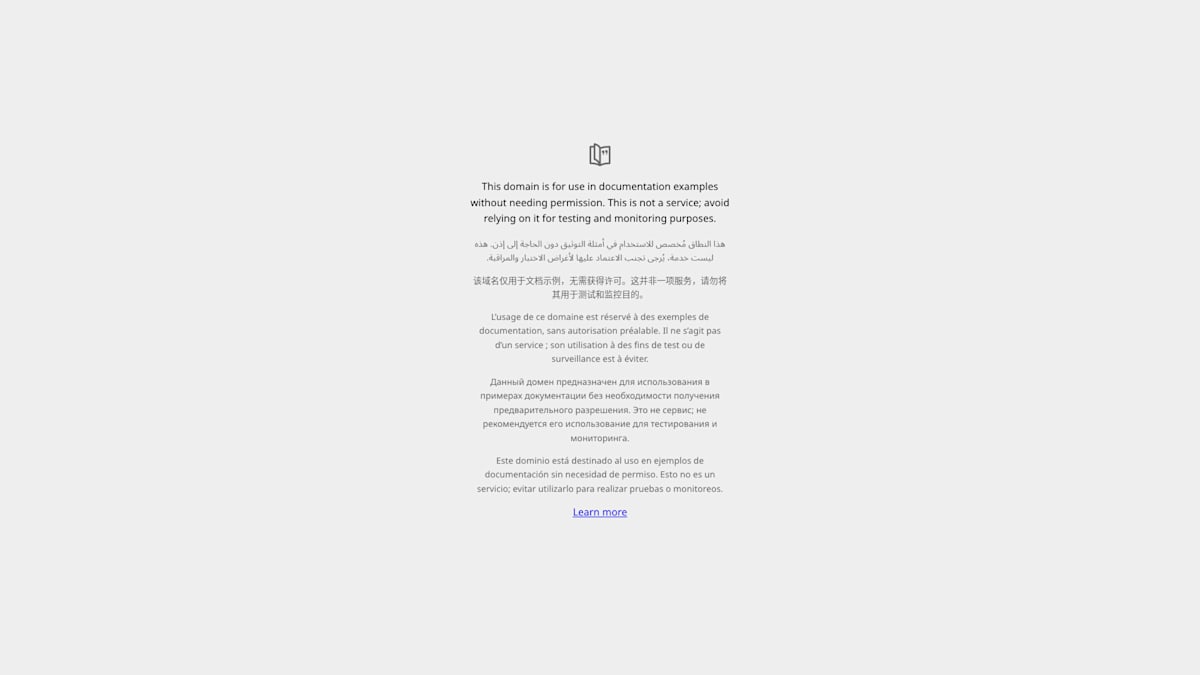
It even draws pages a bit differently (not really obvious, but the font style is different). Here's the same page as a screenshot from each:
Chrome (Cloudflare's normal browser):
Kitesurf:
Three words you'll see in this post
- MCP: how an AI agent gets "tools". Here the tool is
chrome-devtools-mcp, which lets the agent open pages, click, type and read. - Snapshot: not a screenshot. It's a text list of everything on the page (headings, links, buttons). This is how the agent "reads" a page.
- Headless: a browser with no window. It works the same, you just can't see it.
How I tested
Four browsers
| Browser | Where it runs | Tool the agent uses |
|---|---|---|
| Local Chrome | My laptop (my normal Chrome) | claude-in-chrome |
| Local headless | My laptop (Chrome with no window) | chrome-devtools-mcp |
| Kitesurf | Cloudflare | chrome-devtools-mcp |
| Cloudflare Chromium | Cloudflare (their normal Chrome-based browser) | chrome-devtools-mcp |
I also tested Cloudflare Chromium because it runs in the same place as Kitesurf but is a normal browser. So if Kitesurf does worse, it's Kitesurf's fault, not the distance.
Nine tasks
| ID | Task |
|---|---|
| A1 | Find two numbers in a GitHub README |
| A2 | Fill in and send a form |
| A3 | Click "Next" through all pages of a quotes site and count the quotes |
| A4 | Read text inside frames (pages inside a page) and inside a shadow DOM (hidden page parts) |
| A5 | Use a search form, then find the author's birthday and birthplace |
| R1–R4 | Read one fact from: AWS docs, httpbin.org, books.toscrape.com, aws.amazon.com |
I worked out and recorded each task's correct answer in advance, using my laptop's browsers.
Rules (decided before testing)
Kitesurf doesn't help the agent if any of these happen:
- It gets more than 1 extra task wrong compared with Chrome.
- It needs more actions than Chrome.
- It doesn't save at least 20% tokens compared with local headless (same tool, so a fair match).
- It takes more than twice as long as Chrome.
How each run worked
For every task on every browser, I started a brand-new Claude agent with the exact same instructions. Only the browser was different. The agent decided by itself what to click and read. Claude Code counted its tokens, actions and time.
Detailed results
Per task (✅ correct, then actions / seconds):
| Task | Local Chrome | Local headless | Kitesurf | Cloudflare Chromium |
|---|---|---|---|---|
| A1 GitHub README | ✅ 4 / 10s | ✅ 2 / 10s | ✅ 2 / 16s | ✅ 3 / 16s |
| A2 form | ✅ 3 / 12s | ✅ 6 / 14s | ✅ 3 / 12s | ✅ 4 / 15s |
| A3 "Next" pages | ✅ 4 / 18s | ✅ 2 / 13s | ✅ 4 / 32s | ✅ 3 / 14s |
| A4 frames + shadow DOM | ✅ 5 / 17s | ✅ 4 / 21s | ✅ 8 / 30s | ✅ 5 / 18s |
| A5 search form | ✅ 9 / 27s | ✅ 9 / 28s | ✅ 13 / 45s | ✅ 25 / 104s |
| R1 AWS docs | ✅ 2 / 9s | ✅ 3 / 10s | ✅ 3 / 14s | ✅ 3 / 15s |
| R2 httpbin.org | ✅ 2 / 16s | ✅ 2 / 10s | ✅ 3 / 15s | ✅ 3 / 15s |
| R3 books.toscrape | ✅ 3 / 11s | ✅ 3 / 11s | ✅ 3 / 16s | ✅ 3 / 14s |
| R4 aws.amazon.com | ✅ 3 / 11s | ✅ 3 / 16s | ❌ 6 / 24s | ✅ 3 / 18s |
Why did Cloudflare Chromium need 25 actions on A5? Not because of the browser. Its window is small by default, and at that size the page's footer covers the Search button, so its clicks hit the footer.
Details
At 780×493 (Cloudflare Chromium's default window) the footer sits on top of the Search button, in both Chrome and Kitesurf. At 1280×720 (Kitesurf's default) the button is free. So that was window size, not the browser engine.
Checking the four rules
| Kitesurf doesn't help if… | Test result | Kitesurf |
|---|---|---|
| More than 1 extra task wrong | ✅ Pass | 8 vs 9 correct |
| More actions than Chrome | ❌ Fail | 45 vs 35 |
| Doesn't save 20% tokens | ❌ Fail | about 5% more (see below) |
| More than 2x Chrome's time | ✅ Pass | 1.54x |
The cost of using the browser (tokens)
| Local headless | Kitesurf | Cloudflare Chromium | |
|---|---|---|---|
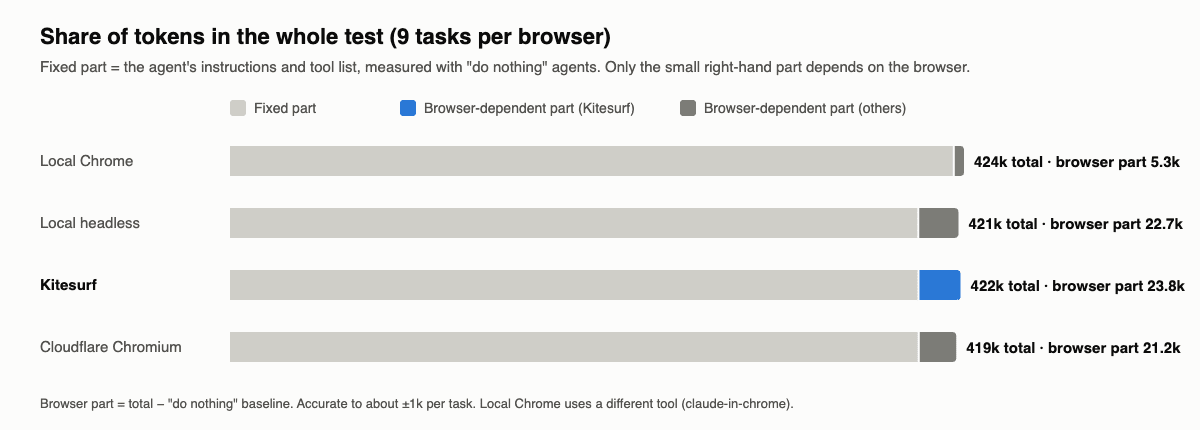
| Tokens spent on the browser (9 tasks) | 22.7k | 23.8k | 21.2k |
This is only what the agent spent on the browser: reading pages and thinking about them. The agent's own instructions and tool list are taken out (I measured them with agents that load the tools and do nothing).
Share of tokens in the whole test
The browser part is only about 5% of each run. The rest is the fixed part.
Kitesurf's pages look smaller to the agent, but mostly because some content is missing, and the agent then spends extra actions looking for it.
Page size, page by page
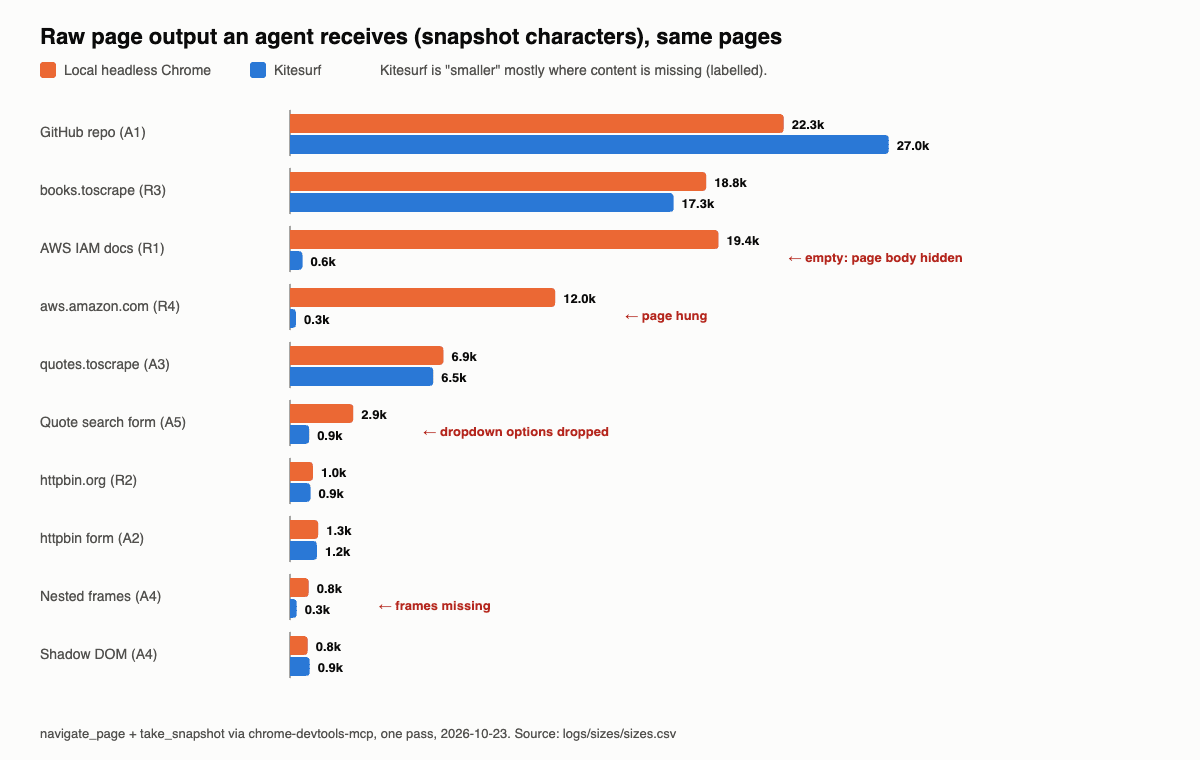
On pages Kitesurf showed fully, its output was actually 5% bigger than Chrome's.
Why Kitesurf did worse
1. Frames don't work. Pages inside a page (iframes) are always empty on Kitesurf, so the agent needed a workaround for Task A4.
Details
I tried old-style <frameset> and every kind of <iframe> (same site, other site, inline). All empty: the content can't be read, scripts inside don't run, and other-site frames are never even loaded. Cloudflare's posts say iframes are supported, but none worked for me on 2026-10-23. In A4 the agent downloaded the frame pages with fetch() instead, which only works because those frames are on the same site.
2. Some pages come back empty. The AWS docs page stays hidden on Kitesurf, so the agent saw nothing and had to read the text another way.
Details
The page hides itself with CSS (body { display: none; }) until its JavaScript app starts. On Kitesurf that app never finishes (4 of 10 scripts, about 200 of 5,000 elements), so the page stays hidden. The text is still there underneath, so the agent read it with a script and answered Task R1 correctly.
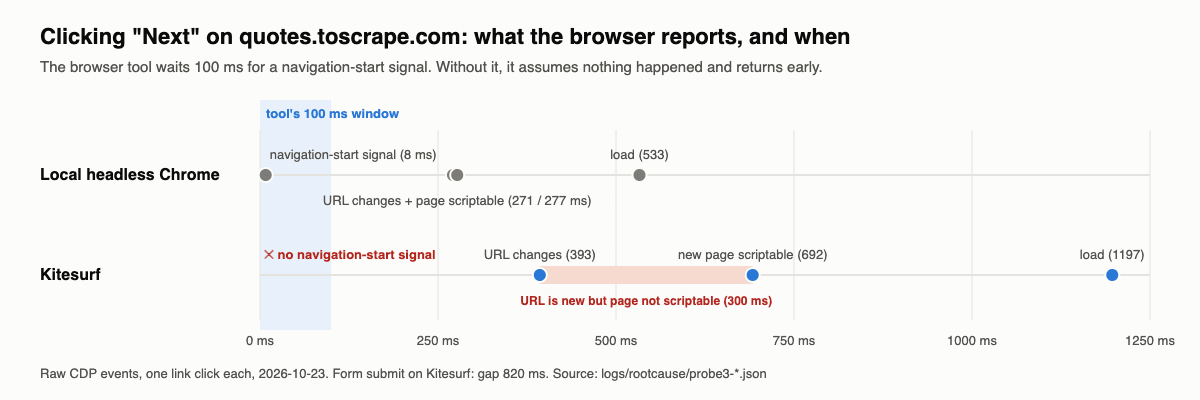
3. After a click, the agent reads the old page. Kitesurf doesn't tell the tool "I'm going to a new page", so the tool thinks the click did nothing and lets the agent read too early.
Details
Chrome sends a "navigation is starting" signal within 8 ms of a click. chrome-devtools-mcp waits 100 ms for exactly that signal. Kitesurf never sends it, so the tool returns early, and the agent's next action lands in a 300–820 ms gap where the address is new but the page can't be read yet. The agent sees old buttons or the error "execution context was destroyed", and has to try again. This is where most of the extra actions in Task A5 came from.
4. aws.amazon.com freezes Kitesurf. The page never finishes loading, so the agent couldn't read the title (Task R4).
Details
In 10 tries it froze 8 times (every command timed out), crashed once with 110 MB of JavaScript memory (Chrome needs 54 MB there), and loaded once (I couldn't make that happen again). amazon.com froze too, but bbc.com and cnn.com loaded fine, so it's not simply "too big". I couldn't dig deeper: Kitesurf ignores the "turn off JavaScript" setting.
5. Kitesurf is slow at opening pages. Opening a page takes about 3x longer inside Kitesurf (about 0.4 s vs 0.13 s), even though Kitesurf's server was the closest to me.
Details
The time for one message to Kitesurf and back was 7 ms (its server was in Kuala Lumpur), versus 92 ms for Cloudflare Chromium (Singapore). So the network isn't the problem. But opening a page took 340–455 ms on Kitesurf versus 115–145 ms on Cloudflare Chromium, plus the click gap above.
What works and what doesn't
✅ Works
- Normal pages, forms, and shadow DOM.
- Running 3 Kitesurf browsers at the same time. Each one is separate: none of them can see the others' pages.
❌ Doesn't work
Good to know
- An unused Kitesurf browser stays alive for up to about 10 minutes (Cloudflare's docs say 60 s), even after your agent disconnects. You have to close it yourself.
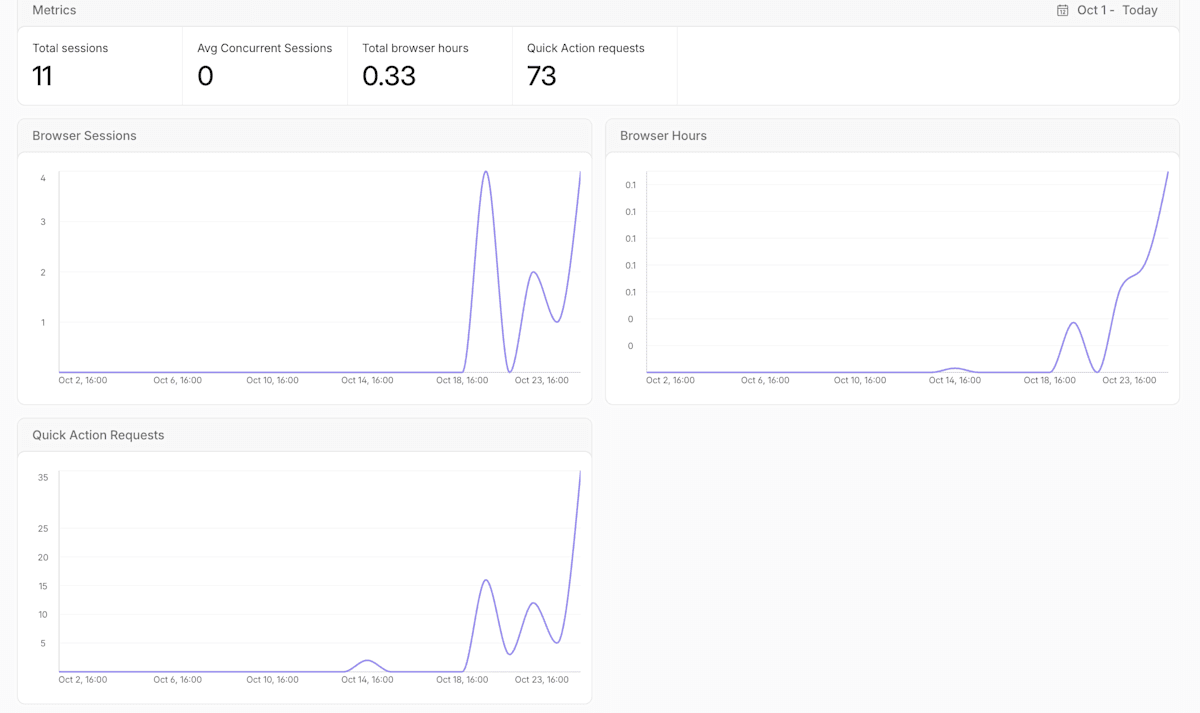
- Usage and the dashboard (beta, as of 2026-10-23): Cloudflare Chromium showed up in the Browser Run dashboard and counted towards the Free plan's 10 minutes a day. Kitesurf didn't show up at all, and I used it for over 35 minutes in one day without being stopped.
So, when should you use Kitesurf?
| Job | My take |
|---|---|
| Reading simple public pages | ✅ Fine, same as Chrome. |
| Lots of short browsers at once, on a budget | ✅ Worth trying (I didn't test cost). |
| Pages with frames (payment boxes, embedded forms, maps) | ❌ Not today. |
| Lots of clicking through pages | ⚠️ Works, but expect extra steps. |
| Big JavaScript sites (like Amazon) | ❌ May freeze. Keep normal Chrome as a backup. |
| Logins, video, 3D, bot-protected sites | ❌ Not supported. |
If you use it with an agent, tell the agent to:
- Check it really got Kitesurf (see the appendix).
- Close pages when it's done.
- Check the page content after every click.
- Read the page with a script if the snapshot looks empty.
Limits of this test
- Each task ran only once per browser. Agents can differ by about ±2 actions on the same task, so only big differences mean something.
- Local Chrome (
claude-in-chrome) uses a different tool, so it's not a perfect match. - I didn't test CPU, memory or price.
- Tested on Claude Code 2.1.307 only (Cloudflare Chromium runs: 2.1.309).
Closing
A lighter browser is great for Cloudflare's servers, and maybe for your bill. But an AI agent doesn't care how light the browser is. It cares whether the page is really there, whether a click tells it what happened, and whether "success" really means success. Right now Kitesurf isn't better at any of these.
It's only a few months old, though, and changing fast. I'll happily test it again when it grows up~
Thank you for following along until here!
Adiós~ (`・ω・´)ゞ
Appendix: Try it yourself
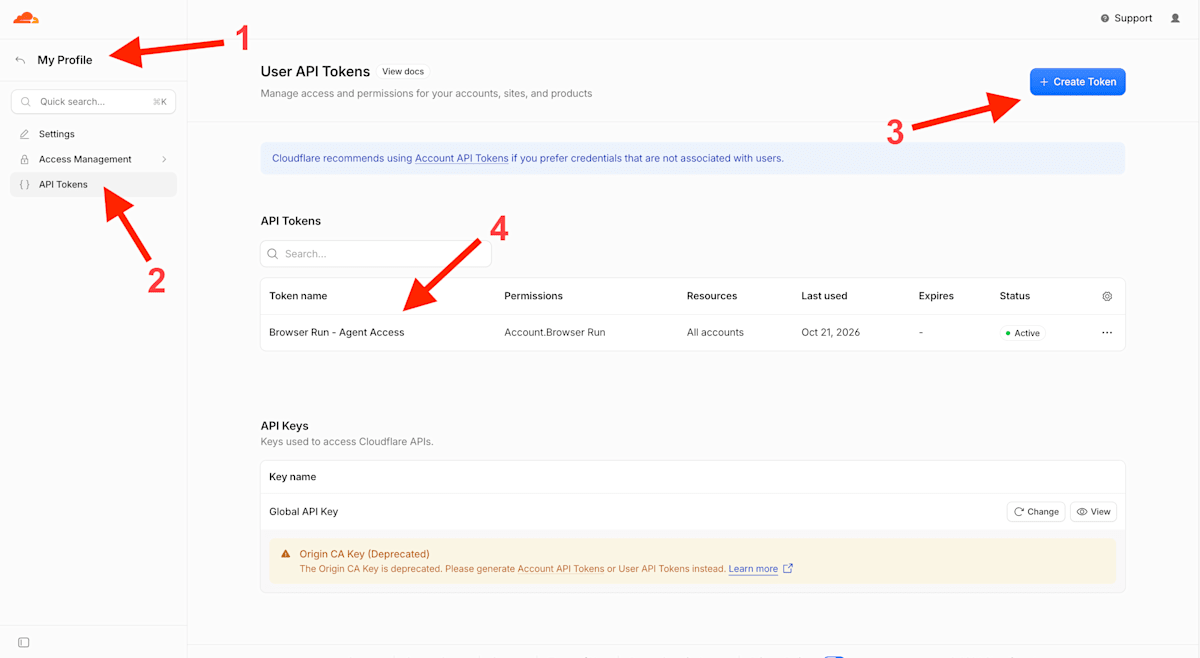
1. Make an API token
Create a Cloudflare API token that is allowed to use Browser Run.
2. Add Kitesurf to your agent
My .mcp.json. The token and account ID come from environment variables, so they're never written in the file:
{
  "mcpServers": {
    "kitesurf": {
      "command": "npx",
      "args": [
        "-y", "chrome-devtools-mcp@latest",
        "--wsEndpoint", "wss://api.cloudflare.com/client/v4/accounts/${CLOUDFLARE_ACCOUNT_ID}/browser-run/devtools/browser?browser=kitesurf",
        "--wsHeaders", "{\"Authorization\":\"Bearer ${CLOUDFLARE_API_TOKEN}\"}"
      ]
    }
  }
}
For Cloudflare Chromium, use the same thing without ?browser=kitesurf.
3. Check that you really got Kitesurf
Asking for Kitesurf doesn't mean you get Kitesurf. When I asked for it in a different way (an HTTP request instead of the direct connection above), I quietly got normal Chrome instead. No error, no warning.
So ask the browser who it is before you trust it:
() => ({
  ua: navigator.userAgent,                                         // "Kitesurf/0.0.1"
  webgl2: !!document.createElement('canvas').getContext('webgl2'), // false on Kitesurf
  chrome: typeof window.chrome                                     // "undefined" on Kitesurf
})
Don't check for WebGL (3D graphics) with
typeof WebGL2RenderingContext. Kitesurf says "yes, I have it", but it's fake. OnlygetContext('webgl2')tells the truth.
4. Give the agent a job
Tell the agent to use the kitesurf tools, and off it goes~