Krita 6.0.0 beta1 が公開されたので PII を検出する Python プラグインの実装を試してみた

はじめに
Krita 6.0.0 beta1 が公開されました。 Qt 6 への移行を含む大きな更新なので、まずは Windows 11 環境で起動と基本操作を試しました。あわせて、Krita の Python プラグイン機構が手元で動くかを確認するために、スクリーンショット内の PII (個人情報) らしき文字列をざっくり検出して選択範囲に反映する小さなプラグインも作ってみました。
Krita とは
Krita は、デジタルペイントとイラスト制作を主用途とする、オープンソースのペイントソフトです。ブラシによる描画とレイヤーを中心に、制作のための基本機能をひと通り備えています。また拡張性が高く、Python によるスクリプト実行やプラグイン作成に対応しています。これにより、繰り返し作業の自動化や、制作ワークフローに合わせた機能追加ができます。
Krita 6.0.0 beta1 とは
Krita 6.0.0 beta1 は、Krita 6 系のベータ版として公開されています。リリースノート では、Krita 6 系が Qt 6 ベースになったこと、Wayland や HDR など表示系の改善が進んでいることが解説されています。
検証環境
- OS: Windows 11
- シェル: Git Bash 2.47.1.windows.1
- Python: 3.11.9
- Krita: 6.0.0 beta1
- GPU: なし (CPU のみで OCR を実行)
対象読者
- Windows 上で、Krita を使って画像編集やスクリーンショット加工をしたい方
- Krita 6.0.0 beta1 の新機能や変更点を、まずは手元で試してみたい方
- 画像内のメールアドレスや電話番号など、PII (個人情報) の写り込みを手作業で確認する負担を減らしたい方
- Python による簡単な自動化に興味があり、Krita のスクリプト機能を触ってみたい方
参考
- How to make a Krita Python plugin — Krita Manual 5.2.0 documentation
- Krita 5.3 and 6.0 Release Notes | Krita
- Krita ログの取得 — Krita Manual 5.2.0 ドキュメント
Krita 6.0.0 beta1 を入れて起動する
Krita 6.0.0 beta1 の入手は、公式の告知ページ にある案内に従います。
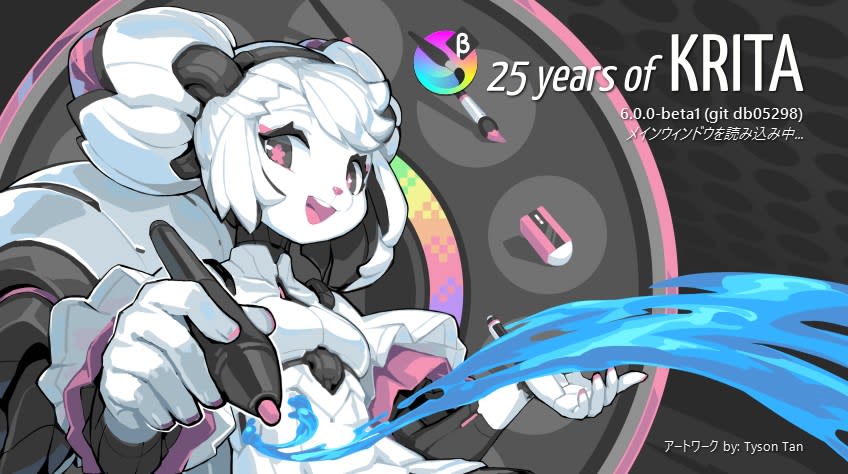
Krita 起動画面。イラストが可愛い。
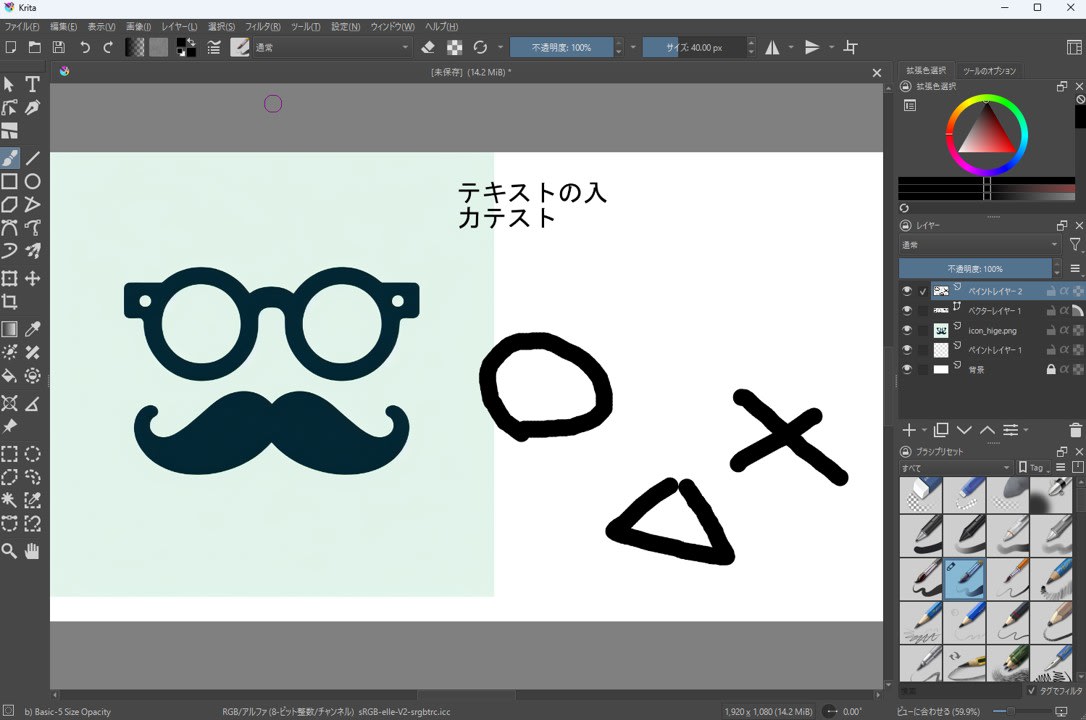
インストール後、起動してキャンバス表示、レイヤー操作、画像の読み込みと書き出しなど、普段使う範囲の操作を先に確認しました。
Python プラグインが動くかを確認する
Krita には Python による拡張機構があります。今回の確認では、Krita 側にプラグインを配置し、メニュー (ツール → スクリプト) から実行できることをゴールにしました。
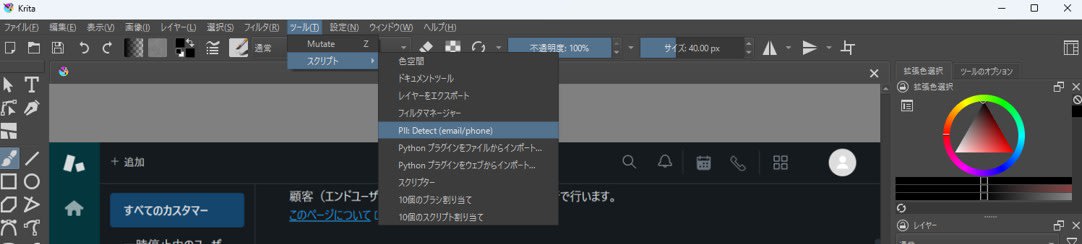
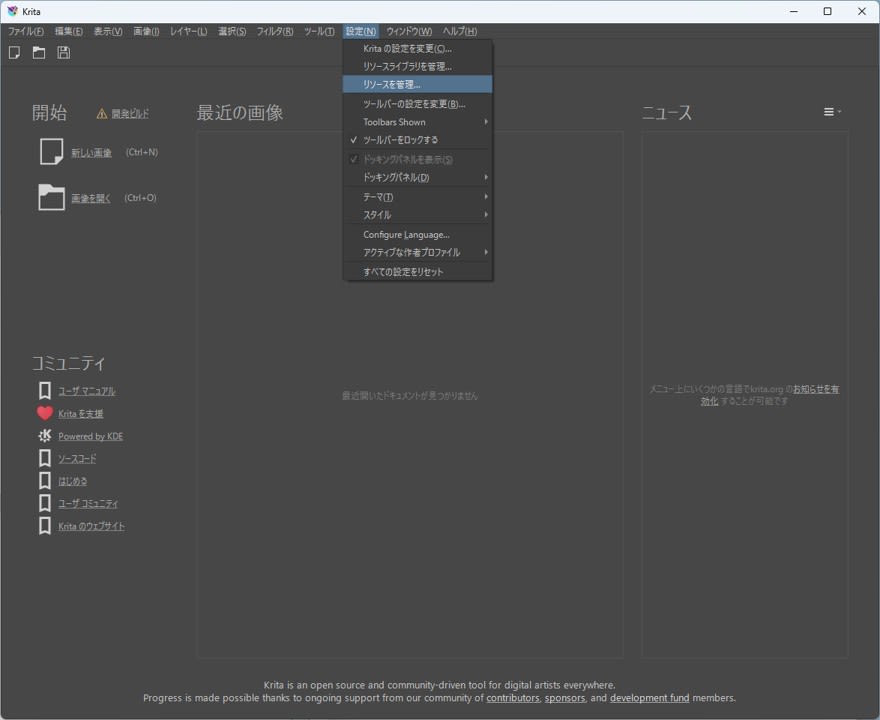
プラグインの配置場所は、Krita のリソースフォルダ配下の pykrita です。リソースフォルダは 設定 → リソースを管理… > リソースフォルダを開く から開けます。
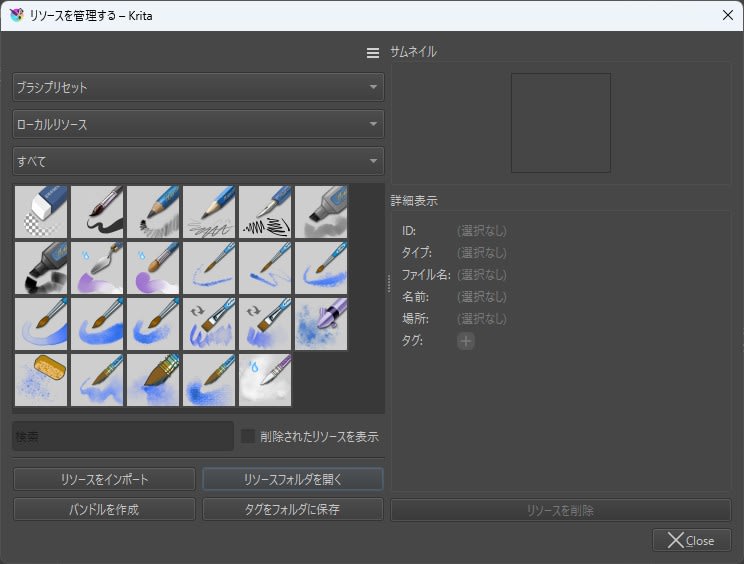
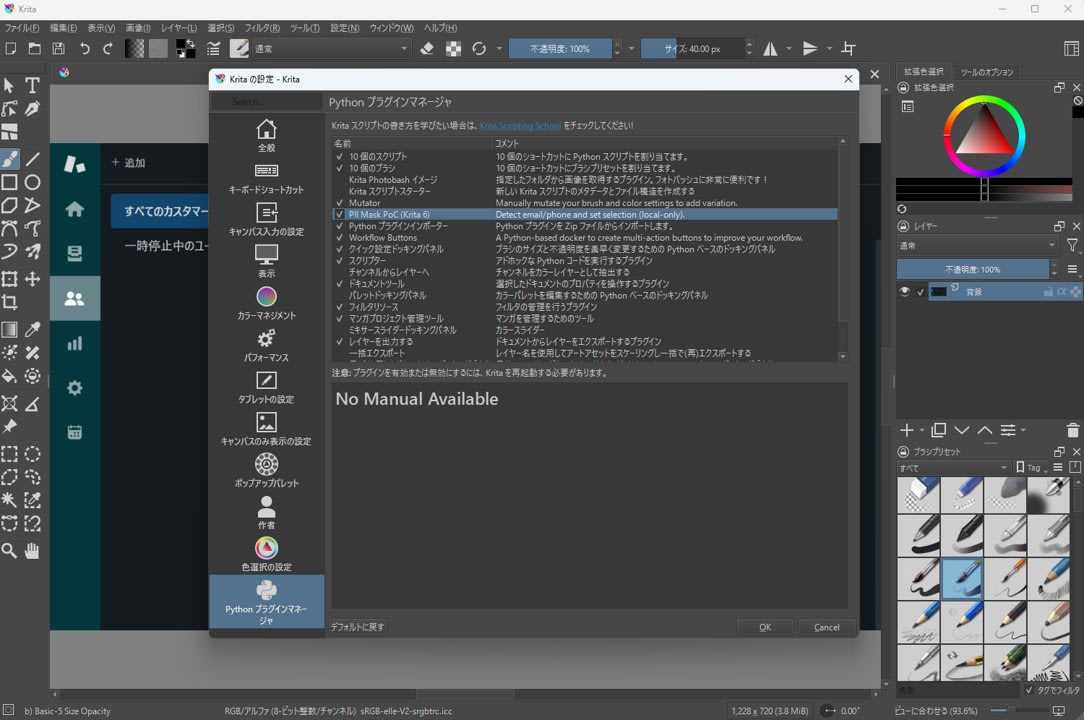
プラグインを有効化する画面は 設定 → Krita の設定を変更 → Python プラグインマネージャ です。ここで対象プラグインを有効にし Krita を再起動すると、スクリプトメニューにアクションが登録されます。
スクリーンショットの PII を検出して選択範囲にする
サポート対応や検証メモ用にスクリーンショットを貼るとき、メールアドレスや電話番号を隠したい場面があります。Krita にはモザイクフィルタが最初から入っているので、プラグイン側でモザイク機能まで作る必要はありません。そこで今回は、次の部分だけをプラグインにしました。
- 画像から文字認識 (OCR) を実行
- メールアドレスや電話番号っぽい領域を抽出
- 抽出した矩形を選択範囲に反映
なお、OCR は Krita 同梱の Python ではなく、別途用意した Python 実行環境 (venv) で実行します。 Krita 側の実行環境と依存ライブラリ (EasyOCR など) を分離し、Qt や Python モジュールの衝突による不具合を避けるためです。
サンプルコードについては記事末尾に記載しています。
使い方
- Krita でスクリーンショット画像を開く
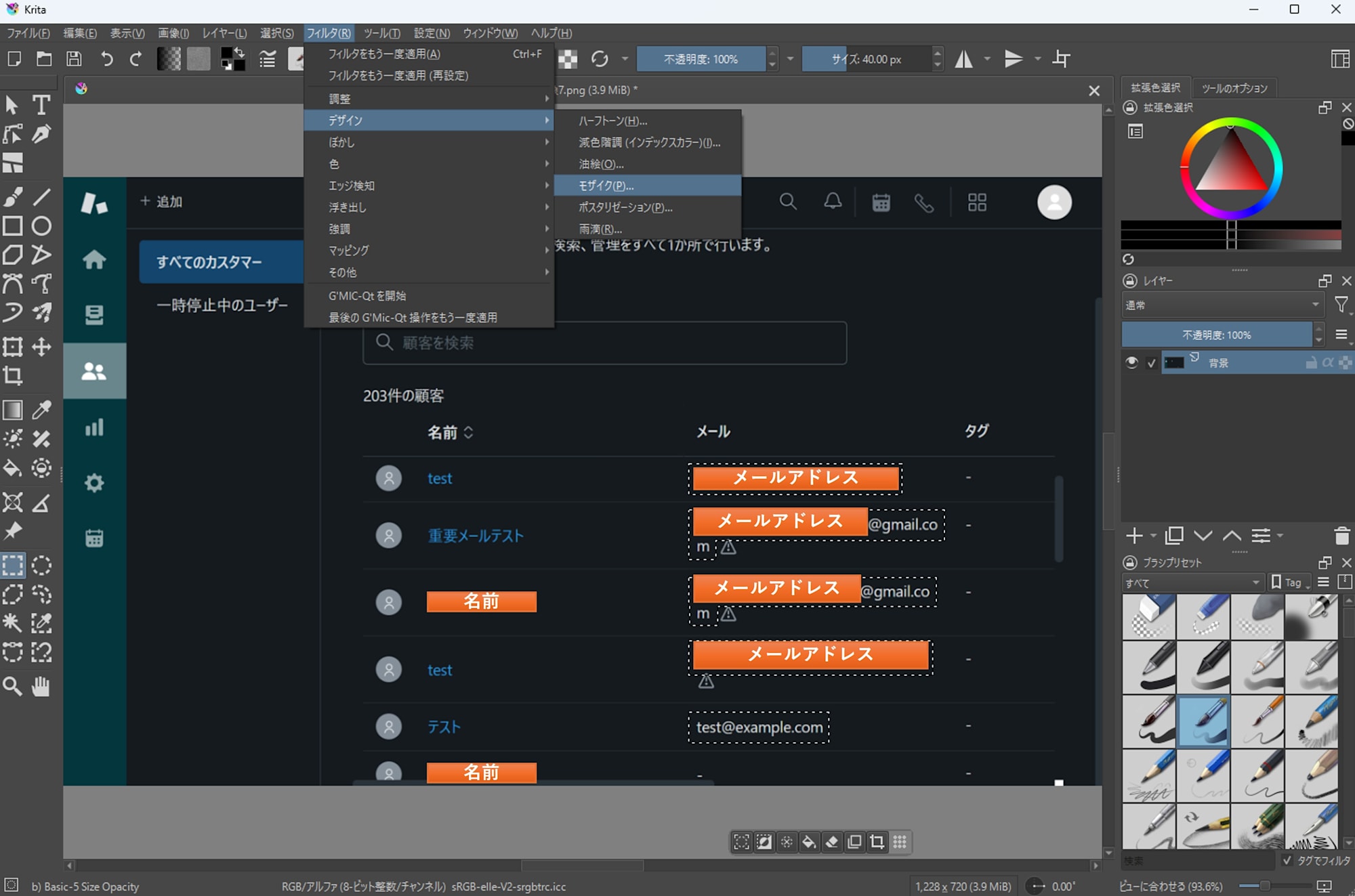
ツール→スクリプト→PII: Detect (email/phone)を実行
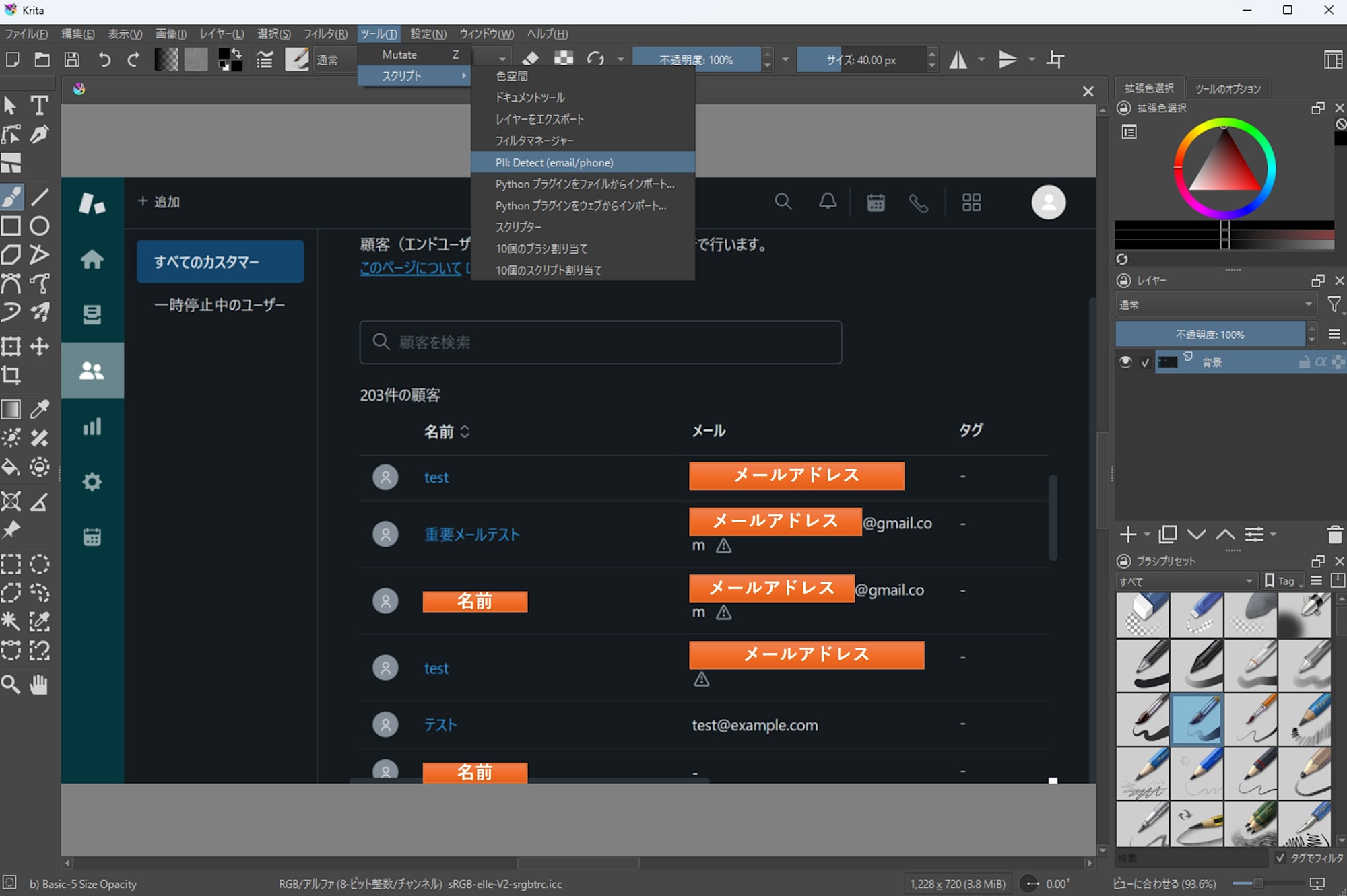
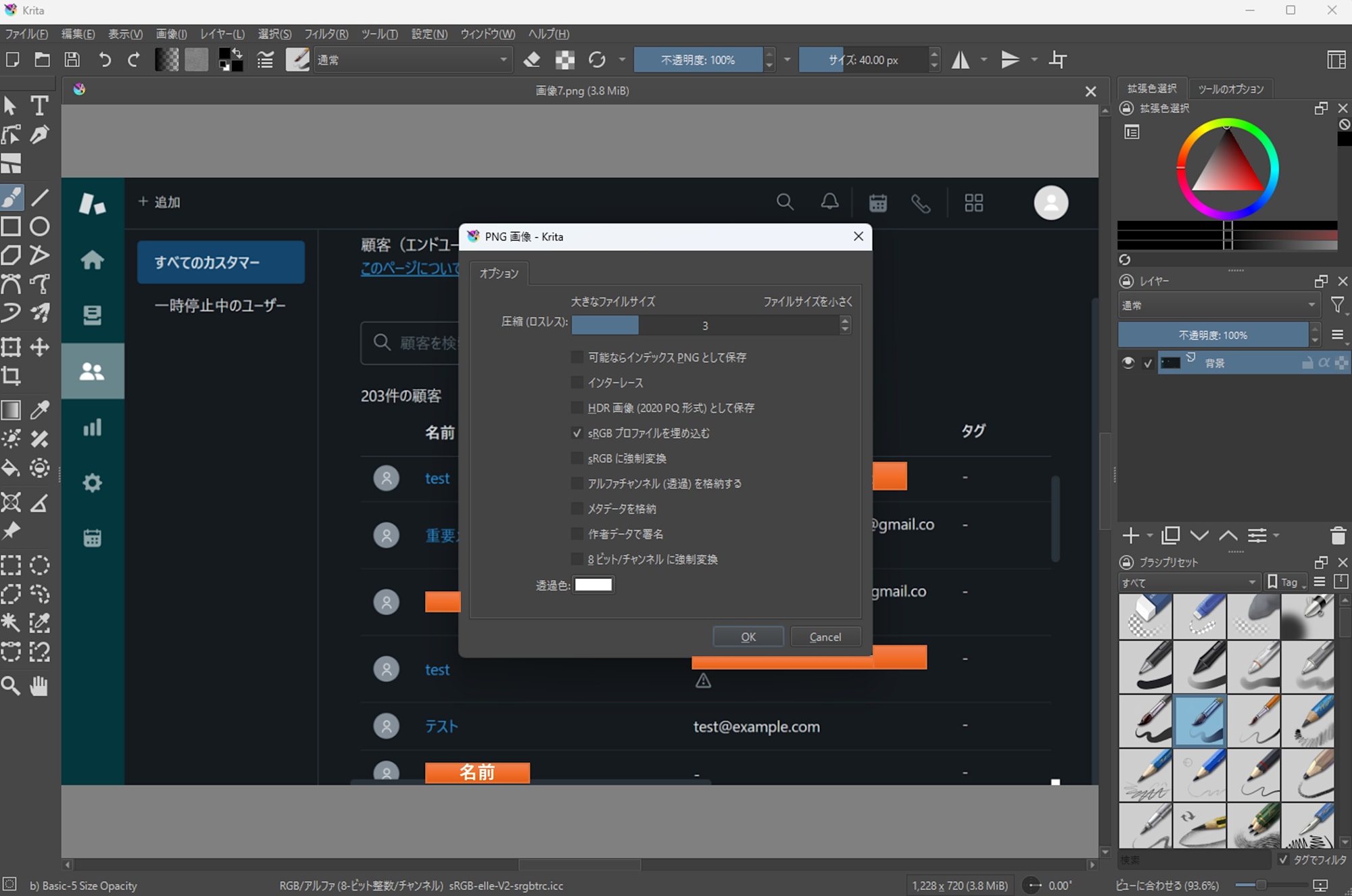
- PNG 書き出しのオプションダイアログが出るので、基本的にデフォルトのまま OK で進めます。
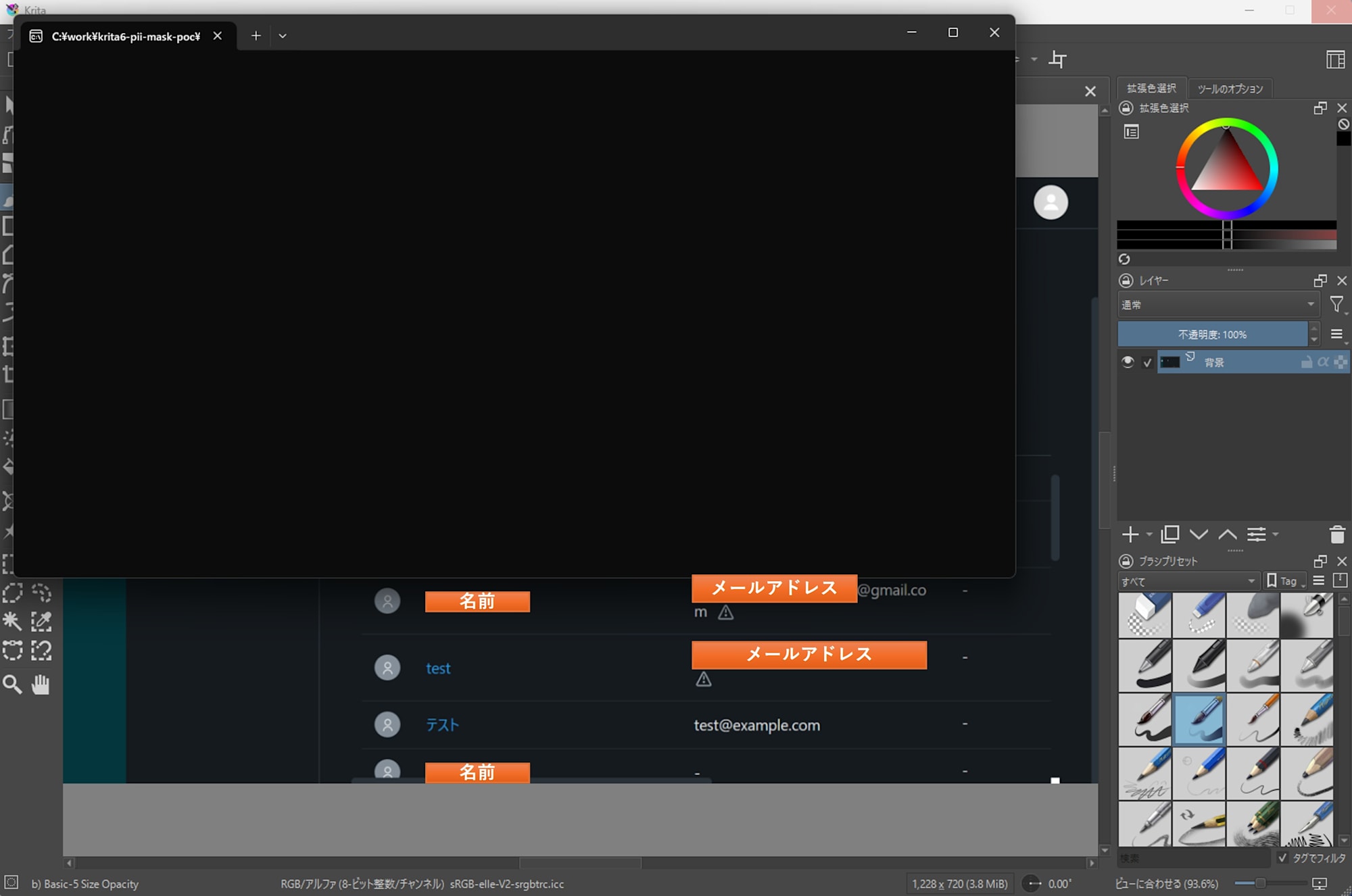
- 検出が完了するまで待ちます。筆者環境 (CPU のみ、GPU なし) では約 30 秒でした。画像サイズや解像度によっては 1 分以上かかることもあります。
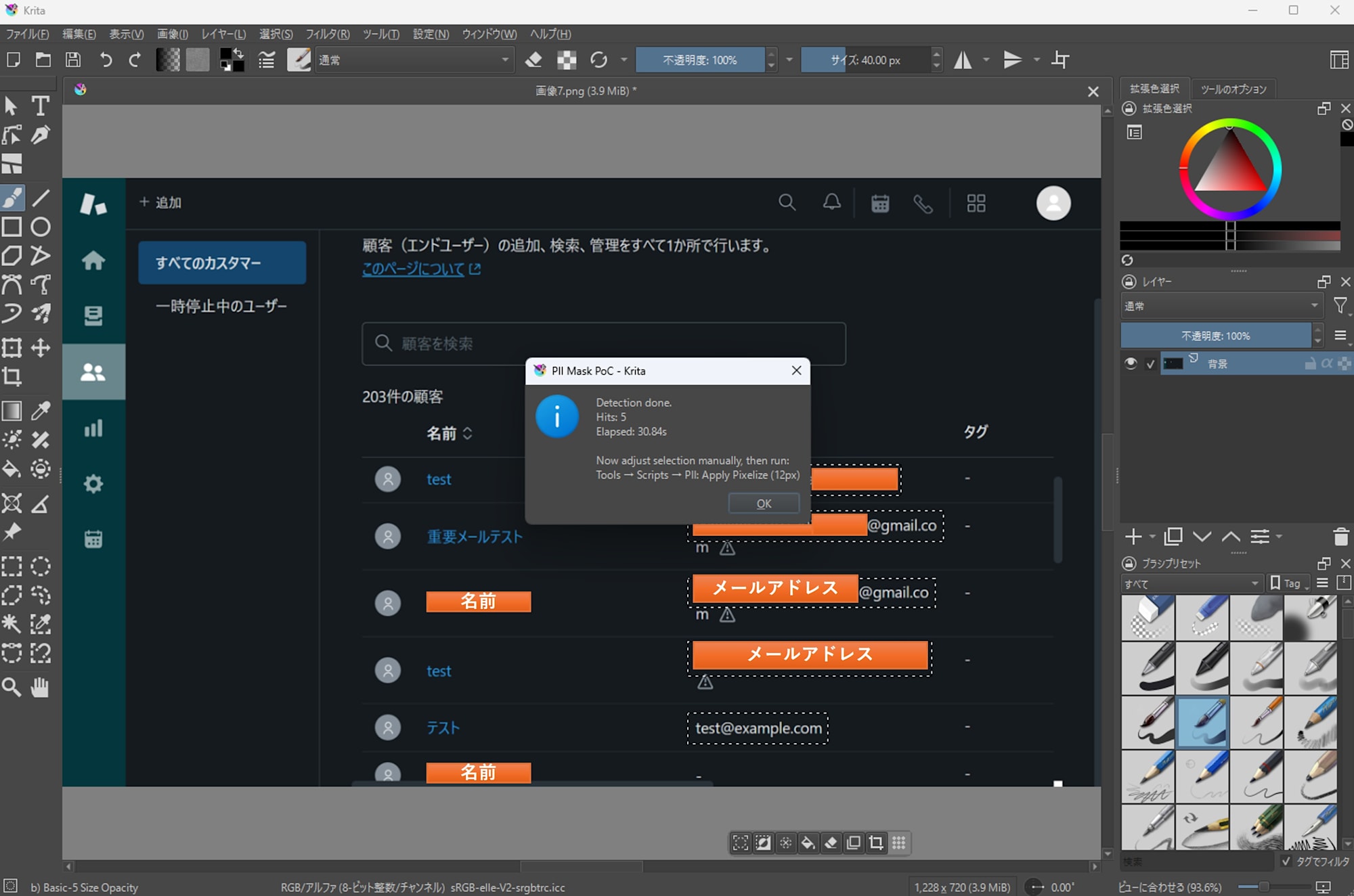
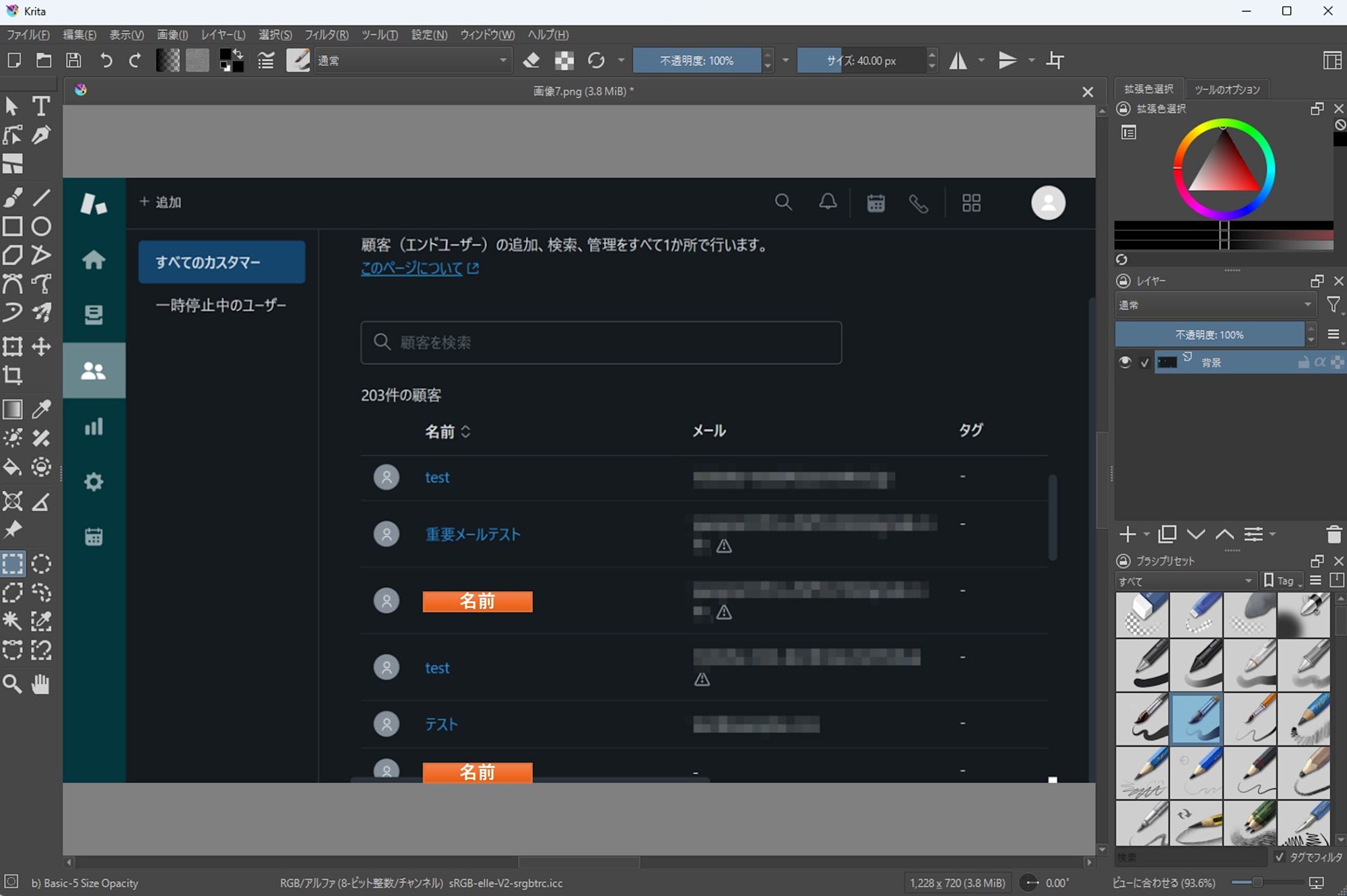
- 検出が成功すると、選択範囲が自動で設定されます。
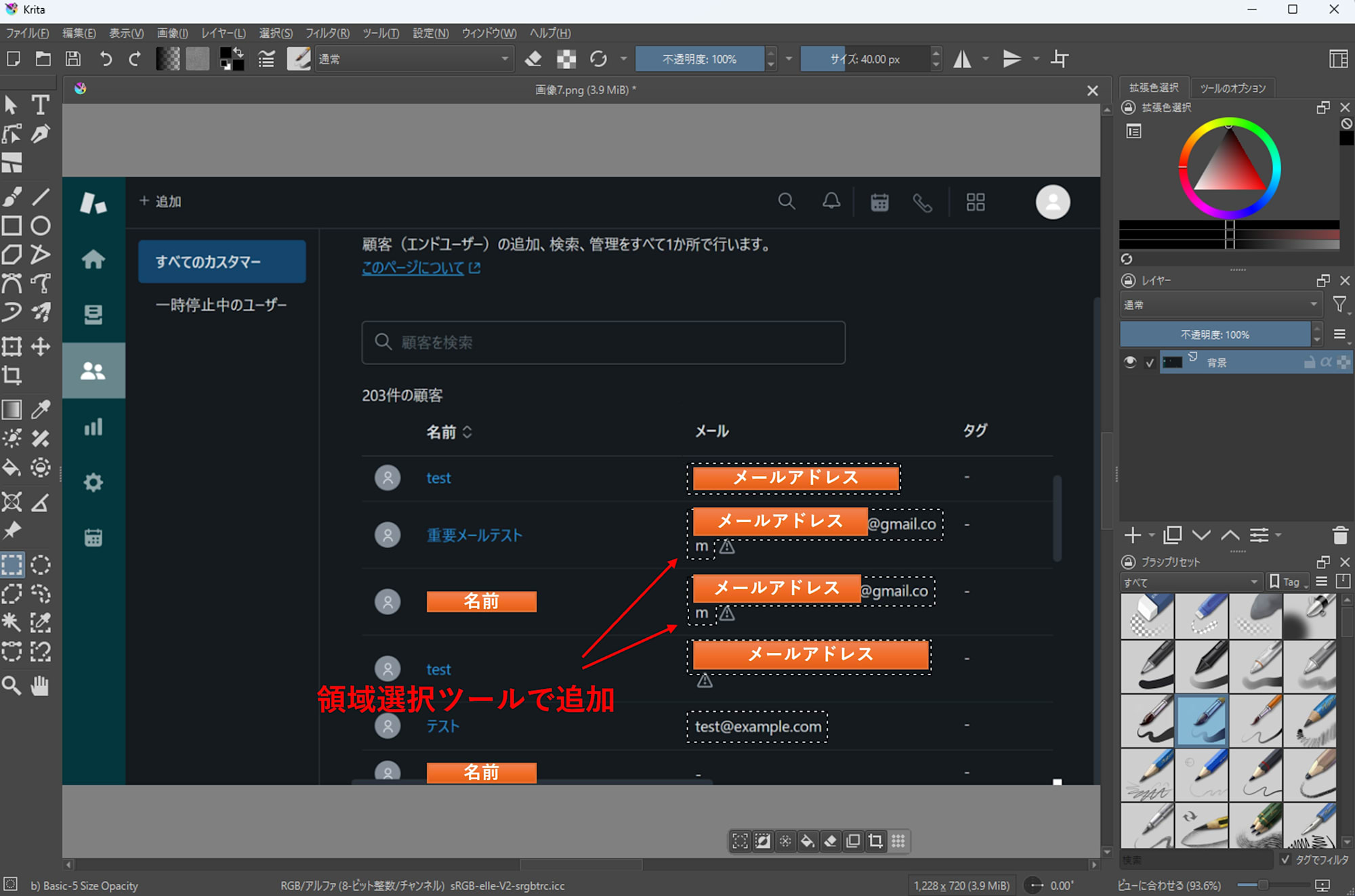
- 必要に応じて選択範囲を追加・削除します。
- 最後に Krita 標準フィルタでモザイクなどを適用します。
トラブルシューティング (メニューに出ない / 動かない)
トラブル時の原因調査には次の 2 つの方法が有効でした。
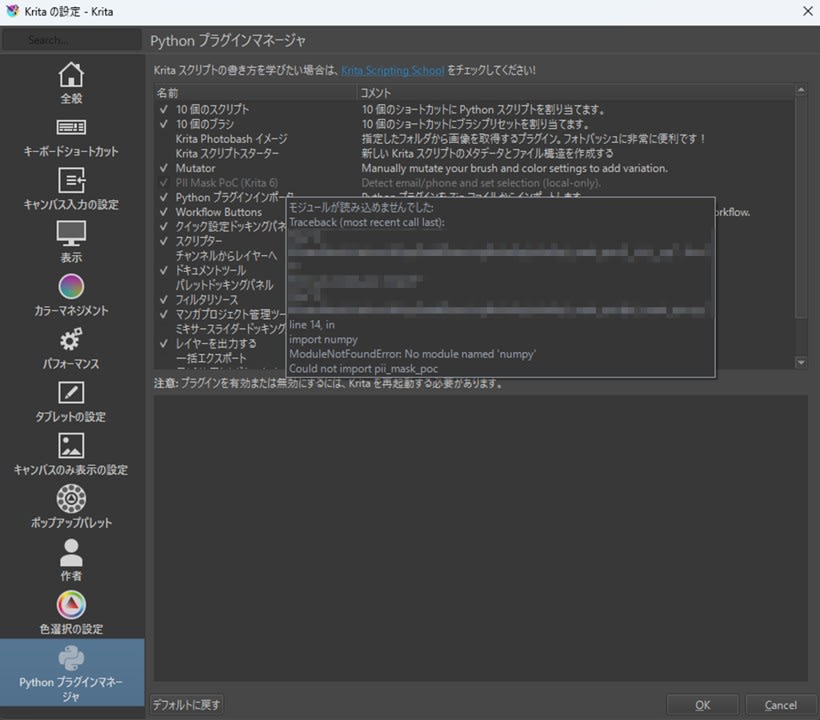
- Python プラグインマネージャでのエラーメッセージ
プラグインが灰色文字になって有効化できない場合、カーソルをあわせるとエラーメッセージが表示されます。
- ログビューワ
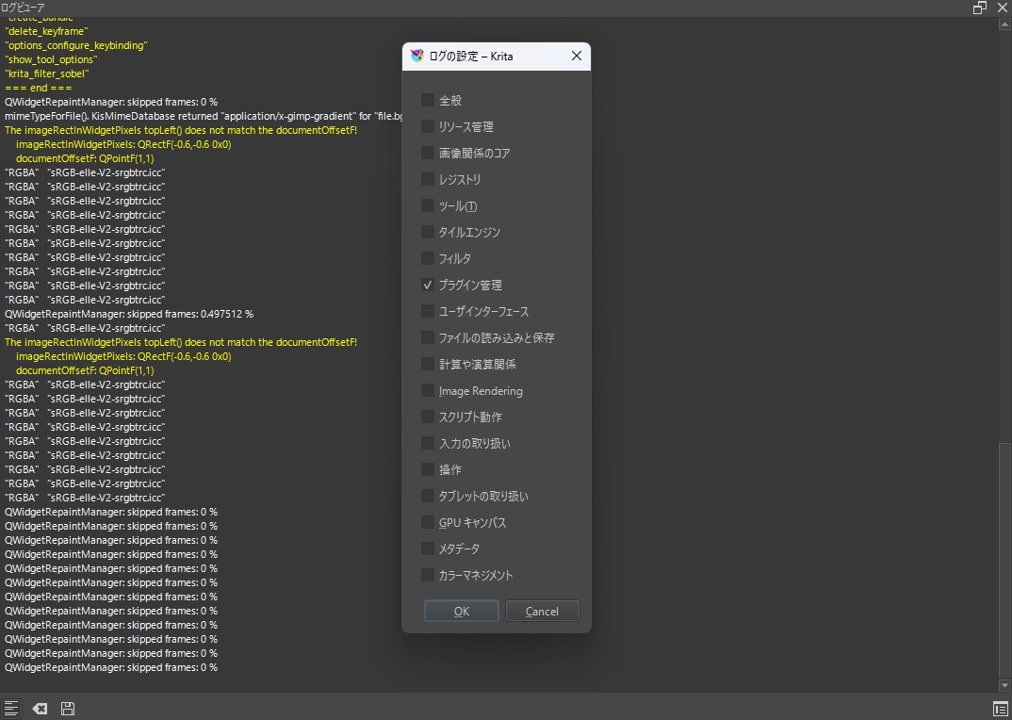
設定>ドッキングパネル>ログビューワからログを閲覧できます。左下のトグルボタンでログを有効化したのち、右下のボタンでフィルタリングして必要なログだけ表示されるようにします。
まとめ
Krita 6.0.0 beta1 を Windows 11 で試し、基本操作の確認に加えて Python プラグインが手元で動くことも確認できました。また今回実装した PII 検出プラグインでは、検出結果を選択範囲にするところまでを自動化し、マスク処理そのものは Krita 標準機能に任せる形にしました。正式版に向けた安定化にも期待しつつ、まずはベータ版で手元のワークフローに支障がないかを確認しておくと安心です。
付録: サンプルコード
付録: サンプルコード
pii_mask_poc.desktop
pykrita 直下に配置します。
[Desktop Entry]
Type=Service
ServiceTypes=Krita/PythonPlugin
X-KDE-Library=pii_mask_poc
X-Python-2-Compatible=false
Name=PII Detector PoC (Krita 6)
Comment=Detect email/+E.164-ish and set selection (local-only).
pii_mask_poc/__init__.py
from .pii_mask_poc import *
pii_mask_poc/config.json
外部 Python を使う前提です。python と detector は手元のパスに合わせてください。
{
  "python": "C:\\path\\to\\.venv\\Scripts\\python.exe",
  "detector": "C:\\path\\to\\detector\\pii_detect.py",
  "langs": "en,ja",
  "min_conf": 0.40,
  "pad": 2,
  "scale": 0,
  "gpu": false
}
gpu を true にすると EasyOCR が CUDA を使い、検出時間を大幅に短縮できます。CUDA 対応の GPU がない環境では false のままにしてください。
pii_mask_poc/pii_mask_poc.py
# pykrita/pii_mask_poc/pii_mask_poc.py
from __future__ import annotations

import json
import os
import subprocess
import tempfile
import time
from pathlib import Path
from typing import Any, Dict, List, Optional

from krita import Extension, InfoObject, Krita, Selection  # type: ignore

try:
    from PyQt6.QtWidgets import QMessageBox
except Exception:  # pragma: no cover
    from PyQt5.QtWidgets import QMessageBox  # type: ignore

PLUGIN_TITLE = "PII Detector PoC"

def _load_config() -> Dict[str, Any]:
    cfg_path = Path(__file__).with_name("config.json")
    if not cfg_path.exists():
        raise RuntimeError(f"config.json not found: {cfg_path}")
    return json.loads(cfg_path.read_text(encoding="utf-8"))

def _msg(title: str, text: str) -> None:
    app = Krita.instance()
    w = app.activeWindow()
    parent = w.qwindow() if w is not None else None
    QMessageBox.information(parent, title, text)

def _err(title: str, text: str) -> None:
    app = Krita.instance()
    w = app.activeWindow()
    parent = w.qwindow() if w is not None else None
    QMessageBox.critical(parent, title, text)

def _export_projection_png(doc, out_path: Path) -> None:
    # projection (見た目通り) を書き出す
    doc.exportImage(str(out_path), InfoObject())

def _rects_to_selection(doc_w: int, doc_h: int, rects: List[Dict[str, int]]) -> Selection:
    sel = Selection()
    sel.resize(doc_w, doc_h)
    sel.clear()

    for r in rects:
        x, y, w, h = int(r["x"]), int(r["y"]), int(r["w"]), int(r["h"])
        if w <= 0 or h <= 0:
            continue
        tmp = Selection()
        tmp.resize(doc_w, doc_h)
        tmp.clear()
        tmp.select(x, y, w, h, 255)
        sel.add(tmp)

    return sel

def _clean_env_for_external_python() -> Dict[str, str]:
    env = os.environ.copy()

    for k in list(env.keys()):
        if k.upper().startswith("PYTHON"):
            env.pop(k, None)

    for k in ["QT_PLUGIN_PATH", "QML2_IMPORT_PATH"]:
        env.pop(k, None)

    return env

def _detector_sanity_check(detector_path: Path) -> Optional[str]:
    try:
        head = detector_path.read_text(encoding="utf-8", errors="ignore")[:2000]
    except Exception:
        return None

    if "from krita import" in head or "import krita" in head:
        return (
            "Detector script looks like a Krita plugin (it imports 'krita').\n"
            "config.json 'detector' may be pointing to the wrong file.\n\n"
            f"detector: {detector_path}"
        )

    return None

class PIIDetectorPoCExtension(Extension):
    def __init__(self, parent):
        super().__init__(parent)

    def setup(self) -> None:
        pass

    def createActions(self, window) -> None:
        a1 = window.createAction("pii_detect_email_phone", "PII: Detect (email/phone)", "tools/scripts")
        a1.triggered.connect(self.detect)

    def detect(self) -> None:
        app = Krita.instance()
        doc = app.activeDocument()
        if doc is None:
            _err(PLUGIN_TITLE, "No active document.")
            return

        try:
            cfg = _load_config()
        except Exception as e:
            _err(PLUGIN_TITLE, f"Failed to load config.json:\n{e}")
            return

        py = Path(str(cfg.get("python", "")))
        detector = Path(str(cfg.get("detector", "")))
        langs = str(cfg.get("langs", "en,ja"))
        min_conf = float(cfg.get("min_conf", 0.40))
        pad = int(cfg.get("pad", 2))
        scale = int(cfg.get("scale", 0))
        gpu = bool(cfg.get("gpu", False))

        if not py.exists():
            _err(PLUGIN_TITLE, f"python not found:\n{py}")
            return
        if not detector.exists():
            _err(PLUGIN_TITLE, f"detector not found:\n{detector}")
            return

        bad = _detector_sanity_check(detector)
        if bad:
            _err(PLUGIN_TITLE, bad)
            return

        tmp_dir = Path(tempfile.gettempdir()) / "krita_pii_detector_poc"
        tmp_dir.mkdir(parents=True, exist_ok=True)
        in_png = tmp_dir / "input.png"
        out_json = tmp_dir / "hits.json"

        try:
            _export_projection_png(doc, in_png)
        except Exception as e:
            _err(PLUGIN_TITLE, f"Failed to export image:\n{e}")
            return

        cmd = [
            str(py),
            "-E",
            "-s",
            str(detector),
            "--in",
            str(in_png),
            "--out",
            str(out_json),
            "--langs",
            langs,
            "--min-conf",
            str(min_conf),
            "--pad",
            str(pad),
            "--scale",
            str(scale),
        ]
        if gpu:
            cmd.append("--gpu")

        t0 = time.perf_counter()
        try:
            p = subprocess.run(
                cmd,
                capture_output=True,
                text=True,
                check=False,
                env=_clean_env_for_external_python(),
            )
        except Exception as e:
            _err(PLUGIN_TITLE, f"Failed to run detector:\n{e}")
            return
        elapsed = time.perf_counter() - t0

        print(f"[{PLUGIN_TITLE}] detector elapsed: {elapsed:.2f}s")
        if p.stdout.strip():
            print(f"[{PLUGIN_TITLE}] detector stdout:\n{p.stdout}")
        if p.stderr.strip():
            print(f"[{PLUGIN_TITLE}] detector stderr:\n{p.stderr}")

        if p.returncode != 0:
            _err(
                PLUGIN_TITLE,
                f"Detector failed (code={p.returncode}).\n\nElapsed: {elapsed:.2f}s\n\nSTDERR:\n{p.stderr}\n\nSTDOUT:\n{p.stdout}",
            )
            return

        try:
            data = json.loads(out_json.read_text(encoding="utf-8"))
            hits = data.get("hits", [])
        except Exception as e:
            _err(PLUGIN_TITLE, f"Failed to read JSON:\n{e}")
            return

        rects = [h["rect"] for h in hits if isinstance(h, dict) and "rect" in h]
        sel = _rects_to_selection(doc.width(), doc.height(), rects)
        doc.setSelection(sel)

        _msg(
            PLUGIN_TITLE,
            f"Detection done.\nHits: {len(rects)}\nElapsed: {elapsed:.2f}s\n\n"
            "Adjust selection manually, then apply pixelize (or other) filter using Krita built-ins.",
        )

Krita.instance().addExtension(PIIDetectorPoCExtension(Krita.instance()))
detector/pii_detect.py
# detector/pii_detect.py (standalone CLI)
from __future__ import annotations

import argparse
import json
import re
import time
import unicodedata
from dataclasses import dataclass
from pathlib import Path
from typing import List, Tuple

import easyocr  # type: ignore
import numpy as np  # type: ignore
from PIL import Image  # type: ignore

@dataclass
class Token:
    text: str
    conf: float
    x: int
    y: int
    w: int
    h: int

    @property
    def x2(self) -> int:
        return self.x + self.w

@dataclass
class Rect:
    x: int
    y: int
    w: int
    h: int

def clamp(v: int, lo: int, hi: int) -> int:
    return max(lo, min(hi, v))

def normalize_text(s: str) -> str:
    s = unicodedata.normalize("NFKC", s)
    s = s.replace("…", "...")
    s = s.replace("+", "+")
    return s.strip()

def digit_count(s: str) -> int:
    return sum(c.isdigit() for c in s)

def bbox_points_to_rect(points: List[List[float]]) -> Tuple[int, int, int, int]:
    xs = [p[0] for p in points]
    ys = [p[1] for p in points]
    x0 = int(min(xs))
    y0 = int(min(ys))
    x1 = int(max(xs))
    y1 = int(max(ys))
    return x0, y0, max(1, x1 - x0), max(1, y1 - y0)

def pad_rect(r: Rect, img_w: int, img_h: int, pad: int) -> Rect:
    x = clamp(r.x - pad, 0, img_w - 1)
    y = clamp(r.y - pad, 0, img_h - 1)
    x2 = clamp(r.x + r.w + pad, 0, img_w)
    y2 = clamp(r.y + r.h + pad, 0, img_h)
    return Rect(x=x, y=y, w=max(1, x2 - x), h=max(1, y2 - y))

def iou(a: Rect, b: Rect) -> float:
    ax1, ay1 = a.x + a.w, a.y + a.h
    bx1, by1 = b.x + b.w, b.y + b.h
    ix0, iy0 = max(a.x, b.x), max(a.y, b.y)
    ix1, iy1 = min(ax1, bx1), min(ay1, by1)
    iw, ih = max(0, ix1 - ix0), max(0, iy1 - iy0)
    inter = iw * ih
    if inter <= 0:
        return 0.0
    area = a.w * a.h + b.w * b.h - inter
    return inter / max(1, area)

def group_lines(tokens: List[Token]) -> List[List[Token]]:
    sorted_t = sorted(tokens, key=lambda t: (t.y, t.x))
    lines: List[List[Token]] = []
    for t in sorted_t:
        cy = t.y + t.h // 2
        placed = False
        for line in lines:
            lcy = line[0].y + line[0].h // 2
            if abs(cy - lcy) <= max(12, max(t.h, line[0].h) // 2):
                line.append(t)
                placed = True
                break
        if not placed:
            lines.append([t])
    for line in lines:
        line.sort(key=lambda t: t.x)
    return lines

def cluster_by_xgap(tokens: List[Token], max_gap: int) -> List[List[Token]]:
    if not tokens:
        return []
    tokens = sorted(tokens, key=lambda t: t.x)
    clusters: List[List[Token]] = [[tokens[0]]]
    for t in tokens[1:]:
        prev = clusters[-1][-1]
        gap = t.x - prev.x2
        if gap <= max_gap:
            clusters[-1].append(t)
        else:
            clusters.append([t])
    return clusters

def looks_like_phone(text: str) -> bool:
    if not text:
        return False

    bad = 0
    for c in text:
        if c.isdigit() or c in "+-() ":
            continue
        bad += 1
    if bad > 2:
        return False

    d = digit_count(text)
    if d >= 10:
        return True
    if "+" in text and d >= 8:
        return True
    return False

def dedupe_hits(hits: List[Tuple[str, Rect, float]], iou_th: float = 0.65) -> List[Tuple[str, Rect, float]]:
    kept: List[Tuple[str, Rect, float]] = []
    for kind, r, conf in sorted(hits, key=lambda x: x[2], reverse=True):
        if any(iou(r, kr) >= iou_th for _, kr, _ in kept):
            continue
        kept.append((kind, r, conf))
    return kept

def main() -> None:
    ap = argparse.ArgumentParser()
    ap.add_argument("--in", dest="in_path", required=True)
    ap.add_argument("--out", dest="out_path", required=True)

    ap.add_argument("--langs", default="en,ja")
    ap.add_argument("--min-conf", type=float, default=0.40)
    ap.add_argument("--pad", type=int, default=2)
    ap.add_argument("--scale", type=int, default=0, help="0=auto, 2/3/4...")
    ap.add_argument("--gpu", action="store_true", default=False)

    args = ap.parse_args()

    t0 = time.perf_counter()

    in_path = Path(args.in_path)
    out_path = Path(args.out_path)

    img0 = Image.open(in_path).convert("RGB")
    w0, h0 = img0.size

    scale = args.scale
    if scale == 0:
        scale = 3 if max(w0, h0) <= 1400 else 2

    img = img0.resize((w0 * scale, h0 * scale), Image.Resampling.BICUBIC) if scale != 1 else img0
    img_np = np.array(img)

    langs = [s.strip() for s in args.langs.split(",") if s.strip()]
    reader = easyocr.Reader(langs, gpu=args.gpu)

    results = reader.readtext(
        img_np,
        detail=1,
        paragraph=False,
        decoder="greedy",
        text_threshold=0.40,
        low_text=0.20,
        link_threshold=0.20,
    )

    tokens: List[Token] = []
    for bbox, text, conf in results:
        if conf is None or conf < args.min_conf:
            continue
        t = normalize_text(text or "")
        if not t:
            continue

        x, y, w, h = bbox_points_to_rect(bbox)
        x = int(x / scale)
        y = int(y / scale)
        w = int(w / scale)
        h = int(h / scale)
        tokens.append(Token(text=t, conf=float(conf), x=x, y=y, w=w, h=h))

    raw_hits: List[Tuple[str, Rect, float]] = []

    for line in group_lines(tokens):
        at_idxs = [i for i, t in enumerate(line) if "@" in t.text]
        for i in at_idxs:
            center = line[i]
            cand = [center]

            j = i - 1
            while j >= 0:
                prev = line[j]
                gap = cand[0].x - prev.x2
                if gap <= max(20, prev.h):
                    cand.insert(0, prev)
                    j -= 1
                else:
                    break

            j = i + 1
            while j < len(line):
                nxt = line[j]
                gap = nxt.x - cand[-1].x2
                if gap <= max(20, nxt.h):
                    cand.append(nxt)
                    j += 1
                else:
                    break

            r = Rect(cand[0].x, cand[0].y, cand[-1].x2 - cand[0].x, max(t.h for t in cand))
            r = pad_rect(r, w0, h0, args.pad)
            conf2 = sum(t.conf for t in cand) / len(cand)
            raw_hits.append(("email", r, conf2))

        phoneish = [t for t in line if any(c.isdigit() for c in t.text) or any(c in t.text for c in "+-()")]
        for cl in cluster_by_xgap(phoneish, max_gap=24):
            joined = normalize_text(" ".join(t.text for t in cl))
            if looks_like_phone(joined):
                r = Rect(cl[0].x, cl[0].y, cl[-1].x2 - cl[0].x, max(t.h for t in cl))
                r = pad_rect(r, w0, h0, args.pad)
                conf2 = sum(t.conf for t in cl) / len(cl)
                raw_hits.append(("phone_e164", r, conf2))

    raw_hits = dedupe_hits(raw_hits)

    hits = [
        {"kind": k, "rect": {"x": r.x, "y": r.y, "w": r.w, "h": r.h}, "confidence": c}
        for k, r, c in raw_hits
    ]
    out = {"image": {"path": str(in_path), "width": w0, "height": h0}, "hits": hits}
    out_path.parent.mkdir(parents=True, exist_ok=True)
    out_path.write_text(json.dumps(out, ensure_ascii=False, indent=2), encoding="utf-8")

    elapsed = time.perf_counter() - t0
    print(f"[pii_detect] elapsed: {elapsed:.2f}s, hits={len(hits)}, image={w0}x{h0}")

if __name__ == "__main__":
    main()
依存関係の導入例
外部 Python 側で次のように実行します。
python -m venv .venv
.venv/Scripts/python -m pip install --upgrade pip
.venv/Scripts/pip install easyocr pillow numpy