
Google Cloud の組織間プロジェクト移行をやってみた

皆さまこんにちは、こんばんは
コンサルティング部のみゃんです。
季節は秋になり、肌寒くなってきましたね。
最近は室内と外の寒暖差に服装どうしようか悩んでいます。
さて、今日は Google Cloud の組織間プロジェクト移行について検証する機会があったので、実施した内容をブログにしたいと思います。
組織間の移行は、移行元と移行先の両方の組織で権限と組織ポリシーを設定する必要があります。
今回は、Gmail アカウントを2つ用意してスタンドアロン組織を2つ作り、片方の組織からもう片方の組織へプロジェクトを移行してみました。
組織間移行は、作業自体はそこまで難しくなく、短時間で終わりますので、移行ハードルが高いのでは?と躊躇されている方の参考になれば嬉しいです。
まずは結論から
忙しい人のために、まずは結論をまとめます。
詳細は、後述の「やってみた」章をご覧ください!
今回主に試したのは以下の6点です。
①両方の組織で、作業用アカウントに移行に必要なロールを付与する
②移行元と移行先の組織に、移行を許可する組織ポリシーを両方向で設定する
③プロジェクトを移行元の組織から移行先の組織へ移行する
④移行後も、作業用アカウントで移行したプロジェクトの Cloud Storage を操作できるかを確認する
⑤移行先の組織から移行元の組織へ戻す(切り戻し)
⑥組織ポリシーとロールを削除して後片付けする
①移行先の組織のオーナーが、移行元の組織の Gmail アカウントにロールを付与できました。
②4つの組織ポリシーを設定し、gcloud org-policies describe で設定されていることを確認しました。
③gcloud beta projects move を1回実行するだけで移行でき、gcloud projects describe で親が移行先の組織に変わったことを確認しました。
④移行前に置いたファイルは移行後も Cloud Storage のバケットに残っており、作業用アカウントで読み取り・書き込み・削除ができました。
⑤移行と同じコマンドで、移行先を移行元の組織に変えるだけで切り戻せました。
⑥組織ポリシーとロールを削除し、元の状態に戻せました。
すべての作業を通しても、1時間程度で移行作業は完了しました。
やってみた
前提
- Gmail アカウントを2つ(以下、アカウント A、アカウント B)用意し、それぞれ Google Cloud の無料トライアルに登録して、スタンドアロン組織(以下、組織 A、組織 B)を作成済み
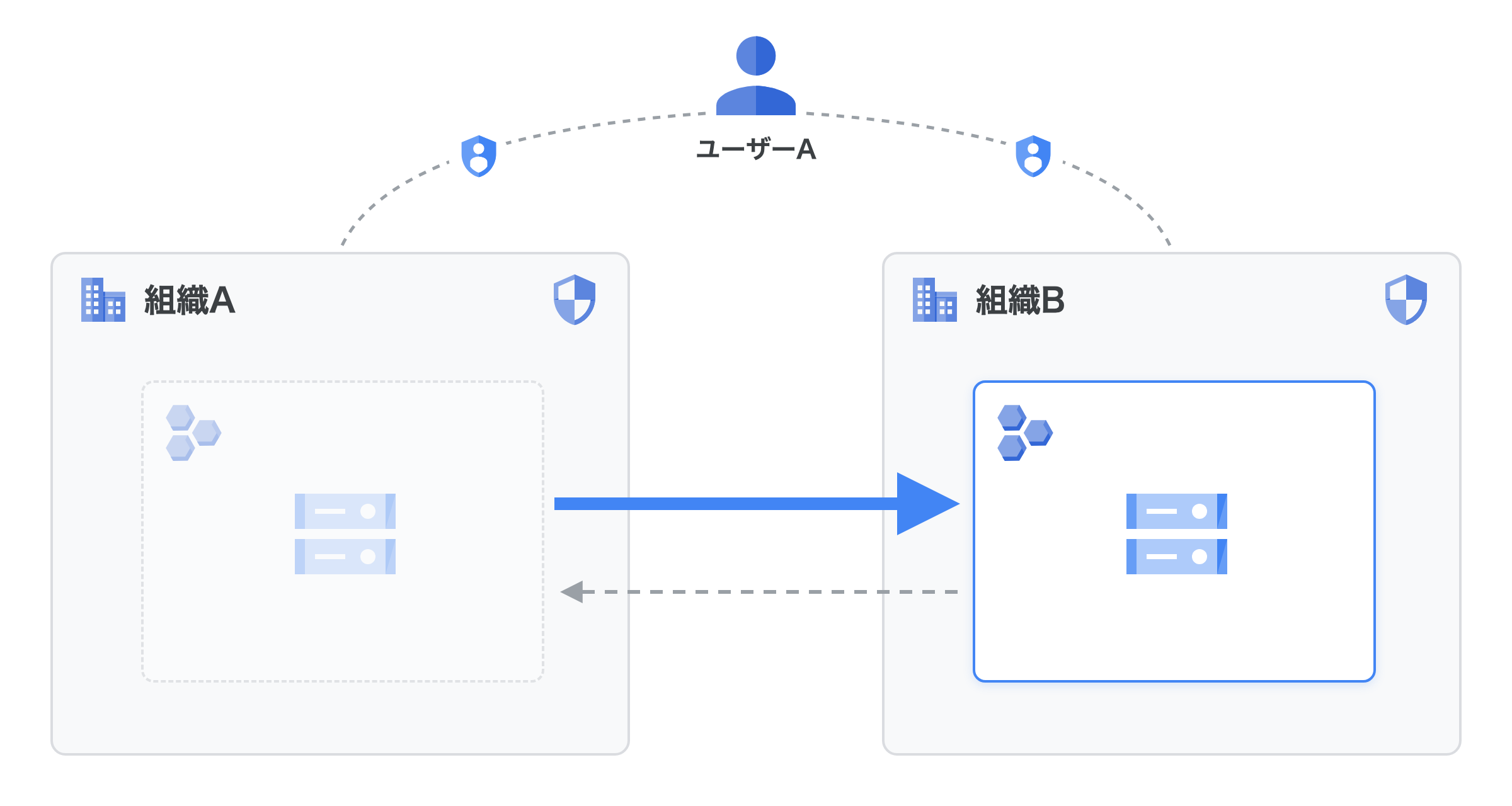
- 組織 A のプロジェクトを、組織 B へ移行する
- 移行作業はアカウント A で行う。組織 B では、アカウント B がアカウント A にロールを付与する
- gcloud は Cloud Shell から実行
- 移行するプロジェクトは検証用に作ったもので、Cloud Storage のバケットを1つだけ作る
※組織 ID・プロジェクト ID・メールアドレスは、記事内では変数またはマスクで表記しています。
スタンドアロン組織は、新しく無料トライアルに登録した Google Cloud アカウントに自動で作られる組織です。
Cloud Identity やドメインがなくても使えます。
組織は1アカウントにつき1つなので、組織を2つ用意するために Gmail アカウントを2つ使いました。
今回の構成概要図はこちらです。
公式ドキュメントをもとに、切り戻し用のロールも加味して、移行に必要なロールを選定しました。
| 付与先 | ロール | 用途 |
|---|---|---|
| 移行するプロジェクト | プロジェクト IAM 管理者(roles/resourcemanager.projectIamAdmin) | 移行・切り戻し |
| 移行するプロジェクト | Cloud Asset 閲覧者(roles/cloudasset.viewer) | 移行の分析 |
| 組織 A | プロジェクト移動者(roles/resourcemanager.projectMover) | 移行 |
| 組織 A | プロジェクト作成者(roles/resourcemanager.projectCreator) | 切り戻し |
| 組織 A | 組織ポリシー管理者(roles/orgpolicy.policyAdmin) | 移行・切り戻し |
| 組織 B | プロジェクト作成者 | 移行 |
| 組織 B | プロジェクト移動者 | 切り戻し |
| 組織 B | 組織ポリシー管理者 | 移行・切り戻し |
Cloud Shell では、以降のコマンドで使う変数を先に設定しておきます。
# 組織 ID、移行するプロジェクト、作業用アカウントを変数に設定する
export ORG_A="{組織AのID}"
export ORG_B="{組織BのID}"
export PROJECT_ID="{移行するプロジェクトID}"
export USER_A="user:{アカウントAのメールアドレス}"
組織 ID は gcloud organizations list で確認できます。
※アカウント A とアカウント B では Cloud Shell が別々なので、変数は両方の Cloud Shell で設定してください。
※USER_A には、先頭の user: まで含めて設定します。user: が抜けると、ロールの付与が Policy members must be of the form "<type>:<value>". のエラーで失敗しますので注意してください。
検証1: 組織 B でアカウント A にロールを付与する
アカウント B で Cloud Shell を開き、組織 B でアカウント A にロールを付与します。
組織外のアカウントにロールを付与するときは、ドメイン制限の組織ポリシー(constraints/iam.allowedPolicyMemberDomains)に注意が必要です。
2024年5月3日以降に作成された組織では、このポリシーが既定で有効になっていて、組織外のアカウントにロールを付与できません。
まずは、組織 B にドメイン制限が設定されているかを確認します。
# ドメイン制限の組織ポリシーの設定を表示する
gcloud org-policies describe iam.allowedPolicyMemberDomains --organization=${ORG_B}
新規で作成した組織だったので、orgpolicy.googleapis.com が有効化されていませんでした。
有効化しても良いか確認が入ったので、y を入力して、有効化します。

組織ポリシーの設定を表示しようとしたところ、NOT_FOUND でエラーとなりました。
これは組織 B ではドメイン制限が設定されていないということになります。そのため、今回はドメイン制限を外さずにロールを付与できることがわかりました。

続けて、組織 B でアカウント A にロールを付与します。
# 組織 B で、プロジェクト作成者・プロジェクト移動者・組織ポリシー管理者を付与する
for R in roles/resourcemanager.projectCreator roles/resourcemanager.projectMover roles/orgpolicy.policyAdmin; do
  gcloud organizations add-iam-policy-binding ${ORG_B} \
    --member="${USER_A}" --role="${R}" --condition=None
done
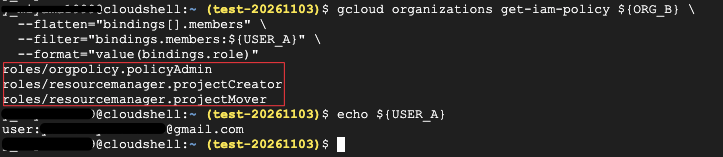
以下のコマンドで、ロールが付与されたことを確認します。
gcloud organizations get-iam-policy ${ORG_B} \
  --flatten="bindings[].members" \
  --filter="bindings.members:${USER_A}" \
  --format="value(bindings.role)"
次のロールが表示されれば成功です。
roles/orgpolicy.policyAdmin
roles/resourcemanager.projectCreator
roles/resourcemanager.projectMover
検証2: 組織 A でアカウント A にロールを付与する
ここからはアカウント A の Cloud Shell で作業します。
組織 A で必要なロールを、アカウント A 自身に付与します。
# 移行するプロジェクトで、プロジェクト IAM 管理者と Cloud Asset 閲覧者を付与する
gcloud projects add-iam-policy-binding ${PROJECT_ID} \
  --member="${USER_A}" --role="roles/resourcemanager.projectIamAdmin" --condition=None
gcloud projects add-iam-policy-binding ${PROJECT_ID} \
  --member="${USER_A}" --role="roles/cloudasset.viewer" --condition=None

# 組織 A で、プロジェクト移動者・プロジェクト作成者・組織ポリシー管理者を付与する
for R in roles/resourcemanager.projectMover roles/resourcemanager.projectCreator roles/orgpolicy.policyAdmin; do
  gcloud organizations add-iam-policy-binding ${ORG_A} \
    --member="${USER_A}" --role="${R}" --condition=None
done
付与できたかを確認します。
まずは移行するプロジェクトで、プロジェクト IAM 管理者と Cloud Asset 閲覧者を付与できたかを確認します。
gcloud projects get-iam-policy ${PROJECT_ID} \
  --flatten="bindings[].members" \
  --filter="bindings.members:${USER_A}" \
  --format="value(bindings.role)"
roles/resourcemanager.projectIamAdmin と roles/cloudasset.viewer が表示されれば成功です。
続いて、先ほどの組織 B と同様に、プロジェクト移行のためのロールが付与されているかを確認します。
gcloud organizations get-iam-policy ${ORG_A} \
  --flatten="bindings[].members" \
  --filter="bindings.members:${USER_A}" \
  --format="value(bindings.role)"
次のロールが表示されれば成功です。
roles/orgpolicy.policyAdmin
roles/resourcemanager.projectCreator
roles/resourcemanager.projectMover
組織 A では、組織を作ったときから持っている組織管理者(roles/resourcemanager.organizationAdmin)などのロールと一緒に、上の3つが表示されました。
※組織 B の確認をアカウント A で実行すると、次のエラーになりました。今回付与した3つのロールでは、組織 B の IAM ポリシーを参照できないためです。組織 B の確認は、アカウント B で行いましょう。
ERROR: (gcloud.organizations.get-iam-policy) [{アカウントAのメールアドレス}] does not have permission to access organizations instance [{組織BのID}:getIamPolicy] (or it may not exist): The caller does not have permission.
検証3: 移行を許可する組織ポリシーを両方向で設定する
組織間の移行は、組織ポリシーで許可する必要があります。
移行元の組織で constraints/resourcemanager.allowedExportDestinations、移行先の組織で constraints/resourcemanager.allowedImportSources を設定します。
今回は切り戻しも試すため、逆向きの2つもあわせて設定します。
ここからの作業は、すべてアカウント A の Cloud Shell で行います。
| 組織 | 組織ポリシー(制約) | 設定する値 | 用途 |
|---|---|---|---|
| 組織 A | resourcemanager.allowedExportDestinations |
under:organizations/${ORG_B} |
移行 |
| 組織 B | resourcemanager.allowedImportSources |
under:organizations/${ORG_A} |
移行 |
| 組織 A | resourcemanager.allowedImportSources |
under:organizations/${ORG_B} |
切り戻し |
| 組織 B | resourcemanager.allowedExportDestinations |
under:organizations/${ORG_A} |
切り戻し |
最初に、作業用のディレクトリと、作業用のプロジェクトを設定します。
組織ポリシーのコマンドは、Cloud Shell で選択中のプロジェクトを quota project(API の割り当てに使うプロジェクト)として使います。
移行するプロジェクトを選択したままだと、移行の途中でそのプロジェクトの所属組織が変わってしまうため、組織 A に残す別のプロジェクトを選択しておきます。
# 作業用のディレクトリを作って移動する
export WORK_DIR="${HOME}/org-migration"
mkdir -p "${WORK_DIR}" && cd "${WORK_DIR}"

# 移行しない作業用のプロジェクトを選択し、組織ポリシーと Cloud Asset の API を有効にする
gcloud config set project {作業用プロジェクトID}
gcloud services enable orgpolicy.googleapis.com cloudasset.googleapis.com
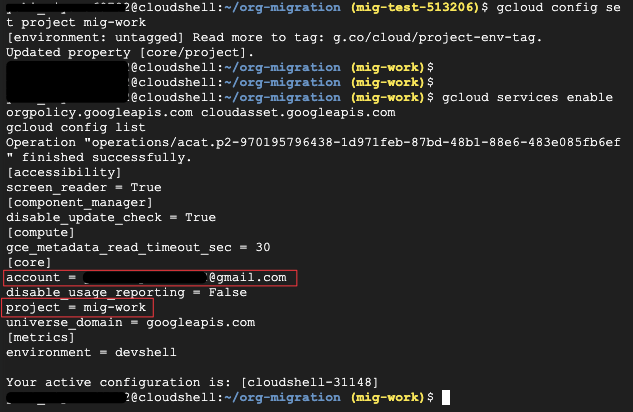
gcloud config list
account がアカウント A、project が作業用プロジェクトになっていることを確認します。
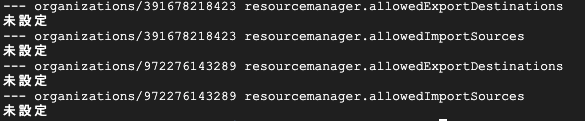
次に、この4つの組織ポリシーがすでに設定されていないかを確認します。
設定がある場合は、後片付けで元の状態へ戻すために、内容をファイルに保存しておきます。
# 移行・切り戻しで使う組織ポリシーが、両方の組織にすでに設定されていないかを確認する
for ORG in ${ORG_A} ${ORG_B}; do
  for C in resourcemanager.allowedExportDestinations resourcemanager.allowedImportSources; do
    echo "--- organizations/${ORG} ${C}"
    gcloud org-policies describe ${C} --organization=${ORG} \
      > before_${ORG}_${C}.yaml 2>&1 || echo "未設定"
  done
done
すべて未設定でした。
続けて、4つの組織ポリシーを設定します。
# 組織 A:組織 B へのエクスポートを許可(移行)
cat <<EOF > a-export.yaml
name: organizations/${ORG_A}/policies/resourcemanager.allowedExportDestinations
spec:
  rules:
    - values:
        allowedValues:
          - under:organizations/${ORG_B}
EOF
gcloud org-policies set-policy a-export.yaml

# 組織 B:組織 A からのインポートを許可(移行)
cat <<EOF > b-import.yaml
name: organizations/${ORG_B}/policies/resourcemanager.allowedImportSources
spec:
  rules:
    - values:
        allowedValues:
          - under:organizations/${ORG_A}
EOF
gcloud org-policies set-policy b-import.yaml

# 組織 A:組織 B からのインポートを許可(切り戻し)
cat <<EOF > a-import.yaml
name: organizations/${ORG_A}/policies/resourcemanager.allowedImportSources
spec:
  rules:
    - values:
        allowedValues:
          - under:organizations/${ORG_B}
EOF
gcloud org-policies set-policy a-import.yaml

# 組織 B:組織 A へのエクスポートを許可(切り戻し)
cat <<EOF > b-export.yaml
name: organizations/${ORG_B}/policies/resourcemanager.allowedExportDestinations
spec:
  rules:
    - values:
        allowedValues:
          - under:organizations/${ORG_A}
EOF
gcloud org-policies set-policy b-export.yaml
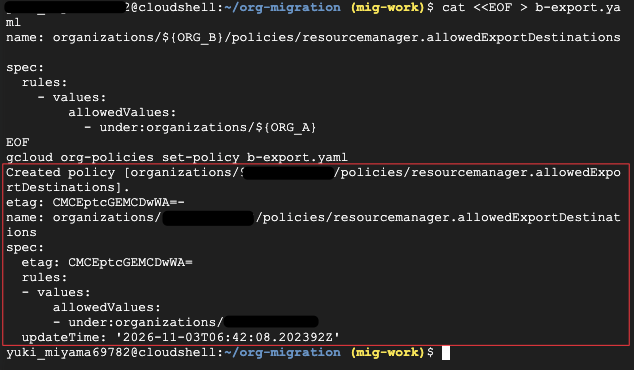
上記作業時の画面イメージは以下です。
組織ポリシーが作成されていること、作成先の組織 ID、allowedValues の under:organizations/ の組織 ID が許可する相手の組織になっていることを確認します。
例えば、以下は組織 B から組織 A へのエクスポートを許可する設定なので、組織 B に組織ポリシー policies/resourcemanager.allowedExportDestinations が作成され、エクスポート先が組織 A の ID になっていることが確認できます。(allowedValues の under:organizations/ の組織 ID が組織 A の ID と一致するかを確認しています。)
次のコマンドで一括で設定されたかを確認します。
# 組織 A・組織 B の、移行に関する組織ポリシーの許可値を表示する
for ORG in ${ORG_A} ${ORG_B}; do
  for C in resourcemanager.allowedExportDestinations resourcemanager.allowedImportSources; do
    echo "--- organizations/${ORG} ${C}"
    gcloud org-policies describe ${C} --organization=${ORG} \
      --format="value(spec.rules[].values.allowedValues)"
  done
done
次の値が表示されれば成功です。
| 組織 | 制約 | 期待する値 |
|---|---|---|
| 組織 A | resourcemanager.allowedExportDestinations |
under:organizations/{組織BのID} |
| 組織 A | resourcemanager.allowedImportSources |
under:organizations/{組織BのID} |
| 組織 B | resourcemanager.allowedExportDestinations |
under:organizations/{組織AのID} |
| 組織 B | resourcemanager.allowedImportSources |
under:organizations/{組織AのID} |
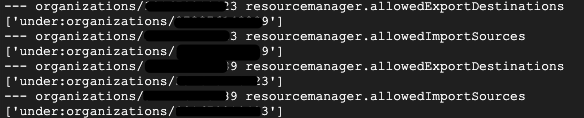
以下の画面では、ID の末尾が 3 のものが組織 A、9 のものが組織 B です。
4つの組織ポリシーの作成が成功していますね。
検証4: 移行するプロジェクトにテスト用のバケットとファイルを作る
移行したあとも、プロジェクトのリソースをこれまでどおり操作できるかを確かめたいですよね。
そこで、移行の前に Cloud Storage のバケットを1つ作り、テストファイルを置いておきます。
# バケット名を変数に設定する(バケット名は全世界で一意にする必要があるため、プロジェクト ID を含める)
export BUCKET="${PROJECT_ID}-mig-test"

# Cloud Storage の API を有効にする
gcloud services enable storage.googleapis.com --project=${PROJECT_ID}

# 移行するプロジェクトにバケットを作る
gcloud storage buckets create gs://${BUCKET} \
  --project=${PROJECT_ID} \
  --location=asia-northeast1 \
  --uniform-bucket-level-access

# テストファイルを作ってアップロードする
echo "before migration $(date)" > before.txt
gcloud storage cp before.txt gs://${BUCKET}/
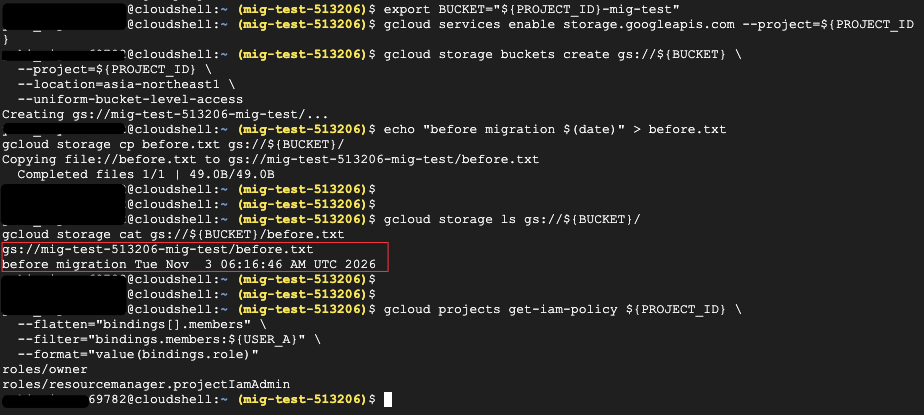
移行前の状態も記録しておきます。
# バケット内のファイルと、ファイルの中身を表示する
gcloud storage ls gs://${BUCKET}/
gcloud storage cat gs://${BUCKET}/before.txt

# 移行するプロジェクトで、アカウント A に直接付与されているロールを表示する
gcloud projects get-iam-policy ${PROJECT_ID} \
  --flatten="bindings[].members" \
  --filter="bindings.members:${USER_A}" \
  --format="value(bindings.role)"
検証5: プロジェクトを組織 B へ移行する
移行の前に、移行を妨げる設定(ブロッカー)がないかを分析します。
Cloud Asset Inventory の移行分析は、移行を実行せずに、ブロッカーと警告だけを表示してくれます。
詳細は公式ドキュメントをご確認ください。
# 移行するプロジェクトを変数に設定する
P=${PROJECT_ID}

# 組織 B への移行を分析する
gcloud asset analyze-move --project=${P} \
  --destination-organization=${ORG_B} | tee analyze-move_${P}.txt
以下が実行した結果です。
moveAnalysis:
- displayName: SERVICE USAGE
  error:
    code: 7
    message: "Failed to analyze the intended resource move. Permission 'serviceusage.effectivepolicy.get'\
      \ denied on resource(s): '//cloudresourcemanager.googleapis.com/projects/{プロジェクト番号}'\
      \ or '//cloudresourcemanager.googleapis.com/organizations/{組織BのID}'. The\
      \ resource(s) may not exist, or you may lack the required permission."
- analysis:
    warnings:
    - detail: |
        The current effective policies including inherited policies applied to the project: {移行するプロジェクトID} may no longer be effective after the migration. The current effective policies based on the current user's read permissions are:
        Policy set on projects/{移行するプロジェクトID}:
        version:         1
        etag: "\a\006_ZFS\273\374"
        bindings {
          role: "roles/cloudasset.viewer"
          members: "user:{別のアカウントのメールアドレス}"
          members: "user:{アカウントAのメールアドレス}"
        }
        bindings {
          role: "roles/owner"
          members: "user:{アカウントAのメールアドレス}"
        }
        bindings {
          role: "roles/resourcemanager.projectIamAdmin"
          members: "user:{別のアカウントのメールアドレス}"
          members: "user:{アカウントAのメールアドレス}"
        }

        Policy set on organizations/{組織AのID}:
        version:         1
        etag: "\a\006_Y\024vO\332"
        bindings {
          role: "roles/billing.admin"
          members: "user:{アカウントAのメールアドレス}"
        }
        bindings {
          role: "roles/billing.creator"
          members: "user:{アカウントAのメールアドレス}"
        }
        bindings {
          role: "roles/iam.workforcePoolAdmin"
          members: "user:{アカウントAのメールアドレス}"
        }
        bindings {
          role: "roles/orgpolicy.policyAdmin"
          members: "user:{別のアカウントのメールアドレス}"
          members: "user:{アカウントAのメールアドレス}"
        }
        bindings {
          role: "roles/resourcemanager.organizationAdmin"
          members: "user:{アカウントAのメールアドレス}"
        }
        bindings {
          role: "roles/resourcemanager.projectCreator"
          members: "user:{別のアカウントのメールアドレス}"
          members: "user:{アカウントAのメールアドレス}"
        }
        bindings {
          role: "roles/resourcemanager.projectMover"
          members: "user:{別のアカウントのメールアドレス}"
          members: "user:{アカウントAのメールアドレス}"
        }
        bindings {
          role: "roles/serviceusage.serviceUsageAdmin"
          members: "user:{アカウントAのメールアドレス}"
        }
  displayName: IAM
- analysis:
    warnings:
    - detail: |-
        Any organization policy constraints inherited from ancestor resources may no longer be effective after the migration. Currently, the merged effective Org Policies including explicit and inherited policies applied on project {移行するプロジェクトID} are:
        [constraint:     "constraints/resourcemanager.allowedExportDestinations"
        list_policy {
          allowed_values: "under:organizations/{組織BのID}"
        }
        , constraint:    "constraints/compute.restrictProtocolForwardingCreationForTypes"
        list_policy {
          allowed_values: "INTERNAL"
        }
        , constraint:    "constraints/storage.uniformBucketLevelAccess"
        boolean_policy {
          enforced: true
        }
        , constraint:    "constraints/resourcemanager.allowedImportSources"
        list_policy {
          allowed_values: "under:organizations/{組織BのID}"
        }
        , constraint:    "constraints/iam.disableServiceAccountKeyUpload"
        boolean_policy {
          enforced: true
        }
        , constraint:    "constraints/iam.disableServiceAccountKeyCreation"
        boolean_policy {
          enforced: true
        }
        , constraint:    "constraints/iam.automaticIamGrantsForDefaultServiceAccounts"
        boolean_policy {
          enforced: true
        }
        , constraint:    "constraints/compute.setNewProjectDefaultToZonalDNSOnly"
        boolean_policy {
          enforced: true
        }
        ]
  displayName: ORGANIZATION POLICY
- analysis:
    warnings:
    - detail: 'Moving project: {移行するプロジェクトID} from its current location in the resource
        hierarchy might result in lower quota limits. The position of a project in
        the resource hierarchy might determine its default quota limits.'
  displayName: QUOTAS
- displayName: HIERARCHICAL FIREWALL POLICIES
  error:
    code: 7
    message: Failed to retrieve inherited firewall policies to perform analysis. Required
      'compute.organizations.listAssociations' permission for 'organizations/{組織AのID}'
- analysis:
    warnings:
    - detail: Moving this project will impact the access granted by the PAM grant(s)
        that are scoped to this project from the parent folder/organization. For more
        details, visit https://cloud.google.com/resource-manager/docs/handle-special-cases.
  displayName: Privileged Access Manager
{ユーザー名}@cloudshell:~/org-migration ({作業用プロジェクトID})$
※メールアドレス・組織 ID・プロジェクト ID・プロジェクト番号はマスクしています。「別のアカウント」は、以前に同じプロジェクトで別の検証をしたときに付与したもので、今回の手順とは関係ありません。
出力が長いので、見方を整理しておきます。
結果は moveAnalysis の下に、displayName(サービス名)ごとに並びます。
サービスごとに、次の3種類のどれかが出力されます。
| 項目 | 意味 |
|---|---|
analysis.blockers |
移行を妨げる設定です。解消しないまま移行すると、移行が失敗します |
analysis.warnings |
移行後に影響が出るかもしれない点です。移行自体は妨げません |
error |
そのサービスを分析できなかったことを表します。code: 7 は、分析に必要な権限が足りないときに返ります |
まずは blockers が出ていないかを確認し、次に warnings と error を確認する、という順で見るとわかりやすいです。
今回の結果は次のとおりでした。
| サービス | 結果 | 内容 |
|---|---|---|
| SERVICE USAGE | エラー(code: 7) |
serviceusage.effectivepolicy.get の権限がなく、分析できなかった |
| IAM | 警告 | 組織から継承している IAM は、移行後は適用されなくなる場合がある。今プロジェクトと組織 A に設定されている IAM の一覧も出力される |
| ORGANIZATION POLICY | 警告 | 組織から継承している組織ポリシーは、移行後は適用されなくなる場合がある。今プロジェクトに適用されている組織ポリシーの一覧も出力される |
| QUOTAS | 警告 | リソース階層の位置が変わることで、割り当ての上限が下がる場合がある |
| HIERARCHICAL FIREWALL POLICIES | エラー(code: 7) |
組織 A で compute.organizations.listAssociations の権限がなく、分析できなかった |
| Privileged Access Manager | 警告 | 親の組織・フォルダで、このプロジェクトを対象にした PAM の付与がある場合は影響を受ける |
blockers はどのサービスにも出ていなかったので、移行を妨げる設定はないと判断して進めました。
ORGANIZATION POLICY の一覧には、検証3で組織 A に設定した resourcemanager.allowedExportDestinations と resourcemanager.allowedImportSources(どちらも under:organizations/{組織BのID})が出ていました。
移行を許可する組織ポリシーが、プロジェクトに適用されていることもここで確認できます。
ただし、組織 A の組織管理者であるアカウント A でも、2つのサービスは権限不足で分析できませんでした。
公式ドキュメントにも、サービスごとに分析に必要な権限が別にあると書かれています。
error になったサービスは分析結果からは判断できないため、階層型ファイアウォール ポリシーを使っていないかなどを別に確認しておきましょう。
※移行の分析は、移行元のプロジェクトだけを分析します。移行先の組織はチェックしないため、移行先の組織ポリシーで移行後に何が制限されるかは、この分析ではわかりません。詳細は公式ドキュメントをご確認ください。
続けて、プロジェクトの親、IAM、適用されている組織ポリシーをファイルに記録しておきます。
移行後の確認と、切り戻すかどうかの判断に使います。
# 移行前の親、IAM、組織ポリシーを記録する
gcloud projects describe ${P} --format="value(parent)" | tee parent_before_${P}.txt
gcloud projects get-iam-policy ${P} --format=json > iam_before_${P}.json
gcloud org-policies list --project=${P} --show-unset > orgpolicy_before_${P}.txt
親は id={組織AのID};type=organization でした。

いよいよ移行です。
# プロジェクトを組織 B へ移行する
gcloud beta projects move ${P} --organization=${ORG_B}
移行を実行すると、次の確認のメッセージが表示されました。
Your project will be moved. This may alter the policies enforced on your Project, either exposing your Project to more security risk through looser polices or cause an outage through stricter polices.
See these public notes on policy implications for more information: https://cloud.google.com/resource-manager/docs/creating-managing-folders#moving-folders-policy-considerations and
https://cloud.google.com/resource-manager/docs/migrating-projects-billing#note_on_policy_implications. Once moved, you can move the Project again so long as you have the appropriate permissions. See our
 public documentation for more information: https://cloud.google.com/resource-manager/docs/creating-managing-folders#moving_a_project_into_a_folder
書かれているのは次の3点です。
- プロジェクトを移行すると、プロジェクトに適用されるポリシーが変わる
- 移行先のポリシーが緩ければセキュリティ上のリスクが増え、厳しければ今まで動いていたものが止まることがある
- 移行したあとも、必要な権限があれば、プロジェクトをもう一度移動できる
3点目は、切り戻しができることを言っています。
今回は検証3で切り戻し用の組織ポリシーも設定し、切り戻しに必要なロールも付与しているので、この条件を満たしています。
Y を押下して、実行します。
数秒でコマンドは正常実行されました。

移行後の状態を確認します。
# 親が組織 B になっていることを確認する
gcloud projects describe ${P} --format="value(parent)"

# IAM が移行前と同じであることを確認する(差分が etag 行だけなら問題なし)
gcloud projects get-iam-policy ${P} --format=json > iam_after_${P}.json
diff iam_before_${P}.json iam_after_${P}.json

# 移行後に適用される組織ポリシーを記録する
gcloud org-policies list --project=${P} --show-unset > orgpolicy_after_${P}.txt
組織 ID の末尾が 9 になっていることから、組織 B に移行されたことがわかります。

IAM の移行前後の差分も、etag の行だけであることが確認できました。

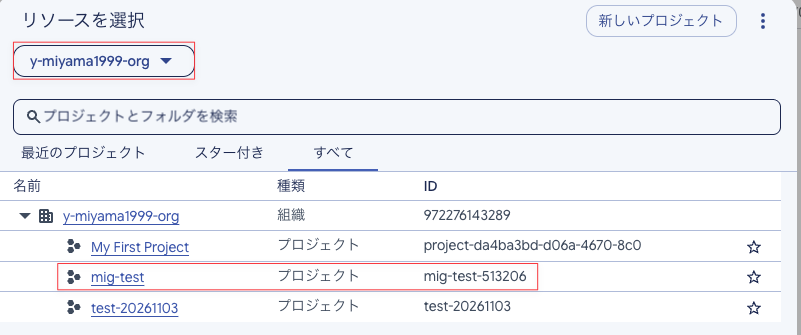
コンソールからも、組織 B 配下に、移行したプロジェクト mig-test があることが確認できました。
検証6: 移行後もアカウント A でバケットのファイルを操作できるか確認する
移行で引き継がれるのは、プロジェクトに直接付与したロールです。
組織やフォルダから継承していたロールは、移行すると外れます。
詳細は公式ドキュメントをご確認ください。
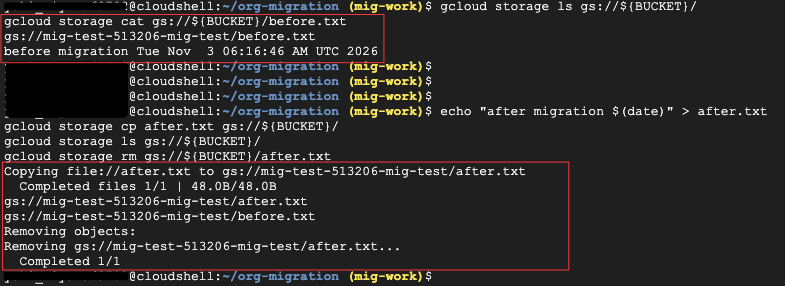
アカウント A の Cloud Shell で、移行前に置いたファイルが残っているか、読み取り・書き込み・削除ができるかを確認します。
# 移行前のファイルが残っているか、中身を読めるかを確認する
gcloud storage ls gs://${BUCKET}/
gcloud storage cat gs://${BUCKET}/before.txt

# 移行後も書き込みと削除ができるかを確認する
echo "after migration $(date)" > after.txt
gcloud storage cp after.txt gs://${BUCKET}/
gcloud storage ls gs://${BUCKET}/
gcloud storage rm gs://${BUCKET}/after.txt
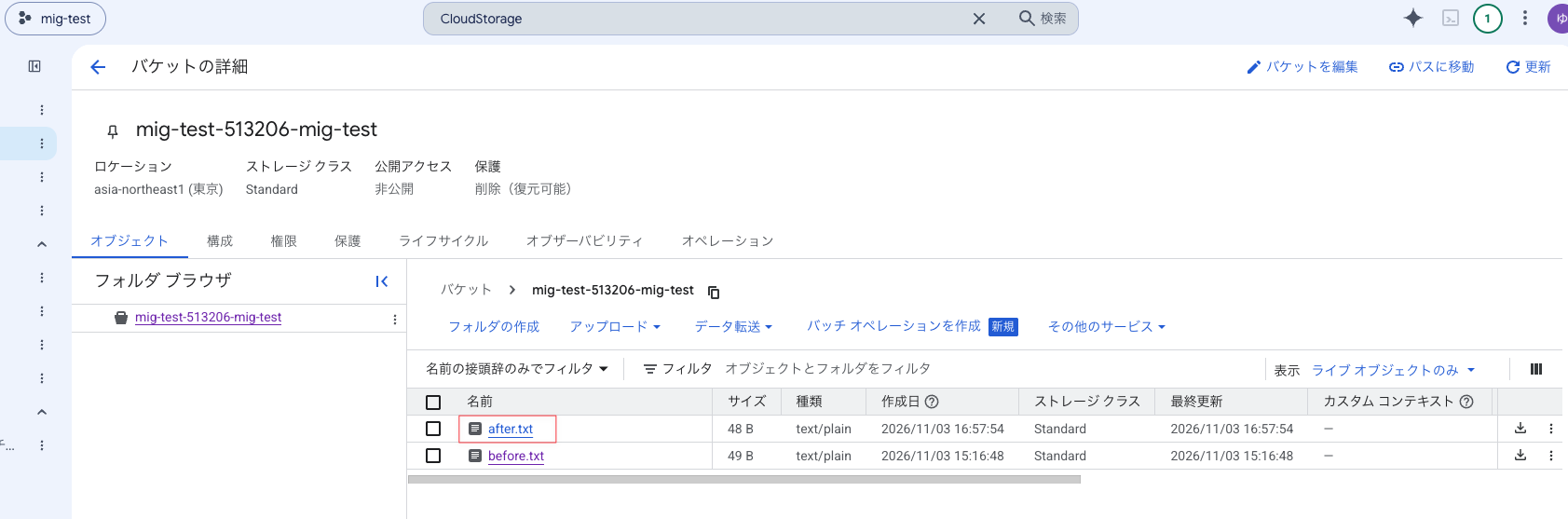
移行前に置いた before.txt は残っていて、中身もそのまま読めました。after.txt の書き込みと削除もできました。
コンソール上からも確認できました。(アカウント A で、移行したプロジェクト mig-test に入っています。)
検証7: プロジェクトを組織 A へ戻す
組織間の移行には、自動で元に戻す機能はありません。
切り戻すときは、移行元と移行先を入れ替えて、もう一度移行します。
検証3で逆向きの組織ポリシーも設定しているので、移行先を組織 A に変えるだけで実行できます。
移行前に記録した親を確認してから戻します。
# 移行前の親を表示する
cat parent_before_${P}.txt

# プロジェクトを組織 A へ戻す
gcloud beta projects move ${P} --organization=${ORG_A}

戻したあとの状態を確認します。
# 親が組織 A に戻ったことを確認する
gcloud projects describe ${P} --format="value(parent)"

# IAM が移行前と同じであることを確認する(差分が etag 行だけなら問題なし)
gcloud projects get-iam-policy ${P} --format=json > iam_rollback_${P}.json
diff iam_before_${P}.json iam_rollback_${P}.json
親が id={組織AのID};type=organization に戻りました。IAM の差分は etag の行だけでした。


検証8: 組織ポリシーとロールを削除する
最後に後片付けです。
移行を許可する組織ポリシーを残したままにすると、その組織との間でいつでも移行できる状態が続きます。
ロールも、作業が終わったら外しておきましょう。
先に組織ポリシーを削除します。
ロールを先に外すと、組織ポリシー管理者のロールがなくなって削除できなくなるためです。
# 移行・切り戻しを許可する4つの組織ポリシーを削除する
gcloud org-policies delete resourcemanager.allowedExportDestinations --organization=${ORG_A}
gcloud org-policies delete resourcemanager.allowedImportSources --organization=${ORG_A}
gcloud org-policies delete resourcemanager.allowedExportDestinations --organization=${ORG_B}
gcloud org-policies delete resourcemanager.allowedImportSources --organization=${ORG_B}

削除されたことを確認します。
# 4つの組織ポリシーが削除されたことを確認する
for ORG in ${ORG_A} ${ORG_B}; do
  for C in resourcemanager.allowedExportDestinations resourcemanager.allowedImportSources; do
    echo "--- organizations/${ORG} ${C}"
    gcloud org-policies describe ${C} --organization=${ORG} 2>&1 | head -1
  done
done
NOT_FOUND と表示されれば削除されています。

※移行前から設定があった組織ポリシーは、削除せずに、検証3で保存したファイル(before_*.yaml)の内容へ戻します。検証3で「未設定」だった場合は、削除だけで元の状態に戻ります。
続けて、アカウント A に付与したロールを削除します。
組織 B のロールは、アカウント B の Cloud Shell で削除します。
# 組織 B で、アカウント A のロールを削除する(アカウント B で実行)
for R in roles/resourcemanager.projectCreator roles/resourcemanager.projectMover roles/orgpolicy.policyAdmin; do
  gcloud organizations remove-iam-policy-binding ${ORG_B} \
    --member="${USER_A}" --role="${R}" --condition=None
done
以下のコマンドを実行して、エラーにならず何も表示されなければ、ロールの削除は成功です。
gcloud organizations get-iam-policy ${ORG_B} \
  --flatten="bindings[].members" \
  --filter="bindings.members:${USER_A}" \
  --format="value(bindings.role)"
ロールの削除が成功しました。

組織 A のロールとプロジェクトのロールは、アカウント A の Cloud Shell で削除します。
# 組織 A で、アカウント A のロールを削除する(アカウント A で実行)
for R in roles/resourcemanager.projectMover roles/resourcemanager.projectCreator roles/orgpolicy.policyAdmin; do
  gcloud organizations remove-iam-policy-binding ${ORG_A} \
    --member="${USER_A}" --role="${R}" --condition=None
done

# 移行したプロジェクトで、プロジェクト IAM 管理者と Cloud Asset 閲覧者を削除する
gcloud projects remove-iam-policy-binding ${PROJECT_ID} \
  --member="${USER_A}" --role="roles/resourcemanager.projectIamAdmin" --condition=None
gcloud projects remove-iam-policy-binding ${PROJECT_ID} \
  --member="${USER_A}" --role="roles/cloudasset.viewer" --condition=None

以下のコマンドで、ロールが表示されなくなったことを確認します。
gcloud organizations get-iam-policy ${ORG_A} \
  --flatten="bindings[].members" \
  --filter="bindings.members:${USER_A}" \
  --format="value(bindings.role)"
今回の検証で付与したロールが削除され、表示されなくなったことを確認しました。

テスト用のバケットも削除しておきます。
# テスト用のバケットを、中のファイルごと削除する
gcloud storage rm --recursive gs://${BUCKET}
まとめ
今回は、Gmail アカウント2つで作ったスタンドアロン組織を使って、組織間のプロジェクト移行を、ロール付与から後片付けまで通しで試してみました。
移行のコマンド自体は1行ですが、その前に両方の組織でロールと組織ポリシーをそろえる必要があります。
組織の管理は必ずしも1つの部署やチームで行っているとは限らないので、移行先の組織の管理者の方に何をお願いするかを、事前に整理しておくのが大事だなと改めて思いました!
また、切り戻しも移行と同じ準備が要るので、最初から両方向で設定しておくと安心です。
基本的には、組織間移行によって、プロジェクト上のリソースは影響を受けないので、その点は移行のハードルが下がるなと思いました。
一方で、移行先の組織の組織ポリシーによる影響や、移行元の組織で、組織単位、フォルダ単位で IAM を継承している場合には、移行により一部機能の停止や運用作業が妨げられる可能性があるので、事前の影響範囲の整理と対策は重要だと思います。
少しでも、移行に不安がある方は、是非一度弊社までお問い合わせください!
この記事が少しでも多くの方の参考になれば幸いです。
以上、コンサルティング部のみゃんでした!
参考リンク