RDSの定期再起動をEventBridge Scheduler + SSM Automationで自動化する

2026.01.08
はじめに
RDSを定期的に再起動する仕組みを EventBridge Scheduler + SSM Automationで作成します。
この構成にすることでプログラミングすることなく構築できます。
再起動する目的はリフレッシュのためです。再起動中はDBに接続できません。
以下のようなフローになります。
- EventBridge Scheduler が指定したスケジュール(デフォルト: 毎日0時)でトリガーします。
- AWSマネージドのSSM Automationドキュメント AWS-RebootRdsInstance を呼び出します。
- 指定したRDSインスタンスが再起動されます。
CloudFormationテンプレート
必要なリソースを作成する CloudFormation テンプレートは以下になります。
パラメータ
AWS-RebootRdsInstance で指定できる DB インスタンス識別子は1つです。複数インスタンスを再起動したい場合はスタックを複数作成してください。
参考
| パラメータ名 | 型 | デフォルト値 | 説明 |
|---|---|---|---|
| RdsInstanceId | String | - | 再起動対象のRDS DBインスタンス識別子 |
| ScheduleExpression | String | cron(0 0 * * ? *) |
再起動スケジュール(デフォルト: 毎日00:00) |
| ScheduleTimezone | String | Asia/Tokyo |
スケジュール式のタイムゾーン |
作成されるリソース
| 論理ID | リソースタイプ | リソース名 | 説明 |
|---|---|---|---|
| SSMAutomationRole | AWS::IAM::Role | ${AWS::StackName}-rds-reboot-automation-role |
SSM AutomationがRDSを再起動するためのIAMロール |
| SchedulerExecutionRole | AWS::IAM::Role | ${AWS::StackName}-rds-reboot-scheduler-role |
EventBridge SchedulerがSSM Automationを起動するためのIAMロール |
| RdsRebootSchedule | AWS::Scheduler::Schedule | rds-reboot-${RdsInstanceId} |
定期的にRDS再起動を実行するEventBridgeスケジュール |
{
  "AWSTemplateFormatVersion": "2010-09-09",
  "Description": "EventBridge Scheduler to periodically reboot RDS instance using SSM Automation",
  "Parameters": {
    "RdsInstanceId": {
      "Type": "String",
      "Description": "The identifier of the RDS DB instance to reboot"
    },
    "ScheduleExpression": {
      "Type": "String",
      "Default": "cron(0 0 * * ? *)",
      "Description": "Schedule expression for the reboot (default: every day at 00:00)"
    },
    "ScheduleTimezone": {
      "Type": "String",
      "Default": "Asia/Tokyo",
      "Description": "Timezone for the schedule expression"
    }
  },
  "Resources": {
    "SSMAutomationRole": {
      "Type": "AWS::IAM::Role",
      "Properties": {
        "RoleName": {
          "Fn::Sub": "${AWS::StackName}-rds-reboot-automation-role"
        },
        "AssumeRolePolicyDocument": {
          "Version": "2012-10-17",
          "Statement": [
            {
              "Effect": "Allow",
              "Principal": {
                "Service": "ssm.amazonaws.com"
              },
              "Action": "sts:AssumeRole"
            }
          ]
        },
        "Policies": [
          {
            "PolicyName": "RdsRebootPolicy",
            "PolicyDocument": {
              "Version": "2012-10-17",
              "Statement": [
                {
                  "Effect": "Allow",
                  "Action": [
                    "rds:RebootDBInstance",
                    "rds:DescribeDBInstances"
                  ],
                  "Resource": {
                    "Fn::Sub": "arn:aws:rds:${AWS::Region}:${AWS::AccountId}:db:${RdsInstanceId}"
                  }
                }
              ]
            }
          }
        ]
      }
    },
    "SchedulerExecutionRole": {
      "Type": "AWS::IAM::Role",
      "Properties": {
        "RoleName": {
          "Fn::Sub": "${AWS::StackName}-rds-reboot-scheduler-role"
        },
        "AssumeRolePolicyDocument": {
          "Version": "2012-10-17",
          "Statement": [
            {
              "Effect": "Allow",
              "Principal": {
                "Service": "scheduler.amazonaws.com"
              },
              "Action": "sts:AssumeRole"
            }
          ]
        },
        "Policies": [
          {
            "PolicyName": "StartAutomationPolicy",
            "PolicyDocument": {
              "Version": "2012-10-17",
              "Statement": [
                {
                  "Effect": "Allow",
                  "Action": "ssm:StartAutomationExecution",
                  "Resource": {
                    "Fn::Sub": "arn:aws:ssm:${AWS::Region}:*:automation-definition/AWS-RebootRdsInstance:*"
                  }
                },
                {
                  "Effect": "Allow",
                  "Action": "iam:PassRole",
                  "Resource": {
                    "Fn::GetAtt": ["SSMAutomationRole", "Arn"]
                  },
                  "Condition": {
                    "StringEquals": {
                      "iam:PassedToService": "ssm.amazonaws.com"
                    }
                  }
                }
              ]
            }
          }
        ]
      }
    },
    "RdsRebootSchedule": {
      "Type": "AWS::Scheduler::Schedule",
      "Properties": {
        "Name": {
          "Fn::Sub": "rds-reboot-${RdsInstanceId}"
        },
        "Description": {
          "Fn::Sub": "Periodic reboot schedule for RDS instance ${RdsInstanceId}"
        },
        "ScheduleExpression": {
          "Ref": "ScheduleExpression"
        },
        "ScheduleExpressionTimezone": {
          "Ref": "ScheduleTimezone"
        },
        "FlexibleTimeWindow": {
          "Mode": "OFF"
        },
        "State": "ENABLED",
        "Target": {
          "Arn": "arn:aws:scheduler:::aws-sdk:ssm:startAutomationExecution",
          "RoleArn": {
            "Fn::GetAtt": ["SchedulerExecutionRole", "Arn"]
          },
          "Input": {
            "Fn::Sub": "{\"DocumentName\":\"AWS-RebootRdsInstance\",\"Parameters\":{\"InstanceId\":[\"${RdsInstanceId}\"],\"AutomationAssumeRole\":[\"${SSMAutomationRole.Arn}\"]}}"
          }
        }
      }
    }
  },
  "Outputs": {
    "SSMAutomationRoleArn": {
      "Description": "ARN of the IAM role used by SSM Automation",
      "Value": {
        "Fn::GetAtt": ["SSMAutomationRole", "Arn"]
      }
    },
    "SchedulerExecutionRoleArn": {
      "Description": "ARN of the IAM role used by EventBridge Scheduler",
      "Value": {
        "Fn::GetAtt": ["SchedulerExecutionRole", "Arn"]
      }
    },
    "ScheduleName": {
      "Description": "Name of the EventBridge Schedule",
      "Value": {
        "Ref": "RdsRebootSchedule"
      }
    }
  }
}
動作確認
最後に動作を確認する方法は以下です。
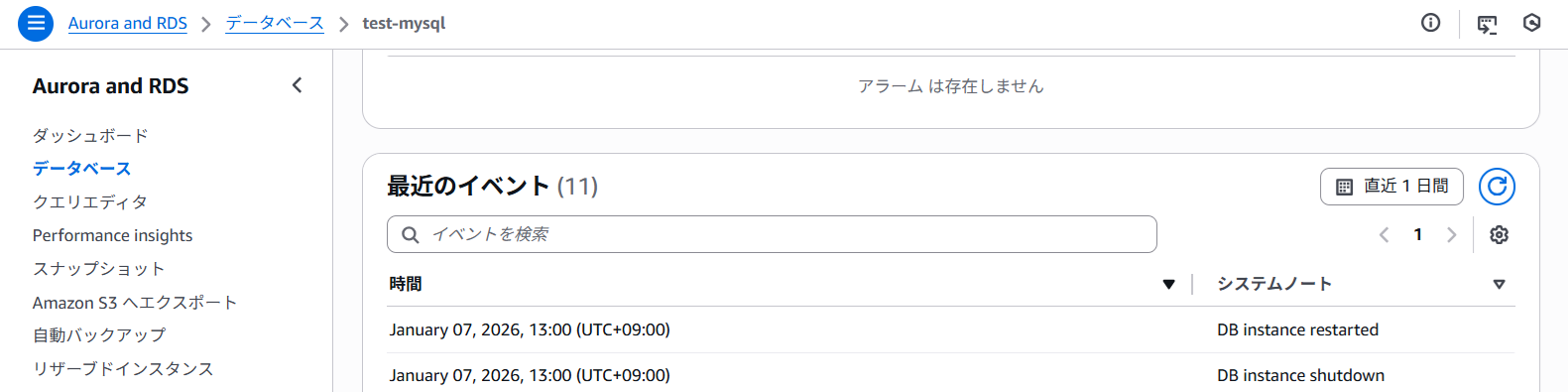
RDSコンソールの「ログとイベント」で DB instance restarted を確認します。
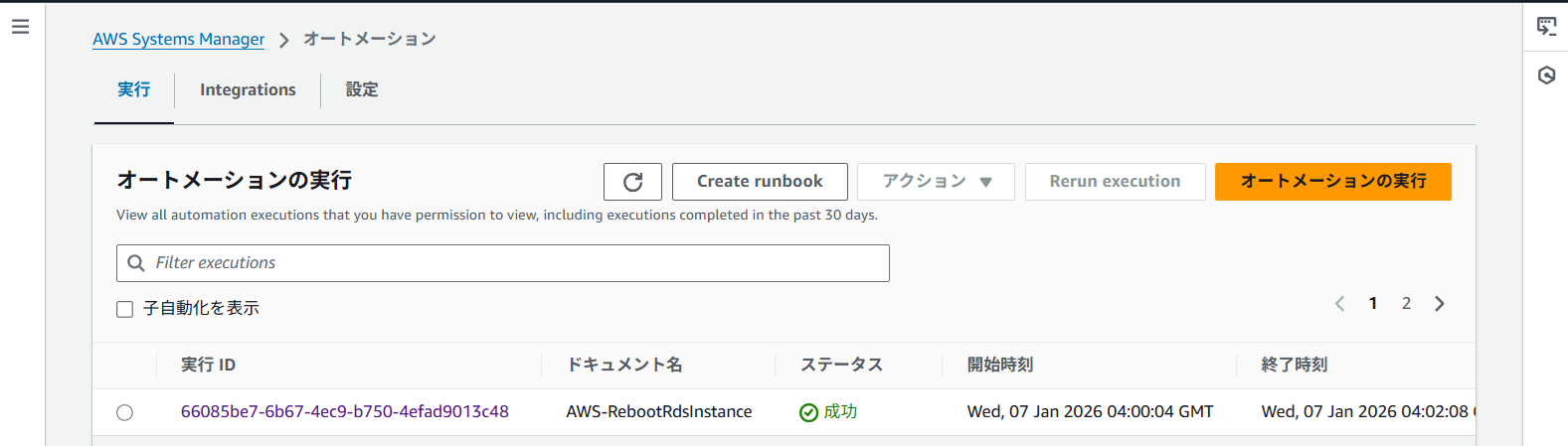
または Systems Manager → オートメーション → 実行履歴で AWS-RebootRdsInstance の実行を確認します。