SageMaker Endpoint に YOLO26 をホストしてみる

こんにちは!コンサルティング部のくろすけです!
SageMaker Endpoint に YOLO26 の物体検出モデルをホストし、画像を送信して推論結果を取得するまでを試してみました。
概要
実施内容は大きく以下です。
- SageMaker 用の推論コンテナを作成
serve.pyで/pingと/invocationsを実装best.ptにmodel.tar.gzにまとめて S3 にアップロード- コンテナイメージを Amazon ECR に push
- SageMaker Serverless Inference のエンドポイントとしてデプロイ
- SageMaker Runtime から画像を送って推論結果を確認
やってみた
1. 推論コンテナを用意する
Dockerfile では、python:3.11-slim をベースにして、YOLO の推論に必要なライブラリと serve.py をコンテナへ含めています。
FROM python:3.11-slim

ENV PYTHONDONTWRITEBYTECODE=1 \
    PYTHONUNBUFFERED=1 \
    MODEL_PATH=/opt/ml/model/best.pt \
    CONFIDENCE_THRESHOLD=0.25 \
    IMAGE_SIZE=640

WORKDIR /opt/program

COPY requirements.txt .
RUN apt-get update \
    && apt-get install -y --no-install-recommends \
        libgl1 \
        libglib2.0-0 \
    && rm -rf /var/lib/apt/lists/* \
    && pip install --no-cache-dir -r requirements.txt

COPY serve.py .

EXPOSE 8080

ENTRYPOINT ["python", "serve.py"]
モデルファイルはイメージに焼き込まないようにしています。
SageMaker は S3 上の model.tar.gz をエンドポイント起動時に /opt/ml/model 配下へ展開します。
そのため、コンテナ側では MODEL_PATH=/opt/ml/model/best.pt を参照するようにしています。
依存関係は requirements.txt にまとめています。
--index-url https://download.pytorch.org/whl/cpu
--extra-index-url https://pypi.org/simple

torch==2.2.2
torchvision==0.17.2
numpy<2
ultralytics
opencv-python-headless
CPU 用の PyTorch wheel を使うため、--index-url https://download.pytorch.org/whl/cpu を指定しています。
2. SageMaker 互換のエンドポイントを実装する
SageMaker の推論コンテナでは、ヘルスチェック用の /ping と推論用の /invocations を実装します。
今回は http.server を使ってシンプルな HTTP サーバーを立てました。
最低限必要なのは以下です。
- 8080 番ポートで待ち受ける
/pingでモデルを読み込めるか確認する/invocationsで画像を受け取り、推論結果を返す- モデルファイルは
/opt/ml/model/best.ptから読み込む
serve.py としてまとめると、以下のような形になります。
import json
import os
from http.server import BaseHTTPRequestHandler, HTTPServer
from typing import Any

import cv2
import numpy as np
import torch
from ultralytics import YOLO

MODEL_PATH = os.environ.get("MODEL_PATH", "/opt/ml/model/best.pt")
CONFIDENCE_THRESHOLD = float(os.environ.get("CONFIDENCE_THRESHOLD", "0.25"))
IMAGE_SIZE = int(os.environ.get("IMAGE_SIZE", "640"))

model: YOLO | None = None

def load_model() -> YOLO:
    global model
    if model is None:
        if not os.path.exists(MODEL_PATH):
            raise FileNotFoundError(f"Model file not found: {MODEL_PATH}")
        model = YOLO(MODEL_PATH)
        if torch.cuda.is_available():
            model.to("cuda")
    return model

def decode_image(body: bytes, content_type: str) -> np.ndarray:
    if content_type not in {"image/jpeg", "image/png", "application/octet-stream"}:
        raise ValueError(f"Unsupported content type: {content_type}")

    image_array = np.frombuffer(body, dtype=np.uint8)
    image = cv2.imdecode(image_array, flags=cv2.IMREAD_COLOR)
    if image is None:
        raise ValueError("Failed to decode request body as image")
    return image

def serialize_result(result: Any) -> dict[str, Any]:
    boxes = result.boxes
    if boxes is None or len(boxes) == 0:
        return {"detections": []}

    detections = []
    for box in boxes:
        class_id = int(box.cls[0])
        detections.append(
            {
                "label": result.names[class_id],
                "class_id": class_id,
                "confidence": float(box.conf[0]),
                "box": [float(value) for value in box.xyxy[0].tolist()],
            }
        )
    return {"detections": detections}

class SageMakerHandler(BaseHTTPRequestHandler):
    def do_GET(self) -> None:
        if self.path != "/ping":
            self.send_json({"error": "Not found"}, status=404)
            return

        try:
            load_model()
        except Exception as exc:
            self.send_json({"error": str(exc)}, status=503)
            return

        self.send_json({"status": "OK"}, status=200)

    def do_POST(self) -> None:
        if self.path != "/invocations":
            self.send_json({"error": "Not found"}, status=404)
            return

        try:
            content_length = int(self.headers.get("Content-Length", "0"))
            body = self.rfile.read(content_length)
            content_type = self.headers.get("Content-Type", "")
            image = decode_image(body, content_type)

            predictions = load_model().predict(
                image,
                conf=CONFIDENCE_THRESHOLD,
                imgsz=IMAGE_SIZE,
                verbose=False,
            )
            self.send_json(serialize_result(predictions[0]), status=200)
        except Exception as exc:
            self.send_json({"error": str(exc)}, status=400)

    def send_json(self, body: dict[str, Any], status: int) -> None:
        encoded = json.dumps(body).encode("utf-8")
        self.send_response(status)
        self.send_header("Content-Type", "application/json")
        self.send_header("Content-Length", str(len(encoded)))
        self.end_headers()
        self.wfile.write(encoded)

if __name__ == "__main__":
    server = HTTPServer(("0.0.0.0", 8080), SageMakerHandler)
    server.serve_forever()
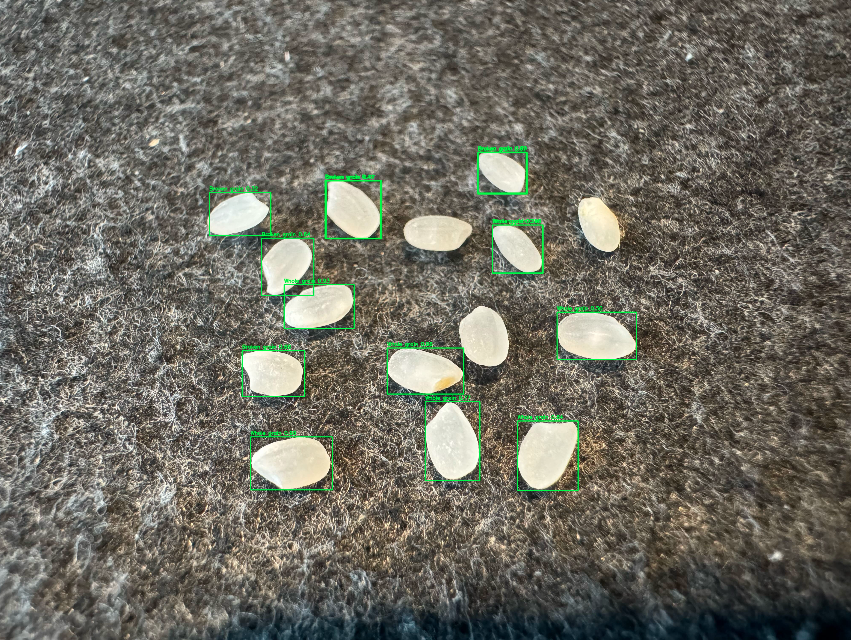
実際の serve.py では、Accept: image/jpeg を指定した場合に検出結果を描画した JPEG を返す処理も追加しています。
3. モデルアーティファクトを作成する
モデルファイルはコンテナイメージに含めず、SageMaker のモデルアーティファクトとして S3 に配置します。
serve.py では /opt/ml/model/best.pt を参照しているため、model.tar.gz の中に best.pt が含まれている必要があります。
tar -czvf model.tar.gz best.pt
aws s3 cp model.tar.gz s3://<S3_BUCKET_NAME>/<S3_KEY>/model.tar.gz
4. コンテナイメージをビルドして ECR に push する
Docker イメージをビルドします。
自分はmacOSで実行しているので、--platform linux/amd64 を指定しています。
docker build --platform linux/amd64 -t sagemaker/krsk-test/rice-detect .
ビルドしたイメージは Amazon ECR に push し、SageMaker Model のコンテナイメージとして指定します。
aws ecr create-repository \
  --repository-name sagemaker/krsk-test/rice-detect \
  --region ap-northeast-1

aws ecr get-login-password --region ap-northeast-1 \
  | docker login --username AWS --password-stdin <account-id>.dkr.ecr.ap-northeast-1.amazonaws.com

docker tag sagemaker/krsk-test/rice-detect:latest \
  <account-id>.dkr.ecr.ap-northeast-1.amazonaws.com/sagemaker/krsk-test/rice-detect:latest

docker push <account-id>.dkr.ecr.ap-northeast-1.amazonaws.com/sagemaker/krsk-test/rice-detect:latest
5. SageMaker Serverless Endpoint を作成する
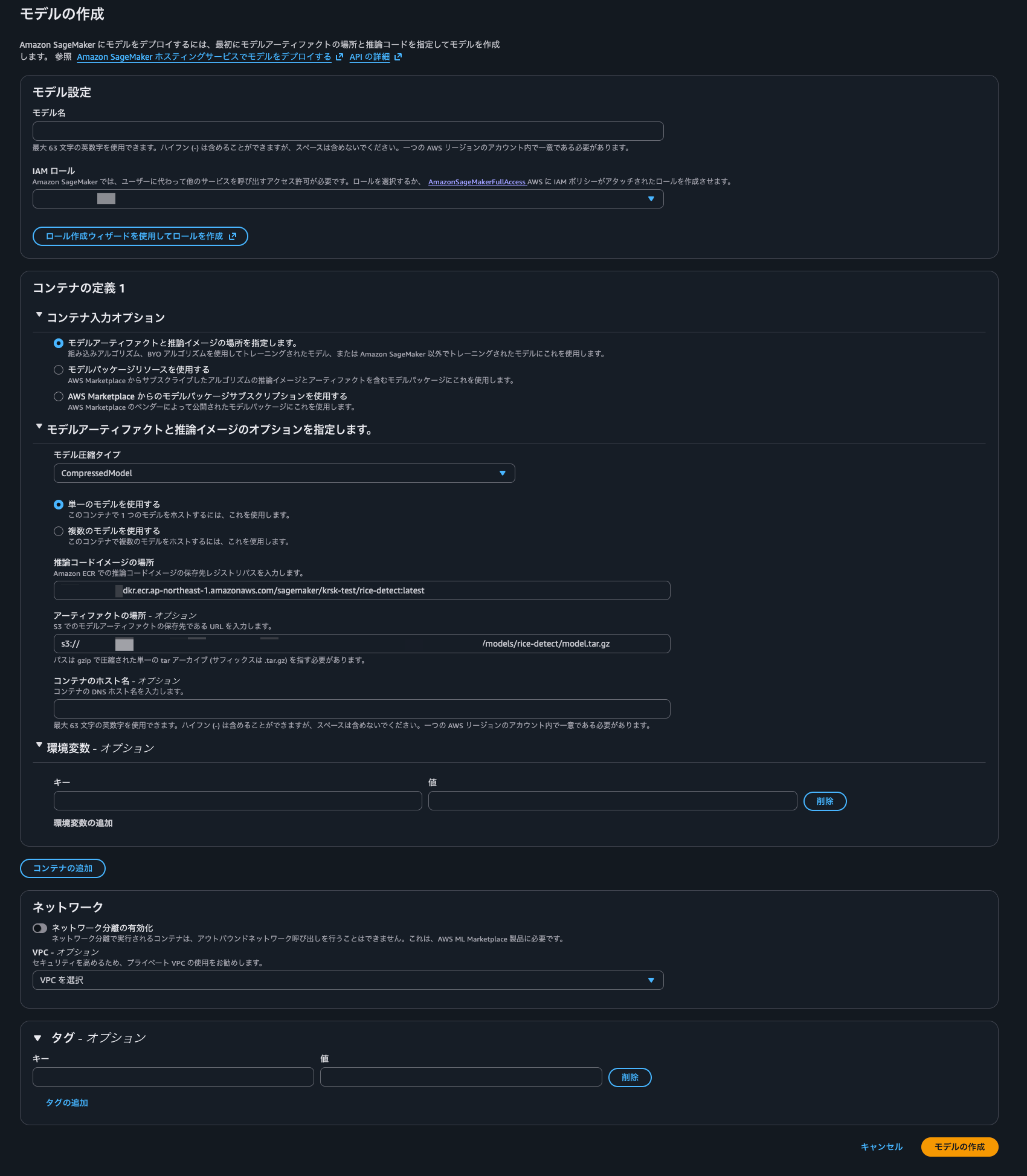
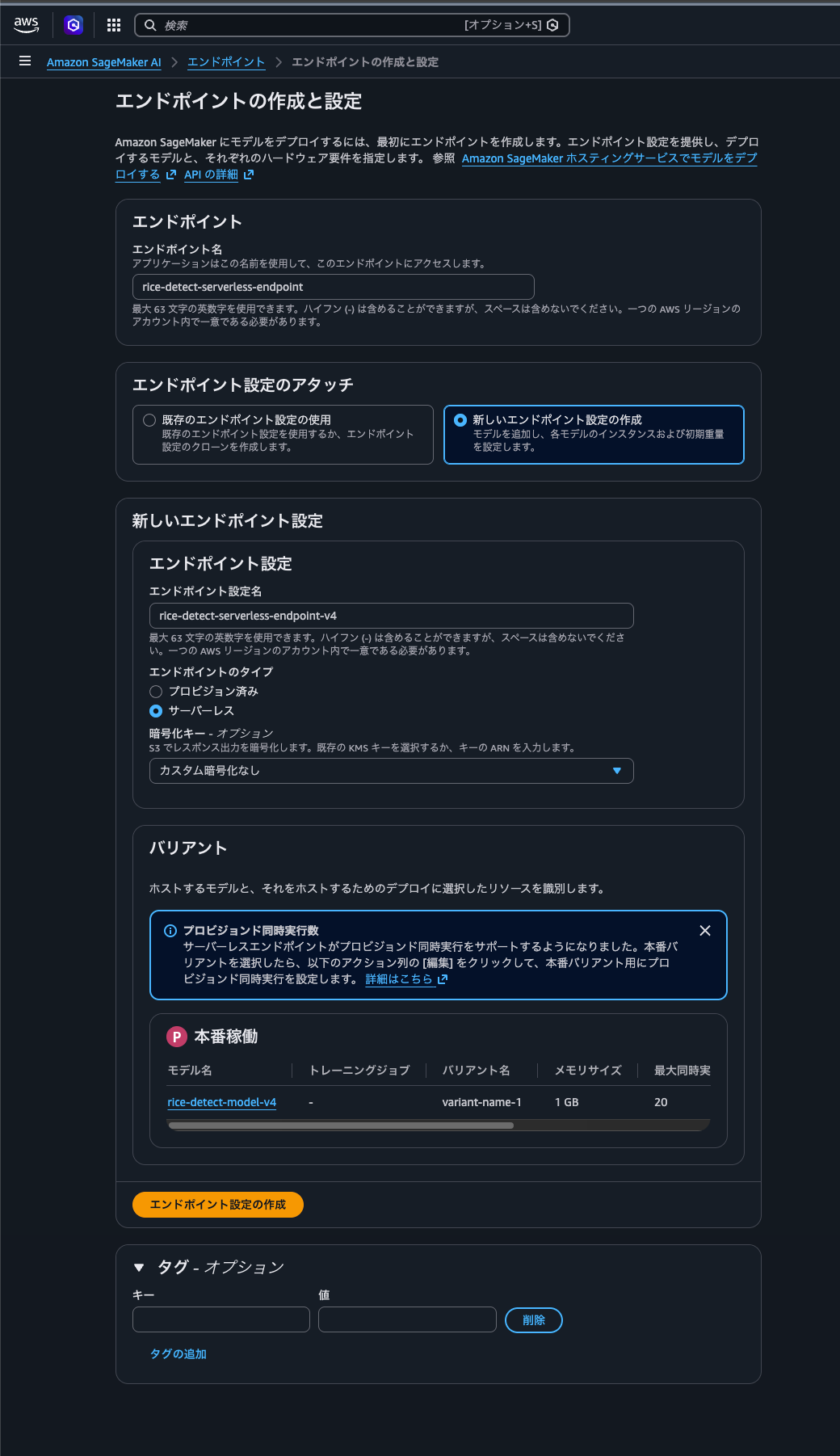
SageMaker Model では、ECR に push したカスタムコンテナイメージと、S3 にアップロードした model.tar.gz の S3 URI を指定します。
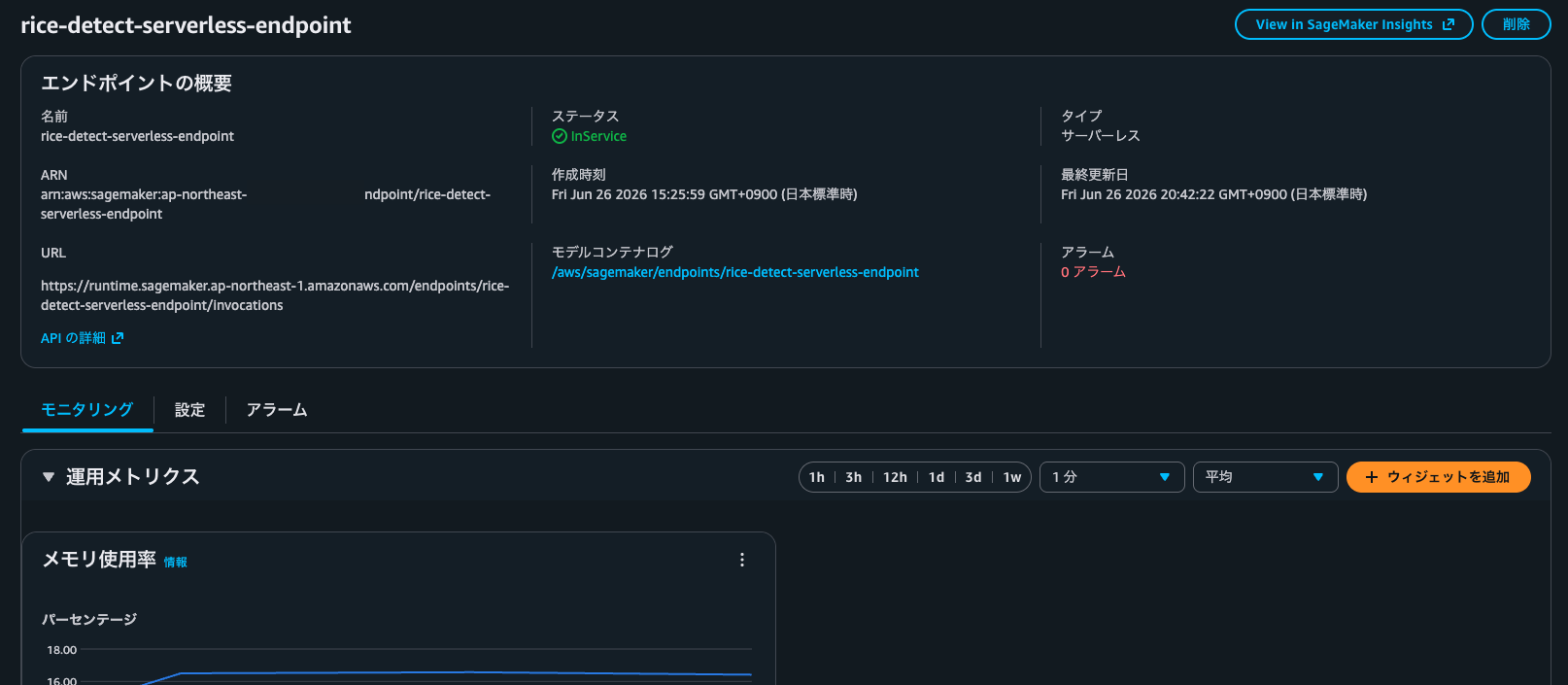
エンドポイントは Serverless Inference として作成します。
6. エンドポイントを呼び出す
エンドポイント作成後は、SageMaker Runtime から画像を送って推論します。
aws sagemaker-runtime invoke-endpoint \
  --endpoint-name <endpoint-name> \
  --content-type image/jpeg \
  --body fileb://<image-path> \
  --region ap-northeast-1 \
  output.json
Accept: image/jpeg を指定すると、検出結果を描画した JPEG を受け取れます。
aws sagemaker-runtime invoke-endpoint \
  --endpoint-name <endpoint-name> \
  --content-type image/jpeg \
  --accept image/jpeg \
  --body fileb://<image-path> \
  --region ap-northeast-1 \
  output.jpg
JSON で受け取る場合は、detections 配列にラベル、クラス ID、信頼度、バウンディングボックスが入ります。
{
  "detections": [
    {
      "label": "example-class",
      "class_id": 0,
      "confidence": 0.95,
      "box": [100.0, 120.0, 320.0, 360.0]
    }
  ]
}
JPEG で受け取る場合の結果は以下のようになりました。
(モデルはテキトーです。ご容赦ください。)
まとめ
SageMaker Endpoint に YOLO26 の物体検出モデルをホストし、カスタム推論コンテナで画像推論できるところまで試しました。
ちなみに SageMaker Endpoint と Lambda の使い分けについての私見ですが、Lambda のスペックで推論が可能で、実行時間も短い軽量なモデルなら Lambda を使う方がコスト的には優位になりやすいと思います。
他方、SageMaker Endpoint は 開発体制が明確に分かれている組織に適していると考えています。
特に機械学習エンジニアとインフラエンジニアの役割が明確に分かれている組織では、責任分界点として SageMaker Endpoint までを機械学習エンジニア、前段の Lambda 等までをインフラエンジニアとすると整理しやすいのではと考えています。
(↑走り書きのように書いてしまったので、この辺は別途ちゃんと確認してまとめたいと思います。)
以上、くろすけでした!