Step FunctionsからEMRを起動してHiveQLを実行してみた

はじめに
データ事業本部のueharaです。
今回は、Step FunctionsからEMRクラスターを起動し、EMR上でHiveQLを実行してみたいと思います。
EMRを常時起動しておくのではなく、Step Functionsから以下のような流れで実行するイメージです。
Step Functions
  -> EMRクラスターを作成
  -> HiveQLをEMR Stepとして実行
  -> EMRクラスターを終了
また、HiveのメタストアにはGlue Data Catalogを利用し、HiveQLには --hivevar で実行時パラメータを渡すようにします。
今回確認したいポイントは以下の通りです。
- Step FunctionsからEMRクラスターを作成
- Glue Data CatalogをHiveメタストアとして利用
- S3上のHiveQLをEMR Stepとして実行
- HiveQLに
--hivevarでパラメータを渡す - 複数のHiveQLについて一部並列に実行
- 処理完了後にEMRクラスターを終了
なお、環境構築にはAWS SAMを利用したいと思います。
構成
今回の構成は以下の通りです。
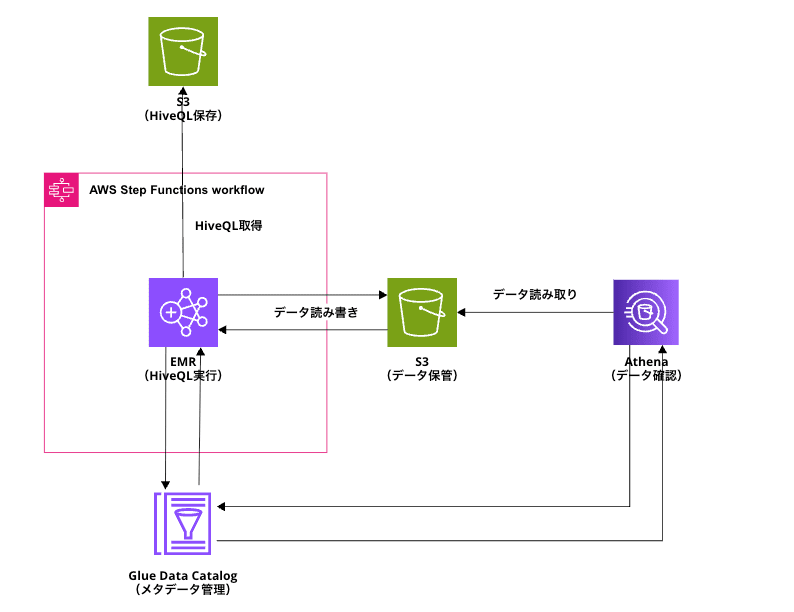
HiveQLを用いたETL処理はEMRで行い、データの確認はAthenaで行います。
事前準備
事前に以下AWSリソースを用意しておきます。
- EMRを起動できるSubnet
- HQL配置用S3バケット
- 入力データ用S3バケット
- 出力データ用S3バケット
- EMRログ用S3バケット
今回はS3バケットはSAMテンプレートでは作成せず、既存のバケット名をパラメータとして渡す形にします。
また、EMRログ用のS3バケットに関して、EMRのAPI上は必須ではありませんが、今回のように処理後にクラスターを終了する構成ではログを後から確認しやすくするため指定しています。
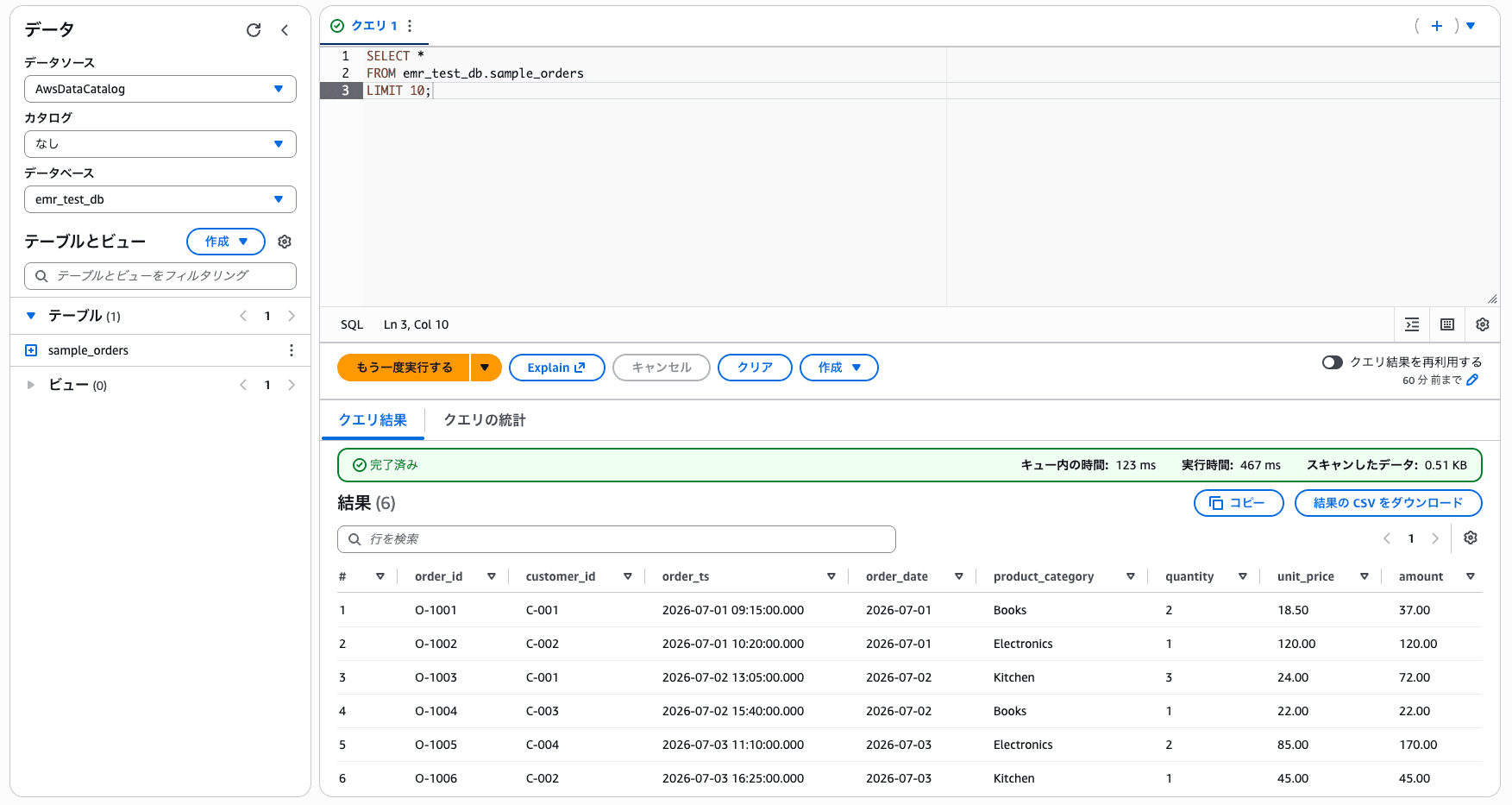
また、Inputとなるテーブルとして、以下の通り emr_test_db.sample_orders というテーブルを事前に用意しています。
ファイル作成
ディレクトリ構成
今回のディレクトリ構成は以下の通りです。
.
├── hql
│   ├── 00_setup_tables.hql
│   ├── 01_daily_sales.hql
│   ├── 02_category_summary.hql
│   └── 03_sales_report.hql
├── samconfig.toml
└── template.yaml
HiveQL
hql にHiveQLを定義します。
今回4つのHiveQLを定義しており、具体的には以下の通りです。
00_setup_tables.hql
USE ${hivevar:database_name};

DROP TABLE IF EXISTS daily_sales;

CREATE EXTERNAL TABLE daily_sales (
    product_category STRING,
    sales_date STRING,
    order_count BIGINT,
    total_quantity BIGINT,
    total_amount DECIMAL(18,2),
    high_sales_flag INT,
    env STRING,
    run_date STRING
)
STORED AS PARQUET
LOCATION 's3://${hivevar:output_bucket}/${hivevar:output_prefix}/daily_sales/';

DROP TABLE IF EXISTS category_sales_summary;

CREATE EXTERNAL TABLE category_sales_summary (
    product_category STRING,
    first_order_date STRING,
    last_order_date STRING,
    order_count BIGINT,
    total_quantity BIGINT,
    total_amount DECIMAL(18,2),
    high_sales_threshold DECIMAL(18,2),
    env STRING,
    run_date STRING
)
STORED AS PARQUET
LOCATION 's3://${hivevar:output_bucket}/${hivevar:output_prefix}/category_summary/';

DROP TABLE IF EXISTS sales_report;

CREATE EXTERNAL TABLE sales_report (
    product_category STRING,
    sales_date STRING,
    daily_order_count BIGINT,
    daily_total_quantity BIGINT,
    daily_total_amount DECIMAL(18,2),
    daily_high_sales_flag INT,
    category_order_count BIGINT,
    category_total_quantity BIGINT,
    category_total_amount DECIMAL(18,2),
    high_sales_threshold DECIMAL(18,2),
    final_flag INT,
    env STRING,
    run_date STRING
)
STORED AS PARQUET
LOCATION 's3://${hivevar:output_bucket}/${hivevar:output_prefix}/sales_report/';
01_daily_sales.hql
USE ${hivevar:database_name};

INSERT OVERWRITE TABLE daily_sales
SELECT
    product_category,
    CAST(order_date AS STRING) AS sales_date,
    COUNT(order_id) AS order_count,
    SUM(quantity) AS total_quantity,
    CAST(SUM(amount) AS DECIMAL(18,2)) AS total_amount,
    CASE
        WHEN SUM(amount) >= CAST('${hivevar:high_sales_threshold}' AS DECIMAL(18,2)) THEN 1
        ELSE 0
    END AS high_sales_flag,
    '${hivevar:env}' AS env,
    '${hivevar:run_date}' AS run_date
FROM sample_orders
WHERE order_date BETWEEN DATE '${hivevar:target_start_date}' AND DATE '${hivevar:target_end_date}'
GROUP BY product_category, order_date;
02_category_summary.hql
USE ${hivevar:database_name};

INSERT OVERWRITE TABLE category_sales_summary
SELECT
    product_category,
    CAST(MIN(order_date) AS STRING) AS first_order_date,
    CAST(MAX(order_date) AS STRING) AS last_order_date,
    COUNT(order_id) AS order_count,
    SUM(quantity) AS total_quantity,
    CAST(SUM(amount) AS DECIMAL(18,2)) AS total_amount,
    CAST('${hivevar:high_sales_threshold}' AS DECIMAL(18,2)) AS high_sales_threshold,
    '${hivevar:env}' AS env,
    '${hivevar:run_date}' AS run_date
FROM sample_orders
WHERE order_date BETWEEN DATE '${hivevar:target_start_date}' AND DATE '${hivevar:target_end_date}'
GROUP BY product_category;
03_sales_report.hql
USE ${hivevar:database_name};

INSERT OVERWRITE TABLE sales_report
SELECT
    b.product_category,
    b.sales_date,
    b.order_count AS daily_order_count,
    b.total_quantity AS daily_total_quantity,
    b.total_amount AS daily_total_amount,
    b.high_sales_flag AS daily_high_sales_flag,
    c.order_count AS category_order_count,
    c.total_quantity AS category_total_quantity,
    c.total_amount AS category_total_amount,
    c.high_sales_threshold,
    CASE
        WHEN b.high_sales_flag = 1 AND c.total_amount >= c.high_sales_threshold THEN 1
        ELSE 0
    END AS final_flag,
    '${hivevar:env}' AS env,
    '${hivevar:run_date}' AS run_date
FROM daily_sales b
INNER JOIN category_sales_summary c
    ON b.product_category = c.product_category;
00_setup_tables.hql では、出力先テーブルを作成します。
${hivevar:xxxxx} となっている部分は変数です。これらの値を、 --hivevar で外から渡す形です。
01_daily_sales.hql では、入力テーブル sample_orders から日別カテゴリ売上を作成します。
ここで、 high_sales_threshold や集計対象期間は変数にしています。
02_category_summary.hql では、カテゴリ単位のサマリを作成します。
最後に、03_sales_report.hql では daily_sales と category_sales_summary をJOINして sales_report を作成します。
これらのファイルを用意できたら、 s3://<HQL配置用S3バケット>/hql/ にアップロードしておきます。
samconfig.toml
samconfig.toml は以下のようにしました。
samconfig.toml
version = 0.1

[default.global.parameters]
region = "ap-northeast-1"

[default.build.parameters]
debug = true

[default.deploy.parameters]
stack_name = "<YOUR_STACK_NAME>"
s3_bucket = "<YOUR_S3_BUCKET>"
s3_prefix = "<YOUR_S3_PREFIX>"
capabilities = "CAPABILITY_NAMED_IAM"
confirm_changeset = true
parameter_overrides = "AppName=\"emr-hivevar-test\" CodeBucketName=\"<YOUR_CODE_BUCKET>\" InputBucketName=\"<YOUR_INPUT_BUCKET>\" OutputBucketName=\"<YOUR_OUTPUT_BUCKET>\" LogBucketName=\"<YOUR_LOG_BUCKET>\" EmrEc2SubnetId=\"<YOUR_EMR_SUBNET_ID>\" EmrReleaseLabel=\"emr-6.15.0\" MasterInstanceType=\"m5.xlarge\" CoreInstanceType=\"m5.xlarge\""
CodeBucketName はHQL配置用S3バケット、InputBucketName はAthenaで事前に入力データを作成した入力データ用S3バケット、OutputBucketName はEMRが作成する集計結果の出力データ用S3バケットです。
EmrEc2SubnetId はEMRを実行するサブネットのIDになります。
template.yaml
template.yaml では、主に以下のリソースを作成しています。
- EMRサービスロール
- EMR EC2ロール
- EMR EC2インスタンスプロファイル
- Step Functions実行ロール
- Step Functionsステートマシン
template.yaml
AWSTemplateFormatVersion: '2010-09-09'
Transform: AWS::Serverless-2016-10-31
Description: Minimal SAM app to test Step Functions, EMR, Glue Data Catalog, and HiveQL hivevar execution.
Parameters:
AppName:
Type: String
Default: emr-hivevar-test
Description: Resource name prefix for this test application.
CodeBucketName:
Type: String
Description: S3 bucket that stores HiveQL files.
InputBucketName:
Type: String
Description: S3 bucket that stores input data and Hive warehouse data.
OutputBucketName:
Type: String
Description: S3 bucket that stores HiveQL output data.
LogBucketName:
Type: String
Description: S3 bucket that stores EMR logs.
EmrEc2SubnetId:
Type: AWS::EC2::Subnet::Id
Description: Subnet ID where the EMR cluster will be launched.
EmrReleaseLabel:
Type: String
Default: emr-6.15.0
Description: EMR release label used by the test cluster.
MasterInstanceType:
Type: String
Default: m5.xlarge
Description: EMR master node instance type.
CoreInstanceType:
Type: String
Default: m5.xlarge
Description: EMR core node instance type.
Resources:
EmrServiceRole:
Type: AWS::IAM::Role
Properties:
Description: Service role used by EMR for the Step Functions HiveQL test.
AssumeRolePolicyDocument:
Version: '2012-10-17'
Statement:
- Effect: Allow
Principal:
Service: elasticmapreduce.amazonaws.com
Action: sts:AssumeRole
ManagedPolicyArns:
- arn:aws:iam::aws:policy/service-role/AmazonElasticMapReduceRole
Tags:
- Key: app
Value: emr-hivevar-test
EmrEc2Role:
Type: AWS::IAM::Role
Properties:
Description: EC2 instance role used by EMR nodes for the Step Functions HiveQL test.
AssumeRolePolicyDocument:
Version: '2012-10-17'
Statement:
- Effect: Allow
Principal:
Service: ec2.amazonaws.com
Action: sts:AssumeRole
ManagedPolicyArns:
- arn:aws:iam::aws:policy/service-role/AmazonElasticMapReduceforEC2Role
Policies:
- PolicyName: EmrHiveTestS3AndGlueAccess
PolicyDocument:
Version: '2012-10-17'
Statement:
- Sid: S3BucketListAccess
Effect: Allow
Action:
- s3:ListBucketMultipartUploads
- s3:ListBucket
- s3:GetBucketLocation
Resource:
- Fn::Sub: arn:${AWS::Partition}:s3:::${CodeBucketName}
- Fn::Sub: arn:${AWS::Partition}:s3:::${InputBucketName}
- Fn::Sub: arn:${AWS::Partition}:s3:::${OutputBucketName}
- Fn::Sub: arn:${AWS::Partition}:s3:::${LogBucketName}
- Sid: S3ObjectAccess
Effect: Allow
Action:
- s3:AbortMultipartUpload
- s3:GetObject
- s3:ListMultipartUploadParts
- s3:PutObject
- s3:DeleteObject
Resource:
- Fn::Sub: arn:${AWS::Partition}:s3:::${CodeBucketName}/*
- Fn::Sub: arn:${AWS::Partition}:s3:::${InputBucketName}/*
- Fn::Sub: arn:${AWS::Partition}:s3:::${OutputBucketName}/*
- Fn::Sub: arn:${AWS::Partition}:s3:::${LogBucketName}/*
- Sid: GlueDataCatalogAccess
Effect: Allow
Action:
- glue:BatchCreatePartition
- glue:BatchDeletePartition
- glue:BatchGetPartition
- glue:BatchDeleteTable
- glue:CreateDatabase
- glue:CreatePartition
- glue:CreateTable
- glue:DeleteDatabase
- glue:DeletePartition
- glue:DeleteTable
- glue:GetDatabase
- glue:GetDatabases
- glue:GetPartition
- glue:GetPartitions
- glue:GetTable
- glue:GetTables
- glue:GetTableVersion
- glue:GetTableVersions
- glue:GetUserDefinedFunction
- glue:GetUserDefinedFunctions
- glue:UpdateDatabase
- glue:UpdatePartition
- glue:UpdateTable
Resource: '*'
Tags:
- Key: app
Value: emr-hivevar-test
EmrEc2InstanceProfile:
Type: AWS::IAM::InstanceProfile
Properties:
Roles:
- Ref: EmrEc2Role
StepFunctionsExecutionRole:
Type: AWS::IAM::Role
Properties:
Description: Execution role used by Step Functions to create EMR, add Hive steps, and terminate EMR.
AssumeRolePolicyDocument:
Version: '2012-10-17'
Statement:
- Effect: Allow
Principal:
Service: states.amazonaws.com
Action: sts:AssumeRole
Policies:
- PolicyName: EmrWorkflowAccess
PolicyDocument:
Version: '2012-10-17'
Statement:
- Sid: EmrClusterAndStepAccess
Effect: Allow
Action:
- elasticmapreduce:AddJobFlowSteps
- elasticmapreduce:AddTags
- elasticmapreduce:CancelSteps
- elasticmapreduce:DescribeCluster
- elasticmapreduce:DescribeStep
- elasticmapreduce:RunJobFlow
- elasticmapreduce:TerminateJobFlows
Resource: '*'
- Sid: PassEmrServiceRole
Effect: Allow
Action: iam:PassRole
Resource:
- Fn::GetAtt:
- EmrServiceRole
- Arn
Condition:
StringEquals:
iam:PassedToService: elasticmapreduce.amazonaws.com
- Sid: PassEmrEc2Role
Effect: Allow
Action: iam:PassRole
Resource:
- Fn::GetAtt:
- EmrEc2Role
- Arn
Condition:
StringEquals:
iam:PassedToService:
- elasticmapreduce.amazonaws.com
- ec2.amazonaws.com
- Sid: CreateEmrServiceLinkedRole
Effect: Allow
Action: iam:CreateServiceLinkedRole
Resource: '*'
Condition:
StringEquals:
iam:AWSServiceName: elasticmapreduce.amazonaws.com
- Sid: StepFunctionsSyncEventBridgeAccess
Effect: Allow
Action:
- events:DescribeRule
- events:PutRule
- events:PutTargets
Resource:
- Fn::Sub: arn:${AWS::Partition}:events:${AWS::Region}:${AWS::AccountId}:rule/StepFunctionsGetEventsForEMR*
Tags:
- Key: app
Value: emr-hivevar-test
EmrHiveTestStateMachine:
Type: AWS::Serverless::StateMachine
Properties:
Name:
Fn::Sub: ${AppName}-state-machine
Type: STANDARD
Role:
Fn::GetAtt:
- StepFunctionsExecutionRole
- Arn
Definition:
Comment: Create an EMR cluster, run HiveQL with hivevar values, and terminate the cluster.
StartAt: CreateEmrCluster
States:
CreateEmrCluster:
Type: Task
Resource: arn:aws:states:::elasticmapreduce:createCluster.sync
Parameters:
Name.$:
Fn::Sub: States.Format('${AppName}-{}', $.Env)
ReleaseLabel:
Ref: EmrReleaseLabel
Applications:
- Name: Hadoop
- Name: Hive
Configurations:
- Classification: hive-site
Properties:
hive.metastore.client.factory.class: com.amazonaws.glue.catalog.metastore.AWSGlueDataCatalogHiveClientFactory
- Classification: spark-hive-site
Properties:
hive.metastore.client.factory.class: com.amazonaws.glue.catalog.metastore.AWSGlueDataCatalogHiveClientFactory
Instances:
Ec2SubnetId:
Ref: EmrEc2SubnetId
KeepJobFlowAliveWhenNoSteps: true
TerminationProtected: false
InstanceGroups:
- Name: Master
Market: ON_DEMAND
InstanceRole: MASTER
InstanceType:
Ref: MasterInstanceType
InstanceCount: 1
- Name: Core
Market: ON_DEMAND
InstanceRole: CORE
InstanceType:
Ref: CoreInstanceType
InstanceCount: 1
JobFlowRole:
Ref: EmrEc2InstanceProfile
ServiceRole:
Ref: EmrServiceRole
StepConcurrencyLevel: 2
LogUri:
Fn::Sub: s3://${LogBucketName}/logs/
AutoTerminationPolicy:
IdleTimeout: 3600
VisibleToAllUsers: true
EbsRootVolumeSize: 32
Tags:
- Key: app
Value:
Ref: AppName
- Key: env
Value.$: $.Env
- Key: created-by
Value: step-functions
ResultPath: $.CreateClusterResult
Next: RunSetupHiveStep
Catch:
- ErrorEquals:
- States.ALL
ResultPath: $.WorkflowError
Next: WorkflowFailed
RunSetupHiveStep:
Type: Task
Resource: arn:aws:states:::elasticmapreduce:addStep.sync
Parameters:
ClusterId.$: $.CreateClusterResult.ClusterId
Step:
Name: hive-setup-tables
ActionOnFailure: CONTINUE
HadoopJarStep:
Jar: command-runner.jar
Args.$:
Fn::Sub: >-
States.Array('hive', '--hivevar', States.Format('env={}', $.Env), '--hivevar', States.Format('database_name={}', $.DatabaseName), '--hivevar', 'output_bucket=${OutputBucketName}', '--hivevar', 'output_prefix=output', '--hivevar', States.Format('target_start_date={}', $.TargetStartDate), '--hivevar', States.Format('target_end_date={}', $.TargetEndDate), '--hivevar', States.Format('high_sales_threshold={}', $.HighSalesThreshold), '--hivevar', States.Format('run_date={}', $.RunDate), '-f', 's3://${CodeBucketName}/hql/00_setup_tables.hql')
ResultPath: $.SetupHiveStepResult
Next: RunParallelHiveSteps
Catch:
- ErrorEquals:
- States.ALL
ResultPath: $.WorkflowError
Next: TerminateClusterOnFailure
RunParallelHiveSteps:
Type: Parallel
Branches:
- StartAt: RunDailySalesStep
States:
RunDailySalesStep:
Type: Task
Resource: arn:aws:states:::elasticmapreduce:addStep.sync
Parameters:
ClusterId.$: $.CreateClusterResult.ClusterId
Step:
Name: hive-daily-sales
ActionOnFailure: CONTINUE
HadoopJarStep:
Jar: command-runner.jar
Args.$:
Fn::Sub: >-
States.Array('hive', '--hivevar', States.Format('env={}', $.Env), '--hivevar', States.Format('database_name={}', $.DatabaseName), '--hivevar', 'output_bucket=${OutputBucketName}', '--hivevar', 'output_prefix=output', '--hivevar', States.Format('target_start_date={}', $.TargetStartDate), '--hivevar', States.Format('target_end_date={}', $.TargetEndDate), '--hivevar', States.Format('high_sales_threshold={}', $.HighSalesThreshold), '--hivevar', States.Format('run_date={}', $.RunDate), '-f', 's3://${CodeBucketName}/hql/01_daily_sales.hql')
End: true
- StartAt: RunCategorySummaryStep
States:
RunCategorySummaryStep:
Type: Task
Resource: arn:aws:states:::elasticmapreduce:addStep.sync
Parameters:
ClusterId.$: $.CreateClusterResult.ClusterId
Step:
Name: hive-category-summary
ActionOnFailure: CONTINUE
HadoopJarStep:
Jar: command-runner.jar
Args.$:
Fn::Sub: >-
States.Array('hive', '--hivevar', States.Format('env={}', $.Env), '--hivevar', States.Format('database_name={}', $.DatabaseName), '--hivevar', 'output_bucket=${OutputBucketName}', '--hivevar', 'output_prefix=output', '--hivevar', States.Format('target_start_date={}', $.TargetStartDate), '--hivevar', States.Format('target_end_date={}', $.TargetEndDate), '--hivevar', States.Format('high_sales_threshold={}', $.HighSalesThreshold), '--hivevar', States.Format('run_date={}', $.RunDate), '-f', 's3://${CodeBucketName}/hql/02_category_summary.hql')
End: true
ResultPath: $.ParallelHiveStepResults
Next: RunFinalHiveStep
Catch:
- ErrorEquals:
- States.ALL
ResultPath: $.WorkflowError
Next: TerminateClusterOnFailure
RunFinalHiveStep:
Type: Task
Resource: arn:aws:states:::elasticmapreduce:addStep.sync
Parameters:
ClusterId.$: $.CreateClusterResult.ClusterId
Step:
Name: hive-sales-report
ActionOnFailure: CONTINUE
HadoopJarStep:
Jar: command-runner.jar
Args.$:
Fn::Sub: >-
States.Array('hive', '--hivevar', States.Format('env={}', $.Env), '--hivevar', States.Format('database_name={}', $.DatabaseName), '--hivevar', 'output_bucket=${OutputBucketName}', '--hivevar', 'output_prefix=output', '--hivevar', States.Format('target_start_date={}', $.TargetStartDate), '--hivevar', States.Format('target_end_date={}', $.TargetEndDate), '--hivevar', States.Format('high_sales_threshold={}', $.HighSalesThreshold), '--hivevar', States.Format('run_date={}', $.RunDate), '-f', 's3://${CodeBucketName}/hql/03_sales_report.hql')
ResultPath: $.FinalHiveStepResult
Next: TerminateClusterOnSuccess
Catch:
- ErrorEquals:
- States.ALL
ResultPath: $.WorkflowError
Next: TerminateClusterOnFailure
TerminateClusterOnSuccess:
Type: Task
Resource: arn:aws:states:::elasticmapreduce:terminateCluster.sync
Parameters:
ClusterId.$: $.CreateClusterResult.ClusterId
ResultPath: $.TerminateClusterResult
Next: WorkflowSucceeded
TerminateClusterOnFailure:
Type: Task
Resource: arn:aws:states:::elasticmapreduce:terminateCluster.sync
Parameters:
ClusterId.$: $.CreateClusterResult.ClusterId
ResultPath: $.TerminateClusterResult
Next: WorkflowFailed
WorkflowSucceeded:
Type: Succeed
WorkflowFailed:
Type: Fail
Error: EmrHiveTestFailed
Cause: EMR HiveQL test workflow failed. Check Step Functions and EMR step logs.
Tags:
app:
Ref: AppName
Outputs:
StateMachineArn:
Description: ARN of the Step Functions state machine.
Value:
Ref: EmrHiveTestStateMachine
EmrServiceRoleName:
Description: EMR service role name.
Value:
Ref: EmrServiceRole
EmrEc2InstanceProfileName:
Description: EMR EC2 instance profile name.
Value:
Ref: EmrEc2InstanceProfile
ポイントは、hive-site に以下を設定している点です。
hive.metastore.client.factory.class=com.amazonaws.glue.catalog.metastore.AWSGlueDataCatalogHiveClientFactory
これにより、EMR上のHiveがGlue Data Catalogをメタストアとして利用します。
また、Step Functionsのパラメータから取得した値を、 --hivevar を用いてHiveQLの実行引数として渡しています。
すなわち、Step Functionsの実行毎にHiveQL上の変数を動的に設定できる形にしています。
EMR側のStep同時実行数は 2 に設定しています。
StepConcurrencyLevel: 2
こちらを設定しなければ、仮にStep Functions側で並列にステップの投入を行ったとしても、実際に実行される並列数はデフォルトの 1 になってしまいます。
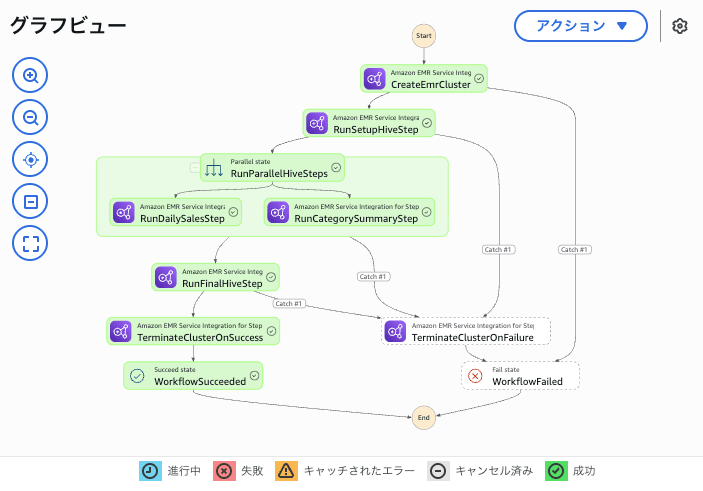
Step Functions側も Parallel の2分岐で 01_daily_sales.hql と 02_category_summary.hql を並列にEMR Stepとして追加しています。
全体として、各ステートでのHiveQLの実行は同期的に行っています(ステップの実行完了まで待機する)。
デプロイ
ファイルの用意ができたら、デプロイを行います。
$ sam deploy
デプロイ完了後、スタックが作成されていることを確認して下さい。
動作確認
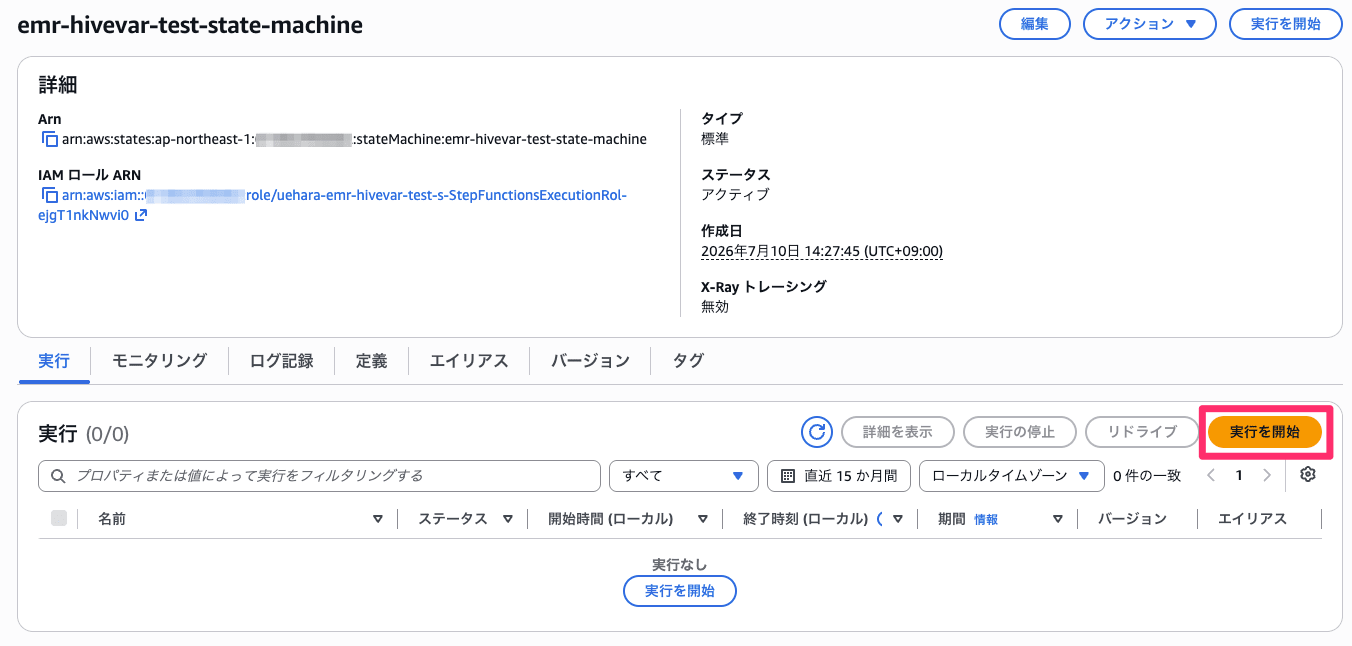
デプロイが完了したら、以下のようにStep Functionsが作成されているかと思いますので、『実行の開始』ボタンを押下します。
Step Functionsの入力は以下のようにしました。
{
  "Env": "dev",
  "DatabaseName": "emr_test_db",
  "RunDate": "2026-07-03",
  "TargetStartDate": "2026-07-01",
  "TargetEndDate": "2026-07-31",
  "HighSalesThreshold": "100"
}
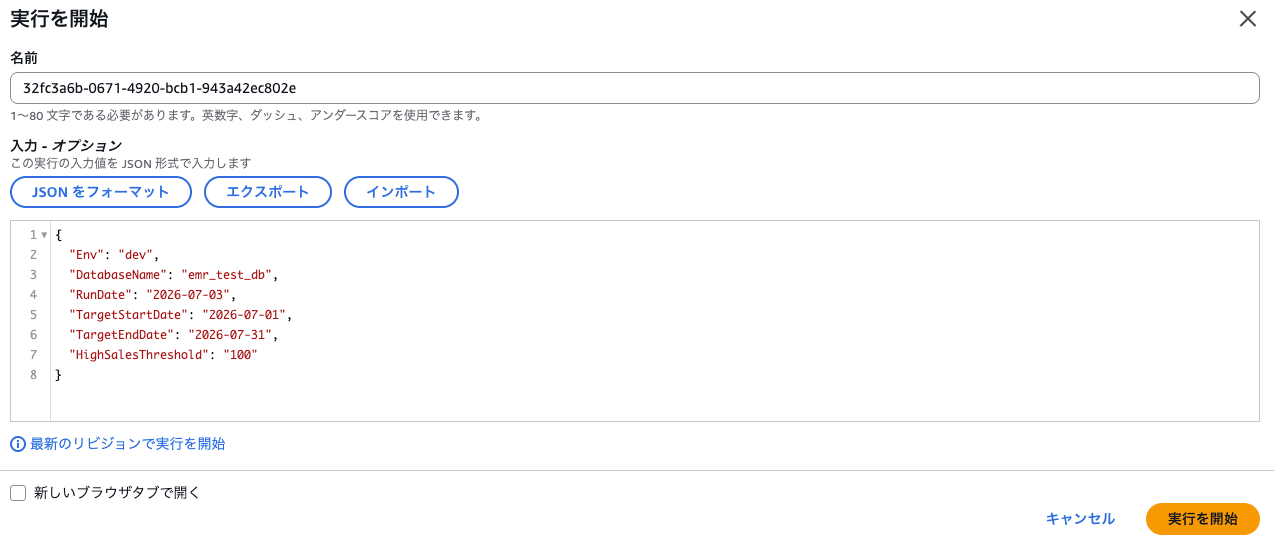
『実行を開始』ボタンを押下すると、Step Functionsの実行が始まります。
全てのステートの実行が完了すると、以下のようになるかと思います。
Athenaでテーブルを確認したところ、以下の通り出力テーブルが無事作成されています。
念のためデータを確認すると、以下の通り想定通りの結果が得られていました。
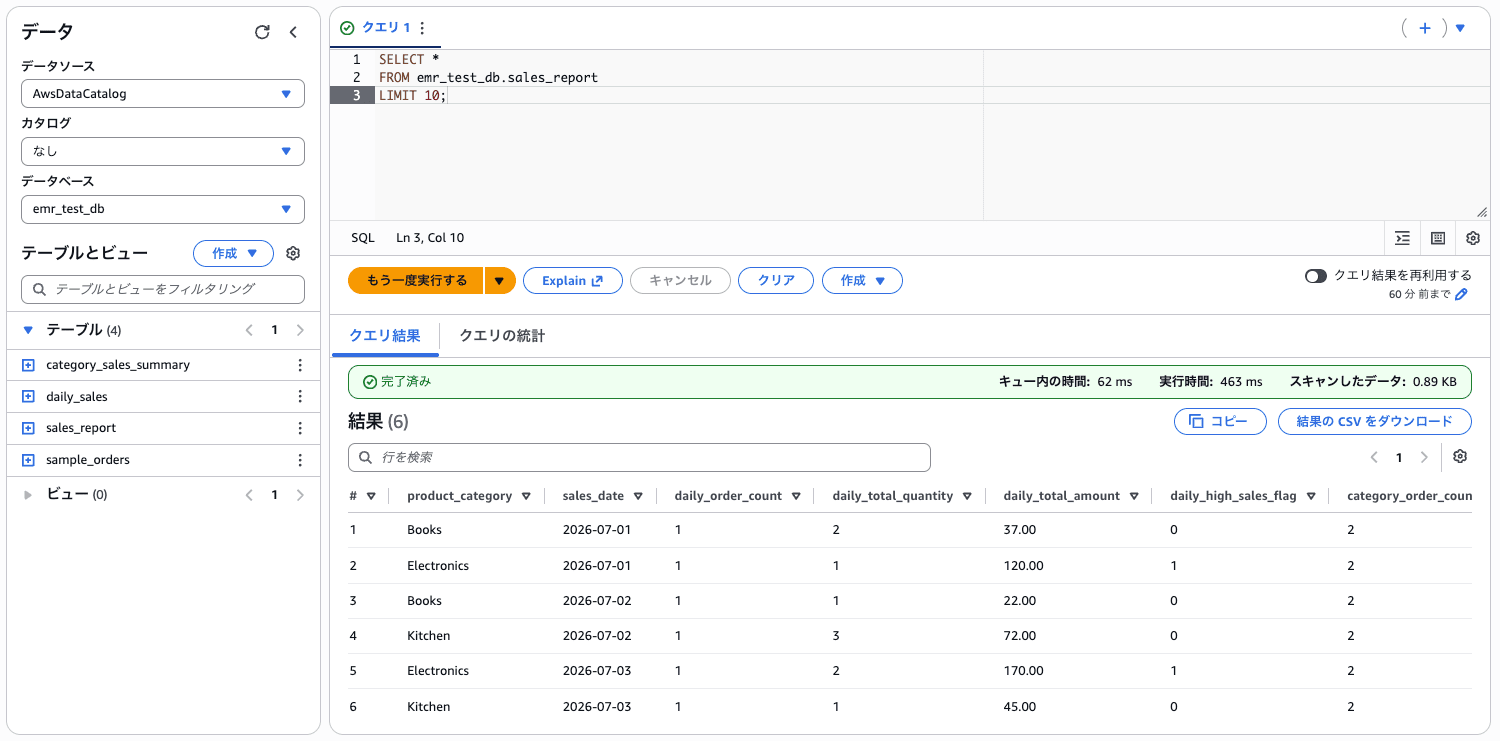
例えば、Step Functionsの実行パラメーターで設定した HighSalesThreshold のしきい値( 100 )の通り、 daily_high_sales_flag が 1 になっていることが分かります。
参考までに、EMRの各ステップについては以下の通りです。
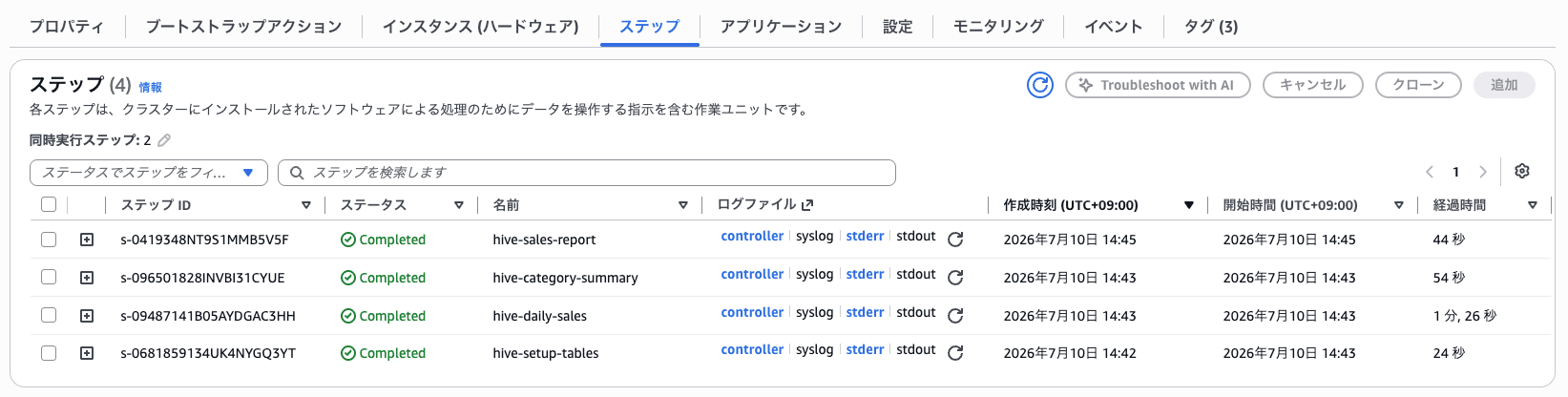
hive-daily-sales と hive-category-summary は同時に動いていることが分かります。
最後に
今回は、Step FunctionsからEMRクラスターを起動し、EMR上でHiveQLを実行してみました。
参考になりましたら幸いです。