
Cognito で AdminInitiateAuth を使ったときの SSO を試してみた

こんにちは、クラスメソッドの長澤です。
Amazon Cognito の 1 つのユーザープールを認証基盤として利用し、OIDC としても利用することができます。
こちらの記事では、Cognito を認証基盤にした Web アプリがマネージドログイン(Cognito のログイン画面)でログインしていれば、SaaS などの別アプリへ OIDC でログイン画面なしで入れることを確かめました。
今回は、元の Web アプリが自前のログイン画面と AdminInitiateAuth(サーバーから呼ぶ API)でログインしている場合に、どうなるかを検証します。
Cognito の 2 つのログイン方式
Cognito でユーザーを認証する方法は大きく 2 つあります。
API 方式(InitiateAuth / AdminInitiateAuth)
アプリが自前のログイン画面で受け取ったメールアドレスとパスワードを、バックエンドから Cognito の API に渡して認証します。ログイン状態はアプリが管理します。
ログイン画面を作り込みたいときなどに使います。
マネージドログイン
Cognito が用意したログイン画面(xxx.auth.region.amazoncognito.com)にブラウザをリダイレクトして認証します。認証に成功するとコールバック URL に認可コードが返り、アプリ側でトークンと交換します。
ALB の認証機能や、SaaS との OIDC 連携はこちらを使います。
同じユーザーなので、API 方式でログインしたあとでも、SaaS 側ではログイン済みとして扱われそうに思えます。
検証環境の構成
CloudFormation で次の環境を作りました。
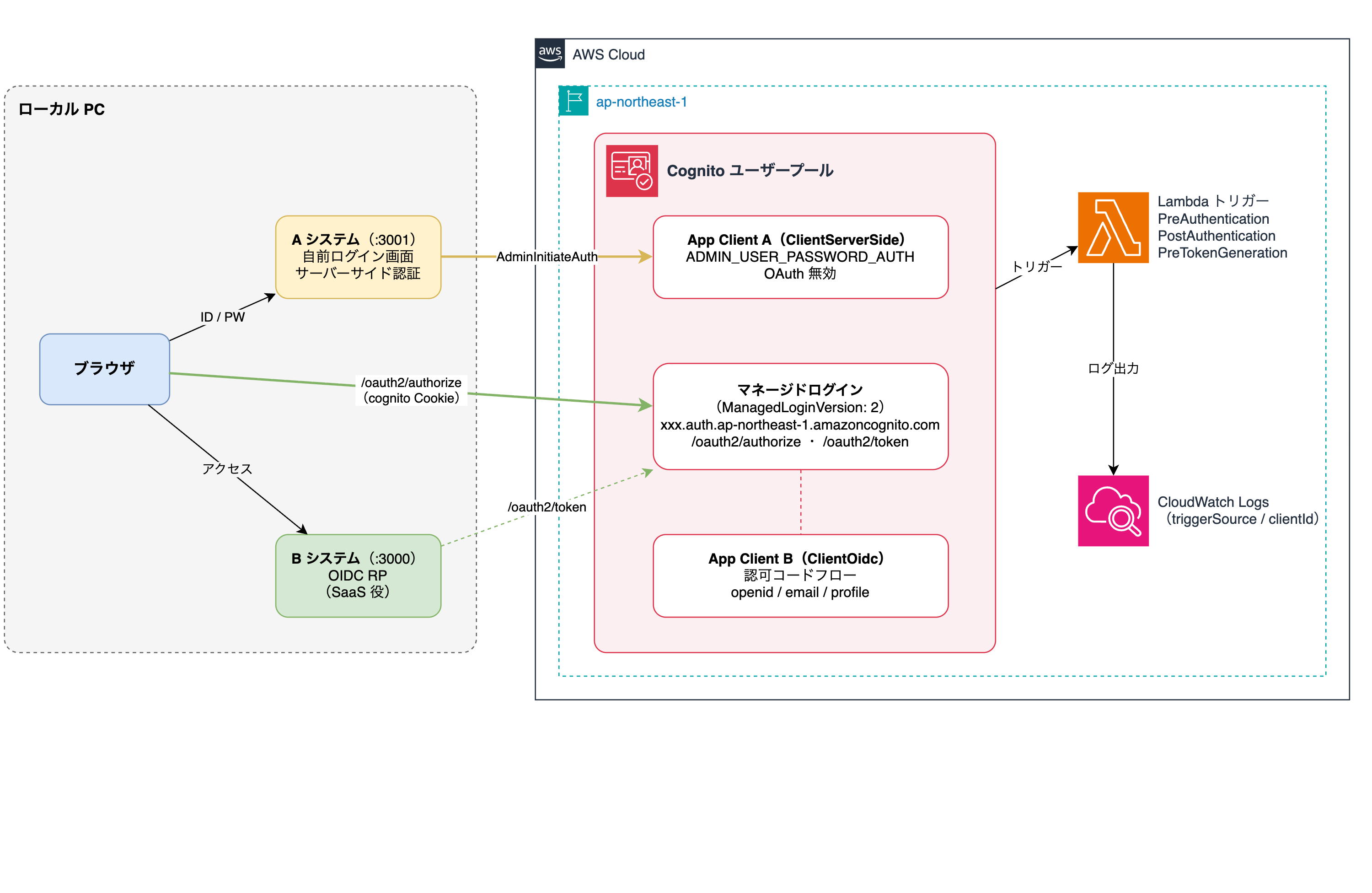
A システムが既存の Web アプリ役、B システムが SaaS 役で、どちらも自作です。
CloudFormation の中身
ユーザープール、ドメイン、B システム用の App Client、ブランディング、Lambda トリガーはこちらの記事と同じです。全文はおまけに載せています。
違うのは、A システム用の App Client が AdminInitiateAuth でログインする設定になっている点です。
App Client A(サーバーサイド認証用)
ClientServerSide:
  Type: AWS::Cognito::UserPoolClient
  Properties:
    ExplicitAuthFlows:
      - ALLOW_ADMIN_USER_PASSWORD_AUTH
      - ALLOW_REFRESH_TOKEN_AUTH
    AllowedOAuthFlowsUserPoolClient: false
AdminInitiateAuth とリフレッシュだけを許可し、OAuth は切っています。
ローカルアプリ
A システム(a-app.js)は、自作のログイン画面で受け取ったメールアドレスとパスワードを AdminInitiateAuth で Cognito に渡し、トークンはサーバーで持ちます。ブラウザに返すのは A システム独自の Cookie(a_session)だけです。
B システム(b-app.js)は、こちらの記事の B システムと同じ OIDC RP です。
どちらも Node.js と Express で書いた検証用のアプリです。セッションはメモリに持ち、ID Token の署名検証は省いているので、本番では使わないでください。
検証
次の順に操作しました。
- A システムでログインする
- そのまま B システムを開く
- 出てきたログイン画面を閉じて、もう一度 B システムでサインインする
- マネージドログインでログインする
- B システムのセッションだけ消して、もう一度開く
各操作で、/oauth2/authorize へのリクエストヘッダと CloudWatch Logs のトリガー記録を取りました。
1. A システムでログインする
A システムの画面でメールアドレスとパスワードを入れてログインします。
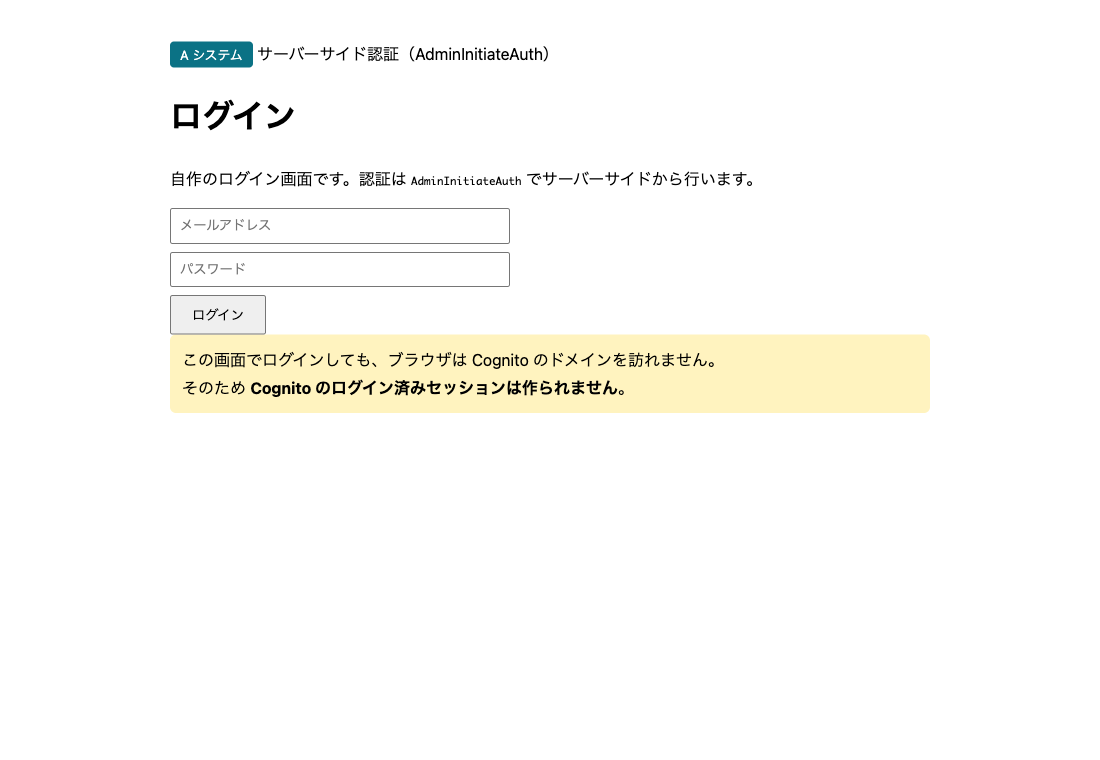
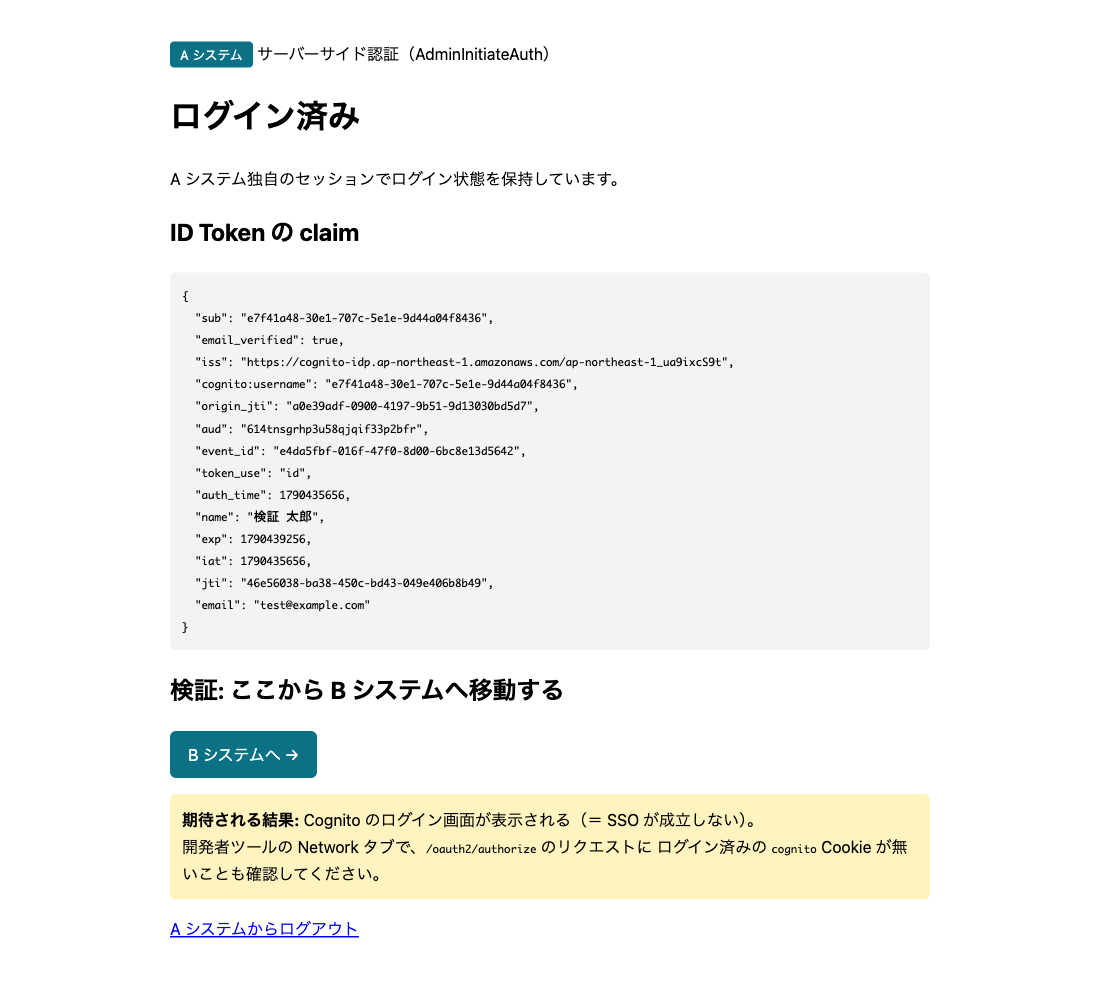
ログインでき、ID Token も取れています。
2. そのまま B システムを開く
A システムの画面から B システムへ移動すると、未ログインの画面が出ます。
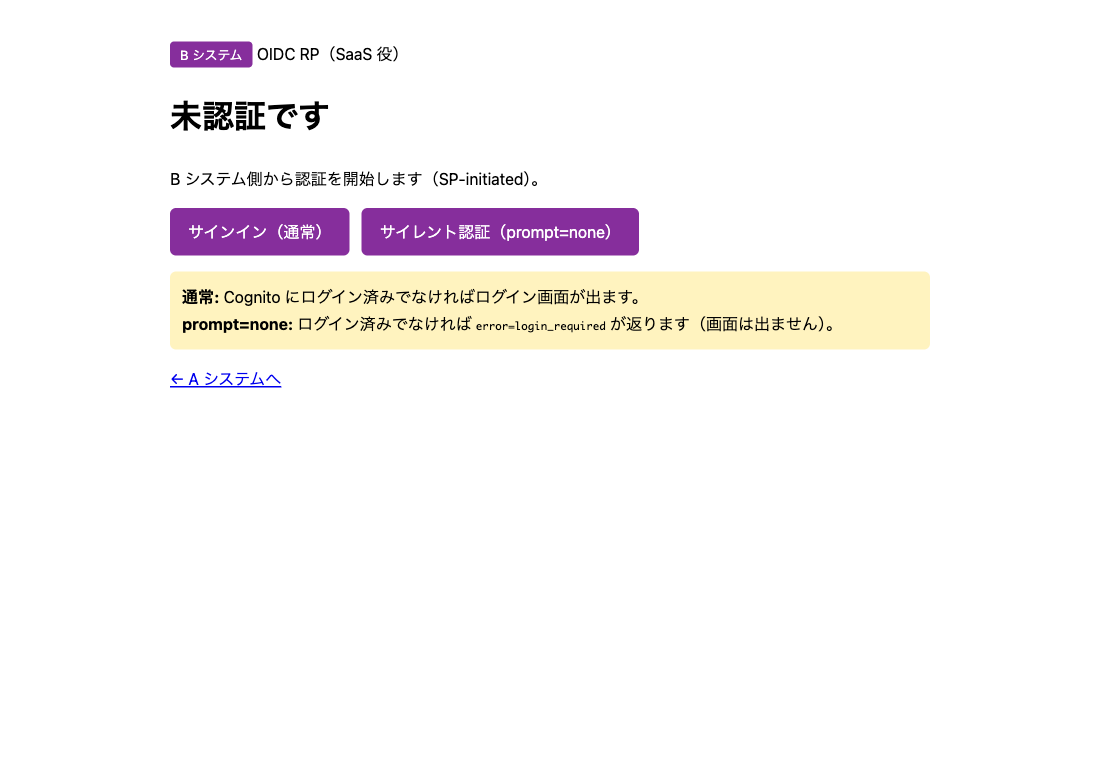
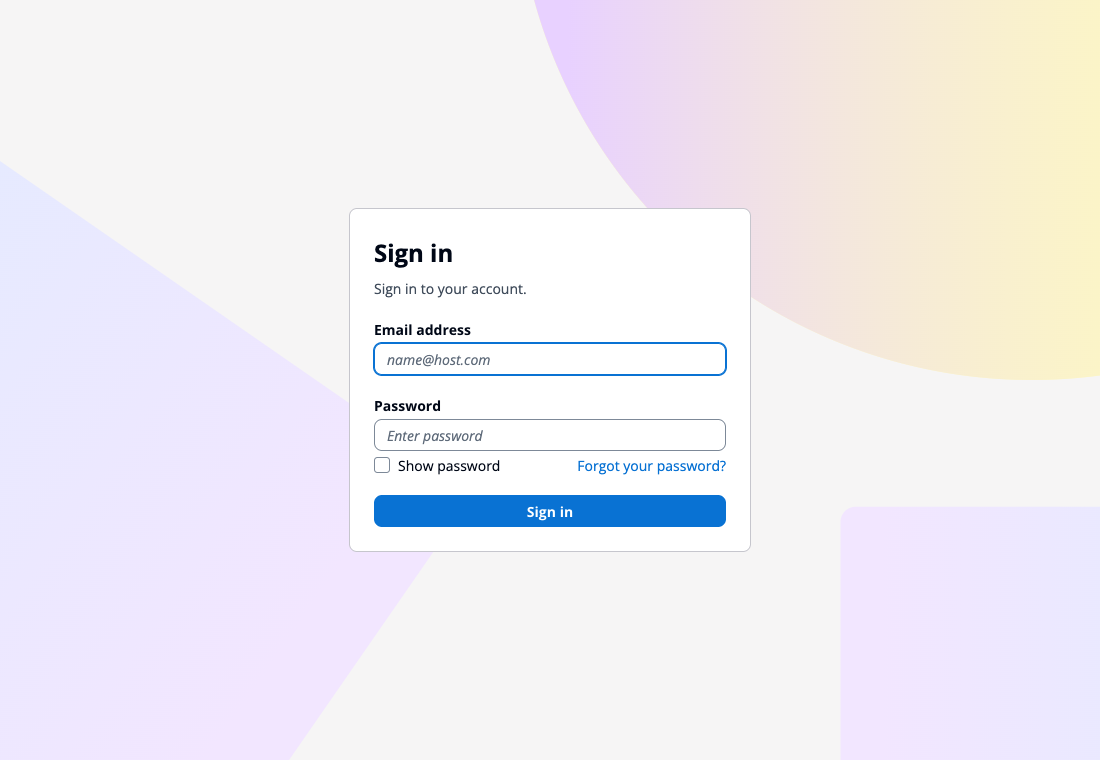
サインインを押すと、Cognito のログイン画面が出ました。A システムではログイン済みなのに、パスワードを求められています。
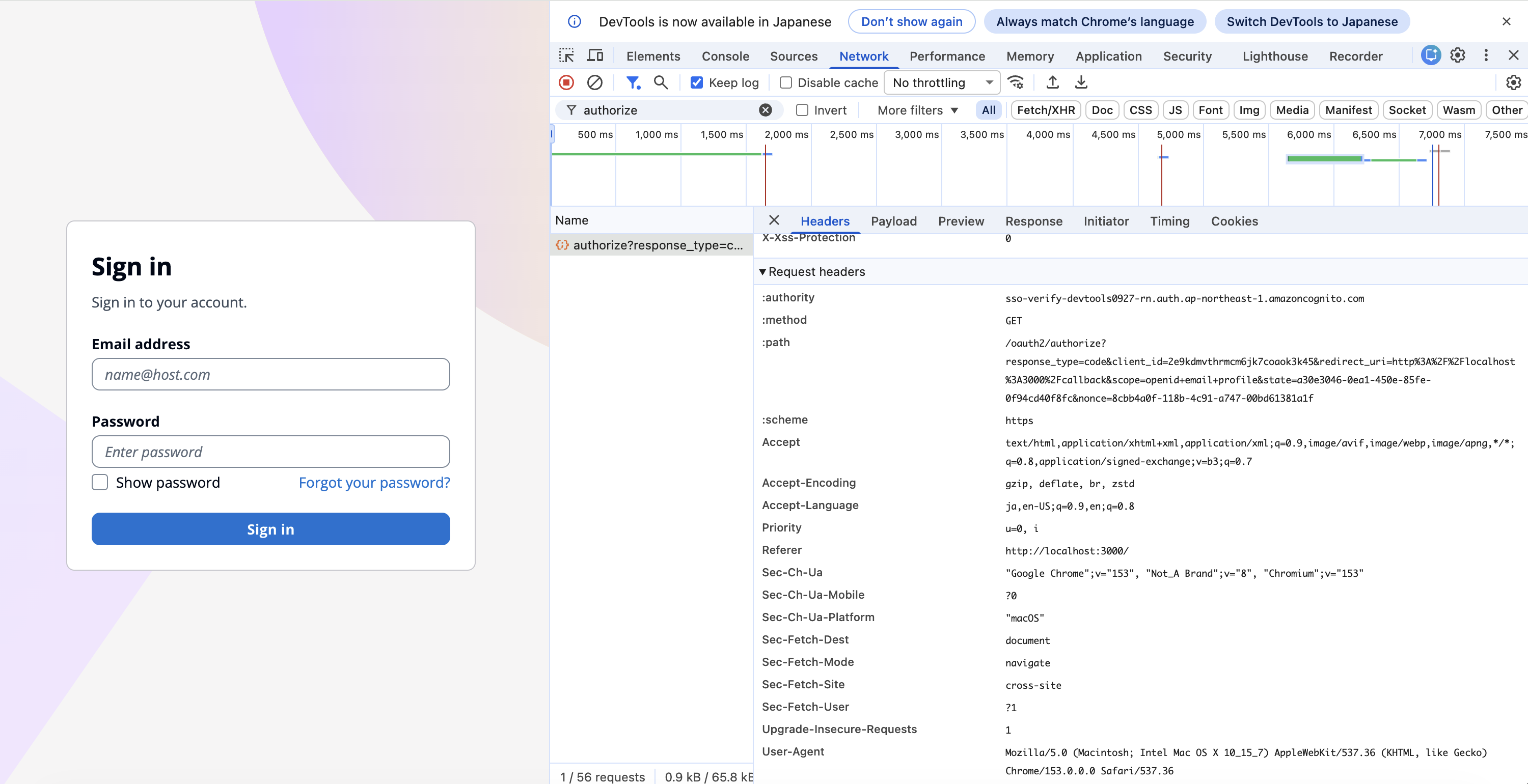
このときの /oauth2/authorize を DevTools で見ると、Request Headers に Cookie がありません。A システムのログインでは、ブラウザが Cognito のドメインにアクセスしていないからです。
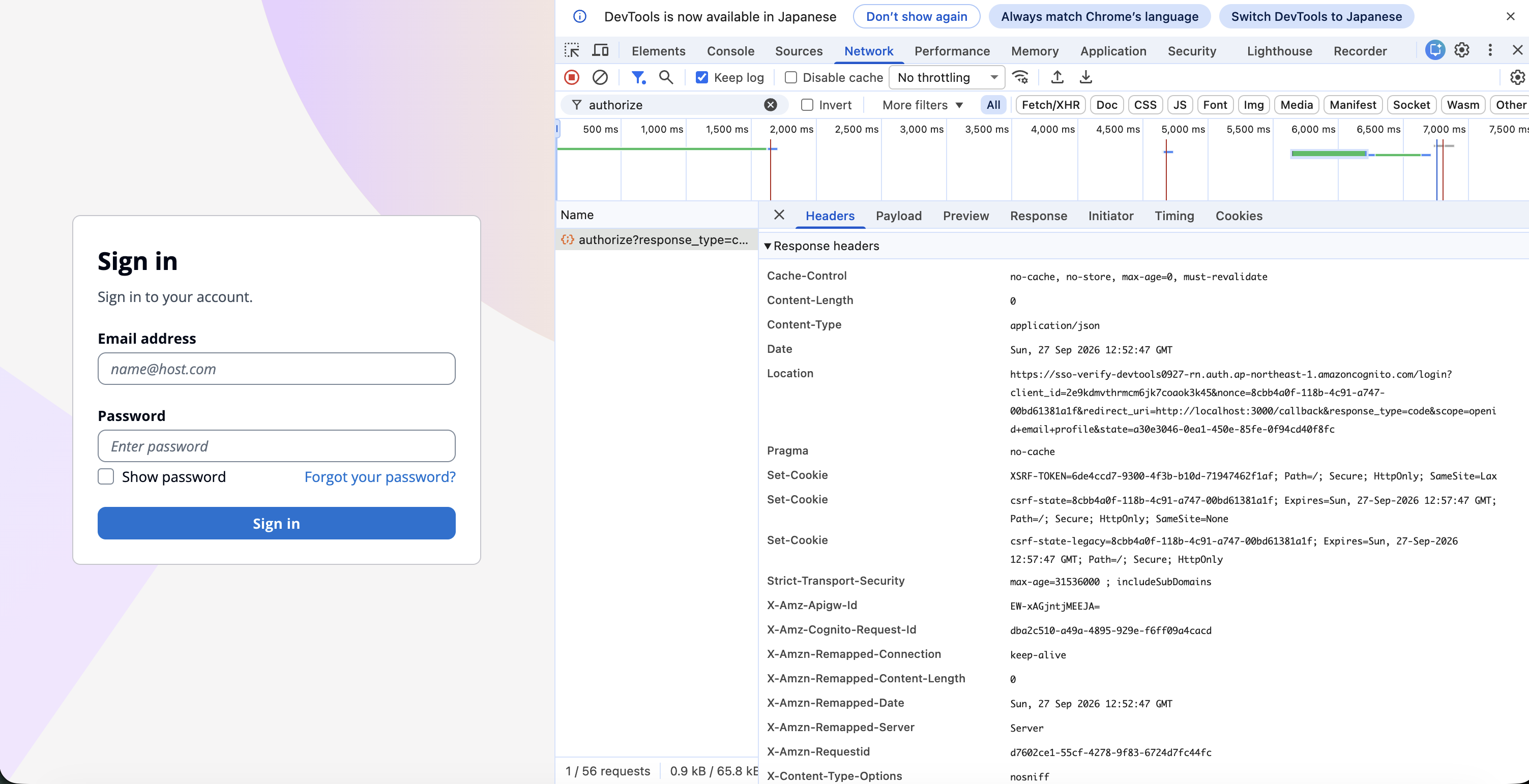
レスポンスの Location はログイン画面(/login)です。このとき付く Cookie は XSRF-TOKEN、csrf-state、csrf-state-legacy だけです。
3. もう一度 B システムでサインインする
ただ、ログイン画面を開いた時点で、cognito という Cookie が付いていました。ログイン画面を返す GET /login のレスポンスの Set-Cookie です(Max-Age=3600)。
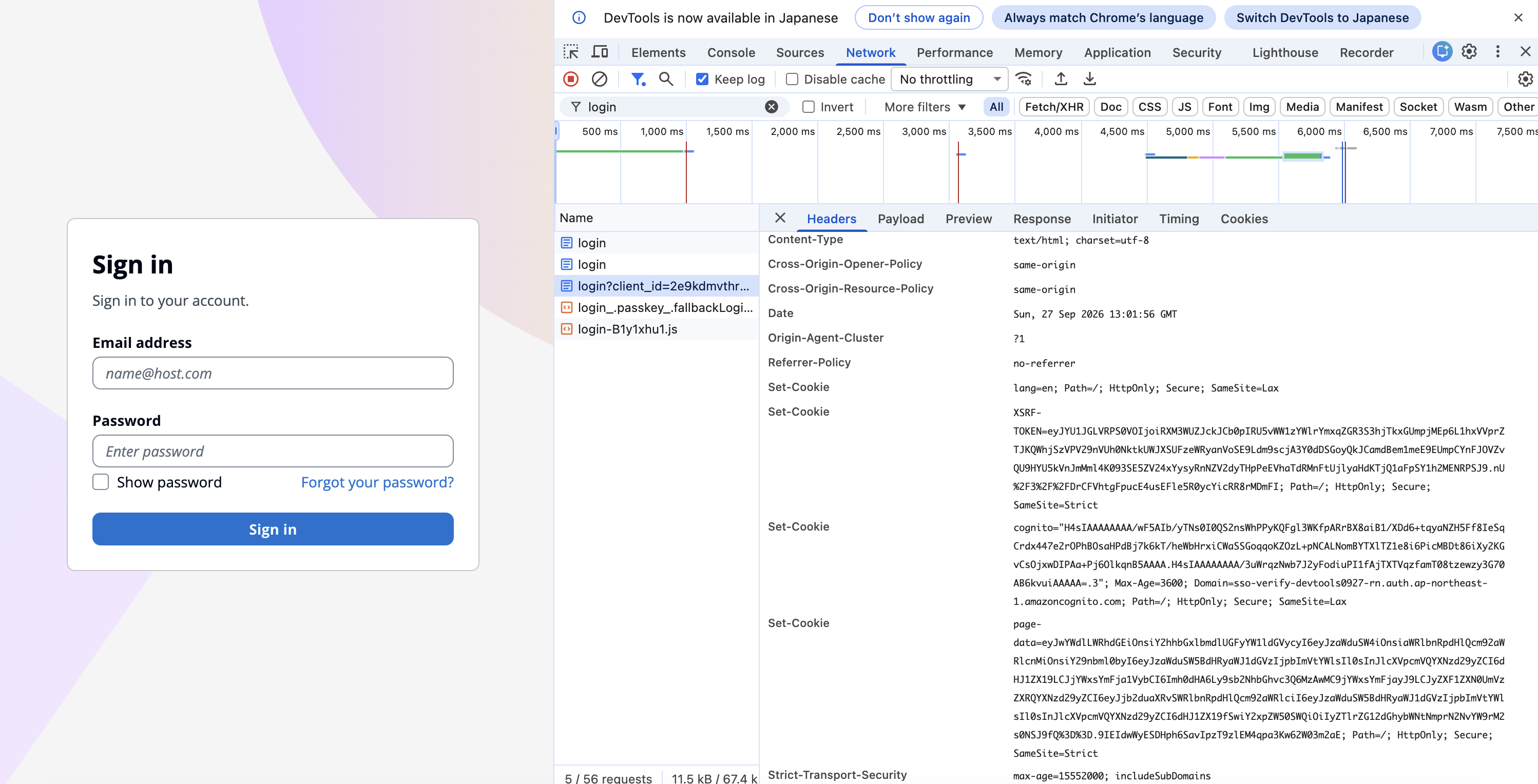
この Cookie で通れるか確かめるため、B システムでもう一度サインインしました。2 回目の /oauth2/authorize には cognito Cookie が入っています。
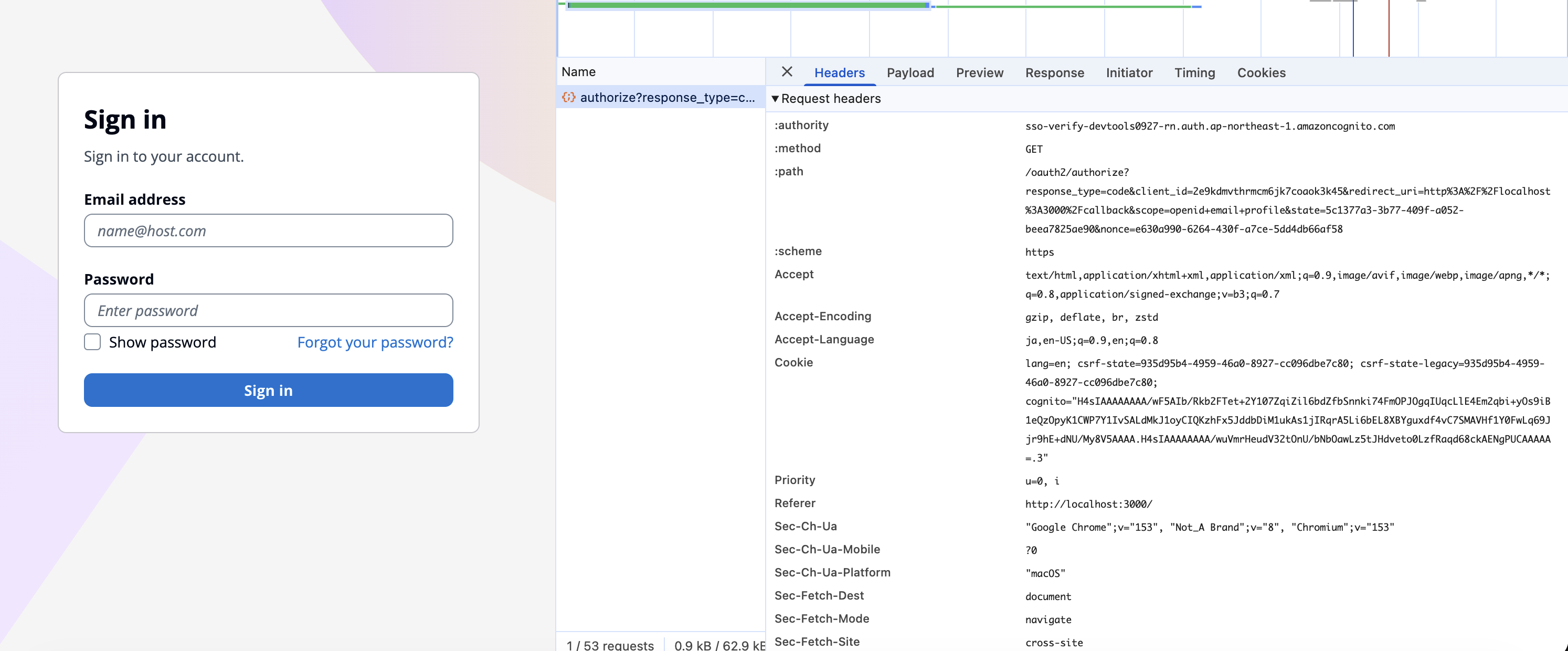
それでも Location は /login で、またログイン画面が出ました。
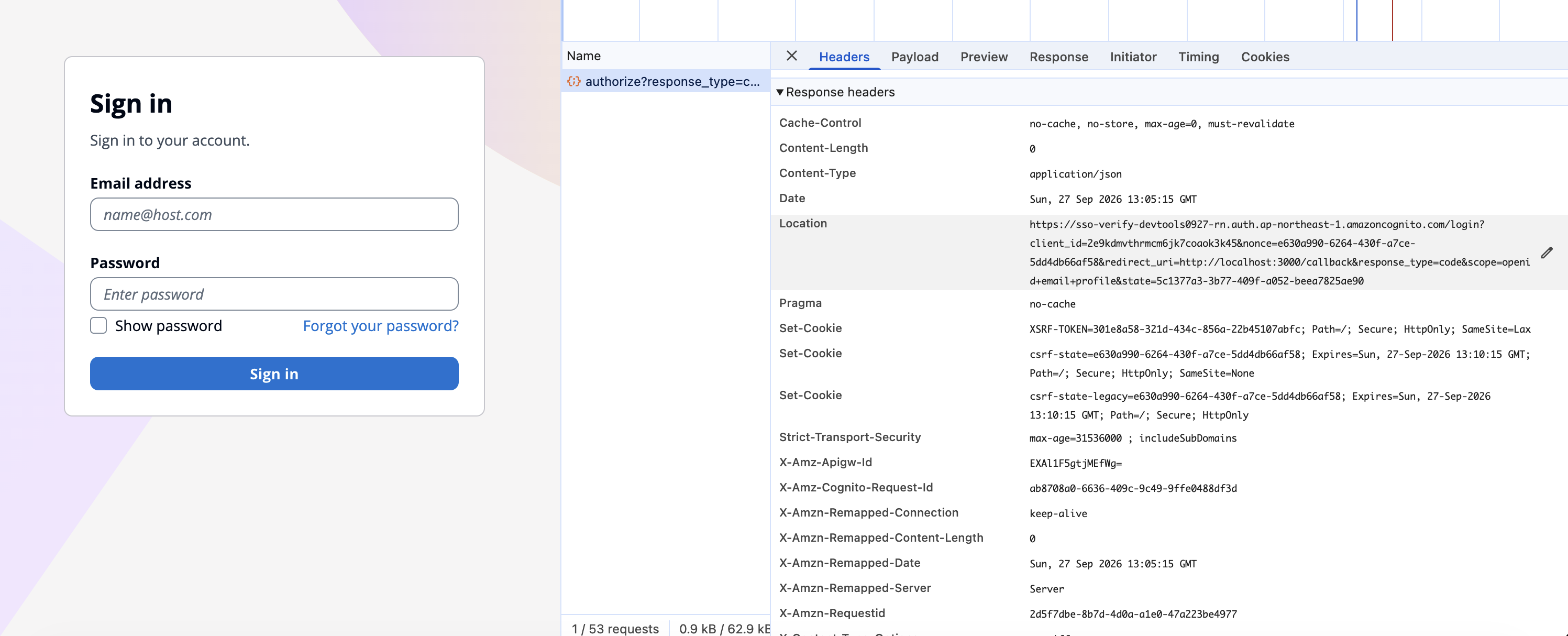
4. マネージドログインでログインする
このログイン画面でログインしました。
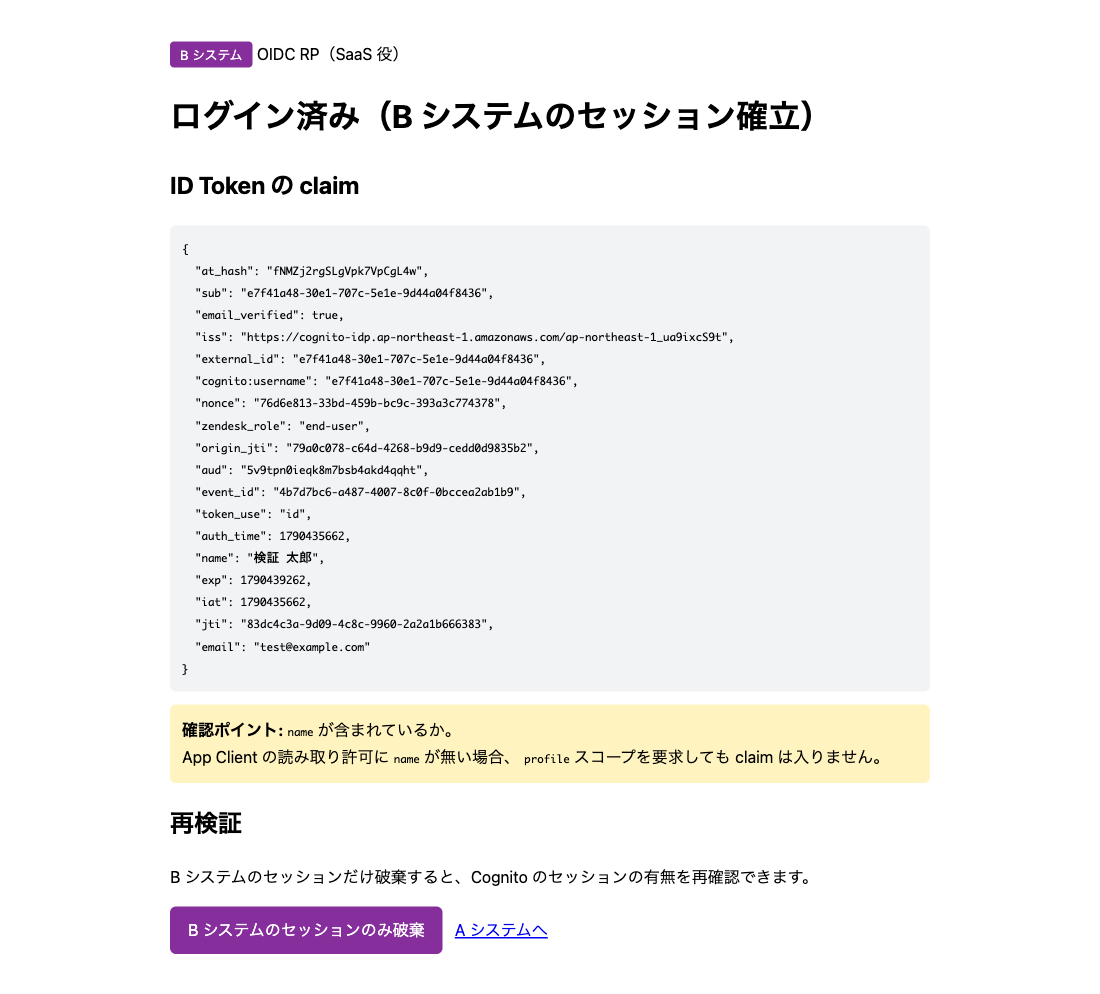
ログインすると、パスワードを送った POST /login のレスポンスで Cognito Cookie の値が置き換わります。
5. B システムのセッションだけ消して、もう一度開く
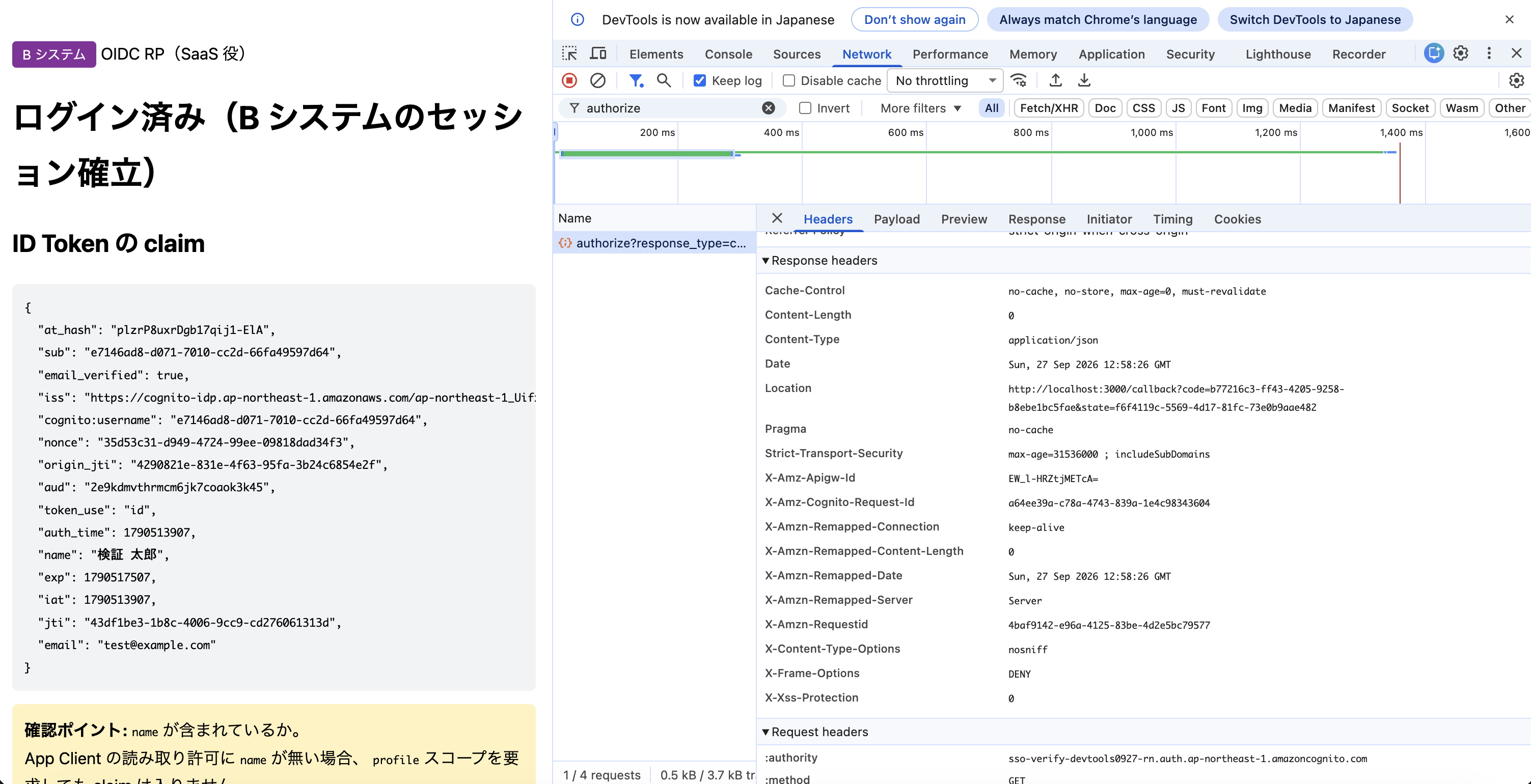
B システムのセッション Cookie だけを消してサインインし直すと、今度はログイン画面が出ませんでした。/oauth2/authorize には、置き換わった cognito Cookie が入っています。
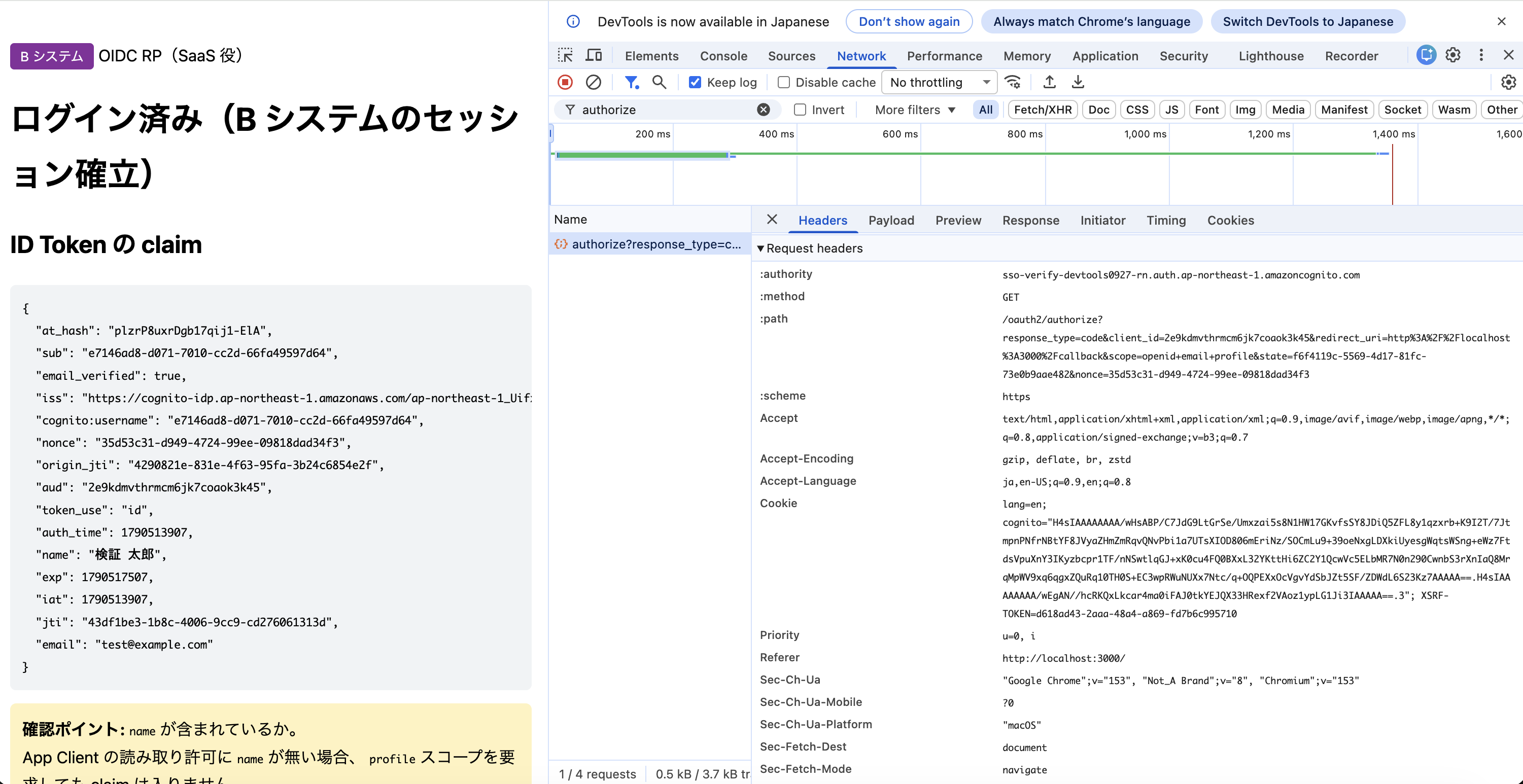
Location は B システムのコールバック(http://localhost:3000/callback?code=…)で、認可コードがそのまま返っています。
3 回の /oauth2/authorize を並べると次のとおりです。
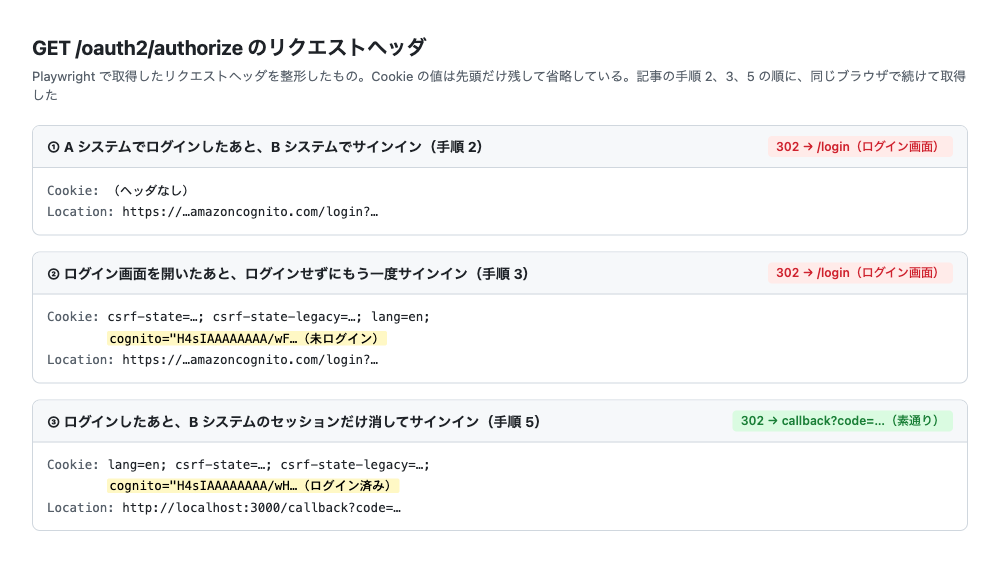
②と③はどちらも cognito Cookie を送っていますが、②はログイン画面を開いただけの値、③はログイン後の値で、結果が分かれました。
Lambda トリガーの記録
同じ時間帯の CloudWatch Logs です。
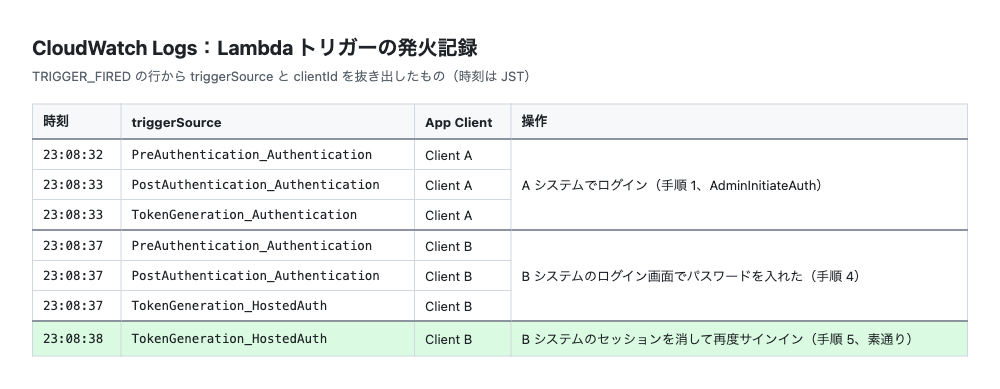
A システムのログイン(23:08:32〜33)のあと、23:08:37 に Client B でもう一度 PreAuthentication から認証が走っています。素通りした 23:08:38 は TokenGeneration_HostedAuth だけです。
triggerSource で経路も分かります。
| 経路 | triggerSource |
|---|---|
AdminInitiateAuth |
TokenGeneration_Authentication |
| マネージドログイン | TokenGeneration_HostedAuth |
結果
A システムにログインしていても、B システムではもう一度ログインが必要で、シームレスな SSO にはなりませんでした。
| A システム | B システムでの操作 | 送った Cognito Cookie | 結果 |
|---|---|---|---|
ログイン済み(AdminInitiateAuth) |
サインイン | なし | ログイン画面が出る |
ログイン済み(AdminInitiateAuth) |
ログイン画面を開いたあと、ログインせずにもう一度サインイン | あり(未ログイン) | ログイン画面が出る |
ログイン済み(AdminInitiateAuth) |
マネージドログインでログインし、B のセッションだけ消してもう一度サインイン | あり(ログイン済み) | ログイン画面なしで入れる |
ログイン画面なしで入れたのは、B システムからマネージドログインでログインしたあとだけでした。
SSO にならなかった理由
API 方式の通信の流れ
API 方式では、認証は A システムのサーバーと Cognito API の間で終わり、ブラウザには何も渡りません。B システムから /oauth2/authorize に行っても、ブラウザはログイン済みの Cookie を持っていません。
原因は、A システムのログインでブラウザが Cognito のドメインを通らないことです。Cognito Cookie がログイン済みになるのは、ブラウザが Cognito のドメインでログインしたときだけです。
公式ドキュメントにも「ブラウザに有効なマネージドログインセッション Cookie がない限り、ユーザーはサインインする必要があります」とあります(Authorize endpoint)。ログイン画面を開いただけの Cookie は、この「有効な」Cookie ではありません。
B システムでログインしたあと素通りできた理由
マネージドログインでは、ブラウザが Cognito のドメインでログインした時点で、Cognito Cookie がログイン済みの値に置き換わります。次の /oauth2/authorize では、Cognito はこの Cookie を見てログイン済みと判断します。
この Cookie は同じユーザープールの別の App Client にも送られるので、A システムのログインも Cognito のドメインを通せば SSO になります。
解決方法
対策は、ブラウザを Cognito でログインさせるか、Cognito の SSO に頼らないかの 2 通りです。
1. A システムもマネージドログインにする
A システムのログインもマネージドログインにすれば、こちらの記事のとおりログイン画面なしで SaaS に入れます。そのかわり、A システムのログイン画面を Cognito の画面に切り替える必要があります。
なお、SSO が有効なのは、最後にログインしてから 1 時間までです(Managed login)。
2. Cognito の SSO に頼らない
A システムのログイン方式を変えられない場合の方法です。
- SaaS 側の別の SSO 方式を使う:SaaS によっては、OIDC 以外の SSO の方式も用意されています。たとえば Zendesk には JWT SSO があり、自分のアプリが JWT に署名して Zendesk に渡します。A システムのログイン方式を変えずに SSO できます
- OIDC Provider を自前で立てる:作るものが大きく、Cognito を挟む意味もほぼなくなります
まとめ
AdminInitiateAuth でログインしている Web アプリ(A システム)から、SaaS 役の別アプリ(B システム)へ OIDC でログインすると、Cognito のログイン画面が出て、シームレスな SSO にはなりませんでした。
原因は、A システムのログインでブラウザが Cognito のドメインを通らず、ログイン済みの Cognito Cookie ができないことです。
A システムをマネージドログインにできるなら、それで SSO できます。変えられないなら、SaaS 側の JWT SSO などを検討してください。
注意点:DevTools で Cognito の Cookie を見るとき
B システムの画面を開いている間は、DevTools の Application タブに Cognito ドメインの Cookie は出てきません。Network タブで /oauth2/authorize のリクエストヘッダを見てください。
おまけ:試すためのファイル一式
検証を再現するためのファイル一式です。
ファイル構成
検証環境/
├─ cognito-sso-verification.yaml   … CloudFormation テンプレート
├─ package.json
├─ env.example.sh   … 環境変数を CloudFormation の出力から取ってくるスクリプト
├─ a-app.js         … A システム(AdminInitiateAuth でログイン、ポート 3001)
└─ b-app.js         … B システム(マネージドログインでログイン、ポート 3000)
動かし方
前提
- Node.js 18 以上(
fetchを使うため) - AWS CLI v2 と、CloudFormation、Cognito、IAM、Lambda、CloudWatch Logs を操作できる認証情報
- A システム(
a-app.js)は AWS SDK でAdminInitiateAuthを呼ぶので、サーバーを起動するターミナルでも同じ認証情報が使えること。名前付きプロファイルを使っている場合は、export AWS_PROFILE=<プロファイル名>もしておきます - リージョンは東京(
ap-northeast-1)
1. ファイルを置く
作業用フォルダを作り、以下の 5 つのファイルを同じ名前で保存します。
mkdir cognito-sso-test && cd cognito-sso-test
# ここに cognito-sso-verification.yaml / package.json / env.example.sh / a-app.js / b-app.js を保存する
ls
# a-app.js  b-app.js  env.example.sh  package.json  cognito-sso-verification.yaml
2. パッケージを入れる
npm install
3. スタックを作る
DomainPrefix は全リージョンで一意な文字列にします。パスワードは 12 文字以上で、大文字、小文字、数字、記号を 1 文字以上ずつ含めます。
aws cloudformation deploy \
  --template-file cognito-sso-verification.yaml \
  --stack-name cognito-sso-verification \
  --capabilities CAPABILITY_IAM \
  --region ap-northeast-1 \
  --parameter-overrides \
      DomainPrefix=sso-verify-<任意の文字列> \
      TestUserEmail=test@example.com \
      TestUserPassword='<パスワード>'
数分で Successfully created/updated stack と出ます。テストユーザーにはメールを送らないので、メールアドレスは実在しなくて大丈夫です。
4. 環境変数を読み込む
cp env.example.sh env.local.sh
source ./env.local.sh
ユーザープール ID などが表示されれば OK です。App Client のシークレットも環境変数に入るので、env.local.sh は人に渡さないでください。
5. サーバーを起動する
ターミナルを 2 つ開き、それぞれで source ./env.local.sh してから起動します。
# ターミナル 1:B システム
PORT=3000 node b-app.js
# B システム : http://localhost:3000
#   issuer       : https://cognito-idp.ap-northeast-1.amazonaws.com/ap-northeast-1_xxxxxxxxx
#   redirect_uri : http://localhost:3000/callback
# ターミナル 2:A システム
PORT=3001 node a-app.js
# A システム : http://localhost:3001
#   認証方式: AdminInitiateAuth(サーバーサイド) / Cognito ドメインは踏まない
環境変数 … が未設定です と出たら、そのターミナルで手順 4 をやり直してください。
6. ブラウザで試す
Cognito の Cookie が残らないよう、シークレットウィンドウで試します。
http://localhost:3001を開き、手順 3 のメールアドレスとパスワードでログインする- 「B システムへ →」を押し、B システムで「サインイン(通常)」を押す
- Cognito のログイン画面が出れば、記事と同じ結果です
- 「サインイン(通常)」からログイン画面でログインし、「B システムのセッションのみ破棄」を押してからもう一度サインインすると、今度はログイン画面が出ません
DevTools の Network タブで「Preserve log」をオンにすると、/oauth2/authorize のヘッダも見られます。
やり直すときはシークレットウィンドウを全部閉じます。Lambda トリガーの記録は次のコマンドで見られます。
aws logs tail "$(aws cloudformation describe-stacks --stack-name cognito-sso-verification --region ap-northeast-1 \
  --query "Stacks[0].Outputs[?OutputKey=='TriggerLogGroup'].OutputValue" --output text)" \
  --region ap-northeast-1 --since 10m --filter-pattern TRIGGER_FIRED
7. 片付け
Ctrl + C でサーバーを止め、スタックを削除します。
aws cloudformation delete-stack --stack-name cognito-sso-verification --region ap-northeast-1
cognito-sso-verification.yaml
AWSTemplateFormatVersion: '2010-09-09'
Description: >
  Cognito OIDC SSO 検証環境(API 方式版).
  A システムは AdminInitiateAuth でサーバーからログインし、B システムはマネージドログインを使う。
  A システムでログインしたあと、B システムにログイン画面なしで入れるかを確かめる。

Parameters:

  DomainPrefix:
    Type: String
    Description: Cognito プレフィックスドメイン(全リージョンで一意)
    AllowedPattern: '^[a-z0-9][a-z0-9-]{1,61}[a-z0-9]$'

  TestUserEmail:
    Type: String
    Description: 検証用ユーザーのメールアドレス(サインイン ID になる)
    AllowedPattern: '^[^@]+@[^@]+\.[^@]+$'

  TestUserPassword:
    Type: String
    NoEcho: true
    Description: 検証用ユーザーのパスワード(12文字以上・大文字・小文字・数字・記号を各1文字以上)
    MinLength: 12

  TestUserName:
    Type: String
    Default: 検証 太郎
    Description: 検証用ユーザーの表示名(name 属性)

  CallbackUrl:
    Type: String
    Default: http://localhost:3000/callback
    Description: B システムのコールバック URL

Resources:

  # --------------------------------------------------------------------------
  # Lambda トリガー(発火の可視化用)
  # --------------------------------------------------------------------------

  TriggerLoggerRole:
    Type: AWS::IAM::Role
    Properties:
      AssumeRolePolicyDocument:
        Version: '2012-10-17'
        Statement:
          - Effect: Allow
            Principal:
              Service: lambda.amazonaws.com
            Action: sts:AssumeRole
      ManagedPolicyArns:
        - arn:aws:iam::aws:policy/service-role/AWSLambdaBasicExecutionRole

  TriggerLoggerFunction:
    Type: AWS::Lambda::Function
    Properties:
      Runtime: python3.12
      Handler: index.handler
      Role: !GetAtt TriggerLoggerRole.Arn
      Timeout: 5
      Code:
        ZipFile: |
          import json

          def handler(event, context):
              print("TRIGGER_FIRED " + json.dumps({
                  "triggerSource": event.get("triggerSource", ""),
                  "clientId": (event.get("callerContext") or {}).get("clientId"),
                  "userName": event.get("userName"),
              }, ensure_ascii=False))
              return event

  # SourceArn に UserPool を指定すると循環参照になるため SourceAccount のみで許可する
  TriggerLoggerPermission:
    Type: AWS::Lambda::Permission
    Properties:
      FunctionName: !GetAtt TriggerLoggerFunction.Arn
      Action: lambda:InvokeFunction
      Principal: cognito-idp.amazonaws.com
      SourceAccount: !Ref AWS::AccountId

  # --------------------------------------------------------------------------
  # ユーザープールとドメイン
  # --------------------------------------------------------------------------

  UserPool:
    Type: AWS::Cognito::UserPool
    Properties:
      UserPoolName: !Sub '${AWS::StackName}-user-pool'
      UsernameAttributes:
        - email
      AutoVerifiedAttributes:
        - email
      AdminCreateUserConfig:
        AllowAdminCreateUserOnly: true
      MfaConfiguration: 'OFF'
      Schema:
        - Name: email
          AttributeDataType: String
          Required: true
          Mutable: true
      Policies:
        PasswordPolicy:
          MinimumLength: 12
          RequireUppercase: true
          RequireLowercase: true
          RequireNumbers: true
          RequireSymbols: true
          TemporaryPasswordValidityDays: 7
      LambdaConfig:
        PreAuthentication: !GetAtt TriggerLoggerFunction.Arn
        PostAuthentication: !GetAtt TriggerLoggerFunction.Arn
        PreTokenGeneration: !GetAtt TriggerLoggerFunction.Arn
    DependsOn: TriggerLoggerPermission

  # ManagedLoginVersion を省略するとクラシックのホストされた UI(1)になる。
  # prompt=none はマネージドログイン(2)でのみ使える
  UserPoolDomain:
    Type: AWS::Cognito::UserPoolDomain
    Properties:
      UserPoolId: !Ref UserPool
      Domain: !Ref DomainPrefix
      ManagedLoginVersion: 2

  # CFn / SDK で作った App Client にはブランディングが自動で作られないため明示的に作る
  OidcClientBranding:
    Type: AWS::Cognito::ManagedLoginBranding
    DependsOn: UserPoolDomain
    Properties:
      UserPoolId: !Ref UserPool
      ClientId: !Ref ClientOidc
      UseCognitoProvidedValues: true

  # --------------------------------------------------------------------------
  # App Client A: A システム(AdminInitiateAuth でログインする既存アプリ役)
  # --------------------------------------------------------------------------

  ClientServerSide:
    Type: AWS::Cognito::UserPoolClient
    Properties:
      ClientName: !Sub '${AWS::StackName}-a-system'
      UserPoolId: !Ref UserPool
      GenerateSecret: true
      ExplicitAuthFlows:
        - ALLOW_ADMIN_USER_PASSWORD_AUTH
        - ALLOW_REFRESH_TOKEN_AUTH
      # マネージドログインを使わないため OAuth は無効にする
      AllowedOAuthFlowsUserPoolClient: false

  # --------------------------------------------------------------------------
  # App Client B: B システム(SaaS 役。マネージドログインでログインする)
  # --------------------------------------------------------------------------

  ClientOidc:
    Type: AWS::Cognito::UserPoolClient
    Properties:
      ClientName: !Sub '${AWS::StackName}-b-system'
      UserPoolId: !Ref UserPool
      GenerateSecret: true
      AllowedOAuthFlowsUserPoolClient: true
      AllowedOAuthFlows:
        - code
      AllowedOAuthScopes:
        - openid
        - email
        - profile
      CallbackURLs:
        - !Ref CallbackUrl
      LogoutURLs:
        - !Ref CallbackUrl
      SupportedIdentityProviders:
        - COGNITO
      # name を入れないと、profile スコープを要求しても ID Token に name が載らない
      ReadAttributes:
        - email
        - email_verified
        - name

  # --------------------------------------------------------------------------
  # 検証用ユーザーの作成(カスタムリソース)
  # --------------------------------------------------------------------------

  TestUserRole:
    Type: AWS::IAM::Role
    Properties:
      AssumeRolePolicyDocument:
        Version: '2012-10-17'
        Statement:
          - Effect: Allow
            Principal:
              Service: lambda.amazonaws.com
            Action: sts:AssumeRole
      ManagedPolicyArns:
        - arn:aws:iam::aws:policy/service-role/AWSLambdaBasicExecutionRole
      Policies:
        - PolicyName: manage-test-user
          PolicyDocument:
            Version: '2012-10-17'
            Statement:
              - Effect: Allow
                Action:
                  - cognito-idp:AdminCreateUser
                  - cognito-idp:AdminSetUserPassword
                  - cognito-idp:AdminUpdateUserAttributes
                  - cognito-idp:AdminDeleteUser
                Resource: !GetAtt UserPool.Arn

  TestUserFunction:
    Type: AWS::Lambda::Function
    Properties:
      Runtime: python3.12
      Handler: index.handler
      Role: !GetAtt TestUserRole.Arn
      Timeout: 30
      Code:
        ZipFile: |
          import boto3
          import cfnresponse

          idp = boto3.client('cognito-idp')

          def handler(event, context):
              props = event.get('ResourceProperties', {})
              pool = props.get('UserPoolId')
              email = props.get('Email')
              password = props.get('Password')
              name = props.get('Name') or ''
              attrs = [
                  {'Name': 'email', 'Value': email},
                  {'Name': 'email_verified', 'Value': 'true'},
              ]
              if name:
                  attrs.append({'Name': 'name', 'Value': name})
              try:
                  if event['RequestType'] in ('Create', 'Update'):
                      try:
                          idp.admin_create_user(
                              UserPoolId=pool,
                              Username=email,
                              UserAttributes=attrs,
                              MessageAction='SUPPRESS',
                          )
                      except idp.exceptions.UsernameExistsException:
                          idp.admin_update_user_attributes(
                              UserPoolId=pool, Username=email, UserAttributes=attrs
                          )
                      idp.admin_set_user_password(
                          UserPoolId=pool,
                          Username=email,
                          Password=password,
                          Permanent=True,
                      )
                  elif event['RequestType'] == 'Delete':
                      try:
                          idp.admin_delete_user(UserPoolId=pool, Username=email)
                      except idp.exceptions.UserNotFoundException:
                          pass
                  cfnresponse.send(event, context, cfnresponse.SUCCESS, {}, email)
              except Exception as e:
                  print('ERROR: %s' % e)
                  status = cfnresponse.SUCCESS if event['RequestType'] == 'Delete' else cfnresponse.FAILED
                  cfnresponse.send(event, context, status, {'Error': str(e)}, email)

  TestUser:
    Type: AWS::CloudFormation::CustomResource
    Properties:
      ServiceToken: !GetAtt TestUserFunction.Arn
      UserPoolId: !Ref UserPool
      Email: !Ref TestUserEmail
      Password: !Ref TestUserPassword
      Name: !Ref TestUserName

Outputs:

  UserPoolId:
    Value: !Ref UserPool

  ManagedLoginDomain:
    Value: !Sub 'https://${DomainPrefix}.auth.${AWS::Region}.amazoncognito.com'

  ClientIdServerSide:
    Value: !Ref ClientServerSide

  ClientIdOidc:
    Value: !Ref ClientOidc

  TriggerLogGroup:
    Value: !Sub '/aws/lambda/${TriggerLoggerFunction}'
package.json
{
  "name": "cognito-sso-verification",
  "version": "1.0.0",
  "description": "Cognito の OIDC SSO 検証用。A システム(サーバーサイド認証)と B システム(OIDC RP)の最小アプリ",
  "private": true,
  "type": "commonjs",
  "engines": {
    "node": ">=18"
  },
  "scripts": {
    "a": "node a-app.js",
    "b": "node b-app.js"
  },
  "dependencies": {
    "@aws-sdk/client-cognito-identity-provider": "^3.700.0",
    "express": "^4.21.2"
  }
}
env.example.sh
# 検証環境の環境変数テンプレート
#   cp env.example.sh env.local.sh してから source する
#   env.local.sh にはクライアントシークレットが入るため、共有しないこと

STACK=cognito-sso-verification
out() { aws cloudformation describe-stacks --stack-name "$STACK" \
  --query "Stacks[0].Outputs[?OutputKey=='$1'].OutputValue" --output text; }
secret() { aws cognito-idp describe-user-pool-client \
  --user-pool-id "$USER_POOL_ID" --client-id "$1" \
  --query 'UserPoolClient.ClientSecret' --output text; }

export AWS_REGION=ap-northeast-1
export USER_POOL_ID=$(out UserPoolId)
export COGNITO_DOMAIN=$(out ManagedLoginDomain)
export A_CLIENT_ID=$(out ClientIdServerSide)
export B_CLIENT_ID=$(out ClientIdOidc)
export A_CLIENT_SECRET=$(secret "$A_CLIENT_ID")
export B_CLIENT_SECRET=$(secret "$B_CLIENT_ID")

echo "UserPool : $USER_POOL_ID"
echo "Domain   : $COGNITO_DOMAIN"
echo "A client: $A_CLIENT_ID"
echo "B client: $B_CLIENT_ID"
a-app.js
/**
 * A システム : サーバーサイド認証(AdminInitiateAuth)でログインする Web アプリ
 *
 *   - ログイン画面は自作
 *   - 認証は AdminInitiateAuth(サーバーサイド API)で行う
 *   - ログイン状態は A システム独自の Cookie で保持する
 *   - ブラウザは Cognito のドメインを一度も訪れない
 *
 * 起動: PORT=3001 node a-app.js
 */

const crypto = require('crypto');
const express = require('express');
const {
  CognitoIdentityProviderClient,
  AdminInitiateAuthCommand,
} = require('@aws-sdk/client-cognito-identity-provider');

const {
  AWS_REGION = 'ap-northeast-1',
  USER_POOL_ID,
  A_CLIENT_ID,
  A_CLIENT_SECRET,
  B_URL = 'http://localhost:3000',
  PORT = 3001,
} = process.env;

for (const [k, v] of Object.entries({ USER_POOL_ID, A_CLIENT_ID })) {
  if (!v) {
    console.error(`環境変数 ${k} が未設定です。先に source ./env.local.sh を実行してください。`);
    process.exit(1);
  }
}

const idp = new CognitoIdentityProviderClient({ region: AWS_REGION });

/** App Client にシークレットがある場合に必要な SECRET_HASH を算出する */
function secretHash(username) {
  if (!A_CLIENT_SECRET) return undefined;
  return crypto
    .createHmac('sha256', A_CLIENT_SECRET)
    .update(username + A_CLIENT_ID)
    .digest('base64');
}

/** JWT のペイロード部だけを取り出す(検証はしない。表示用) */
function decodeJwtPayload(jwt) {
  const [, payload] = jwt.split('.');
  return JSON.parse(Buffer.from(payload, 'base64url').toString('utf8'));
}

// 自前のサーバーサイドセッション(検証用途のためメモリ保持)
const sessions = new Map();

const app = express();
app.use(express.urlencoded({ extended: false }));

/** リクエストから自前セッションを取り出す */
function currentSession(req) {
  const m = /(?:^|;\s*)a_session=([^;]+)/.exec(req.headers.cookie || '');
  return m ? sessions.get(m[1]) : undefined;
}

const page = (body) => `<!doctype html>
<meta charset="utf-8">
<title>A システム(サーバーサイド認証)</title>
<style>
  body { font-family: system-ui, sans-serif; max-width: 760px; margin: 40px auto; padding: 0 16px; line-height: 1.7; }
  .tag { display: inline-block; background: #0b7285; color: #fff; padding: 2px 10px; border-radius: 4px; font-size: 13px; }
  pre { background: #f1f3f5; padding: 12px; border-radius: 6px; overflow-x: auto; font-size: 13px; }
  .note { background: #fff3bf; padding: 12px; border-radius: 6px; }
  a.btn { display: inline-block; background: #0b7285; color: #fff; padding: 10px 18px; border-radius: 6px; text-decoration: none; }
  input { padding: 8px; width: 320px; margin-bottom: 8px; }
  button { padding: 8px 20px; }
</style>
<p><span class="tag">A システム</span> サーバーサイド認証(AdminInitiateAuth)</p>
${body}`;

app.get('/', (req, res) => {
  const s = currentSession(req);

  if (!s) {
    return res.send(
      page(`
      <h1>ログイン</h1>
      <p>自作のログイン画面です。認証は <code>AdminInitiateAuth</code> でサーバーサイドから行います。</p>
      <form method="POST" action="/login">
        <div><input name="email" type="email" placeholder="メールアドレス" required></div>
        <div><input name="password" type="password" placeholder="パスワード" required></div>
        <button type="submit">ログイン</button>
      </form>
      <div class="note">
        この画面でログインしても、ブラウザは Cognito のドメインを訪れません。<br>
        そのため <b>Cognito のログイン済みセッションは作られません</b>。
      </div>
    `)
    );
  }

  return res.send(
    page(`
    <h1>ログイン済み</h1>
    <p>A システム独自のセッションでログイン状態を保持しています。</p>
    <h2>ID Token の claim</h2>
    <pre>${JSON.stringify(s.idTokenClaims, null, 2)}</pre>
    <h2>検証: ここから B システムへ移動する</h2>
    <p><a class="btn" href="${B_URL}">B システムへ →</a></p>
    <div class="note">
      <b>期待される結果:</b> Cognito のログイン画面が表示される(= SSO が成立しない)。<br>
      開発者ツールの Network タブで、<code>/oauth2/authorize</code> のリクエストに
      ログイン済みの <code>cognito</code> Cookie が無いことも確認してください。
    </div>
    <p><a href="/logout">A システムからログアウト</a></p>
  `)
  );
});

app.post('/login', async (req, res) => {
  const { email, password } = req.body;
  try {
    const out = await idp.send(
      new AdminInitiateAuthCommand({
        UserPoolId: USER_POOL_ID,
        ClientId: A_CLIENT_ID,
        AuthFlow: 'ADMIN_USER_PASSWORD_AUTH',
        AuthParameters: {
          USERNAME: email,
          PASSWORD: password,
          ...(secretHash(email) ? { SECRET_HASH: secretHash(email) } : {}),
        },
      })
    );

    // 【重要】レスポンスは JSON でトークンが返るだけ。Set-Cookie は発生しない。
    const result = out.AuthenticationResult;
    if (!result) {
      return res.status(400).send(
        page(`<h1>追加のチャレンジが必要です</h1><pre>${JSON.stringify(out, null, 2)}</pre>`)
      );
    }

    const sid = crypto.randomUUID();
    sessions.set(sid, { idTokenClaims: decodeJwtPayload(result.IdToken) });

    // A システム独自のセッション Cookie(Cognito とは無関係)
    res.setHeader('Set-Cookie', `a_session=${sid}; HttpOnly; Path=/; SameSite=Lax`);
    return res.redirect('/');
  } catch (e) {
    return res
      .status(401)
      .send(page(`<h1>ログイン失敗</h1><pre>${e.name}: ${e.message}</pre><p><a href="/">戻る</a></p>`));
  }
});

app.get('/logout', (req, res) => {
  const m = /(?:^|;\s*)a_session=([^;]+)/.exec(req.headers.cookie || '');
  if (m) sessions.delete(m[1]);
  res.setHeader('Set-Cookie', 'a_session=; Max-Age=0; Path=/');
  res.redirect('/');
});

app.listen(PORT, () => {
  console.log(`A システム : http://localhost:${PORT}`);
  console.log(`  認証方式: AdminInitiateAuth(サーバーサイド) / Cognito ドメインは踏まない`);
});
b-app.js
/**
 * B システム : OIDC RP(SaaS 役)
 *
 * SaaS の OIDC SSO と同じ流れでログインする。
 *   1. 未認証なら Cognito の /oauth2/authorize へ「ブラウザを」リダイレクトする
 *   2. コールバックで認可コードを受け取り、state を照合する
 *   3. トークンエンドポイントへ「サーバー間で」直接リクエストし、code を交換する
 *   4. ID Token の claim でユーザーを識別する
 *
 * ※ 本来 RP は JWKS から公開鍵を取得して署名を検証します。
 *    本アプリは claim の中身を見ることが目的のため、署名検証は省略しています。
 *    検証環境専用であり、そのまま本番利用しないでください。
 *
 * 起動: PORT=3000 node b-app.js
 */

const crypto = require('crypto');
const express = require('express');

const {
  AWS_REGION = 'ap-northeast-1',
  USER_POOL_ID,
  COGNITO_DOMAIN, // 例: https://xxxx.auth.ap-northeast-1.amazoncognito.com
  B_CLIENT_ID,
  B_CLIENT_SECRET,
  A_URL = 'http://localhost:3001',
  PORT = 3000,
} = process.env;

for (const [k, v] of Object.entries({ USER_POOL_ID, COGNITO_DOMAIN, B_CLIENT_ID })) {
  if (!v) {
    console.error(`環境変数 ${k} が未設定です。先に source ./env.local.sh を実行してください。`);
    process.exit(1);
  }
}

const REDIRECT_URI = `http://localhost:${PORT}/callback`;
const ISSUER = `https://cognito-idp.${AWS_REGION}.amazonaws.com/${USER_POOL_ID}`;

function decodeJwtPayload(jwt) {
  const [, payload] = jwt.split('.');
  return JSON.parse(Buffer.from(payload, 'base64url').toString('utf8'));
}

// B システムのセッションと、認可リクエストの一時状態(検証用途のためメモリ保持)
const sessions = new Map();
const pending = new Map();

const app = express();

function currentSession(req) {
  const m = /(?:^|;\s*)b_session=([^;]+)/.exec(req.headers.cookie || '');
  return m ? sessions.get(m[1]) : undefined;
}

const page = (body) => `<!doctype html>
<meta charset="utf-8">
<title>B システム(OIDC RP)</title>
<style>
  body { font-family: system-ui, sans-serif; max-width: 760px; margin: 40px auto; padding: 0 16px; line-height: 1.7; }
  .tag { display: inline-block; background: #862e9c; color: #fff; padding: 2px 10px; border-radius: 4px; font-size: 13px; }
  pre { background: #f1f3f5; padding: 12px; border-radius: 6px; overflow-x: auto; font-size: 13px; }
  .note { background: #fff3bf; padding: 12px; border-radius: 6px; }
  .err { background: #ffe3e3; padding: 12px; border-radius: 6px; }
  a.btn { display: inline-block; background: #862e9c; color: #fff; padding: 10px 18px; border-radius: 6px; text-decoration: none; margin-right: 8px; }
</style>
<p><span class="tag">B システム</span> OIDC RP(SaaS 役)</p>
${body}`;

/** 認可リクエスト URL を組み立てる */
function buildAuthorizeUrl({ state, nonce, prompt }) {
  const p = new URLSearchParams({
    response_type: 'code',
    client_id: B_CLIENT_ID,
    redirect_uri: REDIRECT_URI,
    scope: 'openid email profile',
    state,
    nonce,
  });
  if (prompt) p.set('prompt', prompt);
  return `${COGNITO_DOMAIN}/oauth2/authorize?${p.toString()}`;
}

app.get('/', (req, res) => {
  const s = currentSession(req);

  if (!s) {
    return res.send(
      page(`
      <h1>未認証です</h1>
      <p>B システム側から認証を開始します(SP-initiated)。</p>
      <p>
        <a class="btn" href="/login">サインイン(通常)</a>
        <a class="btn" href="/login?prompt=none">サイレント認証(prompt=none)</a>
      </p>
      <div class="note">
        <b>通常:</b> Cognito にログイン済みでなければログイン画面が出ます。<br>
        <b>prompt=none:</b> ログイン済みでなければ <code>error=login_required</code> が返ります(画面は出ません)。
      </div>
      <p><a href="${A_URL}">← A システムへ</a></p>
    `)
    );
  }

  return res.send(
    page(`
    <h1>ログイン済み(B システムのセッション確立)</h1>
    <h2>ID Token の claim</h2>
    <pre>${JSON.stringify(s.idTokenClaims, null, 2)}</pre>
    <div class="note">
      <b>確認ポイント:</b> <code>name</code> が含まれているか。<br>
      App Client の読み取り許可に <code>name</code> が無い場合、
      <code>profile</code> スコープを要求しても claim は入りません。
    </div>
    <h2>再検証</h2>
    <p>B システムのセッションだけ破棄すると、Cognito のセッションの有無を再確認できます。</p>
    <p>
      <a class="btn" href="/logout-b">B システムのセッションのみ破棄</a>
      <a href="${A_URL}">A システムへ</a>
    </p>
  `)
  );
});

app.get('/login', (req, res) => {
  const state = crypto.randomUUID();
  const nonce = crypto.randomUUID();
  pending.set(state, { nonce, at: Date.now() });

  const url = buildAuthorizeUrl({ state, nonce, prompt: req.query.prompt });
  console.log(`[B システム] → 302 ${url}`);

  // ブラウザ経由のフロントチャネル
  res.redirect(url);
});

app.get('/callback', async (req, res) => {
  const { code, state, error, error_description: desc } = req.query;

  if (error) {
    return res.status(400).send(
      page(`
      <h1>認可エラー</h1>
      <div class="err">
        <p><b>error:</b> <code>${error}</code></p>
        ${desc ? `<p><b>error_description:</b> ${desc}</p>` : ''}
      </div>
      <div class="note">
        <code>login_required</code> が返った場合、<b>Cognito にログイン済みのセッションが無い</b>ことを意味します。
        <code>prompt=none</code> ではサイレント認証できません。
      </div>
      <p><a href="/">戻る</a></p>
    `)
    );
  }

  const p = pending.get(state);
  if (!p) {
    return res.status(400).send(page(`<h1>state が不正です</h1><p><a href="/">戻る</a></p>`));
  }
  pending.delete(state);

  // ここだけがサーバー間の直接通信(バックチャネル)
  const body = new URLSearchParams({
    grant_type: 'authorization_code',
    client_id: B_CLIENT_ID,
    code,
    redirect_uri: REDIRECT_URI,
  });
  const headers = { 'Content-Type': 'application/x-www-form-urlencoded' };
  if (B_CLIENT_SECRET) {
    const basic = Buffer.from(`${B_CLIENT_ID}:${B_CLIENT_SECRET}`).toString('base64');
    headers.Authorization = `Basic ${basic}`;
  }

  const tokenRes = await fetch(`${COGNITO_DOMAIN}/oauth2/token`, {
    method: 'POST',
    headers,
    body,
  });
  const tokens = await tokenRes.json();

  if (!tokenRes.ok) {
    return res
      .status(400)
      .send(page(`<h1>トークン交換に失敗</h1><pre>${JSON.stringify(tokens, null, 2)}</pre>`));
  }

  const claims = decodeJwtPayload(tokens.id_token);
  if (claims.nonce !== p.nonce) {
    return res.status(400).send(page(`<h1>nonce が一致しません</h1>`));
  }
  if (claims.iss !== ISSUER) {
    return res
      .status(400)
      .send(page(`<h1>iss が一致しません</h1><pre>expected: ${ISSUER}\nactual:   ${claims.iss}</pre>`));
  }

  const sid = crypto.randomUUID();
  sessions.set(sid, { idTokenClaims: claims });
  res.setHeader('Set-Cookie', `b_session=${sid}; HttpOnly; Path=/; SameSite=Lax`);
  res.redirect('/');
});

app.get('/logout-b', (req, res) => {
  const m = /(?:^|;\s*)b_session=([^;]+)/.exec(req.headers.cookie || '');
  if (m) sessions.delete(m[1]);
  res.setHeader('Set-Cookie', 'b_session=; Max-Age=0; Path=/');
  res.redirect('/');
});

app.listen(PORT, () => {
  console.log(`B システム : http://localhost:${PORT}`);
  console.log(`  issuer       : ${ISSUER}`);
  console.log(`  redirect_uri : ${REDIRECT_URI}`);
});