Cognito のマネージドログインで App Client をまたいだ SSO を試してみた

こんにちは、クラスメソッドの長澤です。
Amazon Cognito の1つのユーザープールを認証基盤として利用し、OIDC としても利用することができます。
今回はCognito ユーザープールを認証基盤として利用した状態で、SaaS などの別 Web アプリへ OIDC でログインしようとすると、どのような挙動となるか検証してみます。
マネージドログインと App Client
マネージドログインは Cognito が用意しているログイン画面です。アプリがブラウザを Cognito のドメイン(xxx.auth.region.amazoncognito.com)の /oauth2/authorize にリダイレクトし、ユーザーはそこでログインします。成功するとアプリのコールバック URL に認可コードが返り、アプリがトークンと交換します。OIDC の認可コードフローです。
App Client はアプリごとの設定で、コールバック URL やスコープ、ID Token に載せる属性を決めます。ID Token の aud には App Client の ID が入ります。
検証環境の構成
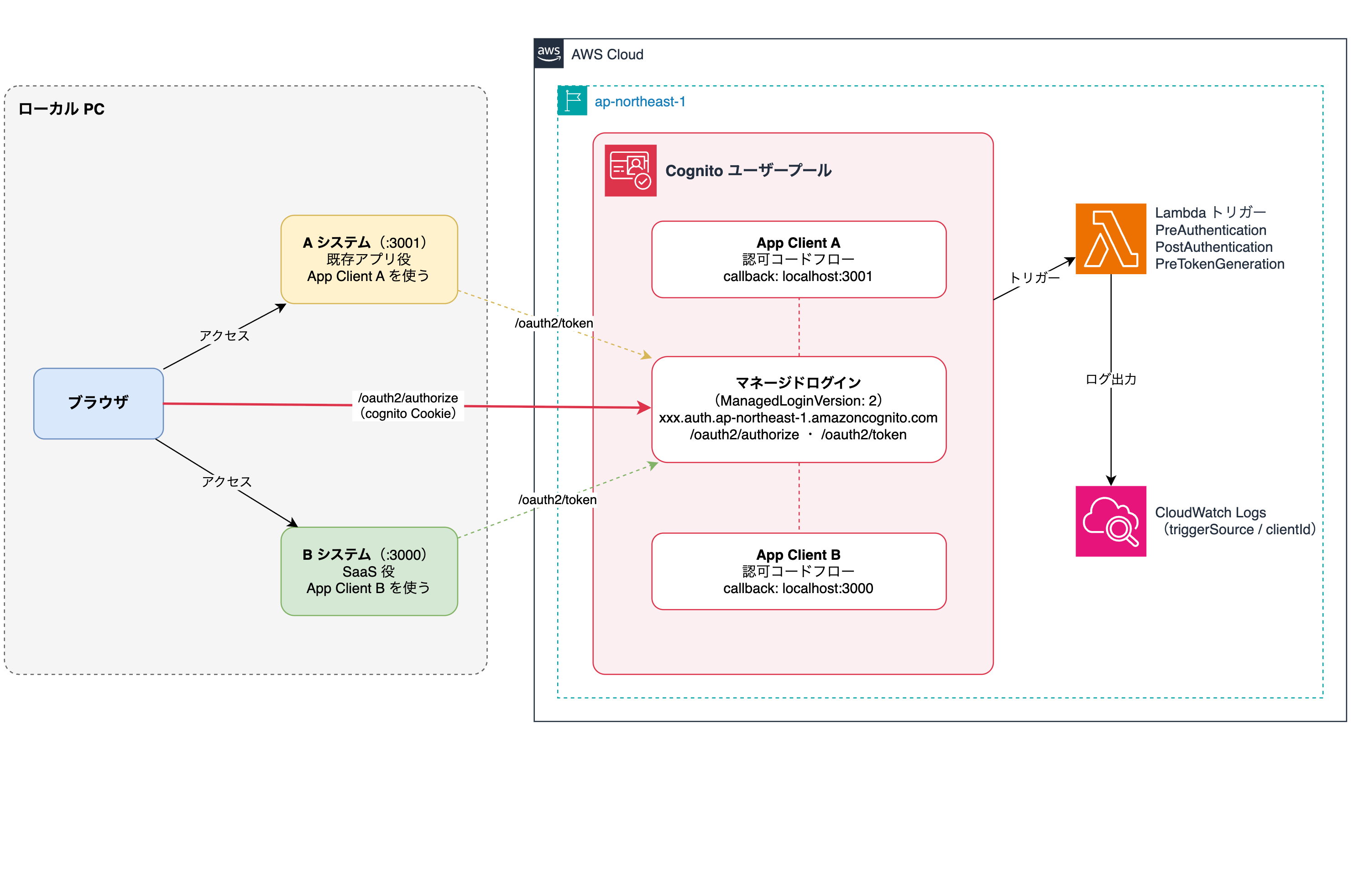
A システムと B システムは自作の OIDC RP で、違うのは使う App Client とポートだけです。
ブラウザ操作とキャプチャには Playwright を使い、どの手順も Cookie が空の新しいブラウザ(シークレットウィンドウ相当)から始めました。
CloudFormation の中身
主なリソースを抜粋します。全文はおまけに載せています。
ユーザープール
UserPool:
  Type: AWS::Cognito::UserPool
  Properties:
    UsernameAttributes:
      - email
    AdminCreateUserConfig:
      AllowAdminCreateUserOnly: true
    MfaConfiguration: 'OFF'
    LambdaConfig:
      PreAuthentication: !GetAtt TriggerLoggerFunction.Arn
      PostAuthentication: !GetAtt TriggerLoggerFunction.Arn
      PreTokenGeneration: !GetAtt TriggerLoggerFunction.Arn
サインインはメールアドレスで、セルフサインアップは無効です。どの App Client で認証とトークン発行が起きたかを見るため、Lambda トリガーを 3 つ付けています。
ドメイン
UserPoolDomain:
  Type: AWS::Cognito::UserPoolDomain
  Properties:
    UserPoolId: !Ref UserPool
    Domain: !Ref DomainPrefix
    ManagedLoginVersion: 2
ManagedLoginVersion はマネージドログインを使うので 2 を指定します。
App Client A と B
ClientA:
  Type: AWS::Cognito::UserPoolClient
  Properties:
    UserPoolId: !Ref UserPool
    GenerateSecret: true
    AllowedOAuthFlowsUserPoolClient: true
    AllowedOAuthFlows:
      - code
    AllowedOAuthScopes:
      - openid
      - email
      - profile
    CallbackURLs:
      - !Ref ACallbackUrl   # 既定値 http://localhost:3001/callback
    SupportedIdentityProviders:
      - COGNITO
    ReadAttributes:
      - email
      - email_verified
      - name
App Client B はコールバック URL が http://localhost:3000/callback なだけで、ほかは同じです。Cognito は http://localhost なら HTTP のコールバック URL を許すので、証明書なしで試せます。
マネージドログインのブランディング
BrandingA:
  Type: AWS::Cognito::ManagedLoginBranding
  Properties:
    UserPoolId: !Ref UserPool
    ClientId: !Ref ClientA
    UseCognitoProvidedValues: true
CFn や SDK で作った App Client にはブランディングが自動で作られず、ログイン画面が表示されません。App Client ごとに作ります(B 用も同様)。
Lambda トリガー
Cognito には、ログインの途中の決まったタイミングで Lambda を呼び出す機能(Lambda トリガー)があります(Lambda トリガーの説明)。今回はそのうち、次の 3 つを使っています。
| トリガー | 呼ばれるタイミング |
|---|---|
| PreAuthentication | パスワードを確かめる直前 |
| PostAuthentication | パスワードの確認に成功した直後 |
| PreTokenGeneration | ID Token などを発行する直前 |
パスワードを入れてログインしたときは 3 つとも呼ばれ、トークンを発行するだけなら PreTokenGeneration だけが呼ばれるはずです。この違いをログで見れば、SSO で入ったかどうかを Cognito 側の記録で確かめられます。
def handler(event, context):
    print("TRIGGER_FIRED " + json.dumps({
        "triggerSource": event.get("triggerSource", ""),
        "clientId": (event.get("callerContext") or {}).get("clientId"),
        "userName": event.get("userName"),
    }, ensure_ascii=False))
    return event
呼ばれたトリガーの種類と App Client の ID をログに出すだけの関数です。
ローカルアプリ
A システム(a-app.js)と B システム(b-app.js)は Node.js と Express で書いた OIDC RP です。未ログインならブラウザを /oauth2/authorize にリダイレクトし、コールバックで受け取った認可コードをサーバーから /oauth2/token に送ってトークンと交換します。
2 つの違いは、App Client の ID とシークレット、ポート、セッション Cookie の名前だけです。localhost の Cookie はポートをまたいで共有されるので、名前を分けています。
検証用のため、セッションはメモリに持ち、ID Token の署名検証は省いています。全文はおまけに載せています。
検証
次の順に操作しました。
- 比較のため、新しいブラウザで B システムだけを開く
- 別の新しいブラウザで A システムを開き、マネージドログインでログインする
- そのまま B システムに移動して、サインインする
各操作で、/oauth2/authorize へのリクエストヘッダと CloudWatch Logs のトリガー記録を取りました。
1. B システムだけを開く
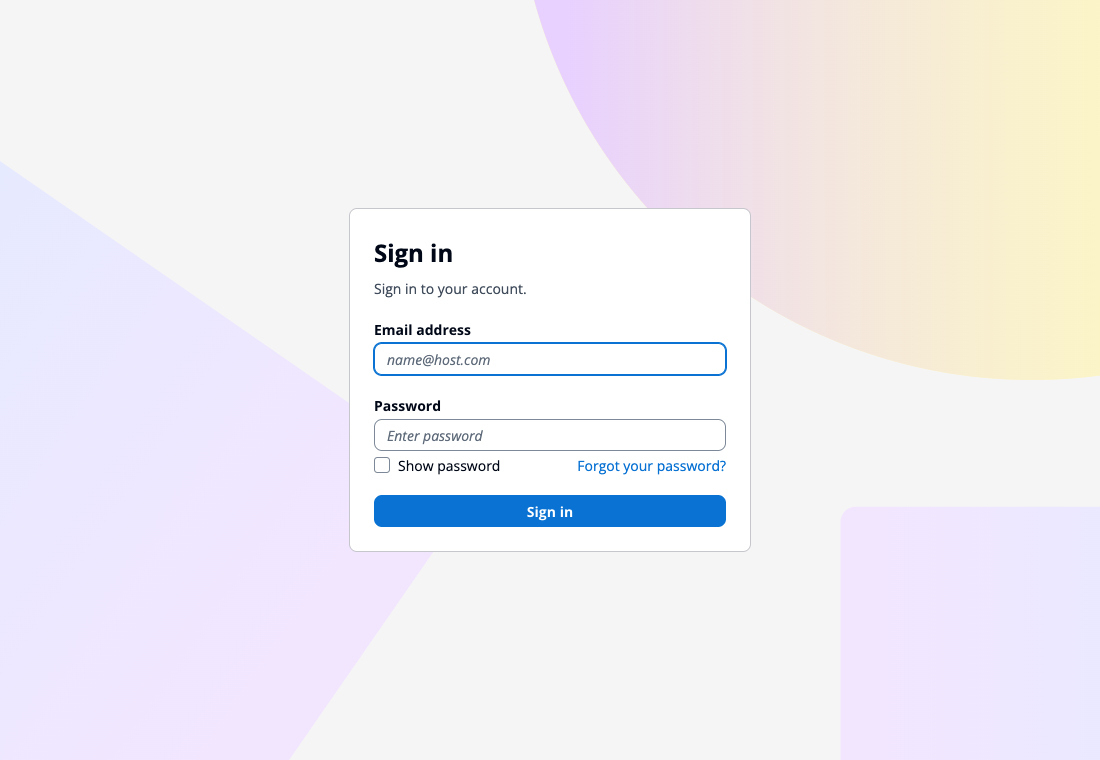
比較用です。新しいブラウザで B システムのサインインを押すと、Cognito のログイン画面が出ました。まだどこにもログインしていないので当然です。
2. A システムでログインする
別の新しいブラウザで A システムを開き、サインインを押します。
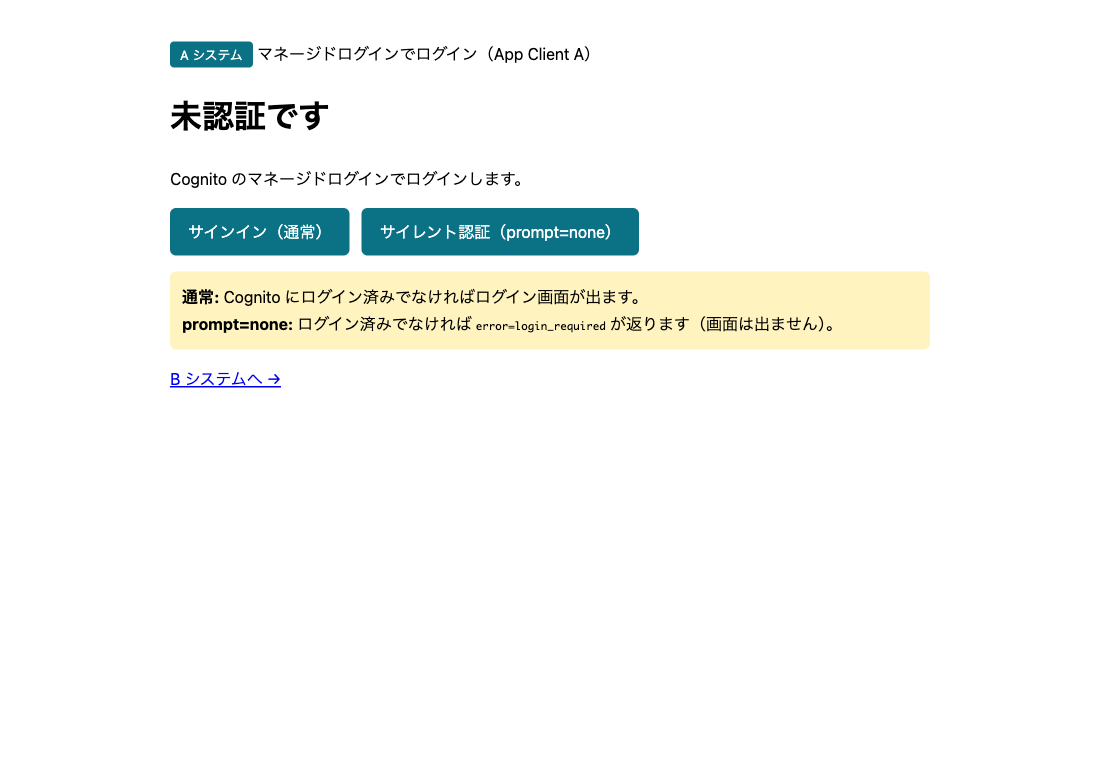
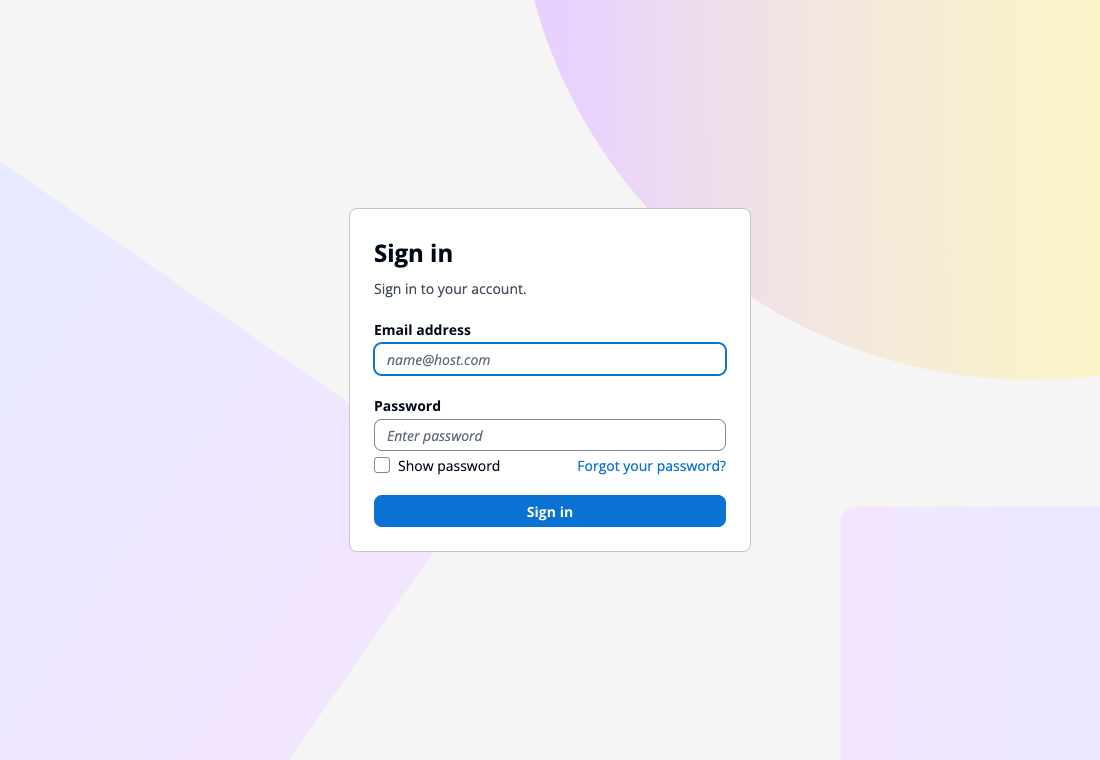
Cognito のログイン画面が出るので、メールアドレスとパスワードを入れます。
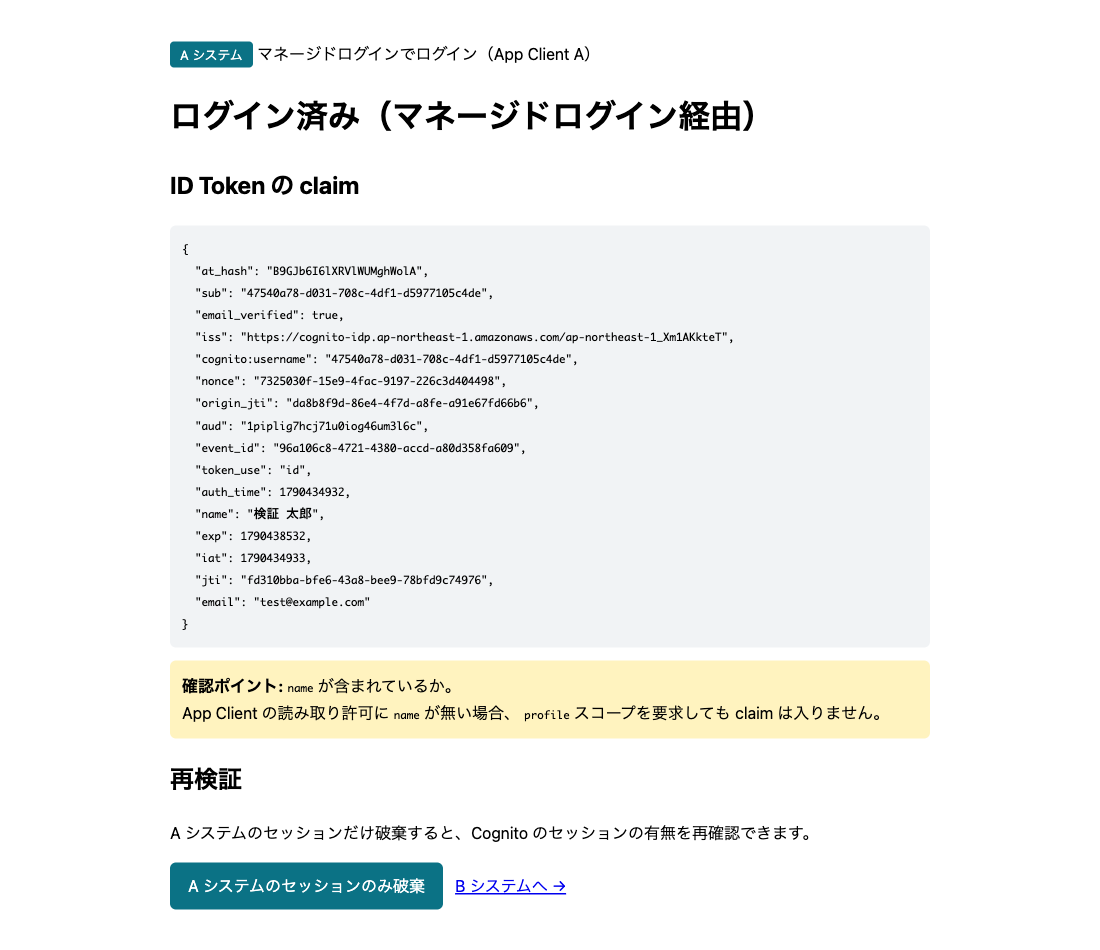
ログインすると A システムに戻ります。ID Token の aud は App Client A の ID です。
3. B システムに移動する
A システムの画面から B システムへ移動します。B システム自身のセッションはまだないので、未ログインの画面です。
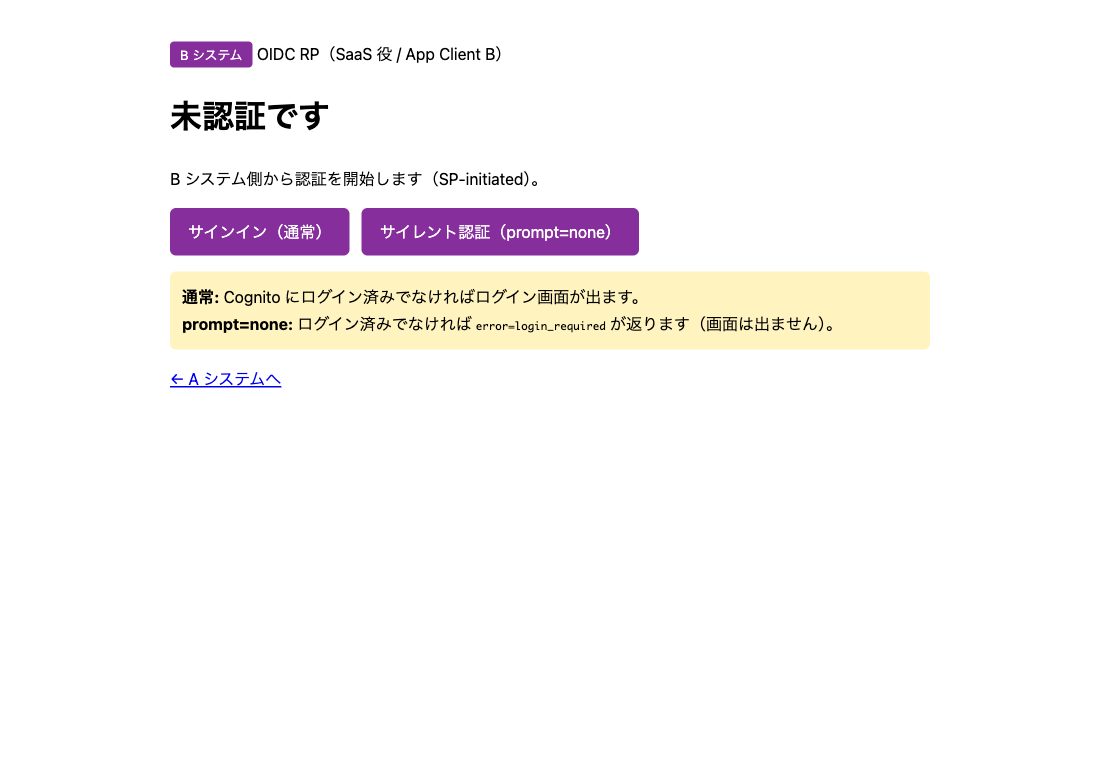
サインインを押すと、ログイン画面は出ずに 0.7 秒ほどでログイン済みになりました。
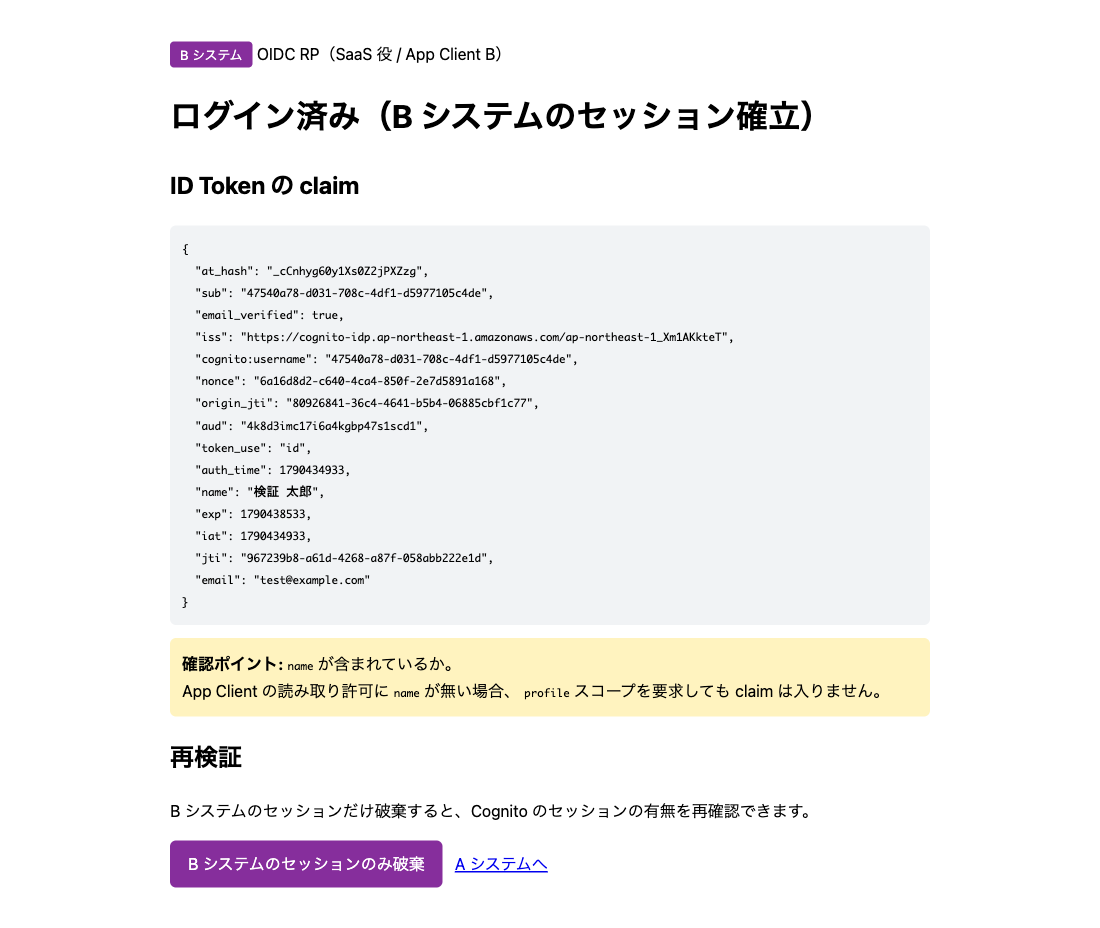
ID Token の aud は App Client B の ID、sub は A システムと同じです。同じユーザーに B 向けのトークンが発行されています。
リクエストヘッダ
3 回の /oauth2/authorize のリクエストヘッダです。
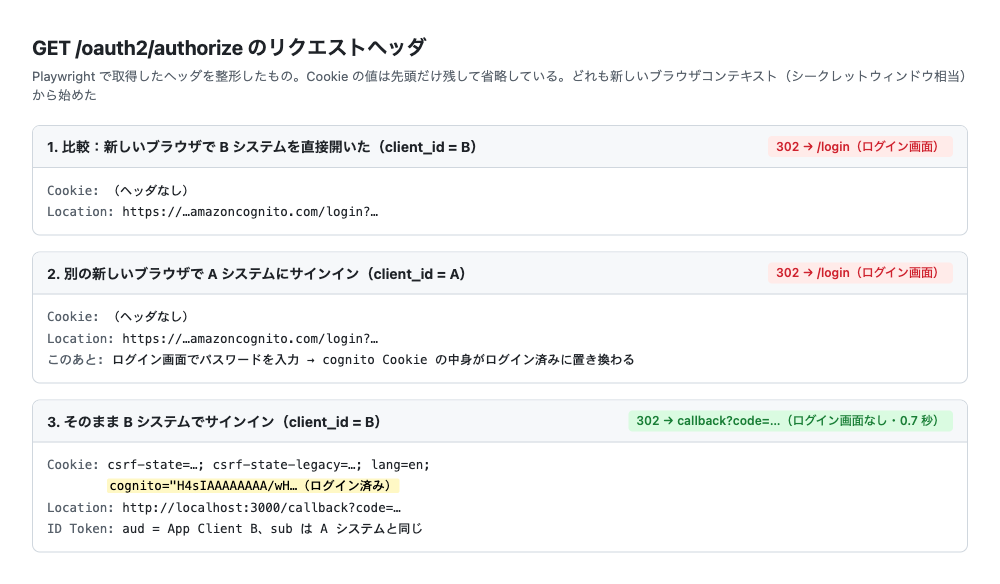
1 と 2 のサインインでは Cookie ヘッダがなく、ログイン画面に飛ばされています。3 の B システムのサインインでは Cognito Cookie が送られ、Cognito はログイン画面を出さずに認可コードを返しました。
レスポンスヘッダも見ると、Cognito Cookie はログイン画面を返す GET /login のレスポンスで付き、パスワードを送った POST /login のレスポンスで値が丸ごと置き換わっていました。どちらも Max-Age=3600 です。
Lambda トリガーの記録
同じ時間帯の CloudWatch Logs です。
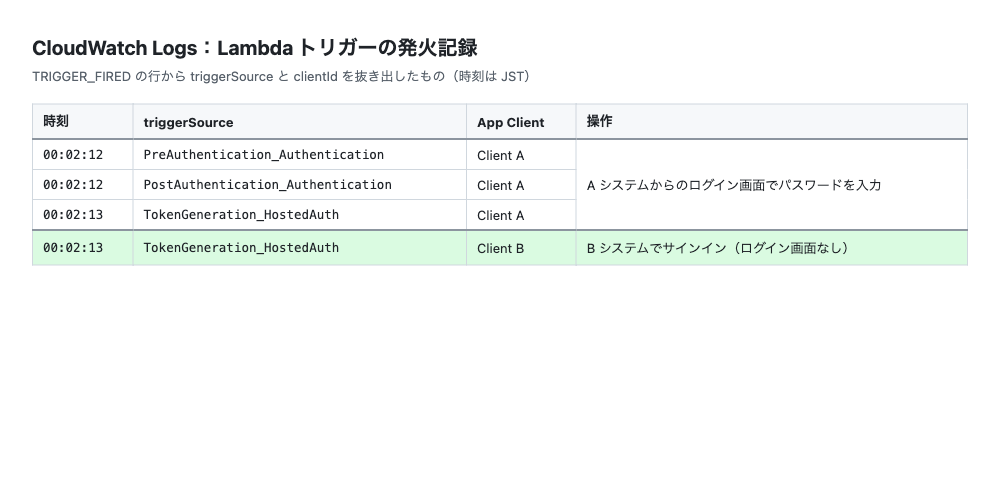
A システムのログインでは、App Client A で PreAuthentication、PostAuthentication、TokenGeneration が順に動きました。B システムのサインインでは App Client B の TokenGeneration_HostedAuth だけで、認証系のトリガーは呼ばれていません。
結果
| A システム | B システムでの操作 | 送った Cognito Cookie | 結果 |
|---|---|---|---|
| 未ログイン | サインイン | なし | ログイン画面が出る |
| ログイン済み(マネージドログイン) | サインイン | あり(ログイン済み) | ログイン画面なしで入れる |
A システムでマネージドログインを使ってログインすると、B システムにはログイン画面なしで入れました。App Client が別でも、ログイン状態は引き継がれます。
考察
通信の流れ
Cognito Cookie は Cognito のドメイン(xxx.auth.ap-northeast-1.amazoncognito.com)に付きます。/oauth2/authorize は App Client A も B も同じドメインなので、A でログインしたときの Cookie が B のリクエストにも送られ、Cognito はログイン済みと判断して B 向けの認可コードを返します。
ブラウザが Cognito のドメインでログインしていなければ、この仕組みは働きません。
今回確かめたのは、A と B が同じドメイン(プレフィックスドメイン)を使い、prompt を指定しない場合です。prompt は /oauth2/authorize に付けてログイン画面の出し方を指定する OIDC のパラメータで、prompt=login を付けるとログイン済みでも再認証になると公式ドキュメントに書かれています。
認証系のトリガー
B システムにログイン画面なしで入ったときは、PreAuthentication も PostAuthentication も呼ばれませんでした。認証は A システムで済んでいて、B ではトークンを発行しただけだからです。公式ドキュメントにも、既存のセッションがあるときは PreAuthentication が呼ばれないと書かれています(Pre authentication Lambda trigger)。
そのため、PreAuthentication や PostAuthentication に独自のチェックや MFA を入れていても、SSO で入るアプリではそのチェックを通りません。
1 時間の制限
Cognito Cookie には Max-Age=3600(1 時間)が付いていました。公式ドキュメントの記載は次のとおりです。
| 公式の記載 | 読み取れること | 出典 |
|---|---|---|
| ブラウザに有効なマネージドログインセッション Cookie がない限り、ユーザーはサインインする必要があります | ログイン画面を省略できるかは、有効なセッション Cookie があるかで決まる | Authorize endpoint |
| セッション Cookie による認証では、Cookie の期間は別の 1 時間にリセットされません | B システムに SSO で入っても、Cookie の期限は延びない | Managed login |
| 最後の対話的認証から 1 時間を超えてサインインページにアクセスしようとすると、再度サインインする必要があります | A システムでログインしてから 1 時間を過ぎると、B システムでもログイン画面が出る | Managed login |
ログアウト
片方のアプリでログアウトしても、Cognito の Cookie が残っていればもう片方からまた入れます。GlobalSignOut API のドキュメントには「This operation doesn't clear the managed login session cookie」とあり、Cookie を消すにはブラウザを Cognito のログアウトエンドポイントに飛ばす必要があるそうです。
まとめ
Cognito ユーザープールを認証基盤にした Web アプリ(A システム)にログインしたあと、SaaS 役の別アプリ(B システム)へ OIDC でログインすると、ログイン画面は出ずにそのまま入れました。B システムでパスワードを入れ直す必要はありません。
A システムと B システムは別の App Client ですが、どちらもマネージドログインでログインしていれば、ログイン状態は Cognito のドメインに付く Cognito Cookie で引き継がれます。
おまけ:試すためのファイル一式
検証を再現するためのファイル一式です。
ファイル構成
検証環境/
├─ cognito-managed-sso.yaml   … CloudFormation テンプレート
├─ package.json
├─ env.example.sh   … 環境変数を CloudFormation の出力から取ってくるスクリプト
├─ a-app.js         … A システム(マネージドログインでログイン、ポート 3001)
└─ b-app.js         … B システム(マネージドログインでログイン、ポート 3000)
動かし方
前提
- Node.js 18 以上(
fetchを使うため) - AWS CLI v2 と、CloudFormation、Cognito、IAM、Lambda、CloudWatch Logs を操作できる認証情報
- リージョンは東京(
ap-northeast-1)
1. ファイルを置く
作業用フォルダを作り、以下の 5 つのファイルを同じ名前で保存します。
mkdir cognito-sso-test && cd cognito-sso-test
# ここに cognito-managed-sso.yaml / package.json / env.example.sh / a-app.js / b-app.js を保存する
ls
# a-app.js  b-app.js  env.example.sh  package.json  cognito-managed-sso.yaml
2. パッケージを入れる
npm install
3. スタックを作る
DomainPrefix は全リージョンで一意な文字列にします。パスワードは 12 文字以上で、大文字、小文字、数字、記号を 1 文字以上ずつ含めます。
aws cloudformation deploy \
  --template-file cognito-managed-sso.yaml \
  --stack-name cognito-managed-sso \
  --capabilities CAPABILITY_IAM \
  --region ap-northeast-1 \
  --parameter-overrides \
      DomainPrefix=managed-sso-<任意の文字列> \
      TestUserEmail=test@example.com \
      TestUserPassword='<パスワード>'
数分で Successfully created/updated stack と出ます。テストユーザーにはメールを送らないので、メールアドレスは実在しなくて大丈夫です。
4. 環境変数を読み込む
cp env.example.sh env.local.sh
source ./env.local.sh
ユーザープール ID などが表示されれば OK です。App Client のシークレットも環境変数に入るので、env.local.sh は人に渡さないでください。
5. サーバーを起動する
ターミナルを 2 つ開き、それぞれで source ./env.local.sh してから起動します。
# ターミナル 1:B システム
PORT=3000 node b-app.js
# B システム : http://localhost:3000
#   issuer       : https://cognito-idp.ap-northeast-1.amazonaws.com/ap-northeast-1_xxxxxxxxx
#   redirect_uri : http://localhost:3000/callback
# ターミナル 2:A システム
PORT=3001 node a-app.js
# A システム : http://localhost:3001
#   issuer       : https://cognito-idp.ap-northeast-1.amazonaws.com/ap-northeast-1_xxxxxxxxx
#   redirect_uri : http://localhost:3001/callback
環境変数 … が未設定です と出たら、そのターミナルで手順 4 をやり直してください。
6. ブラウザで試す
Cognito の Cookie が残らないよう、シークレットウィンドウで試します。
http://localhost:3001を開き、「サインイン(通常)」を押す- Cognito のログイン画面で、手順 3 のメールアドレスとパスワードを入れる
- A システムに戻ったら「B システムへ →」を押す
- B システムで「サインイン(通常)」を押す
ログイン画面なしで B システムがログイン済みになれば成功です。DevTools の Network タブで「Preserve log」をオンにすると、/oauth2/authorize のヘッダも見られます。
やり直すときはシークレットウィンドウを全部閉じます。Lambda トリガーの記録は次のコマンドで見られます。
aws logs tail "$(aws cloudformation describe-stacks --stack-name cognito-managed-sso --region ap-northeast-1 \
  --query "Stacks[0].Outputs[?OutputKey=='TriggerLogGroup'].OutputValue" --output text)" \
  --region ap-northeast-1 --since 10m --filter-pattern TRIGGER_FIRED
7. 片付け
Ctrl + C でサーバーを止め、スタックを削除します。
aws cloudformation delete-stack --stack-name cognito-managed-sso --region ap-northeast-1
cognito-managed-sso.yaml
AWSTemplateFormatVersion: '2010-09-09'
Description: >
  Cognito マネージドログインによる App Client 間の SSO 検証環境.
  A システムと B システムがそれぞれ別の App Client でマネージドログインを使うとき、
  A システムでログインしたあと B システムにログイン画面なしで入れるかを確かめる。

Parameters:

  DomainPrefix:
    Type: String
    Description: Cognito プレフィックスドメイン(全リージョンで一意)
    AllowedPattern: '^[a-z0-9][a-z0-9-]{1,61}[a-z0-9]$'

  TestUserEmail:
    Type: String
    Description: 検証用ユーザーのメールアドレス(サインイン ID になる)
    AllowedPattern: '^[^@]+@[^@]+\.[^@]+$'

  TestUserPassword:
    Type: String
    NoEcho: true
    Description: 検証用ユーザーのパスワード(12文字以上・大文字・小文字・数字・記号を各1文字以上)
    MinLength: 12

  TestUserName:
    Type: String
    Default: 検証 太郎
    Description: 検証用ユーザーの表示名(name 属性)

  ACallbackUrl:
    Type: String
    Default: http://localhost:3001/callback

  BCallbackUrl:
    Type: String
    Default: http://localhost:3000/callback

Resources:

  # --------------------------------------------------------------------------
  # Lambda トリガー(発火の可視化用)
  # --------------------------------------------------------------------------

  TriggerLoggerRole:
    Type: AWS::IAM::Role
    Properties:
      AssumeRolePolicyDocument:
        Version: '2012-10-17'
        Statement:
          - Effect: Allow
            Principal:
              Service: lambda.amazonaws.com
            Action: sts:AssumeRole
      ManagedPolicyArns:
        - arn:aws:iam::aws:policy/service-role/AWSLambdaBasicExecutionRole

  TriggerLoggerFunction:
    Type: AWS::Lambda::Function
    Properties:
      Runtime: python3.12
      Handler: index.handler
      Role: !GetAtt TriggerLoggerRole.Arn
      Timeout: 5
      Code:
        ZipFile: |
          import json

          def handler(event, context):
              print("TRIGGER_FIRED " + json.dumps({
                  "triggerSource": event.get("triggerSource", ""),
                  "clientId": (event.get("callerContext") or {}).get("clientId"),
                  "userName": event.get("userName"),
              }, ensure_ascii=False))
              return event

  # SourceArn に UserPool を指定すると循環参照になるため SourceAccount のみで許可する
  TriggerLoggerPermission:
    Type: AWS::Lambda::Permission
    Properties:
      FunctionName: !GetAtt TriggerLoggerFunction.Arn
      Action: lambda:InvokeFunction
      Principal: cognito-idp.amazonaws.com
      SourceAccount: !Ref AWS::AccountId

  # --------------------------------------------------------------------------
  # ユーザープールとドメイン
  # --------------------------------------------------------------------------

  UserPool:
    Type: AWS::Cognito::UserPool
    Properties:
      UserPoolName: !Sub '${AWS::StackName}-user-pool'
      UsernameAttributes:
        - email
      AutoVerifiedAttributes:
        - email
      AdminCreateUserConfig:
        AllowAdminCreateUserOnly: true
      MfaConfiguration: 'OFF'
      Schema:
        - Name: email
          AttributeDataType: String
          Required: true
          Mutable: true
      Policies:
        PasswordPolicy:
          MinimumLength: 12
          RequireUppercase: true
          RequireLowercase: true
          RequireNumbers: true
          RequireSymbols: true
          TemporaryPasswordValidityDays: 7
      LambdaConfig:
        PreAuthentication: !GetAtt TriggerLoggerFunction.Arn
        PostAuthentication: !GetAtt TriggerLoggerFunction.Arn
        PreTokenGeneration: !GetAtt TriggerLoggerFunction.Arn
    DependsOn: TriggerLoggerPermission

  # ManagedLoginVersion を省略するとクラシックのホストされた UI(1)になる
  UserPoolDomain:
    Type: AWS::Cognito::UserPoolDomain
    Properties:
      UserPoolId: !Ref UserPool
      Domain: !Ref DomainPrefix
      ManagedLoginVersion: 2

  # --------------------------------------------------------------------------
  # App Client A: A システム(既存の Web アプリ役)
  # --------------------------------------------------------------------------

  ClientA:
    Type: AWS::Cognito::UserPoolClient
    Properties:
      ClientName: !Sub '${AWS::StackName}-a-system'
      UserPoolId: !Ref UserPool
      GenerateSecret: true
      AllowedOAuthFlowsUserPoolClient: true
      AllowedOAuthFlows:
        - code
      AllowedOAuthScopes:
        - openid
        - email
        - profile
      CallbackURLs:
        - !Ref ACallbackUrl
      LogoutURLs:
        - !Ref ACallbackUrl
      SupportedIdentityProviders:
        - COGNITO
      ReadAttributes:
        - email
        - email_verified
        - name

  # --------------------------------------------------------------------------
  # App Client B: B システム(SaaS 役)
  # --------------------------------------------------------------------------

  ClientB:
    Type: AWS::Cognito::UserPoolClient
    Properties:
      ClientName: !Sub '${AWS::StackName}-b-system'
      UserPoolId: !Ref UserPool
      GenerateSecret: true
      AllowedOAuthFlowsUserPoolClient: true
      AllowedOAuthFlows:
        - code
      AllowedOAuthScopes:
        - openid
        - email
        - profile
      CallbackURLs:
        - !Ref BCallbackUrl
      LogoutURLs:
        - !Ref BCallbackUrl
      SupportedIdentityProviders:
        - COGNITO
      ReadAttributes:
        - email
        - email_verified
        - name

  # CFn / SDK で作った App Client にはブランディングが自動で作られないため明示的に作る
  BrandingA:
    Type: AWS::Cognito::ManagedLoginBranding
    DependsOn: UserPoolDomain
    Properties:
      UserPoolId: !Ref UserPool
      ClientId: !Ref ClientA
      UseCognitoProvidedValues: true

  BrandingB:
    Type: AWS::Cognito::ManagedLoginBranding
    DependsOn: UserPoolDomain
    Properties:
      UserPoolId: !Ref UserPool
      ClientId: !Ref ClientB
      UseCognitoProvidedValues: true

  # --------------------------------------------------------------------------
  # 検証用ユーザーの作成(カスタムリソース)
  # --------------------------------------------------------------------------

  TestUserRole:
    Type: AWS::IAM::Role
    Properties:
      AssumeRolePolicyDocument:
        Version: '2012-10-17'
        Statement:
          - Effect: Allow
            Principal:
              Service: lambda.amazonaws.com
            Action: sts:AssumeRole
      ManagedPolicyArns:
        - arn:aws:iam::aws:policy/service-role/AWSLambdaBasicExecutionRole
      Policies:
        - PolicyName: manage-test-user
          PolicyDocument:
            Version: '2012-10-17'
            Statement:
              - Effect: Allow
                Action:
                  - cognito-idp:AdminCreateUser
                  - cognito-idp:AdminSetUserPassword
                  - cognito-idp:AdminUpdateUserAttributes
                  - cognito-idp:AdminDeleteUser
                Resource: !GetAtt UserPool.Arn

  TestUserFunction:
    Type: AWS::Lambda::Function
    Properties:
      Runtime: python3.12
      Handler: index.handler
      Role: !GetAtt TestUserRole.Arn
      Timeout: 30
      Code:
        ZipFile: |
          import boto3
          import cfnresponse

          idp = boto3.client('cognito-idp')

          def handler(event, context):
              props = event.get('ResourceProperties', {})
              pool = props.get('UserPoolId')
              email = props.get('Email')
              password = props.get('Password')
              name = props.get('Name') or ''
              attrs = [
                  {'Name': 'email', 'Value': email},
                  {'Name': 'email_verified', 'Value': 'true'},
              ]
              if name:
                  attrs.append({'Name': 'name', 'Value': name})
              try:
                  if event['RequestType'] in ('Create', 'Update'):
                      try:
                          idp.admin_create_user(
                              UserPoolId=pool,
                              Username=email,
                              UserAttributes=attrs,
                              MessageAction='SUPPRESS',
                          )
                      except idp.exceptions.UsernameExistsException:
                          idp.admin_update_user_attributes(
                              UserPoolId=pool, Username=email, UserAttributes=attrs
                          )
                      idp.admin_set_user_password(
                          UserPoolId=pool,
                          Username=email,
                          Password=password,
                          Permanent=True,
                      )
                  elif event['RequestType'] == 'Delete':
                      try:
                          idp.admin_delete_user(UserPoolId=pool, Username=email)
                      except idp.exceptions.UserNotFoundException:
                          pass
                  cfnresponse.send(event, context, cfnresponse.SUCCESS, {}, email)
              except Exception as e:
                  print('ERROR: %s' % e)
                  status = cfnresponse.SUCCESS if event['RequestType'] == 'Delete' else cfnresponse.FAILED
                  cfnresponse.send(event, context, status, {'Error': str(e)}, email)

  TestUser:
    Type: AWS::CloudFormation::CustomResource
    Properties:
      ServiceToken: !GetAtt TestUserFunction.Arn
      UserPoolId: !Ref UserPool
      Email: !Ref TestUserEmail
      Password: !Ref TestUserPassword
      Name: !Ref TestUserName

Outputs:

  UserPoolId:
    Value: !Ref UserPool

  ManagedLoginDomain:
    Value: !Sub 'https://${DomainPrefix}.auth.${AWS::Region}.amazoncognito.com'

  ClientIdA:
    Value: !Ref ClientA

  ClientIdB:
    Value: !Ref ClientB

  TriggerLogGroup:
    Value: !Sub '/aws/lambda/${TriggerLoggerFunction}'
package.json
{
  "name": "cognito-managed-sso",
  "version": "1.0.0",
  "description": "Cognito マネージドログインによる App Client 間 SSO の検証用。A システムと B システムの最小アプリ",
  "private": true,
  "type": "commonjs",
  "engines": {
    "node": ">=18"
  },
  "scripts": {
    "a": "node a-app.js",
    "b": "node b-app.js"
  },
  "dependencies": {
    "express": "^4.21.2"
  }
}
env.example.sh
# 検証環境の環境変数テンプレート
#   cp env.example.sh env.local.sh してから source する
#   クライアントシークレットを取得するため、env.local.sh は共有しないこと

STACK=cognito-managed-sso
out() { aws cloudformation describe-stacks --stack-name "$STACK" \
  --query "Stacks[0].Outputs[?OutputKey=='$1'].OutputValue" --output text; }
secret() { aws cognito-idp describe-user-pool-client \
  --user-pool-id "$USER_POOL_ID" --client-id "$1" \
  --query 'UserPoolClient.ClientSecret' --output text; }

export AWS_REGION=ap-northeast-1
export USER_POOL_ID=$(out UserPoolId)
export COGNITO_DOMAIN=$(out ManagedLoginDomain)
export A_CLIENT_ID=$(out ClientIdA)
export B_CLIENT_ID=$(out ClientIdB)
export A_CLIENT_SECRET=$(secret "$A_CLIENT_ID")
export B_CLIENT_SECRET=$(secret "$B_CLIENT_ID")

echo "UserPool : $USER_POOL_ID"
echo "Domain   : $COGNITO_DOMAIN"
echo "A client : $A_CLIENT_ID"
echo "B client : $B_CLIENT_ID"
a-app.js
/**
 * A システム : マネージドログインでログインする Web アプリ(既存アプリ役)
 *
 * B システムと同じ OIDC の認可コードフローで、App Client A を使ってログインする。
 *
 * ※ 本来は JWKS から公開鍵を取得して ID Token の署名を検証する。
 *    claim の中身を見ることが目的のため、署名検証は省略している。
 *    検証環境専用であり、そのまま本番利用しないこと。
 *
 * 起動: PORT=3001 node a-app.js
 */

const crypto = require('crypto');
const express = require('express');

const {
  AWS_REGION = 'ap-northeast-1',
  USER_POOL_ID,
  COGNITO_DOMAIN, // 例: https://xxxx.auth.ap-northeast-1.amazoncognito.com
  A_CLIENT_ID,
  A_CLIENT_SECRET,
  B_URL = 'http://localhost:3000',
  PORT = 3001,
} = process.env;

for (const [k, v] of Object.entries({ USER_POOL_ID, COGNITO_DOMAIN, A_CLIENT_ID })) {
  if (!v) {
    console.error(`環境変数 ${k} が未設定です。先に source ./env.local.sh を実行してください。`);
    process.exit(1);
  }
}

const REDIRECT_URI = `http://localhost:${PORT}/callback`;
const ISSUER = `https://cognito-idp.${AWS_REGION}.amazonaws.com/${USER_POOL_ID}`;

function decodeJwtPayload(jwt) {
  const [, payload] = jwt.split('.');
  return JSON.parse(Buffer.from(payload, 'base64url').toString('utf8'));
}

// A システムのセッションと、認可リクエストの一時状態(検証用途のためメモリ保持)
const sessions = new Map();
const pending = new Map();

const app = express();

function currentSession(req) {
  const m = /(?:^|;\s*)a_session=([^;]+)/.exec(req.headers.cookie || '');
  return m ? sessions.get(m[1]) : undefined;
}

const page = (body) => `<!doctype html>
<meta charset="utf-8">
<title>A システム(マネージドログイン)</title>
<style>
  body { font-family: system-ui, sans-serif; max-width: 760px; margin: 40px auto; padding: 0 16px; line-height: 1.7; }
  .tag { display: inline-block; background: #0b7285; color: #fff; padding: 2px 10px; border-radius: 4px; font-size: 13px; }
  pre { background: #f1f3f5; padding: 12px; border-radius: 6px; overflow-x: auto; font-size: 13px; }
  .note { background: #fff3bf; padding: 12px; border-radius: 6px; }
  .err { background: #ffe3e3; padding: 12px; border-radius: 6px; }
  a.btn { display: inline-block; background: #0b7285; color: #fff; padding: 10px 18px; border-radius: 6px; text-decoration: none; margin-right: 8px; }
</style>
<p><span class="tag">A システム</span> マネージドログインでログイン(App Client A)</p>
${body}`;

/** 認可リクエスト URL を組み立てる */
function buildAuthorizeUrl({ state, nonce, prompt }) {
  const p = new URLSearchParams({
    response_type: 'code',
    client_id: A_CLIENT_ID,
    redirect_uri: REDIRECT_URI,
    scope: 'openid email profile',
    state,
    nonce,
  });
  if (prompt) p.set('prompt', prompt);
  return `${COGNITO_DOMAIN}/oauth2/authorize?${p.toString()}`;
}

app.get('/', (req, res) => {
  const s = currentSession(req);

  if (!s) {
    return res.send(
      page(`
      <h1>未認証です</h1>
      <p>Cognito のマネージドログインでログインします。</p>
      <p>
        <a class="btn" href="/login">サインイン(通常)</a>
        <a class="btn" href="/login?prompt=none">サイレント認証(prompt=none)</a>
      </p>
      <div class="note">
        <b>通常:</b> Cognito にログイン済みでなければログイン画面が出ます。<br>
        <b>prompt=none:</b> ログイン済みでなければ <code>error=login_required</code> が返ります(画面は出ません)。
      </div>
      <p><a href="${B_URL}">B システムへ →</a></p>
    `)
    );
  }

  return res.send(
    page(`
    <h1>ログイン済み(マネージドログイン経由)</h1>
    <h2>ID Token の claim</h2>
    <pre>${JSON.stringify(s.idTokenClaims, null, 2)}</pre>
    <div class="note">
      <b>確認ポイント:</b> <code>name</code> が含まれているか。<br>
      App Client の読み取り許可に <code>name</code> が無い場合、
      <code>profile</code> スコープを要求しても claim は入りません。
    </div>
    <h2>再検証</h2>
    <p>A システムのセッションだけ破棄すると、Cognito のセッションの有無を再確認できます。</p>
    <p>
      <a class="btn" href="/logout">A システムのセッションのみ破棄</a>
      <a href="${B_URL}">B システムへ →</a>
    </p>
  `)
  );
});

app.get('/login', (req, res) => {
  const state = crypto.randomUUID();
  const nonce = crypto.randomUUID();
  pending.set(state, { nonce, at: Date.now() });

  const url = buildAuthorizeUrl({ state, nonce, prompt: req.query.prompt });
  console.log(`[A システム] → 302 ${url}`);

  // ブラウザ経由のフロントチャネル
  res.redirect(url);
});

app.get('/callback', async (req, res) => {
  const { code, state, error, error_description: desc } = req.query;

  if (error) {
    return res.status(400).send(
      page(`
      <h1>認可エラー</h1>
      <div class="err">
        <p><b>error:</b> <code>${error}</code></p>
        ${desc ? `<p><b>error_description:</b> ${desc}</p>` : ''}
      </div>
      <div class="note">
        <code>login_required</code> が返った場合、<b>Cognito にログイン済みのセッションが無い</b>ことを意味します。
        <code>prompt=none</code> ではサイレント認証できません。
      </div>
      <p><a href="/">戻る</a></p>
    `)
    );
  }

  const p = pending.get(state);
  if (!p) {
    return res.status(400).send(page(`<h1>state が不正です</h1><p><a href="/">戻る</a></p>`));
  }
  pending.delete(state);

  // ここだけがサーバー間の直接通信(バックチャネル)
  const body = new URLSearchParams({
    grant_type: 'authorization_code',
    client_id: A_CLIENT_ID,
    code,
    redirect_uri: REDIRECT_URI,
  });
  const headers = { 'Content-Type': 'application/x-www-form-urlencoded' };
  if (A_CLIENT_SECRET) {
    const basic = Buffer.from(`${A_CLIENT_ID}:${A_CLIENT_SECRET}`).toString('base64');
    headers.Authorization = `Basic ${basic}`;
  }

  const tokenRes = await fetch(`${COGNITO_DOMAIN}/oauth2/token`, {
    method: 'POST',
    headers,
    body,
  });
  const tokens = await tokenRes.json();

  if (!tokenRes.ok) {
    return res
      .status(400)
      .send(page(`<h1>トークン交換に失敗</h1><pre>${JSON.stringify(tokens, null, 2)}</pre>`));
  }

  const claims = decodeJwtPayload(tokens.id_token);
  if (claims.nonce !== p.nonce) {
    return res.status(400).send(page(`<h1>nonce が一致しません</h1>`));
  }
  if (claims.iss !== ISSUER) {
    return res
      .status(400)
      .send(page(`<h1>iss が一致しません</h1><pre>expected: ${ISSUER}\nactual:   ${claims.iss}</pre>`));
  }

  const sid = crypto.randomUUID();
  sessions.set(sid, { idTokenClaims: claims });
  res.setHeader('Set-Cookie', `a_session=${sid}; HttpOnly; Path=/; SameSite=Lax`);
  res.redirect('/');
});

app.get('/logout', (req, res) => {
  const m = /(?:^|;\s*)a_session=([^;]+)/.exec(req.headers.cookie || '');
  if (m) sessions.delete(m[1]);
  res.setHeader('Set-Cookie', 'a_session=; Max-Age=0; Path=/');
  res.redirect('/');
});

app.listen(PORT, () => {
  console.log(`A システム : http://localhost:${PORT}`);
  console.log(`  issuer       : ${ISSUER}`);
  console.log(`  redirect_uri : ${REDIRECT_URI}`);
});
b-app.js
/**
 * B システム : OIDC RP(SaaS 役)
 *
 * SaaS の OIDC SSO と同じ流れでログインする。
 *   1. 未認証なら Cognito の /oauth2/authorize へ「ブラウザを」リダイレクトする
 *   2. コールバックで認可コードを受け取り、state を照合する
 *   3. トークンエンドポイントへ「サーバー間で」直接リクエストし、code を交換する
 *   4. ID Token の claim でユーザーを識別する
 *
 * ※ 本来 RP は JWKS から公開鍵を取得して署名を検証します。
 *    本アプリは claim の中身を見ることが目的のため、署名検証は省略しています。
 *    検証環境専用であり、そのまま本番利用しないでください。
 *
 * 起動: PORT=3000 node b-app.js
 */

const crypto = require('crypto');
const express = require('express');

const {
  AWS_REGION = 'ap-northeast-1',
  USER_POOL_ID,
  COGNITO_DOMAIN, // 例: https://xxxx.auth.ap-northeast-1.amazoncognito.com
  B_CLIENT_ID,
  B_CLIENT_SECRET,
  A_URL = 'http://localhost:3001',
  PORT = 3000,
} = process.env;

for (const [k, v] of Object.entries({ USER_POOL_ID, COGNITO_DOMAIN, B_CLIENT_ID })) {
  if (!v) {
    console.error(`環境変数 ${k} が未設定です。先に source ./env.local.sh を実行してください。`);
    process.exit(1);
  }
}

const REDIRECT_URI = `http://localhost:${PORT}/callback`;
const ISSUER = `https://cognito-idp.${AWS_REGION}.amazonaws.com/${USER_POOL_ID}`;

function decodeJwtPayload(jwt) {
  const [, payload] = jwt.split('.');
  return JSON.parse(Buffer.from(payload, 'base64url').toString('utf8'));
}

// B システムのセッションと、認可リクエストの一時状態(検証用途のためメモリ保持)
const sessions = new Map();
const pending = new Map();

const app = express();

function currentSession(req) {
  const m = /(?:^|;\s*)b_session=([^;]+)/.exec(req.headers.cookie || '');
  return m ? sessions.get(m[1]) : undefined;
}

const page = (body) => `<!doctype html>
<meta charset="utf-8">
<title>B システム(OIDC RP)</title>
<style>
  body { font-family: system-ui, sans-serif; max-width: 760px; margin: 40px auto; padding: 0 16px; line-height: 1.7; }
  .tag { display: inline-block; background: #862e9c; color: #fff; padding: 2px 10px; border-radius: 4px; font-size: 13px; }
  pre { background: #f1f3f5; padding: 12px; border-radius: 6px; overflow-x: auto; font-size: 13px; }
  .note { background: #fff3bf; padding: 12px; border-radius: 6px; }
  .err { background: #ffe3e3; padding: 12px; border-radius: 6px; }
  a.btn { display: inline-block; background: #862e9c; color: #fff; padding: 10px 18px; border-radius: 6px; text-decoration: none; margin-right: 8px; }
</style>
<p><span class="tag">B システム</span> OIDC RP(SaaS 役 / App Client B)</p>
${body}`;

/** 認可リクエスト URL を組み立てる */
function buildAuthorizeUrl({ state, nonce, prompt }) {
  const p = new URLSearchParams({
    response_type: 'code',
    client_id: B_CLIENT_ID,
    redirect_uri: REDIRECT_URI,
    scope: 'openid email profile',
    state,
    nonce,
  });
  if (prompt) p.set('prompt', prompt);
  return `${COGNITO_DOMAIN}/oauth2/authorize?${p.toString()}`;
}

app.get('/', (req, res) => {
  const s = currentSession(req);

  if (!s) {
    return res.send(
      page(`
      <h1>未認証です</h1>
      <p>B システム側から認証を開始します(SP-initiated)。</p>
      <p>
        <a class="btn" href="/login">サインイン(通常)</a>
        <a class="btn" href="/login?prompt=none">サイレント認証(prompt=none)</a>
      </p>
      <div class="note">
        <b>通常:</b> Cognito にログイン済みでなければログイン画面が出ます。<br>
        <b>prompt=none:</b> ログイン済みでなければ <code>error=login_required</code> が返ります(画面は出ません)。
      </div>
      <p><a href="${A_URL}">← A システムへ</a></p>
    `)
    );
  }

  return res.send(
    page(`
    <h1>ログイン済み(B システムのセッション確立)</h1>
    <h2>ID Token の claim</h2>
    <pre>${JSON.stringify(s.idTokenClaims, null, 2)}</pre>
    <div class="note">
      <b>確認ポイント:</b> <code>name</code> が含まれているか。<br>
      App Client の読み取り許可に <code>name</code> が無い場合、
      <code>profile</code> スコープを要求しても claim は入りません。
    </div>
    <h2>再検証</h2>
    <p>B システムのセッションだけ破棄すると、Cognito のセッションの有無を再確認できます。</p>
    <p>
      <a class="btn" href="/logout-b">B システムのセッションのみ破棄</a>
      <a href="${A_URL}">A システムへ</a>
    </p>
  `)
  );
});

app.get('/login', (req, res) => {
  const state = crypto.randomUUID();
  const nonce = crypto.randomUUID();
  pending.set(state, { nonce, at: Date.now() });

  const url = buildAuthorizeUrl({ state, nonce, prompt: req.query.prompt });
  console.log(`[B システム] → 302 ${url}`);

  // ブラウザ経由のフロントチャネル
  res.redirect(url);
});

app.get('/callback', async (req, res) => {
  const { code, state, error, error_description: desc } = req.query;

  if (error) {
    return res.status(400).send(
      page(`
      <h1>認可エラー</h1>
      <div class="err">
        <p><b>error:</b> <code>${error}</code></p>
        ${desc ? `<p><b>error_description:</b> ${desc}</p>` : ''}
      </div>
      <div class="note">
        <code>login_required</code> が返った場合、<b>Cognito にログイン済みのセッションが無い</b>ことを意味します。
        <code>prompt=none</code> ではサイレント認証できません。
      </div>
      <p><a href="/">戻る</a></p>
    `)
    );
  }

  const p = pending.get(state);
  if (!p) {
    return res.status(400).send(page(`<h1>state が不正です</h1><p><a href="/">戻る</a></p>`));
  }
  pending.delete(state);

  // ここだけがサーバー間の直接通信(バックチャネル)
  const body = new URLSearchParams({
    grant_type: 'authorization_code',
    client_id: B_CLIENT_ID,
    code,
    redirect_uri: REDIRECT_URI,
  });
  const headers = { 'Content-Type': 'application/x-www-form-urlencoded' };
  if (B_CLIENT_SECRET) {
    const basic = Buffer.from(`${B_CLIENT_ID}:${B_CLIENT_SECRET}`).toString('base64');
    headers.Authorization = `Basic ${basic}`;
  }

  const tokenRes = await fetch(`${COGNITO_DOMAIN}/oauth2/token`, {
    method: 'POST',
    headers,
    body,
  });
  const tokens = await tokenRes.json();

  if (!tokenRes.ok) {
    return res
      .status(400)
      .send(page(`<h1>トークン交換に失敗</h1><pre>${JSON.stringify(tokens, null, 2)}</pre>`));
  }

  const claims = decodeJwtPayload(tokens.id_token);
  if (claims.nonce !== p.nonce) {
    return res.status(400).send(page(`<h1>nonce が一致しません</h1>`));
  }
  if (claims.iss !== ISSUER) {
    return res
      .status(400)
      .send(page(`<h1>iss が一致しません</h1><pre>expected: ${ISSUER}\nactual:   ${claims.iss}</pre>`));
  }

  const sid = crypto.randomUUID();
  sessions.set(sid, { idTokenClaims: claims });
  res.setHeader('Set-Cookie', `b_session=${sid}; HttpOnly; Path=/; SameSite=Lax`);
  res.redirect('/');
});

app.get('/logout-b', (req, res) => {
  const m = /(?:^|;\s*)b_session=([^;]+)/.exec(req.headers.cookie || '');
  if (m) sessions.delete(m[1]);
  res.setHeader('Set-Cookie', 'b_session=; Max-Age=0; Path=/');
  res.redirect('/');
});

app.listen(PORT, () => {
  console.log(`B システム : http://localhost:${PORT}`);
  console.log(`  issuer       : ${ISSUER}`);
  console.log(`  redirect_uri : ${REDIRECT_URI}`);
});