
Splunk Universal ForwarderのアップデートをAWS Systems Manager Documentsでテンプレート化して一括で適用できるようにしてみました(Linux向け)

初めに
Splunk Universal Forwarder(UF)はログやメトリクスデータをSplunk上に送信するために各サーバにインストールするエージェントとなります。
CloudWatch LogsにおけるCloudWatch Agentのようなもので、ここからSplunk(CloudやEnterprise)のインデクサーや他のフォワーダー等に各種データを送信する形となります。
UFを経由してデータを収集する場合は各サーバにインストールする形になりますので、当然サーバの台数分作業が発生し手間となります。
公式にもリモートで一括アップグレードする向けのスクリプトの雛形があるのですが、AWSであれば実行ホストの準備不要でSystems Managers Documentで定義を用意しておきそこからコマンドを一括で流し込み実行状態も管理できるので今回はこちらで実現してみます。
なお本記事については一旦Linux向けかつtgz形式で配布されるインストーラーを利用することを前提とします。
別途Windows向けについても組み込んではいるのですが、これを載せて書こうとするとWindowsインストーラー(.msi)自体の仕様の話とか少し本筋とは別の話をすることになりそうなので一旦本記事では取り扱いません(後Windows環境でのスクリプトを組み込むことがないのでちょっと自信がない)。
全体イメージ
データ収集用エージェントで多数のサーバに入れる環境もあるかと思いますので、一括アップデート時にインターネット向け帯域の負荷を抑える為に事前にAmazon S3にインストーラーを配置しそこから取得する形とします(インストーラーの配置自体は別途人力)。
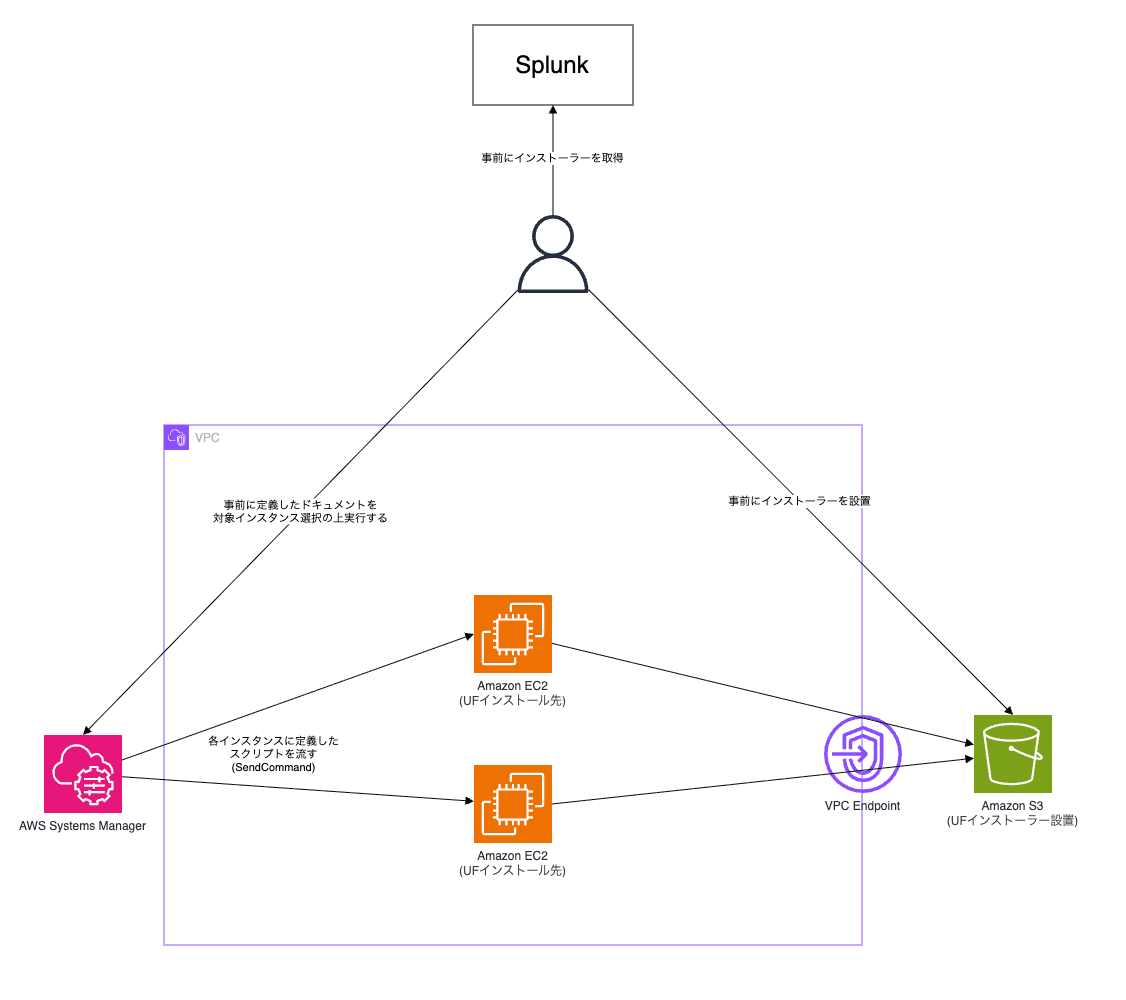
周辺リソースの設定については今回本記事で個別に解説しませんが、S3のアクセスのために各サーバのロールに権限割り当てると手間なのと、インストーラー自体はSplunkにユーザ登録さえすれば誰でも取得できる機密性のないものなので例えば以下のように緩めに許可を当てています。
※ 所定のVPCエンドポイント経由かつロール利用のアクセス(匿名アクセスをさせない)であればOK、ロールの制限はなくてもいいとは思いますが念のため
{
    "Version": "2012-10-17",
    "Statement": [
        {
            "Sid": "AllowFromVpce",
            "Effect": "Allow",
            "Principal": {
                "AWS": "*"
            },
            "Action": "s3:GetObject",
            "Resource": "arn:aws:s3:::xxxxxx/*",
            "Condition": {
                "StringEquals": {
                    "aws:SourceVpce": "vpce-xxxxx"
                },
                "ArnLike": {
                    "aws:PrincipalArn": "arn:aws:iam::xxxxx:role/*"
                }
            }
        }
    ]
}
ちなみにPrincipalに"AWS": "{{具体的なAWSアカウントID}}"を指定するとアクセス元エンティティでも許可が必要になってしまうようなのですが、*だと特にその制限がかからないようなのでその関係でPrincipalでは匿名アクセスを許可する形にしてCondition側で制御しています。
事前準備
今回はUFのアップデートなので事前に済ませておいてください。またawsコマンドを使うのでawscliの導入が必須です。
インストーラーは以下より取得可能です(要ユーザ登録、アップデートも同じものを使います)。
今回の検証環境は最低限のインストールだけを実施するよう以下のコマンドを実行しています。
実際の利用には送信先のサーバの指定も必要になるのですが(splunk add forward-server)それ自体は設定がなくともアップデートには影響はないので今回は特に設定してません。
useradd splunk
tar -xzf splunkforwarder-10.4.3-4174a2deda5d-linux-arm64.tgz -C /opt
chown -R splunk:splunk /opt/splunkforwarder/
sudo -u splunk /opt/splunkforwarder/bin/splunk start
/opt/splunkforwarder/bin/splunk stop
## 単純にstartでもいいがsystemd配下で管理するために
/opt/splunkforwarder/bin/splunk enable boot-start -user splunk -systemd-managed 1
systemctl start SplunkForwarder
動かすドキュメントについて
全体像をまず張ってしまいますがこんな感じになります。
{
  "schemaVersion": "2.2",
  "description": "Update Splunk Universal Forwarder via a fixed package stored in S3 (maintenance version patch)",
  "parameters": {
    "UfUser": {
      "type": "String",
      "description": "Splunkforwarderの実行ユーザー",
      "default": "splunk"
    },
    "S3Path": {
      "type": "String",
      "description": "アップデートパッケージのS3パス",
      "default": "s3://__SPLUNK_UF_BUCKET_NAME__/linux/splunkfowarder.tgz"
    },
    "BackupSuffix": {
      "type": "String",
      "description": "バックアップディレクトリのサフィックス(yyyymmdd)。空の場合は実行日を使用",
      "default": ""
    }
  },
  "mainSteps": [
    {
      "action": "aws:runShellScript",
      "name": "updateSplunkUfFromS3",
      "inputs": {
        "runCommand": [
          "#!/bin/bash",
          "set -euo pipefail",
          "",
          "UF_USER=\"{{ UfUser }}\"",
          "S3_PATH=\"{{ S3Path }}\"",
          "BACKUP_SUFFIX=\"{{ BackupSuffix }}\"",
          "[ -z \"${BACKUP_SUFFIX}\" ] && BACKUP_SUFFIX=\"$(date '+%Y%m%d')\"",
          "",
          "DOWNLOAD_DIR=\"/tmp/splunkforwarder-update\"",
          "INSTALL_DIR=\"/opt/splunkforwarder\"",
          "SERVICE_NAME=\"SplunkForwarder\"",
          "BACKUP_DIR=\"${INSTALL_DIR}_bk_${BACKUP_SUFFIX}\"",
          "PACKAGE=\"$(basename \"${S3_PATH}\")\"",
          "INSTALLER_PATH=\"${DOWNLOAD_DIR}/${PACKAGE}\"",
          "",
          "log() { echo \"[$(date '+%Y-%m-%d %H:%M:%S')] $*\"; }",
          "",
          "stop_splunk() {",
          "  if systemctl is-active --quiet \"${SERVICE_NAME}\"; then",
          "    systemctl stop \"${SERVICE_NAME}\"",
          "  fi",
          "  if pgrep -u \"${UF_USER}\" splunkd &>/dev/null; then",
          "    sudo -u \"${UF_USER}\" \"${INSTALL_DIR}/bin/splunk\" stop",
          "  fi",
          "}",
          "",
          "log \"現在のバージョンを確認\"",
          "sudo -u \"${UF_USER}\" \"${INSTALL_DIR}/bin/splunk\" version",
          "",
          "mkdir -p \"${DOWNLOAD_DIR}\"",
          "log \"パッケージをS3から取得しています: ${S3_PATH}\"",
          "## ダウンロード進捗で多量にログが出るので進捗を--no-progressで抑制",
          "aws s3 cp --no-progress \"${S3_PATH}\" \"${INSTALLER_PATH}\"",
          "",
          "log \"Splunkを停止\"",
          "stop_splunk",
          "",
          "log \"入れ替えのためにアップデート前の自動起動設定を無効化\"",
          "\"${INSTALL_DIR}/bin/splunk\" disable boot-start || true",
          "",
          "log \"既存ディレクトリをバックアップ: ${INSTALL_DIR} -> ${BACKUP_DIR}\"",
          "if [ -e \"${BACKUP_DIR}\" ]; then",
          "  log \"バックアップ ${BACKUP_DIR} は既に存在するため、再作成をスキップします\"",
          "else",
          "  cp -rp \"${INSTALL_DIR}\" \"${BACKUP_DIR}\"",
          "fi",
          "ls -ld \"${BACKUP_DIR}\"",
          "",
          "log \"新バージョンのファイルを展開: ${INSTALLER_PATH} -> /opt\"",
          "tar -xzf \"${INSTALLER_PATH}\" -C /opt",
          "",
          "log \"所有者を ${UF_USER} に変更\"",
          "chown -R \"${UF_USER}:${UF_USER}\" \"${INSTALL_DIR}\"",
          "ls -l /opt | grep splunkforwarder",
          "",
          "log \"アップデート処理を実行\"",
          "sudo -u \"${UF_USER}\" \"${INSTALL_DIR}/bin/splunk\" start --accept-license --answer-yes --no-prompt",
          "",
          "## インストール(アップデート)のために直接binからstartしたが最終的にはsystemdの管理配下におく",
          "log \"Splunkを一旦停止\"",
          "stop_splunk",
          "",
          "log \"自動起動を再設定(boot-start, systemd管理)\"",
          "\"${INSTALL_DIR}/bin/splunk\" enable boot-start -user \"${UF_USER}\" -systemd-managed 1",
          "",
          "log \"systemd経由でSplunkを起動\"",
          "systemctl start \"${SERVICE_NAME}\"",
          "",
          "log \"起動状態を確認\"",
          "systemctl status \"${SERVICE_NAME}\" --no-pager",
          "",
          "log \"起動後のバージョンを確認\"",
          "sudo -u \"${UF_USER}\" \"${INSTALL_DIR}/bin/splunk\" version"
        ]
      }
    }
  ]
}
アップデートとは言いますが起動中のUFのプロセスを止めてインストール時とほぼ同様の操作をするだけです。
特筆する点は以下のとおりです
- プロセスの停止直前には起動状態の確認を挟み込み停止していればその処理はスキップすること(冪等性の確保)
- 前回の試行でなんらかのエラーが発生し停止している状態で終了している、もしくは元々起動していない状態になると再実行時の停止処理でエラー扱いで落ちるのでチェック処理を入れて吸収する
- デフォルトではstart実行時にライセンス同意や各種対話が発生するので非インタラクティブで実行できるようにさせる
--accept-license --answer-yes --no-promptオプション付与(ライセンス同意になるので事前になんらかでご確認ください)
- インストールの一発目はstart→stop→enableで一回起動してから止めて登録してあげる必要がある(ライセンスの同意とかがあるので)
- 書いてた後に気づいたんですがenableの方でも
--accept-licenseがあるっぽく、もしかするとbin/splunk enable boot-start -user splunk -systemd-managed 1 --accept-license --answer-yes一発でいいかもしれないです(ただ公式ドキュメントに明記はなし)
- 書いてた後に気づいたんですがenableの方でも
この方式で既存の設定が維持されるのは、各種設定ファイルを配置する$SPLUNK_HOME/etc/system/local/についてはtgzファイルの状態ではREADMEしか含まれていない為となります。
解凍した後に起動を含め各種コマンドを実行する(もしくは自前で設置)ことで配置されるファイルとなっているので、配布されるtgzファイルを解凍してそのまま上書きしても既存の設定は残ります。
そのほかにも上記のように後から生成されるファイルもあると思うのですが全て確認してるわけではないので本環境に適用する前に事前に検証しておきましょう。
$ ls /opt/splunkforwarder/etc/system/local/
README  migration.conf  server.conf
$ tar -tzf splunkforwarder-10.6.0.5-86587d4e3b27-linux-amd64.tgz | grep 'etc/system/local'
splunkforwarder/etc/system/local/
splunkforwarder/etc/system/local/README
またrpmやdeb等ではなくtgz形式から解凍して既存のファイルの置き換え及び内部のコマンドを実行するだけなので事前にコピーしておくことで何かあった時にスナップショット単位の戻しは不要でコピーしておいたバックアップから実行するだけで戻せます。
実行
実行ログは以下のような形です。一応仕組み上はファイルを上書きして消すだけなので以下の例のようにダウングレードできてしまうのですが、上書きでのダウングレードは許容されているかだいぶ怪しいので真っさらにしてからやり直した方が良さそうです。
ひとまずこれで今まで通り各種情報が飛んでいればOKです(受信先で確認)。
[2026-10-15 11:03:56] 現在のバージョンを確認
Warning: Attempting to revert the SPLUNK_HOME ownership
Warning: Executing "chown -R splunk:splunk /opt/splunkforwarder"
Splunk Universal Forwarder 10.6.0.5 (build 86587d4e3b27)
[2026-10-15 11:03:56] パッケージをS3から取得しています: s3://xxxxx/splunkforwarder-10.4.3-4174a2deda5d-linux-arm64.tgz
download: s3://xxxxxx/splunkforwarder-10.4.3-4174a2deda5d-linux-arm64.tgz to ../../tmp/splunkforwarder-update/splunkforwarder-10.4.3-4174a2deda5d-linux-arm64.tgz
[2026-10-15 11:03:59] Splunkを停止
[2026-10-15 11:03:59] 入れ替えのためにアップデート前の自動起動設定を無効化
Disabled.
[2026-10-15 11:03:59] 既存ディレクトリをバックアップ: /opt/splunkforwarder -> /opt/splunkforwarder_bk_20261015
drwxr-xr-x. 11 splunk splunk 16384 Oct 15 11:03 /opt/splunkforwarder_bk_20261015
[2026-10-15 11:03:59] 新バージョンのファイルを展開: /tmp/splunkforwarder-update/splunkforwarder-10.4.3-4174a2deda5d-linux-arm64.tgz -> /opt
[2026-10-15 11:04:03] 所有者を splunk に変更
drwxr-xr-x. 11 splunk splunk 16384 Aug 19 18:32 splunkforwarder
drwxr-xr-x. 11 splunk splunk 16384 Oct  7 09:08 splunkforwarder_bk_20261007
drwxr-xr-x. 11 splunk splunk 16384 Oct 15 11:03 splunkforwarder_bk_20261015
[2026-10-15 11:04:03] アップデート処理を実行
...(中略)
[2026-10-15 11:04:06] Splunkを一旦停止
Warning: Attempting to revert the SPLUNK_HOME ownership
Warning: Executing "chown -R splunk:splunk /opt/splunkforwarder"
Stopping splunkd...
Shutting down.  Please wait, as this may take a few minutes.
................................................................. [  OK  ]
Stopping splunk helpers...
 [  OK  ]
Done.
[2026-10-15 11:07:25] 自動起動を再設定(boot-start, systemd管理)
Systemd unit file installed by user at /etc/systemd/system/SplunkForwarder.service.
Configured as systemd managed service.
[2026-10-15 11:07:26] systemd経由でSplunkを起動
[2026-10-15 11:07:26] 起動状態を確認
● SplunkForwarder.service - Systemd service file for Splunk, generated by 'splunk enable boot-start'
     Loaded: loaded (/etc/systemd/system/SplunkForwarder.service; enabled; preset: disabled)
     Active: active (running) since Thu 2026-10-15 11:07:26 UTC; 13ms ago
    Process: 4521 ExecStartPre=/bin/bash -c chown -R splunk:splunk /opt/splunkforwarder (code=exited, status=0/SUCCESS)
   Main PID: 4522 (splunk)
      Tasks: 1 (limit: 1004)
     Memory: 1.3M
        CPU: 17ms
     CGroup: /system.slice/SplunkForwarder.service
             ├─4522 /opt/splunkforwarder/bin/splunk _internal_launch_under_systemd
             └─4525 btool web list settings --no-log

Oct 15 11:07:26 ip-172-16-3-25.ap-northeast-1.compute.internal systemd[1]: Starting SplunkForwarder.service - Systemd service file for Splunk, generated by 'splunk enable boot-start'...
Oct 15 11:07:26 ip-172-16-3-25.ap-northeast-1.compute.internal systemd[1]: Started SplunkForwarder.service - Systemd service file for Splunk, generated by 'splunk enable boot-start'.
[2026-10-15 11:07:26] 起動後のバージョンを確認
Warning: Attempting to revert the SPLUNK_HOME ownership
Warning: Executing "chown -R splunk:splunk /opt/splunkforwarder"
Splunk Universal Forwarder 10.4.3 (build 4174a2deda5d)
なおWindows版はダウングレードできないことが明記されています。これが今回の記事にWindows版の話を含めなかった理由なのですが、Windowsインストーラー(.msi)の仕様でバージョンチェックが走るっぽくインストールされているバージョン以下のインストーラーでは実行エラーになります。
終わりに
今回はSplunk Universal ForwarderのアップデートをSystem Managers Documentsを利用して実施してみました。
UFに限らず定期的に多数のサーバに適用するようなものはこうしてまとめてデプロイできる仕組みが準備できればそれだけ作業が楽になるので準備できると良いですね。
今回はWindows版の方は記載していないのですがあちらもCLIベースで非対話式のインストールは可能ですのでまたどこかでご紹介できればと思います。