EMFを利用してALBのログからちょっと細かいカスタムメトリクスを生成する

中山です
CloudWatchの標準メトリクスがちょっと物足りないなーと思ったことはありませんか?
この記事では、EMFとALBのアクセスログを利用して標準メトリクスにはないメトリクスを生成してみます。
EMFとは?
そもそもEMFとは何かを簡単に説明します。
EMFは "embedded metric format" の略です。
CloudWatch Logsに所定の形式でログを書き込むと、自動でカスタムメトリクスを生成してくれます。
PutMetricDataをする必要はありません。
AWSでよしなにやってくれます。
詳細はドキュメントを確認してください。
「所定のフォーマット」はこちら。
実現したいこと
モチベーションは以下のような感じです。
- パス別/Status Code別にレスポンスタイムやリクエスト数のメトリクスがほしい
- 標準だとTarget Groupレベルのメトリクスしかない
SLOの運用を行おうとしたとき、ユーザー体験に大きな影響を与える機能の信頼性確保に注力するなど、メリハリをつけた運用が大事になると思います。
その際、標準のメトリクスでは不十分と感じたため、必要なメトリクスを生成したいと考えました。
このあたりの考え方はGoogle社のドキュメント等が参考になると思います。
構成図
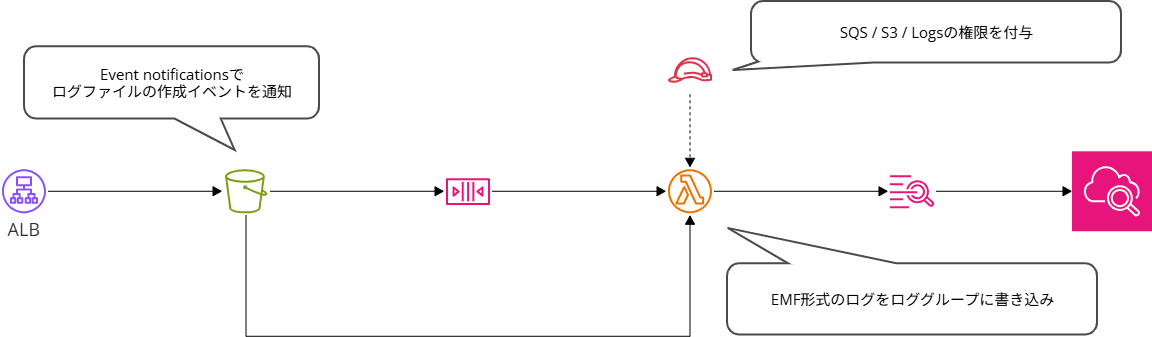
以下の様な構成でやってみます。
やってみた
- AWSリソースの作成
- ログの変換処理を実装
AWSリソースの作成
ALBのアクセスログを出力するS3バケットと、ALBおよびアクセスログの出力設定は完了済として説明します。
SQS Queue
S3バケットにログファイルがPutされたイベントをバッファリングするキューを作成します。
S3 Event notificationでLambda関数を直接設定することもできますが、念のためキューを挟んでおきます。
今回はイベントの発行にS3 Event notificationを利用する想定のため、以下の様なキューポリシーを設定する必要があります。
{
  "Version": "2012-10-17",
  "Statement": [
    {
      "Sid": "s3-event-notification-statement-ID",
      "Effect": "Allow",
      "Principal": {
        "Service": "s3.amazonaws.com"
      },
      "Action": "SQS:SendMessage",
      "Resource": "arn:aws:sqs:ap-northeast-1:xxxxxxxxxxxx:alb-emf-test",
      "Condition": {
        "StringEquals": {
          "aws:SourceAccount": "xxxxxxxxxxxx"
        },
        "ArnLike": {
          "aws:SourceArn": "arn:aws:s3:::alb-emf-test-xxxxxxxxxxxx"
        }
      }
    }
  ]
}
また、Visibility timeoutはLambda関数のタイムアウトの6倍にしておくと良いでしょう。
To allow your function time to process each batch of records, set the source queue's visibility timeout to at least six times the configuration timeout on your function. The extra time allows Lambda to retry if your function is throttled while processing a previous batch.
S3 event notification
S3バケットにログファイルがPutされたイベントを発行するため、ALBのアクセスログを出力するS3バケットでEvent notificationの設定を行います。
イベントタイプには、All object create events s3:ObjectCreated:* を指定しました。
prefixやsuffixは特に指定しませんが、バケットを他の用途でも利用する場合には適宜設定しましょう。
Event Bridgeでもかまいませんが、特に複雑な要件もないので今回はこちらを利用します。
IAM Role
Lambda関数で利用するIAM Roleを作成します。
必要な権限は概ね以下の通りです。
- キューに対するメッセージの受信および削除
- S3バケットからのオブジェクトのダウンロード
- ロググループへのログの書き込み
具体的には以下のポリシーとしました。
(信頼ポリシーは割愛します)
{
    "Version": "2012-10-17",
    "Statement": [
        {
            "Effect": "Allow",
            "Action": [
                "sqs:DeleteMessage",
                "sqs:ReceiveMessage",
                "sqs:GetQueueAttributes"
            ],
            "Resource": "arn:aws:sqs:ap-northeast-1:xxxxxxxxxxxx:alb-emf-test"
        }
    ]
}
{
    "Version": "2012-10-17",
    "Statement": [
        {
            "Effect": "Allow",
            "Action": "s3:GetObject",
            "Resource": "arn:aws:s3:::alb-emf-test-xxxxxxxxxxxx/*"
        },
        {
            "Effect": "Allow",
            "Action": "s3:ListBucket",
            "Resource": "arn:aws:s3:::alb-emf-test-xxxxxxxxxxxx"
        }
    ]
}
{
    "Version": "2012-10-17",
    "Statement": [
        {
            "Effect": "Allow",
            "Action": "logs:CreateLogGroup",
            "Resource": "arn:aws:logs:ap-northeast-1:xxxxxxxxxxxx:*"
        },
        {
            "Effect": "Allow",
            "Action": [
                "logs:CreateLogStream",
                "logs:PutLogEvents"
            ],
            "Resource": [
                "arn:aws:logs:ap-northeast-1:xxxxxxxxxxxx:log-group:/aws/lambda/alb-emf-test:*"
            ]
        }
    ]
}
Log group
ロググループを作成します。
ログクラスはStandardを選択してください。
Infrequent Access(低頻度アクセス)のログクラスではEMFはサポートされていません。
費用を少しでも抑えたかったんですが・・・
保存期間はEMFを利用してメトリクスを生成したいだけなら短期間でも問題無いでしょう。
通常のログメッセージを含む場合は要件等に応じて設定しましょう。
Lambda Function
具体的な実装は後述しますが、以下の点については最低限設定が必要です。
- Trigger
- 作成したSQS Queueを指定
- Permission
- 作成したIAM Roleを指定
- Log destination
- 作成したLog groupを指定
- Timeout
- Queue のVisibility timeoutを考慮した値を設定(前述)
必要なメモリのサイズは、アクセス数の多さ(アクセスログのサイズ)にもよると思うので、必要に応じて調整しましょう。
(この記事の中では細かく検証していません)
ログの変換処理を実装
次に、Lambdaで実行する処理を実装します。
実装したコードは以下の通りです。
Lambda code
import json
import logging
import boto3
import re

import urllib.parse
import gzip
import io

import time
import datetime
from urllib.parse import urlparse
import os

logger = logging.getLogger()
logger.setLevel(logging.INFO)

s3_client = boto3.client('s3')

ALB_LOG_PATTERN = re.compile(
    r'([^ ]*) ([^ ]*) ([^ ]*) ([^ ]*):([0-9]*) ([^ ]*)[:-]([0-9]*) ([-.0-9]*) ([-.0-9]*) ([-.0-9]*) (|[-0-9]*) (-|[-0-9]*) ([-0-9]*) ([-0-9]*) \"([^ ]*) (.*) (- |[^ ]*)\" \"([^\"]*)\" ([A-Z0-9-_]+) ([A-Za-z0-9.-]*) ([^ ]*) \"([^\"]*)\" \"([^\"]*)\" \"([^\"]*)\" ([-.0-9]*) ([^ ]*) \"([^\"]*)\" \"([^\"]*)\" \"([^ ]*)\" \"([^\\s]+?)\" \"([^\\s]+)\" \"([^ ]*)\" \"([^ ]*)\" ?([^ ]*)? ?( .*)?'
)

API_DEFINITIONS = [
    # api.example.com patterns
    # Revise it as per the requirements.
    ("GET",  r"^/api/customer/channel/[^/]+/customer-channel/[^/]+$", "/api/customer/channel/{channel_code}/customer-channel/{customer_channel_code}"),
    ("POST", r"^/api/customer/channel/[^/]+/customer-channel/[^/]+/summary$", "/api/customer/channel/{channel_code}/customer-channel/{customer_channel_code}/summary"),
    ("POST", r"^/api/customer/channel/[^/]+/customer-channel/[^/]+/coupon/[^/]+/_use$", "/api/customer/channel/{channel_code}/customer-channel/{customer_channel_code}/coupon/{coupon_code}/_use"),
    ("POST", r"^/api/customer/channel/[^/]+/customer-channel/[^/]+/coupon/[^/]+/_list$", "/api/customer/channel/{channel_code}/customer-channel/{customer_channel_code}/coupon/{coupon_code}/_list"),
    ("GET",  r"^/api/customer/channel/[^/]+/customer-channel/[^/]+/coupon/[^/]+$", "/api/customer/channel/{channel_code}/customer-channel/{customer_channel_code}/coupon/{coupon_code}"),
    ("POST", r"^/api/customer/channel/[^/]+/customer-channel/[^/]+/point/_use$", "/api/customer/channel/{channel_code}/customer-channel/{customer_channel_code}/point/_use"),
    ("POST", r"^/api/customer$", "/api/customer"),
    ("POST", r"^/api/customer/channel/[^/]+/customer-channel/[^/]+/_enable-registration-completed$", "/api/customer/channel/{channel_code}/customer-channel/{customer_channel_code}/_enable-registration-completed"),
    ("POST", r"^/api/customer/channel/[^/]+/customer-channel/[^/]+/point/_add$", "/api/customer/channel/{channel_code}/customer-channel/{customer_channel_code}/point/_add"),
    ("POST", r"^/api/customer/channel/[^/]+/customer-channel/[^/]+/coupon-config/_list$", "/api/customer/channel/{channel_code}/customer-channel/{customer_channel_code}/coupon-config/_list"),
    ("POST", r"^/api/customer/channel/[^/]+/customer-channel/[^/]+/coupon-config/[^/]+/_exchange$", "/api/customer/channel/{channel_code}/customer-channel/{customer_channel_code}/coupon-config/{coupon_config_code}/_exchange"),
]

COMPILED_API_DEFINITIONS = [
    (method, re.compile(pattern), normalized) for method, pattern, normalized in API_DEFINITIONS
]

def lambda_handler(event, context):
    for record in event['Records']:
        try:
            s3_event = json.loads(record['body'])
            if 'Records' not in s3_event:
                logger.info("Not an S3 event record, skipping.")
                continue
            for s3_record in s3_event['Records']:
                process_s3_record(s3_record)
        except Exception as e:
            logger.error(f"Error processing SQS record: {e}")
            raise e
    return {'statusCode': 200, 'body': json.dumps('Processing complete')}

def process_s3_record(s3_record):
    bucket = s3_record['s3']['bucket']['name']
    key = urllib.parse.unquote_plus(s3_record['s3']['object']['key'], encoding='utf-8')
    logger.info(f"Processing file: s3://{bucket}/{key}")
    try:
        response = s3_client.get_object(Bucket=bucket, Key=key)
        content = response['Body'].read()
        with gzip.GzipFile(fileobj=io.BytesIO(content)) as gz:
            log_content = gz.read().decode('utf-8')
        for line in log_content.splitlines():
            parse_and_log_metrics(line)
    except Exception as e:
        logger.error(f"Failed to process file {key} from bucket {bucket}. Error: {e}")
        raise e

def identify_normalized_uri(http_method, path):
    for method, regex, normalized in COMPILED_API_DEFINITIONS:
        if http_method == method and regex.match(path):
            return normalized
    return None

def parse_and_log_metrics(log_line):
    match = ALB_LOG_PATTERN.match(log_line)
    if not match:
        return

    # timestamp
    dt = datetime.datetime.fromisoformat(match.group(2).replace('Z', '+00:00'))

    # ELB status code
    elb_status_code = match.group(11)

    # HTTP method
    http_method = match.group(15)

    # uri
    parsed = urlparse(match.group(16))
    normalized_uri = identify_normalized_uri(http_method, parsed.path)
    if normalized_uri is None:
        return None

    # target processing time
    target_processing_time = float(match.group(9))

    ### This value is set to -1 if the load balancer can't dispatch the request to a target. This can happen if the target closes the connection before the idle timeout or if the client sends a malformed request.
    ### This value can also be set to -1 if the registered target does not respond before the idle timeout.
    ### https://docs.aws.amazon.com/elasticloadbalancing/latest/application/load-balancer-access-logs.html#access-log-entry-format
    if target_processing_time == -1:
        target_processing_time = 0.0

    emf_payload = {
        "_aws": {
            "Timestamp": int(dt.timestamp() * 1000),
            "CloudWatchMetrics": [
                {
                    "Namespace": "alb-emf-test",
                    "Dimensions": [["ElbStatusCode", "HttpMethod", "Uri"]],
                    "Metrics": [
                        {"Name": "TargetProcessingTime", "Unit": "Seconds", "StorageResolution": 60},
                        {"Name": "RequestCount", "Unit": "Count", "StorageResolution": 60},
                    ]
                }
            ]
        },
        "ElbStatusCode": elb_status_code,
        "HttpMethod": http_method,
        "Uri": normalized_uri,
        "TargetProcessingTime": target_processing_time,
        "RequestCount": 1
    }
    print(json.dumps(emf_payload))
処理の流れ
このLambda関数は、以下のような流れで動作します。
- ALBのアクセスログがS3バケットに出力され、SQS Queueを経由してLambda関数が起動する
- S3バケットからログファイル(gzip)を取得・展開する
- ログを1行ずつ正規表現でパースする
- 特定のURIにマッチするものだけを抽出し、URIを正規化する
- EMF形式のJSONを標準出力する(メトリクスの生成は自動的に実行される)
ここでは、「URIの正規化」と「EMF形式でのログ出力」の2点に絞って解説します。
URIの正規化
一般的なAPIでは、/api/customer/channel/123/customer-channel/456 のようにURLにID(パスパラメータ)が含まれることが一般的です。
これをそのままメトリクスのディメンション(分類の軸)にしてしまうと、IDの数だけメトリクスが作られてしまいます。
すると、CloudWatchの制限に引っかかったりコストが跳ね上がったりします。
この点については公式のドキュメントでも言及されています。
Note
Be careful when configuring your metric extraction as it impacts your custom metric usage and corresponding bill. If you unintentionally create metrics based on high-cardinality dimensions (such as requestId), the embedded metric format will by design create a custom metric corresponding to each unique dimension combination. For more information, see Dimensions.
ログから抽出したHTTPメソッドとパスを identify_normalized_uri 関数に渡し、マッチした場合のみ {channel_code} のようなプレースホルダーを含む共通の文字列(正規化URI)を返します。
マッチしない(監視対象外の)リクエストはここでスルーするため、必要なメトリクスだけを生成できます。
コストも抑えられるので、自分たちが何を見るべきかちゃんと考えましょう。
EMF形式でのログ出力
冒頭でも記載しましたが、EMFは所定の形式でロググループにログを書き込むだけでメトリクスを生成してくれます。
ここでは以下の設定を行っています。
- ディメンション(分類)
- ElbStatusCode(ステータスコード)
- HttpMethod(メソッド)
- Uri(正規化されたURI)
- メトリクス
- TargetProcessingTime(ターゲットの処理時間)
- RequestCount(リクエスト数)
ログのどこに必要な情報が含まれるかは、以下のドキュメントで確認できます。
これにより、「特定のAPIエンドポイントで、5xxエラーがどれくらい発生しているか」「レスポンスタイムが悪化していないか」をCloudWatchで監視できるようになります。
出力例
ロググループにはこういったログが出力されます。(レスポンスタイムが超絶遅いのは負荷テストのログを利用しているためです)
{
    "_aws": {
        "Timestamp": 1771910100729,
        "CloudWatchMetrics": [
            {
                "Namespace": "alb-emf-test",
                "Dimensions": [
                    [
                        "ElbStatusCode",
                        "HttpMethod",
                        "Uri"
                    ]
                ],
                "Metrics": [
                    {
                        "Name": "TargetProcessingTime",
                        "Unit": "Seconds",
                        "StorageResolution": 60
                    },
                    {
                        "Name": "RequestCount",
                        "Unit": "Count",
                        "StorageResolution": 60
                    }
                ]
            }
        ]
    },
    "ElbStatusCode": "200",
    "HttpMethod": "GET",
    "Uri": "/api/customer/channel/{channel_code}/customer-channel/{customer_channel_code}",
    "TargetProcessingTime": 9.325,
    "RequestCount": 1
}
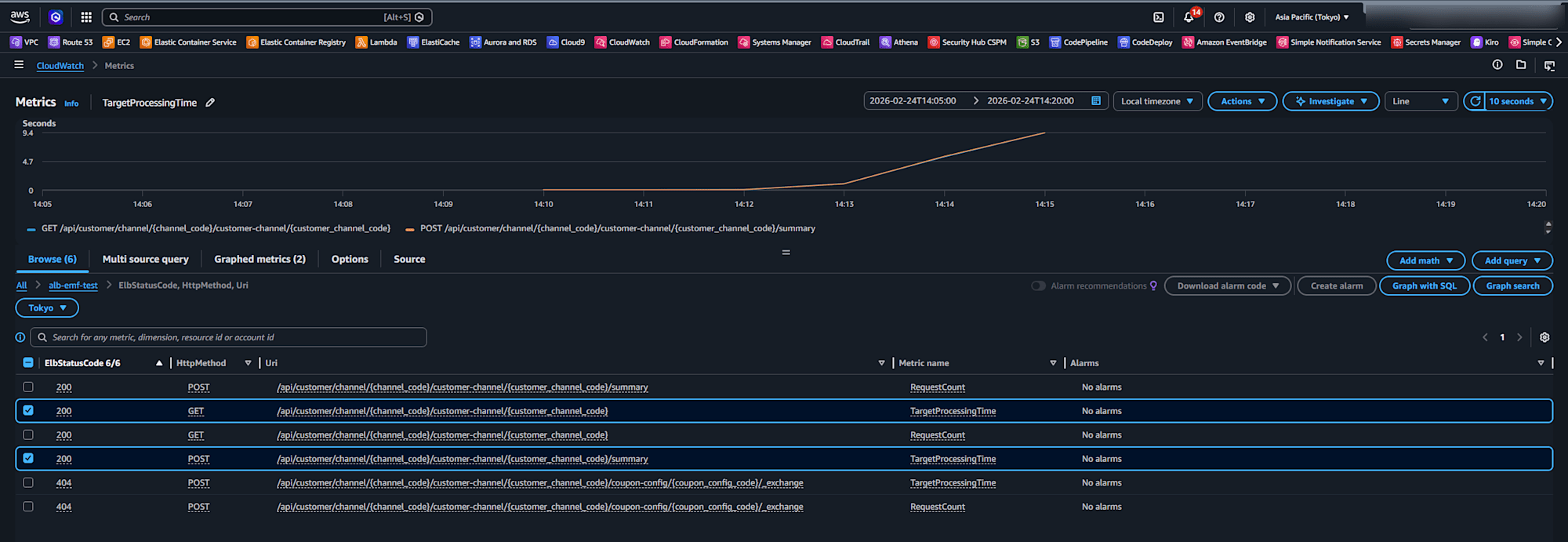
グラフも以下の様に出力されます。
まとめ
PutMetricDataの処理を一切書かなくていいのが最高ですね。
そのため、SLO運用をしたいときなどに手軽にできる事の一つかなーと思いました。
ただし、意図せず高コストにならないように十分気をつけて実装しましょう。
今回はALBのアクセスログを利用しましたが、アプリケーションのログでも活用できます。
APMを導入するほどじゃないけどもうちょっと細かいところを見たいときにEMFはちょうどいいんじゃないでしょうか。
現場からは以上です。