![[AWS Technical Support Note] วิธีการเปลี่ยน Runtime ของ Lambda](https://devio2024-media.developers.io/image/upload/f_auto,q_auto,w_3840/v1768791747/user-gen-eyecatch/mr1qr6lmfgbtaocdttfl.webp)
[AWS Technical Support Note] วิธีการเปลี่ยน Runtime ของ Lambda

ปัญหาที่เกิดขึ้น
ได้รับการแจ้งเตือนจาก AWS ให้อัปเดต Runtime ของ Lambda ที่กำลังใช้งานอยู่
ต้องการเปลี่ยนเป็น Runtime ใหม่เพื่ออัปเดต Runtime ของ Lambda แต่ไม่ทราบวิธีเปลี่ยน ช่วยแนะนำหน่อย
วิธีแก้ปัญหา
สามารถเปลี่ยนได้โดยใช้ Lambda console และ UpdateFunctionConfiguration API
Deploying Lambda functions as .zip file archives (English)
If you update the function configuration to use a new runtime, you may need to update the function code to be compatible with the new runtime.
แปลไทย
หากคุณอัปเดตการตั้งค่าฟังก์ชันเพื่อใช้รันไทม์ใหม่ คุณอาจต้องอัปเดตโค้ดของฟังก์ชันเพื่อให้เข้ากันได้กับรันไทม์ใหม่ด้วย
ลองทำดู
จะลองเปลี่ยน Runtime ด้วย 5 วิธีดังนี้
- Lambda console
- AWS CLI
- CloudFormation
- AWS SDK for JavaScript v3
- AWS SDK for Python (Boto3)
1. Lambda console
สร้าง Function ที่ใช้ Runtime : Python 3.10 เพื่อทดสอบ
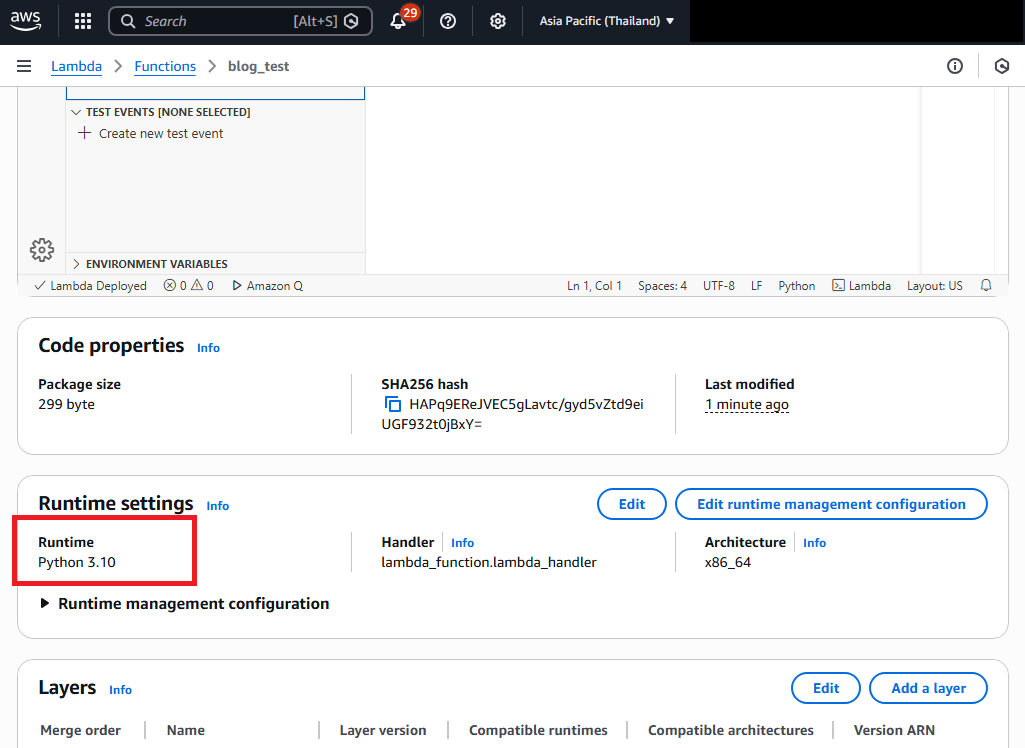
ลองเปลี่ยน Runtime ของ Function เป็น Python 3.13
คลิก Edit
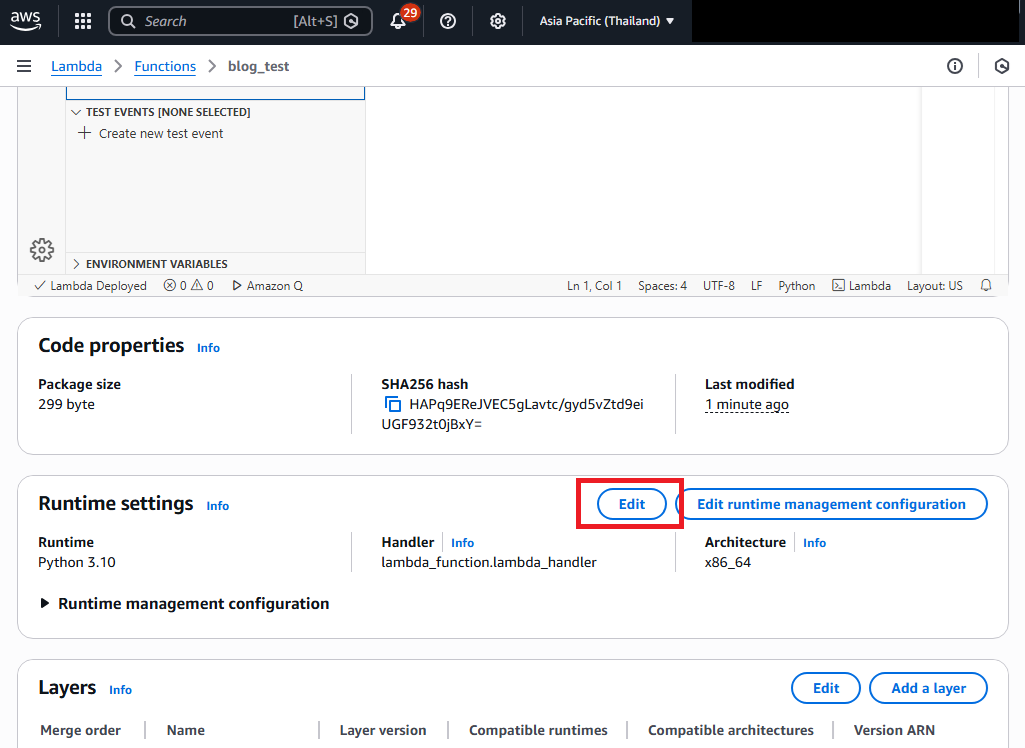
เลือก Python 3.13 จากรายการ Runtime
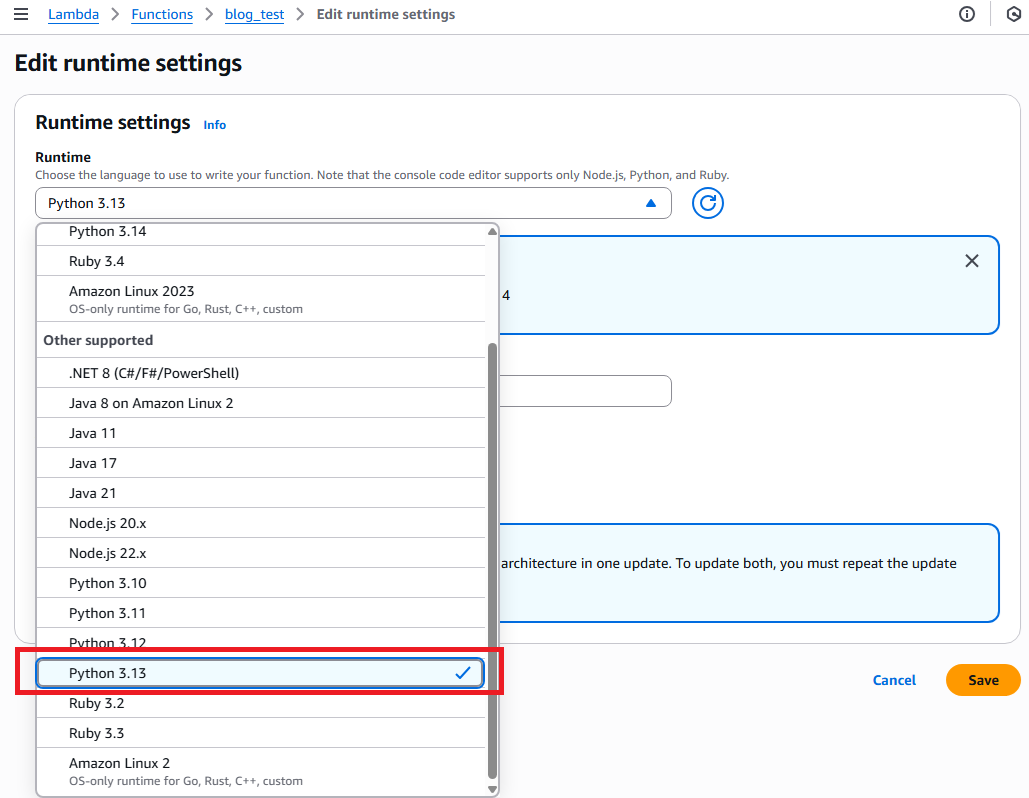
คลิก Save โดยไม่เปลี่ยนการตั้งค่าอื่นๆ
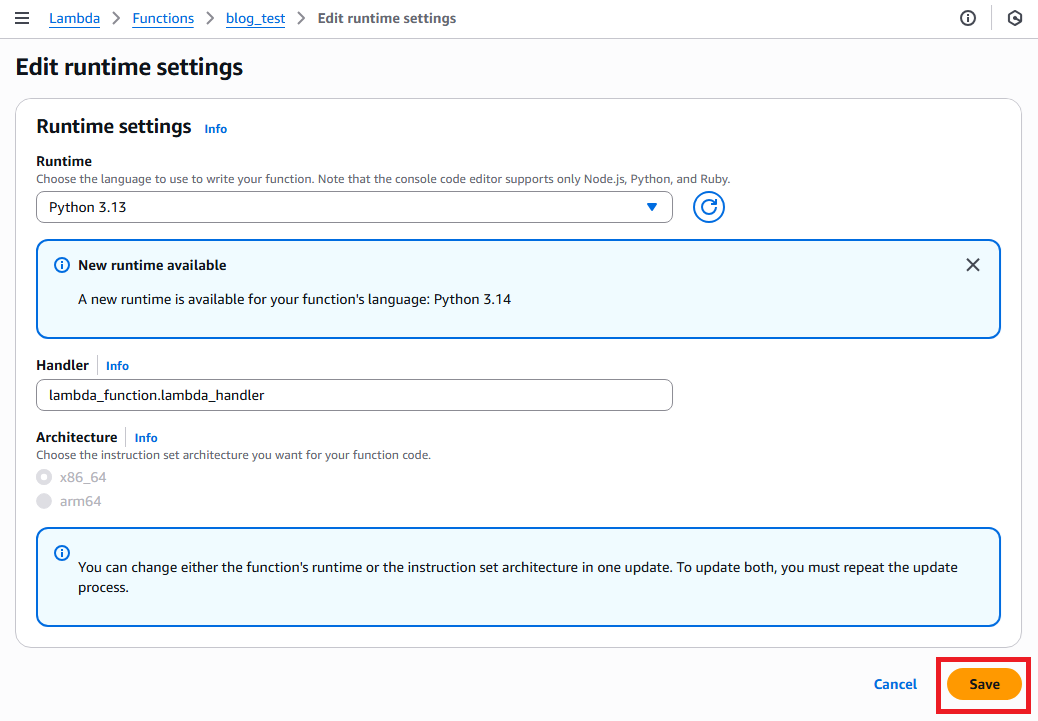
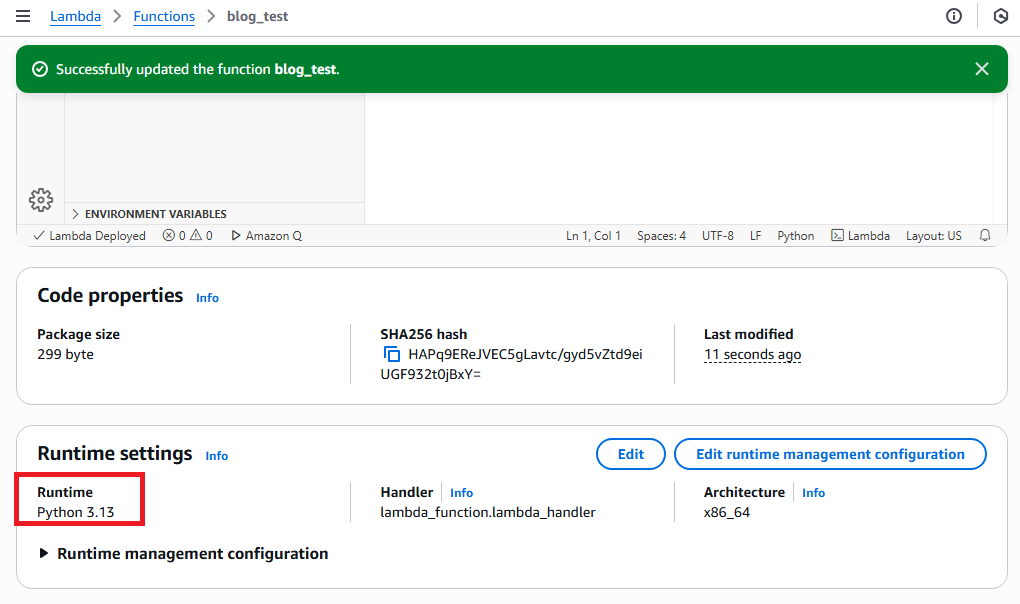
"Successfully updated the function" ปรากฎที่ด้านบนของหน้าจอ และ Runtime เปลี่ยนเป็น Python 3.13 แล้ว
2. AWS CLI
หากต้องการเปลี่ยนแปลงใน AWS CLI ให้ใช้คำสั่ง update-function-configuration (English)
aws lambda update-function-configuration --function-name blog_test  --runtime python3.13
{
    "FunctionName": "blog_test",
    "FunctionArn": "arn:aws:lambda:ap-southeast-7:012345678901:function:blog_test",
    "Runtime": "python3.13",
    "Role": "arn:aws:iam::012345678901:role/service-role/blog_test-role-1bzgse9f",
    "Handler": "lambda_function.lambda_handler",
    "CodeSize": 299,
    "Description": "",
    "Timeout": 3,
    "MemorySize": 128,
    "LastModified": "2026-01-20T09:42:48.000+0000",
    "CodeSha256": "HAPq9EReJVEC5gLavtc/gyd5vZtd9eiUGF932t0jBxY=",
    "Version": "$LATEST",
    "TracingConfig": {
        "Mode": "PassThrough"
    },
    "RevisionId": "0f386293-ccdc-45ce-940a-b44dd64c73c8",
    "State": "Active",
    "LastUpdateStatus": "InProgress",
    "LastUpdateStatusReason": "The function is being created.",
    "LastUpdateStatusReasonCode": "Creating",
    "PackageType": "Zip",
    "Architectures": [
        "x86_64"
    ],
    "EphemeralStorage": {
        "Size": 512
    },
    "SnapStart": {
        "ApplyOn": "None",
        "OptimizationStatus": "Off"
    },
    "RuntimeVersionConfig": {
        "RuntimeVersionArn": "arn:aws:lambda:ap-southeast-7::runtime:1a6363019b274fc28ffbbec073e5ebf1a872c10c52269844a57c62e74063a49b"
    },
    "LoggingConfig": {
        "LogFormat": "Text",
        "LogGroup": "/aws/lambda/blog_test"
    }
}
3. CloudFormation
ในกรณีของ CloudFormation ให้เปลี่ยน Runtime ของ AWS::Lambda::Function (English)
ขั้นแรกสร้าง Function ที่ใช้ Runtime Python 3.10 ก่อนด้วยเทมเพลตด้านล่าง
AWSTemplateFormatVersion: "2010-09-09"
Description: "Python 3.10 Lambda Function"

Resources:
  LambdaFunction:
    Type: AWS::Lambda::Function
    Properties:
      FunctionName: test
      Runtime: python3.10
      Role: arn:aws:iam::012345678901:role/LambdaBasicExecutionRole
      Handler: index.lambda_handler
      Code:
        ZipFile: |
          def lambda_handler(event, context):
              return {
                  'statusCode': 200,
                  'body': 'Hello from Lambda!'
              }
หลังจากสร้าง Function ด้วย CloudFormation แล้ว ให้เปลี่ยน Runtime เป็น python3.13 และอัปเดต stack
AWSTemplateFormatVersion: "2010-09-09"
Description: "Python 3.13 Lambda Function"

Resources:
  LambdaFunction:
    Type: AWS::Lambda::Function
    Properties:
      FunctionName: test
      Runtime: python3.13
      Role: arn:aws:iam::012345678901:role/LambdaBasicExecutionRole
      Handler: index.lambda_handler
      Code:
        ZipFile: |
          def lambda_handler(event, context):
              return {
                  'statusCode': 200,
                  'body': 'Hello from Lambda!'
              }
ทำการอัปเดตเทมเพลตที่มีอยู่เดิมโดยการแทนที่ด้วยเทมเพลตใหม่
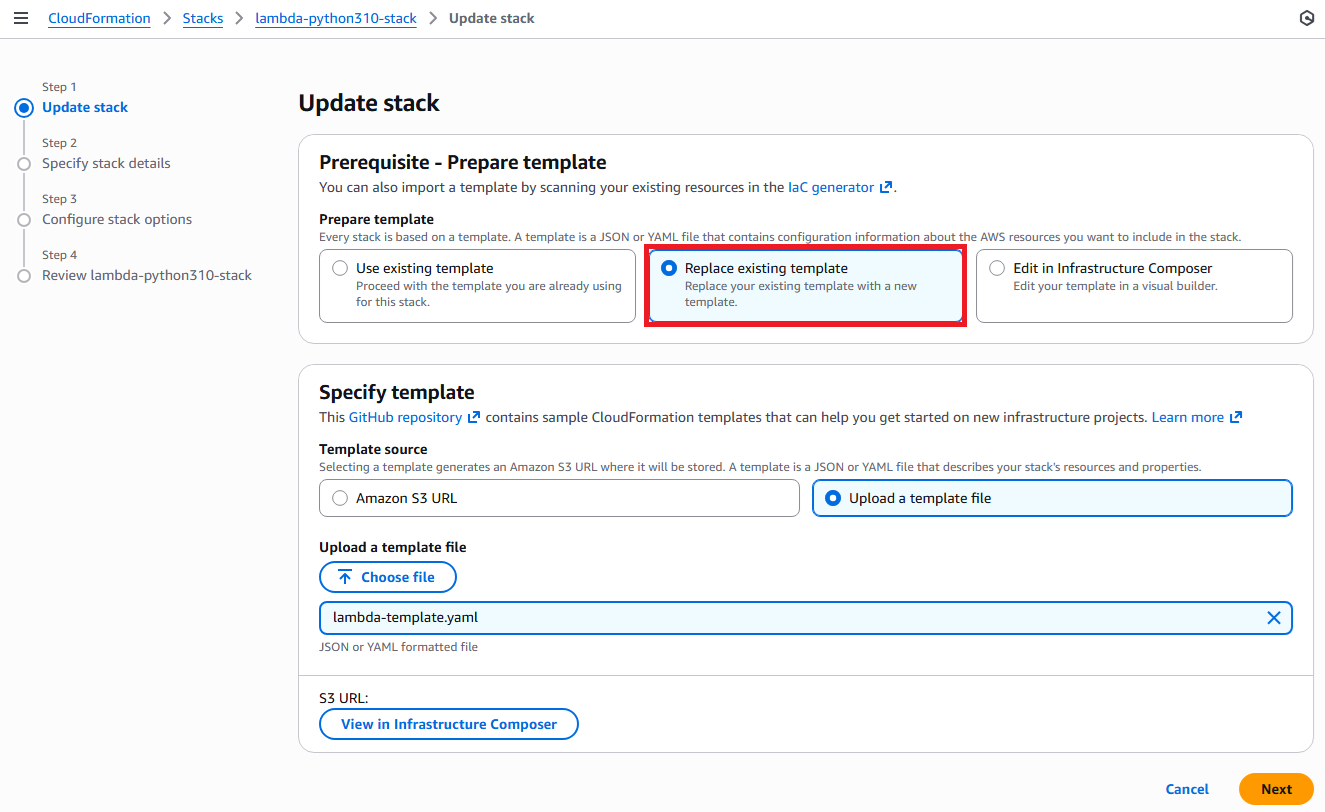
หลังจากอัปเดต stack เสร็จสมบูรณ์แล้ว โปรดตรวจสอบคอนโซล Lambda เพื่อยืนยันว่า Runtime ได้รับการเปลี่ยนแปลงแล้ว
4. AWS SDK for JavaScript v3
ในกรณีของ AWS SDK for JavaScript v3 ให้ใช้ UpdateFunctionConfigurationCommand (English)
    import { LambdaClient, UpdateFunctionConfigurationCommand } from "@aws-sdk/client-lambda";

    const client = new LambdaClient({ region: "ap-northeast-1" });

    export const handler = async (event) => {
      const command = new UpdateFunctionConfigurationCommand({
FunctionName: "test",
Runtime: "python3.13",
      });

      const response = await client.send(command);

      return {
statusCode: 200,
body: JSON.stringify({
  message: "Function configuration updated",
  functionName: response.FunctionName
})
      };
    };
5. AWS SDK for Python (Boto3)
ในกรณีของ AWS SDK for Python (Boto3) ให้ใช้ update_function_configuration (English)
    import json
    import boto3

    client = boto3.client('lambda')

    def lambda_handler(event, context):

response = client.update_function_configuration(
    FunctionName='test',
    Runtime='python3.13'
)

print(json.dumps(response))

return
ข้อควรระวัง
เมื่อเปลี่ยน Runtime ของ Lambda แนะนำให้ทดสอบความเข้ากันได้ระหว่าง Runtime หลังการเปลี่ยนกับซอร์สโค้ดอย่างเพียงพอใน development environment ก่อนที่จะทำการเปลี่ยน
บทความอ้างอิง
・UpdateFunctionConfiguration - AWS Lambda (English)
・Deploying Lambda functions as .zip file archives (English)
・update-function-configuration (English)
・AWS SDK for JavaScript v3 (English)
・update_function_configuration - Boto3 1.40.56 documentation (English)
บทความอื่นๆที่เกี่ยวข้องกับ AWS Lambda
・AWS Lambda คืออะไร? การแนะนำฟังก์ชันล่าสุดของ AWS (Thai)
・[Update] การใช้ Lambda Function เพื่อแปลงข้อมูลใน Firehose (Thai)
・ทดลองสร้าง RESTful API ด้วย Serverless Lambda (Python) + API Gateway (Thai)
・ใช้ AWS Lambda เรียกใช้งาน Amazon Translate แปลภาษา : Serverless Web App บน AWS : Part 1 (Thai)
・ใช้ API Gateway เชื่อมต่อไปยัง Lambda เรียก API แปลภาษา : Serverless Web App บน AWS : Part 2 (Thai)
・ใช้ DynamoDB กับ Lambda สร้างฟังก์ชัน History : Serverless Web App บน AWS : Part 7 (Thai)
・การเรียกใช้ AWS Lambda หลังจาก AWS Glue Crawler รวบรวมข้อมูล (Thai)
บทความต้นฉบับ
・Lambda のランタイムを変更する方法を教えてください (Japanese)