NVIDIAのNemotron 3 DiarizationをNeMo Speechで使ってみる

こんばんは、情報システム室の夏目です。
先日NVIDIAは話者識別用のDiarization ModelであるNemotoron 3 Diarizationをリリースしました。
VoiceArenaのDiarization-Benchリーダーボード で1位の成績で、最大8人の話者識別が可能です。
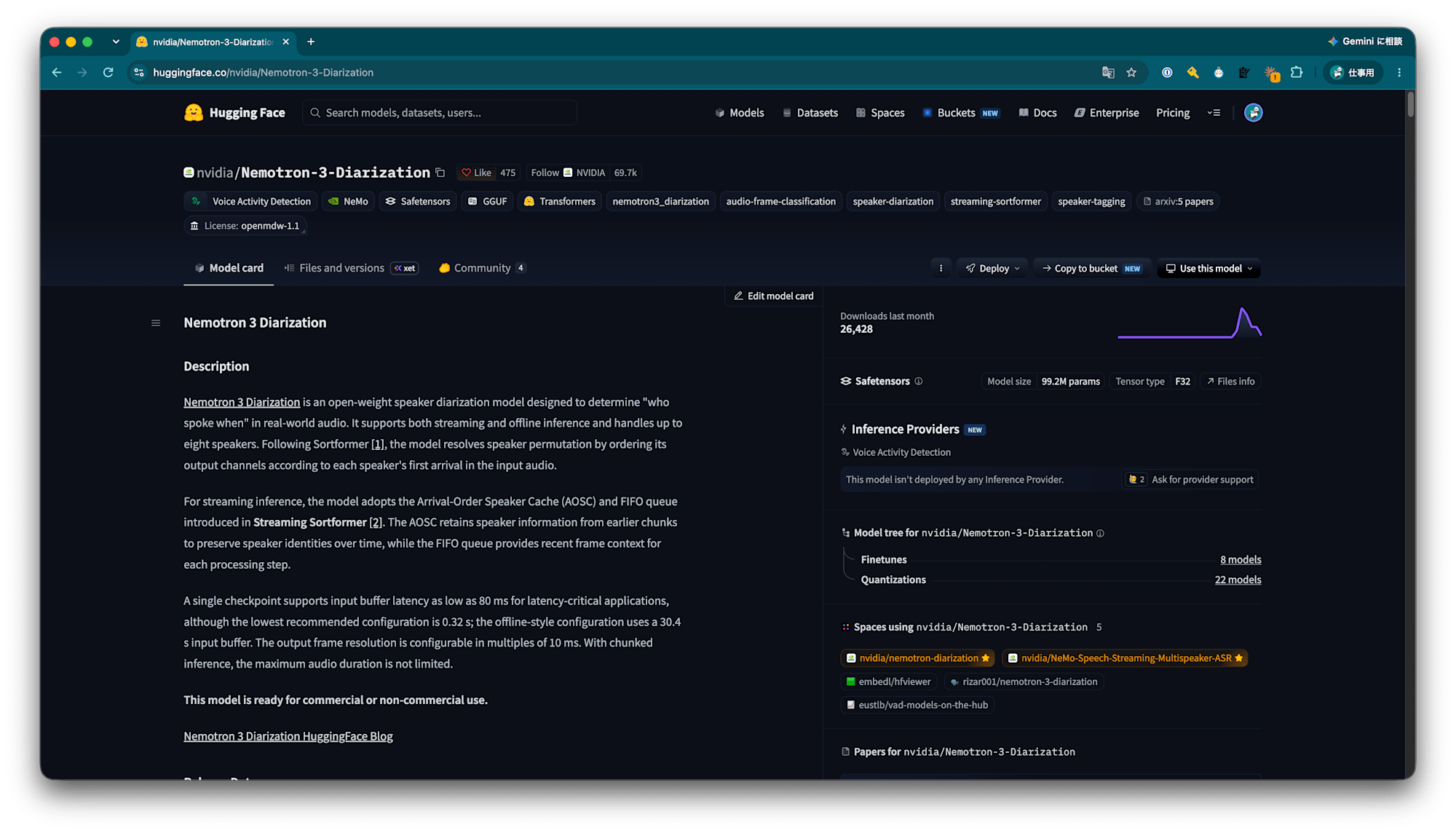
Hugging Faceのモデルカード で記載されていたNeMo Speechで試してみました。
しかし、記載されていた方法では使用できなかったのでどう使ったのかも記載します。
1. NeMo Speech
NeMo Speechは二つのものがあります。
NVIDIA NeMo Speech (Python) と NeMo-Speech.cpp (C++) です。
前者はNVIDIAの音声AI向けフレームワークで、学習やファインチューニングでのモデルの作成や推論で実際に動かすことができます。
nemo-toolkit としてPyPIで公開されています。
後者は、前者で作られたモデルをローカルで動かすためのCLIツールです。
ASR(音声書き起こし)やDiarization(話者分離)、TTS(text to speech)などを CPU/CUDA/Metal/Vulkan で動かすことができます。
2. 検証環境
今回試すにあたって以下の環境で試しました。
- macOS Tahoe 26.6.2
- uv (Python 3.14)
3. NVIDIA NeMo Speech (Python)で動かす
3-1. モデルカードを参考に動かしてみる
まずuvの環境を作成し、nemo-toolkitをインストールします。
$ uv init --python 3.14 --bare
Initialized project `trial-python`

$ uv add nemo-toolkit[asr]
Using CPython 3.14.7
Creating virtual environment at: .venv
Resolved 161 packages in 4.54s
Installed 140 packages in 787ms
 + absl-py==2.5.0
 + aiohappyeyeballs==2.7.1
 + aiohttp==3.14.3
 + aiosignal==1.4.0
 + aistore==1.26.0
 + annotated-doc==0.0.5
 + annotated-types==0.8.0
 + antlr4-python3-runtime==4.9.3
 + anyio==4.15.1
 + attrs==26.1.0
 + audioop-lts==0.2.2
 + audioread==3.1.0
 + braceexpand==0.1.7
 + certifi==2026.7.22
 + cffi==2.1.1
 + charset-normalizer==3.5.1
 + click==8.5.0
 + cloudpickle==3.1.2
 + colorama==0.4.6
 + cytoolz==1.1.0
 + datasets==5.0.1
 + decorator==5.3.1
 + dill==0.4.1
 + einops==0.8.2
 + filelock==4.0.3
 + frozenlist==1.8.0
 + fsspec==2025.12.0
 + googleapis-common-protos==1.75.4
 + grpcio==1.84.0
 + h11==0.16.0
 + hf-xet==1.6.0
 + httpcore==1.0.9
 + httpx==0.28.1
 + huggingface-hub==1.33.0
 + humanize==4.16.0
 + hydra-core==1.3.2
 + idna==3.20
 + indic-numtowords==1.1.0
 + intervaltree==3.2.1
 + jinja2==3.1.6
 + joblib==1.6.0
 + kaldialign==0.12.0
 + lazy-loader==0.6
 + lhotse==1.33.0
 + librosa==1.0.0
 + lightning==2.4.0
 + lightning-utilities==0.15.3
 + llvmlite==0.49.0
 + lxml==6.1.3
 + markdown==3.11
 + markdown-it-py==4.2.0
 + markupsafe==3.0.3
 + mdurl==0.1.2
 + ml-dtypes==0.6.0
 + more-itertools==11.1.0
 + mpmath==1.3.0
 + msgpack==1.2.2
 + msgspec==0.21.1
 + multidict==6.9.1
 + multiprocess==0.70.19
 + narwhals==2.26.0
 + nemo-toolkit==3.0.0
 + networkx==3.7
 + numba==0.67.0
 + numpy==2.5.3
 + nv-one-logger-core==2.3.1
 + nv-one-logger-pytorch-lightning-integration==2.3.1
 + nv-one-logger-training-telemetry==2.3.1
 + omegaconf==2.3.0
 + onnx==1.23.0
 + opentelemetry-api==1.45.0
 + opentelemetry-exporter-http-transport==0.66b0
 + opentelemetry-exporter-otlp-common==0.66b0
 + opentelemetry-exporter-otlp-proto-common==1.45.0
 + opentelemetry-exporter-otlp-proto-http==1.45.0
 + opentelemetry-proto==1.45.0
 + opentelemetry-sdk==1.45.0
 + opentelemetry-semantic-conventions==0.66b0
 + overrides==7.7.0
 + packaging==24.2
 + pandas==3.0.6
 + pillow==12.3.0
 + platformdirs==4.11.15
 + pooch==1.9.0
 + portalocker==4.4.0
 + propcache==0.5.4
 + protobuf==7.36.2
 + pyarrow==25.0.1
 + pycparser==3.0
 + pydantic==2.13.5
 + pydantic-core==2.46.5
 + pygments==2.21.0
 + python-dateutil==2.9.0.post0
 + pytorch-lightning==2.6.6
 + pyyaml==6.0.3
 + regex==2026.9.10
 + requests==2.34.2
 + rich==15.0.0
 + sacrebleu==2.6.0
 + safetensors==0.8.0
 + scikit-learn==1.9.1
 + scipy==1.18.1
 + sentencepiece==0.2.2
 + setuptools==84.0.0
 + shellingham==1.5.4
 + six==1.17.0
 + smart-open==8.0.1
 + sortedcontainers==2.4.0
 + soundfile==0.14.0
 + soxr==1.1.0
 + standard-aifc==3.13.0
 + standard-chunk==3.13.0
 + standard-sunau==3.13.0
 + strenum==0.4.15
 + sympy==1.14.0
 + tabulate==0.10.0
 + tenacity==9.1.4
 + tensorboard==2.21.0
 + tensorboard-data-server==0.7.2
 + text-unidecode==1.3
 + text2num==3.1.0
 + threadpoolctl==3.7.0
 + tokenizers==0.23.2
 + toml==0.10.2
 + toolz==1.1.0
 + torch==2.14.0
 + torchmetrics==1.9.0
 + tqdm==4.70.1
 + transformers==5.17.0
 + typer==0.27.2
 + typing-extensions==4.16.0
 + typing-inspection==0.4.4
 + urllib3==2.8.0
 + wandb==0.30.0
 + webdataset==1.0.2
 + werkzeug==3.1.8
 + whisper-normalizer==0.1.15
 + wrapt==2.4.1
 + xxhash==3.5.0
 + yarl==1.25.1
次にモデルカードに記載されていたコードを使ってみます。
from nemo.collections.asr.models import SortformerEncLabelModel
diar_model = SortformerEncLabelModel.from_pretrained("nvidia/Nemotron-3-Diarization")
diar_model.eval()

diar_model.sortformer_modules.chunk_len = 340
diar_model.sortformer_modules.chunk_right_context = 40
diar_model.sortformer_modules.fifo_len = 40
diar_model.sortformer_modules.spkcache_update_period = 300
diar_model._check_streaming_parameters()

predicted_segments = diar_model.diarize(audio=["audio.wav"], batch_size=1)

for segment in predicted_segments[0]:
    print(segment)
$ uv run main.py
    subsegment_nspk_bias: 1.5
    subsegment_start_guard_sec: 0.25
    subsegment_min_first_spk_sec: 0.5
    subsegment_splice_silence_sec: 0.1

[NeMo W 2026-09-29 15:45:15 modelPT:182] If you intend to do validation, please call the ModelP
    Validation config :
    manifest_filepath: null
    sample_rate: 16000
    num_spks: 8
    session_len_sec: -1
    soft_targets: false
    batch_size: 32
    shuffle: false
    num_workers: 18
    drop_last: false
    pin_memory: true
    use_lhotse: false

[NeMo W 2026-09-29 15:45:15 modelPT:189] Please call the ModelPT.setup_test_data() or ModelPT.s
    Test config :
    manifest_filepath: null
    sample_rate: 16000
    num_spks: 8
    session_len_sec: -1
    soft_targets: false
    batch_size: 32
    shuffle: false
    num_workers: 18
    drop_last: false
    pin_memory: true
    use_lhotse: false

[NeMo W 2026-09-29 15:45:15 experimental:26] `<class 'nemo.collections.asr.modules.transformer_
[NeMo E 2026-09-29 15:45:15 common:827] Model instantiation failed!
    Target class:       nemo.collections.asr.models.sortformer_diar_models.SortformerEncLabelMo
    Error(s):   Error in call to target 'nemo.collections.asr.modules.transformer_encoder.Trans
    ValueError("self_attention_model='rope' is not supported. Currently only 'abs_pos', 'rel_po
    Traceback (most recent call last):
      File "/Users/natsume.yuta/spaces/work/blog/022_nemotron_3_diarization/trial_python/.venv/
        return _target_(*args, **kwargs)
      File "/Users/natsume.yuta/spaces/work/blog/022_nemotron_3_diarization/trial_python/.venv/
        return wrapped(*args, **kwargs)
      File "/Users/natsume.yuta/spaces/work/blog/022_nemotron_3_diarization/trial_python/.venv/
        raise ValueError(
        ...<2 lines>...
        )
    ValueError: self_attention_model='rope' is not supported. Currently only 'abs_pos', 'rel_po

    The above exception was the direct cause of the following exception:

    Traceback (most recent call last):
      File "/Users/natsume.yuta/spaces/work/blog/022_nemotron_3_diarization/trial_python/.venv/
        instance = imported_cls(cfg=config, trainer=trainer)
      File "/Users/natsume.yuta/spaces/work/blog/022_nemotron_3_diarization/trial_python/.venv/
        self.encoder = SortformerEncLabelModel.from_config_dict(self._cfg.encoder).to(self.devi
                       ~~~~~~~~~~~~~~~~~~~~~~~~~~~~~~~~~~~~~~~~^^^^^^^^^^^^^^^^^^^
      File "/Users/natsume.yuta/spaces/work/blog/022_nemotron_3_diarization/trial_python/.venv/
        instance = safe_instantiate(config=config)
      File "/Users/natsume.yuta/spaces/work/blog/022_nemotron_3_diarization/trial_python/.venv/
        return hydra.utils.instantiate(config, *args, **kwargs)
               ~~~~~~~~~~~~~~~~~~~~~~~^^^^^^^^^^^^^^^^^^^^^^^^^
      File "/Users/natsume.yuta/spaces/work/blog/022_nemotron_3_diarization/trial_python/.venv/
        return instantiate_node(
            config, *args, recursive=_recursive_, convert=_convert_, partial=_partial_
        )
      File "/Users/natsume.yuta/spaces/work/blog/022_nemotron_3_diarization/trial_python/.venv/
        return _call_target(_target_, partial, args, kwargs, full_key)
      File "/Users/natsume.yuta/spaces/work/blog/022_nemotron_3_diarization/trial_python/.venv/
        raise InstantiationException(msg) from e
    hydra.errors.InstantiationException: Error in call to target 'nemo.collections.asr.modules.
    ValueError("self_attention_model='rope' is not supported. Currently only 'abs_pos', 'rel_po

Traceback (most recent call last):
  File "/Users/natsume.yuta/spaces/work/blog/022_nemotron_3_diarization/trial_python/.venv/lib/
    return _target_(*args, **kwargs)
  File "/Users/natsume.yuta/spaces/work/blog/022_nemotron_3_diarization/trial_python/.venv/lib/
    return wrapped(*args, **kwargs)
  File "/Users/natsume.yuta/spaces/work/blog/022_nemotron_3_diarization/trial_python/.venv/lib/
    raise ValueError(
    ...<2 lines>...
    )
ValueError: self_attention_model='rope' is not supported. Currently only 'abs_pos', 'rel_pos',

The above exception was the direct cause of the following exception:

Traceback (most recent call last):
  File "/Users/natsume.yuta/spaces/work/blog/022_nemotron_3_diarization/trial_python/main.py",
    diar_model = SortformerEncLabelModel.from_pretrained("nvidia/Nemotron-3-Diarization")
  File "/Users/natsume.yuta/spaces/work/blog/022_nemotron_3_diarization/trial_python/.venv/lib/
    instance = class_.restore_from(
        restore_path=nemo_model_file_in_cache,
    ...<5 lines>...
        save_restore_connector=save_restore_connector,
    )
  File "/Users/natsume.yuta/spaces/work/blog/022_nemotron_3_diarization/trial_python/.venv/lib/
    instance = cls._save_restore_connector.restore_from(
        cls,
    ...<6 lines>...
        validate_access_integrity,
    )
  File "/Users/natsume.yuta/spaces/work/blog/022_nemotron_3_diarization/trial_python/.venv/lib/
    loaded_params = self.load_config_and_state_dict(
        calling_cls,
    ...<6 lines>...
        validate_access_integrity,
    )
  File "/Users/natsume.yuta/spaces/work/blog/022_nemotron_3_diarization/trial_python/.venv/lib/python3.14/site-packages/nemo/core/connectors/save_restore_connector.py", line 193, in load_config_and_state_dict
    instance = calling_cls.from_config_dict(config=conf, trainer=trainer)
  File "/Users/natsume.yuta/spaces/work/blog/022_nemotron_3_diarization/trial_python/.venv/lib/python3.14/site-packages/nemo/core/classes/common.py", line 828, in from_config_dict
    raise e
  File "/Users/natsume.yuta/spaces/work/blog/022_nemotron_3_diarization/trial_python/.venv/lib/python3.14/site-packages/nemo/core/classes/common.py", line 820, in from_config_dict
    instance = cls(cfg=config, trainer=trainer)
  File "/Users/natsume.yuta/spaces/work/blog/022_nemotron_3_diarization/trial_python/.venv/lib/python3.14/site-packages/nemo/collections/asr/models/sortformer_diar_models.py", line 123, in __init__
    self.encoder = SortformerEncLabelModel.from_config_dict(self._cfg.encoder).to(self.device)
                   ~~~~~~~~~~~~~~~~~~~~~~~~~~~~~~~~~~~~~~~~^^^^^^^^^^^^^^^^^^^
  File "/Users/natsume.yuta/spaces/work/blog/022_nemotron_3_diarization/trial_python/.venv/lib/python3.14/site-packages/nemo/core/classes/common.py", line 782, in from_config_dict
    instance = safe_instantiate(config=config)
  File "/Users/natsume.yuta/spaces/work/blog/022_nemotron_3_diarization/trial_python/.venv/lib/python3.14/site-packages/nemo/core/classes/common.py", line 348, in safe_instantiate
    return hydra.utils.instantiate(config, *args, **kwargs)
           ~~~~~~~~~~~~~~~~~~~~~~~^^^^^^^^^^^^^^^^^^^^^^^^^
  File "/Users/natsume.yuta/spaces/work/blog/022_nemotron_3_diarization/trial_python/.venv/lib/python3.14/site-packages/hydra/_internal/instantiate/_instantiate2.py", line 226, in instantiate
    return instantiate_node(
        config, *args, recursive=_recursive_, convert=_convert_, partial=_partial_
    )
  File "/Users/natsume.yuta/spaces/work/blog/022_nemotron_3_diarization/trial_python/.venv/lib/python3.14/site-packages/hydra/_internal/instantiate/_instantiate2.py", line 347, in instantiate_node
    return _call_target(_target_, partial, args, kwargs, full_key)
  File "/Users/natsume.yuta/spaces/work/blog/022_nemotron_3_diarization/trial_python/.venv/lib/python3.14/site-packages/hydra/_internal/instantiate/_instantiate2.py", line 97, in _call_target
    raise InstantiationException(msg) from e
hydra.errors.InstantiationException: Error in call to target 'nemo.collections.asr.modules.transformer_encoder.TransformerEncoder':
ValueError("self_attention_model='rope' is not supported. Currently only 'abs_pos', 'rel_pos', and 'no_pos' (or None) are available.")
ValueError("self_attention_model='rope' is not supported. Currently only 'abs_pos', 'rel_pos', and 'no_pos' (or None) are available.") というエラーが出て失敗しました。
3-2. なぜ失敗したのか
これはNemotoron 3 Diarizationで Rotary Positional Embeddings (RoPE) が採用されており、 nemo-toolkit[asr]の最新バージョン3.0.0 (8月上旬にリリース) では ropeに対応していないことが原因です。
現在のmainブランチではRoPE対応が入っているので、対応バージョンがリリースされるまでは、そちらを使えば動かすことができます。
3-3. nemo-toolkitをmainブランチのものに変えて使ってみる
pyproject.tomlを変更します。
[project]
name = "trial-python"
version = "0.1.0"
requires-python = ">=3.14"
dependencies = [
-   "nemo-toolkit[asr]>=3.0.0",
+   "nemo-toolkit[asr] @ git+https://github.com/NVIDIA/NeMo.git"
]
nemo-toolkitを再インストールします。
$ uv lock
    Updated https://github.com/NVIDIA/NeMo.git (cf724ac337d1ebc7d0dda1e23fb80916f52927a5)      Resolved 163 packages in 8.85s
Updated lhotse v1.33.0 -> v2.0.0a6
Updated nemo-toolkit v3.0.0 -> v3.1.0+cf724ac33 (cf724ac3)
Updated torch v2.14.0 -> v2.14.0, v2.14.0+cpu

$ uv sync
Resolved 163 packages in 16ms
Uninstalled 2 packages in 145ms
Installed 2 packages in 58ms
 - lhotse==1.33.0
 + lhotse==2.0.0a6
 - nemo-toolkit==3.0.0
 + nemo-toolkit==3.1.0+cf724ac33 (from git+https://github.com/NVIDIA/NeMo.git@cf724ac337d1ebc7d0dda1e23fb80916f52927a5)
再度実行してみます。
$ uv run main.py
Streaming Steps: 100%|████████████████████████████████████████| 47/47 [00:16<00:00,  2.92it/s]
Post-processing: 100%|██████████████████████████████████████████| 1/1 [00:00<00:00, 35.91it/s]
Diarizing: 1it [00:16, 16.68s/it]                                       | 0/1 [00:00<?, ?it/s]
5.000 7.020 speaker_0
7.340 10.120 speaker_0
10.330 14.580 speaker_0
14.810 17.440 speaker_0
17.890 19.130 speaker_0
32.150 32.960 speaker_0

... (中略) ...

1248.320 1251.610 speaker_0
1252.600 1255.430 speaker_0
1255.900 1259.210 speaker_0
1259.780 1260.570 speaker_0
1260.830 1263.970 speaker_0
19.480 23.480 speaker_1
23.760 27.390 speaker_1
27.760 31.920 speaker_1
63.150 63.410 speaker_1
63.670 69.710 speaker_1

... (中略) ...

1220.880 1224.490 speaker_1
1224.820 1228.830 speaker_1
1229.100 1231.280 speaker_1
1231.670 1234.700 speaker_1
無事に成功しました。
speaker_0が連続した後にspeaker_1が出ているので識別がうまくいっていないように見えます。
しかしよく秒数をよく見ると、話者ごとにまとめられているだけできちんと識別できてそうでした。
5.000 7.020 speaker_0
7.340 10.120 speaker_0
10.330 14.580 speaker_0
14.810 17.440 speaker_0
17.890 19.130 speaker_0
19.480 23.480 speaker_1
23.760 27.390 speaker_1
27.760 31.920 speaker_1
32.150 32.960 speaker_0
33.240 36.550 speaker_0
36.820 44.020 speaker_0
44.470 46.640 speaker_0
46.910 54.770 speaker_0
55.040 62.800 speaker_0
63.150 63.410 speaker_1
4. NeMo-Speech.cpp (C++)を使ってみる
4-1. インストールする
GithubリポジトリのREADMEに記載されたインストールコマンドを実行します。
$ curl -fsSL https://github.com/NVIDIA/NeMo-Speech.cpp/raw/main/scripts/install.sh | sh
NeMo-Speech.cpp 0.1.0 (macos/aarch64, metal)
Artifact: https://github.com/NVIDIA/NeMo-Speech.cpp/releases/download/v0.1.0/nemo-speech-0.1.0-macos-aarch64-metal.tar.gz
Source:   https://github.com/NVIDIA/NeMo-Speech.cpp.git#v0.1.0 (metal-server fallback)
Prefix:   /Users/natsume.yuta/Library/Application Support/NeMoSpeech
  % Total    % Received % Xferd  Average Speed   Time    Time     Time  Current
                                 Dload  Upload   Total   Spent    Left  Speed
  0     0    0     0    0     0      0      0 --:--:-- --:--:-- --:--:--     0
100 3383k  100 3383k    0     0  3152k      0  0:00:01  0:00:01 --:--:-- 3152k
  % Total    % Received % Xferd  Average Speed   Time    Time     Time  Current
                                 Dload  Upload   Total   Spent    Left  Speed
  0     0    0     0    0     0      0      0 --:--:-- --:--:-- --:--:--     0
100   111  100   111    0     0    172      0 --:--:-- --:--:-- --:--:--   172
nemo-speech 0.1.0
Next: download a model, then run 'nemo-speech transcribe' or 'nemo-speech serve' (see README.md).

$ nemo-speech --help
NeMo-Speech.cpp 0.1.0

Usage: nemo-speech <command> [options]

Commands:
  transcribe   Transcribe an audio file, directory, or microphone
  diarize      Identify speaker segments in an audio file
  translate    Translate text
  synthesize   Synthesize speech to a WAV file
  bench        Benchmark an end-to-end ASR workload
  pull         Download a pinned model from Hugging Face
  model        List, pull, or inspect models
  doctor       Inspect runtime and device availability
  health       Check a running local HTTP server
  serve        Start the local API and playground
  help         Show help for a command

Global options:
  -h, --help       Show help
  --version        Show version
  --json           Emit machine-readable results and errors
  --quiet          Suppress non-result progress messages
  --verbose        Emit additional diagnostics on stderr
4-2. nemo-speech model list をしてみる
ヘルプを見るとmodelコマンドで使用できるモデルが見れそうなので少しみてみます
$ nemo-speech model --help
Usage: nemo-speech model <action> [arguments]

Actions:
  list             List indexed repositories and command defaults
  pull REPO        Download and verify an indexed Hugging Face repository
  info FILE        Inspect a local GGUF file

Models are cached under the platform user cache directory. Override it
with NEMO_SPEECH_MODEL_DIR. Downloads require curl on PATH.

$ nemo-speech model list
Available models (* = command default)

ASR — transcribe, bench, serve
  * nemotron-3.5
      repo: nvidia/nemotron-3.5-asr-streaming-0.6b
      also: nemotron-asr
    nemotron-en
      repo: nvidia/nemotron-speech-streaming-en-0.6b
    parakeet-ctc
      repo: nvidia/parakeet-ctc-1.1b
    parakeet-tdt
      repo: nvidia/parakeet-tdt-0.6b-v3

Diarization — diarize, transcribe --diarize, serve
  * sortformer
      repo: nvidia/diar_streaming_sortformer_4spk-v2
      also: sortformer-diar

TTS — synthesize, serve
  * magpie (speech model + tokenizer)
      repo: nvidia/magpie_tts_multilingual_357m
      also: magpie-tts
      pulls: nano-codec
  * nano-codec (codec)
      repo: nvidia/nemo-nano-codec-22khz-1.89kbps-21.5fps
      also: nanocodec

Use a short name or full repository ID wherever MODEL is accepted.
Download ahead of time with: nemo-speech pull <name>
話者識別に使用するデフォルトのモデルが nvidia/diar_streaming_sortformer_4spk-v2 になっています。
モデルカードには nemo-speech diarize meeting.wav で使用できるとありましたが、デフォルトでは使えなさそうです。
4-3. Nemotron-3-Diarization.q8_0.gguf をダウンロードして使ってみる
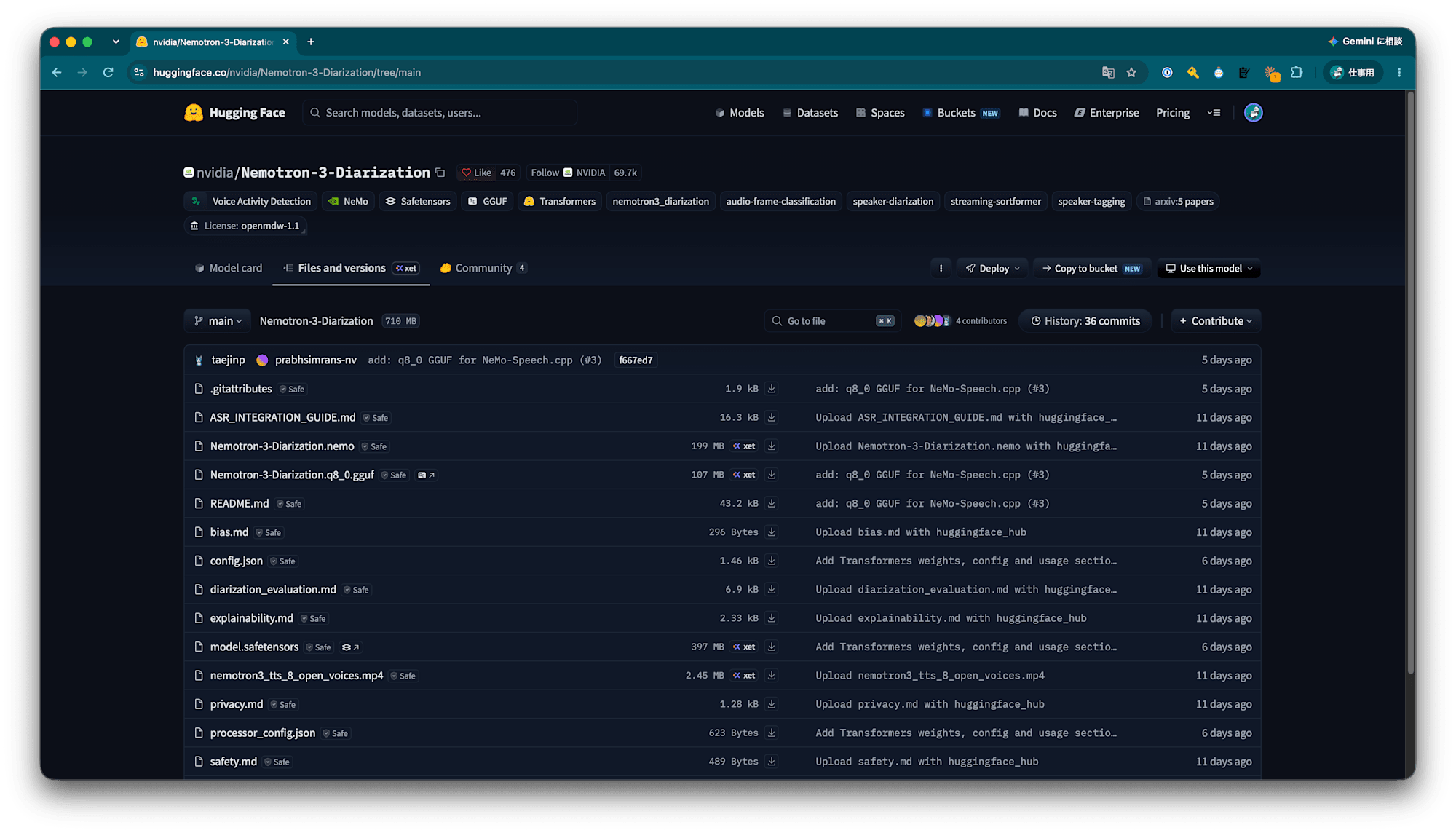
モデルカードのページからファイル一覧に移動し、 /Users/natsume.yuta/Downloads/Nemotron-3-Diarization.q8_0.gguf をダウンロードして使ってみます。
$ nemo-speech diarize -m Nemotron-3-Diarization.q8_0.gguf audio.wav
[nemo-speech] diarize session started
nemo-speech diarize: sortformer: pre_ln transformer variant is not supported
[nemo-speech] diarize session failed (exit code 1)
こちらも使えませんでした。
4-4. なぜダメだったのか
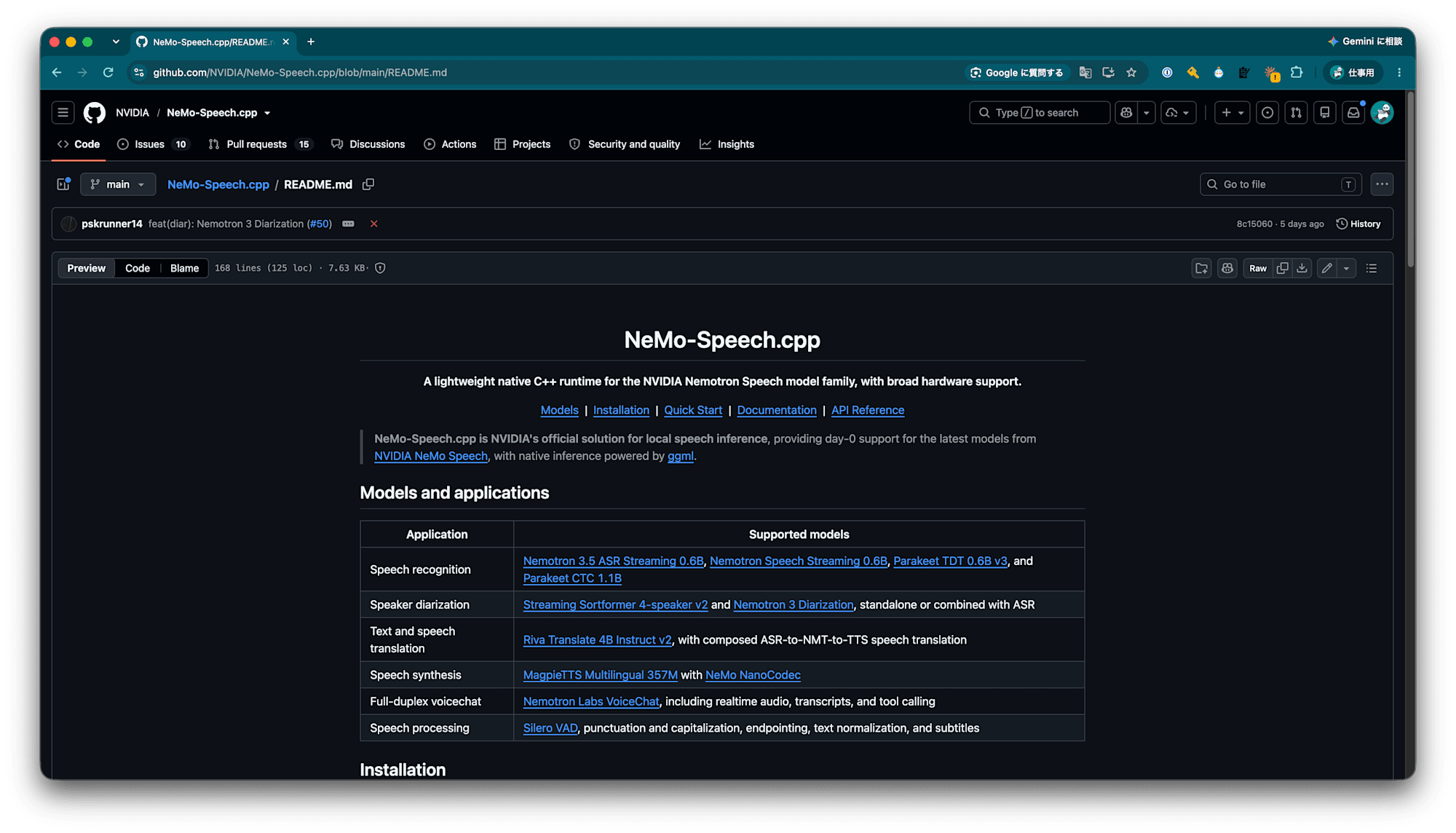
NeMo-Speech.cpp (C++)の最新版はv0.1.0で、Nemotron 3 Diarizationよりも前にリリースされたものです。
そのため、Nemotoron 3 Diarizationで採用されているアーキテクチャに対応していないようです。
こちらもmainブランチでは対応しているようです。
4-5. mainブランチからビルドして使ってみる
まずHomebrewでビルドに必要なものをインストールします。
$ xcode-select --install  # skip if the Command Line Tools are already installed
$ brew install cmake ninja sentencepiece abseil
次にgitからクローンし、そのディレクトリに入ります。
$ git clone git@github.com:NVIDIA/NeMo-Speech.cpp.git
$ cd NeMo-Speech.cpp
次に必要なサブモジュールをインストールします。
$ git submodule update --init ggml
$ git submodule update --init --recursive llama.cpp
次にビルドします。
$ scripts/configure.sh metal-speech
$ cmake --build --preset metal-speech
mac向けへのビルドなのでMetal向けのビルドとし、今回はASRやDiarizationなど向けのビルドも行うようにしています。
ビルドが成功すると build/metal-speech/bin/nemo-speech に実行ファイルが生成されます。
$ build/metal-speech/bin/nemo-speech --help
NeMo-Speech.cpp 0.1.0

Usage: build/metal-speech/bin/nemo-speech <command> [options]

Commands:
  transcribe   Transcribe an audio file, directory, or microphone
  diarize      Identify speaker segments in an audio file
  translate    Translate text
  synthesize   Synthesize speech to a WAV file
  bench        Benchmark an end-to-end ASR workload
  pull         Download a pinned model from Hugging Face
  model        List, pull, or inspect models
  doctor       Inspect runtime and device availability
  help         Show help for a command

Global options:
  -h, --help       Show help
  --version        Show version
  --json           Emit machine-readable results and errors
  --quiet          Suppress non-result progress messages
  --verbose        Emit additional diagnostics on stderr
使用できるモデルを見てみます。
$ build/metal-speech/bin/nemo-speech model list
Available models (* = command default)

ASR — transcribe, bench, serve
  * nemotron-3.5
      repo: nvidia/nemotron-3.5-asr-streaming-0.6b
      also: nemotron-asr
    nemotron-en
      repo: nvidia/nemotron-speech-streaming-en-0.6b
    parakeet-ctc
      repo: nvidia/parakeet-ctc-1.1b
    parakeet-tdt
      repo: nvidia/parakeet-tdt-0.6b-v3

Diarization — diarize, transcribe --diarize, serve
  * nemotron-3-diarization
      repo: nvidia/Nemotron-3-Diarization
      also: nemotron-diar
    sortformer
      repo: nvidia/diar_streaming_sortformer_4spk-v2
      also: sortformer-diar

TTS — synthesize, serve
  * magpie (speech model + tokenizer)
      repo: nvidia/magpie_tts_multilingual_357m
      also: magpie-tts
      pulls: nano-codec
  * nano-codec (codec)
      repo: nvidia/nemo-nano-codec-22khz-1.89kbps-21.5fps
      also: nanocodec

Use a short name or full repository ID wherever MODEL is accepted.
Download ahead of time with: nemo-speech pull <name>
こちらではDiarizationではNemotron 3 Diarizationがデフォルトになっています。
$ build/metal-speech/bin/nemo-speech diarize /path/to/audio.wav
[nemo-speech] diarize session started
[model] downloading nvidia/Nemotron-3-Diarization@f667ed73aee5 (diarization, 102.1 MiB)
[model] license: NVIDIA Open Model License (OpenMDW 1.1) — https://huggingface.co/nvidia/Nemotron-3-Diarization
######################################################################################################################################################################################## 100.0%
[model] verifying size and SHA-256...
[model] ready: /Users/natsume.yuta/Library/Caches/NeMoSpeech/models/nvidia/Nemotron-3-Diarization/f667ed73aee57d40cc39428eb768b4fd87a0a29e/Nemotron-3-Diarization.q8_0.gguf
0.341   14.749  speaker 1
14.801  27.549  speaker 2
27.471  58.429  speaker 1

... (中略) ...

1209.321        1215.679        speaker 1
1215.441        1230.329        speaker 2
1230.201        1232.309        speaker 1
1232.691        1247.239        speaker 1
1247.931        1254.789        speaker 1
1255.101        1259.599        speaker 1
[nemo-speech] diarize session finished
Nemotron 3 Diarizationを使って話者識別ができました。
5. まとめ
以上、Nemotron 3 Diarizationを使ってみる話でした。
NeMo Speechで新しいリリースがあるまでは、モデルカードに記載された方法では使えなさそうです。
早いところ対応してほしいなぁと思います。
何かのお役に立てたら幸いです。