![[アップデート] Amazon Lightsail ブループリントに Bitnami を使わない WordPress イメージが追加され IMDSv2 がデフォルトで適用されるようになりました](https://images.ctfassets.net/ct0aopd36mqt/wp-thumbnail-fa410506a858dc9244cc2631570b82d3/bbcb1ae519d46d2d304f32e4c77a763e/amazon-lightsail?w=3840&fm=webp)
[アップデート] Amazon Lightsail ブループリントに Bitnami を使わない WordPress イメージが追加され IMDSv2 がデフォルトで適用されるようになりました

いわさです。
Amazon Lightsail では事前に提供されているブループリントを選択してインスタンスを起動することが出来ます。
様々なアプリケーションが事前にセットアップされているのですが、その多くは Bitnami に依存したイメージとなっていました。
それが、少し前に登場したいくつかのブループリントから Bitnami が使われずに Amazon 標準でアプリケーションスタックがセットアップされたものが提供されるようになりました。さらに IMDSv2 もデフォルトで強制適用されるようになり、セキュリティ性も向上していました。
今回のアップデートで新たに WordPress ブループリントも Amazon Lightsail 標準のものが提供されるようになりました。
当然ながら IMDSv2 がデフォルトになっています。
従来の Bitnami イメージと同じ WordPress バージョンのものが提供されているので混乱しそうですが、その2つを確認してみたので紹介します。
Lightsail インスタンスイメージ
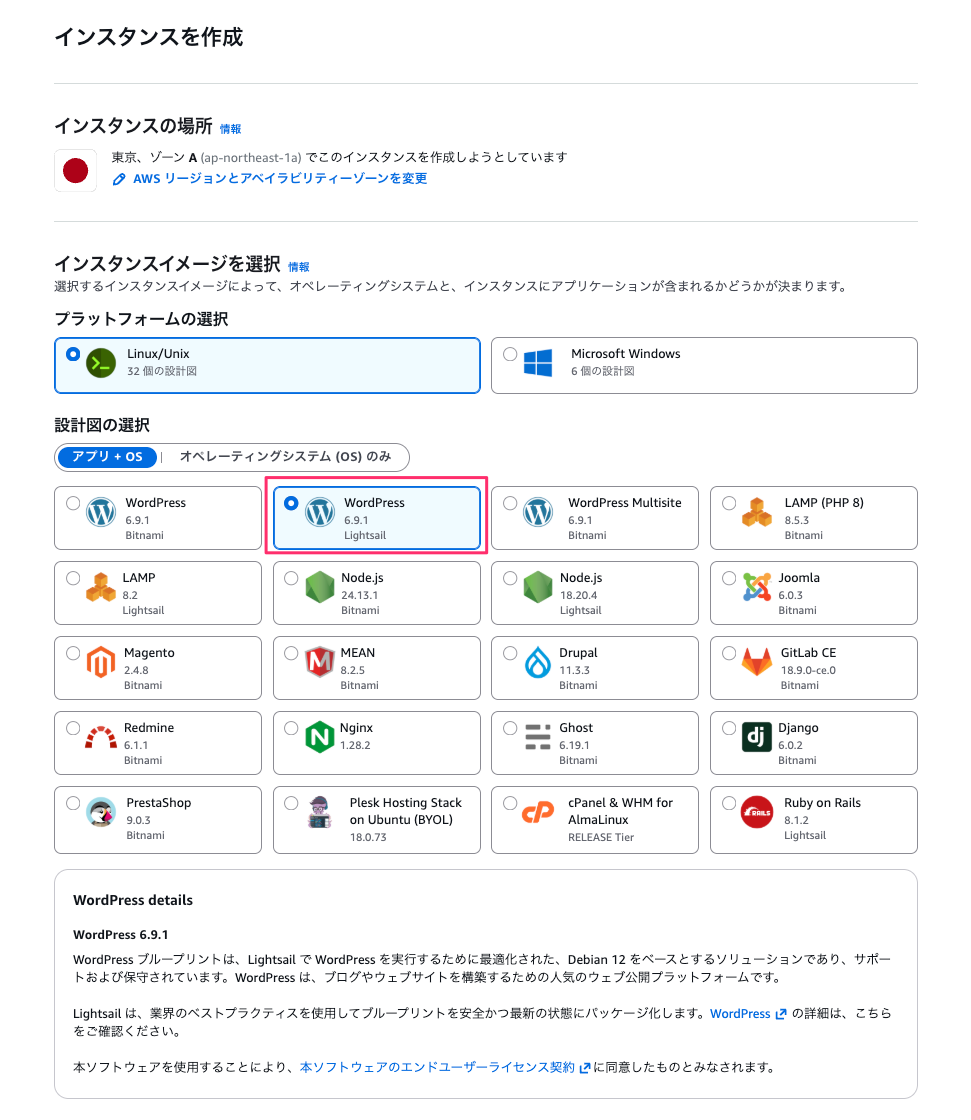
では Lightsail コンソールの東京リージョンでブループリントの一覧を確認してみましょう。
従来は WordPress と WordPress Multisite の2つが存在していましたが、3つ目の WordPress が追加されていることがわかりますね。
前者の2つは Bitnami 提供のものでしたが、今回追加されたものは Lightsai 提供のものとなっています。
AWS CLI からもイメージを確認してみましょう。
% aws lightsail get-blueprints
{
    "blueprints": [
        {
            "blueprintId": "windows_server_2022",
            "name": "Windows Server 2022",
            "group": "windows_2022",
            "type": "os",
            "description": "Windows Server is an environment for deploying applications using the Microsoft Web Platform. This blueprint allows you to run compatible solutions that are based on Windows on Amazon Web Services (AWS), providing high-performance, reliable, and cost-effective cloud computing. Learn more about Windows Server 2022 on the AWS Marketplace.",
            "isActive": true,
            "minPower": 500,
            "version": "2026.02.11",
            "versionCode": "1",
            "productUrl": "https://aws.amazon.com/marketplace/pp/prodview-dq4sxno5vuy7m",
            "licenseUrl": "https://d7umqicpi7263.cloudfront.net/eula/product/b0e459f5-2c38-4939-ad2a-d9784ecab690/0e7c7387-f24a-45b5-9206-e5ab5ff5fd9c.txt",
            "platform": "WINDOWS"
        },

:

        {
            "blueprintId": "wordpress",
            "name": "WordPress",
            "group": "wordpress",
            "type": "app",
            "description": "Bitnami, the leaders in application packaging, and Automattic, the experts behind WordPress, have teamed up to offer this official WordPress image. This image is a pre-configured, ready-to-run image for running WordPress on Amazon Lightsail. WordPress is the world's most popular content management platform. Whether it's for an enterprise or small business website, or a personal or corporate blog, content authors can easily create content using its new Gutenberg editor, and developers can extend the base platform with additional features. Popular plugins like Jetpack, Akismet, All in One SEO Pack, WP Mail, Google Analytics for WordPress, and Amazon Polly are all pre-installed in this image. Let's Encrypt SSL certificates are supported through an auto-configuration script.",
            "isActive": true,
            "minPower": 0,
            "version": "6.9.1",
            "versionCode": "1",
            "productUrl": "https://aws.amazon.com/marketplace/pp/B00NN8Y43U",
            "licenseUrl": "https://aws.amazon.com/marketplace/pp/B00NN8Y43U#pdp-usage",
            "platform": "LINUX_UNIX"
        },
        {
            "blueprintId": "wordpress_ls_1_0",
            "name": "WordPress",
            "group": "wordpress_ls",
            "type": "app",
            "description": "The WordPress blueprint provides a complete production environment with PHP, MariaDB, phpMyAdmin, and WordPress.",
            "isActive": true,
            "minPower": 0,
            "version": "6.9.1",
            "versionCode": "1",
            "productUrl": "https://aws.amazon.com/lightsail/features/#topic-0",
            "licenseUrl": "https://d25b4yjpexuuj4.cloudfront.net/eula/product/lightsail/lightsail-eula.txt",
            "platform": "LINUX_UNIX"
        },
        {
            "blueprintId": "wordpress_multisite",
            "name": "WordPress Multisite",
            "group": "wordpress_multisite",
            "type": "app",
            "description": "WordPress Multisite is ideal for organizations such as universities, corporations, and agencies that need to enable many people to host and manage their own websites while giving overall control to a central administrator. These websites can all have unique domain names and layouts while sharing assets such as themes and plugins. Popular plugins like Jetpack, Akismet, All in One SEO Pack, WP Mail, Google Analytics for WordPress, and Amazon Polly are all pre-installed in this image. Let's Encrypt SSL certificates are supported through an auto-configuration script. This image is certified by Bitnami as secure, up-to-date, and packaged using industry best practices.",
            "isActive": true,
            "minPower": 0,
            "version": "6.9.1",
            "versionCode": "1",
            "productUrl": "https://aws.amazon.com/marketplace/pp/B00NN8XE6S",
            "licenseUrl": "https://aws.amazon.com/marketplace/pp/B00NN8XE6S#pdp-usage",
            "platform": "LINUX_UNIX"
        },

:
Bitnami のものは各URLがマーケットプレイスのものになっていますね。
今回追加されたのは AWS 標準版といえるもので、PHP、MariaDB、phpMyAdmin、WordPress などが事前にセットアップされています。
なお、マルチサイト版は提供されていないのでご注意ください。
WordPress ウェブサイトセットアップ機能は Bitnami 版と同じように提供されている
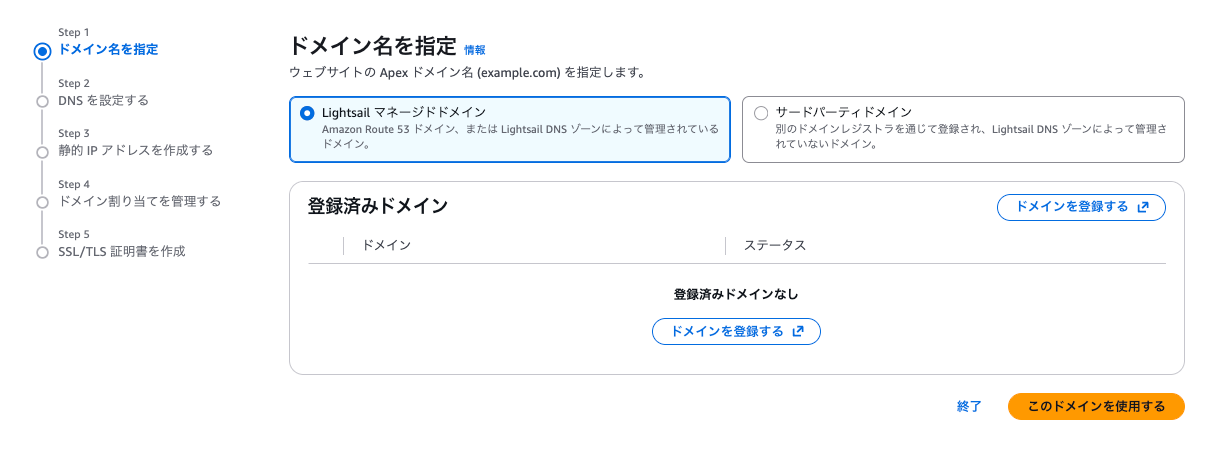
従来の Bitnami 版 WordPress では Lightsail コンソール上から WordPress の一部機能をセットアップすることが出来ました。
今回追加されたイメージの場合でもこのカスタムセットアップフローを使うことが出来ます。
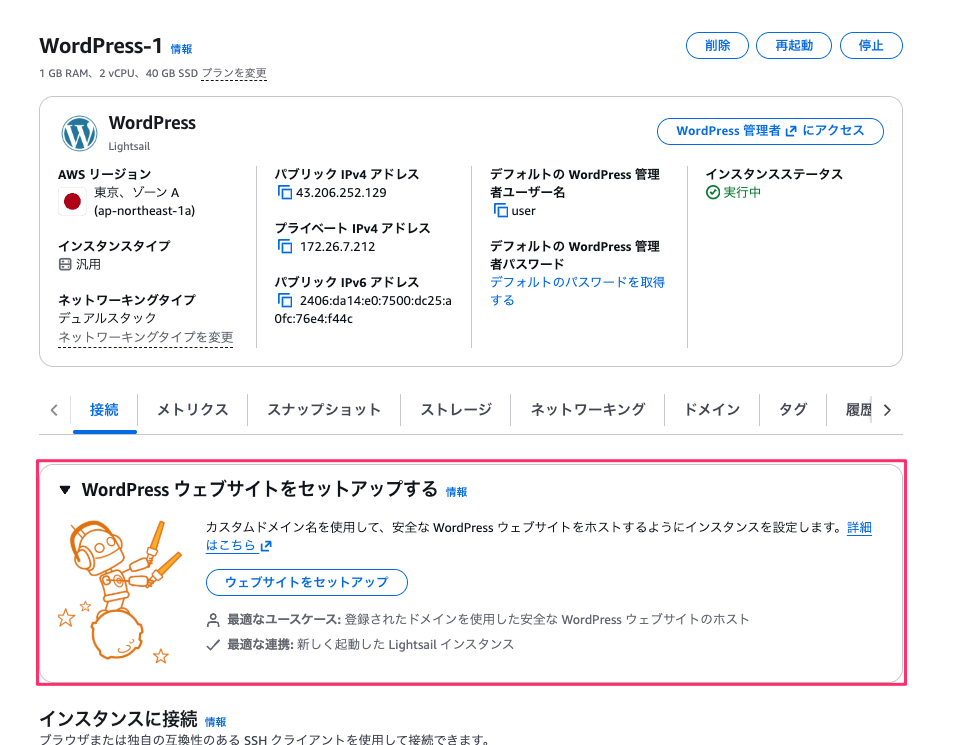
セットアップフローで設定できる項目も同じで、カスタムドメイン/静的IPアドレス/SSL/TLS証明書となっています。
IMDSv2 適用状況
前回の Ruby on Rails イメージと同じように AWS 標準提供のイメージの場合は IMDSv2 が強制適用されています。
次のように Lightsail 提供と Bitnami 提供のインスタンスを2つ作成し、確認してみましょう。
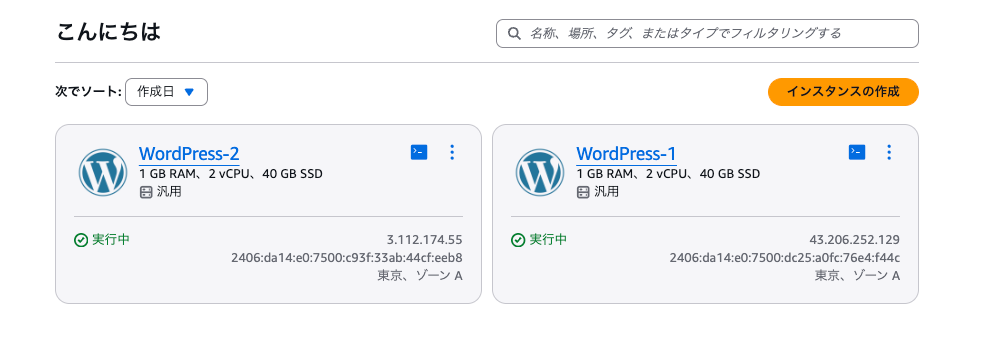
こちらは Lightsail 提供の WordPress インスタンスです。
ブループリントIDはwordpress_ls_1_0ですね、Ruby on Rails と同じようにlsというのが含まれています。
また、metadataOptions.httpTokens"がrequiredに設定されています。IMDSv2 がデフォルトで適用されていますね。
% aws lightsail get-instance --instance-name WordPress-1
{
    "instance": {
        "name": "WordPress-1",
        "arn": "arn:aws:lightsail:ap-northeast-1:123456789012:Instance/5d6c0dc5-3514-48e6-9f0b-357d56d43ee5",
        "supportCode": "173033923990/i-0865b018a45ff1023",
        "createdAt": "2026-02-28T13:05:45.545000+09:00",
        "location": {
            "availabilityZone": "ap-northeast-1a",
            "regionName": "ap-northeast-1"
        },
        "resourceType": "Instance",
        "tags": [],
        "blueprintId": "wordpress_ls_1_0",
        "blueprintName": "WordPress",
        "bundleId": "micro_3_0",
        "isStaticIp": false,
        "privateIpAddress": "172.26.7.212",
        "publicIpAddress": "43.206.252.129",
        "ipv6Addresses": [
            "2406:da14:e0:7500:dc25:a0fc:76e4:f44c"
        ],
        "ipAddressType": "dualstack",
        "hardware": {
            "cpuCount": 2,
            "disks": [
                {
                    "createdAt": "2026-02-28T13:05:45.545000+09:00",
                    "sizeInGb": 40,
                    "isSystemDisk": true,
                    "iops": 3000,
                    "path": "/dev/xvda",
                    "attachedTo": "WordPress-1",
                    "attachmentState": "attached"
                }
            ],
            "ramSizeInGb": 1.0
        },
        "networking": {
            "monthlyTransfer": {
                "gbPerMonthAllocated": 2048
            },
            "ports": [
                {
                    "fromPort": 80,
                    "toPort": 80,
                    "protocol": "tcp",
                    "accessFrom": "Anywhere (0.0.0.0/0 and ::/0)",
                    "accessType": "public",
                    "commonName": "",
                    "accessDirection": "inbound",
                    "cidrs": [
                        "0.0.0.0/0"
                    ],
                    "ipv6Cidrs": [
                        "::/0"
                    ],
                    "cidrListAliases": []
                },
                {
                    "fromPort": 443,
                    "toPort": 443,
                    "protocol": "tcp",
                    "accessFrom": "Anywhere (0.0.0.0/0 and ::/0)",
                    "accessType": "public",
                    "commonName": "",
                    "accessDirection": "inbound",
                    "cidrs": [
                        "0.0.0.0/0"
                    ],
                    "ipv6Cidrs": [
                        "::/0"
                    ],
                    "cidrListAliases": []
                },
                {
                    "fromPort": 22,
                    "toPort": 22,
                    "protocol": "tcp",
                    "accessFrom": "Custom",
                    "accessType": "public",
                    "commonName": "",
                    "accessDirection": "inbound",
                    "cidrs": [],
                    "ipv6Cidrs": [],
                    "cidrListAliases": [
                        "lightsail-connect",
                        "lightsail-connect-ipv6",
                        "lightsail-setup-ipv4",
                        "lightsail-setup-ipv6"
                    ]
                }
            ]
        },
        "state": {
            "code": 16,
            "name": "running"
        },
        "username": "admin",
        "sshKeyName": "LightsailDefaultKeyPair",
        "metadataOptions": {
            "state": "applied",
            "httpTokens": "required",
            "httpEndpoint": "enabled",
            "httpPutResponseHopLimit": 2,
            "httpProtocolIpv6": "disabled"
        }
    }
}
一方で、従来の Bitnami 版の最新イメージで作成した WordPress インスタンスは以下です。
metadataOptions.httpTokensがoptionalです。
% aws lightsail get-instance --instance-name WordPress-2
{
    "instance": {
        "name": "WordPress-2",
        "arn": "arn:aws:lightsail:ap-northeast-1:123456789012:Instance/3cf908ab-a6aa-4694-86f9-008098cd5879",
        "supportCode": "173033923990/i-03bcd53911f767f50",
        "createdAt": "2026-02-28T13:05:58.138000+09:00",
        "location": {
            "availabilityZone": "ap-northeast-1a",
            "regionName": "ap-northeast-1"
        },
        "resourceType": "Instance",
        "tags": [],
        "blueprintId": "wordpress",
        "blueprintName": "WordPress",
        "bundleId": "micro_3_0",
        "isStaticIp": false,
        "privateIpAddress": "172.26.11.174",
        "publicIpAddress": "3.112.174.55",
        "ipv6Addresses": [
            "2406:da14:e0:7500:c93f:33ab:44cf:eeb8"
        ],
        "ipAddressType": "dualstack",
        "hardware": {
            "cpuCount": 2,
            "disks": [
                {
                    "createdAt": "2026-02-28T13:05:58.138000+09:00",
                    "sizeInGb": 40,
                    "isSystemDisk": true,
                    "iops": 120,
                    "path": "/dev/xvda",
                    "attachedTo": "WordPress-2",
                    "attachmentState": "attached"
                }
            ],
            "ramSizeInGb": 1.0
        },
        "networking": {
            "monthlyTransfer": {
                "gbPerMonthAllocated": 2048
            },
            "ports": [
                {
                    "fromPort": 80,
                    "toPort": 80,
                    "protocol": "tcp",
                    "accessFrom": "Anywhere (0.0.0.0/0 and ::/0)",
                    "accessType": "public",
                    "commonName": "",
                    "accessDirection": "inbound",
                    "cidrs": [
                        "0.0.0.0/0"
                    ],
                    "ipv6Cidrs": [
                        "::/0"
                    ],
                    "cidrListAliases": []
                },
                {
                    "fromPort": 22,
                    "toPort": 22,
                    "protocol": "tcp",
                    "accessFrom": "Anywhere (0.0.0.0/0 and ::/0)",
                    "accessType": "public",
                    "commonName": "",
                    "accessDirection": "inbound",
                    "cidrs": [
                        "0.0.0.0/0"
                    ],
                    "ipv6Cidrs": [
                        "::/0"
                    ],
                    "cidrListAliases": []
                },
                {
                    "fromPort": 443,
                    "toPort": 443,
                    "protocol": "tcp",
                    "accessFrom": "Anywhere (0.0.0.0/0 and ::/0)",
                    "accessType": "public",
                    "commonName": "",
                    "accessDirection": "inbound",
                    "cidrs": [
                        "0.0.0.0/0"
                    ],
                    "ipv6Cidrs": [
                        "::/0"
                    ],
                    "cidrListAliases": []
                }
            ]
        },
        "state": {
            "code": 16,
            "name": "running"
        },
        "username": "bitnami",
        "sshKeyName": "LightsailDefaultKeyPair",
        "metadataOptions": {
            "state": "applied",
            "httpTokens": "optional",
            "httpEndpoint": "enabled",
            "httpPutResponseHopLimit": 1,
            "httpProtocolIpv6": "disabled"
        }
    }
}
さいごに
本日は Amazon Lightsail ブループリントに Bitnami を使わない WordPress イメージが追加されたので確認してみました。
やはり Amazon Lightsail の脱 Bitnami 化が進んでいそうです。
Bitnami WordPress の場合スタックバージョンの更新が大変で新しいインスタンス作成と引っ越しが必要なことがあります。今後標準 WordPress でそのあたりが解消されたり、IMDSv2 のデフォルト適用でセキュリティ性も向上することを考えると Lightsail 提供イメージを使うのが良さそうな感じですかね。
今後も他のイメージで Lightsail 提供イメージが増えていきそうです。