AWSサイト間VPN接続のルーティングオプションが動的か静的かでダウンロードできるサンプルConfigファイルが異なる

コンバンハ、千葉(幸)です。
タイトルの繰り返しになりますが、AWSサイト間VPN接続のルーティングオプションが動的か静的かでダウンロードできるサンプルConfigファイルが異なることに気づいた機会がありました。
具体的には以下コマンドを実行した時です。
~ $ VPN_ID=vpn-0e4e28e7659efd2f9
~ $ DEVICE_ID=f8eac8fc
~ $ aws ec2 get-vpn-connection-device-sample-configuration \
>   --vpn-connection-id $VPN_ID \
>   --vpn-connection-device-type-id $DEVICE_ID

An error occurred (UnsupportedOperation) when calling the GetVpnConnectionDeviceSampleConfiguration operation: Parameter vpnConnectionDeviceTypeId=f8eac8fc with parameter vpnConnectionId of a VPN Connection with option staticRoutesOnly=false is not supported.
An error occurred (UnsupportedOperation) when calling the GetVpnConnectionDeviceSampleConfiguration operation: Parameter vpnConnectionDeviceTypeId=f8eac8fc with parameter vpnConnectionId of a VPN Connection with option staticRoutesOnly=false is not supported.
サイト間VPN接続のサンプルConfigファイルをダウンロードするためにaws ec2 get-vpn-connection-device-sample-configurationを実行しています。必須オプションとしてサイト間VPN接続のIDとデバイスタイプIDを指定しています。デバイスタイプとは、「Cisco Systems, Inc.のASA 5500 SeriesのASA 9.7+ VTI」のように「ベンダー、プラットフォーム、ソフトウェア」の組み合わせからなるものです。
コマンドの実行結果に表示されているのは、staticRoutesOnly=false、つまりルーティングオプションが「動的」であるサイト間VPN接続には対応していないデバイスタイプIDである、というエラーです。このデバイスタイプを指定したサンプルConfigファイルのダウンロードは静的にだけ対応している、あるいは逆に動的にだけ対応している、ということがあるわけですね。
タイトルで言っている「〜異なる」というのはそういう意味で使っていました。「デバイスタイプごとにルーティングオプション動的/静的のサポート状況が異なる」の方が実態に近いかもしれません。
であればタイトルも誤解が生じにくいように変えるか……と思っていたところ、「動的/静的どちらもサポートしているデバイスタイプでも、指定したサイト間VPN接続が動的であるか静的であるかによってダウンロードしたサンプルConfigファイルの内訳が異なる」ことが分かりました。
ややこしいですね。結果、タイトルはそのまま行くことにしました。
ここまでで大体言いたいことは言ったのですが、もう少し補足を続けます。
本ブログで伝えたいこと
aws ec2 get-vpn-connection-device-typesでデバイスタイプ一覧を確認できる- コマンドの実行時にサイト間VPN接続は不要
- 少なくともデフォルトリージョンにおいてはリージョン間でデバイスタイプに差は無い
aws ec2 get-vpn-connection-device-sample-configurationでサンプルConfigファイルをダウンロードできる- コマンドの実行時にサイト間VPN接続IDとデバイスタイプIDの指定が必要
- デバイスタイプごとに以下の観点でサンプルConfigファイルのサポート有無が異なる
- 指定したサイト間VPN接続のルーティングタイプ(動的 or 静的)
- IKEバージョン(v1 or v2)
- サンプルタイプ(互換性 or 推奨)
- 動的/静的どちらにも対応しているデバイスタイプの場合、両者でサンプルConfigファイルの中身が異なる
本ブログでのAWS CLI実行環境
本ブログに記載のコマンドはAWS CloudShellでの動作確認を行っています。実行バージョンは以下です。
- aws-cli/2.33.23 Python/3.13.11 Linux/6.1.161-183.298.amzn2023.x86_64 exec-env/CloudShell exe/x86_64.amzn.2023
AWSサイト間VPNのカスタマーデバイスおよびConfigファイルについて
前提のおさらいとして、そもそもカスタマーゲートウェイデバイスとかサンプルのConfigファイルってなんだっけ?という場合は以下のブログをご参照ください。過去にまとめたものです。
カスタマーデバイスの要件やベストプラクティス、サンプルConfigファイルの位置付けや内容について書いています。
AWS CLIでサンプルConfig対応デバイスタイプ一覧を確認する
以下のコマンドで、ベンダー、プラットフォーム、ソフトウェアの組み合わせからなるデバイスタイプの一覧を確認できます。
このコマンドの実行にはサイト間VPN接続IDの指定は不要です。実行すると以下のように結果が返ってきます。
~ $ aws ec2 get-vpn-connection-device-types
{
    "VpnConnectionDeviceTypes": [
        {
            "VpnConnectionDeviceTypeId": "681ac807",
            "Vendor": "AXGate",
            "Platform": "NF",
            "Software": "aos 3.2+"
        },
        {
            "VpnConnectionDeviceTypeId": "9af4506c",
            "Vendor": "AXGate",
            "Platform": "UTM",
            "Software": "aos 2.1+"
        },
        {
            "VpnConnectionDeviceTypeId": "36ef5d04",
            "Vendor": "Barracuda",
            "Platform": "NextGen Firewall F-Series",
            "Software": "6.2+"
        },
 ……以下略
このままだと見辛いので、csv形式で出力してみます。
echo "VpnConnectionDeviceTypeId,Vendor,Platform,Software" && \
aws ec2 get-vpn-connection-device-types \
  --query 'VpnConnectionDeviceTypes[*].[VpnConnectionDeviceTypeId,Vendor,Platform,Software]' \
  --output text | sed 's/\t/,/g'
実行イメージは以下です。
~ $ echo "VpnConnectionDeviceTypeId,Vendor,Platform,Software" && \
> aws ec2 get-vpn-connection-device-types \
>   --query 'VpnConnectionDeviceTypes[*].[VpnConnectionDeviceTypeId,Vendor,Platform,Software]' \
>   --output text | sed 's/\t/,/g'
VpnConnectionDeviceTypeId,Vendor,Platform,Software
681ac807,AXGate,NF,aos 3.2+
9af4506c,AXGate,UTM,aos 2.1+
36ef5d04,Barracuda,NextGen Firewall F-Series,6.2+
feabc07e,Checkpoint,Gaia,R77.10+
1b270706,Checkpoint,Gaia,R80.10+
42ff1bfc,Cisco Meraki,MX Series,15.12+ (WebUI)
866e027c,Cisco Meraki,MX Series,9.0+ (WebUI)
6883834a,Cisco Systems, Inc.,ASA 5500 Series,ASA 8.2+
b556dcd1,Cisco Systems, Inc.,ASA 5500 Series,ASA 9.7+ VTI
78c1a727,Cisco Systems, Inc.,ASA 5500 Series,ASA 9.x
48548f98,Cisco Systems, Inc.,Cisco ASR 1000,IOS 12.4+
7b754310,Cisco Systems, Inc.,CSRv AMI,IOS 12.4+
ae4cefeb,Cisco Systems, Inc.,Firepower,v6.2.2+
b0adb196,Cisco Systems, Inc.,ISR Series Routers,IOS 12.4+
d995c2ab,Citrix,Netscaler CloudBridge,NS 11+
f8eac8fc,Cyberoam,CR15iNG,V 10.6.5 MR-1
56c86b54,F5 Networks, Inc.,BIG-IP,v12.0.0+
2b2c1a73,Fortinet,Fortigate 40+ Series,FortiOS 4.0+
980b2a2d,Fortinet,Fortigate 40+ Series,FortiOS 4.0+ (GUI)
9d9470de,Fortinet,Fortigate 40+ Series,FortiOS 5.0+
887cd1a5,Fortinet,Fortigate 40+ Series,FortiOS 5.0+ (GUI)
7125681a,Fortinet,Fortigate 40+ Series,FortiOS 6.4.4+ (GUI)
9005b6c1,Generic,Generic,Vendor Agnostic
670add1b,H3C,MSR800,Version 5.20
40b66cf5,IIJ,SEIL/B1,SEIL/B1 3.70+
a0c6b2f4,IIJ,SEIL/X1 and SEIL/X2,SEIL/X 3.70+
4b8b2ed4,IIJ,SEIL/x86,SEIL/x86 2.30+
8a961875,Juniper Networks, Inc.,J-Series Routers,JunOS 9.5+
1361227b,Juniper Networks, Inc.,SRX Routers,JunOS 11.0+
acabcac0,Juniper Networks, Inc.,SSG and ISG Series Routers,ScreenOS 6.1
631f834b,Juniper Networks, Inc.,SSG and ISG Series Routers,ScreenOS 6.2+
d36a4756,Juniper Networks, Inc.,SSG and ISG Series Routers,ScreenOS 6.2+ (GUI)
dd55903b,Microsoft,Windows Server,2008 R2
411e7147,Microsoft,Windows Server,2012 R2
2b5427d7,Mikrotik,RouterOS,6.36
37d8aff6,Mikrotik,RouterOS,6.47
6e62f3e3,Openswan,Openswan,Openswan 2.6.38+
754a6372,Palo Alto Networks,PA Series,PANOS 4.1.2+
9612cbed,Palo Alto Networks,PA Series,PANOS 4.1.2+ (GUI)
5fb390ba,Palo Alto Networks,PA Series,PANOS 7.0+
74671aaa,pfSense,pfSense,pfsense 2.2.5+(GUI)
4280e43e,SonicWall,NSA, TZ,OS 5.8
60ca5da1,SonicWall,NSA, TZ,OS 5.9
46154821,SonicWall,NSA, TZ,OS 6.2
fa2df246,SonicWall,NSA, TZ,OS 6.5
758d1557,Sophos,ASG,V8.300+
90f254e7,Sophos,Sophos Firewall,v19+
e5ec51ed,Sophos,UTM,V9
51cb26fd,Strongswan,Ubuntu 16.04,Strongswan 5.5.1+
f1647754,Vyatta,Vyatta Network OS,Vyatta Network OS 6.5+
a0745ade,WatchGuard, Inc.,XTM, Firebox,Fireware OS 11.11.4 (WebUI)
dbeffb53,WatchGuard, Inc.,XTM, Firebox,Fireware OS 11.12.2+ (WebUI)
e7a2d626,Yamaha,RTX Routers,Rev.10.01.16+
400e7aee,Zyxel,ZyWALL,ZLD 4.3+
1153d0d2,Zyxel,Zywall Series,Zywall 4.20+
2026/02/26時点の東京リージョンでは55件結果が返ってきました。なお、リージョンを切り替えても結果は同一でした。(オプトインリージョンは未検証)
各リージョンの差分を確認したプロセス
各リージョンの一覧を出力する。
~ $ aws ec2 describe-regions --query 'Regions[*].RegionName' --output text | tr '\t' '\n' | while read region; do
>   aws ec2 get-vpn-connection-device-types \
>     --region "$region" \
>     --query 'VpnConnectionDeviceTypes[*].[VpnConnectionDeviceTypeId,Vendor,Platform,Software]' \
>     --output text | sed 's/\t/,/g' | sort > "/tmp/vpn_${region}.csv"
> done
念のため出力結果確認する。サイズが皆同じ。
~ $ ls -la /tmp/vpn*
-rw-r--r--. 1 cloudshell-user cloudshell-user 2553 Feb 26 11:52 /tmp/vpn_ap-northeast-1.csv
-rw-r--r--. 1 cloudshell-user cloudshell-user 2553 Feb 26 11:52 /tmp/vpn_ap-northeast-2.csv
-rw-r--r--. 1 cloudshell-user cloudshell-user 2553 Feb 26 11:52 /tmp/vpn_ap-northeast-3.csv
-rw-r--r--. 1 cloudshell-user cloudshell-user 2553 Feb 26 11:52 /tmp/vpn_ap-south-1.csv
-rw-r--r--. 1 cloudshell-user cloudshell-user 2553 Feb 26 11:52 /tmp/vpn_ap-southeast-1.csv
-rw-r--r--. 1 cloudshell-user cloudshell-user 2553 Feb 26 11:52 /tmp/vpn_ap-southeast-2.csv
-rw-r--r--. 1 cloudshell-user cloudshell-user 2553 Feb 26 11:52 /tmp/vpn_ca-central-1.csv
-rw-r--r--. 1 cloudshell-user cloudshell-user 2553 Feb 26 11:52 /tmp/vpn_eu-central-1.csv
-rw-r--r--. 1 cloudshell-user cloudshell-user 2553 Feb 26 11:52 /tmp/vpn_eu-north-1.csv
-rw-r--r--. 1 cloudshell-user cloudshell-user 2553 Feb 26 11:52 /tmp/vpn_eu-west-1.csv
-rw-r--r--. 1 cloudshell-user cloudshell-user 2553 Feb 26 11:52 /tmp/vpn_eu-west-2.csv
-rw-r--r--. 1 cloudshell-user cloudshell-user 2553 Feb 26 11:52 /tmp/vpn_eu-west-3.csv
-rw-r--r--. 1 cloudshell-user cloudshell-user 2553 Feb 26 11:52 /tmp/vpn_sa-east-1.csv
-rw-r--r--. 1 cloudshell-user cloudshell-user 2553 Feb 26 11:52 /tmp/vpn_us-east-1.csv
-rw-r--r--. 1 cloudshell-user cloudshell-user 2553 Feb 26 11:52 /tmp/vpn_us-east-2.csv
-rw-r--r--. 1 cloudshell-user cloudshell-user 2553 Feb 26 11:52 /tmp/vpn_us-west-1.csv
-rw-r--r--. 1 cloudshell-user cloudshell-user 2553 Feb 26 11:52 /tmp/vpn_us-west-2.csv
us-east-1の結果と各リージョンの結果をdiffする。
~ $ BASE="us-east-1"
~ $ for f in /tmp/vpn_*.csv; do
>   region=$(basename "$f" .csv | sed 's/vpn_//')
>   [ "$region" = "$BASE" ] && continue
>   diff_result=$(diff "/tmp/vpn_${BASE}.csv" "$f")
>   [ -z "$diff_result" ] \
>     && echo "$BASE <-> $region : no diff" \
>     || { echo "$BASE <-> $region :"; echo "$diff_result"; }
> done
us-east-1 <-> ap-northeast-1 : no diff
us-east-1 <-> ap-northeast-2 : no diff
us-east-1 <-> ap-northeast-3 : no diff
us-east-1 <-> ap-south-1 : no diff
us-east-1 <-> ap-southeast-1 : no diff
us-east-1 <-> ap-southeast-2 : no diff
us-east-1 <-> ca-central-1 : no diff
us-east-1 <-> eu-central-1 : no diff
us-east-1 <-> eu-north-1 : no diff
us-east-1 <-> eu-west-1 : no diff
us-east-1 <-> eu-west-2 : no diff
us-east-1 <-> eu-west-3 : no diff
us-east-1 <-> sa-east-1 : no diff
us-east-1 <-> us-east-2 : no diff
us-east-1 <-> us-west-1 : no diff
us-east-1 <-> us-west-2 : no diff
差分なしでした。
AWS CLIでサンプルConfigファイルをダウンロードする
上記で確認できたデバイスタイプIDを指定してサンプルConfigファイルをダウンロードできます。使用するコマンドは以下です。
実行時にはオプションとして以下の指定が必須です。
--vpn-connection-id <value>
--vpn-connection-device-type-id <value>
前者はサイト間VPN接続IDです。つまり、このコマンドの実行時には作成済みのサイト間VPN接続が必要です。後者はデバイスタイプIDで、先ほど確認した一覧の中のIDを指定します。
今回はデバイスタイプIDとして以下のものを指定します。深い理由は無くてなんとなくです。
b556dcd1,Cisco Systems, Inc.,ASA 5500 Series,ASA 9.7+ VTI
あらかじめ環境変数に必要な情報を格納しました。今回は構築済みのサイト間VPN接続の情報を指定しています。
~ $ VPN_ID=vpn-0e4e28e7659efd2f9
~ $ DEVICE_ID=b556dcd1
この状態でコマンドを実行します。
aws ec2 get-vpn-connection-device-sample-configuration \
  --vpn-connection-id $VPN_ID \
  --vpn-connection-device-type-id $DEVICE_ID
実行するとこのような形で出力が返ってきます。
~ $ aws ec2 get-vpn-connection-device-sample-configuration \
>   --vpn-connection-id $VPN_ID \
>   --vpn-connection-device-type-id $DEVICE_ID
{
    "VpnConnectionDeviceSampleConfiguration": "! Amazon Web Services\n! Virtual Private Cloud\n\n! AWS utilizes unique identifiers to manipulate the configuration of\n! a VPN Connection. Each VPN Connection is assigned an identifier and is\n! associated with two other identifiers, namely the\n! Customer Gateway Identifier and Virtual Private Gateway Identifier.\n!\n! Your VPN Connection ID                  : vpn-0e4e28e7659efd2f9\n! Your Virtual Private Gateway ID         : vgw-0c8ea7e66864631e1\n! Your Customer Gateway ID\t\t  : cgw-0b89acd1b93ef048d\n!\n!\n! This configuration consists of two tunnels. Both tunnels must be\n! configured on your Customer Gateway.\n!\n\n\n\n\n! --------------------------------------------------------------------------------\n! IPSec Tunnel #1\n! --------------------------------------------------------------------------------\n! #1: Internet Key Exchange (IKE) Configuration\n!\n! A policy is established for the supported ISAKMP encryption,\n! authentication, Diffie-Hellman, lifetime, and key parameters.\n! Please note, these sample configurations are for the minimum requirement of AES12
    ……中略
k 192.168.100.0 mask 255.255.255.0\n    no auto-summary\n    no synchronization\n  exit-address-family\nexit\n!\n\n\n! Additional Notes and Questions\n!  - Amazon Virtual Private Cloud Getting Started Guide:\n!       http://docs.amazonwebservices.com/AmazonVPC/latest/GettingStartedGuide\n!  - Amazon Virtual Private Cloud Network Administrator Guide:\n!       http://docs.amazonwebservices.com/AmazonVPC/latest/NetworkAdminGuide\n"
}
このようにしてあげれば、エスケープシーケンスが展開され改行された状態のコンテンツのみが表示されます。
aws ec2 get-vpn-connection-device-sample-configuration \
  --vpn-connection-id $VPN_ID \
  --vpn-connection-device-type-id $DEVICE_ID \
  --query 'VpnConnectionDeviceSampleConfiguration' \
  --output text
IKEバージョンの指定とサンプルタイプの指定
aws ec2 get-vpn-connection-device-sample-configurationではオプションとして以下を指定可能です。
--internet-key-exchange-version- IKEのバージョンを指定。指定可能な値は
ikev1もしくはikev2 - 未指定時の値は
ikev1
- IKEのバージョンを指定。指定可能な値は
--sample-type- サンプルタイプを指定。指定可能な値は
compatibility(「互換性」)もしくはrecommended(「推奨」) - 未指定時の値は
compatibility?(あるいは「指定なし」の可能性も。詳細な確認はまたの機会に)
- サンプルタイプを指定。指定可能な値は
(なお、サイト間VPN接続ではIKEv2の使用が強く推奨されています。)
ikev2やrecommendedは全てのデバイスタイプで対応しているわけではないことに注意してください。むしろ対応している方が少ないです。
以下は、すべてのデバイスタイプを網羅しているわけではありませんが[1]、過去にAWSマネジメントコンソールから対応状況を確認した際の図です。ikev2は半分以下、recommended(表中では「推奨」と記載)は一部のみでの対応していることが分かります。
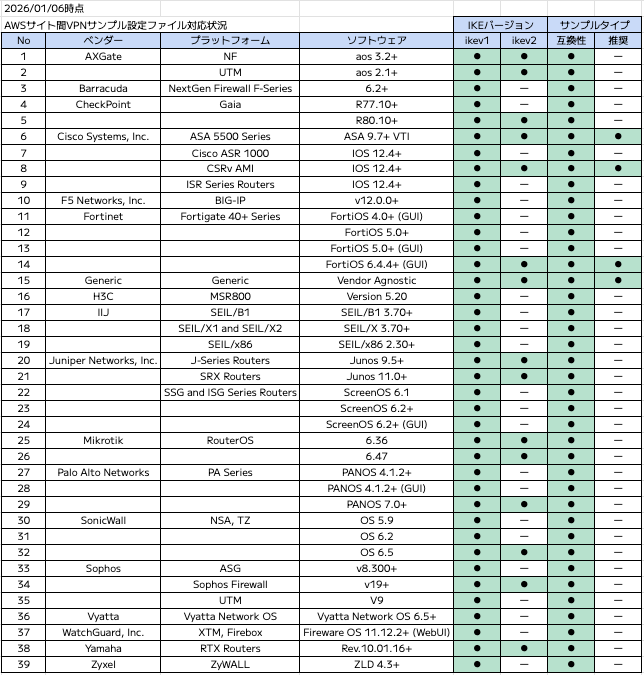
冒頭で取り上げたブログより画像引用
どちらにも対応していない以下のデバイスタイプで実行した際のエラーを確認してみます。
36ef5d04,Barracuda,NextGen Firewall F-Series,6.2+
環境変数の格納。
~ $ VPN_ID=vpn-0e4e28e7659efd2f9
~ $ DEVICE_ID=36ef5d04
IKEv2の指定の場合。
~ $ aws ec2 get-vpn-connection-device-sample-configuration \
>   --vpn-connection-id $VPN_ID \
>   --vpn-connection-device-type-id $DEVICE_ID \
>   --internet-key-exchange-version ikev2

An error occurred (UnsupportedOperation) when calling the GetVpnConnectionDeviceSampleConfiguration operation: Parameter vpnConnectionDeviceTypeId=36ef5d04 with parameter internetKeyExchangeVersion=ikev2 is not supported.
サンプルタイプ推奨指定の場合。
~ $ aws ec2 get-vpn-connection-device-sample-configuration \
>   --vpn-connection-id $VPN_ID \
>   --vpn-connection-device-type-id $DEVICE_ID \
>   --sample-type recommended

An error occurred (UnsupportedOperation) when calling the GetVpnConnectionDeviceSampleConfiguration operation: Parameter internetKeyExchangeVersion=ikev1 with parameter sampleType=recommended is not supported.
AWSマネジメントコンソールで確認できる結果と異なるように見える
AWSマネジメントコンソールでは以下のようにベンダー、プラットフォーム、ソフトウェアなどを指定しサンプルConfigファイルをダウンロードできます。
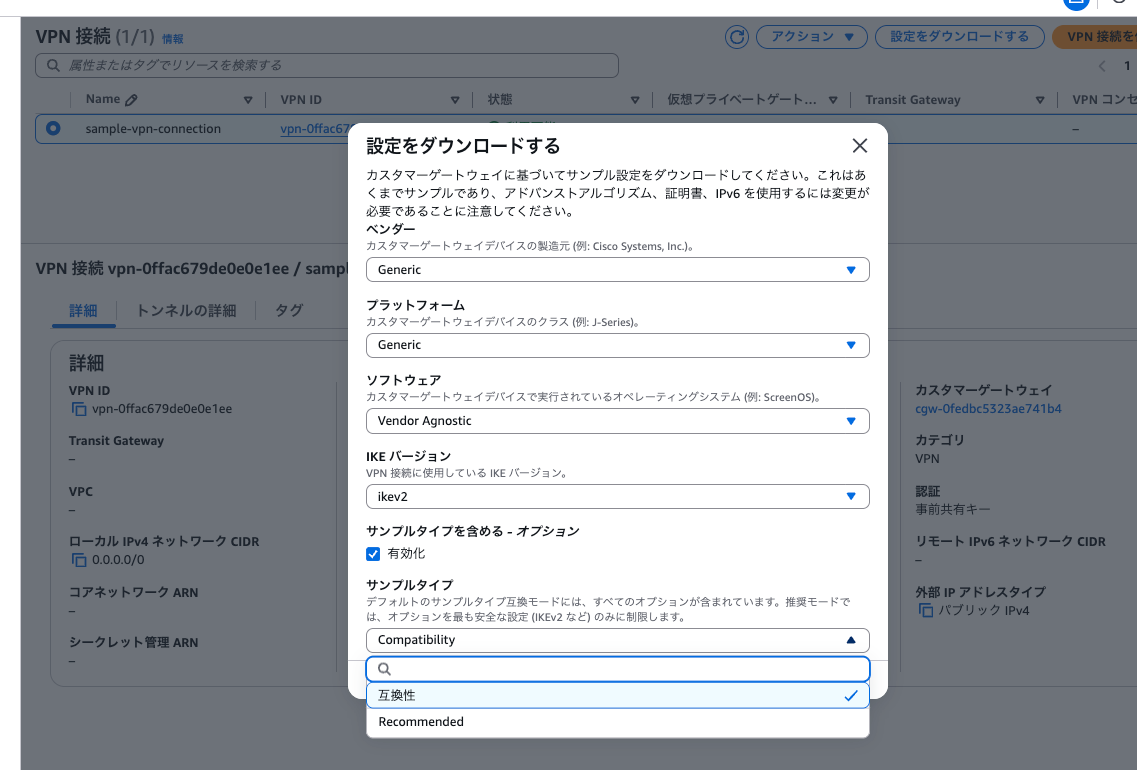
どうもここで選択できる組み合わせと先ほどAWS CLIで確認できたデバイスタイプ一覧の結果が異なりそうだということに気づきました。
以下のデバイスタイプをAWSマネジメントコンソールで探してみます。
f8eac8fc,Cyberoam,CR15iNG,V 10.6.5 MR-1
以下のように、ベンダー名のCyberoamが検索結果に現れてきません。
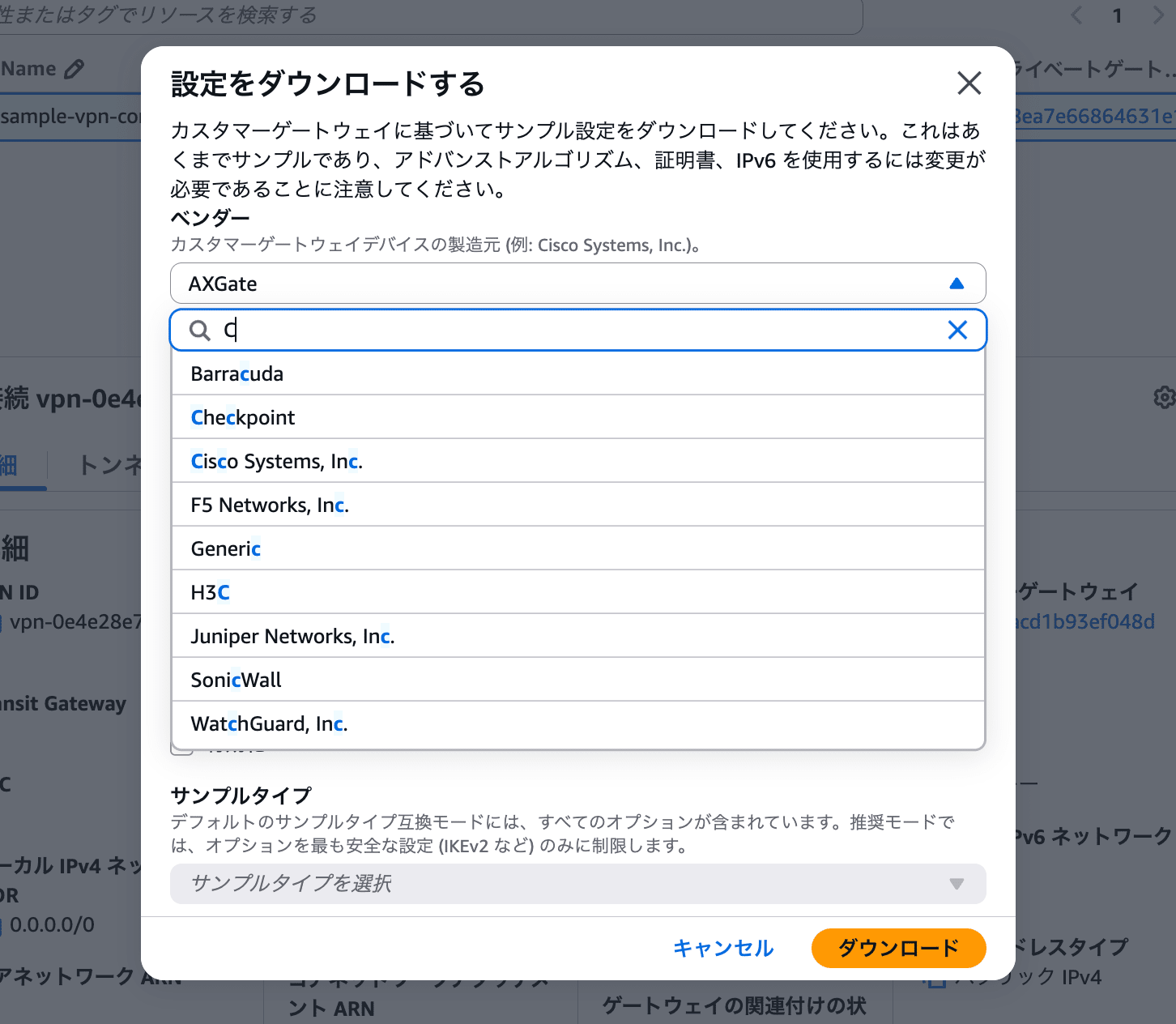
これは一体どういうことなんだろう、と思いました。
AWSマネジメントコンソールで選択肢に現れないデバイスタイプを指定してAWS CLIでファイルをダウンロードする
AWSマネジメントコンソールでは選択できなかったデバイスタイプIDf8eac8fcを指定してAWS CLIでダウンロードしてみます。
ここで冒頭で実行したコマンドが登場します。VPN_ID、DEVICE_IDを格納した上で実行したところ、エラーが発生しました。
~ $ VPN_ID=vpn-0e4e28e7659efd2f9
~ $ DEVICE_ID=f8eac8fc
~ $ aws ec2 get-vpn-connection-device-sample-configuration \
>   --vpn-connection-id $VPN_ID \
>   --vpn-connection-device-type-id $DEVICE_ID

An error occurred (UnsupportedOperation) when calling the GetVpnConnectionDeviceSampleConfiguration operation: Parameter vpnConnectionDeviceTypeId=f8eac8fc with parameter vpnConnectionId of a VPN Connection with option staticRoutesOnly=false is not supported.
An error occurred (UnsupportedOperation) when calling the GetVpnConnectionDeviceSampleConfiguration operation: Parameter vpnConnectionDeviceTypeId=f8eac8fc with parameter vpnConnectionId of a VPN Connection with option staticRoutesOnly=false is not supported.
対象としていたサイト間VPN接続のルーティングオプションは「動的」です。一般論として、基本的には「動的」を選択し、カスタマーデバイスがBGPに対応していない時に「静的」を選択するのが推奨されています。
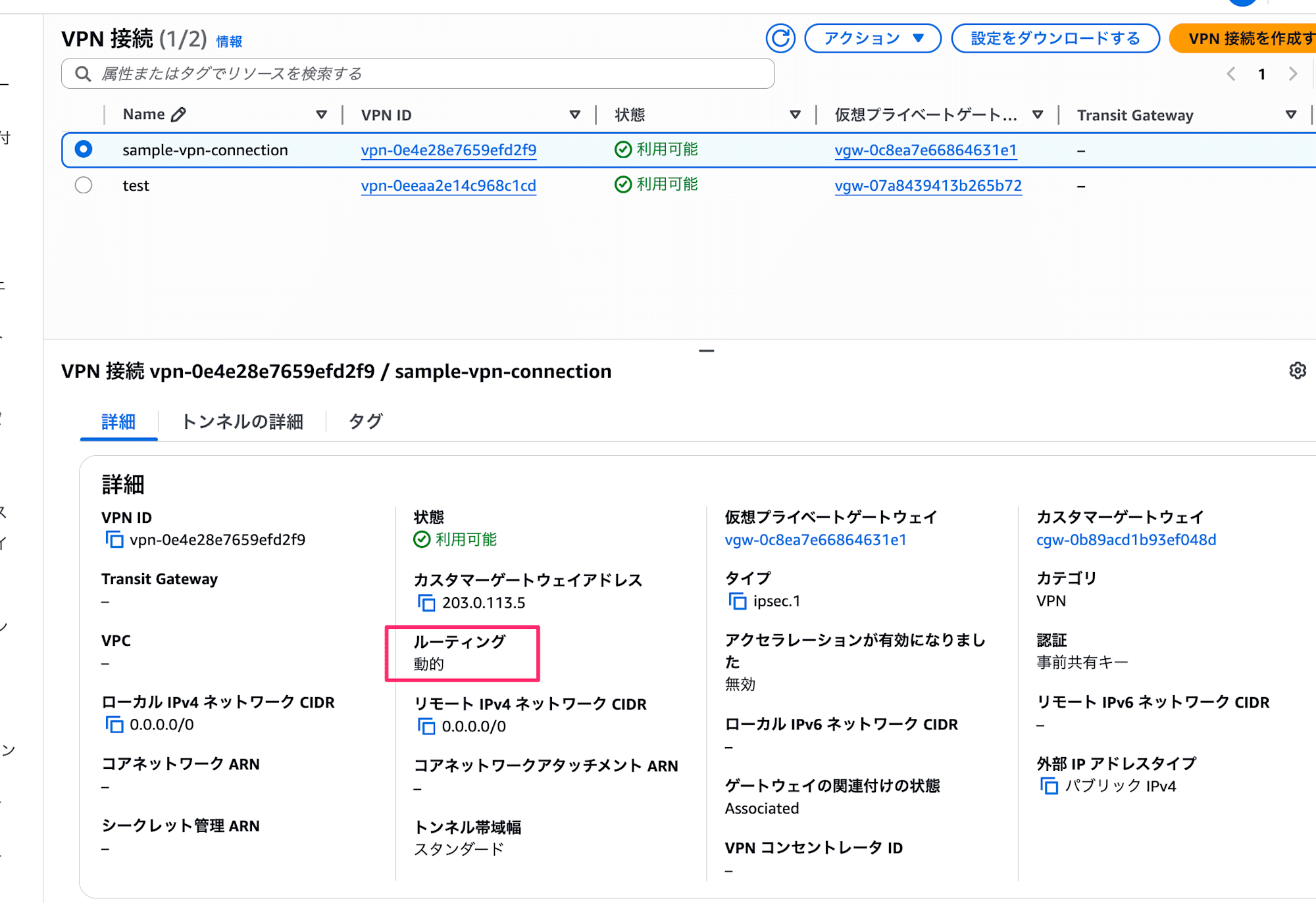
このルーティングオプションはAWS CLIではStaticRoutesOnlyとして確認ができるパラメーターです。
~ $ aws ec2 describe-vpn-connections \
>   --vpn-connection-ids vpn-0e4e28e7659efd2f9
{
    "VpnConnections": [
        {
            "Category": "VPN",
            "GatewayAssociationState": "associated",
            "Options": {
                "EnableAcceleration": false,
                "StaticRoutesOnly": false,
                "LocalIpv4NetworkCidr": "0.0.0.0/0",
                "RemoteIpv4NetworkCidr": "0.0.0.0/0",
                "OutsideIpAddressType": "PublicIpv4",
                "TunnelInsideIpVersion": "ipv4",
 ……以下略
エラーメッセージの「staticRoutesOnly=falseのVPN接続ではサポートされていない」の意味が分かりました。
ルーティングオプション「静的」のサイト間VPN接続で試してみる
先ほどエラーが出たデバイスタイプを、ルーティングオプション「静的」のサイト間VPN接続でダウンロードを試したらどうなるか、というのが気になります。既存のサイト間VPN接続のルーティングオプションは変更できないため、VPN接続を新規に作成してみます。
作成手順の詳細は割愛しますが、AWSマネジメントコンソールから作成する際はルーティングオプションをここで定義します。
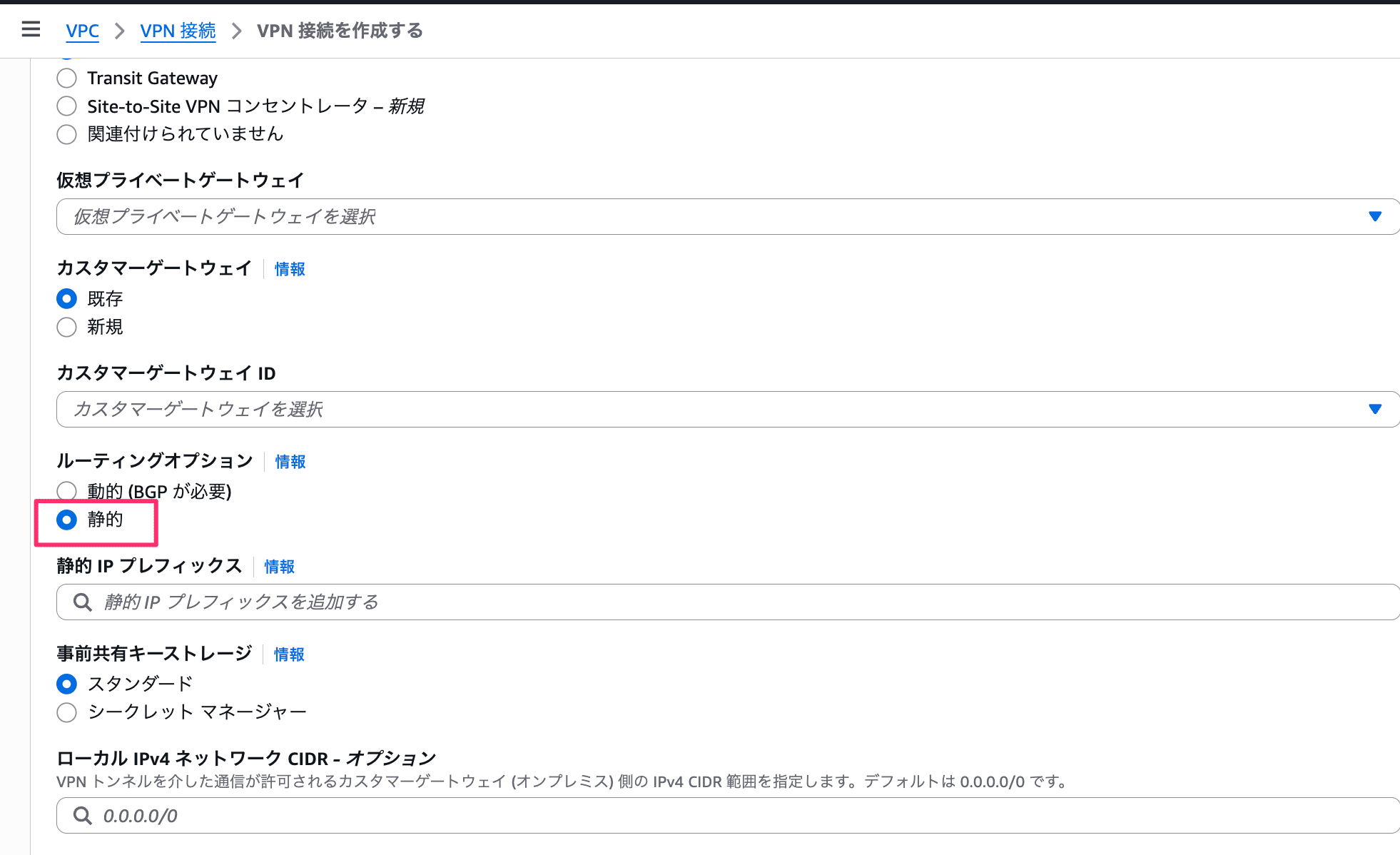
新たに作成した「静的」のサイト間VPN接続であれば、Cyberoamのデバイスタイプが選択肢に現れていることが分かります。
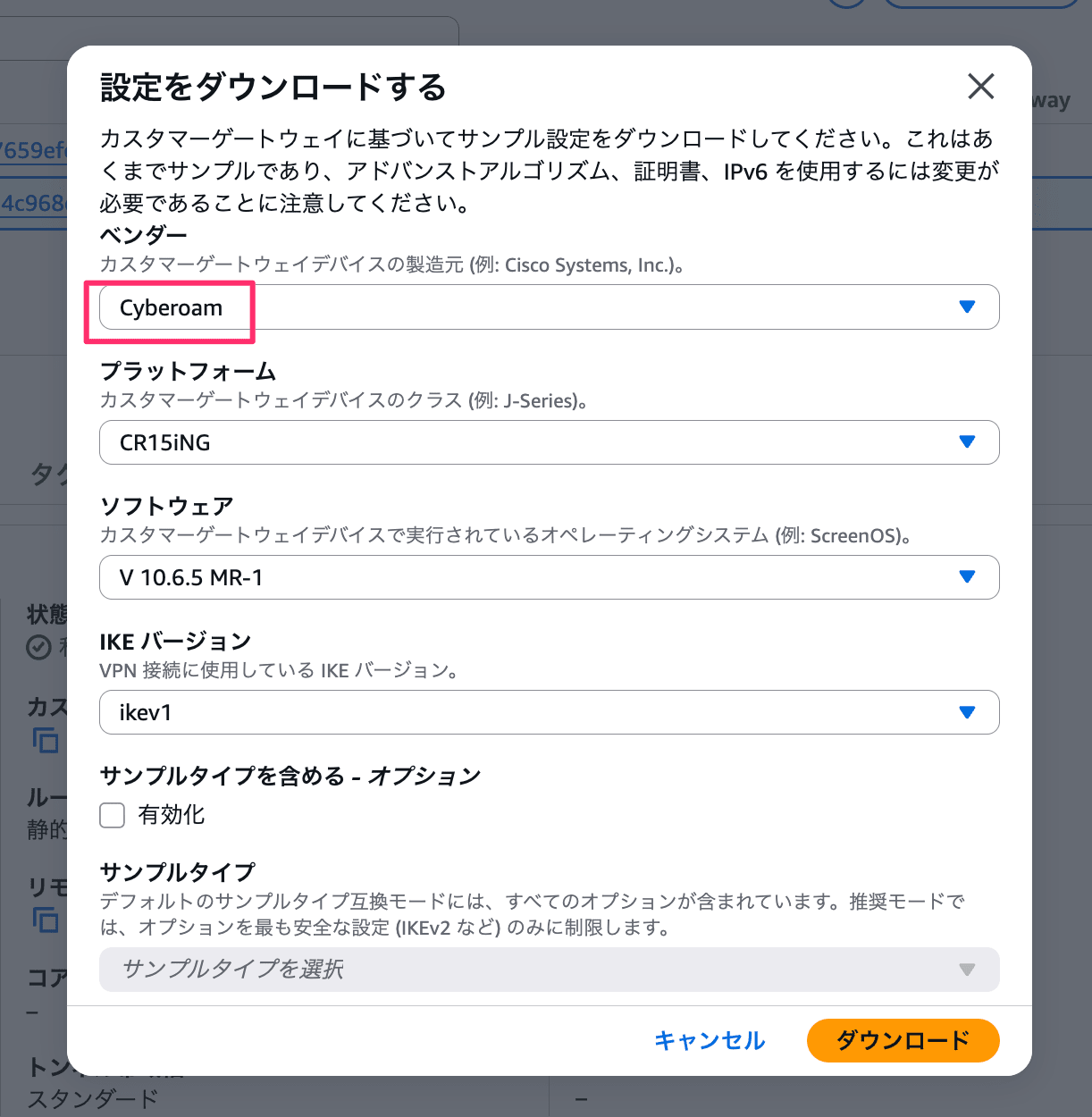
AWS CLIでも問題なくダウンロードできました。
~ $ VPN_ID=vpn-0eeaa2e14c968c1cd
~ $ DEVICE_ID=f8eac8fc
~ $ aws ec2 get-vpn-connection-device-sample-configuration \
>   --vpn-connection-id $VPN_ID \
>   --vpn-connection-device-type-id $DEVICE_ID
{
    "VpnConnectionDeviceSampleConfiguration": "\n! Amazon Web Services\n!\n! Virtual Private Cloud\n!\n! AWS utilizes unique identifiers to manipulate the configuration of\n! a VPN Connection. Each VPN Connection is assigned an identifier and is\n! associated with two other identifiers, namely the\n! Customer Gateway Identifier and Virtual Private Gateway Identifier.\n!\n! Your VPN Connection ID \t\t  : vpn-0eeaa2e14c968c1cd\n! Your Virtual Private Gateway ID         : vgw-07a8439413b265b72\n! Your Customer Gateway ID\t\t  : cgw-059a1d0be4681129e\n!\n!\n! This configuration consists of two tunnels. Both tunnels must be\n! configured on your Customer Gateway.\n\n! --------------------------------------------------------------------------------\n! IPSec Tunnel #1\n! --------------------------------------------------------------------------------\n\n#1:
    ……以下略
ルーティングオプション「動的」でだけ対応したデバイスタイプもある
逆にルーティングオプション「静的」では対応していないデバイスタイプもありそうで、パッとみた中でAWSマネジメントコンソールで選択肢に現れなかった以下で試してみます。
36ef5d04,Barracuda,NextGen Firewall F-Series,6.2+
えい。
~ $ VPN_ID=vpn-0eeaa2e14c968c1cd
~ $ DEVICE_ID=36ef5d04
~ $ aws ec2 get-vpn-connection-device-sample-configuration \
>   --vpn-connection-id $VPN_ID \
>   --vpn-connection-device-type-id $DEVICE_ID

An error occurred (UnsupportedOperation) when calling the GetVpnConnectionDeviceSampleConfiguration operation: Parameter vpnConnectionDeviceTypeId=36ef5d04 with parameter vpnConnectionId of a VPN Connection with option staticRoutesOnly=true is not supported.
An error occurred (UnsupportedOperation) when calling the GetVpnConnectionDeviceSampleConfiguration operation: Parameter vpnConnectionDeviceTypeId=36ef5d04 with parameter vpnConnectionId of a VPN Connection with option staticRoutesOnly=true is not supported.
「staticRoutesOnly=trueのVPN接続ではサポートされていないよ」というエラーが出たので、逆のパターンがあることもわかりました。
動的も静的もサポートしているデバイスタイプのサンプルConfigファイルをダウンロードしてみる
動的/静的どちらかにしか対応していないデバイスタイプがあることは分かりました。では、どちらにも対応しているデバイスタイプではそのサンプルConfigファイルに差はあるのでしょうか。
どちらにも対応している以下のデバイスタイプで確認してみます。ちなみにこれは汎用的なデバイスタイプを表すものです。
9005b6c1,Generic,Generic,Vendor Agnostic
ルーティングタイプが動的のものと静的なものの2つのサイト間VPN接続を作成しました。
まずは動的の方でサンプルConfigファイルをテキストに保存します。
~ $ VPN_ID=vpn-02ec0e3aec15b3e79
~ $ DEVICE_ID=9005b6c1
~ $ aws ec2 get-vpn-connection-device-sample-configuration \
>   --vpn-connection-id $VPN_ID \
>   --vpn-connection-device-type-id $DEVICE_ID \
>   --query 'VpnConnectionDeviceSampleConfiguration' \
>   --output text >> dynamic.txt
続いて静的の方です。
~ $ VPN_ID=vpn-0a8c7e1398e2be017
~ $ DEVICE_ID=9005b6c1
~ $ aws ec2 get-vpn-connection-device-sample-configuration \
>   --vpn-connection-id $VPN_ID \
>   --vpn-connection-device-type-id $DEVICE_ID \
>   --query 'VpnConnectionDeviceSampleConfiguration' \
>   --output text >> static.txt
サンプルConfigファイルには各種IDやIPアドレスが含まれており、当然それらは異なります。そういったVPN接続固有の情報以外で差分がある点として、ルーティング設定の箇所がありました。
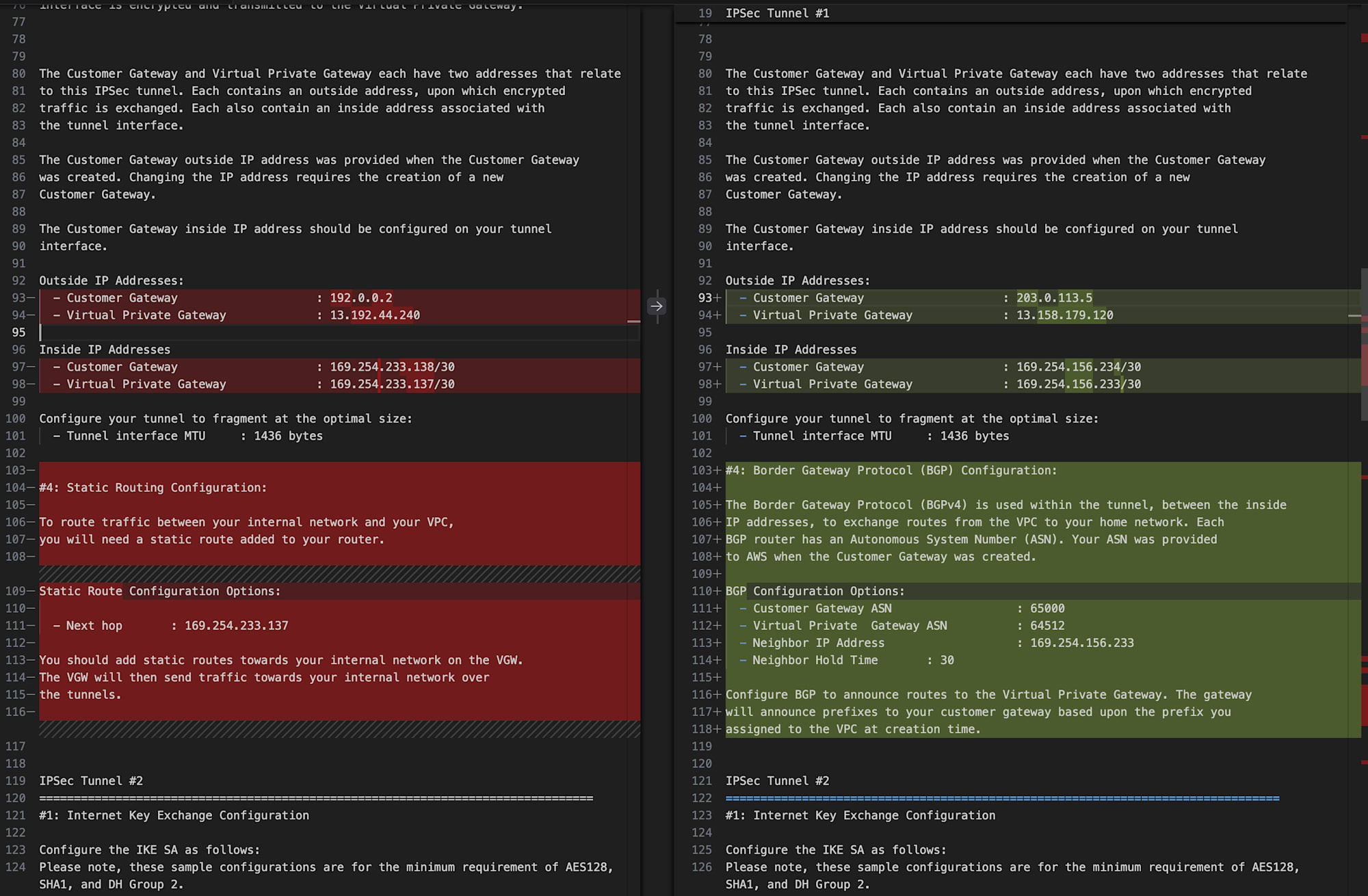
左が静的用のもの、右が動的用のもの
静的な方での該当部ではこちらが。
#4: Static Routing Configuration:

To route traffic between your internal network and your VPC,
you will need a static route added to your router.

Static Route Configuration Options:

  - Next hop       : 169.254.233.137

You should add static routes towards your internal network on the VGW.
The VGW will then send traffic towards your internal network over
the tunnels.
そして動的な方での該当部はこちらが書かれています。
#4: Border Gateway Protocol (BGP) Configuration:

The Border Gateway Protocol (BGPv4) is used within the tunnel, between the inside
IP addresses, to exchange routes from the VPC to your home network. Each
BGP router has an Autonomous System Number (ASN). Your ASN was provided
to AWS when the Customer Gateway was created.

BGP Configuration Options:
  - Customer Gateway ASN                  : 65000
  - Virtual Private  Gateway ASN          : 64512
  - Neighbor IP Address                   : 169.254.156.233
  - Neighbor Hold Time       : 30

Configure BGP to announce routes to the Virtual Private Gateway. The gateway
will announce prefixes to your customer gateway based upon the prefix you
assigned to the VPC at creation time.
一つのサンプルConfigファイルに2本のトンネルの定義があり、トンネルごとにルーティング設定があるため上記の差分も2箇所で発生していました。
動的/静的どちらにも対応しているデバイスタイプでは、サンプルConfigファイルの内容に差があることが分かりました。
本ブログで伝えたかったこと(再掲)
aws ec2 get-vpn-connection-device-typesでデバイスタイプ一覧を確認できる- コマンドの実行時にサイト間VPN接続は不要
- 少なくともデフォルトリージョンにおいてはリージョン間でデバイスタイプに差は無い
aws ec2 get-vpn-connection-device-sample-configurationでサンプルConfigファイルをダウンロードできる- コマンドの実行時にサイト間VPN接続IDとデバイスタイプIDの指定が必要
- デバイスタイプごとに以下の観点でサンプルConfigファイルのサポート有無が異なる
- 指定したサイト間VPN接続のルーティングタイプ(動的 or 静的)
- IKEバージョン(v1 or v2)
- サンプルタイプ(互換性 or 推奨)
- 動的/静的どちらにも対応しているデバイスタイプの場合、両者でサンプルConfigファイルの中身が異なる
付け加えて言うと、デバイスタイプごとのサポート状況を一覧で確認するような術はなく「AWSマネジメントコンソールの選択肢に現れるかどうか」「AWS CLI実行時にエラーが発生するかどうか」で確認するしかない、という点も覚えて帰ってください。
終わりに
AWSサイト間VPN接続のルーティングオプションが動的か静的かでダウンロードできるサンプルConfigファイルが異なる、という話でした。
ルーティングオプションが「静的」のサイト間VPN接続を作成したことがなかったので、しばらく「AWSマネジメントコンソールで選択できるデバイスタイプ足りなくない?」と疑問を持っていました。謎が解けてスッキリです。
そして動的/静的どちらのVPN接続にも対応したデバイスタイプであっても、両者でファイルの内訳が異なるという点が学びでした。動的向けのサンプルConfigファイルではBGPに関する設定が入っており、それは静的では不要な記述でしかないので、当たり前と言えば当たり前ではありました。
どこかしらが参考になれば幸いです。
以上、チバユキ (@batchicchi)がお送りしました。
参考
- AWS Site-to-Site VPN カスタマーゲートウェイデバイスの静的および動的設定ファイル - AWS Site-to-Site VPN
- AWS Site-to-Site VPN カスタマーゲートウェイデバイスのベストプラクティス - AWS Site-to-Site VPN
なぜ網羅できていないのか?の答えは「ルーティングオプションが動的のサイト間VPN接続だけで確認していたから」です。当時は動的か静的かで違いが出ることに気がついていませんでした。 ↩︎