ALBのヘルスチェックと登録解除の遅延(Deregistration Delay)の挙動を検証してみた

はじめに
おはようございます〜
クラウド事業統括本部/プロフェッショナルサービス事業本部/運用イノベーション部の三ツ口寛太です(╹◡╹)
今回も前職での経験ベースでつらつらと書いていきます〜
ALBの「登録解除の遅延(Deregistration Delay)」を、実際にリクエストを流しながら検証してみます🧑💻
ALBのターゲットを外すとき処理中のリクエストがどうなるのかは、意外と意識されていない気がします。
ドキュメントには「既定は300秒」「登録解除中のターゲットには新しいリクエストを送らない」とありますが、遅延より長いリクエストが実際にどう切られるのかまでは書かれていません。そこで、手元で確かめてみることにしました!
CFnでゼロから環境構築もしているのでよかったら再現してみてください!
この記事で分かること
- 登録解除の遅延を変えると、処理中のリクエストの結果がどう変わるか
- 遅延より短い/長いリクエストが、それぞれどうなるか
draining中に来た新しいリクエストがどう扱われるか- 検証で気をつけたいALBのアイドルタイムアウト
こだわりポイント
今回のこだわりポイントは以下です!
- 遅延10秒と120秒のターゲットグループを同じALBに並べて、同時に比べる
- 長時間リクエストを再現するため、
sleepする簡易アプリをPythonで用意 - CloudFormationでゼロベースで構築する
先に結論
結論ファーストでいきます。
- 遅延より短いリクエスト:最後まで完了した(
200) - 遅延より長いリクエスト:遅延が切れた時点で切断された(
502)。切断のタイミングは「登録解除を確定した時刻+遅延」 draining中の新規リクエスト:ターゲットに送られず、ALBが即座に503を返した(約0.06秒)
今回の構成
今回の構成はこちら💁♂️
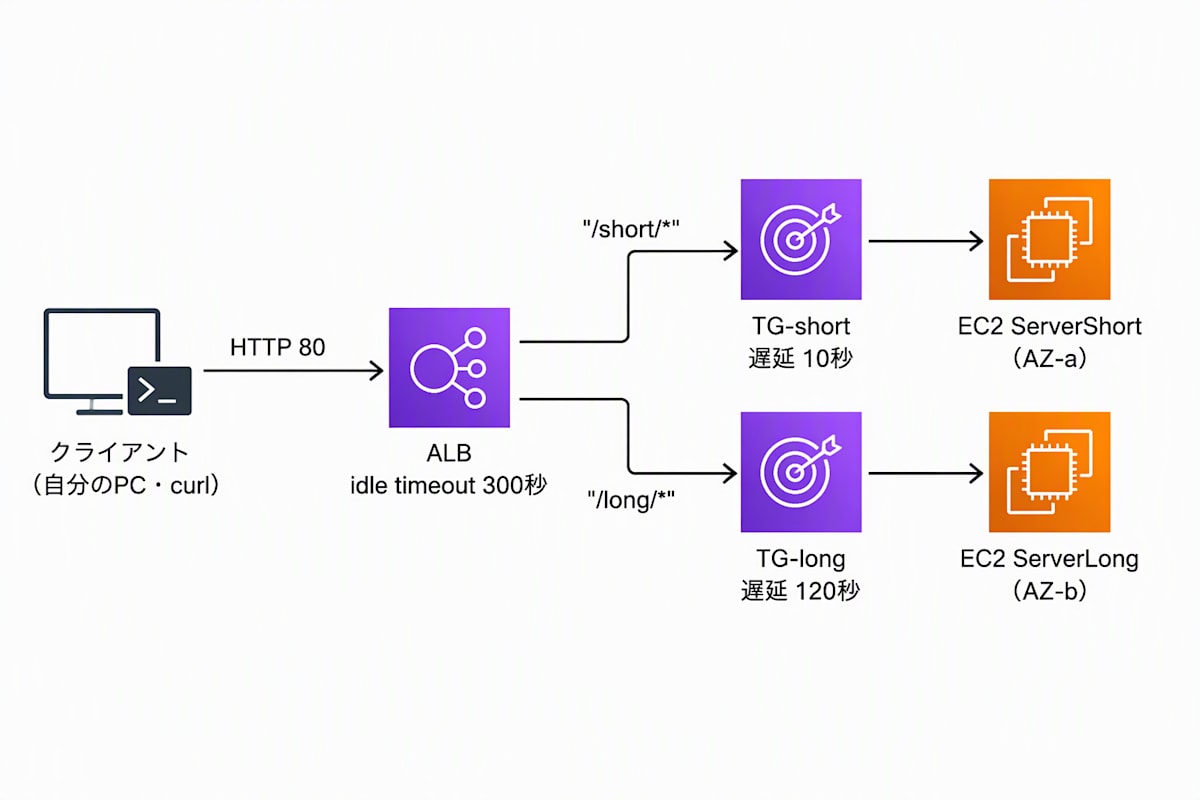
- クライアント(自分のPCから
curl)→ ALB → ターゲットグループ(2つ)→ EC2(2台) - パスで振り分け:
/short/*は遅延10秒のTG-short、/long/*は遅延120秒のTG-long - 各ターゲットグループには、別AZのEC2が1台ずつ
ポイントは、ターゲットを1台ずつにしていることです!
ほかのターゲットに逃げないので、登録解除のときの挙動がそのまま見えます。
構築されるリソースと主な設定値
| リソース | 設定値 | 設定の意図 |
|---|---|---|
| VPC/サブネット | 10.0.0.0/16、パブリック2つ(別AZ) | ALBに2AZ以上が必要。NAT Gatewayは使わず費用を抑える |
| ALB | HTTP:80、アイドルタイムアウト300秒 | 既定の60秒だと、90秒・150秒のリクエストが検証の前に切れてしまうため |
| ALBのSG | 80番を AllowedCidr(自分のIP)のみ許可 |
検証用なので自分だけがアクセスできるようにする |
| リスナールール | /short/* → TG-short、/long/* → TG-long、それ以外は404 |
同じALBで2つの遅延設定を同時に比較するため |
| TG-short | 登録解除の遅延 10秒、ターゲットは ServerShort の1台 | 遅延が短い場合の挙動を見る |
| TG-long | 登録解除の遅延 120秒、ターゲットは ServerLong の1台 | 遅延が長い場合の挙動を見る |
| ヘルスチェック | /health、間隔10秒、healthy 2回、unhealthy 2回 |
再登録後に早くhealthyに戻すため、既定より短くしている |
| EC2(2台) | AL2023、t3.micro、別AZ、パブリックIPあり、Session Manager接続 |
検証用の簡易構成。SSHは開けない |
| 簡易アプリ | Python標準ライブラリのHTTPサーバー(systemdで常駐) | /health はすぐ200を返し、それ以外は ?sec=N の秒数だけ待ってから応答する |
テンプレート
再現できるようにCFnのyamlファイルを以下に置いておきます!
テンプレート全文(alb-dereg-delay.yamlの中身)
AWSTemplateFormatVersion: "2010-09-09"
Description: ALB deregistration delay verification (2 target groups with different delays, 1 slow HTTP app per target). For verification use only.

Parameters:
  ProjectName:
    Type: String
    Default: dereg-lab
    AllowedPattern: "^[a-z0-9][a-z0-9-]{1,18}[a-z0-9]$"
    Description: Lowercase letters, digits and hyphens (3-20 chars).
  AllowedCidr:
    Type: String
    AllowedPattern: "^(\\d{1,3}\\.){3}\\d{1,3}/\\d{1,2}$"
    Description: Source IP range allowed to access the ALB (e.g. 203.0.113.10/32). Check yours at https://checkip.amazonaws.com/
  LatestAmiId:
    Type: AWS::SSM::Parameter::Value<AWS::EC2::Image::Id>
    Default: /aws/service/ami-amazon-linux-latest/al2023-ami-kernel-default-x86_64
  InstanceType:
    Type: String
    Default: t3.micro
    AllowedValues: [t3.micro, t3.small]
  ShortDelaySeconds:
    Type: Number
    Default: 10
    MinValue: 0
    MaxValue: 3600
    Description: Deregistration delay (seconds) of the "short" target group.
  LongDelaySeconds:
    Type: Number
    Default: 120
    MinValue: 0
    MaxValue: 3600
    Description: Deregistration delay (seconds) of the "long" target group.

Resources:
  # ---------------- Network (2 public subnets, no NAT) ----------------
  Vpc:
    Type: AWS::EC2::VPC
    Properties:
      CidrBlock: 10.0.0.0/16
      EnableDnsSupport: true
      EnableDnsHostnames: true
      Tags:
        - { Key: Name, Value: !Sub "${ProjectName}-vpc" }

  InternetGateway:
    Type: AWS::EC2::InternetGateway
    Properties:
      Tags:
        - { Key: Name, Value: !Sub "${ProjectName}-igw" }

  IgwAttachment:
    Type: AWS::EC2::VPCGatewayAttachment
    Properties:
      VpcId: !Ref Vpc
      InternetGatewayId: !Ref InternetGateway

  PublicSubnetA:
    Type: AWS::EC2::Subnet
    Properties:
      VpcId: !Ref Vpc
      CidrBlock: 10.0.0.0/24
      AvailabilityZone: !Select [0, !GetAZs ""]
      MapPublicIpOnLaunch: true
      Tags:
        - { Key: Name, Value: !Sub "${ProjectName}-public-a" }

  PublicSubnetB:
    Type: AWS::EC2::Subnet
    Properties:
      VpcId: !Ref Vpc
      CidrBlock: 10.0.1.0/24
      AvailabilityZone: !Select [1, !GetAZs ""]
      MapPublicIpOnLaunch: true
      Tags:
        - { Key: Name, Value: !Sub "${ProjectName}-public-b" }

  PublicRouteTable:
    Type: AWS::EC2::RouteTable
    Properties:
      VpcId: !Ref Vpc
      Tags:
        - { Key: Name, Value: !Sub "${ProjectName}-public-rt" }

  PublicDefaultRoute:
    Type: AWS::EC2::Route
    DependsOn: IgwAttachment
    Properties:
      RouteTableId: !Ref PublicRouteTable
      DestinationCidrBlock: 0.0.0.0/0
      GatewayId: !Ref InternetGateway

  AssociationA:
    Type: AWS::EC2::SubnetRouteTableAssociation
    Properties:
      SubnetId: !Ref PublicSubnetA
      RouteTableId: !Ref PublicRouteTable

  AssociationB:
    Type: AWS::EC2::SubnetRouteTableAssociation
    Properties:
      SubnetId: !Ref PublicSubnetB
      RouteTableId: !Ref PublicRouteTable

  # ---------------- Security groups ----------------
  AlbSecurityGroup:
    Type: AWS::EC2::SecurityGroup
    Properties:
      GroupDescription: ALB (HTTP from AllowedCidr only)
      VpcId: !Ref Vpc
      SecurityGroupIngress:
        - { IpProtocol: tcp, FromPort: 80, ToPort: 80, CidrIp: !Ref AllowedCidr }
      Tags:
        - { Key: Name, Value: !Sub "${ProjectName}-alb-sg" }

  AppSecurityGroup:
    Type: AWS::EC2::SecurityGroup
    Properties:
      GroupDescription: App servers (HTTP from the ALB only)
      VpcId: !Ref Vpc
      SecurityGroupIngress:
        - { IpProtocol: tcp, FromPort: 80, ToPort: 80, SourceSecurityGroupId: !Ref AlbSecurityGroup }
      Tags:
        - { Key: Name, Value: !Sub "${ProjectName}-app-sg" }

  # ---------------- IAM (Session Manager only) ----------------
  InstanceRole:
    Type: AWS::IAM::Role
    Properties:
      AssumeRolePolicyDocument:
        Version: "2012-10-17"
        Statement:
          - Effect: Allow
            Principal: { Service: ec2.amazonaws.com }
            Action: sts:AssumeRole
      ManagedPolicyArns:
        - arn:aws:iam::aws:policy/AmazonSSMManagedInstanceCore

  InstanceProfile:
    Type: AWS::IAM::InstanceProfile
    Properties:
      Roles: [!Ref InstanceRole]

  # ---------------- Application servers ----------------
  # Both servers run the same slow HTTP app: /health returns 200 at once, any other path sleeps for ?sec=N seconds.
  ServerShort:
    Type: AWS::EC2::Instance
    DependsOn: PublicDefaultRoute
    CreationPolicy:
      ResourceSignal:
        Count: 1
        Timeout: PT10M
    Properties:
      ImageId: !Ref LatestAmiId
      InstanceType: !Ref InstanceType
      IamInstanceProfile: !Ref InstanceProfile
      MetadataOptions:
        HttpTokens: required
        HttpEndpoint: enabled
      NetworkInterfaces:
        - DeviceIndex: "0"
          AssociatePublicIpAddress: true
          SubnetId: !Ref PublicSubnetA
          GroupSet: [!Ref AppSecurityGroup]
      Tags:
        - { Key: Name, Value: !Sub "${ProjectName}-server-short" }
      UserData:
        Fn::Base64:
          !Sub
            - |
              #!/bin/bash
              set -Eeuxo pipefail
              signal() { /opt/aws/bin/cfn-signal -e $1 --stack ${AWS::StackName} --resource ${ResourceName} --region ${AWS::Region}; }
              trap 'signal 1' ERR

              mkdir -p /opt/slowapp
              cat > /opt/slowapp/app.py <<'PYEOF'
              import time, datetime, urllib.request
              from http.server import BaseHTTPRequestHandler, ThreadingHTTPServer
              from urllib.parse import urlparse, parse_qs

              def imds(path):
                  t = urllib.request.Request("http://169.254.169.254/latest/api/token", method="PUT",
                                             headers={"X-aws-ec2-metadata-token-ttl-seconds": "300"})
                  token = urllib.request.urlopen(t, timeout=3).read().decode()
                  r = urllib.request.Request("http://169.254.169.254/latest/meta-data/" + path,
                                             headers={"X-aws-ec2-metadata-token": token})
                  return urllib.request.urlopen(r, timeout=3).read().decode()

              INSTANCE_ID = imds("instance-id")
              AZ = imds("placement/availability-zone")

              def now():
                  return datetime.datetime.now().strftime("%H:%M:%S")

              class Handler(BaseHTTPRequestHandler):
                  def log_message(self, fmt, *args):
                      pass

                  def do_GET(self):
                      u = urlparse(self.path)
                      if u.path == "/health":
                          self.send_response(200)
                          self.send_header("Content-Length", "2")
                          self.end_headers()
                          self.wfile.write(b"ok")
                          return
                      sec = int(parse_qs(u.query).get("sec", ["0"])[0])
                      print(now(), "START", self.path, "sleep", sec, "sec", flush=True)
                      began = time.time()
                      time.sleep(sec)
                      body = "instance=%s az=%s path=%s slept=%ss finished=%s\n" % (INSTANCE_ID, AZ, u.path, sec, now())
                      try:
                          self.send_response(200)
                          self.send_header("Content-Type", "text/plain")
                          self.send_header("Content-Length", str(len(body.encode())))
                          self.end_headers()
                          self.wfile.write(body.encode())
                          print(now(), "END  ", self.path, "elapsed %.1fs" % (time.time() - began), flush=True)
                      except Exception as e:
                          print(now(), "CLIENT_GONE", self.path, "elapsed %.1fs" % (time.time() - began), type(e).__name__, flush=True)

              ThreadingHTTPServer(("0.0.0.0", 80), Handler).serve_forever()
              PYEOF

              cat > /etc/systemd/system/slowapp.service <<'SVCEOF'
              [Unit]
              Description=Slow HTTP app for ALB verification
              After=network-online.target

              [Service]
              ExecStart=/usr/bin/python3 -u /opt/slowapp/app.py
              Restart=always

              [Install]
              WantedBy=multi-user.target
              SVCEOF

              systemctl daemon-reload
              systemctl enable --now slowapp
              sleep 3
              curl -fsS http://localhost/health
              signal 0
            - ResourceName: ServerShort

  ServerLong:
    Type: AWS::EC2::Instance
    DependsOn: PublicDefaultRoute
    CreationPolicy:
      ResourceSignal:
        Count: 1
        Timeout: PT10M
    Properties:
      ImageId: !Ref LatestAmiId
      InstanceType: !Ref InstanceType
      IamInstanceProfile: !Ref InstanceProfile
      MetadataOptions:
        HttpTokens: required
        HttpEndpoint: enabled
      NetworkInterfaces:
        - DeviceIndex: "0"
          AssociatePublicIpAddress: true
          SubnetId: !Ref PublicSubnetB
          GroupSet: [!Ref AppSecurityGroup]
      Tags:
        - { Key: Name, Value: !Sub "${ProjectName}-server-long" }
      UserData:
        Fn::Base64:
          !Sub
            - |
              #!/bin/bash
              set -Eeuxo pipefail
              signal() { /opt/aws/bin/cfn-signal -e $1 --stack ${AWS::StackName} --resource ${ResourceName} --region ${AWS::Region}; }
              trap 'signal 1' ERR

              mkdir -p /opt/slowapp
              cat > /opt/slowapp/app.py <<'PYEOF'
              import time, datetime, urllib.request
              from http.server import BaseHTTPRequestHandler, ThreadingHTTPServer
              from urllib.parse import urlparse, parse_qs

              def imds(path):
                  t = urllib.request.Request("http://169.254.169.254/latest/api/token", method="PUT",
                                             headers={"X-aws-ec2-metadata-token-ttl-seconds": "300"})
                  token = urllib.request.urlopen(t, timeout=3).read().decode()
                  r = urllib.request.Request("http://169.254.169.254/latest/meta-data/" + path,
                                             headers={"X-aws-ec2-metadata-token": token})
                  return urllib.request.urlopen(r, timeout=3).read().decode()

              INSTANCE_ID = imds("instance-id")
              AZ = imds("placement/availability-zone")

              def now():
                  return datetime.datetime.now().strftime("%H:%M:%S")

              class Handler(BaseHTTPRequestHandler):
                  def log_message(self, fmt, *args):
                      pass

                  def do_GET(self):
                      u = urlparse(self.path)
                      if u.path == "/health":
                          self.send_response(200)
                          self.send_header("Content-Length", "2")
                          self.end_headers()
                          self.wfile.write(b"ok")
                          return
                      sec = int(parse_qs(u.query).get("sec", ["0"])[0])
                      print(now(), "START", self.path, "sleep", sec, "sec", flush=True)
                      began = time.time()
                      time.sleep(sec)
                      body = "instance=%s az=%s path=%s slept=%ss finished=%s\n" % (INSTANCE_ID, AZ, u.path, sec, now())
                      try:
                          self.send_response(200)
                          self.send_header("Content-Type", "text/plain")
                          self.send_header("Content-Length", str(len(body.encode())))
                          self.end_headers()
                          self.wfile.write(body.encode())
                          print(now(), "END  ", self.path, "elapsed %.1fs" % (time.time() - began), flush=True)
                      except Exception as e:
                          print(now(), "CLIENT_GONE", self.path, "elapsed %.1fs" % (time.time() - began), type(e).__name__, flush=True)

              ThreadingHTTPServer(("0.0.0.0", 80), Handler).serve_forever()
              PYEOF

              cat > /etc/systemd/system/slowapp.service <<'SVCEOF'
              [Unit]
              Description=Slow HTTP app for ALB verification
              After=network-online.target

              [Service]
              ExecStart=/usr/bin/python3 -u /opt/slowapp/app.py
              Restart=always

              [Install]
              WantedBy=multi-user.target
              SVCEOF

              systemctl daemon-reload
              systemctl enable --now slowapp
              sleep 3
              curl -fsS http://localhost/health
              signal 0
            - ResourceName: ServerLong

  # ---------------- ALB ----------------
  LoadBalancer:
    Type: AWS::ElasticLoadBalancingV2::LoadBalancer
    Properties:
      Name: !Sub "${ProjectName}-alb"
      Type: application
      Scheme: internet-facing
      SecurityGroups: [!Ref AlbSecurityGroup]
      Subnets: [!Ref PublicSubnetA, !Ref PublicSubnetB]
      LoadBalancerAttributes:
        # Default is 60s. Our test requests last up to 150s, so raise it.
        - { Key: idle_timeout.timeout_seconds, Value: "300" }

  TargetGroupShort:
    Type: AWS::ElasticLoadBalancingV2::TargetGroup
    Properties:
      Name: !Sub "${ProjectName}-tg-short"
      VpcId: !Ref Vpc
      Protocol: HTTP
      Port: 80
      TargetType: instance
      HealthCheckPath: /health
      HealthCheckIntervalSeconds: 10
      HealthCheckTimeoutSeconds: 5
      HealthyThresholdCount: 2
      UnhealthyThresholdCount: 2
      Matcher: { HttpCode: "200" }
      TargetGroupAttributes:
        - { Key: deregistration_delay.timeout_seconds, Value: !Ref ShortDelaySeconds }
      Targets:
        - Id: !Ref ServerShort
          Port: 80
      Tags:
        - { Key: Name, Value: !Sub "${ProjectName}-tg-short" }

  TargetGroupLong:
    Type: AWS::ElasticLoadBalancingV2::TargetGroup
    Properties:
      Name: !Sub "${ProjectName}-tg-long"
      VpcId: !Ref Vpc
      Protocol: HTTP
      Port: 80
      TargetType: instance
      HealthCheckPath: /health
      HealthCheckIntervalSeconds: 10
      HealthCheckTimeoutSeconds: 5
      HealthyThresholdCount: 2
      UnhealthyThresholdCount: 2
      Matcher: { HttpCode: "200" }
      TargetGroupAttributes:
        - { Key: deregistration_delay.timeout_seconds, Value: !Ref LongDelaySeconds }
      Targets:
        - Id: !Ref ServerLong
          Port: 80
      Tags:
        - { Key: Name, Value: !Sub "${ProjectName}-tg-long" }

  HttpListener:
    Type: AWS::ElasticLoadBalancingV2::Listener
    Properties:
      LoadBalancerArn: !Ref LoadBalancer
      Protocol: HTTP
      Port: 80
      DefaultActions:
        - Type: fixed-response
          FixedResponseConfig:
            StatusCode: "404"
            ContentType: text/plain
            MessageBody: "use /short/... or /long/..."

  RuleShort:
    Type: AWS::ElasticLoadBalancingV2::ListenerRule
    Properties:
      ListenerArn: !Ref HttpListener
      Priority: 10
      Conditions:
        - Field: path-pattern
          PathPatternConfig: { Values: ["/short/*"] }
      Actions:
        - Type: forward
          TargetGroupArn: !Ref TargetGroupShort

  RuleLong:
    Type: AWS::ElasticLoadBalancingV2::ListenerRule
    Properties:
      ListenerArn: !Ref HttpListener
      Priority: 20
      Conditions:
        - Field: path-pattern
          PathPatternConfig: { Values: ["/long/*"] }
      Actions:
        - Type: forward
          TargetGroupArn: !Ref TargetGroupLong

Outputs:
  AlbDnsName:
    Description: ALB DNS name (access with http://<this>/short/slow?sec=60 or /long/slow?sec=60)
    Value: !GetAtt LoadBalancer.DNSName
  ServerShortId:
    Value: !Ref ServerShort
  ServerLongId:
    Value: !Ref ServerLong
重要な部分の解説
1. ALBのアイドルタイムアウトを300秒にしている
ALBのアイドルタイムアウトは既定で60秒です。今回は90秒や150秒のリクエストを流すので、そのままだと検証の前に切れてしまいます。
2. ターゲットグループごとに遅延を変えている
TargetGroupAttributes:
  - Key: deregistration_delay.timeout_seconds
    Value: !Ref ShortDelaySeconds
パラメータで値を変えられるようにしています(既定は10秒と120秒)。
3. 簡易アプリ
/health はすぐに200を返し、それ以外のパスは ?sec=N の秒数だけ待ってから応答します。ThreadingHTTPServer を使っているので、リクエスト処理中でもヘルスチェックに応答できます。開始・終了・クライアント切断の時刻を、journalに出力しています!
やってみた
1. デプロイ
それではCFnでデプロイしていきましょう。
デプロイは5-10分で終わるので、夕飯何にしようか考えましょう🍚
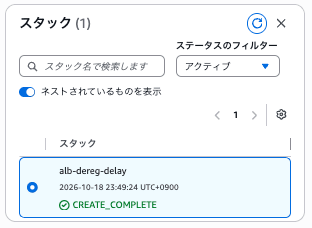
無事スタック作成完了しました!
2. 事前確認
ターゲットがhealthyになっていること、属性が10秒/120秒になっていることを確認します。
ターゲットの状態
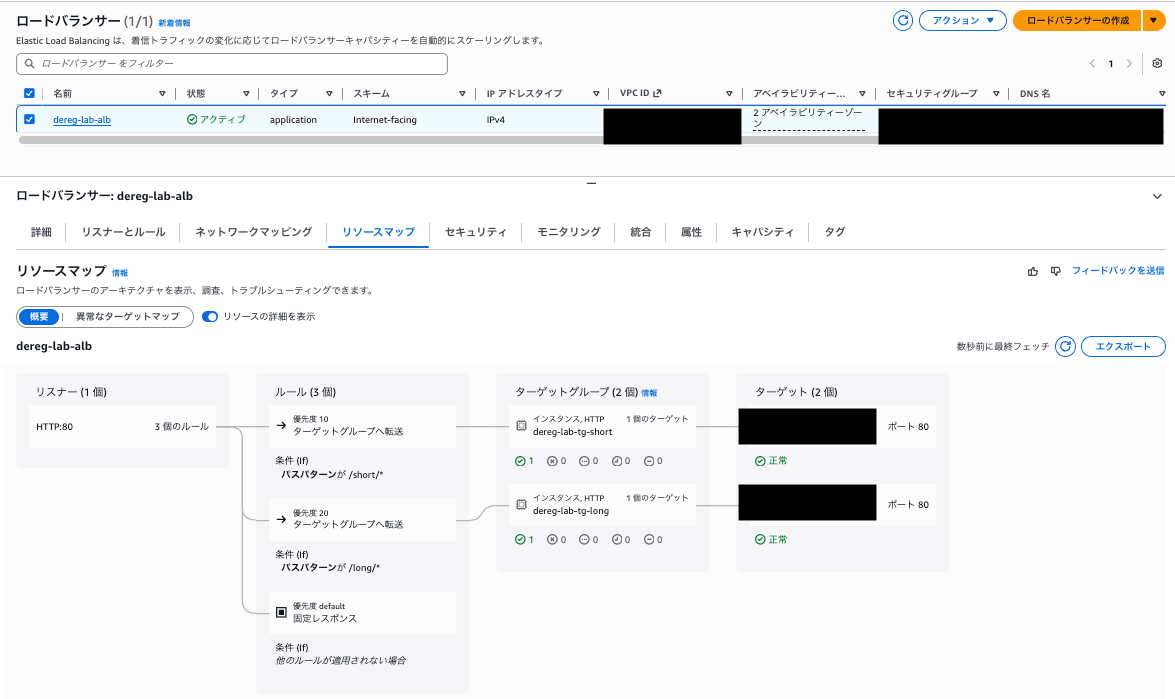
それぞれのターゲットグループの登録解除遅延設定
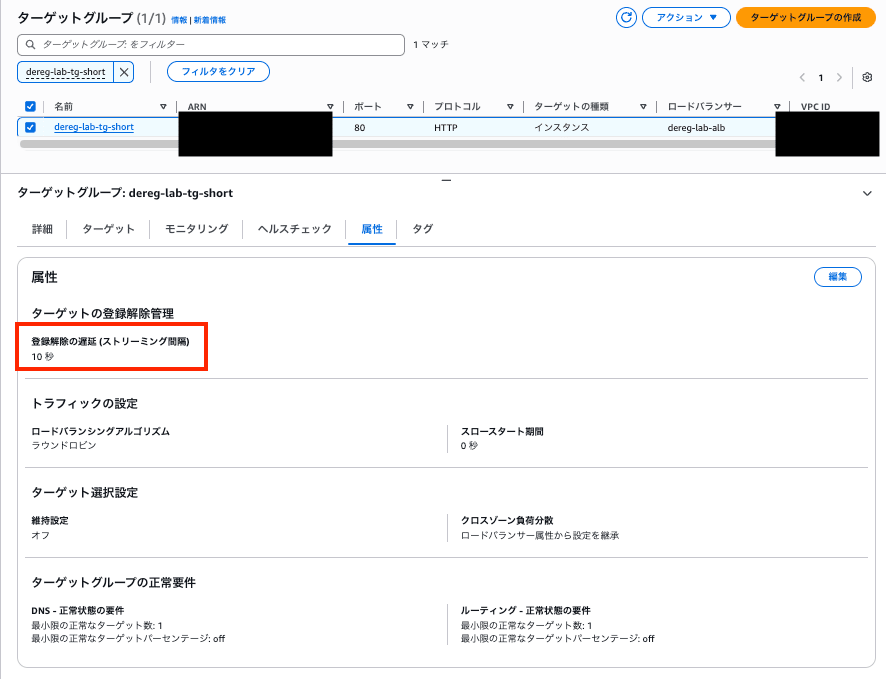
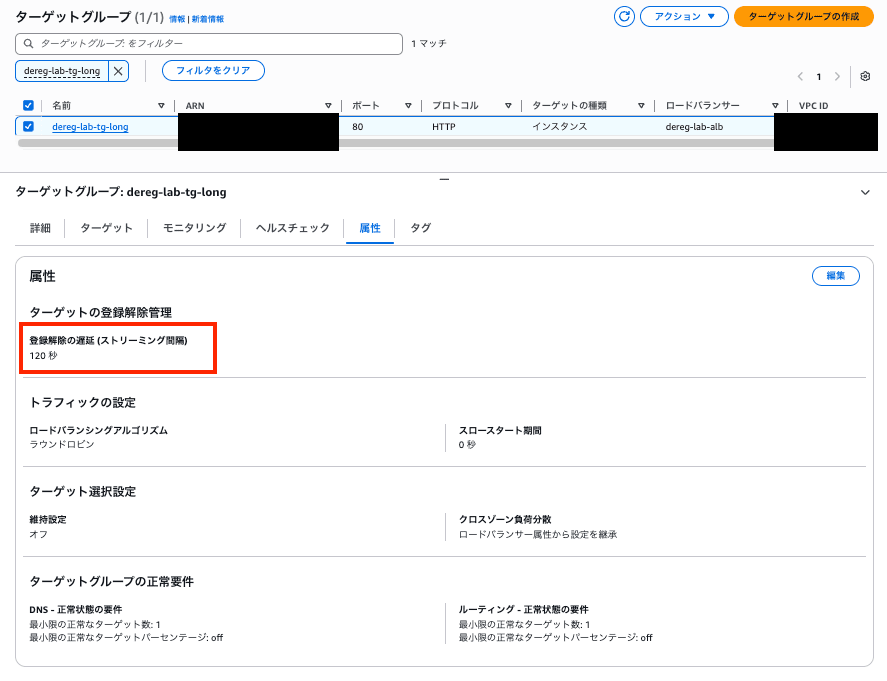
問題なく設定されていますね〜
3. 検証1:90秒のリクエスト中に登録解除する
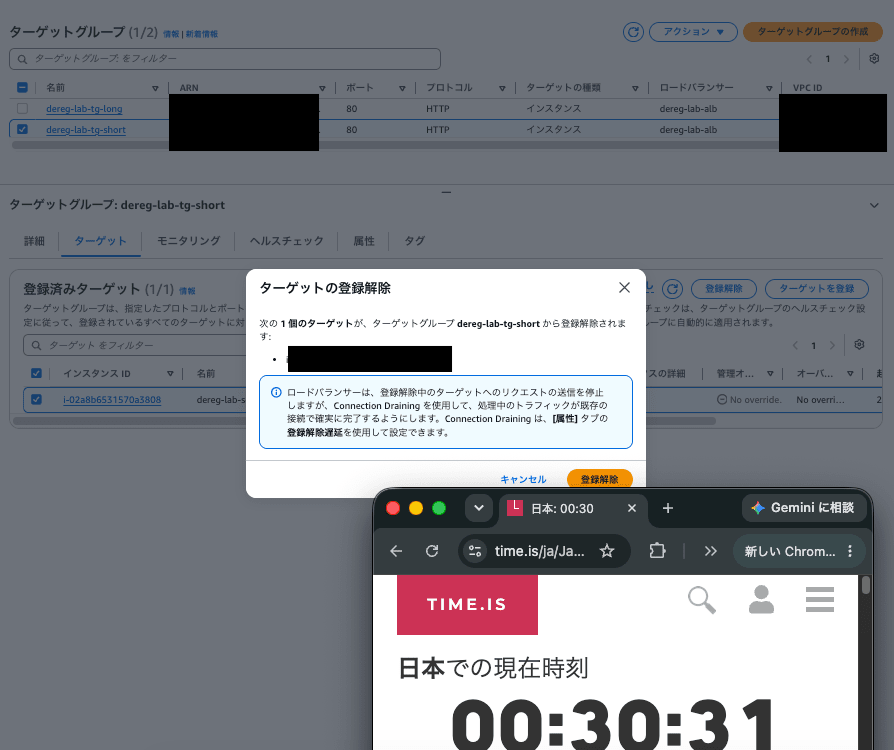
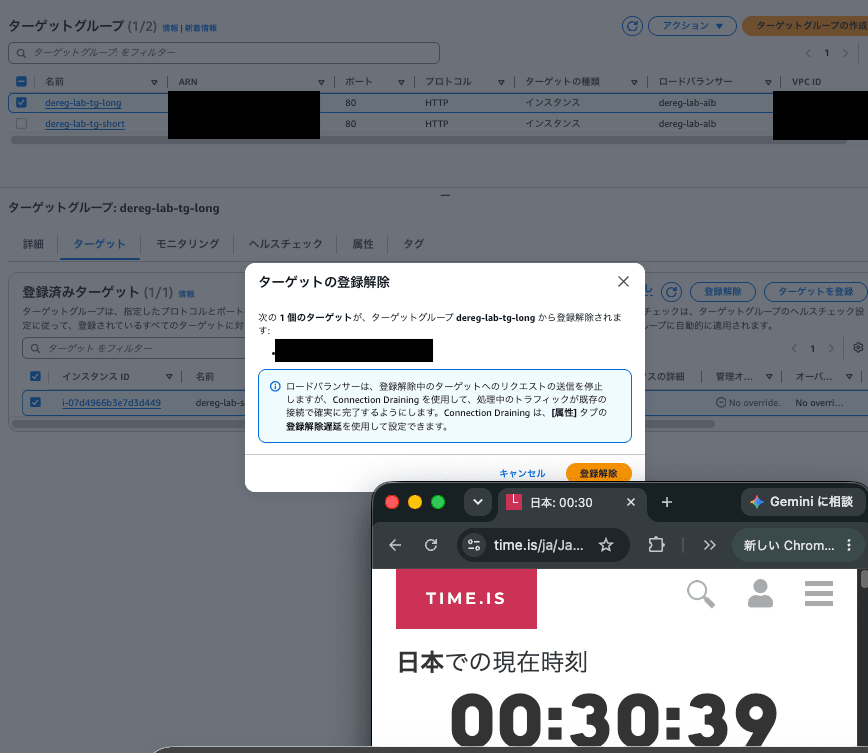
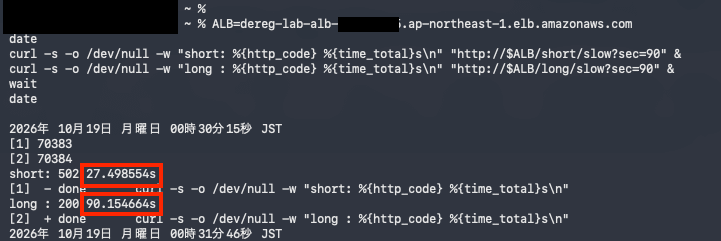
90秒かかるリクエストをshort/longの両方に流し、約10秒後に両方のターゲットを登録解除します。
ALB=<ALBのDNS名>
date
curl -s -o /dev/null -w "short: %{http_code} %{time_total}s\n" "http://$ALB/short/slow?sec=90" &
curl -s -o /dev/null -w "long : %{http_code} %{time_total}s\n" "http://$ALB/long/slow?sec=90" &
wait
date
結果はこちらです。
short: 502 27.498554s
long : 200 90.154664s
- short(遅延10秒):27.5秒で
502。登録解除の確定は開始の約17秒後なので、確定から約10秒後で切断されました。 - long(遅延120秒):90.2秒で
200。遅延が切れる前に、処理が最後まで完了しました。
TG:shortの切断
TG:longの切断
ターミナルからのcurl結果
4. 検証2:遅延(120秒)より長い150秒のリクエスト
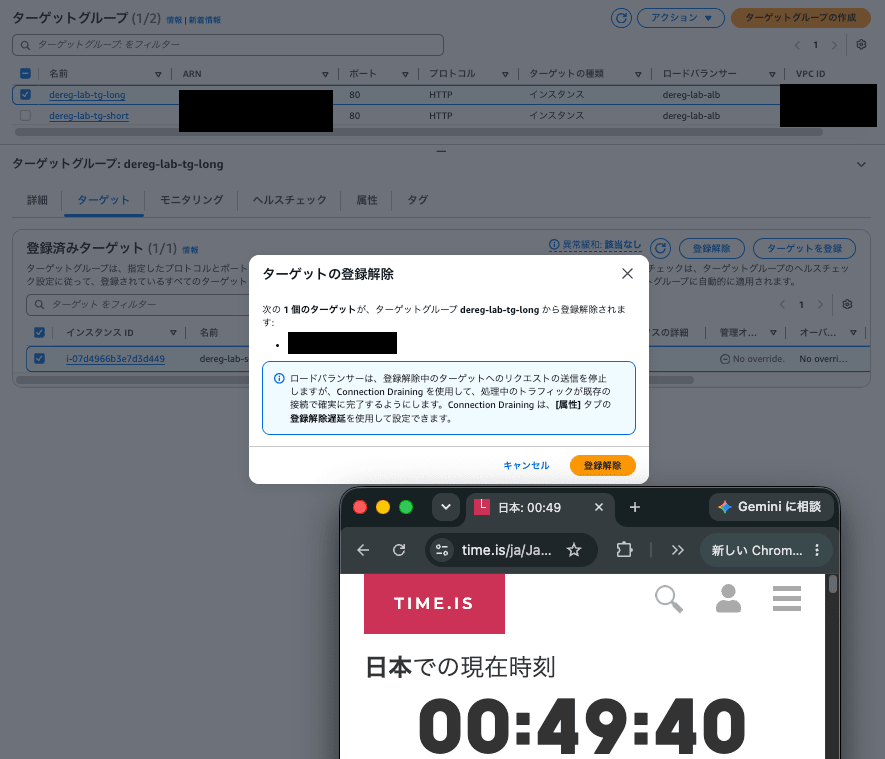
150秒かかるリクエストを /long/ に流し、開始から約13秒後に登録解除を確定しました。
date
curl -s -o /dev/null -w "long : %{http_code} %{time_total}s\n" "http://$ALB/long/slow?sec=150"
date
結果はこちらです。
long : 502 133.373062s
開始から133.4秒後に 502 で切断されました。確定の約13秒後から数えると、**約120秒後(設定した遅延が切れたタイミング)**で切られています。
TG:longの切断
ターミナルからのcurl結果

5. 検証3:draining中に来た新しいリクエスト
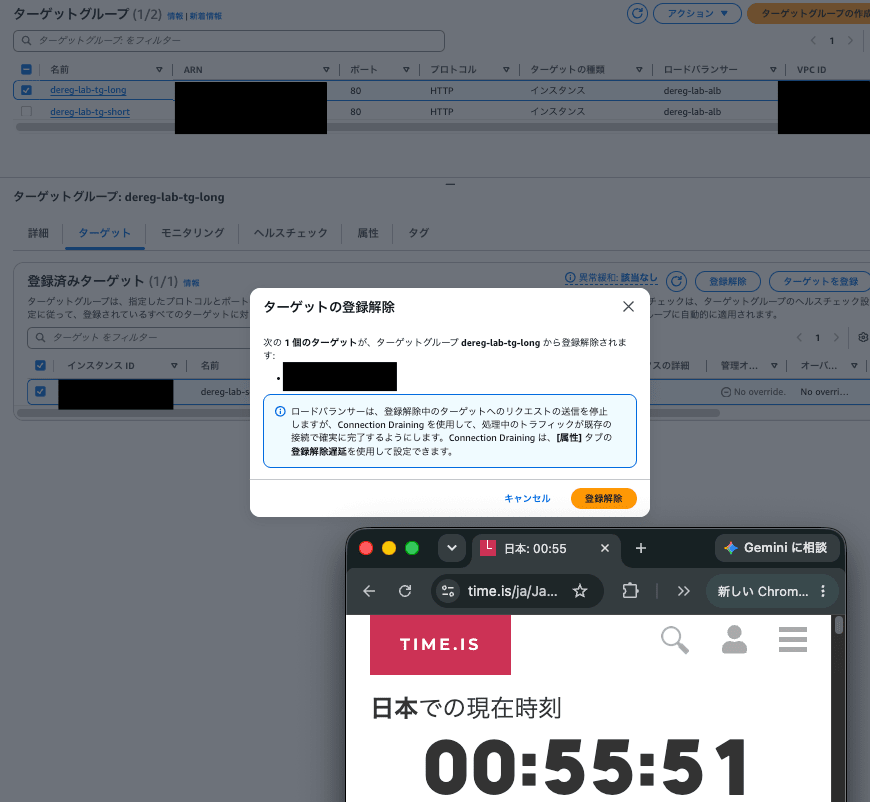
tg-long のターゲットを登録解除し、遅延(120秒)の間に、新しいリクエストを送ってみます。
curl -s -w "\n[%{http_code} %{time_total}s]\n" "http://$ALB/long/slow?sec=0"
結果はこちらです。
<html>
<head><title>503 Service Temporarily Unavailable</title></head>
<body>
<center><h1>503 Service Temporarily Unavailable</h1></center>
</body>
</html>

[503 0.060963s]
TG:longの切断
ターミナルからのcurl結果
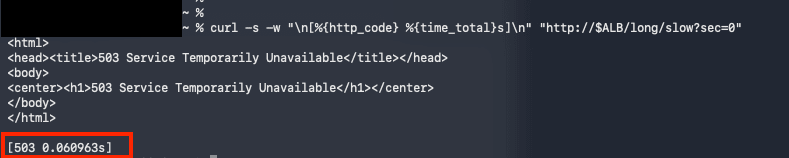
約0.06秒で 503 が返りました。draining 中のターゲットには新しいリクエストが送られず、ほかに送り先がないため、ALBがすぐにエラーを返した形です。
結果のまとめ
| 検証 | 遅延 | リクエスト | 登録解除のタイミング | 結果 |
|---|---|---|---|---|
| 検証1(short) | 10秒 | 90秒 | 開始約17秒後 | 27.5秒で502(確定の約10秒後に切断) |
| 検証1(long) | 120秒 | 90秒 | 開始約25秒後 | 90.2秒で200(最後まで完了) |
| 検証2 | 120秒 | 150秒 | 開始約13秒後 | 133.4秒で502(確定の約120秒後に切断) |
| 検証3 | 120秒 | 新規 | draining中 | 約0.06秒で503 |
注意点
- 今回はターゲットを1台ずつにしています。複数台あれば、新しいリクエストは別のターゲットに送られます。
- ヘルスチェックの切り離しタイミングは今回は検証していません。
- アクセス元をIPで制限した検証用の構成です。本番では適切な設計をしてください。
まとめ
- 登録解除の遅延を変えて、処理中のリクエストの挙動を検証しました。
- 遅延より短い処理は、登録解除されても最後まで完了しました。
- 遅延より長い処理は、登録解除を確定してから遅延の時間が経った時点で、
502で切断されました。遅延は「処理が終わるまで待ってくれる時間」ではなく、「待ってくれる最大時間」でした。 - 切断のタイミングは、リクエストの開始時刻ではなく「登録解除を確定した時刻 + 遅延」で決まります。
draining中のターゲットには新しいリクエストが送られません。送り先がほかにない場合は、すぐに503になります。- なので、遅延は「最も長いリクエストにかかる時間」を目安に決めるのが良さそうです。既定の300秒のままだと、短い処理が中心のサービスではデプロイやスケールインの待ち時間が長くなり、逆に長時間のアップロードなどがあるサービスで短くしすぎると、処理が途中で切られてしまいます。
- 検証のとき、ALBのアイドルタイムアウト(既定60秒)が先に効いて、遅延の挙動と区別がつかなくならないよう注意が必要です。
この記事が、ALBのターゲットを外す作業やデプロイの設計を見直すきっかけになれば幸いです!
最後に
本日の写真はこちら!(ででん)

静岡県にある大室山というところです⛰️
最近すごく人気で混んでますが、上からの景色は海と街が一望でき、とっても綺麗でした。
最後まで見てくださりありがとうございました〜