[アップデート] Amazon S3 Tables で Glue の Hive テーブルを Iceberg テーブルへマネージド移行できるようになったので試してみた

クラウド事業統括本部の石川です。Amazon S3 Tables で、AWS Glue Data Catalog に登録された Apache Hive テーブルを Apache Iceberg テーブルへ移行するマネージド移行が利用可能になりましたので、マネジメントコンソールから Start → Sync → Complete の一連の流れを試してみました。
これまで Hive テーブルを Iceberg テーブルへ移行するには、テーブルごとに移行用のパイプラインを構築する必要があり、数週間かかることもありました。今回のアップデートで、S3 Tables がデータの検証・変換・コピーを行い、移行元のテーブルを使ったまま Iceberg テーブルを作成できるようになりました。アナウンスでは、移行前に各ステップをレビューできること、移行元の変更に何度でも同期できること、移行元データに戻せることも挙げられています。
料金はジョブがコピーしたデータに対してのみ発生し、Hive から Iceberg への変換自体には課金されません。S3 Intelligent-Tiering にある移行元オブジェクトのアクセス階層は変わりません。また、Snappy 圧縮のテーブルは Zstandard(ZSTD)で再圧縮され、コンパクションされます。
ローンチ時点では、Parquet 形式で保存された Glue 登録済みの Hive テーブルが対象で、移行元と移行先は同一 AWS アカウント・同一リージョンである必要があります。利用できるリージョンは、米国東部(バージニア北部、オハイオ)、米国西部(オレゴン)、アジアパシフィック(ムンバイ、シンガポール、シドニー、東京)、欧州(フランクフルト、アイルランド、ストックホルム)です。
S3 Tables のマネージド移行とは
Apache Iceberg は、大規模な分析用データセットのためのオープンテーブルフォーマットです。スキーマ進化、隠しパーティション、タイムトラベルクエリなどの機能を持ち、Iceberg に対応した任意のエンジンからクエリできます。S3 Tables は Iceberg テーブル用のストレージで、コンパクションやスナップショット管理などのメンテナンスを自動で実行します。
S3 Tables のマネージド移行は、Glue Data Catalog の Hive 外部テーブル(Parquet)から、S3 Tables の新しい Iceberg テーブルへデータをコピーします。移行元のテーブルとオブジェクトは変更されません。移行は次の 3 ステップで進めます。
| ステップ | API | 内容 |
|---|---|---|
| Start | StartTableMigration | 移行先テーブルを作成し、移行元のデータをコピーする |
| Sync | SyncTableMigration | 前回の Start / Sync 以降に変更されたオブジェクトとパーティションだけをコピーする。任意で、何回でも実行できる |
| Complete | CompleteTableMigration | 移行先テーブルを読み書き可能にし、テーブルメンテナンスを有効にする。取り消しはできない |
このほか、状態を取得する GetTableMigration、プランを承認またはキャンセルする UpdateTableMigration、移行の一覧を取得する ListTableMigrations があります。
Start と Sync はそれぞれ planning(計画)と migrating(移行)の 2 つの状態を経て進みます。planning では移行対象のオブジェクトを特定し、互換性レポートを書き出します。reviewMigrationPlan を true にすると、planning の後に pendingReview で止まり、レポートを確認してから承認できます。
移行ジョブは次の 3 種類のレポートを汎用バケットに書き出します。
| レポート | 書き出されるタイミング | 内容 |
|---|---|---|
| テーブル互換性レポート | planning の終了時(データのコピー前) | テーブル定義の問題と、列ごとのデータ型の変換内容 |
| オブジェクト互換性レポート | planning の終了時(データのコピー前) | スキャンした移行元オブジェクトごとの、移行対象かどうかと問題点 |
| オブジェクト移行レポート | Start / Sync の完了時 | 移行を試みたオブジェクトごとの結果と、適用された変換 |
移行先の設定は、指定しなければ次の既定値になります。
| 設定 | 既定値 |
|---|---|
| 圧縮コーデック | zstd |
| ターゲットファイルサイズ | 512 MB |
| コンパクション戦略 | binpack |
| 保持する最小スナップショット数 | 3 |
| スナップショットの最大保持期間 | 120 時間 |
| Iceberg フォーマットバージョン | 2(3 も選択可) |
データ型やスキーマが一致しない場合の扱いは、移行ポリシーで決めます。unmatchedSourceFieldsPolicy(移行先スキーマにない列)は fail または drop、incompatibleValuesPolicy(変換できない値)は fail または setNull を指定でき、どちらも既定値は fail です。このような指定が必要なのは、Hive テーブルがスキーマオンリードで、実際にデータを読み取ってみないと、データやその型がテーブル定義に合っているかどうかわからないためです。
やってみた
前提条件
- リージョン: アジアパシフィック(東京)ap-northeast-1。
- AWS CLI: 2.39.4(執筆時点の最新バージョンが必須)
$ aws s3tables start-table-migration help
aws: [ERROR]: An error occurred (ParamValidation): argument operation: Found invalid choice 'start-table-migration'
2.39.4 にアップデートした後は、aws s3tables help に complete-table-migration、get-table-migration、list-table-migrations、start-table-migration、sync-table-migration、update-table-migration が表示されるようになりました。
検証の構成は次のとおりです。移行元のデータ・移行レポート・Athena のクエリ結果は、1 つの汎用バケットの別々のプレフィックスに置きました。
移行元の Hive テーブルを作成する
汎用バケットと Glue データベースを作成し、Athena の CTAS で Parquet(Snappy 圧縮)の Hive 外部テーブルを作成しました。型の変換を確認するため smallint、char(8)、varchar(50)、decimal(10,2)、timestamp を含め、product_name は 97 行に 1 行を NULL にしています。
CREATE TABLE s3tmig_hive_db_a0677f42.sales
WITH (
  format = 'PARQUET',
  write_compression = 'SNAPPY',
  external_location = 's3://s3tmig-src-123456789012-a0677f42/hive/sales/',
  partitioned_by = ARRAY['dt']
) AS
SELECT
  CAST(n AS bigint) AS order_id,
  CAST(n % 50 + 1 AS smallint) AS store_id,
  CAST('P' || lpad(CAST(n % 300 AS varchar), 4, '0') AS char(8)) AS product_code,
  CAST(IF(n % 97 = 0, NULL, 'product-' || CAST(n % 300 AS varchar)) AS varchar(50)) AS product_name,
  CAST(n % 10 + 1 AS integer) AS quantity,
  CAST((n % 1000) * 1.25 + 0.99 AS decimal(10,2)) AS unit_price,
  date_add('millisecond', (n / 3) * 7213, CAST(date_add('day', n % 3, DATE '2026-11-01') AS timestamp)) AS ordered_at,
  (n % 7 = 0) AS is_member,
  CAST(date_add('day', n % 3, DATE '2026-11-01') AS varchar) AS dt
FROM UNNEST(sequence(1, 3000)) AS t(n)
小さいファイルが複数あるテーブルにするため、sequence の範囲を変えた同じ SELECT で INSERT INTO を 3 回実行しました(合計 12,000 行、3 パーティション)。最初のテストデータは ordered_at の日付が dt と対応していなかったため、値の式だけを変えて作り直しています。次の Glue のテーブル定義と後述の Parquet のメタデータは作り直す前に取得したものですが、列の型と Parquet の物理型が変わっていないことはテーブル互換性レポート(sourceType と sampleFileType)で確認しています。
::: description 作成されたテーブル定義の詳細
Columns(8 列)は、後述の表の「Glue の型」と同じなので省略しています。
% aws glue get-table --database-name s3tmig_hive_db_a0677f42 --name sales \
  --query 'Table.{TableType:TableType,Location:StorageDescriptor.Location,InputFormat:StorageDescriptor.InputFormat,SerDe:StorageDescriptor.SerdeInfo.SerializationLibrary,Columns:StorageDescriptor.Columns,PartitionKeys:PartitionKeys,Parameters:Parameters}' \
  --output json
{
  "TableType": "EXTERNAL_TABLE",
  "Location": "s3://s3tmig-src-123456789012-a0677f42/hive/sales/",
  "InputFormat": "org.apache.hadoop.hive.ql.io.parquet.MapredParquetInputFormat",
  "SerDe": "org.apache.hadoop.hive.ql.io.parquet.serde.ParquetHiveSerDe",
  "Columns": [ ... ],
  "PartitionKeys": [
    {
      "Name": "dt",
      "Type": "string",
      "Parameters": {}
    }
  ],
  "Parameters": {
    ...
    "EXTERNAL": "TRUE",
    ...
    "parquet.compression": "SNAPPY",
    ...
  }
}
:::
S3 には 1 パーティションあたり 4 つ、合計 12 個の Parquet オブジェクトができました(dt=2026-11-02 と dt=2026-11-03 の 8 行は省略)。
% aws s3 ls s3://s3tmig-src-123456789012-a0677f42/hive/sales/ --recursive --human-readable --summarize
2026-11-05 10:16:44   21.4 KiB hive/sales/dt=2026-11-01/20261105_011642_00079_vus9v_6fb47bda-b352-475c-9f00-a38a2261bf86
2026-11-05 10:16:52   21.2 KiB hive/sales/dt=2026-11-01/20261105_011650_00016_d8ftk_f7669262-4e62-440c-93eb-c1200db09ca6
2026-11-05 10:16:58   21.1 KiB hive/sales/dt=2026-11-01/20261105_011656_00007_d9nj3_76fb7d2d-1871-4393-8c5e-43f32c69baa4
2026-11-05 10:17:04   21.2 KiB hive/sales/dt=2026-11-01/20261105_011702_00115_s57vz_28550529-1b9f-4486-b1c3-095149a20630
...

Total Objects: 12
   Total Size: 254.2 KiB
::: description dt=2026-11-01 パーティションの先頭のオブジェクトの詳細
物理型と圧縮形式を確認するため、pyarrow で Parquet のメタデータを表示するスクリプト pq_inspect.py を用意しました。行数・row group 数・書き込んだライブラリ(created_by)、先頭の row group の列ごとの物理型・論理型・圧縮コーデック、先頭 3 行のデータを表示します。
import sys, pyarrow.parquet as pq
f = pq.ParquetFile(sys.argv[1]); md = f.metadata
print(f"rows={md.num_rows} row_groups={md.num_row_groups} created_by={md.created_by}")
rg = md.row_group(0)
print(f"{'column':<14} {'physical':<22} {'logical':<34} {'compression'}")
for i in range(rg.num_columns):
    c = rg.column(i); s = f.schema.column(i)
    print(f"{c.path_in_schema:<14} {c.physical_type + ('('+str(s.length)+')' if s.length and s.length>0 else ''):<22} {str(s.logical_type):<34} {c.compression}")
t = f.read().to_pandas().head(3)
print(t.to_string())
dt=2026-11-01 の先頭のオブジェクトで実行すると、圧縮は SNAPPY で、ordered_at は INT96 で書き込まれていました。
% KEY=$(aws s3 ls s3://s3tmig-src-123456789012-a0677f42/hive/sales/dt=2026-11-01/ | head -1 | awk '{print $4}')
% aws s3 cp "s3://s3tmig-src-123456789012-a0677f42/hive/sales/dt=2026-11-01/$KEY" ./src_sample.parquet --only-show-errors
% python3 pq_inspect.py ./src_sample.parquet
rows=1000 row_groups=1 created_by=parquet-mr-trino version 0.215-24652-gd84aa1f (build n/a)
column         physical               logical                            compression
order_id       INT64                  Int(bitWidth=64, isSigned=true)    SNAPPY
store_id       INT32                  Int(bitWidth=16, isSigned=true)    SNAPPY
product_code   BYTE_ARRAY             String                             SNAPPY
product_name   BYTE_ARRAY             String                             SNAPPY
quantity       INT32                  Int(bitWidth=32, isSigned=true)    SNAPPY
unit_price     FIXED_LEN_BYTE_ARRAY(5) Decimal(precision=10, scale=2)     SNAPPY
ordered_at     INT96                  None                               SNAPPY
is_member      BOOLEAN                None                               SNAPPY
   order_id  store_id product_code product_name  quantity unit_price              ordered_at  is_member
0         3         4        P0003    product-3         4       4.74 2026-11-01 00:00:03.702       True
1         6         7        P0006    product-6         7       8.49 2026-11-01 00:00:07.404       True
2         9        10        P0009    product-9        10      12.24 2026-11-01 00:00:11.106       True
:::
移行後の比較に使うため、パーティションごとの件数と集計値を記録しておきます。
SELECT dt, count(*) AS cnt, count(product_name) AS non_null_name, sum(unit_price) AS sum_price,
       min(ordered_at) AS min_ts, max(ordered_at) AS max_ts, sum(CAST(is_member AS integer)) AS members
FROM s3tmig_hive_db_a0677f42.sales
GROUP BY dt ORDER BY dt
| dt | cnt | non_null_name | sum_price | min_ts | max_ts | members |
|---|---|---|---|---|---|---|
| 2026-11-01 | 4000 | 3959 | 2501460.00 | 2026-11-01 00:00:07.213 | 2026-11-01 08:00:52.000 | 571 |
| 2026-11-02 | 4000 | 3959 | 2501460.00 | 2026-11-02 00:00:00.000 | 2026-11-02 08:00:44.787 | 572 |
| 2026-11-03 | 4000 | 3959 | 2501460.00 | 2026-11-03 00:00:00.000 | 2026-11-03 08:00:44.787 | 571 |
このアカウントは Lake Formation の既定権限が空のため、Glue データベースの作成時に CreateTableDefaultPermissions で IAM_ALLOWED_PRINCIPALS を指定し、このデータベースだけ IAM でアクセス制御しています。移行元の S3 ロケーションは Lake Formation に登録していません。
テーブルバケットと移行用 IAM ロールを作成する
移行先のテーブルバケットと名前空間を作成します。テーブルは移行ジョブが作成します。
% aws s3tables create-table-bucket --name s3tmig-dest-a0677f42 --output json
{
  "arn": "arn:aws:s3tables:ap-northeast-1:123456789012:bucket/s3tmig-dest-a0677f42"
}

% aws s3tables create-namespace \
  --table-bucket-arn arn:aws:s3tables:ap-northeast-1:123456789012:bucket/s3tmig-dest-a0677f42 \
  --namespace analytics --output json
{
  "tableBucketARN": "arn:aws:s3tables:ap-northeast-1:123456789012:bucket/s3tmig-dest-a0677f42",
  "namespace": [
    "analytics"
  ]
}
次に、移行ジョブが引き受ける IAM ロールを作成します。信頼ポリシーでは S3 Tables の移行サービスプリンシパル migration.s3tables.amazonaws.com を許可し、aws:SourceArn で移行先のテーブルバケットに限定しました。
::: description trust-policy.json
{
  "Version": "2012-10-17",
  "Statement": [{
    "Effect": "Allow",
    "Principal": { "Service": "migration.s3tables.amazonaws.com" },
    "Action": "sts:AssumeRole",
    "Condition": { "StringEquals": {
      "aws:SourceAccount": "123456789012",
      "aws:SourceArn": "arn:aws:s3tables:ap-northeast-1:123456789012:bucket/s3tmig-dest-a0677f42"
    } }
  }]
}
:::
権限ポリシーは、ドキュメントの例から KMS 関連のステートメントを除き、リソースを今回のバケット・テーブルに限定したものです。
::: description permissions-policy.json
{
  "Version": "2012-10-17",
  "Statement": [
    { "Sid": "ReadSourceTableMetadata", "Effect": "Allow",
      "Action": ["glue:GetTable", "glue:GetPartitions", "glue:GetColumnStatisticsForPartition"],
      "Resource": [
        "arn:aws:glue:ap-northeast-1:123456789012:catalog",
        "arn:aws:glue:ap-northeast-1:123456789012:database/s3tmig_hive_db_a0677f42",
        "arn:aws:glue:ap-northeast-1:123456789012:table/s3tmig_hive_db_a0677f42/sales" ] },
    { "Sid": "ListSourceBucket", "Effect": "Allow", "Action": "s3:ListBucket",
      "Resource": "arn:aws:s3:::s3tmig-src-123456789012-a0677f42" },
    { "Sid": "ReadSourceObjects", "Effect": "Allow", "Action": ["s3:GetObject", "s3:GetObjectVersion"],
      "Resource": "arn:aws:s3:::s3tmig-src-123456789012-a0677f42/hive/sales/*" },
    { "Sid": "WriteReports", "Effect": "Allow", "Action": "s3:PutObject",
      "Resource": "arn:aws:s3:::s3tmig-src-123456789012-a0677f42/migration-reports/*" },
    { "Sid": "CreateDestinationTable", "Effect": "Allow",
      "Action": ["s3tables:CreateTable", "s3tables:TagResource", "s3tables:PutTableEncryption", "s3tables:PutTableStorageClass"],
      "Resource": "arn:aws:s3tables:ap-northeast-1:123456789012:bucket/s3tmig-dest-a0677f42" },
    { "Sid": "WriteDestinationTable", "Effect": "Allow",
      "Action": ["s3tables:GetTable", "s3tables:GetTableMetadataLocation", "s3tables:UpdateTableMetadataLocation",
                 "s3tables:GetTableData", "s3tables:PutTableData", "s3tables:PutTableMaintenanceConfiguration"],
      "Resource": "arn:aws:s3tables:ap-northeast-1:123456789012:bucket/s3tmig-dest-a0677f42/table/*" }
  ]
}
:::
% aws iam create-role --role-name s3tmig-migration-role-a0677f42 \
  --assume-role-policy-document file://trust-policy.json
% aws iam put-role-policy --role-name s3tmig-migration-role-a0677f42 \
  --policy-name S3TablesMigrationPolicy --policy-document file://permissions-policy.json
マネジメントコンソールから移行を開始する(Start)
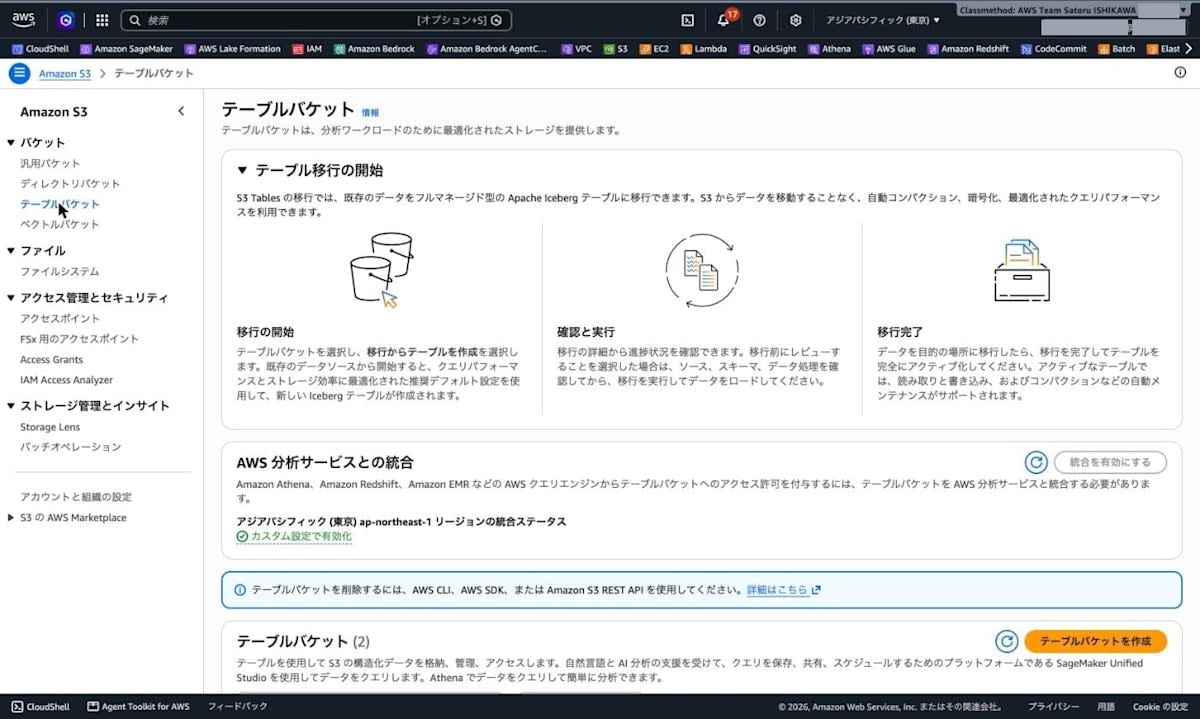
S3 コンソールの「テーブルバケット」を開くと、「テーブル移行の開始」というパネルが表示されていました。
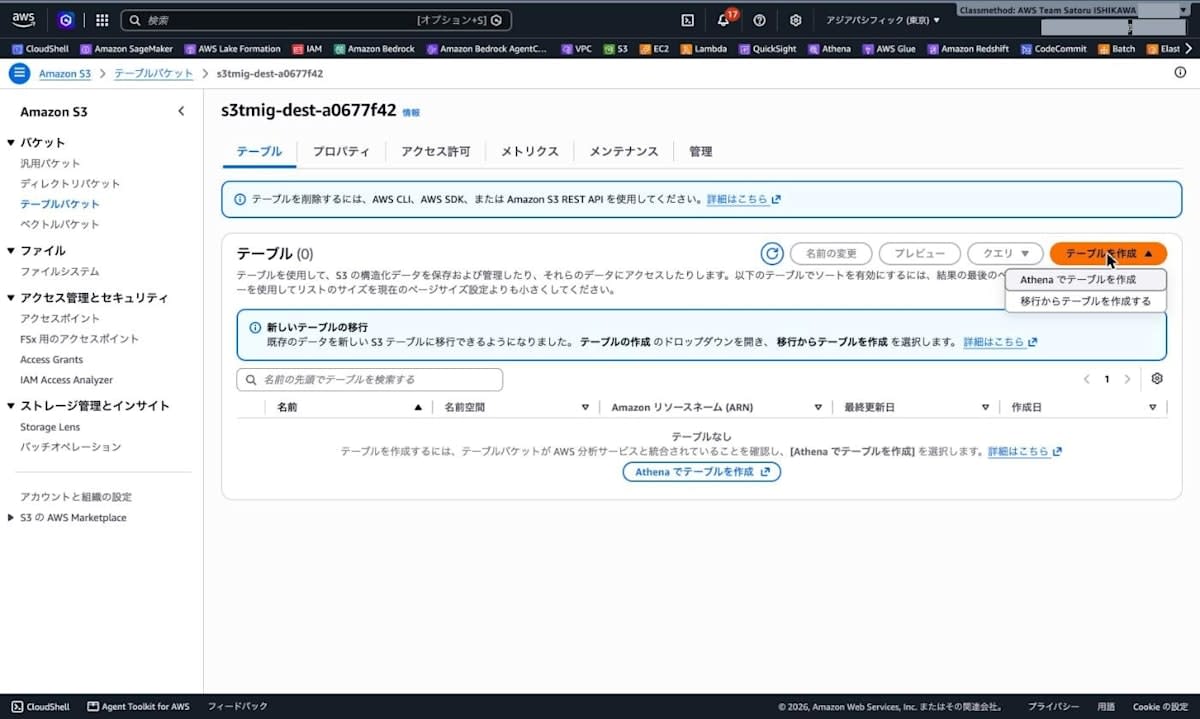
移行先のテーブルバケット s3tmig-dest-a0677f42 を開き、「テーブルを作成」のドロップダウンから「移行からテーブルを作成する」を選択します。
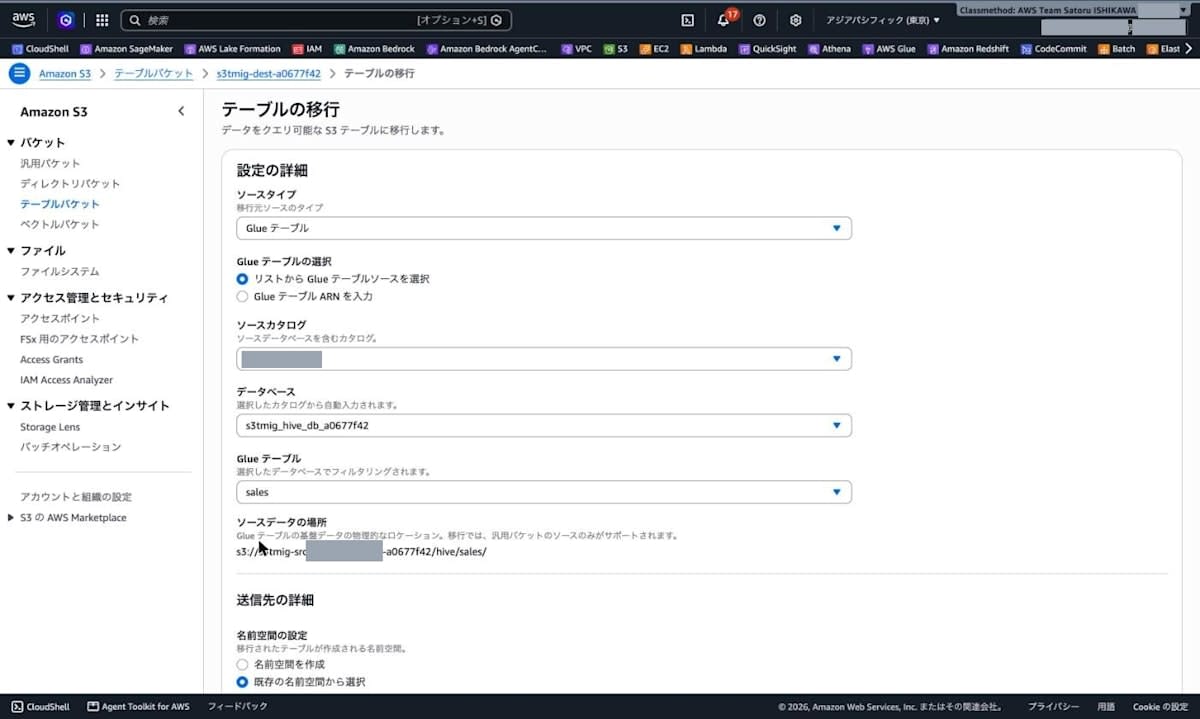
「テーブルの移行」画面で、ソースカタログ・データベース・Glue テーブルを選択すると、ソースデータの場所(s3://s3tmig-src-123456789012-a0677f42/hive/sales/)が表示されました。
送信先の名前空間に analytics、テーブル名に sales を指定しました。IAM ロールは「新しい IAM ロールを作成」「既存の IAM ロールから選択」「IAM ロールの ARN を入力」から選べます。今回は事前に作成したロールを選択し、レポートの送信先に s3://s3tmig-src-123456789012-a0677f42/migration-reports/ を入力しました。
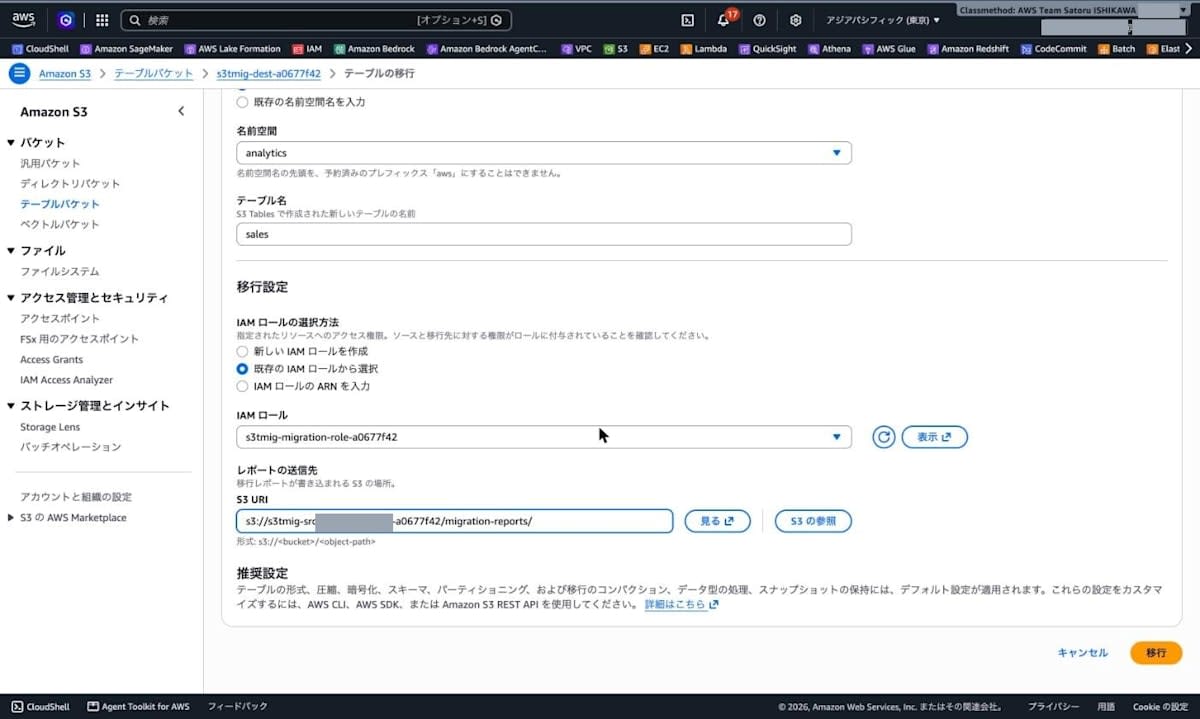
画面下部の「推奨設定」には、テーブルの形式、圧縮、暗号化、スキーマ、パーティショニング、コンパクション、データ型の処理、スナップショットの保持に既定の設定が適用され、変更するには AWS CLI、AWS SDK、Amazon S3 REST API を使うと書かれています。移行計画をレビューしてから承認する設定はフォームにありませんでした。
「移行」を選択すると、移行リクエストが作成され、ステータスが「計画中」になりました。
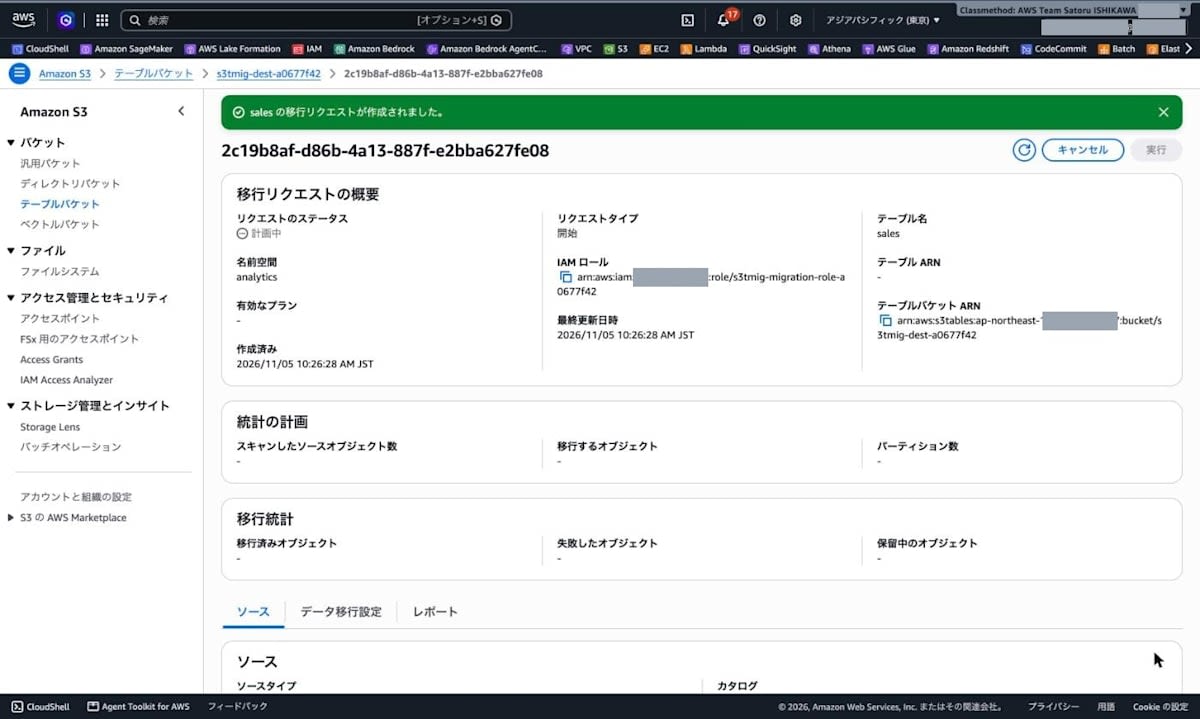
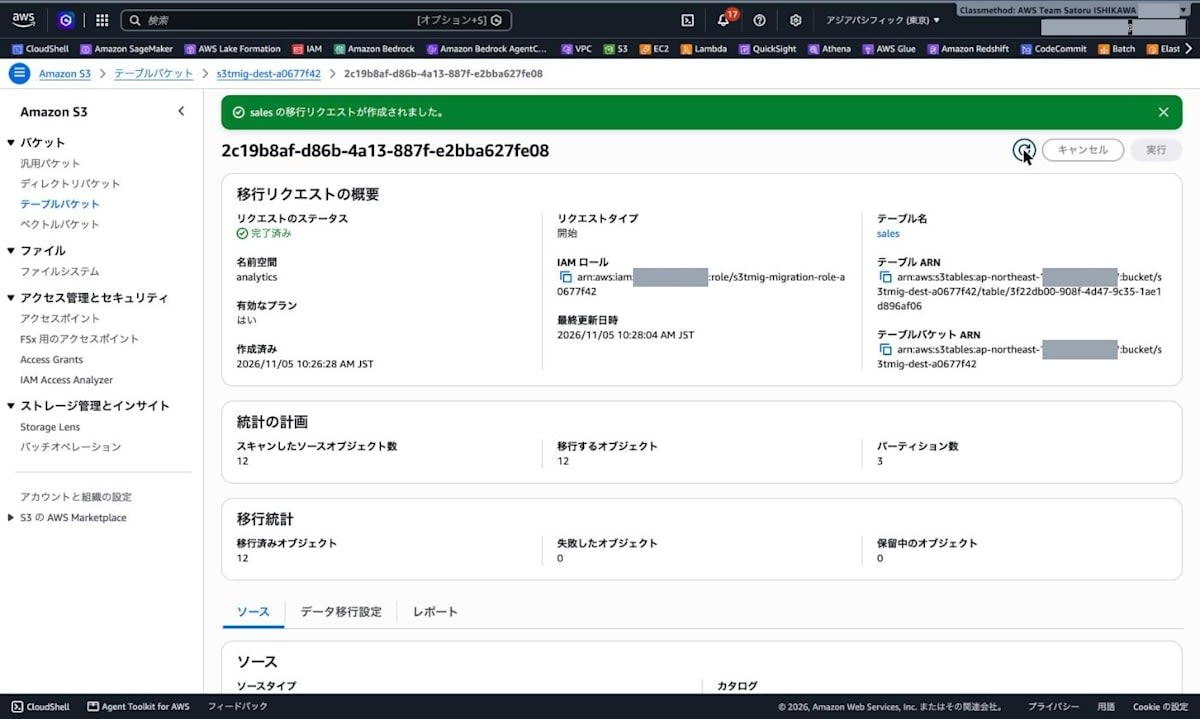
CLI の get-table-migration で 10 秒ごとに state を取得し、変化した時刻を記録しました。12 オブジェクト(254.2 KiB)の移行は、リクエストの作成(createdAt: 10:26:28)から succeeded への更新(stateUpdatedAt: 10:28:04)まで約 1 分 35 秒でした。
10:26:45 planning
10:27:39 migrating
10:28:11 succeeded
完了後の get-table-migration の結果です。
% aws s3tables get-table-migration --migration-id 2c19b8af-d86b-4a13-887f-e2bba627fe08 --output json
{
  "migrationId": "2c19b8af-d86b-4a13-887f-e2bba627fe08",
  "namespace": "analytics",
  "tableARN": "arn:aws:s3tables:ap-northeast-1:123456789012:bucket/s3tmig-dest-a0677f42/table/3f22db00-908f-4d47-9c35-1ae1d896af06",
  "name": "sales",
  "type": "start",
  "state": "succeeded",
  "reviewMigrationPlan": false,
  "hasValidPlan": true,
  "createdAt": "2026-11-05T01:26:28.687645+00:00",
  "stateUpdatedAt": "2026-11-05T01:28:04.018392+00:00",
  "planningStats": {
    "objectsScanned": 12,
    "objectsPlanned": 12,
    "partitionCount": 3
  },
  "migrationStats": {
    "objectsMigrated": 12,
    "objectsFailedMigration": 0,
    "objectsPendingMigration": 0
  },
  "sourceType": "glueTable",
  "dataMigration": { ... },
  "migrationOutput": { ... }
}
コンソールから開始した移行は reviewMigrationPlan が false で、dataMigration の移行ポリシー(fail / fail)とメンテナンス設定(512 MB・binpack、3 個・120 時間)は既定値でした。出力のうち、指定した値と同じ tableBucketARN・roleARN・source、既定値の dataMigration、次の aws s3 ls と同じキーが入る migrationOutput は省略しています。コンソールでも、ステータスが「完了済み」、移行済みオブジェクト 12、失敗したオブジェクト 0 と表示されています。
移行レポートを確認する
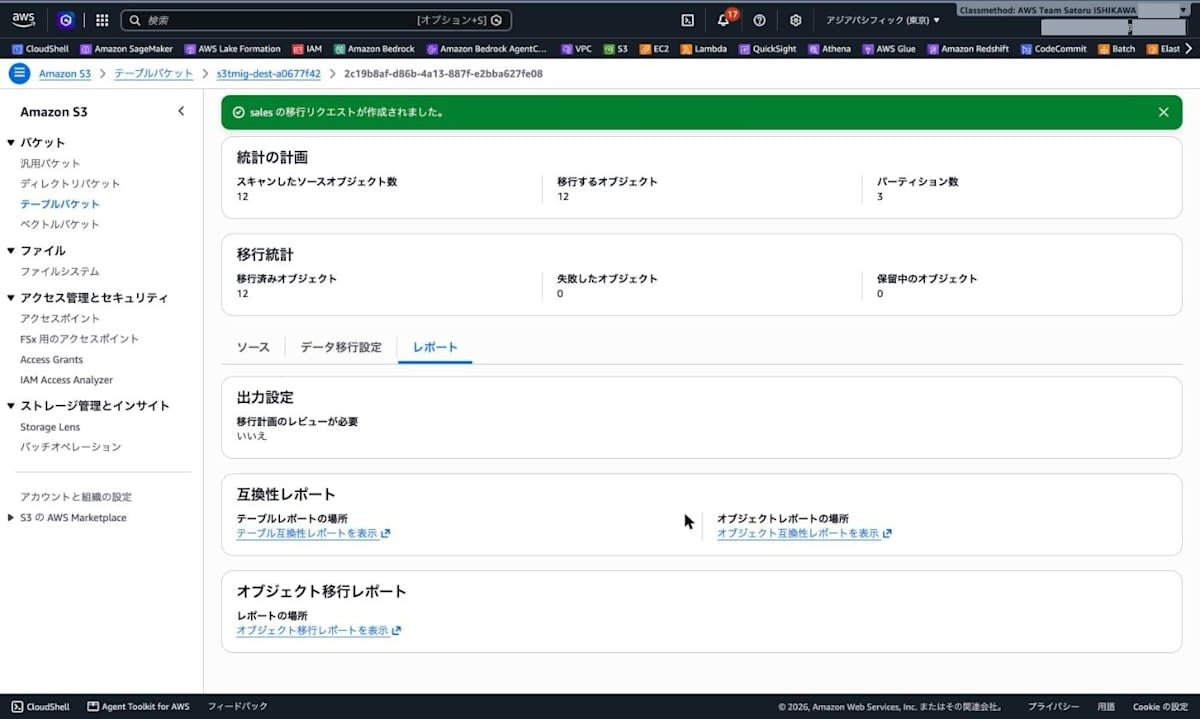
レポートは、指定したプレフィックスの下に移行 ID ごとのフォルダで書き出されていました。互換性レポート 2 種は planning 中(10:26:46)、オブジェクト移行レポートは完了時(10:28:04)に書き出されています。
% aws s3 ls s3://s3tmig-src-123456789012-a0677f42/migration-reports/2c19b8af-d86b-4a13-887f-e2bba627fe08/ --recursive
2026-11-05 10:26:46        505 migration-reports/2c19b8af-d86b-4a13-887f-e2bba627fe08/object-compatibility-report/v1/manifest.json
2026-11-05 10:26:46       3456 migration-reports/2c19b8af-d86b-4a13-887f-e2bba627fe08/object-compatibility-report/v1/objects/part-00000.csv
2026-11-05 10:28:04        484 migration-reports/2c19b8af-d86b-4a13-887f-e2bba627fe08/object-migration-report/v1/manifest.json
2026-11-05 10:28:04       4236 migration-reports/2c19b8af-d86b-4a13-887f-e2bba627fe08/object-migration-report/v1/results/01b7a4ba83165a37a240dd8559f8ca68289f639b.csv
2026-11-05 10:26:46       3182 migration-reports/2c19b8af-d86b-4a13-887f-e2bba627fe08/table-compatibility-report/v1/report.csv
テーブル互換性レポートには列ごとの変換内容が 1 行ずつ記録されており、details の JSON から必要な項目を表にしました。
| 列 | Glue の型 | サンプルファイルの型 | 移行先の型 | finding_subcategory |
|---|---|---|---|---|
| order_id | bigint | INT(64) | long | schemaTransformation.lossless |
| store_id | smallint | INT(16) | int | schemaTransformation.widened |
| product_code | char(8) | STRING | string | schemaTransformation.widened |
| product_name | varchar(50) | STRING | string | schemaTransformation.widened |
| quantity | int | INT(32) | int | schemaTransformation.lossless |
| unit_price | decimal(10,2) | DECIMAL(10,2) | decimal(10,2) | schemaTransformation.lossless |
| ordered_at | timestamp | INT96 | timestamptz | schemaTransformation.converted |
| is_member | boolean | BOOLEAN | boolean | schemaTransformation.lossless |
| dt(パーティション列) | string | - | string | schemaTransformation.lossless |
ordered_at の型は、Glue の定義ではなくサンプルファイルの物理型(INT96)から timestamptz に決まっていました。レポートの先頭 3 行(スキーマの推論に使ったサンプルオブジェクトのキーを含む)と ordered_at の行は次のとおりです(他の列は上の表のとおり)。
% aws s3 cp s3://s3tmig-src-123456789012-a0677f42/migration-reports/2c19b8af-d86b-4a13-887f-e2bba627fe08/table-compatibility-report/v1/report.csv -
finding_type,finding_category,finding_subcategory,details
informational,metadata,schemaInference.sample,"{""bucket"":""s3tmig-src-123456789012-a0677f42"",""key"":""hive/sales/dt%3D2026-11-01/20261105_011702_00115_s57vz_28550529-1b9f-4486-b1c3-095149a20630"",""versionId"":""null""}"
informational,metadata,schemaValidation.sample,"{""message"":""Schema validation passed."",""transformations"":{""Widened:Int16ToInt32"":[{""fId"":2}],""Converted:Int96ToTimestamptz"":[{""fId"":7}]}}"
...
informational,metadata,schemaTransformation.converted,"{""findingDescription"":""The field migrates from the sample file's type to its destination type."",""fName"":""ordered_at"",""fId"":7,""sourceType"":""timestamp"",""sampleFileType"":""INT96"",""destinationType"":""timestamptz"",""partitionField"":false}"
...
オブジェクト移行レポートには、オブジェクトごとに適用された変換と件数が記録されていました。12 行とも succeeded で、Widened:Int16ToInt32 と Converted:Int96ToTimestamptz が各 1000 件だったため、先頭の 1 行だけを載せます。
% aws s3 cp s3://s3tmig-src-123456789012-a0677f42/migration-reports/2c19b8af-d86b-4a13-887f-e2bba627fe08/object-migration-report/v1/results/01b7a4ba83165a37a240dd8559f8ca68289f639b.csv -
s3tmig-src-123456789012-a0677f42,hive/sales/dt%3D2026-11-01/20261105_011642_00079_vus9v_6fb47bda-b352-475c-9f00-a38a2261bf86,null,succeeded,200,,"{""message"":""The source object was migrated to the destination table."",""transformations"":{""Widened:Int16ToInt32"":[{""fId"":2,""n"":1000}],""Converted:Int96ToTimestamptz"":[{""fId"":7,""n"":1000}]}}"
...
コンソールの移行リクエスト画面の「レポート」タブからも、各レポートを開けます。
移行先テーブルを確認する
Complete 前の移行先テーブルは、managedByService が migration.s3tables.amazonaws.com になっていました。
% aws s3tables get-table \
  --table-arn arn:aws:s3tables:ap-northeast-1:123456789012:bucket/s3tmig-dest-a0677f42/table/3f22db00-908f-4d47-9c35-1ae1d896af06 \
  --output json
{
  "name": "sales",
  ...
  "warehouseLocation": "s3://3f22db00-908f-4d47-4pfpjuhra9bhsxeaaw57hui58yy6hapn1b--table-s3",
  ...
  "managedByService": "migration.s3tables.amazonaws.com",
  ...
  "format": "ICEBERG"
}
メンテナンス設定では、コンパクションが disabled、スナップショット管理が enabled でした。
% aws s3tables get-table-maintenance-configuration \
  --table-bucket-arn arn:aws:s3tables:ap-northeast-1:123456789012:bucket/s3tmig-dest-a0677f42 \
  --namespace analytics --name sales --output json
{
  ...
  "configuration": {
    "icebergCompaction": {
      "status": "disabled",
      "settings": {
        "icebergCompaction": {
          "targetFileSizeMB": 512,
          "strategy": "binpack"
        }
      }
    },
    "icebergSnapshotManagement": {
      "status": "enabled",
      "settings": {
        "icebergSnapshotManagement": {
          "minSnapshotsToKeep": 3,
          "maxSnapshotAgeHours": 120
        }
      }
    }
  }
}
Athena から移行先テーブルを参照すると、最初は次のエラーになりました。
COLUMN_NOT_FOUND: Column 'dt' cannot be resolved or requester is not authorized to access requested resources
この時点で、移行先テーブルと名前空間には Lake Formation の権限が何も付与されていなかったため、検証用のロールに、テーブルの ALL と名前空間の DESCRIBE を付与しました。
% aws lakeformation grant-permissions \
  --principal DataLakePrincipalIdentifier=arn:aws:iam::123456789012:role/<検証用ロール> \
  --permissions ALL \
  --resource '{"Table":{"CatalogId":"123456789012:s3tablescatalog/s3tmig-dest-a0677f42","DatabaseName":"analytics","Name":"sales"}}'
% aws lakeformation grant-permissions \
  --principal DataLakePrincipalIdentifier=arn:aws:iam::123456789012:role/<検証用ロール> \
  --permissions DESCRIBE \
  --resource '{"Database":{"CatalogId":"123456789012:s3tablescatalog/s3tmig-dest-a0677f42","Name":"analytics"}}'
権限を付与した後、移行先テーブルに同じ集計クエリを実行しました。
SELECT dt, count(*) AS cnt, count(product_name) AS non_null_name, sum(unit_price) AS sum_price,
       min(ordered_at) AS min_ts, max(ordered_at) AS max_ts, sum(CAST(is_member AS integer)) AS members
FROM "s3tablescatalog/s3tmig-dest-a0677f42"."analytics"."sales"
GROUP BY dt ORDER BY dt
| dt | cnt | non_null_name | sum_price | min_ts | max_ts | members |
|---|---|---|---|---|---|---|
| 2026-11-01 | 4000 | 3959 | 2501460.00 | 2026-11-01 00:00:07.213000 UTC | 2026-11-01 08:00:52.000000 UTC | 571 |
件数・NULL 以外の件数・合計金額・最小/最大時刻・会員数がすべて移行元と一致しました(dt=2026-11-02 と dt=2026-11-03 の行は省略)。ordered_at には UTC のタイムゾーンが付いています。
Iceberg のメタデータテーブル $files と $snapshots で、データファイルとスナップショットを確認します。
SELECT file_format, count(*) AS files, sum(record_count) AS records, sum(file_size_in_bytes) AS bytes
FROM "s3tablescatalog/s3tmig-dest-a0677f42"."analytics"."sales$files"
GROUP BY file_format
| file_format | files | records | bytes |
|---|---|---|---|
| PARQUET | 3 | 12000 | 152746 |
SELECT committed_at, operation, summary
FROM "s3tablescatalog/s3tmig-dest-a0677f42"."analytics"."sales$snapshots"
ORDER BY committed_at
| committed_at | operation | summary |
|---|---|---|
| 2026-11-05 01:27:14.676 UTC | append | {s3tables.migration.commit-token=v1:..., added-data-files=3, total-equality-deletes=0, added-records=12000, total-records=12000, changed-partition-count=3, total-position-deletes=0, added-files-size=152746, total-delete-files=0, iceberg-version=Apache Iceberg 1.10.0 (commit ...), total-files-size=152746, total-data-files=3, s3tables.migration.run-id=2bf65f56-1d91-4fcb-ad02-551eabb79da9} |
移行元は 12 オブジェクト・260,319 バイトでしたが、移行先は 1 パーティション 1 ファイルの 3 ファイル・152,746 バイトになりました。スナップショットは append 1 件で、summary には s3tables.migration.run-id などの移行用のプロパティも記録されていました。
移行先のデータファイルも 1 つ取得して同じスクリプトで確認しました。warehouseLocation に aws s3 ls を実行すると、ListObjectsV2 が MethodNotAllowed で拒否されました。
% aws s3 ls s3://3f22db00-908f-4d47-4pfpjuhra9bhsxeaaw57hui58yy6hapn1b--table-s3/data/ --recursive
aws: [ERROR]: An error occurred (MethodNotAllowed) when calling the ListObjectsV2 operation: The specified method is not allowed against this resource.
そこで、Athena で SELECT * FROM "s3tablescatalog/s3tmig-dest-a0677f42"."analytics"."sales$files" LIMIT 2 を実行し、1 行目の file_path(dt=2026-11-01 のデータファイル)を aws s3 cp で取得しました。
% aws s3 cp s3://3f22db00-908f-4d47-4pfpjuhra9bhsxeaaw57hui58yy6hapn1b--table-s3/data/110001001101000111100101-xq3qq42xhocvn7zm-000000000-0-00000-1793842033374.parquet ./dest_sample.parquet --only-show-errors
% python3 pq_inspect.py ./dest_sample.parquet
rows=4000 row_groups=1 created_by=parquet-rs version 59.3.0
column         physical               logical                            compression
order_id       INT64                  None                               ZSTD
store_id       INT32                  None                               ZSTD
product_code   BYTE_ARRAY             String                             ZSTD
product_name   BYTE_ARRAY             String                             ZSTD
quantity       INT32                  None                               ZSTD
unit_price     INT64                  Decimal(precision=10, scale=2)     ZSTD
ordered_at     INT64                  Timestamp(isAdjustedToUTC=true, timeUnit=microseconds, is_from_converted_type=false, force_set_converted_type=false) ZSTD
is_member      BOOLEAN                None                               ZSTD
dt             BYTE_ARRAY             String                             ZSTD
   order_id  store_id product_code product_name  quantity unit_price                       ordered_at  is_member          dt
0         3         4        P0003    product-3         4       4.74 2026-11-01 00:00:07.213000+00:00      False  2026-11-01
1         6         7        P0006    product-6         7       8.49 2026-11-01 00:00:14.426000+00:00      False  2026-11-01
2         9        10        P0009    product-9        10      12.24 2026-11-01 00:00:21.639000+00:00      False  2026-11-01
圧縮は SNAPPY から ZSTD に変わり、ordered_at は INT96 から INT64(マイクロ秒、UTC)になっていました。移行元のファイルにはなかったパーティション列 dt の値も、データファイルに書き込まれています。
次に、order_id で移行元と移行先を FULL OUTER JOIN し、列ごとに値が異なる行を数えました。
SELECT
  count(*) AS joined_rows,
  count_if(s.order_id IS NULL OR d.order_id IS NULL) AS missing_rows,
  count_if(s.store_id <> d.store_id) AS diff_store_id,
  count_if(CAST(s.product_code AS varchar) <> d.product_code) AS diff_product_code,
  count_if(NOT (s.product_name IS NOT DISTINCT FROM d.product_name)) AS diff_product_name,
  count_if(s.quantity <> d.quantity) AS diff_quantity,
  count_if(s.unit_price <> d.unit_price) AS diff_unit_price,
  count_if(to_unixtime(s.ordered_at) <> to_unixtime(d.ordered_at)) AS diff_ordered_at,
  count_if(s.is_member <> d.is_member) AS diff_is_member,
  count_if(s.dt <> d.dt) AS diff_dt
FROM s3tmig_hive_db_a0677f42.sales s
FULL OUTER JOIN "s3tablescatalog/s3tmig-dest-a0677f42"."analytics"."sales" d ON s.order_id = d.order_id
| joined_rows | missing_rows | diff_store_id | diff_product_code | diff_product_name | diff_quantity | diff_unit_price | diff_ordered_at | diff_is_member | diff_dt |
|---|---|---|---|---|---|---|---|---|---|
| 12000 | 0 | 0 | 12000 | 0 | 0 | 0 | 0 | 0 | 0 |
product_code だけが全行で一致しませんでした。1 行を取り出して比較します。
SELECT
  '[' || CAST(s.product_code AS varchar) || ']' AS src_code, length(s.product_code) AS src_len, typeof(s.product_code) AS src_type,
  '[' || d.product_code || ']' AS dest_code, length(d.product_code) AS dest_len, typeof(d.product_code) AS dest_type,
  typeof(s.ordered_at) AS src_ts_type, typeof(d.ordered_at) AS dest_ts_type
FROM s3tmig_hive_db_a0677f42.sales s JOIN "s3tablescatalog/s3tmig-dest-a0677f42"."analytics"."sales" d ON s.order_id = d.order_id
WHERE s.order_id = 3
| src_code | src_len | src_type | dest_code | dest_len | dest_type | src_ts_type | dest_ts_type |
|---|---|---|---|---|---|---|---|
| [P0003 ] | 8 | char(8) | [P0003] | 5 | varchar | timestamp(3) | timestamp(6) with time zone |
移行元の char(8) は Athena で 8 文字まで空白で埋めて返されますが、移行先の string には埋め込みの空白がありません。末尾の空白を除いて比較すると、差分は 0 件でした。
SELECT count_if(rtrim(CAST(s.product_code AS varchar)) <> d.product_code) AS diff_after_rtrim
FROM s3tmig_hive_db_a0677f42.sales s JOIN "s3tablescatalog/s3tmig-dest-a0677f42"."analytics"."sales" d ON s.order_id = d.order_id
| diff_after_rtrim |
|---|
| 0 |
最後に、Complete 前の移行先テーブルに INSERT を実行してみました。
INSERT INTO "s3tablescatalog/s3tmig-dest-a0677f42"."analytics"."sales"
VALUES (99999, 1, 'PTEST', 'insert-test', 1, CAST(1.00 AS decimal(10,2)), CAST(TIMESTAMP '2026-11-05 00:00:00 UTC' AS timestamp(6) with time zone), false, '2026-11-05')
クエリの状態を get-query-execution で取得した結果です。
% aws athena get-query-execution --query-execution-id de14bb54-28ba-4794-873d-384b6a0683ed \
  --query 'QueryExecution.{State:Status.State,Reason:Status.StateChangeReason,ScannedBytes:Statistics.DataScannedInBytes,EngineMs:Statistics.EngineExecutionTimeInMillis}' --output json
{
  "State": "FAILED",
  "Reason": "PERMISSION_DENIED: Access Denied (Service: S3, Status Code: 403, Request ID: 39C629W5YVAYF3WW, Extended Request ID: ...). If a data manifest file was generated at 's3://s3tmig-src-123456789012-a0677f42/athena-results/de14bb54-28ba-4794-873d-384b6a0683ed-manifest.csv', you may need to manually clean the data from locations specified in the manifest. Athena will not delete data in your account.",
  "ScannedBytes": 0,
  "EngineMs": 1057
}
INSERT は Access Denied で失敗しました。同じ SQL と同じ権限で Complete 後に再実行した結果は、後述します。
移行元に追記して Sync する
移行元への書き込みが続いている状況を想定して、Athena から 2 回 INSERT しました。1 回目は新しいパーティション dt=2026-11-04、2 回目は既存のパーティション dt=2026-11-01 に 300 行ずつです(order_id は 12001〜12600)。移行元は 14 オブジェクト・12,600 行・4 パーティションになり、移行先は 12,000 行のままです。同じ集計クエリの件数だけを並べると次のとおりです。
| dt | cnt(移行元) | cnt(移行先・Sync 前) |
|---|---|---|
| 2026-11-01 | 4300 | 4000 |
| 2026-11-02 | 4000 | 4000 |
| 2026-11-03 | 4000 | 4000 |
| 2026-11-04 | 300 | - |
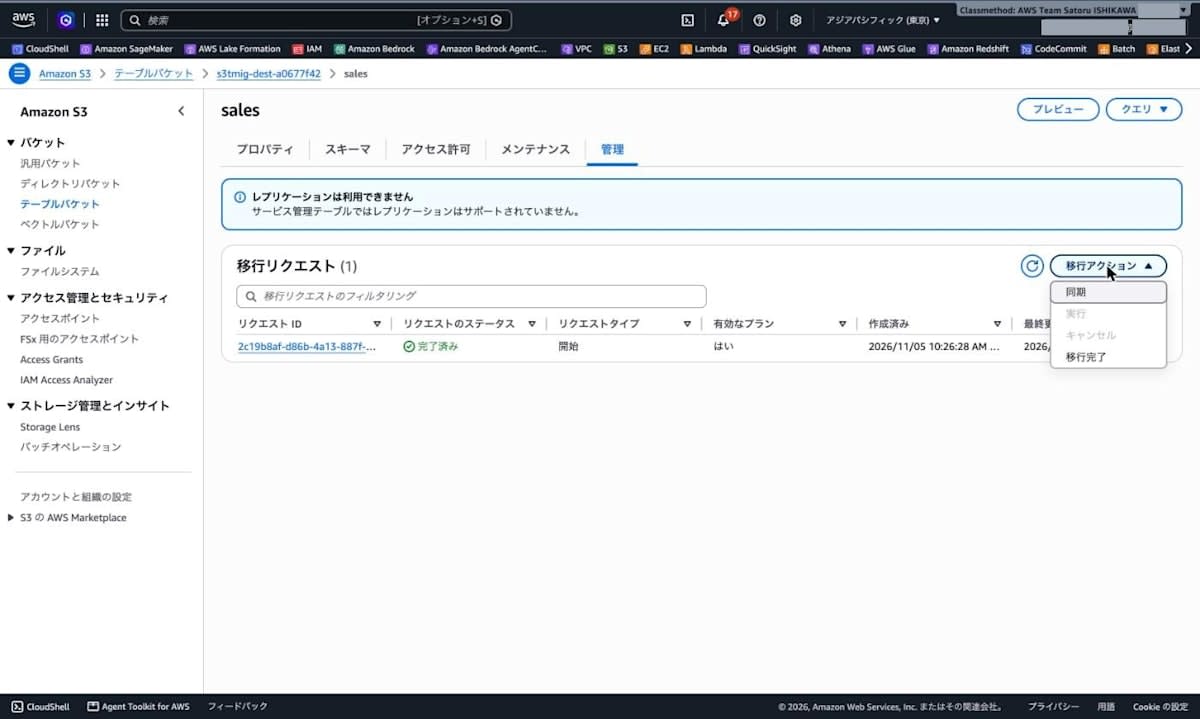
移行先テーブル sales の「管理」タブで「移行アクション」を開くと、「同期」「実行」「キャンセル」「移行完了」がありました。「同期」を選択します。
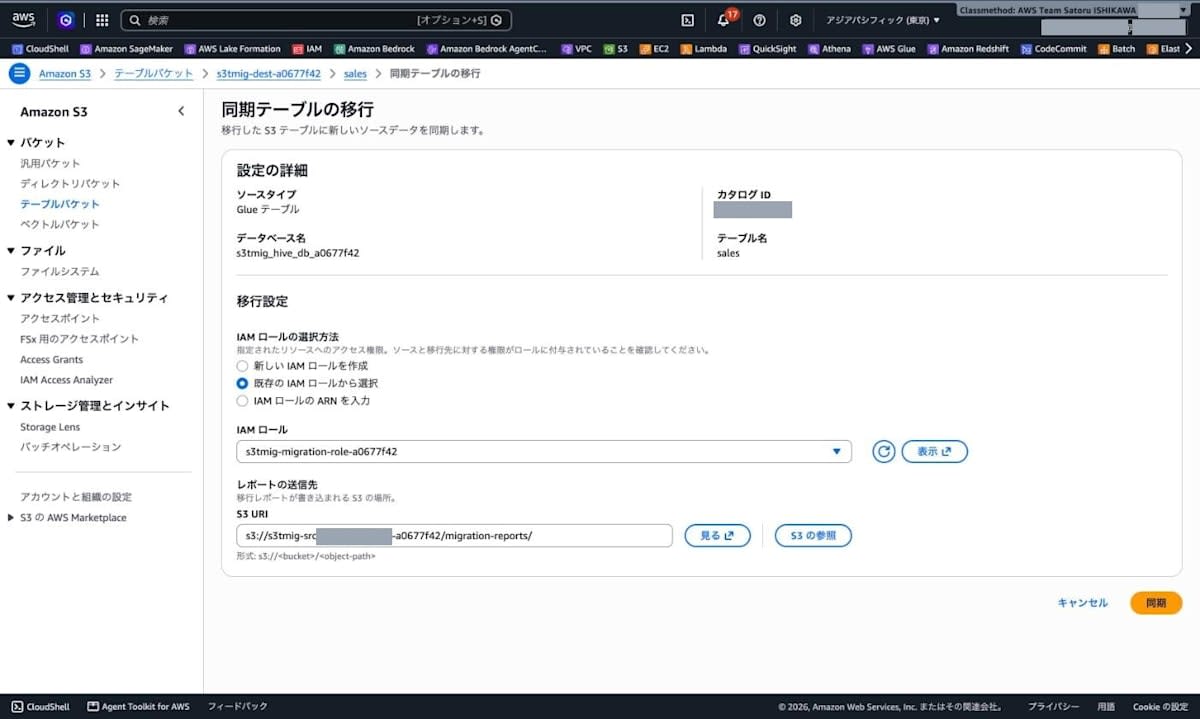
「同期テーブルの移行」画面では、Start で指定した IAM ロールとレポートの送信先が入力済みでした。このまま「同期」を選択します。
Sync も CLI で状態を記録しました。リクエストの作成(10:36:24)から succeeded への更新(10:39:48)まで約 3 分 24 秒でした。
10:36:40 planning
10:38:48 migrating
10:39:53 succeeded
aws s3tables get-table-migration --migration-id 1505a84a-ed22-4426-b323-268ac34144fa \
  --query '{type:type,state:state,hasValidPlan:hasValidPlan,planningStats:planningStats,migrationStats:migrationStats,failureReason:failureReason}' \
  --output json
{
  "type": "sync",
  "state": "succeeded",
  "hasValidPlan": true,
  "planningStats": {
    "objectsScanned": 14,
    "objectsPlanned": 14,
    "partitionCount": 4
  },
  "migrationStats": {
    "objectsMigrated": 14,
    "objectsFailedMigration": 0,
    "objectsPendingMigration": 0
  },
  "failureReason": null
}
統計値では、追加した 2 オブジェクトだけでなく 14 オブジェクトすべてが planned / migrated と数えられていました。オブジェクト移行レポートでは、Start で移行済みの 12 オブジェクトにはメッセージだけが、追加した 2 オブジェクトにだけ transformations が記録されていました(移行済みの 12 行は先頭の 1 行だけを載せます)。
% aws s3 cp s3://s3tmig-src-123456789012-a0677f42/migration-reports/1505a84a-ed22-4426-b323-268ac34144fa/object-migration-report/v1/results/e123a6bae34ac723fb6325a6e7fdf5d7be2057c5.csv -
s3tmig-src-123456789012-a0677f42,hive/sales/dt%3D2026-11-01/20261105_011642_00079_vus9v_6fb47bda-b352-475c-9f00-a38a2261bf86,null,succeeded,200,,"{""message"":""The source object was migrated to the destination table.""}"
...
s3tmig-src-123456789012-a0677f42,hive/sales/dt%3D2026-11-04/20261105_013502_00097_thmqi_918d38a8-4580-4a45-98c3-0ff28da363ae,null,succeeded,200,,"{""message"":""The source object was migrated to the destination table."",""transformations"":{""Widened:Int16ToInt32"":[{""fId"":2,""n"":300}],""Converted:Int96ToTimestamptz"":[{""fId"":7,""n"":300}]}}"
s3tmig-src-123456789012-a0677f42,hive/sales/dt%3D2026-11-01/20261105_013508_00214_ukyd8_1dd68c8a-27ef-447d-8460-2fae49686c15,null,succeeded,200,,"{""message"":""The source object was migrated to the destination table."",""transformations"":{""Widened:Int16ToInt32"":[{""fId"":2,""n"":300}],""Converted:Int96ToTimestamptz"":[{""fId"":7,""n"":300}]}}"
移行先テーブルに実際に追加されたデータを、$snapshots と $files で確認しました。
SELECT committed_at, operation, summary['added-data-files'] AS added_files, summary['deleted-data-files'] AS deleted_files, summary['added-records'] AS added_records, summary['deleted-records'] AS deleted_records, summary['total-records'] AS total_records, summary['total-data-files'] AS total_files
FROM "s3tablescatalog/s3tmig-dest-a0677f42"."analytics"."sales$snapshots"
ORDER BY committed_at
| committed_at | operation | added_files | deleted_files | added_records | deleted_records | total_records | total_files |
|---|---|---|---|---|---|---|---|
| 2026-11-05 01:27:14.676 UTC | append | 3 | NULL | 12000 | NULL | 12000 | 3 |
| 2026-11-05 01:38:38.404 UTC | append | 1 | NULL | 300 | NULL | 12300 | 4 |
| 2026-11-05 01:38:40.306 UTC | append | 1 | NULL | 300 | NULL | 12600 | 5 |
SELECT record_count, file_size_in_bytes, lower_bounds[9] AS dt_lower, upper_bounds[9] AS dt_upper
FROM "s3tablescatalog/s3tmig-dest-a0677f42"."analytics"."sales$files"
ORDER BY 3, 1
| record_count | file_size_in_bytes | dt_lower | dt_upper |
|---|---|---|---|
| 300 | 7458 | 2026-11-01 | 2026-11-01 |
| 4000 | 50922 | 2026-11-01 | 2026-11-01 |
| 4000 | 50922 | 2026-11-02 | 2026-11-02 |
| 4000 | 50902 | 2026-11-03 | 2026-11-03 |
| 300 | 7454 | 2026-11-04 | 2026-11-04 |
Sync で追加されたのは 300 行のファイル 2 つ(合計 600 行)だけで、Start で作成された 3 ファイルはそのまま残っていました。Complete までコンパクションは無効なので、dt=2026-11-01 には 4,000 行と 300 行の 2 ファイルがあります。
Sync 後に全行の突き合わせをやり直すと、12,600 行で欠落 0 件でした。差分があったのは、前述の末尾空白による product_code(12,600 件)だけで、他の列の差分は 0 件でした。
Complete する
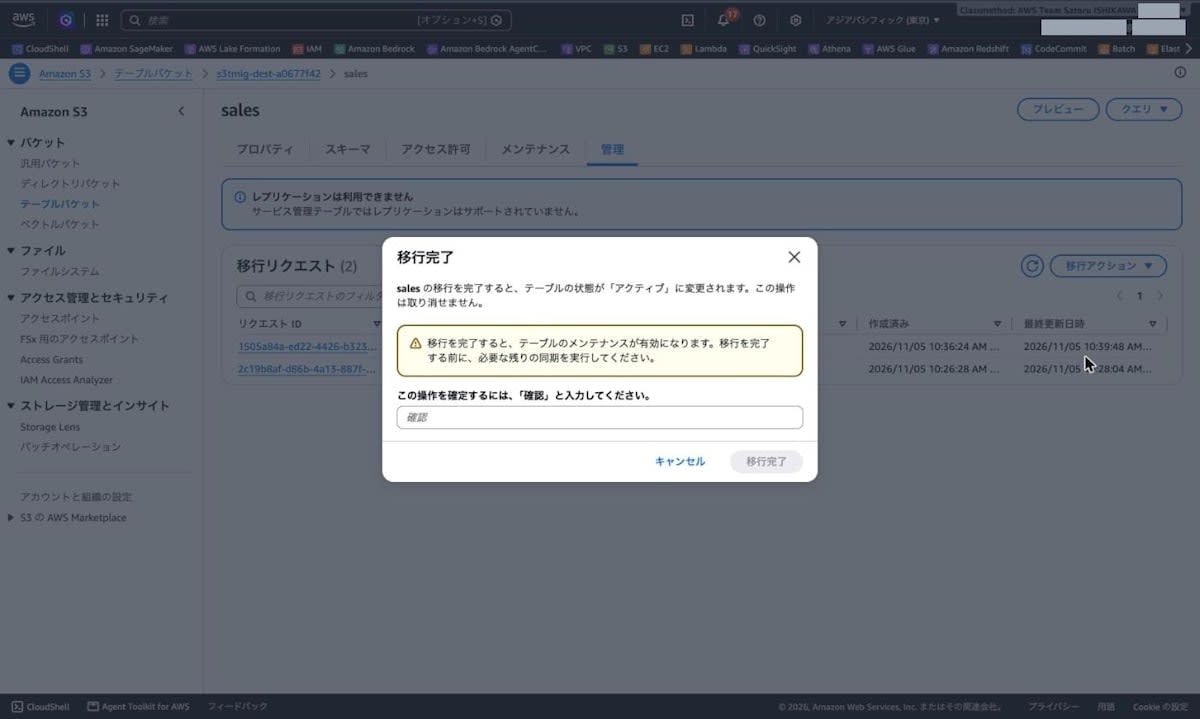
「移行アクション」から「移行完了」を選択すると、確認ダイアログに、テーブルの状態が「アクティブ」に変わること、取り消せないこと、テーブルのメンテナンスが有効になること、完了前に必要な同期を実行することが書かれていました。「確認」と入力して「移行完了」を選択します。
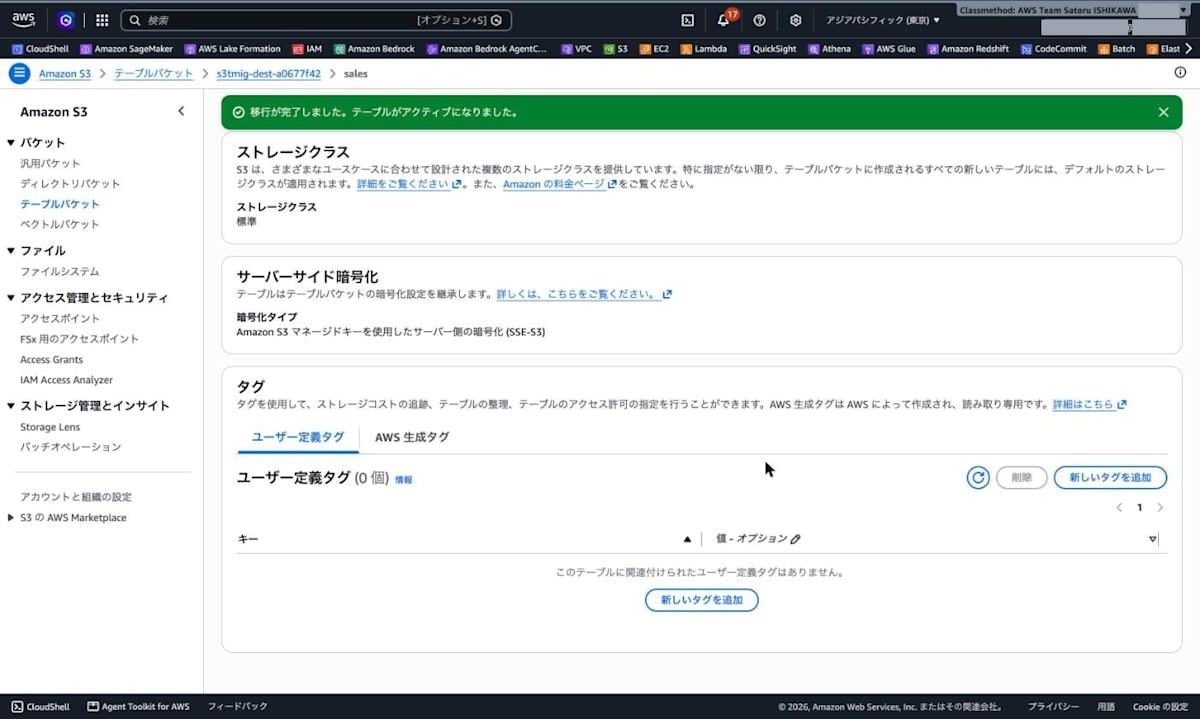
「移行が完了しました。テーブルがアクティブになりました。」と表示されました。
CLI で確認すると、managedByService が null になり、コンパクションが enabled に変わっていました。メンテナンス設定は変わった行だけを載せます(設定値とスナップショット管理は Complete 前と同じ)。
% aws s3tables get-table \
  --table-arn arn:aws:s3tables:ap-northeast-1:123456789012:bucket/s3tmig-dest-a0677f42/table/3f22db00-908f-4d47-9c35-1ae1d896af06 \
  --query '{name:name,managedByService:managedByService,modifiedAt:modifiedAt,format:format}' --output json
{
  "name": "sales",
  "managedByService": null,
  "modifiedAt": "2026-11-05T01:41:32.431505+00:00",
  "format": "ICEBERG"
}
% aws s3tables get-table-maintenance-configuration \
  --table-bucket-arn arn:aws:s3tables:ap-northeast-1:123456789012:bucket/s3tmig-dest-a0677f42 \
  --namespace analytics --name sales --output json
{
  ...
    "icebergCompaction": {
      "status": "enabled",
  ...
}
Complete 直後のメンテナンスジョブの状態では、コンパクションはまだ実行されておらず、スナップショット管理は移行中の 01:30:44 に実行されていました。
% aws s3tables get-table-maintenance-job-status \
  --table-bucket-arn arn:aws:s3tables:ap-northeast-1:123456789012:bucket/s3tmig-dest-a0677f42 \
  --namespace analytics --name sales --output json
{
  ...
  "status": {
    "icebergCompaction": {
      "status": "Not_Yet_Run"
    },
    "icebergUnreferencedFileRemoval": {
      "status": "Not_Yet_Run"
    },
    "icebergSnapshotManagement": {
      "status": "Successful",
      "lastRunTimestamp": "2026-11-05T01:30:44.960000+00:00"
    }
  }
}
Complete 前に失敗した INSERT を、同じ SQL・同じ権限で再実行すると成功しました。get-query-execution の結果は、State が SUCCEEDED、Reason が null、ScannedBytes が 0、EngineMs が 1619 でした。
$snapshots を同じクエリで確認すると、Sync 後の 3 行に続けて、INSERT の append スナップショットが追加されていました。
| committed_at | operation | added_files | deleted_files | added_records | deleted_records | total_records | total_files |
|---|---|---|---|---|---|---|---|
| 2026-11-05 01:41:51.395 UTC | append | 1 | NULL | 1 | NULL | 12601 | 6 |
同じ権限のまま Complete の前後で結果が変わったため、Complete 前の Access Denied は権限不足ではなく、移行中の読み取り専用の状態によるものと判断できます。
ダメ元で、Complete 後に CLI から Sync を実行したところ、以下のエラーが返されました。
% aws s3tables sync-table-migration \
  --role-arn arn:aws:iam::123456789012:role/s3tmig-migration-role-a0677f42 \
  --table-arn arn:aws:s3tables:ap-northeast-1:123456789012:bucket/s3tmig-dest-a0677f42/table/3f22db00-908f-4d47-9c35-1ae1d896af06 \
  --migration-output '{"bucket":"arn:aws:s3:::s3tmig-src-123456789012-a0677f42","prefixes":{"tableCompatibilityReport":"migration-reports/","objectCompatibilityReport":"migration-reports/","objectMigrationReport":"migration-reports/"}}'
aws: [ERROR]: An error occurred (BadRequestException) when calling the SyncTableMigration operation: Invalid input: Must provide either table arn alone OR all of (table bucket arn, namespace, table name) together
Sync は実行されませんでしたが、このエラーメッセージはパラメータの指定方法に関するもので、Complete 済みであることを示す内容ではありませんでした。
また、Complete 前の「管理」タブにあった「サービス管理テーブルではレプリケーションはサポートされていません」というメッセージと移行リクエストの一覧は、Complete 後は表示されず、代わりに「テーブルのレプリケーション構成」が表示されました。
後片付け
検証で作成したリソースは、移行先テーブル → 名前空間 → テーブルバケット → Glue テーブル・データベース → 汎用バケット → IAM ロールの順に削除しました。Lake Formation で付与した権限も取り消しています。
aws s3tables delete-table --table-bucket-arn arn:aws:s3tables:ap-northeast-1:123456789012:bucket/s3tmig-dest-a0677f42 --namespace analytics --name sales
aws s3tables delete-namespace --table-bucket-arn arn:aws:s3tables:ap-northeast-1:123456789012:bucket/s3tmig-dest-a0677f42 --namespace analytics
aws s3tables delete-table-bucket --table-bucket-arn arn:aws:s3tables:ap-northeast-1:123456789012:bucket/s3tmig-dest-a0677f42
aws glue delete-table --database-name s3tmig_hive_db_a0677f42 --name sales
aws glue delete-database --name s3tmig_hive_db_a0677f42
aws s3 rm s3://s3tmig-src-123456789012-a0677f42 --recursive
aws s3api delete-bucket --bucket s3tmig-src-123456789012-a0677f42
aws iam delete-role-policy --role-name s3tmig-migration-role-a0677f42 --policy-name S3TablesMigrationPolicy
aws iam delete-role --role-name s3tmig-migration-role-a0677f42
特徴的な「Sync」とそのユースケース
Sync があるのは、移行元を止めずに移行するためです。Start でコピーしている間や、Start の後も移行元への書き込みは続くので、Start → Complete だけでは移行先が古いまま確定してしまいます。
1. 移行元を止めずに移行し、切り替え時の停止を短くする
- 移行元は移行中も読み書き・削除できます。
- Sync は、前回の Start または Sync 以降に追加・変更されたオブジェクトだけをコピーし、削除されたオブジェクトのデータは移行先から消します。
- 公式ドキュメントの見出しは「Incremental sync before cutover」で、目的は "minimize cutover downtime" と書かれています。AWS News Blog でも、書き込みを止めるのは「切り替え時の数分だけ」です。
大きなテーブルでは、Start の全量コピーに時間がかかります。Sync を繰り返して差分を小さくしておき、書き込みを止めてから最終 Sync を行えば、止める時間は最後の差分をコピーする分だけになります。
2. Complete の前に検証する期間を取る
- 移行中の移行先は、コミット済みのデータをクエリできますが、Complete まで書き込めません。理由は後の Sync で変更が上書きされないようにするためです。
- Complete は取り消せず、Complete 後は Sync もできません。
Sync と Complete が分かれているので、移行元を本番として使い続けながら、移行先を Sync で最新に保ち、件数・値・下流のクエリを確認してから Complete を判断できます。記事の検証も、Start → 比較クエリ → 追記 → Sync → 再比較 → Complete の順で、このSyncを使っています。
3. 失敗やキャンセルの後に再開する
- 失敗またはキャンセルしても、移行先にはコミット済みのデータが残ります。hasValidPlan が true なら、原因を直して Sync すれば、移行できなかったオブジェクトと追加されたオブジェクトだけがコピーされます。全量をコピーし直す必要はありません。
- Agent Toolkit for AWS のスキル文書には、pendingReview でレポートを確認してキャンセルした後、原因を直して Sync で再開する手順も書かれています。
向いているケース・向いていないケース
- 向いている: ETL で日次パーティションを追記し続けるテーブルのように、移行元に追記が続くテーブル。既存パーティションへの追記も Sync で拾えます。記事でも、dt=2026-11-01 に追加したファイルが Sync で移行されました。
- 向いていない: 同じファイルを上書きするテーブル。前回の Start または Sync 以降に上書きされたオブジェクトは、内容が同じでも Sync で失敗します(記事の考察に記載)。INSERT OVERWRITE などでファイルを書き換えるジョブがある場合は、移行中に止めるか、別の方法を検討する必要があります。
- 料金: Sync は、1 回の移行につき最初の 500 回(開始から 3 か月以内)が無料で、それ以降は移行元テーブルのオブジェクト 1,000 個あたりで課金されます。オブジェクト数の多いテーブルで Sync を頻繁に実行すると、料金がかかります。
Sync と Complete を 1 つの操作にしなかった理由は、Complete が取り消せない操作であることを考えると、コピーの繰り返し(Sync)と最終確定(Complete)を分け、切り替えのタイミングを利用者が決められるようにしたものだと私は理解しました。素晴らしい仕様です。
考察
実際に移行する際に確認しておきたい点を整理します。
- AWS CLI は 2.39.4 以降が必要: CHANGELOG によると、
StartTableMigrationなど移行用の 6 つの API は 2.39.4 で追加されました。2.39.3 では実行できませんでした。 - コンソールでは移行計画のレビューができない: コンソールからの移行は
reviewMigrationPlan=falseで、planning の後すぐにコピーが始まりました。レポートを確認してから承認したい場合や、移行ポリシー・スキーマ・圧縮コーデック・Iceberg v3 などを指定したい場合は、CLI のstart-table-migration(--review-migration-planなど)を使います。 - char(n) 列の末尾空白は保持されない:
char(8)はstringになり、Athena が返していた 8 文字までの空白埋めはなくなりました。移行元との検証クエリや、空白埋めを前提にした比較・結合はrtrimなどで調整が必要です。データ型マッピングのドキュメントではchar(n)→stringは Converted ですが、互換性レポートではschemaTransformation.widenedでした。 - timestamp 列の型が変わる: INT96 の
timestamp列はtimestamptzになり、Athena での型はtimestamp(3)からtimestamp(6) with time zoneに変わりました。値は一致しましたが、下流のクエリや BI ツールでの扱いを確認しておく必要があります。変換後の型はサンプルファイルの物理型で決まり、互換性レポートのsampleFileTypeで確認できます。 - Sync の統計値はスキャンしたオブジェクト全体を数える: 2 オブジェクトを追加した Sync でも
objectsPlannedとobjectsMigratedは 14 で、実際に追加されたのは 2 ファイル・600 行でした。コピーされた量は、オブジェクト移行レポートのtransformationsや$snapshotsのadded-recordsで確認します。 - Complete までは移行先に書き込めない: Complete 前の INSERT は Access Denied、Complete 後は同じ SQL が成功しました。移行先が読み取り専用の間は移行元に書き込んで Sync で反映し、移行元への書き込み停止 → 最終 Sync → 件数と値の確認 → Complete → 書き込み先と参照先の切り替え、の順で進めます。Complete は取り消せず、Complete 後は Sync できないため、確認は Complete の前に行います。
- Lake Formation で管理しているアカウントでは参照権限が必要: 今回のアカウントでは、Athena から移行先を参照するのに Lake Formation の権限付与が必要でした。移行先を使うユーザーやジョブのロールにも付与が必要です。
- コンパクションは Complete 後に有効になる: 移行中はコンパクションが無効で、Sync で追加したファイルは別ファイルのまま残りました。Complete 直後は
Not_Yet_Runで、検証時間内には実行を確認できていません。 - 事前に対象外の条件を確認する: ドキュメントによると、ACID(トランザクション)テーブル、Lake Formation に登録されたテーブル、Athena の partition projection を使うテーブル(パーティションを Glue に登録すれば対象)、SSE-C で暗号化されたオブジェクト、アーカイブ系のストレージクラスのオブジェクトは移行できません。前回の Start / Sync 以降に上書きされたオブジェクトは、内容が同じでも Sync で失敗します。Glue のテーブルパラメータ、SerDe の設定、列の統計情報、列コメント、テーブルの説明はコピーされません。
- 料金: S3 の料金ページによると、初回の移行は無料で、Sync は 1 回の移行につき最初の 500 回(開始から 3 か月以内)が無料です。それ以降の Sync は、移行元テーブルのオブジェクト 1,000 個あたりで課金されます。移行先テーブルのストレージと、移行時の PUT / GET リクエストには S3 Tables の料金がかかります。
最後に
Glue に登録された Parquet の Hive テーブルを、コンソールから Start → Sync → Complete の順に S3 Tables の Iceberg テーブルへ移行しました。12 個の Snappy 圧縮ファイルは 3 個の ZSTD 圧縮ファイルになり、全行の値が移行元と一致しました(char 列の末尾空白を除く)。Sync では追加したオブジェクトだけがコピーされ、Complete 後は移行先に書き込めました。
Athena の CTAS や Glue / EMR のジョブで Hive テーブルを Iceberg に書き換える場合、移行用のジョブやコンピューティングを自分で用意する必要がありました。マネージド移行ではそれらが不要で、互換性レポートで型の変換内容を確認しながら移行できます。まず検証用のテーブルで Start と互換性レポートを確認し、型の変換と末尾空白の扱いが要件に合うかを確かめることをおすすめします。コーディングエージェントを使う場合は、Agent Toolkit for AWS の migrating-hive-tables-to-s3-tables スキルもあります。
参考文献