ASR 自動修復結果を Slack に通知するパイプラインを構築してみた

はじめに
みなさん AWS Security Hub の Automated Security Response on AWS(ASR)使われているでしょうか。
私もセキュリティ管理アカウントに ASR をデプロイして自動修復を運用しているのですが、修復が動いているのに通知がない状況に不安を覚えました。
調べてみると、ASR にはデフォルトで SNS Topic を作成してくれるのですが、サブスクリプションは設定されません。修復が実行されても誰にも通知されない状態がデフォルトです。通知先は自分で追加する必要があります。
「とりあえず E メールでサブスクリプション追加すればいいか」と試してみたのですが、届くメッセージがこんな感じでした。
{
  "Remediation_Status": "SUCCESS",
  "Severity": "INFO",
  "Account_Alias": "example-account-alias",
  "Remediation_Output": "{}",
  "Message": "xxxxxxxx-xxxx: Remediation succeeded for SC control S3.5 in account 111122223333: ...",
  "Finding_Link": "https://console.aws.amazon.com/securityhub/home?region=ap-northeast-1#/findings?search=Id%3D%255Coperator...",
  "Finding": {
    "finding_id": "abcdef01-2345-6789-abcd-ef0123456789",
    "standard_control": "S3.5",
    "title": "S3 general purpose buckets should require requests to use SSL",
    "region": "ap-northeast-1",
    "account": "111122223333",
    "finding_arn": "arn:aws:securityhub:ap-northeast-1:111122223333:security-control/S3.5/finding/abcdef01-..."
  },
  "StepFunctions_Execution_Id": "arn:aws:states:ap-northeast-1:444455556666:execution:SO0111-ASR-Orchestrator:..."
}
ネストした JSON がそのままメール本文に表示されるので、どのアカウントのどのコントロールが成功/失敗したのかを一目で判断できません。
また、成功と失敗だけではなく他のイベントも通知されてきたのでフィルターもしたいです。
そんな課題を元に Lambda と Amazon Q Developer in chat applications(旧 AWS Chatbot)で Slack 通知パイプラインを構築しました。以下、Amazon Q Developer と表記します。
とりあえず Slack へ通知したい場合にお試しください。
どう変わるのか
JSON の生データではなく、見やすい形式で通知される
Formatter Lambda が ASR のメッセージを解析し、Amazon Q Developer のカスタム通知形式に変換します。Slack 上では「どのアカウントのどのコントロールが成功/失敗したか」が分かるメッセージとして表示されます。
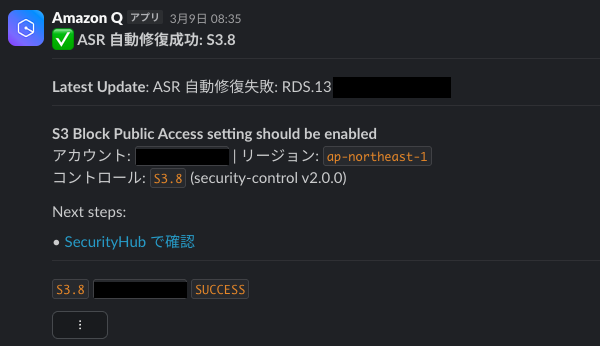
Slack へのメッセージ文はとりあえず作ったものなので、参考程度に利用してください。
ノイズの少ない通知
ASR Topic からは SUCCESS / FAILED / QUEUED / NOT_NEW の 4 種類のメッセージが発行され、デフォルトだと全部の通知が届いてしまいます。確認したいのは成功と失敗のみなので Lambda で SUCCESS と FAILED のみにフィルタリングしてノイズを抑えるようにします。
アーキテクチャ
パイプラインの全体像
ASR を実装した環境は Security Hub CSPM を委任したセキュリティ管理アカウント上です。
ASR はデフォルトで 2 つの SNS Topic をデプロイします。
| Topic 名 | 用途 | メッセージ内容 |
|---|---|---|
SO0111-ASR_Topic |
修復結果通知 | succeeded / failed / queued 等の JSON |
SO0111-ASR_Alarm_Topic |
ASR 障害通知 | CloudWatch Alarm 形式の JSON |
いずれもサブスクリプション未設定の状態でデプロイされるため、通知先は自分で追加する必要があります。
今回の実装はこの 2 つの Topic に対し通知を追加します。
SO0111-ASR_Alarm_Topicについて
管理スタックから UseCloudWatchMetricsAlarms を yes で展開すると、以下 4 つの CloudWatch Alarm が展開されます。
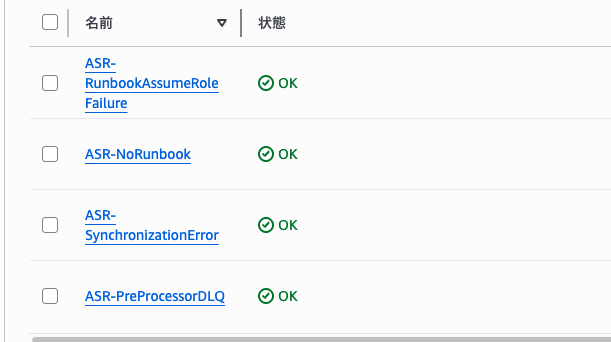
| アラーム名 | 意味 | 発生原因 |
|---|---|---|
| ASR-NoRunbook | 修復用Runbookが見つからない | メンバースタック未デプロイ、またはASR未対応のコントロール |
| ASR-PreProcessorDLQ | 前処理Lambdaの障害 | PreProcessor LambdaがDLQに送信された(処理失敗) |
| ASR-RunbookAssumeRoleFailure | AssumeRole失敗 | 修復先アカウントにASRメンバーロールが存在しない |
| ASR-SynchronizationError | 同期プロセス障害 | ASR内部の同期処理でエラー発生 |
これらのアラートがSO0111-ASR_Alarm_Topicへ紐づいています。
なぜ Amazon Q Developer へ直接通知せずにLambdaを使うのか
ASR Topic に直接 Amazon Q Developer を接続する構成も考えたのですが、メッセージ形式が未対応だったためです。
なるべく Lambda を使わずに対応したかったのですが、それほど管理コストもかからないためフォーマット用の Lambda を挟む構成にしました。
なぜ Slack Webhook ではなく Amazon Q Developer を使うのか
Lambda から Slack Webhook で直接投稿する方法もありますが、Webhook を使うには通知用の Slack アプリを新規作成する必要があります。今回は新しくアプリを作りたくなかったので、既存の Amazon Q Developer 連携を活用する構成にしました。
2つの Topic を1つの Lambda に統合
修復結果通知と Alarm 通知を別々の Lambda で処理することも検討しましたが、1 つの Lambda に統合しました。
- どちらのメッセージも最終的に同じ SNS Topic → Amazon Q Developer → Slack に流すため
AlarmNameキーの有無で ASR 修復結果か CloudWatch Alarm かを簡単に判定できるため、分岐処理のコストは低い- Lambda を 2 つ管理したくないため
やってみる
前提条件
- ASR ソリューションがデプロイ済み(
SO0111-ASR_Topic、SO0111-ASR_Alarm_Topicが存在する) - Amazon Q Developer に Slack ワークスペースが連携済み
CloudFormation テンプレート
以下のテンプレートをデプロイすると、必要なリソースがすべて作成されます。展開したらすぐに Slack 通知が機能する状態になります。
CloudFormation テンプレート(クリックで展開)
AWSTemplateFormatVersion: '2010-09-09'
Description: ASR Slack Notification Pipeline - Formatter Lambda + SNS + Amazon Q Developer

Parameters:
  SlackWorkspaceId:
    Type: String
    Description: >-
      Slack ワークスペースID。Amazon Q Developer コンソールで確認可能
  SlackChannelId:
    Type: String
    Description: >-
      通知先の Slack チャンネルID
  AsrTopicArn:
    Type: String
    Description: >-
      ASR Topic ARN。SSM Parameter /Solutions/SO0111/SNS_Topic_ARN から取得
  AsrAlarmTopicArn:
    Type: String
    Description: >-
      ASR Alarm Topic ARN。ASR Topic ARN の Topic名を置換して導出

Resources:
  # Amazon Q Developer用の通知中継SNS Topic
  NotificationTopic:
    Type: AWS::SNS::Topic
    Properties:
      TopicName: ASR-SlackNotifications
      DisplayName: ASR Remediation Notifications

  # Amazon Q Developer の IAM ロール(リソースタイプは旧名のまま)
  ChatbotRole:
    Type: AWS::IAM::Role
    Properties:
      AssumeRolePolicyDocument:
        Version: '2012-10-17'
        Statement:
          - Effect: Allow
            Principal:
              Service: chatbot.amazonaws.com
            Action: sts:AssumeRole
      ManagedPolicyArns:
        - arn:aws:iam::aws:policy/AWSResourceExplorerReadOnlyAccess

  # Amazon Q Developer Slack チャンネル設定(リソースタイプは旧名のまま)
  SlackChannelConfig:
    Type: AWS::Chatbot::SlackChannelConfiguration
    Properties:
      ConfigurationName: ASR-Notifications
      SlackWorkspaceId: !Ref SlackWorkspaceId
      SlackChannelId: !Ref SlackChannelId
      IamRoleArn: !GetAtt ChatbotRole.Arn
      SnsTopicArns:
        - !Ref NotificationTopic
      LoggingLevel: INFO

  # フォーマッター Lambda の IAM ロール
  FormatterLambdaRole:
    Type: AWS::IAM::Role
    Properties:
      AssumeRolePolicyDocument:
        Version: '2012-10-17'
        Statement:
          - Effect: Allow
            Principal:
              Service: lambda.amazonaws.com
            Action: sts:AssumeRole
      ManagedPolicyArns:
        - arn:aws:iam::aws:policy/service-role/AWSLambdaBasicExecutionRole
      Policies:
        - PolicyName: SnsPublish
          PolicyDocument:
            Version: '2012-10-17'
            Statement:
              - Effect: Allow
                Action: sns:Publish
                Resource: !Ref NotificationTopic

  # フォーマッター Lambda
  FormatterLambda:
    Type: AWS::Lambda::Function
    Properties:
      FunctionName: ASR-NotificationFormatter
      Runtime: python3.13
      Handler: index.handler
      Timeout: 30
      MemorySize: 128
      Role: !GetAtt FormatterLambdaRole.Arn
      Environment:
        Variables:
          ASR_NOTIFICATION_TOPIC_ARN: !Ref NotificationTopic
      Code:
        ZipFile: |
          """ASR通知フォーマッターLambda."""

          import json
          import os
          import urllib.parse

          import boto3

          sns_client = boto3.client("sns")
          TOPIC_ARN = os.environ["ASR_NOTIFICATION_TOPIC_ARN"]


          def handler(event, context):
              processed = 0
              skipped = 0

              for record in event.get("Records", []):
                  raw_message = record["Sns"]["Message"]
                  if _process_message(raw_message):
                      processed += 1
                  else:
                      skipped += 1

              return {"processed": processed, "skipped": skipped}


          def _process_message(raw_message):
              parsed = json.loads(raw_message)

              if "AlarmName" in parsed:
                  return _handle_alarm(parsed)
              if "Finding" in parsed:
                  return _handle_native_remediation(parsed)
              if "finding" in parsed:
                  return _handle_remediation(parsed)
              return False


          def _handle_native_remediation(parsed):
              """実環境で発行されるPascal_Snake_Case形式を処理する."""
              status = parsed.get("Remediation_Status", "")
              if status == "SUCCESS":
                  emoji, label, keyword = ":white_check_mark:", "自動修復成功", "SUCCESS"
              elif status == "FAILED":
                  emoji, label, keyword = ":x:", "自動修復失敗", "FAILED"
              else:
                  return False

              finding = parsed.get("Finding", {})
              return _build_and_publish_remediation(
                  finding, parsed.get("Severity", ""), parsed.get("Message", ""),
                  emoji, label, keyword,
              )


          def _handle_remediation(parsed):
              """公式ドキュメント記載の小文字形式を処理する."""
              message = parsed.get("message", "")
              finding = parsed.get("finding", {})
              severity = parsed.get("severity", "")

              if "Remediation succeeded" in message:
                  emoji, label, keyword = ":white_check_mark:", "自動修復成功", "SUCCESS"
              elif "Remediation failed" in message:
                  emoji, label, keyword = ":x:", "自動修復失敗", "FAILED"
              else:
                  return False

              return _build_and_publish_remediation(
                  finding, severity, message, emoji, label, keyword,
              )


          def _build_and_publish_remediation(finding, severity, message, emoji, label, keyword):
              control = finding.get("standard_control", "")
              account = finding.get("account", "")
              region = finding.get("region", "")
              finding_arn = finding.get("finding_arn", "")
              encoded_arn = urllib.parse.quote(finding_arn, safe="")
              finding_url = (
                  f"https://{region}.console.aws.amazon.com"
                  f"/securityhub/home?region={region}"
                  f"#/findings?search=Id%3D%5Coperator%5CEQUALS%5C{encoded_arn}"
              )

              desc_lines = [
                  f"*{finding.get('title', '')}*",
                  "",
                  f">  アカウント: `{account}`",
                  f">  リージョン: `{region}`",
                  f">  コントロール: `{control}` ({finding.get('standard_name', '')} v{finding.get('standard_version', '')})",
              ]

              notification = {
                  "version": "1.0",
                  "source": "custom",
                  "content": {
                      "textType": "client-markdown",
                      "title": f"{emoji} ASR {label}: {control}",
                      "description": "\n".join(desc_lines),
                      "nextSteps": [f"<{finding_url}|Security Hub CSPM で確認>"],
                      "keywords": [control, account, keyword],
                  },
                  "metadata": {
                      "threadId": f"asr-{account}",
                      "summary": f"ASR {label}: {control} ({account})",
                      "additionalContext": {
                          "findingArn": finding_arn,
                          "severity": severity,
                      },
                  },
              }
              _publish(notification)
              return True


          def _handle_alarm(parsed):
              alarm_name = parsed.get("AlarmName", "")
              state = parsed.get("NewStateValue", "")

              if state == "ALARM":
                  emoji, label, keyword = ":rotating_light:", "ASR アラーム発生", "ALARM"
              elif state == "OK":
                  emoji, label, keyword = ":white_check_mark:", "ASR アラーム復旧", "OK"
              else:
                  emoji, label, keyword = ":warning:", "ASR アラーム データ不足", "INSUFFICIENT_DATA"

              desc_lines = [
                  f"*{alarm_name}*",
                  "",
                  f">  状態: `{state}`",
                  f">  理由: {parsed.get('NewStateReason', '')}",
              ]
              if parsed.get("AlarmDescription"):
                  desc_lines.append(f">  説明: {parsed['AlarmDescription']}")
              if parsed.get("AWSAccountId"):
                  desc_lines.append(f">  アカウント: `{parsed['AWSAccountId']}`")

              notification = {
                  "version": "1.0",
                  "source": "custom",
                  "content": {
                      "textType": "client-markdown",
                      "title": f"{emoji} {label}: {alarm_name}",
                      "description": "\n".join(desc_lines),
                      "nextSteps": [],
                      "keywords": [alarm_name, keyword],
                  },
                  "metadata": {
                      "threadId": "asr-alarm",
                      "summary": f"{label}: {alarm_name}",
                  },
              }
              _publish(notification)
              return True


          def _publish(notification):
              sns_client.publish(
                  TopicArn=TOPIC_ARN,
                  Message=json.dumps(notification),
              )

  # Lambda 呼び出し権限(SNS → Lambda)
  LambdaSnsPermission:
    Type: AWS::Lambda::Permission
    Properties:
      FunctionName: !Ref FormatterLambda
      Action: lambda:InvokeFunction
      Principal: sns.amazonaws.com

  # ASR Topic → Lambda サブスクリプション
  AsrTopicSubscription:
    Type: AWS::SNS::Subscription
    Properties:
      TopicArn: !Ref AsrTopicArn
      Protocol: lambda
      Endpoint: !GetAtt FormatterLambda.Arn

  AsrAlarmTopicSubscription:
    Type: AWS::SNS::Subscription
    Properties:
      TopicArn: !Ref AsrAlarmTopicArn
      Protocol: lambda
      Endpoint: !GetAtt FormatterLambda.Arn

Outputs:
  NotificationTopicArn:
    Value: !Ref NotificationTopic
    Description: Amazon Q Developer連携用SNS Topic ARN
  FormatterLambdaArn:
    Value: !GetAtt FormatterLambda.Arn
    Description: フォーマッターLambda ARN
  SlackChannelConfigArn:
    Value: !Ref SlackChannelConfig
    Description: Amazon Q Developer Slack チャンネル設定 ARN
テンプレートの構成要素をまとめます。
| リソース | 役割 |
|---|---|
NotificationTopic |
Amazon Q Developer への通知中継用 SNS Topic |
ChatbotRole / SlackChannelConfig |
Amazon Q Developer の Slack チャンネル設定 |
FormatterLambda |
ASR メッセージを整形・フィルタリングして SNS に Publish |
AsrTopicSubscription / AsrAlarmTopicSubscription |
ASR の2つの Topic から Lambda へのサブスクリプション |
デプロイ
パラメータに必要な値を取得してからデプロイします。
# ASR Topic ARN を SSM Parameter から取得
$ ASR_TOPIC_ARN=$(aws ssm get-parameter \
    --name "/Solutions/SO0111/SNS_Topic_ARN" \
    --query 'Parameter.Value' --output text)

# Alarm Topic ARN を導出(Topic名を置換するだけ)
$ ALARM_TOPIC_ARN=$(echo "$ASR_TOPIC_ARN" | sed 's/SO0111-ASR_Topic/SO0111-ASR_Alarm_Topic/')
事前に Amazon Q Developer コンソールの「設定済みクライアント」で通知したい Slack のワークスペース連携は済ませましょう。
SlackChannelId は Slack でチャンネル名を右クリックし「リンクをコピー」すると、URL 末尾の英数字として取得できます。
# スタックをデプロイ
$ aws cloudformation deploy \
    --template-file asr-slack-notification.yaml \
    --stack-name ASR-SlackNotification \
    --capabilities CAPABILITY_IAM \
    --parameter-overrides \
      SlackWorkspaceId="T0XXXXXXXXX" \
      SlackChannelId="C0XXXXXXXXX" \
      AsrTopicArn="$ASR_TOPIC_ARN" \
      AsrAlarmTopicArn="$ALARM_TOPIC_ARN"
デプロイ完了後、通知が飛ぶようになっているはずです。
Amazon Q Developer カスタム通知の形式
Formatter Lambda が生成する通知メッセージは、以下のような Amazon Q Developer のカスタム通知形式です。
{
  "version": "1.0",
  "source": "custom",
  "content": {
    "textType": "client-markdown",
    "title": ":white_check_mark: ASR 自動修復成功: S3.5",
    "description": "*S3バケットのSSL必須設定*\n\n>  アカウント: `123456789012`\n>  リージョン: `ap-northeast-1`\n>  コントロール: `S3.5` (security-control v2.0.0)",
    "nextSteps": ["<https://...|Security Hub CSPM で確認>"],
    "keywords": ["S3.5", "123456789012", "SUCCESS"]
  },
  "metadata": {
    "threadId": "asr-123456789012",
    "summary": "ASR 自動修復成功: S3.5 (123456789012)"
  }
}
ポイントは以下の 3 つです。
threadIdにアカウント ID を設定しているため、同じアカウントの修復結果が Slack 上でスレッドにまとまるkeywordsで Slack チャンネル内のフィルタリングが可能nextStepsに Security Hub の Finding 画面へのリンクを埋め込んでいるため、失敗時にすぐ確認
フィルタリングロジック
Formatter Lambda は Remediation_Status を見て通知対象を判定します。
| Remediation_Status | 意味 | 通知 |
|---|---|---|
SUCCESS |
修復成功 | する |
FAILED |
修復失敗 | する |
QUEUED |
修復キュー投入 | しない |
NOT_NEW |
Finding が NEW 以外のためスキップ |
しない |
QUEUED はその後 SUCCESS か FAILED が来るため通知不要です。NOT_NEW は Workflow Status が NOTIFIED や SUPPRESSED の Finding に対して発行されるメッセージで、修復対象外のため同様にスキップします。
クリーンアップ
不要になった場合は CloudFormation スタックを削除してください。
$ aws cloudformation delete-stack --stack-name ASR-SlackNotification
ASR ソリューション本体の SNS Topic には影響しません。サブスクリプションのみが削除されます。
まとめ
ASR の修復結果を Formatter Lambda + Amazon Q Developer 経由で Slack に通知するパイプラインを構築しました。CloudFormation テンプレート 1 つでデプロイでき、ASR の 2 つの SNS Topic からの通知を 1 つの Lambda で整形・フィルタリングして Slack に流せます。
ASR をデプロイしたものの通知が来なくて困っている方の参考になれば嬉しいです。修復を通知して AWS 環境の変更を検知しましょう。
以上、鈴木純がお送りしました。