Gemma 4 31B と Claude Sonnet 4.6 でビジネス文書を OCR・構造化抽出し、料金と精度を比較した

こんにちは、けーまです。
Amazon Bedrock で Google の Gemma 4 31B が利用可能になりました。
低単価かつ画像入力に対応したモデルのため、活用先としてビジネス文書の OCR が考えられます。
ただ、実際に使うとなると「精度はフロンティアモデルと比べてどうか」「料金はどのくらい変わるか」が気になります。
そこで本記事では、Gemma 4 31B と Claude Sonnet 4.6 を取り上げ、2026年6月13日時点の検証結果をまとめて比較しました。
架空のビジネス文書を両モデルで構造化抽出し、料金・速度・精度の3点を中心に整理しています。
PNG と PDF の両形式で検証しました。
低単価モデルの使いどころを検討する参考にしていただければと思います。
対象読者:Amazon Bedrock で文書の OCR を検討している方、モデル選定でコストと精度のバランスを考えている方
1. 検証の前提
1.1 対象モデルと接続方法
Gemma 4 31B は、テキストと画像を入力できるマルチモーダルモデルです。
Gemma 4 31B is Google's 30.7-billion parameter dense model with built-in reasoning, native function calling, and multimodal input across text and image, supporting a 256K token context window.
引用元: モデルカード: Gemma 4 31B | AWS
Gemma 4 は、従来の bedrock-runtime ではなく bedrock-mantle エンドポイント専用です。
Gemma 4 models are available only on the
bedrock-mantleendpoint.
引用元: モデルカード: Gemma 4 31B | AWS
一方、Claude Sonnet 4.6 は bedrock-mantle 非対応です。
画像入力が必要なため、従来の bedrock-runtime Converse API を使いました。
両モデルの接続条件を整理します。
| 項目 | Gemma 4 31B | Claude Sonnet 4.6 |
|---|---|---|
| モデル ID | google.gemma-4-31b |
us.anthropic.claude-sonnet-4-6 |
| エンドポイント | bedrock-mantle | bedrock-runtime |
| API | OpenAI 互換 Chat Completions | Converse |
| リージョン | us-east-1 | us-east-1 |
| 認証 | IAM 認証(トークン生成) | IAM 認証 |
Gemma 4 31B の提供リージョンは限られます。
モデルカードで確認したところ、2026年6月13日時点では us-east-1(バージニア北部)・us-east-2(オハイオ)・us-west-2(オレゴン)・eu-central-1(フランクフルト)の4リージョンです。
いずれも In-Region 推論のみで、Geo / Global の Cross-Region 推論には対応していません。
東京リージョンは含まれないです。その内、対応してくれると信じています!
引用元: モデルカード: Gemma 4 31B | AWS
1.2 検証対象の文書
複雑かつ実務で使いそうな 3 種を、PNG と PDF の両形式で用意しました。
すべて架空の企業・人物です。
| 文書 | 特徴 |
|---|---|
| 請求書 | 明細表と税計算 |
| 給与明細 | 横長で、支給・控除・勤怠の3テーブル。今回で最も複雑 |
| 出張旅費精算書 | 日付ごとの明細 |
各検証は 1 回ずつ実行し、為替は 1USD = 150 円で換算しました。
1.3 共通プロンプト
両モデルで同じプロンプトを使いました。
この文書は日本のビジネス文書です。記載されている情報をすべて読み取り、
JSON形式で構造化して出力してください。文書種別(doc_type)も判定してください。
余計な説明やマークダウンの装飾は不要で、JSONのみを返してください。
2. 検証スクリプト
両モデルとも、3種(請求書・給与明細・出張旅費精算書)を PNG/PDF で順に処理し、応答時間・入力/出力トークン・料金を計測して JSON で保存します。
料金は、レスポンスが返す実測トークン数に各モデルの単価を掛けて算出しています(為替は 1USD = 150 円で固定)。
事前に依存パッケージをインストールします。
python3 -m venv .venv
.venv/bin/pip install openai aws-bedrock-token-generator boto3 "botocore[crt]"
2.1 Gemma 4 31B(bedrock-mantle / OpenAI 互換)
OpenAI SDK の base_url を bedrock-mantle に向け、IAM トークンを api_key に渡します。
画像は image_url、PDF は file 形式で送ります。
以下を scripts/gemma4_ocr.py として保存します。
scripts/gemma4_ocr.py の全文(クリックすると展開します)
"""Gemma 4 31B (Bedrock Mantle) で文書をOCR・構造化し、速度/トークン/料金を計測する。

PNG と PDF の両方を同じ文書で試し、入力形式による差を比較する。

接続方式:
- エンドポイント: https://bedrock-mantle.{REGION}.api.aws/openai/v1 (OpenAI互換 Chat Completions)
- 認証: aws-bedrock-token-generator の provide_token(region) でIAMトークンを生成
- Gemma 4 31B 提供リージョン: us-east-1, us-east-2, us-west-2, eu-central-1

実行例:
    export AWS_PROFILE="<your-profile>"   # 利用するprofileを指定
    export AWS_REGION="us-east-1"
    python3 scripts/gemma4_ocr.py
"""

from __future__ import annotations

import base64
import json
import os
import time
from dataclasses import dataclass, asdict
from pathlib import Path

from openai import OpenAI
from aws_bedrock_token_generator import provide_token

# --- 設定 ---
MODEL_ID = "google.gemma-4-31b"
REGION = os.environ.get("AWS_REGION", "us-east-1")
BASE_URL = f"https://bedrock-mantle.{REGION}.api.aws/openai/v1"

# 料金(1MトークンあたりのUSD、Bedrock公式 on-demand)
PRICE_INPUT_PER_1M = 0.14
PRICE_OUTPUT_PER_1M = 0.40
USD_JPY = 150.0  # 為替は変動するため概算用

ROOT = Path(__file__).resolve().parent.parent
PNG_DIR = ROOT / "png"
PDF_DIR = ROOT / "pdf"
RESULT_DIR = ROOT / "results" / "gemma"

# 検証対象(複雑かつ実務頻出の3種)
SELECTED = ["invoice", "payslip", "travel_expense"]

PROMPT = (
    "この文書は日本のビジネス文書です。記載されている情報をすべて読み取り、"
    "JSON形式で構造化して出力してください。文書種別(doc_type)も判定してください。"
    "余計な説明やマークダウンの装飾は不要で、JSONのみを返してください。"
)

@dataclass
class OcrResult:
    file: str
    fmt: str  # "png" or "pdf"
    elapsed_sec: float
    input_tokens: int
    output_tokens: int
    total_tokens: int
    finish_reason: str
    cost_usd: float
    cost_jpy: float
    output_text: str

def build_content(path: Path) -> list[dict]:
    """ファイル形式に応じてChat Completions用のcontentを組み立てる。

    PNGはimage_url、PDFはfile形式(OpenAI互換)で渡す。
    """
    b64 = base64.b64encode(path.read_bytes()).decode()
    if path.suffix.lower() == ".pdf":
        media = {
            "type": "file",
            "file": {
                "filename": path.name,
                "file_data": f"data:application/pdf;base64,{b64}",
            },
        }
    else:
        media = {
            "type": "image_url",
            "image_url": {"url": f"data:image/png;base64,{b64}"},
        }
    return [media, {"type": "text", "text": PROMPT}]

def build_client() -> OpenAI:
    """Bedrock Mantle向けのOpenAI互換クライアントを生成する。

    認証は provide_token(region) でIAMトークンを生成し api_key に渡す。
    標準のクレデンシャルチェーン(AWS_PROFILE 等)を利用する。
    """
    if not os.environ.get("AWS_PROFILE") and not os.environ.get("AWS_ACCESS_KEY_ID"):
        raise SystemExit("AWS認証情報が見つかりません。利用するprofileを指定してください。")
    return OpenAI(base_url=BASE_URL, api_key=provide_token(region=REGION))

def ocr_one(client: OpenAI, path: Path, fmt: str) -> OcrResult:
    """1ファイルをOCR・構造化し、計測値を返す。"""
    start = time.perf_counter()
    resp = client.chat.completions.create(
        model=MODEL_ID,
        messages=[{"role": "user", "content": build_content(path)}],
    )
    elapsed = time.perf_counter() - start

    usage = resp.usage
    choice = resp.choices[0]
    in_tok = usage.prompt_tokens
    out_tok = usage.completion_tokens
    cost_usd = (
        in_tok / 1_000_000 * PRICE_INPUT_PER_1M
        + out_tok / 1_000_000 * PRICE_OUTPUT_PER_1M
    )
    return OcrResult(
        file=path.stem,
        fmt=fmt,
        elapsed_sec=round(elapsed, 2),
        input_tokens=in_tok,
        output_tokens=out_tok,
        total_tokens=in_tok + out_tok,
        finish_reason=choice.finish_reason,
        cost_usd=round(cost_usd, 6),
        cost_jpy=round(cost_usd * USD_JPY, 4),
        output_text=choice.message.content or "",
    )

def run_format(client: OpenAI, fmt: str, results: list[OcrResult]) -> None:
    """指定形式(png/pdf)で対象を処理し、結果リストに追加する。"""
    base_dir = PNG_DIR if fmt == "png" else PDF_DIR
    ext = ".png" if fmt == "png" else ".pdf"
    print(f"\n=== 形式: {fmt.upper()} ===")
    print(f"{'ファイル':<24}{'秒':>7}{'入力tok':>9}{'出力tok':>9}{'finish':>9}{'円':>9}")
    print("-" * 67)
    for stem in SELECTED:
        path = base_dir / f"{stem}{ext}"
        if not path.exists():
            print(f"{stem:<24} 見つかりません: {path}")
            continue
        try:
            r = ocr_one(client, path, fmt)
        except Exception as e:  # noqa: BLE001  検証スクリプトのため全捕捉
            print(f"{stem:<24} エラー: {str(e)[:120]}")
            continue
        results.append(r)
        print(
            f"{r.file:<24}{r.elapsed_sec:>7}{r.input_tokens:>9}"
            f"{r.output_tokens:>9}{r.finish_reason:>9}{r.cost_jpy:>9}"
        )
        (RESULT_DIR / f"{r.file}__{fmt}.json").write_text(
            r.output_text, encoding="utf-8"
        )

def summarize(fmt: str, results: list[OcrResult]) -> dict | None:
    """形式ごとの集計を表示し、サマリdictを返す。"""
    rs = [r for r in results if r.fmt == fmt]
    if not rs:
        return None
    n = len(rs)
    tin = sum(r.input_tokens for r in rs)
    tout = sum(r.output_tokens for r in rs)
    tjpy = sum(r.cost_jpy for r in rs)
    tusd = sum(r.cost_usd for r in rs)
    tsec = sum(r.elapsed_sec for r in rs)
    print(
        f"[{fmt.upper()}] {n}件 | 平均 {tsec/n:.2f}秒/件 | "
        f"入力{tin//n}tok/件 出力{tout//n}tok/件 | "
        f"{tjpy/n:.3f}円/件 → 1000件 約{tjpy/n*1000:.0f}円"
    )
    return {
        "format": fmt,
        "count": n,
        "avg_sec": round(tsec / n, 2),
        "avg_input_tokens": tin // n,
        "avg_output_tokens": tout // n,
        "total_cost_jpy": round(tjpy, 4),
        "total_cost_usd": round(tusd, 6),
        "per_1000_jpy": round(tjpy / n * 1000, 1),
    }

def main() -> None:
    client = build_client()
    print(f"接続先: {BASE_URL}")
    print(f"モデル: {MODEL_ID} / 対象: {len(SELECTED)}種 x PNG/PDF")

    results: list[OcrResult] = []
    run_format(client, "png", results)
    run_format(client, "pdf", results)

    if not results:
        raise SystemExit("成功した結果がありません。")

    print("\n=== 集計(形式別)===")
    png_sum = summarize("png", results)
    pdf_sum = summarize("pdf", results)

    summary = {
        "model": MODEL_ID,
        "region": REGION,
        "usd_jpy": USD_JPY,
        "by_format": [s for s in (png_sum, pdf_sum) if s],
        "results": [asdict(r) for r in results],
    }
    (RESULT_DIR / "summary.json").write_text(
        json.dumps(summary, ensure_ascii=False, indent=2), encoding="utf-8"
    )
    print(f"\n詳細: {RESULT_DIR}/summary.json")

if __name__ == "__main__":
    main()
実行コマンドは次のとおりです。
AWS_PROFILE=<your-profile> AWS_REGION=us-east-1 .venv/bin/python scripts/gemma4_ocr.py
2.2 Claude Sonnet 4.6(bedrock-runtime / Converse)
boto3 の Converse API を使います。
画像は image ブロック、PDF は document ブロックで送ります。
以下を scripts/sonnet46_ocr.py として保存します。
scripts/sonnet46_ocr.py の全文(クリックすると展開します)
"""Claude Sonnet 4.6 (Bedrock Runtime) で文書をOCR・構造化し、速度/トークン/料金を計測する。

Gemma 4 と同条件で比較するためのスクリプト。Sonnet 4.6 は bedrock-mantle 非対応のため、
従来の bedrock-runtime Converse API(画像/PDF入力対応)を使う。

接続方式:
- API: bedrock-runtime Converse(boto3)
- モデル: us.anthropic.claude-sonnet-4-6(推論プロファイル)
- 入力: PNG=image block、PDF=document block

実行例:
    export AWS_PROFILE="<your-profile>"   # 利用するprofileを指定
    export AWS_REGION="us-east-1"
    python3 scripts/sonnet46_ocr.py
"""

from __future__ import annotations

import json
import os
import time
from dataclasses import dataclass, asdict
from pathlib import Path

import boto3

# --- 設定 ---
MODEL_ID = "us.anthropic.claude-sonnet-4-6"
REGION = os.environ.get("AWS_REGION", "us-east-1")

# 料金(1MトークンあたりのUSD、Bedrock公式 on-demand)
PRICE_INPUT_PER_1M = 3.00
PRICE_OUTPUT_PER_1M = 15.00
USD_JPY = 150.0  # 為替は変動するため概算用

ROOT = Path(__file__).resolve().parent.parent
PNG_DIR = ROOT / "png"
PDF_DIR = ROOT / "pdf"
RESULT_DIR = ROOT / "results" / "sonnet"

# 検証対象(Gemma 4 と同一の3種)
SELECTED = ["invoice", "payslip", "travel_expense"]

PROMPT = (
    "この文書は日本のビジネス文書です。記載されている情報をすべて読み取り、"
    "JSON形式で構造化して出力してください。文書種別(doc_type)も判定してください。"
    "余計な説明やマークダウンの装飾は不要で、JSONのみを返してください。"
)

@dataclass
class OcrResult:
    file: str
    fmt: str
    elapsed_sec: float
    input_tokens: int
    output_tokens: int
    total_tokens: int
    stop_reason: str
    cost_usd: float
    cost_jpy: float
    output_text: str

def build_content(path: Path) -> list[dict]:
    """Converse API用のcontentブロックを組み立てる。

    PNGはimage block、PDFはdocument blockで渡す。
    document name は英数字のみ許容されるため固定名を使う。
    """
    raw = path.read_bytes()
    if path.suffix.lower() == ".pdf":
        media = {
            "document": {
                "format": "pdf",
                "name": "document",
                "source": {"bytes": raw},
            }
        }
    else:
        media = {
            "image": {
                "format": "png",
                "source": {"bytes": raw},
            }
        }
    return [media, {"text": PROMPT}]

def ocr_one(client, path: Path, fmt: str) -> OcrResult:
    """1ファイルをOCR・構造化し、計測値を返す。"""
    start = time.perf_counter()
    resp = client.converse(
        modelId=MODEL_ID,
        messages=[{"role": "user", "content": build_content(path)}],
    )
    elapsed = time.perf_counter() - start

    usage = resp["usage"]
    in_tok = usage["inputTokens"]
    out_tok = usage["outputTokens"]
    text = resp["output"]["message"]["content"][0]["text"]
    cost_usd = (
        in_tok / 1_000_000 * PRICE_INPUT_PER_1M
        + out_tok / 1_000_000 * PRICE_OUTPUT_PER_1M
    )
    return OcrResult(
        file=path.stem,
        fmt=fmt,
        elapsed_sec=round(elapsed, 2),
        input_tokens=in_tok,
        output_tokens=out_tok,
        total_tokens=in_tok + out_tok,
        stop_reason=resp.get("stopReason", ""),
        cost_usd=round(cost_usd, 6),
        cost_jpy=round(cost_usd * USD_JPY, 4),
        output_text=text,
    )

def run_format(client, fmt: str, results: list[OcrResult]) -> None:
    """指定形式(png/pdf)で対象を処理し、結果リストに追加する。"""
    base_dir = PNG_DIR if fmt == "png" else PDF_DIR
    ext = ".png" if fmt == "png" else ".pdf"
    print(f"\n=== 形式: {fmt.upper()} ===")
    print(f"{'ファイル':<24}{'秒':>7}{'入力tok':>9}{'出力tok':>9}{'stop':>10}{'円':>9}")
    print("-" * 68)
    for stem in SELECTED:
        path = base_dir / f"{stem}{ext}"
        if not path.exists():
            print(f"{stem:<24} 見つかりません: {path}")
            continue
        try:
            r = ocr_one(client, path, fmt)
        except Exception as e:  # noqa: BLE001  検証スクリプトのため全捕捉
            print(f"{stem:<24} エラー: {str(e)[:120]}")
            continue
        results.append(r)
        print(
            f"{r.file:<24}{r.elapsed_sec:>7}{r.input_tokens:>9}"
            f"{r.output_tokens:>9}{r.stop_reason:>10}{r.cost_jpy:>9}"
        )
        (RESULT_DIR / f"{r.file}__{fmt}.json").write_text(
            r.output_text, encoding="utf-8"
        )

def summarize(fmt: str, results: list[OcrResult]) -> dict | None:
    """形式ごとの集計を表示し、サマリdictを返す。"""
    rs = [r for r in results if r.fmt == fmt]
    if not rs:
        return None
    n = len(rs)
    tin = sum(r.input_tokens for r in rs)
    tout = sum(r.output_tokens for r in rs)
    tjpy = sum(r.cost_jpy for r in rs)
    tusd = sum(r.cost_usd for r in rs)
    tsec = sum(r.elapsed_sec for r in rs)
    print(
        f"[{fmt.upper()}] {n}件 | 平均 {tsec/n:.2f}秒/件 | "
        f"入力{tin//n}tok/件 出力{tout//n}tok/件 | "
        f"{tjpy/n:.3f}円/件 → 1000件 約{tjpy/n*1000:.0f}円"
    )
    return {
        "format": fmt,
        "count": n,
        "avg_sec": round(tsec / n, 2),
        "avg_input_tokens": tin // n,
        "avg_output_tokens": tout // n,
        "total_cost_jpy": round(tjpy, 4),
        "total_cost_usd": round(tusd, 6),
        "per_1000_jpy": round(tjpy / n * 1000, 1),
    }

def main() -> None:
    if not os.environ.get("AWS_PROFILE") and not os.environ.get("AWS_ACCESS_KEY_ID"):
        raise SystemExit("AWS認証情報が見つかりません。利用するprofileを指定してください。")
    client = boto3.client("bedrock-runtime", region_name=REGION)
    print(f"モデル: {MODEL_ID} / 対象: {len(SELECTED)}種 x PNG/PDF")

    results: list[OcrResult] = []
    run_format(client, "png", results)
    run_format(client, "pdf", results)

    if not results:
        raise SystemExit("成功した結果がありません。")

    print("\n=== 集計(形式別)===")
    png_sum = summarize("png", results)
    pdf_sum = summarize("pdf", results)

    summary = {
        "model": MODEL_ID,
        "region": REGION,
        "usd_jpy": USD_JPY,
        "by_format": [s for s in (png_sum, pdf_sum) if s],
        "results": [asdict(r) for r in results],
    }
    (RESULT_DIR / "summary.json").write_text(
        json.dumps(summary, ensure_ascii=False, indent=2), encoding="utf-8"
    )
    print(f"\n詳細: {RESULT_DIR}/summary.json")

if __name__ == "__main__":
    main()
実行コマンドは次のとおりです。
AWS_PROFILE=<your-profile> AWS_REGION=us-east-1 .venv/bin/python scripts/sonnet46_ocr.py
実行すると、各文書の結果 JSON が results/gemma/ と results/sonnet/ に、集計が各 summary.json に出力されます。
3. 検証結果
3 種それぞれについて、入力画像と各モデル・各形式の出力 JSON を載せます。
JSON は各モデルが実際に返した出力を、読みやすさのために整形して掲載しています(Gemma 4 が付ける ```json コードフェンスは外し、一部のオブジェクトを1行にまとめています)。値そのものは変更していません。
3.1 請求書
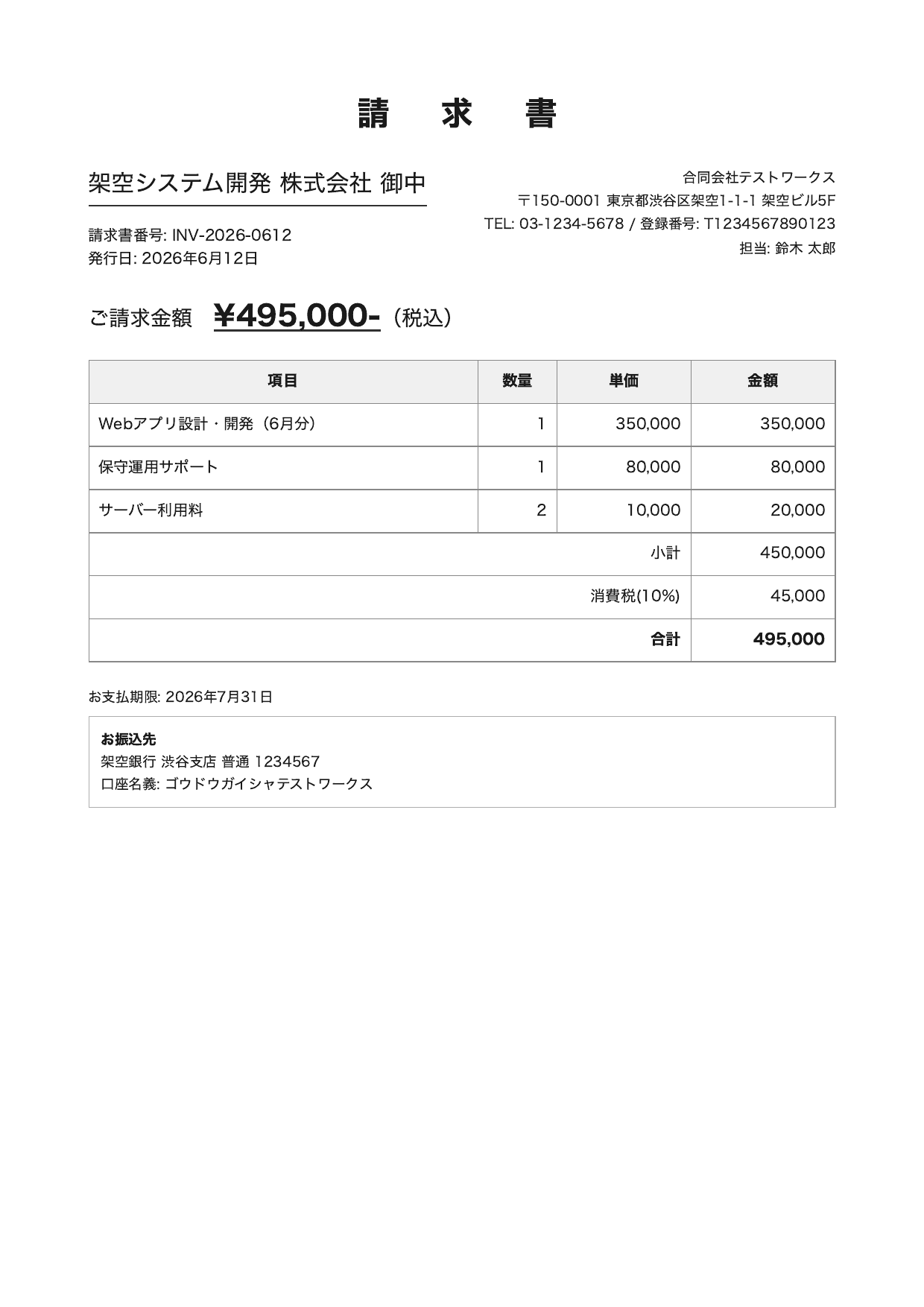
請求書(架空・A4)
Gemma 4 31B / PNG 出力(クリックすると展開します)
{
  "doc_type": "請求書",
  "issuer": {
    "name": "合同会社テストワークス",
    "address": "〒150-0001 東京都渋谷区架空1-1-1 架空ビル5F",
    "tel": "03-1234-5678",
    "registration_number": "T1234567890123",
    "contact_person": "鈴木太郎"
  },
  "recipient": {
    "name": "架空システム開発株式会社 御中"
  },
  "invoice_details": {
    "invoice_number": "INV-2026-0612",
    "issue_date": "2026年6月12日",
    "payment_deadline": "2026年7月31日",
    "total_amount": 495000,
    "currency": "JPY"
  },
  "items": [
    { "description": "Webアプリ設計・開発(6月分)", "quantity": 1, "unit_price": 350000, "amount": 350000 },
    { "description": "保守運用サポート", "quantity": 1, "unit_price": 80000, "amount": 80000 },
    { "description": "サーバー利用料", "quantity": 2, "unit_price": 10000, "amount": 20000 }
  ],
  "summary": {
    "subtotal": 450000,
    "consumption_tax_rate": "10%",
    "consumption_tax_amount": 45000,
    "total_amount": 495000
  },
  "payment_info": {
    "bank_name": "架空銀行",
    "branch_name": "渋谷支店",
    "account_type": "普通",
    "account_number": "1234567",
    "account_holder": "ゴウドウガイシャテストワークス"
  }
}
Gemma 4 31B / PDF 出力(クリックすると展開します)
{
  "doc_type": "請求書",
  "bill_to": "架空システム開発 株式会社 御中",
  "issuer": {
    "company_name": "合同会社テストワークス",
    "address": "〒150-0001 東京都渋谷区架空1-1-1 架空ビル5F",
    "tel": "03-1234-5678",
    "registration_number": "T1234567890123",
    "contact_person": "鈴木 太郎"
  },
  "invoice_details": {
    "invoice_number": "INV-2026-0612",
    "issue_date": "2026年6月12日",
    "payment_deadline": "2026年7月31日",
    "total_amount": 495000,
    "currency": "JPY"
  },
  "line_items": [
    { "description": "Webアプリ設計・開発 (6月分)", "quantity": 1, "unit_price": 350000, "amount": 350000 },
    { "description": "保守運用サポート", "quantity": 1, "unit_price": 80000, "amount": 80000 },
    { "description": "サーバー利用料", "quantity": 2, "unit_price": 10000, "amount": 20000 }
  ],
  "summary": {
    "subtotal": 450000,
    "tax_rate": "10%",
    "tax_amount": 45000,
    "total": 495000
  },
  "payment_info": {
    "bank_name": "架空銀行",
    "branch_name": "渋谷支店",
    "account_type": "普通",
    "account_number": "1234567",
    "account_holder": "ゴウドウガイシャテストワークス"
  }
}
Claude Sonnet 4.6 / PNG 出力(クリックすると展開します)
{
  "doc_type": "請求書",
  "invoice_number": "INV-2026-0612",
  "issue_date": "2026-06-12",
  "payment_due_date": "2026-07-31",
  "bill_to": { "company_name": "架空システム開発 株式会社" },
  "bill_from": {
    "company_name": "合同会社テストワークス",
    "postal_code": "150-0001",
    "address": "東京都渋谷区架空1-1-1 架空ビル5F",
    "tel": "03-1234-5678",
    "registration_number": "T1234567890123",
    "contact_person": "鈴木 太郎"
  },
  "total_amount_with_tax": 495000,
  "items": [
    { "description": "Webアプリ設計・開発(6月分)", "quantity": 1, "unit_price": 350000, "amount": 350000 },
    { "description": "保守運用サポート", "quantity": 1, "unit_price": 80000, "amount": 80000 },
    { "description": "サーバー利用料", "quantity": 2, "unit_price": 10000, "amount": 20000 }
  ],
  "subtotal": 450000,
  "tax_rate": 0.10,
  "tax_amount": 45000,
  "total": 495000,
  "bank_transfer": {
    "bank_name": "架空銀行",
    "branch_name": "渋谷支店",
    "account_type": "普通",
    "account_number": "1234567",
    "account_holder": "ゴウドウガイシャテストワークス"
  }
}
Claude Sonnet 4.6 / PDF 出力(クリックすると展開します)
{
  "doc_type": "請求書",
  "invoice_number": "INV-2026-0612",
  "issue_date": "2026-06-12",
  "bill_to": { "company_name": "架空システム開発 株式会社" },
  "bill_from": {
    "company_name": "合同会社テストワークス",
    "postal_code": "150-0001",
    "address": "東京都渋谷区架空1-1-1 架空ビル5F",
    "tel": "03-1234-5678",
    "registration_number": "T1234567890123",
    "contact_person": "鈴木 太郎"
  },
  "items": [
    { "description": "Webアプリ設計・開発(6月分)", "quantity": 1, "unit_price": 350000, "amount": 350000 },
    { "description": "保守運用サポート", "quantity": 1, "unit_price": 80000, "amount": 80000 },
    { "description": "サーバー利用料", "quantity": 2, "unit_price": 10000, "amount": 20000 }
  ],
  "subtotal": 450000,
  "tax_rate": 0.10,
  "tax_amount": 45000,
  "total_amount": 495000,
  "payment_due_date": "2026-07-31",
  "bank_transfer_info": {
    "bank_name": "架空銀行",
    "branch_name": "渋谷支店",
    "account_type": "普通",
    "account_number": "1234567",
    "account_holder": "ゴウドウガイシャテストワークス"
  }
}
請求書では、請求番号・明細3行・小計・税・合計・振込先まで、4 パターンとも数値が正確でした。
請求先・発行元のキー名はモデル・形式で分かれ(請求先が recipient / bill_to、発行元が issuer / bill_from)、Gemma 4 の PDF では請求先が文字列で返り、明細の括弧も半角((6月分))になりました。
3.2 給与明細
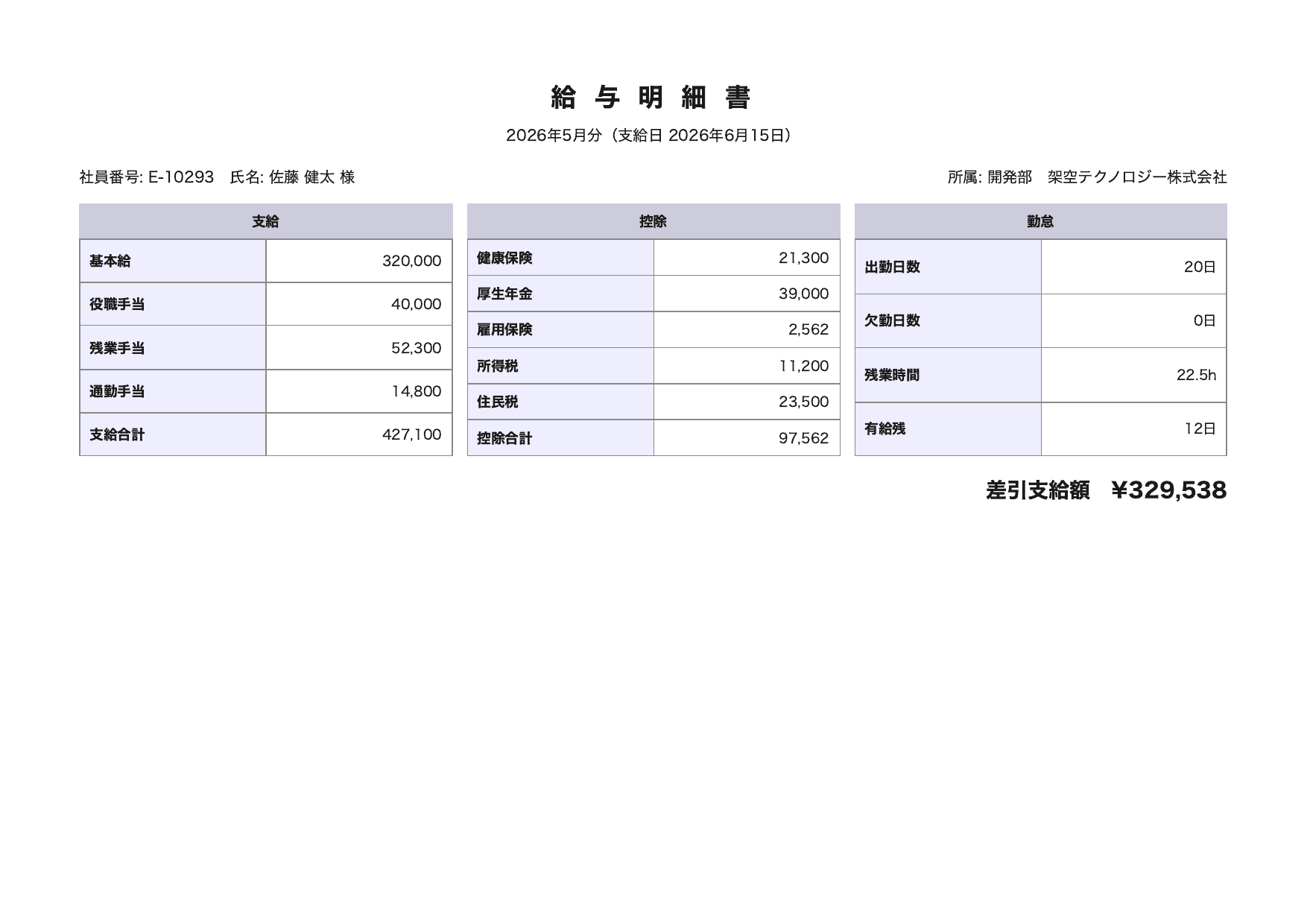
給与明細(架空・A4横)
Gemma 4 31B / PNG 出力(クリックすると展開します)
{
  "doc_type": "給与明細書",
  "employee_info": {
    "employee_number": "E-10293",
    "name": "佐藤 健太",
    "department": "開発部",
    "company": "架空テクノロジー株式会社"
  },
  "pay_period": {
    "target_month": "2026年5月分",
    "payment_date": "2026年6月15日"
  },
  "earnings": {
    "basic_salary": 320000,
    "executive_allowance": 40000,
    "overtime_allowance": 52300,
    "commuting_allowance": 14800,
    "total_earnings": 427100
  },
  "deductions": {
    "health_insurance": 21300,
    "employees_pension": 39000,
    "employment_insurance": 2562,
    "income_tax": 11200,
    "residence_tax": 23500,
    "total_deductions": 97562
  },
  "attendance": {
    "working_days": 20,
    "absent_days": 0,
    "overtime_hours": 22.5,
    "paid_leave_days": 12
  },
  "net_pay": 329538
}
Gemma 4 31B / PDF 出力(クリックすると展開します)
{
  "doc_type": "給与明細書",
  "employee_info": {
    "employee_number": "E-10293",
    "name": "佐藤 健太",
    "department": "開発部",
    "company": "架空テクノロジー株式会社"
  },
  "pay_period": {
    "target_month": "2026年5月分",
    "payment_date": "2026年6月15日"
  },
  "earnings": {
    "breakdown": [
      { "item": "基本給", "amount": 320000 },
      { "item": "役職手当", "amount": 40000 },
      { "item": "残業手当", "amount": 52300 },
      { "item": "通勤手当", "amount": 14800 }
    ],
    "total_earnings": 427100
  },
  "deductions": {
    "breakdown": [
      { "item": "健康保険", "amount": 21300 },
      { "item": "厚生年金", "amount": 39000 },
      { "item": "雇用保険", "amount": 2562 },
      { "item": "所得税", "amount": 11200 },
      { "item": "住民税", "amount": 23500 }
    ],
    "total_deductions": 97562
  },
  "attendance": {
    "working_days": 20,
    "absent_days": 0,
    "overtime_hours": 22.5,
    "paid_leave_remaining": 12
  },
  "net_payment": 329538
}
Claude Sonnet 4.6 / PNG 出力(クリックすると展開します)
{
  "doc_type": "給与明細書",
  "period": { "year": 2026, "month": 5, "label": "2026年5月分" },
  "payment_date": "2026年6月15日",
  "employee": {
    "employee_id": "E-10293",
    "name": "佐藤 健太",
    "department": "開発部",
    "company": "架空テクノロジー株式会社"
  },
  "earnings": {
    "base_salary": 320000,
    "position_allowance": 40000,
    "overtime_allowance": 52300,
    "commuting_allowance": 14800,
    "total_earnings": 427100
  },
  "deductions": {
    "health_insurance": 21300,
    "welfare_pension": 39000,
    "employment_insurance": 2562,
    "income_tax": 11200,
    "resident_tax": 23500,
    "total_deductions": 97562
  },
  "attendance": {
    "working_days": 20,
    "absent_days": 0,
    "overtime_hours": 22.5,
    "paid_leave_remaining": 12
  },
  "net_payment": 329538
}
Claude Sonnet 4.6 / PDF 出力(クリックすると展開します)
{
  "doc_type": "給与明細書",
  "period": { "year": 2026, "month": 5, "label": "2026年5月分" },
  "payment_date": "2026年6月15日",
  "employee": {
    "employee_number": "E-10293",
    "name": "佐藤 健太",
    "department": "開発部"
  },
  "company": { "name": "架空テクノロジー株式会社" },
  "earnings": {
    "base_salary": 320000,
    "position_allowance": 40000,
    "overtime_allowance": 52300,
    "commuting_allowance": 14800,
    "total_earnings": 427100
  },
  "deductions": {
    "health_insurance": 21300,
    "welfare_pension": 39000,
    "employment_insurance": 2562,
    "income_tax": 11200,
    "resident_tax": 23500,
    "total_deductions": 97562
  },
  "attendance": {
    "working_days": 20,
    "absent_days": 0,
    "overtime_hours": 22.5,
    "remaining_paid_leave_days": 12
  },
  "net_payment": 329538
}
給与明細は3テーブル構成で今回最も複雑ですが、支給5項目・控除5項目・勤怠・差引支給額(329,538円)まで、4 パターンとも数値が正確でした。
ただし同じ Gemma 4 でも、PNG は支給・控除をフラットなキーで、PDF は配列(breakdown)で返しており、構造が変わりました。
3.3 出張旅費精算書
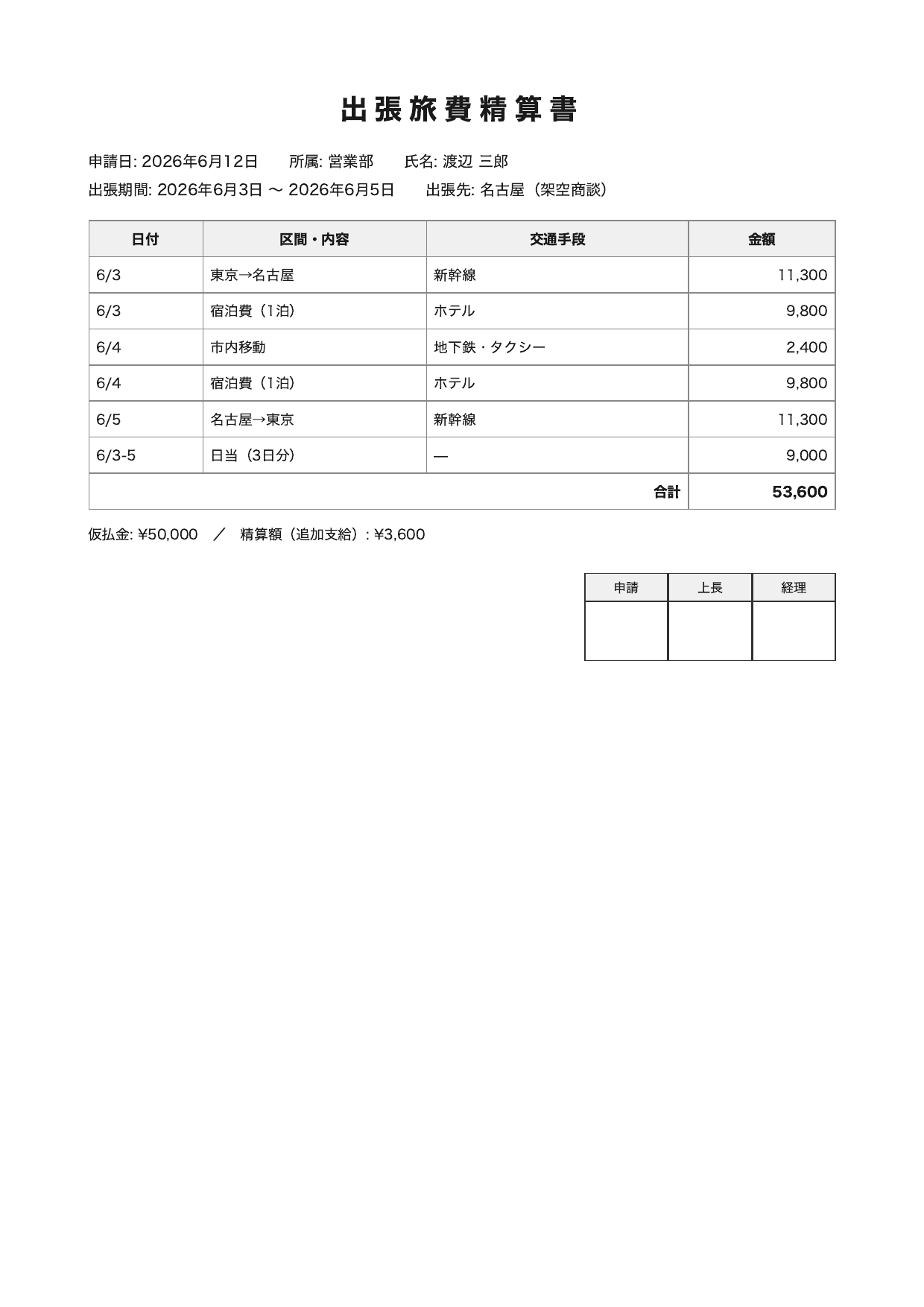
出張旅費精算書(架空・A4)
Gemma 4 31B / PNG 出力(クリックすると展開します)
{
  "doc_type": "出張旅費精算書",
  "application_date": "2026年6月12日",
  "department": "営業部",
  "name": "渡辺 三郎",
  "business_trip_period": {
    "start_date": "2026年6月3日",
    "end_date": "2026年6月5日"
  },
  "destination": "名古屋(空架商談)",
  "expenses": [
    { "date": "6/3", "description": "東京→名古屋", "transportation": "新幹線", "amount": 11300 },
    { "date": "6/3", "description": "宿泊費(1泊)", "transportation": "ホテル", "amount": 9800 },
    { "date": "6/4", "description": "市内移動", "transportation": "地下鉄・タクシー", "amount": 2400 },
    { "date": "6/4", "description": "宿泊費(1泊)", "transportation": "ホテル", "amount": 9800 },
    { "date": "6/5", "description": "名古屋→東京", "transportation": "新幹線", "amount": 11300 },
    { "date": "6/3-5", "description": "日当(3日分)", "transportation": null, "amount": 9000 }
  ],
  "total_amount": 53600,
  "advance_payment": 50000,
  "settlement_amount": 3600
}
Gemma 4 31B / PDF 出力(クリックすると展開します)
{
  "doc_type": "出張旅費精算書",
  "application_date": "2026年6月12日",
  "department": "営業部",
  "name": "渡辺 三郎",
  "trip_period": {
    "start_date": "2026年6月3日",
    "end_date": "2026年6月5日"
  },
  "destination": "名古屋(架空商談)",
  "expenses": [
    { "date": "6/3", "description": "東京→名古屋", "transportation": "新幹線", "amount": 11300 },
    { "date": "6/3", "description": "宿泊費(1泊)", "transportation": "ホテル", "amount": 9800 },
    { "date": "6/4", "description": "市内移動", "transportation": "地下鉄・タクシー", "amount": 2400 },
    { "date": "6/4", "description": "宿泊費(1泊)", "transportation": "ホテル", "amount": 9800 },
    { "date": "6/5", "description": "名古屋→東京", "transportation": "新幹線", "amount": 11300 },
    { "date": "6/3-5", "description": "日当(3日分)", "transportation": "―", "amount": 9000 }
  ],
  "total_amount": 53600,
  "advance_payment": 50000,
  "settlement_amount": 3600
}
Claude Sonnet 4.6 / PNG 出力(クリックすると展開します)
{
  "doc_type": "出張旅費精算書",
  "申請日": "2026年6月12日",
  "所属": "営業部",
  "氏名": "渡辺 三郎",
  "出張期間": { "開始": "2026年6月3日", "終了": "2026年6月5日" },
  "出張先": "名古屋",
  "出張目的": "架空商談",
  "明細": [
    { "日付": "6/3", "区間・内容": "東京→名古屋", "交通手段": "新幹線", "金額": 11300 },
    { "日付": "6/3", "区間・内容": "宿泊費(1泊)", "交通手段": "ホテル", "金額": 9800 },
    { "日付": "6/4", "区間・内容": "市内移動", "交通手段": "地下鉄・タクシー", "金額": 2400 },
    { "日付": "6/4", "区間・内容": "宿泊費(1泊)", "交通手段": "ホテル", "金額": 9800 },
    { "日付": "6/5", "区間・内容": "名古屋→東京", "交通手段": "新幹線", "金額": 11300 },
    { "日付": "6/3-5", "区間・内容": "日当(3日分)", "交通手段": null, "金額": 9000 }
  ],
  "合計金額": 53600,
  "仮払金": 50000,
  "精算額": { "種別": "追加支給", "金額": 3600 },
  "承認欄": { "申請": null, "上長": null, "経理": null }
}
Claude Sonnet 4.6 / PDF 出力(クリックすると展開します)
{
  "doc_type": "出張旅費精算書",
  "申請日": "2026年6月12日",
  "所属": "営業部",
  "氏名": "渡辺 三郎",
  "出張期間": { "開始": "2026年6月3日", "終了": "2026年6月5日" },
  "出張先": "名古屋(架空商談)",
  "明細": [
    { "日付": "6/3", "区間・内容": "東京→名古屋", "交通手段": "新幹線", "金額": 11300 },
    { "日付": "6/3", "区間・内容": "宿泊費(1泊)", "交通手段": "ホテル", "金額": 9800 },
    { "日付": "6/4", "区間・内容": "市内移動", "交通手段": "地下鉄・タクシー", "金額": 2400 },
    { "日付": "6/4", "区間・内容": "宿泊費(1泊)", "交通手段": "ホテル", "金額": 9800 },
    { "日付": "6/5", "区間・内容": "名古屋→東京", "交通手段": "新幹線", "金額": 11300 },
    { "日付": "6/3-5", "区間・内容": "日当(3日分)", "交通手段": null, "金額": 9000 }
  ],
  "合計金額": 53600,
  "仮払金": 50000,
  "精算額": { "種別": "追加支給", "金額": 3600 },
  "承認欄": { "申請": null, "上長": null, "経理": null }
}
出張旅費精算書は明細が6行ありますが、各行の金額と合計53,600円、仮払金50,000円、追加支給3,600円は、4 パターンとも正確でした。
ただし、Gemma 4 の PNG だけが出張先「名古屋(架空商談)」を「名古屋(空架商談)」と読み、「架空」と「空架」を取り違えました。
{ "destination": "名古屋(空架商談)" }
同じ Gemma 4 でも PDF では正しく読めています。
金額や明細の数値ではありませんが、固有名詞の誤読が起こりうる例です。
この文書では、空欄の扱いと項目の分け方もモデルや形式で分かれました。
承認欄は中身が空欄ですが、Sonnet 4.6 は PNG・PDF とも null として出力し、Gemma 4 は PNG・PDF とも承認欄のキーを省きました。
出張先は、Sonnet 4.6 の PNG だけが「出張先」と「出張目的」の2つに分け、残り3つは1つにまとめました。
4. 料金・速度の比較
形式別・モデル別の集計です。
料金は実測の入出力トークンに各モデルの単価を掛けて算出しました。
| モデル | 形式 | 平均速度 | 平均入力tok | 平均出力tok | 料金/件 | 1000件換算 |
|---|---|---|---|---|---|---|
| Gemma 4 31B | PNG | 3.83秒 | 337 | 465 | 0.035円 | 35.0円 |
| Gemma 4 31B | 3.85秒 | 337 | 504 | 0.037円 | 37.3円 | |
| Sonnet 4.6 | PNG | 8.00秒 | 1,648 | 485 | 1.834円 | 1,833.6円 |
| Sonnet 4.6 | 6.15秒 | 2,020 | 482 | 1.995円 | 1,995.0円 |
料金差は、Gemma 4 の PNG(0.035円/件)と Sonnet 4.6 の PNG(1.834円/件)で約52倍です。
差が単価の倍率以上に開く主因は、入力トークン量です。
Gemma 4 は画像・PDF を約337トークンで入力するのに対し、Sonnet 4.6 は画像を1,648〜2,020トークンで入力しています。
単価差に加えて、入力トークン量の差が料金差を押し広げています。
なお画像の入力トークンは、ファイルの大きさ(KB)では決まりません。
Gemma 4 は、画像を決まった数のトークンに変換する設計で、既定では1枚あたり280トークンです。
このため PNG でも PDF でも画像のトークン数は一定で、今回はこれに日本語プロンプト分が加わり、どちらも約337トークンで安定しました。
the default is 280 soft tokens per image
引用元: Gemma 4 | Hugging Face Transformers
単価のうち、Gemma 4 31B は入力 $0.14 / 出力 $0.40(1M トークンあたり、US リージョン)です。
"Gemma 4 31B" costs "$0.14" per 1M input tokens and "$0.40" per 1M output tokens.
引用元: Amazon Bedrock Pricing | AWS
Claude Sonnet 4.6 は、入力 $3.00 / 出力 $15.00(1M トークンあたり)です。
Claude Sonnet 4.6 — Price per 1M input tokens: $3.00 / Price per 1M output tokens: $15.00
引用元: Amazon Bedrock Pricing | AWS
速度は、今回の計測では Gemma 4 が約1.5〜2倍速い結果でした。
ただし応答時間は API 経路やネットワーク条件に左右されるため、モデル単体の厳密なレイテンシ比較としては扱えません。
5. 精度の比較
各文書の主要フィールドを、元データと1項目ずつ照合しました。
照合したのは金額・明細・日付・合計計算です。
| 文書 | 照合した主要フィールド | Gemma PNG | Gemma PDF | Sonnet PNG | Sonnet PDF |
|---|---|---|---|---|---|
| 請求書 | 請求番号・明細3行・小計/税/合計・振込先・登録番号 | 一致 | 一致 | 一致 | 一致 |
| 給与明細 | 支給5項目・控除5項目・勤怠4項目・差引支給額 | 一致 | 一致 | 一致 | 一致 |
| 出張旅費精算書 | 明細6行・合計・仮払金・追加支給 | 一致 | 一致 | 一致 | 一致 |
金額や数値は、全12パターンで誤りがありませんでした。
給与明細の差引支給額 329,538 円のような計算結果も、すべて元データと一致しました。
主要な金額・数値の精度は、Gemma 4 31B と Claude Sonnet 4.6 で互角です。
ただし固有名詞まで含めると、今回の検証では Gemma 4 の PNG に誤読が1件あり、Sonnet 4.6 は誤読がありませんでした。
観測した範囲では、Sonnet 4.6 の方がわずかに安定していました。
一方、3章で文書ごとに示したとおり、補助的な項目では差や揺れがありました。
金額や明細の誤読ではなく、空欄や複合表記、構造、キー名の解釈差です。
- 請求書: 請求先・発行元のキー名がモデルや形式で分かれた
- 給与明細: 同じ Gemma 4 でも支給・控除の構造が、フラットなキーと配列に分かれた
- 出張旅費精算書: Gemma 4 の PNG が固有名詞を1件誤読。承認欄や出張先の扱いも分かれた
こうした揺れは、スキーマを指定していないために実行ごとに出ます。
業務で項目名や構造を固定したい場合は、Structured Outputs によるスキーマ指定の併用を検討するとよいでしょう。
6. まとめ
定型ビジネス文書(請求書・給与明細・出張旅費精算書の3種)の JSON 構造化抽出では、主要な金額・数値の精度は Gemma 4 31B と Claude Sonnet 4.6 で互角でした。
ただし今回の検証では、Gemma 4 の PNG に固有名詞の誤読が1件あり、Sonnet 4.6 は誤読がなく、観測した範囲では Sonnet 4.6 の方がわずかに安定していました。
料金は Gemma 4 の方が大幅に安く、今回の単価では約50分の1でした。
速度も Gemma 4 の方が速く、今回の計測では約2倍でした。
OCR や構造化抽出のように量を捌くタスクでは、低単価が効くため Gemma 4 31B が有力な選択肢になります。
品質が要る処理はフロンティアモデル、量を捌く処理は低単価モデルという使い分けは、考慮したいところです。