
CUR 2.0のAthena統合をセットアップし、Step FunctionsとPartition Projectionで改良してみた

はじめに
2026年6月2日、AWSはCUR 2.0(Cost and Usage Report 2.0)のAthenaおよびRedshift統合サポートを発表しました。
CUR 2.0はData Exports経由で作成するコストレポートです。固定スキーマ・Parquet形式・ネストカラム(product、resource_tags等がmap型)といった特徴があります。今回のアップデートにより、エクスポート作成時に「Report data integration: Amazon Athena」を選択できるようになりました。選択するとS3にCloudFormationテンプレート(crawler-cfn.yml)が自動配信されます。これをデプロイするだけでGlue Crawler + Lambdaによるパーティション自動管理が構成されます。
以下、公式フロー → 課題整理 → 代替手法の順で進めます。
| 公式 (Crawler) | Step Functions | Partition Projection | |
|---|---|---|---|
| セットアップ | CFn 1クリック | CFn デプロイ | DDL 1文 |
| パーティション管理コスト/月 | ~$1.03 | ~$0.011 | $0 |
| パーティションのCatalog登録 | あり | あり | なし |
公式フローでセットアップ
マネジメントコンソールからCUR 2.0エクスポートを作成し、公式CFnテンプレートをデプロイしてAthenaでクエリ可能にするまでの手順です。
S3 バケット作成
CURデータの配信先となるS3バケットを作成します(us-east-1)。
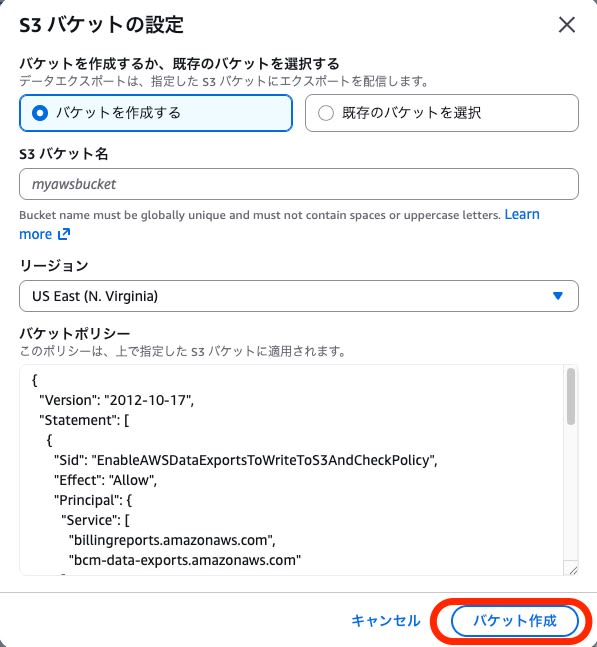
バケットポリシーはエクスポート作成時に自動設定されるため、この時点では空のバケットを作成するだけで構いません。
CLIでの実行
aws s3api create-bucket --bucket {bucket-name} --region us-east-1

aws s3api put-bucket-policy --bucket {bucket-name} \
  --policy file://bucket-policy.json
バケットポリシーの内容は公式ドキュメントを参照してください。Principalに bcm-data-exports.amazonaws.com と billingreports.amazonaws.com を許可します。
Data Exports でエクスポート作成
Billing and Cost ManagementコンソールのData Exportsから「Create export」を選択します。
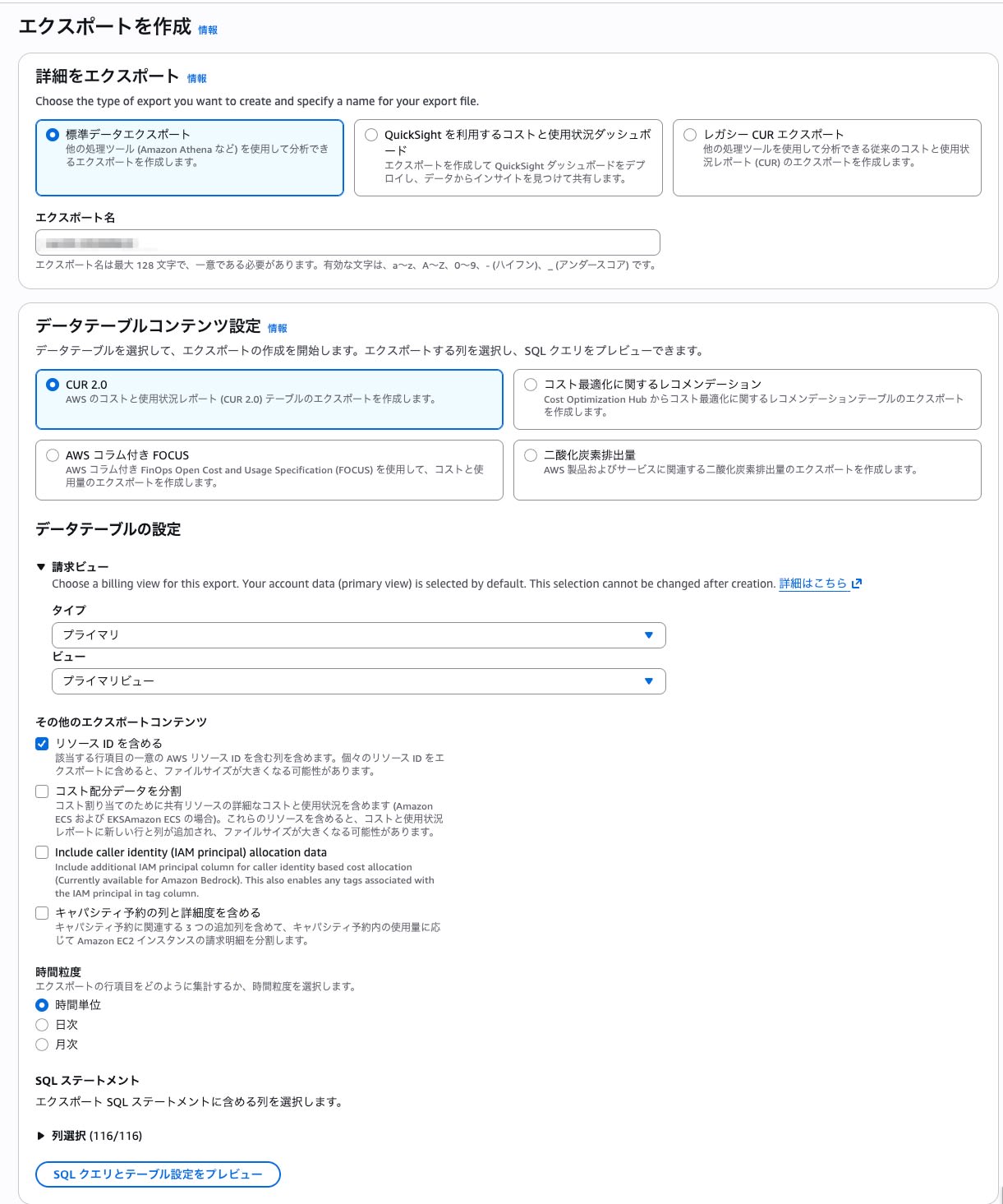
設定のポイントは以下の通りです。
- Export type: Standard data export
- Table:
COST_AND_USAGE_REPORT(CUR 2.0) - Include resource IDs: 有効
- Time granularity: HOURLY
- Report data integration: Amazon Athena ← 今回のポイント
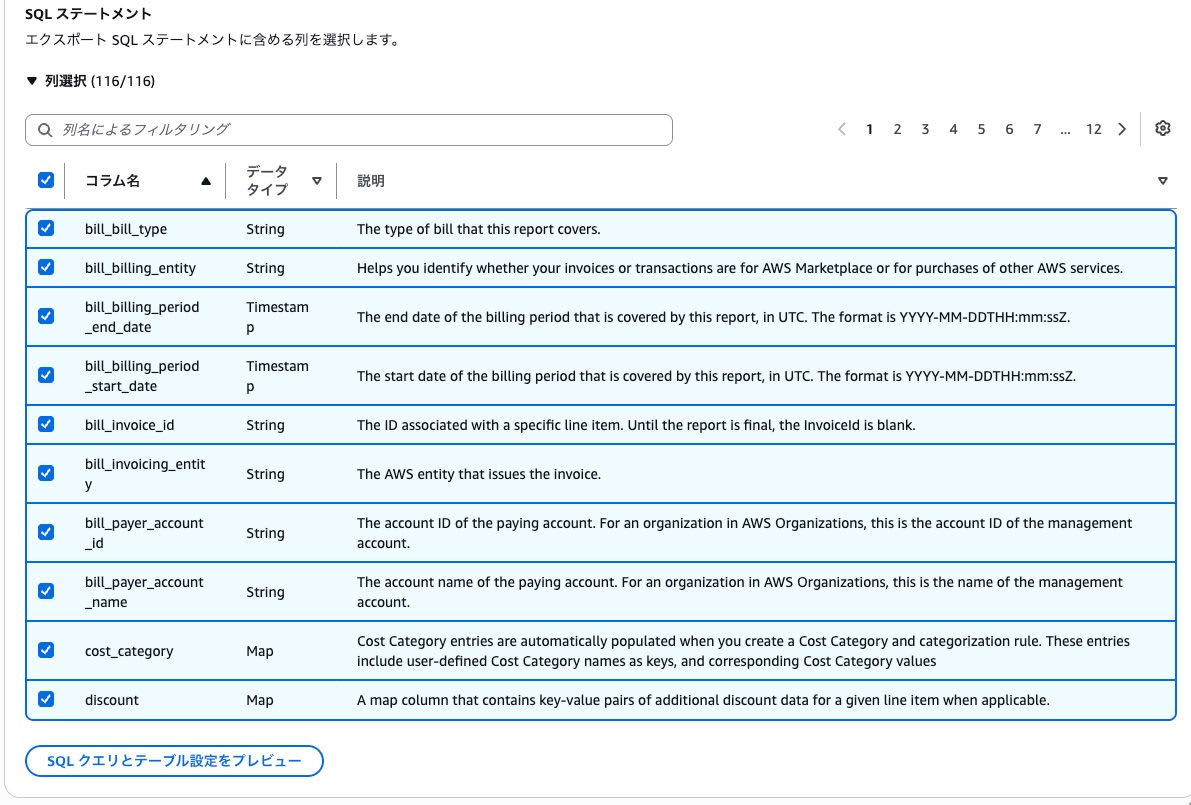
Athena統合を選択すると、出力形式がParquet / Overwriteに固定されます。
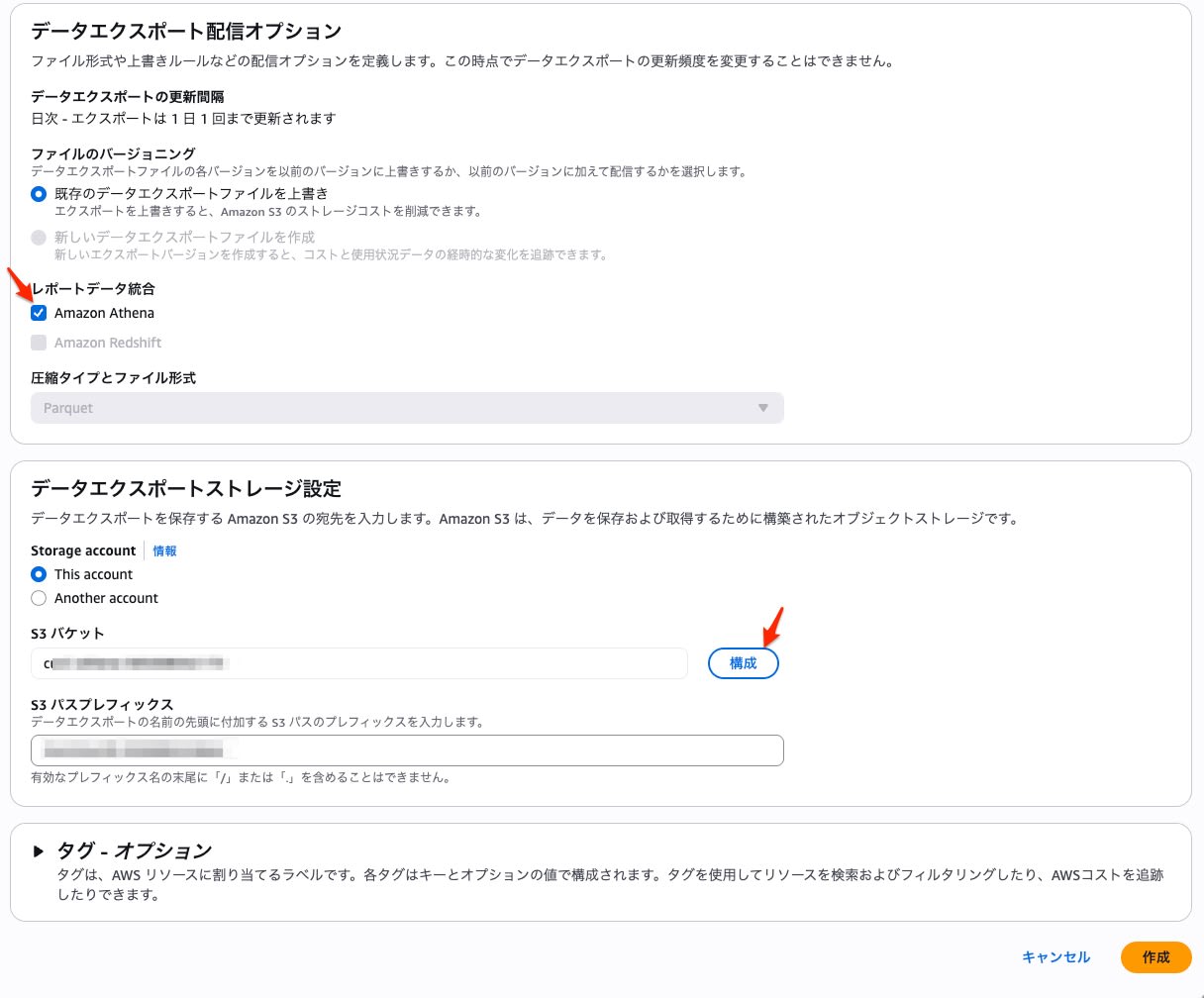
S3バケットとプレフィックスを指定して作成します。
CLIでの実行
aws bcm-data-exports create-export --region us-east-1 \
  --export '{
    "Name": "{export-name}",
    "DataQuery": {
      "QueryStatement": "SELECT * FROM COST_AND_USAGE_REPORT",
      "TableConfigurations": {
        "COST_AND_USAGE_REPORT": {
          "INCLUDE_RESOURCES": "TRUE",
          "TIME_GRANULARITY": "HOURLY"
        }
      }
    },
    "DestinationConfigurations": {
      "S3Destination": {
        "S3Bucket": "{bucket-name}",
        "S3Prefix": "cur2",
        "S3Region": "us-east-1",
        "S3OutputConfigurations": {
          "OutputType": "CUSTOM",
          "Format": "PARQUET",
          "Compression": "PARQUET",
          "Overwrite": "OVERWRITE_REPORT"
        }
      }
    },
    "RefreshCadence": {"Frequency": "SYNCHRONOUS"}
  }'
データ配信確認
エクスポート作成後、最大24時間で初回データがS3に配信されます。配信後のS3構造は以下の通りです。
cur2/{export-name}/
├── crawler-cfn.yml                          ← 公式 CFn テンプレート
├── data/BILLING_PERIOD=2026-06/*.snappy.parquet
├── execution_status/execution_status.parquet
└── metadata/BILLING_PERIOD=2026-06/
    ├── {export-name}-Manifest.json
    └── {export-name}-create-table.sql       ← Athena DDL(参考用)
crawler-cfn.yml が配信されていることを確認して次のステップへ進みます。
公式 CFn テンプレートのデプロイ
CloudFormationコンソールから crawler-cfn.yml のS3 URLを指定してデプロイします。
デプロイされるリソースは以下の通りです。
| リソース | タイプ |
|---|---|
| Glue Database | AWS::Glue::Database |
| Glue Crawler | AWS::Glue::Crawler |
| execution_status テーブル | AWS::Glue::Table |
| Initializer Lambda | AWS::Lambda::Function |
| S3 Notification Lambda | AWS::Lambda::Function |
| IAM Role × 3 | AWS::IAM::Role |
| Custom Resource × 2 | AWS::CloudFormation::CustomResource |
デプロイ完了後、Crawlerが初回実行されて data テーブルがGlue Catalogに作成されます。
CLIでの実行
aws cloudformation create-stack \
  --stack-name cur2-athena-crawler \
  --template-url https://s3.us-east-1.amazonaws.com/{bucket-name}/cur2/{export-name}/crawler-cfn.yml \
  --capabilities CAPABILITY_IAM --region us-east-1

aws cloudformation wait stack-create-complete \
  --stack-name cur2-athena-crawler --region us-east-1
Athena でクエリ実行
Athenaコンソールで動作確認します。
-- 配信状態確認
SELECT status_code FROM athenadataexports_{export_name}.execution_status;

-- サービス別コスト集計
SELECT line_item_product_code, SUM(line_item_unblended_cost) as cost
FROM athenadataexports_{export_name}.data
GROUP BY line_item_product_code
ORDER BY cost DESC LIMIT 10;
以上で公式フローのセットアップは完了です。
公式テンプレートの中身と課題
公式テンプレート(crawler-cfn.yml)の動作は、S3イベント → Lambda → Crawler → テーブル更新です。
crawler-cfn.ymlの構造(リソース一覧)
テンプレートには以下のリソースが定義されています。
- AWSDataExportsDatabase: Glue Database
- AWSDataExportsCrawler: S3パスを走査し、テーブル定義とパーティションを自動検出
- AWSDataExportsReportStatusTable:
execution_statusテーブル(配信状態管理) - AWSDataExportsInitializer: Custom ResourceでCrawlerの初回実行をトリガーするLambda
- AWSDataExportsS3Notification: S3 Event Notificationを登録するLambda
- IAM Role × 3: Crawler用、Lambda実行用、S3通知用
この構成には以下の課題があります。
Crawlerの冗長性: CUR 2.0は固定スキーマです。カラム名・型は変わりません。にもかかわらず、データ配信のたびにCrawlerがフルスキャンを実行します。実質的に必要な処理は「月替わり時のパーティション追加」だけです。
実行時間とコスト: 検証では1回のCrawler実行に46.672秒かかりました。CUR 2.0の配信頻度(SYNCHRONOUS、最大3回/日)から月90回起動すると仮定した場合の概算は以下の通りです。
- 46.672秒 × 2 DPU × 90回 ÷ 3600 × $0.44/DPU-hour = ~$1.03/月
Lambda ランタイム保守: テンプレートに含まれるLambdaは nodejs22.x で実装されており、ランタイムのEOLに合わせた更新が将来必要になります。
Step Functions でパーティション管理に切り替え
動作フロー
- S3にデータが配信される → EventBridgeでキーの
wildcardパターンをフィルタ - Step FunctionsがS3キーから
billing_periodを抽出 GetPartitionsで既存パーティションを確認 → 存在すればスキップ、なければBatchCreatePartition
※本検証ではパーティション数が少ないため GetPartitions のページングは考慮していません。
検証結果
Step Functionsの実行時間は653ms〜808msでした(新規パーティション作成時が808ms、既存パーティションでスキップ時が653ms)。Crawlerの47秒に対して約1/60です。
コストの概算(状態遷移数に基づく概算であり、実請求額ではありません):
- Standard Workflow: $0.000025/状態遷移
- 新規パーティション: 5遷移 × 90回/月 = 450遷移 = ~$0.011/月
- 既存パーティション(スキップ): 4遷移
※実行回数はCURの配信回数ではなく、作成されたParquetオブジェクト数に依存します。本試算では90実行/月と仮定しています。
切り替え手順
aws cloudformation update-stack \
  --stack-name cur2-athena-crawler \
  --template-body file://cfn-partition-manager.yml \
  --capabilities CAPABILITY_IAM --region us-east-1

aws cloudformation wait stack-update-complete \
  --stack-name cur2-athena-crawler --region us-east-1
UpdateStackにより、不要になったLambda・Crawler・Custom Resourceが削除され、Step Functions・EventBridge Ruleが追加されます。Glue Databaseは同じ論理IDで維持されるため削除されません。
S3バケットのEventBridge通知を有効化します。
aws s3api put-bucket-notification-configuration \
  --bucket {bucket-name} \
  --notification-configuration '{"EventBridgeConfiguration": {}}'
UpdateStackで何が起きるか
AWSDataExportsDatabase(Glue Database): 新テンプレートに同じ論理IDで存在 → 維持dataテーブル: Crawlerが動的に作成したCFn管理外のリソース → Databaseが残れば影響なし- Lambda × 2、Crawler、Custom Resource × 2、IAM Role × 3: 新テンプレートに存在しない → 削除
事前にChange Setで確認できます:
aws cloudformation create-change-set \
  --stack-name cur2-athena-crawler \
  --template-body file://cfn-partition-manager.yml \
  --capabilities CAPABILITY_IAM \
  --change-set-name migrate-to-sfn --region us-east-1

aws cloudformation describe-change-set \
  --stack-name cur2-athena-crawler \
  --change-set-name migrate-to-sfn --region us-east-1 \
  --query 'Changes[].ResourceChange.{Action:Action,LogicalId:LogicalResourceId,Type:ResourceType}'
cfn-partition-manager.yml全文
AWSTemplateFormatVersion: 2010-09-09
Description: CUR 2.0 Athena - Lambda-less partition management (EventBridge + Step Functions)

Resources:

  AWSDataExportsDatabase:
    Type: AWS::Glue::Database
    Properties:
      DatabaseInput:
        Name: athenadataexports_{export_name}
      CatalogId: !Ref AWS::AccountId

  AWSDataExportsReportStatusTable:
    Type: AWS::Glue::Table
    DependsOn: AWSDataExportsDatabase
    Properties:
      DatabaseName: athenadataexports_{export_name}
      CatalogId: !Ref AWS::AccountId
      TableInput:
        Name: execution_status
        TableType: EXTERNAL_TABLE
        StorageDescriptor:
          Columns:
            - Name: status_code
              Type: string
          InputFormat: org.apache.hadoop.hive.ql.io.parquet.MapredParquetInputFormat
          OutputFormat: org.apache.hadoop.hive.ql.io.parquet.MapredParquetOutputFormat
          SerdeInfo:
            SerializationLibrary: org.apache.hadoop.hive.ql.io.parquet.serde.ParquetHiveSerDe
          Location: s3://{bucket-name}/cur2/{export-name}/execution_status/

  StateMachineRole:
    Type: AWS::IAM::Role
    Properties:
      AssumeRolePolicyDocument:
        Version: 2012-10-17
        Statement:
          - Effect: Allow
            Principal:
              Service: states.amazonaws.com
            Action: sts:AssumeRole
      Policies:
        - PolicyName: GluePartitionAccess
          PolicyDocument:
            Version: 2012-10-17
            Statement:
              - Effect: Allow
                Action:
                  - glue:GetPartitions
                  - glue:BatchCreatePartition
                  - glue:GetTable
                Resource:
                  - !Sub arn:${AWS::Partition}:glue:${AWS::Region}:${AWS::AccountId}:catalog
                  - !Sub arn:${AWS::Partition}:glue:${AWS::Region}:${AWS::AccountId}:database/athenadataexports_{export_name}
                  - !Sub arn:${AWS::Partition}:glue:${AWS::Region}:${AWS::AccountId}:table/athenadataexports_{export_name}/data

  PartitionManager:
    Type: AWS::StepFunctions::StateMachine
    Properties:
      StateMachineName: cur2-athena-partition-manager
      RoleArn: !GetAtt StateMachineRole.Arn
      DefinitionString: |
        {
          "QueryLanguage": "JSONata",
          "Comment": "Add new CUR 2.0 partition to Glue table if not exists",
          "StartAt": "ExtractBillingPeriod",
          "States": {
            "ExtractBillingPeriod": {
              "Type": "Pass",
              "Assign": {
                "billingPeriod": "{% $split($split($states.input.detail.object.key, '=')[1], '/')[0] %}"
              },
              "Next": "GetPartitions"
            },
            "GetPartitions": {
              "Type": "Task",
              "Resource": "arn:aws:states:::aws-sdk:glue:getPartitions",
              "Arguments": {
                "DatabaseName": "athenadataexports_{export_name}",
                "TableName": "data"
              },
              "Assign": {
                "existingPeriods": "{% $states.result.Partitions.Values[].[0] %}"
              },
              "Next": "CheckPartitionExists"
            },
            "CheckPartitionExists": {
              "Type": "Choice",
              "Choices": [
                {
                  "Condition": "{% $billingPeriod in $existingPeriods %}",
                  "Next": "PartitionExists"
                }
              ],
              "Default": "CreatePartition"
            },
            "CreatePartition": {
              "Type": "Task",
              "Resource": "arn:aws:states:::aws-sdk:glue:batchCreatePartition",
              "Arguments": {
                "DatabaseName": "athenadataexports_{export_name}",
                "TableName": "data",
                "PartitionInputList": [
                  {
                    "Values": ["{% $billingPeriod %}"],
                    "StorageDescriptor": {
                      "InputFormat": "org.apache.hadoop.hive.ql.io.parquet.MapredParquetInputFormat",
                      "OutputFormat": "org.apache.hadoop.hive.ql.io.parquet.MapredParquetOutputFormat",
                      "SerdeInfo": {
                        "SerializationLibrary": "org.apache.hadoop.hive.ql.io.parquet.serde.ParquetHiveSerDe",
                        "Parameters": {"serialization.format": "1"}
                      },
                      "Location": "{% 's3://{bucket-name}/cur2/{export-name}/data/BILLING_PERIOD=' & $billingPeriod & '/' %}"
                    }
                  }
                ]
              },
              "Next": "PartitionCreated"
            },
            "PartitionCreated": {"Type": "Succeed"},
            "PartitionExists": {"Type": "Succeed"}
          }
        }

  EventBridgeRole:
    Type: AWS::IAM::Role
    Properties:
      AssumeRolePolicyDocument:
        Version: 2012-10-17
        Statement:
          - Effect: Allow
            Principal:
              Service: events.amazonaws.com
            Action: sts:AssumeRole
      Policies:
        - PolicyName: StartStateMachine
          PolicyDocument:
            Version: 2012-10-17
            Statement:
              - Effect: Allow
                Action: states:StartExecution
                Resource: !GetAtt PartitionManager.Arn

  S3EventRule:
    Type: AWS::Events::Rule
    Properties:
      Name: cur2-athena-s3-event
      EventPattern:
        source:
          - aws.s3
        detail-type:
          - Object Created
        detail:
          bucket:
            name:
              - {bucket-name}
          object:
            key:
              - wildcard: cur2/{export-name}/data/BILLING_PERIOD=*/*.snappy.parquet
      State: ENABLED
      Targets:
        - Id: StepFunctionsTarget
          Arn: !GetAtt PartitionManager.Arn
          RoleArn: !GetAtt EventBridgeRole.Arn

Outputs:
  StateMachineArn:
    Value: !GetAtt PartitionManager.Arn
  DatabaseName:
    Value: athenadataexports_{export_name}
Partition Projection: DDL 1文で完結
AthenaのPartition Projectionを使えば、追加リソースなしでクエリ可能です。
特徴
- DDL 1文で完結。パーティション管理用の追加リソースなし、パーティション管理としての維持コスト $0
projection.billing_period.range = '2026-06,NOW'により、新しい月のパーティションを自動的にカバー- Glue Catalogに個別パーティションは登録されない(Athenaがクエリ実行時にパス解決)
いつ選ぶか
- Athenaからの参照のみで完結する場合
- Redshift Spectrumなど、Athena以外からGlue Catalogの個別パーティションを参照する用途が不要な場合
- 追加インフラを一切持ちたくない場合
DDL
Partition Projectionの核心は TBLPROPERTIES の設定です。
CREATE EXTERNAL TABLE athenadataexports_{export_name}.data_projected (
  -- カラム定義(全文は折りたたみ参照)
)
PARTITIONED BY (billing_period STRING)
ROW FORMAT SERDE 'org.apache.hadoop.hive.ql.io.parquet.serde.ParquetHiveSerDe'
STORED AS PARQUET
LOCATION 's3://{bucket-name}/cur2/{export-name}/data/'
TBLPROPERTIES (
  'projection.enabled' = 'true',
  'projection.billing_period.type' = 'date',
  'projection.billing_period.format' = 'yyyy-MM',
  'projection.billing_period.range' = '2026-06,NOW',
  'projection.billing_period.interval' = '1',
  'projection.billing_period.interval.unit' = 'MONTHS',
  'storage.location.template' = 's3://{bucket-name}/cur2/{export-name}/data/BILLING_PERIOD=${billing_period}/'
);
projection.billing_period.range に NOW を指定することで、月が替わってもDDLの再実行は不要です。
全カラム定義を含む完全なDDL
CREATE EXTERNAL TABLE athenadataexports_{export_name}.data_projected (
  identity_line_item_id STRING,
  identity_time_interval STRING,
  bill_invoice_id STRING,
  bill_invoicing_entity STRING,
  bill_billing_entity STRING,
  bill_bill_type STRING,
  bill_payer_account_id STRING,
  bill_payer_account_name STRING,
  bill_billing_period_start_date TIMESTAMP,
  bill_billing_period_end_date TIMESTAMP,
  line_item_usage_account_id STRING,
  line_item_usage_account_name STRING,
  line_item_line_item_type STRING,
  line_item_usage_start_date TIMESTAMP,
  line_item_usage_end_date TIMESTAMP,
  line_item_product_code STRING,
  line_item_usage_type STRING,
  line_item_operation STRING,
  line_item_availability_zone STRING,
  line_item_resource_id STRING,
  line_item_usage_amount DOUBLE,
  line_item_normalization_factor DOUBLE,
  line_item_normalized_usage_amount DOUBLE,
  line_item_currency_code STRING,
  line_item_unblended_rate STRING,
  line_item_unblended_cost DOUBLE,
  line_item_blended_rate STRING,
  line_item_blended_cost DOUBLE,
  line_item_net_unblended_rate STRING,
  line_item_net_unblended_cost DOUBLE,
  line_item_line_item_description STRING,
  line_item_tax_type STRING,
  line_item_legal_entity STRING,
  product MAP<STRING,STRING>,
  pricing_term STRING,
  pricing_unit STRING,
  pricing_public_on_demand_cost DOUBLE,
  pricing_public_on_demand_rate STRING,
  pricing_currency STRING,
  reservation_reservation_a_r_n STRING,
  reservation_net_recurring_fee_for_usage DOUBLE,
  reservation_net_unused_recurring_fee DOUBLE,
  reservation_net_unused_amortized_upfront_fee_for_billing_period DOUBLE,
  reservation_net_upfront_value DOUBLE,
  reservation_net_effective_cost DOUBLE,
  reservation_effective_cost DOUBLE,
  reservation_unused_quantity DOUBLE,
  reservation_unused_recurring_fee DOUBLE,
  reservation_unused_amortized_upfront_fee_for_billing_period DOUBLE,
  reservation_amortized_upfront_fee_for_billing_period DOUBLE,
  reservation_amortized_upfront_cost_for_usage DOUBLE,
  reservation_recurring_fee_for_usage DOUBLE,
  reservation_start_time STRING,
  reservation_end_time STRING,
  reservation_upfront_value DOUBLE,
  reservation_modification_status STRING,
  reservation_total_reserved_units STRING,
  reservation_total_reserved_normalized_units STRING,
  reservation_number_of_reservations STRING,
  reservation_subscription_id STRING,
  reservation_availability_zone STRING,
  savings_plan_savings_plan_a_r_n STRING,
  savings_plan_savings_plan_rate DOUBLE,
  savings_plan_savings_plan_effective_cost DOUBLE,
  savings_plan_total_commitment_to_date DOUBLE,
  savings_plan_used_commitment DOUBLE,
  savings_plan_net_savings_plan_effective_cost DOUBLE,
  savings_plan_net_amortized_upfront_commitment_for_billing_period DOUBLE,
  savings_plan_net_recurring_commitment_for_billing_period DOUBLE,
  savings_plan_amortized_upfront_commitment_for_billing_period DOUBLE,
  savings_plan_recurring_commitment_for_billing_period DOUBLE,
  savings_plan_start_time STRING,
  savings_plan_end_time STRING,
  savings_plan_offering_type STRING,
  savings_plan_payment_option STRING,
  savings_plan_purchase_term STRING,
  savings_plan_region STRING,
  cost_category MAP<STRING,STRING>,
  resource_tags MAP<STRING,STRING>,
  discount MAP<STRING,DOUBLE>
)
PARTITIONED BY (billing_period STRING)
ROW FORMAT SERDE 'org.apache.hadoop.hive.ql.io.parquet.serde.ParquetHiveSerDe'
STORED AS PARQUET
LOCATION 's3://{bucket-name}/cur2/{export-name}/data/'
TBLPROPERTIES (
  'projection.enabled' = 'true',
  'projection.billing_period.type' = 'date',
  'projection.billing_period.format' = 'yyyy-MM',
  'projection.billing_period.range' = '2026-06,NOW',
  'projection.billing_period.interval' = '1',
  'projection.billing_period.interval.unit' = 'MONTHS',
  'storage.location.template' = 's3://{bucket-name}/cur2/{export-name}/data/BILLING_PERIOD=${billing_period}/'
);
カラム定義はS3に配信される metadata/ 内の create-table.sql を参考にしてください。
注意事項
WHERE billing_period = '2026-06'のように絞り込みを推奨します。絞り込まないクエリではrange内の全月分に対してS3パス解決が実行されます
3構成の比較
今回検証した3構成を比較すると以下の通りです。
| 公式 (Crawler) | Step Functions | Partition Projection | |
|---|---|---|---|
| パーティション管理用の追加リソース | Lambda×2, Crawler, IAM×3 | Step Functions, EventBridge, IAM×2 | なし |
| パーティション管理処理の実行時間 | 47秒 | 653〜808ms | 管理処理なし(クエリ時解決) |
| パーティション管理コスト/月 | ~$1.03 | ~$0.011 | $0 |
| 新パーティション対応 | 自動 | 自動(イベント駆動) | 自動(NOW) |
| セットアップ | 公式CFnデプロイ | CFnデプロイ | DDL 1文 |
| パーティションのCatalog登録 | あり | あり | なし |
| スキーマ変更追従 | 自動 | DDL再発行 | DDL再発行 |
| Redshift Spectrum連携 | ○ | ○ | × |
まとめ
CUR 2.0のAthena統合により、公式CloudFormationテンプレートをデプロイするだけでAthena分析環境を構築できるようになりました。
一方で、公式テンプレートはGlue Crawlerによるパーティション管理を行うため、固定スキーマのCUR 2.0に対してはやや重い構成です。今回の検証では、Step Functionsに置き換えることで、Glue Catalogへのパーティション登録を維持しながら管理処理の実行時間を47秒から1秒未満に短縮できました。
Athena単体で参照できればよい場合は、Partition Projectionが最もシンプルです。パーティション管理用の追加リソースなしで、新しい月のデータも自動的に参照できます。
公式Crawler構成は、まずAthena統合を素早く試したい場合に向いています。Glue Catalogへの個別パーティション登録を維持しつつCrawlerを置き換えたい場合は、Step Functions構成が候補になります。Athenaからの参照だけで完結する場合は、Partition Projection構成にすることで、追加の管理リソースを持たないシンプルな構成にできます。
参考リンク