dbtとSnowflakeでデータモデリング:出来事単位の記録に役立つTransaction Fact Tableを試してみた

さがらです。
dbt Projects on Snowflakeを使って、KimballのディメンショナルモデリングにあるTransaction Fact Table(トランザクションファクトテーブル)を試してみます。販売や返品などの出来事を1行ずつ記録するファクトテーブルです。
参考にしている書籍・Webページは以下です。
題材は受注(Sales Order)です。あわせて、ほぼ全てのファクトテーブルが参照するCalendar Date Dimension(カレンダー日付ディメンション)も作ります。モデルの作成から、テストと分析クエリでの確認まで、手順と結果をまとめます。
Transaction Fact Tableの概要
ファクトテーブルを設計するときは、最初にGrain(粒度)、つまり「1行が何を表すか」を決めます。決めないまま作り始めると、あとから粒度の矛盾に気づいて手戻りになるためです。Kimballは、業務プロセス → 粒度 → ディメンション → ファクトの順に設計すると整理しています。
Kimball公式Web「Four-Step Dimensional Design Process」と「Grain」が参考になります。
粒度が決まったら、その粒度に合ったファクトテーブルの型を選びます。Kimballはファクトテーブルを3類型に整理しています。
| 類型 | 1行の意味 | 行の増減パターン | 典型例 |
|---|---|---|---|
| Transaction Fact Table | 1つの測定事象 | イベント発生に応じて行を追加するのが基本(訂正・再取込の扱いは要設計) | POSレコード、受注明細 |
| Periodic Snapshot Fact Table | 一定期間ごとの状態 | 期間ごとにINSERT | 日次在庫残高、月次KPI |
| Accumulating Snapshot Fact Table | 開始〜終了のプロセス1件 | INSERT後、複数回UPDATE | 受注処理パイプライン |
Transaction Fact Tableは、ある時点に起きた測定事象を1行として持つファクトテーブルです。
Kimball公式Web「Transaction Fact Table」が参考になります。
今回は受注明細を扱うので、Transaction Fact Tableを選びます。販売・返品・キャンセルは別々の出来事なので、それぞれが起きた日時の行として記録できるためです。残高の推移やプロセスの進行を扱いたい場合は、他の2類型を検討します。
確認したいこと
作ったファクトテーブルが使えるかを、次の4つの問いに答えられるかで確認します。期待値はseedから事前に計算してあり、クエリ結果と照合します。
- 国・通貨ごとの商品代金(現地通貨とJPY換算)はいくらか。返品・キャンセルは差し引かれているか
- 商品ごとの返品率はどれくらいか
- 返品・キャンセルは、元の販売日ではなく、出来事が起きた日に紐づいているか
- 商品マスタに存在しない商品の明細は、どう扱われているか
今回の検証内容
題材は、日本・台湾・シンガポールに展開するアウトドア用品チェーンです。複数通貨・複数タイムゾーンが自然に発生する設定です。
受注(Sales Order)プロセスの検証に必要な、以下の6つのseedをロードします。
| 今回使うseed | 役割 |
|---|---|
raw_customer.csv |
顧客マスタ |
raw_product.csv |
商品マスタ |
raw_store.csv |
店舗マスタ(国・通貨・タイムゾーン) |
raw_exchange_rate.csv |
月次の為替レート(JPY換算用) |
raw_sales_order_header.csv |
受注ヘッダ(顧客・店舗・通貨を持つ。受注状態order_status・受注日order_dateは使わず、返品・キャンセルは状態列ではなくイベント行を正とする) |
raw_sales_order_line.csv |
受注明細のイベント。販売(SALE)・返品(RETURN)・キャンセル(CANCEL)が、それぞれ起きた日時の行として入る |
作るモデルは次のとおりです。ディメンションとstagingは「ベースライン」として畳んで掲載し、主題のfct_sales_transactionとdim_dateを中心に解説します。
models/
├── staging/retail/
│   ├── stg_retail__customers.sql
│   ├── stg_retail__products.sql
│   ├── stg_retail__stores.sql
│   ├── stg_retail__exchange_rates.sql
│   ├── stg_retail__sales_order_headers.sql
│   └── stg_retail__sales_order_lines.sql
└── dwh/
    ├── shared/dim/
    │   ├── dim_date.sql                      -- Calendar Date Dimension
    │   ├── dim_customer.sql
    │   ├── dim_product.sql
    │   └── dim_store.sql
    └── sales/fact/
        └── fct_sales_transaction.sql         -- Transaction Fact Table
fct_sales_transactionの粒度は、「1明細の1イベント(販売・返品・キャンセル)=1行」とします。ここでの明細は、order_idとline_numberで決まる商品ごとの行です。イベントは、order_line_idで識別される販売・返品・キャンセルの1件で、1つの明細に、販売とあとから起きた返品・キャンセルが紐づきます。今回の検証では、次のように決めます。
- イベント: ソースが販売・返品・キャンセルを、発生日時付きの別イベントとして保持していることが前提です。「最新状態」しかないソースから、過去の返品・キャンセル日時を復元する実装ではありません。日付は、その出来事が起きた日を参照します
- 符号: 数量と金額は、販売をプラス、返品・キャンセルをマイナスで持ちます
- 商品代金: 金額は、
quantity × unit_priceの商品代金(merchandise_amount_*)です。会計上の売上や実際の返金額ではありません - 通貨: 現地通貨とJPY換算額の両方を持ちます。換算は、イベント発生月の月次レートを使い、イベントごとに丸めます。異なる通貨の現地通貨額は、そのまま合計しません
- 日時:
transaction_at(TIMESTAMP_NTZ)は店舗の現地日時として扱い、タイムゾーン変換は行いません
符号や換算のルールは、この検証での取り決めです。Kimballの考え方との違いは、各手順の補足にまとめています。
前提条件
- 検証環境: Snowflake(Snowsight Workspaces) + dbt Projects on Snowflake(dbt 1.10.15)。テストの引数は、1.10.5以降の
arguments:形式で書いています - 前提: dbt Projects on Snowflakeでdbtプロジェクトが作成済みで、seedとmodelを配置して実行できる状態であること
- 外部パッケージ:
dbt_utilsを使います。dbt Projects on Snowflakeで外部パッケージを使うには、EXTERNAL ACCESS INTEGRATIONが必要です。許可するホストは必要最小限に絞ることをおすすめします。具体的な手順については、こちらのブログを参照ください。
事前準備
1. dbt_utilsをインストール
プロジェクト直下にpackages.ymlを配置し、dbt depsでdbt_utilsをインストールします。
packages.yml(クリックで展開)
packages:
  - package: dbt-labs/dbt_utils
    version: 1.4.1
WorkspaceでDepsを選択し、前提条件で紹介したブログの手順で作成したEXTERNAL ACCESS INTEGRATIONを指定して実行します。
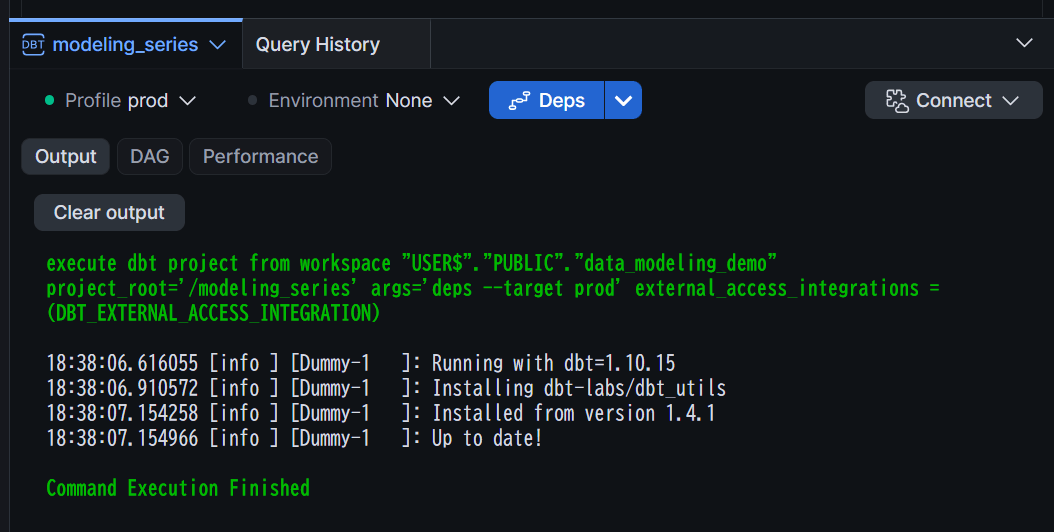
dbt_utilsのインストールが成功していればOKです。
2. seedファイルを配置する
今回使う6つのseed CSVと、型指定用のseed propertiesファイルです。CSVには全てsource_updated_at(ソース側の更新時刻)・loaded_at(ロード時刻)列を持たせています。
seeds/raw_seeds.yml(クリックで展開)
version: 2

seeds:
  - name: raw_customer
    config:
      column_types:
        customer_id: varchar(10)
        source_updated_at: timestamp_ntz
        loaded_at: timestamp_ntz
  - name: raw_product
    config:
      column_types:
        product_id: varchar(10)
        list_price_jpy: number(10,0)
        source_updated_at: timestamp_ntz
        loaded_at: timestamp_ntz
  - name: raw_store
    config:
      column_types:
        store_id: varchar(20)
        open_date: date
        close_date: date
        source_updated_at: timestamp_ntz
        loaded_at: timestamp_ntz
  - name: raw_exchange_rate
    config:
      column_types:
        rate_month: date
        rate_to_jpy: number(10,4)
        source_updated_at: timestamp_ntz
        loaded_at: timestamp_ntz
  - name: raw_sales_order_header
    config:
      column_types:
        order_id: varchar(10)
        customer_id: varchar(10)
        order_date: date
        source_updated_at: timestamp_ntz
        loaded_at: timestamp_ntz
  - name: raw_sales_order_line
    config:
      column_types:
        order_line_id: varchar(10)
        order_id: varchar(10)
        line_number: number(2,0)
        product_id: varchar(10)
        quantity: number(6,0)
        unit_price: number(10,0)
        original_order_line_id: varchar(10)
        transaction_at: timestamp_ntz
        source_updated_at: timestamp_ntz
        loaded_at: timestamp_ntz
seeds/raw_customer.csv(クリックで展開)
customer_id,customer_name,email,membership_rank,country_code,address,source_updated_at,loaded_at
C001,山田太郎,yamada.taro@example.com,ゴールド,JP,東京都渋谷区1-1-1,2026-01-10 09:00:00,2026-01-10 09:05:00
C002,佐藤花子,sato.hanako@example.com,シルバー,JP,大阪府大阪市北区2-2-2,2026-01-12 10:00:00,2026-01-12 10:05:00
C003,鈴木一郎,,ブロンズ,JP,,2026-01-15 11:00:00,2026-01-15 11:05:00
C004,Chen Wei,chen.wei@example.tw,ゴールド,TW,台北市信義區3-3-3,2026-01-18 08:00:00,2026-01-18 08:05:00
C005,Lin Mei,lin.mei@example.tw,シルバー,TW,高雄市前鎮區4-4-4,2026-01-20 09:30:00,2026-01-20 09:35:00
C006,Tan Wei Ming,tan.wm@example.sg,ゴールド,SG,Orchard Road 5,2026-01-22 07:00:00,2026-01-22 07:05:00
C007,高橋美咲,takahashi.misaki@example.com,不明,JP,,2026-01-25 12:00:00,2026-01-25 12:05:00
C008,田中健,,,JP,愛知県名古屋市6-6-6,2026-01-28 13:00:00,2026-01-28 13:05:00
C009,Wong Siu Fung,wong.sf@example.sg,ブロンズ,SG,Bugis Street 7,2026-02-01 09:00:00,2026-02-01 09:05:00
C010,伊藤さくら,ito.sakura@example.com,ゴールド,JP,福岡県福岡市博多区8-8-8,2026-02-03 10:00:00,2026-02-03 10:05:00
C011,渡辺翔太,watanabe.shota@example.com,シルバー,JP,北海道札幌市中央区9-9-9,2026-02-05 11:00:00,2026-02-05 11:05:00
C012,Huang Ting,huang.ting@example.tw,不明,TW,台中市西區10-10-10,2026-02-08 08:00:00,2026-02-08 08:05:00
C013,中村めぐみ,nakamura@example.com,シルバー,JP,,2026-02-10 09:00:00,2026-02-10 09:05:00
C014,小林大輔,kobayashi.daisuke@example.com,ブロンズ,JP,兵庫県神戸市11-11-11,2026-02-12 10:00:00,2026-02-12 10:05:00
C015,Goh Xin Yi,goh.xy@example.sg,ゴールド,SG,Clementi Ave 12,2026-02-15 09:00:00,2026-02-15 09:05:00
C016,加藤結衣,,,JP,埼玉県さいたま市12-12-12,2026-02-18 11:00:00,2026-02-18 11:05:00
C017,Lee Jia Hao,lee.jh@example.tw,シルバー,TW,台南市東區13-13-13,2026-02-20 08:00:00,2026-02-20 08:05:00
C018,松本涼,matsumoto.ryo@example.com,不明,JP,,2026-02-22 12:00:00,2026-02-22 12:05:00
C019,井上あかり,inoue.akari@example.com,ゴールド,JP,広島県広島市13-13-13,2026-02-25 10:00:00,2026-02-25 10:05:00
C020,Ng Wei Jie,ng.wj@example.sg,ブロンズ,SG,Tampines Ave 14,2026-02-28 09:00:00,2026-02-28 09:05:00
seeds/raw_product.csv(クリックで展開)
product_id,product_name,product_type,category_id,list_price_jpy,source_updated_at,loaded_at
P001,アルパイントレッキングシューズ,物販,CAT01,18000,2026-01-05 09:00:00,2026-01-05 09:05:00
P002,ウルトラライトテント2人用,物販,CAT02,42000,2026-01-05 09:00:00,2026-01-05 09:05:00
P003,登山用レインウェア,物販,CAT01,15000,2026-01-05 09:00:00,2026-01-05 09:05:00
P004,ダウンスリーピングバッグ,物販,CAT02,22000,2026-01-05 09:00:00,2026-01-05 09:05:00
P005,トレッキングポール2本セット,物販,CAT01,6000,2026-01-05 09:00:00,2026-01-05 09:05:00
P006,テントレンタル(3泊4日),レンタル,CAT02,9000,2026-01-05 09:00:00,2026-01-05 09:05:00
P007,登山靴レンタル(1泊2日),レンタル,CAT01,3000,2026-01-05 09:00:00,2026-01-05 09:05:00
P008,ガイド同行登山ツアー,サービス,CAT03,25000,2026-01-05 09:00:00,2026-01-05 09:05:00
P009,ギアメンテナンス講習,サービス,CAT03,5000,2026-01-05 09:00:00,2026-01-05 09:05:00
P010,携帯浄水器,物販,CAT01,8000,2026-01-05 09:00:00,2026-01-05 09:05:00
P011,ソロキャンプ用チェア,物販,CAT02,4500,2026-01-05 09:00:00,2026-01-05 09:05:00
P012,ヘッドライト(充電式),物販,CAT01,3500,2026-01-05 09:00:00,2026-01-05 09:05:00
P013,アウトドアクッカーセット,物販,CAT02,7000,2026-01-05 09:00:00,2026-01-05 09:05:00
P014,防水バックパック40L,物販,CAT01,16000,2026-01-05 09:00:00,2026-01-05 09:05:00
P015,カヤックレンタル(半日),レンタル,CAT02,6000,2026-01-05 09:00:00,2026-01-05 09:05:00
P016,ロープ・ハーネスセット,物販,CAT01,12000,2026-01-05 09:00:00,2026-01-05 09:05:00
P017,焚き火台コンパクト,物販,CAT02,5000,2026-01-05 09:00:00,2026-01-05 09:05:00
P018,防寒インナーウェア,物販,CAT01,6500,2026-01-05 09:00:00,2026-01-05 09:05:00
P019,ギア用防水スタッフバッグ,物販,CAT02,2500,2026-01-05 09:00:00,2026-01-05 09:05:00
P020,登山計画作成サポート,サービス,CAT03,2000,2026-01-05 09:00:00,2026-01-05 09:05:00
seeds/raw_store.csv(クリックで展開)
store_id,store_name,country_code,currency_code,timezone,open_date,close_date,source_updated_at,loaded_at
JP-TOKYO-01,東京新宿店,JP,JPY,Asia/Tokyo,2024-04-01,,2026-01-05 09:00:00,2026-01-05 09:05:00
JP-OSAKA-01,大阪梅田店,JP,JPY,Asia/Tokyo,2024-06-15,,2026-01-05 09:00:00,2026-01-05 09:05:00
JP-NAGOYA-01,名古屋栄店,JP,JPY,Asia/Tokyo,2024-09-01,,2026-01-05 09:00:00,2026-01-05 09:05:00
JP-FUKUOKA-01,福岡天神店,JP,JPY,Asia/Tokyo,2025-03-20,,2026-01-05 09:00:00,2026-01-05 09:05:00
JP-SAPPORO-01,札幌駅前店,JP,JPY,Asia/Tokyo,2025-04-10,,2026-01-05 09:00:00,2026-01-05 09:05:00
JP-KOBE-01,神戸三宮店,JP,JPY,Asia/Tokyo,2025-07-01,,2026-01-05 09:00:00,2026-01-05 09:05:00
JP-HIROSHIMA-01,広島本通店,JP,JPY,Asia/Tokyo,2025-09-12,,2026-01-05 09:00:00,2026-01-05 09:05:00
JP-KYOTO-01,京都四条店,JP,JPY,Asia/Tokyo,2024-05-01,2026-03-31,2026-01-05 09:00:00,2026-01-05 09:05:00
TW-TAIPEI-01,台北信義店,TW,TWD,Asia/Taipei,2024-08-01,,2026-01-05 09:00:00,2026-01-05 09:05:00
TW-KAOHSIUNG-01,高雄前鎮店,TW,TWD,Asia/Taipei,2025-01-15,,2026-01-05 09:00:00,2026-01-05 09:05:00
TW-TAICHUNG-01,台中西區店,TW,TWD,Asia/Taipei,2025-05-20,,2026-01-05 09:00:00,2026-01-05 09:05:00
TW-TAINAN-01,台南東區店,TW,TWD,Asia/Taipei,2025-10-01,,2026-01-05 09:00:00,2026-01-05 09:05:00
TW-TAOYUAN-01,桃園中壢店,TW,TWD,Asia/Taipei,2026-02-01,,2026-01-05 09:00:00,2026-01-05 09:05:00
SG-ORCHARD-01,シンガポールオーチャード店,SG,SGD,Asia/Singapore,2024-10-01,,2026-01-05 09:00:00,2026-01-05 09:05:00
SG-BUGIS-01,シンガポールブギス店,SG,SGD,Asia/Singapore,2025-06-01,,2026-01-05 09:00:00,2026-01-05 09:05:00
seeds/raw_exchange_rate.csv(クリックで展開)
rate_month,currency_code,rate_to_jpy,source_updated_at,loaded_at
2026-01-01,JPY,1.0000,2026-01-05 09:00:00,2026-01-05 09:05:00
2026-01-01,TWD,4.6000,2026-01-05 09:00:00,2026-01-05 09:05:00
2026-01-01,SGD,110.0000,2026-01-05 09:00:00,2026-01-05 09:05:00
2026-02-01,JPY,1.0000,2026-01-05 09:00:00,2026-01-05 09:05:00
2026-02-01,TWD,4.6100,2026-01-05 09:00:00,2026-01-05 09:05:00
2026-02-01,SGD,110.5000,2026-01-05 09:00:00,2026-01-05 09:05:00
2026-03-01,JPY,1.0000,2026-01-05 09:00:00,2026-01-05 09:05:00
2026-03-01,TWD,4.6200,2026-01-05 09:00:00,2026-01-05 09:05:00
2026-03-01,SGD,111.0000,2026-01-05 09:00:00,2026-01-05 09:05:00
2026-04-01,JPY,1.0000,2026-01-05 09:00:00,2026-01-05 09:05:00
2026-04-01,TWD,4.6300,2026-01-05 09:00:00,2026-01-05 09:05:00
2026-04-01,SGD,111.5000,2026-01-05 09:00:00,2026-01-05 09:05:00
2026-05-01,JPY,1.0000,2026-01-05 09:00:00,2026-01-05 09:05:00
2026-05-01,TWD,4.6400,2026-01-05 09:00:00,2026-01-05 09:05:00
2026-05-01,SGD,112.0000,2026-01-05 09:00:00,2026-01-05 09:05:00
2026-06-01,JPY,1.0000,2026-01-05 09:00:00,2026-01-05 09:05:00
2026-06-01,TWD,4.6500,2026-01-05 09:00:00,2026-01-05 09:05:00
2026-06-01,SGD,112.5000,2026-01-05 09:00:00,2026-01-05 09:05:00
2026-07-01,JPY,1.0000,2026-01-05 09:00:00,2026-01-05 09:05:00
2026-07-01,TWD,4.6600,2026-01-05 09:00:00,2026-01-05 09:05:00
2026-07-01,SGD,113.0000,2026-01-05 09:00:00,2026-01-05 09:05:00
2026-08-01,JPY,1.0000,2026-01-05 09:00:00,2026-01-05 09:05:00
2026-08-01,TWD,4.6700,2026-01-05 09:00:00,2026-01-05 09:05:00
2026-08-01,SGD,113.5000,2026-01-05 09:00:00,2026-01-05 09:05:00
2026-09-01,JPY,1.0000,2026-01-05 09:00:00,2026-01-05 09:05:00
2026-09-01,TWD,4.6800,2026-01-05 09:00:00,2026-01-05 09:05:00
2026-09-01,SGD,114.0000,2026-01-05 09:00:00,2026-01-05 09:05:00
2026-10-01,JPY,1.0000,2026-01-05 09:00:00,2026-01-05 09:05:00
2026-10-01,TWD,4.6900,2026-01-05 09:00:00,2026-01-05 09:05:00
2026-10-01,SGD,114.5000,2026-01-05 09:00:00,2026-01-05 09:05:00
2026-11-01,JPY,1.0000,2026-01-05 09:00:00,2026-01-05 09:05:00
2026-11-01,TWD,4.7000,2026-01-05 09:00:00,2026-01-05 09:05:00
2026-11-01,SGD,115.0000,2026-01-05 09:00:00,2026-01-05 09:05:00
2026-12-01,JPY,1.0000,2026-01-05 09:00:00,2026-01-05 09:05:00
2026-12-01,TWD,4.7100,2026-01-05 09:00:00,2026-01-05 09:05:00
2026-12-01,SGD,115.5000,2026-01-05 09:00:00,2026-01-05 09:05:00
seeds/raw_sales_order_header.csv(クリックで展開)
order_id,customer_id,store_id,order_date,order_status,currency_code,source_updated_at,loaded_at
O0001,C001,JP-TOKYO-01,2026-08-01,COMPLETED,JPY,2026-08-01 10:00:00,2026-08-01 10:05:00
O0002,C002,JP-OSAKA-01,2026-08-02,COMPLETED,JPY,2026-08-02 11:00:00,2026-08-02 11:05:00
O0003,C003,JP-TOKYO-01,2026-08-03,COMPLETED,JPY,2026-08-03 09:00:00,2026-08-03 09:05:00
O0004,C004,TW-TAIPEI-01,2026-08-03,COMPLETED,TWD,2026-08-03 12:00:00,2026-08-03 12:05:00
O0005,C005,TW-KAOHSIUNG-01,2026-08-04,CANCELLED,TWD,2026-08-04 08:00:00,2026-08-04 08:05:00
O0006,C006,SG-ORCHARD-01,2026-08-05,COMPLETED,SGD,2026-08-05 09:00:00,2026-08-05 09:05:00
O0007,C007,JP-TOKYO-01,2026-08-05,COMPLETED,JPY,2026-08-05 13:00:00,2026-08-05 13:05:00
O0008,C008,JP-NAGOYA-01,2026-08-06,COMPLETED,JPY,2026-08-06 10:00:00,2026-08-06 10:05:00
O0009,C009,SG-ORCHARD-01,2026-08-07,COMPLETED,SGD,2026-08-07 09:00:00,2026-08-07 09:05:00
O0010,C010,JP-FUKUOKA-01,2026-08-08,COMPLETED,JPY,2026-08-08 14:00:00,2026-08-08 14:05:00
O0011,C011,JP-SAPPORO-01,2026-08-09,COMPLETED,JPY,2026-08-09 10:00:00,2026-08-09 10:05:00
O0012,C012,TW-TAICHUNG-01,2026-08-10,COMPLETED,TWD,2026-08-10 08:00:00,2026-08-10 08:05:00
O0013,C013,JP-TOKYO-01,2026-08-11,RETURNED,JPY,2026-08-11 10:00:00,2026-08-11 10:05:00
O0014,C014,JP-KOBE-01,2026-08-12,COMPLETED,JPY,2026-08-12 11:00:00,2026-08-12 11:05:00
O0015,C015,SG-ORCHARD-01,2026-08-13,COMPLETED,SGD,2026-08-13 09:00:00,2026-08-13 09:05:00
O0016,C001,JP-TOKYO-01,2026-08-14,COMPLETED,JPY,2026-08-14 10:00:00,2026-08-14 10:05:00
O0017,C017,TW-TAINAN-01,2026-08-15,COMPLETED,TWD,2026-08-15 08:00:00,2026-08-15 08:05:00
O0018,C018,JP-TOKYO-01,2026-08-16,COMPLETED,JPY,2026-08-16 10:00:00,2026-08-16 10:05:00
O0019,C019,JP-HIROSHIMA-01,2026-08-17,COMPLETED,JPY,2026-08-17 10:00:00,2026-08-17 10:05:00
O0020,C020,SG-ORCHARD-01,2026-08-18,COMPLETED,SGD,2026-08-18 09:00:00,2026-08-18 09:05:00
seeds/raw_sales_order_line.csv(クリックで展開)
order_line_id,order_id,line_number,product_id,transaction_type,quantity,unit_price,transaction_at,original_order_line_id,source_updated_at,loaded_at
OL00001,O0001,1,P001,SALE,1,18000,2026-08-01 10:00:00,,2026-08-01 10:00:00,2026-08-01 10:05:00
OL00002,O0001,2,P005,SALE,1,6000,2026-08-01 10:00:00,,2026-08-01 10:00:00,2026-08-01 10:05:00
OL00003,O0002,1,P002,SALE,1,42000,2026-08-02 11:00:00,,2026-08-02 11:00:00,2026-08-02 11:05:00
OL00004,O0003,1,P010,SALE,2,8000,2026-08-03 09:00:00,,2026-08-03 09:00:00,2026-08-03 09:05:00
OL00005,O0004,1,P003,SALE,1,3210,2026-08-03 12:00:00,,2026-08-03 12:00:00,2026-08-03 12:05:00
OL00006,O0004,2,P018,SALE,1,1390,2026-08-03 12:00:00,,2026-08-03 12:00:00,2026-08-03 12:05:00
OL00007,O0005,1,P006,SALE,1,1930,2026-08-04 08:00:00,,2026-08-04 08:00:00,2026-08-04 08:05:00
OL00008,O0006,1,P011,SALE,2,40,2026-08-05 09:00:00,,2026-08-05 09:00:00,2026-08-05 09:05:00
OL00009,O0007,1,P004,SALE,1,22000,2026-08-05 13:00:00,,2026-08-05 13:00:00,2026-08-05 13:05:00
OL00010,O0007,2,P012,SALE,1,3500,2026-08-05 13:00:00,,2026-08-05 13:00:00,2026-08-05 13:05:00
OL00011,O0008,1,P013,SALE,1,7000,2026-08-06 10:00:00,,2026-08-06 10:00:00,2026-08-06 10:05:00
OL00012,O0009,1,P015,SALE,1,53,2026-08-07 09:00:00,,2026-08-07 09:00:00,2026-08-07 09:05:00
OL00013,O0010,1,P014,SALE,1,16000,2026-08-08 14:00:00,,2026-08-08 14:00:00,2026-08-08 14:05:00
OL00014,O0011,1,P016,SALE,1,12000,2026-08-09 10:00:00,,2026-08-09 10:00:00,2026-08-09 10:05:00
OL00015,O0012,1,P017,SALE,1,1070,2026-08-10 08:00:00,,2026-08-10 08:00:00,2026-08-10 08:05:00
OL00016,O0013,1,P001,SALE,1,18000,2026-08-11 10:00:00,,2026-08-11 10:00:00,2026-08-11 10:05:00
OL00017,O0013,1,P001,RETURN,1,18000,2026-08-13 15:00:00,OL00016,2026-08-13 15:00:00,2026-08-13 15:05:00
OL00018,O0014,1,P019,SALE,3,2500,2026-08-12 11:00:00,,2026-08-12 11:00:00,2026-08-12 11:05:00
OL00019,O0015,1,P020,SALE,1,18,2026-08-13 09:00:00,,2026-08-13 09:00:00,2026-08-13 09:05:00
OL00020,O0016,1,P001,SALE,1,18000,2026-08-14 10:00:00,,2026-08-14 10:00:00,2026-08-14 10:05:00
OL00021,O0016,2,P999,SALE,1,9800,2026-08-14 10:00:00,,2026-08-14 10:00:00,2026-08-14 10:05:00
OL00022,O0017,1,P007,SALE,1,640,2026-08-15 08:00:00,,2026-08-15 08:00:00,2026-08-15 08:05:00
OL00023,O0018,1,P008,SALE,1,25000,2026-08-16 10:00:00,,2026-08-16 10:00:00,2026-08-16 10:05:00
OL00024,O0019,1,P009,SALE,1,5000,2026-08-17 10:00:00,,2026-08-17 10:00:00,2026-08-17 10:05:00
OL00025,O0020,1,P011,SALE,1,40,2026-08-18 09:00:00,,2026-08-18 09:00:00,2026-08-18 09:05:00
OL00026,O0002,2,P017,SALE,1,5000,2026-08-02 11:00:00,,2026-08-02 11:00:00,2026-08-02 11:05:00
OL00027,O0003,2,P012,SALE,1,3500,2026-08-03 09:00:00,,2026-08-03 09:00:00,2026-08-03 09:05:00
OL00028,O0009,2,P019,SALE,2,22,2026-08-07 09:00:00,,2026-08-07 09:00:00,2026-08-07 09:05:00
OL00029,O0010,2,P005,SALE,1,6000,2026-08-08 14:00:00,,2026-08-08 14:00:00,2026-08-08 14:05:00
OL00030,O0020,2,P020,SALE,1,18,2026-08-18 09:00:00,,2026-08-18 09:00:00,2026-08-18 09:05:00
OL00031,O0005,1,P006,CANCEL,1,1930,2026-08-05 18:00:00,OL00007,2026-08-05 18:00:00,2026-08-05 18:05:00
raw_sales_order_line.csvは、受注明細の現在の状態ではなく、販売・返品・キャンセルという出来事(イベント)を1行ずつ持つデータです。order_line_idは各イベントの識別子で、返品・キャンセルにも別の値が振られます。original_order_line_idは、返品・キャンセルの元になった販売イベントのorder_line_idです(販売行ではNULL)。数量は正の値のままtransaction_typeで区別し、符号はモデルで付けます。台湾・シンガポールの受注は、現地通貨建ての単価です。主なケースは次のとおりです。
| ケース | 該当行 | 内容 |
|---|---|---|
| 返品 | OL00017 |
OL00016(8/11の販売)の返品。transaction_atは返品日の8/13 |
| キャンセル | OL00031 |
OL00007(8/4の販売)が翌日の8/5にキャンセル。transaction_atはキャンセル日の8/5 |
| 商品マスタに未登録の商品 | OL00021 |
product_id(P999)は分かっているが、商品マスタにない |
line_numberは受注内の明細番号で、返品・キャンセルは元の販売と同じ番号です。今回のモデルでは使わず、イベントの識別にはorder_line_idを使います。
3. dbt seedでロードする
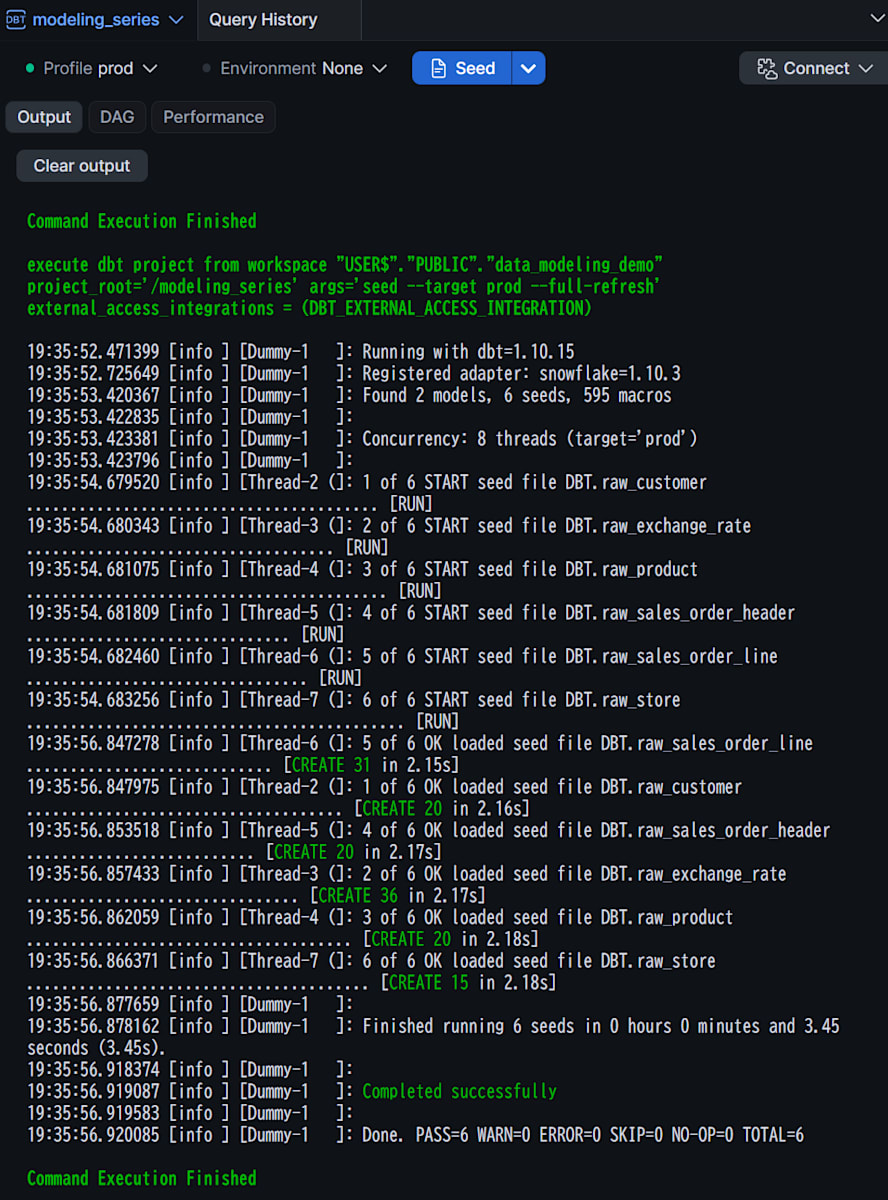
Workspace上で、dbt seedを実行します。(何かしらの事情で再ロードする場合は、--full-refreshも追加して実行します。)
PASS=6 ERROR=0のように、6つのseedがすべて成功していればOKです。
試してみた
1. ベースラインのモデルを作る
ファクトテーブルを作る前に、参照先になるstagingとディメンションを用意します。顧客・商品・店舗のディメンションは、業務ID(customer_idなど)からdbt_utils.generate_surrogate_keyでキー(customer_sk・product_sk・store_sk)を作ります。参照先が見つからない場合に備えて、キーが-1のUnknown Member行も持たせます。ファクトの外部キーをNULLにせず、特別な行に紐づけておく考え方は、Kimballも示しています。
Kimball公式Web「Design Tip #43: Dealing With Nulls In The Dimensional Model」が参考になります。
models/staging/retail/stg_retail__customers.sql(クリックで展開)
-- models/staging/retail/stg_retail__customers.sql
{{ config(materialized='view') }}

select
    customer_id,
    customer_name,
    nullif(trim(email), '') as email,
    nullif(trim(membership_rank), '') as membership_rank,
    country_code,
    nullif(trim(address), '') as address,
    source_updated_at,
    loaded_at
from {{ ref('raw_customer') }}
models/staging/retail/stg_retail__products.sql(クリックで展開)
-- models/staging/retail/stg_retail__products.sql
{{ config(materialized='view') }}

select
    product_id,
    product_name,
    product_type,
    category_id,
    list_price_jpy,
    source_updated_at,
    loaded_at
from {{ ref('raw_product') }}
models/staging/retail/stg_retail__stores.sql(クリックで展開)
-- models/staging/retail/stg_retail__stores.sql
{{ config(materialized='view') }}

select
    store_id,
    store_name,
    country_code,
    currency_code,
    timezone,
    open_date,
    close_date,
    source_updated_at,
    loaded_at
from {{ ref('raw_store') }}
models/staging/retail/stg_retail__exchange_rates.sql(クリックで展開)
-- models/staging/retail/stg_retail__exchange_rates.sql
{{ config(materialized='view') }}

select
    currency_code,
    rate_to_jpy,
    rate_month,
    source_updated_at,
    loaded_at
from {{ ref('raw_exchange_rate') }}
models/staging/retail/stg_retail__sales_order_headers.sql(クリックで展開)
-- models/staging/retail/stg_retail__sales_order_headers.sql
{{ config(materialized='view') }}

select
    order_id,
    customer_id,
    store_id,
    order_status,
    currency_code,
    order_date,
    source_updated_at,
    loaded_at
from {{ ref('raw_sales_order_header') }}
models/staging/retail/stg_retail__sales_order_lines.sql(クリックで展開)
-- models/staging/retail/stg_retail__sales_order_lines.sql
{{ config(materialized='view') }}

select
    order_line_id,
    order_id,
    product_id,
    transaction_type,
    nullif(trim(original_order_line_id), '') as original_order_line_id,
    line_number,
    quantity,
    unit_price,
    transaction_at,
    source_updated_at,
    loaded_at
from {{ ref('raw_sales_order_line') }}
models/dwh/shared/dim/dim_customer.sql(クリックで展開)
-- models/dwh/shared/dim/dim_customer.sql
{{ config(materialized='table') }}

select
    {{ dbt_utils.generate_surrogate_key(['customer_id']) }} as customer_sk,
    customer_id,
    customer_name,
    coalesce(membership_rank, '不明') as membership_rank,
    country_code
from {{ ref('stg_retail__customers') }}

union all

-- 参照先が見つからない場合の受け皿(Unknown Member)
select '-1', '-1', 'Unknown', 'Unknown', 'Unknown'
models/dwh/shared/dim/dim_product.sql(クリックで展開)
-- models/dwh/shared/dim/dim_product.sql
{{ config(materialized='table') }}

select
    {{ dbt_utils.generate_surrogate_key(['product_id']) }} as product_sk,
    product_id,
    product_name,
    product_type,
    category_id,
    list_price_jpy
from {{ ref('stg_retail__products') }}

union all

select '-1', '-1', 'Unknown', 'Unknown', 'Unknown', null
models/dwh/shared/dim/dim_store.sql(クリックで展開)
-- models/dwh/shared/dim/dim_store.sql
{{ config(materialized='table') }}

select
    {{ dbt_utils.generate_surrogate_key(['store_id']) }} as store_sk,
    store_id,
    store_name,
    country_code,
    currency_code,
    timezone,
    open_date,
    close_date
from {{ ref('stg_retail__stores') }}

union all

select '-1', '-1', 'Unknown', 'Unknown', 'Unknown', 'Unknown', null, null
models/dwh/shared/dim/_shared__models.yml(クリックで展開)
# models/dwh/shared/dim/_shared__models.yml
version: 2

models:
  - name: dim_date
    columns:
      - name: date_key
        data_tests: [unique, not_null]
  - name: dim_customer
    columns:
      - name: customer_sk
        data_tests: [unique, not_null]
  - name: dim_product
    columns:
      - name: product_sk
        data_tests: [unique, not_null]
  - name: dim_store
    columns:
      - name: store_sk
        data_tests: [unique, not_null]
サロゲートキーとディメンションの更新方針については、以下の補足に記載しております。※クリックで展開できます。
補足: サロゲートキーとディメンションの更新方針(クリックで展開)
Kimballは、ソースの業務キーとは別に、ディメンションの主キーとしてサロゲートキーを持つことを勧めています。履歴を持たせると同じ業務キーの行が複数できることや、複数ソースのキーが衝突しうることに備えるためです。公式ページで説明されているのは、1から順に振る連番の整数です。
今回は、generate_surrogate_keyで業務IDから決まるハッシュ値を使っています。これは今回の実装上の選択で、Kimballがこのマクロやハッシュ方式を勧めているわけではありません。なお、業務IDだけのハッシュでは、将来SCD Type 2で履歴行を持たせたときに、同じ業務IDの行を区別できません(今回は履歴行を持ちません)。
顧客・商品・店舗の属性は、現在値だけを保持します。これはSCD Type 1(上書き)に相当する方針です。ただし今回は、毎回tableで作り直しており、UPDATEによる差分更新は検証していません。
Kimball公式Web「Dimension Surrogate Keys」と「Type 1: Overwrite」が参考になります。
Calendar Date Dimension(dim_date)
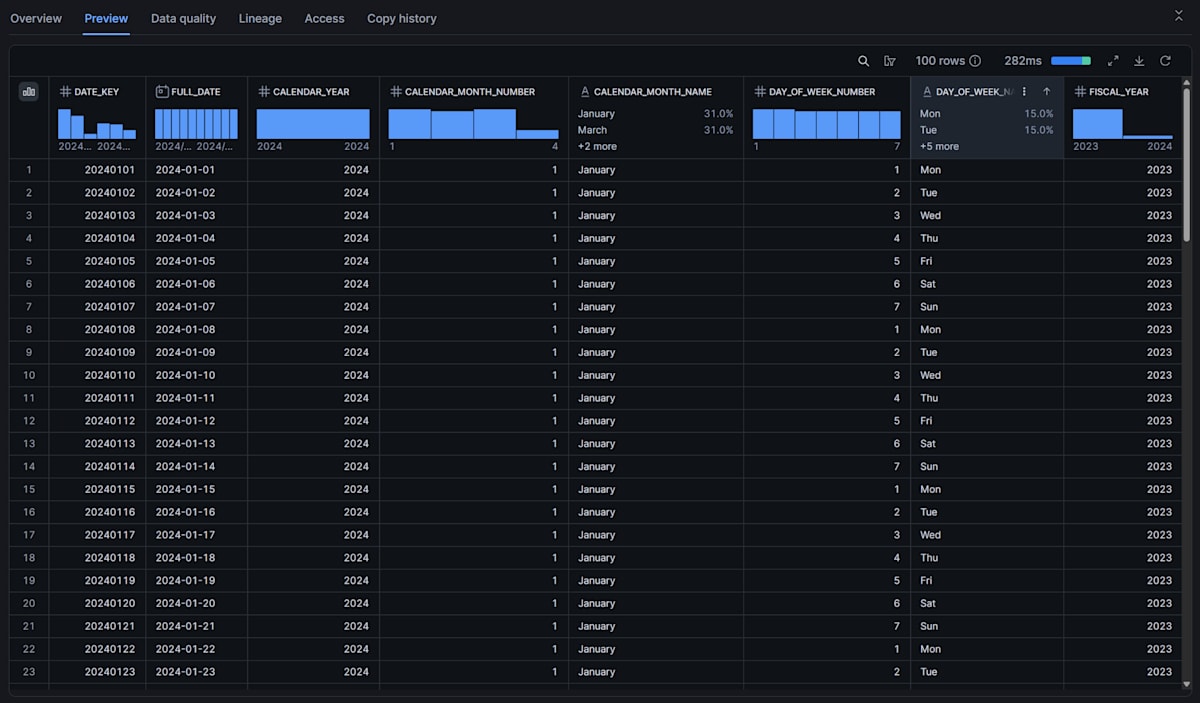
次に、Calendar Date Dimensionのdim_dateを作ります。年・月・曜日・会計年度(ここでは4月始まり)といった分析用の属性を、日付ごとにまとめたディメンションです。日付による絞り込みや集計は、キーの値ではなく、dim_dateの属性(calendar_year・day_of_week_nameなど)で行います。
キーのdate_keyは、20260811のようなYYYYMMDDの整数です。日付ディメンションは、連番ではなく意味を持つキーでよいと公式にも書かれています。ファクトには、日時の精度を保持するtransaction_atと、日付による分析に使うtransaction_date_keyを、別の列で持たせます。生成範囲は2024-01-01〜2027-12-31で、範囲外の日時はtransaction_date_keyがNULLになり、後述のnot_nullテストで検知します。
Kimball公式Web「Calendar Date Dimensions」が参考になります。
-- models/dwh/shared/dim/dim_date.sql
{{ config(materialized='table') }}

with date_spine as (

    select
        cast(date_day as date) as full_date
    from (
        {{ dbt_utils.date_spine(
            datepart="day",
            start_date="cast('2024-01-01' as date)",
            end_date="cast('2028-01-01' as date)"
        ) }}
    )  -- 2024-01-01から4年分(end_dateは含まれない)

),

enriched as (

    select
        cast(to_char(full_date, 'YYYYMMDD') as int) as date_key,
        full_date,
        extract(year from full_date)                as calendar_year,
        extract(month from full_date)               as calendar_month_number,
        to_char(full_date, 'MMMM')                  as calendar_month_name,
        dayofweekiso(full_date)                     as day_of_week_number,  -- 月曜=1〜日曜=7
        dayname(full_date)                          as day_of_week_name,
        case
            when extract(month from full_date) >= 4
                then extract(year from full_date)
            else extract(year from full_date) - 1
        end as fiscal_year
    from date_spine

)

select
    date_key,
    full_date,
    calendar_year,
    calendar_month_number,
    calendar_month_name,
    day_of_week_number,
    day_of_week_name,
    fiscal_year
from enriched
不明な日付を表す行の扱いについては、以下の補足に記載しております。※クリックで展開できます。
補足: 不明な日付を表す行について(クリックで展開)
公式ページは、不明・未確定の日付を表す特別行も必要としています。今回のdim_dateにその行がないのは、出来事の日時を必須とし、欠損と範囲外をテストの失敗で検知する、という今回の検証に限った判断です(欠損はstagingのtransaction_at、範囲外はファクトのtransaction_date_keyのnot_nullテスト)。日付が未確定になりうる業務では、特別行が必要になる場合があります。
stagingは、空文字をNULLにする程度で、ソースの列を基本的にそのまま通す方針です。今回は使わないorder_status・order_dateも残しています。入力側のイベントIDなどの検証は、stagingに置きます。
models/staging/retail/_retail__models.yml(クリックで展開)
# models/staging/retail/_retail__models.yml
version: 2

models:
  - name: stg_retail__sales_order_lines
    description: 受注明細のイベント。1行 = 販売・返品・キャンセルのいずれか1イベント
    columns:
      - name: order_line_id
        description: 各イベントの識別子(返品・キャンセルにも別の値が振られる)
        data_tests: [unique, not_null]
      - name: original_order_line_id
        description: 返品・キャンセルが元にしている販売イベントのorder_line_id(販売行ではNULL)
      - name: transaction_type
        data_tests:
          - accepted_values:
              arguments:
                values: ['SALE', 'RETURN', 'CANCEL']
      - name: transaction_at
        description: 出来事が起きた日時(必須)
        data_tests: [not_null]
  - name: stg_retail__exchange_rates
    description: 月次の為替レート。1行 = 1か月 × 1通貨
    data_tests:
      - dbt_utils.unique_combination_of_columns:
          arguments:
            combination_of_columns: [rate_month, currency_code]
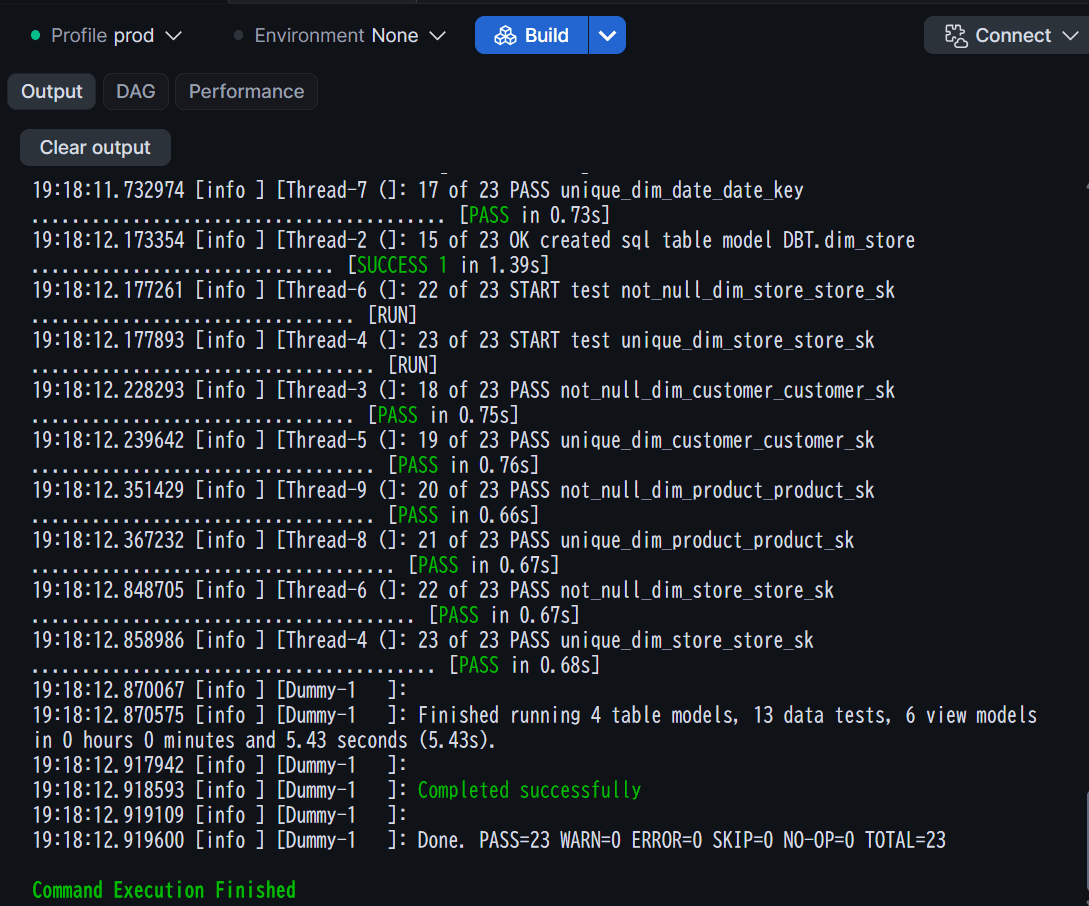
ベースラインのモデルをdbt buildします。Additional Flags として--select path:models/staging/retail path:models/dwh/sharedを追加して実行します。
ERROR=0で、6つのstaging view・4つのディメンションと、それらのテストがすべて成功していればOKです。
また、dim_dateテーブルは以下のようなデータで作られました。
2. Transaction Fact Tableを実装する
粒度を「1明細の1イベント(販売・返品・キャンセル)=1行」とし、fct_sales_transactionを実装します。ヘッダ単位(1受注=1行)ではなく明細単位にするのは、1回の受注に含まれる複数商品を、商品ごとに分析できるようにするためです。返品・キャンセルは、販売行を更新せず別の行として追加するので、販売日と返品日がそれぞれ正しい日付に紐づきます。
実装の方針は次のとおりです。
- 符号:
SALEをプラス、RETURN・CANCELをマイナスにして、数量と商品代金に反映します。sum()するだけで、返品・キャンセルが差し引かれます。想定外のtransaction_typeは符号がNULLになり、not_nullテストで検知します。stagingのaccepted_valuesでも検知するので、防御は二重にしています - イベントの識別: ソースの
order_line_idは、返品・キャンセルも含めて1イベントごとに別の値なので、そのままファクトの識別子にします - ディメンションのキー取得: 業務ID(
customer_idなど)とtransaction_atの日付から、各ディメンションのcustomer_sk・product_sk・store_sk・date_keyを取得します。顧客と店舗は受注ヘッダにしかないため、ヘッダとJOINします。商品名などの属性は、ファクトにコピーしません - Unknown Member: ディメンションにないキー(
P999など)は、left joinしてcoalesce(..., '-1')でUnknown Memberの行に紐づけます。行を落とさず、元のproduct_idなども残します - JPY換算: イベントごとに、取引日の月の為替レートで換算して丸めます。レートが見つからない場合は
NULLになるため、テストで検知します。通貨はヘッダのcurrency_codeを使います。dim_storeのcurrency_codeと一致する前提で、不一致を検知するテストは置いていません。実運用では、このテストの追加をおすすめします
-- models/dwh/sales/fact/fct_sales_transaction.sql
-- grain: 1行 = 1明細の1イベント(販売・返品・キャンセル)
{{ config(materialized='table') }}

with signed as (

    select
        *,
        case transaction_type
            when 'SALE' then 1
            when 'RETURN' then -1
            when 'CANCEL' then -1
        end as sign_factor
    from {{ ref('stg_retail__sales_order_lines') }}

)

select
    l.order_line_id,
    l.order_id,
    l.original_order_line_id,

    coalesce(c.customer_sk, '-1') as customer_sk,
    coalesce(p.product_sk, '-1') as product_sk,
    coalesce(s.store_sk, '-1') as store_sk,
    d.date_key as transaction_date_key,

    h.customer_id,
    l.product_id,
    h.store_id,

    l.transaction_type,
    h.currency_code,

    l.quantity * l.sign_factor as quantity_signed,
    l.quantity * l.unit_price * l.sign_factor as merchandise_amount_local,
    fx.rate_to_jpy as exchange_rate_to_jpy,
    round(l.quantity * l.unit_price * l.sign_factor * fx.rate_to_jpy, 0) as merchandise_amount_jpy,

    l.transaction_at
from signed l
inner join {{ ref('stg_retail__sales_order_headers') }} h
    on l.order_id = h.order_id
left join {{ ref('dim_customer') }} c
    on h.customer_id = c.customer_id
left join {{ ref('dim_product') }} p
    on l.product_id = p.product_id
left join {{ ref('dim_store') }} s
    on h.store_id = s.store_id
left join {{ ref('dim_date') }} d
    on cast(l.transaction_at as date) = d.full_date
left join {{ ref('stg_retail__exchange_rates') }} fx
    on date_trunc('month', cast(l.transaction_at as date)) = fx.rate_month
    and h.currency_code = fx.currency_code
粒度やキーの前提を、schema.ymlにも残します。
# models/dwh/sales/fact/_sales__models.yml
version: 2

models:
  - name: fct_sales_transaction
    description: |
      業務プロセス: 受注(Sales Order)
      grain: 1行 = 1明細の1イベント(販売・返品・キャンセル)
      quantity_signed・merchandise_amount_*は符号付き(返品・キャンセルはマイナス)
      merchandise_amount_*はquantity × unit_priceの商品代金。値引き・送料は含まない
      transaction_date_keyは出来事が起きた日(返品は返品日、キャンセルはキャンセル日)
    columns:
      - name: order_line_id
        data_tests: [unique, not_null]
      - name: customer_sk
        data_tests:
          - not_null
          - relationships:
              arguments:
                to: ref('dim_customer')
                field: customer_sk
      - name: product_sk
        data_tests:
          - not_null
          - relationships:
              arguments:
                to: ref('dim_product')
                field: product_sk
      - name: store_sk
        data_tests:
          - not_null
          - relationships:
              arguments:
                to: ref('dim_store')
                field: store_sk
      - name: transaction_date_key
        data_tests:
          - not_null
          - relationships:
              arguments:
                to: ref('dim_date')
                field: date_key
      - name: transaction_type
        data_tests:
          - accepted_values:
              arguments:
                values: ['SALE', 'RETURN', 'CANCEL']
      - name: quantity_signed
        data_tests: [not_null]
      - name: exchange_rate_to_jpy
        data_tests: [not_null]
ファクトの実装とKimballの考え方の対応については、以下の補足に記載しております。※クリックで展開できます。
補足: ファクトの実装とKimballの考え方(クリックで展開)
ディメンションのJOINの目的(Surrogate Key Pipeline)
上のSQLでdim_customer・dim_product・dim_store・dim_dateをJOINしているのは、業務IDなどを使って、ディメンション側のサロゲートキーを取得するためです。Kimballは、ファクト処理の最後に、ソースの業務キーをサロゲートキーへ置き換える処理を、Surrogate Key Pipelineとして説明しています。ディメンションを先に処理するのは、ファクトの外部キーに対応する行を、各ディメンションに用意しておくためです。dbtでディメンションを先にビルドするのも、このためです(設計の順序とは別の話です)。
JOINの目的は外部キーの取得で、ディメンションの属性をファクトへコピーすることではありません。商品名や国は、問い1・2のように、分析時に_skでJOINして取得します。キーの取得は、ETLツールの機能やルックアップでも実装でき、1つのSQLで全ディメンションをJOINする決まりはありません。受注ヘッダや為替レートとのJOINは、ディメンションのキー取得ではないため、この処理には含めません。
Kimball公式Web「Design Tip #171: Unclogging the Fact Table Surrogate Key Pipeline」が参考になります。
Header/Line Fact Table
ヘッダと明細に分かれたソースでは、ヘッダ側のディメンション参照や退化ディメンションを、明細粒度のファクトに含めます。今回のcustomer_sk・store_skがこれにあたります。JOINしているのはソースのヘッダと明細で、ヘッダ粒度と明細粒度のファクトをJOINしているわけではありません。
Kimball公式Web「Header/Line Fact Tables」が参考になります。
Degenerate Dimension(退化ディメンション)
order_idは、独立したディメンションテーブルを作らずにファクトへ持たせた取引番号で、退化ディメンションの例です。order_line_idはソースが発行したイベントの識別子、original_order_line_idは元の販売イベントへの参照で、役割が異なります。ファクトのID列をすべて退化ディメンションと呼ぶわけではありません。order_line_idは、サロゲートキーではなく、ソースのIDをそのまま使っています。customer_idなどは、Unknown Memberに紐づけたときに、元のIDを追跡するための列です。
Kimball公式Web「Degenerate Dimensions」が参考になります。
Unknown Memberの扱い
今回は、ソースのIDがNULLのケースと、P999のようにIDはあるがマスタにないケースを、どちらも共通の-1の行に紐づけ、元のIDを残しています。上で紹介したDesign Tip #171は、これとは別に、IDごとの専用のplaceholder行(推奨)を紹介しています。マスタが遅れて届いたとき、ファクトを修正せず、ディメンションの行だけを更新できるためです。今回はplaceholder行を扱いません。
3. unit testで符号と日付を確認する
符号付けと、イベントごとの日付の紐づけは、このファクトの中心のロジックです。seedの結果を見る前に、小さな入力と期待値を決めたdbt unit testで、次の内容を確認します。
- 符号:
SALEはプラス、RETURN・CANCELはマイナスになる - 日付: 返品は元の販売日ではなく返品日、キャンセルはキャンセル日の
dim_dateに紐づく
# models/dwh/sales/fact/_sales__unit_tests.yml
unit_tests:
  - name: sales_transaction_sign_by_type
    model: fct_sales_transaction
    given:
      - input: ref('stg_retail__sales_order_lines')
        rows:
          - {order_line_id: OL1, order_id: O1, product_id: P1, transaction_type: SALE, quantity: 2, unit_price: 1000, transaction_at: '2026-08-11 10:00:00'}
          - {order_line_id: OL2, order_id: O1, product_id: P1, transaction_type: RETURN, quantity: 1, unit_price: 1000, original_order_line_id: OL1, transaction_at: '2026-08-11 10:00:00'}
          - {order_line_id: OL3, order_id: O1, product_id: P1, transaction_type: CANCEL, quantity: 1, unit_price: 1000, original_order_line_id: OL1, transaction_at: '2026-08-11 10:00:00'}
      - input: ref('stg_retail__sales_order_headers')
        rows:
          - {order_id: O1, customer_id: C1, store_id: S1, currency_code: JPY}
      - input: ref('dim_customer')
        rows:
          - {customer_sk: SK_C1, customer_id: C1}
      - input: ref('dim_product')
        rows:
          - {product_sk: SK_P1, product_id: P1}
      - input: ref('dim_store')
        rows:
          - {store_sk: SK_S1, store_id: S1}
      - input: ref('dim_date')
        rows:
          - {date_key: 20260811, full_date: '2026-08-11'}
      - input: ref('stg_retail__exchange_rates')
        rows:
          - {currency_code: JPY, rate_to_jpy: 1, rate_month: '2026-08-01'}
    expect:
      rows:
        - {order_line_id: OL1, quantity_signed: 2, merchandise_amount_local: 2000, merchandise_amount_jpy: 2000}
        - {order_line_id: OL2, quantity_signed: -1, merchandise_amount_local: -1000, merchandise_amount_jpy: -1000}
        - {order_line_id: OL3, quantity_signed: -1, merchandise_amount_local: -1000, merchandise_amount_jpy: -1000}

  - name: sales_transaction_date_by_event
    model: fct_sales_transaction
    given:
      - input: ref('stg_retail__sales_order_lines')
        rows:
          - {order_line_id: OL1, order_id: O1, product_id: P1, transaction_type: SALE, quantity: 1, unit_price: 1000, transaction_at: '2026-08-11 10:00:00'}
          - {order_line_id: OL2, order_id: O1, product_id: P1, transaction_type: RETURN, quantity: 1, unit_price: 1000, original_order_line_id: OL1, transaction_at: '2026-08-13 15:00:00'}
          - {order_line_id: OL3, order_id: O1, product_id: P1, transaction_type: SALE, quantity: 1, unit_price: 1000, transaction_at: '2026-08-12 10:00:00'}
          - {order_line_id: OL4, order_id: O1, product_id: P1, transaction_type: CANCEL, quantity: 1, unit_price: 1000, original_order_line_id: OL3, transaction_at: '2026-08-14 09:00:00'}
      - input: ref('stg_retail__sales_order_headers')
        rows:
          - {order_id: O1, customer_id: C1, store_id: S1, currency_code: JPY}
      - input: ref('dim_customer')
        rows:
          - {customer_sk: SK_C1, customer_id: C1}
      - input: ref('dim_product')
        rows:
          - {product_sk: SK_P1, product_id: P1}
      - input: ref('dim_store')
        rows:
          - {store_sk: SK_S1, store_id: S1}
      - input: ref('dim_date')
        rows:
          - {date_key: 20260811, full_date: '2026-08-11'}
          - {date_key: 20260812, full_date: '2026-08-12'}
          - {date_key: 20260813, full_date: '2026-08-13'}
          - {date_key: 20260814, full_date: '2026-08-14'}
      - input: ref('stg_retail__exchange_rates')
        rows:
          - {currency_code: JPY, rate_to_jpy: 1, rate_month: '2026-08-01'}
    expect:
      rows:
        - {order_line_id: OL1, transaction_date_key: 20260811}
        - {order_line_id: OL2, transaction_date_key: 20260813}
        - {order_line_id: OL3, transaction_date_key: 20260812}
        - {order_line_id: OL4, transaction_date_key: 20260814}
unit testは、ファクト自体のビルドを必要としません(dbt buildでも、unit testはモデルの作成より先に実行されます)。一方、直接の上流(stagingとディメンション)はDB上に存在している必要があるため、手順1のビルド後に実行します。
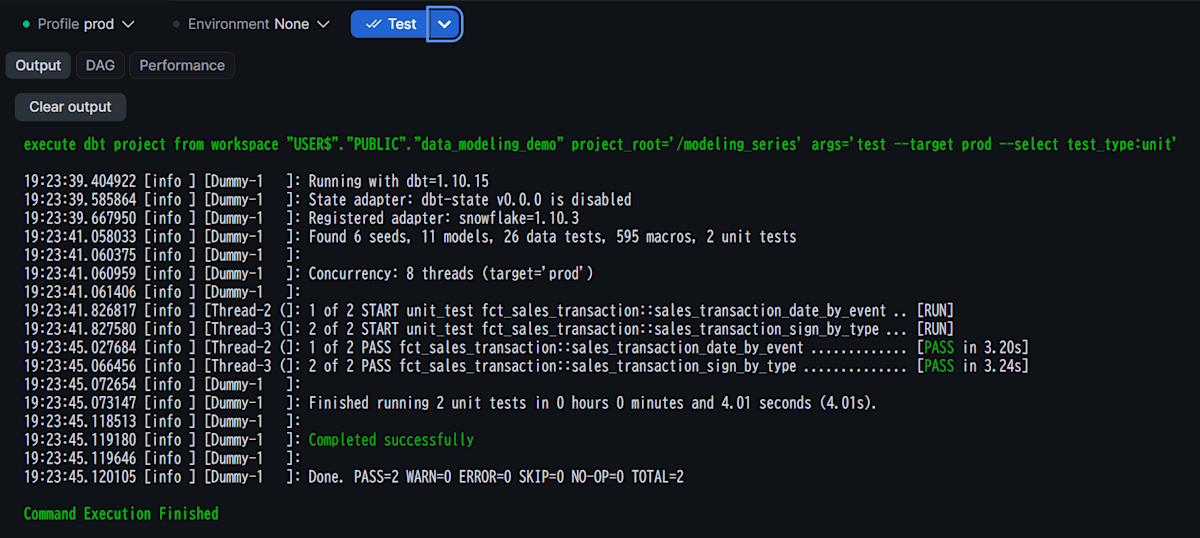
dbt testに、Additional Flagsで--select test_type:unitをつけて実行します。
ERROR=0で、2つのunit testが成功していればOKです。
4. dbt buildで実行し、data testsで確認する
宣言した粒度が守られているかを、先ほど定義したdata testsで確認します。
| テスト | 確認できること |
|---|---|
unique・not_null(入力のorder_line_id、ファクトのorder_line_id) |
イベントの識別子が一意で欠けていない |
accepted_values(transaction_type) |
想定外の取引種別が混入していない |
not_null(transaction_at、transaction_date_key) |
出来事の日時があり、dim_dateの範囲内に収まっている |
relationships(各_sk・transaction_date_key) |
ディメンションの参照先が存在する |
not_null(quantity_signed、exchange_rate_to_jpy) |
符号付けできている。為替レートの欠損がない |
dbt_utils.unique_combination_of_columns(為替レートのrate_month・currency_code) |
月×通貨で1行だけである。為替レートが重複していて、JOINでファクトの行が増えることがない |
ただし、relationshipsは、Unknown Memberの行が存在すれば、-1に紐づいた行(商品マスタにない商品など)も通過します。参照欠損の発生を検知するテストにはならないため、発生件数は問い4のクエリで確認します。
また、ファクトの行数が入力と同じでも、「ある明細が欠落し、別の明細が重複した」場合は検出できません。そこで、次の2つのsingular testを追加します。1つ目は、ヘッダが見つからずにinner joinで落ちた明細も検知できます。
-- tests/assert_sales_transaction_ids_match_staging.sql
-- 0行なら、入力のイベントとファクトのorder_line_idが過不足なく一致している
select
    coalesce(f.order_line_id, s.order_line_id) as order_line_id
from {{ ref('fct_sales_transaction') }} f
full outer join {{ ref('stg_retail__sales_order_lines') }} s
    on f.order_line_id = s.order_line_id
where f.order_line_id is null
   or s.order_line_id is null
-- tests/assert_return_cancel_refer_to_sale.sql
-- 0行なら、返品・キャンセルの元の販売イベントが存在している
select r.order_line_id, r.original_order_line_id
from {{ ref('stg_retail__sales_order_lines') }} r
left join {{ ref('stg_retail__sales_order_lines') }} s
    on r.original_order_line_id = s.order_line_id
    and s.transaction_type = 'SALE'
where r.transaction_type in ('RETURN', 'CANCEL')
  and s.order_line_id is null
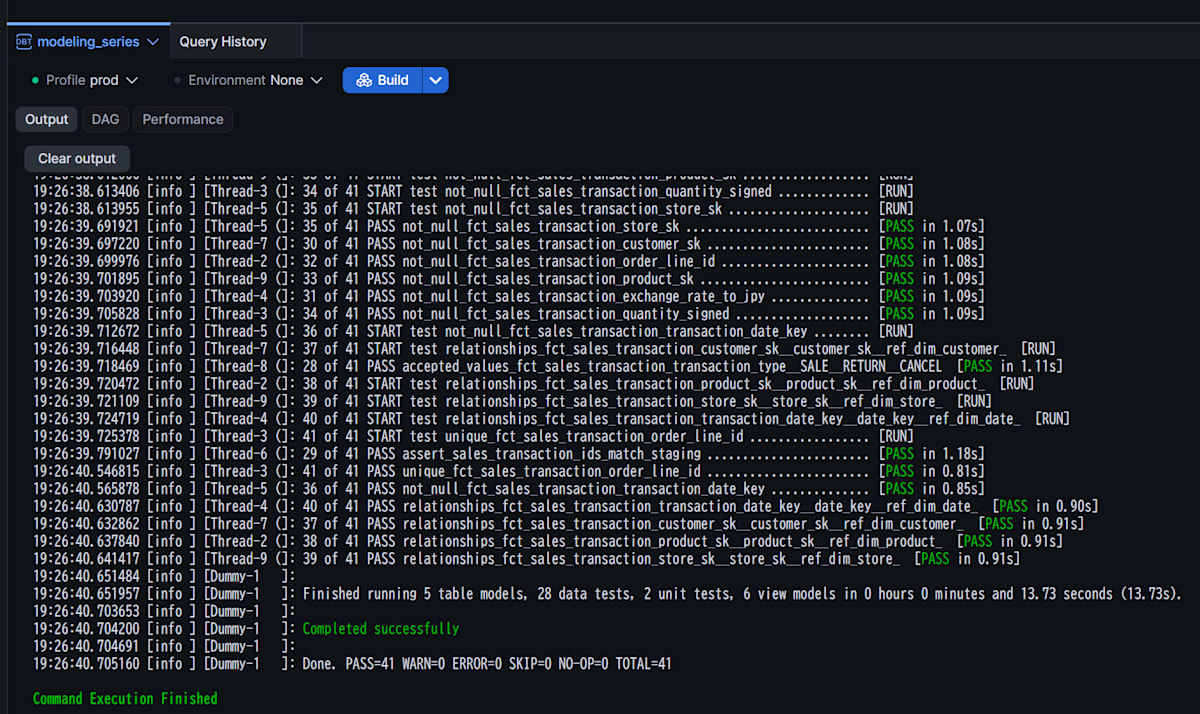
ユニットテストとあわせて、プロジェクト全体をビルドします(seedはロード済みのため除外します)。
dbt buildを、Additional Flagsに--exclude resource_type:seedを入れて実行します。
ERROR=0で、モデル11個の作成と、unit test・data test・singular testがすべて成功していればOKです。
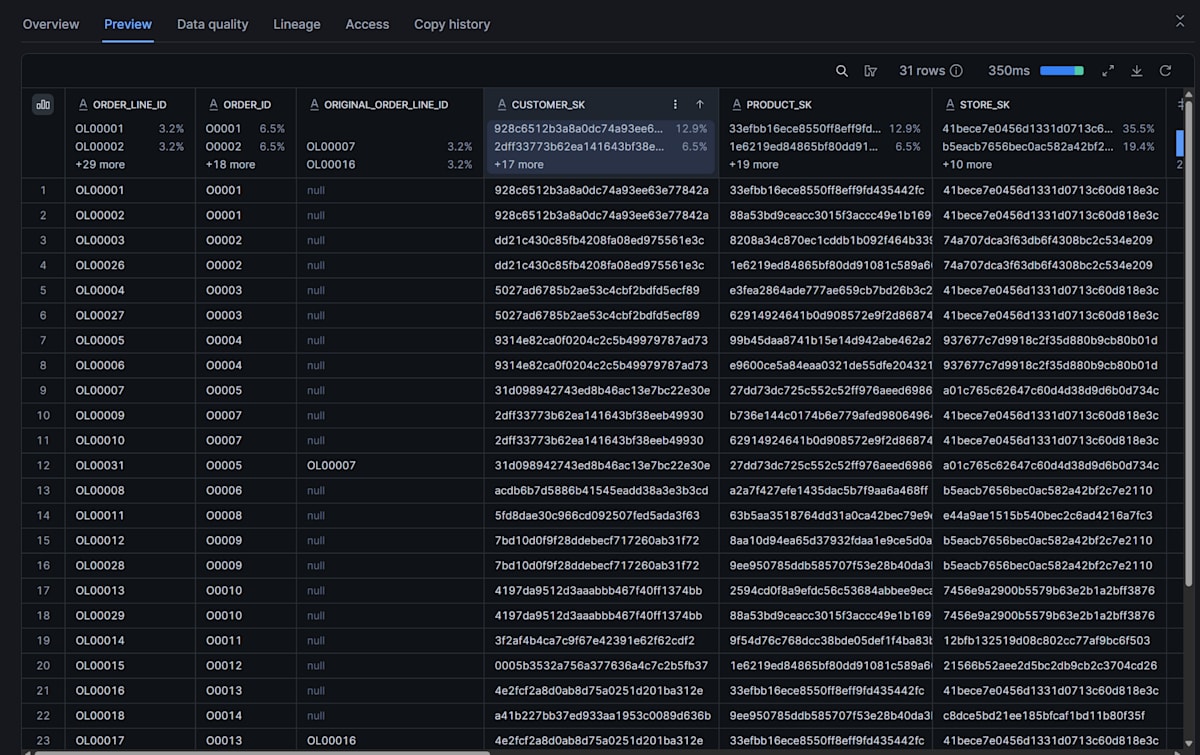
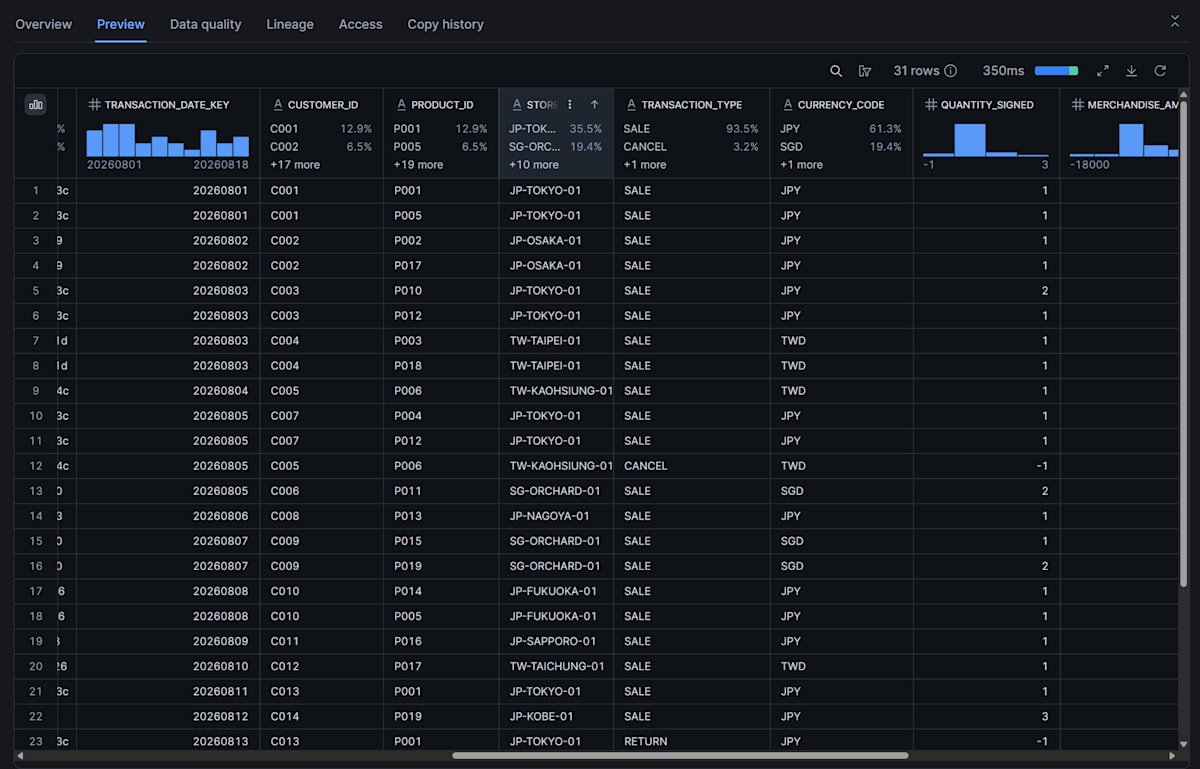
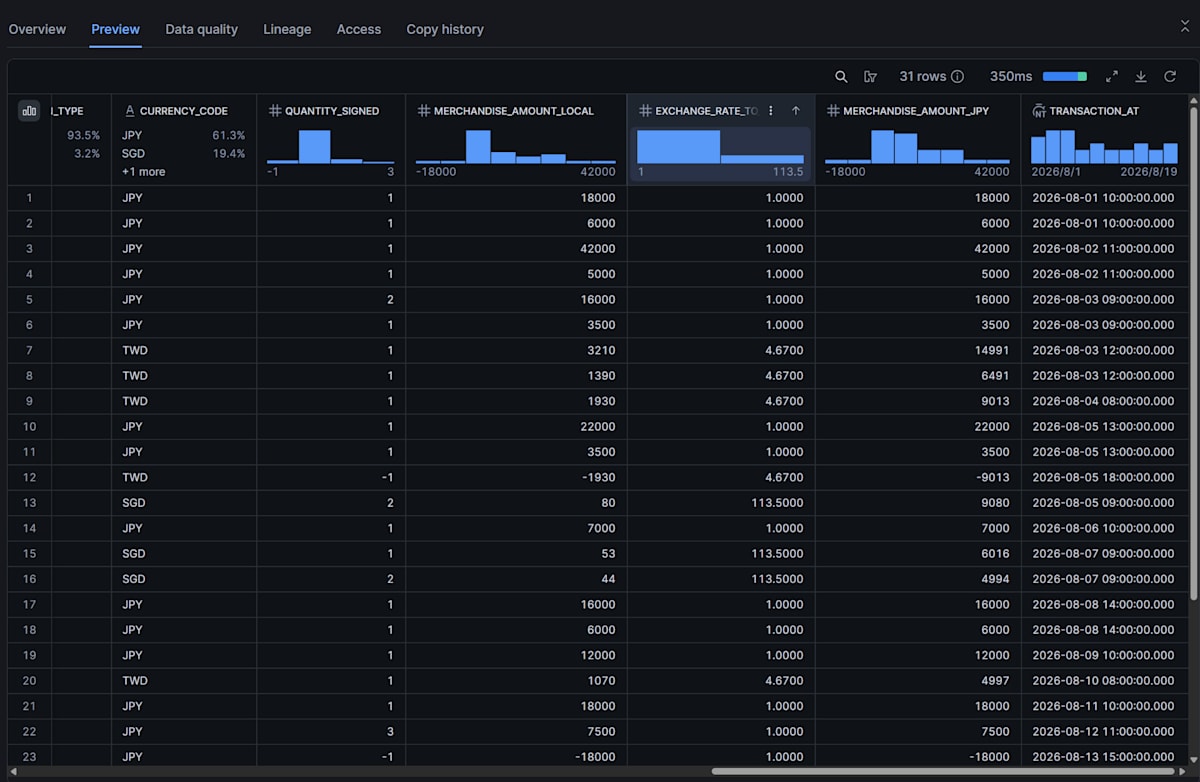
作られたTransaction Fact Tableであるfct_sales_transactionを見ると、以下のようになっています。
5. 業務の問いに答える
ここまでのテストは、モデルが宣言どおりに動くことを確認するものでした。最後に、4つの問いにクエリで答え、事前に計算した期待値と一致するかを確認します。クエリは、dbtがモデルを作成したデータベースとスキーマを指定したうえで、Snowsightのワークシートなどで実行します。
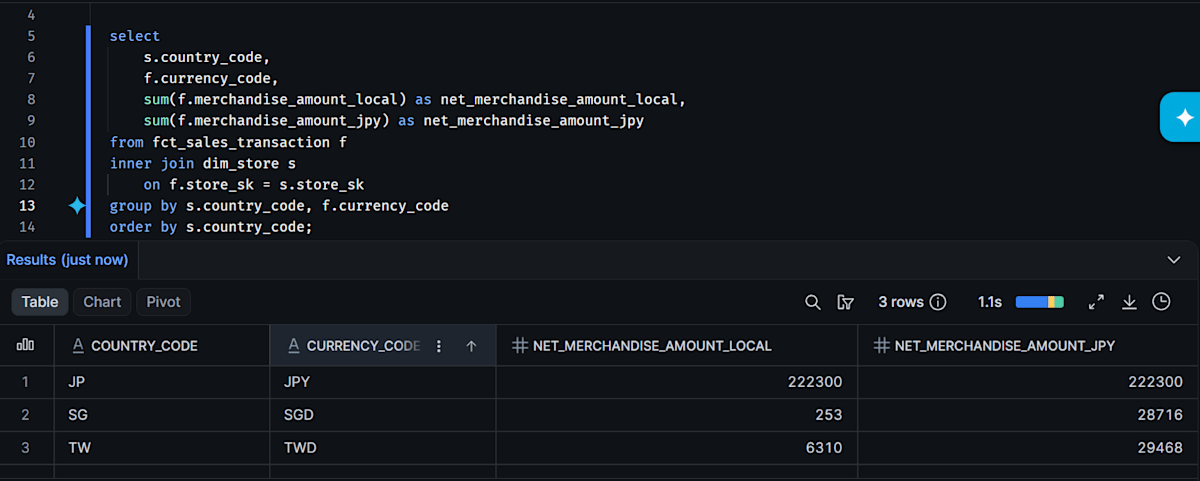
問い1: 国・通貨ごとの商品代金(現地通貨とJPY換算)
select
    s.country_code,
    f.currency_code,
    sum(f.merchandise_amount_local) as net_merchandise_amount_local,
    sum(f.merchandise_amount_jpy) as net_merchandise_amount_jpy
from fct_sales_transaction f
inner join dim_store s
    on f.store_sk = s.store_sk
group by s.country_code, f.currency_code
order by s.country_code;
次の結果になればOKです。返品(OL00017)とキャンセル(OL00031)が差し引かれ、通貨ごとに分かれています。通貨をまたいだ現地通貨額の合計は意味を持たないため、JPY換算額(合計280,484円)で比較します。JPY換算額は、イベントごとに丸めてから合計しています。
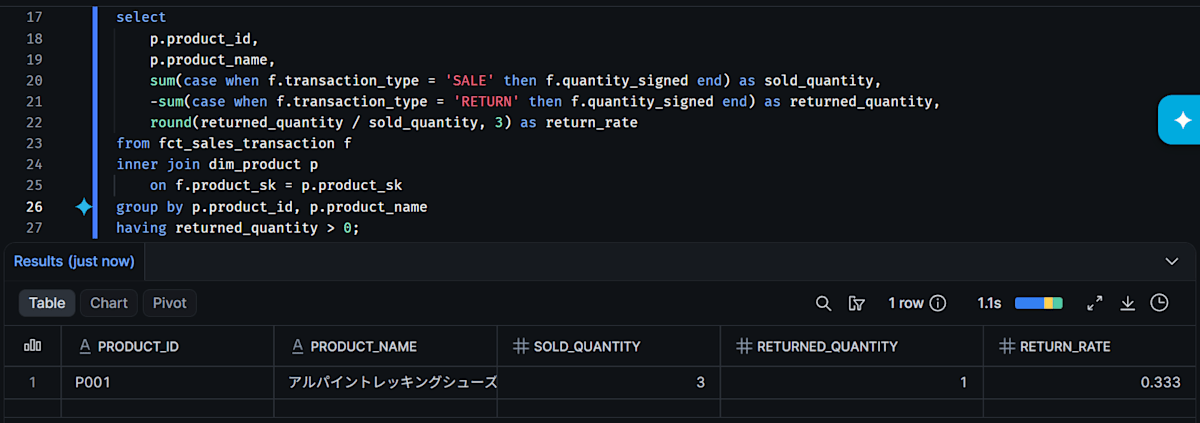
問い2: 商品ごとの返品率
select
    p.product_id,
    p.product_name,
    sum(case when f.transaction_type = 'SALE' then f.quantity_signed end) as sold_quantity,
    -sum(case when f.transaction_type = 'RETURN' then f.quantity_signed end) as returned_quantity,
    round(returned_quantity / sold_quantity, 3) as return_rate
from fct_sales_transaction f
inner join dim_product p
    on f.product_sk = p.product_sk
group by p.product_id, p.product_name
having returned_quantity > 0;
P001(アルパイントレッキングシューズ)が、販売3・返品1・返品率0.333の1行だけ返ればOKです。返品率は、販売数量と返品数量を先に合計してから割って求めています。
通貨と集計についての注意点は、以下の補足に記載しております。※クリックで展開できます。
補足: 通貨と集計についての注意(クリックで展開)
Multiple Currency Facts
Kimballは、取引通貨の金額と、共通の基準通貨の金額を並べて持つことを説明しています。今回のmerchandise_amount_localとmerchandise_amount_jpyがこれにあたります。月次レート、イベント発生月のレート、イベントごとの丸めという換算の方法は今回の取り決めで、Kimballが指定するものではありません。また、公式ページは通貨ディメンションも持たせるとしていますが、今回は省略し、currency_codeの列で識別しています。
返品・キャンセルも発生日のレートで換算するため、元の販売と月をまたいでレートが変わると、現地通貨では相殺されても、JPY換算額は相殺されない場合があります。今回のseedの返品・キャンセルは、販売と同じ8月内です。同じ月なら、換算額はNUMBER型同士の計算で、SnowflakeのROUNDは既定で0.5を0から遠い方へ丸めるため正負が対称になり、JPY換算額も完全に相殺されます(FLOATでは丸めが想定どおりにならない場合があります)。
Kimball公式Web「Multiple Currency Facts」が参考になります。
Additive / Non-Additive Facts
商品代金や数量は合計できますが、返品率のような比率は非加法的で、行別・商品別の率を合計や平均しても意味がありません。Kimballは、分子・分母のような加法的な要素を保持し、集計してから計算するよう説明しています。問い2のSQLも、数量を先にsum()してから返品率を出しています。exchange_rate_to_jpyも合計できません。quantity_signedを合計できるのも、単位や業務上の意味が揃っている範囲に限られます。
Kimball公式Web「Additive, Semi-Additive, and Non-Additive Facts」が参考になります。
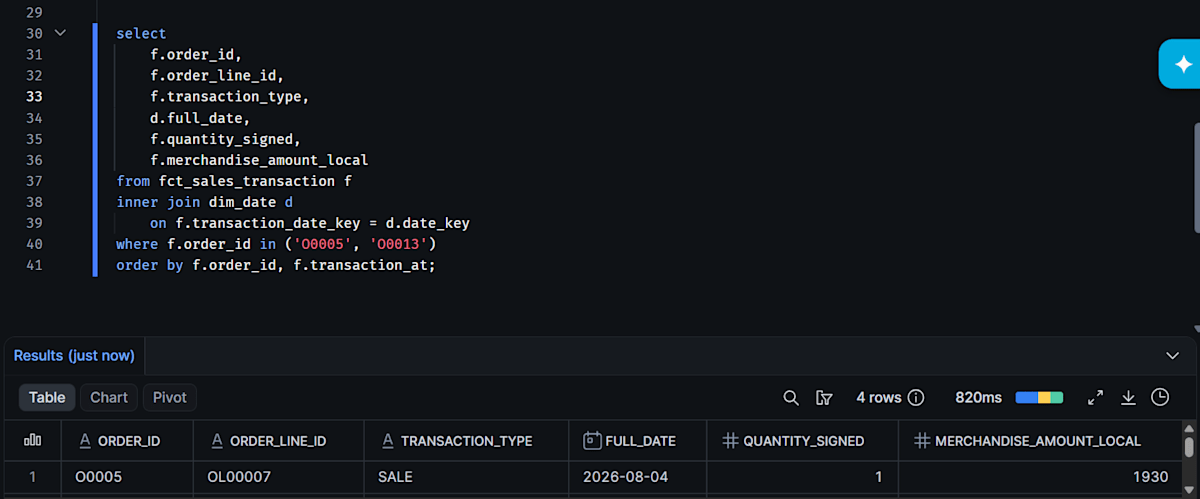
問い3: 返品・キャンセルが紐づく日付
返品(O0013)とキャンセル(O0005)の受注について、各イベントがどの日付に紐づいているかを確認します。
select
    f.order_id,
    f.order_line_id,
    f.transaction_type,
    d.full_date,
    f.quantity_signed,
    f.merchandise_amount_local
from fct_sales_transaction f
inner join dim_date d
    on f.transaction_date_key = d.date_key
where f.order_id in ('O0005', 'O0013')
order by f.order_id, f.transaction_at;
次の結果になればOKです。返品(OL00017)は、元の販売日(8/11)ではなく返品日(8/13)に紐づいています。キャンセル(OL00031)も、販売日(8/4)ではなくキャンセル日(8/5)に紐づいています。
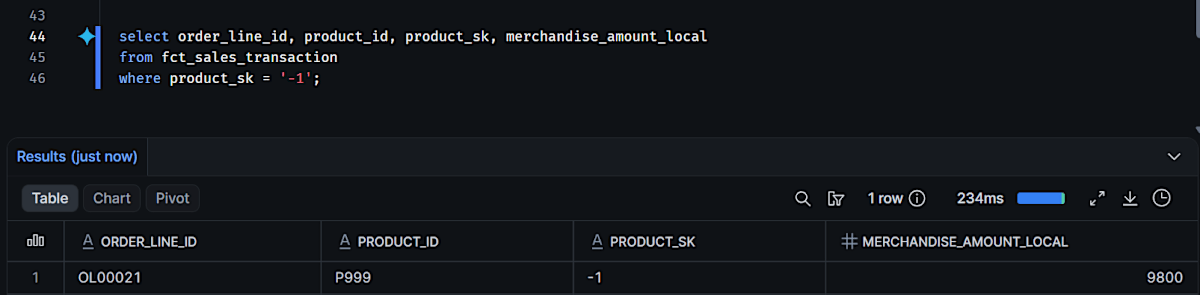
問い4: 商品マスタにない商品の明細
select order_line_id, product_id, product_sk, merchandise_amount_local
from fct_sales_transaction
where product_sk = '-1';
OL00021(product_idがP999)の1行だけが、product_sk = '-1'のまま残っていればOKです。行は落とされず、元のproduct_idも追跡できます。ソースのproduct_id自体がNULLのケースとは、product_id is nullかどうかで区別できます。通常の運用では、このクエリの件数を監視し、想定外に増えていないかを確認します。
最後に
dbt Projects on Snowflake上で、Transaction Fact TableとCalendar Date Dimensionを、受注(Sales Order)プロセスを題材に試しました。
ダミーデータを用いた、ある意味「きれいなデータ」で試したものではありますが、少しでも参考になると幸いです。