検証中にAccessDenied?そしたらすぐにCloudShellからIAM Policy Autopilotで自動修復じゃい!

CloudShellを起動してuvx iam-policy-autopilot fix-access-denied ""でエラー文を貼る!以上!
こんにちは、臼田です。
みなさん、AWSの検証してますか?(挨拶
検証中にIAMの権限が足りずにAn error occurred (AccessDeniedException)ってなることよくありますよね?
そんな時はCloudShellを起動してuvx iam-policy-autopilot fix-access-denied ""でエラー文を貼る!です。
これですぐに解決しますよ。スニペット登録しておきましょう。
IAM Policy Autopilot概要
2025年末のAWS re:Inventにて、IAM Policyの作成と修正を助けてくれるIAM Policy Autopilotがリリースされました。
これはAWSの機能ではなくて、パッと実行できるツールです。
ローカルで動かしてもいいですし、MCP経由で呼び出すことも可能です。
大きく下記2つの機能があります。
generate-policies: ソースコードを読んで新規のIAM Policyのポリシードキュメントを作成、オプションでIAM Policy自体の作成fix-access-denied: AccessDeniedのエラー文から足りない権限の特定、オプションで該当IAMのIAM Policyを追加
どちらも大変便利機能です。
ユースケース
IAM Policy Autopilot自体は色んな使い方ができますが、今回のユースケースはこんな感じです。
みなさん、ちょっとした検証でAWS公式のCloudFormationテンプレートとかを実行した際に、権限エラーで動かないことありませんか?
自分たちで1から書いたコードやIaCの場合、それらのコードを読ませながらgenerate-policiesするとよいですが、コードを特定したりするのが難しかったり、アプリケーションコードじゃないロジックのIAMの場合(例えばStepFunctionsから実行する際の権限など)には直接generate-policiesは使えません。
一方、エラー文は実際にエラーが発生しているのでパッと確認して直すことが可能です。
というわけで、AWSマネジメントコンソールを触っていてエラーが出た際、パッとCloudShellを起動して修正を始めればよいのです。つまり…
CloudShellを起動してuvx iam-policy-autopilot fix-access-denied ""でエラー文を貼る!
今回私はこちらのAmazon Bedrock AgentCore invokeHarness を使用した Triage サポートチケットを検証していたのですが、環境構築後にStepFunctionsの実行がエラーで止まってしまったので、そのエラーをコピーして
CloudShellを起動してuvx iam-policy-autopilot fix-access-denied ""でエラー文を貼る!
をしました。
こんな感じにエラーになっていて、本来はbedrock-agentcore:ListEventsの権限が足りないのねー追加しなきゃねーと読み取って考えるところです。
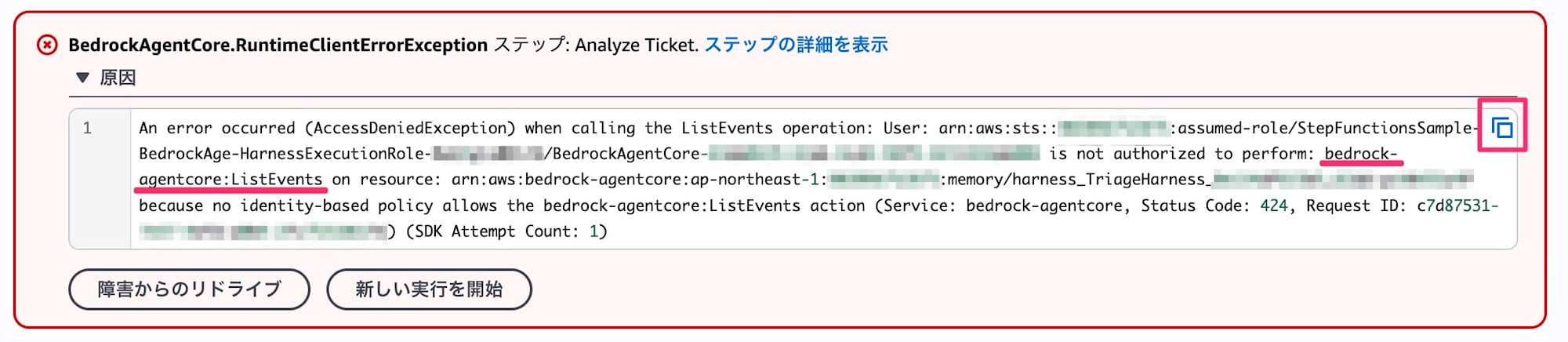
しかし、AccessDeniedとあらば、コピーボタンを押してCloudShellに向かうだけで良いんですね。
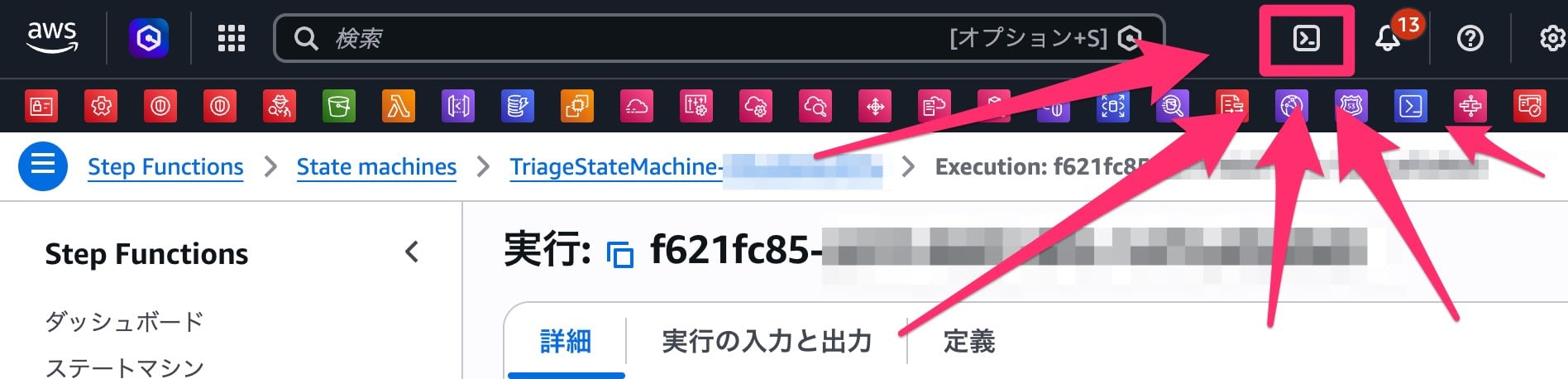
CloudShellを起動してuvx iam-policy-autopilot fix-access-denied ""でエラー文を貼る!
実行したらこうなりました。
[cloudshell-user@ip-10-0-0-1 ~]$ uvx iam-policy-autopilot fix-access-denied "An error occurred (AccessDeniedException) when calling the ListEvents operation: User: arn:aws:sts::999999999999:assumed-role/StepFunctionsSample-BedrockAge-HarnessExecutionRole-XXXXXXXXXXXX/BedrockAgentCore-XXXXXXXX-XXXX-XXXX-XXXX-XXXXXXXXXXXX is not authorized to perform: bedrock-agentcore:ListEvents on resource: arn:aws:bedrock-agentcore:ap-northeast-1:999999999999:memory/harness_TriageHarness_XXXXXXXXXXXX_XXXX-XXXXXXXXXX because no identity-based policy allows the bedrock-agentcore:ListEvents action (Service: bedrock-agentcore, Status Code: 424, Request ID: XXXXXXXX-XXXX-XXXX-XXXX-XXXXXXXXXXXX) (SDK Attempt Count: 1)"
Installed 1 package in 1ms

IAM Policy Autopilot will collect telemetry data on command usage starting at version 0.2.0 (unless opted out)

        Overview: We do not collect customer content and we anonymize the
                  telemetry we do collect. See the attached link for more
                  information on what data is collected, why, and how to
                  opt-out. Telemetry will NOT be collected for any version
                  prior to 0.2.0 - regardless of opt-in/out.

        Opt-out:  Run `iam-policy-autopilot telemetry --disable`
                  or set DISABLE_IAM_POLICY_AUTOPILOT_TELEMETRY=true

        Details:  https://github.com/awslabs/iam-policy-autopilot/blob/main/TELEMETRY.md

IAM Policy Autopilot Plan
Principal: arn:aws:sts::999999999999:assumed-role/StepFunctionsSample-BedrockAge-HarnessExecutionRole-XXXXXXXXXXXX/BedrockAgentCore-XXXXXXXX-XXXX-XXXX-XXXX-XXXXXXXXXXXX
Action:    bedrock-agentcore:ListEvents
Resource:  arn:aws:bedrock-agentcore:ap-northeast-1:999999999999:memory/harness_TriageHarness_XXXXXXXXXXXX_XXXX-XXXXXXXXXX
Denial:    ImplicitIdentity

Proposed permissions:
  - bedrock-agentcore:ListEvents

Apply this fix now? [y/N] y
Applied inline policy 'IamPolicyAutopilot-StepFunctionsSample-BedrockAge-HarnessExecutionRole-XXXXXXXXXXXX' to Role/StepFunctionsSample-BedrockAge-HarnessExecutionRole-XXXXXXXXXXXX
修復後、実行すると別の権限が足りずにまたエラーとなりました。コードを確認する?いいえ。
CloudShellを起動してuvx iam-policy-autopilot fix-access-denied ""でエラー文を貼る!
[cloudshell-user@ip-10-0-0-1 ~]$ uvx iam-policy-autopilot fix-access-denied "An error occurred (AccessDeniedException) when calling the CreateEvent operation: User: arn:aws:sts::999999999999:assumed-role/StepFunctionsSample-BedrockAge-HarnessExecutionRole-XXXXXXXXXXXX/BedrockAgentCore-XXXXXXXX-XXXX-XXXX-XXXX-XXXXXXXXXXXX is not authorized to perform: bedrock-agentcore:CreateEvent on resource: arn:aws:bedrock-agentcore:ap-northeast-1:999999999999:memory/harness_TriageHarness_XXXXXXXXXXXX_XXXX-XXXXXXXXXX because no identity-based policy allows the bedrock-agentcore:CreateEvent action (Service: bedrock-agentcore, Status Code: 424, Request ID: XXXXXXXX-XXXX-XXXX-XXXX-XXXXXXXXXXXX) (SDK Attempt Count: 1)"

IAM Policy Autopilot will collect telemetry data on command usage starting at version 0.2.0 (unless opted out)

        Overview: We do not collect customer content and we anonymize the
                  telemetry we do collect. See the attached link for more
                  information on what data is collected, why, and how to
                  opt-out. Telemetry will NOT be collected for any version
                  prior to 0.2.0 - regardless of opt-in/out.

        Opt-out:  Run `iam-policy-autopilot telemetry --disable`
                  or set DISABLE_IAM_POLICY_AUTOPILOT_TELEMETRY=true

        Details:  https://github.com/awslabs/iam-policy-autopilot/blob/main/TELEMETRY.md

IAM Policy Autopilot Plan
Principal: arn:aws:sts::999999999999:assumed-role/StepFunctionsSample-BedrockAge-HarnessExecutionRole-XXXXXXXXXXXX/BedrockAgentCore-XXXXXXXX-XXXX-XXXX-XXXX-XXXXXXXXXXXX
Action:    bedrock-agentcore:CreateEvent
Resource:  arn:aws:bedrock-agentcore:ap-northeast-1:999999999999:memory/harness_TriageHarness_XXXXXXXXXXXX_XXXX-XXXXXXXXXX
Denial:    ImplicitIdentity

Proposed permissions:
  - bedrock-agentcore:CreateEvent

Apply this fix now? [y/N] y
Added statement to policy 'IamPolicyAutopilot-StepFunctionsSample-BedrockAge-HarnessExecutionRole-XXXXXXXXXXXX' on Role/StepFunctionsSample-BedrockAge-HarnessExecutionRole-XXXXXXXXXXXX (now 2 statements total)
これで実行が通りました。
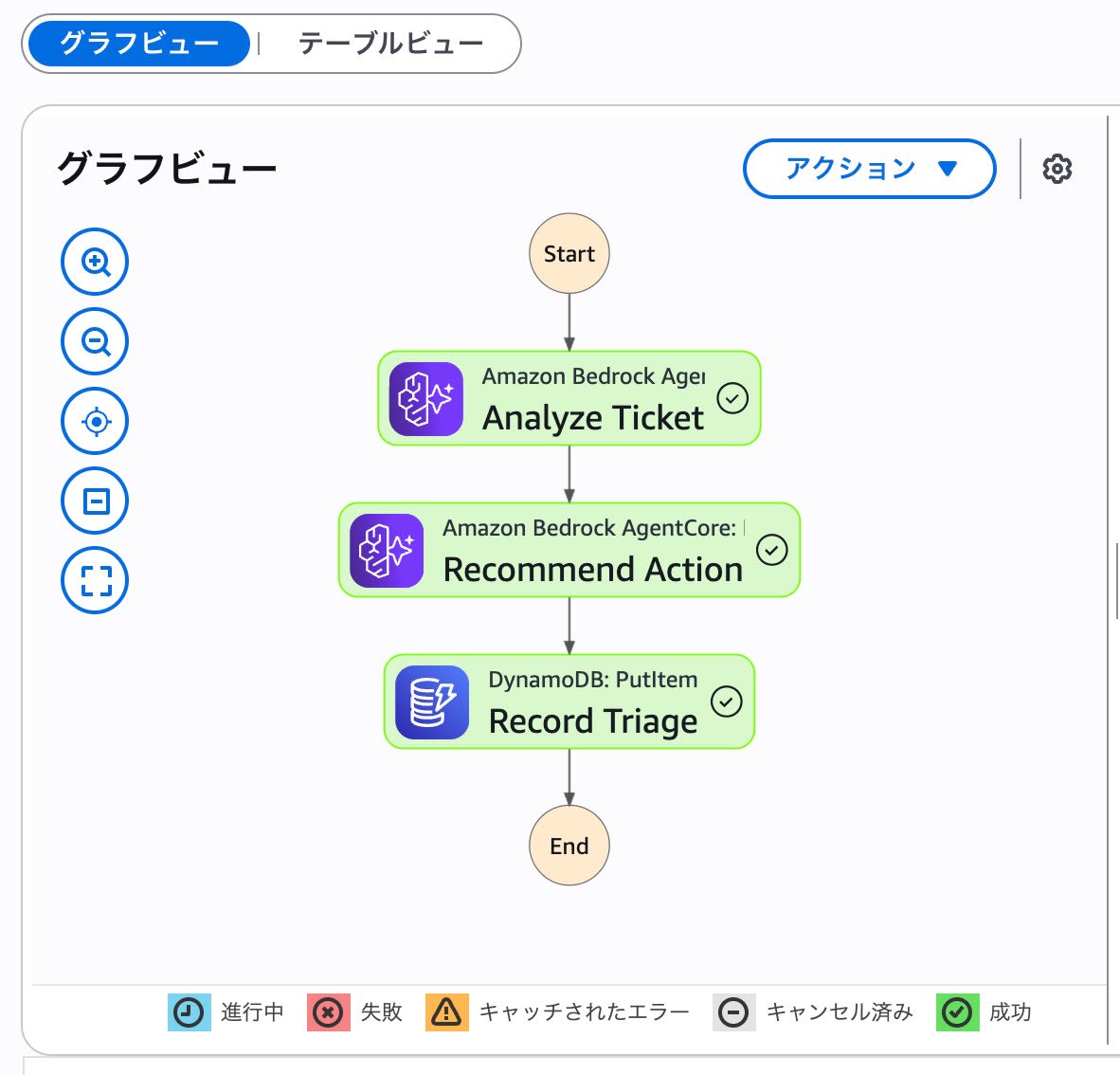
権限の修復処理
修復されたIAMに実際どう権限が付いているかというとこんな感じです。
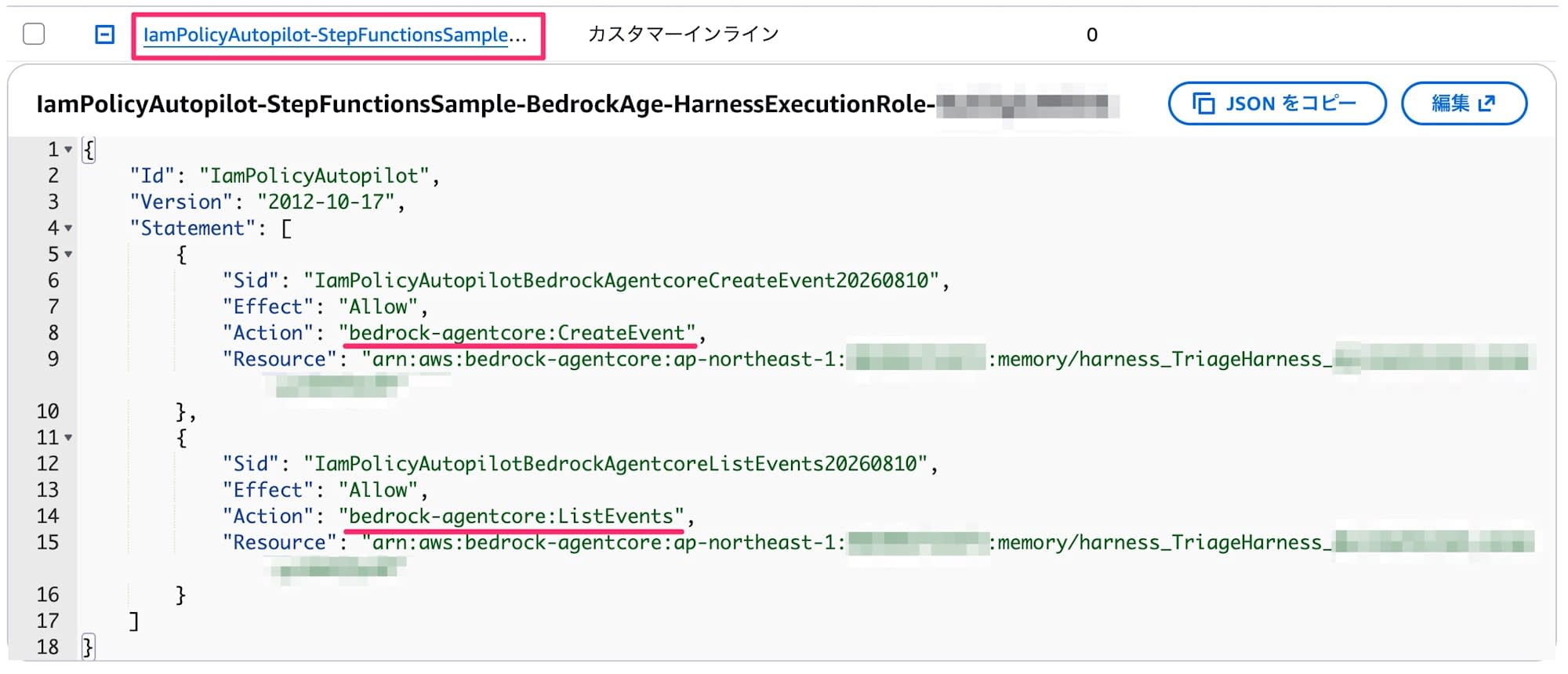
IamPolicyAutopilot-<IAMプリンシパルの名前>という感じのインラインポリシーが作られ、その中に各Actionが追加される感じですね。複数回実行してもちゃんと1つのインラインポリシーにまとまるのは良いことです。
まとめ
CloudShellを起動してuvx iam-policy-autopilot fix-access-denied ""でエラー文を貼る!
スニペットを登録しておいて、常に素早く実行できるようにしましょう。