Amazon GuardDutyの新機能「AI Protection」を有効化してAIワークロードの脅威検知を試してみた

はじめに
2026年7月14日、Amazon GuardDuty AI Protection が一般提供されました。BedrockやSageMakerで動くAIワークロードに対して、コスト搾取や異常なモデル呼び出し、プロンプトインジェクションといったAI固有の脅威を検知する機能です。
これまでのGuardDutyでも、Foundational検知はCloudTrail管理イベントを通じてAIワークロード関連の不審操作を検知していました。Bedrock Guardrailsの不審な削除やモデル呼び出しログの無効化などが対象です。AI Protectionはこれに加え、モデル呼び出しのデータイベントを分析してAI固有の脅威を検知する専用のFindingタイプを追加します。
| 観点 | Foundational検知 | AI Protection追加後 |
|---|---|---|
| 検知対象 | EC2, IAM, S3, EKS, Lambda等に加え、CloudTrail管理イベント上のBedrock/SageMaker AI関連操作 | 左記に加え、AIワークロードのモデル呼び出しを対象とした専用検知 |
| AI関連の検知 | Bedrock Guardrailsの不審な変更、モデル呼び出しログの無効化など | CostHarvesting, AnomalousModelInvocation, PromptInjection.Direct |
| データソース | VPCフローログ, DNSログ, CloudTrail管理イベント等 | CloudTrail管理イベントおよびデータイベント(データイベントはサービスリンクチャネル経由) |
| 追加設定 | 各Protection Planごとに有効化 | トグル1つ(CloudTrail証跡の手動設定不要) |
AI Protectionが検知する脅威は3タイプです。CostHarvesting はモデルの不正利用によるコスト搾取を、AnomalousModelInvocation は普段と異なるモデルやAPI、送信元からの異常な呼び出しを検知します。どちらもユーザーやアカウントごとのベースラインを学習した上で異常を判定します。PromptInjection.Direct は、Bedrock Guardrailsがプロンプト攻撃をブロックしたイベントを起点に、直接的なプロンプトインジェクションを検知します。
各タイプの詳細はGuardDuty AI Protection のドキュメントにまとまっています。本記事では東京リージョンでAI Protectionを有効化し、サービスリンクチャネルの自動作成、サンプルFindingの構造、Bedrock Guardrails連携の動作を順に見ていきます。
有効化手順
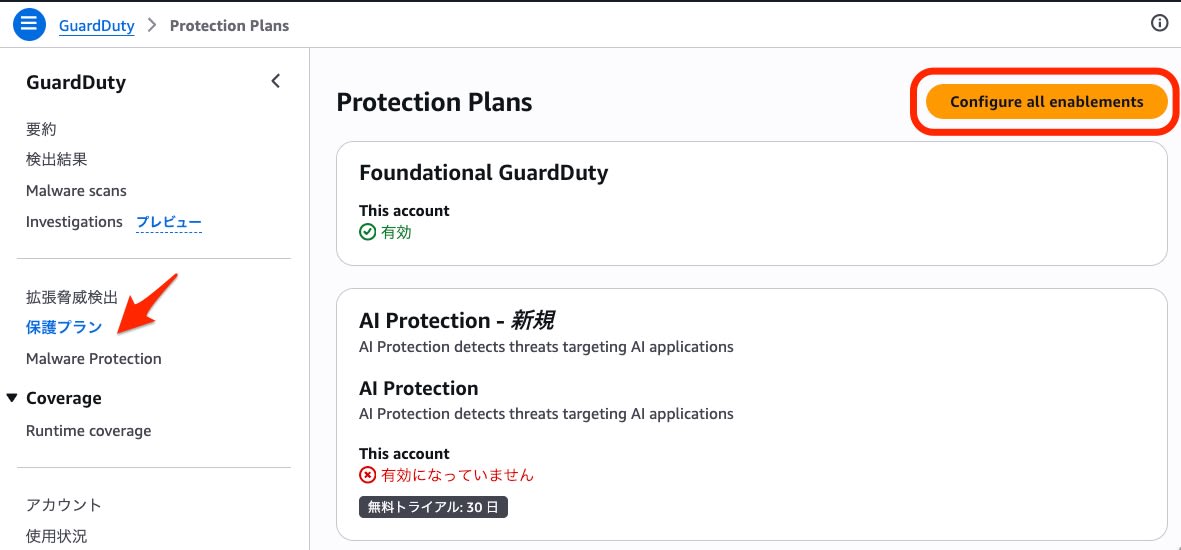
AI Protectionはマネジメントコンソールから3クリックで有効化できます。GuardDutyコンソールの「Protection plans」を開き、設定画面に進みます。
一覧の中から AI Protection のトグルを有効化します。
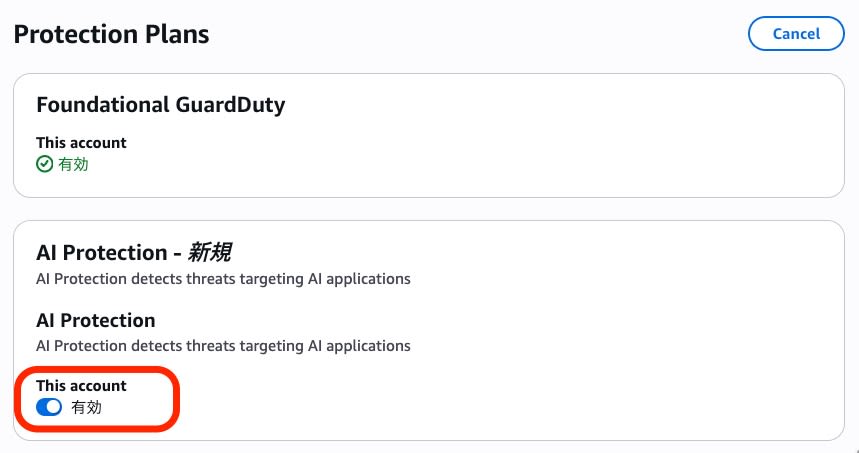
最後に「Save all」で設定を保存します。
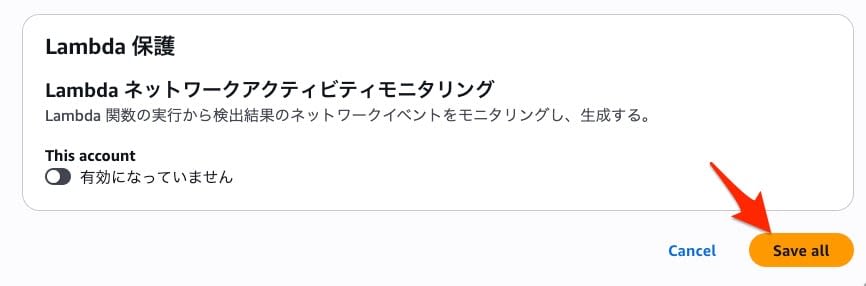
CLIからも有効化できます。詳細な手順はスタンドアロンアカウントでのAI Protection有効化ドキュメントを参照してください。
aws guardduty update-detector \
  --detector-id <your-detector-id> \
  --region ap-northeast-1 \
  --features '[{"Name": "AI_PROTECTION", "Status": "ENABLED"}]'
成功時のレスポンスは空です。get-detector で確認します。
aws guardduty get-detector \
  --detector-id <your-detector-id> \
  --region ap-northeast-1 \
  --query 'Features[?Name==`AI_PROTECTION`]'
[
    {
        "Name": "AI_PROTECTION",
        "Status": "ENABLED",
        "UpdatedAt": "2026-07-15T06:47:02+09:00"
    }
]
コンソール・CLIのどちらの方法でも、設定は即時に反映されました。
サービスリンクチャネルの確認
AI Protectionを有効化すると、CloudTrailのサービスリンクチャネルが自動作成されます。ユーザーが証跡を作成する必要はなく、サービスリンクチャネル経由でデータイベントがGuardDutyに配信されます。
aws cloudtrail list-channels --region ap-northeast-1
{
    "Channels": [
        {
            "ChannelArn": "arn:aws:cloudtrail:ap-northeast-1:123456789012:channel/aws-service-channel/guardduty/xxxxxxxx-xxxx-xxxx-xxxx-xxxxxxxxxxxx",
            "Name": "aws-service-channel/guardduty/default"
        }
    ]
}
チャネルの詳細は以下のとおりです。
| 項目 | 値 |
|---|---|
| Name | aws-service-channel/guardduty/default |
| Source | CloudTrail |
| ApplyToAllRegions | false(リージョン単位) |
| Destination | guardduty(AWS_SERVICE) |
このチャネルが監視するリソースタイプは全34種です。内訳はBedrockコアが18種、Bedrock AgentCoreが14種、その他(BedrockMantleとSageMaker)が2種です。
監視対象リソースタイプ全34種
Bedrock コア(18種):
| # | リソースタイプ | 説明 |
|---|---|---|
| 1 | AWS::Bedrock::Model | モデル呼び出し(InvokeModel等) |
| 2 | AWS::Bedrock::AgentAlias | Agentの呼び出し |
| 3 | AWS::Bedrock::AsyncInvoke | 非同期呼び出し |
| 4 | AWS::Bedrock::FlowAlias | フロー呼び出し |
| 5 | AWS::Bedrock::Guardrail | ガードレール評価 |
| 6 | AWS::Bedrock::InlineAgent | インラインエージェント |
| 7 | AWS::Bedrock::KnowledgeBase | ナレッジベース検索 |
| 8 | AWS::Bedrock::PromptVersion | プロンプト管理 |
| 9 | AWS::Bedrock::Session | セッション |
| 10 | AWS::Bedrock::FlowExecution | フロー実行 |
| 11 | AWS::Bedrock::AutomatedReasoningPolicy | 自動推論ポリシー |
| 12 | AWS::Bedrock::AutomatedReasoningPolicyVersion | 同上バージョン |
| 13 | AWS::Bedrock::AdvancedOptimizePromptJob | プロンプト最適化ジョブ |
| 14 | AWS::Bedrock::DataAutomationProject | データ自動化プロジェクト |
| 15 | AWS::Bedrock::DataAutomationInvocation | データ自動化呼び出し |
| 16 | AWS::Bedrock::DataAutomationProfile | データ自動化プロファイル |
| 17 | AWS::Bedrock::Blueprint | ブループリント |
| 18 | AWS::Bedrock::Tool | ツール |
Bedrock AgentCore(14種):
| # | リソースタイプ | 説明 |
|---|---|---|
| 19 | AWS::BedrockAgentCore::CodeInterpreter | コードインタプリタ |
| 20 | AWS::BedrockAgentCore::Browser | ブラウザー |
| 21 | AWS::BedrockAgentCore::WorkloadIdentity | ワークロードID |
| 22 | AWS::BedrockAgentCore::WorkloadIdentityDirectory | ワークロードIDディレクトリ |
| 23 | AWS::BedrockAgentCore::TokenVault | トークンボールト |
| 24 | AWS::BedrockAgentCore::APIKeyCredentialProvider | APIキープロバイダ |
| 25 | AWS::BedrockAgentCore::Runtime | ランタイム |
| 26 | AWS::BedrockAgentCore::RuntimeEndpoint | ランタイムエンドポイント |
| 27 | AWS::BedrockAgentCore::Gateway | ゲートウェイ |
| 28 | AWS::BedrockAgentCore::Memory | メモリ |
| 29 | AWS::BedrockAgentCore::OAuth2CredentialProvider | OAuth2プロバイダ |
| 30 | AWS::BedrockAgentCore::BrowserCustom | カスタムブラウザー |
| 31 | AWS::BedrockAgentCore::CodeInterpreterCustom | カスタムコードインタプリタ |
| 32 | AWS::BedrockAgentCore::Evaluator | 評価器 |
その他:
| # | リソースタイプ | 説明 |
|---|---|---|
| 33 | AWS::BedrockMantle::Project | プロジェクト |
| 34 | AWS::SageMaker::Endpoint | SageMakerエンドポイント |
サンプルFindingの確認
AI Protectionが出力するFindingの構造を確認するため、サンプルFindingを生成しました。
aws guardduty create-sample-findings \
  --detector-id <your-detector-id> \
  --region ap-northeast-1 \
  --finding-types "Impact:IAMUser/CostHarvesting"
3タイプのうち、サンプル生成に対応しているのは CostHarvesting のみでした。
| Finding タイプ | サンプル生成 |
|---|---|
| Impact:IAMUser/CostHarvesting | ✅ 対応 |
| Impact:IAMUser/AnomalousModelInvocation | ❌ 未対応 |
| Impact:IAMUser/PromptInjection.Direct | ❌ 未対応 |
生成された CostHarvesting Findingの主要フィールドを確認します。
| フィールド | 値 |
|---|---|
| Type | Impact:IAMUser/CostHarvesting |
| Title | "Unusual model invocation activity associated with cost harvesting was observed." |
| Severity | 5.0(MEDIUM) |
| FeatureName | AIProtection |
| Service.Action.ActionType | AWS_API_CALL |
| Service.Action.AwsApiCallAction.Api | InvokeModel |
| Service.Action.AwsApiCallAction.ServiceName | bedrock |
| Resource.ResourceType | AccessKey |
Descriptionには、どのIAM IDがどのモデルをどこから呼び出し、なぜ疑わしいと判断したのかが自然文で記述されます。
The IAM identity GeneratedFindingUserName invoked the following APIs:
- bedrock.amazonaws.com: ConverseStream completed without error.
The model anthropic.claude-3-opus-20240229 was invoked from 198.51.100.23
located in GeneratedFindingCountryName from GeneratedFindingISP (ASN=12345).
GuardDuty considers these invocations suspicious because:- The organization GeneratedFindingASNOrg (ASN=12345) has not been previously observed for this user or account.
- The ConverseStream API has not been previously observed for this user or account.
- The model anthropic.claude-3-opus-20240229 has not been previously observed for this user or account.
検知対象のモデルはModelDetailsフィールドにIDまたはARNで記録されます(オンデマンド、カスタムモデルデプロイ、プロビジョンドスループット等の形式を含みます)。
異常と判定した根拠は Detection 構造に格納されます。
Detection 構造(Anomaly Detection)
"Detection": {
    "Anomaly": {
        "Profiles": {
            "<Scope>": {
                "<Feature>": {
                    "ProfileType": "VOLUME" | "FREQUENCY",
                    "ProfileSubtype": "AVERAGE" | "COUNT" | "FREQUENT" | "UNSEEN",
                    "Observations": {
                        "Number": [...] | "Text": [...]
                    }
                }
            }
        }
    }
}
ProfileType は異常の種類を表し、VOLUME(呼び出し量の異常)と FREQUENCY(頻度の異常)があります。ProfileSubtype はその内訳で、平均との比較(AVERAGE)、回数(COUNT)、頻出(FREQUENT)、未観測(UNSEEN)といった観点で異常が判定されます。
生成されたAI Protection FindingはfeatureNameで絞り込めます。
aws guardduty list-findings \
  --detector-id <your-detector-id> \
  --region ap-northeast-1 \
  --finding-criteria '{"Criterion":{"service.featureName":{"Eq":["AIProtection"]}}}'
各Findingタイプには前提条件とベースライン期間があります。
| Finding タイプ | 前提条件 | ベースライン期間 |
|---|---|---|
| CostHarvesting | AI Protection有効化のみ | 7〜14日 |
| AnomalousModelInvocation | AI Protection有効化のみ | 7〜14日 |
| PromptInjection.Direct | Bedrock Guardrails + Converse API | 不要(イベント駆動) |
Bedrock Guardrails連携
PromptInjection.Direct Findingは、Bedrock Guardrailsがプロンプト攻撃をブロックしたイベントを前提に生成されます。プロンプト攻撃フィルタを有効にしたガードレールを用意し、動作を試しました。
| 項目 | 値 |
|---|---|
| guardrailId | abcdef123456 |
| name | guardduty-ai-protection-test |
| PROMPT_ATTACK inputStrength | HIGH |
| PROMPT_ATTACK outputStrength | NONE |
| tier | CLASSIC |
このガードレールを使い、InvokeModel APIと Converse APIでプロンプト攻撃の扱いがどう異なるかを比較しました。
| API | ガードレール動作 | 備考 |
|---|---|---|
| InvokeModel | guardrailAction: NONE(通過) | |
| Converse | stopReason: guardrail_intervened(ブロック) | 正しく動作する |
Converse APIで正常なプロンプトを送ると、通常どおり応答が返りました。
{
    "stopReason": "end_turn",
    "usage": {"inputTokens": 19, "outputTokens": 66, "totalTokens": 85}
}
一方、プロンプト攻撃を送るとガードレールが介入し、stopReason が guardrail_intervened になりました。
プロンプトインジェクション検知時のレスポンス
{
    "output": {
        "message": {
            "role": "assistant",
            "content": [{"text": "プロンプト攻撃が検知されました。リクエストはブロックされました。"}]
        }
    },
    "stopReason": "guardrail_intervened",
    "usage": {"inputTokens": 0, "outputTokens": 0, "totalTokens": 0},
    "metrics": {"latencyMs": 346},
    "trace": {
        "guardrail": {
            "inputAssessment": {
                "abcdef123456": {
                    "contentPolicy": {
                        "filters": [{
                            "type": "PROMPT_ATTACK",
                            "confidence": "HIGH",
                            "filterStrength": "HIGH",
                            "action": "BLOCKED",
                            "detected": true
                        }]
                    },
                    "invocationMetrics": {
                        "guardrailProcessingLatency": 196,
                        "usage": {"contentPolicyUnits": 1},
                        "guardrailCoverage": {"textCharacters": {"guarded": 111, "total": 111}}
                    }
                }
            },
            "actionReason": "Guardrail blocked."
        }
    }
}
今回の検証ではガードレールによるプロンプト攻撃のブロック(手順1〜2)まで実測しています。手順3〜5はドキュメントベースの記載です。
- ユーザーが Converse API でガードレール付きモデルを呼び出す ✅
- Guardrailが PROMPT_ATTACK を検知し、
guardrail_intervenedとなる ✅ - CloudTrailデータイベント(
AWS::Bedrock::Guardrail)が記録される - GuardDutyがサービスリンクチャネル経由でデータイベントを受信する
- GuardDutyが
Impact:IAMUser/PromptInjection.DirectFinding を生成する
Security Hub連携
GuardDutyのFindingは、統合が有効であればSecurity Hubに自動連携されます。まず統合状態を見てみます。
aws securityhub list-enabled-products-for-import \
  --region ap-northeast-1 \
  --query "ProductSubscriptions[?contains(@, 'guardduty')]"
["arn:aws:securityhub:ap-northeast-1:123456789012:product-subscription/aws/guardduty"]
GuardDuty → Security Hub の統合は有効です。ただし、先ほど生成したサンプルFindingをSecurity Hub側で検索しても結果は空でした。
aws securityhub get-findings \
  --region ap-northeast-1 \
  --filters '{"ProductName":[{"Value":"GuardDuty","Comparison":"EQUALS"}],"Title":[{"Value":"Unusual model invocation","Comparison":"PREFIX"}]}'
{"Findings": []}
サンプルFinding(sample: true)が転送対象外である可能性とタイミングの問題を切り分けられなかったため、この結果だけでは連携の成否を判断していません。実際のFindingであればタイプで絞り込めます。
aws securityhub get-findings \
  --region ap-northeast-1 \
  --filters '{
    "ProductName": [{"Value": "GuardDuty", "Comparison": "EQUALS"}],
    "Type": [{"Value": "TTPs/Impact/Impact:IAMUser-CostHarvesting", "Comparison": "EQUALS"}]
  }'
実際のFindingがSecurity Hubに連携されることは、既存のRuntime Monitoring Findingで確認できました。
aws securityhub get-findings \
  --region ap-northeast-1 \
  --filters '{"ProductName":[{"Value":"GuardDuty","Comparison":"EQUALS"}],"RecordState":[{"Value":"ACTIVE","Comparison":"EQUALS"}]}' \
  --sort-criteria '{"Field":"CreatedAt","SortOrder":"desc"}' \
  --max-results 3 \
  --query 'Findings[].{Title: Title, Type: Types[0], CreatedAt: CreatedAt}'
[
    {
        "Title": "Security-sensitive file modification is detected in a resource of type KubernetesCluster.",
        "Type": "TTPs/Privilege Escalation/PrivilegeEscalation:Runtime-SensitiveFileModified",
        "CreatedAt": "2026-07-02T00:59:30.271Z"
    }
]
PrivilegeEscalation:Runtime-SensitiveFileModified のFindingが正常にSecurity Hubへ連携されています。AI ProtectionのFindingも同じ仕組みで自動連携されます。
まとめ
Amazon GuardDuty AI Protection は、トグル1つで有効化でき、CloudTrail証跡の個別設定なしにAIワークロードの脅威検知を開始できます。既存のGuardDuty・Security Hub運用にそのまま乗るため、導入のハードルは低いと感じました。
CostHarvesting と AnomalousModelInvocation はベースライン形成に7〜14日かかるため、検知が効き始めるのは有効化してしばらく経ってからです。PromptInjection.Direct は Converse API + Guardrails が前提ですが、イベント駆動なので即時性があります。ベースライン形成後に実Findingが生成される挙動は、別途確認予定です。
AI Protectionには30日間の無料トライアルがあり、今回の検証規模ではコストはほぼ$0でした。料金の詳細はGuardDutyの料金ページを参照してください。