![[アップデート]Amazon GuardDutyのカスタム脅威リストが実行ファイルのSHA256ハッシュに対応しました](https://images.ctfassets.net/ct0aopd36mqt/wp-thumbnail-f1f1e80330aaa8917410e012de277155/263838c1009bccfef2d8a98f11615f2d/amazon-guardduty?w=3840&fm=webp)
[アップデート]Amazon GuardDutyのカスタム脅威リストが実行ファイルのSHA256ハッシュに対応しました

こんにちは、AWS事業本部@福岡オフィスのべこみん(@beco_minn)です。
みなさん、Amazon GuardDuty(以下、GuardDuty)の脅威エンティティリスト(threat entity list)は活用していますか?
先週木曜日(2026/05/14)のアップデートで、GuardDutyの脅威エンティティリストにSHA-256ファイルハッシュも登録できるようになりました。
アップデート内容は以下の通り。
{
    "version": "1",
    "type": "NEW_FEATURES",
    "featureDetails": [
        {
            "featureDescription": "Customers can now use their own threat entity lists to add SHA-256 file hash IOCs and GuardDuty will generate Execution:Runtime/MaliciousFileExecuted.Custom findings on them. See https://docs.aws.amazon.com/guardduty/latest/ug/guardduty_upload-lists.html for instructions on uploading threat entity lists.",
            "featureLink": "https://docs.aws.amazon.com/guardduty/latest/ug/findings-runtime-monitoring.html#execution-runtime-malicious-file-executed-custom"
        }
    ]
}
(訳)
独自の脅威エンティティリストにSHA-256ファイルハッシュのIOCを追加できるようになりました。リストに登録されたハッシュに対して、GuardDutyはExecution:Runtime/MaliciousFileExecuted.Customのfindingを生成します。脅威エンティティリストのアップロード手順については Customizing threat detection with entity lists and IP address lists - Amazon GuardDutyを参照してください。
これにより、自社で保有する独自のIOC(Indicator of Compromise)を使って、Runtime Monitoringで既知マルウェアの実行を検知できるようになります。
前回のアップデート(ドメイン対応)が2025年8月のアップデートなので、9ヶ月振りのアップデートですね。
[アップデート]Amazon GuardDutyがドメインによる信頼する/検出するリストに対応しました | DevelopersIO
本記事ではこのアップデートの概要と、実際にカスタムSHA-256ハッシュを登録して検知させるまでの実機検証をご紹介します。
※本アップデートはGuardDutyのお知らせ用SNSトピックから拾っています。ご興味のある方はぜひサブスクライブしてみてください。
Amazon SNS GuardDutyのお知らせへのサブスクライブ - Amazon GuardDuty
ざっくりまとめ
- GuardDuty Runtime Monitoringの脅威エンティティリストにSHA-256ファイルハッシュを登録できるようになった
- 自社で持っている独自IOCで既知マルウェアの実行を検知できるようになった
- 検知されると
Execution:Runtime/MaliciousFileExecuted.Customという新しいfinding typeが生成される.Customサフィックスでユーザー提供IOC由来と一目で分かる
- 従来はIP/ドメインしか登録できず、ハッシュベースの検知はAWS提供の脅威インテリジェンスに依存していた
何が変わったのか?
従来の脅威エンティティリスト
GuardDutyの脅威エンティティリストは、ユーザーが独自の脅威情報をGuardDutyに取り込むための機能です。
従来脅威エンティティリストでサポートされていたのはIPアドレスとドメインのみで、これらを登録することによってGuardDutyは対象のIPやドメインとの通信を検知してfindingを生成していました。
一方、ファイルハッシュベースの検知(マルウェア実行の検知)については、GuardDutyがAWS側で提供する脅威インテリジェンスに基づく Execution:Runtime/MaliciousFileExecuted や Execution:EC2/MaliciousFile といったfinding typeのみでした。つまり、ユーザーが独自のファイルハッシュIOCを持ち込む手段が無かったんです。
今回のアップデート
今回のアップデートにより、脅威エンティティリストにSHA-256ファイルハッシュを登録できるようになりました。
登録したハッシュに一致するファイルがRuntime Monitoringの監視対象(EC2インスタンスやコンテナ)上で実行されると、 Execution:Runtime/MaliciousFileExecuted.Custom というfindingが生成されます。
従来のfinding type Execution:Runtime/MaliciousFileExecuted との違いは .Custom サフィックスが付いている点です。これにより、AWS提供の脅威インテリジェンス由来の検知なのか、ユーザー提供のIOC由来の検知なのかを判別できます。
JPCERT/CCや業界ISAC経由で共有されるIOC、あるいは自社のインシデント対応で得たマルウェアハッシュをそのままGuardDutyにそのまま取り込んで、横展開的にマルウェア実行を検知するといった活用も可能です。
やってみた
実際にSHA-256ハッシュを脅威エンティティリストに登録し、検知されるまでの流れを検証してみました。
検証環境
- GuardDuty Runtime Monitoring (EC2)を有効化済み
- Amazon Linux 2023のEC2インスタンス(runtime agent自動デプロイ済み)
- インスタンスにはSSM Session Managerで接続可能
1. 検証用バイナリの作成
まず、EC2上で検証用のバイナリを作成します。
今回は簡単な出力をするバイナリファイルを作成しました。
cat << 'EOF' > /tmp/gd-test.c
#include <stdio.h>
int main() { printf("gd-test-binary\n"); return 0; }
EOF
gcc -o /tmp/gd-test /tmp/gd-test.c
sha256sum /tmp/gd-test
ここで sha256sum の出力結果をメモしておきます。この値を脅威エンティティリストに登録します。
2.脅威エンティティリストファイルの作成とS3アップロード
脅威エンティティリスト 用のファイルを作成します。フォーマットはplaintext形式で、1行に1つのハッシュ値を記載します。
# sha256sum の出力からハッシュ値のみを取り出してファイルに書き込む
sha256sum /tmp/gd-test | awk '{print $1}' > /tmp/gd-custom-threats.txt
cat /tmp/gd-custom-threats.txt
作成したファイルをS3バケットにアップロードします。
aws s3 cp /tmp/gd-custom-threats.txt s3://guardduty-test-custom-threat/gd-custom-threats.txt
3. GuardDutyに脅威エンティティリストとして登録・Activate
GuardDutyコンソールから脅威エンティティリストを登録します。
-
GuardDutyコンソールの左メニューから「リスト」を選択
-
「脅威エンティティリストを追加」を選択
-
以下の内容を入力します。
- リスト名: 任意の名前(例:
test-custom-threat-20260519) - Format: Plaintext (TXT)
- Location: S3 URL(
s3://guardduty-test-custom-threat/gd-custom-threats.txt) - アクティブ化: チェックを入れる
- リスト名: 任意の名前(例:
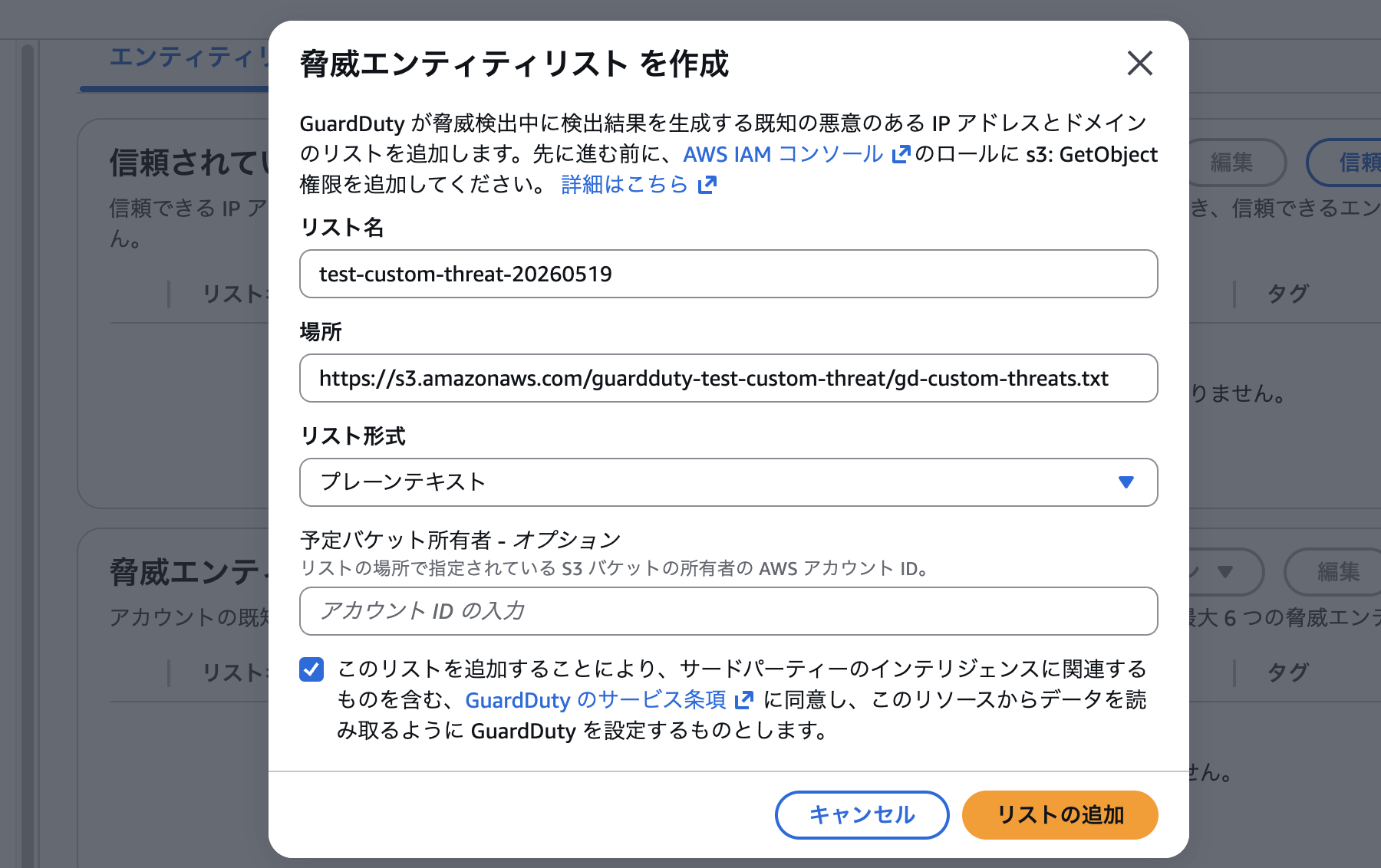
- 「追加」を選択して登録します。
ステータスが Active になるまで待ちます。今回は5分~10分程度でActiveになりましたが、最大40分程度かかる場合もあります。

4. テストバイナリの実行
脅威エンティティリスト がActiveになったことを確認したら、EC2上でテストバイナリを実行します。
/tmp/gd-test
5. Findingの確認
findingの生成にも最大数十分の時間がかかります。
今回は15分ほど待つと Execution:Runtime/MaliciousFileExecuted.Custom というfindingが生成されました。
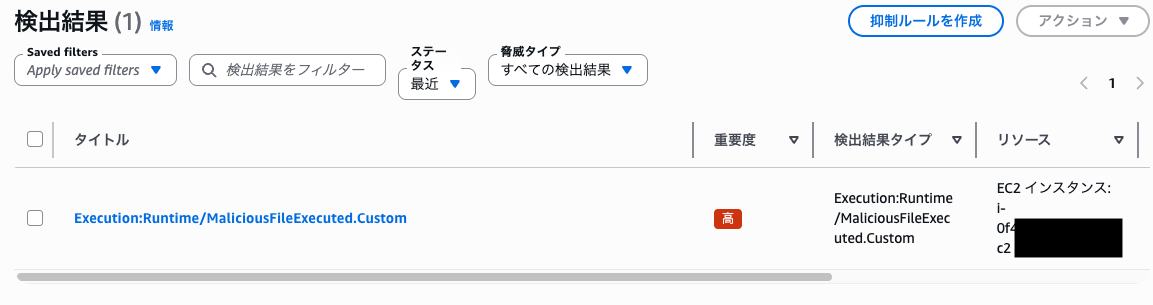
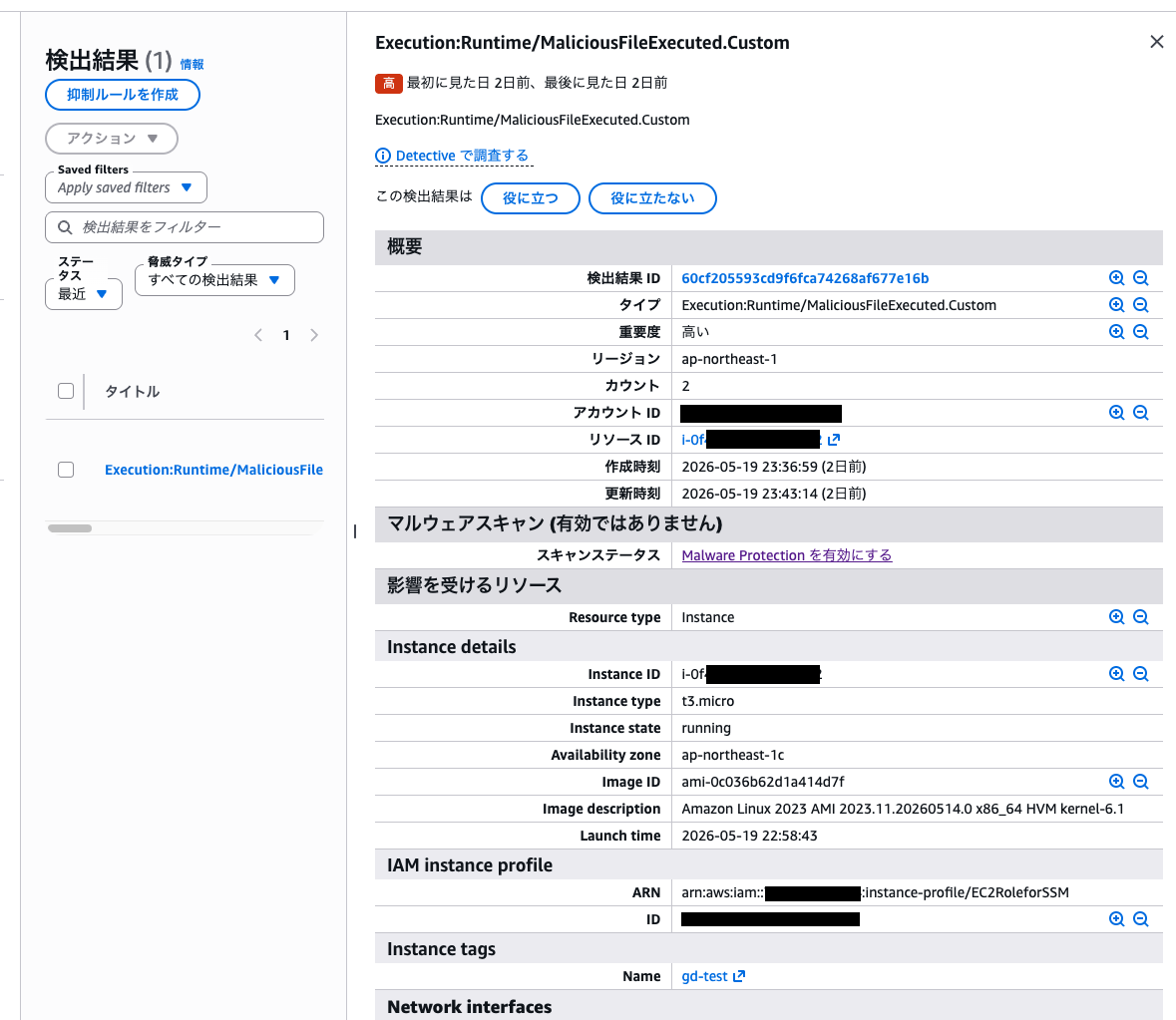
findingのJSONを確認すると、以下のような構造になっています。
実際に検出されたfinding(一部マスク)
[
  {
    "AccountId": "************",
    "Arn": "arn:aws:guardduty:ap-northeast-1:************:detector/********************************/finding/********************************",
    "CreatedAt": "2026-05-19T14:36:59.163Z",
    "Id": "********************************",
    "Region": "ap-northeast-1",
    "Resource": {
      "InstanceDetails": {
        "AvailabilityZone": "ap-northeast-1c",
        "IamInstanceProfile": {
          "Arn": "arn:aws:iam::************:instance-profile/EC2RoleforSSM",
          "Id": "*********************"
        },
        "ImageDescription": "Amazon Linux 2023 AMI 2023.11.20260514.0 x86_64 HVM kernel-6.1",
        "ImageId": "ami-*****************",
        "InstanceId": "i-*****************",
        "InstanceState": "running",
        "InstanceType": "t3.micro",
        "LaunchTime": "2026-05-19T13:58:43.000Z",
        "NetworkInterfaces": [
          {
            "Ipv6Addresses": [],
            "NetworkInterfaceId": "eni-*****************",
            "PrivateDnsName": "ip-***-***-***-***.ap-northeast-1.compute.internal",
            "PrivateIpAddress": "***.***.***.***",
            "PrivateIpAddresses": [
              {
                "PrivateDnsName": "ip-***-***-***-***.ap-northeast-1.compute.internal",
                "PrivateIpAddress": "***.***.***.***"
              }
            ],
            "PublicDnsName": "ec2-***-***-***-***.ap-northeast-1.compute.amazonaws.com",
            "PublicIp": "***.***.***.***",
            "SecurityGroups": [
              {
                "GroupId": "sg-*****************",
                "GroupName": "GuardDutyManagedSecurityGroup-vpc-*****************"
              },
              {
                "GroupId": "sg-*****************",
                "GroupName": "ec2-sg"
              }
            ],
            "SubnetId": "subnet-*****************",
            "VpcId": "vpc-*****************"
          }
        ],
        "ProductCodes": [],
        "Tags": [
          {
            "Key": "Name",
            "Value": "gd-test"
          }
        ]
      },
      "ResourceType": "Instance"
    },
    "SchemaVersion": "2.0",
    "Severity": 8,
    "Type": "Execution:Runtime/MaliciousFileExecuted.Custom",
    "UpdatedAt": "2026-05-19T14:43:14.455Z",
    "Description": "Execution:Runtime/MaliciousFileExecuted.Custom",
    "Partition": "aws",
    "Service": {
      "Evidence": {
        "ThreatIntelligenceDetails": [
          {
            "ThreatListName": "test-custom-threat-20260519",
            "ThreatNames": [
              "Customer Threat Intel"
            ],
            "ThreatFileSha256": "cf7ca9c55f5fb9ba78172904f55af0a410153da12971ec13cbd882e324e492c2"
          }
        ]
      },
      "Archived": false,
      "Count": 2,
      "DetectorId": "********************************",
      "EventFirstSeen": "2026-05-19T14:24:10.143Z",
      "EventLastSeen": "2026-05-19T14:32:15.186Z",
      "ServiceName": "guardduty",
      "AdditionalInfo": {
        "Value": "{\"threatFileSha256\":\"cf7ca9c55f5fb9ba78172904f55af0a410153da12971ec13cbd882e324e492c2\",\"threatListName\":\"test-custom-threat-20260519\",\"threatName\":\"Customer Threat Intel\"}",
        "Type": "default"
      },
      "FeatureName": "RuntimeMonitoring",
      "RuntimeDetails": {
        "Process": {
          "Name": "gd-test",
          "ExecutablePath": "/tmp/gd-test",
          "ExecutableSha256": "cf7ca9c55f5fb9ba78172904f55af0a410153da12971ec13cbd882e324e492c2",
          "NamespacePid": 26792,
          "Pwd": "/home/ec2-user",
          "Pid": 26792,
          "StartTime": "2026-05-19T14:32:15.187Z",
          "Uuid": "************************************",
          "ParentUuid": "************************************",
          "User": "ec2-user",
          "UserId": 1000,
          "Euid": 1000,
          "Lineage": [
            {
              "StartTime": "2026-05-19T14:24:00.433Z",
              "NamespacePid": 26507,
              "UserId": 1000,
              "Name": "bash",
              "Pid": 26507,
              "Uuid": "************************************",
              "ExecutablePath": "/usr/bin/bash",
              "Euid": 1000,
              "ParentUuid": "************************************"
            },
            {
              "StartTime": "2026-05-19T14:24:00.413Z",
              "NamespacePid": 26499,
              "UserId": 0,
              "Name": "su",
              "Pid": 26499,
              "Uuid": "************************************",
              "ExecutablePath": "/usr/bin/su",
              "Euid": 0,
              "ParentUuid": "************************************"
            },
            {
              "StartTime": "2026-05-19T14:24:00.403Z",
              "NamespacePid": 26498,
              "UserId": 1001,
              "Name": "sudo",
              "Pid": 26498,
              "Uuid": "************************************",
              "ExecutablePath": "/usr/bin/sudo",
              "Euid": 0,
              "ParentUuid": "************************************"
            },
            {
              "StartTime": "2026-05-19T14:23:44.283Z",
              "NamespacePid": 26491,
              "UserId": 1001,
              "Name": "sh",
              "Pid": 26491,
              "Uuid": "************************************",
              "ExecutablePath": "/usr/bin/bash",
              "Euid": 1001,
              "ParentUuid": "************************************"
            },
            {
              "StartTime": "2026-05-19T14:23:44.063Z",
              "NamespacePid": 26477,
              "UserId": 0,
              "Name": "ssm-session-wor",
              "Pid": 26477,
              "Uuid": "************************************",
              "ExecutablePath": "/usr/bin/ssm-session-worker",
              "Euid": 0,
              "ParentUuid": "************************************"
            },
            {
              "StartTime": "2026-05-19T13:58:59.303Z",
              "NamespacePid": 1661,
              "UserId": 0,
              "Name": "ssm-agent-worke",
              "Pid": 1661,
              "Uuid": "************************************",
              "ExecutablePath": "/usr/bin/ssm-agent-worker",
              "Euid": 0,
              "ParentUuid": "************************************"
            },
            {
              "StartTime": "2026-05-19T13:58:57.493Z",
              "NamespacePid": 1586,
              "UserId": 0,
              "Name": "amazon-ssm-agen",
              "Pid": 1586,
              "Uuid": "************************************",
              "ExecutablePath": "/usr/bin/amazon-ssm-agent",
              "Euid": 0,
              "ParentUuid": "************************************"
            },
            {
              "StartTime": "2026-05-19T13:58:49.363Z",
              "NamespacePid": 1,
              "UserId": 0,
              "Name": "systemd",
              "Pid": 1,
              "Uuid": "************************************",
              "ExecutablePath": "/usr/lib/systemd/systemd",
              "Euid": 0,
              "ParentUuid": ""
            }
          ]
        },
        "Context": {
          "ThreatFilePath": "/tmp/gd-test"
        }
      }
    },
    "Title": "Execution:Runtime/MaliciousFileExecuted.Custom"
  }
]
無事に検知できました。
findingの詳細を確認すると、Typeの末尾が .Custom になっているためユーザー提供のIOC由来の検知だと判別できます。
Service.Evidence.ThreatIntelligenceDetails に登録したthreat list名とハッシュが入っているので、実行されたバイナリの ExecutableSha256 と一致しているのが分かりますね。
さらに Service.RuntimeDetails.Process.Lineage を辿ると systemd → amazon-ssm-agent → ssm-session-worker → bash → sudo → su → bash → /tmp/gd-test というプロセスの親子関係が記録されていて、SSM Session Manager経由でsudoを使って実行した経緯までしっかり追えますね。
最後に
今回は、GuardDutyの脅威エンティティリストにSHA-256ファイルハッシュを登録して、カスタムIOCによる既知マルウェアの実行検知を試してみました。
従来はIPやドメインしか登録できなかった脅威エンティティリストにハッシュベースのIOCを持ち込めるようになったことで、SOCやインシデント対応の現場で得た独自の脅威情報をGuardDuty単体で活用できるようになりました。
サードパーティのEDRを別途導入しなくてもGuardDutyだけでここまで柔軟に対応できるのは嬉しいですね。
本記事がどなたかのお役に立てれば幸いです。
以上、べこみんでした。