Guidance for Claude Code with Amazon Bedrock を使って、組織向けの Claude Code 環境を構築してみた

こんにちは!クラウド事業本部コンサルティング部のたかくに(@takakuni_)です。
最近、Claude Code を利用してみたいと、お問い合わせをよく頂きます。
Claude Code を Bedrock 上で組織的に利用するとなると、ユーザーのプロビジョニングや権限管理、証跡などなど、どうするのがいいんだろうと、悩みますよね。
色々調べてみると AWS さんから、ソリューションとして、「Guidance for Claude Code with Amazon Bedrock」というものが提供されてました。
今回はこちらを利用して、ユーザーの管理基盤を作成し、Claude Code を利用してみたいと思います。
Guidance for Claude Code with Amazon Bedrock
内容が重複しますが、Guidance for Claude Code with Amazon Bedrock は、既存のアイデンティティプロバイダー(IdP)を活用しながら、Claude Code on Bedrock を組織的に導入するためのソリューションです。
Okta、Azure AD、Auth0、Cognito ユーザープールといった主要なIdPと連携させることで、組織全体におけるアクセス制御の集約、監査ログの取得、および利用状況のモニタリングを一元管理できるようになります。
ソースコードは OSS として、GitHub 上で公開されています。
認証/認可フロー
認証/認可のフローについてです。
Cognito Identity Pool を挟む構成と、IdP から STS へ直接フェデレーションする構成の 2 パターンに分かれます。(以後、Direct STS 方式と呼びます)
Cognito Identity Pool 方式
Cognito Identity Pool 方式は、外部 IdP(Entra ID や Okta など)で認証したトークンを、Cognito Identity Pool が受け取り、AWS の一時認証情報に変換する方式です。IdP から発行された ID トークンをそのまま AWS に渡すのではなく、Cognito Identity Pool が仲介役となります。
クライアントは Cognito Identity Pool に ID トークンを渡すと、Cognito が内部で STS を呼び出し、IAM ロールに紐付いた一時認証情報(Access Key / Secret / Session Token)を返します。
図にすると、以下のとおりです。
Direct STS 方式
Direct STS 方式は、外部 IdP で認証した ID トークンを、Cognito などの仲介を挟まず直接 AWS STS に渡して一時認証情報を取得する方式です。
IdP から発行された ID トークンをそのまま sts:AssumeRoleWithWebIdentity に渡します。AWS IAM に OIDC プロバイダーを登録しておくことで、STS がトークンの検証と IAM ロールへの紐付けを行います。
図にすると、以下のとおりです。
README を読むと、基本的には Direct STS 方式が推奨されているようです。
This guidance uses Direct IAM OIDC federation as the recommended authentication pattern. This provides temporary AWS credentials with complete user attribution for audit trails and usage monitoring.
やってみた
今回、 IdP は Cognito User Pool を利用します。(Entra ID を用意しようと思ったのですが、テナントが無効化されてたので復旧待ちです。)
IdP に Cognito を利用するので、 Cognito Identity Pool と Direct STS の 2 パターンで検証してみます。
事前に Guidance for Claude Code with Amazon Bedrock を Git で落としておきます。
# Clone the repository
git clone https://github.com/aws-solutions-library-samples/guidance-for-claude-code-with-amazon-bedrock
Cognito User Pool の作成
まずは Cognito User Pool を作成します。スクリプトファイルが用意されているためこちらを利用します。
# guidance-for-claude-code-with-amazon-bedrock 配下で以下実行
./deployment/scripts/deploy-cognito.sh
実行結果
東京リージョンに作成しました。
Cognito domain に cognito と含まれていると、エラーになるのでドメインの接頭辞だけを claude-code にしました。
Provider Domain, User Pool ID, Client ID は、あとで必要になるのでメモしておきます。
takakuni@guidance-for-claude-code-with-amazon-bedrock % ./deployment/scripts/deploy-cognito.sh
╭────────────────────────────────────────────────────────────╮
│  Cognito User Pool Deployment for Claude Code with Bedrock │
╰────────────────────────────────────────────────────────────╯

Current AWS Account: unknown

Stack name [claude-code-cognito]:
AWS Region [us-east-1]: ap-northeast-1
User Pool name [claude-code-cognito]:

Use custom domain? [y/N]:
Domain prefix for Cognito domain [claude-code-cognito]: claude-code

╭─── Configuration Summary ───╮
│ Stack Name:    claude-code-cognito
│ Region:        ap-northeast-1
│ User Pool:     claude-code-cognito
│ Domain Prefix: claude-code
│ Full Domain:   claude-code.auth.ap-northeast-1.amazoncognito.com
╰─────────────────────────────╯

Proceed with deployment? [Y/n]:

→ Deploying Cognito User Pool stack...

Waiting for changeset to be created..
Waiting for stack create/update to complete
Successfully created/updated stack - claude-code-cognito

✓ Cognito User Pool deployed successfully

╭─── Claude Code Configuration ───╮
To use with Claude Code CLI authentication (native app):

poetry run ccwb init
- Provider Domain: claude-code.auth.ap-northeast-1.amazoncognito.com
- User Pool ID: ap-northeast-1_LJrzXXXXX
- Client ID: 9hae1scXXXXXXXXXXXXXXXXXX

Next steps:
1. Run: ccwb init
2. Use the configuration values shown above
3. Deploy the rest of the infrastructure: ccwb deploy
ユーザーの作成
User Pool にユーザーを登録します。Secrets Manager の GetRandomPassword API を使ってパスワードを生成します。
aws secretsmanager get-random-password --query RandomPassword
出力されたパスワードを使って、ユーザーの作成を行います。--user-pool-id には先ほどメモした内容を貼り付けます。
aws cognito-idp admin-create-user \
  --user-pool-id <your-user-pool-id> \
  --username <user-name> \
  --user-attributes Name=email,Value=<e-mail address> \
  --temporary-password <temp-password>
Cognito Identity Pool 方式
では、Cognito Identity Pool を挟んだ、フェデレーションパターンを実装してみます。
パッケージインストール
poetry でパッケージのインストールを行います。
# guidance-for-claude-code-with-amazon-bedrock 配下で以下実行
cd source
poetry install
プロファイルの作成
続いて、プロファイルの作成に移ります。
Guidance for Claude Code with Amazon Bedrock では、プロファイルという概念でデプロイ設定のまとまりとして管理しています。
本エントリでは、Cognito Identity Pool と Direct STS の 2 パターンを作りたいので、プロファイルは 2 つになります。
ccwb init でプロファイルの初期化を行います。
対話式で聞かれる項目は、次のとおりです。
- プロファイル名
- Provider domain
- Cognito User Pool ID
- OIDC Client ID
- Credential Storage Method
- Cognito 認証後の STS の一時クレデンシャルをどこで保管するか
- Federation type
- AWS Region for infrastructure deployment (Cognito, IAM, monitoring)
- Identity Pool Name
- Enable monitoring?
- Enable Windows builds?
- Distribution method
- Claude Code/IAM の設定ファイルをインストーラーで配布するのですが、どうやって配布するかを選ぶ
- Select Claude model
- Select cross-region inference profile
- Select source region for AWS configuration
今回は最低限の基盤を作りたいので、Cognito Identity Pool と Bedrock へのアクセスで必要な IAM リソースのみ作成するようにしました。
takakuni@source % poetry run ccwb init

No profiles found. Let's create your first profile!

Profile Name
Choose a descriptive name for this deployment profile.
Suggested format: {project}-{environment}-{region}
Examples: acme-prod-us-east-1, internal-dev-us-west-2

? Profile name: claude-code-cognito-id-pool
╭───────────────────────────────────────────────────────────────────────────╮
│                                                                           │
│  Welcome to Claude Code with Bedrock Setup!                               │
│                                                                           │
│  This wizard will help you deploy Claude Code using Amazon Bedrock with:  │
│    • Secure authentication via your identity provider                     │
│    • Usage monitoring and dashboards                                      │
│                                                                           │
╰───────────────────────────────────────────────────────────────────────────╯
Prerequisites Check:
Enter MFA code for arn:aws:iam::4828XXXXXXXX:mfa/takakuni:
  ✓ AWS CLI installed
  ✓ AWS credentials configured
  ✓ Python 3.10+ available
  ✓ Current region: us-east-1
  ✓ Bedrock access enabled in us-east-1

Step 1: OIDC Provider Configuration
──────────────────────────────
? Enter your OIDC provider domain:  (e.g., company.okta.com, company.auth0.com, login.microsoftonline.com/{tenant-id}/v2.0, my-app.au
th.us-east-1.amazoncognito.com, or my-app.auth-fips.us-gov-west-1.amazoncognito.com for GovCloud) claude-code.auth.ap-northeast-1.ama
zoncognito.com
? Enter your Cognito User Pool ID for ap-northeast-1:  (case-sensitive) ap-northeast-1_LJrzXXXXX
? Enter your OIDC Client ID: 9hae1scXXXXXXXXXXXXXXXXXX

Credential Storage Method
Choose how to store AWS credentials locally:
  • Keyring: Uses OS secure storage (may prompt for password)
  • Session Files: Temporary files (deleted on logout)

? Select credential storage method: Session Files (Temporary storage)

Federation Type Selection
Direct STS.
Cognito Identity Pool.

? Choose federation type: Cognito Identity Pool

Step 2: AWS Infrastructure Configuration
────────────────────────────────────────
? Select AWS Region for infrastructure deployment (Cognito, IAM, monitoring): ap-northeast-1
? Identity Pool Name: claude-code-auth

Optional Features Configuration
────────────────────────────────────────

Monitoring and Usage Dashboards
Track Claude Code usage and performance metrics in CloudWatch
? Enable monitoring? No

Windows Build Support
Build Windows binaries using AWS CodeBuild
? Enable Windows builds? No

Package Distribution
Choose how to distribute Claude Code packages to end users:
  • Presigned S3 URLs: Simple, no authentication (good for < 20 users)
  • Landing Page: IdP authentication with web UI (good for 20-100 users)
? Distribution method: Disabled

Step 3: Bedrock Model Selection
────────────────────────────────────────
? Select Claude model: Claude Opus 4.6 (Global, US)

Selected: Claude Opus 4.6
? Select cross-region inference profile: GLOBAL Cross-Region - Global CRIS - All commercial AWS regions worldwide

Selected: GLOBAL Cross-Region
? Select source region for AWS configuration: ap-northeast-1
✓ Source region: ap-northeast-1

✓ Configured Claude Opus 4.6 with GLOBAL Cross-Region (Global CRIS - All commercial AWS regions worldwide)

Step 4: Review Configuration
──────────────────────────────
                            Configuration Summary
╭───────────────────────┬───────────────────────────────────────────────────╮
│ Setting               │ Value                                             │
├───────────────────────┼───────────────────────────────────────────────────┤
│ OIDC Provider         │ claude-code.auth.ap-northeast-1.amazoncognito.com │
│ OIDC Client ID        │ 9hae1scXXXXXXXXXXXXX...                           │
│ Credential Storage    │ Session Files (temporary)                         │
│ Infrastructure Region │ ap-northeast-1 (Cognito, IAM, Monitoring)         │
│ Identity Pool         │ claude-code-auth                                  │
│ Monitoring            │ ✗ Disabled                                        │
│ Claude Model          │ Claude Opus 4.6 (Global)                          │
│ Bedrock Regions       │ global                                            │
│ AWS Account           │ 3407XXXXXXXX                                      │
╰───────────────────────┴───────────────────────────────────────────────────╯

Resources to be created:
• Cognito Identity Pool for authentication
• IAM roles and policies for Bedrock access

╭─────────────────────────────────────────────────────────────────────────────╮
│                                                                             │
│  ✓ Profile 'claude-code-cognito-id-pool' created successfully!              │
│                                                                             │
│  Your configuration has been saved.                                         │
│                                                                             │
│  Next steps:                                                                │
│  1. Deploy infrastructure: poetry run ccwb deploy                           │
│  2. Create package: poetry run ccwb package                                 │
│  3. Test authentication: poetry run ccwb test                               │
│  4. View profile: poetry run ccwb context show claude-code-cognito-id-pool  │
│                                                                             │
╰─────────────────────────────────────────────────────────────────────────────╯
デプロイ
ccwb deploy で作成したプロファイルをデプロイします。中身は CloudFormation が流れる仕組みですね。
takakuni@source % poetry run ccwb deploy
╭──────────────────────────────────────────╮
│                                          │
│  Claude Code Infrastructure Deployment   │
│                                          │
│  Deploy or update CloudFormation stacks  │
│                                          │
╰──────────────────────────────────────────╯
Using active profile: claude-code-cognito-id-pool

Deployment Plan:

  Stack          Description                              Status
 ────────────────────────────────────────────────────────────────
  auth           Authentication Stack (Cognito + IAM)     Create
  distribution   Distribution infrastructure (S3 + IAM)   Create

Deploying stacks...

Authentication Stack (Cognito + IAM)
✓ auth stack deployed successfully
⠦ CognitoIdentityPoolRoleAttachment - CREATE_COMPLETE

Distribution infrastructure (S3 + IAM)
✓ distribution stack deployed successfully
⠇ claude-code-auth-distribution - CREATE_COMPLETE

Deployment complete!

Stack Outputs:

Authentication Stack:
• Federation Type: cognito
• Identity Pool ID: ap-northeast-1:0253ef0a-XXXX-XXXX-XXXX-XXXXXXXXXXXX
• Role ARN: arn:aws:iam::3407XXXXXXXX:role/claude-code-auth-stack-CognitoAuthenticatedRole-szPBjXrpwZdE
• OIDC Provider: N/A
User Pool の文字数でエラーになる場合
もしかしたら、以下のように User Pool の文字数でエラーになる可能性もあります。
takakuni@source % poetry run ccwb deploy
╭──────────────────────────────────────────╮
│                                          │
│  Claude Code Infrastructure Deployment   │
│                                          │
│  Deploy or update CloudFormation stacks  │
│                                          │
╰──────────────────────────────────────────╯
Using active profile: claude-code-cognito

Deployment Plan:

  Stack          Description                              Status
 ────────────────────────────────────────────────────────────────
  auth           Authentication Stack (Cognito + IAM)     Create
  distribution   Distribution infrastructure (S3 + IAM)   Create

Deploying stacks...

Authentication Stack (Cognito + IAM)
CloudFormation error: Template validation failed: Parameter CognitoUserPoolClientId failed to satisfy constraint:
Must be a valid Cognito User Pool Client ID
⠙ Stack -
Failed to deploy auth stack

Deployment failed. Check the errors above.
必要に応じて deployment/infrastructure/bedrock-auth-cognito-pool.yaml を次の PR のように、修正してあげましょう。(PR がマージ済みであれば、他の理由で止まっている可能性があります。)
インストーラーの作成
続いて、Claude Code を使いたいユーザーに配布するインストーラーの作成に移ります。
ここで注意なのが、プラットフォーム別によって、 Docker や CodeBuild などが別途必要になります。
| プラットフォーム | ビルド方法 | Docker 必要 |
|---|---|---|
| macOS ARM64 | PyInstaller(ネイティブ) | 不要 |
| macOS Intel | PyInstaller(ネイティブ) | 不要 |
| Linux x64 | Docker (ubuntu:22.04) | 必要 |
| Linux ARM64 | Docker (ubuntu:22.04) | 必要 |
| Windows | CodeBuild | 不要(AWS 側) |
今回、私は Linux (x86_64) のユーザーに配布したいので、 Docker が必要でした。
takakuni@source % poetry run ccwb package
? Which platform(s) do you want to build for? (Use space to select, enter to confirm) [linux-x64]
? Include 'Co-Authored-By: Claude' in git commits? No
Fetching deployment information...
╭───────────────────────────────────────────────────────────────────────────────────────╮
│                                                                                       │
│  Package Builder                                                                      │
│                                                                                       │
│  Creating distribution package for claude-code.auth.ap-northeast-1.amazoncognito.com  │
│                                                                                       │
╰───────────────────────────────────────────────────────────────────────────────────────╯

Package Configuration:
  Configuration Profile: claude-code-cognito-id-pool
  AWS Profile: ClaudeCode
  OIDC Provider: claude-code.auth.ap-northeast-1.amazoncognito.com
  Client ID: 9hae1scXXXXXXXXXXXXXXXXXX
  Federation Type: Cognito Identity Pool (8-hour sessions)
  AWS Region: ap-northeast-1
  Identity Pool: ap-northeast-1:0253ef0a-XXXX-XXXX-XXXX-XXXXXXXXXXXX
  Claude Model: Claude Opus 4.6 (GLOBAL)
  Source Region: ap-northeast-1
  Bedrock Regions: global

Building package...

Building credential process for linux-x64...
Building Linux x64 binary via Docker (this may take a few minutes)...
✓ Linux x64 binary built successfully via Docker

Creating configuration...
Creating installer script...
Creating documentation...
Creating Claude Code settings...
Created Claude Code settings for Bedrock configuration

✓ Package created successfully!

Output directory: dist/claude-code-cognito-id-pool/2026-03-08-141708

Package contents:
  • credential-process-linux-x64 - Authentication executable for linux-x64
  • config.json - Configuration
  • install.sh - Installation script for macOS/Linux
  • README.md - Installation instructions

Distribution steps:
1. Send users the entire dist folder
2. Users run: ./install.sh
3. Authentication is configured automatically

To test locally:
cd dist/claude-code-cognito-id-pool/2026-03-08-141708
./install.sh

Next steps:
To create a distribution package: poetry run ccwb distribute
インストーラーの中身を確認
ビルドしたインストーラーは、/guidance-for-claude-code-with-amazon-bedrock/source/dist/<プロファイル名> 配下に作成されます。プロファイル名を claude-code-cognito-id-pool としたので、guidance-for-claude-code-with-amazon-bedrock/source/dist/claude-code-cognito-id-pool にビルドしたものができ上がりました。
takakuni@claude-code-cognito-id-pool % tree .
.
└── 2026-03-08-141708
    ├── claude-settings
    │   └── settings.json
    ├── config.json
    ├── credential-process-linux-x64
    ├── install.sh
    └── README.md

3 directories, 5 files
それぞれのファイルを見てみます。
install.sh
文字数の関係で install.sh を添付できなかったのですが、 install.sh ではインストール動作の役割を担っています。
package.py によって生成され、credential_process で利用するバイナリファイルの配置や、Claude Code やこの仕組み自体の設定ファイルをコピーする処理が含まれていますね。
claude-settings/settings.json
Claude Code 自体の設定ファイルです。Amazon Bedrock を利用しますかどうかや、どのモデルを使うかなどの設定が記載されてますね。
awsAuthRefresh で認証情報の有効期限が切れたときに、リフレッシュする仕組みが設けられています。
{
  "env": {
    "AWS_REGION": "ap-northeast-1",
    "CLAUDE_CODE_USE_BEDROCK": "1",
    "AWS_PROFILE": "claude-code-cognito-id-pool",
    "ANTHROPIC_MODEL": "global.anthropic.claude-opus-4-6-v1",
    "ANTHROPIC_SMALL_FAST_MODEL": "global.anthropic.claude-3-5-haiku-20241022-v1:0"
  },
  "includeCoAuthoredBy": false,
  "awsAuthRefresh": "__CREDENTIAL_PROCESS_PATH__ --profile claude-code-cognito-id-pool"
}
config.json
インストーラー直下に置いてある config.json は、この仕組み自体の設定ファイルのようです。
{
  "claude-code-cognito-id-pool": {
    "provider_domain": "claude-code.auth.ap-northeast-1.amazoncognito.com",
    "client_id": "9hae1scXXXXXXXXXXXXXXXXXX",
    "aws_region": "ap-northeast-1",
    "provider_type": "cognito",
    "credential_storage": "session",
    "cross_region_profile": "global",
    "identity_pool_id": "ap-northeast-1:0253ef0a-XXXX-XXXX-XXXX-XXXXXXXXXXXX",
    "federation_type": "cognito",
    "cognito_user_pool_id": "ap-northeast-1_LJrzXXXXX",
    "selected_model": "global.anthropic.claude-opus-4-6-v1"
  }
}
credential-process
最後に credential-process です。
私の場合、credential-process-linux-x64 のみ配置されていましたが、ビルドするプラットフォームが増えれば、プラットフォーム毎に増えていきます。
中身は以下の __main__.py を PyInstaller でコンパイルしたもののようで、Python のランタイムごと同梱されているため、バイナリファイルとなっています。
インストーラーの配布
では、インストーラーを配布します。配布は以下の 3 パターン用意されています。
/dist配下のインストーラーを zip で固めて手動で配布するccwb distributeコマンドで S3 の署名付き URL を使って配布- Cognito 認証付きのランディングページを作成し、ダウンロード
今回は 2 の方法を使って配布します。署名付き URL が発行され、簡単な手順が共有されましたね。
takakuni@source % poetry run ccwb distribute
╭──────────────────────────────────────────────╮
│                                              │
│  Claude Code Package Distribution            │
│                                              │
│  Share packages securely via presigned URLs  │
│                                              │
╰──────────────────────────────────────────────╯

Scanning package directory...

Profile: claude-code-cognito-id-pool
  [1] 2026-03-08-141708 (Latest)
      Platforms: linux-x64
      Size: 24.4 MB

Auto-selecting only available build

Using build: claude-code-cognito-id-pool/2026-03-08-141708
Using active profile: claude-code-cognito-id-pool

Package contents:
  ✗ Windows executable (not built)
  ✓ Linux x64 executable (built: 2026-03-08 14:22)
  ✓ Unix installer script
  ✓ Configuration file

Warning: Windows support not included in this distribution
? Continue without Windows support? Yes

Ready to distribute for: linux-x64
⠏ Preparing upload...
Uploading to S3 ━━━━━━━━━━━━━━━━━━━━━━━━━━━━━━━━━━━━━━━━ 100.0% • 25.3/25.3 MB • 0:00:00
⠼ Saving package locally...

✓ Distribution package created successfully!

Distribution URL (expires in 48 hours):

https://claude-code-auth-distribution-3407XXXXXXXX.s3.amazonaws.com/packages/20260308-165917/claude-code-package-20260308-165917.zip?AWSAcce
ssKeyId=ASIAXXXXXXXXXXXXXXXX&Signature=mVO3XXXXXXXXXXXXXXXXXXXXXXXXXXXXXX&x-amz-security-token=XXXXXXXXXXXXXXXXXXXXXXXXXXXXXX&Expires=1773129564

Package Details:
  Filename: claude-code-package-20260308-165917.zip
  SHA256: 5edb73a2d5996b23c8b959333d07281417ab1520524f149dd7ff00da4df6bb55
  Expires: 2026-03-10 16:59:24
  Size: 24.1 MB

Share this URL with developers to download the package.

Download and Installation Instructions:

For macOS/Linux:
1. Download (copy entire line):
   curl -L -o "claude-code-package-20260308-165917.zip" "https://claude-code-auth-distribution-3407XXXXXXXX.s3.amazonaws.com/packages/20260308-165917/claude-code-package-20260308-165917.zip?AWSAccessKeyId=ASIAXXXXXXXXXXXXXXXX&Signature=mVO3XXXXXXXXXXXXXXXXXXXXXXXXXXXXXX&x-amz-security-token=XXXXXXXXXXXXXXXXXXXXXXXXXXXXXX&Expires=1773129564"
2. Extract and install:
   unzip claude-code-package-20260308-165917.zip && cd claude-code-package && ./install.sh

For Windows PowerShell:
1. Download (copy entire line):
   Invoke-WebRequest -Uri "https://claude-code-auth-distribution-3407XXXXXXXX.s3.amazonaws.com/packages/20260308-165917/claude-code-package-20260308-165917.zip?AWSAccessKeyId=ASIAXXXXXXXXXXXXXXXX&Signature=mVO3XXXXXXXXXXXXXXXXXXXXXXXXXXXXXX&x-amz-security-token=XXXXXXXXXXXXXXXXXXXXXXXXXXXXXX&Expires=1773129564" -OutFile "claude-code-package-20260308-165917.zip"
2. Extract and install:
   Expand-Archive -Path "claude-code-package-20260308-165917.zip" -DestinationPath "."
   cd claude-code-package
   .\install.bat

Verify download with: sha256sum claude-code-package-20260308-165917.zip (or Get-FileHash on Windows)
開発マシンの用意
Claude Code 用に Ubuntu 22.4 のサーバーを用意します。
認証には、ブラウザアクセスが必要なので、Amazon DCV を有効にしたサーバーを利用します。
IAM ロール
Claude Code と関係ない部分なのでサラッといきますが、SSM に加えて DCV のライセンスを取得できるよう、インラインポリシーを加えています。
- AmazonSSMManagedInstanceCore
{
    "Version": "2012-10-17",
    "Statement": [
        {
            "Effect": "Allow",
            "Action": "s3:GetObject",
            "Resource": "arn:aws:s3:::dcv-license.ap-northeast-1/*"
        }
    ]
}
セキュリティグループ
クライアントから接続できるよう、8443 ポートを TCP/UDP で許可しています。
| タイプ | プロトコル | ポート | ソース | 説明 |
|---|---|---|---|---|
| カスタム UDP | UDP | 8443 | 接続する端末の IP アドレス/32 | NICE DCV クライアント接続 |
| カスタム TCP | TCP | 8443 | 接続する端末の IP アドレス/32 | NICE DCV クライアント接続 |
コマンド
以下、セットアップコマンドです。SSM で繋ぎ、設定しました。時折再起動を求められるのですが、エンターで OK です。
# デスクトップ環境とデスクトップマネージャーパッケージをインストール
sudo apt update -y

sudo apt install ubuntu-desktop -y

# GDM3 のインストール
sudo apt install gdm3 -y

# GDM3 がデフォルトのデスクトップマネージャとして設定されていることを確認
## /usr/sbin/gdm3 だったら OK
cat /etc/X11/default-display-manager

# ソフトウェアパッケージを更新
sudo apt upgrade -y

# Wayland プロトコルを無効にする
# [daemon] セクションで WaylandEnable を false に設定する
sudo sed -i -e "s/^#WaylandEnable=false/WaylandEnable=false/g" /etc/gdm3/custom.conf

# GDM サービスを再起動
sudo systemctl restart gdm3

# X サーバーを設定する
## graphical.target だったら OK
sudo systemctl get-default

# X サーバーを再起動
sudo systemctl isolate graphical.target

# X サーバーが実行中であることを確認
ps aux | grep X | grep -v grep

# glxinfo ユーティリティをインストールする
sudo apt install mesa-utils -y

# xDummy ドライバーをインストール
sudo apt install xserver-xorg-video-dummy -y

# xorg.conf で xDummy を設定する
sudo bash -c 'cat > /etc/X11/xorg.conf' << EOF
Section "Device"
    Identifier "DummyDevice"
    Driver "dummy"
    Option "UseEDID" "false"
    VideoRam 512000
EndSection

Section "Monitor"
    Identifier "DummyMonitor"
    HorizSync   5.0 - 1000.0
    VertRefresh 5.0 - 200.0
    Option "ReducedBlanking"
EndSection

Section "Screen"
    Identifier "DummyScreen"
    Device "DummyDevice"
    Monitor "DummyMonitor"
    DefaultDepth 24
    SubSection "Display"
        Viewport 0 0
        Depth 24
        Virtual 4096 2160
    EndSubSection
EndSection
EOF

# X サーバーを再起動
sudo systemctl isolate multi-user.target
sudo systemctl isolate graphical.target

# Amazon DCV GPG キーのインポート
wget https://d1uj6qtbmh3dt5.cloudfront.net/NICE-GPG-KEY
gpg --import NICE-GPG-KEY

# Amazon DCV のパッケージをダウンロード/インストール
wget https://d1uj6qtbmh3dt5.cloudfront.net/nice-dcv-ubuntu2204-x86_64.tgz
tar -xvzf nice-dcv-ubuntu2204-x86_64.tgz && cd $(tar -tzf nice-dcv-ubuntu2204-x86_64.tgz | head -1 | cut -d/ -f1)
sudo NEEDRESTART_MODE=a DEBIAN_FRONTEND=noninteractive apt install -y ./nice-dcv-server_*.deb

# ランレベルの切り替え
sudo systemctl isolate multi-user.target
sudo systemctl isolate graphical.target

sudo DISPLAY=:0 XAUTHORITY=$(ps aux | grep "X.*\-auth" | grep -v grep | sed -n 's/.*-auth \([^ ]\+\).*/\1/p') xhost | grep "SI:localuser:dcv$"

# サービス起動
sudo systemctl start dcvserver
sudo systemctl enable dcvserver
sudo systemctl status dcvserver

# 自動コンソールセッション有効化
sudo sed -i -e "s/^#create-session/create-session/g" /etc/dcv/dcv.conf
sudo sed -i -e "s/^#owner = \"\"/owner = \"ubuntu\"/g" /etc/dcv/dcv.conf
sudo systemctl restart dcvserver
検証なのでデフォルトの ubuntu ユーザーを使って、ログインします。パスワードを設定しました。
# パスワード設定
sudo passwd ubuntu
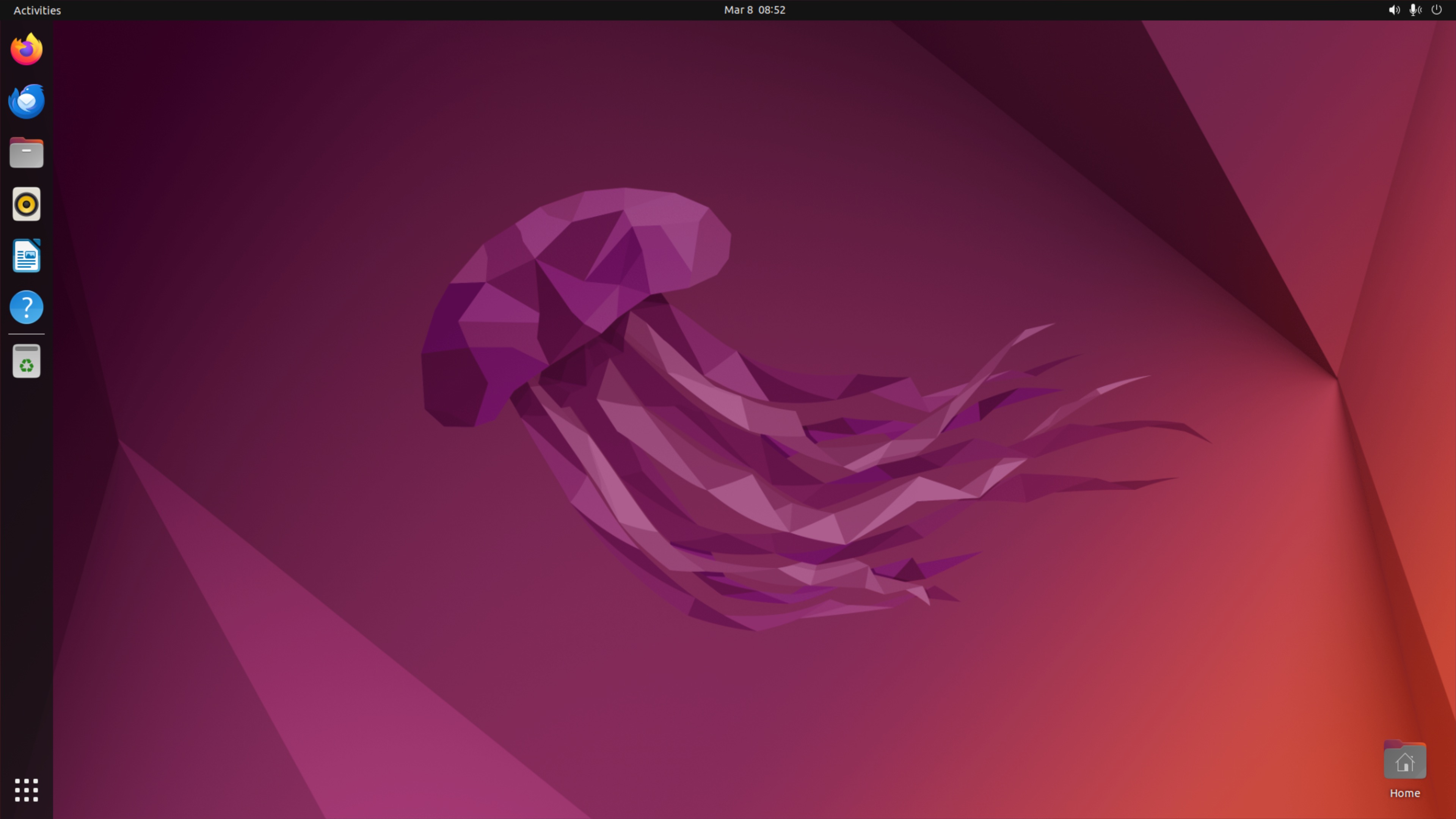
以下のように DCV クライアントから接続できていれば、OK です。
AWS CLI のインストール
インストーラーでインストールする前に、AWS CLI をインストールします。
curl "https://awscli.amazonaws.com/awscli-exe-linux-x86_64.zip" -o "awscliv2.zip"
unzip awscliv2.zip
sudo ./aws/install
インストーラーの利用
先ほど生成した、署名付き URL からインストーラーを取得し、インストールを行います。もし期限が切れている場合は、再度 poetry run ccwb distribute で再配布します。
curl -L -o "claude-code-package-20260308-165917.zip" "https://claude-code-auth-distribution-3407XXXXXXXX.s3.amazonaws.com/packages/20260308-165917/claude-code-package-20260308-165917.zip?AWSAccessKeyId=ASIAXXXXXXXXXXXXXXXX&Signature=mVO3XXXXXXXXXXXXXXXXXXXXXXXXXXXXXX&x-amz-security-token=mVO3XXXXXXXXXXXXXXXXXXXXXXXXXXXXXX&Expires=1773129564"

unzip claude-code-package-20260308-165917.zip
cd claude-code-package && ./install.sh
実行結果
インストールが完了していますね。
ubuntu@ip-172-31-0-97:~$ unzip claude-code-package-20260308-175722.zip
Archive:  claude-code-package-20260308-175722.zip
  inflating: claude-code-package/config.json
  inflating: claude-code-package/install.sh
  inflating: claude-code-package/credential-process-linux-x64
  inflating: claude-code-package/README.md
  inflating: claude-code-package/claude-settings/settings.json
ubuntu@ip-172-31-0-97:~$ cd claude-code-package && ./install.sh
======================================
Claude Code Authentication Installer
======================================

Organization: claude-code.auth.ap-northeast-1.amazoncognito.com

Checking prerequisites...
✓ Prerequisites found

Detecting platform and architecture...
✓ Detected Linux x64

Installing authentication tools...

Installing Claude Code settings...
✓ Claude Code settings configured

Configuring AWS profiles...
Found profiles: claude-code-cognito-id-pool

Configuring AWS profile: claude-code-cognito-id-pool
  ✓ Created AWS profile 'claude-code-cognito-id-pool'

======================================
✓ Installation complete!
======================================

Available profiles:
  - claude-code-cognito-id-pool

To use Claude Code authentication:
  export AWS_PROFILE=<profile-name>
  aws sts get-caller-identity

Example:
  export AWS_PROFILE=claude-code-cognito-id-pool
  aws sts get-caller-identity

Note: Authentication will automatically open your browser when needed.
Claude Code のインストール
Claude Code のインストールを行います。
curl -fsSL https://claude.ai/install.sh | bash
実行結果
ubuntu@ip-172-31-0-97:~/claude-code-package$ curl -fsSL https://claude.ai/install.sh | bash
Setting up Claude Code...

✔ Claude Code successfully installed!

  Version: 2.1.71

  Location: ~/.local/bin/claude

  Next: Run claude --help to get started

⚠ Setup notes:
  • Native installation exists but ~/.local/bin is not in your PATH. Run:

  echo 'export PATH="$HOME/.local/bin:$PATH"' >> ~/.bashrc && source ~/.bashrc

✅ Installation complete!
出力されているコマンドで、パスも通しておきましょう。
echo 'export PATH="$HOME/.local/bin:$PATH"' >> ~/.bashrc && source ~/.bashrc
Claude Code 起動
起動前に AWS_PROFILE を設定します。
export AWS_PROFILE=claude-code-cognito-id-pool
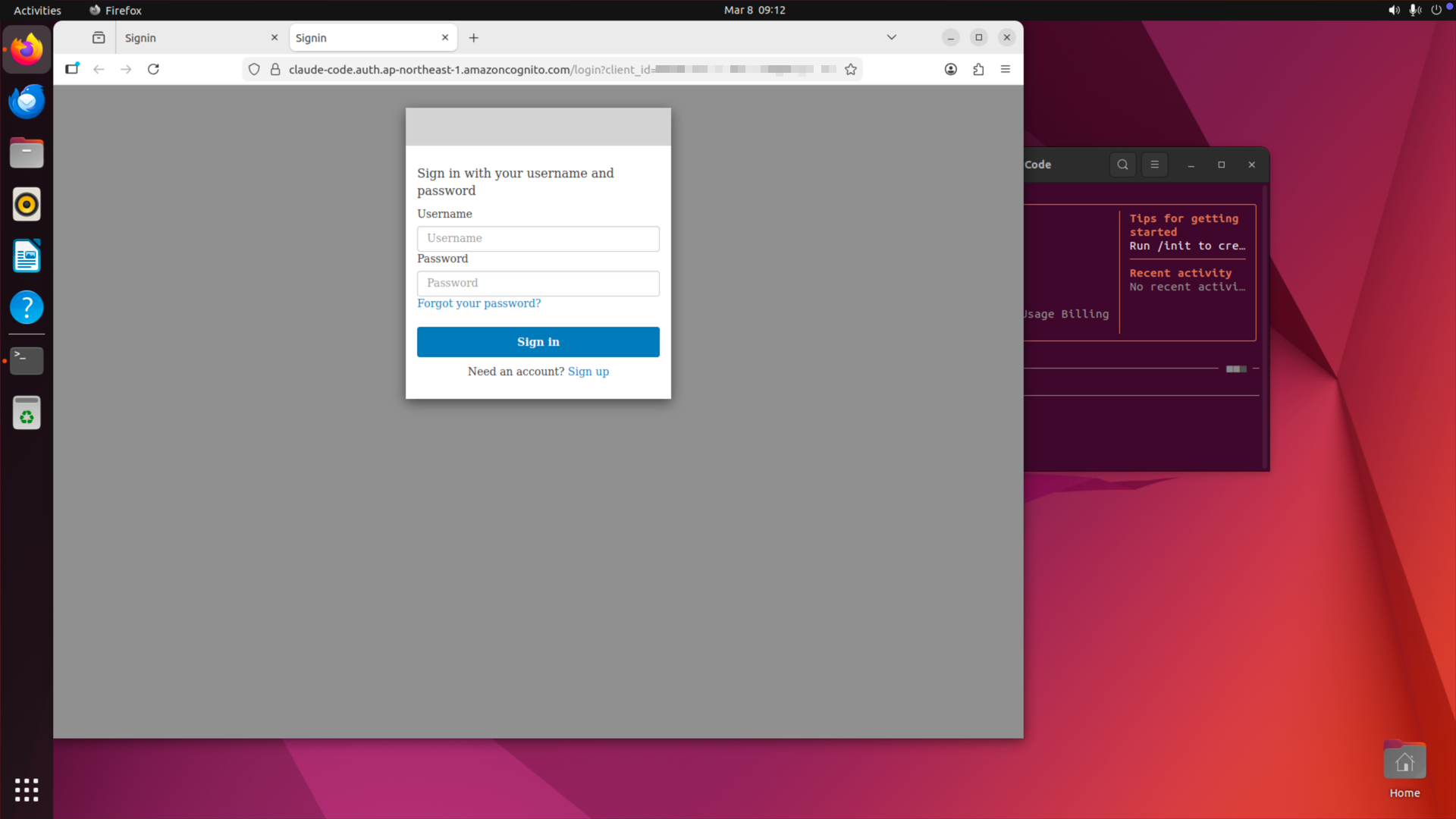
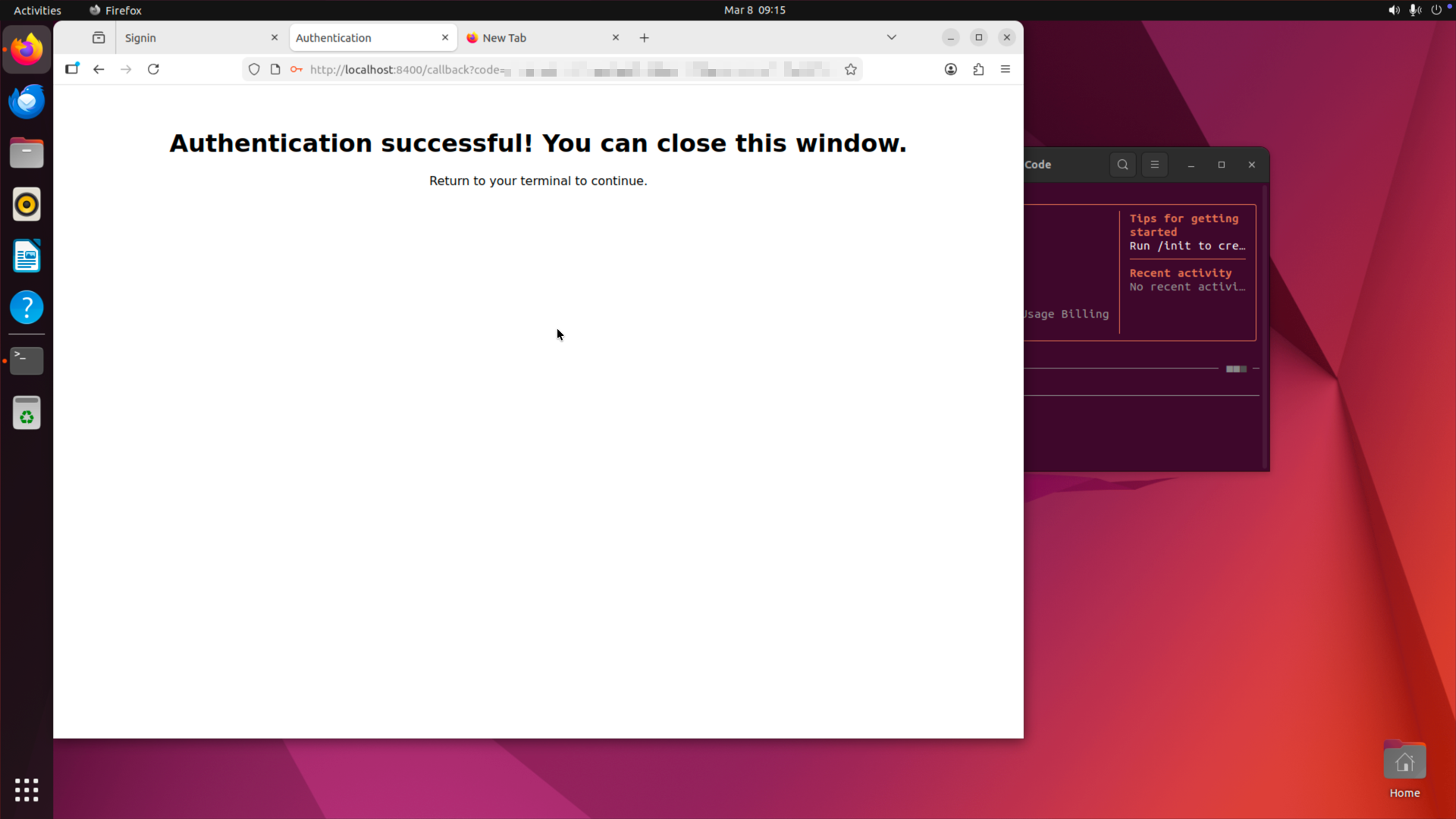
Claude Code を起動すると、Cognito Hosted UI の認証画面に遷移しましたね。
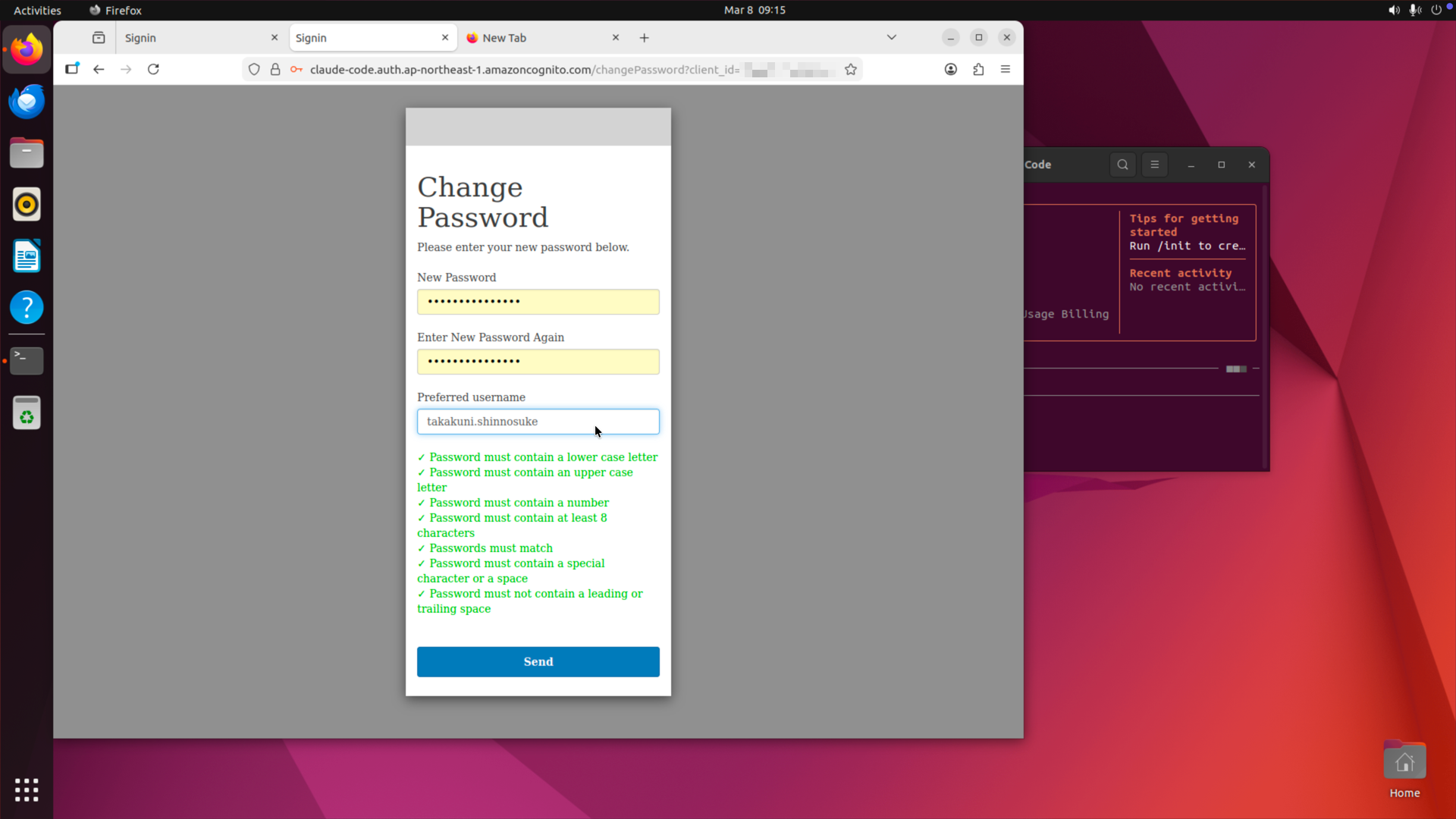
認証が成功するとパスワードリセットが求められます。
リセットが完了したら、問題なく認証成功と返されました。
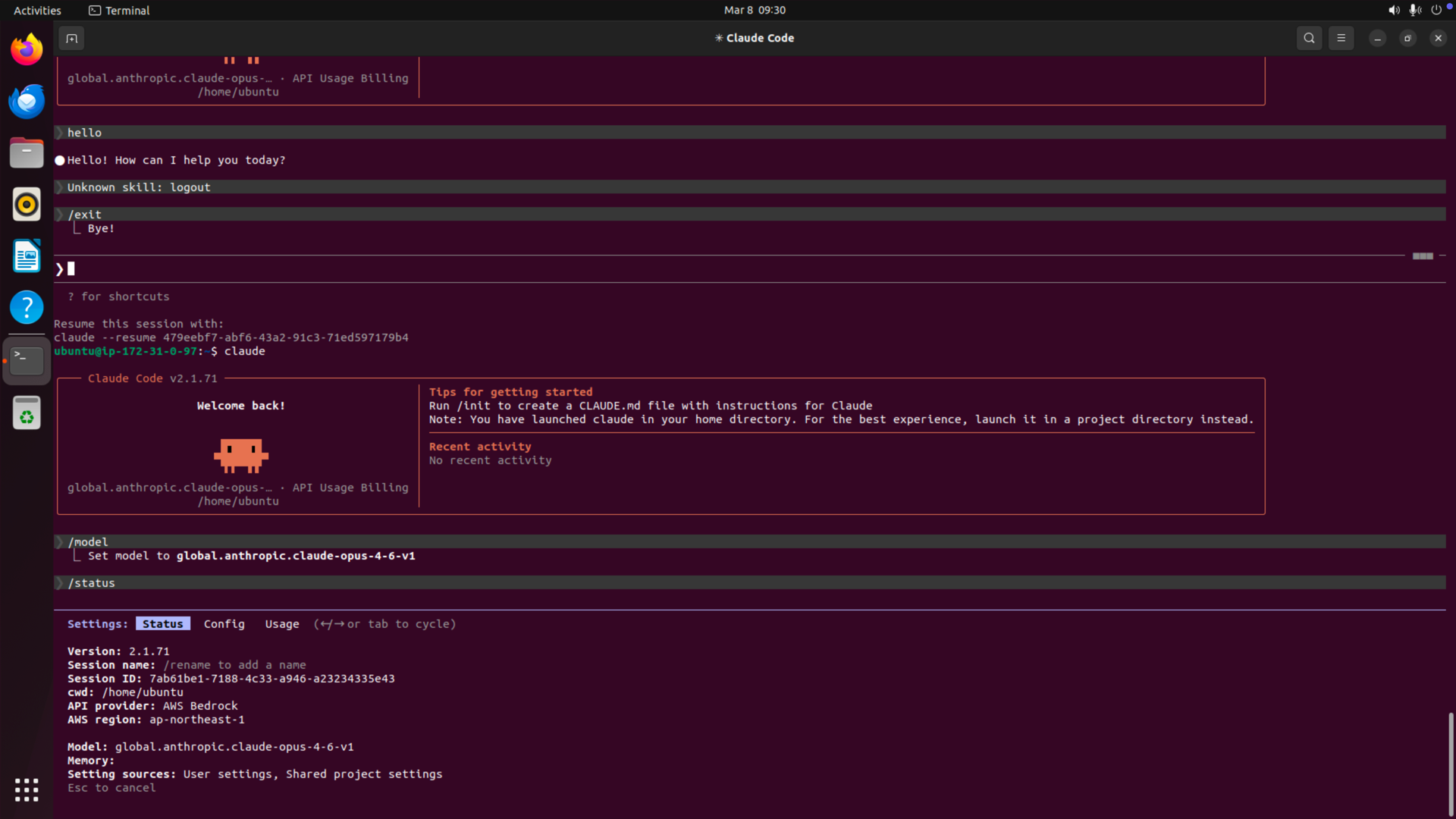
Amazon Bedrock 経由でアクセスされていることがわかります。
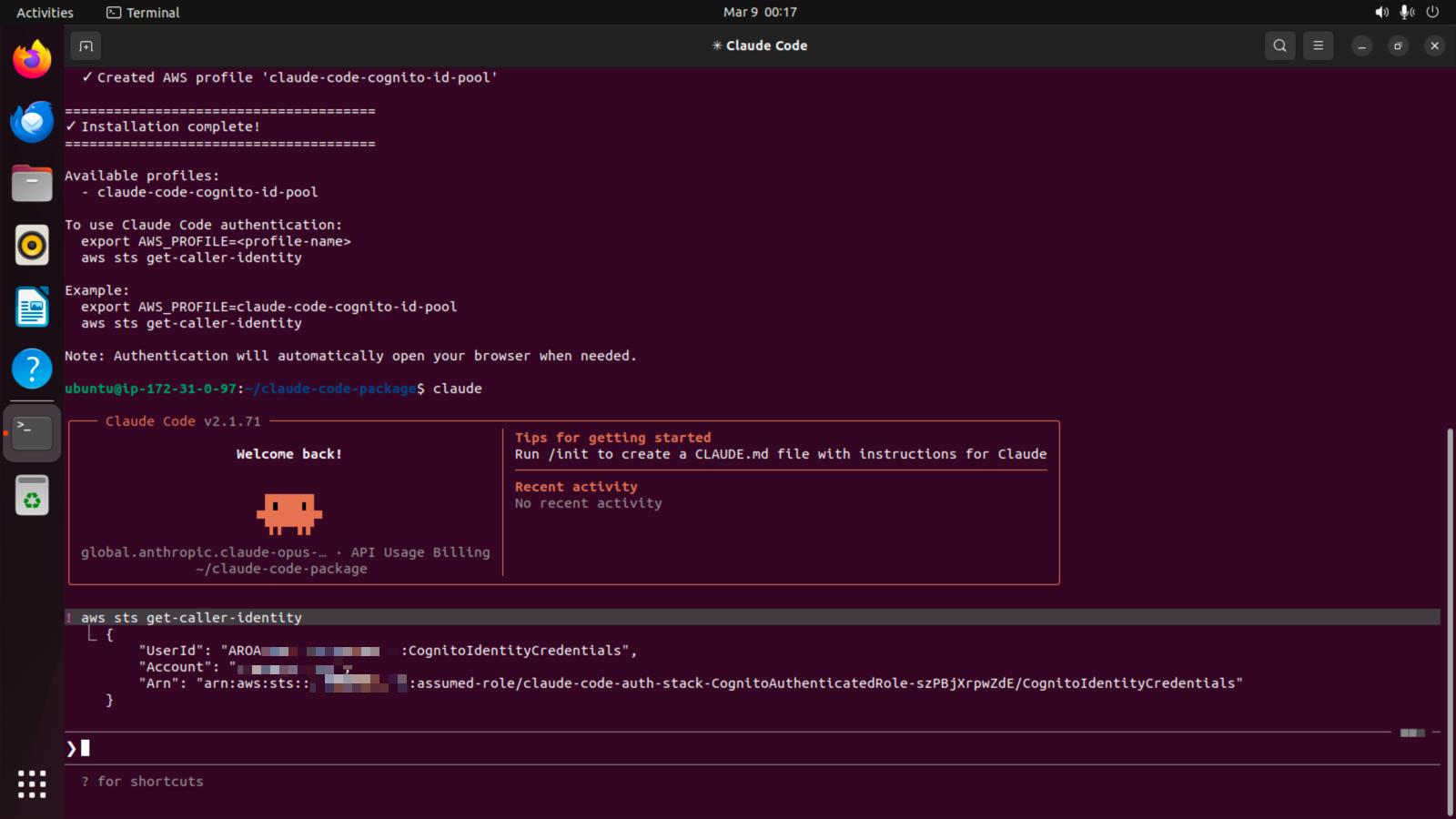
IAM ロールを確認すると、ccwb deploy でデプロイした claude-code-auth-stack-CognitoAuthenticatedRole から始まる IAM Role 経由でアクセスされていることがわかります。
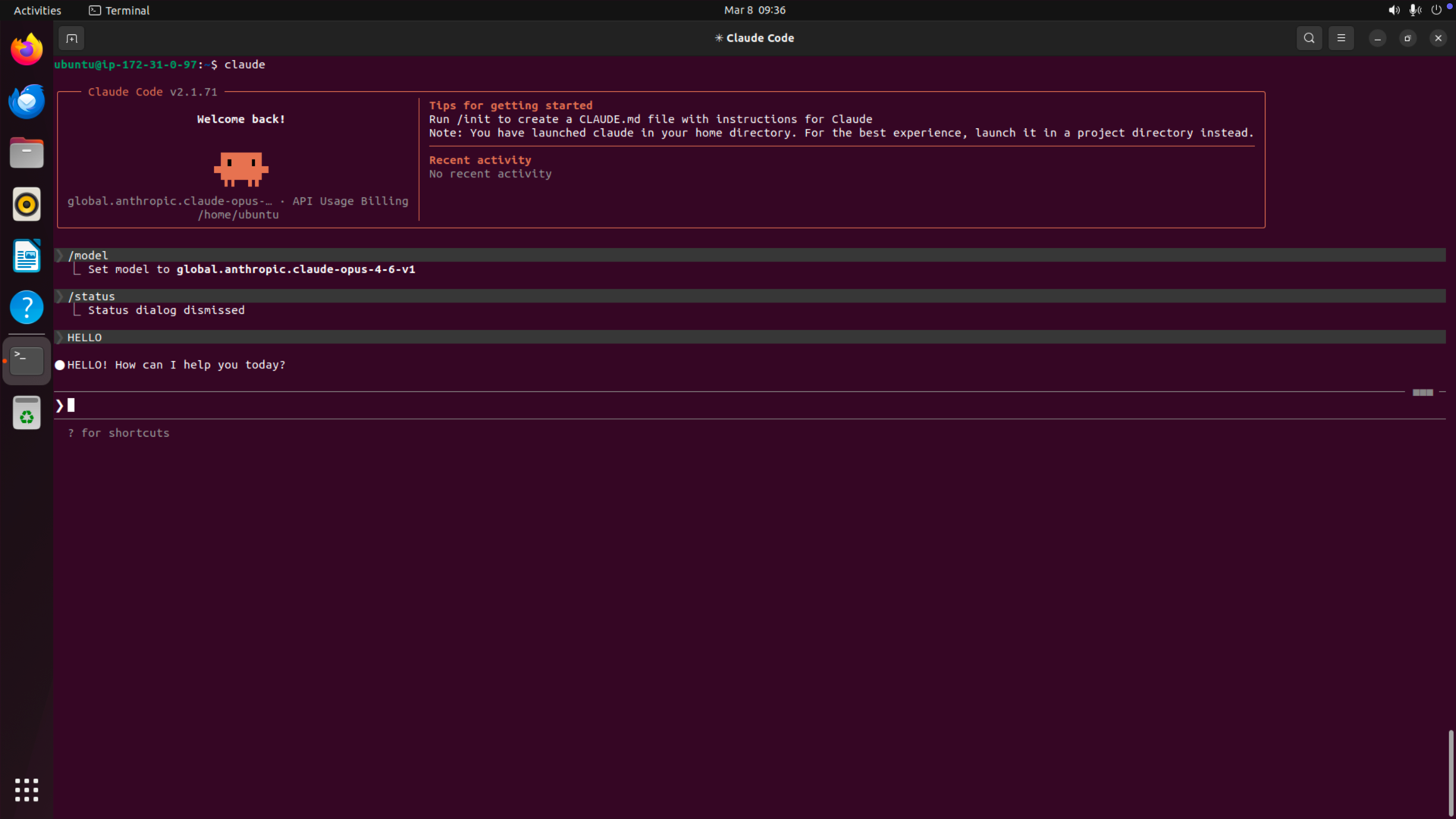
推論も正しく行えていますね。
Direct STS 方式
長くなりましたが、次は Direct STS 方式を実装してみます。
プロファイルの作成
まずは、プロファイルの作成を行います。
ccwb init でプロファイルの初期化を行います。
CloudFormation Stack 名が重複しないよう claude-code-auth-sts にスタック名を上書きしました。
takakuni@source % poetry run ccwb init

Found 1 existing profile(s):
  ★ claude-code-cognito-id-pool
?
What would you like to do? Create new profile for different account/region

Profile Name
Choose a descriptive name for this deployment profile.
Suggested format: {project}-{environment}-{region}
Examples: acme-prod-us-east-1, internal-dev-us-west-2

? Profile name: claude-code-cognito-direct-sts
╭───────────────────────────────────────────────────────────────────────────╮
│                                                                           │
│  Welcome to Claude Code with Bedrock Setup!                               │
│                                                                           │
│  This wizard will help you deploy Claude Code using Amazon Bedrock with:  │
│    • Secure authentication via your identity provider                     │
│    • Usage monitoring and dashboards                                      │
│                                                                           │
╰───────────────────────────────────────────────────────────────────────────╯
Prerequisites Check:
Enter MFA code for arn:aws:iam::4828XXXXXXXX:mfa/takakuni:
  ✓ AWS CLI installed
  ✓ AWS credentials configured
  ✓ Python 3.10+ available
  ✓ Current region: us-east-1
  ✓ Bedrock access enabled in us-east-1

Step 1: OIDC Provider Configuration
──────────────────────────────
? Enter your OIDC provider domain:  (e.g., company.okta.com, company.auth0.com, login.microsoftonline.com/
{tenant-id}/v2.0, my-app.auth.us-east-1.amazoncognito.com, or my-app.auth-fips.us-gov-west-1.amazoncognito
.com for GovCloud) claude-code.auth.ap-northeast-1.amazoncognito.com
? Enter your Cognito User Pool ID for ap-northeast-1:  (case-sensitive) ap-northeast-1_LJrzXXXXX
? Enter your OIDC Client ID: 9hae1scXXXXXXXXXXXXXXXXXX

Credential Storage Method
Choose how to store AWS credentials locally:
  • Keyring: Uses OS secure storage (may prompt for password)
  • Session Files: Temporary files (deleted on logout)

? Select credential storage method: Session Files (Temporary storage)

Federation Type Selection
Direct STS.
Cognito Identity Pool.

? Choose federation type: Direct STS

Step 2: AWS Infrastructure Configuration
────────────────────────────────────────
? Select AWS Region for infrastructure deployment (Cognito, IAM, monitoring): ap-northeast-1
? Stack base name (for CloudFormation): claude-code-auth-sts

Optional Features Configuration
────────────────────────────────────────

Monitoring and Usage Dashboards
Track Claude Code usage and performance metrics in CloudWatch
? Enable monitoring? No

Windows Build Support
Build Windows binaries using AWS CodeBuild
? Enable Windows builds? No

Package Distribution
Choose how to distribute Claude Code packages to end users:
  • Presigned S3 URLs: Simple, no authentication (good for < 20 users)
  • Landing Page: IdP authentication with web UI (good for 20-100 users)
? Distribution method: Disabled

Step 3: Bedrock Model Selection
────────────────────────────────────────
? Select Claude model: Claude Opus 4.6 (Global, US)

Selected: Claude Opus 4.6
? Select cross-region inference profile: GLOBAL Cross-Region - Global CRIS - All commercial AWS regions wo
rldwide

Selected: GLOBAL Cross-Region
? Select source region for AWS configuration: ap-northeast-1
✓ Source region: ap-northeast-1

✓ Configured Claude Opus 4.6 with GLOBAL Cross-Region (Global CRIS - All commercial AWS regions worldwide)

Step 4: Review Configuration
──────────────────────────────
                            Configuration Summary
╭───────────────────────┬───────────────────────────────────────────────────╮
│ Setting               │ Value                                             │
├───────────────────────┼───────────────────────────────────────────────────┤
│ OIDC Provider         │ claude-code.auth.ap-northeast-1.amazoncognito.com │
│ OIDC Client ID        │ 9hae1scXXXXXXXXXXXXX...                           │
│ Credential Storage    │ Session Files (temporary)                         │
│ Infrastructure Region │ ap-northeast-1 (Cognito, IAM, Monitoring)         │
│ Identity Pool         │ claude-code-auth-sts                              │
│ Monitoring            │ ✗ Disabled                                        │
│ Claude Model          │ Claude Opus 4.6 (Global)                          │
│ Bedrock Regions       │ global                                            │
│ AWS Account           │ 3407XXXXXXXX                                      │
╰───────────────────────┴───────────────────────────────────────────────────╯

Resources to be created:
• IAM OIDC Provider for authentication
• IAM roles and policies for Bedrock access

╭────────────────────────────────────────────────────────────────────────────────╮
│                                                                                │
│  ✓ Profile 'claude-code-cognito-direct-sts' created successfully!              │
│                                                                                │
│  Your configuration has been saved.                                            │
│                                                                                │
│  Next steps:                                                                   │
│  1. Deploy infrastructure: poetry run ccwb deploy                              │
│  2. Create package: poetry run ccwb package                                    │
│  3. Test authentication: poetry run ccwb test                                  │
│  4. View profile: poetry run ccwb context show claude-code-cognito-direct-sts  │
│                                                                                │
╰────────────────────────────────────────────────────────────────────────────────╯
デプロイ
作成したプロファイルをデプロイします。
takakuni@source % poetry run ccwb deploy
╭──────────────────────────────────────────╮
│                                          │
│  Claude Code Infrastructure Deployment   │
│                                          │
│  Deploy or update CloudFormation stacks  │
│                                          │
╰──────────────────────────────────────────╯
Using active profile: claude-code-cognito-direct-sts

Deployment Plan:

  Stack          Description                              Status
 ────────────────────────────────────────────────────────────────
  auth           Authentication Stack (Cognito + IAM)     Create
  distribution   Distribution infrastructure (S3 + IAM)   Create

Deploying stacks...

Authentication Stack (Cognito + IAM)
✓ auth stack deployed successfully
⠦ claude-code-auth-sts-stack - CREATE_COMPLETE

Distribution infrastructure (S3 + IAM)
✓ distribution stack deployed successfully
⠸ DistributionUserPolicy - CREATE_COMPLETE

Deployment complete!

Stack Outputs:

Authentication Stack:
• Federation Type: direct
• Direct STS Role ARN: arn:aws:iam::3407XXXXXXXX:role/BedrockCognitoFederatedRole
• Role ARN: arn:aws:iam::3407XXXXXXXX:role/BedrockCognitoFederatedRole
• OIDC Provider:
arn:aws:iam::3407XXXXXXXX:oidc-provider/cognito-idp.ap-northeast-1.amazonaws.com/ap-northeast-1_LJrzXXXXX
インストーラーの作成
続いてインストーラーの作成を行います。ここも先ほどの内容ととくに変わらずですね。
強いて言えば、Direct STS の場合、セッション時間は最大 12 時間のようです。
takakuni@source % poetry run ccwb package
? Which platform(s) do you want to build for? (Use space to select, enter to confirm) [linux-x64]
? Include 'Co-Authored-By: Claude' in git commits? No
Fetching deployment information...
╭───────────────────────────────────────────────────────────────────────────────────────╮
│                                                                                       │
│  Package Builder                                                                      │
│                                                                                       │
│  Creating distribution package for claude-code.auth.ap-northeast-1.amazoncognito.com  │
│                                                                                       │
╰───────────────────────────────────────────────────────────────────────────────────────╯

Package Configuration:
  Configuration Profile: claude-code-cognito-direct-sts
  AWS Profile: ClaudeCode
  OIDC Provider: claude-code.auth.ap-northeast-1.amazoncognito.com
  Client ID: 9hae1scXXXXXXXXXXXXXXXXXX
  Federation Type: Direct STS (12-hour sessions)
  Federated Role: BedrockCognitoFederatedRole
  AWS Region: ap-northeast-1
  Identity Pool: arn:aws:iam::3407XXXXXXXX:role/BedrockCognitoFederatedRole
  Claude Model: Claude Opus 4.6 (GLOBAL)
  Source Region: ap-northeast-1
  Bedrock Regions: global

Building package...

Building credential process for linux-x64...
Building Linux x64 binary via Docker (this may take a few minutes)...
✓ Linux x64 binary built successfully via Docker

Creating configuration...
Creating installer script...
Creating documentation...
Creating Claude Code settings...
Created Claude Code settings for Bedrock configuration

✓ Package created successfully!

Output directory: dist/claude-code-cognito-direct-sts/2026-03-08-191613

Package contents:
  • credential-process-linux-x64 - Authentication executable for linux-x64
  • config.json - Configuration
  • install.sh - Installation script for macOS/Linux
  • README.md - Installation instructions

Distribution steps:
1. Send users the entire dist folder
2. Users run: ./install.sh
3. Authentication is configured automatically

To test locally:
cd dist/claude-code-cognito-direct-sts/2026-03-08-191613
./install.sh

Next steps:
To create a distribution package: poetry run ccwb distribute
インストーラー直下の config.json は federation_type が direct になっていますね。
{
  "claude-code-cognito-direct-sts": {
    "provider_domain": "claude-code.auth.ap-northeast-1.amazoncognito.com",
    "client_id": "9hae1scXXXXXXXXXXXXXXXXXX",
    "aws_region": "ap-northeast-1",
    "provider_type": "cognito",
    "credential_storage": "session",
    "cross_region_profile": "global",
    "federated_role_arn": "arn:aws:iam::3407XXXXXXXX:role/BedrockCognitoFederatedRole",
    "federation_type": "direct",
    "max_session_duration": 43200,
    "cognito_user_pool_id": "ap-northeast-1_LJrzXXXXX",
    "selected_model": "global.anthropic.claude-opus-4-6-v1"
  }
}
インストーラーの配布
先ほど同様、S3 の署名付き URL を発行して、インストーラーを配布します。
takakuni@source % poetry run ccwb distribute
╭──────────────────────────────────────────────╮
│                                              │
│  Claude Code Package Distribution            │
│                                              │
│  Share packages securely via presigned URLs  │
│                                              │
╰──────────────────────────────────────────────╯

Scanning package directory...

Profile: claude-code-cognito-direct-sts
  [1] 2026-03-08-191613 (Latest)
      Platforms: linux-x64
      Size: 24.4 MB

Profile: claude-code-cognito-id-pool
  [2] 2026-03-08-141708 (Latest)
      Platforms: linux-x64
      Size: 24.4 MB

? Select package to distribute: claude-code-cognito-direct-sts - 2026-03-08-191613 (Latest)

Using build: claude-code-cognito-direct-sts/2026-03-08-191613
Using active profile: claude-code-cognito-direct-sts

Package contents:
  ✗ Windows executable (not built)
  ✓ Linux x64 executable (built: 2026-03-08 19:23)
  ✓ Unix installer script
  ✓ Configuration file

Warning: Windows support not included in this distribution
? Continue without Windows support? Yes

Ready to distribute for: linux-x64
⠙ Preparing upload...
Uploading to S3 ━━━━━━━━━━━━━━━━━━━━━━━━━━━━━━━━━━━━━━━━ 100.0% • 25.3/25.3 MB • 0:00:00
⠧ Saving package locally...

✓ Distribution package created successfully!

Distribution URL (expires in 48 hours):

https://claude-code-auth-sts-distribution-3407XXXXXXXX.s3.amazonaws.com/packages/20260308-193138/claude-code-package-20260308-1
93138.zip?AWSAccessKeyId=ASIAXXXXXXXXXXXXXXXX&Signature=hCjiXXXXXXXXXXXXXXXXXXXXXXXXXX&x-amz-security-token=XXXXXXXXXXXXXXXXXXXXXXXXXX&Expires=1773138701

Package Details:
  Filename: claude-code-package-20260308-193138.zip
  SHA256: 8c28aa9ba8d0b25f0db75812df11e0c40585808d379a1af6e774b823aa08105c
  Expires: 2026-03-10 19:31:41
  Size: 24.1 MB

Share this URL with developers to download the package.

Download and Installation Instructions:

For macOS/Linux:
1. Download (copy entire line):
   curl -L -o "claude-code-package-20260308-193138.zip" "https://claude-code-auth-sts-distribution-3407XXXXXXXX.s3.amazonaws.com/packages/20260308-193138/claude-code-package-20260308-193138.zip?AWSAccessKeyId=ASIAXXXXXXXXXXXXXXXX&Signature=hCjiXXXXXXXXXXXXXXXXXXXXXXXXXX&x-amz-security-token=XXXXXXXXXXXXXXXXXXXXXXXXXX"
2. Extract and install:
   unzip claude-code-package-20260308-193138.zip && cd claude-code-package && ./install.sh

For Windows PowerShell:
1. Download (copy entire line):
   Invoke-WebRequest -Uri "https://claude-code-auth-sts-distribution-3407XXXXXXXX.s3.amazonaws.com/packages/20260308-193138/claude-code-package-20260308-193138.zip?AWSAccessKeyId=ASIAXXXXXXXXXXXXXXXX&Signature=hCjiXXXXXXXXXXXXXXXXXXXXXXXXXX&x-amz-security-token=XXXXXXXXXXXXXXXXXXXXXXXXXX" -OutFile "claude-code-package-20260308-193138.zip"
2. Extract and install:
   Expand-Archive -Path "claude-code-package-20260308-193138.zip" -DestinationPath "."
   cd claude-code-package
   .\install.bat

Verify download with: sha256sum claude-code-package-20260308-193138.zip (or Get-FileHash on Windows)
インストーラーの利用
先ほど生成した、署名付き URL からインストーラーを取得し、インストールを行います。
私の場合、すでに claude-code-package が存在するので上書きします。
ubuntu@ip-172-31-0-97:~$ unzip claude-code-package-20260308-193138.zip && cd claude-code-package && ./install.sh
Archive:  claude-code-package-20260308-193138.zip
replace claude-code-package/config.json? [y]es, [n]o, [A]ll, [N]one, [r]ename: A
  inflating: claude-code-package/config.json
  inflating: claude-code-package/install.sh
  inflating: claude-code-package/credential-process-linux-x64
  inflating: claude-code-package/README.md
  inflating: claude-code-package/claude-settings/settings.json
======================================
Claude Code Authentication Installer
======================================

Organization: claude-code.auth.ap-northeast-1.amazoncognito.com

Checking prerequisites...
✓ Prerequisites found

Detecting platform and architecture...
✓ Detected Linux x64

Installing authentication tools...

Installing Claude Code settings...
Existing Claude Code settings found
Overwrite with new settings? (Y/n): Y
✓ Claude Code settings configured

Configuring AWS profiles...
Found profiles: claude-code-cognito-direct-sts

Configuring AWS profile: claude-code-cognito-direct-sts
  ✓ Created AWS profile 'claude-code-cognito-direct-sts'

======================================
✓ Installation complete!
======================================

Available profiles:
  - claude-code-cognito-direct-sts

To use Claude Code authentication:
  export AWS_PROFILE=<profile-name>
  aws sts get-caller-identity

Example:
  export AWS_PROFILE=claude-code-cognito-direct-sts
  aws sts get-caller-identity

Note: Authentication will automatically open your browser when needed.
Claude Code の起動
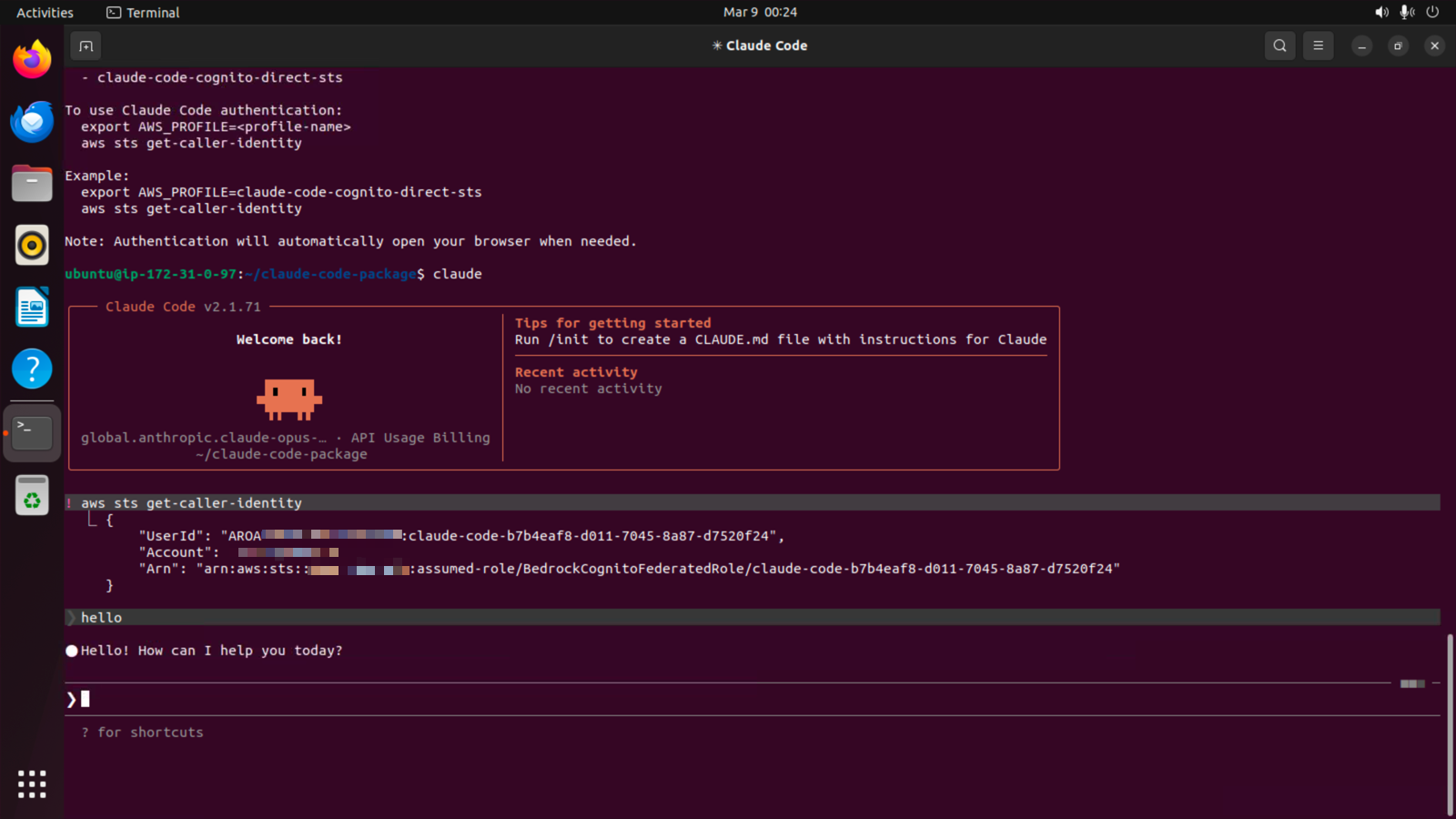
Claude Code を起動しました。IdP は同じ User Pool を利用しているため、再セッションは張られませんでした。
ただし、利用する IAM ロールは異なり、Direct STS の場合、BedrockCognitoFederatedRole が利用されています。
うまく推論もできていますね。
まとめ
以上、「Guidance for Claude Code with Amazon Bedrock を使って、組織向けの Claude Code 環境を構築してみた」でした。
Guidance for Claude Code with Amazon Bedrock にはモニタリング機能も別途用意されているようなので、他のブログでまとめてみたいと思います。
当初、Identity Center とか必要なのかなと思っていたのですが、Cognito 連携、非常に良いですね。
このブログがどなたかの参考になれば幸いです。クラウド事業本部コンサルティング部のたかくに(@takakuni_)でした!