
GitHub CLI 2.0でIssue周りの操作を試してみた

この記事は公開されてから1年以上経過しています。情報が古い可能性がありますので、ご注意ください。
こんにちは、CX事業本部 IoT事業部の若槻です。
今回は、GitHub CLI 2.0でIssue周りの操作を試してみました。
GitHub CLIとは
GitHub CLIとは、GitHubに対する操作をコマンドラインで行うことができるユーティリティです。
gitとは異なり、IssueやPull Request、Repository等の通常はGitHubのブラウザコンソールで行う操作をCLIで行えます。
GitHub CLIは、2020年9月に1.0が、2021年8月に2.0がバージョンリリースされました。
- GitHub CLI 1.0 is now available | The GitHub Blog
- GitHub CLI 2.0 includes extensions! | The GitHub Blog
今回はGitHub CLI 2.0の方を使用してIssue周りの操作を試してみます。
導入
GitHub CLIを未導入でしたので、まずMac端末に導入してみます。
HomebrewでGitHub CLIをインストールします。
$ brew install gh
インストールできました。
$ gh --version
gh version 2.4.0 (2021-12-21)
https://github.com/cli/cli/releases/tag/v2.4.0
gh auth loginコマンドを実行し、Login with a web browserを選択してブラウザによるログインを行います。
$ gh auth login
? What account do you want to log into? GitHub.com
? What is your preferred protocol for Git operations? HTTPS
? Authenticate Git with your GitHub credentials? Yes
? How would you like to authenticate GitHub CLI? Login with a web browser

! First copy your one-time code: BAED-FEEF
- Press Enter to open github.com in your browser...
ブラウザで端末認証画面が開くので、ワンタイムコードを入力します。

GitHub CLIを自分のGitHubユーザーアカウントで認証します。

認証できました!

コンソールに戻りコマンドを完了させます。
✓ Authentication complete. Press Enter to continue...

- gh config set -h github.com git_protocol https
✓ Configured git protocol
✓ Logged in as cm-rwakatsuki
gh auth statusで確認すると、ログインできていますね。
```sh
$ gh auth status
github.com
  ✓ Logged in to github.com as cm-rwakatsuki (/Users/wakatsuki.ryuta/.config/gh/hosts.yml)
  ✓ Git operations for github.com configured to use https protocol.
  ✓ Token: *******************
## 試してみた

Issue周りの操作ができる`gh issue`コマンドには次のようなサブコマンドがあります。

- `gh issue close`
- `gh issue comment`
- `gh issue create`
- `gh issue delete`
- `gh issue edit`
- `gh issue list`
- `gh issue reopen`
- `gh issue status`
- `gh issue transfer`
- `gh issue view`

今回はこのうち`gh issue list`と`gh issue view`、`gh issue edit`を試してみます。

### gh issue list

`gh issue list`コマンドを使用すると、Issueの一覧の取得やフィルターができます。

- [gh issue list | GitHub CLI](https://cli.github.com/manual/gh_issue_list)

```shell
$  gh issue list help
unknown argument "help"

Usage:  gh issue list [flags]

Flags:
  -a, --assignee string    Filter by assignee
  -A, --author string      Filter by author
  -q, --jq expression      Filter JSON output using a jq expression
      --json fields        Output JSON with the specified fields
  -l, --label strings      Filter by labels
  -L, --limit int          Maximum number of issues to fetch (default 30)
      --mention string     Filter by mention
  -m, --milestone number   Filter by milestone number or `title`
  -S, --search query       Search issues with query
  -s, --state string       Filter by state: {open|closed|all} (default "open")
  -t, --template string    Format JSON output using a Go template
  -w, --web                Open the browser to list the issue(s)
gh issue listコマンドをオプション無しで実行すると、直近で更新されたIssueを最大30個取得できます。この時is:issue is:openクエリによるフィルターが既定で使用されるようです。
$ gh issue list

Showing 30 of 269 open issues in cm-rwakatsuki/devio

#1054  GitHub CLI 2.0でIssue周りの操作を試してみた                                                   about 10 minutes ago
#1052  GitHub Projectボードに既存のIssueを追加してみた                                               about 14 minutes ago
#1035  クッキーを取り巻く法整備の現状を整理してみた                                                  about 5 days ago
#1026  Google AnalyticsのデータをBigQueryでクエリしてみた                                            about 13 days ago
#1024  Google Tag Managerのデータレイヤー                                                            about 13 days ago
#1015  ReactでGoogle Tag Managerを使う                                                               about 16 days ago
#1011  ReactアプリケーションだとGoogleアナリティクスが発火しなかった                                 about 18 days ago
#1008  [チュートリアル] Amazon SQSメッセージを処理するLambda関数を作成してみた                       about 2 days ago
#1007  Amazon Forecast                                                                               about 10 days ago
#1005  StoryBook                                                                                     about 20 days ago
#1002  RDS Proxy触ってみる                                                                           about 23 hours ago
#1000  Deno触ってみる                                                                                about 21 days ago
#999   Rust触ってみる                                                                                about 21 days ago
#997   Google 広告                                                                                   about 19 days ago
#995   CloudFrontでのオリジンでのzip圧縮                                                             about 22 days ago
#993   Googleっぽいアイコンを作る                                                                    about 23 days ago
#992   Azureっぽいアイコンを作る                                                                     about 23 days ago
#991   AWSっぽいアイコンを作る                                                                       about 23 days ago
#982   npm scriptsから実行してCognitoユーザーのIDトークンを取得できるスクリプト(TypeScript)...     about 2 days ago
#974   AWS AmplifyでAPバックエンドをREST APIで構築してみた                                          about 1 month ago
#971   Dependency Injectionについて                                                                  about 1 month ago
#970   MUI                                                                                           about 1 month ago
#966   Redux                                                                                         about 21 days ago
#965   useContext                                                                                    about 20 days ago
#964   CDKのカスタムリソース                                                                         about 1 month ago
#962   Amazon SumerianでPLATEAUやってみる                                                            about 1 month ago
#959   LambdaのメトリクスフィルターをCDKで実装する                                                   about 1 month ago
#958   メトリクスフィルターで柔軟なフィルターがんばる                                                about 1 month ago
#949   DeepL                                                                                         about 1 month ago
#943   なんかsnykが使われてる?                                                                      about 1 month ago
--limitオプションを指定すれば先頭から指定数だけ取得できます。
$  gh issue list --limit 3

Showing 3 of 269 open issues in cm-rwakatsuki/devio

#1054  GitHub CLI 2.0でIssue周りの操作を試してみた        about 17 minutes ago
#1052  GitHub Projectボードに既存のIssueを追加してみた    about 21 minutes ago
#1035  クッキーを取り巻く法整備の現状を整理してみた       about 5 days ago
JSON形式で出力も可能です。--jsonオプションで出力したいフィールドをコンマ区切りで指定すればいいようです。
$ gh issue list --json
Specify one or more comma-separated fields for `--json`:
  assignees
  author
  body
  closed
  closedAt
  comments
  createdAt
  id
  labels
  milestone
  number
  projectCards
  reactionGroups
  state
  title
  updatedAt
  url
--jsonオプションを指定するとJSON形式で出力できました。これで出力結果をシェルスクリプトなどでさらに使用したい場合に便利ですね。
$  gh issue list --limit 3 --json number,title
[
  {
    "number": 1054,
    "title": "GitHub CLI 2.0でIssue周りの操作を試してみた"
  },
  {
    "number": 1052,
    "title": "GitHub Projectボードに既存のIssueを追加してみた"
  },
  {
    "number": 1035,
    "title": "クッキーを取り巻く法整備の現状を整理してみた"
  }
]
--searchオプションを指定すると、指定した文字列でタイトルやコメント内を検索し、ヒットしたIssueを取得できます。
$ gh issue list --search "QuickSight"

Showing 10 of 10 issues in cm-rwakatsuki/devio that match your search

#107  QuickSight改善Tips                                                                                 about 1 year ago
#121  Amazon Athenaのクエリ結果を                                                                        about 1 year ago
#127  【devio-flow】onpushでconfigのJSONパースが失敗する                                                 about 1 year ago
#114  QuickSightで期間指定のフィルターを作成する                                                         about 1 year ago
#130  Amazon QuickSightで計算フィールドを利用する                                                        about 1 year ago
#122  Amazon QuickSightでSPICにAthenaのクエリ結果を定期的にインポートしてみた                           about 1 year ago
#112  Amazon QuickSightのデータセットでデータを加工してみる                                              about 1 year ago
#248  BIツールでは日付情報はどのような形式で渡されると嬉しい?                                           about 1 year ago
#113  QuickSightのデータセットで計算フィールドを使用してstring型(数字)の値を数値(int型)に変換する    about 1 year ago
#111  AthenaでS3上のCSVをSelectするたびに空白行と文字化けデータが増えていく                              about 1 year ago
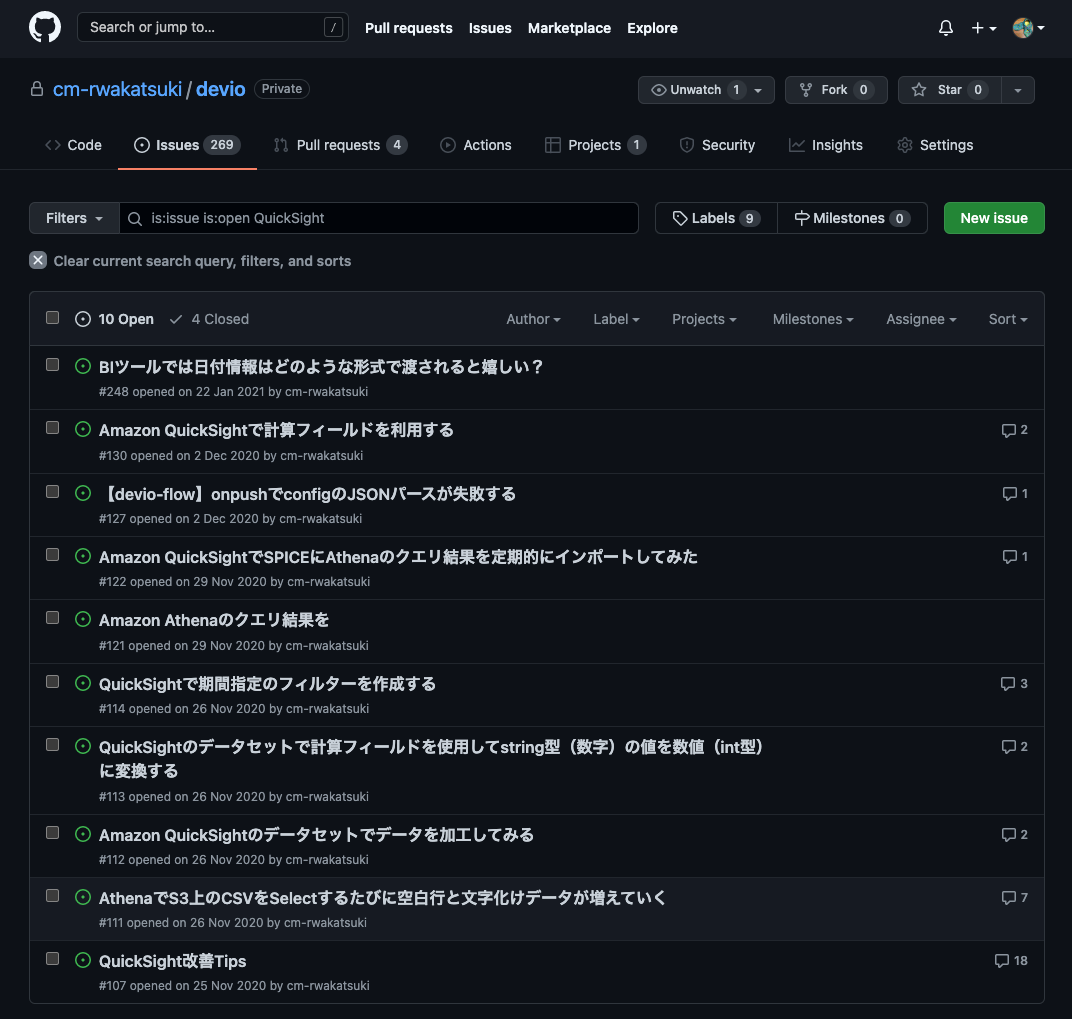
--webオプションを使用すると、検索結果をブラウザで開くことができます。
$  gh issue list --search "QuickSight" --web
Opening github.com/cm-rwakatsuki/devio/issues in your browser.
実行すると下記の画面がブラウザで自動的に開きました。
gh issue view
gh issue viewコマンドを使用すると、指定した番号のIssueの詳細をコメント含め取得できます。
$  gh issue view 933
scilit-learn #933
Open • cm-rwakatsuki opened about 1 month ago • 1 comment


  No description provided


cm-rwakatsuki (Owner) • 0m • Newest comment

  こめんとです


View this issue on GitHub: https://github.com/cm-rwakatsuki/devio/issues/933
取得できました。
gh issue edit
gh issue editコマンドを使用すると、Issueの編集ができます。
--titleオプションを指定すると、タイトルの編集ができます。--bodyオプションを指定すると本文の編集ができます。
$ gh issue edit 933 --title scikit-learn --body てすと
https://github.com/cm-rwakatsuki/devio/issues/933

$ gh issue view 933
scikit-learn #933
Open • cm-rwakatsuki opened about 1 month ago • 1 comment


  てすと


cm-rwakatsuki (Owner) • 10m • Newest comment

  こめんとです


View this issue on GitHub: https://github.com/cm-rwakatsuki/devio/issues/933
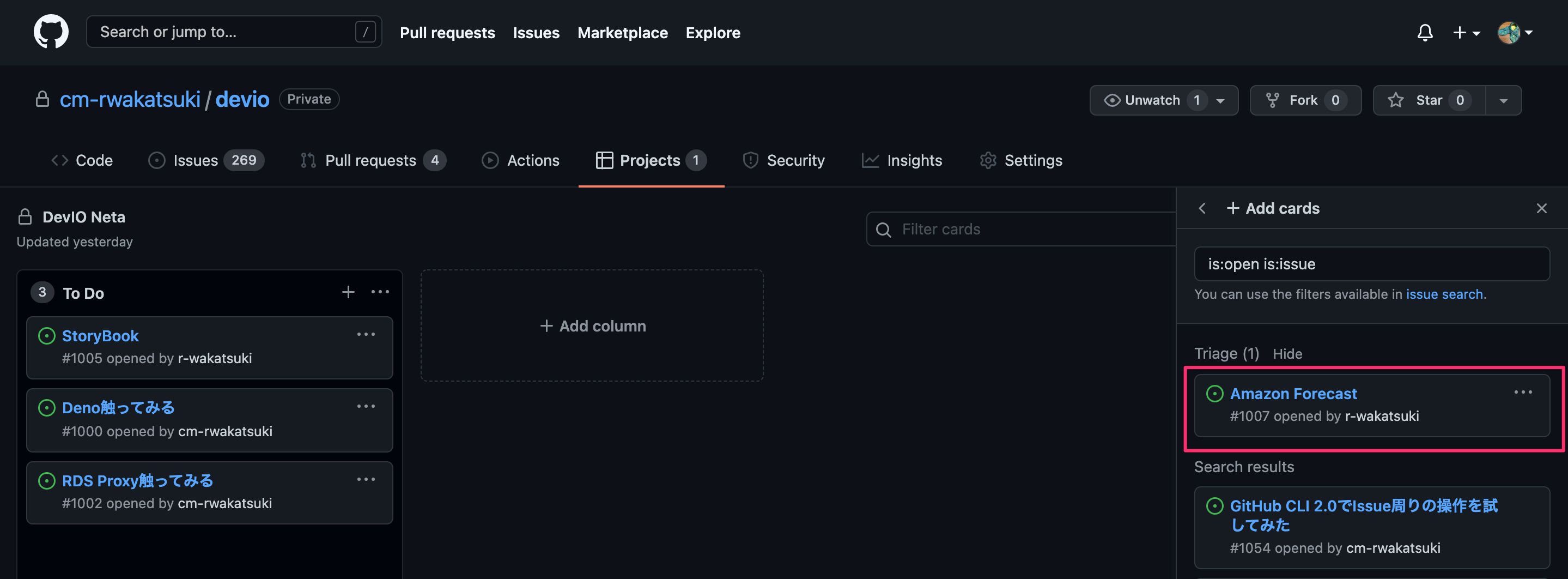
--add-projectオプションを指定すると、IssueをProjectに追加できます。
$ gh issue edit 1007 --add-project "DevIO Neta"
指定した番号のIssueをProjectに追加できました。しかしTriageまではコマンドでできないようなので、手動でする必要があるようです。
おわりに
GitHub CLI 2.0でIssue周りの操作を試してみました。
今まではGitHub操作をシェルスクリプトなどで行いたい時はRest APIを直接叩いていましたが、操作によってはGitHub CLIで置き換えできそうですね。
参考
以上