Lambda の再帰ループ検出が EventBridge の新しい Custom Event Bus に対応したので試してみた

はじめに
2026 年 10 月 14 日に、Lambda の再帰ループ検出が EventBridge のカスタムイベントバスに対応しました。
イベントを受け取った Lambda 関数が同じイベントバスへイベントを発行する構成では、設定やコードを誤ると関数が呼び出され続けてしまいます。これまで EventBridge は検出の対象外だったため、気付くまで料金が発生し続け、アカウントの同時実行数を使い切ってしまう危険性がありました。
今回の対応で、このようなループが自動的に止まり、通知も届くようになります。
本記事では実際に Custom Event Bus で Lambda 関数のループを作り、本当に止まるのかを検証してみます!
なお、ルールとターゲットで組んだ既存の構成は対象外なのでご注意ください。検証は東京リージョンで行いました。
対象は新しい Custom Event Bus
現在の EventBridge には、カスタムイベントバスが 2 種類あります[1]。
- Custom Event Bus: サブスクライバーがイベントをフィルタリングしてターゲットへ配信する、新しいイベントバス。CloudFormation のリソースタイプは
AWS::EventsV2::EventBus - Custom Event Bus - Classic: ルールとターゲットで構成する、従来のイベントバス。CloudFormation のリソースタイプは
AWS::Events::EventBus
以後、前者を「Custom Event Bus」、後者を「Classic」と呼びます。
ちなみに、Lambda の再帰ループ検出の対象は SQS、S3、SNS、Custom Event Bus、Lambda 関数同士の呼び出しです[2]。
仕組みやこれまでの経緯については以下の記事をご参照ください。
検証環境
Custom Event Bus のサブスクライバーが Lambda 関数を呼び出し、その関数が同じバスへ PutEvents でイベントを発行するループを作りました。
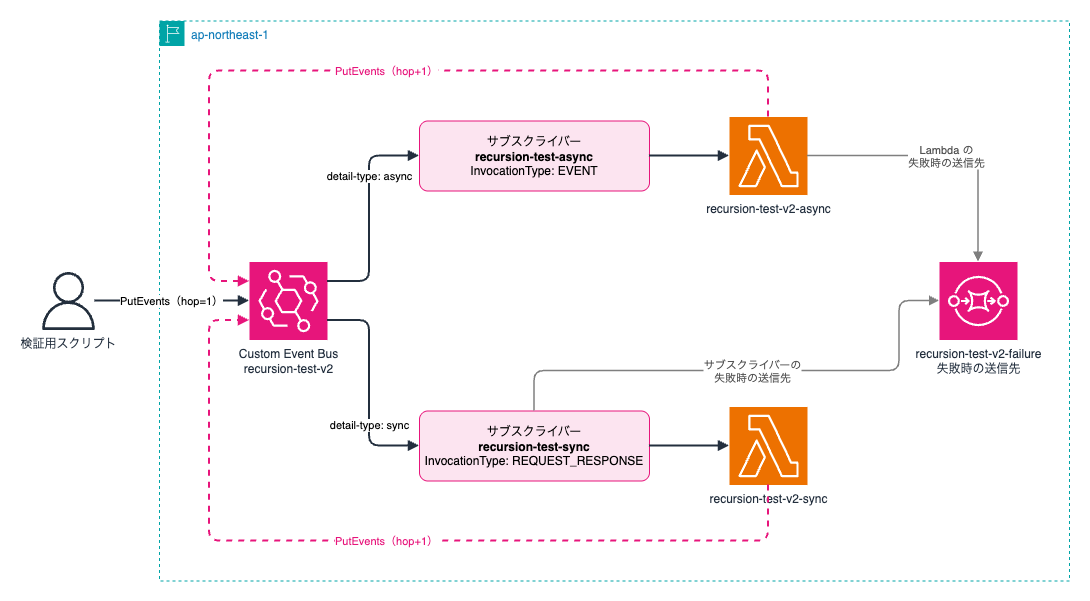
サブスクライバーの InvocationType には、非同期の EVENT と同期の REQUEST_RESPONSE があります。今回は両方を用意し、detail-type のフィルターで別々のループに分けました。
Lambda 関数のコードは以下のようにしました。イベントの detail にホップ数を持たせ、30 回で自分から止まるようにしています。
import json, os
import boto3

events = boto3.client("eventbridgev2")

def handler(event, context):
    hop = event["detail"]["hop"]
    print(json.dumps({
        "hop": hop,
        "trace": os.environ.get("_X_AMZN_TRACE_ID"),
        "boto3": boto3.__version__,
    }))
    # 検出されなかった場合の安全策
    if hop >= int(os.environ["MAX_HOP"]):
        return
    events.put_events(
        EventBusArn=os.environ["BUS_ARN"],
        Entries=[{
            "Source": "blog.recursion",
            "DetailType": os.environ["DETAIL_TYPE"],
            "Detail": json.dumps({"hop": hop + 1}),
        }],
    )
Custom Event Bus の API は、boto3 では eventbridgev2 という別のクライアントです。
Python 3.13 ランタイムに同梱されている boto3 v1.42.97 には、このクライアントがありませんでした。 eventbridgev2 は botocore v1.43.102 で追加されているため[3]、boto3 v1.43.118 を Lambda レイヤーにして同梱しています。
PutEvents で発行した場合、Lambda 関数には Classic と同じ形のエンベロープがそのまま届きます。サブスクライバーの MaxBatchSize を 1 にしておくと、配列ではなく単一のオブジェクトとして届きます[4]。
CloudFormation テンプレート
AWSTemplateFormatVersion: "2010-09-09"
Description: Lambda recursive loop detection test with EventBridge Custom Event Bus

Parameters:
  Boto3LayerArn:
    Type: String

Resources:
  Bus:
    Type: AWS::EventsV2::EventBus
    Properties:
      Name: recursion-test-v2

  FailureQueue:
    Type: AWS::SQS::Queue
    Properties:
      QueueName: recursion-test-v2-failure

  FunctionRole:
    Type: AWS::IAM::Role
    Properties:
      AssumeRolePolicyDocument:
        Version: "2012-10-17"
        Statement:
          - Effect: Allow
            Principal:
              Service: lambda.amazonaws.com
            Action: sts:AssumeRole
      ManagedPolicyArns:
        - arn:aws:iam::aws:policy/service-role/AWSLambdaBasicExecutionRole
      Policies:
        - PolicyName: put-events
          PolicyDocument:
            Version: "2012-10-17"
            Statement:
              - Effect: Allow
                Action: events:PutEvents
                Resource: !Ref Bus
              - Effect: Allow
                Action: sqs:SendMessage
                Resource: !GetAtt FailureQueue.Arn

  # サブスクライバーが Lambda を呼び出すためのロール
  DeliveryRole:
    Type: AWS::IAM::Role
    Properties:
      AssumeRolePolicyDocument:
        Version: "2012-10-17"
        Statement:
          - Effect: Allow
            Principal:
              Service: events.amazonaws.com
            Action: sts:AssumeRole
      Policies:
        - PolicyName: deliver
          PolicyDocument:
            Version: "2012-10-17"
            Statement:
              - Effect: Allow
                Action: lambda:InvokeFunction
                Resource:
                  - !GetAtt AsyncFunction.Arn
                  - !GetAtt SyncFunction.Arn
              - Effect: Allow
                Action: sqs:SendMessage
                Resource: !GetAtt FailureQueue.Arn

  AsyncFunction:
    Type: AWS::Lambda::Function
    Properties:
      FunctionName: recursion-test-v2-async
      Runtime: python3.13
      Handler: index.handler
      Role: !GetAtt FunctionRole.Arn
      Layers:
        - !Ref Boto3LayerArn
      Environment:
        Variables:
          BUS_ARN: !Ref Bus
          DETAIL_TYPE: async
          MAX_HOP: "30"
      Code:
        ZipFile: |
          import json, os
          import boto3

          events = boto3.client("eventbridgev2")

          def handler(event, context):
              hop = event["detail"]["hop"]
              print(json.dumps({
                  "hop": hop,
                  "trace": os.environ.get("_X_AMZN_TRACE_ID"),
                  "boto3": boto3.__version__,
              }))
              # 検出されなかった場合の安全策
              if hop >= int(os.environ["MAX_HOP"]):
                  return
              events.put_events(
                  EventBusArn=os.environ["BUS_ARN"],
                  Entries=[{
                      "Source": "blog.recursion",
                      "DetailType": os.environ["DETAIL_TYPE"],
                      "Detail": json.dumps({"hop": hop + 1}),
                  }],
              )

  SyncFunction:
    Type: AWS::Lambda::Function
    Properties:
      FunctionName: recursion-test-v2-sync
      Runtime: python3.13
      Handler: index.handler
      Role: !GetAtt FunctionRole.Arn
      Layers:
        - !Ref Boto3LayerArn
      Environment:
        Variables:
          BUS_ARN: !Ref Bus
          DETAIL_TYPE: sync
          MAX_HOP: "30"
      Code:
        ZipFile: |
          import json, os
          import boto3

          events = boto3.client("eventbridgev2")

          def handler(event, context):
              hop = event["detail"]["hop"]
              print(json.dumps({
                  "hop": hop,
                  "trace": os.environ.get("_X_AMZN_TRACE_ID"),
                  "boto3": boto3.__version__,
              }))
              # 検出されなかった場合の安全策
              if hop >= int(os.environ["MAX_HOP"]):
                  return
              events.put_events(
                  EventBusArn=os.environ["BUS_ARN"],
                  Entries=[{
                      "Source": "blog.recursion",
                      "DetailType": os.environ["DETAIL_TYPE"],
                      "Detail": json.dumps({"hop": hop + 1}),
                  }],
              )

  AsyncInvokeConfig:
    Type: AWS::Lambda::EventInvokeConfig
    Properties:
      FunctionName: !Ref AsyncFunction
      Qualifier: $LATEST
      MaximumRetryAttempts: 0
      DestinationConfig:
        OnFailure:
          Destination: !GetAtt FailureQueue.Arn

  AsyncSubscriber:
    Type: AWS::EventsV2::Subscriber
    Properties:
      Name: recursion-test-async
      EventBusArn: !Ref Bus
      FilterConfiguration:
        Filters:
          - Scope: DATA
            Pattern: '{"detail-type":["async"]}'
      BatchConfiguration:
        MaxBatchSize: 1
      InvokeConfiguration:
        TargetArn: !GetAtt AsyncFunction.Arn
        RoleArn: !GetAtt DeliveryRole.Arn
        LambdaParameters:
          InvocationType: EVENT
      OnFailureConfiguration:
        Arn: !GetAtt FailureQueue.Arn

  SyncSubscriber:
    Type: AWS::EventsV2::Subscriber
    Properties:
      Name: recursion-test-sync
      EventBusArn: !Ref Bus
      FilterConfiguration:
        Filters:
          - Scope: DATA
            Pattern: '{"detail-type":["sync"]}'
      BatchConfiguration:
        MaxBatchSize: 1
      InvokeConfiguration:
        TargetArn: !GetAtt SyncFunction.Arn
        RoleArn: !GetAtt DeliveryRole.Arn
        LambdaParameters:
          InvocationType: REQUEST_RESPONSE
      RetryPolicy:
        MaxRetryAttempts: 2
        MaxEventAgeInSeconds: 600
      OnFailureConfiguration:
        Arn: !GetAtt FailureQueue.Arn

Outputs:
  BusArn:
    Value: !Ref Bus
最初のイベントは、手元の新しい boto3 から次のコードで発行しました。
import json
import boto3

client = boto3.client("eventbridgev2")
client.put_events(
    EventBusArn="<スタックの出力 BusArn>",
    Entries=[{
        "Source": "blog.recursion",
        "DetailType": "async",  # 同期のループを試す場合は "sync"
        "Detail": json.dumps({"hop": 1}),
    }],
)
非同期呼び出しでループさせる
InvocationType が EVENT のサブスクライバーに最初のイベントを発行すると、ホップ数 16 の実行を最後にループが止まりました!
13:46:09.601 hop=1  Lineage=1:efad5874:0
13:46:10.015 hop=2  Lineage=2:efad5874:1
...
13:46:11.262 hop=15 Lineage=15:efad5874:14
13:46:11.363 hop=16 Lineage=16:efad5874:15
本記事のログの時刻は UTC です。
_X_AMZN_TRACE_ID の Lineage の値は、呼び出しのたびに 1 ずつ増えていました。
Lambda 関数の失敗時の送信先に設定した SQS キューには、止められたイベントが届いていました。
{
  "version": "1.0",
  "timestamp": "2026-10-27T13:46:11.572Z",
  "requestContext": {
    "requestId": "79c455e8-d3a3-4932-8ed3-161b9662ab58",
    "functionArn": "arn:aws:lambda:ap-northeast-1:123456789012:function:recursion-test-v2-async:$LATEST",
    "condition": "RecursiveInvocation",
    "approximateInvokeCount": 0
  },
  "requestPayload": {
    "detail-type": "async",
    "source": "blog.recursion",
    "detail": { "hop": 17 }
  },
  "responseContext": { "statusCode": 400 }
}
condition が RecursiveInvocation で、approximateInvokeCount は 0 です。17 回目は関数のコードが実行される前に止められたことがわかります。
CloudWatch の RecursiveInvocationsDropped メトリクスには 1 が記録されました。
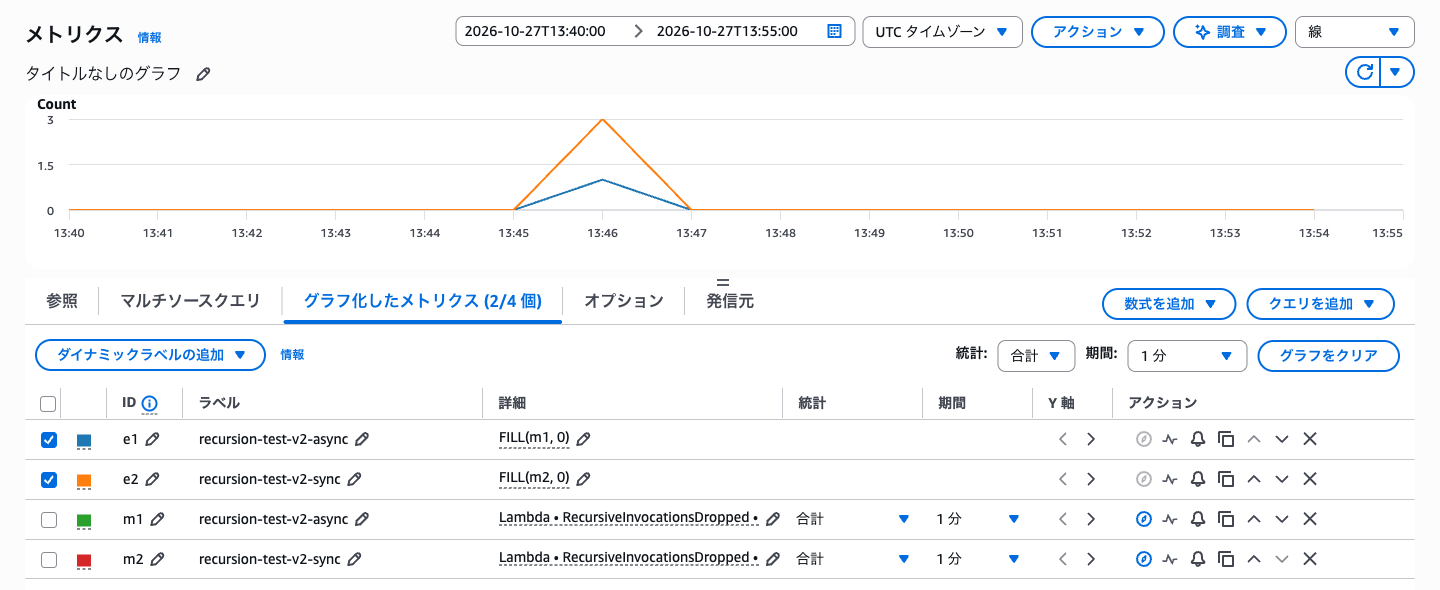
同期呼び出しでループさせる
InvocationType が REQUEST_RESPONSE の場合も、同じくホップ数 16 で止まりました。
同期呼び出しでは、止められた呼び出しがサブスクライバーにとっては配信の失敗になります。サブスクライバーの再試行回数を 2 にしていたため、RecursiveInvocationsDropped には再試行の分も含めて 3 が記録されました。
再試行が尽きると、サブスクライバーの失敗時の送信先に次のレコードが届きました。
{
  "id": "53f6f859-6014-44fb-957a-c3039c3574ac",
  "version": "1.0",
  "busArn": "arn:aws:events:ap-northeast-1:123456789012:event-busv2/recursion-test-v2/3kzoowo52jd5vtgpg3ymwjmid",
  "subscriberArn": "arn:aws:events:ap-northeast-1:123456789012:subscriber/recursion-test-sync/39sr6y1xwjwmvr0j2zbk5q17h",
  "targetArn": "arn:aws:lambda:ap-northeast-1:123456789012:function:recursion-test-v2-sync",
  "errorCode": "CUSTOMER_VALIDATION",
  "errorMessage": "The invocation request exceeded maximum recursion depth.",
  "exhaustedRetryCondition": "MaximumRetryAttempts",
  "retryAttempts": 2,
  "failedMessages": [
    {
      "eventId": "313ed728-b42f-4e1a-b040-46accfed0a98",
      "eventGroupId": "b09c76a7-b64e-4f37-aaf0-6e79333d29bd",
      "deduplicationId": "b09c76a7-b64e-4f37-aaf0-6e79333d29bd",
      "timestamp": "2026-10-27T13:46:11.503Z",
      "targetRequestId": "b9537eb9-5735-4449-b8cc-18c42d6c9363"
    }
  ]
}
非同期の場合と違い、こちらにはイベントの本文が含まれず、イベント ID だけが記録されています。
再帰ループで止まったことは errorMessage から判断できます。再試行でも同じイベントが送られるため、再び止められます。同期呼び出しを使う場合は、再試行回数を見直してもよいかもしれませんね。
Classic とデフォルトイベントバスでは止まらない
比較のため、Classic のイベントバスとデフォルトイベントバスでも同じループを作りました。どちらもルールとターゲットで構成し、Lambda 関数は events クライアントの PutEvents で同じバスへ発行しています。
結果は、どちらもホップ数 30 の安全策まで止まりませんでした。
13:34:50.561 hop=1  Lineage=1:f7dc5e10:0
...
13:34:54.601 hop=29 Lineage=29:f7dc5e10:28
13:34:54.718 hop=30 Lineage=30:f7dc5e10:29
Lineage の値は 29 まで増えているので、トレースヘッダーは Classic でも伝搬しています。それでも止まらないのは、Classic が検出の対象に含まれていないためなのではないか、と推測しています。
念のため、同じアカウントで SQS のループも作ったところ、こちらは 16 回目で止まったので、アカウント側の設定の問題ではなさそうです。
ちなみに、SQS のループではソースキューに DLQ を設定していなかったので、止められたメッセージが SQS から再試行され続けていました。RecursiveInvocationsDropped が毎分記録され続けるので、SQS で試す場合はご注意ください。
再帰ループを許可した場合
非同期の関数で put-function-recursion-config を実行し、再帰ループを許可しました。
aws lambda put-function-recursion-config \
  --function-name recursion-test-v2-async \
  --recursive-loop Allow
コンソールの場合は、Lambda 関数の「設定」タブにある「同時実行と再帰の検出」から変更できます。
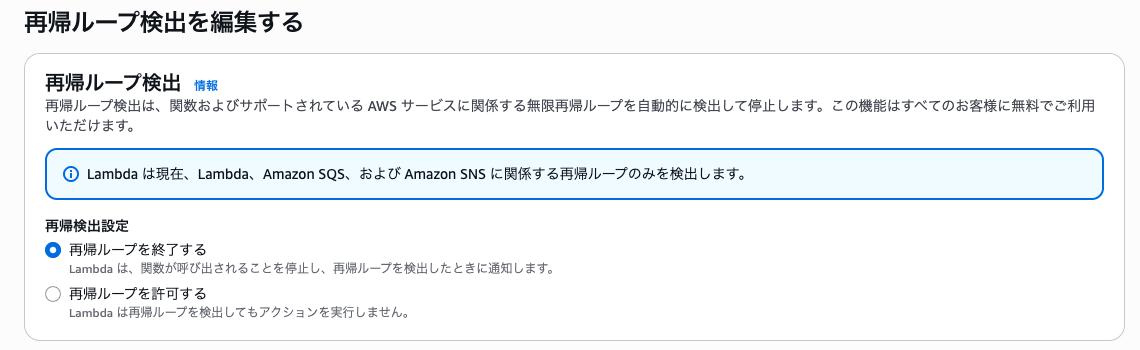
再帰ループを許可した状態で最初のイベントを発行すると、ループは 16 回を超えて続き、ホップ数 30 の安全策で止まりました。Custom Event Bus でも、関数単位の設定はほかのサービスと同じように使えます。
Health Dashboard の通知
ループを止めてから約 3 時間後、Health Dashboard に AWS_LAMBDA_RUNAWAY_TERMINATION_NOTIFICATION のイベントが届きました。(ドキュメントによれば、最大 3.5 時間かかるらしいです)
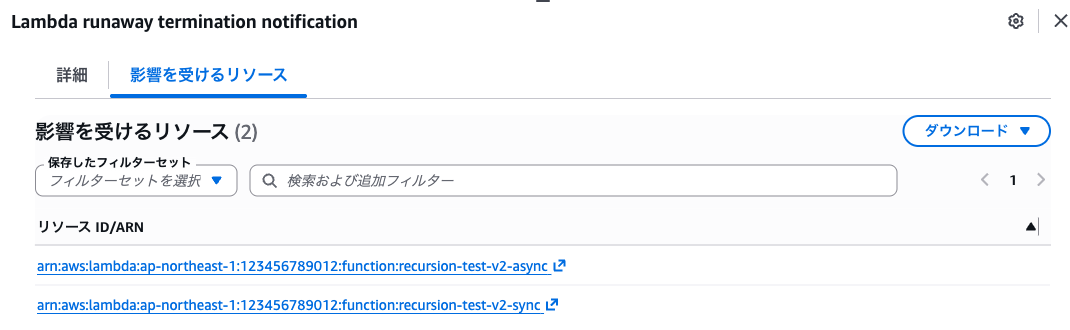
届いたイベントは 2 件でした。
| 届いた時刻(日本時間) | 対象の関数 |
|---|---|
| 2026-10-28 01:40 | recursion-test-sqs |
| 2026-10-28 01:50 | recursion-test-v2-async、recursion-test-v2-sync |
イベントの説明文には、再帰ループを止めたことと、意図的なループであれば再帰ループ検出を無効にできることが書かれていました。
AWS Lambda has detected that one or more Lambda functions in your AWS Account are being invoked in a recursive loop with other AWS resources. To prevent unexpected charges from being billed to your AWS account, Lambda has stopped the recursive invocations listed in the 'Affected resources' tab.
おわりに
結論としては、新しい Custom Event Bus では Lambda 関数のループが 16 回目で止まりましたが、従来の Custom Event Bus - Classic とデフォルトイベントバスでは止まりませんでした。
Classic のルールで組んだ既存の構成や、DynamoDB Streams のような対象外のサービスを含むループは引き続き止まりません。Lambda の同時実行数や呼び出し回数の CloudWatch アラームなどで備えておきましょう。