![[アップデート] NLBが加重ターゲットグループをサポートしました](https://images.ctfassets.net/ct0aopd36mqt/wp-thumbnail-f650a3011b384cc3781610c17755bc71/c37c67c9bc40b72e6dce1a49f4153283/elastic-load-balancing?w=3840&fm=webp)
[アップデート] NLBが加重ターゲットグループをサポートしました

はじめに
皆様こんにちは、あかいけです。
2025年11月19日のアップデートにて、Network Load Balancer(NLB)が加重ターゲットグループをサポートするようになりました。
Application Load Balancer(ALB)では2019年から提供されていたのですが、ついにNLBでも使えるようになり、これでL4レベルでもBlue/Greenデプロイやカナリアリリースが簡単に実装できるようになりました。
なので今回は、この新機能の概要と具体的な活用方法をまとめてみました。
モチベーション
従来、NLBで段階的なデプロイメント戦略を実装しようとすると、複数のNLBを用意してRoute 53でトラフィックの重み付けを管理する必要がありましたが、これにはいくつかの課題がありました。
- 複数のロードバランサーを管理するコストと運用負荷が高い
- Route 53のDNSレベルでの制御のため、トラフィック切り替えにDNSキャッシュの影響を受ける
今回、加重ターゲットグループをサポートしたことにより、これらの課題が解決されます。
加重ターゲットグループとは
加重ターゲットグループは、1つのNLBリスナー内で複数のターゲットグループに対してトラフィックの配分比率を設定できる機能です。
各ターゲットグループに0から999の間で重み(weight)を設定でき、その比率に応じてトラフィックが振り分けられます。
主なユースケース
公式のアップデートブログにも書いてありますが、以下のようなユースケースで活用できそうです。
1. Blue/Greenデプロイメント
新バージョン(Green)のアプリケーションを本番環境にデプロイする際、旧バージョン(Blue)から段階的にトラフィックを移行できます。
移行例:
- 初期状態: Blue 100%, Green 0%
- 検証フェーズ: Blue 90%, Green 10%
- 段階的移行: Blue 50%, Green 50%
- 完全移行: Blue 0%, Green 100%
2. カナリアリリース
新機能やパフォーマンス改善を含む新バージョンに、まず少量のトラフィック(例: 5%)を流してモニタリングし、問題がなければ徐々に増やしていく戦略です。
移行例:
- カナリア開始: 本番 95%, カナリア 5%
- 監視・評価後: 本番 80%, カナリア 20%
- 問題なければ: 本番 0%, カナリア 100%
3. アプリケーション移行
レガシーシステムから新システムへの移行時に、段階的にトラフィックを移行することでリスクを最小化できます。
4. A/Bテスト
異なるバージョンや設定のアプリケーションに対して、トラフィックを分割して実験的な検証を行えます。
試してみる
では、実際に加重ターゲットグループを使ったBlue/Greenデプロイメント環境を構築して検証します。
今回の構成
まず今回の構成は以下の通りで、各AZにBlue用とGreen用のインスタンスを用意しています。
実際の切り替えでは、切り替えを実施するタイミングで移行先を用意するかと思いますが、
今回はまとめて作成しています。
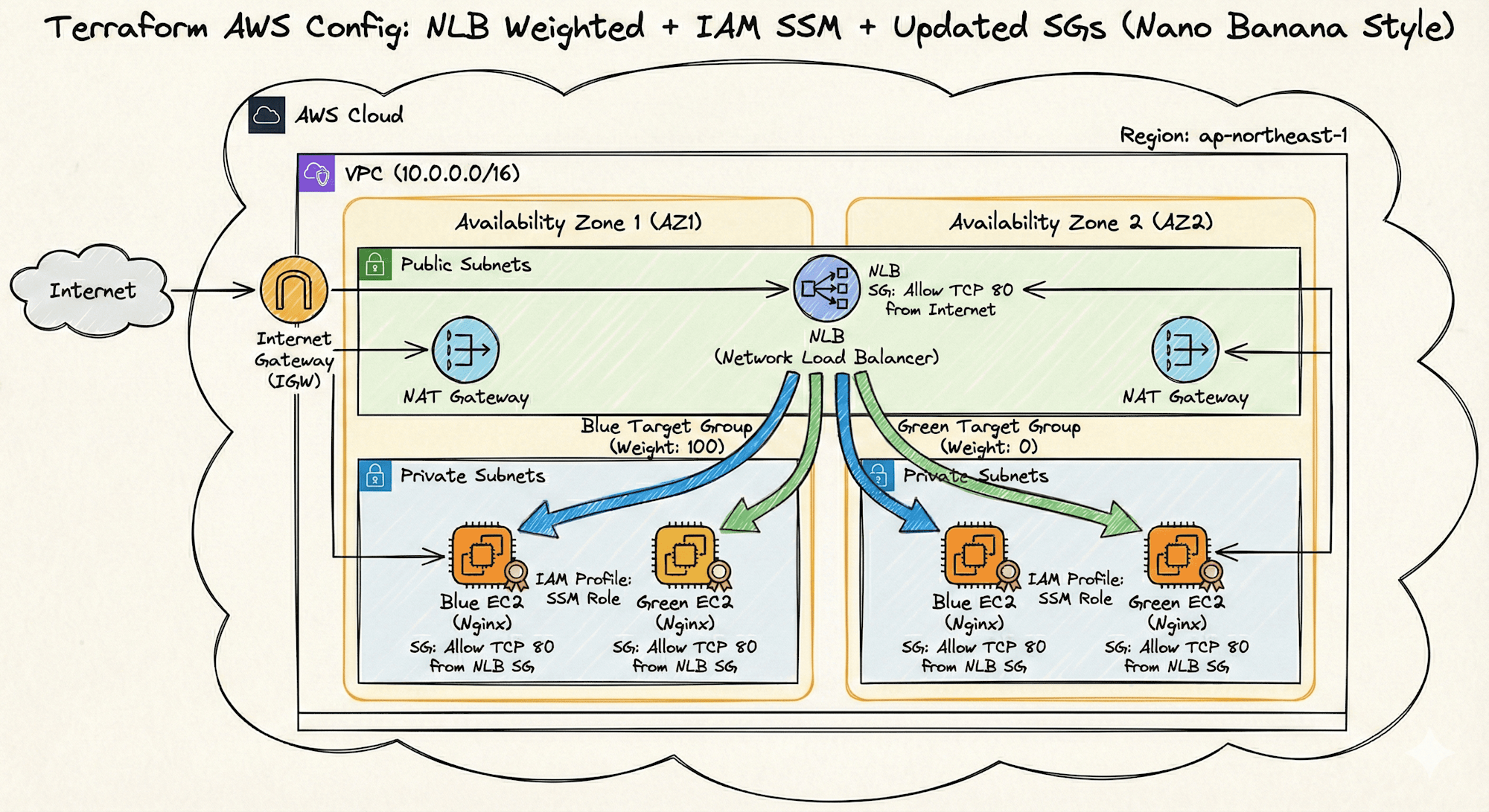
なお上記は最近話題のNano Banana Proに後述のTerraformコードを渡して作成してもらいました。
細かい部分でツッコミどころはありますが、なかなか完成度が高くて驚きました。
(近い将来、システム構成図お絵描き職人としての私の仕事は無くなる予感がします)
Terraformコード
長いので折りたたんでいます。
コード
terraform {
  required_version = ">= 1.0"
  required_providers {
    aws = {
      source  = "hashicorp/aws"
      version = "~> 6.0"
    }
  }
}

provider "aws" {
  region = "ap-northeast-1"
}

# 変数定義
variable "blue_weight" {
  description = "Blueターゲットグループの重み(0-999)"
  type        = number
  default     = 100

  validation {
    condition     = var.blue_weight >= 0 && var.blue_weight <= 999
    error_message = "重みは0から999の間で指定してください。"
  }
}

variable "green_weight" {
  description = "Greenターゲットグループの重み(0-999)"
  type        = number
  default     = 0

  validation {
    condition     = var.green_weight >= 0 && var.green_weight <= 999
    error_message = "重みは0から999の間で指定してください。"
  }
}

# 最新のAmazon Linux 2023 AMIを取得
data "aws_ami" "amazon_linux_2023" {
  most_recent = true
  owners      = ["amazon"]

  filter {
    name   = "name"
    values = ["al2023-ami-*-x86_64"]
  }

  filter {
    name   = "virtualization-type"
    values = ["hvm"]
  }
}

# ローカル変数
locals {
  availability_zones = {
    az1 = data.aws_availability_zones.available.names[0]
    az2 = data.aws_availability_zones.available.names[1]
  }
}

# Availability Zonesの取得
data "aws_availability_zones" "available" {
  state = "available"
}

# VPC
resource "aws_vpc" "main" {
  cidr_block           = "10.0.0.0/16"
  enable_dns_hostnames = true
  enable_dns_support   = true

  tags = {
    Name = "nlb-weighted-vpc"
  }
}

# インターネットゲートウェイ
resource "aws_internet_gateway" "main" {
  vpc_id = aws_vpc.main.id

  tags = {
    Name = "nlb-weighted-igw"
  }
}

# パブリックサブネット
resource "aws_subnet" "public" {
  for_each = local.availability_zones

  vpc_id                  = aws_vpc.main.id
  cidr_block              = each.key == "az1" ? "10.0.1.0/24" : "10.0.2.0/24"
  availability_zone       = each.value
  map_public_ip_on_launch = true

  tags = {
    Name = "nlb-weighted-public-${each.key}"
    Type = "public"
  }
}

# プライベートサブネット
resource "aws_subnet" "private" {
  for_each = local.availability_zones

  vpc_id            = aws_vpc.main.id
  cidr_block        = each.key == "az1" ? "10.0.11.0/24" : "10.0.12.0/24"
  availability_zone = each.value

  tags = {
    Name = "nlb-weighted-private-${each.key}"
    Type = "private"
  }
}

# Elastic IP for NAT Gateway
resource "aws_eip" "nat" {
  for_each = local.availability_zones

  domain = "vpc"

  tags = {
    Name = "nlb-weighted-nat-eip-${each.key}"
  }

  depends_on = [aws_internet_gateway.main]
}

# NAT Gateway
resource "aws_nat_gateway" "main" {
  for_each = local.availability_zones

  allocation_id = aws_eip.nat[each.key].id
  subnet_id     = aws_subnet.public[each.key].id

  tags = {
    Name = "nlb-weighted-nat-${each.key}"
  }

  depends_on = [aws_internet_gateway.main]
}

# パブリックルートテーブル
resource "aws_route_table" "public" {
  vpc_id = aws_vpc.main.id

  route {
    cidr_block = "0.0.0.0/0"
    gateway_id = aws_internet_gateway.main.id
  }

  tags = {
    Name = "nlb-weighted-public-rt"
  }
}

# プライベートルートテーブル
resource "aws_route_table" "private" {
  for_each = local.availability_zones

  vpc_id = aws_vpc.main.id

  route {
    cidr_block     = "0.0.0.0/0"
    nat_gateway_id = aws_nat_gateway.main[each.key].id
  }

  tags = {
    Name = "nlb-weighted-private-rt-${each.key}"
  }
}

# パブリックルートテーブルとサブネットの関連付け
resource "aws_route_table_association" "public" {
  for_each = local.availability_zones

  subnet_id      = aws_subnet.public[each.key].id
  route_table_id = aws_route_table.public.id
}

# プライベートルートテーブルとサブネットの関連付け
resource "aws_route_table_association" "private" {
  for_each = local.availability_zones

  subnet_id      = aws_subnet.private[each.key].id
  route_table_id = aws_route_table.private[each.key].id
}

# IAMロール(SSMセッションマネージャー用)
resource "aws_iam_role" "ssm" {
  name = "nlb-weighted-ssm-role"

  assume_role_policy = jsonencode({
    Version = "2012-10-17"
    Statement = [
      {
        Action = "sts:AssumeRole"
        Effect = "Allow"
        Principal = {
          Service = "ec2.amazonaws.com"
        }
      }
    ]
  })

  tags = {
    Name = "nlb-weighted-ssm-role"
  }
}

# IAMロールポリシーアタッチメント(SSM用)
resource "aws_iam_role_policy_attachment" "ssm" {
  role       = aws_iam_role.ssm.name
  policy_arn = "arn:aws:iam::aws:policy/AmazonSSMManagedInstanceCore"
}

# IAMインスタンスプロファイル
resource "aws_iam_instance_profile" "ssm" {
  name = "nlb-weighted-ssm-profile"
  role = aws_iam_role.ssm.name

  tags = {
    Name = "nlb-weighted-ssm-profile"
  }
}

# セキュリティグループ(VPCエンドポイント用)
resource "aws_security_group" "vpc_endpoint" {
  name        = "nlb-weighted-vpc-endpoint-sg"
  description = "Security group for VPC endpoints"
  vpc_id      = aws_vpc.main.id

  ingress {
    description = "HTTPS from VPC"
    from_port   = 443
    to_port     = 443
    protocol    = "tcp"
    cidr_blocks = [aws_vpc.main.cidr_block]
  }

  egress {
    description = "Allow all outbound"
    from_port   = 0
    to_port     = 0
    protocol    = "-1"
    cidr_blocks = ["0.0.0.0/0"]
  }

  tags = {
    Name = "nlb-weighted-vpc-endpoint-sg"
  }
}

# セキュリティグループ(NLB用)
resource "aws_security_group" "nlb" {
  name        = "nlb-weighted-nlb-sg"
  description = "Security group for Network Load Balancer"
  vpc_id      = aws_vpc.main.id

  ingress {
    description = "HTTP from internet"
    from_port   = 80
    to_port     = 80
    protocol    = "tcp"
    cidr_blocks = ["0.0.0.0/0"]
  }

  egress {
    description = "Allow all outbound"
    from_port   = 0
    to_port     = 0
    protocol    = "-1"
    cidr_blocks = ["0.0.0.0/0"]
  }

  tags = {
    Name = "nlb-weighted-nlb-sg"
  }
}

# セキュリティグループ(EC2インスタンス用)
resource "aws_security_group" "instance" {
  name        = "nlb-weighted-instance-sg"
  description = "Security group for EC2 instances"
  vpc_id      = aws_vpc.main.id

  ingress {
    description     = "HTTP from NLB"
    from_port       = 80
    to_port         = 80
    protocol        = "tcp"
    security_groups = [aws_security_group.nlb.id]
  }

  egress {
    description = "Allow all outbound"
    from_port   = 0
    to_port     = 0
    protocol    = "-1"
    cidr_blocks = ["0.0.0.0/0"]
  }

  tags = {
    Name = "nlb-weighted-instance-sg"
  }
}

# Network Load Balancer
resource "aws_lb" "main" {
  name               = "nlb-weighted-tg-example"
  internal           = false
  load_balancer_type = "network"
  subnets            = [for subnet in aws_subnet.public : subnet.id]
  security_groups    = [aws_security_group.nlb.id]

  enable_deletion_protection       = false
  enable_cross_zone_load_balancing = true

  tags = {
    Name        = "nlb-weighted-tg-example"
    Environment = "production"
  }
}

# Blueターゲットグループ
resource "aws_lb_target_group" "blue" {
  name     = "tg-blue"
  port     = 80
  protocol = "TCP"
  vpc_id   = aws_vpc.main.id

  health_check {
    enabled             = true
    protocol            = "TCP"
    interval            = 30
    healthy_threshold   = 3
    unhealthy_threshold = 3
  }

  tags = {
    Name        = "tg-blue"
    Environment = "production"
    Version     = "blue"
  }
}

# Greenターゲットグループ
resource "aws_lb_target_group" "green" {
  name     = "tg-green"
  port     = 80
  protocol = "TCP"
  vpc_id   = aws_vpc.main.id

  health_check {
    enabled             = true
    protocol            = "TCP"
    interval            = 30
    healthy_threshold   = 3
    unhealthy_threshold = 3
  }

  tags = {
    Name        = "tg-green"
    Environment = "production"
    Version     = "green"
  }
}

# NLBリスナー(加重ターゲットグループを使用)
resource "aws_lb_listener" "main" {
  load_balancer_arn = aws_lb.main.arn
  port              = 80
  protocol          = "TCP"

  default_action {
    type = "forward"

    forward {
      target_group {
        arn    = aws_lb_target_group.blue.arn
        weight = var.blue_weight
      }

      target_group {
        arn    = aws_lb_target_group.green.arn
        weight = var.green_weight
      }
    }
  }

  tags = {
    Name = "nlb-listener-weighted"
  }
}

# Blueバージョンのインスタンス
resource "aws_instance" "blue" {
  for_each = local.availability_zones

  ami                    = data.aws_ami.amazon_linux_2023.id
  instance_type          = "t3.micro"
  subnet_id              = aws_subnet.private[each.key].id
  vpc_security_group_ids = [aws_security_group.instance.id]
  iam_instance_profile   = aws_iam_instance_profile.ssm.name

  user_data = <<-EOF
              #!/bin/bash
              dnf update -y
              dnf install -y nginx
              echo "<h1>Blue Version - ${each.key}</h1>" > /usr/share/nginx/html/index.html
              systemctl start nginx
              systemctl enable nginx
              EOF

  tags = {
    Name    = "app-blue-${each.key}"
    Version = "blue"
  }
}

# Blueインスタンスをターゲットグループに登録
resource "aws_lb_target_group_attachment" "blue" {
  for_each = aws_instance.blue

  target_group_arn = aws_lb_target_group.blue.arn
  target_id        = each.value.id
  port             = 80
}

# Greenバージョンのインスタンス
resource "aws_instance" "green" {
  for_each = local.availability_zones

  ami                    = data.aws_ami.amazon_linux_2023.id
  instance_type          = "t3.micro"
  subnet_id              = aws_subnet.private[each.key].id
  vpc_security_group_ids = [aws_security_group.instance.id]
  iam_instance_profile   = aws_iam_instance_profile.ssm.name

  user_data = <<-EOF
              #!/bin/bash
              dnf update -y
              dnf install -y nginx
              echo "<h1>Green Version - ${each.key}</h1>" > /usr/share/nginx/html/index.html
              systemctl start nginx
              systemctl enable nginx
              EOF

  tags = {
    Name    = "app-green-${each.key}"
    Version = "green"
  }
}

# Greenインスタンスをターゲットグループに登録
resource "aws_lb_target_group_attachment" "green" {
  for_each = aws_instance.green

  target_group_arn = aws_lb_target_group.green.arn
  target_id        = each.value.id
  port             = 80
}

# 出力
output "nlb_dns_name" {
  description = "NLBのDNS名"
  value       = aws_lb.main.dns_name
}

output "blue_target_group_arn" {
  description = "BlueターゲットグループのARN"
  value       = aws_lb_target_group.blue.arn
}

output "green_target_group_arn" {
  description = "GreenターゲットグループのARN"
  value       = aws_lb_target_group.green.arn
}

output "blue_instance_ids" {
  description = "BlueインスタンスのID一覧"
  value       = { for k, v in aws_instance.blue : k => v.id }
}

output "green_instance_ids" {
  description = "GreenインスタンスのID一覧"
  value       = { for k, v in aws_instance.green : k => v.id }
}
Blue/Greenデプロイメントしてみる
ではBlue/Greenデプロイメントを試してみます。
実際に行う場合は手動で行なったりCI/CDで適用する場面が多いですが、
今回はローカルからTerraformの変数を直接指定して切り替えてみます。
Phase 1: 切り替え前(Blue 100%, Green 0%)
まずは切り替え前の状態で、当然レスポンスはBlueが100%です。
terraform apply -var="blue_weight=100" -var="green_weight=0"
% for i in {1..10}; do curl $NLB_DNS; done
<h1>Blue Version - az1</h1>
<h1>Blue Version - az1</h1>
<h1>Blue Version - az2</h1>
<h1>Blue Version - az2</h1>
<h1>Blue Version - az2</h1>
<h1>Blue Version - az2</h1>
<h1>Blue Version - az2</h1>
<h1>Blue Version - az1</h1>
<h1>Blue Version - az1</h1>
<h1>Blue Version - az2</h1>
Phase 2: 段階的移行1(Blue 90%, Green 10%)
次に10%だけGreenに流れるように切り替えます。
切り替え後、私の環境では約1分程度でGreenバージョンが表示されるようになりました。
terraform apply -var="blue_weight=90" -var="green_weight=10"
% for i in {1..10}; do curl $NLB_DNS; done
<h1>Green Version - az2</h1>
<h1>Blue Version - az2</h1>
<h1>Blue Version - az2</h1>
<h1>Blue Version - az1</h1>
<h1>Blue Version - az1</h1>
<h1>Blue Version - az2</h1>
<h1>Blue Version - az1</h1>
<h1>Blue Version - az1</h1>
<h1>Blue Version - az1</h1>
<h1>Blue Version - az1</h1>
Phase 3: 段階的移行2(Blue 50%, Green 50%)
次に50%だけGreenに流れるように切り替えます。
こちらも約1分程度でGreenバージョンがほぼ半分を占めるようになりました。
terraform apply -var="blue_weight=50" -var="green_weight=50"
% for i in {1..10}; do curl $NLB_DNS; done
<h1>Blue Version - az2</h1>
<h1>Blue Version - az1</h1>
<h1>Blue Version - az2</h1>
<h1>Green Version - az1</h1>
<h1>Blue Version - az2</h1>
<h1>Green Version - az2</h1>
<h1>Green Version - az1</h1>
<h1>Green Version - az2</h1>
<h1>Green Version - az2</h1>
<h1>Green Version - az1</h1>
Phase 4: 完全移行(Blue 0%, Green 100%)
最後に100%をGreenに流れるように切り替えます。
こちらも約1分程度でGreenバージョンが100%になりました。
terraform apply -var="blue_weight=0" -var="green_weight=100"
% for i in {1..10}; do curl $NLB_DNS; done
<h1>Green Version - az2</h1>
<h1>Green Version - az2</h1>
<h1>Green Version - az2</h1>
<h1>Green Version - az1</h1>
<h1>Green Version - az1</h1>
<h1>Green Version - az2</h1>
<h1>Green Version - az1</h1>
<h1>Green Version - az1</h1>
<h1>Green Version - az2</h1>
<h1>Green Version - az1</h1>
今回は台数が少ないため全て約1分程度で切り替えが完了しましたが、大規模な環境ではさらに切り替え完了まで時間がかかる可能性があります。
ただし、AWS公式ブログによると最大でも3分以内には切り替えが完了するとのことです。
The result will shift new traffic from the Blue target group to the Green target group after a short period of up to 3 minutes.
さいごに
以上、Network Load Balancerの加重ターゲットグループ機能についてまとめました。
この機能により、L4レベルでのBlue/Greenデプロイやカナリアリリースが非常に簡単に実装できるようになりました。
従来の複数NLB + Route 53構成と比較して、コスト削減と運用の簡素化を実現できる点は大きなメリットではないでしょうか。
今後、皆様のNLBを使ったデプロイメント作業がより安全で効率的になることを願っています。