
OpenAI Codex CLIでOpenRouterのモデルを使用する

はじめに
日頃の業務でClaude Codeを使用しています。
最近OpenAIのCodexに乗り換えたという話を度々聞くようになったので、今更ながらCodexを使ってみようと思い始めました。
残念ながらChatGPTの定額プランには加入していないので、APIキーでの利用が必須となります。
OpenRouterに以前課金したクレジットが残っていたので、今回はCodexでOpenRouterのAPIキーを使用して動作させてみます。
Codexのインストール
以下のコマンドでCodexをインストールします。
npm install -g @openai/codex
通常通りCodexを起動するとChatGPTかAPIキーでの選択が求められますが、外部プロバイダー経由で利用する場合は別途設定ファイルを定義する必要があります。
codex

>_ Welcome to Codex, OpenAI's command-line coding agent

> Sign in with ChatGPT to use Codex as part of your paid plan
  or connect an API key for usage-based billing

> 1. Sign in with ChatGPT
     Usage included with Plus, Pro, and Team plans
  1. Provide your own API key
     Pay for what you use

  Press Enter to continue
config.tomlの設定
外部プロバイダーを利用する場合はconfig.tomlを作成し以下の様にプロバイダー定義が必要です。
[model_providers.openrouter]
name = "OpenRouter"
base_url = "https://openrouter.ai/api/v1"
env_key = "OPENROUTER_API_KEY"
OpenRouterのAPIキー発行画面からAPIキーを発行し、config.tomlで指定した環境変数に設定します。
export OPENROUTER_API_KEY="sk-or-v1-xxxxxxxxxxxxxxxxxxxxxxxxxxxxxxxxxxxxxxxxxxxxxxxxxxxxxxxxxxxxxxxx"
以下のコマンドを実行し起動時にプロバイダーとモデルを指定します。
codex --config model_provider=openrouter --model openai/gpt-5
上記のままでも問題ないのですが、コマンド実行時に毎回引数を指定するのは大変なので設定ファイルに以下のデフォルト設定を追記します。
+ model_provider = "openrouter"
+ model = "openai/gpt-5"

[model_providers.openrouter]
name = "OpenRouter"
base_url = "https://openrouter.ai/api/v1"
env_key = "OPENROUTER_API_KEY"
設定が追加できていれば引数なしで起動可能です。
codex

>_ Welcome to Codex, OpenAI's command-line coding agent

> You are running Codex in /Users/sakai.takahisa/hoge/fuga

  Since this folder is version controlled, you may wish to allow Codex
  to work in this folder without asking for approval.

> 1. Yes, allow Codex to work in this folder without asking for approval
  2. No, ask me to approve edits and commands

  Press Enter to continue
動作確認
CodeXをインタラクティブモードで起動して実際にモデルを呼び出してみます。
codex

>_ You are using OpenAI Codex in ~/hoge/fuga

 To get started, describe a task or try one of these commands:

 /init - create an AGENTS.md file with instructions for Codex
 /status - show current session configuration and token usage
 /approvals - choose what Codex can do without approval
 /model - choose what model and reasoning effort to use

user
Generate a file named AGENTS.md that serves as a contributor guide for this repository.
Your goal is to produce a clear, concise, and well-structured document with descriptive headings and actionable explanations for each section.
Follow the outline below, but adapt as needed — add sections if relevant, and omit those that do not apply to this project.

Document Requirements

- Title the document "Repository Guidelines".
- Use Markdown headings (#, ##, etc.) for structure.
- Keep the document concise. 200-400 words is optimal.
- Keep explanations short, direct, and specific to this repository.
- Provide examples where helpful (commands, directory paths, naming patterns).
- Maintain a professional, instructional tone.

Recommended Sections

Project Structure & Module Organization

- Outline the project structure, including where the source code, tests, and assets are located.

Build, Test, and Development Commands

- List key commands for building, testing, and running locally (e.g., npm test, make build).
- Briefly explain what each command does.

Coding Style & Naming Conventions

- Specify indentation rules, language-specific style preferences, and naming patterns.
- Include any formatting or linting tools used.

Testing Guidelines

- Identify testing frameworks and coverage requirements.
- State test naming conventions and how to run tests.

Commit & Pull Request Guidelines

- Summarize commit message conventions found in the project’s Git history.
- Outline pull request requirements (descriptions, linked issues, screenshots, etc.).

(Optional) Add other sections if relevant, such as Security & Configuration Tips, Architecture Overview, or Agent-Specific Instructions.

 Working (10s • Esc to interrupt
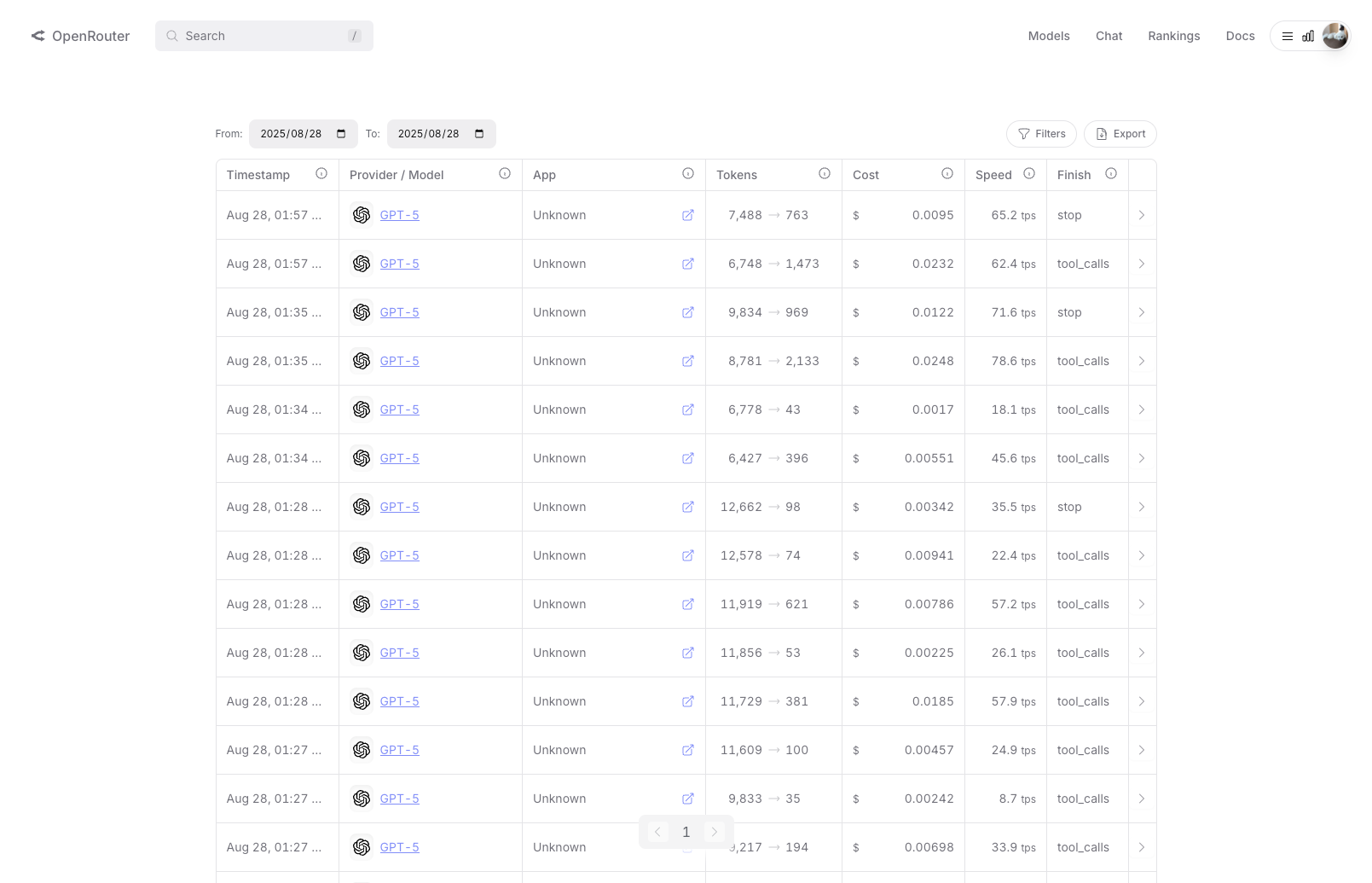
OpenRouterの管理画面からActivityを確認すると、トークン消費が発生しており問題なく呼び出せていることが確認できました。
まとめ
今回はCodexでOpenRouterのモデルを使える様に設定してみました。
Claude Codeからの乗り換え?候補の1つとしてこれからいろいろ試してみたいと思います。
直近のアップデートで機能が拡充された様なので期待しています。
どなたかの参考になれば幸いです。