![[アップデート] AWS Site-to-Site VPN がトンネルの BGPのログ出力をサポートしました](https://images.ctfassets.net/ct0aopd36mqt/wp-thumbnail-29d0c06186de656ab6bd356a6137c849/9cd9f471543540e5546e89a7c571a8e6/aws-site-to-site-vpn?w=3840&fm=webp)
[アップデート] AWS Site-to-Site VPN がトンネルの BGPのログ出力をサポートしました

BGPのログを見たい
こんにちは、のんピ(@non____97)です。
皆さんはSite-to-Site VPNのBGPのログを見たいなと思ったことはありますか? 私はあります。
以下記事で紹介されているとおり、IPSec VPNのログは確認することができました。
一方で、どのASからどのプレフィックスがアドバタイズされているのかやLocal Preferenceは確認することができませんでした。
今回、アップデートによりBGPのログも確認できるようになりました。
ログに記録されるBGPステータスメッセージやルートステータスメッセージの説明については以下AWS公式ドキュメントにまとまっています。
実際に確認してみます。
やってみた
検証環境
検証環境は以下のとおりです。
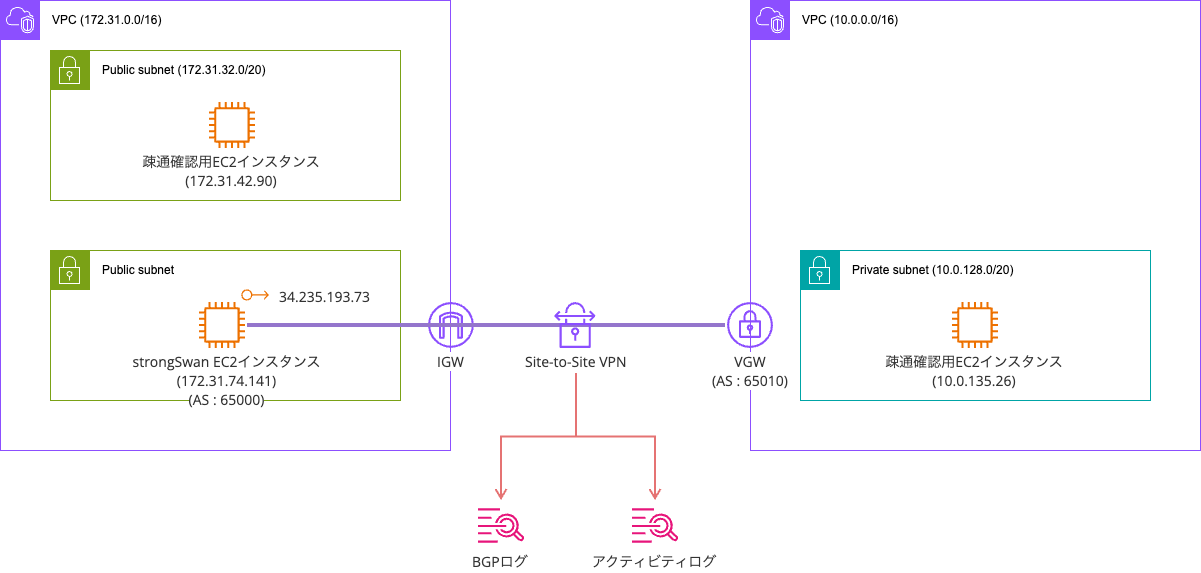
IPSec VPNにはstrongSwanを使用します。
strongSwanEC2インスタンスは起動まで完了しています。
$ cat /etc/os-release
PRETTY_NAME="Ubuntu 24.04.3 LTS"
NAME="Ubuntu"
VERSION_ID="24.04"
VERSION="24.04.3 LTS (Noble Numbat)"
VERSION_CODENAME=noble
ID=ubuntu
ID_LIKE=debian
HOME_URL="https://www.ubuntu.com/"
SUPPORT_URL="https://help.ubuntu.com/"
BUG_REPORT_URL="https://bugs.launchpad.net/ubuntu/"
PRIVACY_POLICY_URL="https://www.ubuntu.com/legal/terms-and-policies/privacy-policy"
UBUNTU_CODENAME=noble
LOGO=ubuntu-logo

$ ip a
1: lo: <LOOPBACK,UP,LOWER_UP> mtu 65536 qdisc noqueue state UNKNOWN group default qlen 1000
    link/loopback 00:00:00:00:00:00 brd 00:00:00:00:00:00
    inet 127.0.0.1/8 scope host lo
       valid_lft forever preferred_lft forever
    inet6 ::1/128 scope host noprefixroute
       valid_lft forever preferred_lft forever
2: ens5: <BROADCAST,MULTICAST,UP,LOWER_UP> mtu 9001 qdisc mq state UP group default qlen 1000
    link/ether 16:ff:f7:b6:34:db brd ff:ff:ff:ff:ff:ff
    altname enp0s5
    inet 172.31.74.141/20 metric 100 brd 172.31.79.255 scope global dynamic ens5
       valid_lft 3414sec preferred_lft 3414sec
    inet6 fe80::14ff:f7ff:feb6:34db/64 scope link
       valid_lft forever preferred_lft forever
VPCやVGWの作成は完了していますが、Site-toーSite VPNについては現時点で未作成です。
手っ取り早くstrongSwanを用いたSite-to-Site VPNの環境を用意したい場合は以下CloudFormationテンプレートを用いるのも良いと思います。
Site-to-Site VPNの作成
まず、Site-to-Site VPNの作成をします。
今回はBGPのログを確認したいのでルーティングオプションは動的としています。
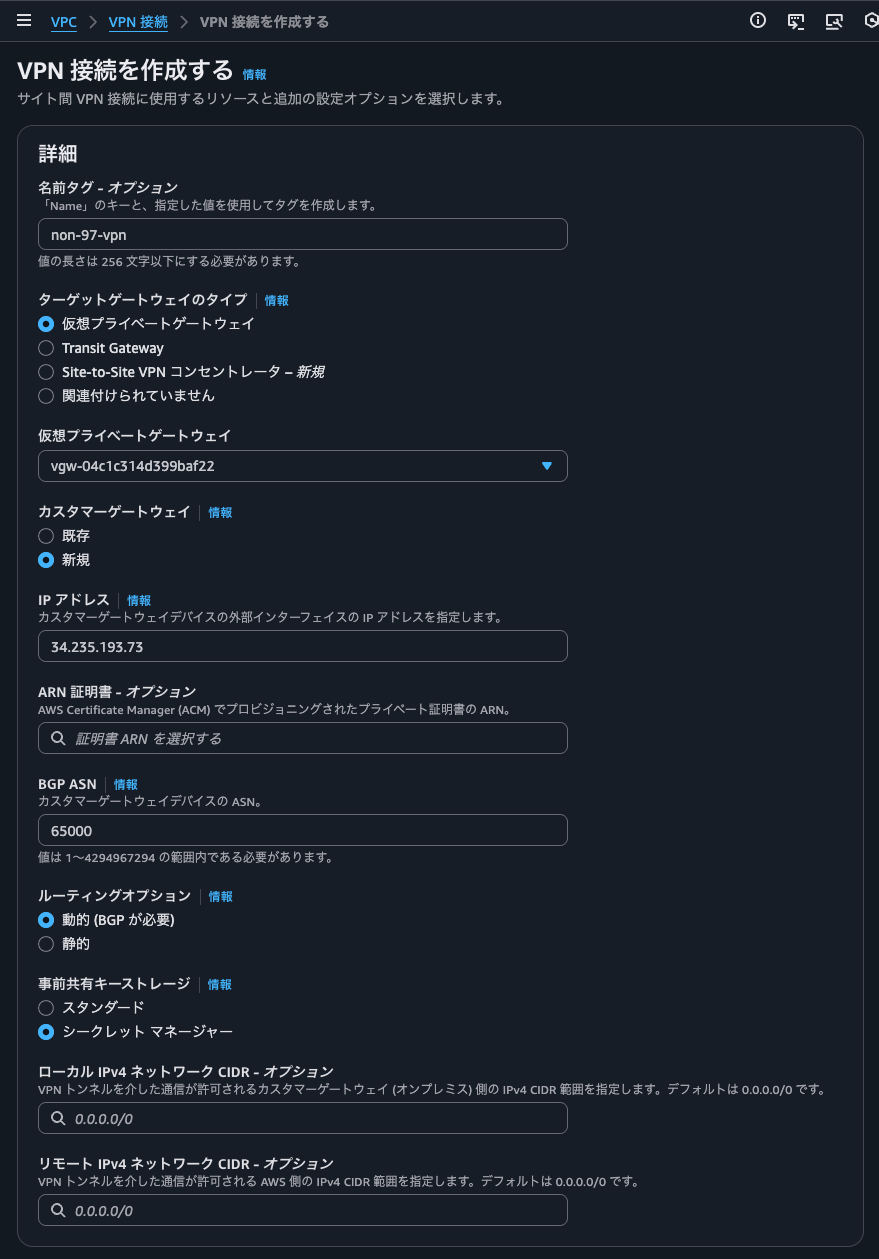
CGWのIPアドレスにはstrongSwanのEC2インスタンスに付与したElastic IPアドレスを指定しています。
Site-to-Site VPNの作成ウィザードの中でトンネルアクティビティログとBGPログの出力先CloudWatch Logsロググループを作成することはできないため、このタイミングで作成をしておきます。
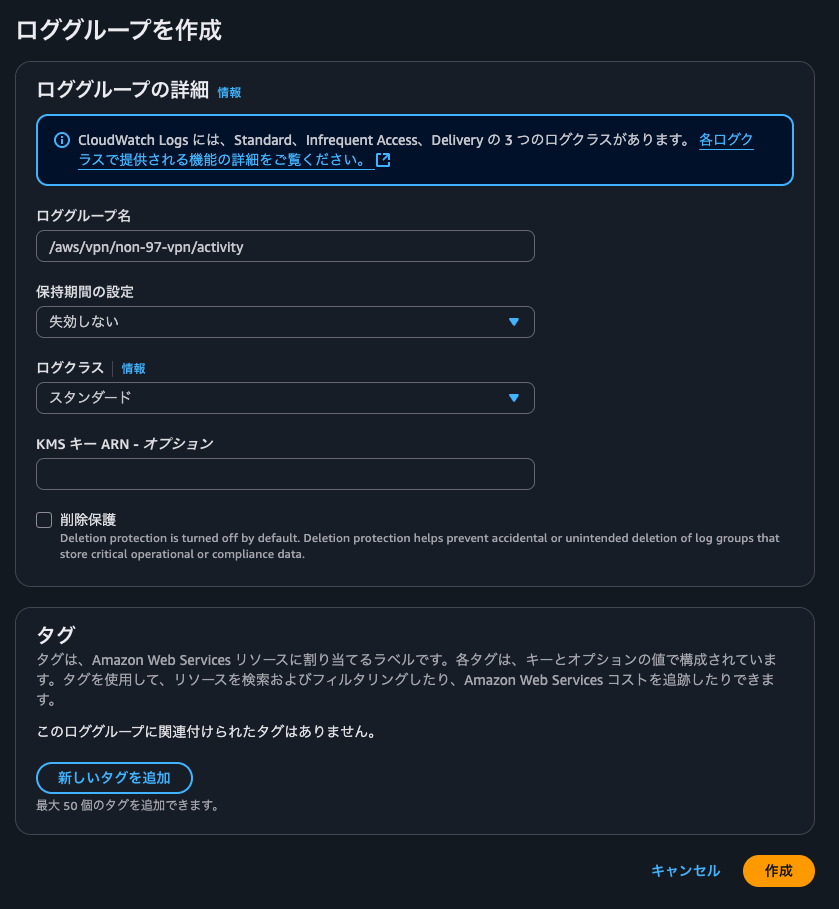
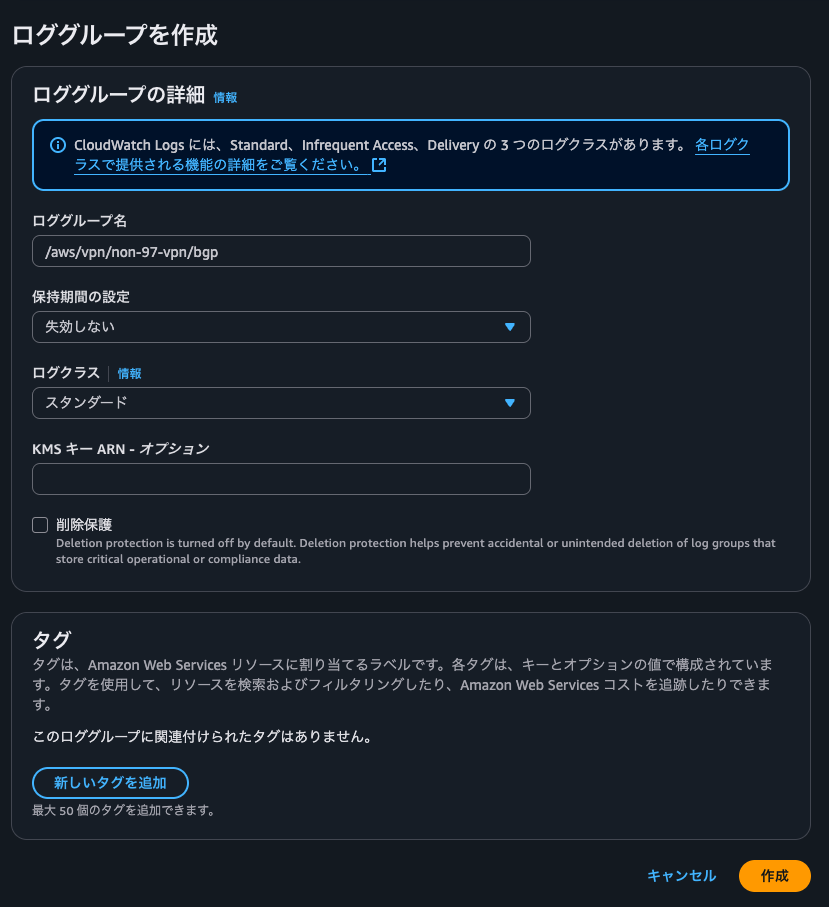
トンネルオプションで各ログ出力設定で、先ほど作成したロググループを指定します。出力形式はJSONにします。
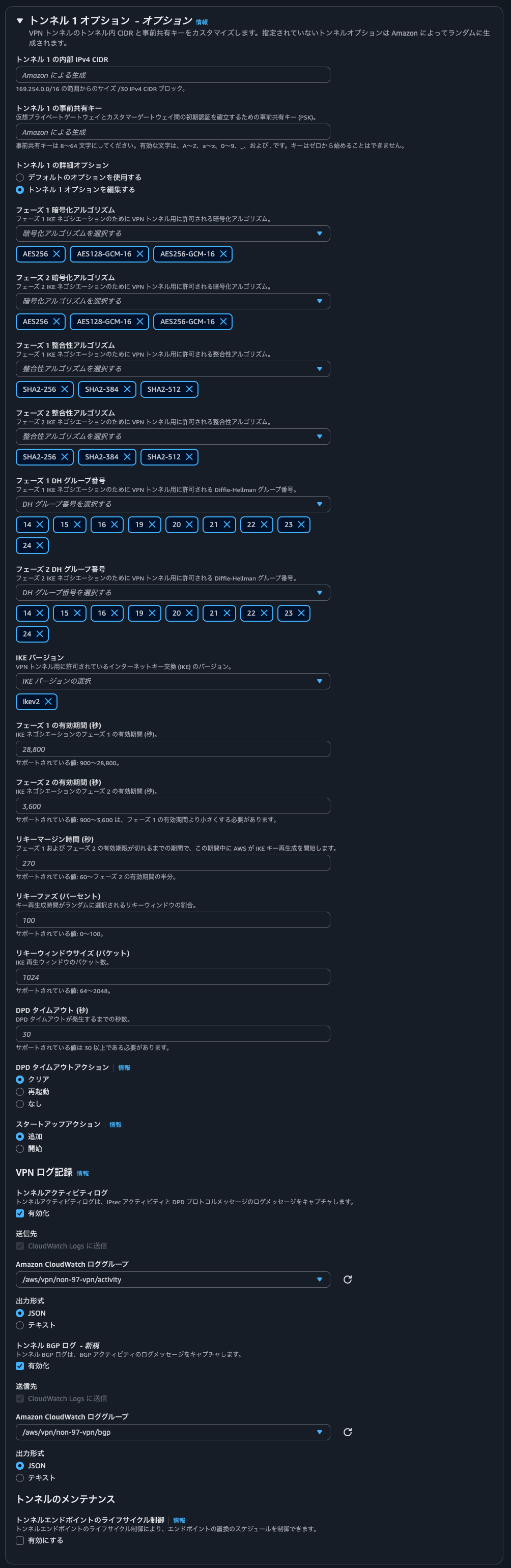
もう1つのトンネルについても同様の設定をします。
作成後のSite-to-Site VPNは以下のとおりです。
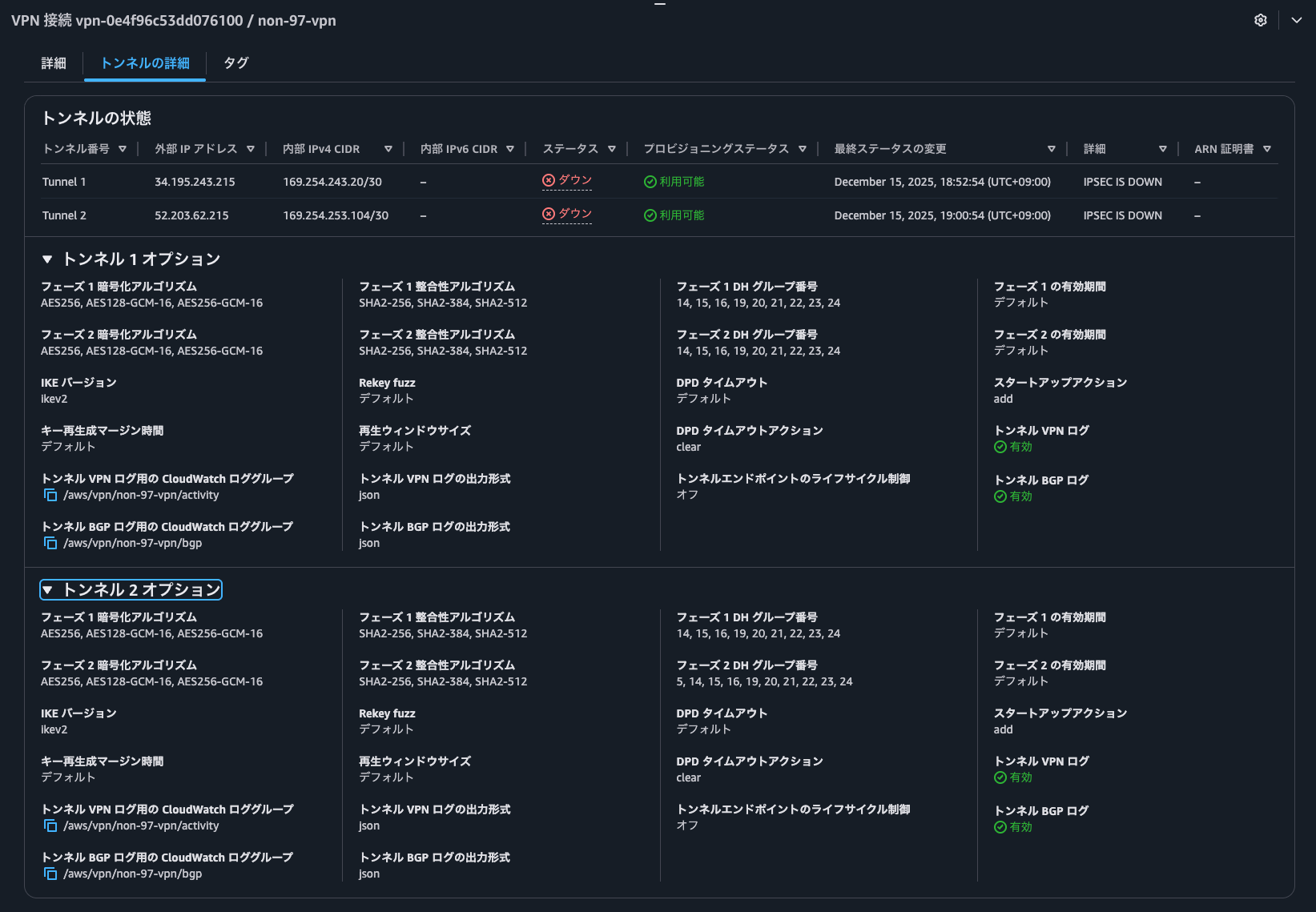
strongSwan EC2インスタンスのセキュリティグループの設定
続いて、strongSwan EC2インスタンスのセキュリティグループの設定をします。
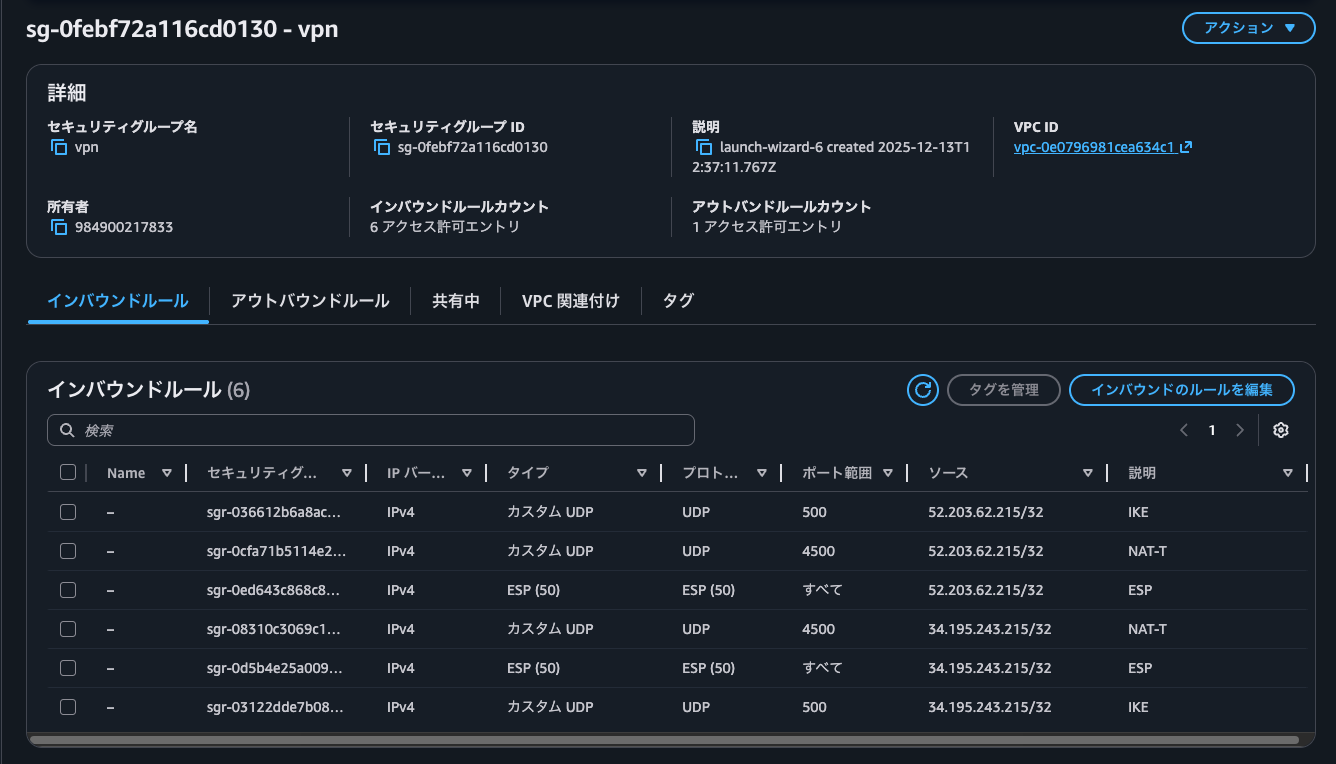
IPSec VPNが張れるように、Site-to-Site VPNのVGW側で使用するトンネルの外部IPアドレスからのIKE、NATトラバーサルのポートとESPの通信を許可します。
strongSwan EC2インスタンスの送信元/送信先チェックの無効化
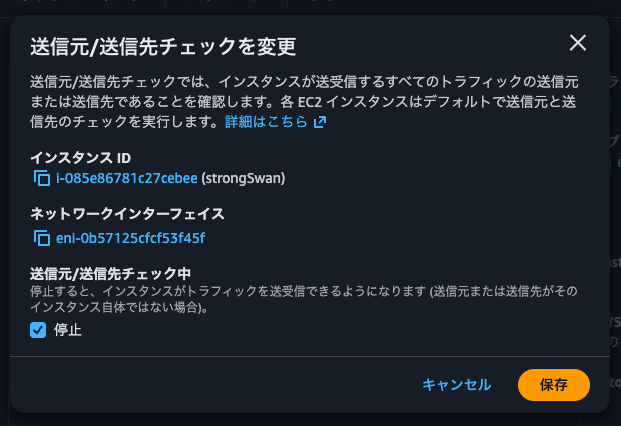
strongSwan EC2インスタンスを介して通信できるように、送信元/送信先チェックの無効化を行います。
strongSwanのインストール
strongSwanのインストールをします。
$ sudo apt install -y strongswan
Reading package lists... Done
Building dependency tree... Done
Reading state information... Done
The following additional packages will be installed:
  libcharon-extauth-plugins libstrongswan libstrongswan-standard-plugins strongswan-charon strongswan-libcharon strongswan-starter
Suggested packages:
  libstrongswan-extra-plugins libcharon-extra-plugins
The following NEW packages will be installed:
  libcharon-extauth-plugins libstrongswan libstrongswan-standard-plugins strongswan strongswan-charon strongswan-libcharon strongswan-starter
0 upgraded, 7 newly installed, 0 to remove and 0 not upgraded.
Need to get 968 kB of archives.
After this operation, 4109 kB of additional disk space will be used.
Get:1 http://us-east-1.ec2.archive.ubuntu.com/ubuntu noble-updates/main amd64 libstrongswan amd64 5.9.13-2ubuntu4.24.04.1 [406 kB]
.
.
(以下略)
.
.
IPSec VPNの設定
IPSec VPNの設定を行います。
まず、/etc/ipsec.confの編集を行います。
$ ls -l /etc/ipsec.conf
-rw-r--r-- 1 root root 608 Oct 21 15:06 /etc/ipsec.conf

$ sudo vi /etc/ipsec.conf
$ cat /etc/ipsec.conf
# /etc/ipsec.conf - StrongSwan IPsec configuration file
# AWS Site-to-Site VPN Configuration
# VPN Connection ID: vpn-0e4f96c53dd076100

config setup
    charondebug="ike 2, knl 2, cfg 2, net 2, esp 2, dmn 2, mgr 2"
    uniqueids=no

## default
conn %default
    auto=start
    type=tunnel
    authby=secret

    # Left (Customer Gateway) Configuration
    left=%defaultroute
    leftid=34.235.193.73
    leftsubnet=0.0.0.0/0

    # IKE Configuration (Phase 1)
    keyexchange=ikev2
    ike=aes256gcm16-sha384-ecp384!
    ikelifetime=28800s

    # IPSec Configuration (Phase 2)
    esp=aes256gcm16-sha384-ecp384!
    lifetime=3600s

    # Dead Peer Detection
    dpdaction=restart
    dpddelay=10s
    dpdtimeout=30s

    # Fragmentation
    fragmentation=yes
    mobike=no

    # Replay Window
    replay_window=1024

# IPSec Tunnel #1
conn aws-tunnel-1
    # Right (Virtual Private Gateway) Configuration
    right=34.195.243.215
    rightsubnet=0.0.0.0/0

    # Tunnel Interface
    mark=100
    leftupdown=/etc/ipsec.d/ipsec-vti-hook.sh

# IPSec Tunnel #2
conn aws-tunnel-2
    # Right (Virtual Private Gateway) Configuration
    right=52.203.62.215
    rightsubnet=0.0.0.0/0

    # Tunnel Interface
    mark=200
    leftupdown=/etc/ipsec.d/ipsec-vti-hook.sh
続いて、トンネルごとに設定されているPSKを登録します。
$ ls -l /etc/ipsec.secrets
-rw------- 1 root root 175 Oct 21 15:06 /etc/ipsec.secrets
$ sudo vi /etc/ipsec.secrets
$ sudo cat /etc/ipsec.secrets
# /etc/ipsec.secrets - StrongSwan IPsec secrets file
# AWS Site-to-Site VPN Pre-Shared Keys
# VPN Connection ID: vpn-0e4f96c53dd076100

# IPSec Tunnel #1
34.235.193.73 34.195.243.215 : PSK "<トンネル1のPSK>"

# IPSec Tunnel #2
34.235.193.73 52.203.62.215 : PSK "<トンネル2のPSK>"
仮想トンネルインターフェイス(VTI)の作成/削除用のスクリプトを配置します。
$ ls -l /etc/ipsec.d
total 36
drwxr-xr-x 2 root root 4096 Oct 21 15:06 aacerts
drwxr-xr-x 2 root root 4096 Oct 21 15:06 acerts
drwxr-xr-x 2 root root 4096 Oct 21 15:06 cacerts
drwxr-xr-x 2 root root 4096 Oct 21 15:06 certs
drwxr-xr-x 2 root root 4096 Oct 21 15:06 crls
drwxr-xr-x 2 root root 4096 Oct 21 15:06 ocspcerts
drwxr-xr-x 2 root root 4096 Oct 21 15:06 policies
drwx------ 2 root root 4096 Oct 21 15:06 private
drwxr-xr-x 2 root root 4096 Oct 21 15:06 reqs

$ sudo vi /etc/ipsec.d/ipsec-vti-hook.sh
$ cat /etc/ipsec.d/ipsec-vti-hook.sh
#!/bin/bash
# /etc/ipsec.d/ipsec-vti-hook.sh
# StrongSwan updown script for AWS Site-to-Site VPN tunnels
# This script configures VTI interfaces and routes when tunnels come up/down

set -o nounset
set -o errexit

# Logging
LOG_FILE="/var/log/ipsec-vti-hook.log"
log_message() {
    echo "$(date '+%Y-%m-%d %H:%M:%S') - $1" | tee -a "$LOG_FILE"
}

# Command paths
IP=$(which ip)
IPTABLES=$(which iptables)

# Extract mark values from PLUTO_MARK_OUT and PLUTO_MARK_IN (format: "mark/mask" or just "mark")
PLUTO_MARK_OUT_ARR=(${PLUTO_MARK_OUT//// })
PLUTO_MARK_IN_ARR=(${PLUTO_MARK_IN//// })
MARK_OUT="${PLUTO_MARK_OUT_ARR[0]}"
MARK_IN="${PLUTO_MARK_IN_ARR[0]}"

# VTI interface mapping based on marks
case "${MARK_OUT}" in
    100)
        VTI_IF="vti1"
        VTI_LOCAL="169.254.243.22/30"
        VTI_REMOTE="169.254.243.21/30"
        TUNNEL_ID=1
        ;;
    200)
        VTI_IF="vti2"
        VTI_LOCAL="169.254.253.106/30"
        VTI_REMOTE="169.254.253.105/30"
        TUNNEL_ID=2
        ;;
    *)
        log_message "ERROR: Unknown PLUTO_MARK_OUT: ${PLUTO_MARK_OUT} (MARK_OUT: ${MARK_OUT})"
        exit 0
        ;;
esac

# Debug logging
log_message "==================================================="
log_message "PLUTO_CONNECTION: ${PLUTO_CONNECTION}"
log_message "PLUTO_VERB: ${PLUTO_VERB}"
log_message "VTI_INTERFACE: ${VTI_IF}"
log_message "PLUTO_ME: ${PLUTO_ME}"
log_message "PLUTO_PEER: ${PLUTO_PEER}"
log_message "MARK_IN: ${MARK_IN}"
log_message "MARK_OUT: ${MARK_OUT}"
log_message "==================================================="

log_message "Tunnel #${TUNNEL_ID} - Action: ${PLUTO_VERB}, Interface: ${VTI_IF}"

case "${PLUTO_VERB}" in
    up-client)
        log_message "Tunnel #${TUNNEL_ID} - Creating VTI interface ${VTI_IF}"

        # Create VTI interface with proper okey/ikey
        $IP link add ${VTI_IF} type vti \
            local ${PLUTO_ME} \
            remote ${PLUTO_PEER} \
            okey ${MARK_OUT} \
            ikey ${MARK_IN}
        log_message "Tunnel #${TUNNEL_ID} - VTI interface ${VTI_IF} created"

        # Disable policy and set rp_filter
        sysctl -w net.ipv4.conf.${VTI_IF}.disable_policy=1 >/dev/null
        sysctl -w net.ipv4.conf.${VTI_IF}.rp_filter=2 >/dev/null || sysctl -w net.ipv4.conf.${VTI_IF}.rp_filter=0 >/dev/null

        # Configure IP address with remote endpoint
        $IP addr add ${VTI_LOCAL} remote ${VTI_REMOTE} dev ${VTI_IF}
        log_message "Tunnel #${TUNNEL_ID} - IP address ${VTI_LOCAL} remote ${VTI_REMOTE} configured"

        # Bring interface up
        $IP link set ${VTI_IF} up mtu 1436
        log_message "Tunnel #${TUNNEL_ID} - Interface ${VTI_IF} is UP"

        # MSS clamping for TCP
        $IPTABLES -t mangle -I FORWARD -o ${VTI_IF} -p tcp -m tcp --tcp-flags SYN,RST SYN -j TCPMSS --clamp-mss-to-pmtu
        log_message "Tunnel #${TUNNEL_ID} - MSS clamping configured"

        # Mark ESP packets
        $IPTABLES -t mangle -I INPUT -p esp -s ${PLUTO_PEER} -d ${PLUTO_ME} -j MARK --set-xmark ${PLUTO_MARK_IN}
        log_message "Tunnel #${TUNNEL_ID} - ESP packet marking configured"

        # Flush routing table 220
        $IP route flush table 220 2>/dev/null || true

        log_message "Tunnel #${TUNNEL_ID} - VTI setup complete"
        ;;

    down-client)
        log_message "Tunnel #${TUNNEL_ID} - Taking down VTI interface ${VTI_IF}"

        # Remove iptables rules
        $IPTABLES -t mangle -D FORWARD -o ${VTI_IF} -p tcp -m tcp --tcp-flags SYN,RST SYN -j TCPMSS --clamp-mss-to-pmtu 2>/dev/null || true
        $IPTABLES -t mangle -D INPUT -p esp -s ${PLUTO_PEER} -d ${PLUTO_ME} -j MARK --set-xmark ${PLUTO_MARK_IN} 2>/dev/null || true
        log_message "Tunnel #${TUNNEL_ID} - iptables rules removed"

        # Delete VTI interface
        $IP link del ${VTI_IF} 2>/dev/null || true
        log_message "Tunnel #${TUNNEL_ID} - VTI interface ${VTI_IF} removed"
        ;;

    *)
        log_message "Tunnel #${TUNNEL_ID} - Unhandled verb: ${PLUTO_VERB}"
        ;;
esac

# Enable IPv4 forwarding and disable xfrm/policy on primary interface
sysctl -w net.ipv4.ip_forward=1 >/dev/null

# Detect primary network interface (not lo, not vti)
PRIMARY_IF=$(ip route show default | awk '/default/ {print $5}' | head -1)
if [ -n "${PRIMARY_IF}" ]; then
    sysctl -w net.ipv4.conf.${PRIMARY_IF}.disable_xfrm=1 >/dev/null 2>&1 || true
    sysctl -w net.ipv4.conf.${PRIMARY_IF}.disable_policy=1 >/dev/null 2>&1 || true
    log_message "Primary interface: ${PRIMARY_IF}, xfrm/policy disabled"
fi

exit 0

$ sudo chmod +x /etc/ipsec.d/ipsec-vti-hook.sh
$ ls -l /etc/ipsec.d/ipsec-vti-hook.sh
-rwxr-xr-x 1 root root 4535 Dec 15 10:17 /etc/ipsec.d/ipsec-vti-hook.sh
この状態でIPSec VPNを張ってみます。
$ sudo systemctl restart strongswan-starter
$ systemctl status strongswan-starter
● strongswan-starter.service - strongSwan IPsec IKEv1/IKEv2 daemon using ipsec.conf
     Loaded: loaded (/usr/lib/systemd/system/strongswan-starter.service; enabled; preset: enabled)
     Active: active (running) since Mon 2025-12-15 10:18:47 UTC; 9s ago
   Main PID: 12600 (starter)
      Tasks: 18 (limit: 1008)
     Memory: 3.4M (peak: 3.6M)
        CPU: 25ms
     CGroup: /system.slice/strongswan-starter.service
             ├─12600 /usr/lib/ipsec/starter --daemon charon --nofork
             └─12604 /usr/lib/ipsec/charon --debug-ike 2 --debug-knl 2 --debug-cfg 2 --debug-net 2 --debug-esp 2 --debug-dmn 2 --debug-mgr 2

$ ip a
1: lo: <LOOPBACK,UP,LOWER_UP> mtu 65536 qdisc noqueue state UNKNOWN group default qlen 1000
    link/loopback 00:00:00:00:00:00 brd 00:00:00:00:00:00
    inet 127.0.0.1/8 scope host lo
       valid_lft forever preferred_lft forever
    inet6 ::1/128 scope host noprefixroute
       valid_lft forever preferred_lft forever
2: ens5: <BROADCAST,MULTICAST,UP,LOWER_UP> mtu 9001 qdisc mq state UP group default qlen 1000
    link/ether 16:ff:f7:b6:34:db brd ff:ff:ff:ff:ff:ff
    inet 172.31.74.141/20 metric 100 brd 172.31.79.255 scope global dynamic ens5
       valid_lft 3007sec preferred_lft 3007sec
    inet6 fe80::14ff:f7ff:feb6:34db/64 scope link
       valid_lft forever preferred_lft forever
5: ip_vti0@NONE: <NOARP> mtu 1480 qdisc noop state DOWN group default qlen 1000
    link/ipip 0.0.0.0 brd 0.0.0.0
6: vti1@NONE: <POINTOPOINT,NOARP,UP,LOWER_UP> mtu 1436 qdisc noqueue state UNKNOWN group default qlen 1000
    link/ipip 172.31.74.141 peer 34.195.243.215
    inet 169.254.243.22 peer 169.254.243.21/30 scope global vti1
       valid_lft forever preferred_lft forever
    inet6 fe80::5efe:ac1f:4a8d/64 scope link
       valid_lft forever preferred_lft forever
7: vti2@NONE: <POINTOPOINT,NOARP,UP,LOWER_UP> mtu 1436 qdisc noqueue state UNKNOWN group default qlen 1000
    link/ipip 172.31.74.141 peer 52.203.62.215
    inet 169.254.253.106 peer 169.254.253.105/30 scope global vti2
       valid_lft forever preferred_lft forever
    inet6 fe80::5efe:ac1f:4a8d/64 scope link
       valid_lft forever preferred_lft forever

$ sudo ip xfrm state
src 172.31.74.141 dst 52.203.62.215
        proto esp spi 0xc259baac reqid 2 mode tunnel
        replay-window 0 flag af-unspec
        mark 0xc8/0xffffffff
        aead rfc4106(gcm(aes)) 0x80404f83e2278cdbf4b1eaff62cfd1bd8421207d09349532b1dedf597347b694dc8b6f78 128
        encap type espinudp sport 4500 dport 4500 addr 0.0.0.0
        lastused 2025-12-15 10:35:11
        anti-replay context: seq 0x0, oseq 0x1, bitmap 0x00000000
src 172.31.74.141 dst 34.195.243.215
        proto esp spi 0xcf3a1b96 reqid 1 mode tunnel
        replay-window 0 flag af-unspec
        mark 0x64/0xffffffff
        aead rfc4106(gcm(aes)) 0x65cc34949a14211adb81b6e4e7c063575817640ba05701fa4d7365b6a9b9426762e37041 128
        encap type espinudp sport 4500 dport 4500 addr 0.0.0.0
        lastused 2025-12-15 10:35:02
        anti-replay context: seq 0x0, oseq 0x1, bitmap 0x00000000
src 52.203.62.215 dst 172.31.74.141
        proto esp spi 0xc673c9c0 reqid 2 mode tunnel
        replay-window 0 flag af-unspec
        aead rfc4106(gcm(aes)) 0x726a853e98493e09c838a5f8979c2886b42aa9c9fd7573d9be1161400c24f60f8ecb045d 128
        encap type espinudp sport 4500 dport 4500 addr 0.0.0.0
        lastused 2025-12-15 10:35:11
        anti-replay esn context:
         seq-hi 0x0, seq 0x1, oseq-hi 0x0, oseq 0x0
         replay_window 1024, bitmap-length 32
         00000000 00000000 00000000 00000000 00000000 00000000 00000000 00000000
         00000000 00000000 00000000 00000000 00000000 00000000 00000000 00000000
         00000000 00000000 00000000 00000000 00000000 00000000 00000000 00000000
         00000000 00000000 00000000 00000000 00000000 00000000 00000000 00000001
src 34.195.243.215 dst 172.31.74.141
        proto esp spi 0xc5b9d1ac reqid 1 mode tunnel
        replay-window 0 flag af-unspec
        aead rfc4106(gcm(aes)) 0x35bb820c0465dc7b939cb9e34e0b1358c5e0201b210b9d0d2add248d3df769144abffea3 128
        encap type espinudp sport 4500 dport 4500 addr 0.0.0.0
        lastused 2025-12-15 10:35:02
        anti-replay esn context:
         seq-hi 0x0, seq 0x1, oseq-hi 0x0, oseq 0x0
         replay_window 1024, bitmap-length 32
         00000000 00000000 00000000 00000000 00000000 00000000 00000000 00000000
         00000000 00000000 00000000 00000000 00000000 00000000 00000000 00000000
         00000000 00000000 00000000 00000000 00000000 00000000 00000000 00000000
         00000000 00000000 00000000 00000000 00000000 00000000 00000000 00000001
VTIが作成されていることと、2つのトンネルそれぞれに送受信用のSAが作成されていることがわかります。
なお、VTI作成時のログは以下のとおりです。
$ ls -l /var/log/ipsec-vti-hook.log
-rw-r--r-- 1 root root 2085 Dec 15 10:34 /var/log/ipsec-vti-hook.log

$ cat /var/log/ipsec-vti-hook.log
2025-12-15 10:34:51 - ===================================================
2025-12-15 10:34:51 - PLUTO_CONNECTION: aws-tunnel-1
2025-12-15 10:34:51 - PLUTO_VERB: up-client
2025-12-15 10:34:51 - VTI_INTERFACE: vti1
2025-12-15 10:34:51 - PLUTO_ME: 172.31.74.141
2025-12-15 10:34:51 - PLUTO_PEER: 34.195.243.215
2025-12-15 10:34:51 - MARK_IN: 100
2025-12-15 10:34:51 - MARK_OUT: 100
2025-12-15 10:34:51 - ===================================================
2025-12-15 10:34:51 - Tunnel #1 - Action: up-client, Interface: vti1
2025-12-15 10:34:51 - Tunnel #1 - Creating VTI interface vti1
2025-12-15 10:34:51 - Tunnel #1 - VTI interface vti1 created
2025-12-15 10:34:51 - Tunnel #1 - IP address 169.254.243.22/30 remote 169.254.243.21/30 configured
2025-12-15 10:34:51 - Tunnel #1 - Interface vti1 is UP
2025-12-15 10:34:51 - Tunnel #1 - MSS clamping configured
2025-12-15 10:34:51 - Tunnel #1 - ESP packet marking configured
2025-12-15 10:34:51 - Tunnel #1 - VTI setup complete
2025-12-15 10:34:51 - Primary interface: ens5, xfrm/policy disabled
2025-12-15 10:34:51 - ===================================================
2025-12-15 10:34:51 - PLUTO_CONNECTION: aws-tunnel-2
2025-12-15 10:34:51 - PLUTO_VERB: up-client
2025-12-15 10:34:51 - VTI_INTERFACE: vti2
2025-12-15 10:34:51 - PLUTO_ME: 172.31.74.141
2025-12-15 10:34:51 - PLUTO_PEER: 52.203.62.215
2025-12-15 10:34:51 - MARK_IN: 200
2025-12-15 10:34:51 - MARK_OUT: 200
2025-12-15 10:34:51 - ===================================================
2025-12-15 10:34:51 - Tunnel #2 - Action: up-client, Interface: vti2
2025-12-15 10:34:51 - Tunnel #2 - Creating VTI interface vti2
2025-12-15 10:34:51 - Tunnel #2 - VTI interface vti2 created
2025-12-15 10:34:51 - Tunnel #2 - IP address 169.254.253.106/30 remote 169.254.253.105/30 configured
2025-12-15 10:34:51 - Tunnel #2 - Interface vti2 is UP
2025-12-15 10:34:51 - Tunnel #2 - MSS clamping configured
2025-12-15 10:34:51 - Tunnel #2 - ESP packet marking configured
2025-12-15 10:34:51 - Tunnel #2 - VTI setup complete
2025-12-15 10:34:51 - Primary interface: ens5, xfrm/policy disabled
IKEのフェーズ1(IKE_SA)とフェーズ2(CHILD_SA)それぞれが確立したときのログは以下のとおりです。
$ sudo journalctl -t charon --no-pager | grep -i "ESTABLISHED"
Dec 15 10:34:51 ip-172-31-74-141 charon[961]: 16[IKE] IKE_SA aws-tunnel-1[1] established between 172.31.74.141[34.235.193.73]...34.195.243.215[34.195.243.215]
Dec 15 10:34:51 ip-172-31-74-141 charon[961]: 16[IKE] IKE_SA aws-tunnel-1[1] established between 172.31.74.141[34.235.193.73]...34.195.243.215[34.195.243.215]
Dec 15 10:34:51 ip-172-31-74-141 charon[961]: 16[IKE] IKE_SA aws-tunnel-1[1] state change: CONNECTING => ESTABLISHED
Dec 15 10:34:51 ip-172-31-74-141 charon[961]: 15[IKE] IKE_SA aws-tunnel-2[2] established between 172.31.74.141[34.235.193.73]...52.203.62.215[52.203.62.215]
Dec 15 10:34:51 ip-172-31-74-141 charon[961]: 15[IKE] IKE_SA aws-tunnel-2[2] established between 172.31.74.141[34.235.193.73]...52.203.62.215[52.203.62.215]
Dec 15 10:34:51 ip-172-31-74-141 charon[961]: 15[IKE] IKE_SA aws-tunnel-2[2] state change: CONNECTING => ESTABLISHED
Dec 15 10:34:51 ip-172-31-74-141 charon[961]: 16[IKE] CHILD_SA aws-tunnel-1{1} established with SPIs c5b9d1ac_i cf3a1b96_o and TS 0.0.0.0/0 === 0.0.0.0/0
Dec 15 10:34:51 ip-172-31-74-141 charon[961]: 16[IKE] CHILD_SA aws-tunnel-1{1} established with SPIs c5b9d1ac_i cf3a1b96_o and TS 0.0.0.0/0 === 0.0.0.0/0
Dec 15 10:34:51 ip-172-31-74-141 charon[961]: 15[IKE] CHILD_SA aws-tunnel-2{2} established with SPIs c673c9c0_i c259baac_o and TS 0.0.0.0/0 === 0.0.0.0/0
Dec 15 10:34:51 ip-172-31-74-141 charon[961]: 15[IKE] CHILD_SA aws-tunnel-2{2} established with SPIs c673c9c0_i c259baac_o and TS 0.0.0.0/0 === 0.0.0.0/0
VGW側のトンネルの内部IPアドレスに対してpingを打ってみましょう。
$ ip -s tunnel show
ip_vti0: ip/ip remote any local any ttl inherit nopmtudisc key 0
RX: Packets    Bytes        Errors CsumErrs OutOfSeq Mcasts
    0          0            0      0        0        0
TX: Packets    Bytes        Errors DeadLoop NoRoute  NoBufs
    0          0            0      0        0        0
vti1: ip/ip remote 34.195.243.215 local 172.31.74.141 ttl inherit nopmtudisc key 100
RX: Packets    Bytes        Errors CsumErrs OutOfSeq Mcasts
    3          180          0      0        0        0
TX: Packets    Bytes        Errors DeadLoop NoRoute  NoBufs
    3          120          0      0        0        0
vti2: ip/ip remote 52.203.62.215 local 172.31.74.141 ttl inherit nopmtudisc key 200
RX: Packets    Bytes        Errors CsumErrs OutOfSeq Mcasts
    3          180          0      0        0        0
TX: Packets    Bytes        Errors DeadLoop NoRoute  NoBufs
    3          120          0      0        0        0

$ ping -c 4 169.254.243.21
PING 169.254.243.21 (169.254.243.21) 56(84) bytes of data.
64 bytes from 169.254.243.21: icmp_seq=1 ttl=127 time=0.554 ms
64 bytes from 169.254.243.21: icmp_seq=2 ttl=127 time=0.632 ms
64 bytes from 169.254.243.21: icmp_seq=3 ttl=127 time=0.644 ms
64 bytes from 169.254.243.21: icmp_seq=4 ttl=127 time=0.567 ms

--- 169.254.243.21 ping statistics ---
4 packets transmitted, 4 received, 0% packet loss, time 3091ms
rtt min/avg/max/mdev = 0.554/0.599/0.644/0.039 ms

$ ping -c 4 169.254.253.105
PING 169.254.253.105 (169.254.253.105) 56(84) bytes of data.
64 bytes from 169.254.253.105: icmp_seq=1 ttl=127 time=0.962 ms
64 bytes from 169.254.253.105: icmp_seq=2 ttl=127 time=1.06 ms
64 bytes from 169.254.253.105: icmp_seq=3 ttl=127 time=1.01 ms
64 bytes from 169.254.253.105: icmp_seq=4 ttl=127 time=0.946 ms

--- 169.254.253.105 ping statistics ---
4 packets transmitted, 4 received, 0% packet loss, time 3004ms
rtt min/avg/max/mdev = 0.946/0.993/1.057/0.043 ms

$ ip -s tunnel show
ip_vti0: ip/ip remote any local any ttl inherit nopmtudisc key 0
RX: Packets    Bytes        Errors CsumErrs OutOfSeq Mcasts
    0          0            0      0        0        0
TX: Packets    Bytes        Errors DeadLoop NoRoute  NoBufs
    0          0            0      0        0        0
vti1: ip/ip remote 34.195.243.215 local 172.31.74.141 ttl inherit nopmtudisc key 100
RX: Packets    Bytes        Errors CsumErrs OutOfSeq Mcasts
    7          516          0      0        0        0
TX: Packets    Bytes        Errors DeadLoop NoRoute  NoBufs
    7          456          0      0        0        0
vti2: ip/ip remote 52.203.62.215 local 172.31.74.141 ttl inherit nopmtudisc key 200
RX: Packets    Bytes        Errors CsumErrs OutOfSeq Mcasts
    7          516          0      0        0        0
TX: Packets    Bytes        Errors DeadLoop NoRoute  NoBufs
    7          456          0      0        0        0
問題なく通りましたね。
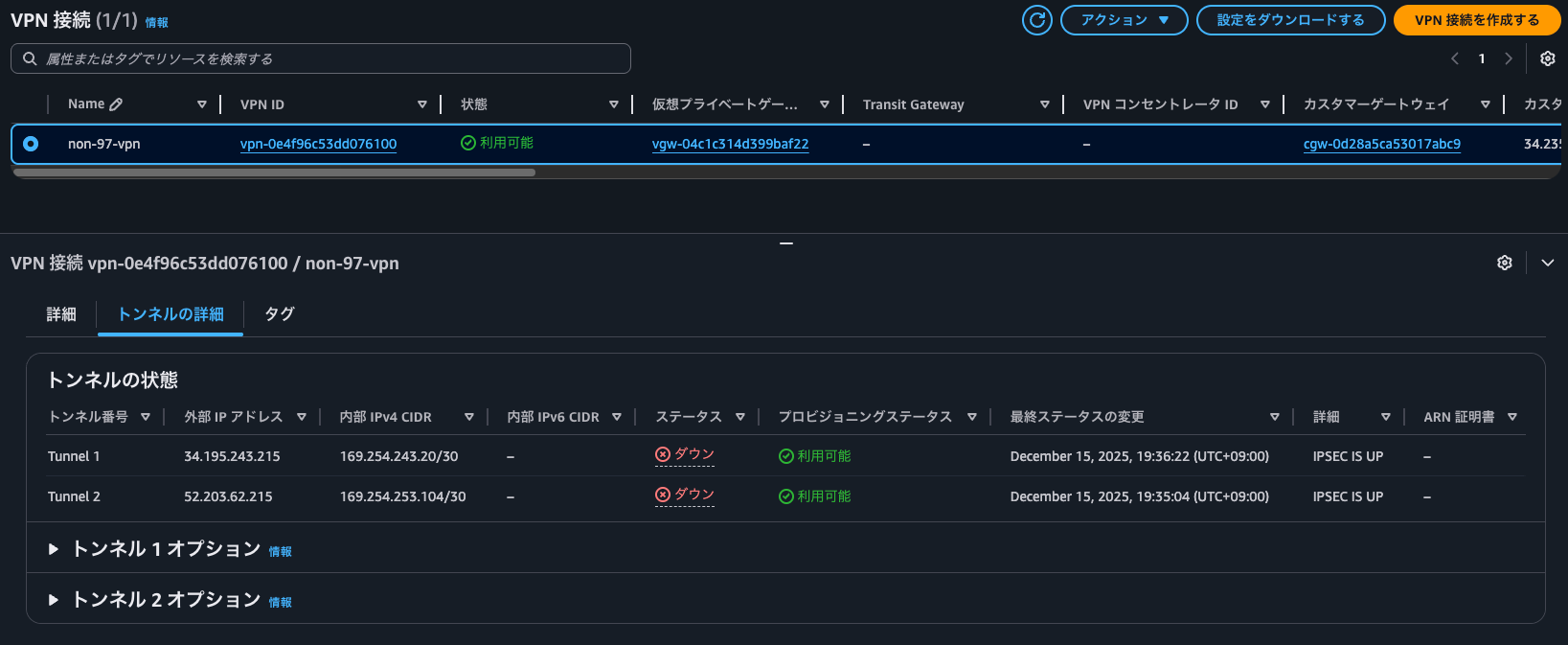
マネジメントコンソールから確認すると、両方のトンネルがIPSEC IS UPとなっていました。
ちなみに、この時のAWS Site-to-Site VPNのアクティビティログには以下の記録がされていました。
{
    "event_timestamp": 1765792799395,
    "timestamp": "2025-12-15 09:59:59.395Z",
    "details": "AWS tunnel IKE service is starting up",
    "dpd_enabled": true,
    "nat_t_detected": false,
    "ike_phase1_state": "down",
    "ike_phase2_state": "down"
}

{
    "event_timestamp": 1765794891019,
    "timestamp": "2025-12-15 10:34:51.019Z",
    "details": "received packet: from cgw-0d28a5ca53017abc9 [UDP 500] to 52.203.62.215 [UDP 500] (296 bytes)",
    "dpd_enabled": true,
    "nat_t_detected": true,
    "ike_phase1_state": "established",
    "ike_phase2_state": "established"
}

{
    "event_timestamp": 1765794891019,
    "timestamp": "2025-12-15 10:34:51.019Z",
    "details": "AWS tunnel processed request (id=0) for IKE_SA_INIT exchange with notification payload(s): NAT Detection (Source IP), NAT Detection (Destination IP), IKE Fragmentation, Hash Algorithms, IKE Redirection",
    "dpd_enabled": true,
    "nat_t_detected": true,
    "ike_phase1_state": "established",
    "ike_phase2_state": "established"
}

{
    "event_timestamp": 1765794891019,
    "timestamp": "2025-12-15 10:34:51.019Z",
    "details": "AWS tunnel detected cgw-0d28a5ca53017abc9 as the IKE_SA initiator",
    "dpd_enabled": true,
    "nat_t_detected": true,
    "ike_phase1_state": "established",
    "ike_phase2_state": "established"
}

{
    "event_timestamp": 1765794891019,
    "timestamp": "2025-12-15 10:34:51.019Z",
    "details": "Selected proposals for Phase 1 SA: Encryption: AES256-GCM-16 Hash: None PRF: SHA2-384 DH Group(s): 20",
    "dpd_enabled": true,
    "nat_t_detected": true,
    "ike_phase1_state": "established",
    "ike_phase2_state": "established"
}

{
    "event_timestamp": 1765794891021,
    "timestamp": "2025-12-15 10:34:51.021Z",
    "details": "AWS tunnel detected NAT-T as enabled on local host and is sending keep-alive(s)",
    "dpd_enabled": true,
    "nat_t_detected": true,
    "ike_phase1_state": "established",
    "ike_phase2_state": "established"
}

{
    "event_timestamp": 1765794891021,
    "timestamp": "2025-12-15 10:34:51.021Z",
    "details": "AWS tunnel detected NAT-T behind CGW / remote host",
    "dpd_enabled": true,
    "nat_t_detected": true,
    "ike_phase1_state": "established",
    "ike_phase2_state": "established"
}

{
    "event_timestamp": 1765794891021,
    "timestamp": "2025-12-15 10:34:51.021Z",
    "details": "AWS tunnel is sending response (id=0) for IKE_SA_INIT exchange with notification payload(s): NAT Detection (Source IP), NAT Detection (Destination IP), IKE Fragmentation, Hash Algorithms",
    "dpd_enabled": true,
    "nat_t_detected": true,
    "ike_phase1_state": "established",
    "ike_phase2_state": "established"
}

{
    "event_timestamp": 1765794891021,
    "timestamp": "2025-12-15 10:34:51.021Z",
    "details": "sending packet: from 52.203.62.215 [UDP 500] to cgw-0d28a5ca53017abc9 [UDP 500] (288 bytes)",
    "dpd_enabled": true,
    "nat_t_detected": true,
    "ike_phase1_state": "established",
    "ike_phase2_state": "established"
}

{
    "event_timestamp": 1765794891032,
    "timestamp": "2025-12-15 10:34:51.032Z",
    "details": "received packet: from cgw-0d28a5ca53017abc9 [UDP 4500] to 52.203.62.215 [UDP 4500] (245 bytes)",
    "dpd_enabled": true,
    "nat_t_detected": true,
    "ike_phase1_state": "established",
    "ike_phase2_state": "established"
}

{
    "event_timestamp": 1765794891032,
    "timestamp": "2025-12-15 10:34:51.032Z",
    "details": "AWS tunnel processed request (id=1) for IKE_AUTH exchange with notification payload(s): Initial Contact, EAP-Only Auth, Message ID Synchronization",
    "dpd_enabled": true,
    "nat_t_detected": true,
    "ike_phase1_state": "established",
    "ike_phase2_state": "established"
}

{
    "event_timestamp": 1765794891032,
    "timestamp": "2025-12-15 10:34:51.032Z",
    "details": "AWS tunnel is searching for matching peer configurations between 52.203.62.215 and cgw-0d28a5ca53017abc9",
    "dpd_enabled": true,
    "nat_t_detected": true,
    "ike_phase1_state": "established",
    "ike_phase2_state": "established"
}

{
    "event_timestamp": 1765794891032,
    "timestamp": "2025-12-15 10:34:51.032Z",
    "details": "AWS tunnel has successfully authenticated pre-shared key",
    "dpd_enabled": true,
    "nat_t_detected": true,
    "ike_phase1_state": "established",
    "ike_phase2_state": "established"
}

{
    "event_timestamp": 1765794891032,
    "timestamp": "2025-12-15 10:34:51.032Z",
    "details": "AWS tunnel Phase 1 SA is established",
    "dpd_enabled": true,
    "nat_t_detected": true,
    "ike_phase1_state": "established",
    "ike_phase2_state": "established"
}

{
    "event_timestamp": 1765794891032,
    "timestamp": "2025-12-15 10:34:51.032Z",
    "details": "Selected proposals for Phase 2 SA: Encryption: AES256-GCM-16 Hash: None DH Group(s): None PFS: None",
    "dpd_enabled": true,
    "nat_t_detected": true,
    "ike_phase1_state": "established",
    "ike_phase2_state": "established"
}

{
    "event_timestamp": 1765794891039,
    "timestamp": "2025-12-15 10:34:51.039Z",
    "details": "AWS tunnel Phase 2 SA is established with inbound SPI: 0xc259baac: outbound SPI: 0xc673c9c0: traffic selectors: (AWS-side) 0.0.0.0/0 <=> (CGW-side) 0.0.0.0/0",
    "dpd_enabled": true,
    "nat_t_detected": true,
    "ike_phase1_state": "established",
    "ike_phase2_state": "established"
}

{
    "event_timestamp": 1765794891116,
    "timestamp": "2025-12-15 10:34:51.116Z",
    "details": "AWS tunnel is sending response (id=1) for IKE_AUTH exchange",
    "dpd_enabled": true,
    "nat_t_detected": true,
    "ike_phase1_state": "established",
    "ike_phase2_state": "established"
}

{
    "event_timestamp": 1765794891117,
    "timestamp": "2025-12-15 10:34:51.117Z",
    "details": "sending packet: from 52.203.62.215 [UDP 4500] to cgw-0d28a5ca53017abc9 [UDP 4500] (209 bytes)",
    "dpd_enabled": true,
    "nat_t_detected": true,
    "ike_phase1_state": "established",
    "ike_phase2_state": "established"
}
また、dpddelay=10sとしているため、以下ログが10秒おきに出力されていました。
{
    "event_timestamp": 1765795391053,
    "timestamp": "2025-12-15 10:43:11.053Z",
    "details": "AWS tunnel is sending DPD request",
    "dpd_enabled": true,
    "nat_t_detected": true,
    "ike_phase1_state": "established",
    "ike_phase2_state": "established"
}

{
    "event_timestamp": 1765795391054,
    "timestamp": "2025-12-15 10:43:11.054Z",
    "details": "sending packet: from 52.203.62.215 [UDP 4500] to cgw-0d28a5ca53017abc9 [UDP 4500] (57 bytes)",
    "dpd_enabled": true,
    "nat_t_detected": true,
    "ike_phase1_state": "established",
    "ike_phase2_state": "established"
}

{
    "event_timestamp": 1765795391055,
    "timestamp": "2025-12-15 10:43:11.055Z",
    "details": "received packet: from cgw-0d28a5ca53017abc9 [UDP 4500] to 52.203.62.215 [UDP 4500] (57 bytes)",
    "dpd_enabled": true,
    "nat_t_detected": true,
    "ike_phase1_state": "established",
    "ike_phase2_state": "established"
}
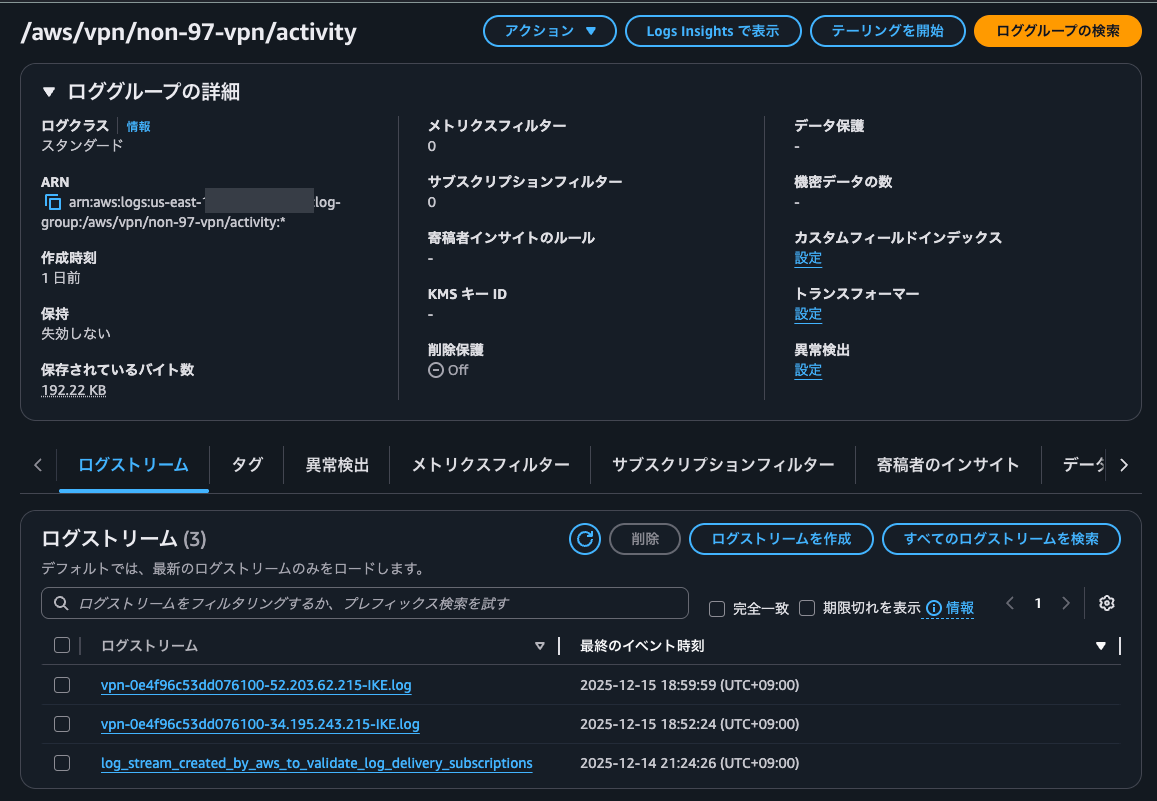
ログストリームはvpn-0e4f96c53dd076100-34.195.243.215-IKE.logと<Site-to-Site VPN ID>-<AWS側のトンネルの外部IPアドレス>-IKE.logという名前で作成されていました。
FRRouting(frr)のインストール
次にBGP周りの設定です。
strongSwanは直接BGPをサポートしていないため、FRRoutingを使用します。
FRRoutingのインストールをします。
$ sudo apt install frr -y
Reading package lists... Done
Building dependency tree... Done
Reading state information... Done
The following additional packages will be installed:
  frr-pythontools libcares2 libyang2t64
Suggested packages:
  frr-doc
The following NEW packages will be installed:
  frr frr-pythontools libcares2 libyang2t64
0 upgraded, 4 newly installed, 0 to remove and 0 not upgraded.
Need to get 4903 kB of archives.
After this operation, 22.6 MB of additional disk space will be used.
Get:1 http://us-east-1.ec2.archive.ubuntu.com/ubuntu noble/main amd64 libcares2 amd64 1.27.0-1.0ubuntu1 [73.7 kB]
.
.
(以下略)
.
.
FRRoutingの設定
続いて、FRRoutingの設定です。
vtyshで組み立ててるのが一般的だと思いますが、直接frr.confの更新をします。
$ sudo ls -l /etc/frr/frr.conf
-rw-r----- 1 frr frr 489 Jun 16  2023 /etc/frr/frr.conf
$ sudo vi /etc/frr/frr.conf
$ sudo cat /etc/frr/frr.conf
! /etc/frr/frr.conf
frr version 8.5
frr defaults traditional
hostname customer-gateway
log syslog informational
no ipv6 forwarding
service integrated-vtysh-config

ip prefix-list ADVERTISE-TO-AWS seq 10 permit 172.31.0.0/16
ip route 172.31.0.0/16 172.31.64.1

router bgp 65000
 bgp router-id 34.235.193.73
 bgp log-neighbor-changes
 no bgp default ipv4-unicast
 no bgp default ipv6-unicast
 bgp graceful-restart
 timers bgp 10 30

 neighbor 169.254.243.21 remote-as 65010
 neighbor 169.254.243.21 description AWS-VPN-Tunnel-1
 neighbor 169.254.243.21 timers 10 30
 neighbor 169.254.243.21 timers connect 10

 neighbor 169.254.253.105 remote-as 65010
 neighbor 169.254.253.105 description AWS-VPN-Tunnel-2
 neighbor 169.254.253.105 timers 10 30
 neighbor 169.254.253.105 timers connect 10

 address-family ipv4 unicast
  network 172.31.0.0/16

  neighbor 169.254.243.21 activate
  neighbor 169.254.243.21 soft-reconfiguration inbound
  neighbor 169.254.243.21 route-map FROM-AWS in
  neighbor 169.254.243.21 prefix-list ADVERTISE-TO-AWS out

  neighbor 169.254.253.105 activate
  neighbor 169.254.253.105 soft-reconfiguration inbound
  neighbor 169.254.253.105 route-map FROM-AWS in
  neighbor 169.254.253.105 prefix-list ADVERTISE-TO-AWS out
 exit-address-family
exit

route-map FROM-AWS permit 10
exit

line vty
 exec-timeout 0 0
exit

end
/etc/frr/daemonsを編集して、BGPを使用するように設定します。
$ sudo ls -l /etc/frr/daemons
-rw-r----- 1 frr frr 3840 Jan 24  2025 /etc/frr/daemons
$ sudo cp -p /etc/frr/daemons /etc/frr/daemons_old
$ sudo vi /etc/frr/daemons
$ sudo diff -u /etc/frr/daemons_old /etc/frr/daemons
--- /etc/frr/daemons_old        2025-01-24 14:43:49.000000000 +0000
+++ /etc/frr/daemons    2025-12-15 10:57:30.024549277 +0000
@@ -14,7 +14,7 @@
 #
 # The watchfrr, zebra and staticd daemons are always started.
 #
-bgpd=no
+bgpd=yes
 ospfd=no
 ospf6d=no
 ripd=no
この状態でFRRoutingを起動させます。
sudo systemctl restart frr
$ systemctl status frr
● frr.service - FRRouting
     Loaded: loaded (/usr/lib/systemd/system/frr.service; enabled; preset: enabled)
     Active: active (running) since Tue 2025-12-16 02:23:39 UTC; 20s ago
       Docs: https://frrouting.readthedocs.io/en/latest/setup.html
    Process: 531 ExecStart=/usr/lib/frr/frrinit.sh start (code=exited, status=0/SUCCESS)
   Main PID: 596 (watchfrr)
     Status: "FRR Operational"
      Tasks: 13 (limit: 1017)
     Memory: 33.3M (peak: 43.5M)
        CPU: 350ms
     CGroup: /system.slice/frr.service
             ├─596 /usr/lib/frr/watchfrr -d -F traditional zebra bgpd staticd
             ├─679 /usr/lib/frr/zebra -d -F traditional -A 127.0.0.1 -s 90000000
             ├─696 /usr/lib/frr/bgpd -d -F traditional -A 127.0.0.1
             └─709 /usr/lib/frr/staticd -d -F traditional -A 127.0.0.1
OSのルートテーブルを確認するとBGPで経路交換されたと思われるプレフィックスのルートがいくつかありますね。
$ ip route show
default via 172.31.64.1 dev ens5 proto dhcp src 172.31.74.141 metric 100
10.0.0.0/16 nhid 23 via 169.254.253.105 dev vti2 proto bgp metric 20
169.254.243.20/30 dev vti1 proto kernel scope link src 169.254.243.22
169.254.253.104/30 dev vti2 proto kernel scope link src 169.254.253.106
172.31.0.0/16 nhid 9 via 172.31.64.1 dev ens5 proto static metric 20 onlink
172.31.0.2 via 172.31.64.1 dev ens5 proto dhcp src 172.31.74.141 metric 100
172.31.64.0/20 dev ens5 proto kernel scope link src 172.31.74.141 metric 100
172.31.64.1 dev ens5 proto dhcp scope link src 172.31.74.141 metric 100
BGP関連のコマンドを確認してみます。
$ sudo vtysh -c "show ip bgp summary"

IPv4 Unicast Summary (VRF default):
BGP router identifier 34.235.193.73, local AS number 65000 vrf-id 0
BGP table version 2
RIB entries 3, using 576 bytes of memory
Peers 2, using 1448 KiB of memory

Neighbor        V         AS   MsgRcvd   MsgSent   TblVer  InQ OutQ  Up/Down State/PfxRcd   PfxSnt Desc
169.254.243.21  4      65010        17        15        0    0    0 00:02:05            1        1 AWS-VPN-Tunnel-1
169.254.253.105 4      65010        17        15        0    0    0 00:02:05            1        1 AWS-VPN-Tunnel-2

Total number of neighbors 2

$ sudo vtysh -c "show ip bgp"
BGP table version is 2, local router ID is 34.235.193.73, vrf id 0
Default local pref 100, local AS 65000
Status codes:  s suppressed, d damped, h history, * valid, > best, = multipath,
               i internal, r RIB-failure, S Stale, R Removed
Nexthop codes: @NNN nexthop's vrf id, < announce-nh-self
Origin codes:  i - IGP, e - EGP, ? - incomplete
RPKI validation codes: V valid, I invalid, N Not found

   Network          Next Hop            Metric LocPrf Weight Path
*> 10.0.0.0/16      169.254.253.105        100             0 65010 i
*                   169.254.243.21         200             0 65010 i
*> 172.31.0.0/16    0.0.0.0                  0         32768 i

Displayed  2 routes and 3 total paths

$ sudo vtysh -c "show ip bgp detail"
BGP table version is 2, local router ID is 34.235.193.73, vrf id 0
Default local pref 100, local AS 65000
Status codes:  s suppressed, d damped, h history, * valid, > best, = multipath,
               i internal, r RIB-failure, S Stale, R Removed
Nexthop codes: @NNN nexthop's vrf id, < announce-nh-self
Origin codes:  i - IGP, e - EGP, ? - incomplete
RPKI validation codes: V valid, I invalid, N Not found

   Network          Next Hop            Metric LocPrf Weight Path
  65010
    169.254.253.105 from 169.254.253.105 (169.254.253.105)
      Origin IGP, metric 100, valid, external, best (MED)
      Last update: Tue Dec 16 02:23:45 2025
  65010
    169.254.243.21 from 169.254.243.21 (169.254.243.21)
      Origin IGP, metric 200, valid, external
      Last update: Tue Dec 16 02:23:45 2025
  Local
    0.0.0.0 from 0.0.0.0 (34.235.193.73)
      Origin IGP, metric 0, weight 32768, valid, sourced, local, best (First path received)
      Last update: Tue Dec 16 02:23:40 2025

Displayed  2 routes and 3 total paths

$ sudo vtysh -c "show ip bgp neighbors 169.254.243.21 advertised-routes"
BGP table version is 2, local router ID is 34.235.193.73, vrf id 0
Default local pref 100, local AS 65000
Status codes:  s suppressed, d damped, h history, * valid, > best, = multipath,
               i internal, r RIB-failure, S Stale, R Removed
Nexthop codes: @NNN nexthop's vrf id, < announce-nh-self
Origin codes:  i - IGP, e - EGP, ? - incomplete
RPKI validation codes: V valid, I invalid, N Not found

   Network          Next Hop            Metric LocPrf Weight Path
*> 172.31.0.0/16    0.0.0.0                  0         32768 i

Total number of prefixes 1

$ sudo vtysh -c "show ip bgp neighbors 169.254.253.105 advertised-routes"
BGP table version is 2, local router ID is 34.235.193.73, vrf id 0
Default local pref 100, local AS 65000
Status codes:  s suppressed, d damped, h history, * valid, > best, = multipath,
               i internal, r RIB-failure, S Stale, R Removed
Nexthop codes: @NNN nexthop's vrf id, < announce-nh-self
Origin codes:  i - IGP, e - EGP, ? - incomplete
RPKI validation codes: V valid, I invalid, N Not found

   Network          Next Hop            Metric LocPrf Weight Path
*> 172.31.0.0/16    0.0.0.0                  0         32768 i

Total number of prefixes 1

$ sudo vtysh -c "show ip bgp neighbors 169.254.243.21 routes"
BGP table version is 2, local router ID is 34.235.193.73, vrf id 0
Default local pref 100, local AS 65000
Status codes:  s suppressed, d damped, h history, * valid, > best, = multipath,
               i internal, r RIB-failure, S Stale, R Removed
Nexthop codes: @NNN nexthop's vrf id, < announce-nh-self
Origin codes:  i - IGP, e - EGP, ? - incomplete
RPKI validation codes: V valid, I invalid, N Not found

   Network          Next Hop            Metric LocPrf Weight Path
*  10.0.0.0/16      169.254.243.21         200             0 65010 i

Displayed  1 routes and 3 total paths

$ sudo vtysh -c "show ip bgp neighbors 169.254.253.105 routes"
BGP table version is 2, local router ID is 34.235.193.73, vrf id 0
Default local pref 100, local AS 65000
Status codes:  s suppressed, d damped, h history, * valid, > best, = multipath,
               i internal, r RIB-failure, S Stale, R Removed
Nexthop codes: @NNN nexthop's vrf id, < announce-nh-self
Origin codes:  i - IGP, e - EGP, ? - incomplete
RPKI validation codes: V valid, I invalid, N Not found

   Network          Next Hop            Metric LocPrf Weight Path
*> 10.0.0.0/16      169.254.253.105        100             0 65010 i

Displayed  1 routes and 3 total paths
意図したとおりにプレフィックスをアドバタイズおよび受信していますね。
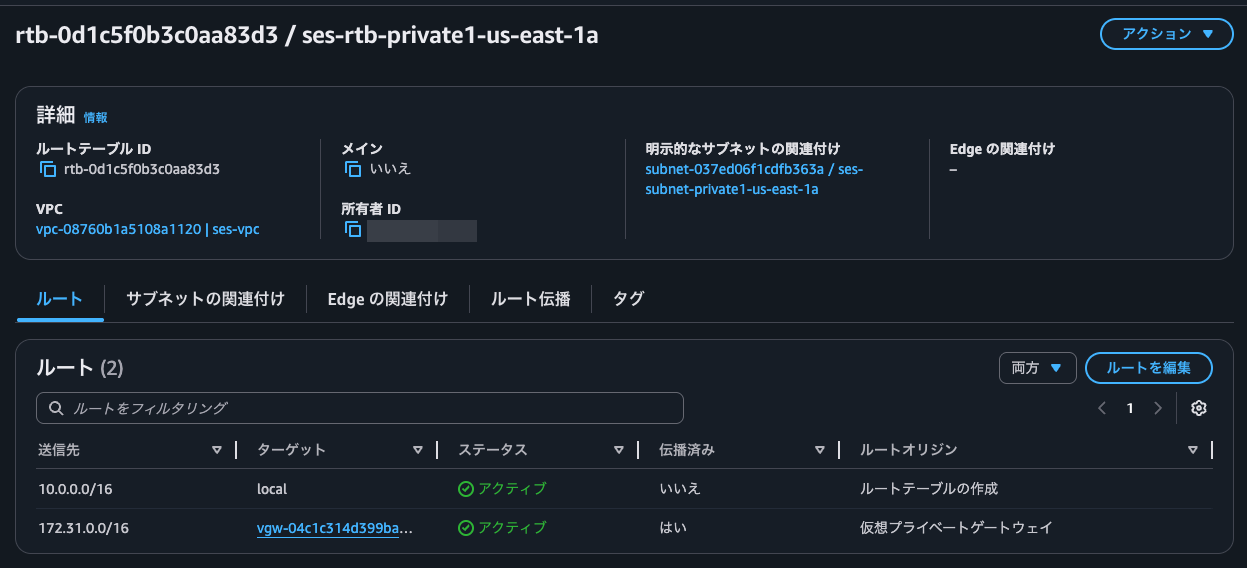
VGWからルート伝播を有効化しているルートテーブルのルートを確認すると、確かにstrongSwan EC2インスタンスからアドバタイズしているルートが追加されています。
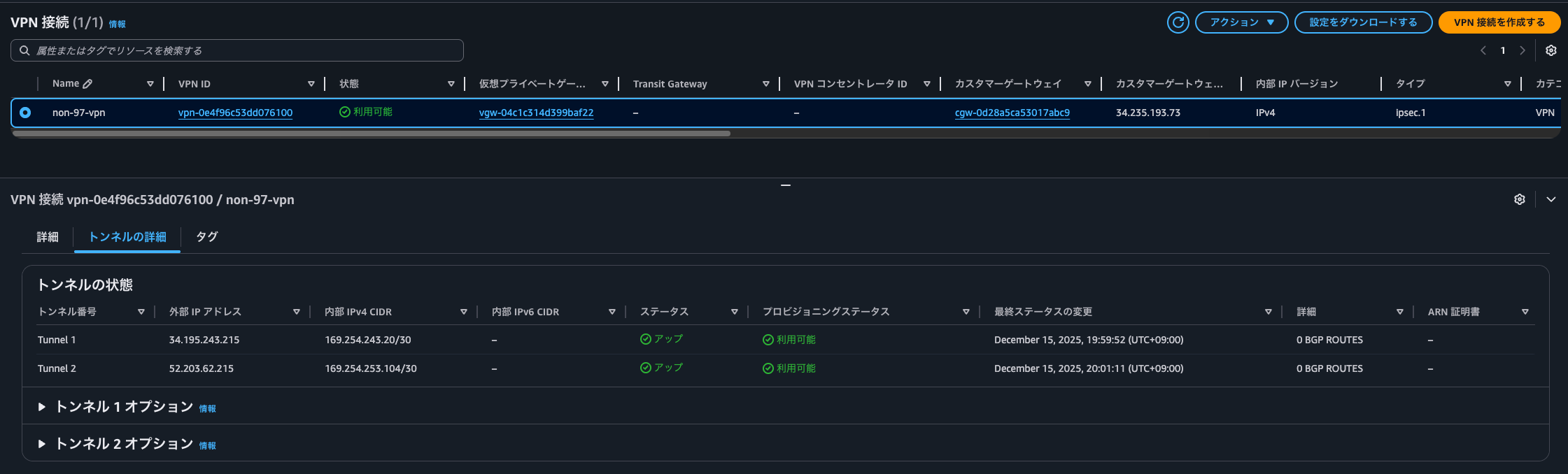
もちろん、Site-to-Site VPNの各トンネルのステータスもUPとなっています。
この時、CloudWatch Logsに出力していたBGPログは以下のとおりです。
{
    "resource_id": "vpn-0e4f96c53dd076100_34.195.243.215",
    "event_timestamp": 1765851825243,
    "timestamp": "2025-12-16 02:23:45.243Z",
    "type": "BGPStatus",
    "status": "DOWN",
    "message": {
        "details": "AWS-side peer BGP session state has changed from Active to OpenSent with neighbor 169.254.243.22"
    }
}

{
    "resource_id": "vpn-0e4f96c53dd076100_34.195.243.215",
    "event_timestamp": 1765851825243,
    "timestamp": "2025-12-16 02:23:45.243Z",
    "type": "BGPStatus",
    "status": "DOWN",
    "message": {
        "details": "AWS-side peer received an OPEN message from neighbor 169.254.243.22 - version 4, AS 65000, holdtime 30, router-id 34.235.193.73"
    }
}

{
    "resource_id": "vpn-0e4f96c53dd076100_34.195.243.215",
    "event_timestamp": 1765851825243,
    "timestamp": "2025-12-16 02:23:45.243Z",
    "type": "BGPStatus",
    "status": "DOWN",
    "message": {
        "details": "AWS-side peer sent an OPEN message to neighbor 169.254.243.22 - version 4, AS 65010, holdtime 30, router-id 169.254.243.21"
    }
}

{
    "resource_id": "vpn-0e4f96c53dd076100_34.195.243.215",
    "event_timestamp": 1765851825243,
    "timestamp": "2025-12-16 02:23:45.243Z",
    "type": "BGPStatus",
    "status": "DOWN",
    "message": {
        "details": "AWS-side peer BGP session state has changed from OpenSent to Deleted with neighbor 169.254.243.22"
    }
}

{
    "resource_id": "vpn-0e4f96c53dd076100_34.195.243.215",
    "event_timestamp": 1765851825243,
    "timestamp": "2025-12-16 02:23:45.243Z",
    "type": "BGPStatus",
    "status": "DOWN",
    "message": {
        "details": "AWS-side peer BGP session state has changed from OpenSent to OpenConfirm with neighbor 169.254.243.22"
    }
}

{
    "resource_id": "vpn-0e4f96c53dd076100_34.195.243.215",
    "event_timestamp": 1765851825247,
    "timestamp": "2025-12-16 02:23:45.247Z",
    "type": "BGPStatus",
    "status": "UP",
    "message": {
        "details": "AWS-side peer BGP session state has changed from OpenConfirm to Established with neighbor 169.254.243.22"
    }
}

{
    "resource_id": "vpn-0e4f96c53dd076100_34.195.243.215",
    "event_timestamp": 1765851826248,
    "timestamp": "2025-12-16 02:23:46.248Z",
    "type": "RouteStatus",
    "status": "UPDATED",
    "message": {
        "prefix": "10.0.0.0/16",
        "asPath": "65010",
        "localPref": 100,
        "med": 200,
        "nextHopIp": "169.254.243.21",
        "weight": 32768
    }
}

{
    "resource_id": "vpn-0e4f96c53dd076100_34.195.243.215",
    "event_timestamp": 1765851826248,
    "timestamp": "2025-12-16 02:23:46.248Z",
    "type": "BGPStatus",
    "status": "UP",
    "message": {
        "details": "AWS-side peer sent an End-of-RIB message to neighbor 169.254.243.22"
    }
}

{
    "resource_id": "vpn-0e4f96c53dd076100_34.195.243.215",
    "event_timestamp": 1765851826345,
    "timestamp": "2025-12-16 02:23:46.345Z",
    "type": "BGPStatus",
    "status": "UP",
    "message": {
        "details": "AWS-side peer received update with attributes from neighbor 169.254.243.22 - AS path: 65000"
    }
}

{
    "resource_id": "vpn-0e4f96c53dd076100_34.195.243.215",
    "event_timestamp": 1765851826345,
    "timestamp": "2025-12-16 02:23:46.345Z",
    "type": "RouteStatus",
    "status": "ADVERTISED",
    "message": {
        "prefix": "172.31.0.0/16",
        "asPath": "65000",
        "localPref": 100,
        "med": 0,
        "nextHopIp": "169.254.243.22",
        "weight": 0
    }
}
ログストリームはvpn-0e4f96c53dd076100-52.203.62.215-BGP.logと<Site-to-Site VPN ID>-<AWS側のトンネルの外部IPアドレス>-BGP.logという名前で作成されていました。
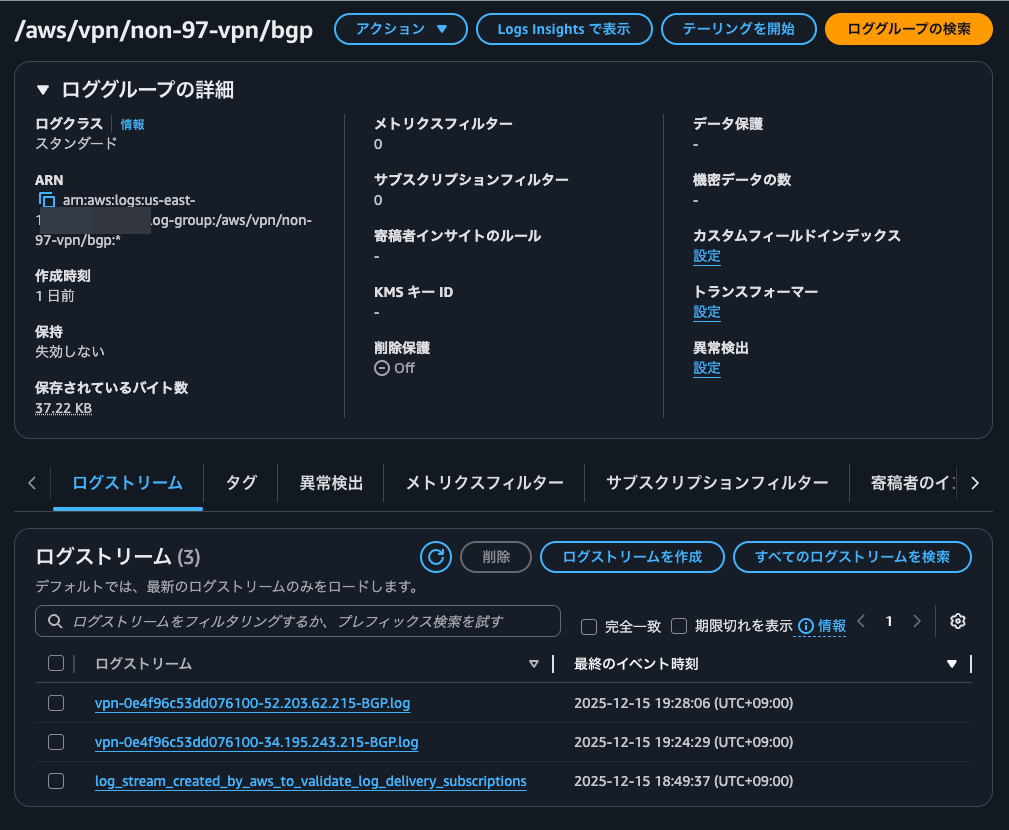
が2分置きに繰り返し出力
疎通確認
最後に疎通確認です。
$ hostname -i
10.0.135.26

[ec2-user@ip-10-0-135-26 ~]$ ping -c 4 172.31.42.90
PING 172.31.42.90 (172.31.42.90) 56(84) bytes of data.
64 bytes from 172.31.42.90: icmp_seq=1 ttl=126 time=2.42 ms
64 bytes from 172.31.42.90: icmp_seq=2 ttl=126 time=2.00 ms
64 bytes from 172.31.42.90: icmp_seq=3 ttl=126 time=2.18 ms
64 bytes from 172.31.42.90: icmp_seq=4 ttl=126 time=2.20 ms

--- 172.31.42.90 ping statistics ---
4 packets transmitted, 4 received, 0% packet loss, time 3004ms
rtt min/avg/max/mdev = 2.003/2.200/2.417/0.146 ms

$ traceroute 172.31.42.90
traceroute to 172.31.42.90 (172.31.42.90), 30 hops max, 60 byte packets
 1  169.254.253.106 (169.254.253.106)  1.616 ms  1.595 ms  1.577 ms
 2  ip-172-31-42-90.ec2.internal (172.31.42.90)  2.388 ms  2.407 ms  2.418 ms
接続できましたね。
BGPで経路交換しているSite-to-Site VPNにおけるトラブルシューティングのお供に
AWS Site-to-Site VPN がトンネルの BGPのログ出力をサポートしたアップデートを紹介しました。
従来のアクティビティログと同様にトラブルシューティング時に役立ちそうですね。
私の環境においてはBGPログはアクティビティログと異なりログの流量が控え目だったので、目視チェックでも十分後追いができました。
この記事が誰かの助けになれば幸いです。
以上、クラウド事業本部 コンサルティング部の のんピ(@non____97)でした!