![[AWS Technical Support Note] วิธีการตรวจสอบ Execution Logs และ Access Logs ของ API Gateway (REST API)](https://devio2024-media.developers.io/image/upload/f_auto,q_auto,w_3840/v1770805319/user-gen-eyecatch/ovxiv1a58vwrca3pca3j.webp)
[AWS Technical Support Note] วิธีการตรวจสอบ Execution Logs และ Access Logs ของ API Gateway (REST API)

ปัญหาที่เกิดขึ้น
ฉันต้องการตรวจสอบ Execution Logs และ Access Logs ของ API Gateway (REST API) ควรทำอย่างไร?
วิธีแก้ปัญหา
กรุณาตรวจสอบจาก CloudWatch Logs (Log group)
นอกจากนี้ Access Logs สามารถส่งไปยัง Kinesis Data Firehose ได้ แต่ในบล็อกนี้จะกล่าวถึงการส่งไปยัง CloudWatch Logs เท่านั้น
ชื่อ Log group แต่ละประเภทมีดังนี้
Execution Logs: API-Gateway-Execution-Logs_{API ID}/{ชื่อ Stage}
Access Logs: ชื่อ Log group ที่ระบุในการตั้งค่า
โปรดทราบว่า Logs แต่ละประเภทจำเป็นต้องเปิดใช้งานล่วงหน้า
การตั้งค่า Logs สามารถแก้ไขได้จาก Stage ดังนี้
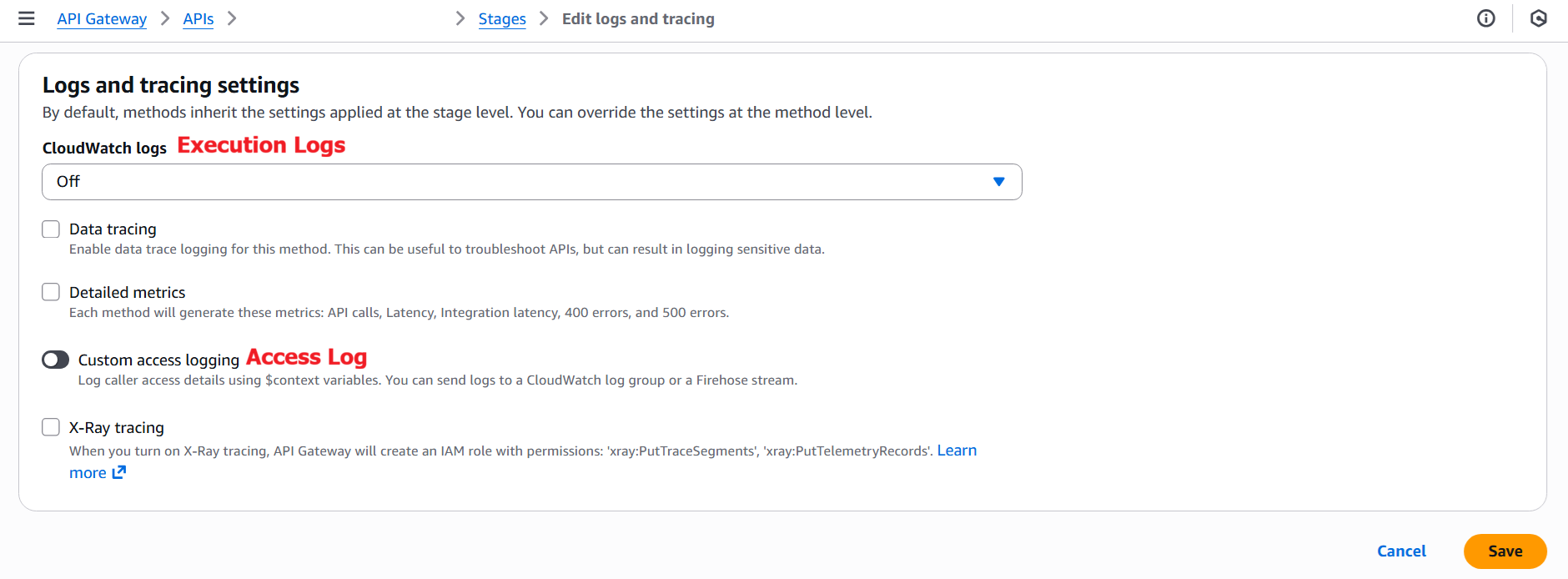
เพื่อเปิดใช้งาน ให้ตั้งค่าดังนี้และบันทึก
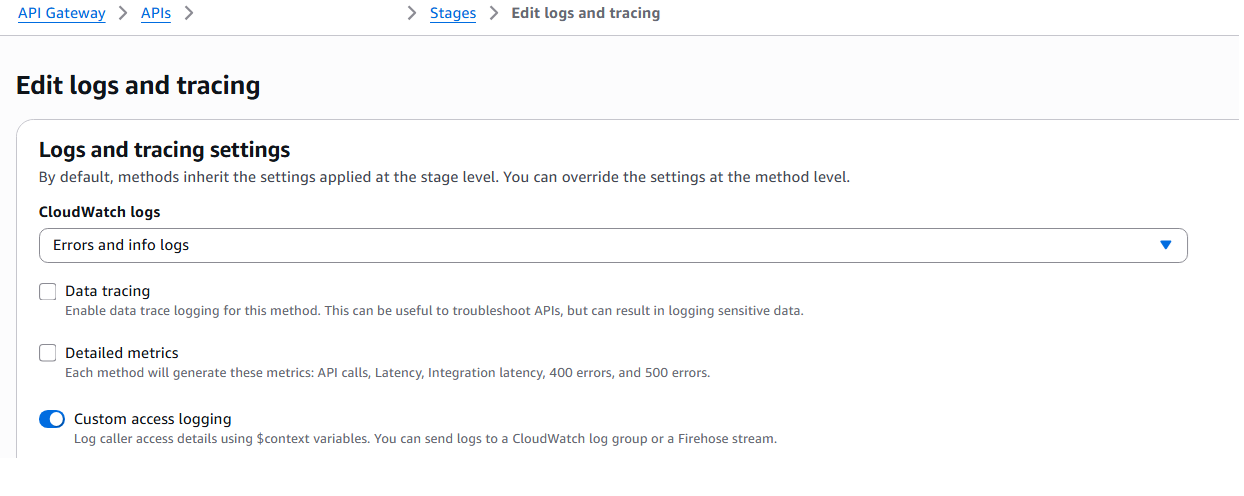
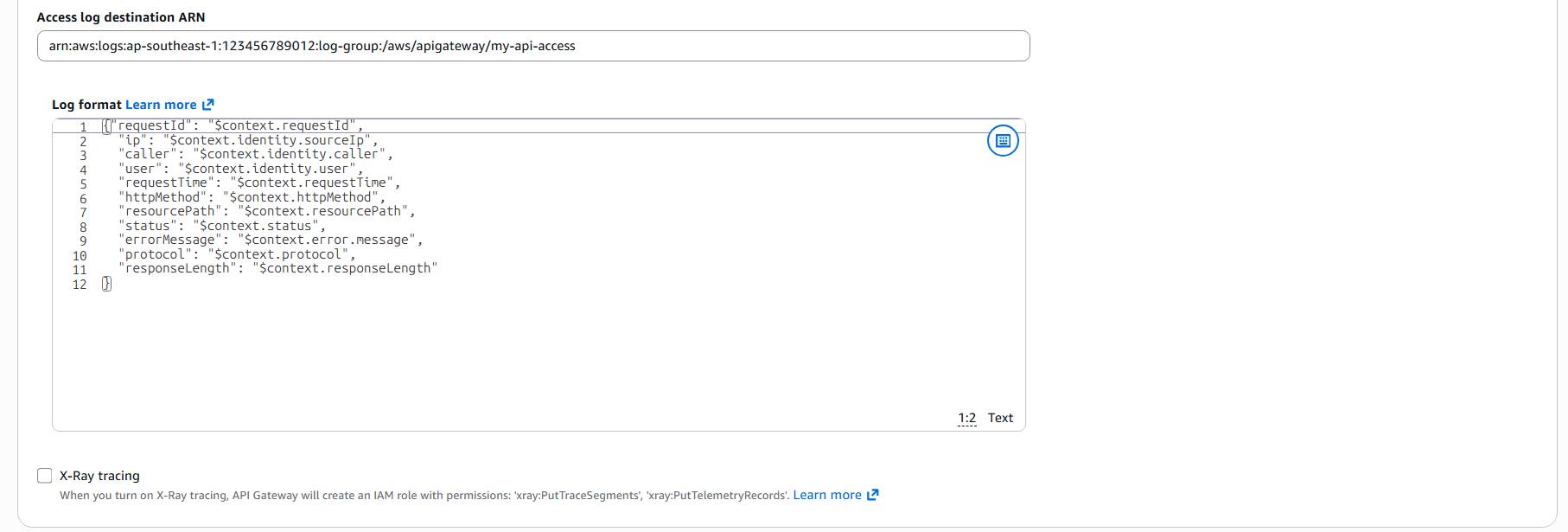
Execution Logs มีระดับ Log (Log Level) ในครั้งนี้จะเลือก "ERROR and INFO logs" (บันทึก Error และ Info)
โปรดทราบว่าการเปิดใช้งาน "Data tracing" จะช่วยในการแก้ไขปัญหา API แต่อาจมีการบันทึกข้อมูลที่เป็นความลับ หากมีความจำเป็นต้องใช้งาน กรุณาใช้งานด้วยความระมัดระวัง
(ข้อมูลที่ปรากฏในเอกสาร ณ เดือนกุมภาพันธ์ 2569)
Set up CloudWatch logging for REST APIs in API Gateway (English)
a. Select a logging level from the CloudWatch Logs dropdown menu. The logging levels are the following:
・Off – Logging is not turned on for this stage.
・Errors only – Logging is enabled for errors only.
・Errors and info logs – Logging is enabled for all events.
b. (Optional) Select Data tracing to turn on data trace logging for your stage. This can be useful to troubleshoot APIs, but can result in logging sensitive data.
Note
We recommend that you don't use Data tracing for production APIs.
(แปลไทย)
a. เลือกระดับการบันทึก Log จากเมนูแบบเลื่อนลง CloudWatch Logs ระดับการบันทึก Log มีดังนี้:
・Off – ไม่เปิดใช้งานการบันทึก Log สำหรับ Stage นี้
・Errors only – เปิดใช้งานการบันทึก Log เฉพาะ Error เท่านั้น
・Errors and info logs – เปิดใช้งานการบันทึก Log สำหรับทุก Event
b. (ตัวเลือก) เลือก Data tracing เพื่อเปิดใช้งานการบันทึก Data trace log สำหรับ Stage ของคุณ วิธีนี้อาจเป็นประโยชน์ในการแก้ไขปัญหา API แต่อาจส่งผลให้มีการบันทึกข้อมูลที่เป็นความลับ
หมายเหตุ
แนะนำว่าไม่ควรใช้ Data tracing สำหรับ API ที่ใช้งานจริง (Production)
Log group ที่ระบุใน ARN ปลายทางของ Access Logs คือ Log group ที่จะส่ง Access Logs ไป
สามารถตั้งค่ารูปแบบของ Access Logs ได้ดังเนื้อหาด้านล่าง แต่สามารถปรับแก้ได้ตามความจำเป็น
    {
      "requestId": "$context.requestId",
      "ip": "$context.identity.sourceIp",
      "caller": "$context.identity.caller",
      "user": "$context.identity.user",
      "requestTime": "$context.requestTime",
      "httpMethod": "$context.httpMethod",
      "resourcePath": "$context.resourcePath",
      "status": "$context.status",
      "errorMessage": "$context.error.message",
      "protocol": "$context.protocol",
      "responseLength": "$context.responseLength"
    }
ณ วันที่ 29 ตุลาคม 2023 หากบันทึกในรูปแบบข้างต้นจะเกิด Error ว่า "Access Log format must be single line, new line character is allowed only at end of the format:..." ดังนั้นให้รวมเป็น 1 บรรทัดและบันทึกดังนี้
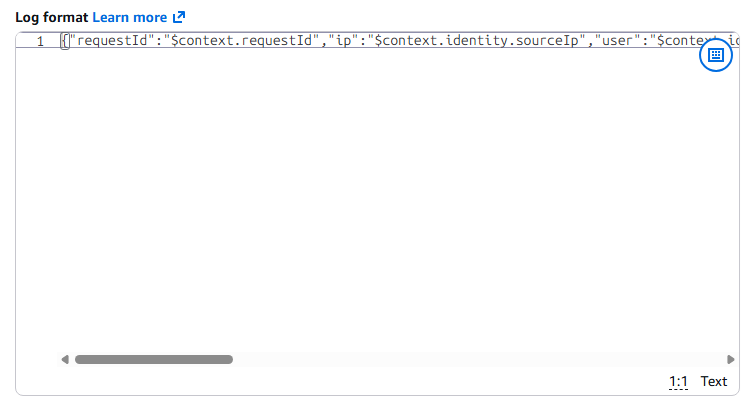
สำหรับรายละเอียดของตัวแปร $context ที่ตั้งค่าไว้และตัวแปร $context อื่นๆ ที่สามารถเพิ่มได้ สามารถตรวจสอบได้ที่เอกสาร Variables for data transformations for API Gateway (English)
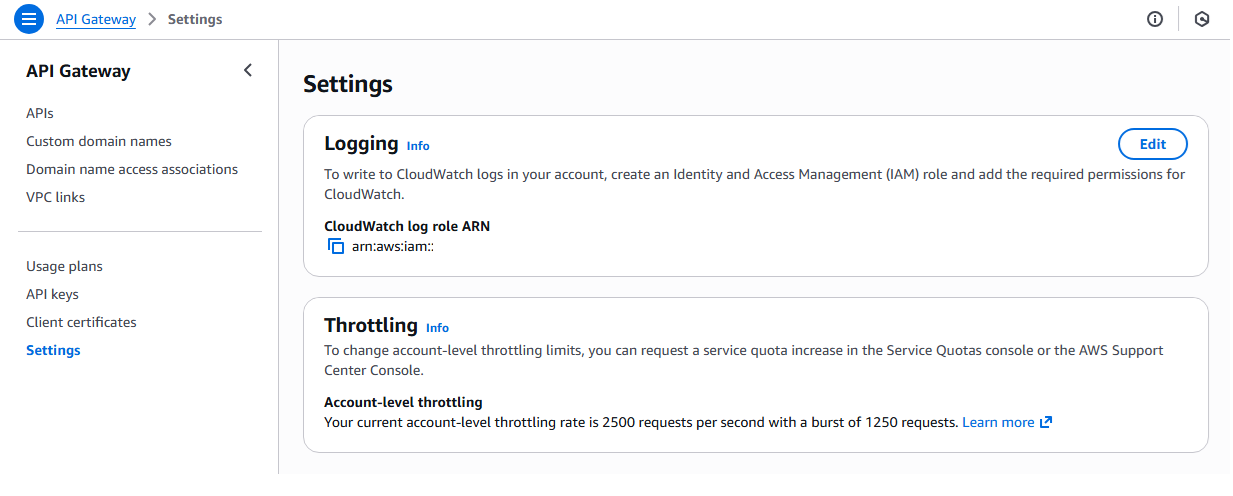
นอกจากนี้ โปรดทราบว่าจำเป็นต้องตั้งค่า IAM Role ที่มีสิทธิ์เขียน Log ในการตั้งค่า API Gateway
Set up CloudWatch logging for REST APIs in API Gateway (English)
To enable CloudWatch Logs, you must grant API Gateway permission to read and write logs to CloudWatch for your account. The AmazonAPIGatewayPushToCloudWatchLogs has all the required permissions.
(แปลไทย)
เพื่อเปิดใช้งาน CloudWatch Logs ท่านจำเป็นต้องให้สิทธิ์ API Gateway ในการอ่านและเขียน Logs ไปยัง CloudWatch สำหรับ Account ของท่าน โดย Managed Policy ชื่อ AmazonAPIGatewayPushToCloudWatchLogs มีสิทธิ์ที่จำเป็นทั้งหมดอยู่แล้ว
หลังจากดำเนินการตั้งค่าข้างต้นเสร็จสิ้นแล้ว เมื่อทำ Request ไปยัง API ที่เกี่ยวข้อง ท่านจะสามารถตรวจสอบ Execution Logs และ Access Logs ได้จาก CloudWatch Logs Log group
หมายเหตุ: การอัปเดตการตั้งค่า Logs ไม่จำเป็นต้อง Deploy API ใหม่
Set up CloudWatch logging for REST APIs in API Gateway (English)
API Gateway is now ready to log requests to your API. You don't need to redeploy the API when you update the stage settings, logs, or stage variables.
(แปลไทย)
ขณะนี้ API Gateway พร้อมที่จะบันทึก Logs ของ Request ไปยัง API ของท่านแล้ว โดยท่านไม่จำเป็นต้อง Deploy API ใหม่เมื่อทำการอัปเดต Stage settings, Logs หรือ Stage variables
บทความอ้างอิง
・Set up CloudWatch logging for REST APIs in API Gateway (English)
・Variables for data transformations for API Gateway (English)
・Log REST API calls to Amazon Data Firehose in API Gateway (English)
・API Gateway のアクセスログを Kinesis 経由で S3 に保管してみた (Japanese)
บทความอื่นๆที่เกี่ยวข้องกับ API Gateway
・ทดลองสร้าง RESTful API ด้วย Serverless Lambda (Python) + API Gateway (Thai)
・การใช้งาน AWS Lambda และ Amazon API Gateway ร่วมกับโปรเจกต์ React (Thai)
・ใช้ API Gateway เชื่อมต่อไปยัง Lambda เรียก API แปลภาษา : Serverless Web App บน AWS : Part 2 (Thai)
・มาเชื่อมต่อ Lambda กับ API gateway กันเถอะ (Thai)
บทความต้นฉบับ
・API Gateway(REST API)の実行ログとアクセスログを確認する方法を教えてください (Japanese)