I implemented a simple RAG by integrating Amazon Bedrock Knowledge Bases (S3 Vectors) with Amazon Bedrock AgentCore

This page has been translated by machine translation. View original
Introduction
I'm Kanno from the consulting department, who loves finding bargains at supermarkets.
Recently, I've been introducing Amazon Bedrock AgentCore features, but I hadn't yet tried creating one myself! So I decided to try building a RAG system and wrote this article.
I also want to verify that what I've created is working properly using GenU!
What we'll build today
I decided to create a simple RAG using S3 Vectors + Amazon Bedrock Knowledge Bases + Strands Agents.
Strands Agents has a tool called retrieve prepared for getting documents, so I want to try this out!
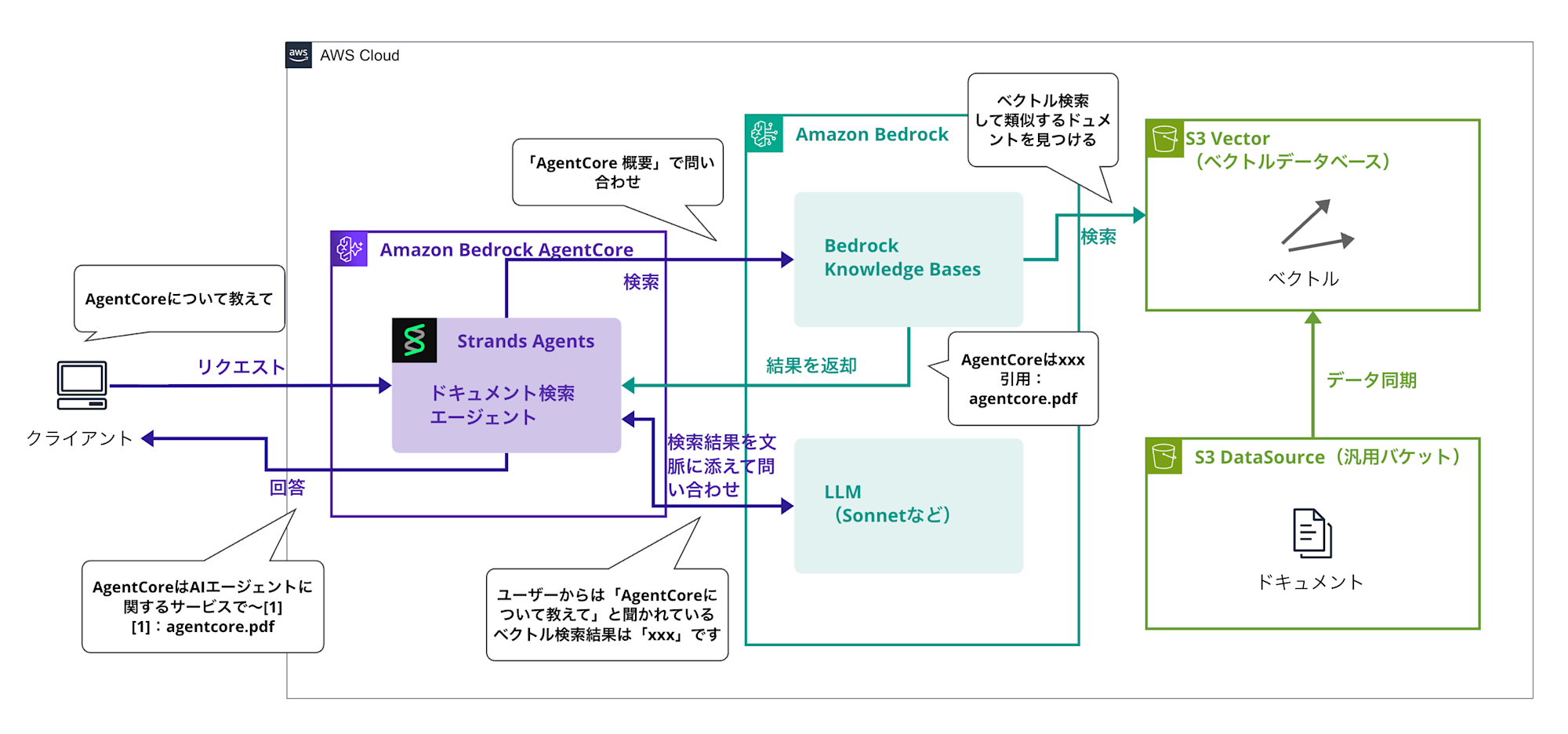
The overall architecture is as follows (sorry for the somewhat complex diagram...):
The search part of Strands Agents uses the retrieve tool to query Knowledge Bases, and the results are passed to the LLM as context to generate answers.
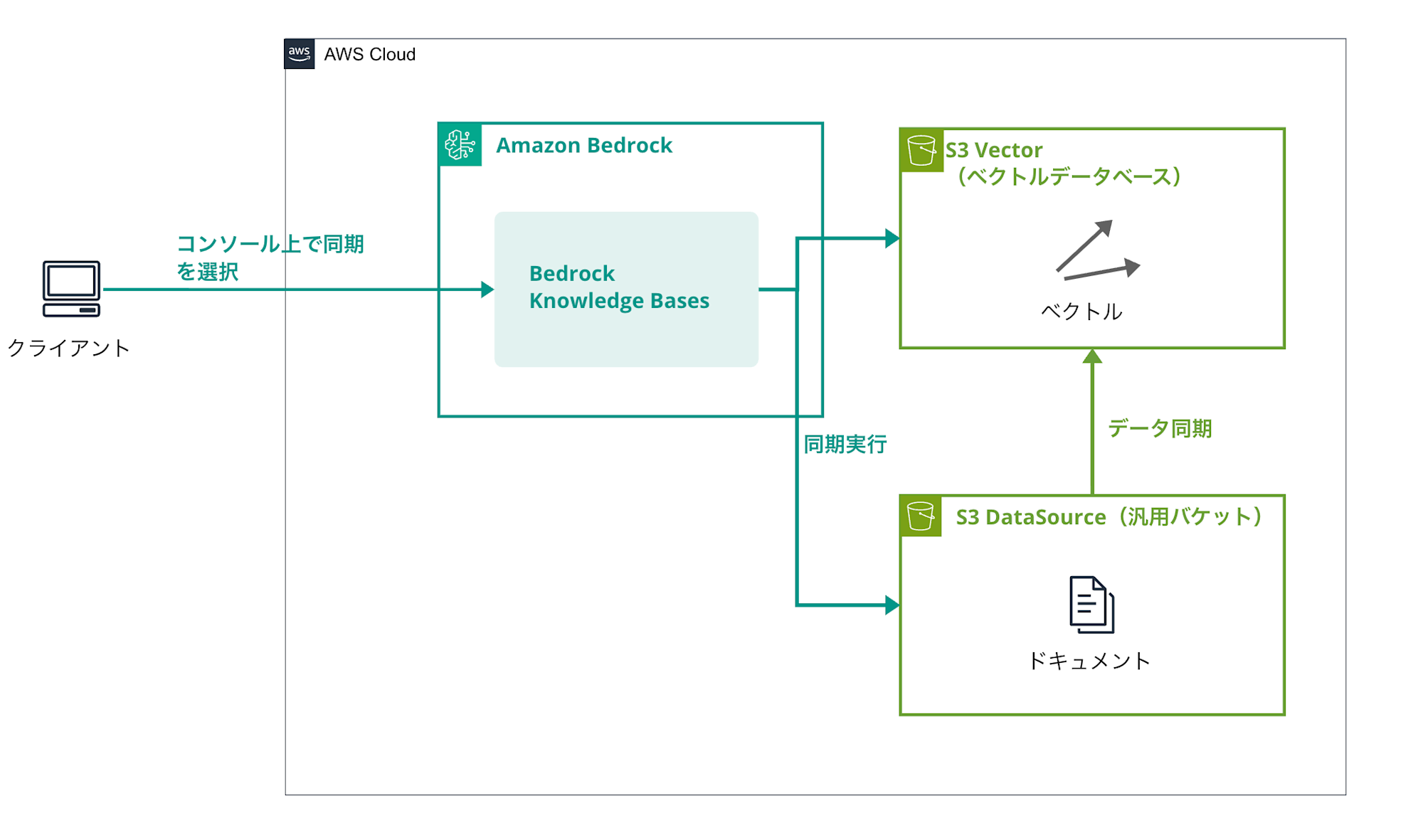
Data Preparation
We'll synchronize data from the S3 data source (documents we want to incorporate into RAG) to the vector database.
This is where vectorization takes place.
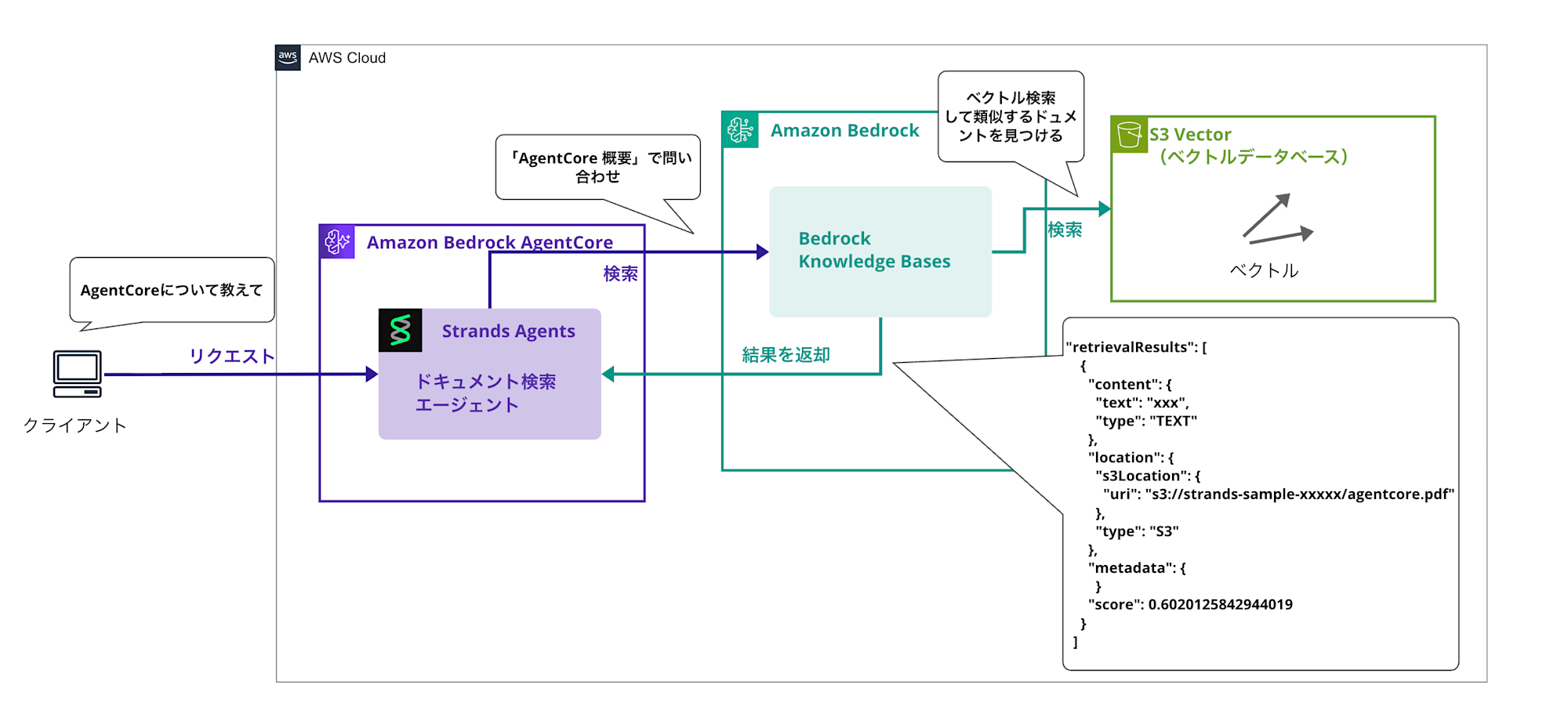
Search
When a question from a user is received (e.g., "Tell me about AgentCore"), the retrieve tool is executed to search for similar documents from Knowledge Bases and obtain the results.
Answer Generation Phase
The retrieved search results are added to the LLM's context to generate an answer to the question.
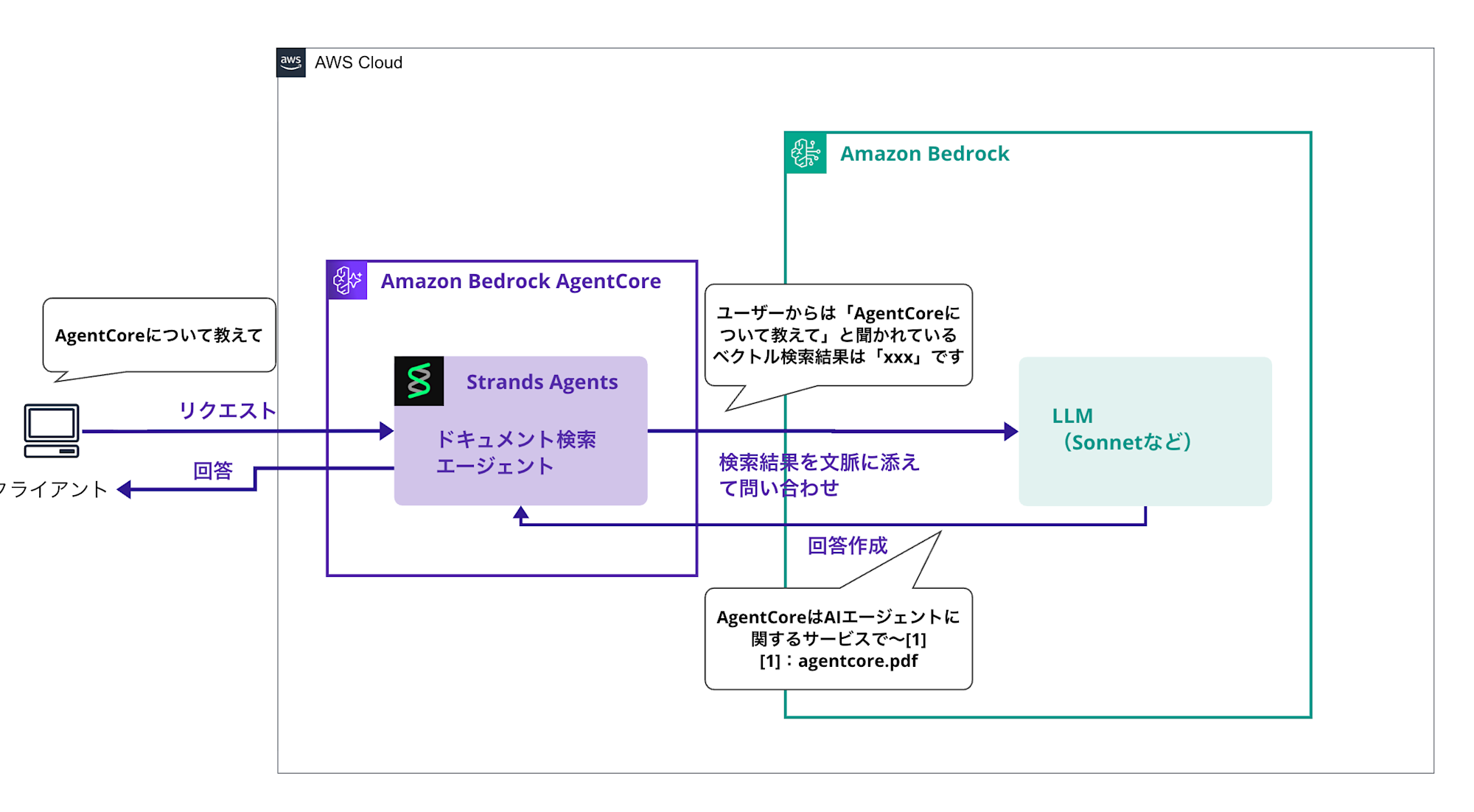
With this mechanism, we'll create a simple RAG that allows the LLM to answer questions while referencing documents.
I'll check the behavior of the created AI agent with GenU.
For details about GenU integration, please refer to the article below. I'll skip the GenU integration in this article.
The sample code for this article is stored in the repository below, so please refer to it as needed.
Prerequisites
- AWS CLI 2.28.8
- Python 3.12.6
- AWS account
- Region to use: us-west-2
- The models to be used need to be enabled in advance.
- GenU version used: v5.1.1
- Docker version 27.5.1-rd, build 0c97515
- IAM role
- We'll use a role with the following policies attached for the AgentCore agent. The role automatically created by the
configurecommand doesn't include permissions for Bedrock Knowledge Bases.
- We'll use a role with the following policies attached for the AgentCore agent. The role automatically created by the
IAM Policy
Please change the account ID (123456789012) in the following policy to your own AWS account ID.
{
    "Version": "2012-10-17",
    "Statement": [
        {
            "Sid": "ECRImageAccess",
            "Effect": "Allow",
            "Action": [
                "ecr:BatchGetImage",
                "ecr:GetDownloadUrlForLayer"
            ],
            "Resource": [
                "arn:aws:ecr:us-west-2:123456789012:repository/*"
            ]
        },
        {
            "Effect": "Allow",
            "Action": [
                "logs:DescribeLogStreams",
                "logs:CreateLogGroup"
            ],
            "Resource": [
                "arn:aws:logs:us-west-2:123456789012:log-group:/aws/bedrock-agentcore/runtimes/*"
            ]
        },
        {
            "Effect": "Allow",
            "Action": [
                "logs:DescribeLogGroups"
            ],
            "Resource": [
                "arn:aws:logs:us-west-2:123456789012:log-group:*"
            ]
        },
        {
            "Effect": "Allow",
            "Action": [
                "logs:CreateLogStream",
                "logs:PutLogEvents"
            ],
            "Resource": [
                "arn:aws:logs:us-west-2:123456789012:log-group:/aws/bedrock-agentcore/runtimes/*:log-stream:*"
            ]
        },
        {
            "Sid": "ECRTokenAccess",
            "Effect": "Allow",
            "Action": [
                "ecr:GetAuthorizationToken"
            ],
            "Resource": "*"
        },
        {
            "Effect": "Allow",
            "Action": [
                "xray:PutTraceSegments",
                "xray:PutTelemetryRecords",
                "xray:GetSamplingRules",
                "xray:GetSamplingTargets"
            ],
            "Resource": [
                "*"
            ]
        },
        {
            "Effect": "Allow",
            "Resource": "*",
            "Action": "cloudwatch:PutMetricData",
            "Condition": {
                "StringEquals": {
                    "cloudwatch:namespace": "bedrock-agentcore"
                }
            }
        },
        {
            "Sid": "GetAgentAccessToken",
            "Effect": "Allow",
            "Action": [
                "bedrock-agentcore:GetWorkloadAccessToken",
                "bedrock-agentcore:GetWorkloadAccessTokenForJWT",
                "bedrock-agentcore:GetWorkloadAccessTokenForUserId"
            ],
            "Resource": [
                "arn:aws:bedrock-agentcore:us-west-2:123456789012:workload-identity-directory/default",
                "arn:aws:bedrock-agentcore:us-west-2:123456789012:workload-identity-directory/default/workload-identity/agent-*"
            ]
        },
        {
            "Sid": "BedrockModelInvocation",
            "Effect": "Allow",
            "Action": [
                "bedrock:InvokeModel",
                "bedrock:InvokeModelWithResponseStream",
                "bedrock:ApplyGuardrail"
            ],
            "Resource": [
                "arn:aws:bedrock:*::foundation-model/*",
                "arn:aws:bedrock:us-west-2:123456789012:*"
            ]
        },
        {
            "Sid": "KBManagement",
            "Effect": "Allow",
            "Action": [
                "bedrock:CreateKnowledgeBase",
                "bedrock:GetKnowledgeBase",
                "bedrock:UpdateKnowledgeBase",
                "bedrock:DeleteKnowledgeBase",
                "bedrock:ListKnowledgeBases",
                "bedrock:TagResource",
                "bedrock:UntagResource"
            ],
            "Resource": "*"
        },
        {
            "Sid": "KBDataSourceManagement",
            "Effect": "Allow",
            "Action": [
                "bedrock:CreateDataSource",
                "bedrock:GetDataSource",
                "bedrock:UpdateDataSource",
                "bedrock:DeleteDataSource",
                "bedrock:ListDataSources",
                "bedrock:StartIngestionJob",
                "bedrock:GetIngestionJob",
                "bedrock:ListIngestionJobs",
                "bedrock:Retrieve"
            ],
            "Resource": "*"
        }
    ]
}
Note: This policy has very loose permissions for testing purposes. For production environments, it's recommended to follow the principle of least privilege and restrict permissions to the minimum necessary.
Preparation
Preparing Data Source
Creating an S3 Bucket
First, let's create an S3 bucket and upload documents.
For the S3 bucket creation, select the General purpose bucket type, enter any name, and create with default settings for everything else.
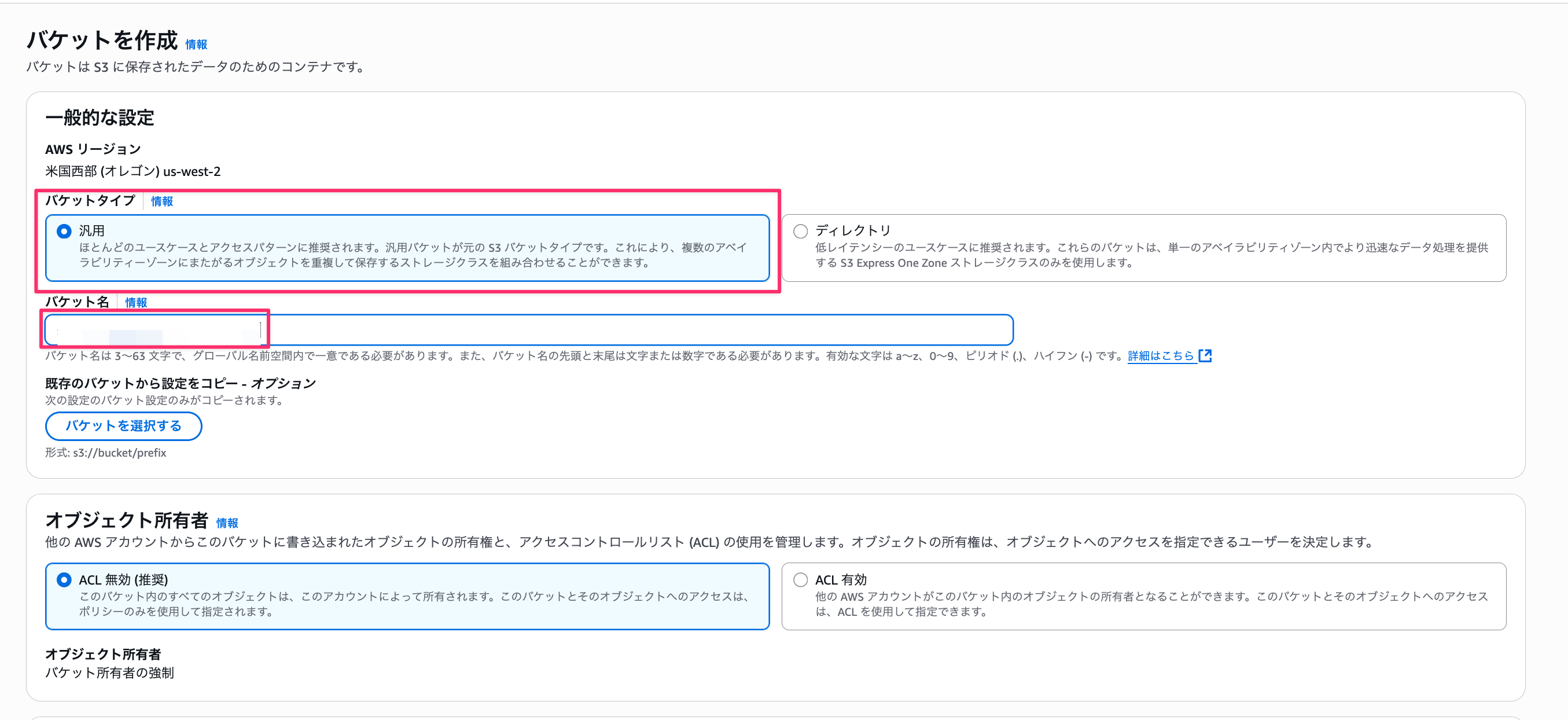
Once created, upload the documents you want to search.
This time, I'll upload the AgentCore PDF document I recently created.
Creating a Knowledge Base Manually
-
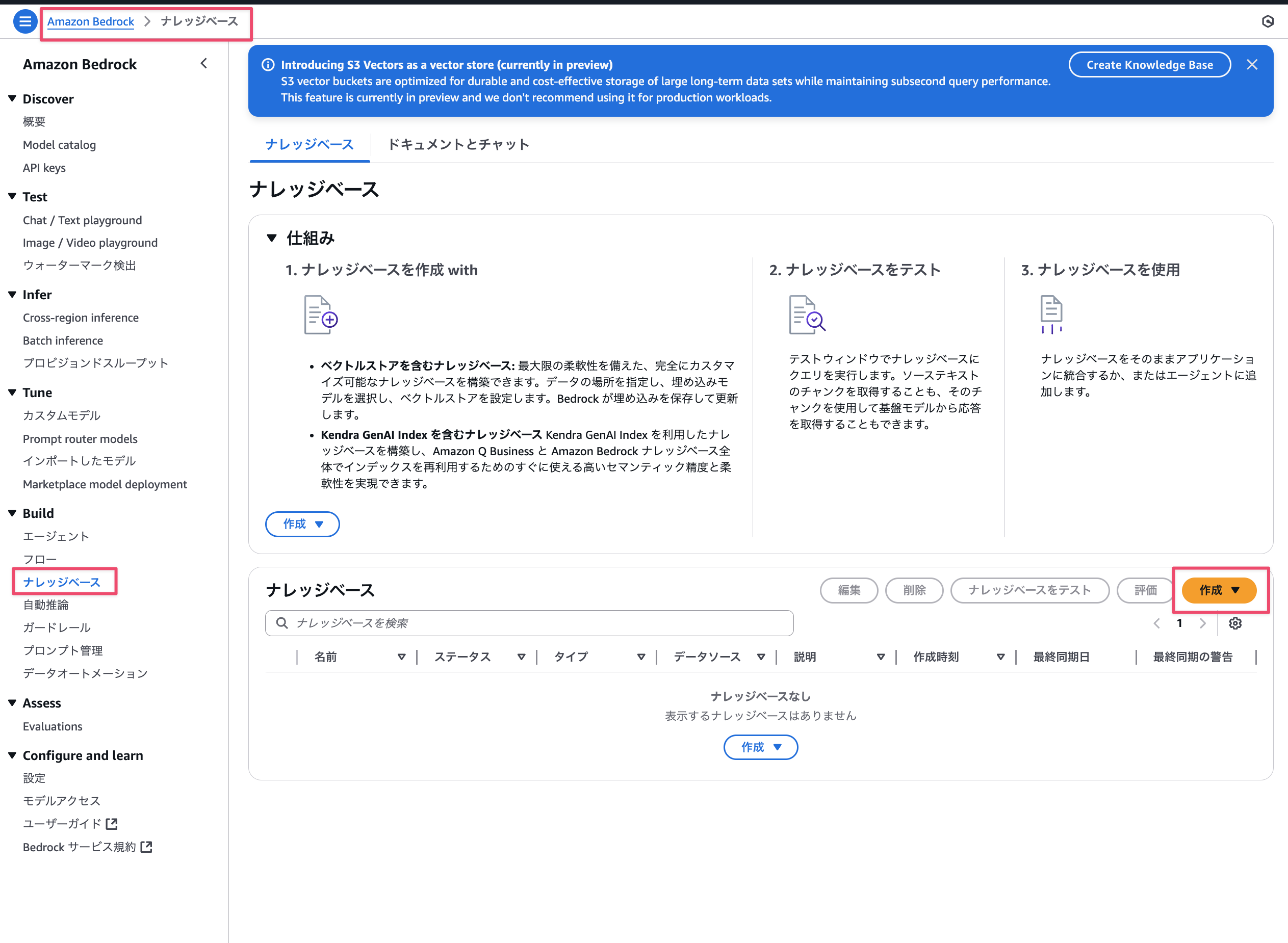
Go to the Bedrock console → Knowledge bases → Select Create button.
-
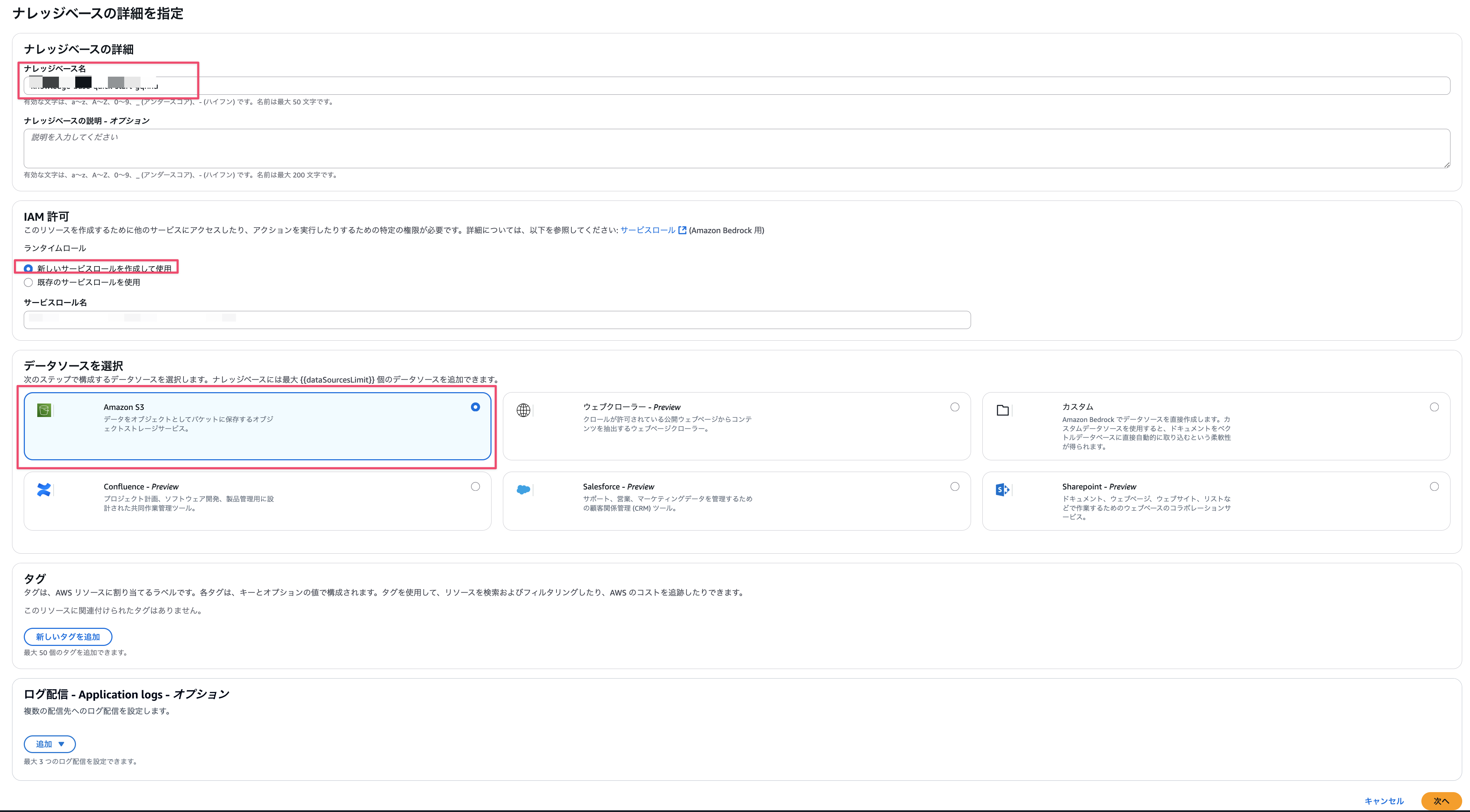
Select knowledge base name, IAM permissions, and data source.
- Knowledge base name: any name
- IAM permissions: For this time, select
Create and use a new service role. - Select data source: Choose
Amazon S3
-
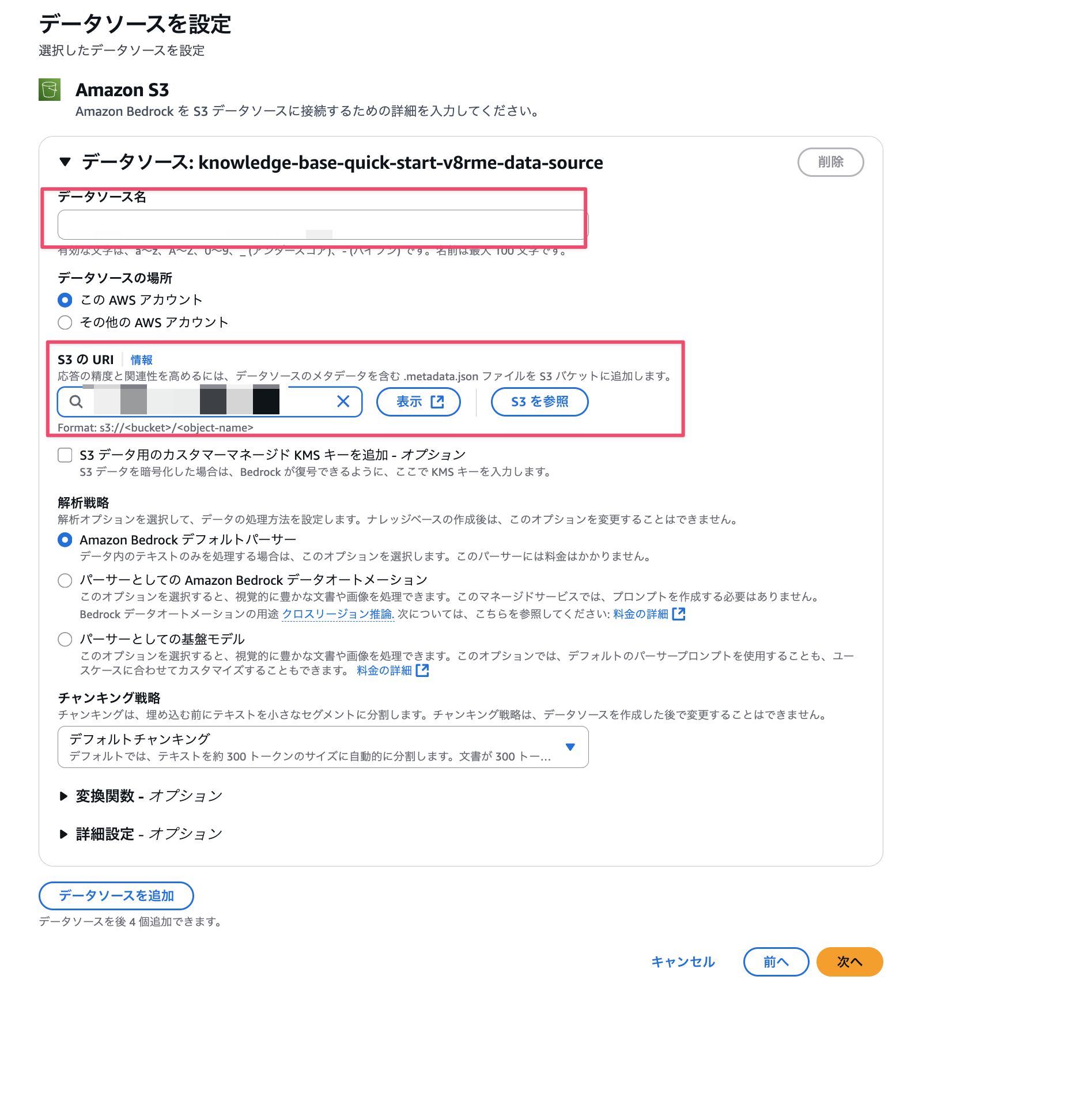
Select the S3 bucket we created earlier as the data source and enter any name for the data source name. For everything else, we'll use the default settings for vectorization.
-
Select the embedding model. This time, we'll use
Titan Text Embeddings v2provided by Amazon. For the vector database, selectQuick create a new vector storeand chooseAmazon S3 Vectorsfor automatic creation.
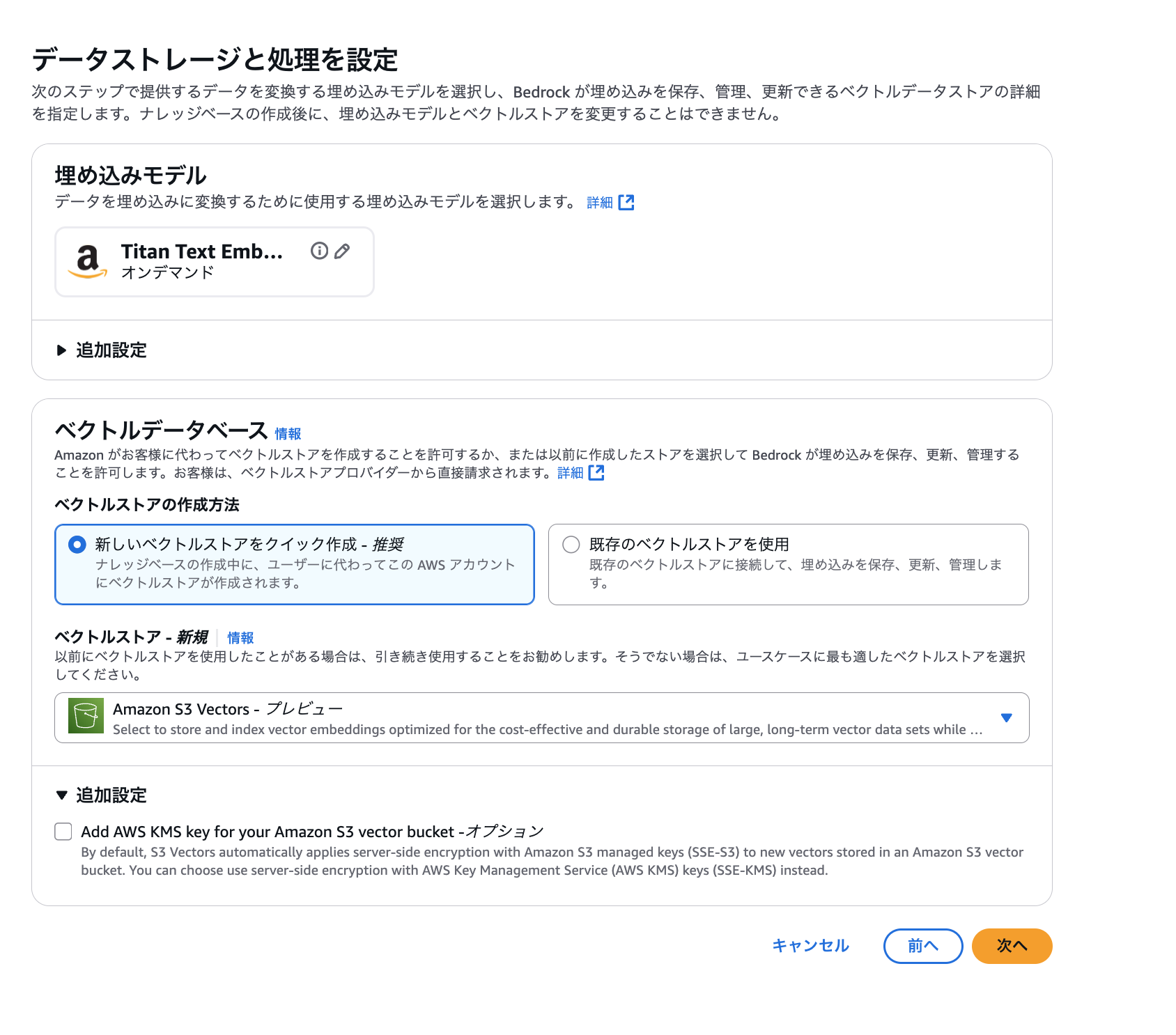
It's convenient that it's created automatically. -
Finally, a confirmation screen will be displayed. If everything looks good, select Create knowledge base.
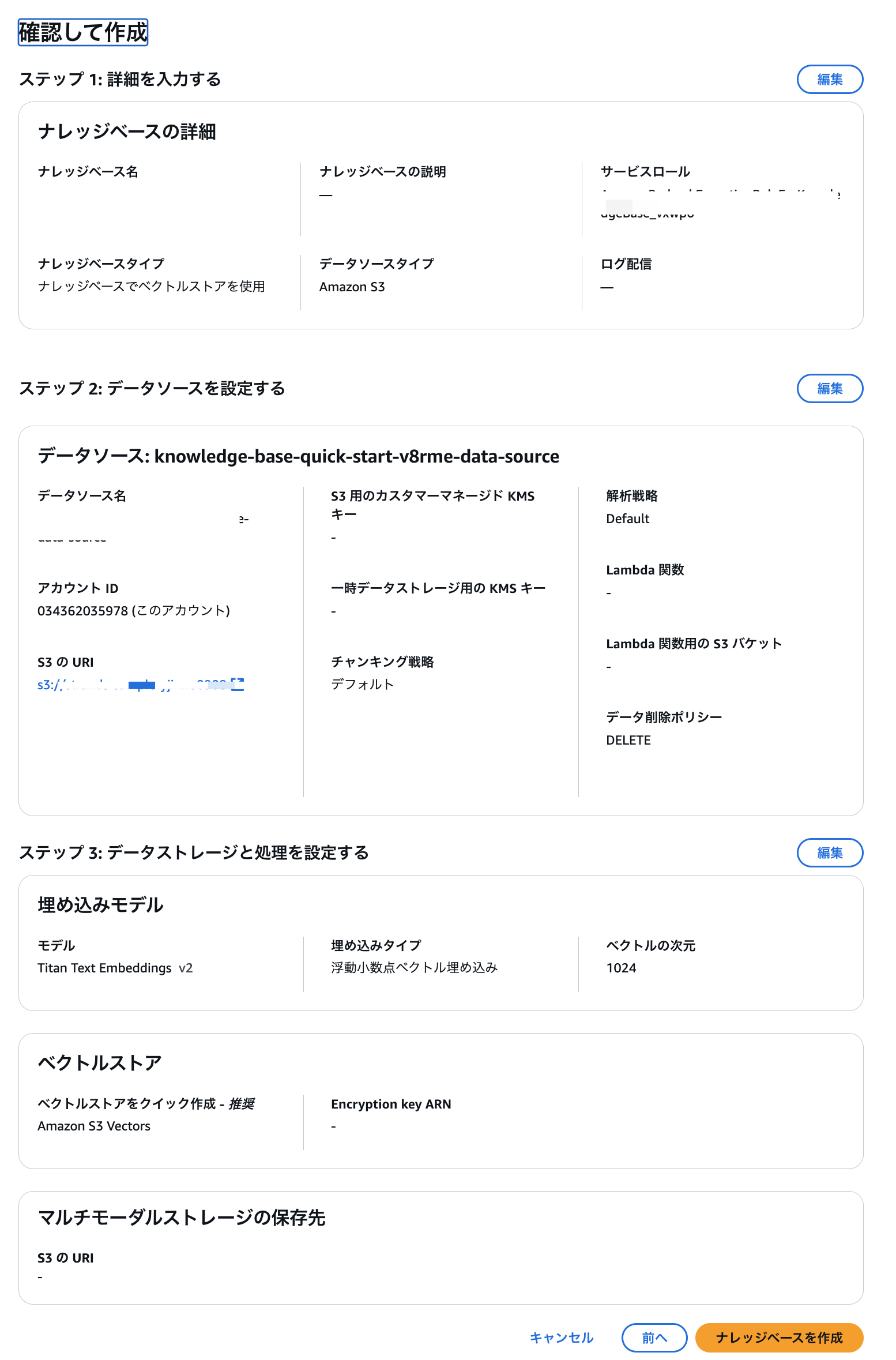
Once successfully created, synchronize the data source and vector store.
Select the created data source name and click the Sync button.
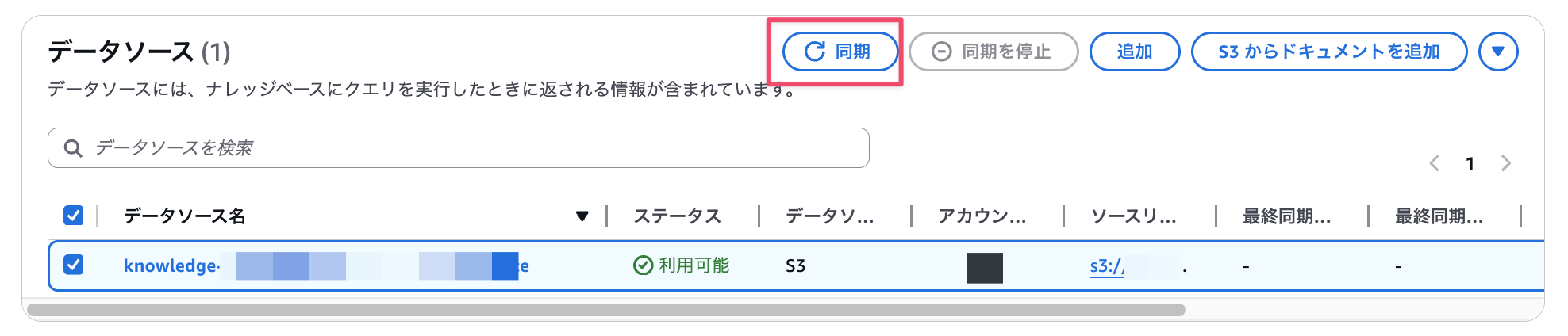
After waiting for a while, a completion message will be displayed.

Once completed, click Test knowledge base to see if it returns as expected.
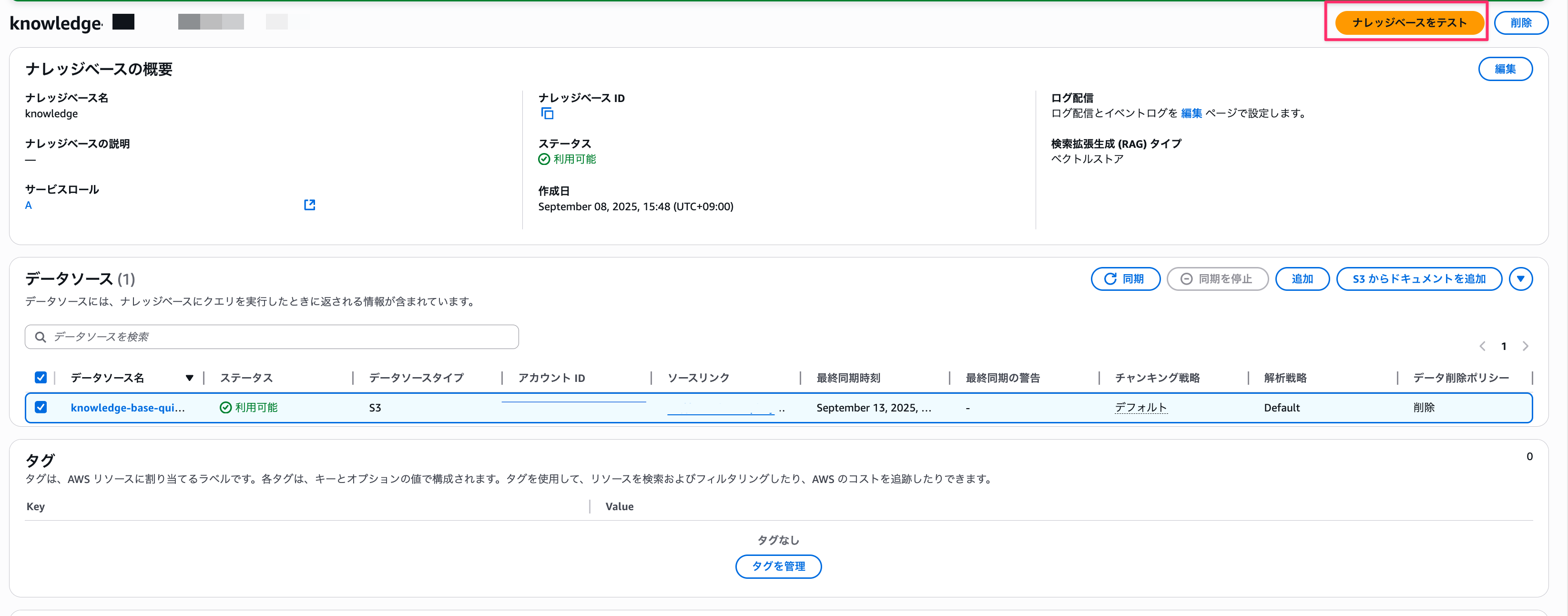
Select Retrieve and generate response, choose any model (I chose Nova Pro), and ask a question.
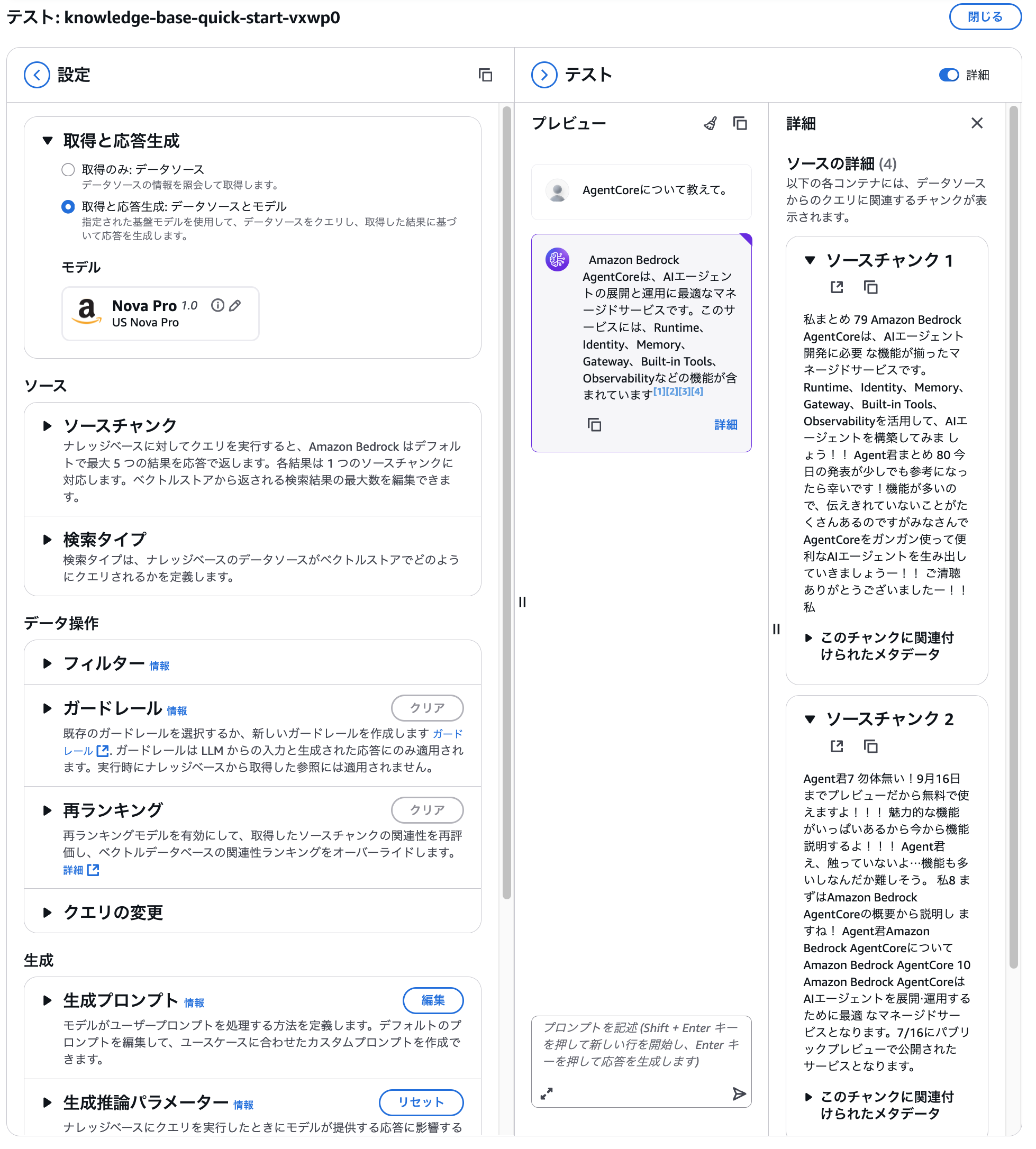
We can see that it's properly referencing the uploaded document.
Next, we'll create an AI agent using this knowledge base.
We'll need the knowledge base ID for the next steps, so let's make note of it.

The noted knowledge base ID will be set as an environment variable when starting the agent.
Include it in the command as follows:
agentcore launch --env STRANDS_KNOWLEDGE_BASE_ID=your-knowledge-base-id
Installing Libraries
Dependencies are listed in requirements.txt and installed as follows.
strands-agents
strands-agents-tools
bedrock-agentcore
bedrock-agentcore-starter-toolkit
pip install -r requirements.txt
retrieve Implementation
First, let's build RAG using the Strands Tools' retrieve function.
The entire code process is as follows. Since it's lengthy, I'll hide it and explain the key points.
Full Code
import os
import logging
from strands import Agent, tool
from strands.models import BedrockModel
from bedrock_agentcore.runtime import BedrockAgentCoreApp
from strands_tools import retrieve as retrieve_module

LOG_LEVEL = os.getenv("LOG_LEVEL", "INFO").upper()
logging.basicConfig(
    level=getattr(logging, LOG_LEVEL, logging.INFO),
    format="%(asctime)s %(levelname)s %(name)s - %(message)s",
)
logger = logging.getLogger("strands")

app = BedrockAgentCoreApp()

SYSTEM_PROMPT = """
# RAG System Prompt

## Basic Policy
You are an assistant that provides accurate and useful answers based on search results. Please follow the guidelines below when responding.

## Response Rules

### 1. Using Search Results
- Use only the provided search results as your information source
- For information not included in the search results, do not speculate or supplement with general knowledge; clearly state "not included in the search results"
- When there are multiple search results, integrate them to create a comprehensive response

### 2. Citation Method
- Always include citation numbers for information in your response (e.g., [1], [2])
- Include a "## References" section at the end of your response with the following format:
[1] Title - Source (URL, date, etc.)
[2] Title - Source (URL, date, etc.)
### 3. Response Format
- Answer in clear and concise Japanese
- Use headings and bullet points to organize important points
- For lengthy responses, include a summary at the beginning

### 4. When Information is Insufficient
- If search results are not sufficient for the question, clearly state this
- If you can partially answer, clearly indicate which aspects you can address

## Response Example

**Question:** Please explain how solar power generation works.

**Answer:**

Solar power generation is a system that directly converts sunlight into electrical energy using solar cells (solar cells)[1].

### Basic Mechanism
Solar cells are primarily made from semiconductor materials such as silicon, and when sunlight hits them, electrons move due to the photoelectric effect, generating current[1]. Since this current is direct current, it needs to be converted to alternating current using a device called an inverter for use as standard household power[2].

### Main Components
- **Solar panels**: Convert sunlight to electricity[1]
- **Inverter**: Convert DC to AC[2]
- **Power conditioner**: Adjust and control power[2]

### Generation Efficiency
The conversion efficiency of common solar cells today is around 15-20%[1].

## References
[1] Solar Power Basics - New Energy Foundation (https://example.com/solar-basics, April 2023)
[2] Solar Power System Components - Energy Technology Institute (https://example.com/solar-system, March 2023)

---

## Notes
- If search results contain outdated information, please note this
- If there are conflicting pieces of information, present both perspectives
- When using technical terms, include simple explanations whenever possible
"""

STRANDS_KNOWLEDGE_BASE_ID = os.environ.get("STRANDS_KNOWLEDGE_BASE_ID", "XXXXXXXXXX")

@app.entrypoint
async def entrypoint(payload):
  logger.info("Processing started")
  message = payload.get("prompt", "")
  logger.info("prompt=%r", message)
  str_message = str(message)
  logger.info("str_message=%r", str_message)
  model = payload.get("model", {})
  model_id = model.get("modelId","anthropic.claude-3-5-haiku-20241022-v1:0")
  model = BedrockModel(model_id=model_id, params={"max_tokens": 4096, "temperature": 0.7}, region="us-west-2")
  agent = Agent(model=model, system_prompt=SYSTEM_PROMPT, tools=[retrieve_module])

  # Retrieving from Knowledge Base (only if environment variable is valid)
  augmented_prompt = str_message
  kb_id = STRANDS_KNOWLEDGE_BASE_ID
  logger.info("kb_id=%s", kb_id)
  try:
      if kb_id and kb_id != "your_kb_id":
          kb_results = agent.tool.retrieve(
              text=str_message,
              knowledgeBaseId=kb_id,
              numberOfResults=9,
              score=0.4,
              region="us-west-2",
          )
          logger.info("kb_results=%s", kb_results)
          kb_block = str(kb_results)
          logger.info("kb_block=%s", kb_block)
          if kb_block:
              augmented_prompt = (
                  "The following are search results from the Knowledge Base. Please always cite using numbers in your response.\n"
                  "Search Results:\n" + kb_block + "\n\n"
                  "User Question:\n" + str_message
              )
  except Exception as e:
      # Fall back to normal response if KB retrieval fails
      logger.exception("Failed to retrieve from Knowledge Base")
      augmented_prompt = str_message

  stream_messages = agent.stream_async(augmented_prompt)
  async for message in stream_messages:
      if "event" in message:
          yield message

if __name__ == "__main__":
  app.run()
Let's first look at the system prompt.
It instructs the model to use only the provided search results as sources and include reference information.
SYSTEM_PROMPT = """
# RAG System Prompt

## Basic Policy
You are an assistant that provides accurate and useful answers based on search results. Please follow the guidelines below when responding.

## Response Rules

### 1. Using Search Results
- Use only the provided search results as your information source
- For information not included in the search results, do not speculate or supplement with general knowledge; clearly state "not included in the search results"
- When there are multiple search results, integrate them to create a comprehensive response

### 2. Citation Method
- Always include citation numbers for information in your response (e.g., [1], [2])
- Include a "## References" section at the end of your response with the following format:
  ```
  [1] Title - Source (URL, date, etc.)
  [2] Title - Source (URL, date, etc.)
  ```

### 3. Response Format
- Answer in clear and concise Japanese
- Use headings and bullet points to organize important points
- For lengthy responses, include a summary at the beginning

### 4. When Information is Insufficient
- If search results are not sufficient for the question, clearly state this
- If you can partially answer, clearly indicate which aspects you can address

## Response Example

**Question:** Please explain how solar power generation works.

**Answer:**

Solar power generation is a system that directly converts sunlight into electrical energy using solar cells (solar cells)[1].

### Basic Mechanism
Solar cells are primarily made from semiconductor materials such as silicon, and when sunlight hits them, electrons move due to the photoelectric effect, generating current[1]. Since this current is direct current, it needs to be converted to alternating current using a device called an inverter for use as standard household power[2].

### Main Components
- **Solar panels**: Convert sunlight to electricity[1]
- **Inverter**: Convert DC to AC[2]
- **Power conditioner**: Adjust and control power[2]

### Generation Efficiency
The conversion efficiency of common solar cells today is around 15-20%[1].

## References
[1] Solar Power Basics - New Energy Foundation (https://example.com/solar-basics, April 2023)
[2] Solar Power System Components - Energy Technology Institute (https://example.com/solar-system, March 2023)

---

## Notes
- If search results contain outdated information, please note this
- If there are conflicting pieces of information, present both perspectives
- When using technical terms, include simple explanations whenever possible
Set the retrieve tool in the tools list and call it.
# import
from strands_tools import retrieve

# ~omitted~

# Specify retrieve
agent = Agent(model=model, system_prompt=SYSTEM_PROMPT, tools=[retrieve])
# ~omitted~

# Use the tool
kb_results = agent.tool.retrieve(
	text=str_message,
	knowledgeBaseId=kb_id,
	numberOfResults=9,
	score=0.4,
	region="us-west-2",
)
Include the retrieved results in the context for the LLM to answer.
augmented_prompt = (
	"The following are search results from the Knowledge Base. Please always cite using numbers in your response.\n"
	"Search Results:\n" + kb_block + "\n\n"
	"User Question:\n" + str_message
)
Implementation complete! Simple, right? Let's proceed with deployment.
First, create a configuration file using the agentcore configure command.
Specify a pre-created IAM role. Other settings can remain as default.
agentcore configure --entrypoint agent.py

# Specify a pre-created IAM role for AgentCore
🔐 Execution Role
Press Enter to auto-create execution role, or provide execution role ARN/name to use existing
Execution role ARN/name (or press Enter to auto-create):
After configuration is complete, run the agentcore launch command to deploy.
agentcore launch --env STRANDS_KNOWLEDGE_BASE_ID=your-knowledge-base-id
Once deployed, let's test it in GenU!
I'll ask "Tell me about AgentCore."
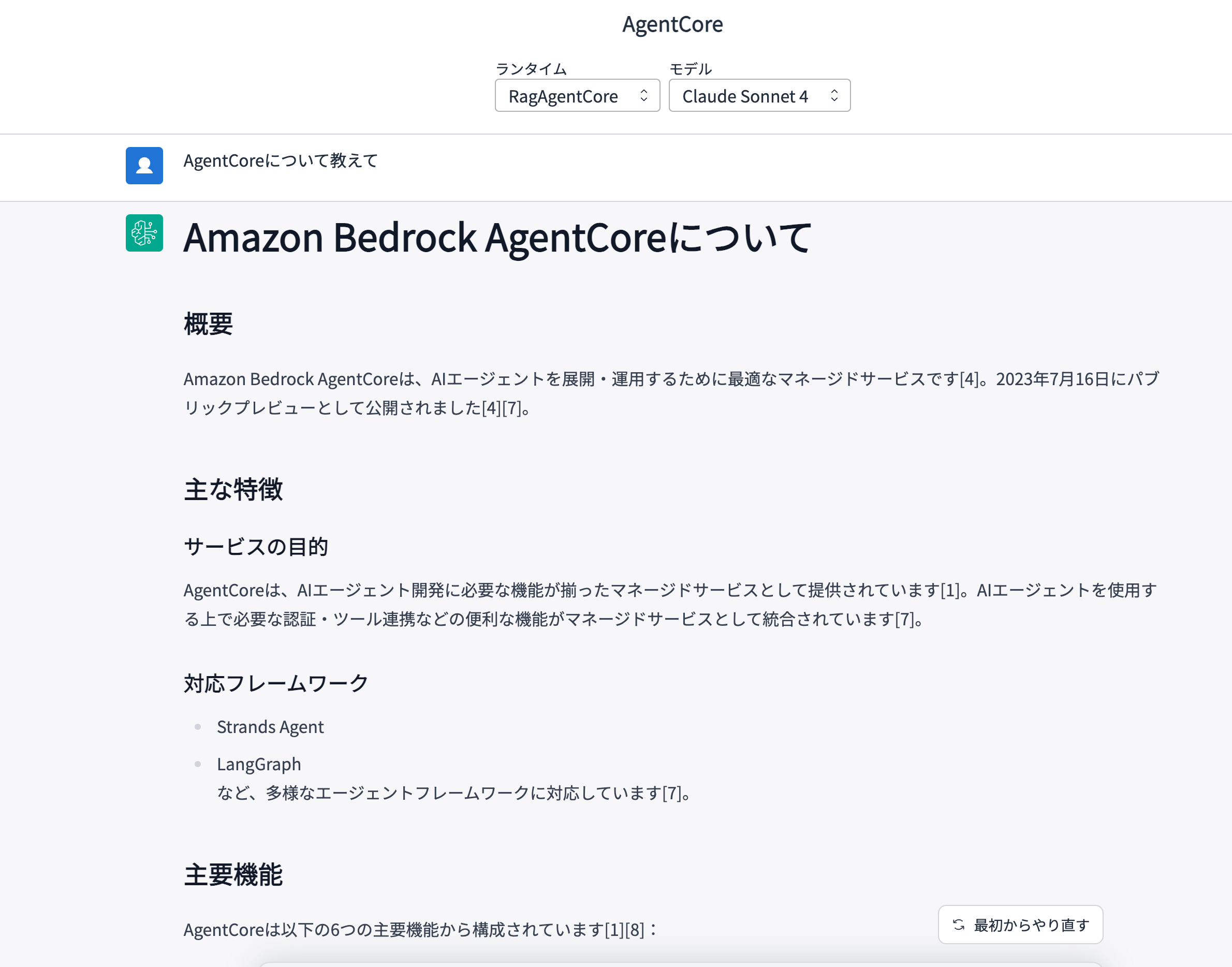
# Amazon Bedrock AgentCore

## Overview
Amazon Bedrock AgentCore is an optimized managed service for deploying and operating AI agents[4]. It was released as a public preview on July 16, 2023[4][7].

## Key Features

### Purpose of the Service
AgentCore is provided as a managed service with all the necessary functions for AI agent development[1]. It integrates authentication, tool integration, and other useful features needed when using AI agents as a managed service[7].

### Supported Frameworks
- Strands Agents
- LangGraph
and various other agent frameworks[7].

## Main Functions

AgentCore consists of six main functions[1][8]:

### 1. Runtime
- **Function**: Hosting capability[8]
- **Description**: Foundation for deploying AI agents[8]

### 2. Identity
- **Function**: Authentication[8]
- **Description**: Manages access control to AI agents

### 3. Gateway
- **Function**: Tool conversion for external processing[8]
- **Description**: Streamlines integration with external services

### 4. Memory
- **Function**: Memory capabilities[8]
- **Examples**:
  - Short-term Memory: Stores daily conversation history[6]
  - Long-term Memory: Stores summaries of personal weaknesses or learning content[6]

### 5. Built-in Tools
The following execution environments are provided[2][8]:
- **Code Interpreter**: Environment for safely executing code[2]
- **Browser**: Environment for operating a browser[2]

### 6. Observability
- **Function**: Visualizes AI agent operations[2]
- **Features**:
  - Ability to see AI agent movements on a timeline[2]
  - Tracking of tool usage[2]
  - Span-level effective time monitoring[2]
  - Easy identification of bottlenecks[2]

## What is an AI Agent?
An AI agent is an AI system that can make judgments and act autonomously[7]. It understands user instructions and executes tasks by planning and using necessary tools on its own[7]. It's a system that works methodically as a human proxy[9].

## Preview Period
It can be used for free during the preview period until September 16[4].

## References
[1] Search Result 1 - Amazon Bedrock AgentCore Summary Document
[2] Search Result 2 - AgentCore Visualization Feature Explanation
[3] Search Result 3 - Yudai Kamino Profile and Presentation Materials
[4] Search Result 4 - Amazon Bedrock AgentCore Overview
[5] Search Result 5 - Amazon Bedrock AgentCore Explanation Slides
[6] Search Result 6 - AgentCore Memory Function Usage Examples
[7] Search Result 7 - AI Agent Framework Compatibility Explanation
[8] Search Result 8 - Amazon Bedrock AgentCore Function List
[9] Search Result 9 - AI Agent Use Cases
It answered correctly! Great... but wait? The references aren't properly returned...?
I wondered if perhaps the tool wasn't retrieving S3 links properly.
I checked by logging the tool's retrieval results.
{
  "content": [{
    "text": "Retrieved 9 results with score >= 0.4:\n\nScore: 0.5354\nDocument ID: Unknown\nContent: 私まとめ 79 Amazon Bedrock AgentCoreは、AIエージェント開発に必要 な機能が揃ったマネージドサービスです。...",
    "formatted_results": [
      {
        "score": 0.5354,
        "document_id": "Unknown",
        "content": "私まとめ 79 Amazon Bedrock AgentCoreは、AIエージェント開発に必要 な機能が揃ったマネージドサービスです。Runtime、Identity、Memory、Gateway、Built-in Tools、Observabilityを活⽤して、AIエージェントを構築してみましょう!!"
      },
      {
        "score": 0.5102,
        "document_id": "Unknown",
        "content": "具体的な可視化を⾒てみる 66 下記のようにタイムライン上でAIエージェントの動きを確認することができます。例えばtoolを使⽤したのは⾚枠のように確認できます。"
      }
    ]
  }]
}
Looking at the logs, indeed Document ID: Unknown appears.
I was hoping an S3 URL would be included here...
Let's check the specific implementation of retrieve.
The formatting logic in retrieve limits source references to customDocumentLocation. In our case, the URI is in the s3Location field, which is why Document ID is always "Unknown" and we can't get the S3 URL. The issue is that the response data layout is different from what's expected, preventing proper parsing and S3 URL retrieval.
Note: This behavior is based on the
retrievetool specification as of September 2025. As Strands Tools is actively developed, this may be improved in future updates. Please check the official repository for the latest specifications.
retrieve implementation
doc_id = result.get("location", {}).get("customDocumentLocation", {}).get("id", "Unknown")
...
text = content["text"]
formatted.append(f"Content: {text}\n")
Response example when using S3 as knowledge base
{
  "ResponseMetadata": {
    "RequestId": "xxxx-xxxx-xxxx-xxxx",
    "HTTPStatusCode": 200
  },
  "retrievalResults": [
    {
      "content": {
        "text": "私まとめ 79 Amazon Bedrock AgentCoreは、AIエージェント開発に必要な機能が揃ったマネージドサービスです。Runtime、Identity、Memory、Gateway、Built-in Tools、Observabilityを活用して、AIエージェントを構築してみましょう!!",
        "type": "TEXT"
      },
      "location": {
        "s3Location": {
          "uri": "s3://strands-sample-xxxxx/Amazon Bedrock AgentCoreを使ってみよう! 〜各種機能のポイントを解説〜 (5).pdf"
        },
        "type": "S3"
      },
      "metadata": {
        "x-amz-bedrock-kb-source-uri": "s3://strands-sample-xxxxx/Amazon Bedrock AgentCoreを使ってみよう! 〜各種機能のポイントを解説〜 (5).pdf",
        "x-amz-bedrock-kb-document-page-number": 78.0,
        "x-amz-bedrock-kb-chunk-id": "f47935bc-4296-426b-a6fa-f74f0d775244",
        "x-amz-bedrock-kb-data-source-id": "XXXXXXXXXX"
      },
      "score": 0.6020125842944019
    }
  ]
}
Switching to a Custom Tool
If simply returning information is sufficient, that's fine, but we want to ensure citation accuracy, right? I decided to create a custom tool called kb_search that extracts only the necessary elements from the Bedrock Knowledge Bases response and returns them as JSON.
Implementation of kb_search
The full code is quite long so I've collapsed it.
I'll explain just the key points.
Full code
import os
import json
from typing import Optional
import boto3
from strands import Agent, tool
from strands.models import BedrockModel
from bedrock_agentcore.runtime import BedrockAgentCoreApp

app = BedrockAgentCoreApp()

SYSTEM_PROMPT = """
# RAG System Prompt

## Basic Policy
You are an assistant that provides accurate and useful answers based on search results. Please follow these guidelines for your responses.

## Response Rules

### 1. Utilizing Search Results
- Use only the provided search results as information sources
- For information not included in the search results, do not make assumptions or supplement with general knowledge; clearly state "Not included in the search results"
- If there are multiple search results, integrate them to create a comprehensive answer

### 2. Citation Method
- Always include citation numbers for information in your answer (e.g., [1], [2])
- Include a "## References" section after your answer in the following format:
  ```
  [1] Title - Source (URL, date, etc.)
  [2] Title - Source (URL, date, etc.)
  ```
- If search results are provided as JSON, extract the uri from each item and use it as the URL in the references
- For references, clearly indicate "filename and S3 URL". Use the end of the URI as the filename (e.g., s3://bucket/path/file.pdf → file.pdf), and use location.s3Location.uri (or metadata.x-amz-bedrock-kb-source-uri if not available). If there's a page number, add (p.<number>).
  Example:
  ```
  [1] s3://strands-sample-xxx/Amazon Bedrock AgentCoreを使ってみよう! 〜各種機能のポイントを解説〜 (5).pdf (p.78)
  [2] s3://strands-sample-xxx/Amazon Bedrock AgentCoreを使ってみよう! 〜各種機能のポイントを解説〜 (5).pdf (p.4)
  ```

### 3. Response Format
- Answer in clear and concise Japanese
- Organize important points using headings and bullet points
- For longer answers, include a summary at the beginning

### 4. When Information is Insufficient
- If search results are insufficient for the question, clearly state this
- If you can provide a partial answer, clearly specify the scope of what you can answer

### 5. Tool Usage
- This agent can use the `kb_search(query, max_results?)` tool
- Call `kb_search` with appropriate queries before answering and use the results as evidence
- When there are multiple results, prioritize those with higher importance and integrate them, avoiding duplication
- Number citations in the order used and match them with the "References" section at the end (including title/URL/date as available)

## Answer Example

**Question:** Please explain how solar power generation works.

**Answer:**

Solar power generation is a system that converts sunlight directly into electrical energy using solar cells (solar cells)[1].

### Basic Mechanism
Solar cells are mainly made of semiconductor materials such as silicon, and when exposed to sunlight, electrons move due to the photoelectric effect, generating an electric current[1]. Since this current is direct current, it needs to be converted to alternating current using a device called an inverter for use as general household power[2].

### Main Components
- **Solar Panels**: Convert sunlight into electricity[1]
- **Inverter**: Convert DC to AC[2]
- **Power Conditioner**: Adjusts and controls power[2]

### Generation Efficiency
The conversion efficiency of typical solar cells today is about 15-20%[1].

## References
[1] Solar Power Generation Basics - New Energy Foundation (https://example.com/solar-basics, April 2023)
[2] Solar Power System Configuration - Energy Technology Institute (https://example.com/solar-system, March 2023)

---

## Notes
- If the search results contain outdated information, please mention this
- If there is contradictory information, present both perspectives
- When using technical terms, provide easy-to-understand explanations whenever possible
"""

STRANDS_KNOWLEDGE_BASE_ID = os.environ.get("STRANDS_KNOWLEDGE_BASE_ID", "XXXXXXXXXX")

# =========================
# Bedrock KB Tool Setup
# =========================
BEDROCK_CLIENT = None
KB_REGION = os.environ.get("AWS_REGION", "us-west-2")
KB_MAX_RESULTS = int(os.environ.get("BEDROCK_KB_MAX_RESULTS", "5"))

def _ensure_bedrock_client(region_name: Optional[str] = None):
    global BEDROCK_CLIENT
    if BEDROCK_CLIENT is None:
        region = region_name or KB_REGION
        BEDROCK_CLIENT = boto3.client("bedrock-agent-runtime", region_name=region)
    return BEDROCK_CLIENT

@tool
def kb_search(query: str, max_results: Optional[int] = None) -> str:
    """
    Search (Retrieve) related documents from the knowledge base.

    Args:
        query: Search query
        max_results: Maximum number of items to retrieve (defaults to environment variable if omitted)

    Returns:
        JSON string (including success, results, etc.)
    """
    try:
        client = _ensure_bedrock_client()
        kb_id = STRANDS_KNOWLEDGE_BASE_ID
        if not kb_id:
            return json.dumps({
                "success": False,
                "error": "Environment variable STRANDS_KNOWLEDGE_BASE_ID is not set",
                "results": [],
            }, ensure_ascii=False)

        num = max_results or KB_MAX_RESULTS
        response = client.retrieve(
            knowledgeBaseId=kb_id,
            retrievalQuery={"text": query},
            retrievalConfiguration={
                "vectorSearchConfiguration": {
                    "numberOfResults": num,
                    "overrideSearchType": "SEMANTIC",
                }
            },
        )

        items = []
        for r in response.get("retrievalResults", []):
            content = r.get("content", {})
            location = r.get("location", {})
            metadata = r.get("metadata", {})
            s3loc = location.get("s3Location", {})
            page = metadata.get("x-amz-bedrock-kb-document-page-number")
            if isinstance(page, float) and page.is_integer():
                page = int(page)
            items.append({
                "content": content.get("text", ""),
                "type": content.get("type"),
                "score": r.get("score", 0),
                "uri": s3loc.get("uri") or metadata.get("x-amz-bedrock-kb-source-uri"),
                "page": page,
                "chunkId": metadata.get("x-amz-bedrock-kb-chunk-id"),
                "dataSourceId": metadata.get("x-amz-bedrock-kb-data-source-id"),
            })
        return json.dumps({
            "success": True,
            "query": query,
            "results_count": len(items),
            "results": items,
        }, ensure_ascii=False)
    except Exception as e:
        return json.dumps({
            "success": False,
            "query": query,
            "error": str(e),
            "results": [],
        }, ensure_ascii=False)

@app.entrypoint
async def entrypoint(payload):
    message = payload.get("prompt", "")
    model = payload.get("model", {})
    model_id = model.get("modelId", "anthropic.claude-3-5-haiku-20241022-v1:0")
    model = BedrockModel(
        model_id=model_id,
        params={"max_tokens": 4096, "temperature": 0.7},
        region=KB_REGION,
    )
    agent = Agent(
        model=model,
        system_prompt=SYSTEM_PROMPT,
        tools=[kb_search],
    )

    stream_messages = agent.stream_async(message)
    async for message in stream_messages:
        if "event" in message:
            yield message

if __name__ == "__main__":
    app.run()
We define the tool using the @tool decorator.
It's a simple process that queries the Knowledge Base and processes the results before returning the response.
We extract the S3 document URL that wasn't properly extracted earlier.
@tool
def kb_search(query: str, max_results: Optional[int] = None) -> str:
    """
    Search (Retrieve) related documents from the knowledge base.

    Args:
        query: Search query
        max_results: Maximum number of items to retrieve (defaults to environment variable if omitted)

    Returns:
        JSON string (including success, results, etc.)
    """
    try:
        client = _ensure_bedrock_client()
        kb_id = STRANDS_KNOWLEDGE_BASE_ID
        if not kb_id:
            return json.dumps({
                "success": False,
                "error": "Environment variable STRANDS_KNOWLEDGE_BASE_ID is not set",
                "results": [],
            }, ensure_ascii=False)

        num = max_results or KB_MAX_RESULTS
        response = client.retrieve(
            knowledgeBaseId=kb_id,
            retrievalQuery={"text": query},
            retrievalConfiguration={
                "vectorSearchConfiguration": {
                    "numberOfResults": num,
                    "overrideSearchType": "SEMANTIC",
                }
            },
        )

        items = []
        for r in response.get("retrievalResults", []):
            content = r.get("content", {})
            location = r.get("location", {})
            metadata = r.get("metadata", {})
            s3loc = location.get("s3Location", {})
            page = metadata.get("x-amz-bedrock-kb-document-page-number")
            if isinstance(page, float) and page.is_integer():
                page = int(page)
            items.append({
                "content": content.get("text", ""),
                "type": content.get("type"),
                "score": r.get("score", 0),
                "uri": s3loc.get("uri") or metadata.get("x-amz-bedrock-kb-source-uri"),
                "page": page,
                "chunkId": metadata.get("x-amz-bedrock-kb-chunk-id"),
                "dataSourceId": metadata.get("x-amz-bedrock-kb-data-source-id"),
            })
        return json.dumps({
            "success": True,
            "query": query,
            "results_count": len(items),
            "results": items,
        }, ensure_ascii=False)
    except Exception as e:
        return json.dumps({
            "success": False,
            "query": query,
            "error": str(e),
            "results": [],
        }, ensure_ascii=False)
Let's slightly modify the prompt.
We'll include instructions to use the tool and extract URLs.
SYSTEM_PROMPT = """
# RAG System Prompt

## Basic Policy
You are an assistant that provides accurate and useful answers based on search results. Please follow these guidelines for your responses.

## Response Rules

### 1. Utilizing Search Results
- Use only the provided search results as information sources
- For information not included in the search results, do not make assumptions or supplement with general knowledge; clearly state "Not included in the search results"
- If there are multiple search results, integrate them to create a comprehensive answer

### 2. Citation Method
- Always include citation numbers for information in your answer (e.g., [1], [2])
- Include a "## References" section after your answer in the following format:
  ```
  [1] Title - Source (URL, date, etc.)
  [2] Title - Source (URL, date, etc.)
  ```
- If search results are provided as JSON, extract the uri from each item and use it as the URL in the references
- For references, clearly indicate "filename and S3 URL". Use the end of the URI as the filename (e.g., s3://bucket/path/file.pdf → file.pdf), and use location.s3Location.uri (or metadata.x-amz-bedrock-kb-source-uri if not available). If there's a page number, add (p.<number>).
  Example:
  ```
  [1] s3://strands-sample-xxx/Amazon Bedrock AgentCoreを使ってみよう! 〜各種機能のポイントを解説〜 (5).pdf (p.78)
  [2] s3://strands-sample-xxx/Amazon Bedrock AgentCoreを使ってみよう! 〜各種機能のポイントを解説〜 (5).pdf (p.4)
  ```

### 3. Response Format
- Answer in clear and concise Japanese
- Organize important points using headings and bullet points
- For longer answers, include a summary at the beginning

### 4. When Information is Insufficient
- If search results are insufficient for the question, clearly state this
- If you can provide a partial answer, clearly specify the scope of what you can answer

### 5. Tool Usage
- This agent can use the `kb_search(query, max_results?)` tool
- Call `kb_search` with appropriate queries before answering and use the results as evidence
- When there are multiple results, prioritize those with higher importance and integrate them, avoiding duplication
- Number citations in the order used and match them with the "References" section at the end (including title/URL/date as available)

## Answer Example

**Question:** Please explain how solar power generation works.

**Answer:**

Solar power generation is a system that converts sunlight directly into electrical energy using solar cells (solar cells)[1].

### Basic Mechanism
Solar cells are mainly made of semiconductor materials such as silicon, and when exposed to sunlight, electrons move due to the photoelectric effect, generating an electric current[1]. Since this current is direct current, it needs to be converted to alternating current using a device called an inverter for use as general household power[2].

### Main Components
- **Solar Panels**: Convert sunlight into electricity[1]
- **Inverter**: Convert DC to AC[2]
- **Power Conditioner**: Adjusts and controls power[2]

### Generation Efficiency
The conversion efficiency of typical solar cells today is about 15-20%[1].

## References
[1] Solar Power Generation Basics - New Energy Foundation (https://example.com/solar-basics, April 2023)
[2] Solar Power System Configuration - Energy Technology Institute (https://example.com/solar-system, March 2023)

---

## Notes
- If the search results contain outdated information, please mention this
- If there is contradictory information, present both perspectives
- When using technical terms, provide easy-to-understand explanations whenever possible
"""
We'll update the agent configuration to use kb_search as a tool.
# Change to use kb_search
agent = Agent(
        model=model,
        system_prompt=SYSTEM_PROMPT,
        tools=[kb_search],
)
Now we're ready! Let's deploy to AgentCore again.
agentcore launch --env STRANDS_KNOWLEDGE_BASE_ID=your-knowledge-base-id
Let's verify it in GenU.
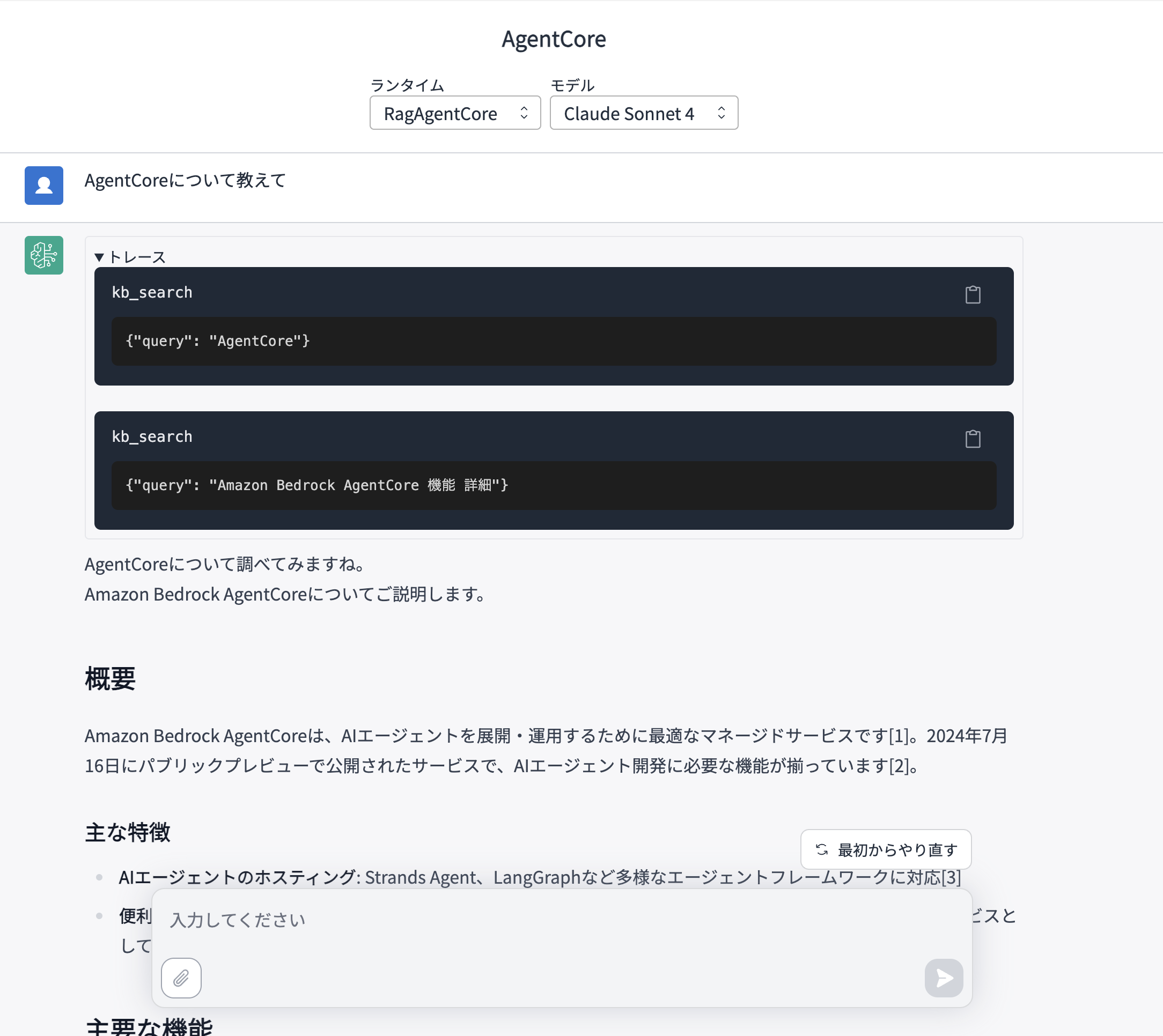
The tool is being executed properly.
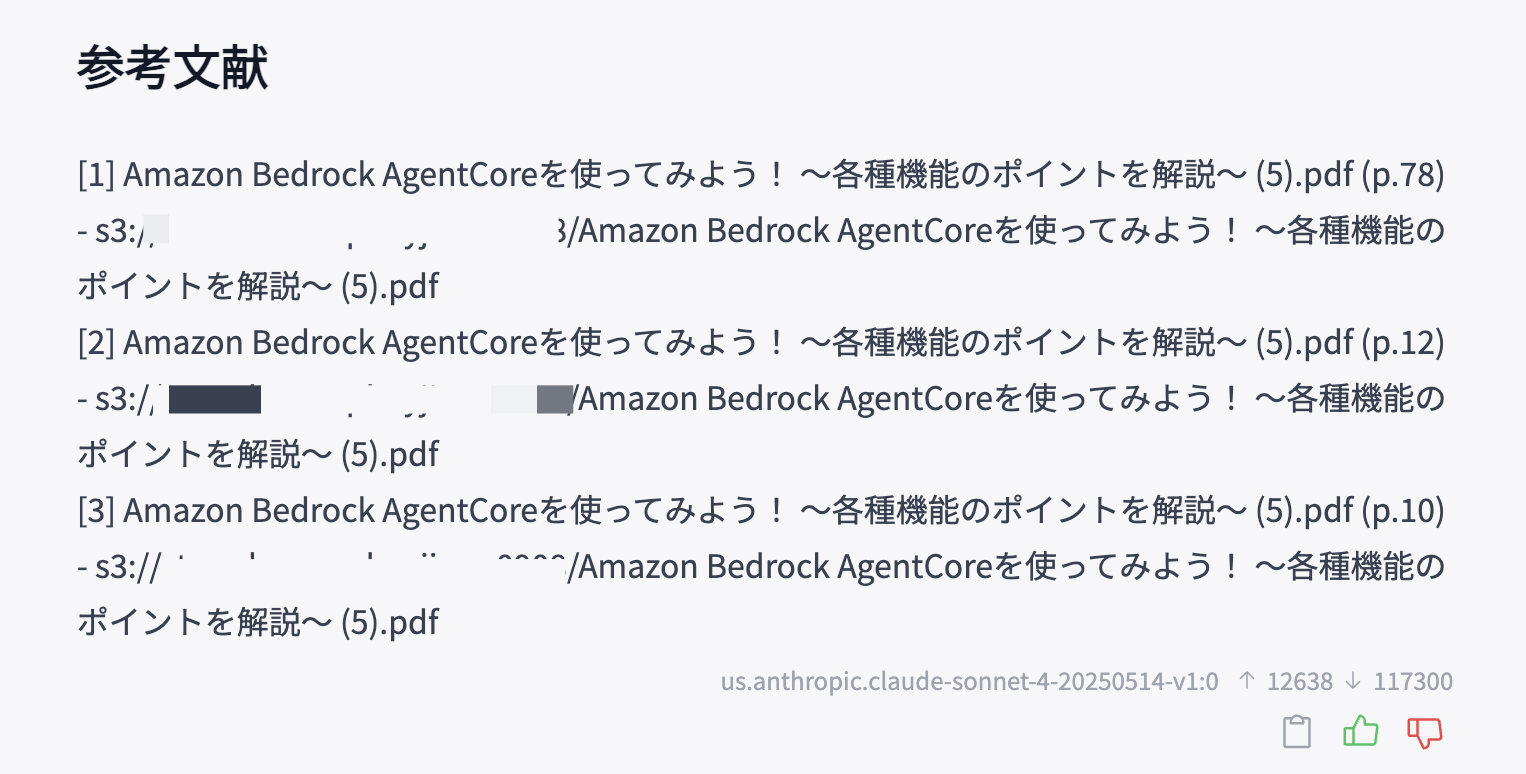
Let's check how the references look.
Full answer
I'll look up information about AgentCore for you.
Let me explain Amazon Bedrock AgentCore.

## Overview

Amazon Bedrock AgentCore is an optimal managed service for deploying and operating AI agents[1]. It was released in public preview on July 16, 2024, and includes all the necessary functions for AI agent development[2].

### Key Features
- **AI Agent Hosting**: Supports various agent frameworks including Strands Agents, LangGraph, and more[3]
- **Convenient Managed Service**: Provides useful managed services for authentication, tool integration, and other functions when using AI agents[3]

## Main Functions

Amazon Bedrock AgentCore has the following six main functions[2]:

### 1. **Runtime**
- Hosting functionality[2]
- Foundational capability for deploying AI agents

### 2. **Identity**
- Access control and authentication for AI agents[2]

### 3. **Gateway**
- Tool creation functionality for external processing[2]
- Enables integration with external services

### 4. **Memory**
- Functionality to store conversation history and state of AI agents[2]

### 5. **Built-in Tools**
AgentCore includes the following convenient built-in tools[2]:
- **Code Interpreter**: Code execution environment
- **Browser**: Browser execution environment

### 6. **Observability**
- Functionality to monitor the operational status of AI agents[1]

## What is an AI Agent?

An AI agent is an AI system that can make judgments and act autonomously. It understands user instructions, plans and uses necessary tools on its own to execute tasks[3].

## Summary

Amazon Bedrock AgentCore is a managed service that enables efficient construction of AI agents using Runtime, Identity, Memory, Gateway, Built-in Tools, and Observability[1]. It supports various agent frameworks and provides integrated functionalities necessary for AI agent development.

## References
[1] Amazon Bedrock AgentCoreを使ってみよう! 〜各種機能のポイントを解説〜 (5).pdf (p.78) - s3://strands-sample-xxxxx/Amazon Bedrock AgentCoreを使ってみよう! 〜各種機能のポイントを解説〜 (5).pdf
[2] Amazon Bedrock AgentCoreを使ってみよう! 〜各種機能のポイントを解説〜 (5).pdf (p.12) - s3://strands-sample-xxxxx/Amazon Bedrock AgentCoreを使ってみよう! 〜各種機能のポイントを解説〜 (5).pdf
[3] Amazon Bedrock AgentCoreを使ってみよう! 〜各種機能のポイントを解説〜 (5).pdf (p.10) - s3://strands-sample-xxxxx/Amazon Bedrock AgentCoreを使ってみよう! 〜各種機能のポイントを解説〜 (5).pdf
Great! The response includes reference links!
We've successfully created a simple RAG system.
Conclusion
In this article, we created a simple RAG using S3 Vectors + Knowledge Bases + Strands Agents.
While the retrieve tool didn't work exactly as I expected, it's sufficient if you just want to retrieve document information.
When we needed to get reference documents from the knowledge base, we had to create a custom solution, but it wasn't too difficult to implement, which is great.
I hope this article was helpful! Thank you for reading to the end!