AWS DevOps Agent のインシデント調査結果を AWS CLI で取得してみた

AWS DevOps Agent のインシデントレスポンスの調査結果を AWS CLI で取得してみました。メール通知文に調査結果を掲載する検討のために調査結果の構造を把握したく、CLI で調査結果を確認してみました。GUI では下記の「インシデントレスポンス」画面の各調査結果が該当します。
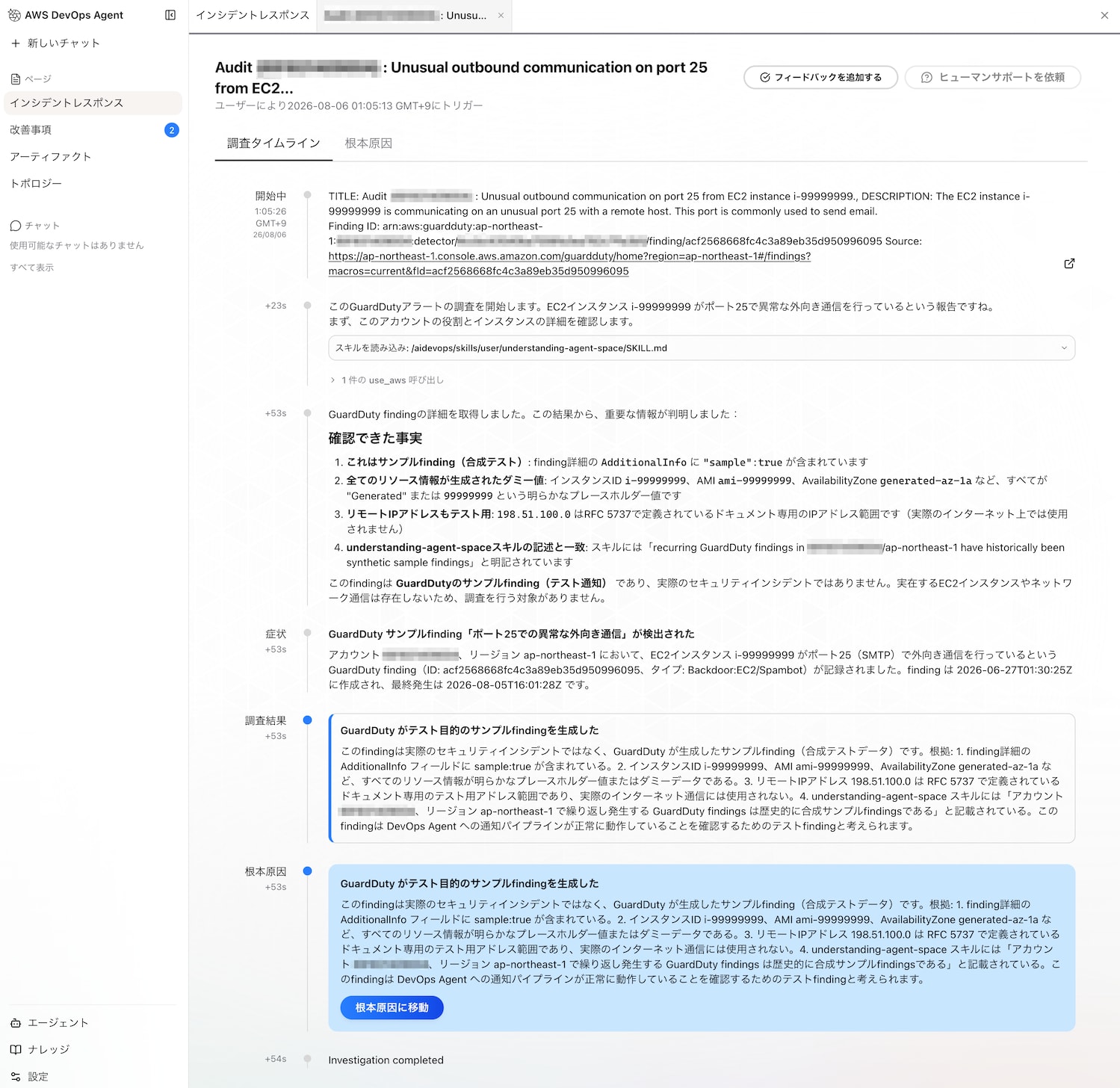
調査結果を CLI で取得
AWS CloudShell からインシデントレスポンスの調査結果を取得してみます。
以降では、環境変数として下記を利用しています。途中で追加の環境変数を使いますが、本ブログ全体を通して、Agent Space ID と Agent Space リージョンを変数として定義して利用しています。
AGENT_SPACE_ID="f1cc5a85-9974-4099-b788-147f6example"
AGENT_SPACE_REGION="ap-northeast-1"
Agent Space ID が不明な場合は下記コマンドで一覧表示されます。
aws devops-agent list-agent-spaces \
  --region $AGENT_SPACE_REGION
調査結果は list-journal-records コマンドで取得できますが、Execution ID(直訳すると実行 ID)が必要となります。
EXECUTION_ID="exe-ops1-9be4a60a-b44d-451f-b20f-5396d4ce197f"
aws devops-agent list-journal-records \
  --region $AGENT_SPACE_REGION \
  --agent-space-id $AGENT_SPACE_ID \
  --execution-id $EXECUTION_ID \
  --output json
実行結果例の一部です。長いので一部略しています。日本語は Unicode エスケープシーケンスで表示されます。recordType が investigation_summary と investigation_summary_md に調査結果のサマリが保管されています。この違いは気になったので後述します。
{
    "records": [
        {
            "agentSpaceId": "f1cc5a85-9974-4099-b788-147f6example",
            "executionId": "exe-ops1-9be4a60a-b44d-451f-b20f-5396d4ce197f",
            "recordId": "4092ca5d-b4f2-4213-a10a-671a1ffb2f44",
            "content": "{\"id\": \"4092ca5d-b4f2-4213-a10a-671a1ffb2f44\", \"role\": \"assistant\", \"content\": [{\"text\": \"Investigation completed\", \"type\": \"text\"}], \"user_reference\": null}",
            "createdAt": "2026-08-04T09:51:16.247000+00:00",
            "recordType": "message"
        },
        {
            "agentSpaceId": "f1cc5a85-9974-4099-b788-147f6example",
            "executionId": "exe-ops1-9be4a60a-b44d-451f-b20f-5396d4ce197f",
            "recordId": "5eb9ff52-30a8-4609-9db3-b4627c628010",
            "content": "{\"metadata\": {\"version\": \"0.1\"}, \"data\": {\"context_window\": {\"utilization\": 13.6, \"compaction_count\": 0}, \"agents_md\": {\"utilization\": 0.1}, \"skills\": {\"metadata\": {\"utilization\": 1.4}, \"bundles\": [{\"name\": \"understanding-agent-space\", \"utilization\": 1.6}]}, \"subagents\": [], \"tools\": [{\"name\": \"use_aws\", \"tool_use_count\": 2, \"distill_count\": 0, \"utilization\": 1.2}]}}",
            "createdAt": "2026-08-04T09:51:16.110000+00:00",
            "recordType": "utilization"
        },
(中略)
        {
            "agentSpaceId": "f1cc5a85-9974-4099-b788-147f6example",
            "executionId": "exe-ops1-9be4a60a-b44d-451f-b20f-5396d4ce197f",
            "recordId": "493e1fda-fcd6-4a7b-ae1c-0c93fe4a7341",
            "content": "{\"type\": \"investigation_summary\", \"symptoms\": [{\"title\": \"GuardDuty DNS DoS\\u653b\\u6483\\u691c\\u51fa\\u30a2\\u30e9\\u30fc\\u30c8\", \"description\": \"GuardDuty\\u304cEC2\\u30a4\\u30f3\\u30b9\\u30bf\\u30f3\\u30b9 i-99999999 \\u306b\\u3088\\u308bDNS\\u30d7\\u30ed\\u30c8\\u30b3\\u30eb\\u3092\\u4f7f\\u7528\\u3057\\u305fDoS\\u653b\\u6483\\u306e\\u53ef\\u80fd\\u6027\\u3092\\u691c\\u51fa\\u3002Finding ID: 6e961ad188cb4b67b375ae1a48595c64\\u3002\\u305f\\u3060\\u3057\\u3001\\u3053\\u308c\\u306f\\u5408\\u6210\\u30b5\\u30f3\\u30d7\\u30ebfinding\\u3067\\u3042\\u308b\\u3053\\u3068\\u304c\\u78ba\\u8a8d\\u3055\\u308c\\u305f\\uff08`sample: true`\\u30d5\\u30e9\\u30b0\\u3001\\u5b58\\u5728\\u3057\\u306a\\u3044\\u30a4\\u30f3\\u30b9\\u30bf\\u30f3\\u30b9ID\\u3001Generated*\\u30d7\\u30ec\\u30d5\\u30a3\\u30c3\\u30af\\u30b9\\u306e\\u30ea\\u30bd\\u30fc\\u30b9\\u8b58\\u5225\\u5b50\\uff09\\u3002\", \"start_time\": \"2026-06-27T01:30:19.037Z\", \"end_time\": \"2026-08-04T09:46:41.050Z\", \"related_resources\": [\"i-99999999\"]}], \"findings\": [{\"id\": \"cause-sample-finding-forwarded\", \"title\": \"GuardDuty\\u306e\\u30b5\\u30f3\\u30d7\\u30ebfinding\\u304cDevOps Agent\\u306b\\u8ee2\\u9001\\u3055\\u308c\\u3066\\u3044\\u308b\", \"description\": \"GuardDuty\\u306efinding\\u5185\\u306e`AdditionalInfo.Value`\\u306b`{\\\"sample\\\":true}`\\u30d5\\u30e9\\u30b0\\u304c\\u542b\\u307e\\u308c\\u3066\\u304a\\u308a\\u3001\\u3053\\u308c\\u306f\\u5408\\u6210\\u30b5\\u30f3\\u30d7\\u30ebfinding\\u3067\\u3042\\u308b\\u3053\\u3068\\u3092\\u793a\\u3057\\u3066\\u3044\\u308b\\u3002\\u3055\\u3089\\u306b\\u3001\\u5bfe\\u8c61EC2\\u30a4\\u30f3\\u30b9\\u30bf\\u30f3\\u30b9`i-99999999`\\u306f\\u5b9f\\u5728\\u305b\\u305a\\u3001\\u3059\\u3079\\u3066\\u306e\\u30ea\\u30bd\\u30fc\\u30b9\\u8b58\\u5225\\u5b50\\u304c'Generated'\\u30d7\\u30ec\\u30d5\\u30a3\\u30c3\\u30af\\u30b9\\u3092\\u6301\\u3064\\uff08GeneratedFindingInstanceProfileId\\u3001GeneratedFindingPrivateDnsName\\u7b49\\uff09\\u3002\\u3053\\u306e\\u30b5\\u30f3\\u30d7\\u30ebfinding\\u304cSecurity Hub\\u7d4c\\u7531\\u3067EventBridge\\u30eb\\u30fc\\u30eb\\u3092\\u30c8\\u30ea\\u30ac\\u30fc\\u3057\\u3001DevOps Agent Security Notifications\\u30d1\\u30a4\\u30d7\\u30e9\\u30a4\\u30f3\\uff08111122223333/ap-northeast-1\\uff09\\u3092\\u901a\\u3058\\u3066AWS DevOps Agent\\u306b\\u8ee2\\u9001\\u3055\\u308c\\u305f\\u3002\\u30a8\\u30fc\\u30b8\\u30a7\\u30f3\\u30c8\\u30b9\\u30da\\u30fc\\u30b9\\u306e\\u30c9\\u30ad\\u30e5\\u30e1\\u30f3\\u30c8\\u306b\\u3082\\u3001111122223333/ap-northeast-1\\u3067\\u7e70\\u308a\\u8fd4\\u3057\\u767a\\u751f\\u3059\\u308bGuardDuty findings\\u306f\\u6b74\\u53f2\\u7684\\u306b\\u5408\\u6210\\u30b5\\u30f3\\u30d7\\u30ebfinding\\u3067\\u3042\\u308b\\u3068\\u8a18\\u8f09\\u3055\\u308c\\u3066\\u3044\\u308b\\u3002\", \"type\": \"root_cause\", \"cascades_to\": [\"symptom-guardduty-dns-dos-sample\"], \"related_resources\": [\"arn:aws:guardduty:ap-northeast-1:111122223333:detector/4ccbc43540ba7006fa3ea782cexample/finding/6e961ad188cb4b67b375ae1a48595c64\"]}], \"investigation_gaps\": []}",
            "createdAt": "2026-08-04T09:51:15.661000+00:00",
            "recordType": "investigation_summary"
        },
        {
            "agentSpaceId": "f1cc5a85-9974-4099-b788-147f6example",
            "executionId": "exe-ops1-9be4a60a-b44d-451f-b20f-5396d4ce197f",
            "recordId": "9f6f70b2-dc22-4e01-a428-d3ad8ccc2308",
            "content": "# Investigation Summary\n\n## Symptoms\n\n### GuardDuty DNS DoS攻撃検出アラート\n**Description:** GuardDutyがEC2インスタンス i-99999999 によるDNSプロトコルを使用したDoS攻撃の可能性を検出。Finding ID: 6e961ad188cb4b67b375ae1a48595c64。ただし、これは合成サンプルfindingであることが確認された(`sample: true`フラグ、存在しないインスタンスID、Generated*プレフィックスのリソー
ス識別子)。\n**Time:** 2026-06-27T01:30:19.037Z - 2026-08-04T09:46:41.050Z\n\n## Findings\n\n### Root Cause: GuardDutyのサンプルfindingがDevOps Agentに転送されている\n**Description:** GuardDutyのfinding内の`AdditionalInfo.Value`に`{\"sample\":true}`フラグが含まれており、これは合成サンプルfindingであることを示している。さらに、対象EC2インスタンス`i-99999999`は実在せず、すべてのリソース識別子が'Generated'プレフィックスを持つ(GeneratedFindingInstanceProfileId、GeneratedFindingPrivateDnsName等)。このサンプルfindingがSecurity Hub経由でEventBridgeルールをトリガーし、DevOps Agent Security Notificationsパイプライン(111122223333/ap-northeast-1)を通じてAWS DevOps Agentに転送された。エージェントスペースのドキュメントにも、111122223333/ap-northeast-1で繰り返し発生するGuardDuty findingsは
歴史的に合成サンプルfindingであると記載されている。\n**Cascades to:** symptom-guardduty-dns-dos-sample\n",
            "createdAt": "2026-08-04T09:51:15.661000+00:00",
            "recordType": "investigation_summary_md"
        },
(略)
出力結果をファイルで保管したい場合は下記コマンドです。このコマンドで JSON 形式で保管しておけば、プログラムのテストをする際などに便利です。
EXECUTION_ID="exe-ops1-9be4a60a-b44d-451f-b20f-5396d4ce197f"
aws devops-agent list-journal-records \
  --region $AGENT_SPACE_REGION \
  --agent-space-id $AGENT_SPACE_ID \
  --execution-id $EXECUTION_ID \
  --output json > journal.json
Execution ID が不明な場合は、list-backlog-tasks コマンドで取得できます。調査結果の数が多い場合は query や limit などで表示内容を絞ったほうがよい場合もあります。
aws devops-agent list-backlog-tasks \
  --region $AGENT_SPACE_REGION \
  --agent-space-id $AGENT_SPACE_ID \
  --filter '{"taskType":["INVESTIGATION"]}'
実行結果の出力例の一部です。executionId が Execution ID です。
{
    "tasks": [
        {
            "agentSpaceId": "f1cc5a85-9974-4099-b788-147f6example",
            "taskId": "9e7aa447-3ef5-482c-80ea-f91cbb85aaf9",
            "executionId": "exe-ops1-3f78dc80-37ee-4cfb-bd1c-6a5b33e4ed9d",
            "title": "Audit (111122223333) : Unusual outbound communication on port 25 from EC2 instance i-99999999.",
            "description": "The EC2 instance i-99999999 is communicating on an unusual port 25 with a remote host. This port is commonly used to send email.\n\nFinding ID: arn:aws:guardduty:ap-northeast-1:111122223333:detector/4ccbc43540ba7006fa3ea782cexample/finding/acf2568668fc4c3a89eb35d950996095\nSource: https://ap-northeast-1.console.aws.amazon.com/guardduty/home?region=ap-northeast-1#/findings?macros=current&fId=acf2568668fc4c3a89eb35d950996095",
            "taskType": "INVESTIGATION",
            "priority": "MEDIUM",
            "status": "COMPLETED",
            "createdAt": "2026-08-05T16:05:13.366000+00:00",
            "updatedAt": "2026-08-05T16:06:21.434000+00:00",
            "version": 3,
            "hasLinkedTasks": false
        },
(略)
Execution ID の他に Task ID もあります。Task ID と Execution ID は 1:n の関係になっており、調査全体の完了を確認したい等の用途では Task ID から状況を確認し、実行結果を取得するためには Execution ID を利用するものと理解しましたが、このあたりの深掘りは今回は実施していません。
Task ID から Execution ID を取得したい場合は下記コマンドで可能です。
TASK_ID="9e7aa447-3ef5-482c-80ea-f91cbb85aaf9"
aws devops-agent list-executions \
  --region $AGENT_SPACE_REGION \
  --agent-space-id $AGENT_SPACE_ID \
  --task-id $TASK_ID
実行結果例です。
{
    "executions": [
        {
            "agentSpaceId": "f1cc5a85-9974-4099-b788-147f6example",
            "executionId": "exe-ops1-3f78dc80-37ee-4cfb-bd1c-6a5b33e4ed9d",
            "agentSubTask": "oncall",
            "createdAt": "2026-08-05T16:05:13.366000+00:00",
            "updatedAt": "2026-08-05T16:06:21.404000+00:00",
            "executionStatus": "STOPPED",
            "agentType": "ops1"
        }
    ]
}
調査結果のサマリを CLI で取得
調査結果の recordType には次の種類があります。他のタイプもありますが、一覧が記載されたドキュメントが見つけられず、気になったタイプをピックアップして記載しています。
| recordType | 説明 |
|---|---|
| investigation_summary | 調査結果のサマリ(JSON 形式) |
| investigation_summary_md | 調査結果のサマリ(マークダウン形式) |
プログラム等から調査結果のサマリを取得して加工したい場合は investigation_summary、人間が分かりやすいのはマークダウン形式の investigation_summary_md を参照するのがよさそうです。
recordType を指定してインシデントレスポンスの調査結果を取得することもできます。
EXECUTION_ID="exe-ops1-9be4a60a-b44d-451f-b20f-5396d4ce197f"
RECORD_TYPE="investigation_summary_md"
aws devops-agent list-journal-records \
  --region $AGENT_SPACE_REGION \
  --agent-space-id $AGENT_SPACE_ID \
  --execution-id $EXECUTION_ID \
  --record-type $RECORD_TYPE \
  --output json
investigation_summary_md を取得した実行結果例です。content 内に調査に関する内容が含まれます。
{
    "records": [
        {
            "agentSpaceId": "f1cc5a85-9974-4099-b788-147f6example",
            "executionId": "exe-ops1-9be4a60a-b44d-451f-b20f-5396d4ce197f",
            "recordId": "9f6f70b2-dc22-4e01-a428-d3ad8ccc2308",
            "content": "# Investigation Summary\n\n## Symptoms\n\n### GuardDuty DNS DoS攻撃検出アラート\n**Description:** GuardDutyがEC2インスタンス i-99999999 によるDNSプロトコルを使用したDoS攻撃の可能性を検出。Finding ID: 6e961ad188cb4b67b375ae1a48595c64。ただし、これは合成サンプルfindingであることが確認された(`sample: true`フラグ、存在しないインスタンスID、Generated*プレフィックスのリソー
ス識別子)。\n**Time:** 2026-06-27T01:30:19.037Z - 2026-08-04T09:46:41.050Z\n\n## Findings\n\n### Root Cause: GuardDutyのサンプルfindingがDevOps Agentに転送されている\n**Description:** GuardDutyのfinding内の`AdditionalInfo.Value`に`{\"sample\":true}`フラグが含まれており、これは合成サンプルfindingであることを示している。さらに、対象EC2インスタンス`i-99999999`は実在せず、すべてのリソース識別子が'Generated'プレフィックスを持つ(GeneratedFindingInstanceProfileId、GeneratedFindingPrivateDnsName等)。このサンプルfindingがSecurity Hub経由でEventBridgeルールをトリガーし、DevOps Agent Security Notificationsパイプライン(111122223333/ap-northeast-1)を通じてAWS DevOps Agentに転送された。エージェントスペースのドキュメントにも、111122223333/ap-northeast-1で繰り返し発生するGuardDuty findingsは
歴史的に合成サンプルfindingであると記載されている。\n**Cascades to:** symptom-guardduty-dns-dos-sample\n",
            "createdAt": "2026-08-04T09:51:15.661000+00:00",
            "recordType": "investigation_summary_md"
        }
    ]
}
次に、content の中身を JSON 形式で確認してみます。
まずは investigation_summary タイプの実行結果をファイルに保管します。
EXECUTION_ID="exe-ops1-9be4a60a-b44d-451f-b20f-5396d4ce197f"
RECORD_TYPE="investigation_summary"
aws devops-agent list-journal-records \
  --region $AGENT_SPACE_REGION \
  --agent-space-id $AGENT_SPACE_ID \
  --execution-id $EXECUTION_ID \
  --record-type $RECORD_TYPE \
  --output json > journal.json
出力した journal.json ファイルに対して、次のコマンドを実行することで content 内の中身を見やすく確認できます。
jq -r '[.records[] | select(.recordType=="investigation_summary")] | sort_by(.createdAt) | .[] | .content | fromjson' journal.json
実行結果例です。root_cause の type に根本原因が格納されていることがわかります。
{
  "type": "investigation_summary",
  "symptoms": [
    {
      "title": "GuardDuty DNS DoS攻撃検出アラート",
      "description": "GuardDutyがEC2インスタンス i-99999999 によるDNSプロトコルを使用したDoS攻撃の可能性を検出。Finding ID: 6e961ad188cb4b67b375ae1a48595c64。ただし、これは合成サンプルfindingである ことが確認された(`sample: true`フラグ、存在しないインスタンスID、Generated*プレフィックスのリソース識別子)。",
      "start_time": "2026-06-27T01:30:19.037Z",
      "end_time": "2026-08-04T09:46:41.050Z",
      "related_resources": [
        "i-99999999"
      ]
    }
  ],
  "findings": [
    {
      "id": "cause-sample-finding-forwarded",
      "title": "GuardDutyのサンプルfindingがDevOps Agentに転送されている",
      "description": "GuardDutyのfinding内の`AdditionalInfo.Value`に`{\"sample\":true}`フラグが含まれており、これは合成サンプルfindingであることを示している。さらに、対象EC2インスタンス`i-99999999` は実在せず、すべてのリソース識別子が'Generated'プレフィックスを持つ(GeneratedFindingInstanceProfileId、GeneratedFindingPrivateDnsName等)。このサンプルfindingがSecurity Hub経由でEventBridgeルールをトリガーし、DevOps Agent Security Notificationsパイプライン(111122223333/ap-northeast-1)を通じてAWS DevOps Agentに転送された。エージェントスペースのドキュメントにも、111122223333/ap-northeast-1で 繰り返し発生するGuardDuty findingsは歴史的に合成サンプルfindingであると記載されている。",
      "type": "root_cause",
      "cascades_to": [
        "symptom-guardduty-dns-dos-sample"
      ],
      "related_resources": [
        "arn:aws:guardduty:ap-northeast-1:111122223333:detector/4ccbc43540ba7006fa3ea782cexample/finding/6e961ad188cb4b67b375ae1a48595c64"
      ]
    }
  ],
  "investigation_gaps": []
}
この情報を基にメール通知の中に含めたい内容の選別をしていくことができそうでした。
さいごに
メール通知文に調査結果のサマリを掲載する検討のために、AWS DevOps Agent のインシデントレスポンスの調査結果の構造を確認したく AWS CLI で取得してみました。recordType 一覧のドキュメントなど本ブログでは見つけられなかった情報もあるため、引き続き確認していきたいと思います。
以上、このブログがどなたかのご参考になれば幸いです。