AWS DevOps Agentのマルチアカウント構成をTerraformでデプロイしてみた

公式ドキュメントを参考に、Terraformを使ってAWS DevOps Agentのマルチアカウントアクセス構成を構築してみました。
Getting started with AWS DevOps Agent using Terraform
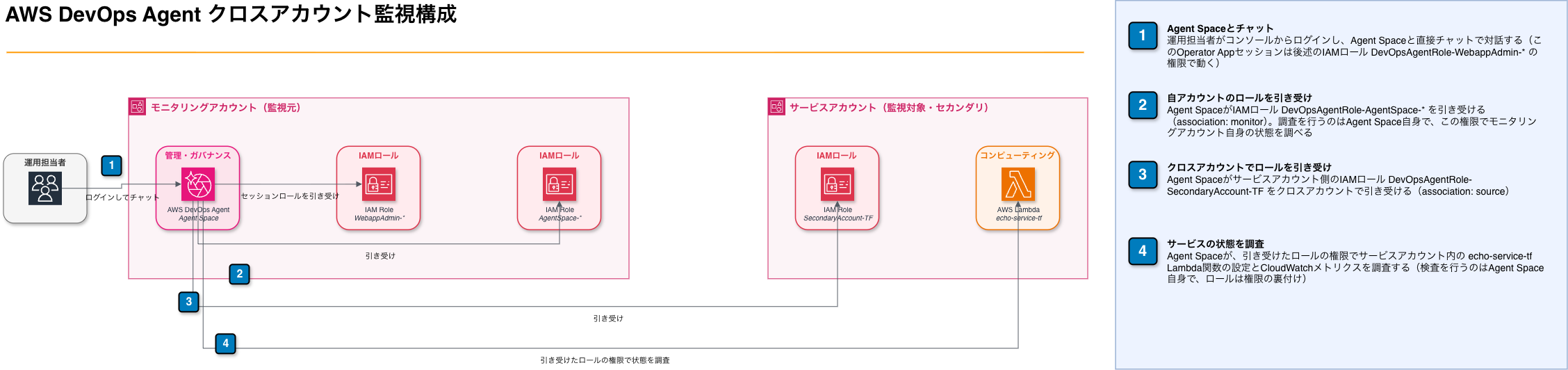
構成図
Terraformコード
AWS DevOps Agentのエージェントスペース(プライマリアカウント側)と、マルチアカウント監視用のセカンダリアカウント側の設定をまとめて構築します。
現時点ではawsプロバイダーでDevOps Agentの設定ができないため、awsccプロバイダーも併用します。
# AWS DevOps Agent Terraform Configuration

provider "awscc" {
  region  = var.aws_region
  profile = "your-primary-account-profile"
}

provider "aws" {
  region  = var.aws_region
  profile = "your-primary-account-profile"
}

# Provider alias for the secondary account
provider "aws" {
  alias   = "secondary"
  region  = var.aws_region
  profile = "your-secondary-account-profile"
}

# Data source to get current AWS account ID
data "aws_caller_identity" "current" {}

# Data source to get the secondary account ID (avoids requiring
# service_account_id to be typed manually in tfvars)
data "aws_caller_identity" "secondary" {
  provider = aws.secondary
}

# Data source to get current AWS region
data "aws_region" "current" {}
# Variables for AWS DevOps Agent Configuration

variable "aws_region" {
  description = "AWS region for DevOps Agent deployment"
  type        = string
  default     = "ap-northeast-1"
}

variable "agent_space_name" {
  description = "Name for the DevOps Agent Space"
  type        = string
  default     = "MyAgentSpace"
}

variable "agent_space_description" {
  description = "Description for the DevOps Agent Space"
  type        = string
  default     = "AgentSpace for monitoring my application"
}

variable "tags" {
  description = "Tags to apply to resources"
  type        = map(string)
  default = {
    Environment = "test"
    Project     = "aws-devops-agent"
  }
}
プライマリアカウント側のIAMロールは2つです。
DevOpsAgentRole-AgentSpace-*: DevOps Agentサービス自身がアカウント内のリソース(Lambda、CloudWatch等)を調査するためのロールです。AIDevOpsAgentAccessPolicyを付与します。DevOps Agentはリソース検出用に、Resource Explorerのサービスリンクロールも許可しています。DevOpsAgentRole-WebappAdmin-*: コンソールのチャット画面(オペレーターアプリ)を使うためのロールです。AssumeRoleに加えsts:TagSessionを許可し、AIDevOpsOperatorAppAccessPolicyを付与します
信頼ポリシーはどちらも自アカウント・自エージェントスペースに限定しています。
# IAM Roles and Policies for AWS DevOps Agent

# Random suffix to ensure unique role names
resource "random_id" "suffix" {
  byte_length = 4
}

# Trust policy for DevOps Agent Space Role
data "aws_iam_policy_document" "devops_agentspace_trust" {
  statement {
    effect = "Allow"

    principals {
      type        = "Service"
      identifiers = ["aidevops.amazonaws.com"]
    }

    actions = ["sts:AssumeRole"]

    condition {
      test     = "StringEquals"
      variable = "aws:SourceAccount"
      values   = [data.aws_caller_identity.current.account_id]
    }

    condition {
      test     = "ArnLike"
      variable = "aws:SourceArn"
      values   = ["arn:aws:aidevops:${data.aws_region.current.region}:${data.aws_caller_identity.current.account_id}:agentspace/*"]
    }
  }
}

# DevOps Agent Space Role
resource "aws_iam_role" "devops_agentspace" {
  name               = "DevOpsAgentRole-AgentSpace-${random_id.suffix.hex}"
  assume_role_policy = data.aws_iam_policy_document.devops_agentspace_trust.json

  tags = var.tags
}

# Attach AIDevOpsAgentAccessPolicy managed policy to Agent Space role
resource "aws_iam_role_policy_attachment" "devops_agentspace_access" {
  role       = aws_iam_role.devops_agentspace.name
  policy_arn = "arn:aws:iam::aws:policy/AIDevOpsAgentAccessPolicy"
}

# Inline policy for creating Resource Explorer service-linked role
data "aws_iam_policy_document" "devops_agentspace_inline" {
  statement {
    sid    = "AllowCreateServiceLinkedRoles"
    effect = "Allow"

    actions = [
      "iam:CreateServiceLinkedRole"
    ]

    resources = [
      "arn:aws:iam::${data.aws_caller_identity.current.account_id}:role/aws-service-role/resource-explorer-2.amazonaws.com/AWSServiceRoleForResourceExplorer"
    ]
  }
}

resource "aws_iam_role_policy" "devops_agentspace_inline" {
  name   = "AllowCreateServiceLinkedRoles"
  role   = aws_iam_role.devops_agentspace.id
  policy = data.aws_iam_policy_document.devops_agentspace_inline.json
}

# Trust policy for Operator App Role
data "aws_iam_policy_document" "devops_operator_trust" {
  statement {
    effect = "Allow"

    principals {
      type        = "Service"
      identifiers = ["aidevops.amazonaws.com"]
    }

    actions = ["sts:AssumeRole", "sts:TagSession"]

    condition {
      test     = "StringEquals"
      variable = "aws:SourceAccount"
      values   = [data.aws_caller_identity.current.account_id]
    }

    condition {
      test     = "ArnLike"
      variable = "aws:SourceArn"
      values   = ["arn:aws:aidevops:${data.aws_region.current.region}:${data.aws_caller_identity.current.account_id}:agentspace/*"]
    }
  }
}

# DevOps Operator App Role
resource "aws_iam_role" "devops_operator" {
  name               = "DevOpsAgentRole-WebappAdmin-${random_id.suffix.hex}"
  assume_role_policy = data.aws_iam_policy_document.devops_operator_trust.json

  tags = var.tags
}

# Attach AIDevOpsOperatorAppAccessPolicy managed policy to Operator App role
resource "aws_iam_role_policy_attachment" "devops_operator_access" {
  role       = aws_iam_role.devops_operator.name
  policy_arn = "arn:aws:iam::aws:policy/AIDevOpsOperatorAppAccessPolicy"
}
セカンダリアカウント側には、クロスアカウントIAMロールDevOpsAgentRole-SecondaryAccount-TFと、調査対象のサンプルのエコー用Lambda関数echo-service-tfを作ります。信頼ポリシーは、プライマリアカウントのエージェントスペースARNをaws:SourceArn条件として指定して限定します。
# Service Account Resources
# Deploys into the secondary account for cross-account monitoring.
# This configuration always deploys cross-account, so these resources are unconditional.

# Secondary account role (trusted by the Agent Space in the monitoring account)
resource "aws_iam_role" "secondary_account" {
  provider = aws.secondary

  name               = "DevOpsAgentRole-SecondaryAccount-TF"
  assume_role_policy = data.aws_iam_policy_document.secondary_account_trust.json
  description        = "Secondary account role for DevOps Agent Space cross-account access"

  tags = var.tags
}

data "aws_iam_policy_document" "secondary_account_trust" {
  statement {
    effect = "Allow"

    principals {
      type        = "Service"
      identifiers = ["aidevops.amazonaws.com"]
    }

    actions = ["sts:AssumeRole"]

    condition {
      test     = "StringEquals"
      variable = "aws:SourceAccount"
      values   = [data.aws_caller_identity.current.account_id]
    }

    condition {
      test     = "StringEquals"
      variable = "aws:SourceArn"
      values   = [awscc_devopsagent_agent_space.main.arn]
    }
  }
}

# Attach AIDevOpsAgentAccessPolicy managed policy
resource "aws_iam_role_policy_attachment" "secondary_account_access" {
  provider = aws.secondary

  role       = aws_iam_role.secondary_account.name
  policy_arn = "arn:aws:iam::aws:policy/AIDevOpsAgentAccessPolicy"
}

# Inline policy for creating Resource Explorer service-linked role
data "aws_iam_policy_document" "secondary_account_inline" {
  statement {
    sid    = "AllowCreateServiceLinkedRoles"
    effect = "Allow"

    actions = [
      "iam:CreateServiceLinkedRole"
    ]

    resources = [
      "arn:aws:iam::${data.aws_caller_identity.secondary.account_id}:role/aws-service-role/resource-explorer-2.amazonaws.com/AWSServiceRoleForResourceExplorer"
    ]
  }
}

resource "aws_iam_role_policy" "secondary_account_inline" {
  provider = aws.secondary

  name   = "AllowCreateServiceLinkedRoles"
  role   = aws_iam_role.secondary_account.id
  policy = data.aws_iam_policy_document.secondary_account_inline.json
}

# Echo Lambda function (simple example service)
resource "aws_lambda_function" "echo_service" {
  provider = aws.secondary

  function_name = "echo-service-tf"
  description   = "Simple echo service that returns the input event"
  runtime       = "nodejs20.x"
  handler       = "index.handler"
  timeout       = 30
  memory_size   = 128

  filename         = data.archive_file.echo_lambda.output_path
  source_code_hash = data.archive_file.echo_lambda.output_base64sha256

  role = aws_iam_role.echo_service_role.arn

  tags = var.tags
}

data "archive_file" "echo_lambda" {
  type        = "zip"
  output_path = "${path.module}/echo-service.zip"

  source {
    content  = <<-JS
exports.handler = async (event) => {
  console.log('Received event:', JSON.stringify(event, null, 2));

  return {
    statusCode: 200,
    headers: {
      'Content-Type': 'application/json'
    },
    body: JSON.stringify({
      message: 'Echo service response',
      echo: event,
      timestamp: new Date().toISOString()
    })
  };
};
JS
    filename = "index.js"
  }
}

# Lambda execution role
resource "aws_iam_role" "echo_service_role" {
  provider = aws.secondary

  name               = "echo-service-tf-role"
  assume_role_policy = data.aws_iam_policy_document.lambda_trust.json

  tags = var.tags
}

data "aws_iam_policy_document" "lambda_trust" {
  statement {
    effect = "Allow"

    principals {
      type        = "Service"
      identifiers = ["lambda.amazonaws.com"]
    }

    actions = ["sts:AssumeRole"]
  }
}

resource "aws_iam_role_policy_attachment" "echo_service_basic" {
  provider = aws.secondary

  role       = aws_iam_role.echo_service_role.name
  policy_arn = "arn:aws:iam::aws:policy/service-role/AWSLambdaBasicExecutionRole"
}
最後に、エージェントスペースとプライマリ・セカンダリ両アカウントの関連付けです。
# AWS DevOps Agent Resources

# Create the Agent Space with Operator App
resource "awscc_devopsagent_agent_space" "main" {
  name        = var.agent_space_name
  description = var.agent_space_description
  operator_app = {
    iam = {
      operator_app_role_arn = aws_iam_role.devops_operator.arn
    }
  }
}

# Associate the primary AWS account for monitoring
resource "awscc_devopsagent_association" "primary_aws_account" {
  agent_space_id = awscc_devopsagent_agent_space.main.id
  service_id     = "aws"
  configuration = {
    aws = {
      assumable_role_arn = aws_iam_role.devops_agentspace.arn
      account_id         = data.aws_caller_identity.current.account_id
      account_type       = "monitor"
    }
  }
  depends_on = [
    awscc_devopsagent_agent_space.main
  ]
}

# Associate the secondary account for cross-account monitoring
resource "awscc_devopsagent_association" "secondary_aws_account" {
  agent_space_id = awscc_devopsagent_agent_space.main.id
  service_id     = "aws"
  configuration = {
    source_aws = {
      assumable_role_arn = aws_iam_role.secondary_account.arn
      account_id         = data.aws_caller_identity.secondary.account_id
      account_type       = "source"
    }
  }
  depends_on = [
    awscc_devopsagent_association.primary_aws_account
  ]
}
terraform applyでデプロイします。
デプロイ後、CLIでエージェントスペースの作成を確認できます。
aws devops-agent get-agent-space \
  --agent-space-id <AGENT_SPACE_ID> \
  --region ap-northeast-1 \
  --profile <プライマリアカウントのプロファイル>
関連付けの検証
terraform apply後、list-associationsで状態を確認します。セカンダリアカウント側の関連付けがpending-confirmationのまま止まっています。
aws devops-agent list-associations \
  --agent-space-id <AGENT_SPACE_ID> \
  --region ap-northeast-1 \
  --profile <プライマリアカウントのプロファイル>
{
    "associations": [
        {
            "status": "valid",
            "associationId": "<ASSOCIATION_ID_PRIMARY>",
            "serviceId": "aws",
            "configuration": {
                "aws": {
                    "assumableRoleArn": "arn:aws:iam::<PRIMARY_ACCOUNT_ID>:role/DevOpsAgentRole-AgentSpace-xxxxxxxx",
                    "accountId": "<PRIMARY_ACCOUNT_ID>",
                    "accountType": "monitor"
                }
            }
        },
        {
            "status": "pending-confirmation",
            "associationId": "<ASSOCIATION_ID_SECONDARY>",
            "serviceId": "aws",
            "configuration": {
                "sourceAws": {
                    "accountId": "<SECONDARY_ACCOUNT_ID>",
                    "accountType": "source",
                    "assumableRoleArn": "arn:aws:iam::<SECONDARY_ACCOUNT_ID>:role/DevOpsAgentRole-SecondaryAccount-TF"
                }
            }
        }
    ]
}
validにするには、次のコマンドを実行する必要があります。
aws devops-agent validate-aws-associations \
  --agent-space-id <AGENT_SPACE_ID> \
  --region ap-northeast-1 \
  --profile <プライマリアカウントのプロファイル>
数秒後、再度list-associationsで確認するとstatus: "valid"に変わりました。
{
    "association": {
        "status": "valid",
        "associationId": "<ASSOCIATION_ID_SECONDARY>",
        "serviceId": "aws",
        "configuration": {
            "sourceAws": {
                "accountId": "<SECONDARY_ACCOUNT_ID>",
                "accountType": "source",
                "assumableRoleArn": "arn:aws:iam::<SECONDARY_ACCOUNT_ID>:role/DevOpsAgentRole-SecondaryAccount-TF"
            }
        }
    }
}
動作確認
association状態がvalidになっただけでは、関連付けが成立していることしか分かりません。実際にマルチアカウントの調査権限が機能しているか確認します。DevOps Agentのコンソール(オペレーターアプリ)のチャットで、セカンダリアカウント側のLambda関数について質問してみました。
セカンダリアカウント(
<SECONDARY_ACCOUNT_ID>)のecho-service-tfというLambda関数について教えて
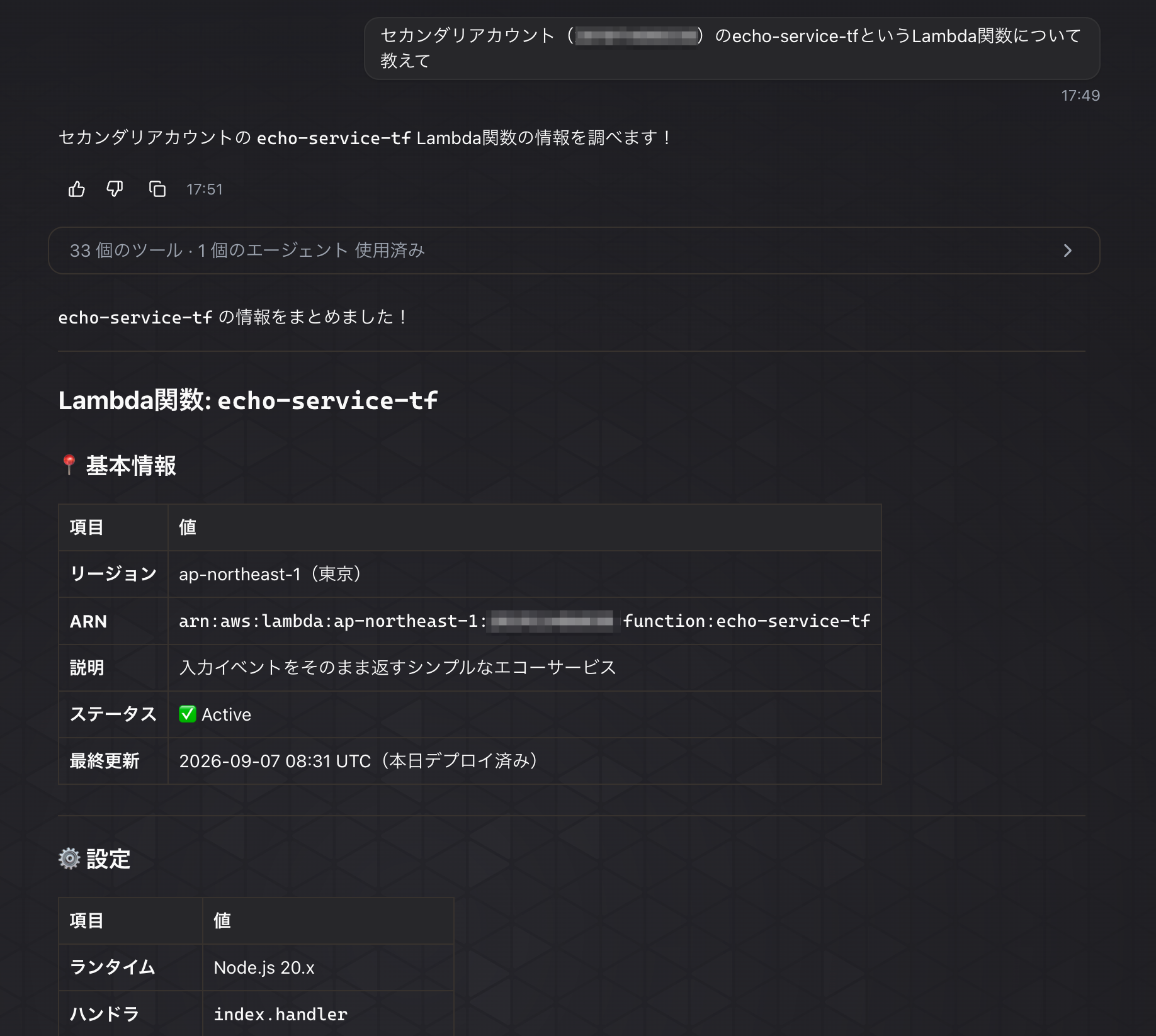
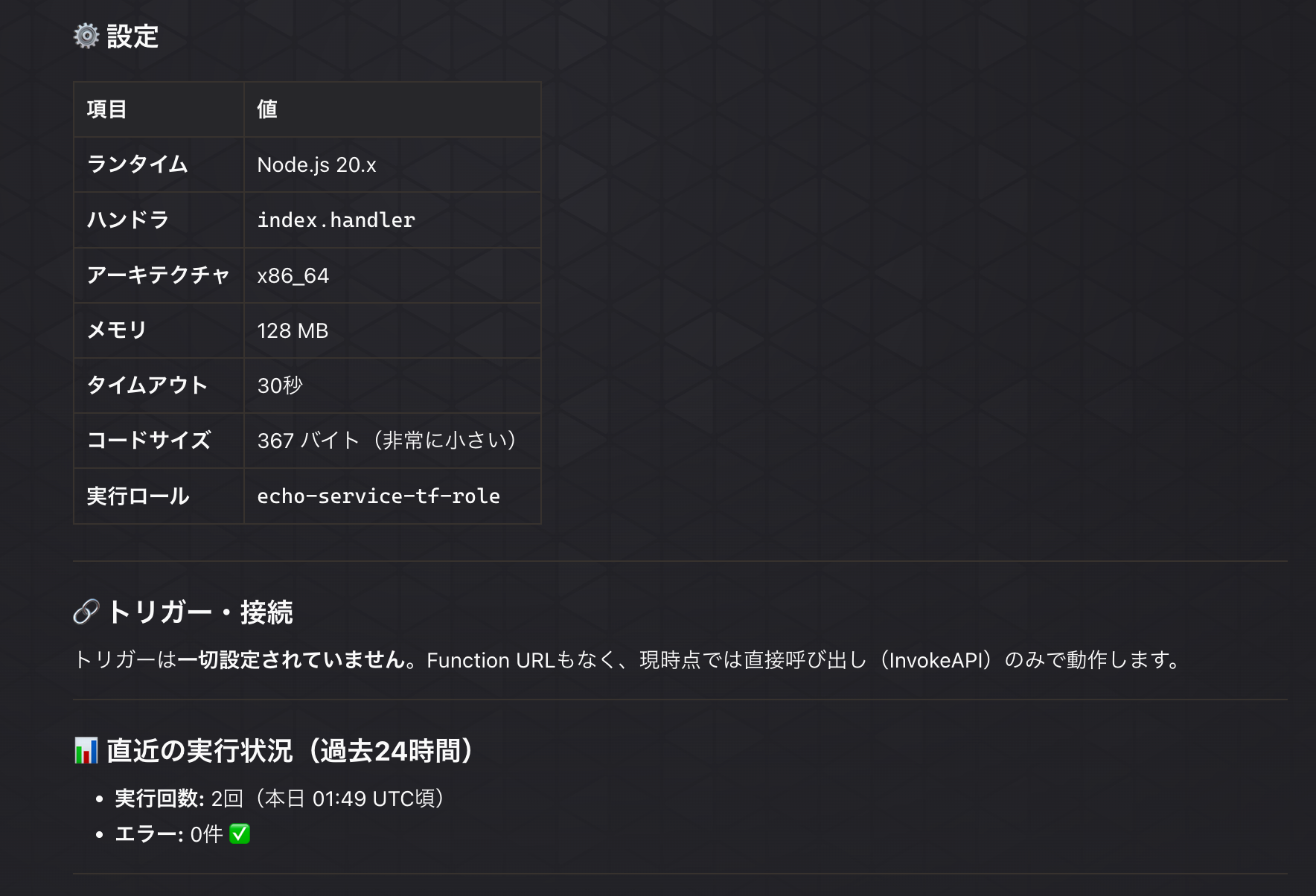
33個のツールを使って調べた結果、正しいARN(アカウントIDを含む)・ランタイム・実行ロール名まで回答に含まれていました。加えて、直近24時間の実行回数(2回)とエラー件数(0件)も正確でした。実行回数の2回は、検証中に自分が実際に呼び出していた回数と一致しています。Agentがセカンダリアカウント側のLambda設定・CloudWatch指標まで実際に横断して読みに行けることを確認できました。
おわりに
terraform applyだけでは関連付けがvalidにならず、validate-aws-associationsを別途実行する必要があります。CIやモジュール化まで考えるなら、apply後にこのCLI呼び出しを挟む構成も考えられます。