
dbtとSnowflakeでデータモデリング:顧客の履歴とID変更を題材にDimension Surrogate KeyとDurable Keyの違いを試してみた

さがらです。
dbt Projects on Snowflakeを使って、KimballのディメンショナルモデリングにあるDimension Surrogate KeyとDurable Keyを比較してみます。Dimension Surrogate Keyはディメンションの1行を識別するDWH側のキーで、Durable Keyは、ソースのIDが変わっても同じ顧客(同一人物)を指し続けるためのDWH側のキーです。
参考にしている書籍・Webページは以下です。
題材は受注(Sales Order)の顧客ディメンションです。会員ランクが変わる顧客と、退会後に新しいIDで再入会した顧客を含むデータで、2つのキーを両方ファクトテーブルに持たせ、集計結果がどう変わるかを確認します。
Dimension Surrogate KeyとDurable Keyの概要
ソースシステムが発行するIDはNatural Keyと呼ばれます。Natural Keyは業務のルールで管理されているため、DWH側では制御できません。たとえば、退会後に再入会すると新しいIDが振られることがあります。そこでKimballのディメンショナルモデリングでは、Natural KeyをそのままディメンションのキーにせずDWH側で別のキーを発行します。
- Dimension Surrogate Key: ディメンションの1行を識別するための、DWH側で発行する匿名のキーです。履歴を持たせると同じNatural Keyの行が複数できてしまい、Natural Keyでは行を一意に決められません。そこで行ごとに別のキーを振ります
- Durable Key: Natural Keyが変わっても、同じ実体(今回の場合は1人の顧客)を指し続けるためのDWH側のキーです。IDが再発行されても、履歴行ごとにSurrogate Keyが変わっても、値は変わりません
Kimball公式Web「Dimension Surrogate Keys」と「Natural, Durable, and Supernatural Keys」が参考になります。
整理すると、3つのキーは次のように役割が違います。
| キー | 発行元 | 識別するもの | 変わるタイミング |
|---|---|---|---|
| Natural Key | ソースシステム | ソース上の1つのID | 業務ルールで変わりうる(退会後の再入会など) |
| Dimension Surrogate Key | DWH | ディメンションの1行 | 履歴行(バージョン)ごとに別の値になる |
| Durable Key | DWH | 同一人物(1人の顧客) | 同一人物である限り変わらない |
今回は顧客ディメンションに履歴行(バージョン)を持たせ、バージョンごとにSurrogate Keyを振ります。さらに、再発行されたIDをたどって1人の顧客ごとにDurable Keyを振ります。目的が違うキーなので、片方を選ぶのではなく両方をファクトテーブルに持たせて、集計結果を比べます。
確認したいこと
2つのキーを持たせたファクトテーブルが使えるかを、次の4つの問いに答えられるかで確認します。
- 注文時点の会員ランク別に、商品代金はいくらか(Surrogate Keyで、注文時点のバージョンに紐づける)
- 同じ注文を、顧客の現在の会員ランクで集計すると、結果はどう変わるか(Durable Keyで、現在の属性に紐づける)
- 商品を購入した顧客は何人か。
customer_idで数えた場合と、Durable Keyで数えた場合で違いはあるか - IDが再発行された顧客の累計商品代金は、旧IDと新IDを合わせるといくらか
今回の検証内容
題材は日本国内のアウトドア用品チェーンの受注です。会員ランクが変わる履歴と、退会後にIDが再発行されるケースを含む4つのseedをロードします。
| 今回使うseed | 役割 |
|---|---|
raw_customer.csv |
顧客。同じcustomer_idに、更新時刻(source_updated_at)違いの複数バージョンの行がある。ID再発行の旧IDはprevious_customer_idに入る |
raw_product.csv |
商品マスタ |
raw_sales_order_header.csv |
受注ヘッダ(顧客を持つ) |
raw_sales_order_line.csv |
受注明細。商品・数量・単価・日時を持つ |
作るモデルは次のとおりです。stagingと顧客以外のディメンション(dim_date・dim_product)はベースラインとして畳んで掲載し、キーに関わる4つのモデルを中心に解説します。
models/
├── staging/retail/
│   ├── stg_retail__customers.sql
│   ├── stg_retail__products.sql
│   ├── stg_retail__sales_order_headers.sql
│   └── stg_retail__sales_order_lines.sql
├── intermediate/customer/
│   └── int_customer__identity.sql          -- IDの再発行をたどり、起点のIDを求める
└── dwh/
    ├── shared/dim/
    │   ├── dim_date.sql
    │   ├── dim_product.sql
    │   ├── dim_customer.sql                -- 1バージョン = 1行。Dimension Surrogate Key
    │   └── dim_customer_current.sql        -- Durable Key 1件 = 1行。現在の属性
    └── sales/fact/
        └── fct_sales_order_line.sql        -- 1明細 = 1行
- バージョン:
raw_customerの1行を顧客の1バージョンとし、source_updated_atを有効開始日時(valid_from)にします - ID再発行: 退会後の再入会で新しいIDが振られ、旧IDは
previous_customer_idに入ります。同一人物かどうかは、ソースのprevious_customer_idを信頼し、名寄せのロジック自体は作りません - 商品代金:
quantity × unit_price(merchandise_amount、JPY)を集計します
前提条件
- 検証環境: Snowflake(Snowsight Workspaces) + dbt Projects on Snowflake(dbt 1.12.3)。テストの引数は、1.10.5以降の
arguments:形式で書いています - 外部パッケージ:
dbt_utilsを使います。dbt Projects on Snowflakeで外部パッケージを使うには、EXTERNAL ACCESS INTEGRATIONが必要です。許可するホストは必要最小限に絞ることをおすすめします。具体的な手順については、こちらのブログを参照ください。
事前準備
1. dbt_utilsをインストール
プロジェクト直下にpackages.ymlを置き、WorkspaceのDepsで、前提条件のブログで作成したEXTERNAL ACCESS INTEGRATIONを指定して実行します。
packages.yml(クリックで展開)
packages:
  - package: dbt-labs/dbt_utils
    version: 1.4.1
dbt_utilsのインストールが成功していればOKです。
2. seedをロードする
今回使う4つのseed CSVと、型指定用のseed propertiesファイルを配置します。dbt seedは列の型を推論しますが、推論結果に依存しないよう、IDと数値・日付・タイムスタンプ列はcolumn_typesで明示しています。
seeds/raw_seeds.yml(クリックで展開)
version: 2

seeds:
  - name: raw_customer
    config:
      column_types:
        customer_id: varchar(10)
        previous_customer_id: varchar(10)
        source_updated_at: timestamp_ntz
        loaded_at: timestamp_ntz
  - name: raw_product
    config:
      column_types:
        product_id: varchar(10)
        list_price_jpy: number(10,0)
        source_updated_at: timestamp_ntz
        loaded_at: timestamp_ntz
  - name: raw_sales_order_header
    config:
      column_types:
        order_id: varchar(10)
        customer_id: varchar(10)
        order_date: date
        source_updated_at: timestamp_ntz
        loaded_at: timestamp_ntz
  - name: raw_sales_order_line
    config:
      column_types:
        order_line_id: varchar(10)
        order_id: varchar(10)
        line_number: number(2,0)
        product_id: varchar(10)
        quantity: number(6,0)
        unit_price: number(10,0)
        transaction_at: timestamp_ntz
        source_updated_at: timestamp_ntz
        loaded_at: timestamp_ntz
seeds/raw_customer.csv(クリックで展開)
customer_id,previous_customer_id,customer_name,membership_rank,membership_status,source_updated_at,loaded_at
C001,,山田太郎,シルバー,有効,2026-01-10 09:00:00,2026-01-10 09:05:00
C001,,山田太郎,ゴールド,有効,2026-06-01 00:00:00,2026-06-01 00:05:00
C002,,佐藤花子,ブロンズ,有効,2026-01-12 10:00:00,2026-01-12 10:05:00
C002,,佐藤花子,シルバー,有効,2026-04-01 00:00:00,2026-04-01 00:05:00
C002,,佐藤花子,ゴールド,有効,2026-07-01 00:00:00,2026-07-01 00:05:00
C003,,鈴木一郎,ブロンズ,有効,2026-01-15 11:00:00,2026-01-15 11:05:00
C003,,鈴木一郎,ブロンズ,退会,2026-04-30 18:00:00,2026-04-30 18:05:00
C004,,高橋美咲,ゴールド,有効,2026-01-18 08:00:00,2026-01-18 08:05:00
C004,,高橋美咲,シルバー,有効,2026-07-01 00:00:00,2026-07-01 00:05:00
C005,,田中健,シルバー,有効,2026-01-20 09:30:00,2026-01-20 09:35:00
C005,,田中健,シルバー,退会,2026-03-31 18:00:00,2026-03-31 18:05:00
C006,,伊藤さくら,ブロンズ,有効,2026-01-22 07:00:00,2026-01-22 07:05:00
C006,,伊藤さくら,シルバー,有効,2026-05-01 00:00:00,2026-05-01 00:05:00
C007,,渡辺翔太,シルバー,有効,2026-01-25 12:00:00,2026-01-25 12:05:00
C008,,中村めぐみ,ゴールド,有効,2026-01-28 13:00:00,2026-01-28 13:05:00
C008,,中村めぐみ,ゴールド,退会,2026-05-31 18:00:00,2026-05-31 18:05:00
C009,,小林大輔,ブロンズ,有効,2026-02-01 09:00:00,2026-02-01 09:05:00
C010,,加藤結衣,ゴールド,有効,2026-02-03 10:00:00,2026-02-03 10:05:00
C011,,松本涼,シルバー,有効,2026-02-05 11:00:00,2026-02-05 11:05:00
C012,,井上あかり,ブロンズ,有効,2026-02-08 08:00:00,2026-02-08 08:05:00
C013,,木村拓也,シルバー,有効,2026-02-10 09:00:00,2026-02-10 09:05:00
C014,,林真由美,ブロンズ,有効,2026-02-12 10:00:00,2026-02-12 10:05:00
C015,,清水健太,ゴールド,有効,2026-02-15 09:00:00,2026-02-15 09:05:00
C016,,山口奈々,シルバー,有効,2026-02-18 11:00:00,2026-02-18 11:05:00
C017,,森田浩二,ブロンズ,有効,2026-02-20 08:00:00,2026-02-20 08:05:00
C018,,池田彩,シルバー,有効,2026-02-22 12:00:00,2026-02-22 12:05:00
C019,,橋本誠,ゴールド,有効,2026-02-25 10:00:00,2026-02-25 10:05:00
C020,,石川優子,ブロンズ,有効,2026-02-28 09:00:00,2026-02-28 09:05:00
C021,C003,鈴木一郎,ブロンズ,有効,2026-06-10 10:00:00,2026-06-10 10:05:00
C021,,鈴木一郎,ブロンズ,退会,2026-08-20 18:00:00,2026-08-20 18:05:00
C022,C005,田中健,シルバー,有効,2026-05-15 10:00:00,2026-05-15 10:05:00
C022,,田中健,ゴールド,有効,2026-08-01 00:00:00,2026-08-01 00:05:00
C023,C008,中村めぐみ,ブロンズ,有効,2026-07-01 10:00:00,2026-07-01 10:05:00
C024,C021,鈴木一郎,ブロンズ,有効,2026-09-10 10:00:00,2026-09-10 10:05:00
seeds/raw_product.csv(クリックで展開)
product_id,product_name,product_type,list_price_jpy,source_updated_at,loaded_at
P001,アルパイントレッキングシューズ,物販,18000,2026-01-05 09:00:00,2026-01-05 09:05:00
P002,ウルトラライトテント2人用,物販,42000,2026-01-05 09:00:00,2026-01-05 09:05:00
P003,登山用レインウェア,物販,15000,2026-01-05 09:00:00,2026-01-05 09:05:00
P004,ダウンスリーピングバッグ,物販,22000,2026-01-05 09:00:00,2026-01-05 09:05:00
P005,トレッキングポール2本セット,物販,6000,2026-01-05 09:00:00,2026-01-05 09:05:00
P006,テントレンタル(3泊4日),レンタル,9000,2026-01-05 09:00:00,2026-01-05 09:05:00
P007,登山靴レンタル(1泊2日),レンタル,3000,2026-01-05 09:00:00,2026-01-05 09:05:00
P008,ガイド同行登山ツアー,サービス,25000,2026-01-05 09:00:00,2026-01-05 09:05:00
P009,ギアメンテナンス講習,サービス,5000,2026-01-05 09:00:00,2026-01-05 09:05:00
P010,携帯浄水器,物販,8000,2026-01-05 09:00:00,2026-01-05 09:05:00
P011,ソロキャンプ用チェア,物販,4500,2026-01-05 09:00:00,2026-01-05 09:05:00
P012,ヘッドライト(充電式),物販,3500,2026-01-05 09:00:00,2026-01-05 09:05:00
P013,アウトドアクッカーセット,物販,7000,2026-01-05 09:00:00,2026-01-05 09:05:00
P014,防水バックパック40L,物販,16000,2026-01-05 09:00:00,2026-01-05 09:05:00
P015,カヤックレンタル(半日),レンタル,6000,2026-01-05 09:00:00,2026-01-05 09:05:00
P016,ロープ・ハーネスセット,物販,12000,2026-01-05 09:00:00,2026-01-05 09:05:00
P017,焚き火台コンパクト,物販,5000,2026-01-05 09:00:00,2026-01-05 09:05:00
P018,防寒インナーウェア,物販,6500,2026-01-05 09:00:00,2026-01-05 09:05:00
P019,ギア用防水スタッフバッグ,物販,2500,2026-01-05 09:00:00,2026-01-05 09:05:00
P020,登山計画作成サポート,サービス,2000,2026-01-05 09:00:00,2026-01-05 09:05:00
seeds/raw_sales_order_header.csv(クリックで展開)
order_id,customer_id,order_date,source_updated_at,loaded_at
O0001,C001,2026-03-05,2026-03-05 10:00:00,2026-03-05 10:05:00
O0002,C002,2026-03-08,2026-03-08 11:00:00,2026-03-08 11:05:00
O0003,C003,2026-03-10,2026-03-10 09:30:00,2026-03-10 09:35:00
O0004,C005,2026-03-12,2026-03-12 14:00:00,2026-03-12 14:05:00
O0005,C008,2026-03-20,2026-03-20 10:00:00,2026-03-20 10:05:00
O0006,C004,2026-04-02,2026-04-02 13:00:00,2026-04-02 13:05:00
O0007,C006,2026-04-15,2026-04-15 10:00:00,2026-04-15 10:05:00
O0008,C007,2026-04-20,2026-04-20 12:00:00,2026-04-20 12:05:00
O0009,C002,2026-05-10,2026-05-10 15:00:00,2026-05-10 15:05:00
O0010,C001,2026-06-15,2026-06-15 10:00:00,2026-06-15 10:05:00
O0011,C006,2026-06-20,2026-06-20 11:00:00,2026-06-20 11:05:00
O0012,C022,2026-06-25,2026-06-25 10:00:00,2026-06-25 10:05:00
O0013,C021,2026-07-05,2026-07-05 09:00:00,2026-07-05 09:05:00
O0014,C002,2026-07-15,2026-07-15 16:00:00,2026-07-15 16:05:00
O0015,C004,2026-07-20,2026-07-20 10:00:00,2026-07-20 10:05:00
O0016,C023,2026-07-25,2026-07-25 11:00:00,2026-07-25 11:05:00
O0017,C009,2026-08-03,2026-08-03 10:00:00,2026-08-03 10:05:00
O0018,C022,2026-08-10,2026-08-10 14:00:00,2026-08-10 14:05:00
O0019,C010,2026-08-18,2026-08-18 10:00:00,2026-08-18 10:05:00
O0020,C011,2026-09-01,2026-09-01 10:00:00,2026-09-01 10:05:00
seeds/raw_sales_order_line.csv(クリックで展開)
order_line_id,order_id,line_number,product_id,quantity,unit_price,transaction_at,source_updated_at,loaded_at
OL00001,O0001,1,P001,1,18000,2026-03-05 10:00:00,2026-03-05 10:00:00,2026-03-05 10:05:00
OL00002,O0002,1,P005,1,6000,2026-03-08 11:00:00,2026-03-08 11:00:00,2026-03-08 11:05:00
OL00003,O0003,1,P010,1,8000,2026-03-10 09:30:00,2026-03-10 09:30:00,2026-03-10 09:35:00
OL00004,O0004,1,P003,1,15000,2026-03-12 14:00:00,2026-03-12 14:00:00,2026-03-12 14:05:00
OL00005,O0004,2,P012,1,3500,2026-03-12 14:00:00,2026-03-12 14:00:00,2026-03-12 14:05:00
OL00006,O0005,1,P002,1,42000,2026-03-20 10:00:00,2026-03-20 10:00:00,2026-03-20 10:05:00
OL00007,O0006,1,P004,1,22000,2026-04-02 13:00:00,2026-04-02 13:00:00,2026-04-02 13:05:00
OL00008,O0007,1,P011,2,4500,2026-04-15 10:00:00,2026-04-15 10:00:00,2026-04-15 10:05:00
OL00009,O0008,1,P013,1,7000,2026-04-20 12:00:00,2026-04-20 12:00:00,2026-04-20 12:05:00
OL00010,O0009,1,P014,1,16000,2026-05-10 15:00:00,2026-05-10 15:00:00,2026-05-10 15:05:00
OL00011,O0010,1,P016,1,12000,2026-06-15 10:00:00,2026-06-15 10:00:00,2026-06-15 10:05:00
OL00012,O0010,2,P019,2,2500,2026-06-15 10:00:00,2026-06-15 10:00:00,2026-06-15 10:05:00
OL00013,O0011,1,P017,1,5000,2026-06-20 11:00:00,2026-06-20 11:00:00,2026-06-20 11:05:00
OL00014,O0012,1,P018,1,6500,2026-06-25 10:00:00,2026-06-25 10:00:00,2026-06-25 10:05:00
OL00015,O0013,1,P001,1,18000,2026-07-05 09:00:00,2026-07-05 09:00:00,2026-07-05 09:05:00
OL00016,O0014,1,P008,1,25000,2026-07-15 16:00:00,2026-07-15 16:00:00,2026-07-15 16:05:00
OL00017,O0015,1,P009,1,5000,2026-07-20 10:00:00,2026-07-20 10:00:00,2026-07-20 10:05:00
OL00018,O0016,1,P005,1,6000,2026-07-25 11:00:00,2026-07-25 11:00:00,2026-07-25 11:05:00
OL00019,O0017,1,P012,1,3500,2026-08-03 10:00:00,2026-08-03 10:00:00,2026-08-03 10:05:00
OL00020,O0018,1,P014,1,16000,2026-08-10 14:00:00,2026-08-10 14:00:00,2026-08-10 14:05:00
OL00021,O0019,1,P020,1,2000,2026-08-18 10:00:00,2026-08-18 10:00:00,2026-08-18 10:05:00
OL00022,O0020,1,P006,1,9000,2026-09-01 10:00:00,2026-09-01 10:00:00,2026-09-01 10:05:00
raw_customer.csvは顧客のバージョンを1行ずつ持つデータです。同じcustomer_idの行はsource_updated_atが変わった時点の状態を表し、previous_customer_idは新しいIDの最初の行にだけ入っています。主なケースは次のとおりです。
| ケース | 該当行 | 内容 |
|---|---|---|
| 会員ランクの昇格 | C001、C002、C006 |
昇格する(C001はシルバー→ゴールド、C002はブロンズ→シルバー→ゴールド) |
| 会員ランクの降格 | C004 |
ゴールド→シルバー |
| 退会 | C003、C005、C008、C021 |
membership_statusが退会の行が追加される |
| ID再発行 | C021、C022、C023 |
退会後の再入会で新しいIDが振られる(C003→C021、C005→C022、C008→C023) |
| 2段の再発行 | C024 |
C003→C021→C024の2段で、起点はC003。C024は購入がない |
| 再発行後のランク変化 | C022 |
新IDでシルバー→ゴールド。2行目のprevious_customer_idは空 |
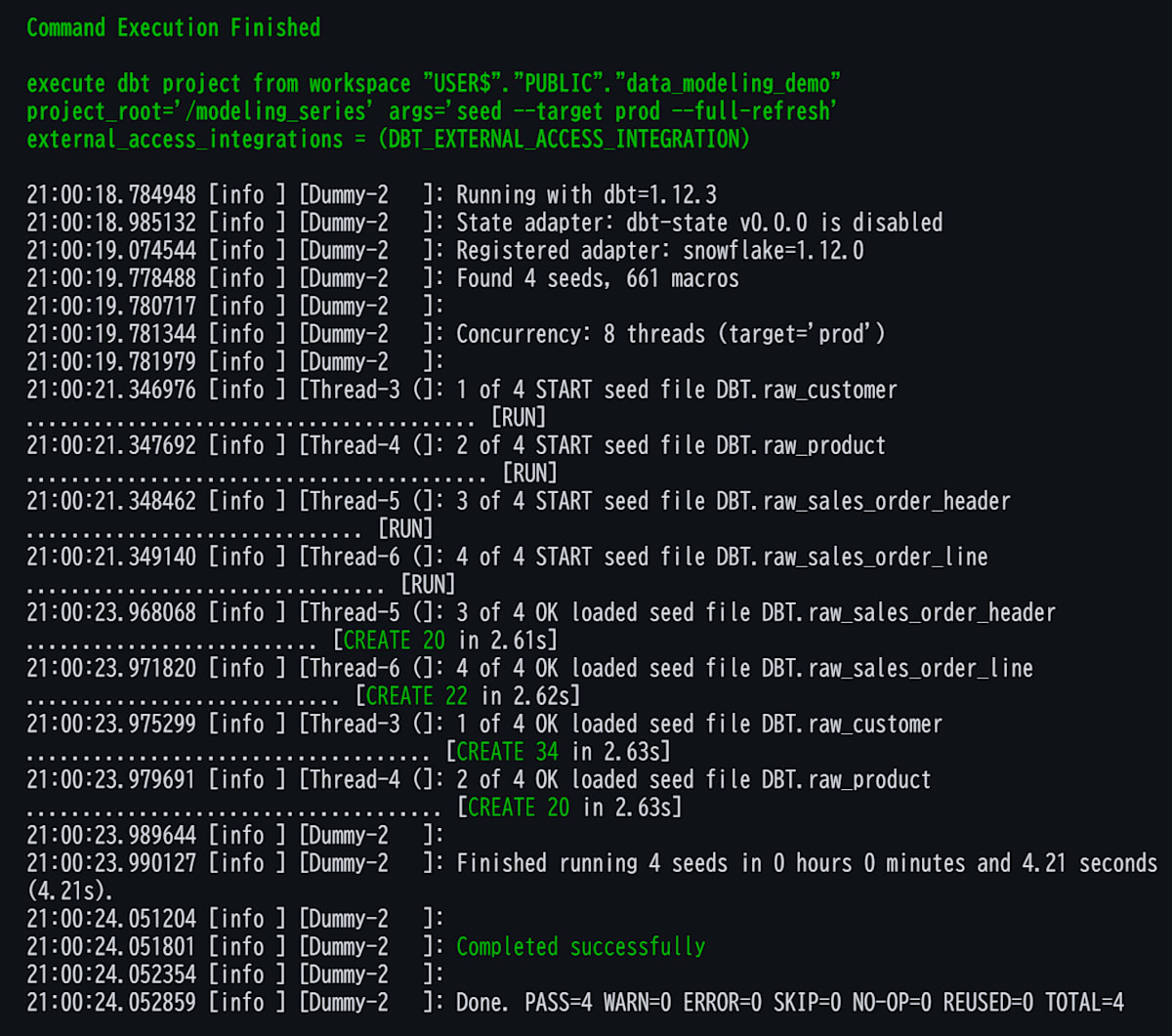
Workspaceでdbt seedを実行します(再ロードする場合は--full-refreshも追加します)。PASS=4 ERROR=0のように、4つのseedがすべて成功していればOKです。
試してみた
1. ベースラインのモデルを作る
顧客以外のモデル(staging、dim_product、dim_date)をベースラインとして作成します。ディメンションのキーはdbt_utils.generate_surrogate_keyで作り、dim_productには参照先が見つからない場合に備えて、キーが-1のUnknown Member行を持たせています。
models/staging/retail/stg_retail__customers.sql(クリックで展開)
-- models/staging/retail/stg_retail__customers.sql
{{ config(materialized='view') }}

select
    customer_id,
    nullif(trim(previous_customer_id), '') as previous_customer_id,
    customer_name,
    nullif(trim(membership_rank), '') as membership_rank,
    membership_status,
    source_updated_at,
    loaded_at
from {{ ref('raw_customer') }}
models/staging/retail/stg_retail__products.sql(クリックで展開)
-- models/staging/retail/stg_retail__products.sql
{{ config(materialized='view') }}

select
    product_id,
    product_name,
    product_type,
    list_price_jpy,
    source_updated_at,
    loaded_at
from {{ ref('raw_product') }}
models/staging/retail/stg_retail__sales_order_headers.sql(クリックで展開)
-- models/staging/retail/stg_retail__sales_order_headers.sql
{{ config(materialized='view') }}

select
    order_id,
    customer_id,
    order_date,
    source_updated_at,
    loaded_at
from {{ ref('raw_sales_order_header') }}
models/staging/retail/stg_retail__sales_order_lines.sql(クリックで展開)
-- models/staging/retail/stg_retail__sales_order_lines.sql
{{ config(materialized='view') }}

select
    order_line_id,
    order_id,
    line_number,
    product_id,
    quantity,
    unit_price,
    transaction_at,
    source_updated_at,
    loaded_at
from {{ ref('raw_sales_order_line') }}
models/dwh/shared/dim/dim_product.sql(クリックで展開)
-- models/dwh/shared/dim/dim_product.sql
{{ config(materialized='table') }}

select
    {{ dbt_utils.generate_surrogate_key(['product_id']) }} as product_sk,
    product_id,
    product_name,
    product_type,
    list_price_jpy
from {{ ref('stg_retail__products') }}

union all

-- 参照先が見つからない場合の受け皿(Unknown Member)
select '-1', '-1', 'Unknown', 'Unknown', null
models/dwh/shared/dim/dim_date.sql(クリックで展開)
-- models/dwh/shared/dim/dim_date.sql
{{ config(materialized='table') }}

with date_spine as (

    select
        cast(date_day as date) as full_date
    from (
        {{ dbt_utils.date_spine(
            datepart="day",
            start_date="cast('2024-01-01' as date)",
            end_date="cast('2028-01-01' as date)"
        ) }}
    )  -- 2024-01-01から4年分(end_dateは含まれない)

),

enriched as (

    select
        cast(to_char(full_date, 'YYYYMMDD') as int) as date_key,
        full_date,
        extract(year from full_date)                as calendar_year,
        extract(month from full_date)               as calendar_month_number,
        to_char(full_date, 'MMMM')                  as calendar_month_name,
        dayofweekiso(full_date)                     as day_of_week_number,  -- 月曜=1〜日曜=7
        dayname(full_date)                          as day_of_week_name,
        case
            when extract(month from full_date) >= 4
                then extract(year from full_date)
            else extract(year from full_date) - 1
        end as fiscal_year
    from date_spine

)

select
    date_key,
    full_date,
    calendar_year,
    calendar_month_number,
    calendar_month_name,
    day_of_week_number,
    day_of_week_name,
    fiscal_year
from enriched
2. Durable Keyの起点を求める(int_customer__identity)
まず、IDが再発行されても同じ顧客を指し続けられるように、再発行のチェーンをたどって各customer_idの起点のID(previous_customer_idを持たない、いちばん古いID)を求めます。チェーンはC003→C021→C024のように1段とは限らないので、WITH RECURSIVEで段数を決めずにたどります。
-- models/intermediate/customer/int_customer__identity.sql
-- grain: 1行 = 顧客ID。durable_customer_idは再発行チェーンの起点のID
{{ config(materialized='view') }}

with recursive links as (

    select
        customer_id,
        max(previous_customer_id) as previous_customer_id
    from {{ ref('stg_retail__customers') }}
    group by customer_id

),

chain (customer_id, durable_customer_id) as (

    -- 起点: 旧IDを持たないID
    select
        customer_id,
        customer_id
    from links
    where previous_customer_id is null

    union all

    -- 旧IDがチェーンにあるIDを、起点のIDを引き継いで追加する
    select
        l.customer_id,
        c.durable_customer_id
    from links l
    inner join chain c
        on l.previous_customer_id = c.customer_id

)

select
    customer_id,
    durable_customer_id
from chain
ポイントは次の2つです。
previous_customer_idは、同じcustomer_idの複数行のうち1行にだけ入っているため、maxで取ります- Snowflakeの再帰CTEでは、CTE名のあとに列名のリストを書く必要があります
3. 顧客ディメンションを作る(dim_customer・dim_customer_current)
dim_customer(1バージョン=1行)
dim_customerの粒度は**「1バージョン=1行」**です。customer_idだけでは行を一意に決められない(C002は3行ある)ので、customer_idとvalid_fromからハッシュを作ってcustomer_sk(Dimension Surrogate Key)にします。customer_durable_sk(Durable Key)は、int_customer__identityの起点のID(durable_customer_id)をハッシュ化して作るため、再発行された顧客も同じ値になります。
-- models/dwh/shared/dim/dim_customer.sql
-- grain: 1行 = 顧客IDの1バージョン
{{ config(materialized='table') }}

with versions as (

    select
        c.customer_id,
        i.durable_customer_id,
        c.customer_name,
        coalesce(c.membership_rank, '不明') as membership_rank,
        c.membership_status,
        c.source_updated_at as valid_from,
        lead(c.source_updated_at) over (
            partition by c.customer_id
            order by c.source_updated_at
        ) as next_valid_from
    from {{ ref('stg_retail__customers') }} c
    inner join {{ ref('int_customer__identity') }} i
        on c.customer_id = i.customer_id

)

select
    {{ dbt_utils.generate_surrogate_key([
        'customer_id',
        "to_char(valid_from, 'YYYY-MM-DD HH24:MI:SS.FF9')"
    ]) }} as customer_sk,
    {{ dbt_utils.generate_surrogate_key(['durable_customer_id']) }} as customer_durable_sk,
    customer_id,
    durable_customer_id,
    customer_name,
    membership_rank,
    membership_status,
    valid_from,
    coalesce(next_valid_from, '9999-12-31'::timestamp_ntz) as valid_to,
    next_valid_from is null as is_current_version
from versions

union all

-- 参照先が見つからない場合の受け皿(Unknown Member)
select
    '-1',
    '-1',
    '-1',
    '-1',
    'Unknown',
    'Unknown',
    'Unknown',
    '1900-01-01'::timestamp_ntz,
    '9999-12-31'::timestamp_ntz,
    true
実装上のポイントは次のとおりです。
- 有効期間:
valid_fromはソースのsource_updated_atで、valid_toは同じcustomer_idの次のバージョンのvalid_fromです(最後のバージョンは'9999-12-31')。期間はvalid_from <= 日時 < valid_toで判定します - Unknown Member:
-1の行の期間は1900-01-01〜9999-12-31ですが、customer_idが-1なのでファクトの期間JOINにはかかりません is_current_version: そのcustomer_id内の最終バージョンかどうかを表します。ID再発行をまたいだ顧客単位(Durable Key単位)の現在の状態は、次に作るdim_customer_currentで扱います
dim_customer_current(Durable Key 1件=1行)
次に、Durable Key 1件を1行にしたdim_customer_currentを作ります。1人の顧客に複数のバージョン(複数のcustomer_idを含む)があるので、Durable Key内でvalid_fromがいちばん新しいバージョンを選び、その属性を持たせます。最新バージョンのcustomer_idはcurrent_customer_idとして残します。
この記事の「現在」は、seedに含まれる全バージョンのうち、同じDurable Key内でvalid_fromが最も新しい状態です。
-- models/dwh/shared/dim/dim_customer_current.sql
-- grain: 1行 = Durable Key(同一とみなした顧客)。属性は最も新しいバージョンのもの
{{ config(materialized='table') }}

with ranked as (

    select
        *,
        row_number() over (
            partition by customer_durable_sk
            order by valid_from desc, customer_id desc
        ) as version_rank
    from {{ ref('dim_customer') }}
    where customer_sk <> '-1'

)

select
    customer_durable_sk,
    durable_customer_id,
    customer_id as current_customer_id,
    customer_name,
    membership_rank,
    membership_status,
    valid_from as latest_valid_from
from ranked
where version_rank = 1

union all

-- 参照先が見つからない場合の受け皿(Unknown Member)
select
    '-1',
    '-1',
    '-1',
    'Unknown',
    'Unknown',
    'Unknown',
    '1900-01-01'::timestamp_ntz
4. ファクトにキーを持たせる(fct_sales_order_line)
最後にファクトfct_sales_order_lineです。粒度は**「1受注明細=1行」**(order_idとline_numberで決まる商品ごとの行)です。customer_skには注文時点のバージョン、customer_durable_skにはヘッダのcustomer_idが属するDurable Keyを持たせます。
-- models/dwh/sales/fact/fct_sales_order_line.sql
-- grain: 1行 = 1受注明細
{{ config(materialized='table') }}

select
    l.order_line_id,
    l.order_id,
    l.line_number,

    coalesce(c.customer_sk, '-1') as customer_sk,
    coalesce(cid.customer_durable_sk, '-1') as customer_durable_sk,
    coalesce(p.product_sk, '-1') as product_sk,
    d.date_key as transaction_date_key,

    l.quantity,
    l.unit_price,
    l.quantity * l.unit_price as merchandise_amount,

    l.transaction_at
from {{ ref('stg_retail__sales_order_lines') }} l
inner join {{ ref('stg_retail__sales_order_headers') }} h
    on l.order_id = h.order_id
-- 注文時点のバージョン
left join {{ ref('dim_customer') }} c
    on h.customer_id = c.customer_id
    and l.transaction_at >= c.valid_from
    and l.transaction_at < c.valid_to
-- 顧客のDurable Key(バージョンに依存しない)
left join (
    select distinct customer_id, customer_durable_sk
    from {{ ref('dim_customer') }}
    where customer_sk <> '-1'
) cid
    on h.customer_id = cid.customer_id
left join {{ ref('dim_product') }} p
    on l.product_id = p.product_id
left join {{ ref('dim_date') }} d
    on cast(l.transaction_at as date) = d.full_date
customer_sk: ヘッダのcustomer_idとtransaction_atで注文時点のバージョンを選びます。valid_toを含まない半開区間にして、境界の日時が2つのバージョンに当てはまらないようにします。該当するバージョンがなければ-1のUnknown Memberに紐づけますcustomer_durable_sk: バージョンではなくヘッダのcustomer_idから取ります。注文時点のバージョンが見つからずcustomer_skが-1になっても、顧客が分かっていれば-1にならないので、履歴が不明なのか顧客が不明なのかを区別できます。dim_customer_currentと結合すれば、注文後にランクが変わっても同じ顧客の現在の属性を取得できます
実装上の選択とKimballの考え方との違いは、以下の補足にまとめています。※クリックで展開できます。
補足: キーの作り方とKimballの考え方(クリックで展開)
連番ではなくハッシュを使っている点
KimballのSurrogate KeyとDurable Keyは、連番の整数が基本です。今回はgenerate_surrogate_keyで作るハッシュ値を使っています。ディメンションを毎回tableで作り直すためです。連番だと、作り直すたびに採番の順序で同じバージョンでも値が変わりえます。ハッシュなら、入力値と文字列表現が同じである限り、作り直しても同じキーになります。本番運用で連番を使う場合は、採番済みの値を保持する採番テーブルなどが別途必要です。マクロの中身は、次のURLで確認できます。
Durable Keyについて
今回のDurable Keyは、起点のIDをハッシュ化したものです。起点のIDはソースが発行した値なので、Kimballの言う「業務プロセスから独立した形式」にはなっていません。起点より古いIDがあとから見つかるとDurable Keyの値も変わるため、本番運用で値を固定したい場合は、採番した値を保持するテーブルなどが別途必要です。
履歴行を持つ構造について
dim_customerは、同じ顧客の変更履歴をバージョンごとの行として持つ、SCD Type 2(行を追加して履歴を持つ方式)に近い構造です。今回はseedにすべてのバージョンが入っているので、変更検知やdbt snapshotによる履歴の生成は行っていません。
Surrogate Key Pipelineと、ファクトの実装
ファクトでdim_customer・dim_product・dim_dateをJOINしているのは、業務IDや日時から各ディメンションのキーを取得するためです。Kimballは、この処理をSurrogate Key Pipelineとして説明しています。customer_skの取得ではIDに加えて日時の条件も使っています。ヘッダのcustomer_idを明細に持たせる構造はHeader/Line Fact Tables、order_idは独立したディメンションを作らずにファクトへ持たせた取引番号で、Degenerate Dimension(退化ディメンション)の例です。
Kimball公式Web「Design Tip #171: Unclogging the Fact Table Surrogate Key Pipeline」が参考になります。
5. テストとビルドを実行する
ファクトのcustomer_skとcustomer_durable_skの紐づけは、小さな入力と期待値を決めたdbt unit testで確認します。確認するのは、次の3点です。
- バージョンの境界: 境界ちょうどの時刻(
transaction_at = valid_from)は新しいバージョンに、その直前は古いバージョンに紐づく(OL1・OL2) - 該当バージョンなし: 最初のバージョンより前の日時(
OL3)はcustomer_skが-1になる。ただし顧客は分かっているのでcustomer_durable_skは-1にならない - 顧客が不明: ディメンションにない顧客(
OL4のC9)は、両方のキーが-1になる
# models/dwh/sales/fact/_sales__unit_tests.yml
unit_tests:
  - name: sales_order_line_binds_customer_keys
    model: fct_sales_order_line
    given:
      - input: ref('stg_retail__sales_order_lines')
        rows:
          - {order_line_id: OL1, order_id: O1, product_id: P1, quantity: 1, unit_price: 1000, transaction_at: '2026-07-01 00:00:00'}
          - {order_line_id: OL2, order_id: O1, product_id: P1, quantity: 1, unit_price: 1000, transaction_at: '2026-06-30 23:59:59'}
          - {order_line_id: OL3, order_id: O1, product_id: P1, quantity: 1, unit_price: 1000, transaction_at: '2025-12-31 23:59:59'}
          - {order_line_id: OL4, order_id: O2, product_id: P1, quantity: 1, unit_price: 1000, transaction_at: '2026-07-01 00:00:00'}
      - input: ref('stg_retail__sales_order_headers')
        rows:
          - {order_id: O1, customer_id: C1}
          - {order_id: O2, customer_id: C9}
      - input: ref('dim_customer')
        rows:
          - {customer_sk: SK_C1_V1, customer_durable_sk: DSK_C1, customer_id: C1, valid_from: '2026-01-01 00:00:00', valid_to: '2026-07-01 00:00:00'}
          - {customer_sk: SK_C1_V2, customer_durable_sk: DSK_C1, customer_id: C1, valid_from: '2026-07-01 00:00:00', valid_to: '9999-12-31 00:00:00'}
      - input: ref('dim_product')
        rows:
          - {product_sk: SK_P1, product_id: P1}
      - input: ref('dim_date')
        rows:
          - {date_key: 20260701, full_date: '2026-07-01'}
          - {date_key: 20260630, full_date: '2026-06-30'}
          - {date_key: 20251231, full_date: '2025-12-31'}
    expect:
      rows:
        - {order_line_id: OL1, customer_sk: SK_C1_V2, customer_durable_sk: DSK_C1, transaction_date_key: 20260701}
        - {order_line_id: OL2, customer_sk: SK_C1_V1, customer_durable_sk: DSK_C1, transaction_date_key: 20260630}
        - {order_line_id: OL3, customer_sk: '-1', customer_durable_sk: DSK_C1, transaction_date_key: 20251231}
        - {order_line_id: OL4, customer_sk: '-1', customer_durable_sk: '-1', transaction_date_key: 20260701}
キーの一意性や参照整合性を確認するdata testsも、あわせて定義しています。なお、dbtのunit testは再帰SQLを使うモデルをサポートしていないため、再帰CTEで作るint_customer__identityはunit testの対象にしていません。再帰の結果は、手順6の問い3・4で、再発行された顧客が1人にまとまることを確認します。
data testsのテーブルとschema.yml(クリックで展開)
| テスト | 確認できること |
|---|---|
unique・not_null(dim_customer.customer_sk) |
バージョンごとのキーが一意で、欠けていない |
dbt_utils.unique_combination_of_columns(dim_customerのcustomer_id・valid_from) |
同じ顧客IDで、同じ有効開始日時のバージョンが重複していない |
unique・not_null(dim_customer_current.customer_durable_sk) |
Durable Key 1件が、1行になっている |
unique・not_null(int_customer__identityのcustomer_id) |
顧客IDごとに、起点のIDが1つに決まっている |
relationships(ファクトのcustomer_sk→dim_customer、customer_durable_sk→dim_customer_current) |
ファクトのキーの参照先が存在する |
not_null(ファクトの各キー) |
キーが欠けていない |
# models/dwh/sales/fact/_sales__models.yml
version: 2

models:
  - name: fct_sales_order_line
    description: |
      業務プロセス: 受注(Sales Order)
      grain: 1行 = 1受注明細(すべて販売)
      customer_sk: 注文時点(transaction_at)で有効だったdim_customerのバージョン。該当なしは-1
      customer_durable_sk: ヘッダのcustomer_idが属するDurable Key。dim_customer_currentと結合すると現在の属性が取れる。顧客が不明な場合だけ-1
      merchandise_amountはquantity × unit_priceの商品代金(JPY)。値引き・送料は含まない
      transaction_date_keyはtransaction_atの日付(YYYYMMDD)
    columns:
      - name: order_line_id
        data_tests: [unique, not_null]
      - name: customer_sk
        data_tests:
          - not_null
          - relationships:
              arguments:
                to: ref('dim_customer')
                field: customer_sk
      - name: customer_durable_sk
        data_tests:
          - not_null
          - relationships:
              arguments:
                to: ref('dim_customer_current')
                field: customer_durable_sk
      - name: product_sk
        data_tests:
          - not_null
          - relationships:
              arguments:
                to: ref('dim_product')
                field: product_sk
      - name: transaction_date_key
        data_tests:
          - not_null
          - relationships:
              arguments:
                to: ref('dim_date')
                field: date_key
# models/dwh/shared/dim/_customer__models.yml
version: 2

models:
  - name: dim_customer
    description: 顧客のバージョン。1行 = 顧客IDの1バージョン
    data_tests:
      - dbt_utils.unique_combination_of_columns:
          arguments:
            combination_of_columns: [customer_id, valid_from]
    columns:
      - name: customer_sk
        data_tests: [unique, not_null]
      - name: customer_durable_sk
        data_tests: [not_null]
  - name: dim_customer_current
    description: Durable Key 1件 = 1行。属性は、Durable Key内で最も新しいバージョンのもの
    columns:
      - name: customer_durable_sk
        data_tests: [unique, not_null]
# models/intermediate/customer/_customer__models.yml
version: 2

models:
  - name: int_customer__identity
    description: 顧客IDごとの、再発行チェーンの起点のID
    columns:
      - name: customer_id
        data_tests: [unique, not_null]
      - name: durable_customer_id
        data_tests: [not_null]
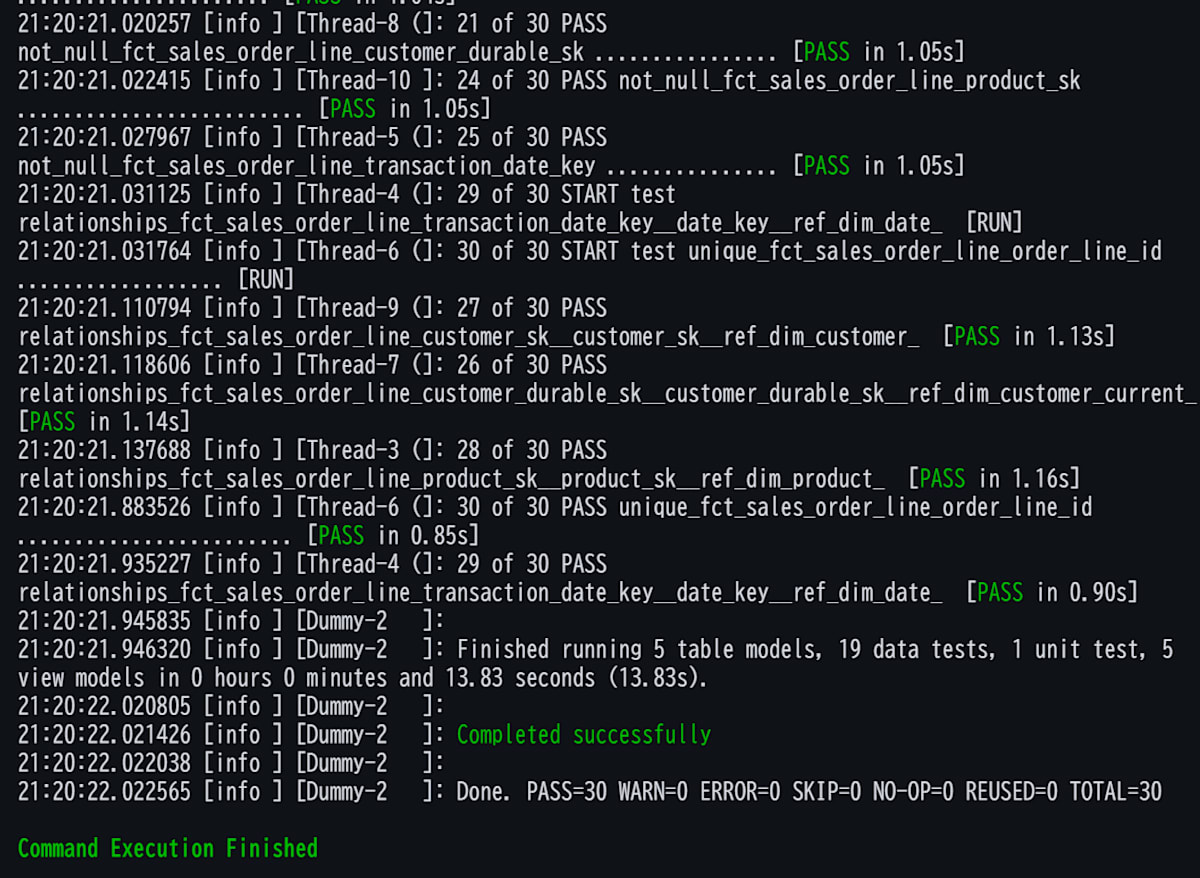
プロジェクト全体をビルドします(seedはロード済みのため除外します)。dbt buildを、Additional Flagsに--exclude resource_type:seedを入れて実行します。dbt buildは、上流のモデルの作成、unit test、fct_sales_order_lineの作成、data testを、依存関係の順に実行します。
ERROR=0で、モデル10個の作成と、unit test(1つ)・data testがすべて成功していればOKです。
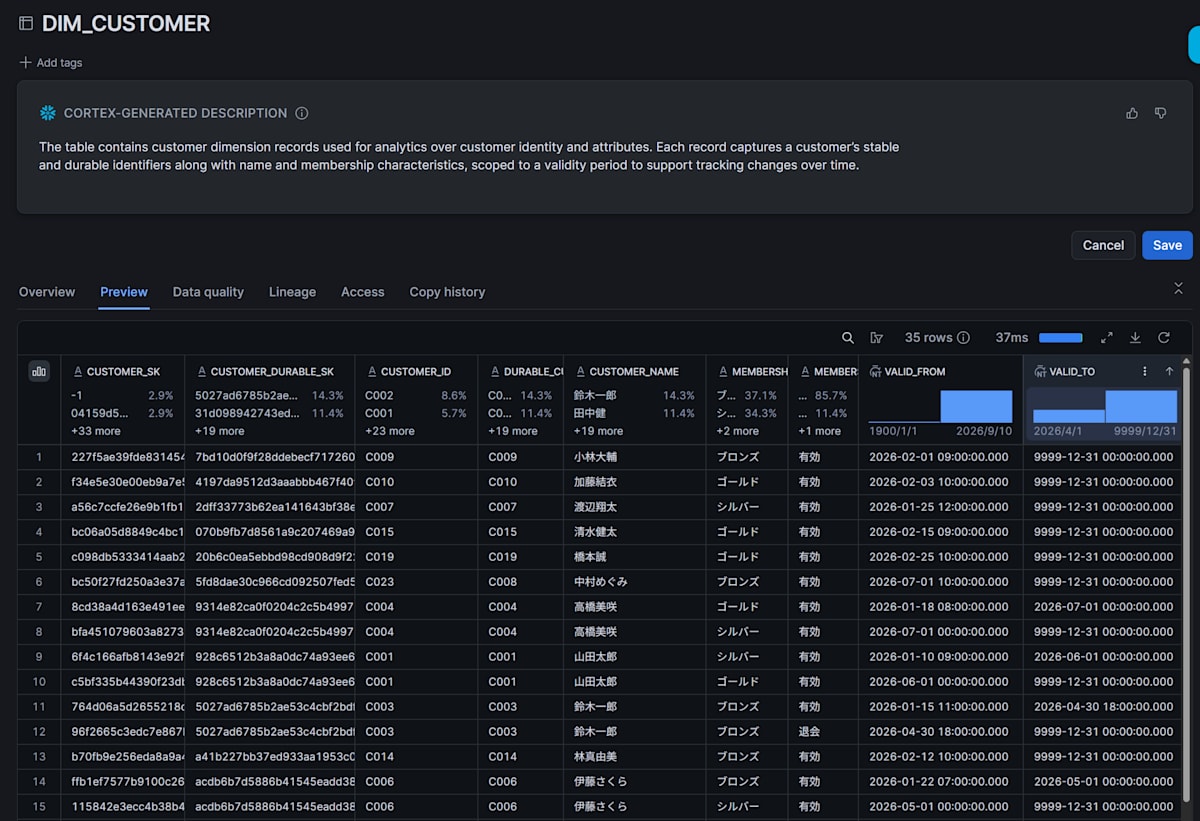
作られたdim_customerは、以下のようなデータです。同じcustomer_idの行が、valid_from〜valid_toで並んでいます。
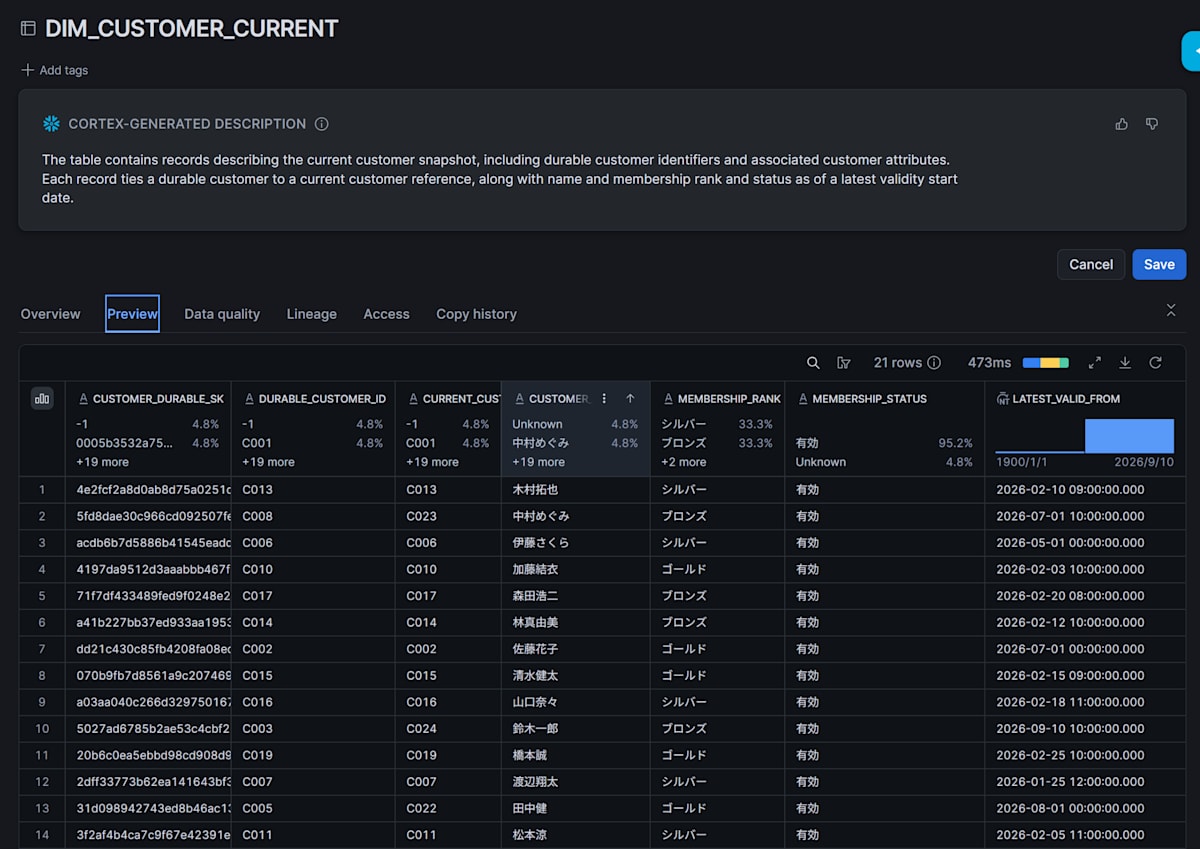
dim_customer_currentは、Durable Key 1件が1行になり、旧IDと新IDが1行にまとまります。
6. 業務の問いに答える
最後に、4つの問いにクエリで答えます。クエリは、dbtがモデルを作成したデータベースとスキーマを指定したうえで、Snowsightのワークシートなどで実行します。商品代金の合計は259,500円です。
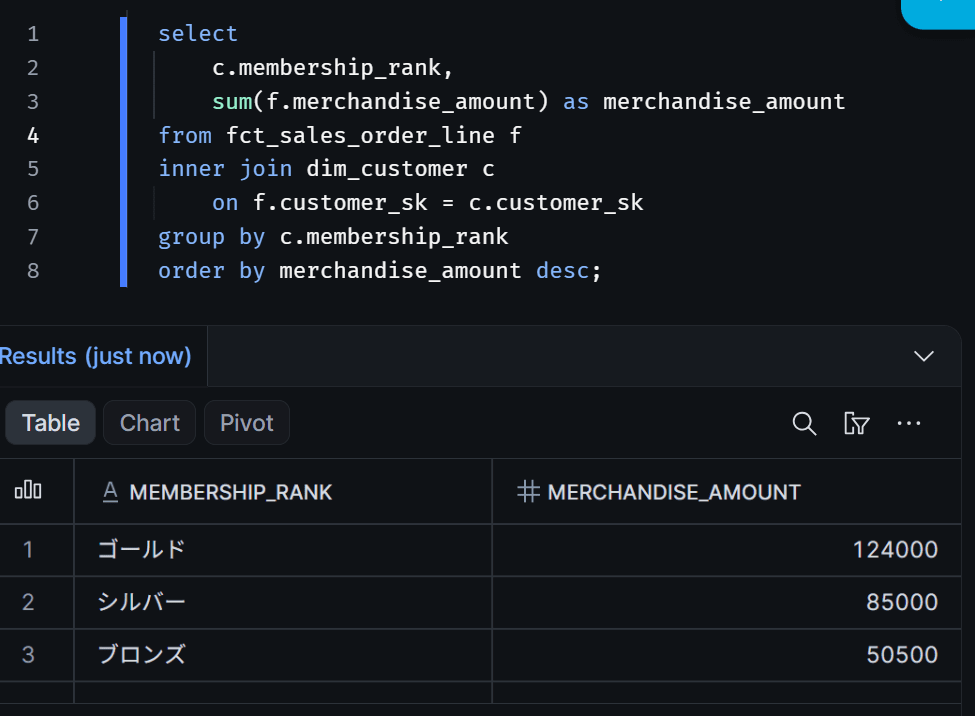
問い1: 注文時点の会員ランク別の商品代金(customer_sk経由)
select
    c.membership_rank,
    sum(f.merchandise_amount) as merchandise_amount
from fct_sales_order_line f
inner join dim_customer c
    on f.customer_sk = c.customer_sk
group by c.membership_rank
order by merchandise_amount desc;
次の結果になればOKです。ゴールド124,000、シルバー85,000、ブロンズ50,500で、合計は259,500です。たとえばC022(田中健)の注文は、6月分がシルバー、8月分がゴールドに分かれて集計されます。
問い2: 同じ注文を、顧客の現在の会員ランクで集計すると(customer_durable_sk経由)
select
    cc.membership_rank,
    sum(f.merchandise_amount) as merchandise_amount
from fct_sales_order_line f
inner join dim_customer_current cc
    on f.customer_durable_sk = cc.customer_durable_sk
group by cc.membership_rank
order by merchandise_amount desc;
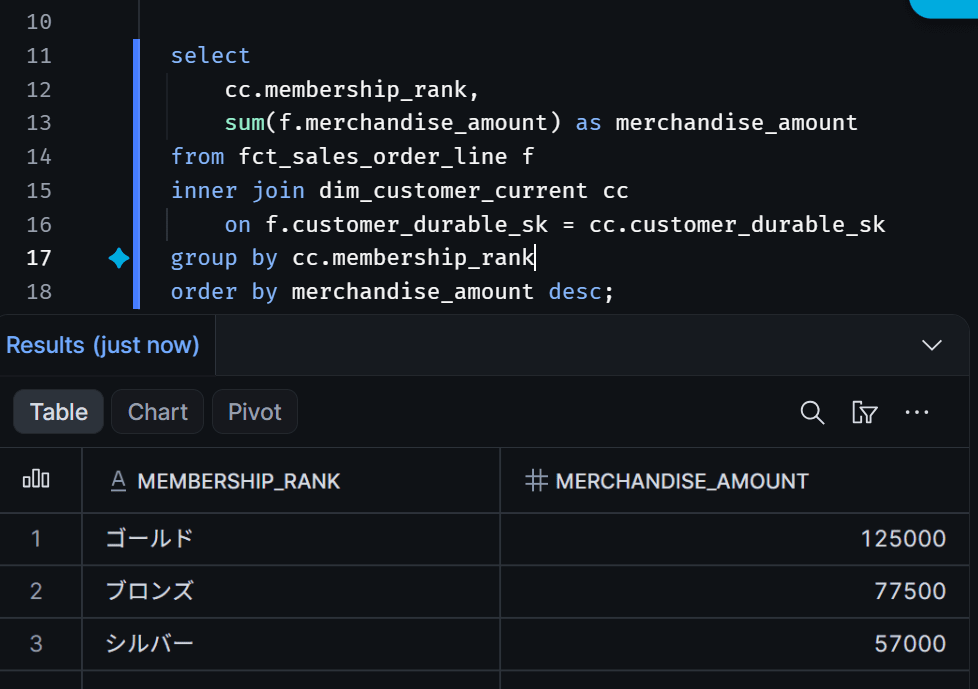
次の結果になればOKです。ゴールド125,000、シルバー57,000、ブロンズ77,500で、合計は同じ259,500です。問い1と比べると、シルバーが85,000から57,000に減り、ブロンズが50,500から77,500に増えています。後からランクが変わった顧客の注文が、すべて現在のランクに集約されるためです。たとえばC001(山田太郎)の注文は、注文時点ではシルバーとゴールドに分かれていましたが、現在のゴールドにまとまります。またC008の42,000円の注文は、注文時点ではゴールドですが、再入会後のC023が現在ブロンズなので、ブロンズに集計されます。
問い3: 購入した顧客は何人か
select
    count(distinct c.customer_id) as customer_id_count,
    count(distinct f.customer_sk) as customer_sk_count,
    count(distinct f.customer_durable_sk) as durable_customer_count
from fct_sales_order_line f
inner join dim_customer c
    on f.customer_sk = c.customer_sk;
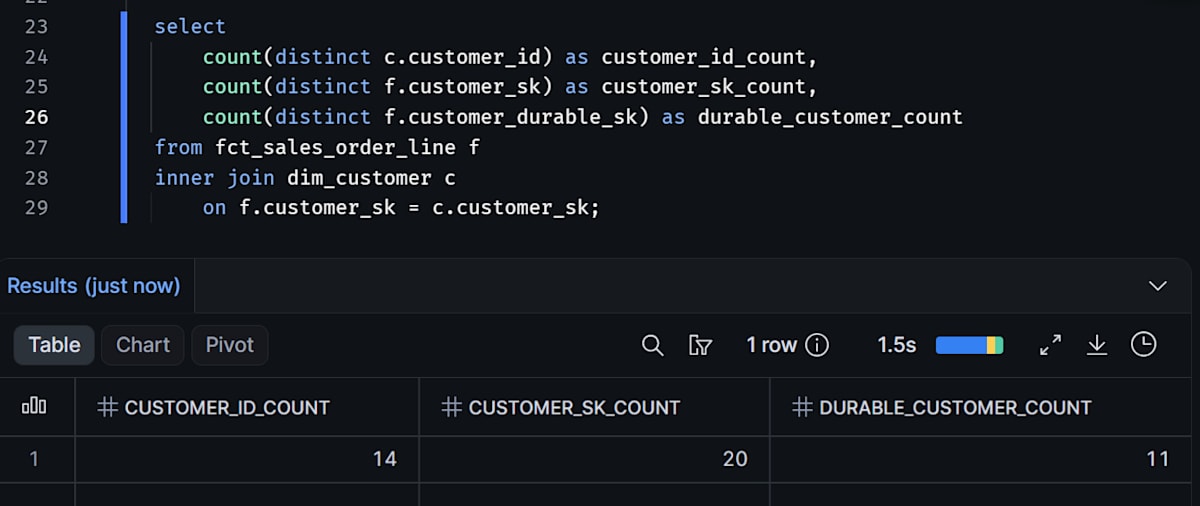
customer_id_countが14、customer_sk_countが20、durable_customer_countが11になればOKです。
customer_skは履歴行(バージョン)を識別するキーなので、そのまま数えると顧客数ではなく購入のあったバージョンの数(20)になります。customer_idで数えても、C003とC021のように同じ顧客の再発行前後のIDが別々に数えられて14になります。Durable Keyで数えると、再発行された3人(C003→C021、C005→C022、C008→C023)がそれぞれ1人にまとまり、11になります。
問い4: ID再発行された顧客の累計商品代金
select
    cc.customer_name,
    c.customer_id,
    sum(f.merchandise_amount) as merchandise_amount,
    sum(sum(f.merchandise_amount)) over (partition by cc.customer_durable_sk) as total_merchandise_amount
from fct_sales_order_line f
inner join dim_customer c
    on f.customer_sk = c.customer_sk
inner join dim_customer_current cc
    on f.customer_durable_sk = cc.customer_durable_sk
group by cc.customer_durable_sk, cc.customer_name, c.customer_id
qualify count(*) over (partition by cc.customer_durable_sk) > 1
order by cc.customer_name, c.customer_id;
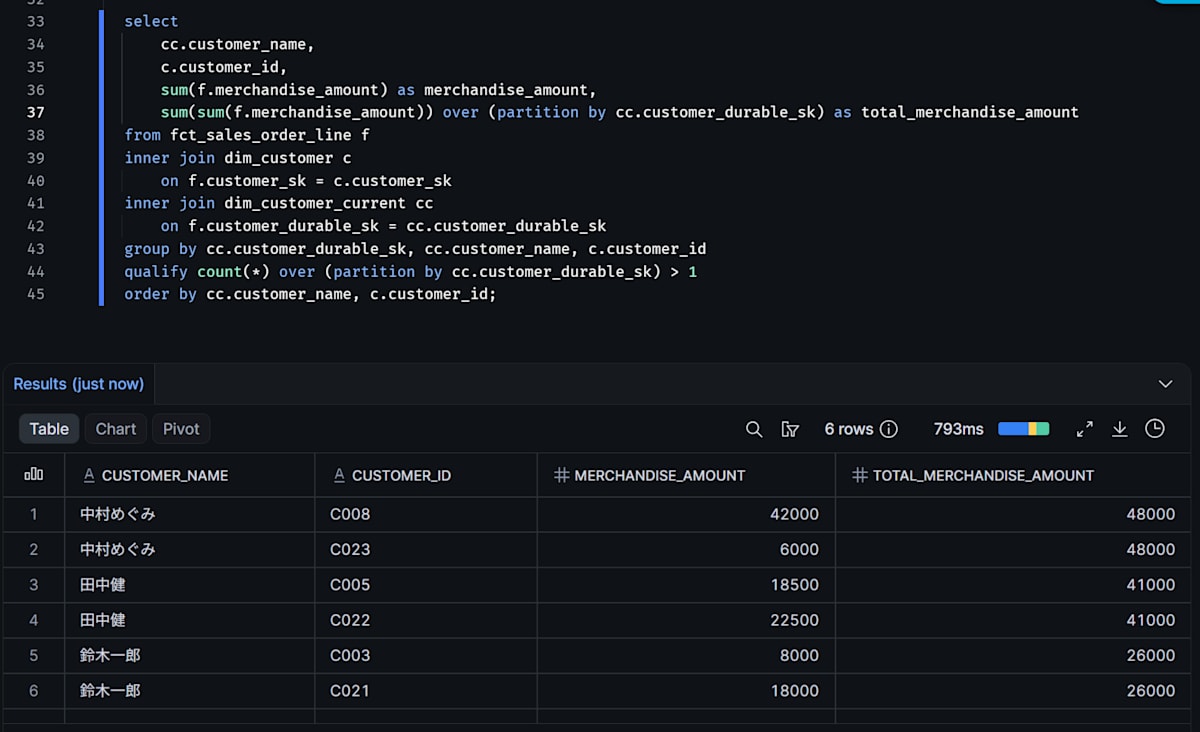
次の6行が返ればOKです。購入実績に旧IDと新IDの両方が現れる顧客だけを抽出しています。2段のチェーンの末尾のC024のように購入のないIDは表示されません。
customer_idだけで集計すると、C003の8,000円とC021の18,000円は別の顧客の購入に見えますが、Durable Keyを使えば鈴木一郎の累計26,000円として扱えます。
Dimension Surrogate KeyとDurable Keyの使い分け
ここまでの検証では、同じファクトテーブルを2つのキーで集計しました。2つのキーは、何を識別するかが違います。
| 観点 | Dimension Surrogate Key(customer_sk) |
Durable Key(customer_durable_sk) |
|---|---|---|
| 何を識別するか | ディメンションの1行(顧客IDの1バージョン) | 1人の顧客(再発行されたIDも同一人物としてまとめる) |
| キーが作られる単位(何に対して1つ振られるか) | customer_idとvalid_fromの組み合わせごと(バージョンごと) |
再発行チェーンの起点のIDごと(1人の顧客につき1つ) |
| ファクトでの役割 | 注文時点のバージョンに紐づける外部キー | 同じ顧客として集計・参照するための外部キー |
| 属性の見え方 | 注文時点の属性が見える(問い1) | 現在の属性が見える(問い2)。過去の属性はdim_customer_currentだけでは分からない |
| ユニーク顧客数・累計の集計 | キー単独ではできない。数えるとバージョン数やcustomer_idの数になる(問い3) |
できる。ID変更をまたいだ累計金額(LTVなど)も合算できる(問い3・4) |
| 名寄せの責任 | 持たない。ソースのIDとバージョンをそのまま識別する | 持つ。どのIDを同一人物とみなすかをDWH側で決める必要がある。今回はprevious_customer_idを信頼した |
分析の目的ごとの使い分けは、次のとおりです。
- 注文時点の属性で見たいとき(Surrogate Key): 注文時点の会員ランク別に商品代金を見たいときに使います。履歴行を持つディメンションでは、行を一意に決めるキーが必要です
- ユニーク顧客数やLTVを見たいとき(Durable Key):
customer_idやcustomer_skをそのまま顧客数として数えると、同じ人が複数回カウントされることがあります。ID変更をまたいで1人の顧客として数えたり累計したりするには、Durable Keyか、同じ役割のIDの対応表が必要です - 現在の属性で見たいとき(Durable Key): Durable Key内で最も新しいバージョンを持つ
dim_customer_currentと結合します。注文時点と現在のどちらの属性を使うかは、分析したい内容で決まります - 両方をファクトに持たせる: ファクトには
customer_skだけを持たせ、dim_customer経由でcustomer_durable_skをたどる構成も可能です。ただ、ファクトに両方持たせておくと、今回のようにJOIN先を変えるだけで「注文時点の属性」でも「現在の属性・同一顧客単位」でもシンプルに集計できます(ただし名寄せルールが変わった場合はファクト側の再計算も必要になります)
ファクトに、履歴のバージョンを指すSurrogate Keyと、現在の属性を指すDurable Keyの両方を持たせる考え方は、KimballのSCD Type 7です。Design Tip #152では、Type 7を、ファクトにType 2ディメンションへのSurrogate Keyと、現在行の属性を参照するためのDurable Keyの2つの外部キーを持たせる構成として紹介しています。
今回は、現在の属性用のテーブルとしてdim_customer_currentを別に作り、Type 7の考え方をキーの面から確認しました。
ソースの顧客ID(Natural Key)が1人の顧客に対して決して変わらず、ID変更や複数IDの統合を扱う必要がなければ、名寄せのチェーンをたどる処理は不要で、customer_idから直接Durable Keyを作れます。逆に、退会後の再入会などでIDが再発行される業務ルールがあるのにcustomer_idだけで集計していると、顧客数のずれや累計額の分散に気づきにくくなります。
最後に
dbt Projects on Snowflakeで、顧客ディメンションにDimension Surrogate KeyとDurable Keyを実装し、受注明細のファクトに両方を持たせて集計結果を比較しました。注文時点の属性で見るならSurrogate Key、同じ顧客として集計したり現在の属性で見たりするならDurable Key、と使い分けられることが確認できました。
この記事が少しでも参考になれば幸いです。