FivetranのHybrid Deployment AgentをAmazon EKSで動かし、フェイルオーバーを試してみた

データ事業本部のueharaです。
今回は、FivetranのHybrid Deployment AgentをAmazon EKSで動かし、フェイルオーバーを試してみたいと思います。
はじめに
Fivetranには、顧客が管理するネットワーク(例:Amazon VPC)に存在するデータソースに接続するための機能として、Hybrid Deploymentという機能が提供されています。
Hybrid Deployment Agentのdeployment typeには、以下の3つが存在します。
- Docker
- Kubernetes
- Podman
Fivetranの冗長構成については、Fivetran社としても現状はKubernetesにのみ重点を置いているようで、例えばAWSのAZ障害に自動フェイルオーバーで対応するのであればAmazon EKSの利用が必要になってくるかと思います。
ここで、KubernetesでHybrid Deploymentを使用するには、環境が次の要件を満たしている必要があります。
- Kubernetes v1.29.x 以上
- Hybrid Deployment AgentのHelmチャートを展開するためのHelm CLI v3.16.1 以上
- 任意のオンプレミスKubernetesサービス、または次のいずれかのクラウドベースのKubernetesサービス
- Amazon Elastic Kubernetes Service (Amazon EKS)
- Azure Kubernetes Service (AKS)
- Google Kubernetes Engine (GKE)
今回は、この内Amazon EKSを利用することにします。
環境構築
SnowflakeをDestinationとして設定
まず、FivetranでSnowflakeをDestinationとして設定します。
ここで、Snowflake上でのFivetran用のユーザー設定等は既に済んでいるものとします。
Fivetranのダッシュボード上にある『Destination』から、『Snowflake』を選択し適当な名前を付けます。
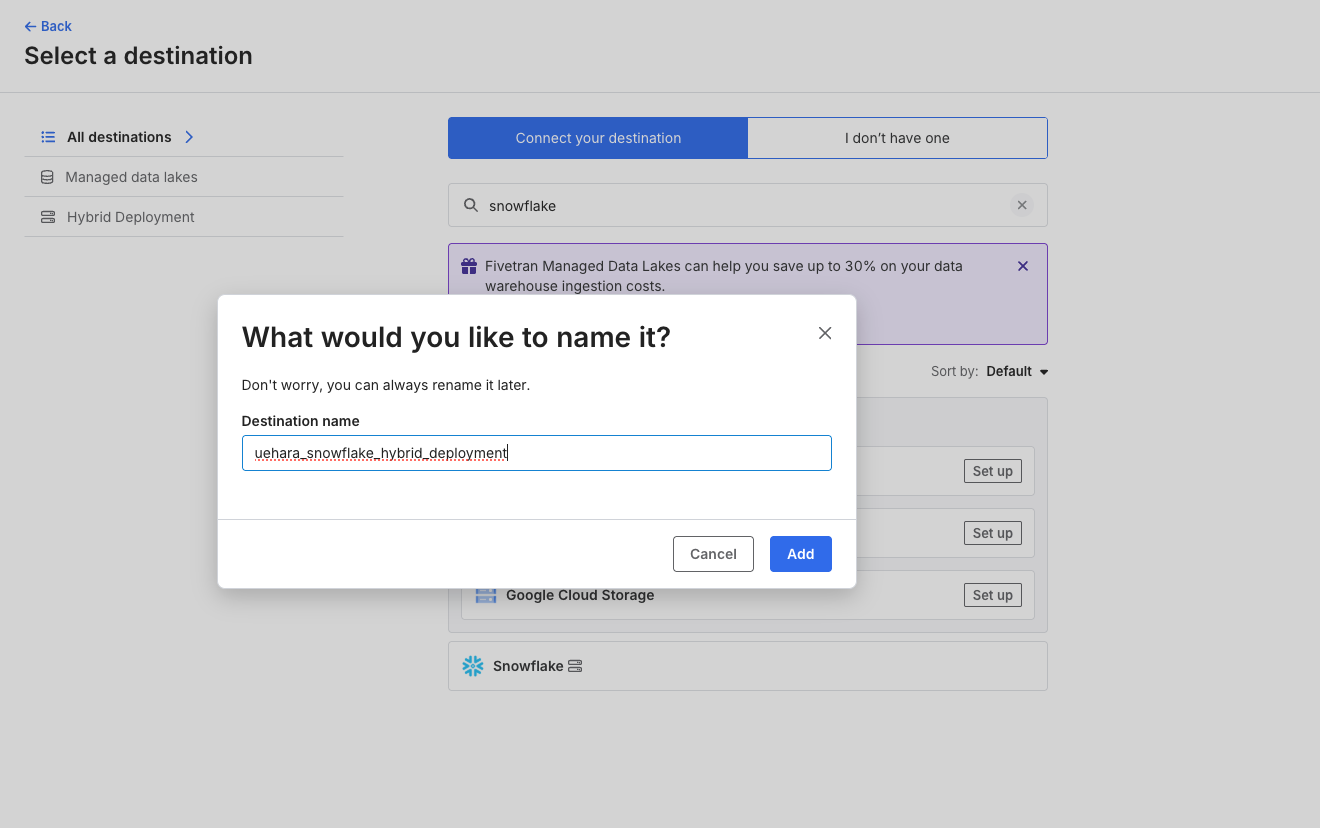
Snowflake上で設定したFivetran用ユーザーの接続情報を入力します。
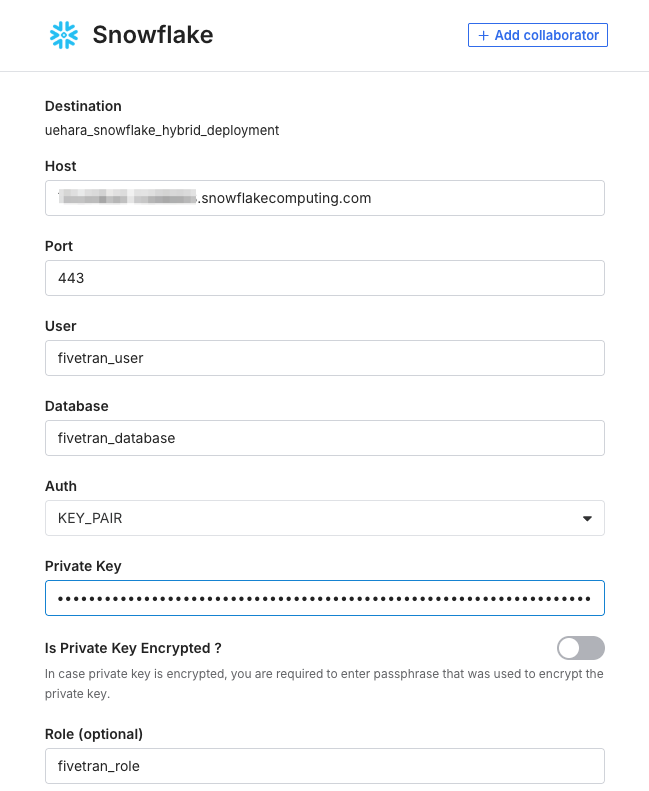
deployment modelは『Hybrid Deployment』とし、『Select Hybrid Deployment Agent』を選択します。

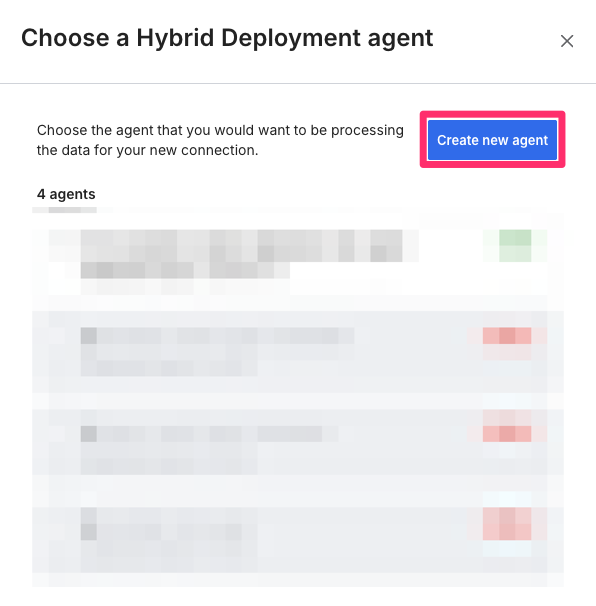
今回agentは新規作成するので、『Create new agent』を選択します。
deployment typeは冒頭の通り『Kubernetes』を選択します。
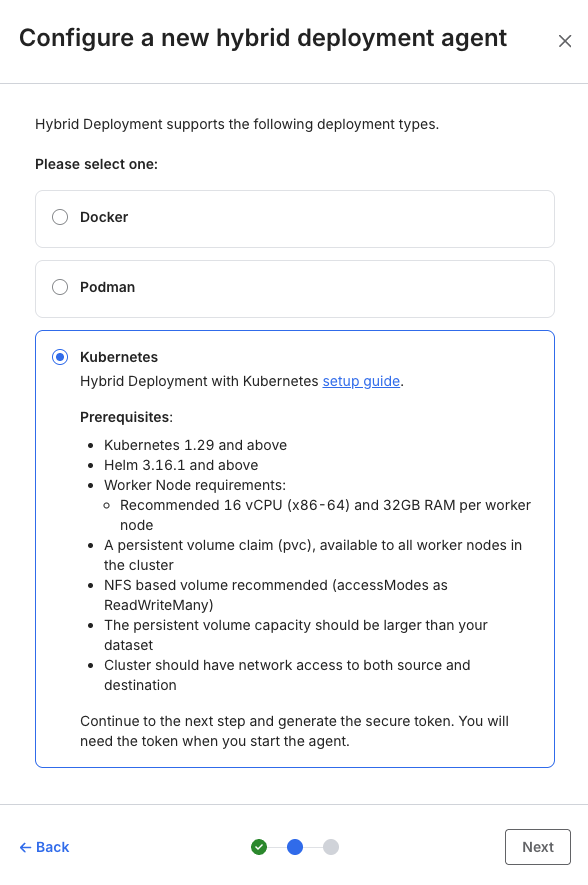
次に進むと、Agent tokenとAgentをインストールするためのHelmのコマンドが表示されるかと思いますので、これをコピーしておきます。

この後、AWS上でAmazon EKS等のリソースを作成し、Hybrid Deployment Agentのインストールを行った後にこちらのSnowflakeのDestinationのセットアップ作業を続けますので、ブラウザはそのままの状態にしておいて下さい。
※誤ってブラウザを閉じてしまっても、再度作成途中のDestinationから作業の続行は可能です。
CloudFormationでリソースの作成
AWSのマネジメントコンソールに接続し、『CloudFormation』のページから以下CloudFormationテンプレート infla.yml でスタックの作成を行います。
AWSTemplateFormatVersion: '2010-09-09'
Description: >
  CloudFormation template for Fivetran Hybrid Deployment Agent on EKS.

# =============================================================================
# Parameters
# =============================================================================
Parameters:
  # Network Parameters
  VpcId:
    Type: AWS::EC2::VPC::Id
    Description: Existing VPC ID

  PrivateSubnetAZa:
    Type: AWS::EC2::Subnet::Id
    Description: Private subnet ID in ap-northeast-1a

  PrivateSubnetAZc:
    Type: AWS::EC2::Subnet::Id
    Description: Private subnet ID in ap-northeast-1c

  # EKS Parameters
  ClusterName:
    Type: String
    Default: fivetran-hda-cluster
    Description: EKS cluster name

  KubernetesVersion:
    Type: String
    Default: '1.33'
    Description: Kubernetes version (1.29 or above required)

  # Node Group Parameters
  NodeInstanceType:
    Type: String
    Default: m5.4xlarge
    Description: >
      EC2 instance type for worker nodes
      (Recommended: 16 vCPU, 32GB+ RAM - m5.4xlarge)

  NodeGroupDesiredSize:
    Type: Number
    Default: 2
    MinValue: 1
    MaxValue: 10
    Description: Desired number of worker nodes

  NodeGroupMinSize:
    Type: Number
    Default: 1
    MinValue: 1
    MaxValue: 10
    Description: Minimum number of worker nodes

  NodeGroupMaxSize:
    Type: Number
    Default: 4
    MinValue: 1
    MaxValue: 20
    Description: Maximum number of worker nodes

  NodeDiskSize:
    Type: Number
    Default: 100
    MinValue: 50
    Description: Disk size for worker nodes in GB (minimum 50GB recommended)

  # Environment Tag
  Environment:
    Type: String
    Default: dev
    AllowedValues:
      - dev
      - stg
      - prd
    Description: Environment tag

# =============================================================================
# Resources
# =============================================================================
Resources:
  # ---------------------------------------------------------------------------
  # IAM Roles
  # ---------------------------------------------------------------------------

  # EKS Cluster Role
  EKSClusterRole:
    Type: AWS::IAM::Role
    Properties:
      RoleName: !Sub '${ClusterName}-cluster-role'
      AssumeRolePolicyDocument:
        Version: '2012-10-17'
        Statement:
          - Effect: Allow
            Principal:
              Service: eks.amazonaws.com
            Action: sts:AssumeRole
      ManagedPolicyArns:
        - arn:aws:iam::aws:policy/AmazonEKSClusterPolicy
        - arn:aws:iam::aws:policy/AmazonEKSVPCResourceController
      Tags:
        - Key: Name
          Value: !Sub '${ClusterName}-cluster-role'
        - Key: Environment
          Value: !Ref Environment

  # EKS Node Group Role
  EKSNodeRole:
    Type: AWS::IAM::Role
    Properties:
      RoleName: !Sub '${ClusterName}-node-role'
      AssumeRolePolicyDocument:
        Version: '2012-10-17'
        Statement:
          - Effect: Allow
            Principal:
              Service: ec2.amazonaws.com
            Action: sts:AssumeRole
      ManagedPolicyArns:
        - arn:aws:iam::aws:policy/AmazonEKSWorkerNodePolicy
        - arn:aws:iam::aws:policy/AmazonEKS_CNI_Policy
        - arn:aws:iam::aws:policy/AmazonEC2ContainerRegistryReadOnly
        - arn:aws:iam::aws:policy/AmazonSSMManagedInstanceCore
      Tags:
        - Key: Name
          Value: !Sub '${ClusterName}-node-role'
        - Key: Environment
          Value: !Ref Environment

  # ---------------------------------------------------------------------------
  # Security Groups
  # ---------------------------------------------------------------------------

  # EKS Cluster Security Group
  EKSClusterSecurityGroup:
    Type: AWS::EC2::SecurityGroup
    Properties:
      GroupName: !Sub '${ClusterName}-cluster-sg'
      GroupDescription: Security group for EKS cluster control plane
      VpcId: !Ref VpcId
      Tags:
        - Key: Name
          Value: !Sub '${ClusterName}-cluster-sg'
        - Key: Environment
          Value: !Ref Environment

  # EKS Node Security Group
  EKSNodeSecurityGroup:
    Type: AWS::EC2::SecurityGroup
    Properties:
      GroupName: !Sub '${ClusterName}-node-sg'
      GroupDescription: Security group for EKS worker nodes
      VpcId: !Ref VpcId
      SecurityGroupEgress:
        - IpProtocol: '-1'
          CidrIp: '0.0.0.0/0'
          Description: Allow all outbound traffic for Fivetran connectivity
      Tags:
        - Key: Name
          Value: !Sub '${ClusterName}-node-sg'
        - Key: Environment
          Value: !Ref Environment

  # Node to Node communication
  NodeSecurityGroupIngress:
    Type: AWS::EC2::SecurityGroupIngress
    Properties:
      GroupId: !Ref EKSNodeSecurityGroup
      IpProtocol: '-1'
      SourceSecurityGroupId: !Ref EKSNodeSecurityGroup
      Description: Allow node to node communication

  # Cluster to Node communication
  ClusterToNodeIngress:
    Type: AWS::EC2::SecurityGroupIngress
    Properties:
      GroupId: !Ref EKSNodeSecurityGroup
      IpProtocol: tcp
      FromPort: 443
      ToPort: 443
      SourceSecurityGroupId: !Ref EKSClusterSecurityGroup
      Description: Allow cluster control plane to communicate with nodes

  ClusterToNodeKubeletIngress:
    Type: AWS::EC2::SecurityGroupIngress
    Properties:
      GroupId: !Ref EKSNodeSecurityGroup
      IpProtocol: tcp
      FromPort: 10250
      ToPort: 10250
      SourceSecurityGroupId: !Ref EKSClusterSecurityGroup
      Description: Allow cluster control plane to communicate with kubelet

  ClusterToNodeAllIngress:
    Type: AWS::EC2::SecurityGroupIngress
    Properties:
      GroupId: !Ref EKSNodeSecurityGroup
      IpProtocol: tcp
      FromPort: 1025
      ToPort: 65535
      SourceSecurityGroupId: !Ref EKSClusterSecurityGroup
      Description: Allow cluster control plane to communicate with nodes on ephemeral ports

  # Node to Cluster communication
  NodeToClusterIngress:
    Type: AWS::EC2::SecurityGroupIngress
    Properties:
      GroupId: !Ref EKSClusterSecurityGroup
      IpProtocol: tcp
      FromPort: 443
      ToPort: 443
      SourceSecurityGroupId: !Ref EKSNodeSecurityGroup
      Description: Allow nodes to communicate with cluster control plane

  # EFS Security Group
  EFSSecurityGroup:
    Type: AWS::EC2::SecurityGroup
    Properties:
      GroupName: !Sub '${ClusterName}-efs-sg'
      GroupDescription: Security group for EFS mount targets
      VpcId: !Ref VpcId
      SecurityGroupIngress:
        - IpProtocol: tcp
          FromPort: 2049
          ToPort: 2049
          SourceSecurityGroupId: !Ref EKSNodeSecurityGroup
          Description: Allow NFS traffic from EKS nodes (custom SG)
      Tags:
        - Key: Name
          Value: !Sub '${ClusterName}-efs-sg'
        - Key: Environment
          Value: !Ref Environment

  # Additional EFS ingress rule for EKS Cluster Security Group
  # EKS Managed Node Group uses the cluster security group
  EFSClusterSecurityGroupIngress:
    Type: AWS::EC2::SecurityGroupIngress
    DependsOn: EKSCluster
    Properties:
      GroupId: !Ref EFSSecurityGroup
      IpProtocol: tcp
      FromPort: 2049
      ToPort: 2049
      SourceSecurityGroupId: !GetAtt EKSCluster.ClusterSecurityGroupId
      Description: Allow NFS traffic from EKS cluster security group

  # ---------------------------------------------------------------------------
  # EKS Cluster
  # ---------------------------------------------------------------------------

  EKSCluster:
    Type: AWS::EKS::Cluster
    Properties:
      Name: !Ref ClusterName
      Version: !Ref KubernetesVersion
      RoleArn: !GetAtt EKSClusterRole.Arn
      ResourcesVpcConfig:
        SubnetIds:
          - !Ref PrivateSubnetAZa
          - !Ref PrivateSubnetAZc
        SecurityGroupIds:
          - !Ref EKSClusterSecurityGroup
        EndpointPrivateAccess: true
        EndpointPublicAccess: false
      Logging:
        ClusterLogging:
          EnabledTypes:
            - Type: api
            - Type: audit
            - Type: authenticator
            - Type: controllerManager
            - Type: scheduler
      Tags:
        - Key: Name
          Value: !Ref ClusterName
        - Key: Environment
          Value: !Ref Environment

  # ---------------------------------------------------------------------------
  # OIDC Provider for IAM Roles for Service Accounts (IRSA)
  # ---------------------------------------------------------------------------

  OIDCProvider:
    Type: AWS::IAM::OIDCProvider
    DependsOn: EKSCluster
    Properties:
      Url: !GetAtt EKSCluster.OpenIdConnectIssuerUrl
      ClientIdList:
        - sts.amazonaws.com
      ThumbprintList:
        # AWS recommends this thumbprint for EKS OIDC
        - 9e99a48a9960b14926bb7f3b02e22da2b0ab7280
      Tags:
        - Key: Name
          Value: !Sub '${ClusterName}-oidc-provider'
        - Key: Environment
          Value: !Ref Environment

  # EFS CSI Driver Role (created after OIDC Provider)
  EFSCSIDriverRole:
    Type: AWS::IAM::Role
    DependsOn: OIDCProvider
    Properties:
      RoleName: !Sub '${ClusterName}-efs-csi-role'
      AssumeRolePolicyDocument:
        Fn::Sub:
          - |
            {
              "Version": "2012-10-17",
              "Statement": [
                {
                  "Effect": "Allow",
                  "Principal": {
                    "Federated": "arn:aws:iam::${AWS::AccountId}:oidc-provider/${OIDCProviderHost}"
                  },
                  "Action": "sts:AssumeRoleWithWebIdentity",
                  "Condition": {
                    "StringEquals": {
                      "${OIDCProviderHost}:aud": "sts.amazonaws.com",
                      "${OIDCProviderHost}:sub": "system:serviceaccount:kube-system:efs-csi-controller-sa"
                    }
                  }
                }
              ]
            }
          - OIDCProviderHost: !Select
              - 1
              - !Split
                - '://'
                - !GetAtt EKSCluster.OpenIdConnectIssuerUrl
      ManagedPolicyArns:
        - arn:aws:iam::aws:policy/service-role/AmazonEFSCSIDriverPolicy
      Tags:
        - Key: Name
          Value: !Sub '${ClusterName}-efs-csi-role'
        - Key: Environment
          Value: !Ref Environment

  # ---------------------------------------------------------------------------
  # EKS Node Group (Managed Node Group with Amazon Linux 2023)
  # ---------------------------------------------------------------------------

  EKSNodeGroup:
    Type: AWS::EKS::Nodegroup
    DependsOn: EKSCluster
    Properties:
      NodegroupName: !Sub '${ClusterName}-nodegroup'
      ClusterName: !Ref ClusterName
      NodeRole: !GetAtt EKSNodeRole.Arn
      Subnets:
        - !Ref PrivateSubnetAZa
        - !Ref PrivateSubnetAZc
      # Amazon Linux 2023 (EKS optimized, fully supported)
      AmiType: AL2023_x86_64_STANDARD
      InstanceTypes:
        - !Ref NodeInstanceType
      DiskSize: !Ref NodeDiskSize
      ScalingConfig:
        DesiredSize: !Ref NodeGroupDesiredSize
        MinSize: !Ref NodeGroupMinSize
        MaxSize: !Ref NodeGroupMaxSize
      Labels:
        role: fivetran-hda
      Tags:
        Name: !Sub '${ClusterName}-nodegroup'
        Environment: !Ref Environment

  # ---------------------------------------------------------------------------
  # EFS File System (for ReadWriteMany PVC - Required by Fivetran HDA)
  # ---------------------------------------------------------------------------

  EFSFileSystem:
    Type: AWS::EFS::FileSystem
    Properties:
      Encrypted: true
      PerformanceMode: generalPurpose
      ThroughputMode: elastic
      LifecyclePolicies:
        - TransitionToIA: AFTER_30_DAYS
      FileSystemTags:
        - Key: Name
          Value: !Sub '${ClusterName}-efs'
        - Key: Environment
          Value: !Ref Environment

  EFSMountTargetAZa:
    Type: AWS::EFS::MountTarget
    Properties:
      FileSystemId: !Ref EFSFileSystem
      SubnetId: !Ref PrivateSubnetAZa
      SecurityGroups:
        - !Ref EFSSecurityGroup

  EFSMountTargetAZc:
    Type: AWS::EFS::MountTarget
    Properties:
      FileSystemId: !Ref EFSFileSystem
      SubnetId: !Ref PrivateSubnetAZc
      SecurityGroups:
        - !Ref EFSSecurityGroup

  # ---------------------------------------------------------------------------
  # EKS Add-ons
  # ---------------------------------------------------------------------------

  VpcCniAddon:
    Type: AWS::EKS::Addon
    DependsOn: EKSNodeGroup
    Properties:
      AddonName: vpc-cni
      ClusterName: !Ref ClusterName
      ResolveConflicts: OVERWRITE

  CoreDnsAddon:
    Type: AWS::EKS::Addon
    DependsOn: EKSNodeGroup
    Properties:
      AddonName: coredns
      ClusterName: !Ref ClusterName
      ResolveConflicts: OVERWRITE

  KubeProxyAddon:
    Type: AWS::EKS::Addon
    DependsOn: EKSNodeGroup
    Properties:
      AddonName: kube-proxy
      ClusterName: !Ref ClusterName
      ResolveConflicts: OVERWRITE

  EFSCSIAddon:
    Type: AWS::EKS::Addon
    DependsOn:
      - EKSNodeGroup
      - EFSCSIDriverRole
    Properties:
      AddonName: aws-efs-csi-driver
      ClusterName: !Ref ClusterName
      ServiceAccountRoleArn: !GetAtt EFSCSIDriverRole.Arn
      ResolveConflicts: OVERWRITE

# =============================================================================
# Outputs
# =============================================================================
Outputs:
  ClusterName:
    Description: EKS cluster name
    Value: !Ref EKSCluster
    Export:
      Name: !Sub '${AWS::StackName}-ClusterName'

  ClusterArn:
    Description: EKS cluster ARN
    Value: !GetAtt EKSCluster.Arn
    Export:
      Name: !Sub '${AWS::StackName}-ClusterArn'

  ClusterEndpoint:
    Description: EKS cluster endpoint
    Value: !GetAtt EKSCluster.Endpoint
    Export:
      Name: !Sub '${AWS::StackName}-ClusterEndpoint'

  ClusterSecurityGroupId:
    Description: EKS cluster security group ID
    Value: !GetAtt EKSCluster.ClusterSecurityGroupId
    Export:
      Name: !Sub '${AWS::StackName}-ClusterSecurityGroupId'

  OIDCProviderHost:
    Description: OIDC provider host (without https://)
    Value: !Select [1, !Split ['https://', !GetAtt EKSCluster.OpenIdConnectIssuerUrl]]
    Export:
      Name: !Sub '${AWS::StackName}-OIDCProviderHost'

  OIDCProviderArn:
    Description: OIDC provider ARN
    Value: !GetAtt OIDCProvider.Arn
    Export:
      Name: !Sub '${AWS::StackName}-OIDCProviderArn'

  NodeGroupArn:
    Description: EKS node group ARN
    Value: !GetAtt EKSNodeGroup.Arn
    Export:
      Name: !Sub '${AWS::StackName}-NodeGroupArn'

  EFSFileSystemId:
    Description: EFS file system ID (use for PVC creation)
    Value: !Ref EFSFileSystem
    Export:
      Name: !Sub '${AWS::StackName}-EFSFileSystemId'

  EFSFileSystemArn:
    Description: EFS file system ARN
    Value: !GetAtt EFSFileSystem.Arn
    Export:
      Name: !Sub '${AWS::StackName}-EFSFileSystemArn'

  NodeSecurityGroupId:
    Description: Node security group ID
    Value: !Ref EKSNodeSecurityGroup
    Export:
      Name: !Sub '${AWS::StackName}-NodeSecurityGroupId'
構成図をざっくり書くと、以下のようになります。
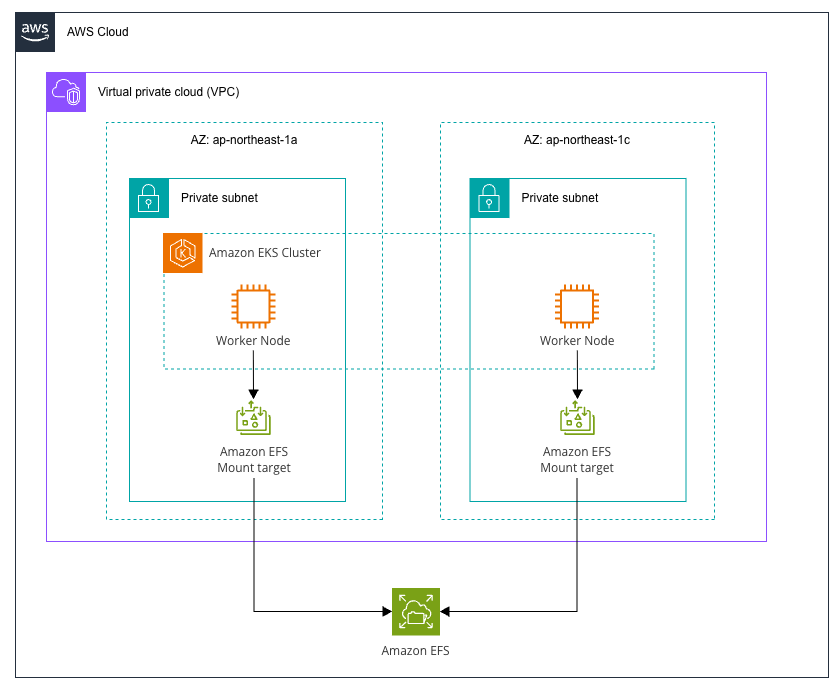
ここで、VPCとサブネットは既に構築済みであると想定し、今回利用しているNWは以下のような構成となっています。
| リソース | CIDR | リージョン |
|---|---|---|
| VPC | 10.99.0.0/22 | ap-northeast-1 |
| リソース | CIDR | リージョン | AZ | Public/Private | 備考 |
|---|---|---|---|---|---|
| Subnet | 10.99.1.0/24 | ap-northeast-1 | ap-northeast-1a | Private | インターネット向けは Public SubnetのNAT GWにルーティング |
| Subnet | 10.99.2.0/24 | ap-northeast-1 | ap-northeast-1c | Private | インターネット向けは Public SubnetのNAT GWにルーティング |
VPCやサブネットの他、EKSの設定値についても Parameter として用意しているので、よしなに値を設定して下さい。
CloudFormationの実行が正常に完了すると、以下のような出力がされているかと思います。

EKSの設定とagentのインストール
本来であれば踏み台のサーバー等を用意し、そこからEKSの設定をするのが正しいと思うのですが、今回は検証なのでワーカーノードをそのまま利用して設定を行います。
まず、作成したCluster配下で管理されているノードから適当に1つ選択し、インスタンスIDを確認します。

AWS Systems Manager Session Managerを利用して、インスタンスにアクセスします。
$ aws ssm start-session \
  --target <INSTANCE-ID> \
  --region ap-northeast-1
事前準備
アクセスできたら、まず、kubectlのセットアップを行います。
# 作業ディレクトリに移動
$ cd /tmp

# kubectlのインストール
$ curl -LO "https://dl.k8s.io/release/v1.29.0/bin/linux/amd64/kubectl"
$ chmod +x kubectl
$ sudo mv kubectl /usr/local/bin/

# kubectlの確認
$ kubectl version --client
バージョンの確認コマンドで、以下のように表示されたらインストールが成功しています。

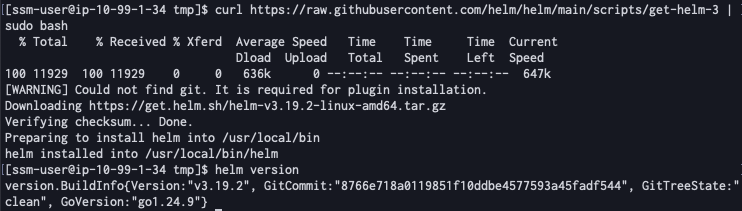
次に、そのままHelmのインストールを行います。
# Helmのインストール
$ curl https://raw.githubusercontent.com/helm/helm/main/scripts/get-helm-3 | sudo bash

# Helmの確認
$ helm version
こちらもバージョン確認コマンドで結果が表示されればインストール完了です。
次に、kubeconfigの設定を行います。
aws eks コマンドを利用するためEKSを扱うためのIAMの権限が必要ですが、今回は権限を持つIAMロールからSTSを用いて一時認証情報を発行し、そちらを利用することにします。(※一時認証情報ではなく、普通にアクセスキーを利用しても問題ありません。その場合、以下の aws sts コマンドの実行はスキップし、SSMセッション内でそのままアクセスキーを設定して下さい。)
別でターミナルを開き、以下を実行します。
$ aws sts assume-role --role-arn <IAM-ROLE-ARN> --role-session-name <SESSION-NAME> --duration-seconds 3600
上記コマンドで一時認証情報が取得できたら、SSMのセッションを張っているターミナルに戻り、kubeconfigの設定を行います。
# 一時認証情報の設定
$ export AWS_ACCESS_KEY_ID="<AWS-ACCESS-KEY-ID>"
$ export AWS_SECRET_ACCESS_KEY="<AWS-SECRET-ACCESS-KEY>"
$ export AWS_SESSION_TOKEN="<AWS-SESSION-TOKEN>"
$ export AWS_DEFAULT_REGION="ap-northeast-1"

# kubeconfigの設定
$ aws eks update-kubeconfig --region ap-northeast-1 --name <EKS-CLUSTER-NAME>

# 接続確認
$ kubectl get nodes
最後の kubectl コマンドでノードが表示されていれば設定が完了しています。

ストレージクラスの作成
次に、EFS CSI Driver用のストレージクラスの作成を行います。
※CSIのdynamic provisioningについては以下をご参考下さい。
# ストレージクラスの作成
$ cat <<EOF | kubectl apply -f -
apiVersion: storage.k8s.io/v1
kind: StorageClass
metadata:
  name: efs-sc
provisioner: efs.csi.aws.com
parameters:
  provisioningMode: efs-ap
  fileSystemId: <EFS-FILESYSTEM-ID>
  directoryPerms: "700"
  basePath: "/fivetran"
reclaimPolicy: Retain
volumeBindingMode: Immediate
EOF

# ストレージクラスの確認
$ kubectl get storageclass efs-sc
<EFS-FILESYSTEM-ID> は作成したEFSのID( fs-xxxxx )に置き換えて下さい。
最後の kubectl コマンドの実行で、以下のように表示されていれば完了です。

PVCの作成
次に、Persistent Volume Claim (PVC) の作成を行います。
# PVCの作成
$ cat <<EOF | kubectl apply -f -
apiVersion: v1
kind: PersistentVolumeClaim
metadata:
  name: fivetran-hda-pvc
  namespace: default
spec:
  accessModes:
    - ReadWriteMany
  storageClassName: efs-sc
  resources:
    requests:
      storage: 100Gi
EOF

# PVCのステータスがBoundになるまで確認
$ kubectl get pvc fivetran-hda-pvc
最初はステータスが Pending になっているかも知れませんが、少し待つと Bound になります。

Hybrid Deployment Agentのインストール
ここまでできたら、HelmでHybrid Deployment Agentのインストールを行います。
# Helmチャートをインストール
$ helm upgrade --install hd-agent \
  oci://us-docker.pkg.dev/prod-eng-fivetran-ldp/public-docker-us/helm/hybrid-deployment-agent \
  --create-namespace \
  --namespace default \
  --set config.data_volume_pvc=fivetran-hda-pvc \
  --set config.token="<FIVETRAN-TOKEN>" \
  --set config.namespace=default \
  --version 0.15.0
インストールができたら、以下コマンドで確認を行います。
# Helmリリースの確認
$ helm list -n default

# Podの状態確認
$ kubectl get pods -n default -l app.kubernetes.io/name=hd-agent

# Deploymentの確認
$ kubectl get deployments -n default
以下のように確認が取れればインストール完了です。

SnowflakeをDestinationとして設定(続き)
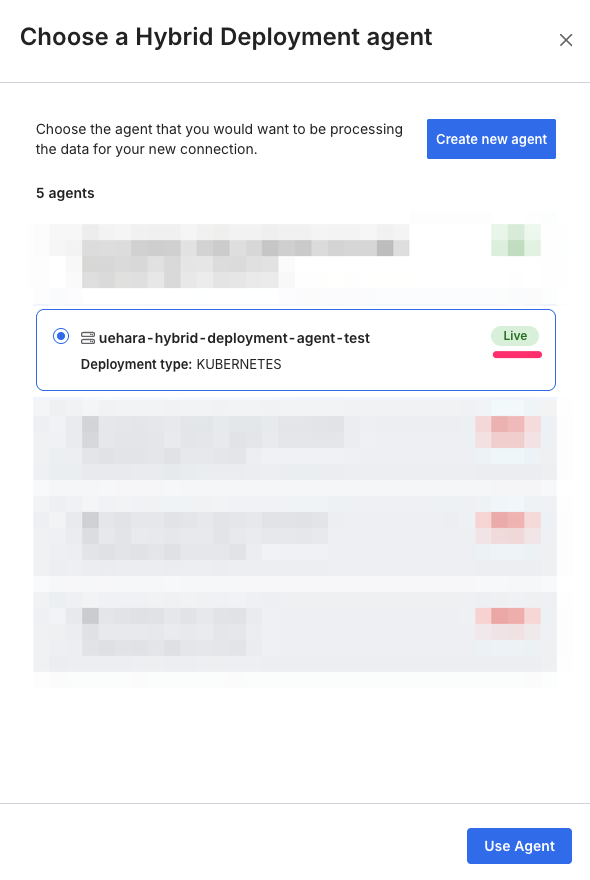
EKSとHybrid Deployment Agentの用意ができたので、SnowflakeのDestination設定画面に戻ります。
先に作成したagentのステータスが『Live』になっていれば疎通ができている状態です。
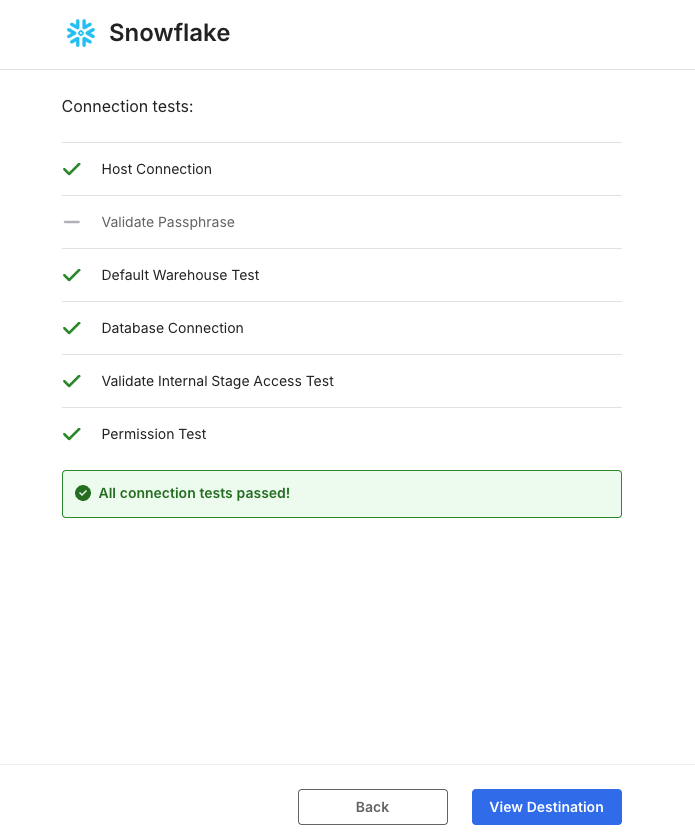
そのまま疎通確認まで行い、以下のような画面になればDestinationの設定としては完了です。
Aurora PostgreSQLをConnectionに設定
FivetranでAurora PostgreSQLをConnectionとして設定します。
ここでも、Aurora PostgreSQL上でのFivetran用のユーザー設定や、Logical replicationの設定は既に済んでいるものとします。
Fivetranのダッシュボード上にある『Connections』から、『Aurora PostgreSQL』を選択します。
そのまま、接続情報等を設定します。
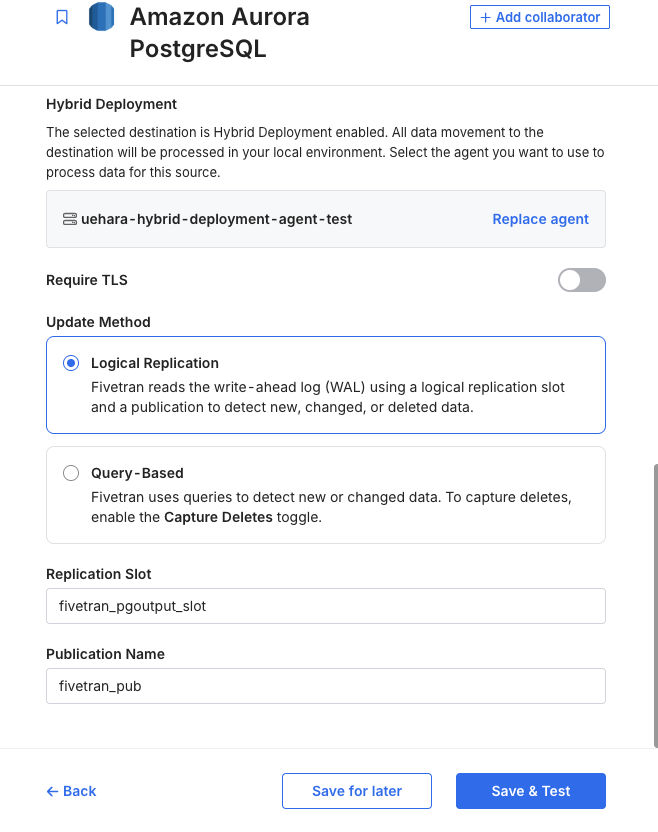
※なお、今回EKSと同じプライベートサブネットにAurora PostgreSQLが存在するため、接続先は直接ドメイン名を設定しています。
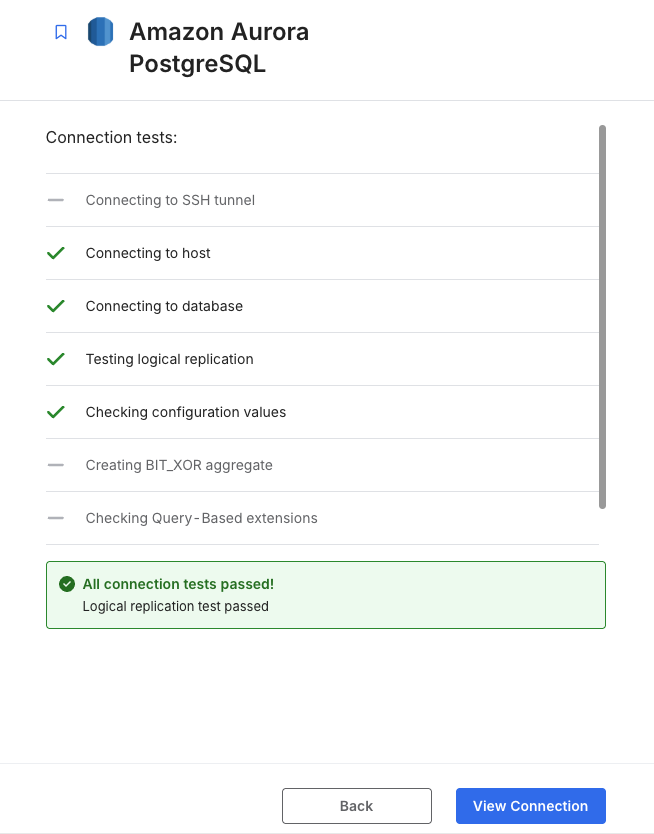
接続テストで以下のようになれば成功です。
Syncの実行
環境の用意ができたので、いよいよSyncを実行してみます。
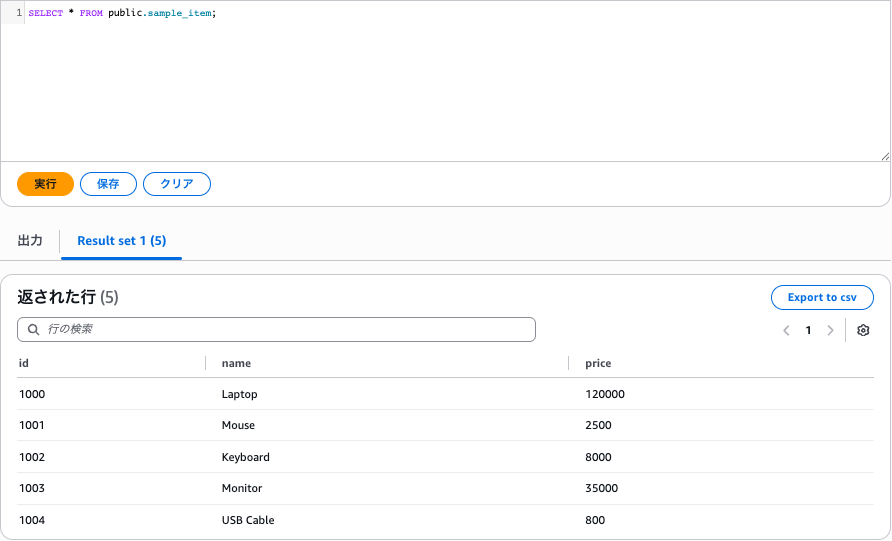
なお、Aurora PostgreSQLには既に以下のサンプルテーブルを用意しており、こちらをSnowflakeに同期します。
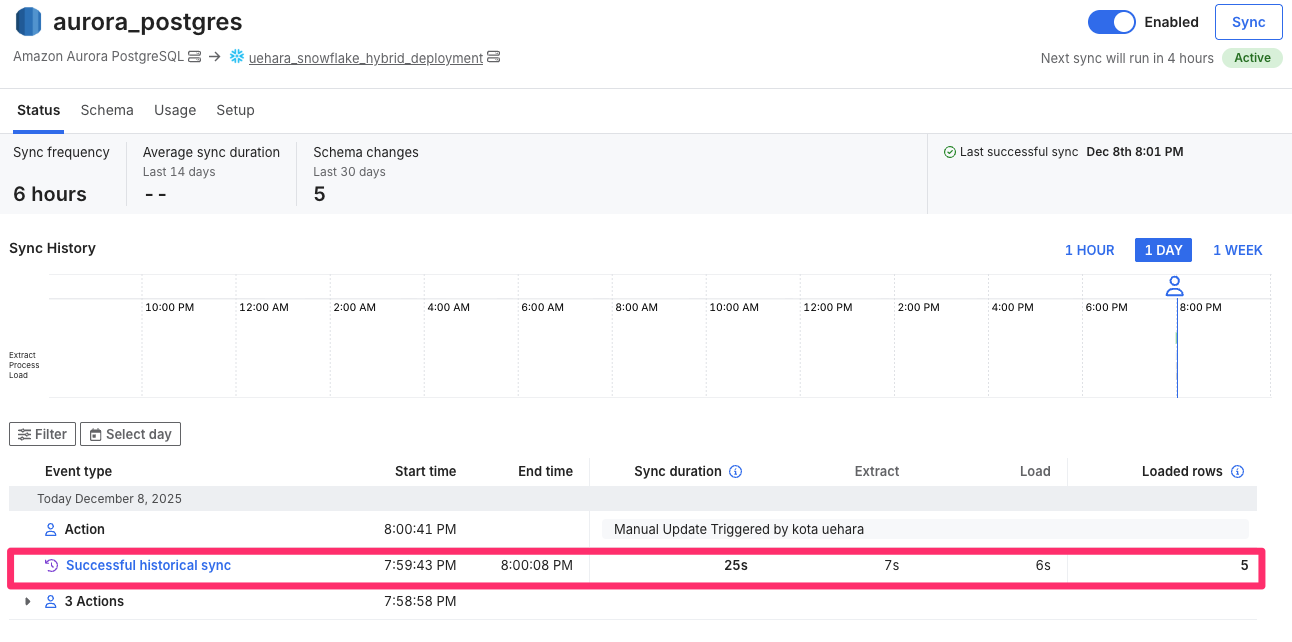
初回のSyncをすると、以下のように正常終了を確認できました。
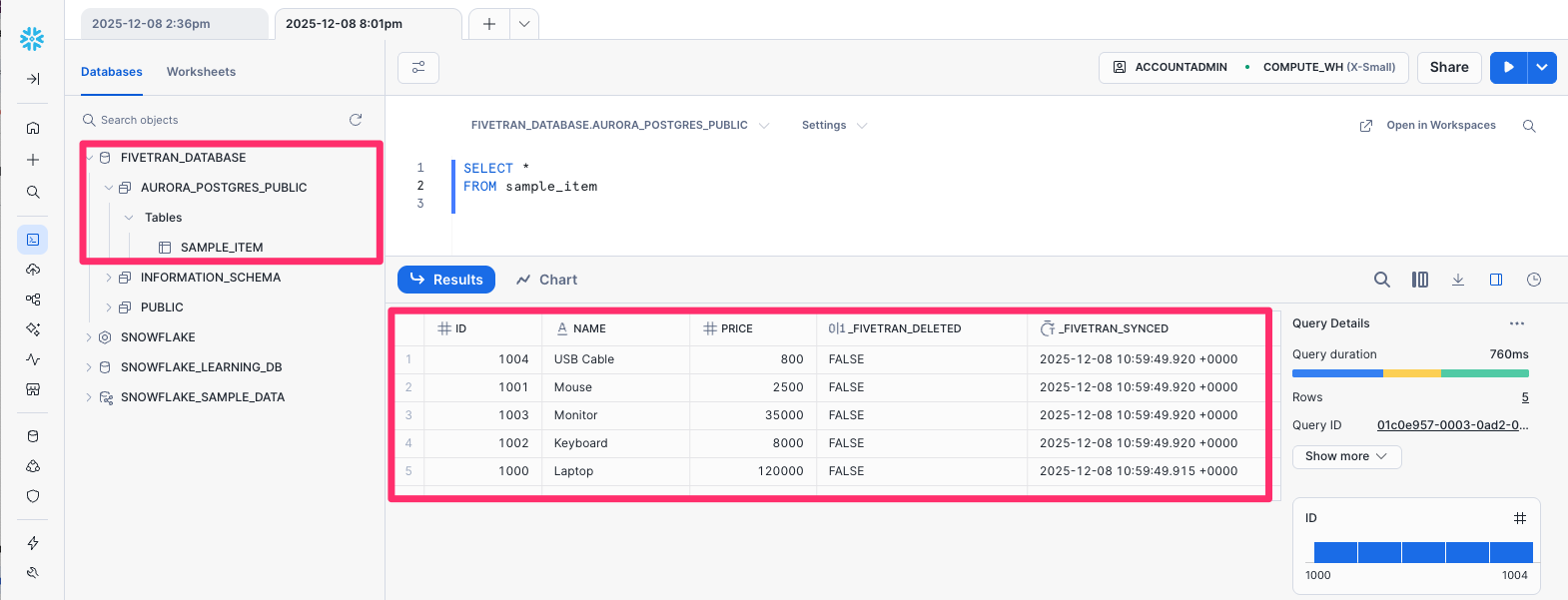
Snowflakeでも、無事データがSyncされていることを確認できました。
フェイルオーバーを試してみる
AWSのAZ障害を想定し、フェイルオーバーを試してみます。
まず、Podが動いているノードを確認します。
# hd-agent Podがどのノードで動作しているか確認
$ kubectl get pods -n default -o wide
結果を確認すると、 ap-northeast-1a の方のノードで動作していそうです。

AWSマネジメントコンソールから、当該ノードのインスタンスを探します。
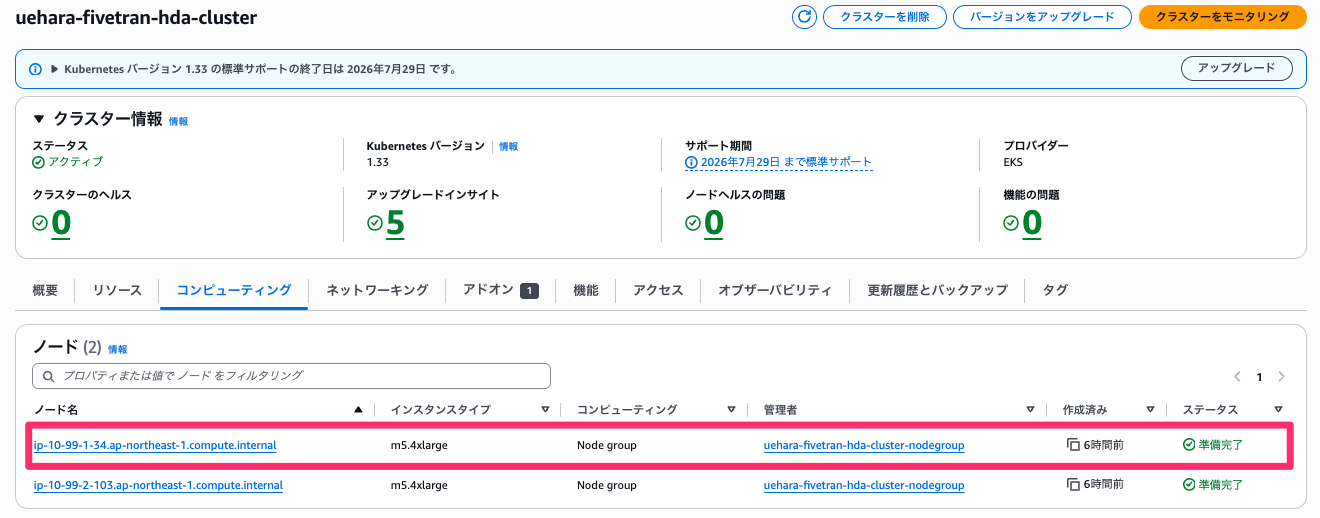
確認できたら、インスタンスを停止してみます。
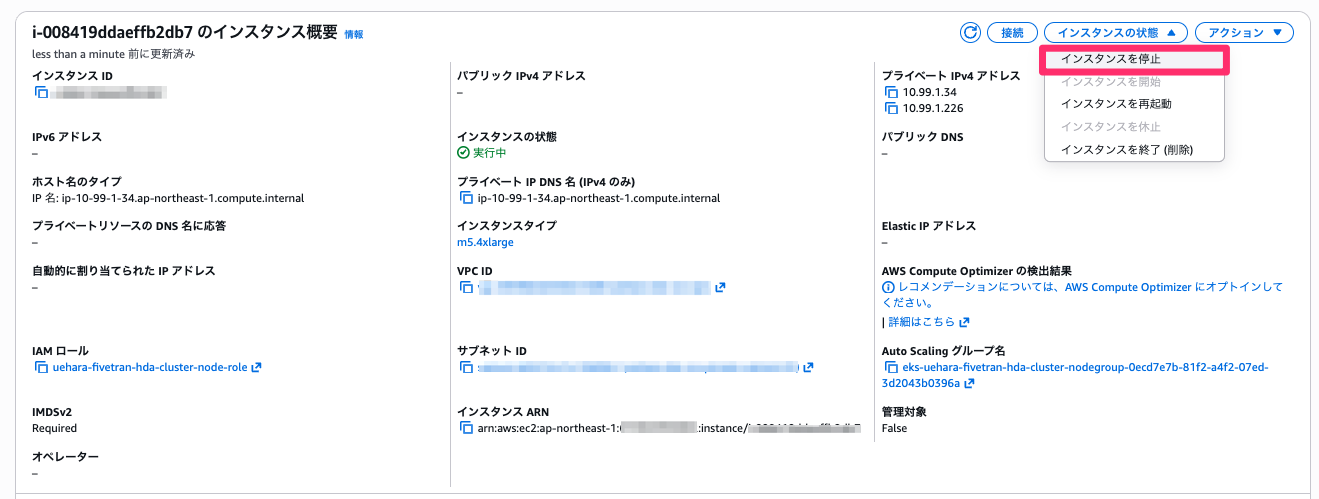
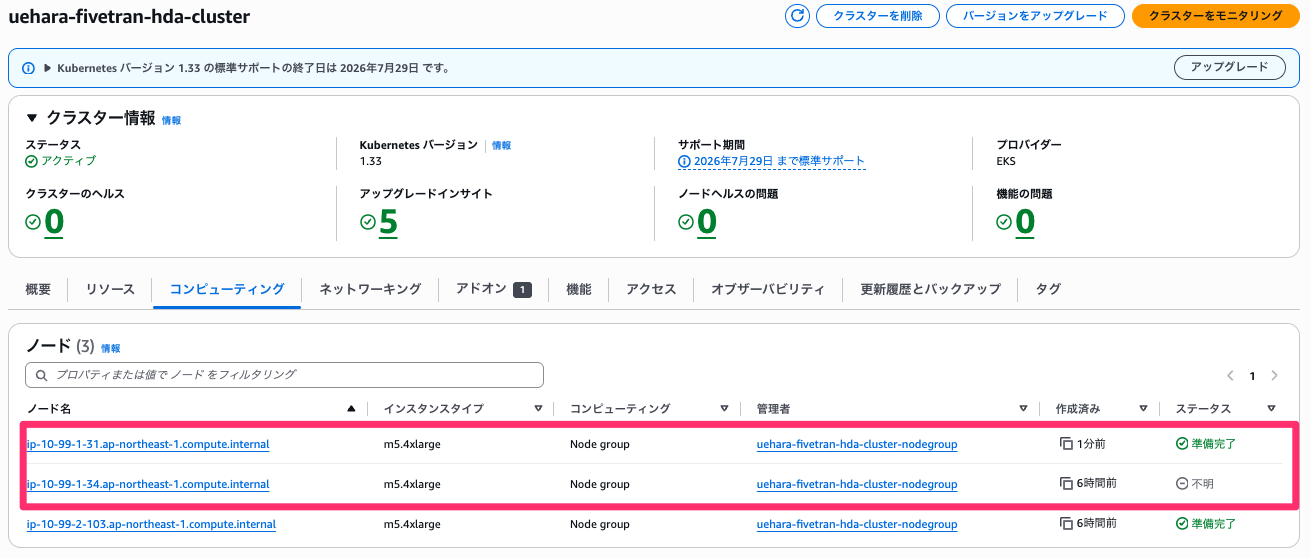
停止をすると、すぐさま ap-northeast-1a の方に新たなノードが作成されていることが分かります。
再度適当なノードにSSMで接続を行い、kubectlを用意したあと、もう一度Podが動いているノードを確認します。
# hd-agent Podがどのノードで動作しているか確認
$ kubectl get pods -n default -o wide
すると以下のように、 ap-northeast-1a の方は終了され、新たに ap-northeast-1c の方のノードで動作していることが分かります。

再度Syncしてみると、特に問題無く実行が正常終了しました。
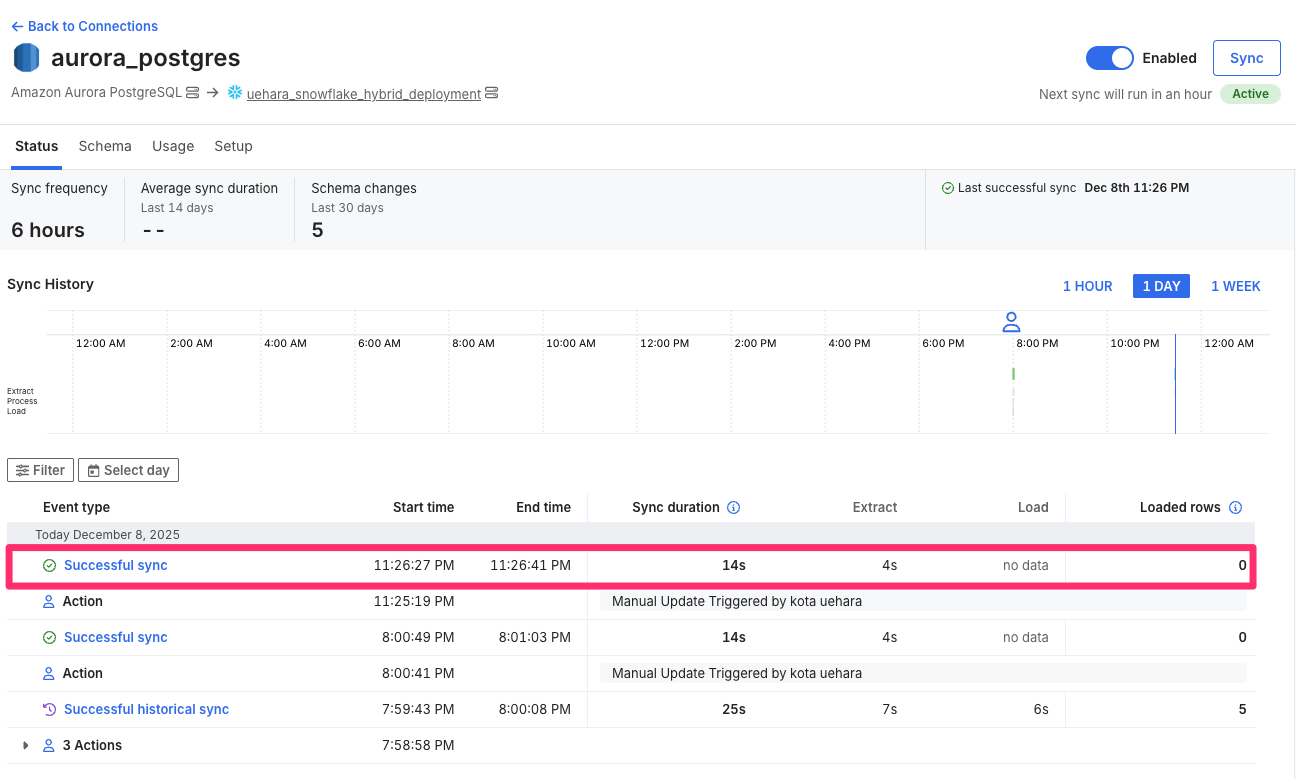
しばらくして再度Podが動いているノードを確認すると、 ap-northeast-1a の方は完全に終了し、 ap-northeast-1c だけになっていることが分かります。

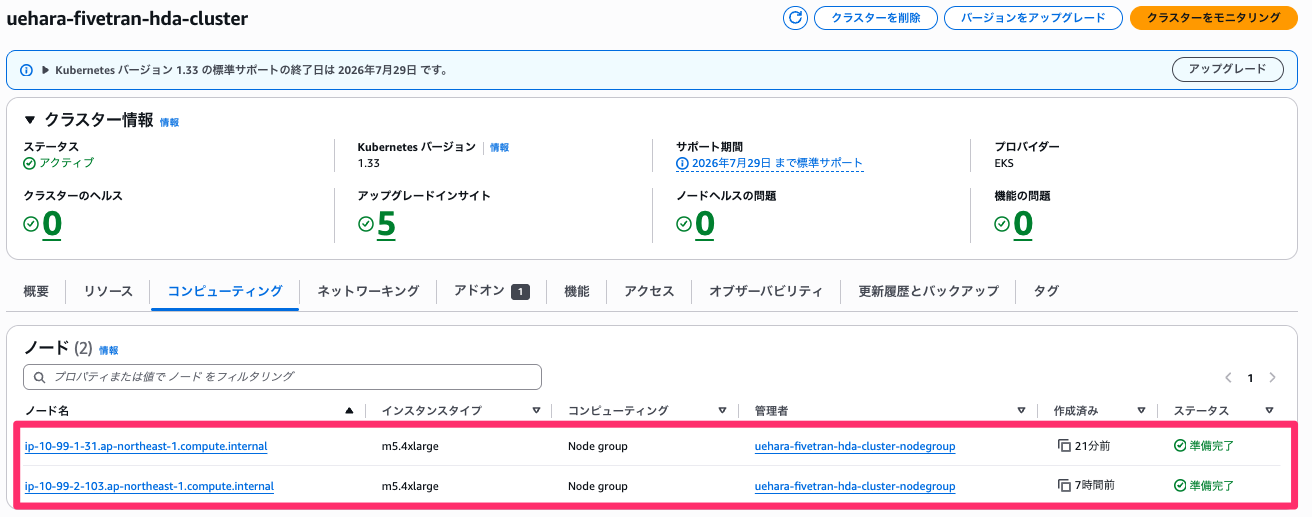
AWSマネジメントコンソール上でも、停止したノードは完全に削除され、元々あった ap-northeast-1c のノードと、新規に立ち上がった ap-northeast-1a のノードの2つになっていることが分かります。
最後に
今回は、FivetranのHybrid Deployment AgentをAmazon EKSで動かし、フェイルオーバーを試してみました。
参考になりましたら幸いです。