AWS Security Hub CSPM 経由の検出結果を特定 OU 配下のアカウントに絞って通知する仕組みを Lambda で作ってみた

AWS Security Hub CSPM の管理者アカウントに集約されたイベント経由でセキュリティ通知する場合に、特定の OU 配下のアカウントのみ通知対象にする仕組みの一例を試してみました。色々な実現方法はありますが、このブログでは、Lambda を用いて特定の OU 配下のアカウントかどうか判定して通知するようにしてみました。
構成イメージ
前提条件は下記です。
- GuardDuty と Security Hub CSPM の AWS Organizations 統合が有効であること
- Security Hub CSPM の検出結果を東京リージョンに集約していること
- SNS トピックは設定済みであること
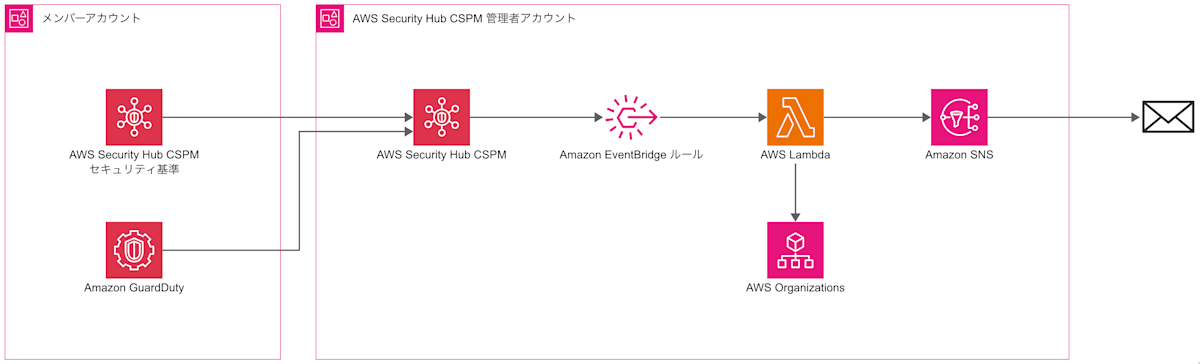
EventBridge ルールのイベントパターンで OU の指定をできればよかったのですが、ざっと調べたところ対応してないように思えたので、Lambda で実装しています。他の方法としては、イベントパターンに対象のアカウントを列挙する方法もあります。ただし、この場合はアカウント追加・廃止の度に更新が必要となります。
Lambda 関数のコード例と周辺リソースの設定
主要なリソースの設定を記載していきます。
EventBridge ルール
始めに、EventBridge ルールです。イベントパターンではアカウントを限定せずに下記のパターンを採用しました。GuardDuty と Security Hub CSPM の重要度 High 以上を対象とし、CSPM に関しては FAILED ステータスを対象としています。
{
  "source": ["aws.securityhub"],
  "detail-type": ["Security Hub Findings - Imported"],
  "detail": {
    "findings": {
      "Severity": { "Label": ["HIGH", "CRITICAL"] },
      "Workflow": { "Status": ["NEW"] },
      "RecordState": ["ACTIVE"],
      "$or": [
        { "ProductName": ["GuardDuty"] },
        { "ProductName": ["Security Hub"], "Compliance": { "Status": ["FAILED"] } }
      ]
    }
  }
}
EventBridge ルールに割り当てるロールには、作成する Lambda の実行権限を持つポリシーを指定します
{
  "Version": "2012-10-17",
  "Statement": [
    {
      "Effect": "Allow",
      "Action": "lambda:InvokeFunction",
      "Resource": "arn:aws:lambda:ap-northeast-1:111122223333:function:security-notification-ou"
    }
  ]
}
Lambda 関数の実行ロール
次に、Lambda 関数に割り当てるロールの設定です。
Lambda で OU を確認する場合は、AWS Organizations の API を実行できる必要があります。今回の Lambda 実装アカウントはセキュリティサービスを管理アカウントから委任されている関係で、Organizations の読み取り API を実行できる状態でした。そのため、管理アカウントに IAM ロールを作成して AssumeRole する必要はありませんでした。
上記より、SNS トピックへの発行権限と合わせて、次のポリシーをロールに割り当てました。
- AWS 管理ポリシー:
AWSLambdaBasicExecutionRole - カスタマー管理ポリシー or インラインポリシー:下記ポリシー
{
  "Version": "2012-10-17",
  "Statement": [
    {
      "Sid": "AllowOrganizationsRead",
      "Effect": "Allow",
      "Action": [
        "organizations:ListParents",
        "organizations:DescribeAccount"
      ],
      "Resource": "*"
    },
    {
      "Sid": "AllowSnsPublish",
      "Effect": "Allow",
      "Action": "sns:Publish",
      "Resource": "arn:aws:sns:ap-northeast-1:111122223333:security-notification-topic"
    }
  ]
}
Lambda 関数の設定
検証で利用した Lambda の主要な設定です。複雑な処理ではないので、タイムアウト時間は 1 分としました。
- ランタイム:Python 3.14
- メモリ:128 MB
- エフェメラルストレージ:512 MB
- タイムアウト:1分
環境変数には下記を指定しています。
| キー | 説明 | 値の例 |
|---|---|---|
TARGET_OU_IDS |
通知したいアカウントが存在する OU をカンマ区切りで格納(孫以降の OU も判定対象) | ou-xxxx-1111aaaa,ou-xxxx-2222bbbb |
SNS_TOPIC_ARN |
メール本文を発行する SNS トピック ARN | arn:aws:sns:ap-northeast-1:111122223333:security-notification-topic |
REGION |
SNS トピックのリージョン | ap-northeast-1 |
Lambda 関数のサンプルコードです。Claude Code と一緒に作成しました。
OU 配下であるかどうかを判定する is_target_account は、イベントで渡された Findings 内の検出アカウントの OU をルートまで順番に辿っていき、環境変数 TARGET_OU_IDS で指定した OU と一致するかどうか確認しています。通知内容やその組み立て部分は今回の検証では特にこだわりがなかったので、Claude のおすすめの実装としています。
import logging
import os
from datetime import datetime, timedelta, timezone

import boto3

logger = logging.getLogger()
logger.setLevel(logging.INFO)

# 環境変数
TARGET_OU_IDS = [
    ou.strip() for ou in os.environ.get("TARGET_OU_IDS", "").split(",") if ou.strip()
]
SNS_TOPIC_ARN = os.environ["SNS_TOPIC_ARN"]
REGION = os.environ["REGION"]

organizations = boto3.client("organizations")
sns = boto3.client("sns", region_name=REGION)

JST = timezone(timedelta(hours=9))
JST_FORMAT = "%Y-%m-%d %H:%M:%S JST"
RESOURCE_INDENT = "          "

BODY_TEMPLATE = """━━━━━━━━━━━━━━━━━━━━━━━━━━━━━━━━━━
検出されたセキュリティ脅威
━━━━━━━━━━━━━━━━━━━━━━━━━━━━━━━━━━

検出日時    : {detected_at}
最終検出日時  : {last_observed_at}
アカウント情報 : {account_id}
アカウント名  : {account_name}
重要度     : {severity}
検出リージョン : {region}
検出サービス  : {product_name}
検出タイプ   : {detection_type}
タイトル    : {title}
説明      : {description}
対象リソース  : {resources}
検出結果ID   : {finding_id}"""

# EventBridge の Security Hub Findings - Imported イベントを処理する
def lambda_handler(event, context):
    for finding in event["detail"]["findings"]:
        finding_id = finding["Id"]
        account_id = finding["AwsAccountId"]

        if not is_target_account(account_id):
            logger.info(
                "finding_id=%s account_id=%s result=skip", finding_id, account_id
            )
            continue

        subject, message = build_notification(finding)
        sns.publish(TopicArn=SNS_TOPIC_ARN, Subject=subject, Message=message)
        logger.info(
            "finding_id=%s account_id=%s result=notify", finding_id, account_id
        )

# アカウントが対象 OU 配下(ネスト含む)かをルートまでたどって判定する
def is_target_account(account_id):
    child = account_id
    while True:
        parent = organizations.list_parents(ChildId=child)["Parents"][0]
        if parent["Type"] == "ROOT":
            return False
        if parent["Id"] in TARGET_OU_IDS:
            return True
        child = parent["Id"]

# 検出結果から SNS の件名と本文を組み立てる
def build_notification(finding):
    account_id = finding["AwsAccountId"]
    account_name = organizations.describe_account(AccountId=account_id)["Account"][
        "Name"
    ]
    product_name = finding["ProductName"]
    severity = finding["Severity"]["Label"]
    title = finding["Title"]
    finding_id = finding["Id"]

    detected_at = datetime.fromisoformat(
        finding.get("FirstObservedAt", finding["CreatedAt"])
    )
    last_observed_at = datetime.fromisoformat(
        finding.get("LastObservedAt", finding["UpdatedAt"])
    )
    # 検出タイプ(GuardDuty: Types[0]、Security Hub: コントロール ID)
    if product_name == "GuardDuty":
        detection_type = finding["Types"][0]
    else:
        detection_type = finding["Compliance"]["SecurityControlId"]
    # リソースを <種類>: <ID> 形式で整形し、2件目以降は改行してインデントする
    resources = ("\n" + RESOURCE_INDENT).join(
        f"{r['Type']}: {r['Id']}" for r in finding["Resources"]
    )

    subject = f"[{product_name}][{severity}] {account_id} {account_name}"
    body = BODY_TEMPLATE.format(
        detected_at=detected_at.astimezone(JST).strftime(JST_FORMAT),
        last_observed_at=last_observed_at.astimezone(JST).strftime(JST_FORMAT),
        account_id=account_id,
        account_name=account_name,
        severity=severity,
        region=finding["Region"],
        product_name=product_name,
        detection_type=detection_type,
        title=title,
        description=finding["Description"],
        resources=resources,
        finding_id=finding_id,
    )
    return subject, body
通知の確認
通知をテストしたい場合は、指定した OU 配下のアカウントで GuardDuty のサンプルイベントを作成して確認できます。
実際の通知例は下記です。件名には製品名と重要度、アカウント ID、アカウント名が含まれます。
- 件名:
[GuardDuty][HIGH] 444455556666 Sandbox 01 - 本文;下記参照
━━━━━━━━━━━━━━━━━━━━━━━━━━━━━━━━━━
検出されたセキュリティ脅威
━━━━━━━━━━━━━━━━━━━━━━━━━━━━━━━━━━

検出日時    : 2026-10-21 23:46:46 JST
最終検出日時  : 2026-10-21 23:46:46 JST
アカウント情報 : 444455556666
アカウント名  : Sandbox 01
重要度     : HIGH
検出リージョン : ap-northeast-1
検出サービス  : GuardDuty
検出タイプ   : TTPs/Command and Control/Backdoor:EC2-DenialOfService.Dns
タイトル    : The EC2 instance i-99999999 is behaving in a manner that may indicate it is being used to perform a Denial of Service (DoS) attack using the DNS protocol.
説明      : The EC2 instance i-99999999 is behaving in a manner that may indicate it is being used to perform a Denial of Service (DoS) attack using the DNS protocol.
対象リソース  : AwsEc2Instance: arn:aws:ec2:ap-northeast-1:444455556666:instance/i-99999999
検出結果ID   : arn:aws:guardduty:ap-northeast-1:444455556666:detector/eacbc435de3b20a8b3b8cf2ebexample/finding/c16043492a8b4389a9376fa73example
環境変数で指定した OU 配下ではないアカウントにおいて、GuardDuty のサンプルを作成したところ、意図どおり通知はされず、CloudWatch Logs には result=skip が出力されていることを確認できました。
[INFO] 2026-10-21T15:05:51.300Z 61bed7b9-f454-4b1b-9326-8123eexample finding_id=arn:aws:guardduty:ap-northeast-1:777788889999:detector/18ce8d1326125b93b06eb5806example/finding/da193e9ca9504ab989ebb1a44example account_id=777788889999 result=skip
さいごに
AWS Organizations 環境において、特定 OU 配下のアカウントのみ通知したい状況があったため、Lambda で指定した OU 配下であるかどうかを判定して通知する仕組みを試してみました。別の方法としては、定期的に Lambda を実行して EventBridge ルールのイベントパターンを更新する案もあるため、こちらも時間があれば試してみたいと思いました。
以上、このブログがどなたかのご参考になれば幸いです。