【登壇資料】 Amazon GuardDuty の検出通知メールに AWS DevOpsAgent の調査結果を追加する #devio2026

2026 年 9 月 29 日にクラスメソッドの大阪オフィスで開催された DevelopersIO 2026 Osaka Day2 において「Amazon GuardDuty の検出通知メールに AWS DevOps Agent の調査結果を追加する」というタイトルで話しました。本ブログで資料を公開します。
登壇資料
GuardDuty の検出をメール通知するときに、メール本文に DevOps Agent の調査結果を記載する方法を紹介しています。
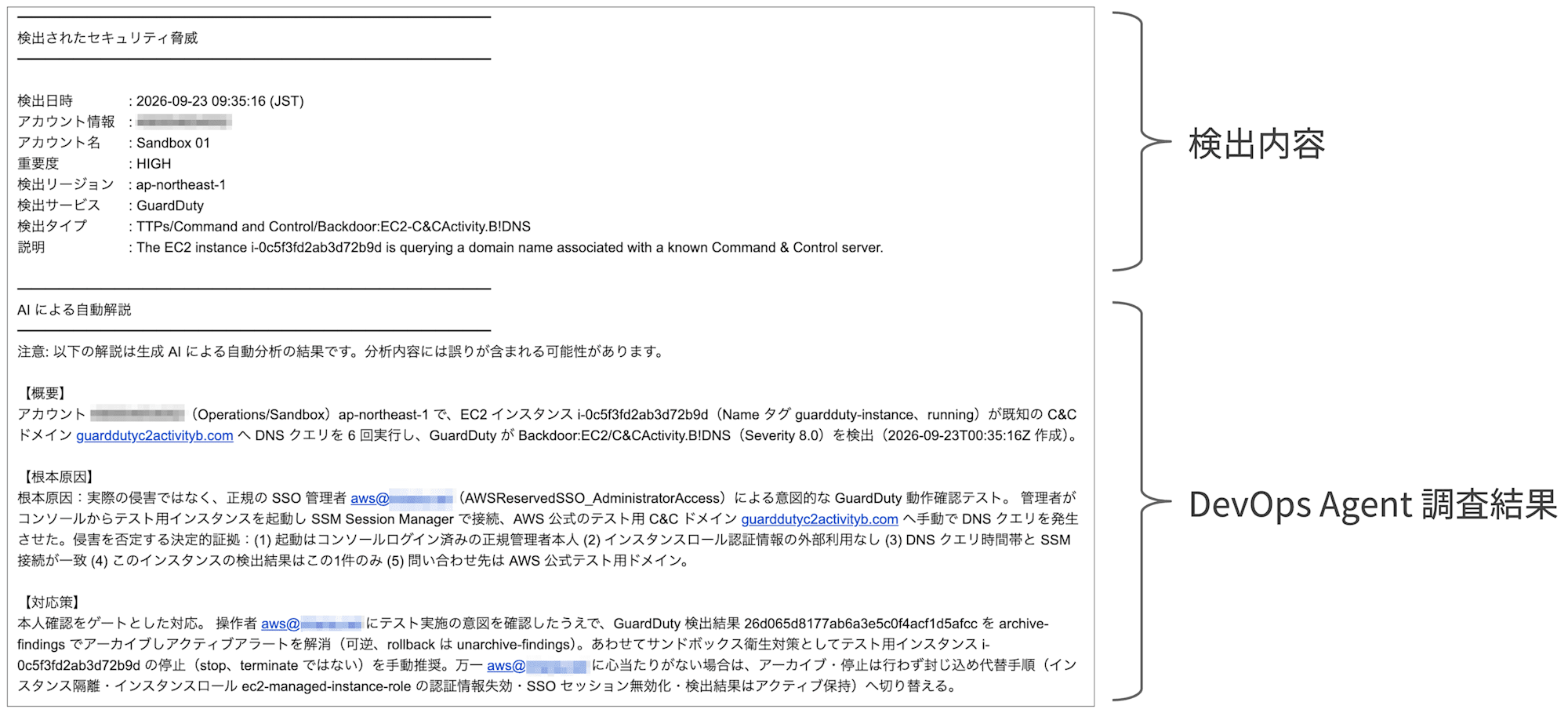
前提となっている環境は次の条件です。
- AWS Organizations 全体の GuardDuty 検出結果を Security Hub に集約
- 集約した検出結果から EventBridge ルール経由で通知
- メールで通知し、宛先は AWS 全体の管理者(アカウント毎に宛先を分けない)
以降は資料で説明している内容を実装するための各サービスのサンプル設定を紹介します。
EventBridge の設定
AWS Security Hub CSPM に集約された GuardDuty の検出イベントにマッチする EventBridge ルールのイベントパターンです。資料中にも記載していますが、次の条件を設定する例です。
- 重要度「高(High)」以上にマッチ
- サンプルは特定の 1 タイプのみ(
EC2-DenialOfService.Dnsタイプのみ)マッチ
{
    "source": ["aws.securityhub"],
    "detail-type": ["Security Hub Findings - Imported"],
    "detail": {
        "findings": {
            "ProductName": ["GuardDuty"],
            "Severity": {
                "Label": ["HIGH", "CRITICAL"]
            },
            "$or": [
                { "Sample": [false] },
                { "Types": ["TTPs/Command and Control/Backdoor:EC2-DenialOfService.Dns"] }
            ]
        }
    }
}
ターゲットには後述する Lambda 関数を指定し、IAM ロールに必要なポリシーは下記です。
{
    "Version": "2012-10-17",
    "Statement": [
        {
            "Effect": "Allow",
            "Action": [
                "lambda:InvokeFunction"
            ],
            "Resource": [
                "arn:aws:lambda:ap-northeast-1:<ACCOUNT_ID>:function:<LAMBDA_FUNCTION_NAME>"
            ]
        }
    ]
}
なお、イベントパターンの詳細については下記のブログでも紹介しています。
Lambda のサンプル
資料中で説明している GuardDuty の検出通知に DevOps Agent の調査結果を記載して SNS 経由でメールを送信するサンプルのコードを紹介します。Claude Code と一緒に作成しました。
検証した Lambda のランタイムとスペック、最低限必要な設定です。
- ランタイム:Python 3.14
- メモリ:256MB
- タイムアウト:15分
IAM ロールの権限では DevOps Agent の調査に関するアクションを許可します。
- AWS 管理ポリシー:
AWSLambdaBasicExecutionRole - カスタマー管理ポリシー or インラインポリシー:下記ポリシー
{
    "Version": "2012-10-17",
    "Statement": [
        {
            "Effect": "Allow",
            "Action": [
                "aidevops:CreateBacklogTask",
                "aidevops:GetBacklogTask",
                "aidevops:ListJournalRecords"
            ],
            "Resource": [
                "arn:aws:aidevops:ap-northeast-1:<ACCOUNT_ID>:agentspace/<DEVOPS_AGENT_SPACE_ID>",
                "arn:aws:aidevops:ap-northeast-1:<ACCOUNT_ID>:agentspace/<DEVOPS_AGENT_SPACE_ID>/*"
            ]
        },
        {
            "Effect": "Allow",
            "Action": "sns:Publish",
            "Resource": "arn:aws:sns:ap-northeast-1:<ACCOUNT_ID>:<SNS_TOPIC_NAME>"
        }
    ]
}
環境変数には下記を設定します。
| キー | 説明 | 値の例 |
|---|---|---|
DEVOPS_AGENT_SPACE_ID |
調査を作成する DevOps Agent スペース ID | f1cc5a85-9974-4099-b788-147f6example |
SNS_TOPIC_ARN |
メール本文を発行する SNS トピック ARN | arn:aws:sns:ap-northeast-1:111122223333:security-notification-topic |
REGION |
DevOps Agent API と SNS のリージョン | ap-northeast-1 |
Lambda 関数のサンプルコードです。
DevOps Agent の概要(サマリ)から情報を取得するか、調査タイムラインから情報を選択できるようにしています。 lambda_handler 内の investigation に代入する値を切り替えて使います。後から急きょサマリの取得を追加した関係で、関数名が分かりづらくなっています。
- extract_ui_summary(records): 概要(サマリ)の情報を取得
- extract_final_summary(records): 調査タイムラインの情報を取得
import datetime
import json
import os
import re
import time

import boto3

DEVOPS_AGENT_SPACE_ID = os.environ["DEVOPS_AGENT_SPACE_ID"]
SNS_TOPIC_ARN = os.environ["SNS_TOPIC_ARN"]
REGION = os.environ.get("REGION", "ap-northeast-1")

SEVERITY_MAP = {
    "CRITICAL": "CRITICAL",
    "HIGH": "HIGH",
    "MEDIUM": "MEDIUM",
    "LOW": "LOW",
    "INFORMATIONAL": "MINIMAL",
}

# ポーリングを終了するタスクの終端ステータス
TERMINAL = {"COMPLETED", "FAILED", "TIMED_OUT", "CANCELED", "PENDING_CUSTOMER_APPROVAL"}

# 通知メール本文テンプレート
MAIL_TEMPLATE = """━━━━━━━━━━━━━━━━━━━━━━━━━━━━━━━━━━
検出されたセキュリティ脅威
━━━━━━━━━━━━━━━━━━━━━━━━━━━━━━━━━━

検出日時    : {detected_at}
アカウント情報 : {account_id}
アカウント名  : {account_name}
重要度     : {severity}
検出リージョン : {region}
検出サービス  : {product_name}
検出タイプ   : {detection_type}
説明      : {description}

━━━━━━━━━━━━━━━━━━━━━━━━━━━━━━━━━━
AI による自動解説
━━━━━━━━━━━━━━━━━━━━━━━━━━━━━━━━━━
注意: 以下の解説は生成 AI による自動分析の結果です。分析内容には誤りが含まれる可能性があります。

{investigation}
"""

agent = boto3.client("devops-agent", region_name=REGION)
sns = boto3.client("sns", region_name=REGION)

# finding の時刻を JST 表記の文字列に変換する
def to_jst(iso_timestamp):
    if not iso_timestamp:
        return ""
    try:
        dt = datetime.datetime.fromisoformat(iso_timestamp)
        jst = dt.astimezone(datetime.timezone(datetime.timedelta(hours=9)))
        return jst.strftime("%Y-%m-%d %H:%M:%S (JST)")
    except ValueError:
        return iso_timestamp

# メール本文はプレーンテキストのため Agent の出力に混ざる Markdown 装飾を取り除く
def strip_markdown(text):
    text = re.sub(r"\*\*(.+?)\*\*", r"\1", text)
    text = re.sub(r"`(.+?)`", r"\1", text)
    text = re.sub(r"\[(.+?)\]\(.+?\)", r"\1", text)
    return text

# investigation_summary の findings / symptoms を title と description の2行に整形して連結する
def format_items(items):
    return "\n\n".join(
        f"{strip_markdown(item.get('title', ''))}\n{strip_markdown(item.get('description', ''))}"
        for item in items
    )

# 調査の途中で何度も記録されるため createdAt が最新の investigation_summary を採用し、調査結果と検出された現象を取り出す
def extract_final_summary(records):
    if not records:
        return None

    content = json.loads(max(records, key=lambda r: r["createdAt"])["content"])
    findings = content.get("findings") or []
    symptoms = content.get("symptoms") or []

    # 調査で確定した原因である root_cause を全件掲載し、無ければ cause の先頭1件を暫定結論にする
    conclusion = [f for f in findings if f.get("type") == "root_cause"]
    if not conclusion:
        conclusion = [f for f in findings if f.get("type") == "cause"][:1]

    return (
        "【調査結果】\n"
        + (format_items(conclusion) or "根本原因を特定できませんでした。")
        + "\n\n【検出された現象】\n"
        + (format_items(symptoms) or "検出された現象の記録がありませんでした。")
    )

# 調査の途中で何度も記録されるため createdAt が最新の ui_investigation_summary から概要・根本原因・対応策を取り出す
def extract_ui_summary(records):
    if not records:
        return None

    # 最新レコードの content をパースして中のデータを取り出す
    tree = json.loads(max(records, key=lambda r: r["createdAt"])["content"])["content"]

    # 目的のテキストが階層の奥にあるため全ノードを辿り id で引ける形に集める
    texts = {}

    def walk(node):
        texts[node.get("id")] = node.get("text")
        for child in node.get("children") or []:
            walk(child)

    walk(tree)

    sections = [("概要", "summary__incident"), ("根本原因", "summary__cause"), ("対応策", "summary__mitigation")]
    return "\n\n".join(
        f"【{title}】\n{strip_markdown(texts[key])}"
        for title, key in sections
        if texts.get(key)
    )

def lambda_handler(event, context):
    finding = event["detail"]["findings"][0]
    account_id = finding.get("AwsAccountId", "")
    account_name = finding.get("AwsAccountName", "Unknown")
    severity = finding.get("Severity", {}).get("Label", "")
    title = finding.get("Title", "Security Finding")
    detection_types = finding.get("Types", [])
    detection_type = ", ".join(detection_types) if detection_types else title
    priority = SEVERITY_MAP.get(severity, "MEDIUM")

    # 調査タスクを作成し、レスポンスで即座に返る executionId を受け取る
    task = agent.create_backlog_task(
        agentSpaceId=DEVOPS_AGENT_SPACE_ID,
        taskType="INVESTIGATION",
        priority=priority,
        title=f"{account_name} ({account_id}) : {title}",
        description=f'{finding.get("Description", "")}\n\nFinding ID: {finding.get("Id", "")}\nSource: {finding.get("SourceUrl", "")}',
    )["task"]
    task_id = task["taskId"]
    execution_id = task["executionId"]
    status = task["status"]
    print(f"Created backlog task {task_id} (execution {execution_id}), status={status}")

    # 調査完了まで15秒間隔でポーリングし、Lambda の残り時間が20秒を切ったら打ち切る
    while status not in TERMINAL and context.get_remaining_time_in_millis() > 20000:
        time.sleep(15)
        status = agent.get_backlog_task(agentSpaceId=DEVOPS_AGENT_SPACE_ID, taskId=task_id)["task"]["status"]
        print(f"Polling task {task_id}: status={status}")

    # メール本文に使うレコード種別を選ぶ(下の行に切り替えると従来の調査結果 / 検出された現象になる)
    record_type = "ui_investigation_summary"
    # record_type = "investigation_summary"

    # メール本文で使うレコードだけを API 側で絞り込み、nextToken 未処理による取りこぼしを避ける
    records = agent.list_journal_records(
        agentSpaceId=DEVOPS_AGENT_SPACE_ID,
        executionId=execution_id,
        recordType=record_type,
    ).get("records", [])
    print(f"Task {task_id} final status={status}, {record_type} records={len(records)}")

    # 作成日時が最新のレコードから通知メールの件名と本文を組み立てる(record_type と合わせて切り替える)
    investigation = extract_ui_summary(records)
    # investigation = extract_final_summary(records)
    if not investigation:
        investigation = "調査結果を取得できませんでした。"

    mail_subject = f"{account_name} ({account_id}) AWS Security Notification"
    mail_body = MAIL_TEMPLATE.format(
        detected_at=to_jst(finding.get("CreatedAt", "")),
        account_id=account_id,
        account_name=account_name,
        severity=severity,
        product_name=finding.get("ProductName", ""),
        detection_type=detection_type,
        description=finding.get("Description", ""),
        region=finding.get("Region", ""),
        investigation=investigation,
    )

    # 生成した件名と本文を SNS トピックに発行する
    sns.publish(
        TopicArn=SNS_TOPIC_ARN,
        Subject=mail_subject,
        Message=mail_body,
    )
Lambda Durable Functions のサンプル
上述した Lambda のタイムアウト時間を15分より長くするために、Durable Functions を利用したサンプルコードも紹介します。こちらも Claude Code と一緒に作成しました。
検証した Lambda のランタイムとスペック、最低限必要な設定です。Durable Functions 用の設定もあります。
- ランタイム:Python 3.14
- メモリ:256MB
- タイムアウト:15分
- Durable Functions の実行タイムアウト:1時間
IAM ロールの権限では DevOps Agent の調査に関するアクションを許可します。利用している AWS 管理ポリシーは通常の Lambda とは異なるポリシーです。
- AWS 管理ポリシー:
AWSLambdaBasicDurableExecutionRolePolicy - カスタマー管理ポリシー or インラインポリシー:下記ポリシー
{
    "Version": "2012-10-17",
    "Statement": [
        {
            "Effect": "Allow",
            "Action": [
                "aidevops:CreateBacklogTask",
                "aidevops:GetBacklogTask",
                "aidevops:ListJournalRecords"
            ],
            "Resource": [
                "arn:aws:aidevops:ap-northeast-1:<ACCOUNT_ID>:agentspace/<DEVOPS_AGENT_SPACE_ID>",
                "arn:aws:aidevops:ap-northeast-1:<ACCOUNT_ID>:agentspace/<DEVOPS_AGENT_SPACE_ID>/*"
            ]
        },
        {
            "Effect": "Allow",
            "Action": "sns:Publish",
            "Resource": "arn:aws:sns:ap-northeast-1:<ACCOUNT_ID>:<SNS_TOPIC_NAME>"
        }
    ]
}
環境変数には下記を設定します。こちらは上述している通常の Lambda と同様です。
| キー | 説明 | 値の例 |
|---|---|---|
DEVOPS_AGENT_SPACE_ID |
調査を作成する DevOps Agent スペース ID | f1cc5a85-9974-4099-b788-147f6example |
SNS_TOPIC_ARN |
メール本文を発行する SNS トピック ARN | arn:aws:sns:ap-northeast-1:111122223333:security-notification-topic |
REGION |
DevOps Agent API と SNS のリージョン | ap-northeast-1 |
Lambda Durable Functions のサンプルコードです。
上述した Lambda 関数同様に lambda_handler 内の investigation に代入する値を切り替えて使います。こちらも、後から急きょサマリの取得を追加した関係で、関数名が分かりづらくなっています。
- extract_ui_summary(records): 概要(サマリ)の情報を取得
- extract_final_summary(records): 調査タイムラインの情報を取得
import datetime
import json
import os
import re

import boto3
from aws_durable_execution_sdk_python import (
    DurableContext,
    durable_execution,
    durable_step,
)
from aws_durable_execution_sdk_python.config import Duration

DEVOPS_AGENT_SPACE_ID = os.environ["DEVOPS_AGENT_SPACE_ID"]
SNS_TOPIC_ARN = os.environ["SNS_TOPIC_ARN"]
REGION = os.environ.get("REGION", "ap-northeast-1")

SEVERITY_MAP = {
    "CRITICAL": "CRITICAL",
    "HIGH": "HIGH",
    "MEDIUM": "MEDIUM",
    "LOW": "LOW",
    "INFORMATIONAL": "MINIMAL",
}

# ポーリングを終了するタスクの終端ステータス
TERMINAL = {"COMPLETED", "FAILED", "TIMED_OUT", "CANCELED", "PENDING_CUSTOMER_APPROVAL"}

# 調査の状況を確認する間隔と最大回数(実行タイムアウト1時間に収まる範囲)
POLL_INTERVAL_SECONDS = 60
MAX_POLLS = 55

# 通知メール本文テンプレート
MAIL_TEMPLATE = """━━━━━━━━━━━━━━━━━━━━━━━━━━━━━━━━━━
検出されたセキュリティ脅威
━━━━━━━━━━━━━━━━━━━━━━━━━━━━━━━━━━

検出日時    : {detected_at}
アカウント情報 : {account_id}
アカウント名  : {account_name}
重要度     : {severity}
検出リージョン : {region}
検出サービス  : {product_name}
検出タイプ   : {detection_type}
説明      : {description}

━━━━━━━━━━━━━━━━━━━━━━━━━━━━━━━━━━
AI による自動解説
━━━━━━━━━━━━━━━━━━━━━━━━━━━━━━━━━━
注意: 以下の解説は生成 AI による自動分析の結果です。分析内容には誤りが含まれる可能性があります。

{investigation}
"""

agent = boto3.client("devops-agent", region_name=REGION)
sns = boto3.client("sns", region_name=REGION)

# finding の時刻を JST 表記の文字列に変換する
def to_jst(iso_timestamp):
    if not iso_timestamp:
        return ""
    try:
        dt = datetime.datetime.fromisoformat(iso_timestamp)
        jst = dt.astimezone(datetime.timezone(datetime.timedelta(hours=9)))
        return jst.strftime("%Y-%m-%d %H:%M:%S (JST)")
    except ValueError:
        return iso_timestamp

# メール本文はプレーンテキストのため Agent の出力に混ざる Markdown 装飾を取り除く
def strip_markdown(text):
    text = re.sub(r"\*\*(.+?)\*\*", r"\1", text)
    text = re.sub(r"`(.+?)`", r"\1", text)
    text = re.sub(r"\[(.+?)\]\(.+?\)", r"\1", text)
    return text

# investigation_summary の findings / symptoms を title と description の2行に整形して連結する
def format_items(items):
    return "\n\n".join(
        f"{strip_markdown(item.get('title', ''))}\n{strip_markdown(item.get('description', ''))}"
        for item in items
    )

# 調査の途中で何度も記録されるため createdAt が最新の investigation_summary を採用し、調査結果と検出された現象を取り出す
def extract_final_summary(records):
    if not records:
        return None

    content = json.loads(max(records, key=lambda r: r["createdAt"])["content"])
    findings = content.get("findings") or []
    symptoms = content.get("symptoms") or []

    # 調査で確定した原因である root_cause を全件掲載し、無ければ cause の先頭1件を暫定結論にする
    conclusion = [f for f in findings if f.get("type") == "root_cause"]
    if not conclusion:
        conclusion = [f for f in findings if f.get("type") == "cause"][:1]

    return (
        "【調査結果】\n"
        + (format_items(conclusion) or "根本原因を特定できませんでした。")
        + "\n\n【検出された現象】\n"
        + (format_items(symptoms) or "検出された現象の記録がありませんでした。")
    )

# 調査の途中で何度も記録されるため createdAt が最新の ui_investigation_summary から概要・根本原因・対応策を取り出す
def extract_ui_summary(records):
    if not records:
        return None

    # 最新レコードの content をパースして中のデータを取り出す
    tree = json.loads(max(records, key=lambda r: r["createdAt"])["content"])["content"]

    # 目的のテキストが階層の奥にあるため全ノードを辿り id で引ける形に集める
    texts = {}

    def walk(node):
        texts[node.get("id")] = node.get("text")
        for child in node.get("children") or []:
            walk(child)

    walk(tree)

    sections = [("概要", "summary__incident"), ("根本原因", "summary__cause"), ("対応策", "summary__mitigation")]
    return "\n\n".join(
        f"【{title}】\n{strip_markdown(texts[key])}"
        for title, key in sections
        if texts.get(key)
    )

# 調査タスクを作成し、レスポンスで即座に返る executionId を受け取る
@durable_step
def create_investigation_task(step_context, finding_info):
    task = agent.create_backlog_task(
        agentSpaceId=DEVOPS_AGENT_SPACE_ID,
        taskType="INVESTIGATION",
        priority=finding_info["priority"],
        title=f'{finding_info["account_name"]} ({finding_info["account_id"]}) : {finding_info["title"]}',
        description=f'{finding_info["description"]}\n\nFinding ID: {finding_info["finding_id"]}\nSource: {finding_info["source_url"]}',
    )["task"]
    step_context.logger.info(f'Created backlog task {task["taskId"]} (execution {task["executionId"]}), status={task["status"]}')
    return {"taskId": task["taskId"], "executionId": task["executionId"], "status": task["status"]}

# 調査タスクの現在のステータスを取得する
@durable_step
def poll_investigation_task(step_context, task_id):
    status = agent.get_backlog_task(agentSpaceId=DEVOPS_AGENT_SPACE_ID, taskId=task_id)["task"]["status"]
    step_context.logger.info(f"Polling task {task_id}: status={status}")
    return status

# 調査結果のレコードを取得し、メール本文用に組み立て済みのテキストへ変換する
@durable_step
def fetch_investigation_result(step_context, execution_id):
    # メール本文に使うレコード種別を選ぶ(下の行に切り替えると従来の調査結果 / 検出された現象になる)
    record_type = "ui_investigation_summary"
    # record_type = "investigation_summary"

    # メール本文で使うレコードだけを API 側で絞り込み、nextToken 未処理による取りこぼしを避ける
    records = agent.list_journal_records(
        agentSpaceId=DEVOPS_AGENT_SPACE_ID,
        executionId=execution_id,
        recordType=record_type,
    ).get("records", [])
    step_context.logger.info(f"execution {execution_id}: {record_type} records={len(records)}")

    # 作成日時が最新のレコードから通知メール本文を組み立てる(record_type と合わせて切り替える)
    investigation = extract_ui_summary(records)
    # investigation = extract_final_summary(records)
    return investigation

# 生成した件名と本文を SNS トピックに発行する
@durable_step
def publish_notification(step_context, mail_subject, mail_body):
    sns.publish(
        TopicArn=SNS_TOPIC_ARN,
        Subject=mail_subject,
        Message=mail_body,
    )
    step_context.logger.info("Published notification to SNS")

@durable_execution
def lambda_handler(event, context: DurableContext):
    finding = event["detail"]["findings"][0]
    account_id = finding.get("AwsAccountId", "")
    account_name = finding.get("AwsAccountName", "Unknown")
    severity = finding.get("Severity", {}).get("Label", "")
    title = finding.get("Title", "Security Finding")
    detection_types = finding.get("Types", [])
    detection_type = ", ".join(detection_types) if detection_types else title
    priority = SEVERITY_MAP.get(severity, "MEDIUM")

    finding_info = {
        "account_id": account_id,
        "account_name": account_name,
        "title": title,
        "description": finding.get("Description", ""),
        "finding_id": finding.get("Id", ""),
        "source_url": finding.get("SourceUrl", ""),
        "priority": priority,
    }

    task = context.step(create_investigation_task(finding_info))
    task_id = task["taskId"]
    execution_id = task["executionId"]
    status = task["status"]

    # 調査完了まで60秒間隔でポーリングし、MAX_POLLS 回で打ち切る
    polls = 0
    while status not in TERMINAL and polls < MAX_POLLS:
        context.wait(Duration.from_seconds(POLL_INTERVAL_SECONDS))
        status = context.step(poll_investigation_task(task_id))
        polls += 1

    investigation = context.step(fetch_investigation_result(execution_id))
    if not investigation:
        investigation = "調査結果を取得できませんでした。"

    mail_subject = f"{account_name} ({account_id}) AWS Security Notification"
    mail_body = MAIL_TEMPLATE.format(
        detected_at=to_jst(finding.get("CreatedAt", "")),
        account_id=account_id,
        account_name=account_name,
        severity=severity,
        product_name=finding.get("ProductName", ""),
        detection_type=detection_type,
        description=finding.get("Description", ""),
        region=finding.get("Region", ""),
        investigation=investigation,
    )

    context.step(publish_notification(mail_subject, mail_body))
資料中の参考資料へのリンク
資料中で紹介している参考資料のリンクを紹介します。
- AWS DevOps Agent のインシデントレスポンス機能関連
- DevOps Agent のスペース設定関連
- DevOps Agent の調査コスト関連
- EventBridge ルールの設定関連
- Lambda の設定関連