【アップデート】DevOps AgentがリモートMCPサーバーとして利用可能になりました!

リテールアプリ共創部@大阪の岩田です。
いつものようにDevOps Agentのマネコンと戯れていたところ、UIが少し変わっていることに気づきました。
急いでDocument Historyを確認すると、6/12付けで以下のアップデートが追加されていました。
| Change | Description | Date |
|---|---|---|
| DevOps Agent Memories | Added documentation for memories, the informational knowledge items that AWS DevOps Agent builds and maintains to supplement agent context. Covers memory stores, the two built-in stores (directives and monitors), limits, and how to view and manage memories from the Knowledge page. | June 12, 2026 |
| Connect to DevOps Agent remote servers | Added documentation for connecting IDE, CLI, and agent integrations to AWS DevOps Agent through dedicated MCP and A2A remote server endpoints, including access token and SigV4 authentication. | June 12, 2026 |
| Custom Agents | Added documentation for custom agents — user-defined AI agents that automate operational tasks. Includes creating, executing, and managing custom agents, and configuring agent outputs such as artifacts and recommendations. | June 12, 2026 |
| Supported Regions | Added support for five additional AWS Regions: Asia Pacific (Mumbai), Asia Pacific (Singapore), Canada (Central), Europe (London), and South America (São Paulo). | June 12, 2026 |
| Global cross-Region inference for specific Regions | Added documentation that Agent Spaces created in Asia Pacific (Mumbai), Asia Pacific (Singapore), and South America (São Paulo) route inference requests across all global commercial AWS Regions rather than within a single geography. | June 12, 2026 |
このブログでは上記アップデートに含まれる「Connect to DevOps Agent remote servers」について確認していきます。
Claude CodeからDevOps Agentに接続してみる
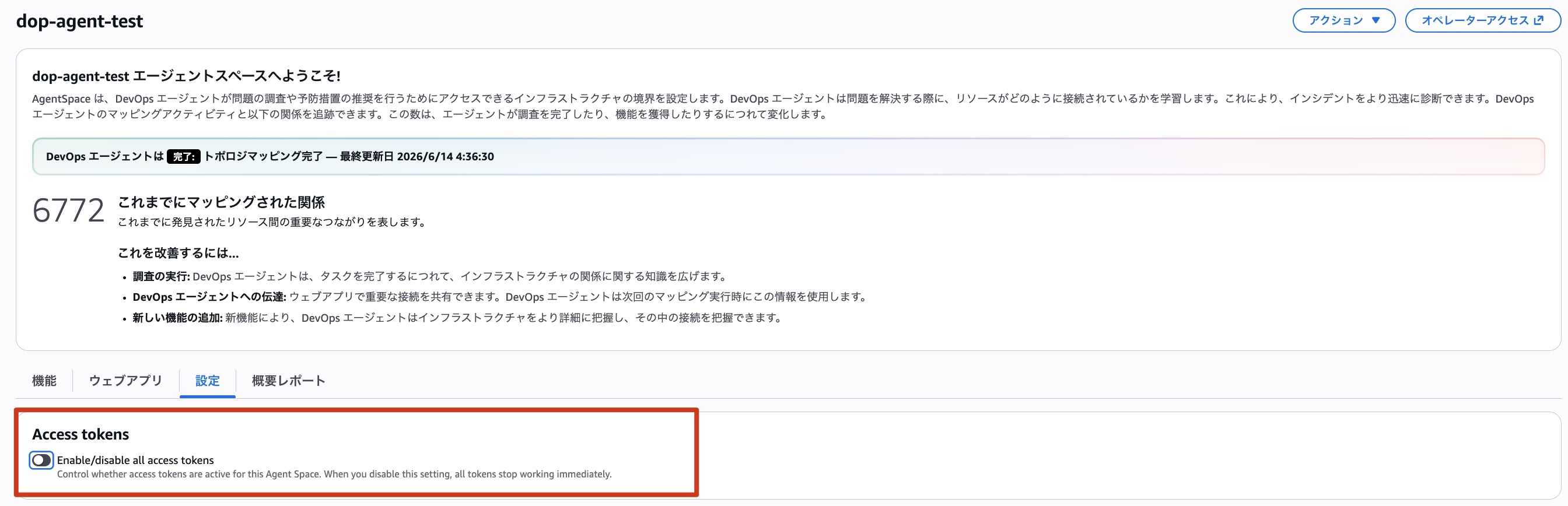
マネコンからエージェントスペースにアクセスすると、アクセストークンを有効/無効化する設定が追加されています。まず、こちらを有効化しましょう。
続いてウェブアプリにアクセスし、設定→アクセスキーを選択するとアクセスキーを管理するUIが表示されます。
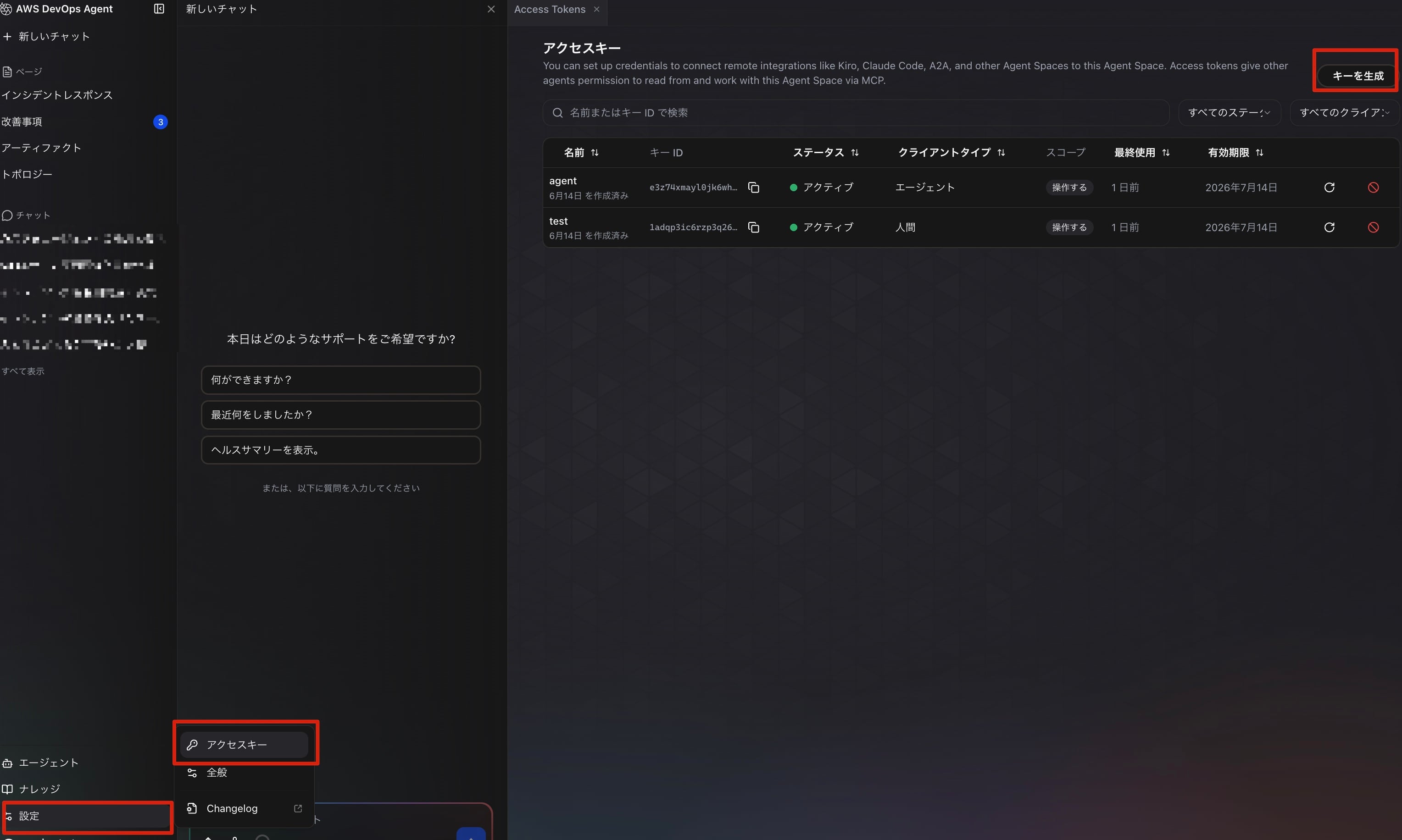
ここから「キーを生成」をクリックし、アクセスキーを発行しましょう。
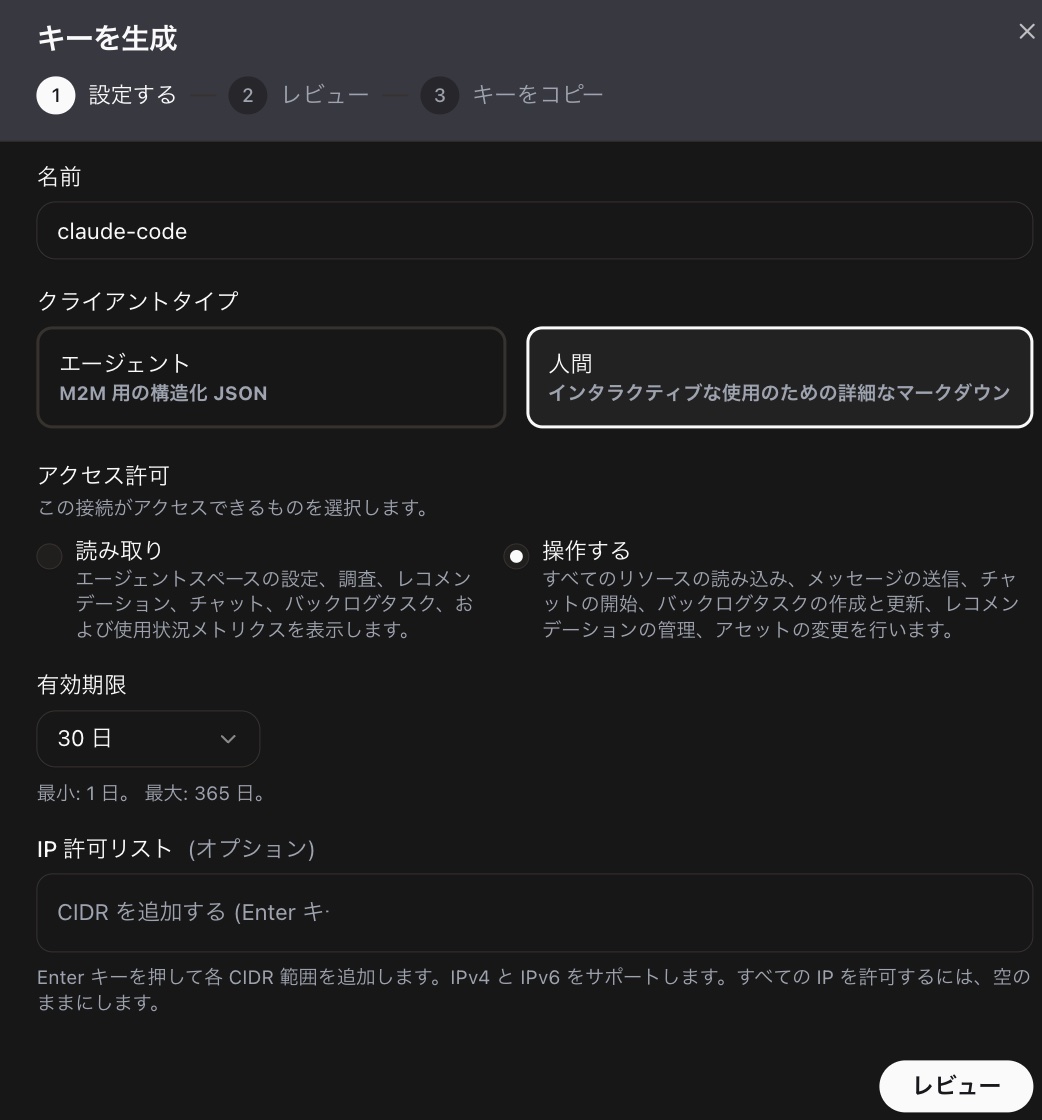
キーの名前、クライアントタイプ、アクセス許可、有効期限を指定します。オプションでIP許可リストも指定できるようです。指定できたら「レビュー」をクリック。
するとレビュー画面が表示されるので、内容を確認します。
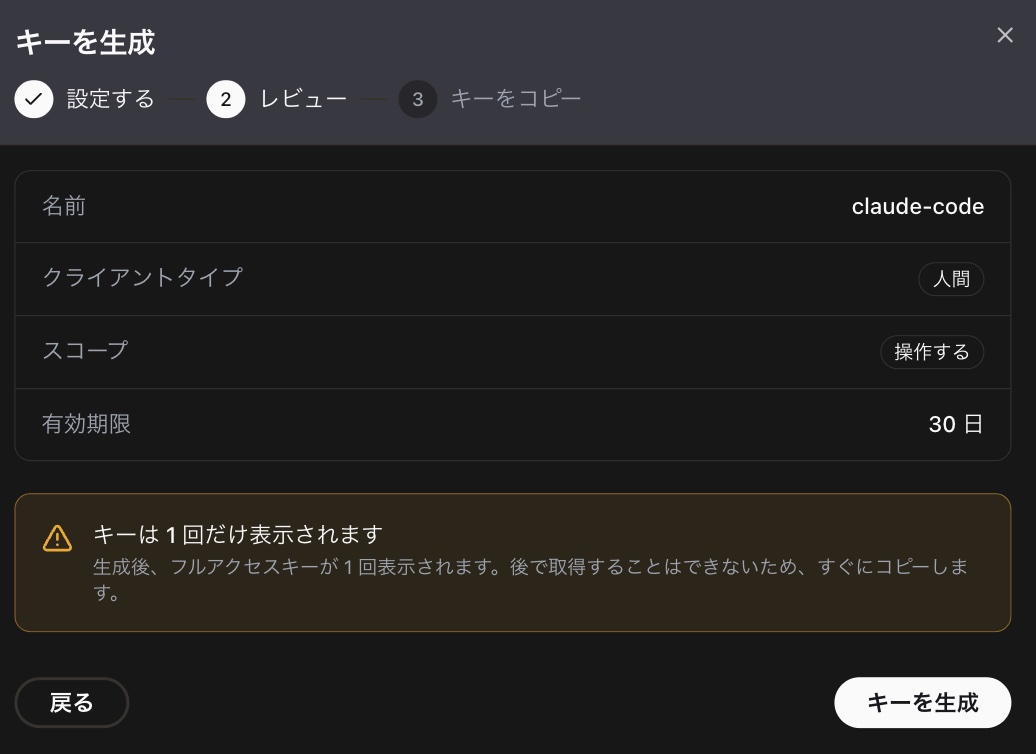
問題なければ「キーを生成」をクリックします。
するとアクセスキーが発行され、各種ツール設定用のコンフィグも表示されます。
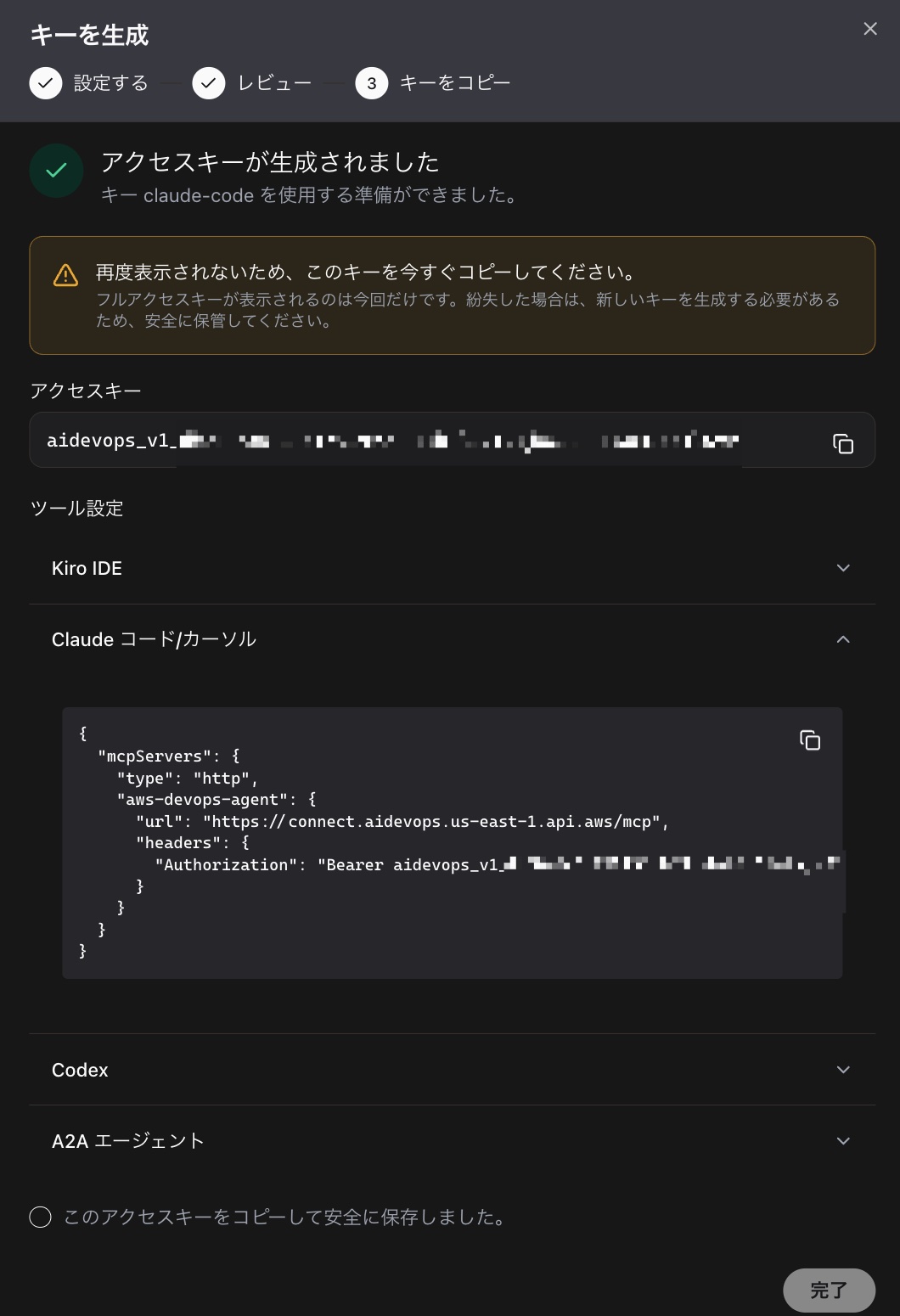
Claude Code向けの設定ファイルは以下のように表示されていました。
{
  "mcpServers": {
    "type": "http",
    "aws-devops-agent": {
      "url": "https://connect.aidevops.us-east-1.api.aws/mcp",
      "headers": {
        "Authorization": "Bearer aidevops_v1_..."
      }
    }
  }
}
これは"type"の位置がおかしいので、このままだとうまく動作しません。以下のように"type"を"aws-devops-agent"配下に移動させて利用しましょう。
{
  "mcpServers": {
    "aws-devops-agent": {
      "type": "http",
      "url": "https://connect.aidevops.us-east-1.api.aws/mcp",
      "headers": {
        "Authorization": "Bearer aidevops_v1_..."
      }
    }
  }
}
上記ファイルを.mcp.jsonとしてプロジェクトのディレクトリに保存し、Claude Codeを起動します。
─────────────────────────────────────────────────────────────────────────────────────────────────────────────────────────────────────────────────────────────────────────────────────────────────────────────────
  New MCP server found in this project: aws-devops-agent

  MCP servers may execute code or access system resources. All tool calls require approval. Learn more in the MCP documentation.

    1. Use this MCP server
  ❯ 2. Use this and all future MCP servers in this project
    3. Continue without using this MCP server
新しいMCPサーバーaws-devops-agentが見つかったよ!と言われるので利用を許可しておきましょう。これでClaude CodeとDevOps Agentの連携完了です!
利用できるツールを確認してみる
Claude Codeから/mcpを叩いて利用可能なツールを確認すると全部で24個のツールが利用できるようです。
  Tools for aws-devops-agent
  24 tools

  ❯ 1.  get_agent_space
    2.  list_associations
    3.  create_investigation
    4.  get_task
  ↓ 5.  list_tasks
tuiだとちょっと見にくいので、MCP InspectorからもDevOps Agentに接続して確認してみました。
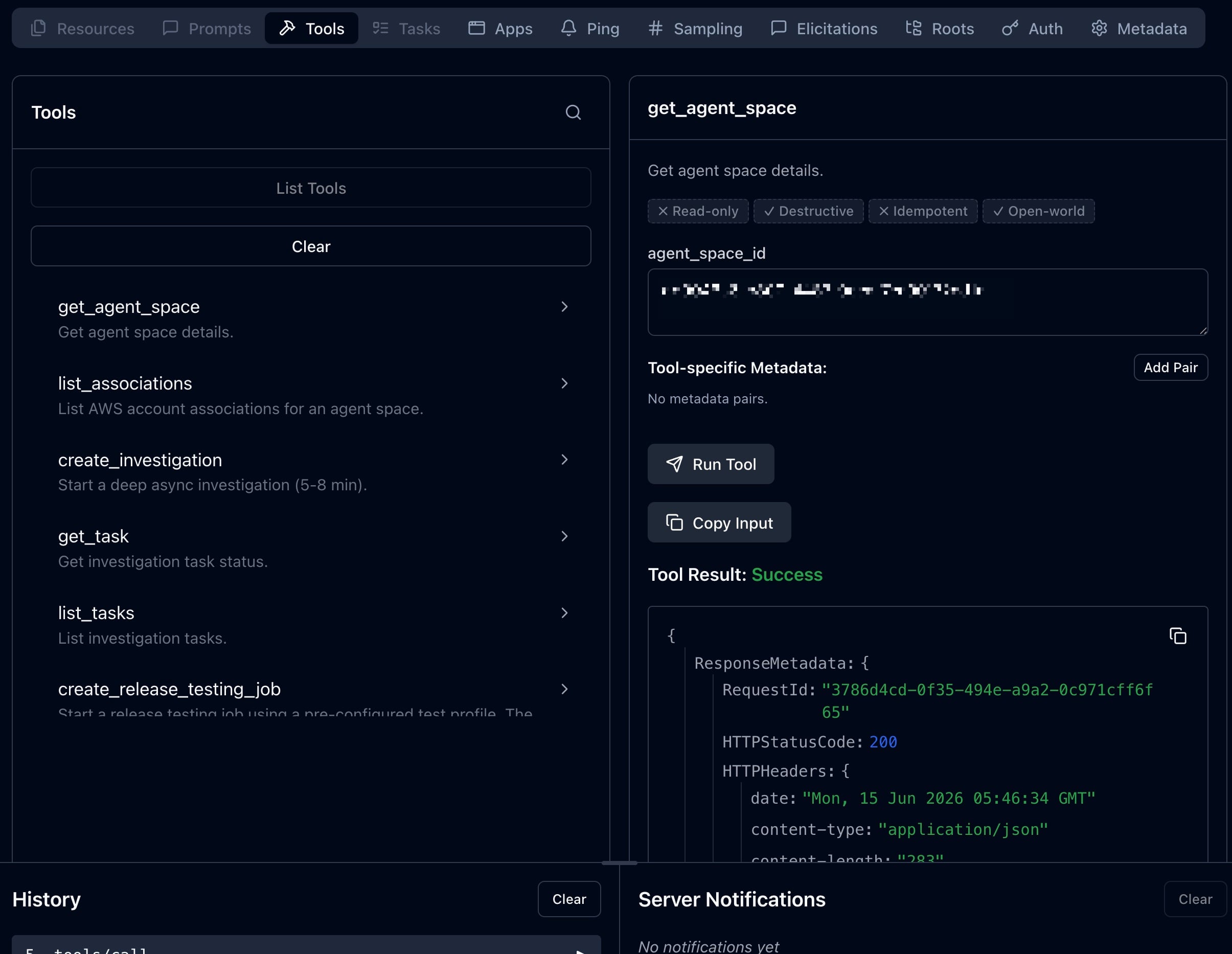
こういうのはやっぱりGUIからの方が確認しやすいですね。試しにget_agent_spaceを実行してみましたが、問題なく実行できました。
ちなみにMCP Inspectorからtools/listのレスポンスをコピーすると以下の通りでした。各ツールの詳細な定義が知りたい方は参考にしてください。
tools/list のレスポンス
{
"tools": [
{
"name": "get_agent_space",
"description": "Get agent space details.",
"inputSchema": {
"type": "object",
"properties": {
"agent_space_id": {
"type": "string"
}
}
}
},
{
"name": "list_associations",
"description": "List AWS account associations for an agent space.",
"inputSchema": {
"type": "object",
"properties": {
"agent_space_id": {
"type": "string"
},
"max_results": {
"type": "integer"
},
"next_token": {
"type": "string"
}
}
}
},
{
"name": "create_investigation",
"description": "Start a deep async investigation (5-8 min).",
"inputSchema": {
"type": "object",
"properties": {
"title": {
"type": "string"
},
"description": {
"type": "string"
},
"priority": {
"type": "string",
"enum": [
"CRITICAL",
"HIGH",
"MEDIUM",
"LOW",
"MINIMAL"
]
},
"agent_space_id": {
"type": "string"
}
},
"required": [
"title"
]
}
},
{
"name": "get_task",
"description": "Get investigation task status.",
"inputSchema": {
"type": "object",
"properties": {
"task_id": {
"type": "string"
},
"agent_space_id": {
"type": "string"
}
},
"required": [
"task_id"
]
}
},
{
"name": "list_tasks",
"description": "List investigation tasks.",
"inputSchema": {
"type": "object",
"properties": {
"agent_space_id": {
"type": "string"
},
"status": {
"type": "string"
},
"task_type": {
"type": "string",
"description": "Filter by task type, e.g. RELEASE_TESTING, RELEASE_READINESS_REVIEW, INVESTIGATION"
},
"limit": {
"type": "integer"
},
"next_token": {
"type": "string"
}
}
}
},
{
"name": "create_release_testing_job",
"description": "Start a release testing job using a pre-configured test profile. The test profile (a CloudSmith Asset) stores the target URL, agent type (UI or API), API spec, credentials ARN, and test personas. Returns a taskId to track the job via get_task and list_journal_records.",
"inputSchema": {
"type": "object",
"properties": {
"test_profile_id": {
"type": "string",
"description": "CloudSmith Asset ID of the test profile (e.g. ki-12345)"
},
"title": {
"type": "string",
"description": "Title for the task (default: 'Release Testing Job')"
},
"priority": {
"type": "string",
"enum": [
"CRITICAL",
"HIGH",
"MEDIUM",
"LOW",
"MINIMAL"
],
"description": "Task priority (default: MEDIUM)"
},
"webhook_event_message": {
"type": "string",
"description": "Optional test requirement or focus area (e.g. 'validate the checkout flow', 'test user authentication'). If omitted, runs a full exploratory test."
},
"agent_space_id": {
"type": "string"
}
},
"required": [
"test_profile_id"
]
}
},
{
"name": "cancel_release_testing_job",
"description": "Cancel a running release testing job.",
"inputSchema": {
"type": "object",
"properties": {
"task_id": {
"type": "string",
"description": "Task ID returned by create_release_testing_job"
},
"agent_space_id": {
"type": "string"
}
},
"required": [
"task_id"
]
}
},
{
"name": "get_release_ui_testing_report",
"description": "Retrieve the final UI test report for a completed release UI testing job. Fetches the qa_ui_testing_report journal record written by the release UI testing agent. Call this after get_task shows status=COMPLETED for a UI testing job.",
"inputSchema": {
"type": "object",
"properties": {
"execution_id": {
"type": "string",
"description": "Execution ID from get_task or create_release_testing_job response"
},
"agent_space_id": {
"type": "string"
}
},
"required": [
"execution_id"
]
}
},
{
"name": "get_release_api_testing_report",
"description": "Retrieve the final API test report for a completed release API testing job. Fetches the qa_api_testing_report journal record written by the release API testing agent. Call this after get_task shows status=COMPLETED for an API testing job.",
"inputSchema": {
"type": "object",
"properties": {
"execution_id": {
"type": "string",
"description": "Execution ID from get_task or create_release_testing_job response"
},
"agent_space_id": {
"type": "string"
}
},
"required": [
"execution_id"
]
}
},
{
"name": "create_release_readiness_review",
"description": "Create a release readiness review. Analyzes a code change for risk, correctness, and potential rollback issues. Supply exactly one content variant: githubPrContent for GitHub PRs, or gitlabMrContent for GitLab MRs. Returns a taskId — poll with get_task, then call get_release_readiness_report(execution_id) for findings.",
"inputSchema": {
"type": "object",
"properties": {
"content": {
"type": "object",
"description": "Exactly one content variant must be set.",
"properties": {
"githubPrContent": {
"type": "array",
"description": "GitHub PR(s). At least one of headSha, headBranch, or prNumber required per item.",
"items": {
"type": "object",
"properties": {
"repository": {
"type": "string",
"description": "owner/repo"
},
"headSha": {
"type": "string"
},
"headBranch": {
"type": "string"
},
"prNumber": {
"type": "string"
},
"workflowName": {
"type": "string"
},
"jobName": {
"type": "string"
},
"jobId": {
"type": "string"
},
"conclusion": {
"type": "string"
},
"hostname": {
"type": "string",
"description": "For GitHub Enterprise (omit for github.com)"
}
},
"required": [
"repository"
]
}
},
"gitlabMrContent": {
"type": "array",
"description": "GitLab MR(s). At least one of headSha, headBranch, or mergeRequestIid required per item.",
"items": {
"type": "object",
"properties": {
"repository": {
"type": "string",
"description": "namespace/repo"
},
"headSha": {
"type": "string"
},
"headBranch": {
"type": "string"
},
"mergeRequestIid": {
"type": "string"
},
"action": {
"type": "string"
},
"hostname": {
"type": "string"
}
},
"required": [
"repository"
]
}
}
}
},
"skip_automated_testing": {
"type": "boolean",
"description": "Controls automated testing. true = static analysis only. false = full analysis including automated sandbox testing."
},
"title": {
"type": "string",
"description": "Title for the task (default: 'Release Analysis')"
},
"priority": {
"type": "string",
"enum": [
"CRITICAL",
"HIGH",
"MEDIUM",
"LOW",
"MINIMAL"
],
"description": "Task priority (default: MEDIUM)"
},
"agent_space_id": {
"type": "string"
}
},
"required": [
"content"
]
}
},
{
"name": "cancel_release_readiness_review",
"description": "Cancel a running release readiness review.",
"inputSchema": {
"type": "object",
"properties": {
"task_id": {
"type": "string",
"description": "Task ID returned by create_release_readiness_review"
},
"agent_space_id": {
"type": "string"
}
},
"required": [
"task_id"
]
}
},
{
"name": "get_release_readiness_report",
"description": "Retrieve the final release readiness report for a completed review. Fetches the release_analysis_report journal record written by the release agent. Call this after get_task shows status=COMPLETED for a release readiness review.",
"inputSchema": {
"type": "object",
"properties": {
"execution_id": {
"type": "string",
"description": "Execution ID from get_task or create_release_readiness_review response"
},
"agent_space_id": {
"type": "string"
}
},
"required": [
"execution_id"
]
}
},
{
"name": "list_journal_records",
"description": "Stream investigation findings.",
"inputSchema": {
"type": "object",
"properties": {
"execution_id": {
"type": "string"
},
"agent_space_id": {
"type": "string"
},
"limit": {
"type": "integer"
},
"next_token": {
"type": "string"
},
"record_type": {
"type": "string"
},
"order": {
"type": "string",
"enum": [
"ASC",
"DESC"
]
}
},
"required": [
"execution_id"
]
}
},
{
"name": "list_executions",
"description": "List execution history for a task.",
"inputSchema": {
"type": "object",
"properties": {
"task_id": {
"type": "string"
},
"agent_space_id": {
"type": "string"
},
"limit": {
"type": "integer"
},
"next_token": {
"type": "string"
}
},
"required": [
"task_id"
]
}
},
{
"name": "list_recommendations",
"description": "List AI-generated mitigations.",
"inputSchema": {
"type": "object",
"properties": {
"agent_space_id": {
"type": "string"
},
"task_id": {
"type": "string"
},
"status": {
"type": "string"
},
"limit": {
"type": "integer"
},
"next_token": {
"type": "string"
}
}
}
},
{
"name": "get_recommendation",
"description": "Get detailed mitigation spec.",
"inputSchema": {
"type": "object",
"properties": {
"recommendation_id": {
"type": "string"
},
"agent_space_id": {
"type": "string"
}
},
"required": [
"recommendation_id"
]
}
},
{
"name": "update_recommendation",
"description": "Update recommendation status.",
"inputSchema": {
"type": "object",
"properties": {
"recommendation_id": {
"type": "string"
},
"agent_space_id": {
"type": "string"
},
"status": {
"type": "string"
},
"additional_context": {
"type": "string"
}
},
"required": [
"recommendation_id"
]
}
},
{
"name": "list_goals",
"description": "List evaluation goals.",
"inputSchema": {
"type": "object",
"properties": {
"agent_space_id": {
"type": "string"
},
"status": {
"type": "string"
},
"limit": {
"type": "integer"
},
"next_token": {
"type": "string"
}
}
}
},
{
"name": "start_evaluation",
"description": "Start an evaluation against a goal.",
"inputSchema": {
"type": "object",
"properties": {
"goal_id": {
"type": "string"
},
"agent_space_id": {
"type": "string"
},
"title": {
"type": "string"
},
"priority": {
"type": "string"
}
},
"required": [
"goal_id"
]
}
},
{
"name": "create_chat",
"description": "Start a real-time chat session.",
"inputSchema": {
"type": "object",
"properties": {
"agent_space_id": {
"type": "string"
},
"user_id": {
"type": "string"
}
}
}
},
{
"name": "list_chats",
"description": "List previous chat sessions.",
"inputSchema": {
"type": "object",
"properties": {
"agent_space_id": {
"type": "string"
},
"user_id": {
"type": "string"
},
"max_results": {
"type": "integer"
},
"next_token": {
"type": "string"
}
}
}
},
{
"name": "chat",
"description": "Ask the DevOps Agent a question. Handles session creation automatically — one tool call for a complete answer. Use this for quick questions about cost, architecture, topology, services, or general DevOps queries.",
"inputSchema": {
"type": "object",
"properties": {
"message": {
"type": "string",
"description": "Your question or request"
},
"agent_space_id": {
"type": "string"
}
},
"required": [
"message"
]
}
},
{
"name": "investigate",
"description": "Start a deep root-cause investigation (runs 5-8 minutes). Use for incidents, outages, error spikes, latency issues. Returns initial status — poll with get_task for completion.",
"inputSchema": {
"type": "object",
"properties": {
"title": {
"type": "string",
"description": "Brief description of the issue to investigate"
},
"agent_space_id": {
"type": "string"
},
"priority": {
"type": "string",
"enum": [
"CRITICAL",
"HIGH",
"MEDIUM",
"LOW"
]
}
},
"required": [
"title"
]
}
},
{
"name": "send_message",
"description": "Send a message in an existing chat session. For new conversations, use the 'chat' tool instead.",
"inputSchema": {
"type": "object",
"properties": {
"execution_id": {
"type": "string"
},
"content": {
"type": "string"
},
"agent_space_id": {
"type": "string"
},
"user_id": {
"type": "string"
}
},
"required": [
"execution_id",
"content"
]
}
}
]
}
これをnameとdescriptionだけに整形すると以下のようになりました。
- get_agent_space
- Get agent space details.
- list_associations
- List AWS account associations for an agent space.
- create_investigation
- Start a deep async investigation (5-8 min).
- get_task
- Get investigation task status.
- list_tasks
- List investigation tasks.
- create_release_testing_job
- Start a release testing job using a pre-configured test profile. The test profile (a CloudSmith Asset) stores the target URL, agent type (UI or API), API spec, credentials ARN, and test personas. Returns a taskId to track the job via get_task and list_journal_records.
- cancel_release_testing_job
- Cancel a running release testing job.
- get_release_ui_testing_report
- Retrieve the final UI test report for a completed release UI testing job. Fetches the qa_ui_testing_report journal record written by the release UI testing agent. Call this after get_task shows status=COMPLETED for a UI testing job.
- get_release_api_testing_report
- Retrieve the final API test report for a completed release API testing job. Fetches the qa_api_testing_report journal record written by the release API testing agent. Call this after get_task shows status=COMPLETED for an API testing job.
- create_release_readiness_review
- Create a release readiness review. Analyzes a code change for risk, correctness, and potential rollback issues. Supply exactly one content variant: githubPrContent for GitHub PRs, or gitlabMrContent for GitLab MRs. Returns a taskId — poll with get_task, then call get_release_readiness_report(execution_id) for findings.
- cancel_release_readiness_review
- Cancel a running release readiness review.
- get_release_readiness_report
- Retrieve the final release readiness report for a completed review. Fetches the release_analysis_report journal record written by the release agent. Call this after get_task shows status=COMPLETED for a release readiness review.
- list_journal_records
- Stream investigation findings.
- list_executions
- List execution history for a task.
- list_recommendations
- List AI-generated mitigations.
- get_recommendation
- Get detailed mitigation spec.
- update_recommendation
- Update recommendation status.
- list_goals
- List evaluation goals.
- start_evaluation
- Start an evaluation against a goal.
- create_chat
- Start a real-time chat session.
- list_chats
- List previous chat sessions.
- chat
- Ask the DevOps Agent a question. Handles session creation automatically — one tool call for a complete answer. Use this for quick questions about cost, architecture, topology, services, or general DevOps queries.
- investigate
- Start a deep root-cause investigation (runs 5-8 minutes). Use for incidents, outages, error spikes, latency issues. Returns initial status — poll with get_task for completion.
- send_message
- Send a message in an existing chat session. For new conversations, use the 'chat' tool instead.
DevOps AgentのAPIをラップしたツールが多いようですが、個人的にcreate_release_readiness_reviewやget_release_readiness_reportが気になりました。GitHubのPRをレビューしてコード変更のリスクなどを評価してくれるとのことです。DevOps Agentは実際にシステムが稼働している環境のメトリクスを学習しているはずなので、非機能要件の観点からレビューをくれると非常に助かりそうですね。
create_release_readiness_reviewでPRをレビューさせてみた
試しに個人運用しているツールのPRをレビューしてもらいましょう!ちょうどkiro webに作らせたPRがあったので、これをDevOps Agentにレビューさせてみましょう。
Claude Codeを起動して DevOps Agentを使ってこのPRをリリースして問題ないかチェックして とお願いしてみました。しばらくAIが思考を繰り返した後に、最終的にcreate_release_readiness_reviewツールが呼び出されていることが確認できました。
⏺ aws-devops-agent - create_release_readiness_review (MCP)(title: "Release Readiness: PR #46 DLP exclusion lists", content:
  {"githubPrContent":[{"repository":"cm-iwata/devio-blog-aoto-review","prNumber":"46","headBranch":"dev-setup-20260129-063908"}]})
  ⎿  {
       "taskId": "05c40759-4804-4349-b4c3-05d72e7048c4",
       "executionId": null,
       "status": "started",
       "message": "Release readiness review started. Poll get_task(task_id) for status, then get_release_readiness_report(execution_id) for findings."
     }
その後get_taskツールでタスクの完了をポーリングしてくれたのですが...最終的に以下の通りタイムアウトしてしまいました。
⏺ DevOps Agentのリリースレディネスレビューは投入から約15分経っても PENDING_START のまま起動せず、updatedAt も初回作成時刻から一切変化していません。DevOps
  Agent側のキュー/起動処理が滞っている状態で、現時点ではレポートを取得できませんでした(タスクID: 05c40759-4804-4349-b4c3-05d72e7048c4、後から再取得は可能です)。
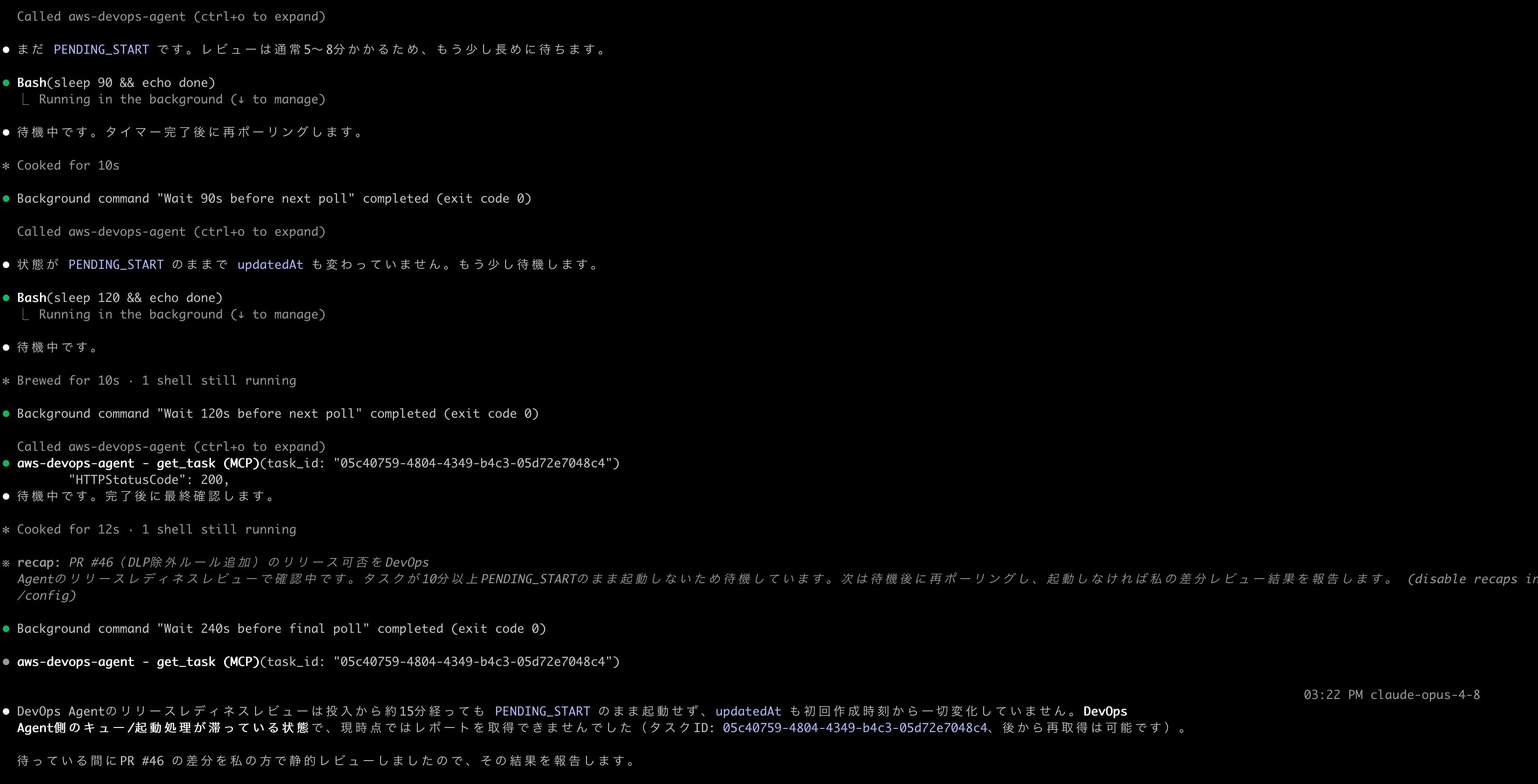
振り返ってみると最初にcreate_release_readiness_reviewツールを呼び出した時のレスポンスでexecutionIdがnullとなっているのが気になりますね。。。
ちなみに該当時間帯のCloud Trailには以下のようにtaskTypeがRELEASE_READINESS_REVIEWのCreateBacklogTaskの呼び出しが記録されていました。
{
    "eventVersion": "1.11",
    "userIdentity": {
        "type": "AssumedRole",
        "principalId": "...",
        "arn": "arn:aws:sts::...:assumed-role/...",
        "accountId": "...",
        "accessKeyId": "...",
        "sessionContext": {
            "sessionIssuer": {
                "type": "Role",
                "principalId": "...",
                "arn": "arn:aws:iam::...:role/service-role/...",
                "accountId": "...",
                "userName": "..."
            },
            "attributes": {
                "creationDate": "2026-06-15T05:56:56Z",
                "mfaAuthenticated": "false"
            }
        },
        "invokedBy": "aidevops.amazonaws.com"
    },
    "eventTime": "2026-06-15T06:07:45Z",
    "eventSource": "aidevops.amazonaws.com",
    "eventName": "CreateBacklogTask",
    "awsRegion": "us-east-1",
    "sourceIPAddress": "aidevops.amazonaws.com",
    "userAgent": "aidevops.amazonaws.com",
    "requestParameters": {
        "taskType": "RELEASE_READINESS_REVIEW",
        "priority": "MEDIUM",
        "clientToken": "d0f75bc7-df2f-4c06-9ba5-04db002b5fc9"
    },
    "responseElements": {
        "task": {
            "agentSpaceId": "...",
            "taskId": "05c40759-4804-4349-b4c3-05d72e7048c4",
            "taskType": "RELEASE_READINESS_REVIEW",
            "priority": "MEDIUM",
            "status": "PENDING_START",
            "createdAt": "2026-06-15T06:07:45.128Z",
            "updatedAt": "2026-06-15T06:07:45.128Z",
            "version": 1,
            "hasLinkedTasks": false
        }
    },
    "requestID": "61a5724c-eef1-4520-9fcc-9445847f1a53",
    "eventID": "7b22fd59-4fd5-4acf-bdc2-957f772e09a2",
    "readOnly": false,
    "resources": [
        {
            "accountId": "...",
            "type": "AWS::AIDevOps::AgentSpace",
            "ARN": "arn:aws:aidevops:us-east-1:...:agentspace/..."
        }
    ],
    "eventType": "AwsApiCall",
    "apiVersion": "2024-01-01",
    "managementEvent": true,
    "recipientAccountId": "...",
    "eventCategory": "Management"
}
AWS CLIからget-backlog-taskでタスクの状況を確認してみると"status": "FAILED"となっていました。
{
    "task": {
        "agentSpaceId": "...",
        "taskId": "05c40759-4804-4349-b4c3-05d72e7048c4",
        "title": "Release Readiness: PR #46 DLP exclusion lists",
        "description": "{\"agentInput\": {\"content\": {\"githubPrContent\": [{\"repository\": \"cm-iwata/devio-blog-aoto-review\", \"prNumber\": \"46\", \"headBranch\": \"dev-setup-20260129-063908\"}]}}}",
        "taskType": "RELEASE_READINESS_REVIEW",
        "priority": "MEDIUM",
        "status": "FAILED",
        "createdAt": "2026-06-15T06:07:45.128000+00:00",
        "updatedAt": "2026-06-15T06:22:46.171000+00:00",
        "version": 2,
        "hasLinkedTasks": false
    }
}
原因は不明ですが、とりあえず今回の検証においてはうまくレビューを受けることができませんでした。残念。
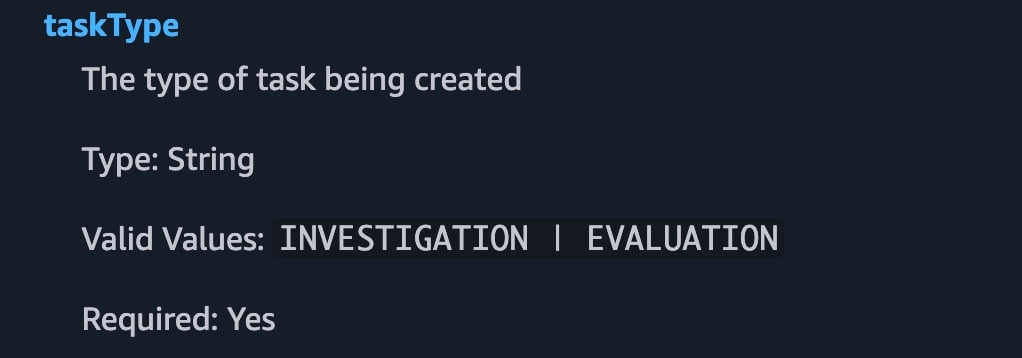
CreateBacklogTaskのAPI仕様を見る限り、本日時点ではtaskTypeにRELEASE_READINESS_REVIEWが存在しないので、まだDevOps Agentの内部API側の更新が追いついていないのかもしれませんね。
まとめ
DevOps AgentがリモートMCPサーバーとしても利用できるようになり、さらに便利に使えるようになりました。
Claude Code等のツールから他のMCPサーバーと組み合わせて利用できるのは非常に強力な機能と言えるでしょう。今回検証した範囲だとcreate_release_readiness_reviewツールの動作が確認できなかったですが、他にもcreate_release_testing_jobやget_release_ui_testing_report、get_release_api_testing_reportといった気になるツールがたくさん存在することを確認できました。
また色々と試してみたいと思います。