AWS DevOps Agent のコスト情報を Cost Explorer や CUR から調べてみた

はじめに
DevOps Agent とは
AWS DevOps Agent は、AWSが提供するマネージドなAIオペレーションエージェントです。 CloudWatch アラームやオブザーバビリティツールからのアラートを起点に、自律的にインシデントの初期調査と根本原因分析を実行します。 マルチアカウント環境にも対応しており、複数アカウントを横断した分析が可能です。 2026-03-31 に 一般提供(GA) になっています。
現在プロジェクトでの活用を模索しながら DevOps Agent を触っています。 全体的に好印象です。以下のような所感を持っています。
- 運用者向けの専用UI(Operator Web App)が良い意味で従来のマネコンっぽくない
- 緩和計画で提案されるコマンドが、事前検証や切り戻しコマンドまで含まれており実用的
- 事前準備や前提条件が少なく、導入を推奨しやすい
- アラート分析以外にもセキュリティやコストなどの運用でも使えそう
料金について
GA後の料金は以下のようになっています。
Pay-As-You-Go Investigations (Incident Response) $0.0083 per agent-second Evaluations (Incident Prevention) $0.0083 per agent-second On-demand SRE tasks (Chat) $0.0083 per agent-second
調査・評価・オンデマンドチャットのいずれも、エージェントの稼働時間に応じた課金です。 1時間あたり、約$30 ですね。
ドキュメント上の料金体系は上記のとおりですが、今回は Cost Explorer や CUR明細から実際にどう見えるのか を調べてみました。
Cost Explorer から確認してみた
使用タイプの把握
ディメンション:使用タイプ, サービス:DevOpsAgent の組み合わせで、 使用タイプを把握できます。
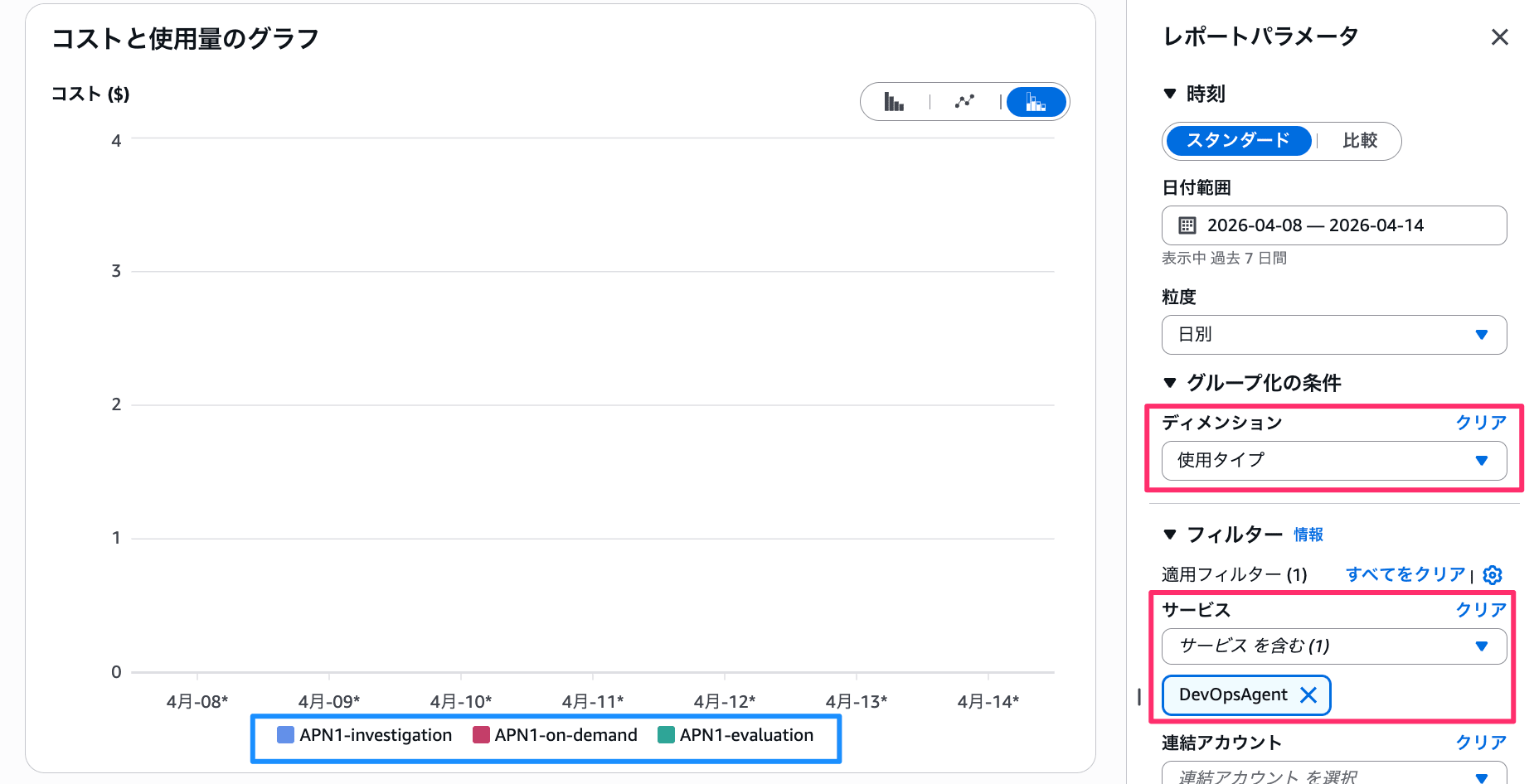
ディメンション「使用タイプ」、サービス「DevOpsAgent」でフィルタした画面
東京リージョンでの利用の場合、以下3つの使用タイプとなります。
APN1-investigation: 「Investigations (Incident Response)」に相当する使用タイプAPN1-evaluation: 「Evaluations (Incident Prevention)」に相当する使用タイプAPN1-on-demand: 「On-demand SRE tasks (Chat)」に相当する使用タイプ
各使用タイプの使用量
各使用タイプがどれだけ使われているかは、 フィルターを絞ることで確認できます。
たとえば 使用タイプ: APN1-investigation のフィルタを付けてみましょう。 使用量(Hrs)セクションが出てくるはずです。
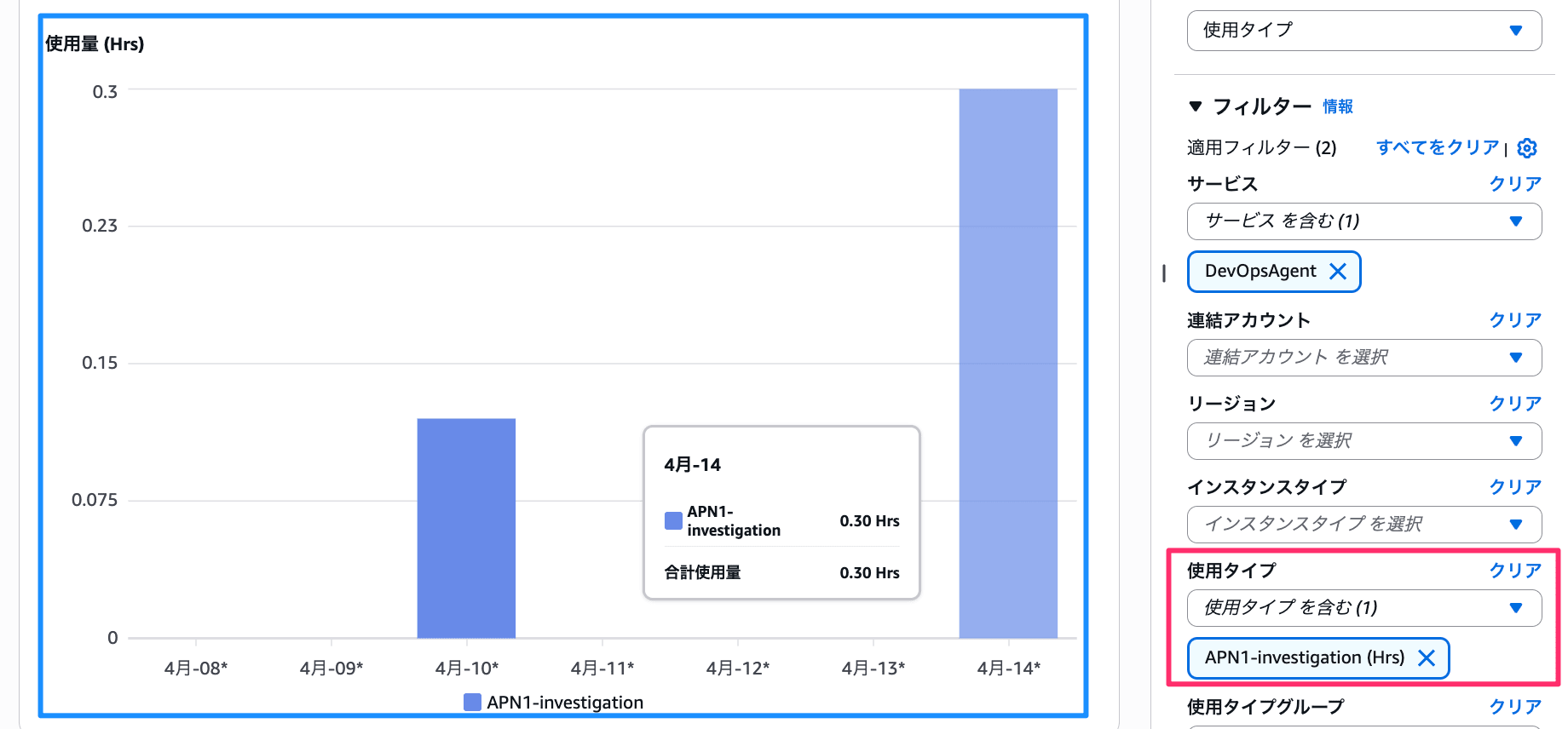
使用タイプ「APN1-investigation」でフィルタした使用量グラフ
キャプチャの例だと、 4/14に 0.30時間の使用量が記録されています。 もし無料利用枠が終了していたら、おおよそ 0.30時間 × $30/時間 = $9.00 のコストになる、ということです。
CURから確認
今回は CUR 2.0 の DAILY のコスト明細から確認します。 以下1日分の CSV明細を調べてみました。
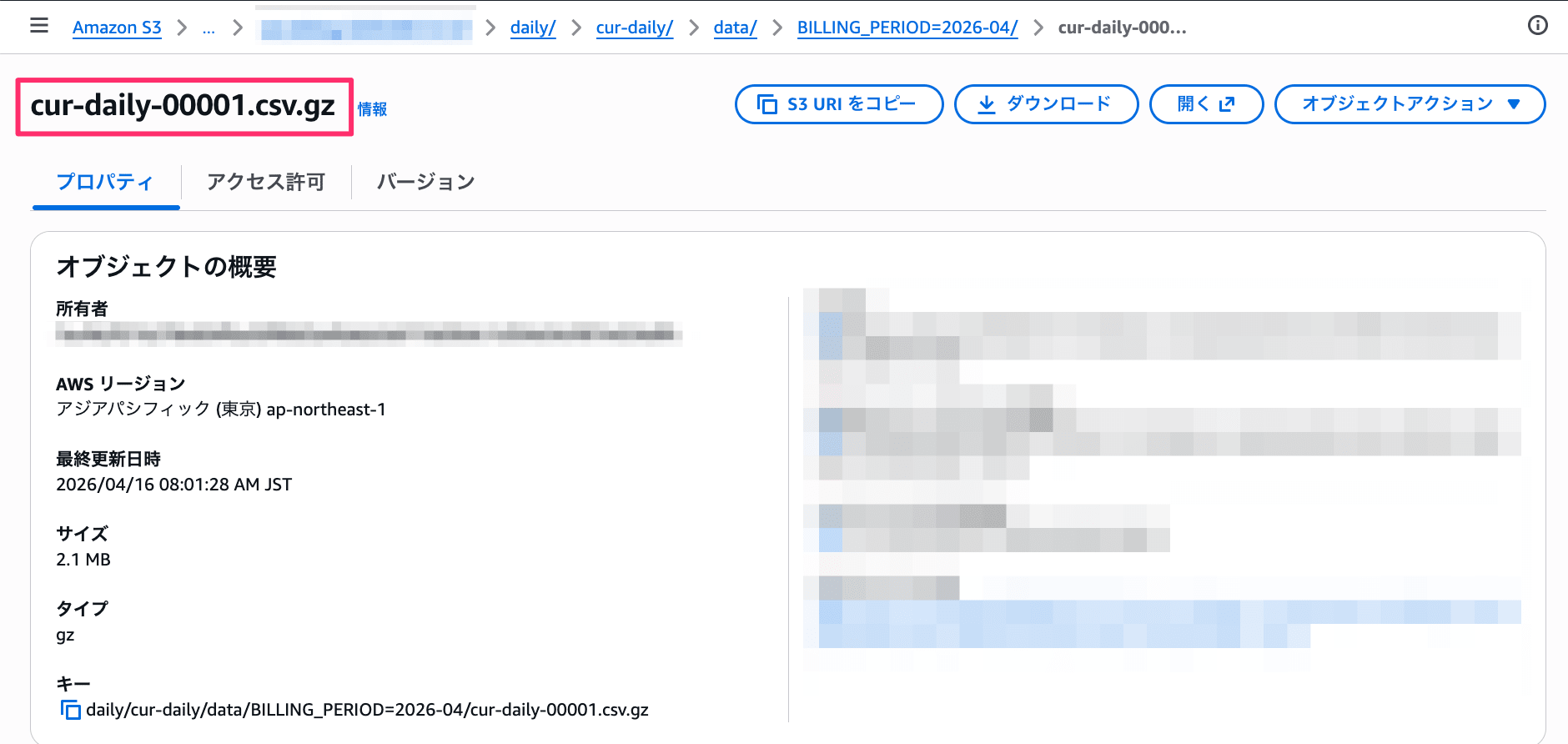
S3に保存されたCUR 2.0のDAILY明細ファイルのオブジェクト詳細
調査機能(investigation) の明細
以下のようなエントリが入っています。(主要カラムのみ抜粋)
基本情報
| カラム | 値サンプル |
|---|---|
| line_item/LineItemType | Usage |
| line_item/ProductCode | DevOpsAgent |
| line_item/Operation | OPS1 |
| line_item/UsageType | APN1-investigation |
| line_item/LineItemDescription | {長いので後述} |
| line_item/ResourceId | {エージェントスペースのARN} |
| line_item/UsageAccountId | 111111111111 |
| product/regionCode | ap-northeast-1 |
| product/servicecode | DevOpsAgent |
| product/productFamily | AWS DevOps Agent |
どのアカウント、どのエージェントスペースかの情報も分かります。
また、line_item/LineItemDescription には料金ティアの説明が書かれます。 本エントリでは無料利用枠である旨: "$0.00 per Hour from 0 to 20 for investigation in Asia Pacific (Tokyo)" が記載されています。
期間と使用量
| カラム | 値サンプル |
|---|---|
| line_item/UsageStartDate | 2026-04-10T02:00:00Z |
| line_item/UsageEndDate | 2026-04-10T03:00:00Z |
| line_item/UsageAmount | 0.1183333333 |
| pricing/unit | Hours |
| pricing/publicOnDemandRate | 30.0 |
| pricing/publicOnDemandCost | 3.549999999 |
publicOnDemandCost はオンデマンド料金で換算した場合のコストです。 無料枠内でも「もし課金されていたらいくらか」が記録されています。
実際の料金
| カラム | 値サンプル |
|---|---|
| line_item/UnblendedRate | 0.0 |
| line_item/UnblendedCost | 0.0 |
無料枠内のため、実際の課金額はすべて 0.0 となっています。
予防機能(evaluation) の明細
以下のようなエントリが入っています。
基本情報
| カラム | 値サンプル |
|---|---|
| line_item/LineItemType | Usage |
| line_item/ProductCode | DevOpsAgent |
| line_item/Operation | OPS2 |
| line_item/UsageType | APN1-evaluation |
| line_item/LineItemDescription | {長いので後述} |
| line_item/ResourceId | {エージェントスペースのARN} |
| line_item/UsageAccountId | 111111111111 |
| product/regionCode | ap-northeast-1 |
| product/servicecode | DevOpsAgent |
| product/productFamily | AWS DevOps Agent |
Operation( OPS2 )、UsageType( APN1-evaluation ) 以外はおおよそ investigation と同じです。
line_item/LineItemDescription には "$0.00 per Hour from 0 to 15 for evaluation in Asia Pacific (Tokyo)" が記載されています。 無料枠の上限が investigation の20時間に対し、evaluation は15時間となっています。
期間と使用量
| カラム | 値サンプル |
|---|---|
| line_item/UsageStartDate | 2026-04-14T01:00:00Z |
| line_item/UsageEndDate | 2026-04-14T02:00:00Z |
| line_item/UsageAmount | 0.0291666667 |
| pricing/unit | Hours |
| pricing/publicOnDemandRate | 30.0 |
| pricing/publicOnDemandCost | 0.875000001 |
実際の料金
| カラム | 値サンプル |
|---|---|
| line_item/UnblendedRate | 0.0 |
| line_item/UnblendedCost | 0.0 |
こちらも無料枠内のため、実際の課金額は 0.0 です。
チャット(on-demand) の明細
以下のようなエントリが入っています。
基本情報
| カラム | 値サンプル |
|---|---|
| line_item/LineItemType | Usage |
| line_item/ProductCode | DevOpsAgent |
| line_item/Operation | POWER_CHAT |
| line_item/UsageType | APN1-on-demand |
| line_item/LineItemDescription | {長いので後述} |
| line_item/ResourceId | {エージェントスペースのARN} |
| line_item/UsageAccountId | 111111111111 |
| product/regionCode | ap-northeast-1 |
| product/servicecode | DevOpsAgent |
| product/productFamily | AWS DevOps Agent |
Operation が POWER_CHAT 、UsageType が APN1-on-demand となります。
line_item/LineItemDescription には "$0.00 per Hour from 0 to 20 for on-demand in Asia Pacific (Tokyo)" が記載されています。 無料枠の上限は investigation と同じ20時間です。
期間と使用量
| カラム | 値サンプル |
|---|---|
| line_item/UsageStartDate | 2026-04-14T00:00:00Z |
| line_item/UsageEndDate | 2026-04-14T02:00:00Z |
| line_item/UsageAmount | 0.0297222223 |
| pricing/unit | Hour |
| pricing/publicOnDemandRate | 30.0 |
| pricing/publicOnDemandCost | 0.891666669 |
実際の料金
| カラム | 値サンプル |
|---|---|
| line_item/UnblendedRate | 0.0 |
| line_item/UnblendedCost | 0.0 |
こちらも無料枠内のため、実際の課金額は 0.0 です。
おわりに
AWS DevOps Agent のコスト情報を覗いてみました。
ちなみに オペレーターUIの [設定] からも使用量が確認できます。 (表示が少し変ですが…)
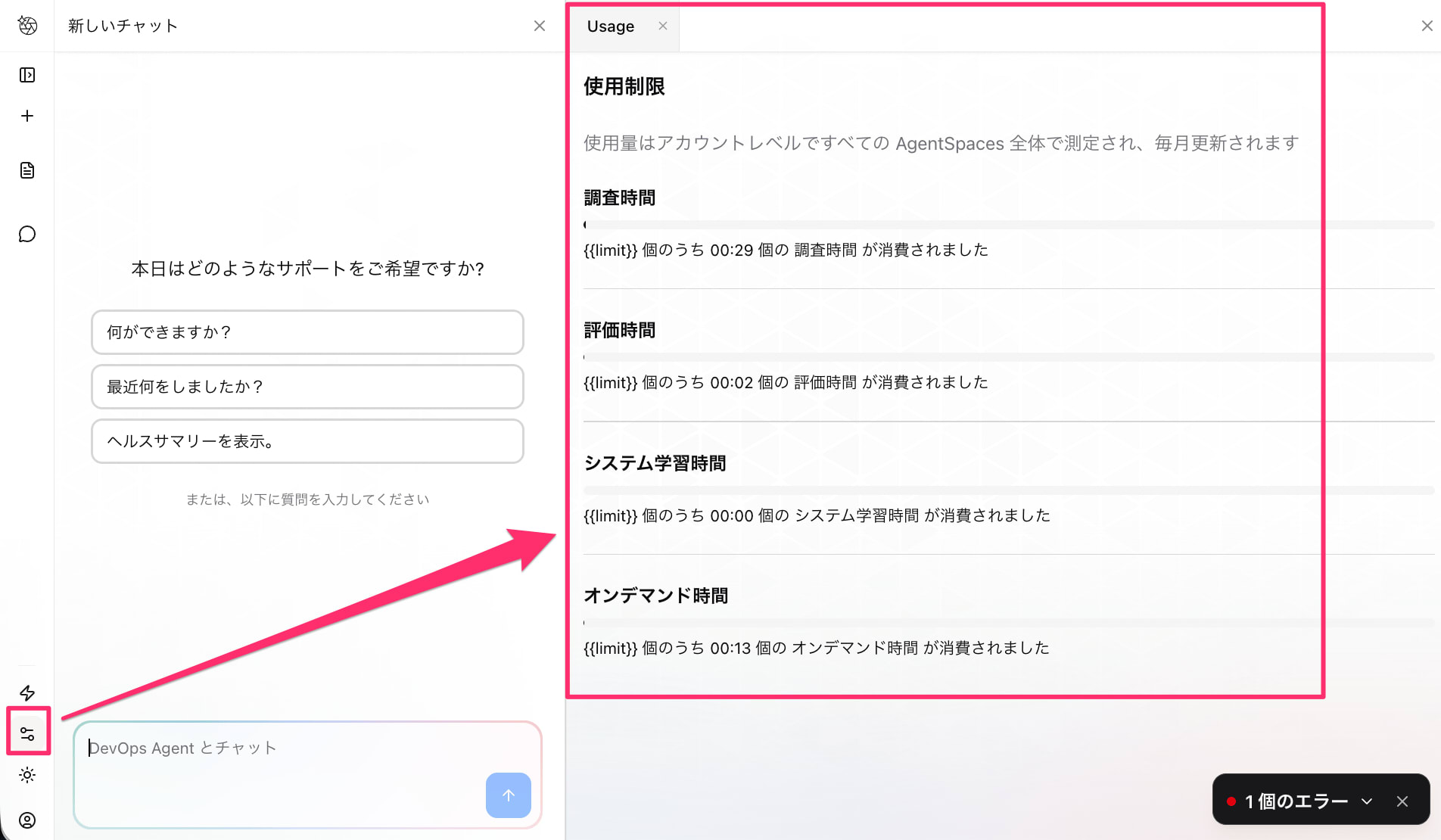
オペレーターUIの設定画面から確認できる使用量
シンプルな課金体系なので、見積もりはしやすいかなと思います。 無料利用枠の間に使用量を把握し、各調査のコスト感を見積もっておくのが理想ですね。
以上、参考になれば幸いです。