
v0でスマホを振動させるWebアプリを作る: 1回のプロンプトで実装し、Vercelにデプロイ

はじめに
スマホの Web ページで、ボタンを押したときに端末が振動すると、操作の手応えが増します。簡単なデモでも、触覚 (Haptics) のフィードバックがあると体験の変化が感じられます。本記事では、v0 で実装した Web アプリで Android 端末を振動させられるか検証します。
v0 とは
v0 は Vercel が提供する AI 開発プラットフォームです。自然言語の指示から Next.js などの Web アプリを生成し、Vercel へ 1 クリックでデプロイできます。
この記事で扱う範囲
スマホを振動させるために Vibration API を使用します。Vibration API は、すべてのブラウザで動く機能ではありません。特に Safari と Safari on iOS は未対応です。そのため、この記事の動作確認は Android 実機を前提にします。iOS でアクセスした場合は、未対応であることを画面で示し、振動ボタンを無効化します。
検証環境は次の通りです。
- 端末: Pixel 8 Pro
- ブラウザ: Chrome
なお、Vibration API では、振動の強さ (振幅) を指定できません。指定できるのは、振動と停止の時間 (ms) です。そのため本記事のデモでは、検証に用いる Step と Ramp の 2 つの振動パターンについて、次のような方針とします。
Step: 1,000 ms ごとに、振動の ON 時間を伸ばして、強くなったように感じさせるRamp: 短い振動パルスを繰り返し、停止間隔を短くして、密度が上がったように感じさせる
対象読者
- v0 を使い、プロンプトから Web アプリを生成する流れを試したい方
- Web の Vibration API でできる表現の範囲と、ブラウザ対応状況を把握したい方
- Android 端末と Chrome を使い、実機で振動を確認する手順を知りたい方
参考
- Vibration API
- Navigator: vibrate() method - Web APIs | MDN
- Vibration API | Can I use... Support tables for HTML5, CSS3, etc
- User activation - Security - MDN Web Docs - Mozilla
v0 に投入したプロンプト
以下が、v0 に投入したプロンプト全文です。強さ (振幅) を指定できない前提のもとで、Step と Ramp を時間パターンで表現するよう指示しています。
Build a production-ready Next.js (App Router) web app that demonstrates device vibration using the Web Vibration API.

Goals:
- One-click deployable on Vercel (no extra setup).
- Mobile-first UI, dark theme, clean typography.
- This is a web app. Do NOT generate React Native / Expo.

UI requirements:
- Title: Vibration Demo
- Subtitle: Works on Android browsers that support navigator.vibrate(). iOS Safari is not supported.
- A status panel showing:
  - Platform info (userAgent, isMobile)
  - Vibration support: supported / not supported
  - Last action (Idle / Step running / Ramp running / Stopped / Completed)
- Buttons (large, accessible):
  1) Step (5 levels / 5s)
  2) Ramp (smooth / 5s)
  3) Stop

Behavior requirements:
- Use navigator.vibrate() ONLY inside direct user gestures (button click).
- Feature detect safely:
  - const canVibrate = typeof navigator !== 'undefined' && 'vibrate' in navigator
- If not supported:
  - Disable Step/Ramp buttons
  - Show a clear message explaining iOS Safari does not support Vibration API.
- Stop button always works:
  - navigator.vibrate(0)
  - Also cancels any timers.
- Implement Step as a single vibration pattern array lasting ~5 seconds:
  - Since intensity control is not available in Vibration API, represent stronger as longer ON time within each 1000ms step.
  - Example: five steps where ON duration increases each second (e.g., 200ms, 400ms, 600ms, 800ms, 1000ms) with OFF time filling the remainder.
- Implement Ramp as a single pattern array lasting ~5 seconds:
  - Simulate smooth ramp by short pulses with gradually shorter pauses (frequency increases).
- Use React state and refs to prevent double-runs and to support canceling.
- Add a small Test tips section:
  - Must be HTTPS (Vercel provides this)
  - Must tap buttons (user activation)
  - Some devices / modes may suppress vibration
  - iOS Safari: not supported

Output:
- Provide complete code for all files needed.
- Keep dependencies minimal.
- Use Tailwind CSS for styling (or plain CSS modules if you prefer), but ensure it works out of the box.
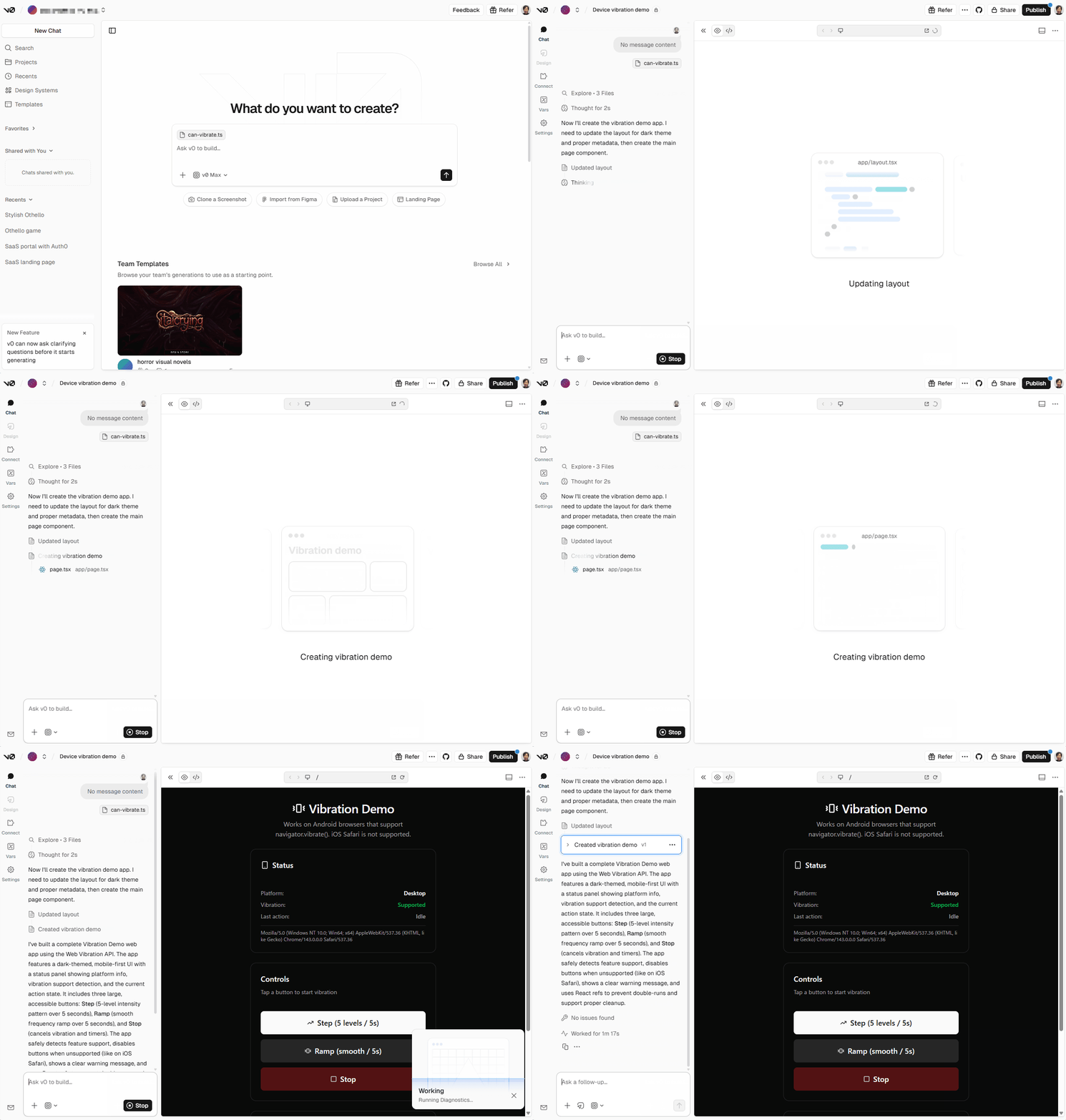
このプロンプトにより、Step と Ramp は「時間パターンで擬似的に変化させる」設計として明確になります。アプリが生成される様子 (5倍速) を GIF アニメとして記録しました。
生成されたアプリの構成
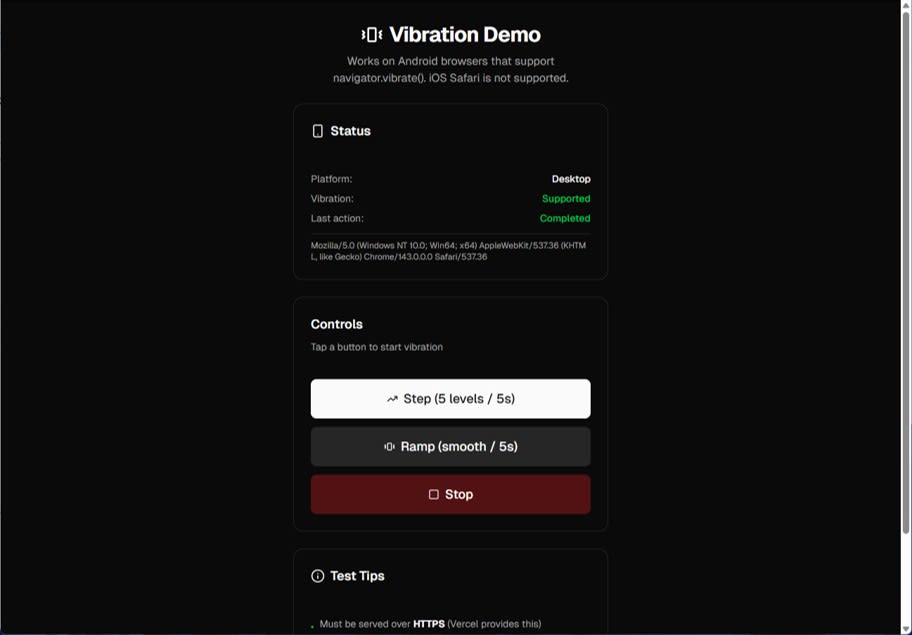
v0 が生成したアプリの画面は次のような形です。
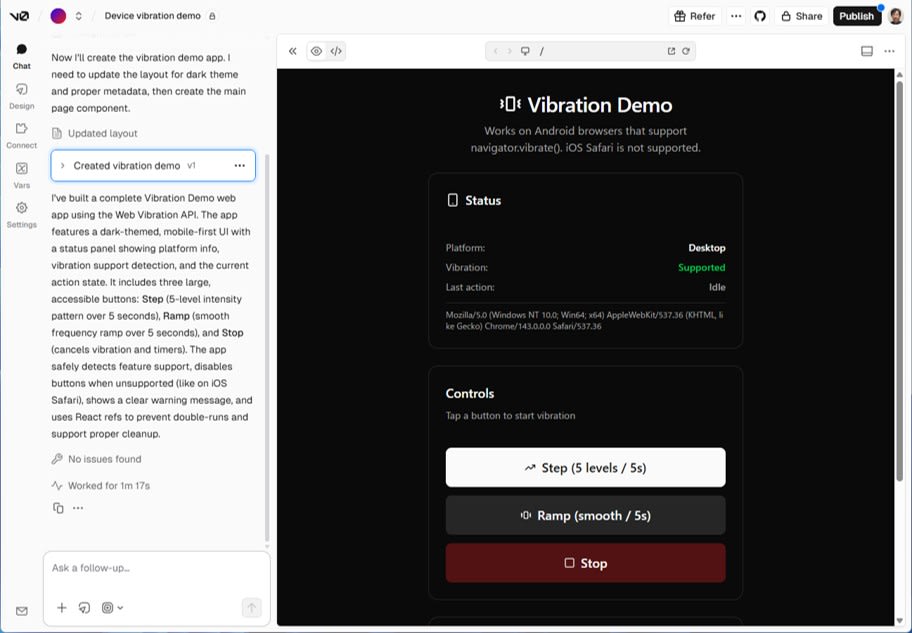
構成は Next.js (App Router) でした。
app/layout.tsx: メタデータ、アイコン、@vercel/analytics の組み込み
app/layout.tsx
import React from "react"
import type { Metadata } from 'next'
import { Geist, Geist_Mono } from 'next/font/google'
import { Analytics } from '@vercel/analytics/next'
import './globals.css'

const _geist = Geist({ subsets: ["latin"] });
const _geistMono = Geist_Mono({ subsets: ["latin"] });

export const metadata: Metadata = {
  title: 'Vibration Demo',
  description: 'Test device vibration using the Web Vibration API',
  generator: 'v0.app',
  icons: {
    icon: [
      {
        url: '/icon-light-32x32.png',
        media: '(prefers-color-scheme: light)',
      },
      {
        url: '/icon-dark-32x32.png',
        media: '(prefers-color-scheme: dark)',
      },
      {
        url: '/icon.svg',
        type: 'image/svg+xml',
      },
    ],
    apple: '/apple-icon.png',
  },
}

export default function RootLayout({
  children,
}: Readonly<{
  children: React.ReactNode
}>) {
  return (
    <html lang="en" className="dark">
      <body className={`font-sans antialiased`}>
        {children}
        <Analytics />
      </body>
    </html>
  )
}
app/page.tsx: 画面本体 (単一ページ)
app/page.tsx
"use client"

import { useState, useRef, useEffect, useCallback } from "react"
import { Smartphone, Vibrate, Square, TrendingUp, AlertTriangle, Info } from "lucide-react"
import { Button } from "@/components/ui/button"
import { Card, CardContent, CardDescription, CardHeader, CardTitle } from "@/components/ui/card"

type ActionStatus = "Idle" | "Step running" | "Ramp running" | "Stopped" | "Completed"

export default function VibrationDemo() {
  const [canVibrate, setCanVibrate] = useState<boolean | null>(null)
  const [isMobile, setIsMobile] = useState<boolean | null>(null)
  const [userAgent, setUserAgent] = useState<string>("")
  const [status, setStatus] = useState<ActionStatus>("Idle")
  const [isRunning, setIsRunning] = useState(false)

  const timeoutRef = useRef<NodeJS.Timeout | null>(null)

  useEffect(() => {
    const supported = typeof navigator !== "undefined" && "vibrate" in navigator
    setCanVibrate(supported)

    const ua = typeof navigator !== "undefined" ? navigator.userAgent : ""
    setUserAgent(ua)

    const mobile = /Android|webOS|iPhone|iPad|iPod|BlackBerry|IEMobile|Opera Mini/i.test(ua)
    setIsMobile(mobile)
  }, [])

  const stopVibration = useCallback(() => {
    if (timeoutRef.current) {
      clearTimeout(timeoutRef.current)
      timeoutRef.current = null
    }
    if (canVibrate) {
      navigator.vibrate(0)
    }
    setIsRunning(false)
    setStatus("Stopped")
  }, [canVibrate])

  const runStep = useCallback(() => {
    if (!canVibrate || isRunning) return

    setIsRunning(true)
    setStatus("Step running")

    // Step pattern: 5 levels over ~5 seconds
    // Each step is 1000ms total, ON duration increases: 200, 400, 600, 800, 1000
    // Pattern: [on, off, on, off, on, off, on, off, on]
    const pattern = [
      200, 800,  // Step 1: 200ms on, 800ms off
      400, 600,  // Step 2: 400ms on, 600ms off
      600, 400,  // Step 3: 600ms on, 400ms off
      800, 200,  // Step 4: 800ms on, 200ms off
      1000       // Step 5: 1000ms on (no off needed at end)
    ]

    navigator.vibrate(pattern)

    // Pattern duration: 200+800+400+600+600+400+800+200+1000 = 5000ms
    timeoutRef.current = setTimeout(() => {
      setIsRunning(false)
      setStatus("Completed")
    }, 5000)
  }, [canVibrate, isRunning])

  const runRamp = useCallback(() => {
    if (!canVibrate || isRunning) return

    setIsRunning(true)
    setStatus("Ramp running")

    // Ramp pattern: simulate smooth ramp by short pulses with gradually shorter pauses
    // Total duration ~5 seconds, frequency increases over time
    const pattern: number[] = []
    let totalDuration = 0
    const targetDuration = 5000

    // Start with long pauses (low frequency), gradually shorten pauses (high frequency)
    // Pulse duration stays constant at 50ms, pause decreases from 150ms to 10ms
    let pulseDuration = 50
    let pauseDuration = 150
    const pauseDecrement = 5

    while (totalDuration < targetDuration) {
      pattern.push(pulseDuration)
      totalDuration += pulseDuration

      if (totalDuration >= targetDuration) break

      pattern.push(pauseDuration)
      totalDuration += pauseDuration

      // Decrease pause duration to increase frequency
      pauseDuration = Math.max(10, pauseDuration - pauseDecrement)
    }

    navigator.vibrate(pattern)

    timeoutRef.current = setTimeout(() => {
      setIsRunning(false)
      setStatus("Completed")
    }, totalDuration)
  }, [canVibrate, isRunning])

  const handleStop = () => {
    stopVibration()
  }

  // Cleanup on unmount
  useEffect(() => {
    return () => {
      if (timeoutRef.current) {
        clearTimeout(timeoutRef.current)
      }
      if (typeof navigator !== "undefined" && "vibrate" in navigator) {
        navigator.vibrate(0)
      }
    }
  }, [])

  return (
    <main className="min-h-screen bg-background p-4 md:p-8">
      <div className="mx-auto max-w-md space-y-6">
        {/* Header */}
        <div className="space-y-2 text-center">
          <div className="flex items-center justify-center gap-2">
            <Vibrate className="h-8 w-8 text-foreground" />
            <h1 className="text-3xl font-bold tracking-tight text-foreground">
              Vibration Demo
            </h1>
          </div>
          <p className="text-muted-foreground text-balance">
            Works on Android browsers that support navigator.vibrate(). iOS Safari is not supported.
          </p>
        </div>

        {/* Status Panel */}
        <Card className="border-border bg-card">
          <CardHeader className="pb-3">
            <CardTitle className="flex items-center gap-2 text-lg text-card-foreground">
              <Smartphone className="h-5 w-5" />
              Status
            </CardTitle>
          </CardHeader>
          <CardContent className="space-y-3">
            <div className="space-y-2 text-sm">
              <div className="flex justify-between">
                <span className="text-muted-foreground">Platform:</span>
                <span className="text-card-foreground font-medium">
                  {isMobile === null ? "Detecting..." : isMobile ? "Mobile" : "Desktop"}
                </span>
              </div>
              <div className="flex justify-between">
                <span className="text-muted-foreground">Vibration:</span>
                <span className={`font-medium ${canVibrate ? "text-green-500" : "text-red-500"}`}>
                  {canVibrate === null ? "Detecting..." : canVibrate ? "Supported" : "Not supported"}
                </span>
              </div>
              <div className="flex justify-between">
                <span className="text-muted-foreground">Last action:</span>
                <span className={`font-medium ${
                  status === "Idle" ? "text-muted-foreground" :
                  status === "Stopped" ? "text-yellow-500" :
                  status === "Completed" ? "text-green-500" :
                  "text-blue-500"
                }`}>
                  {status}
                </span>
              </div>
            </div>
            {userAgent && (
              <div className="pt-2 border-t border-border">
                <p className="text-xs text-muted-foreground break-all">
                  {userAgent}
                </p>
              </div>
            )}
          </CardContent>
        </Card>

        {/* Not Supported Warning */}
        {canVibrate === false && (
          <Card className="border-yellow-500/50 bg-yellow-500/10">
            <CardContent className="flex items-start gap-3 pt-6">
              <AlertTriangle className="h-5 w-5 text-yellow-500 shrink-0 mt-0.5" />
              <div className="space-y-1">
                <p className="font-medium text-yellow-500">Vibration API Not Supported</p>
                <p className="text-sm text-muted-foreground">
                  Your browser does not support the Vibration API. iOS Safari and some desktop browsers do not implement this feature.
                </p>
              </div>
            </CardContent>
          </Card>
        )}

        {/* Control Buttons */}
        <Card className="border-border bg-card">
          <CardHeader className="pb-3">
            <CardTitle className="text-lg text-card-foreground">Controls</CardTitle>
            <CardDescription>
              Tap a button to start vibration
            </CardDescription>
          </CardHeader>
          <CardContent className="space-y-3">
            <Button
              onClick={runStep}
              disabled={!canVibrate || isRunning}
              size="lg"
              className="w-full h-14 text-lg gap-2"
            >
              <TrendingUp className="h-5 w-5" />
              Step (5 levels / 5s)
            </Button>

            <Button
              onClick={runRamp}
              disabled={!canVibrate || isRunning}
              size="lg"
              variant="secondary"
              className="w-full h-14 text-lg gap-2"
            >
              <Vibrate className="h-5 w-5" />
              Ramp (smooth / 5s)
            </Button>

            <Button
              onClick={handleStop}
              size="lg"
              variant="destructive"
              className="w-full h-14 text-lg gap-2"
            >
              <Square className="h-5 w-5" />
              Stop
            </Button>
          </CardContent>
        </Card>

        {/* Test Tips */}
        <Card className="border-border bg-card">
          <CardHeader className="pb-3">
            <CardTitle className="flex items-center gap-2 text-lg text-card-foreground">
              <Info className="h-5 w-5" />
              Test Tips
            </CardTitle>
          </CardHeader>
          <CardContent>
            <ul className="space-y-2 text-sm text-muted-foreground">
              <li className="flex items-start gap-2">
                <span className="text-green-500 mt-1">•</span>
                <span>Must be served over <strong className="text-foreground">HTTPS</strong> (Vercel provides this)</span>
              </li>
              <li className="flex items-start gap-2">
                <span className="text-green-500 mt-1">•</span>
                <span>Must <strong className="text-foreground">tap buttons</strong> (user activation required)</span>
              </li>
              <li className="flex items-start gap-2">
                <span className="text-yellow-500 mt-1">•</span>
                <span>Some devices or silent modes may suppress vibration</span>
              </li>
              <li className="flex items-start gap-2">
                <span className="text-red-500 mt-1">•</span>
                <span><strong className="text-foreground">iOS Safari:</strong> Not supported</span>
              </li>
            </ul>
          </CardContent>
        </Card>
      </div>
    </main>
  )
}
UI は shadcn/ui 系のコンポーネントと Tailwind CSS で組まれており、アイコンは lucide-react を使っていました。page.tsx は use client を宣言しており、クライアント側で navigator を参照する実装になっています。
また、package.json の依存関係はかなり多くなりました。プロンプトでは依存を最小にするよう求めましたが、v0 は UI 部品群を含めたテンプレートを採用したようです。
package.json
{
  "name": "my-v0-project",
  "version": "0.1.0",
  "private": true,
  "scripts": {
    "dev": "next dev",
    "build": "next build",
    "start": "next start",
    "lint": "eslint ."
  },
  "dependencies": {
    "@hookform/resolvers": "^3.10.0",
    "@radix-ui/react-accordion": "1.2.2",
    "@radix-ui/react-alert-dialog": "1.1.4",
    "@radix-ui/react-aspect-ratio": "1.1.1",
    "@radix-ui/react-avatar": "1.1.2",
    "@radix-ui/react-checkbox": "1.1.3",
    "@radix-ui/react-collapsible": "1.1.2",
    "@radix-ui/react-context-menu": "2.2.4",
    "@radix-ui/react-dialog": "1.1.4",
    "@radix-ui/react-dropdown-menu": "2.1.4",
    "@radix-ui/react-hover-card": "1.1.4",
    "@radix-ui/react-label": "2.1.1",
    "@radix-ui/react-menubar": "1.1.4",
    "@radix-ui/react-navigation-menu": "1.2.3",
    "@radix-ui/react-popover": "1.1.4",
    "@radix-ui/react-progress": "1.1.1",
    "@radix-ui/react-radio-group": "1.2.2",
    "@radix-ui/react-scroll-area": "1.2.2",
    "@radix-ui/react-select": "2.1.4",
    "@radix-ui/react-separator": "1.1.1",
    "@radix-ui/react-slider": "1.2.2",
    "@radix-ui/react-slot": "1.1.1",
    "@radix-ui/react-switch": "1.1.2",
    "@radix-ui/react-tabs": "1.1.2",
    "@radix-ui/react-toast": "1.2.4",
    "@radix-ui/react-toggle": "1.1.1",
    "@radix-ui/react-toggle-group": "1.1.1",
    "@radix-ui/react-tooltip": "1.1.6",
    "@vercel/analytics": "1.3.1",
    "autoprefixer": "^10.4.20",
    "class-variance-authority": "^0.7.1",
    "clsx": "^2.1.1",
    "cmdk": "1.0.4",
    "date-fns": "4.1.0",
    "embla-carousel-react": "8.5.1",
    "input-otp": "1.4.1",
    "lucide-react": "^0.454.0",
    "next": "16.0.10",
    "next-themes": "^0.4.6",
    "react": "19.2.0",
    "react-day-picker": "9.8.0",
    "react-dom": "19.2.0",
    "react-hook-form": "^7.60.0",
    "react-resizable-panels": "^2.1.7",
    "recharts": "2.15.4",
    "sonner": "^1.7.4",
    "tailwind-merge": "^3.3.1",
    "tailwindcss-animate": "^1.0.7",
    "vaul": "^1.1.2",
    "zod": "3.25.76"
  },
  "devDependencies": {
    "@tailwindcss/postcss": "^4.1.9",
    "@types/node": "^22",
    "@types/react": "^19",
    "@types/react-dom": "^19",
    "postcss": "^8.5",
    "tailwindcss": "^4.1.9",
    "tw-animate-css": "1.3.3",
    "typescript": "^5"
  }
}
対応判定
Vibration API は未対応環境があります。navigator.vibrate の有無を確認して、画面に反映します。
const supported = typeof navigator !== "undefined" && "vibrate" in navigator
setCanVibrate(supported)
iOS の Safari 系ブラウザは未対応なので、iPhone で開くと Not supported になり、ボタンは無効化されます。
ユーザー操作が必要になる理由
navigator.vibrate() は、セキュリティ上の理由で明示的な操作を起点にした実行許可が必要です。ページ表示直後に自動で振動を開始する設計にはできません。ボタンのクリックなど、ユーザーが操作した後に呼び出す必要があります。本デモはボタンからのみ呼ぶため、この条件を満たします。
Step のパターン
Step は 5 秒間です。1 秒ごとに振動の ON 時間を 200 ms ずつ伸ばし、段階的に変化しているように感じさせます。
const pattern = [
  200, 800,
  400, 600,
  600, 400,
  800, 200,
  1000
]

navigator.vibrate(pattern)
この配列は、振動と停止の時間を交互に指定する Vibration API の形式に沿っています。合計は 5,000 ms で、プロンプトの指示と一致します。
Ramp のパターン
Ramp は 5 秒間かけて、短い振動パルスを繰り返し、停止間隔を徐々に短くします。生成された実装は、プロンプトの指示を素直にコード化していました。
- 振動パルスは 50 ms 固定
- 停止時間は 150 ms から始めて 5 ms ずつ減らす
- 停止時間の最小は 10 ms
- 合計が 5,000 ms 付近になるまで配列を積み上げる
この方式は「強さ (振幅) を滑らかに上げる」のではなく、「振動の頻度を上げる」表現です。Vibration API が強さを指定できないため、時間パターンで体感を作る設計になります。
Stop の停止方法
Stop は navigator.vibrate(0) で停止します。本実装では、setTimeout で管理している完了処理も clearTimeout します。これにより、表示上の Status との不整合が起きにくくなります。
Vercel へのデプロイ
Pixel 8 Pro の Chrome からアクセスし、実機で振動を確認するためにデプロイします。
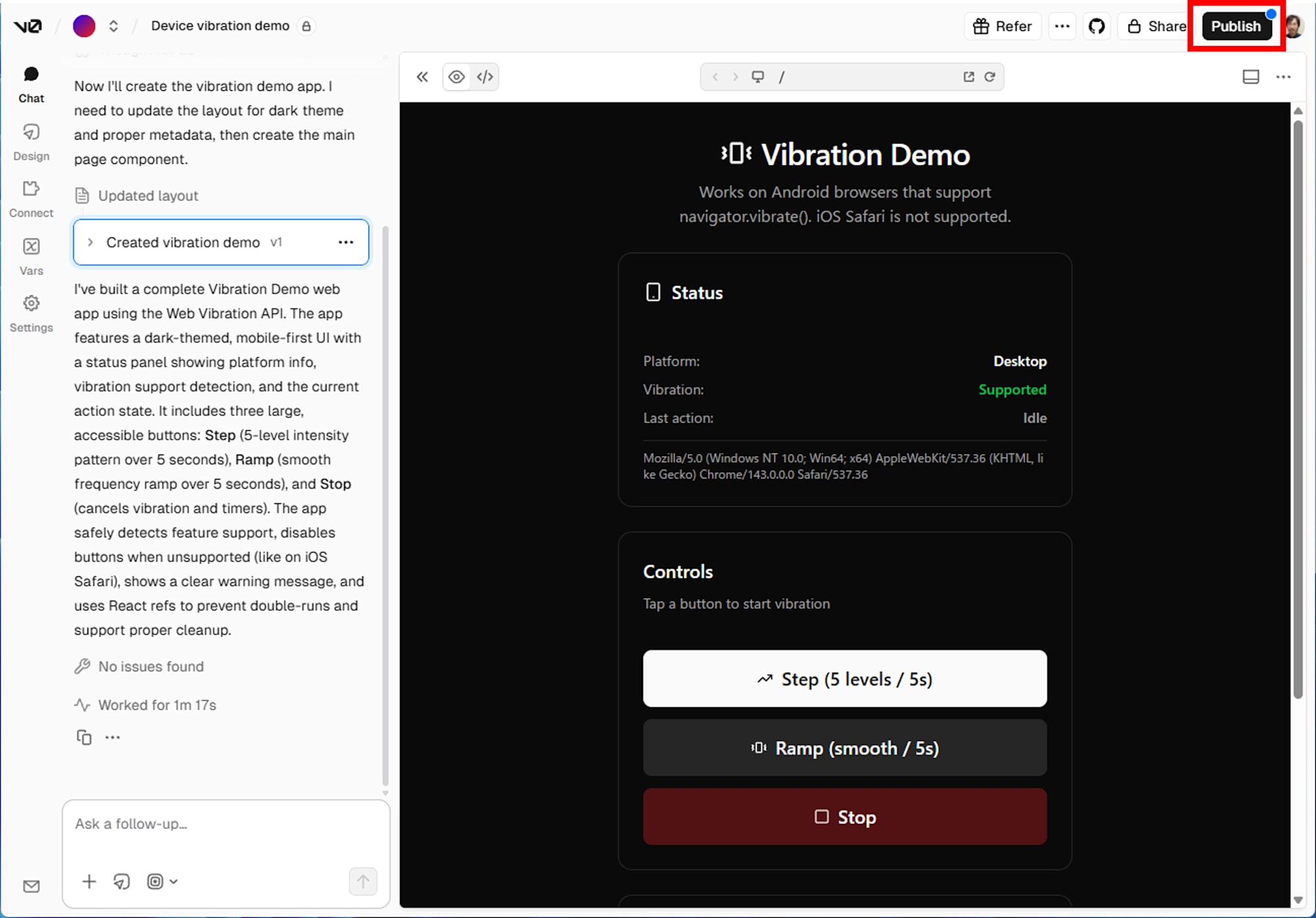
- v0 の生成画面から Publish を選び、Vercel にデプロイ
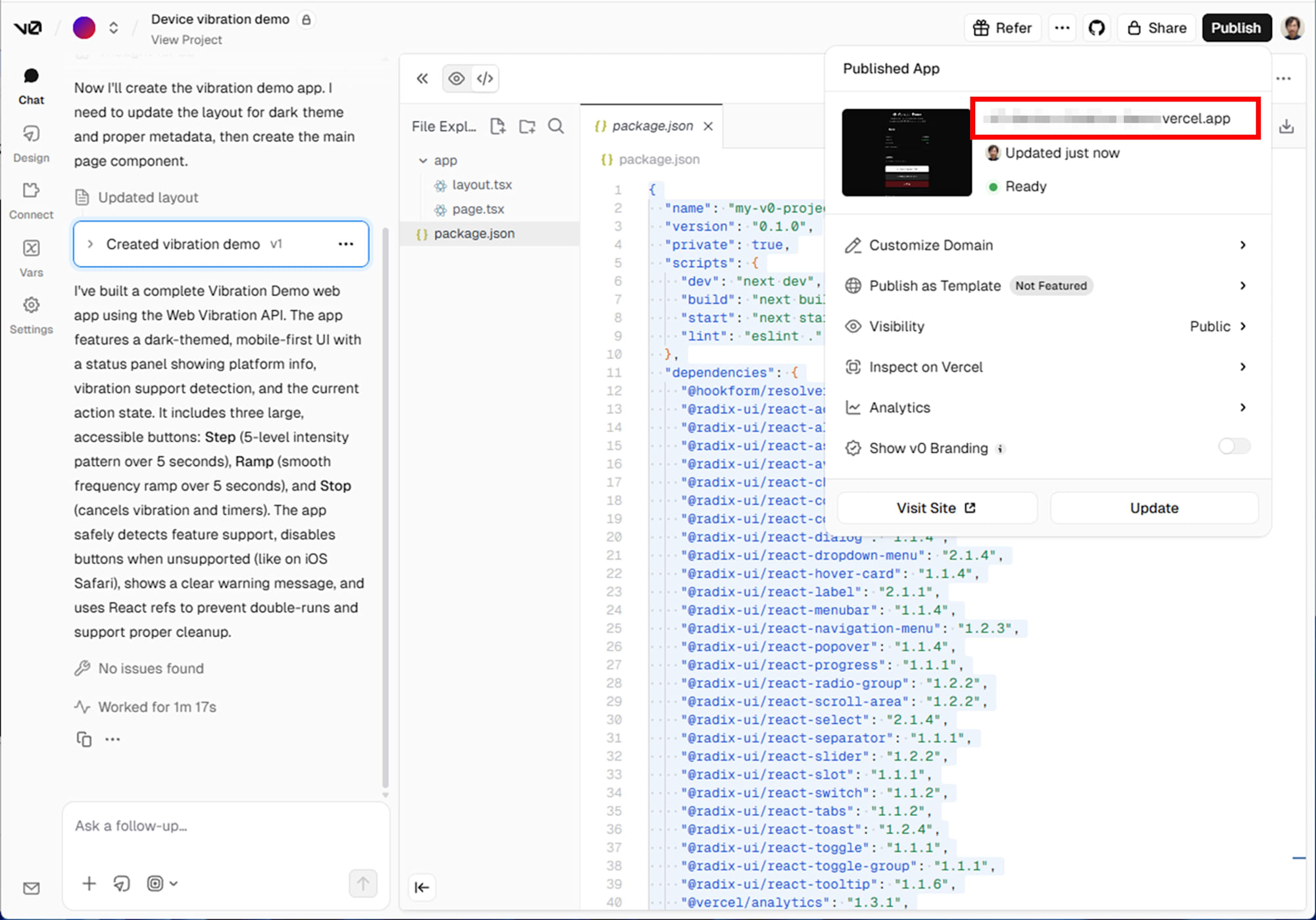
- デプロイ完了後に表示される URL を取得
実機での動作確認
Pixel 8 Pro の Chrome でデプロイ先 URL を開き、Status の Vibration が Supported になることを確認しました。
Step ボタンを押すと、5 秒間の振動が発生し、Last action が Step running から Completed に変化しました。Step は意図通りに体感できました。
Ramp ボタンを押すと、断続的に振動と停止を繰り返し、後半ほど間隔が詰まっていく体感でした。滑らかに強くなるというより、ブッブッブッと区切られたパルスが続き、密度が上がっていく印象です。
Stop ボタンは実行中に押しても有効で、振動が停止し、Last action が Stopped に変化しました。
考察
Ramp が滑らかに感じにくい理由
今回の Ramp が断続的に感じられたのは、実装の失敗というより Vibration API の制約によるものです。Vibration API は振動と停止の時間 (ms) だけを指定でき、強さ (振幅) を指定できません。そのため runRamp は、短いパルスを繰り返し、停止間隔を短くして周波数の変化で Ramp らしさを作っています。
結果として、滑らかに強くなるというより、パルスが詰まっていく体感になりました。この動作はプロンプトの意図と整合しています。一方で、時間パターンだけで滑らかな変化を表現するのは難しく、強さ (振幅) を指定できる仕組みが欲しいと感じました。
また、Vibration API のパターンは環境によって解釈が変わることがあります。複雑な波形を前提にせず、短いデモ用途に留めると扱いやすいでしょう。
v0 の生成品質について
v0 は、プロンプトで指定した UI 構成をほぼそのまま反映しました。Status の表示、ボタンの無効化、Step/Ramp/Stop の実装、Test Tips の文言まで含めて、要求を満たしています。
一方で、依存関係は最小とは言いにくい構成になりました。shadcn/ui と Radix UI 群がまとめて入り、今回のデモに直接関係しないライブラリも含まれます。これは、v0 が汎用 UI テンプレートを前提に生成していることを示しています。とはいえ、「振動を実機で体感する」という今回の目的には十分だといえるでしょう。
まとめ
本記事では、v0 にプロンプトを 1 回投入して Web アプリを生成し、Vercel にデプロイしたうえで、Pixel 8 Pro の Chrome で振動を確認しました。Step は意図通りに体感できました。Ramp は滑らかに強くなるというより、パルスが詰まっていく体感になりましたが、強さ (振幅) を指定できない Vibration API の制約を踏まえると自然な結果でした。
v0 を使うことで UI と実装をまとめて生成できました。一方で依存関係は多くなる傾向がありました。用途が小さなデモであれば問題になりにくいものの、運用を見据える場合は依存関係も含めて設計を見直す必要があります。