AWS CLI の Agent Toolkit for AWS 連携機能を試してみた

しばたです。
いつも通りAWS CLIの更新をチェックしていたところ、少し前にリリースされたVer.2.35.9からaws agent-toolkitというコマンドが追加されているのが確認できました。
初見だとこのコマンドが何者かわからなかったので調べてみた結果を本記事で共有していきます。
このコマンドは何なのか?
調べてみたところ、このコマンドはAgent Toolkit for AWSの設定(現状スキル管理)をAWS CLIから行うためのコマンドであることが分かりました。
Agent Toolkit for AWSの詳細については弊社石川の記事をご覧ください。
なお、もうすぐメンテナンスモードになるAWS CLI v1は非対応なのでご留意ください。
今できること
このaws agent-toolkitコマンドではAgent Toolkit for AWSで提供される各スキルのインストールやダウンロード等の管理が行えます。
本日時点で対応しているエージェントは
- Claude Code
- Cline
- Codex
- Cursor
- Gemini CLI (Antigravity CLIに対する対応は怪しい感じ)
- Kiro
- OpenClaw
- OpenCode
- Pi
- Windsurf (Devin Desktopに対する対応は怪しい感じ)
となります。
開発タイミングの都合か廃止予定のGemini CLIやDevin DesktopにリブランドされるWindsurfも含まれています。
GitHub上のソースコードを軽く読んだ感じ両者の後継ツールへの対応はちょっと怪しそうだったので、今後のバージョンで対応されていくものと予想されます。
各エージェントの検出はホームディレクトリに所定の設定フォルダ(たとえば ~/.claude/ など)があるかどうかで判定しており、新たに追加されたaws configure agent-toolkitコマンドで利用エージェントを選択することも可能です。
(デフォルトではインストール済みの全エージェントが対象の模様)
試してみた
ここからは実際に試してみた結果を見てもらった方が分かりやすいかと思います。
検証環境と日本語版Windows環境における問題点
今回私のローカル環境(64bit版 日本語 Windows 11)を検証環境とし、以下のツールがインストール済みの状態です。
- AWS CLI v2.35.10
- Claude Code v2.1.187
- Kiro IDE v0.12.333
PS C:\> aws --version
aws-cli/2.35.10 Python/3.14.5 Windows/11 exe/AMD64
PS C:\> claude --version
2.1.187 (Claude Code)
PS C:\> kiro --version
0.12.333
c7e35289ee989c7c61a1e9440d48b51361d95a10
x64
ただ、日本語版Windows環境だとコマンド実行時の出力とエージェントの設定ファイル保存処理でエンコーディングの問題が起きることがあったのでPYTHONUTF8環境変数を設定しUTF-8モードにしています。
# コマンド実行時にエンコーディング周りのエラーが出てしまう
aws: [ERROR]: 'cp932' codec can't encode character '\u2014' in position 21: illegal multibyte sequence
PowerShell環境でUTF-8モードにする場合は次の様にします。
# PYTHONUTF8 環境変数を設定。永続化したい場合はプロファイルに記述してください。
$env:PYTHONUTF8=1
本来AWS CLI v2ではPYTHONUTF8環境変数は非サポートであり代わりにAWS_CLI_FILE_ENCODING環境変数を設定すべきとされているのですが、今回はPYTHONUTF8環境変数を指定しないとエラーが解消しませんでした。
加えてAWS CLI側実装の考慮漏れ[1]から非英語版Windows環境ではMCPサーバーの設定機能が使えませんでした。
こちらは後日GitHubでIssueを上げようと思います。
- 【追記】 Issue上げました : https://github.com/aws/aws-cli/issues/10452
aws configure agent-toolkit コマンド
最初にaws configure agent-toolkitコマンドを実行すると、現在インストールされているエージェントと利用対象にするエージェントの指定が可能です。
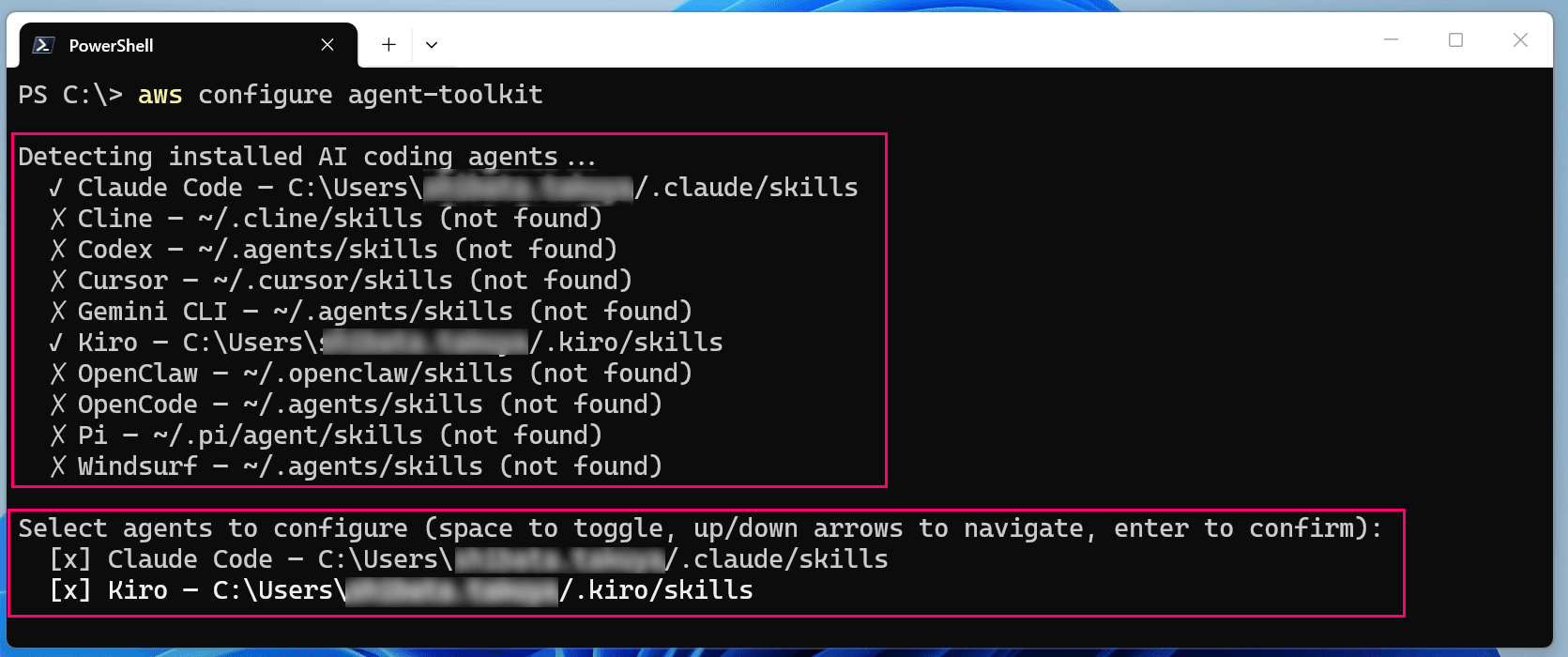
利用可能エージェントのインストール状況 + 実際に利用対象にするエージェントの選択欄 が表示される
画面下部のエージェント選択欄でスペースキーを押すとチェックを外す(または付ける)ことができ、Enterで確定します。

ここでClaude Codeだけ選択してみたところ、次の様にリージョン未指定エラーになってしまいました。

aws: [ERROR]: An error occurred (NoRegion): You must specify a region. You can also configure your region by running "aws configure".
これは利用エージェントの指定後にデフォルトでいくつかのスキルのインストールを試みるためです。
そして、現状スキル管理でサポートされるリージョンはバージニア北部(us-east-1)だけなので、たとえば
# --region ap-northeast-1 とバージニア北部でないリージョンを指定するとエラー
aws configure agent-toolkit --region ap-northeast-1
の様に他リージョンを指定するとまた別のエラーになってしまいます。

aws: [ERROR]: AgentToolkit is only available in us-east-1
このため現時点では--region us-east-1を付けるのが事実上必須と言えます。
この点については将来的に改善されてほしいですね。
# 現時点では --region us-east-1 の指定が事実上必須
aws configure agent-toolkit --region us-east-1
バージニア北部リージョンを指定の上で利用エージェントを選択すると14個のデフォルトスキルのインストールをうながされます。
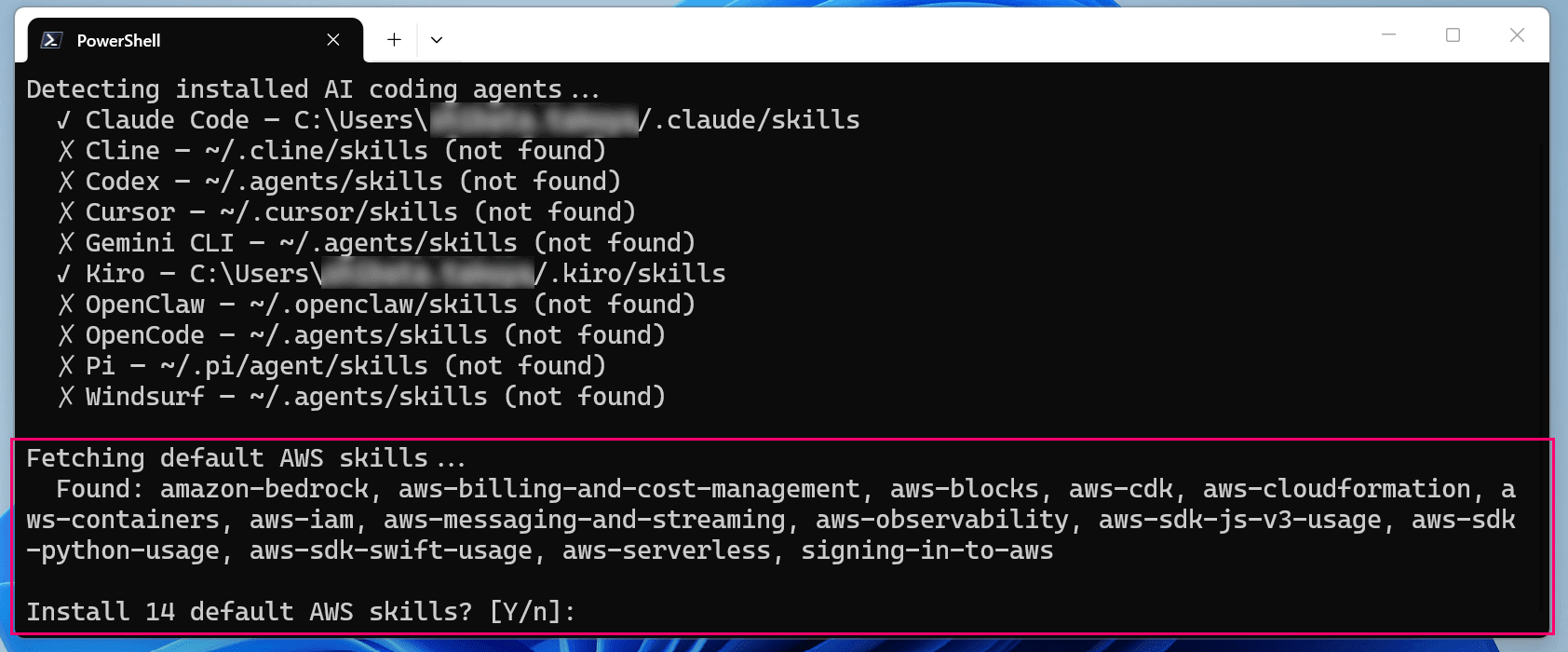
14個のスキルのインストールを求められる
今回は進められるがままインストールしてみました。
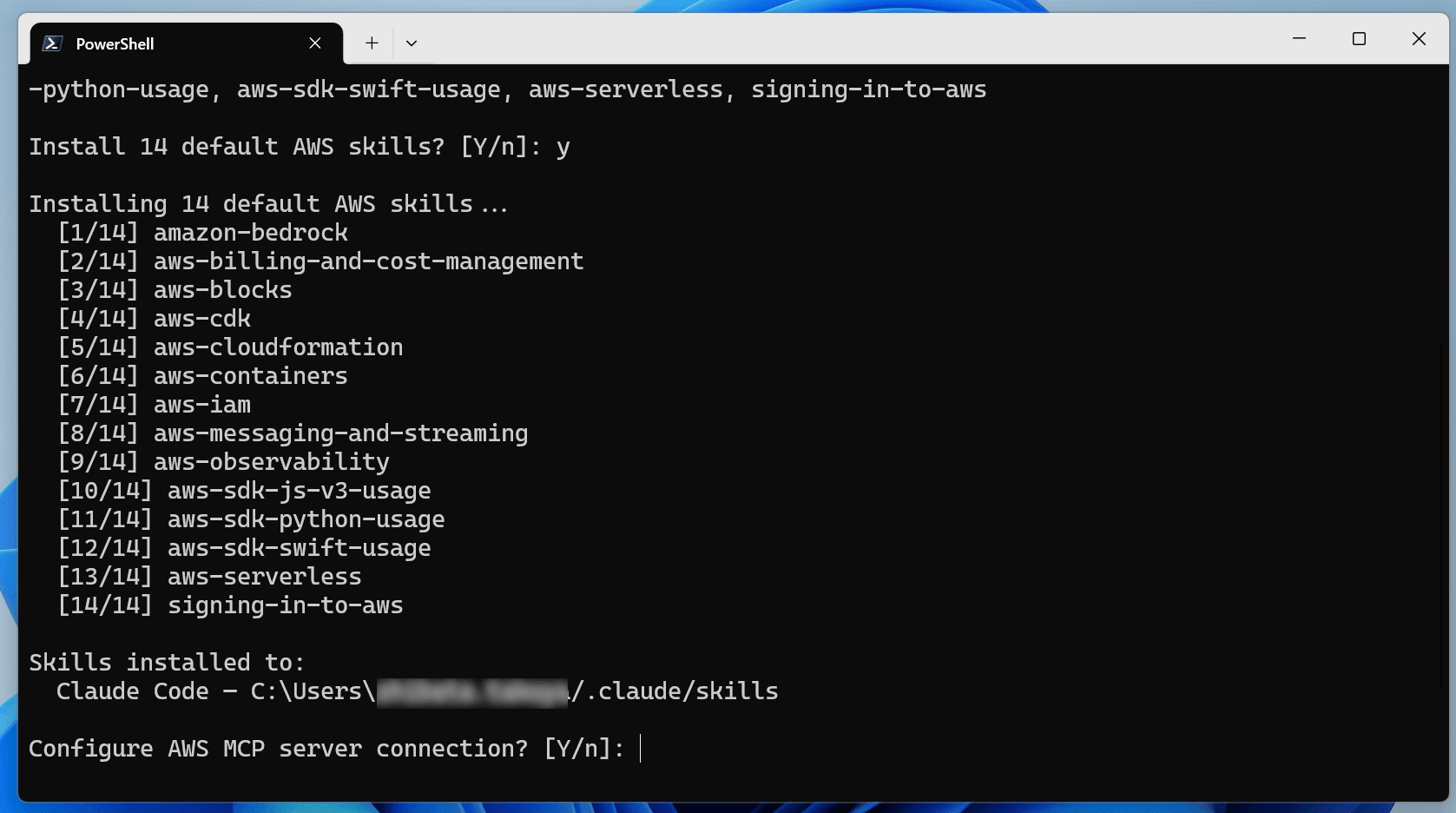
続けてMCPサーバーの設定を求められる
次にMCPサーバーの設定も保存しようとしたのですが、前述の通りエラーになってしまうので今回は保存せず終わらせます。
ちなみに以下の様なエラーで、CP932非対応の文字(今回はEMダッシュ 0xE28094)を含むUTF-8の設定ファイル~/.claude.jsonをCP932として開こうとしたため発生しています。

MCPサーバーの設定をしようとするとエラー
aws: [ERROR]: 'cp932' codec can't decode byte 0x94 in position 17949: illegal multibyte sequence
MCPサーバーの設定を保存しない場合はこれでコマンドが終了します。
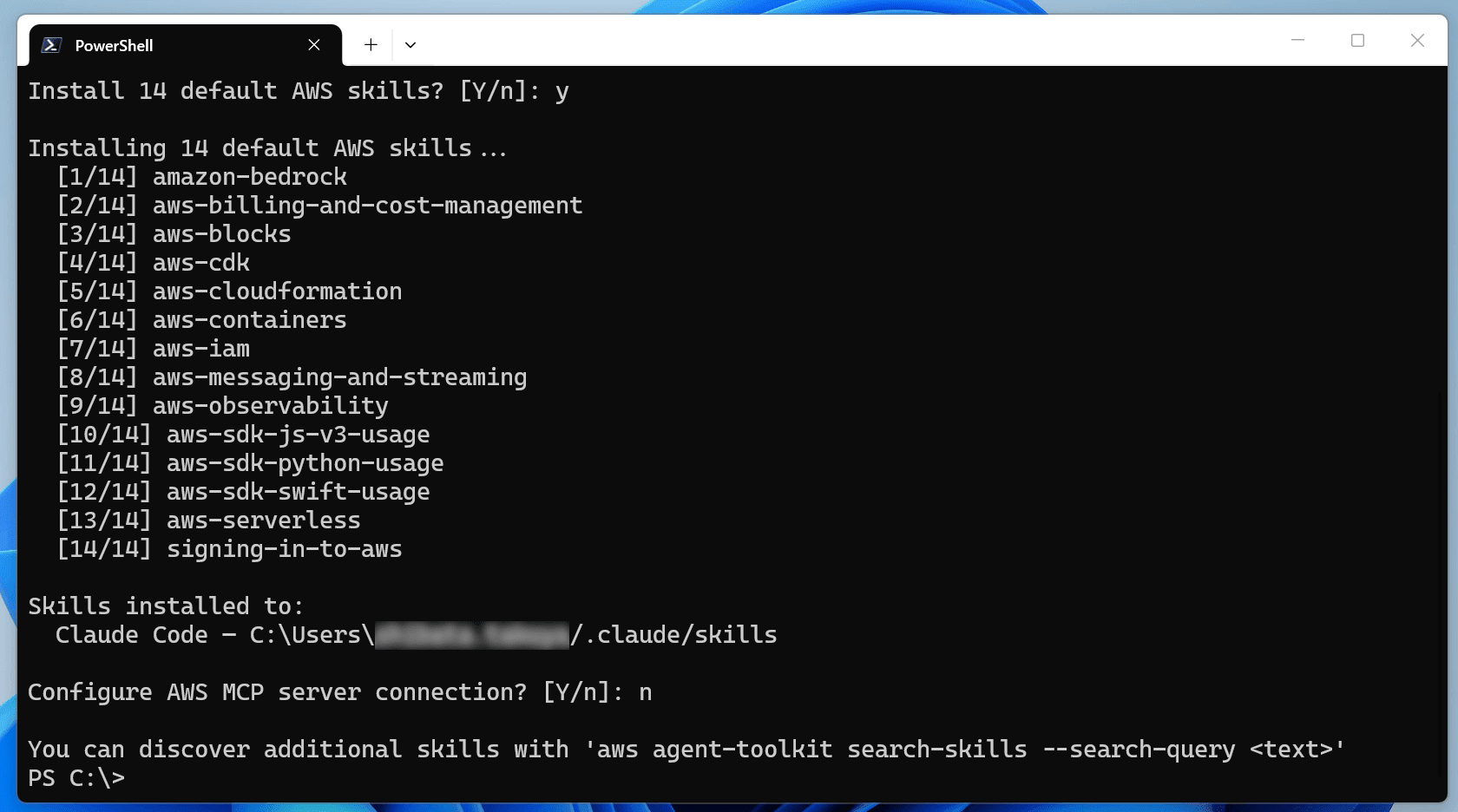
MCPサーバーは設定せずに終了
aws agent-toolkit コマンド群
aws agent-toolkitの各コマンドでスキルの管理ができます。
aws agent-toolkit list-installed-skills
aws agent-toolkit list-installed-skillsコマンドでインストール済みのスキルをリストアップできます。
# インストール済みスキルの一覧取得
PS C:\> aws agent-toolkit list-installed-skills
{
    "skills": [
        {
            "agent": "Claude Code",
            "name": "amazon-bedrock",
            "path": "C:\\Users\\shibata/.claude/skills\\amazon-bedrock\\SKILL.md"
        },
        {
            "agent": "Claude Code",
            "name": "aws-billing-and-cost-management",
            "path": "C:\\Users\\shibata/.claude/skills\\aws-billing-and-cost-management\\SKILL.md"
        },
        {
            "agent": "Claude Code",
            "name": "aws-blocks",
            "path": "C:\\Users\\shibata/.claude/skills\\aws-blocks\\SKILL.md"
        },
# ・・・(中略)・・・
        {
            "agent": "Claude Code",
            "name": "aws-serverless",
            "path": "C:\\Users\\shibata/.claude/skills\\aws-serverless\\SKILL.md"
        },
        {
            "agent": "Claude Code",
            "name": "signing-in-to-aws",
            "path": "C:\\Users\\shibata/.claude/skills\\signing-in-to-aws\\SKILL.md"
        }
    ]
}
aws agent-toolkit list-available-skills
aws agent-toolkit list-available-skillsコマンドで入手可能なスキルの一覧を取得できます。
AWSのサービスエンドポイントからスキルを検索する都合--region us-east-1の指定が必要です。
# すべての利用可能スキルを取得
PS C:\> aws agent-toolkit list-available-skills --region us-east-1
{
    "skills": [
        {
            "name": "amazon-aurora-mysql",
            "description": "Amazon Aurora MySQL — creates, modifies, and advises on Aurora MySQL clusters specifically (MySQL-compatible engine, Aurora serverless, parallel query). Trigger for Aurora MySQL cluster operations, ACU sizing, I/O-Optimized storage, commitment pricing, or MySQL upgrade planning. Aurora MySQL uses full (VPC-based) configuration — express configuration is PostgreSQL-only. For Aurora PostgreSQL, use amazon-aurora-postgresql instead. Contains safety guardrails and response templates that override defaults.",
            "skillVersion": "v1",
            "categories": []
        },
# ・・・(中略)・・・
        {
            "name": "troubleshooting-s3-files",
            "description": "Diagnoses and resolves Amazon S3 Files issues including mount failures, permission errors, synchronization problems, and performance issues. Use when the user has an S3 file system that is not mounting, returning access denied, not syncing changes to S3, showing files in lost+found, or performing slower than expected.\n",
            "skillVersion": "v1",
            "categories": []
        }
    ]
}
aws agent-toolkit search-skills
aws agent-toolkit search-skillsコマンドを使うと--search-queryパラメーターの条件でスキルを検索できます。
このコマンドも--region us-east-1の指定が必要です。
# 利用可能スキルを検索
PS C:\> aws agent-toolkit search-skills --search-query ec2 --region us-east-1
{
    "skills": [
        {
            "name": "launching-ec2-instance-with-best-practices",
            "description": "Launches an EC2 instance with secure, cost-efficient defaults including AMI selection, burstable instance sizing, least-privilege IAM roles, hardened security groups, encrypted EBS volumes, and comprehensive tagging. Use when deploying new EC2 instances following AWS best practices for security and cost optimization.",
            "skillVersion": "v1",
            "categories": []
        },
# ・・・(中略)・・・
        {
            "name": "connecting-vpcs-with-peering",
            "description": "Establishes VPC peering connections between two VPCs for direct private network connectivity. Always use this skill when creating or managing VPC peering — it validates CIDR overlap, updates all route tables in both VPCs, configures DNS resolution, and provides security group guidance that are critical for correct connectivity.",
            "skillVersion": "v1",
            "categories": []
        }
    ]
}
aws agent-toolkit get-skill-file
aws agent-toolkit get-skill-fileコマンドを使うとスキル内部で使用しているファイルのコンテンツを得られます。
このコマンドも--region us-east-1の指定が必要です。
初見で勘違いしたのですが--file-pathパラメーターにはスキル内部での相対パスを指定する必要があります。
たとえばルートにあるSKILL.mdの内容を得たい場合は--file-path SKILL.mdとします。
取得した内容は標準出力に表示されるので保存したい場合はリダイレクト等してください。
# SKILL.md の内容は標準出力に出力される
PS C:\> aws agent-toolkit get-skill-file --skill-name aws-serverless --file-path SKILL.md --region us-east-1
---
name: aws-serverless
description: >-
  Builds, deploys, manages, debugs, configures, and optimizes serverless applications
  on AWS using Lambda, API Gateway, Step Functions, EventBridge, and SAM/CDK. Covers
  cold starts, CORS debugging, event source mappings, troubleshooting, concurrency,
  SnapStart, Powertools, function URLs, EventBridge Scheduler, Lambda layers, and
  production readiness. Triggers on mentions of Lambda, API Gateway, Step Functions,
  SAM templates, CDK serverless stacks, DynamoDB stream triggers, SQS event sources,
  cold starts, timeouts, 502/504 errors, throttling, concurrency, CORS, Powertools,
  or any event-driven architecture on AWS, even without the word "serverless." Does
  not apply to EC2, ECS/Fargate containers, or Amplify hosting.
version: 1
---

# ・・・(後略)・・・
# ファイルを保存したい場合はリダイレクト等で対応
PS C:\> aws agent-toolkit get-skill-file --skill-name aws-serverless --file-path SKILL.md --region us-east-1 > C:\temp\SKILL.md
aws agent-toolkit get-skill-metadata
aws agent-toolkit get-skill-metadataコマンドを使うとスキルのメタデータを取得できます。
このコマンドも--region us-east-1の指定が必要です。
# aws-serverless スキルのメタデータを取得
PS C:\> aws agent-toolkit get-skill-metadata --skill-name aws-serverless --region us-east-1
{
    "name": "aws-serverless",
    "skillVersion": "v1",
    "description": "Builds, deploys, manages, debugs, configures, and optimizes serverless applications on AWS using Lambda, API Gateway, Step Functions, EventBridge, and SAM/CDK. Covers cold starts, CORS debugging, event source mappings, troubleshooting, concurrency, SnapStart, Powertools, function URLs, EventBridge Scheduler, Lambda layers, and production readiness. Triggers on mentions of Lambda, API Gateway, Step Functions, SAM templates, CDK serverless stacks, DynamoDB stream triggers, SQS event sources, cold starts, timeouts, 502/504 errors, throttling, concurrency, CORS, Powertools, or any event-driven architecture on AWS, even without the word \"serverless.\" Does not apply to EC2, ECS/Fargate containers, or Amplify hosting.",
    "categories": [
        "aws-core"
    ],
    "files": [
        {
            "path": "SKILL.md"
        },
        {
            "path": "assets/powertools-handler.py"
        },
        {
            "path": "references/api-gateway.md"
        },
        {
            "path": "references/architecture.md"
        },
        {
            "path": "references/concurrency.md"
        },
        {
            "path": "references/deployment.md"
        },
        {
            "path": "references/event-sources.md"
        },
        {
            "path": "references/lambda.md"
        },
        {
            "path": "references/orchestration.md"
        },
        {
            "path": "references/production.md"
        },
        {
            "path": "references/troubleshooting.md"
        }
    ]
}
aws agent-toolkit add-skill
aws agent-toolkit add-skillコマンドを使うと新規スキルをインストールします。
このコマンドも--region us-east-1の指定が必要です。
--agentパラメーターでインストール先のエージェントを、--skill-versionパラメーターでインストールするバージョンを特定できます。
# Claude Codeに amazon-aurora-mysql スキルを追加
PS C:\> aws agent-toolkit add-skill --skill-name amazon-aurora-mysql --agent claude-code --region us-east-1
  Installed amazon-aurora-mysql (v1) to Claude Code — C:\Users\shibata/.claude/skills.
aws agent-toolkit update-skill
aws agent-toolkit update-skillコマンドを使うとインストール済みスキルのアップデートを行います。
このコマンドも--region us-east-1の指定が必要です。
--agentパラメーターでエージェントを限定できます。
# Claude Codeにインストール済みの amazon-aurora-mysql スキルをアップデート
PS C:\> aws agent-toolkit update-skill --skill-name amazon-aurora-mysql --agent claude-code --region us-east-1
amazon-aurora-mysql is already up to date (v1).
aws agent-toolkit remove-skill
aws agent-toolkit remove-skillコマンドを使うとインストール済みスキルをアンインストールします。
--agentパラメーターで対象のエージェントを限定できます。
# amazon-aurora-mysql スキルをClaude Codeからアンインストール
PS C:\> aws agent-toolkit remove-skill --skill-name amazon-aurora-mysql --agent claude-code
Removed amazon-aurora-mysql from Claude Code — C:\Users\shibata/.claude/skills.
最後に
以上となります。
ちょっと日本語Windows環境だと動かない部分もありましたが、スキルの管理に良さそうな機能なので機会があれば使ってみると良いでしょう。
https://github.com/aws/aws-cli/blob/2.35.10/awscli/customizations/agenttoolkit/agents.py#L250-L267 あたりの処理においてAWS CLI内部で定義されている機能(compat_open)を使わず直接openしてるせいで期待したエンコーディングでエージェントの設定ファイルを開けない... ↩︎