
I tried feeding DevelopersIO blog articles into Cloudflare AI Search to see if I could search them using natural language

This page has been translated by machine translation. View original
This is Konishi from the Berlin office.
Cloudflare has released a managed search service called AI Search (currently in open beta). When you pass content to it, it automatically handles chunking, vectorization, and index construction, making it searchable in natural language.
Our company blog, DevelopersIO, manages approximately 60,000 articles in Contentful. This time, I fed a portion of these into AI Search. Here is a summary of what I tested, from setup to Japanese search accuracy.
What is Cloudflare AI Search
It is a managed service that, when you upload or have it crawl content, handles chunking, vectorization, and index construction for you.
Key features:
- Data sources come in 3 types: website crawling, R2 buckets, and direct upload via the Items API
- Hybrid search support: runs vector (semantic) search and BM25 keyword search in parallel and merges the results
- Search interfaces: can be called from Wrangler CLI, REST API, Workers binding, and MCP server
- Pricing: free within limits during the beta period (Workers AI and AI Gateway usage is billed separately)
What I Did This Time
I retrieve articles from the DevIO backend, feed them into AI Search, and make them searchable in natural language.
Tools used:
- Cloudflare account (Free plan)
- Wrangler CLI
- Node.js script (for data retrieval and upload)
- ※ Details of the Node.js script are omitted this time.
Setting Up the AI Search Instance
First, create an instance with the Wrangler CLI. It is also possible from the dashboard or REST API.
$ wrangler ai-search create devio-search
You will be asked a few questions interactively. Since I am uploading data directly via the Items API from the CMS through a local connection, I selected Builtin (Cloudflare-managed storage) as the source type.
✔ Select the source type: › Builtin
✔ Configure custom metadata fields? (optional) … no
Creating AI Search instance "devio-search" in namespace "konishi-test"...
Successfully created AI Search instance "devio-search"
  Name:       devio-search
  Namespace:  konishi-test
  Type:       builtin
  Source:     -
  Model:
  Embedding:  @cf/qwen/qwen3-embedding-0.6b
The embedding model @cf/qwen/qwen3-embedding-0.6b was automatically assigned.
Check the status with stats.
$ wrangler ai-search stats devio-search --namespace konishi-test
┌────────┬────────────┬─────────┬─────────┬──────────┬────────┐
│ Queued │ Processing │ Indexed │ Skipped │ Outdated │ Errors │
├────────┼────────────┼─────────┼─────────┼──────────┼────────┤
│ 0      │ 0          │ 0       │ 0       │ 0        │ 0      │
└────────┴────────────┴─────────┴─────────┴──────────┴────────┘
Everything is zero right after creation. Pass the namespace name specified during instance creation to --namespace.
About Metadata
In AI Search, you can attach metadata to indexed documents. Metadata can be used for filtering results and adjusting rankings.
Default Metadata
The following three fields are automatically attached.
| Field | Content |
|---|---|
filename |
File name |
folder |
Folder path |
timestamp |
Last updated datetime |
Custom Metadata
In addition to the above, you can define up to 5 custom fields per instance. The supported types are text (up to 500 characters), number, boolean, and datetime (ISO 8601).
These can also be used for weighting during search.
This time, I added 3 fields to match the CMS article data: slug, first-published-at, and author.
Methods for adding them include setting them interactively during instance creation, adding them later via the REST API's update, or adding them from the dashboard.
custom_metadata:
  - field_name: slug,          data_type: text
  - field_name: first-published-at, data_type: datetime
  - field_name: author,        data_type: text
This makes it possible to do things like...
- Return the
slugof a matched article - Filter by
"author": "konishi-ryo" - Narrow down by a range of
first-published-at
during search.
Uploading Article Data
I use the Items API to upload article data to AI Search. Since there is no upload command in the CLI, I use the REST API.
A wide range of file formats are supported; plain text formats (.md, .txt, .log, etc.) are indexed as-is, while rich formats (.pdf, .html, .docx, .xlsx, .csv, etc.) are automatically converted to Markdown by Cloudflare before being indexed.
DevelopersIO's backend stores articles in Markdown, which is convenient.
First, I download the following article (title and body) from the CMS in Markdown format, and then upload it directly to Cloudflare.
After downloading the MD file, uploading to Cloudflare looks something like this:
$ curl -X POST "https://api.cloudflare.com/client/v4/accounts/<ACCOUNT_ID>/ai-search/namespaces/konishi-test/instances/devio-search/items" \
  -H "Authorization: Bearer <API_TOKEN>" \
  -F "file=@articles.md" \
  -F 'metadata={"slug":"n26-chargeback-ai","first-published-at":"2026-05-28T12:00:00Z","author":"konishi-ryo"}'
Response:
{
  "success": true,
  "result": {
    "id": "928ad9f2e3ed4535a81f7377d3731aa6",
    "key": "article.md",
    "status": "queued",
    "next_action": "INDEX",
    "namespace": "konishi-test",
    "source_id": "builtin",
    "created_at": "2026-05-29 15:24:09"
  }
}
The upload succeeded with status: "queued". Index processing starts automatically. Looking at the stats, you can see it has entered Processing.
$ pnpm wrangler ai-search stats devio-search --namespace
┌────────┬────────────┬─────────┬─────────┬──────────┬────────┐
│ Queued │ Processing │ Indexed │ Skipped │ Outdated │ Errors │
├────────┼────────────┼─────────┼─────────┼──────────┼────────┤
│ 0      │ 1          │ 0       │ 0       │ 0        │ 0      │
└────────┴────────────┴─────────┴─────────┴──────────┴────────┘
After waiting a little, you can see it has been indexed.
┌────────┬────────────┬─────────┬─────────┬──────────┬────────┐
│ Queued │ Processing │ Indexed │ Skipped │ Outdated │ Errors │
├────────┼────────────┼─────────┼─────────┼──────────┼────────┤
│ 0      │ 0          │ 1       │ 0       │ 0        │ 0      │
└────────┴────────────┴─────────┴─────────┴──────────┴────────┘
Files uploaded directly can also be confirmed from the dashboard.
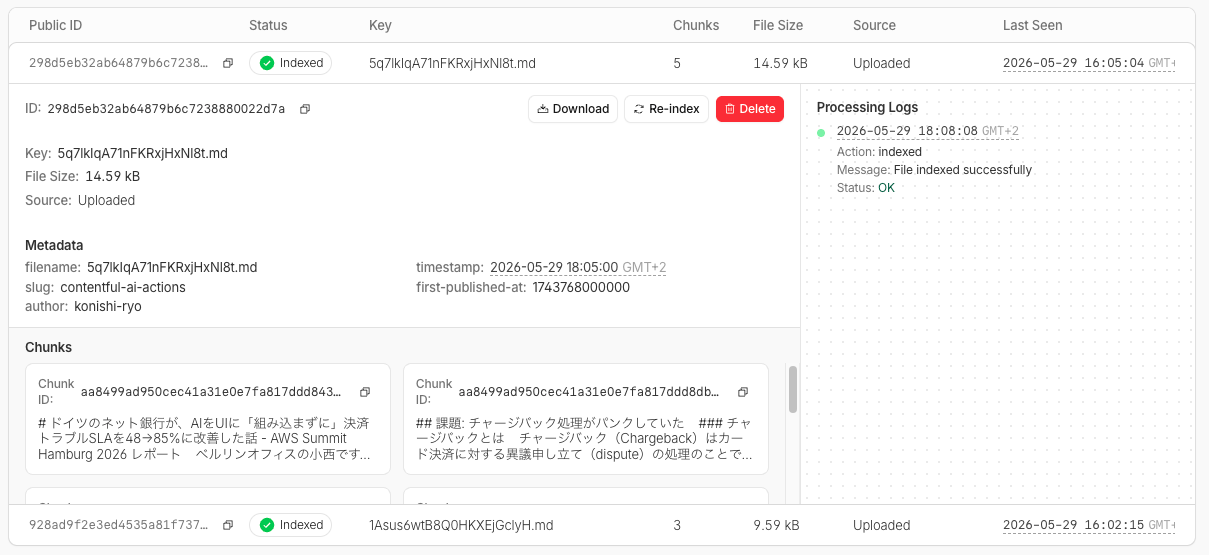
It was split into 5 chunks and indexed (these parameters can also be changed, as described later). The file size is 14.59 kB, the status is "Indexed," and the index processing completed successfully.
The custom metadata could also be confirmed.
Trying a Search
Once indexing is complete, let's try searching. Starting with the CLI.
$ wrangler ai-search search devio-search --namespace konishi-test --query "N26 決済トラブル AI"
Search query: "N26 決済トラブル AI"  (6 results)

┌───┬────────┬───────────────────────────┬───────────────────────────────────────────────────────────────────────────────────────────────────────────────────────────┬──────┐
│ # │ score  │ key                       │ text                                                                                                                      │ type │
├───┼────────┼───────────────────────────┼───────────────────────────────────────────────────────────────────────────────────────────────────────────────────────────┼──────┤
│ 1 │ 0.7265 │ 5q7lkIqA71nFKRxjHxNl8t.md │ # ドイツのネット銀行が、AIをUIに「組み込まずに」決済トラブルSLAを48→85%に改善した話 - AWS Summit Hamburg 2026 レポート... │ text │
├───┼────────┼───────────────────────────┼───────────────────────────────────────────────────────────────────────────────────────────────────────────────────────────┼──────┤
│ 2 │ 0.5867 │ 5q7lkIqA71nFKRxjHxNl8t.md │ ## 安全性の担保                                                                                                           │ text │
│   │        │                           │                                                                                                                           │      │
│   │        │                           │ 規制業界のため安全性は3つのレイヤーで担保しています。                                                                     │      │
│   │        │                           │                                                                                                                           │      │
│   │        │                           │ **AI Guardrails**: 判定リクエストがAIに到達する前にバリデー...                                                            │      │
├───┼────────┼───────────────────────────┼───────────────────────────────────────────────────────────────────────────────────────────────────────────────────────────┼──────┤
│ 3 │ 0.5754 │ 5q7lkIqA71nFKRxjHxNl8t.md │ ## 課題: チャージバック処理がパンクしていた                                                                               │ text │
│   │        │                           │                                                                                                                           │      │
│   │        │                           │ ### チャージバックとは                                                                                                    │      │
│   │        │                           │                                                                                                                           │      │
│   │        │                           │ チャージバック(Chargeback)はカード決済に対する異議申し立て(dis...                                                      │      │
├───┼────────┼───────────────────────────┼───────────────────────────────────────────────────────────────────────────────────────────────────────────────────────────┼──────┤
│ 4 │ 0.5632 │ 5q7lkIqA71nFKRxjHxNl8t.md │ ## 学んだこと                                                                                                             │ text │
│   │        │                           │                                                                                                                           │      │
│   │        │                           │ Alex氏が共有してくれた3つの学びが下記です:                                                                                │      │
│   │        │                           │                                                                                                                           │      │
│   │        │                           │ **Lesson 1: まずインプットを直せ。** 導入前は自由テキスト1つとファイルア...                                               │      │
├───┼────────┼───────────────────────────┼───────────────────────────────────────────────────────────────────────────────────────────────────────────────────────────┼──────┤
│ 5 │ 0.5580 │ 5q7lkIqA71nFKRxjHxNl8t.md │ ## ドメイン理解から始めた                                                                                                 │ text │
│   │        │                           │                                                                                                                           │      │
│   │        │                           │ Alex氏のチームはもともとチャージバックのUI提出フローと一部の自動化ルール(不正利用系)を担当していました。ただ、Autho...  │      │
├───┼────────┼───────────────────────────┼───────────────────────────────────────────────────────────────────────────────────────────────────────────────────────────┼──────┤
│ 6 │ 0.4349 │ 1Asus6wtB8Q0HKXEjGclyH.md │ ## 注意点                                                                                                                 │ text │
│   │        │                           │                                                                                                                           │      │
│   │        │                           │ - AI Actionsはフィールド単位で実行されます。テキストの部分選択や、エントリー全体に対する適用は現時点ではできません。      │      │
│   │        │                           │ - 権限管...                                                                                                               │      │
└───┴────────┴───────────────────────────┴───────────────────────────────────────────────────────────────────────────────────────────────────────────────────────────┘
5 out of 6 results are the N26 article's chunks arranged in score order, showing that results are returned at the chunk level rather than the article level. The 6th result mixes in another test article with a score of 0.43, which was pulled in by the keyword "AI."
The search command has the following options.
| Option | Description |
|---|---|
--max-num-results |
Maximum number of results |
--score-threshold |
Minimum score (0 to 1) |
--reranking |
Enable/disable reranking |
--filter |
Metadata filter (key=value, multiple can be specified) |
--json |
Output in JSON format |
Using --filter, you can narrow down by the custom metadata set earlier. For example, to search only articles by a specific author:
$ wrangler ai-search search devio-search --namespace konishi-test --query "AI" --filter author=konishi-ryo
Adding --json returns the response including metadata (such as slug). Since it is returned in score order, the Top-K can be used as-is.
Quick Evaluation of Japanese Search Accuracy
Let me do a simple evaluation.
Evaluation Method
I prepare pairs of test queries and correct articles, and measure with Hit Rate@5 — simply checking whether the correct article is included in the Top-5 search results.
Test Query Design
The index target is approximately 1,000 articles, and I used 50 test queries. To approximate real search behavior, queries are in keyword format of up to 4 words separated by half-width spaces.
Results
Here are the test execution results.
Overall Hit Rate@5: 46/49 (93.9%)
| Query | Expected Article | Rank |
|---|---|---|
| ✅ Terraform RDS log management | terraform-rds-manage-cloudwatch-logs | #1 |
| ✅ CloudFormation Lambda inline code | cloudformation-lambda-inline-code-s3-zip | #1 |
| ✅ Multiple ALB logs Athena query | athena-partition-projection-enum | #1 |
| ✅ PostgreSQL index-only response | postgresql-include-index-only-scan | #2 |
| ✅ pnpm v11 postinstall broken | pnpm-v10-to-v11-migration-docker-ci | #1 |
| ✅ Claude Code Codex cross-review | claude-code-codex-cross-review | #1 |
| ✅ Twilio Studio weather forecast | twilio-weather-sms-bot | #1 |
| ✅ WAF ALB direct CloudFront via difference | tsnote-waf-attach-alb-or-cloudfront | #1 |
| ✅ Sales CLAUDE.md usage | claude-code-claude-md-for-non-engineer-sales | #1 |
| ✅ EC2 forgetting to stop LINE notification | ec2-line-notify-stop-reminder | #1 |
| ✅ LLM conversation memory persistence | mem0-llm-memory | #2 |
| ✅ StackSets IAM user bulk creation | create-handson-iam-users-with-stacksets | #1 |
| ✅ EC2 multiple instances AMI bulk creation | ec2-ami-backup-parameter-store-lambda | #1 |
| ✅ S3 pre-signed URL via VPC endpoint | s3-presigned-url-via-vpc-endpoint | #1 |
| ✅ ECS pause resume manual | amazon-ecs-pause-continue-deployments | #1 |
| ✅ EFS replication impact | tsnote-efs-replication-workload-impact-001 | #1 |
| ✅ Route 53 subdomain Cloud DNS delegation | delegate-zone-from-amazon-route53-to-cloud-dns | #1 |
| ✅ NLB S3 fixed IP | nlb-s3-interface-endpoint-fixed-ip-access | #1 |
| ✅ RDS Multi-AZ ENA Express | rds-multi-az-ena-express-srd | #1 |
| ❌ Incident automation Bedrock | aws-devops-agent-error-investigation | - |
| ✅ RAG wrong answer why paper | why-rag-fails-graph-perspective | #1 |
| ✅ Slack workflow DynamoDB | slack-bolt-workflow | #1 |
| ✅ Google Chat Bot Cloud Functions | google-chat-bot-cloud-functions-python | #3 |
| ✅ Kiro headless Lambda | kiro-cli-headless-lambda-guardduty-triage | #6 |
| ✅ Google Cloud Log Sink copy | gcp-folder-log-sink-dual-storage | #3 |
| ❌ Bedrock Claude boto3 Anthropic SDK migration | migrate-boto3-to-anthropic-sdk-bedrock | - |
| ✅ Strands Agents Bedrock agent-sre | strands-bedrock-agent-sre | #1 |
| ✅ VPC PrivateLink cross-VPC | vpc-private-link-vpc-provider-customer-ks | #1 |
| ✅ SAM CLI Fn::ForEach | sam-cli-1-160-foreach | #1 |
| ✅ aws-vault 1Password Desktop | aws-vault-op-desktop-1password-desktop | #1 |
| ✅ Amazon Quick SAML Microsoft Entra ID | entra-id-amazon-quick-saml-sso | #1 |
| ✅ Regional NAT Gateway TGW cost | regional-nat-gateway-tgw-cost-analysis | #1 |
| ✅ PowerPoint translation automatic | pptx-auto-translation | #1 |
| ✅ SCP Deny exclusion | iam-identity-center-scp-awsreservedsso-role-arn | #7 |
| ✅ CDK BucketDeployment Inspector suppression | suppress-amazon-inspector-findings-for-aws-cdk-bucketdeployment-lambda | #1 |
| ✅ Databricks AI Forecast | databricks-ai-forecast-bi | #1 |
| ✅ In-house RAG accuracy not improving | enterprise-rag-deep-search-herb | #1 |
| ❌ System prompt improvement | try-promptfoo | - |
| ✅ Chronos-2 time series forecasting | dgx-spark-chronos2-plc-sim-llm-maintenance | #2 |
| ✅ Aurora DSQL Toasty usable | toasty-amazon-aurora-dsql | #1 |
| ✅ Snowflake Adaptive Refresh | snowflake-dynamic-tables-adaptive-refresh-mode | #1 |
| ✅ Google Cloud Binary Authorization | binary-authorization-cloud-build-cloud-run | #1 |
| ✅ Cloudflare Rate Limiting workers | cloudflare-rate-limit-experiments | #1 |
| ✅ Cloud Logging BigQuery | cloud-logging-observability-analytics-linked-dataset-bigquery | #1 |
| ✅ Snowflake Fivetran manual setup | snowflake-fivetran-manual-setup-handson | #1 |
| ✅ Redshift RG RA3 benchmark | 20260517-amazon-redshift-rg-vs-ra3 | #1 |
| ✅ Langfuse LLM accuracy | langfuse-experiment-action-ci | #6 |
| ✅ AWS Security Agent penetration | security-agent-owasp-juice-shop | #2 |
| ✅ Twilio voice AI phone | twilio-openai-realtime-ai-call-flyio | #2 |
Out of 50 queries, 1 fell outside the Top-5 (ranked #6 and #7) but the correct article itself existed in the index, and there were only 3 complete misses.
Looking at the 3 misses, in each case the query was too generic to pinpoint a specific article among the 1,000. For example, "Incident automation Bedrock" was expected to return a DevOps Agent article, but since many Bedrock-related articles exist, it got buried among them. "System prompt improvement" was also a query aimed at the promptfoo article, but since multiple articles mention prompt improvement, it could not be identified without including the tool name or similar.
The larger the corpus, the more semantically similar articles there are, and the harder it becomes to get a specific article into the Top-5 with generic queries.
My Impressions After Using It
- Setup is easy. Just feed it data and search works. When building vector search yourself, you can offload decisions like DB selection, embedding model selection, and chunking strategy.
- Japanese accuracy was a Hit Rate@5 of 93.9% in an evaluation of 1,000 articles and 50 queries. For keyword queries targeting a specific article, most come back at #1. With generic queries, there are cases where results get buried among articles on the same topic, but this is partly a query-side problem.
- Agent integration. Since it also supports MCP server and Workers binding, it seems possible to build chatbots that answer based on blog content or external sources.
How to Further Improve Accuracy
This verification was done with the default settings (vector search only), but AI Search has other options. There is also room for improvement through data preprocessing.
AI Search Settings
- Hybrid Search: By combining keyword search, weight is added to matches for specific keywords like "boto3" and "postinstall". This can be effective for cases like the missed "Bedrock Claude boto3 Anthropic SDK migration" scenario
- Query Rewrite: The LLM rewrites the query into a search-appropriate expression before searching. Accuracy may improve as ambiguous queries become more specific, but how the rewriting actually occurs depends on Cloudflare's LLM
- Reranking: The top results from the initial search are re-evaluated and reordered by the LLM. Effective for cases where results are in the top 10 but missed from the top 5
Data-side Improvements
- Add title to custom metadata and weight with Boost by: Add the article title as a
texttype field in one of the 5 available custom metadata slots, and setting it to Boost by adds score for matches with the title - Add article summaries to metadata: Summarize topics like "the problem this article solves" with an LLM before uploading and attach to metadata. If the summary includes expressions not directly written in the body (e.g., "automate initial incident investigation"), it becomes easier to hit with general queries
- Chunk size adjustment: The default is 1024 tokens. Making it larger increases the context included in one chunk and improves semantic search accuracy, but there is a tradeoff where noise also increases
Controllable Values
AI Search automatically handles chunk splitting and index building, but several parameters can be adjusted per instance.
You can check and change them from the instance settings screen in the dashboard. The main items are as follows.
Embedding
| Parameter | Default Value | Description |
|---|---|---|
| Embedding model | @cf/qwen/qwen3-embedding-0.6b |
Model used for vectorization |
| Chunk size | 1024 tokens | Number of tokens per chunk |
| Chunk overlap | 10% | Overlap rate between adjacent chunks (0%–30%) |
The chunk splitting algorithm is recursive chunking (recursively splitting at natural boundaries in the order of paragraphs → sentences), and cannot be changed. It splits with awareness of structural boundaries such as Markdown headings, so it works well with blog articles.
Retrieval
| Parameter | Default Value | Description |
|---|---|---|
| Match threshold | 0.4 | Minimum score. Chunks below this are not included in results |
| Maximum number of results | 10 | Maximum number of chunks to return |
| Boost by | - | Weight scores by specific metadata |
Other Options
| Item | Description |
|---|---|
| Hybrid search | Combines vector search with BM25 (full-text keyword search based on word frequency) (default: OFF) |
| Query rewrite | Rewrites ambiguous or colloquial queries into search-appropriate expressions using an LLM before searching (default: OFF) |
| Reranking | Re-ranks search results using an LLM (default: OFF) |
| Similarity caching | Caches results of similar queries for faster responses (default: ON, TTL 48 hours) |
| Generation model | @cf/meta/llama-3.3-70b-instruct-fp8-fast. Model used to generate answers based on search results |
Settings can be changed even after instance creation. They can be changed from the dashboard or via update in the REST API.
About Limits
Main limits of the Free plan.
| Item | Free plan | Paid plan |
|---|---|---|
| Files/instance | 100,000 | 1,000,000 (500,000 for hybrid search) |
| File size limit | 4 MB | 4 MB |
| Queries/month | 20,000 | Unlimited |
| Instances/account | 100 | 5,000 |
Since the CMS in this case is Contentful with a 2 MB limit per entry, the 4 MB file size limit was not an issue.
20,000 queries per month is sufficient for verification purposes. A Paid plan is needed if incorporating into a product.
Summary
I tried enabling natural language search across approximately 1,000 DevIO articles using Cloudflare AI Search.
Regarding the data source, I tested with direct upload from local this time, but at larger scale, uploading to R2 would be far more efficient.
What I did:
- Created an AI Search instance with Wrangler CLI
- Retrieved articles from the CMS in Markdown and uploaded via the Items API
- Tested search with CLI and REST API, and quickly evaluated Japanese accuracy with Hit Rate@5
Given the ease of setup, I think this accuracy with only default vector search settings is sufficient. Further improvements can be expected by combining options like Hybrid Search and Query Rewrite with data preprocessing.
It's free while in beta, so if you're curious, give it a try.

